pressling 0.1.0__tar.gz
This diff represents the content of publicly available package versions that have been released to one of the supported registries. The information contained in this diff is provided for informational purposes only and reflects changes between package versions as they appear in their respective public registries.
- pressling-0.1.0/LICENSE +21 -0
- pressling-0.1.0/PKG-INFO +374 -0
- pressling-0.1.0/README.md +352 -0
- pressling-0.1.0/pyproject.toml +40 -0
- pressling-0.1.0/setup.cfg +4 -0
- pressling-0.1.0/src/music_curator/__init__.py +2 -0
- pressling-0.1.0/src/music_curator/__main__.py +5 -0
- pressling-0.1.0/src/music_curator/apply.py +700 -0
- pressling-0.1.0/src/music_curator/better_copies.py +104 -0
- pressling-0.1.0/src/music_curator/cli.py +252 -0
- pressling-0.1.0/src/music_curator/config.py +316 -0
- pressling-0.1.0/src/music_curator/curate.py +849 -0
- pressling-0.1.0/src/music_curator/deep_scan.py +56 -0
- pressling-0.1.0/src/music_curator/discogs.py +315 -0
- pressling-0.1.0/src/music_curator/export.py +258 -0
- pressling-0.1.0/src/music_curator/folders.py +281 -0
- pressling-0.1.0/src/music_curator/fpcompare.py +85 -0
- pressling-0.1.0/src/music_curator/fpdrift.py +52 -0
- pressling-0.1.0/src/music_curator/genres.py +113 -0
- pressling-0.1.0/src/music_curator/keys.py +71 -0
- pressling-0.1.0/src/music_curator/library.py +458 -0
- pressling-0.1.0/src/music_curator/loudness.py +31 -0
- pressling-0.1.0/src/music_curator/ost.py +131 -0
- pressling-0.1.0/src/music_curator/other_sources.py +165 -0
- pressling-0.1.0/src/music_curator/own_playlists.py +291 -0
- pressling-0.1.0/src/music_curator/parse.py +217 -0
- pressling-0.1.0/src/music_curator/resolve.py +494 -0
- pressling-0.1.0/src/music_curator/samerec.py +147 -0
- pressling-0.1.0/src/music_curator/saving.py +144 -0
- pressling-0.1.0/src/music_curator/spotify.py +912 -0
- pressling-0.1.0/src/music_curator/suggest.py +241 -0
- pressling-0.1.0/src/music_curator/tagwriter.py +415 -0
- pressling-0.1.0/src/music_curator/vgmdb.py +98 -0
- pressling-0.1.0/src/music_curator/videos.py +121 -0
- pressling-0.1.0/src/music_curator/waveform.py +108 -0
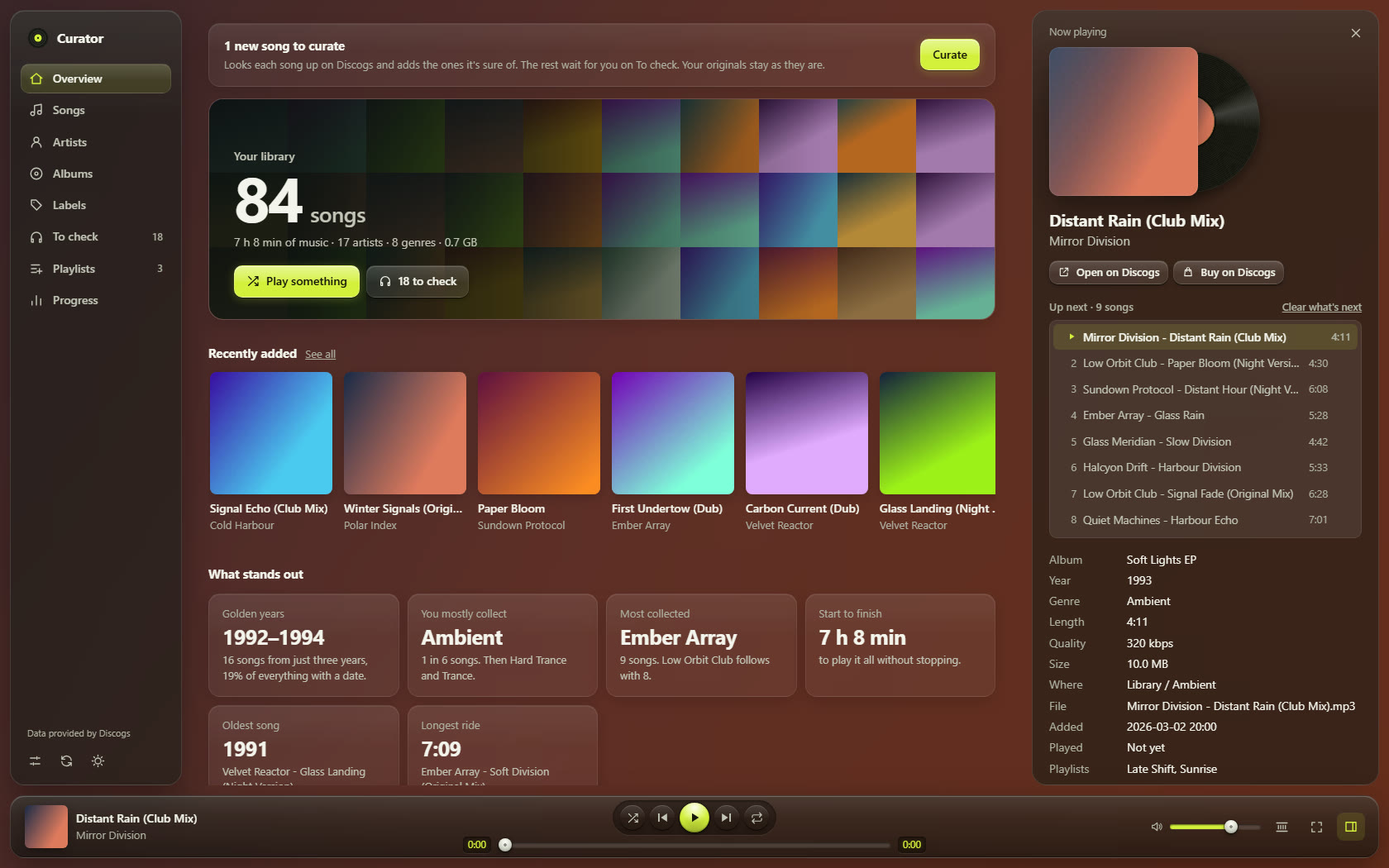
- pressling-0.1.0/src/music_curator/web/app.js +4127 -0
- pressling-0.1.0/src/music_curator/web/effects.js +15059 -0
- pressling-0.1.0/src/music_curator/web/favicon.svg +1 -0
- pressling-0.1.0/src/music_curator/web/glass.css +187 -0
- pressling-0.1.0/src/music_curator/web/hifi.css +492 -0
- pressling-0.1.0/src/music_curator/web/index.html +86 -0
- pressling-0.1.0/src/music_curator/web/packs.js +135 -0
- pressling-0.1.0/src/music_curator/web/style.css +703 -0
- pressling-0.1.0/src/music_curator/webapp.py +1347 -0
- pressling-0.1.0/src/music_curator/ytdlp_helper.py +74 -0
- pressling-0.1.0/src/pressling.egg-info/PKG-INFO +374 -0
- pressling-0.1.0/src/pressling.egg-info/SOURCES.txt +70 -0
- pressling-0.1.0/src/pressling.egg-info/dependency_links.txt +1 -0
- pressling-0.1.0/src/pressling.egg-info/entry_points.txt +3 -0
- pressling-0.1.0/src/pressling.egg-info/requires.txt +3 -0
- pressling-0.1.0/src/pressling.egg-info/top_level.txt +1 -0
- pressling-0.1.0/tests/test_apply.py +822 -0
- pressling-0.1.0/tests/test_compare_audio.py +644 -0
- pressling-0.1.0/tests/test_curate.py +1741 -0
- pressling-0.1.0/tests/test_damaged_audio.py +236 -0
- pressling-0.1.0/tests/test_export.py +526 -0
- pressling-0.1.0/tests/test_folders.py +176 -0
- pressling-0.1.0/tests/test_formats.py +539 -0
- pressling-0.1.0/tests/test_genres.py +198 -0
- pressling-0.1.0/tests/test_loudness.py +153 -0
- pressling-0.1.0/tests/test_names.py +519 -0
- pressling-0.1.0/tests/test_own_playlists.py +683 -0
- pressling-0.1.0/tests/test_playlists.py +255 -0
- pressling-0.1.0/tests/test_plays.py +209 -0
- pressling-0.1.0/tests/test_review_fixes.py +345 -0
- pressling-0.1.0/tests/test_review_round2.py +282 -0
- pressling-0.1.0/tests/test_review_round3.py +477 -0
- pressling-0.1.0/tests/test_saving.py +855 -0
- pressling-0.1.0/tests/test_spotify.py +1364 -0
- pressling-0.1.0/tests/test_suggest.py +288 -0
- pressling-0.1.0/tests/test_waveform.py +450 -0
- pressling-0.1.0/tests/test_webapp.py +387 -0
pressling-0.1.0/LICENSE
ADDED
|
@@ -0,0 +1,21 @@
|
|
|
1
|
+
MIT License
|
|
2
|
+
|
|
3
|
+
Copyright (c) 2026 music-curator contributors
|
|
4
|
+
|
|
5
|
+
Permission is hereby granted, free of charge, to any person obtaining a copy
|
|
6
|
+
of this software and associated documentation files (the "Software"), to deal
|
|
7
|
+
in the Software without restriction, including without limitation the rights
|
|
8
|
+
to use, copy, modify, merge, publish, distribute, sublicense, and/or sell
|
|
9
|
+
copies of the Software, and to permit persons to whom the Software is
|
|
10
|
+
furnished to do so, subject to the following conditions:
|
|
11
|
+
|
|
12
|
+
The above copyright notice and this permission notice shall be included in all
|
|
13
|
+
copies or substantial portions of the Software.
|
|
14
|
+
|
|
15
|
+
THE SOFTWARE IS PROVIDED "AS IS", WITHOUT WARRANTY OF ANY KIND, EXPRESS OR
|
|
16
|
+
IMPLIED, INCLUDING BUT NOT LIMITED TO THE WARRANTIES OF MERCHANTABILITY,
|
|
17
|
+
FITNESS FOR A PARTICULAR PURPOSE AND NONINFRINGEMENT. IN NO EVENT SHALL THE
|
|
18
|
+
AUTHORS OR COPYRIGHT HOLDERS BE LIABLE FOR ANY CLAIM, DAMAGES OR OTHER
|
|
19
|
+
LIABILITY, WHETHER IN AN ACTION OF CONTRACT, TORT OR OTHERWISE, ARISING FROM,
|
|
20
|
+
OUT OF OR IN CONNECTION WITH THE SOFTWARE OR THE USE OR OTHER DEALINGS IN THE
|
|
21
|
+
SOFTWARE.
|
pressling-0.1.0/PKG-INFO
ADDED
|
@@ -0,0 +1,374 @@
|
|
|
1
|
+
Metadata-Version: 2.4
|
|
2
|
+
Name: pressling
|
|
3
|
+
Version: 0.1.0
|
|
4
|
+
Summary: Pressling: a player for your own music files with a curator built in. It checks songs against Discogs, settles the exact version, and writes clean tags and covers.
|
|
5
|
+
License-Expression: MIT
|
|
6
|
+
Project-URL: Homepage, https://github.com/Vasco-Alves/pressling
|
|
7
|
+
Project-URL: Issues, https://github.com/Vasco-Alves/pressling/issues
|
|
8
|
+
Keywords: music,player,music library,tags,discogs,mp3,flac
|
|
9
|
+
Classifier: Development Status :: 3 - Alpha
|
|
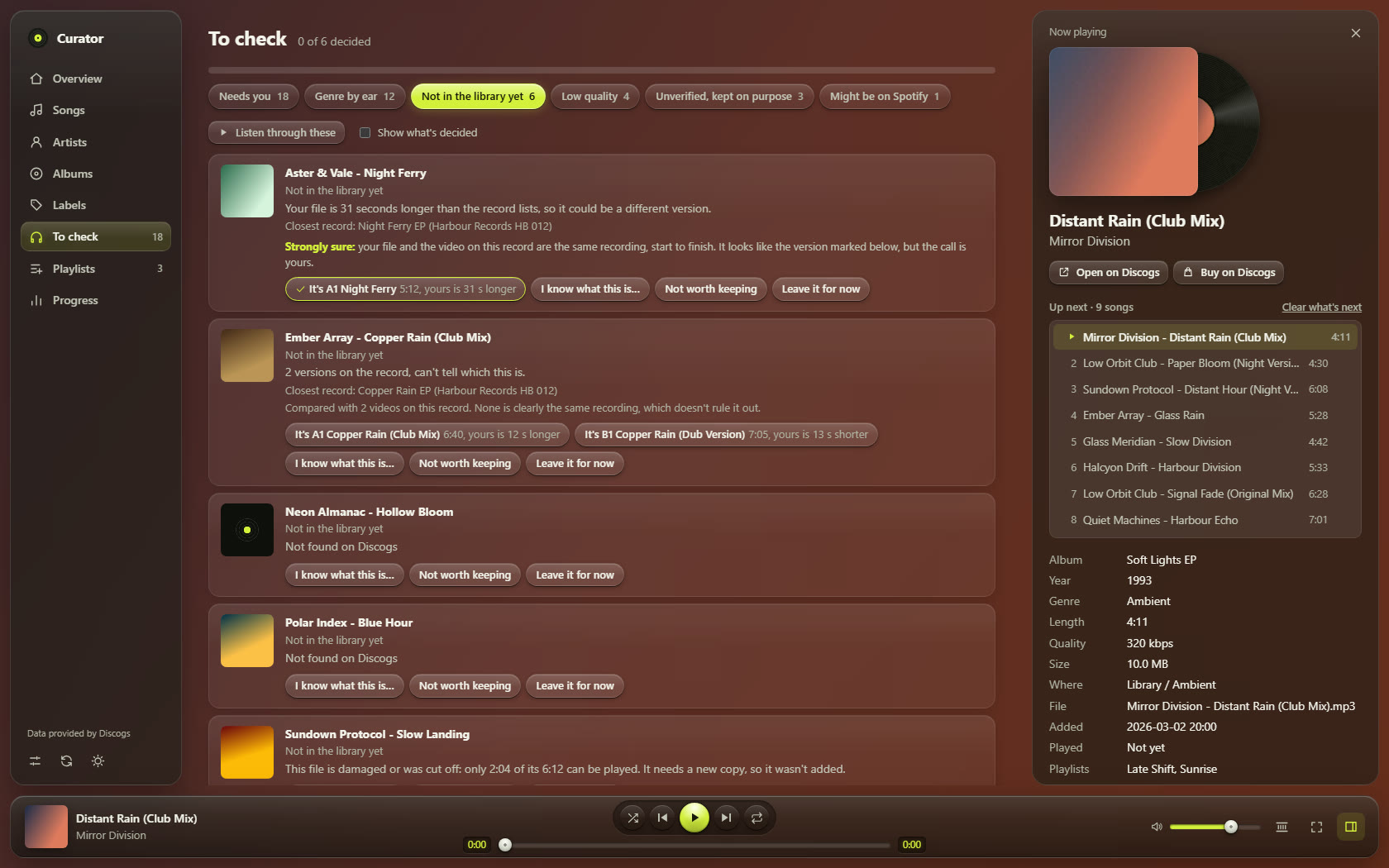
10
|
+
Classifier: Environment :: Web Environment
|
|
11
|
+
Classifier: Intended Audience :: End Users/Desktop
|
|
12
|
+
Classifier: Operating System :: OS Independent
|
|
13
|
+
Classifier: Programming Language :: Python :: 3
|
|
14
|
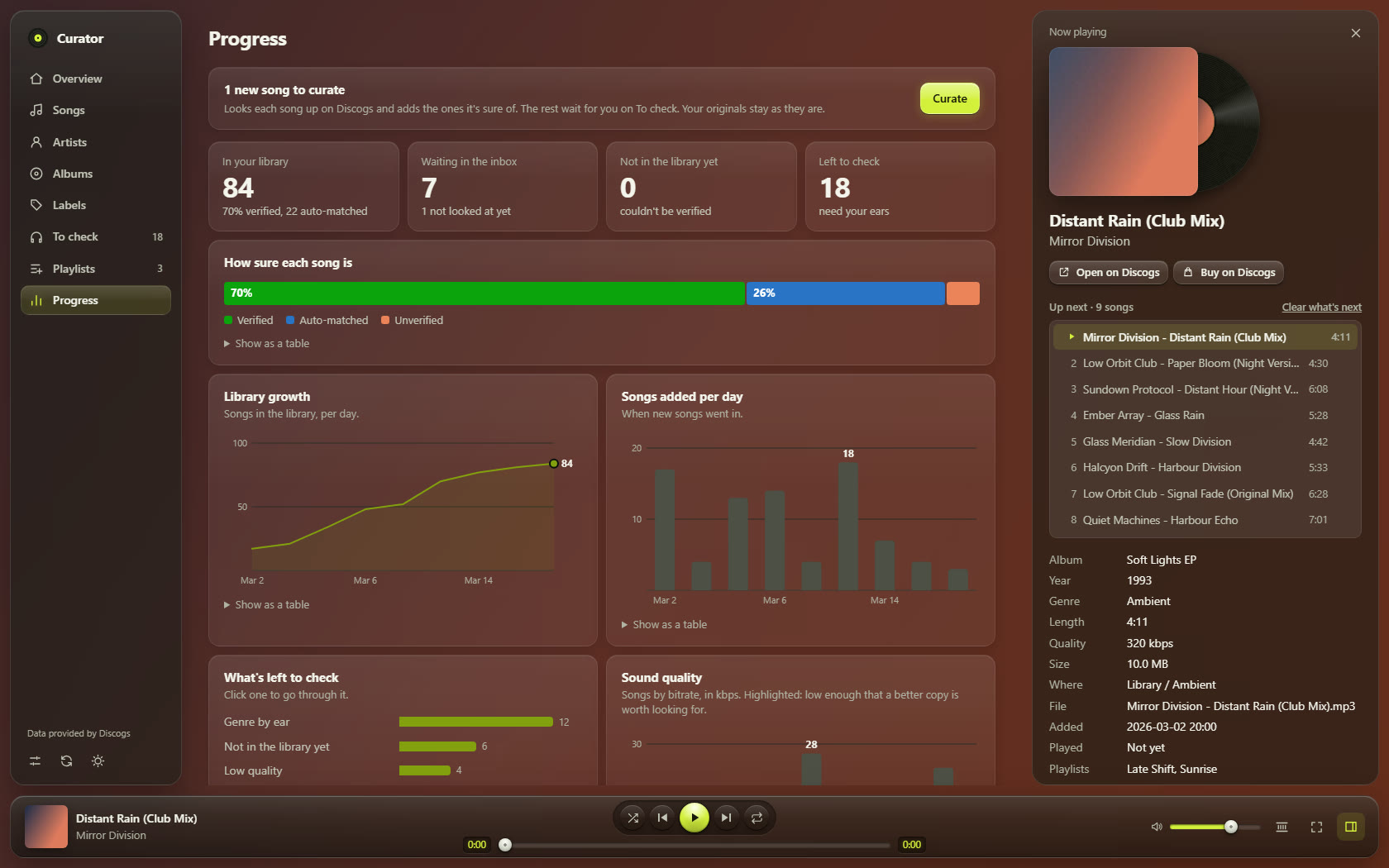
+
Classifier: Programming Language :: Python :: 3 :: Only
|
|
15
|
+
Classifier: Topic :: Multimedia :: Sound/Audio :: Players
|
|
16
|
+
Requires-Python: >=3.11
|
|
17
|
+
Description-Content-Type: text/markdown
|
|
18
|
+
License-File: LICENSE
|
|
19
|
+
Provides-Extra: compare
|
|
20
|
+
Requires-Dist: yt-dlp; extra == "compare"
|
|
21
|
+
Dynamic: license-file
|
|
22
|
+
|
|
23
|
+
# Pressling
|
|
24
|
+
|
|
25
|
+
A free, open-source companion for your own music files: a player with a curator built in, which checks every song
|
|
26
|
+
like a test pressing before it goes on the shelf. Install it as `pressling` and start it with `pressling`; the `curator`
|
|
27
|
+
command does the same and more, for scripts and AI agents.
|
|
28
|
+
|
|
29
|
+
Curate a local music library, on its own or with an AI agent: every song is checked against
|
|
30
|
+
[Discogs](https://www.discogs.com), the exact version is settled by track length (and, with an agent, audio
|
|
31
|
+
fingerprints and other sources), and a clean copy is written with consistent tags, filename and cover. Nothing is
|
|
32
|
+
changed in place, and every change is logged.
|
|
33
|
+
|
|
34
|
+
Built for people who keep their own files — vinyl-era electronic music, rips, rare tracks — and play them in
|
|
35
|
+
Spotify (local files), Plex, Navidrome, foobar2000, a phone, …
|
|
36
|
+
|
|
37
|
+
> Status: early (0.1). The workflow was developed on a real library of 90s acid/trance. Only Windows has had real use so far; the tests pass on macOS and Linux too.
|
|
38
|
+
|
|
39
|
+
|
|
40
|
+
|
|
41
|
+
<sub>The screenshots show a made-up library.</sub>
|
|
42
|
+
|
|
43
|
+
## Try it
|
|
44
|
+
|
|
45
|
+
The quickest way is one line. It installs what Pressling needs (asking before each thing), offers to set up your Discogs token,
|
|
46
|
+
checks everything and opens Pressling; run it again any time to update it and open it.
|
|
47
|
+
|
|
48
|
+
Windows (in PowerShell):
|
|
49
|
+
|
|
50
|
+
```powershell
|
|
51
|
+
powershell -ExecutionPolicy ByPass -c "irm https://raw.githubusercontent.com/Vasco-Alves/pressling/main/install.ps1 | iex"
|
|
52
|
+
```
|
|
53
|
+
|
|
54
|
+
macOS and Linux:
|
|
55
|
+
|
|
56
|
+
```bash
|
|
57
|
+
curl -LsSf https://raw.githubusercontent.com/Vasco-Alves/pressling/main/install.sh | sh
|
|
58
|
+
```
|
|
59
|
+
|
|
60
|
+
From a copy of this repository it is `install.ps1` or `sh install.sh` (with `-DryRun` / `--dry-run` it only says what it would do).
|
|
61
|
+
It installs uv if it's missing (with uv's own installer, once you say yes), then Pressling (from PyPI once it is there, else the
|
|
62
|
+
newest code on GitHub), ffmpeg only if you want it (winget on Windows, Homebrew on macOS; on Linux it tells you the command),
|
|
63
|
+
opens the Discogs page and an empty `.env` file for you to paste your token into (the token never goes through the script),
|
|
64
|
+
runs `pressling doctor` and opens Pressling.
|
|
65
|
+
|
|
66
|
+
Or by hand, with no programming needed: three commands, about ten minutes.
|
|
67
|
+
|
|
68
|
+
1. **Install uv**, a small free tool that installs Python apps, and Python itself if you don't have it. Open a terminal
|
|
69
|
+
(on Windows, PowerShell from the Start menu) and paste the line for your computer:
|
|
70
|
+
|
|
71
|
+
Windows:
|
|
72
|
+
|
|
73
|
+
```powershell
|
|
74
|
+
powershell -ExecutionPolicy ByPass -c "irm https://astral.sh/uv/install.ps1 | iex"
|
|
75
|
+
```
|
|
76
|
+
|
|
77
|
+
macOS and Linux:
|
|
78
|
+
|
|
79
|
+
```bash
|
|
80
|
+
curl -LsSf https://astral.sh/uv/install.sh | sh
|
|
81
|
+
```
|
|
82
|
+
|
|
83
|
+
Then close the terminal and open a new one.
|
|
84
|
+
|
|
85
|
+
2. **Install Pressling:**
|
|
86
|
+
|
|
87
|
+
```
|
|
88
|
+
uv tool install pressling
|
|
89
|
+
```
|
|
90
|
+
|
|
91
|
+
If uv says it can't find it, it isn't on PyPI yet, so get it straight from GitHub instead:
|
|
92
|
+
`uv tool install "pressling @ https://github.com/Vasco-Alves/pressling/archive/refs/heads/main.zip"`.
|
|
93
|
+
To update a copy installed that way, run the same line with `--reinstall` added after `install`.
|
|
94
|
+
|
|
95
|
+
3. **Start it:**
|
|
96
|
+
|
|
97
|
+
```
|
|
98
|
+
pressling
|
|
99
|
+
```
|
|
100
|
+
|
|
101
|
+
Your browser opens. Pick the folder your music is in, and it plays your music straight away (a downloads folder is
|
|
102
|
+
optional, for the Curator). Keep the terminal open while you use it. If it says `pressling` isn't found, run `uv tool update-shell`
|
|
103
|
+
and open a new terminal.
|
|
104
|
+
|
|
105
|
+
Next time, only step 3. `uv tool upgrade pressling` gets the newest version, and `uv tool uninstall pressling`
|
|
106
|
+
removes it. Your music and settings stay where they are.
|
|
107
|
+
|
|
108
|
+
It's a music player first. The **Curator**, which looks up new downloads and files them into your library, and **Spotify**
|
|
109
|
+
are extras: they're on once you give them what they need, and **Settings → Extras** turns either off again (that only hides
|
|
110
|
+
it). **To let it curate**, tick Curator under Settings → Extras, pick a downloads folder further down the same page, and
|
|
111
|
+
give it two more things:
|
|
112
|
+
|
|
113
|
+
- **ffmpeg**, to check that each song plays all the way through, to draw its waveform and to find a quiet start or end: `winget install Gyan.FFmpeg`
|
|
114
|
+
on Windows, `brew install ffmpeg` on macOS, `sudo apt install ffmpeg` on Debian and Ubuntu.
|
|
115
|
+
- **A free Discogs token**, for the lookups. Sign in at <https://www.discogs.com/settings/developers>, press
|
|
116
|
+
**Generate new token** and copy it. On Windows, save it with this command, then reload the page:
|
|
117
|
+
|
|
118
|
+
```powershell
|
|
119
|
+
setx DISCOGS_TOKEN "paste your token here"
|
|
120
|
+
```
|
|
121
|
+
|
|
122
|
+
On macOS and Linux, see [Your Discogs token](#your-discogs-token).
|
|
123
|
+
|
|
124
|
+
`pressling doctor` says what's still missing.
|
|
125
|
+
|
|
126
|
+
## Two ways to use it
|
|
127
|
+
|
|
128
|
+
You can mix them:
|
|
129
|
+
|
|
130
|
+
- **On its own.** Press **Curate** on the page. The app looks up each song and adds the ones it's sure of, and you settle the rest by ear.
|
|
131
|
+
Then **Double-check** what it added, if you like: listen, look over what it wrote, and say whether it's right.
|
|
132
|
+
See [Try it](#try-it) and [Curate with no AI](#curate-with-no-ai).
|
|
133
|
+
- **With an AI app** that can run commands on your computer, such as Claude Code, Codex, Cursor or Gemini CLI. It does the hard
|
|
134
|
+
cases too, and it can do the whole setup for you:
|
|
135
|
+
|
|
136
|
+
1. Download this repository and unzip it (or `git clone` it).
|
|
137
|
+
2. Open the folder in your AI app.
|
|
138
|
+
3. Say **"Set up Pressling for me."**
|
|
139
|
+
|
|
140
|
+
It checks what's missing and asks before installing anything. The one part only you can do is getting a free Discogs token, and
|
|
141
|
+
it walks you through that. Then your library opens in your browser and you pick your folders.
|
|
142
|
+
|
|
143
|
+
After that, just say what you want:
|
|
144
|
+
|
|
145
|
+
| Say | What happens |
|
|
146
|
+
|---|---|
|
|
147
|
+
| "Curate my new downloads" | The app's Curate goes first, then your AI app double-checks everything: tags, cover, that the audio is the right version, and other sources when Discogs doesn't have a song. A clean copy goes into your library. Anything it can't verify waits for you in To check, and so does any better-sounding copy it finds, with a link: your file only changes if you say so. |
|
|
148
|
+
| "Open my library" | The page opens in your browser. |
|
|
149
|
+
| "Apply my answers" | What you decided in To check gets carried out. |
|
|
150
|
+
|
|
151
|
+
## What makes it different
|
|
152
|
+
|
|
153
|
+
Taggers like Mp3tag, MusicBrainz Picard and beets match metadata. This toolkit also answers *"is this file really
|
|
154
|
+
that version?"*:
|
|
155
|
+
|
|
156
|
+
- **Version proof.** Compares your file's audio fingerprint with a reference recording, so "A-side or Barn Mix?" is
|
|
157
|
+
answered from the audio, not guessed. (Using the videos linked on a Discogs release as the reference needs the optional yt-dlp.)
|
|
158
|
+
- **Speed and edit detection.** Finds rips that play a few percent fast (a common upload trick) or were cut
|
|
159
|
+
short, by aligning 20-second fingerprint chunks.
|
|
160
|
+
- **Human in the loop.** Clear "held back" reasons, genre toss-ups to settle by ear, a report per batch.
|
|
161
|
+
- **Player switch-overs.** The log keeps old vs new tags, so you know which playlist entries to re-add.
|
|
162
|
+
|
|
163
|
+
## How it works
|
|
164
|
+
|
|
165
|
+
```
|
|
166
|
+
inbox files ──parse──▶ items.json ──resolve──▶ ready / review / notfound
|
|
167
|
+
│ │ │
|
|
168
|
+
│ scan · videos other (MusicBrainz, YouTube)
|
|
169
|
+
│ same · drift ost (game music)
|
|
170
|
+
▼ ▼ ▼
|
|
171
|
+
plan.json ──write──▶ library/<genre>/<artist> - <title>.mp3
|
|
172
|
+
+ log.csv (old → new) + report
|
|
173
|
+
```
|
|
174
|
+
|
|
175
|
+
The Curate button runs the plain version of these steps by itself. An AI agent runs all of them and talks to you; see
|
|
176
|
+
[AGENTS.md](https://github.com/Vasco-Alves/pressling/blob/main/AGENTS.md) for the full workflow it follows. You can also run every step by hand.
|
|
177
|
+
|
|
178
|
+
## Requirements
|
|
179
|
+
|
|
180
|
+
- Python 3.11+ (standard library only)
|
|
181
|
+
- `ffmpeg` and `ffprobe` on PATH, built with **chromaprint** (`ffmpeg -hide_banner -muxers` lists `chromaprint`)
|
|
182
|
+
- A free Discogs personal access token (<https://www.discogs.com/settings/developers>), saved as described
|
|
183
|
+
[below](#your-discogs-token)
|
|
184
|
+
- Optional: [yt-dlp](https://github.com/yt-dlp/yt-dlp), to compare your files with videos online and find official YouTube uploads. Whatever it fetches is deleted right after the comparison
|
|
185
|
+
|
|
186
|
+
It curates MP3, FLAC and M4A files. Each stays the type of file it is, and the audio is copied as it is, never re-encoded. Other formats still show up and play on the page, but they're skipped when curating.
|
|
187
|
+
|
|
188
|
+
## Install from the source code
|
|
189
|
+
|
|
190
|
+
For changing the code, or if you'd rather not use uv. Install it into a virtual environment: a private copy of Python just for
|
|
191
|
+
this app, so nothing else on your computer changes.
|
|
192
|
+
(On recent Linux, and with Homebrew's Python on macOS, a plain `pip install` is refused anyway.) In this repository's folder:
|
|
193
|
+
|
|
194
|
+
Windows:
|
|
195
|
+
|
|
196
|
+
```powershell
|
|
197
|
+
python -m venv .venv
|
|
198
|
+
.venv\Scripts\python -m pip install -e .
|
|
199
|
+
.venv\Scripts\curator serve
|
|
200
|
+
```
|
|
201
|
+
|
|
202
|
+
macOS and Linux (on Debian and Ubuntu, `sudo apt install python3-venv` first if `venv` isn't there):
|
|
203
|
+
|
|
204
|
+
```bash
|
|
205
|
+
python3 -m venv .venv
|
|
206
|
+
.venv/bin/python -m pip install -e .
|
|
207
|
+
.venv/bin/curator serve
|
|
208
|
+
```
|
|
209
|
+
|
|
210
|
+
`curator serve` opens your browser, where you pick your library and downloads folders. `pressling doctor`, run the same way,
|
|
211
|
+
checks that everything is in place. From then on, that full path is how you start the app. If you'd rather type just `curator`,
|
|
212
|
+
activate the environment first in each new terminal: `.venv\Scripts\activate` on Windows, `source .venv/bin/activate` on macOS and Linux.
|
|
213
|
+
|
|
214
|
+
Prefer a config file? `curator init` writes a `curator.toml` in the current folder.
|
|
215
|
+
|
|
216
|
+
**How it fits together:** you put downloaded songs in your downloads folder and press **Curate**, or ask your AI app to curate
|
|
217
|
+
them. Finished songs are copied into your library, sorted by genre, and your originals stay in downloads until you say they can
|
|
218
|
+
go. Songs that can't be settled stay put and show up in To check.
|
|
219
|
+
|
|
220
|
+
### Your Discogs token
|
|
221
|
+
|
|
222
|
+
Lookups need a free token from <https://www.discogs.com/settings/developers>. The easiest place for it is a text file called
|
|
223
|
+
`.env` next to your settings, with one line (`pressling doctor` says which folder, and so does the page):
|
|
224
|
+
|
|
225
|
+
```
|
|
226
|
+
DISCOGS_TOKEN=your token here
|
|
227
|
+
```
|
|
228
|
+
|
|
229
|
+
An environment variable called `DISCOGS_TOKEN` works too, and wins if you have both. The app only ever reads the token and sends
|
|
230
|
+
it to Discogs. Keep the file out of anything you share: `.env` is already in this repository's `.gitignore`.
|
|
231
|
+
|
|
232
|
+
## Curate with no AI
|
|
233
|
+
|
|
234
|
+
**Curate** on the page (or `curator curate`, with `--dry-run` for a preview) looks up everything waiting in your downloads folders.
|
|
235
|
+
With nobody double-checking, the rules are strict. A song goes in only when:
|
|
236
|
+
|
|
237
|
+
- its artist and title match a track on a record, and any mix named in the file is the one on the record
|
|
238
|
+
- the length is within 20 seconds of the record's, when the record lists one
|
|
239
|
+
- it isn't already in your library
|
|
240
|
+
- it plays all the way through: a broken download still has a good name, so each song is played through first, which takes about a second
|
|
241
|
+
|
|
242
|
+
Those songs are marked **Auto-matched**, so you can tell them from the ones checked more closely. Everything else waits on To check
|
|
243
|
+
with the reason and the versions found: listen, then click the one it is, or type what it really is, and press Curate again.
|
|
244
|
+
|
|
245
|
+
**Double-check** (on To check, and in each song's panel) is where you check the Auto-matched songs yourself. Each one shows what Curate
|
|
246
|
+
wrote: the old and new file names, the tags, the cover and its size, the record it matched, and the versions on that record with their
|
|
247
|
+
lengths next to yours. The ones worth a closer look come first, with the reason: a length further off, a version picked from several by
|
|
248
|
+
length, one you picked yourself, a genre toss-up, a low bitrate, a small cover or a better copy found. **Looks right** marks the song
|
|
249
|
+
Verified straight away, the way `curator verified` does, and only writes that in the log. **Not right**, with a note if you like, takes
|
|
250
|
+
it out of your library the next time you press Curate. The copy goes to the Set aside folder while your original is still in your downloads,
|
|
251
|
+
or back to your downloads under its old name if it isn't. Then the song is looked up again and waits on To check with your note, and only
|
|
252
|
+
your answer puts it back. Quick mode works here too: 1 for Looks right, 2 for Not right, U to undo.
|
|
253
|
+
|
|
254
|
+
On one real library of 518 songs, replayed from their original messy names, 55% went in by themselves and one disagreed with the
|
|
255
|
+
verified answer, only in how the title was spelled. The rules were tuned on that same library, so expect a little less on yours.
|
|
256
|
+
Files nobody can look up, like nightcore edits or unofficial remixes, always wait for you or an agent. An agent adds what Curate can't
|
|
257
|
+
do: reading odd names, settling versions from the audio, checking other sources, and looking for better-sounding copies.
|
|
258
|
+
|
|
259
|
+
**Comparing audio (optional).** If you have yt-dlp, Settings has a switch for this, off by default (`compare_audio = true` under `[curate]` does the same). When Curate finds the record but can't tell which version your file is, it fetches the video linked on that record, compares it with your file, and deletes it straight after. A match is never treated as proof, because a video can be mislabelled or be another mix from the same record. So nothing goes in because of it: To check says when the app is strongly sure your file is the same recording, and you decide.
|
|
260
|
+
|
|
261
|
+
## See it in your browser
|
|
262
|
+
|
|
263
|
+
`curator serve` opens a small local page (127.0.0.1 only, nothing to install):
|
|
264
|
+
|
|
265
|
+
|
|
266
|
+
|
|
267
|
+
- **Overview**: a wall of your covers, what you added last, your peak years, top genres, artists, labels and countries. Once you've played a few songs it also shows what you listen to most. A song counts as played once you've heard half of it, or 4 minutes if that comes first.
|
|
268
|
+
- **Songs**: search and filter everything, play it, see how each song was verified and what the file used to be called, and jump to its Discogs page to check it or buy the record. **Export** takes whatever you've filtered: an M3U playlist, a spreadsheet, or copies in a folder or on a USB drive, with a playlist that goes along with them, for your phone, car or another player.
|
|
269
|
+
- **Artists**, **Albums** and **Labels**: browse your library by cover, play a whole record, and click through to its songs.
|
|
270
|
+
- **Playlists**: make your own, add songs to them from anywhere in the app and drag them into the order you want, or **Import** `.m3u` and `.m3u8` files from another player. Each line of a file is matched to a song you already have, and you're told which ones it couldn't find. Once you've pressed Check Spotify, your Spotify playlists play here too, as far as you have the songs as files. Each song's details say which of them it's on, and the Songs page can show just the songs that are on none. Streamed songs you don't have are left out. **Save as files** writes them all as `.m3u8` playlists that other players can open.
|
|
271
|
+
- **Now Playing**: click the cover in the play bar for the big view. Beside the record is what's up next, which you can drag into another order, or **About this song** with everything known about it; the x folds that side away and leaves the record the whole page. A song that came out on CD shows as a CD in its case,
|
|
272
|
+
read by a laser that moves out from the middle as the song plays, instead of a record and its tonearm; a cassette is a tape
|
|
273
|
+
pulled from its box, its reels winding the tape across as the song goes; and a download is just its cover. The seek bar shows the shape of the song, so you can jump straight to a breakdown or a drop.
|
|
274
|
+
- **Crossfade**: a button on the play bar blends each song into the next over 3, 6 or 10 seconds. It leaves songs from the same record alone, since they may run into each other on purpose.
|
|
275
|
+
- **Quiet starts and ends**: a song that opens or closes with a second or more of near silence starts where its sound does, and the next one comes as soon as its sound is over, with the crossfade or without. Previous and repeat go back to where the sound starts, too. Each song is measured with ffmpeg the first time it plays, quiet in the middle of a song is left alone, and the file isn't changed. **Playing** in Settings turns it off, and To check always plays the whole file.
|
|
276
|
+
- **Effects**: pictures made from the sound on Now Playing, in the colors of the record: Ribbon, Bars, Trails, Stars, Halo and Space, Psychedelic (a kaleidoscope, a plasma, an endless fractal fall, and three fractals proper, each a journey that lasts the song: a flight through the spirals of a Julia set, into one and on to a smaller one for as long as the song plays, and back out to the whole set on a drop; a fall into the Mandelbrot set from place to place, going in through a tiny copy of the whole set each time; and Newton's method as a well of rings that never ends, into the beads on the chains where its colors meet and on from inside them. Their colors travel as they go, the picture breathes with the bass, a quiet break folds it into a mirror and then a flower that opens when the kick comes back, each kick leaves an after-image, and in hardcore, gabber and their kin every kick sends a ring out through the picture), Journeys (under the sea, a neon road into a striped sun, the northern lights), 3D (falling down an endless tube of light that bends as you go, big heads drawn in neon that nod to the kick and sing along, sometimes in glasses (shades, round ones, stars, or a visor with the sound running along it) that they take off and change as the song goes, a sphere of sound, the five regular solids floating past, and a neon city whose towers stand as tall as their part of the sound), Visions (faces inside faces, drawn in glowing lines, whose eyes open pair by pair as the song gathers and look at you on the drop; the forms seen with closed eyes: tunnels, spirals and rays that flow into honeycombs and cobwebs; and beings, whose bodies are the shadows of four-dimensional shapes turning through themselves, with eyes that open as their corners come towards you, gathering through a build and looking at you on the drop, and in each one's great eye the next being, which the view falls into) and Pixel (pixel art in a world picked by the kind of music: places worth looking at for a whole song, a fjord under the northern lights for trance, a city at night for techno, a volcano over a lake of lava for hardcore, a marsh under a dripping moon for acid, a mushroom garden under a ringed planet for psytrance and goa, whose mushrooms hop to the kick, a boardwalk with a big wheel for house, the open sea for ambient and a meadow for anything else, each with a sky that turns through the hours, small things on the hi-hat, the kick and the bass, and one grand thing kept for the drop; a little runner whose hops land on the kick, who floats when the path falls away in a break and leaps through a gate into another sky on the drop; and an arcade game that plays itself, a ship whose shots leave on the hi-hat and land on the kick, one foe a beat, with a great foe that comes down through the build and bursts on the drop; and a living grid, the oldest games that play themselves, cells that live and die by their neighbours, sand that falls, ants that turn, crystals that grow into mandalas, planted by the kick and the bass and cleared by a ring on the drop, with a ring of light running out from the middle on every kick while the cells flash with it; visitors to a pixel world, and the 303's singer, are drawn in its own big square dots) and Aero (the glossy, hopeful look of the 2000s: Frutiger Aero, a bright sky over clear water where glossy bubbles and glass orbs rise, tropical fish and a butterfly cross and the sun flares on the drop, with bubbles that drift from the mouse and pop when you click them; and Aqua, a bright aquarium with light rippling through it, gel capsules and a school of fish that turns on the kick, swims away from the mouse and gathers to food flakes where you click; Dark Aero, the same gloss on black, glass orbs and panels over a mirror floor with long streaks of light, whose orbs turn their shine toward the mouse; Technozen, the calm one, still water and stacked stones under a glowing ring, where a click drops a pebble in; DORFic, daylight futurism in white, orange and yellow, swooshes, a sun disc and rings, where a click blooms a sun (with the app's dark theme it turns to night: a black page lit by the sun, glowing swooshes and far-off lights); and Frutiger Eco, a sunny meadow under a canopy of glossy leaves, a stream, wind turbines and dandelion seeds, where the mouse is a breath of wind and a click grows a sprout), each with its own list of styles, from LEDs and an oscilloscope to fireworks, and sliders under **Adjust** for each one, with 100% as the default. The fractals have four of their own there: **Colors that travel**, **After-images**, **Breathing**, and **Answers to sounds**, which sets how much they answer particular sounds: the ring a hard kick sends through them, and, where the page hears them, a 303's squelch opening and shutting the middle of the picture, a clap snapping it round a few degrees, a snare roll making it shiver and a riser swelling it toward you. Every effect has **Color tricks** too: now and then, chosen by the music, the whole picture takes another look for a bar or two (mostly a bar after a drop, sometimes at the start of a phrase deep in a long groove, once softly in a long breakdown): a negative, an x-ray, a duotone in the record's colors, night vision, a glitch, a mirror or its colors turned halfway round, coming and going on the beat by a wipe, a circle from the middle, sweeping slices, a fold or a slow tilt. They keep within limits for flashing light (never more than three large flashes a second, never a large red flash, a negative of a dark picture never near white), so the busiest pictures only ever get the mirror; at 0 nothing changes. In hard music every effect also gets **Hard kicks**: on each kick the whole picture jumps a few percent nearer, tips and shakes and is back within a tenth of a second, its colors tear apart into yellow and blue, and on the big kicks (at most two a second) its lines and highlights flash white and glow and a pale band flashes along its edges; hardstyle and its kin get it fullest, the hardcore family a little less, and nothing red ever flashes. Space is a flight past nebulas, galaxies, planets and black holes, seen from the cockpit of a ship, that changes course on the beat, with shooting stars on the hi-hats. Now and then a planet comes up dead ahead and the ship falls into it: in through the fire of the entry, down through three decks of cloud with lightning on the kick, to whatever is underneath, and back out to the stars, at once if a drop lands on the way. There are six, each with its own air: a gas giant in amber bands, a water world in the rain, a lava world full of embers, an ice world in the snow, a toxic one where the lightning hardly stops, and one in the colors of the song. **Falling into planets** in **Adjust** makes it rarer, more often, or stops it. Visitors come by in any of them now and then (saucers, jellyfish, a face peeking up, an astronaut, a cow, and things too: neon tubes that buzz on, wireframe shapes, a glowing sea that swells with the bass; at a drop, lasers, a disco ball or confetti). The effect moves them: the bars bounce them, the ribbon's wave carries them, a build draws them in and the drop throws them out. They stay when the picture changes, and one effect turns into the next in a fade, a spin, a melt or like an old TV switching off, the old one still moving to the music until it is gone (never frozen on its last frame), in time with the beat, with Brightness gliding from the one to the other; a drop that lands during a change hurries it, so the drop lands on the new one. **Morph** makes that happen by itself every minute or so, into any style of any effect: best of all in a breakdown or as a build begins, so the drop lands on the new one, and never just after a drop. Every effect also keeps changing a little by itself, so it never looks quite the same twice: how many, what shape, folded like a mirror or a kaleidoscope, a moon instead of the sun, a city on the skyline, a lake under the northern lights, the sea at night, and the colors turned round the wheel. A drop changes it all on the beat, and now and then in the groove one thing changes, or the whole effect slowly becomes another version of itself over eight bars or more: a ring bends into a star, a mirror comes over the picture, three ribbons become four and then five, and the colors move round. **Another version** (or **N**) changes it now, and **Changes by itself** in **Adjust** makes that rarer, more often, or stops it. **Recipes** are effects written as data, so anyone can make one: a few layers of shapes (rings, polygons, stars, lines, dots, sparkles, the waveform), each with little formulas over the time and the sound, like `0.5 + 0.2 * bass` or `sin(t + i) * band(u)`; `lead` and `tune` say how much of a melody is playing. Seven come with the app. **Recipe** shows how the one playing is made: change it and the picture changes as you type, save it as yours, **Export** it as a `.pressling-effect.json` file to give to someone, and **Import** theirs. The formulas are read by the app's own small reader, which knows numbers, a few names and functions and nothing else, so a recipe can't run anything. **Record** (or **R**) saves what the effect does, with the sound, as a WebM video in your downloads. **V** picks the next one and **F** shows just the picture, with the controls coming back when you move the mouse, and with them the song's album, year, genre and label, and **Favourite**, **Add to playlist** and **Add to Spotify**; **Keep controls** there (or **K**) keeps them on screen while the mouse rests. Clicking the picture itself sends a soft ring out from where you clicked, in the record's colors, that the kick pushes on, and the visitors in it answer the mouse too (they turn to look, lean away or come to a click near them); **Answers to the mouse** in **Adjust** sets how much the pictures answer it, and at 0 only the ring goes out. **All pages** keeps it going faintly behind the rest of the app. How much of it shows behind the page, and how soft it is there, are two sliders under **Adjust** (for every effect) and in Settings under **The picture behind the page**; Full view always shows it whole and sharp. The pictures follow how the song goes, too: a calm part slows them down, a build sends sparks up faster and faster, and the drop lands with a flash and a wave. A drop is the kick coming back as big as it was, so the toms, bass notes and soft thumps of a break don't set it off early, and it has to be earned within the song (after its groove, or through a build), so a new song starting on its kick isn't one; it also needs a real break before it (the low end gone for over a second) after the kick has run a while, which takes away about half of the false drops on real songs and none of the real ones. They keep the beat as well: a clock on the song's own time (so a pause or a seek doesn't throw it off) finds the beat, the bar and the phrase from how well the kicks fit, a hit half-way between two beats of a sure clock is a bass note and not a kick, versions of an effect change on the start of a bar, and small things keep the beat softly through a break. They hear chords and leads too, and how euphoric or intense each part is next to what is usual for that song: in a euphoric part the colors get a little lighter and warmer and a warm light comes down over the background, in an intense one they deepen and its edges darken, and under a 303 the acid glow rises and sinks with the filter. And they hear a melody: when a big held lead comes in, the kind hard trance, trance and hardstyle are built on, soft beams of light come down from above, circles of light drift up, glints fly and the colors turn paler; an acid line, a stab or chords bring the same lights in the song's own colors, each beam following its part of the notes; drums alone bring none. **Dreamy lights** in **Adjust** sets how much, down to none. And when a 303 line squelches in an acid, hard trance, goa or psytrance song (going by its genres, since elsewhere another sound can pass for one), every effect sings it in its own way: ribbons swell and kink on each note, bars and rings light where the squelch sits, the neon road's grid rolls in waves, the northern lights climb, nebulas turn orange to lime as the filter opens, the faces mouth the line, the runner's scarf waves with it, and so on through every style (slider **Answers to sounds**). Now and then a small smiley comes in and sings it too, from the right, the left, the bottom, hanging from the top or as a duet, with one of six faces and five ribbons: its mouth opens and shuts with the filter and the line pours out of it across the picture as a glowing ribbon, over whatever effect is showing. Now and then it goes through the rainbow, and its ribbon with it, the colors streaming out of its mouth quicker the more the filter opens; a drop while it sings sends it there too. Other sounds bring company of their own: when claps come in a steady pattern, a few people come up along the foot of the picture, seen from behind (two of them in glasses that catch the lights on the kick), each dancing in their own way (nodding and bouncing to the kick, swaying, fists or open hands up, clapping over their heads), raising their arms one after another through a build, shaking their hands through a snare roll and jumping on the drop, and swaying with a light held up when it goes calm; in hardcore, gabber, hardstyle and their kin a dancer stamps on a pair of speakers to the kick; and when a riser climbs, a rocket climbs with it and bursts at the top. Each stays a while and then rests, and in a pixel world they are drawn in its own big dots. **Crowd and dancers** in **Adjust** sets how long they stay and how soon they come back, down to never. It listens for two things at once, how the brightest place in the sound leaps up and glides back on every note and how a sharp peak rides on it, and believes a 303 only when both agree, so a singer, a lead or a pad never brings it; a 303 that doesn't squelch, a slow wah or a dark bass, won't either. It stays half a minute at most and then rests for over a minute, so it comes now and then (about one line in three) and not for the whole track. **Singing to the 303** in **Adjust** sets how long it stays and how soon it comes back, down to never. The glow and flash on the app get softer or harder with it, and the play button jumps when the beat comes back.
|
|
277
|
+
- **Your color**: Settings changes the green of the buttons to another color, or to the strongest color on the record that's playing.
|
|
278
|
+
- **Favourites**: the heart on the play bar, Now Playing, the song panel and song rows adds to a local playlist called Favourites, which sits first on the Playlists page and works like any other.
|
|
279
|
+
- **More than one genre**: a file keeps the one genre you settled on, but the app also shows every style Discogs lists for its record, after the file's own (Genres: Acid, Acid House, Techno), and finds the song under any of them. On a compilation those are the whole album's, so they're only shown, on a line of their own. Kept in `styles.json` next to the log; Curate fills it in.
|
|
280
|
+
- **Glow, Flash and Sparkle**: separate switches, on the play bar and on Now Playing. Glow makes the buttons light up softly on each kick, and Flash does the same to the background. Sparkle follows the hi-hats instead: the dots in the clock tick and now and then a glint catches the record or the play button. All three are off until you turn them on.
|
|
281
|
+
- **On your phone**: `curator serve --lan` also opens the app on your home network and prints a private link. Open it once on the phone and it remembers. Only devices on that network with the link get in, and choosing folders, copying files and Spotify sign-in stay on the computer. It's plain HTTP, so keep it to a network you trust.
|
|
282
|
+
- **Packs**: under Settings you can export how you've set the app up as a small file, and import someone else's: jokes, road signs, which genre gets which mood, sliders and surprises. A pack only holds words, numbers and colors, so it can't run anything. See `examples/example.curator-pack.json` to write one by hand.
|
|
283
|
+
- **Surprises**: now and then the app nods along to the kick, and once in a while it dances. Visitors drop by the app itself too: a saucer borrows a cover and gives it back, a face peeks over the play bar, a cow gets taken from it, a little one hangs on a thread from the top. On acid the smileys come out, and now and then one trips: it sticks its tongue out, melts and drips, or runs through the rainbow. Settings says how often, how strong and how long, or turns them off, and the nodding can stay on all the time.
|
|
284
|
+
- **Mood**: the background and the way a kick lands change a little with the genre of what's playing: softer for trance, yellow for acid, darker and quicker for hardcore, for goa and psytrance every color at once, slowly going round, with each kick landing in the next one, and for nightcore sakura pink, cyan and lavender, with a starry tiled sky, petals drifting and a pale moon behind the page. Who visits follows the mood too: on psytrance a great eye opens and looks about, kaleidoscope flowers bloom, and toadstools hop across to the kick. On nightcore a lucky cat waves on the kick, paper cranes fly over, little windows of the early internet pop up and fold shut (a starry screen with a blinking cursor, a counter that ticks on the kick, a bar that fills), sparkle stars with faces hop, lanterns glow, a floppy disk smiles, a moon rises over waves with a gate in the water, and every drop lands in a burst of petals and sparkles with speed lines. Little windows like these drop by in every other mood too, now and then, dressed for it (acid yellow with a smiley on the screen, hard red and black with square corners, psytrance with a rainbow sliding along the title bar, euphoric in pastels, otherwise in the record's colors), each with a screen that follows the music: a starry sky, a counter that ticks on the kick, a page still being built, a little spectrum, a scope, stars rushing past, a bar that follows the song, or blocks typed on the beat; a click shuts one, and one may pop up in a corner of the app itself. So do the time and the record: late at night it gets darker and more neon, at dawn a sunrise comes up (most of all on psytrance), the evening is warm; a record from the seventies gets film grain, the eighties scanlines, the nineties a VHS wobble; the season sends snow, petals, fireflies or leaves through the pictures now and then; the pictures run with the tempo; and after a long session the visitors turn up more often, like a party. Settings turns each of these off.
|
|
285
|
+
- **White labels and stickers**: a song with no verified cover shows as a blank promo record with its name stamped on it. Sleeves carry small stickers for what the curator knows: a seal when every song on the record is verified, a yellow label when something waits for you on To check, and an orange one when a better copy may exist.
|
|
286
|
+
- **Radio**: Start radio on any song and it keeps playing others like it from your library, going by genre, label, year, artist and the playlists they share. Clear what's next to stop it.
|
|
287
|
+
- **Even volume**: a button on the play bar that turns loud songs down to match the rest. It never raises a song, because nearly every file already reaches full scale and raising it would distort it, so quieter songs stay as they are. Each song is measured with ffmpeg the first time it's needed, and the file isn't changed.
|
|
288
|
+
- **To check**: the questions only ears can answer (genre toss-ups, songs that couldn't be verified), with the audio right there. **Quick mode** takes them one at a time: press a number to answer and the next song starts. **Double-check** has the songs Curate added with nobody checking, for you to confirm or take back out (see [Curate with no AI](#curate-with-no-ai)).
|
|
289
|
+
- **Progress**: what's waiting in the inbox, how sure each song is, library growth, latest changes.
|
|
290
|
+
|
|
291
|
+
|
|
292
|
+
|
|
293
|
+
The first time it asks where your library and downloads live, and you can change them later under Settings. Picking a
|
|
294
|
+
folder never moves any music. The app keeps its log, answers and cache in a `_curation` folder next to the library, and its
|
|
295
|
+
settings in your user profile. Browsing only ever reads your music. Your answers go to `decisions.json` next to the log, with play counts in `plays.json` and the playlists you make in `own_playlists.json` beside it. The
|
|
296
|
+
one thing on the page that changes your library is the Curate button, and the only outside service it talks to is Discogs (plus YouTube, if you turn on comparing audio). Export never changes your library, and copying only ever adds files to the folder you pick.
|
|
297
|
+
|
|
298
|
+
When you've answered To check, press **Curate** at the top of that page. It adds the songs you identified and carries out your other answers that need no research: songs
|
|
299
|
+
you said aren't right on Double-check, genre changes, which also move the song to the new genre's folder, and, if you tick the box, the songs you marked not worth keeping. `curator apply` does the same from a terminal (`--dry-run` to preview, `--set-aside` for those songs).
|
|
300
|
+
Nothing is deleted: old copies go to a `Set aside` folder next to the log, which you can empty whenever you like. Answers that need
|
|
301
|
+
research, like finding a better copy, stay on the list for your agent.
|
|
302
|
+
|
|
303
|
+
Optional `[paths]` keys feed the To check page: `review` (a folder of songs waiting for a decision) and `review_list` (a Markdown
|
|
304
|
+
file with one `- **Artist - Title**: reason` per song).
|
|
305
|
+
|
|
306
|
+
### Checking Spotify (optional)
|
|
307
|
+
|
|
308
|
+
Your local playlists live in the app, and Spotify is something it checks. Spotify doesn't let apps add or remove local files in playlists, so the **Spotify to-do** tab on the Playlists page lists what's for you to do by hand. Songs you
|
|
309
|
+
accept under Playlist ideas, or press **Add to Spotify** on, wait under To add, for you to drag in. The same button takes a song out of a playlist it's already in: it waits under To take out until you've removed it in Spotify, and **Never mind** or **Keep it** changes your mind. **Send to Spotify** on a local playlist makes it on Spotify and lists its songs the same way. It asks for permission to change your playlists when you press it, and if Spotify won't let your app make playlists, you make one with the same name yourself. A **Check Spotify** button confirms what arrived and what you took out, and lists under To
|
|
310
|
+
remove the local entries with no matching file (Spotify shows those greyed) and any second copies, with where they are in the playlist.
|
|
311
|
+
A song has arrived when the playlist has it under the same artists and name, mix and all, and for a streamed copy at about the same length: another version in the playlist isn't the song. When something there may be another version of it, the song's row under To add says what, and if that's the one you meant, press **Added** and it stays that way. A song you took out stays under To take out while Spotify's own copy of that recording may still be in the playlist.
|
|
312
|
+
Check Spotify only reads your playlists, the sign-in stays in memory until the app closes, and a playlist that hasn't changed isn't read twice. If entries to remove are spread through a playlist, **Move all to the bottom** gathers them so you can select them in one go. That button asks Spotify for permission to reorder your playlists when you press it, and it never removes anything.
|
|
313
|
+
|
|
314
|
+
Check Spotify also searches Spotify for the songs still waiting in your downloads and Review, once per song. Likely matches appear on To check as **Might be on Spotify**, going by name and length, because Spotify gives apps no audio to compare. Open it, listen, and if it's the same recording, choose playlists and the app adds the streamed song to them. Your file stays where it is until you say otherwise.
|
|
315
|
+
|
|
316
|
+
To turn all this on, create an app at <https://developer.spotify.com/dashboard>, add
|
|
317
|
+
`http://127.0.0.1:8888/callback` as its redirect URI, and put its Client ID in `curator.toml`:
|
|
318
|
+
|
|
319
|
+
```toml
|
|
320
|
+
[spotify]
|
|
321
|
+
client_id = "your client id"
|
|
322
|
+
```
|
|
323
|
+
|
|
324
|
+
## Commands
|
|
325
|
+
|
|
326
|
+
| Command | What it does |
|
|
327
|
+
|---|---|
|
|
328
|
+
| `init`, `doctor` | starter config; environment check |
|
|
329
|
+
| `curate [--dry-run]` | curate with no AI: add the songs the evidence settles, leave the rest on To check |
|
|
330
|
+
| `verified SONG… --how TEXT` | record that Auto-matched songs were checked properly, like Looks right on Double-check (for your agent, after Curate) |
|
|
331
|
+
| `parse OUT [DIR…]` | read inbox folders (names + tags) into items |
|
|
332
|
+
| `resolve ITEMS OUT` | Discogs match and tag decisions |
|
|
333
|
+
| `scan ITEMS` | every pressing/version of a song with lengths |
|
|
334
|
+
| `videos ITEMS OUT` | fingerprint files against Discogs-linked videos |
|
|
335
|
+
| `other ITEMS OUT` | MusicBrainz and official YouTube uploads |
|
|
336
|
+
| `ost ITEMS OUT` | game-soundtrack lookup |
|
|
337
|
+
| `better ITEMS OUT` | find better copies and compare them with yours (yt-dlp); gives links and keeps no audio |
|
|
338
|
+
| `maybe-better SONG URL --why TEXT [--checked]` | leave a link to a possibly better copy on To check, to open or ignore (for your agent) |
|
|
339
|
+
| `same COPY REF`, `compare A B`, `drift COPY REF` | same-recording tests (`REF` can be a YouTube link, with yt-dlp) |
|
|
340
|
+
| `write PLAN [--dry-run]` | write tagged copies + cover into the library, append to the log |
|
|
341
|
+
| `serve [--port N] [--no-browser]` | open the library in your browser |
|
|
342
|
+
| `decisions` | list what you decided in the browser |
|
|
343
|
+
| `apply [--dry-run] [--set-aside]` | carry out your browser answers that need no research |
|
|
344
|
+
| `serve --lan` | also open the app on your home network, behind a private link, for your phone |
|
|
345
|
+
| `genres` | get every style Discogs lists for the records in your library, for the page (files keep their one genre) |
|
|
346
|
+
| `suggest PLAYLISTS [NAME] [--count N]` | suggest playlists your songs are a confident fit for, to judge by ear on To check (experimental) |
|
|
347
|
+
| `discogs …`, `vgmdb …` | raw clients |
|
|
348
|
+
|
|
349
|
+
## Your rules
|
|
350
|
+
|
|
351
|
+
The defaults follow one person's taste; change them in `curator.toml` (`[rules]`) and
|
|
352
|
+
[docs/RULES.md](https://github.com/Vasco-Alves/pressling/blob/main/docs/RULES.md): filename pattern, folder layout, artist joiner, album for singles, keeping your
|
|
353
|
+
existing genres, game/TV soundtrack folders.
|
|
354
|
+
|
|
355
|
+
## Using it with AI agents
|
|
356
|
+
|
|
357
|
+
- **Any agent:** point it at [AGENTS.md](https://github.com/Vasco-Alves/pressling/blob/main/AGENTS.md).
|
|
358
|
+
- **An app with its own browser**, like the Claude desktop app: open the page right beside the chat, so you and the agent are looking at the same thing. This is the best way to use the two together.
|
|
359
|
+
- **Claude Code:** [CLAUDE.md](https://github.com/Vasco-Alves/pressling/blob/main/CLAUDE.md) imports AGENTS.md; a skill is in [skills/music-curator](https://github.com/Vasco-Alves/pressling/tree/main/skills/music-curator).
|
|
360
|
+
|
|
361
|
+
## Notes and limits
|
|
362
|
+
|
|
363
|
+
- Meant for files you already have. It doesn't download music for you to keep: the optional yt-dlp only fetches audio to
|
|
364
|
+
compare it with your file, and that audio is deleted straight after. Better copies it finds are left as links. Using it is your
|
|
365
|
+
responsibility; check the terms of the sites you use and your local law.
|
|
366
|
+
- Discogs data: use your own token, stay within the rate limits (the client throttles and caches), and credit
|
|
367
|
+
Discogs where you display its data ("Data provided by Discogs"). Cover images are for your personal tags.
|
|
368
|
+
- MusicBrainz data is CC0; please keep its 1 request/second limit.
|
|
369
|
+
- VGMdb (game music) blocks automated access; the `vgmdb` client uses a volunteer mirror that is often down.
|
|
370
|
+
- Fingerprints come from [Chromaprint](https://acoustid.org/chromaprint) via ffmpeg.
|
|
371
|
+
|
|
372
|
+
## License
|
|
373
|
+
|
|
374
|
+
[MIT](https://github.com/Vasco-Alves/pressling/blob/main/LICENSE). Data from Discogs, MusicBrainz and Spotify stays under their own terms.
|