prashna 0.2.0__tar.gz
This diff represents the content of publicly available package versions that have been released to one of the supported registries. The information contained in this diff is provided for informational purposes only and reflects changes between package versions as they appear in their respective public registries.
- prashna-0.2.0/.gitignore +42 -0
- prashna-0.2.0/LICENSE +21 -0
- prashna-0.2.0/PKG-INFO +117 -0
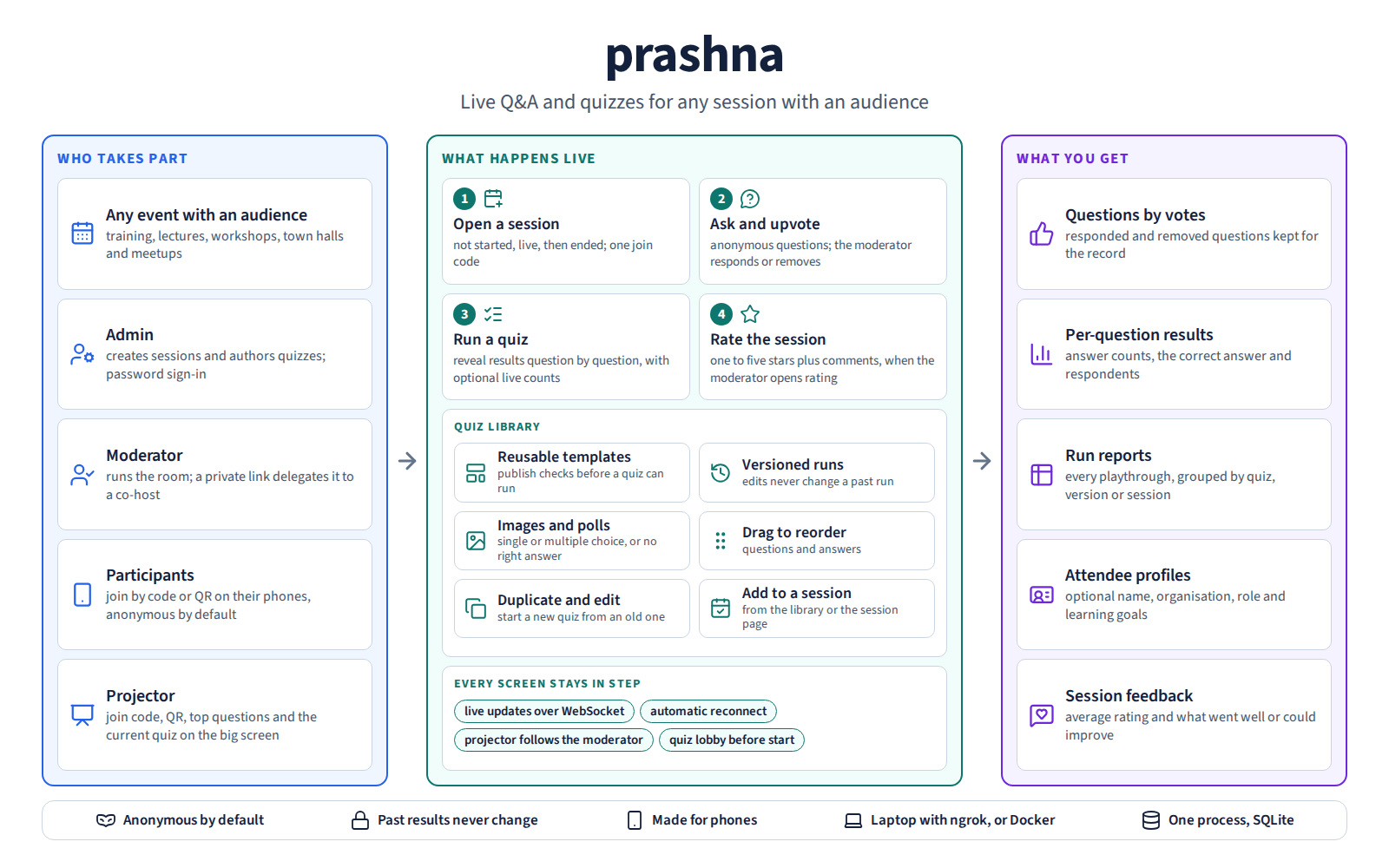
- prashna-0.2.0/README.md +90 -0
- prashna-0.2.0/deploy/README.md +176 -0
- prashna-0.2.0/distribution/README.md +118 -0
- prashna-0.2.0/performance/README.md +119 -0
- prashna-0.2.0/prashna/__init__.py +0 -0
- prashna-0.2.0/prashna/__main__.py +6 -0
- prashna-0.2.0/prashna/auth.py +198 -0
- prashna-0.2.0/prashna/backup.py +194 -0
- prashna-0.2.0/prashna/cli.py +134 -0
- prashna-0.2.0/prashna/db.py +155 -0
- prashna-0.2.0/prashna/diagnostics.py +58 -0
- prashna-0.2.0/prashna/installers/install.ps1 +22 -0
- prashna-0.2.0/prashna/installers/install.sh +24 -0
- prashna-0.2.0/prashna/main.py +2800 -0
- prashna-0.2.0/prashna/models.py +320 -0
- prashna-0.2.0/prashna/oauth.py +115 -0
- prashna-0.2.0/prashna/ratelimit.py +90 -0
- prashna-0.2.0/prashna/static/assets/common-B1uJCwh4.css +1 -0
- prashna-0.2.0/prashna/static/assets/common-C-iimYTB.js +1 -0
- prashna-0.2.0/prashna/static/assets/index-DZnWpx3x.js +1 -0
- prashna-0.2.0/prashna/static/assets/moderator-dnk9gqKk.js +1 -0
- prashna-0.2.0/prashna/static/assets/participant-C9Hyu7Br.js +1 -0
- prashna-0.2.0/prashna/static/assets/projector-lCmSbmv0.js +1 -0
- prashna-0.2.0/prashna/static/assets/quizzes-BCrX8Dds.js +1 -0
- prashna-0.2.0/prashna/static/index.html +133 -0
- prashna-0.2.0/prashna/static/moderator.html +133 -0
- prashna-0.2.0/prashna/static/participant.html +182 -0
- prashna-0.2.0/prashna/static/projector.html +37 -0
- prashna-0.2.0/prashna/static/quizzes.html +89 -0
- prashna-0.2.0/prashna/static/vendor/qrcode.js +2297 -0
- prashna-0.2.0/prashna/ws.py +71 -0
- prashna-0.2.0/pyproject.toml +101 -0
prashna-0.2.0/.gitignore
ADDED
|
@@ -0,0 +1,42 @@
|
|
|
1
|
+
__pycache__/
|
|
2
|
+
*.pyc
|
|
3
|
+
.venv/
|
|
4
|
+
.DS_Store
|
|
5
|
+
|
|
6
|
+
# SQLite DB and journals — contains user accounts, session data.
|
|
7
|
+
# (-wal / -shm are the WAL-mode sidecar files created at runtime.)
|
|
8
|
+
prashna.db
|
|
9
|
+
prashna.db-journal
|
|
10
|
+
*.db
|
|
11
|
+
*.db-journal
|
|
12
|
+
*.db-wal
|
|
13
|
+
*.db-shm
|
|
14
|
+
|
|
15
|
+
# User-uploaded files
|
|
16
|
+
uploads/*
|
|
17
|
+
!uploads/.gitkeep
|
|
18
|
+
|
|
19
|
+
# Local env / IDE / tooling
|
|
20
|
+
.env
|
|
21
|
+
.env.*
|
|
22
|
+
!.env.example
|
|
23
|
+
.idea/
|
|
24
|
+
.vscode/
|
|
25
|
+
.claude/
|
|
26
|
+
.mcp.json
|
|
27
|
+
|
|
28
|
+
# Frontend dev-lint tooling (no runtime/build artifacts — dev only)
|
|
29
|
+
node_modules/
|
|
30
|
+
|
|
31
|
+
# Lint / test caches & coverage
|
|
32
|
+
.ruff_cache/
|
|
33
|
+
.pytest_cache/
|
|
34
|
+
.coverage
|
|
35
|
+
coverage.xml
|
|
36
|
+
htmlcov/
|
|
37
|
+
|
|
38
|
+
# Vite build output (produced by `npm run build`)
|
|
39
|
+
prashna/static/
|
|
40
|
+
|
|
41
|
+
# Local release archives (published artifacts are attached in GitHub Releases)
|
|
42
|
+
dist/
|
prashna-0.2.0/LICENSE
ADDED
|
@@ -0,0 +1,21 @@
|
|
|
1
|
+
MIT License
|
|
2
|
+
|
|
3
|
+
Copyright (c) 2026 Sankaranarayanan Viswanathan
|
|
4
|
+
|
|
5
|
+
Permission is hereby granted, free of charge, to any person obtaining a copy
|
|
6
|
+
of this software and associated documentation files (the "Software"), to deal
|
|
7
|
+
in the Software without restriction, including without limitation the rights
|
|
8
|
+
to use, copy, modify, merge, publish, distribute, sublicense, and/or sell
|
|
9
|
+
copies of the Software, and to permit persons to whom the Software is
|
|
10
|
+
furnished to do so, subject to the following conditions:
|
|
11
|
+
|
|
12
|
+
The above copyright notice and this permission notice shall be included in all
|
|
13
|
+
copies or substantial portions of the Software.
|
|
14
|
+
|
|
15
|
+
THE SOFTWARE IS PROVIDED "AS IS", WITHOUT WARRANTY OF ANY KIND, EXPRESS OR
|
|
16
|
+
IMPLIED, INCLUDING BUT NOT LIMITED TO THE WARRANTIES OF MERCHANTABILITY,
|
|
17
|
+
FITNESS FOR A PARTICULAR PURPOSE AND NONINFRINGEMENT. IN NO EVENT SHALL THE
|
|
18
|
+
AUTHORS OR COPYRIGHT HOLDERS BE LIABLE FOR ANY CLAIM, DAMAGES OR OTHER
|
|
19
|
+
LIABILITY, WHETHER IN AN ACTION OF CONTRACT, TORT OR OTHERWISE, ARISING FROM,
|
|
20
|
+
OUT OF OR IN CONNECTION WITH THE SOFTWARE OR THE USE OR OTHER DEALINGS IN THE
|
|
21
|
+
SOFTWARE.
|
prashna-0.2.0/PKG-INFO
ADDED
|
@@ -0,0 +1,117 @@
|
|
|
1
|
+
Metadata-Version: 2.5
|
|
2
|
+
Name: prashna
|
|
3
|
+
Version: 0.2.0
|
|
4
|
+
Summary: Live Q&A and quizzes for any session with an audience
|
|
5
|
+
Project-URL: Homepage, https://kvsankar.github.io/prashna/
|
|
6
|
+
Project-URL: Source, https://github.com/kvsankar/prashna
|
|
7
|
+
Project-URL: Documentation, https://github.com/kvsankar/prashna/tree/main/docs
|
|
8
|
+
Project-URL: Issues, https://github.com/kvsankar/prashna/issues
|
|
9
|
+
License-Expression: MIT
|
|
10
|
+
License-File: LICENSE
|
|
11
|
+
Keywords: audience,classroom,live,q&a,quiz,training
|
|
12
|
+
Classifier: Development Status :: 4 - Beta
|
|
13
|
+
Classifier: Environment :: Web Environment
|
|
14
|
+
Classifier: Framework :: FastAPI
|
|
15
|
+
Classifier: Intended Audience :: Education
|
|
16
|
+
Classifier: Programming Language :: Python :: 3
|
|
17
|
+
Classifier: Topic :: Education
|
|
18
|
+
Requires-Python: >=3.11
|
|
19
|
+
Requires-Dist: bcrypt>=4.0
|
|
20
|
+
Requires-Dist: fastapi>=0.115
|
|
21
|
+
Requires-Dist: itsdangerous>=2.2
|
|
22
|
+
Requires-Dist: pydantic>=2.7
|
|
23
|
+
Requires-Dist: python-multipart>=0.0.9
|
|
24
|
+
Requires-Dist: sqlalchemy>=2.0
|
|
25
|
+
Requires-Dist: uvicorn[standard]>=0.30
|
|
26
|
+
Description-Content-Type: text/markdown
|
|
27
|
+
|
|
28
|
+
# Prashna
|
|
29
|
+
|
|
30
|
+
|
|
31
|
+
|
|
32
|
+
*How prashna runs a session with an audience: an admin sets it up, a moderator runs the room, participants join on their phones and the projector shows the room the same state. Questions are asked and upvoted, versioned quizzes are run question by question, and the session ends with ranked questions, quiz results, run reports, attendee profiles and feedback. The [infographic source](https://github.com/kvsankar/prashna/blob/main/docs/images/prashna-infographic.html) is kept with the image.*
|
|
33
|
+
|
|
34
|
+
A live Q&A and quiz tool for any session with an audience: training,
|
|
35
|
+
lectures, workshops, town halls, meetups. *Prashna* (प्रश्न) is
|
|
36
|
+
Sanskrit for *question*.
|
|
37
|
+
|
|
38
|
+
Two core features:
|
|
39
|
+
|
|
40
|
+
- **Anonymous Q&A.** Participants post questions and upvote each other's.
|
|
41
|
+
The moderator responds in text or out loud. A removed question is hidden
|
|
42
|
+
from participants and kept for the record.
|
|
43
|
+
- **Moderator-run quizzes.** Single- or multiple-choice questions, optional
|
|
44
|
+
images, anonymous answers, results revealed one question at a time, a lobby
|
|
45
|
+
screen on the projector, and optional live counts while people answer.
|
|
46
|
+
Quizzes are versioned: editing a quiz never changes the report of a past
|
|
47
|
+
run.
|
|
48
|
+
|
|
49
|
+
A **projector view** for the screen at the front of the room shows the join
|
|
50
|
+
code, a QR code for the participant link, the top questions, and the current
|
|
51
|
+
quiz question in step with the moderator.
|
|
52
|
+
|
|
53
|
+
## Install
|
|
54
|
+
|
|
55
|
+
One command, on macOS, Linux, or Windows:
|
|
56
|
+
|
|
57
|
+
```bash
|
|
58
|
+
curl -LsSf https://kvsankar.github.io/prashna/install.sh | sh # macOS / Linux
|
|
59
|
+
powershell -ExecutionPolicy ByPass -c "irm https://kvsankar.github.io/prashna/install.ps1 | iex" # Windows
|
|
60
|
+
```
|
|
61
|
+
|
|
62
|
+
Then start it:
|
|
63
|
+
|
|
64
|
+
```bash
|
|
65
|
+
prashna
|
|
66
|
+
```
|
|
67
|
+
|
|
68
|
+
If you already have [uv](https://docs.astral.sh/uv/), `uvx prashna` installs
|
|
69
|
+
and starts it in one step. Update with `uv tool upgrade prashna`.
|
|
70
|
+
`prashna --help` lists the options: port, data folder, and backups.
|
|
71
|
+
|
|
72
|
+
## First run
|
|
73
|
+
|
|
74
|
+
`prashna` serves on <http://127.0.0.1:8000> and opens your browser on a
|
|
75
|
+
one-time page where you choose the admin's username and password. The page
|
|
76
|
+
works once. After that, sign in to create sessions and write quizzes.
|
|
77
|
+
Prashna keeps its data in your app-data folder.
|
|
78
|
+
|
|
79
|
+
## Roles
|
|
80
|
+
|
|
81
|
+
| Role | Page | Who gets in |
|
|
82
|
+
| --- | --- | --- |
|
|
83
|
+
| Admin | `/` | The person who signed in with the admin password (or an allowed GitHub account). Creates sessions and quizzes. |
|
|
84
|
+
| Moderator | `/m/<code>` | The admin who owns the session, or anyone the admin gives the moderator link to, such as a co-host. Runs the room. |
|
|
85
|
+
| Participant | `/s/<code>` | Anyone with the session code or QR code. No account; an optional profile. |
|
|
86
|
+
| Projector | `/p/<code>` | Anyone. Read-only, for the room's screen. |
|
|
87
|
+
| Quiz library | `/quizzes` | The admin. Writes quizzes and reads run reports. |
|
|
88
|
+
|
|
89
|
+
The admin who owns a session can do everything a moderator can, on the same
|
|
90
|
+
page, plus the session's settings. The moderator link is how the admin hands
|
|
91
|
+
the room to someone without an admin account.
|
|
92
|
+
|
|
93
|
+
## Documentation
|
|
94
|
+
|
|
95
|
+
- [Behaviour specification](https://github.com/kvsankar/prashna/blob/main/docs/specs.md): every use case and its tests.
|
|
96
|
+
- [UX rules](https://github.com/kvsankar/prashna/blob/main/docs/UX.md): the frontend design system.
|
|
97
|
+
- [Architecture](https://github.com/kvsankar/prashna/blob/main/docs/architecture.md): components, data model, design decisions, and risks.
|
|
98
|
+
- [Development guide](https://github.com/kvsankar/prashna/blob/main/docs/development.md): setup, environment variables, tests, checks, and releases.
|
|
99
|
+
- [Engineering backlog](https://github.com/kvsankar/prashna/blob/main/docs/todo.md).
|
|
100
|
+
- [Performance measurement](https://github.com/kvsankar/prashna/blob/main/performance/README.md).
|
|
101
|
+
|
|
102
|
+
To run Prashna in Docker instead, see the
|
|
103
|
+
[container guide](https://github.com/kvsankar/prashna/blob/main/distribution/README.md).
|
|
104
|
+
The production deployment behind nginx is described in the
|
|
105
|
+
[deployment runbook](https://github.com/kvsankar/prashna/blob/main/deploy/README.md).
|
|
106
|
+
|
|
107
|
+
## License
|
|
108
|
+
|
|
109
|
+
MIT. See [LICENSE](https://github.com/kvsankar/prashna/blob/main/LICENSE).
|
|
110
|
+
|
|
111
|
+
## Status
|
|
112
|
+
|
|
113
|
+
Prashna runs in production at `prashna.sankara.net` for a single operator. It
|
|
114
|
+
is released as a container image.
|
|
115
|
+
Product ideas that need a decision are listed in the
|
|
116
|
+
[deferred appendix](https://github.com/kvsankar/prashna/blob/main/docs/specs.md#deferred-decision-needed)
|
|
117
|
+
of the specification.
|
prashna-0.2.0/README.md
ADDED
|
@@ -0,0 +1,90 @@
|
|
|
1
|
+
# Prashna
|
|
2
|
+
|
|
3
|
+

|
|
4
|
+
|
|
5
|
+
*How prashna runs a session with an audience: an admin sets it up, a moderator runs the room, participants join on their phones and the projector shows the room the same state. Questions are asked and upvoted, versioned quizzes are run question by question, and the session ends with ranked questions, quiz results, run reports, attendee profiles and feedback. The [infographic source](https://github.com/kvsankar/prashna/blob/main/docs/images/prashna-infographic.html) is kept with the image.*
|
|
6
|
+
|
|
7
|
+
A live Q&A and quiz tool for any session with an audience: training,
|
|
8
|
+
lectures, workshops, town halls, meetups. *Prashna* (प्रश्न) is
|
|
9
|
+
Sanskrit for *question*.
|
|
10
|
+
|
|
11
|
+
Two core features:
|
|
12
|
+
|
|
13
|
+
- **Anonymous Q&A.** Participants post questions and upvote each other's.
|
|
14
|
+
The moderator responds in text or out loud. A removed question is hidden
|
|
15
|
+
from participants and kept for the record.
|
|
16
|
+
- **Moderator-run quizzes.** Single- or multiple-choice questions, optional
|
|
17
|
+
images, anonymous answers, results revealed one question at a time, a lobby
|
|
18
|
+
screen on the projector, and optional live counts while people answer.
|
|
19
|
+
Quizzes are versioned: editing a quiz never changes the report of a past
|
|
20
|
+
run.
|
|
21
|
+
|
|
22
|
+
A **projector view** for the screen at the front of the room shows the join
|
|
23
|
+
code, a QR code for the participant link, the top questions, and the current
|
|
24
|
+
quiz question in step with the moderator.
|
|
25
|
+
|
|
26
|
+
## Install
|
|
27
|
+
|
|
28
|
+
One command, on macOS, Linux, or Windows:
|
|
29
|
+
|
|
30
|
+
```bash
|
|
31
|
+
curl -LsSf https://kvsankar.github.io/prashna/install.sh | sh # macOS / Linux
|
|
32
|
+
powershell -ExecutionPolicy ByPass -c "irm https://kvsankar.github.io/prashna/install.ps1 | iex" # Windows
|
|
33
|
+
```
|
|
34
|
+
|
|
35
|
+
Then start it:
|
|
36
|
+
|
|
37
|
+
```bash
|
|
38
|
+
prashna
|
|
39
|
+
```
|
|
40
|
+
|
|
41
|
+
If you already have [uv](https://docs.astral.sh/uv/), `uvx prashna` installs
|
|
42
|
+
and starts it in one step. Update with `uv tool upgrade prashna`.
|
|
43
|
+
`prashna --help` lists the options: port, data folder, and backups.
|
|
44
|
+
|
|
45
|
+
## First run
|
|
46
|
+
|
|
47
|
+
`prashna` serves on <http://127.0.0.1:8000> and opens your browser on a
|
|
48
|
+
one-time page where you choose the admin's username and password. The page
|
|
49
|
+
works once. After that, sign in to create sessions and write quizzes.
|
|
50
|
+
Prashna keeps its data in your app-data folder.
|
|
51
|
+
|
|
52
|
+
## Roles
|
|
53
|
+
|
|
54
|
+
| Role | Page | Who gets in |
|
|
55
|
+
| --- | --- | --- |
|
|
56
|
+
| Admin | `/` | The person who signed in with the admin password (or an allowed GitHub account). Creates sessions and quizzes. |
|
|
57
|
+
| Moderator | `/m/<code>` | The admin who owns the session, or anyone the admin gives the moderator link to, such as a co-host. Runs the room. |
|
|
58
|
+
| Participant | `/s/<code>` | Anyone with the session code or QR code. No account; an optional profile. |
|
|
59
|
+
| Projector | `/p/<code>` | Anyone. Read-only, for the room's screen. |
|
|
60
|
+
| Quiz library | `/quizzes` | The admin. Writes quizzes and reads run reports. |
|
|
61
|
+
|
|
62
|
+
The admin who owns a session can do everything a moderator can, on the same
|
|
63
|
+
page, plus the session's settings. The moderator link is how the admin hands
|
|
64
|
+
the room to someone without an admin account.
|
|
65
|
+
|
|
66
|
+
## Documentation
|
|
67
|
+
|
|
68
|
+
- [Behaviour specification](https://github.com/kvsankar/prashna/blob/main/docs/specs.md): every use case and its tests.
|
|
69
|
+
- [UX rules](https://github.com/kvsankar/prashna/blob/main/docs/UX.md): the frontend design system.
|
|
70
|
+
- [Architecture](https://github.com/kvsankar/prashna/blob/main/docs/architecture.md): components, data model, design decisions, and risks.
|
|
71
|
+
- [Development guide](https://github.com/kvsankar/prashna/blob/main/docs/development.md): setup, environment variables, tests, checks, and releases.
|
|
72
|
+
- [Engineering backlog](https://github.com/kvsankar/prashna/blob/main/docs/todo.md).
|
|
73
|
+
- [Performance measurement](https://github.com/kvsankar/prashna/blob/main/performance/README.md).
|
|
74
|
+
|
|
75
|
+
To run Prashna in Docker instead, see the
|
|
76
|
+
[container guide](https://github.com/kvsankar/prashna/blob/main/distribution/README.md).
|
|
77
|
+
The production deployment behind nginx is described in the
|
|
78
|
+
[deployment runbook](https://github.com/kvsankar/prashna/blob/main/deploy/README.md).
|
|
79
|
+
|
|
80
|
+
## License
|
|
81
|
+
|
|
82
|
+
MIT. See [LICENSE](https://github.com/kvsankar/prashna/blob/main/LICENSE).
|
|
83
|
+
|
|
84
|
+
## Status
|
|
85
|
+
|
|
86
|
+
Prashna runs in production at `prashna.sankara.net` for a single operator. It
|
|
87
|
+
is released as a container image.
|
|
88
|
+
Product ideas that need a decision are listed in the
|
|
89
|
+
[deferred appendix](https://github.com/kvsankar/prashna/blob/main/docs/specs.md#deferred-decision-needed)
|
|
90
|
+
of the specification.
|
|
@@ -0,0 +1,176 @@
|
|
|
1
|
+
# Deploy
|
|
2
|
+
|
|
3
|
+
This directory holds everything the **Hetzner** box needs to run Prashna at
|
|
4
|
+
`https://prashna.sankara.net`.
|
|
5
|
+
|
|
6
|
+
Laptop and other self-hosted container installs use the root `compose.yaml`
|
|
7
|
+
instead; see [`distribution/README.md`](../distribution/README.md).
|
|
8
|
+
|
|
9
|
+
## One-time setup
|
|
10
|
+
|
|
11
|
+
1. **DNS** — create a proxied Cloudflare `A` record whose origin value is:
|
|
12
|
+
|
|
13
|
+
```
|
|
14
|
+
prashna.sankara.net → <server-ip>
|
|
15
|
+
```
|
|
16
|
+
|
|
17
|
+
With the orange cloud enabled, public DNS correctly returns Cloudflare
|
|
18
|
+
anycast addresses rather than the server's IP. Verify the record and proxy
|
|
19
|
+
state in Cloudflare before continuing.
|
|
20
|
+
|
|
21
|
+
2. **GitHub Actions** — the `Build & publish Docker image` workflow pushes to
|
|
22
|
+
`ghcr.io/kvsankar/prashna`. No extra secrets needed; it uses the built-in
|
|
23
|
+
`GITHUB_TOKEN` with `packages:write` permission. Trigger it once by pushing
|
|
24
|
+
to `main` or running it manually so the image exists.
|
|
25
|
+
|
|
26
|
+
3. **On the server**, install nginx and Certbot if they are not already
|
|
27
|
+
present. `setup.sh` installs Docker when necessary, but it expects the nginx
|
|
28
|
+
and Certbot commands to exist before configuring TLS.
|
|
29
|
+
|
|
30
|
+
4. **If the GHCR package is private**, sign in to `ghcr.io` on the server
|
|
31
|
+
first, as described in
|
|
32
|
+
[Registry access](../distribution/README.md#registry-access).
|
|
33
|
+
|
|
34
|
+
5. **Run the bootstrap**:
|
|
35
|
+
|
|
36
|
+
```bash
|
|
37
|
+
git clone git@github.com:kvsankar/prashna.git ~/repos/prashna
|
|
38
|
+
cd ~/repos/prashna
|
|
39
|
+
CERTBOT_EMAIL=you@example.com ./deploy/setup.sh
|
|
40
|
+
```
|
|
41
|
+
|
|
42
|
+
This installs Docker when it is missing, lays down `/opt/prashna/` with a
|
|
43
|
+
generated `PRASHNA_SECRET_KEY` in `.env`, pulls the image, installs the
|
|
44
|
+
nginx site, prepares nginx for Cloudflare proxying
|
|
45
|
+
(`prepare-cloudflare-proxy.sh`), requests a TLS certificate with Certbot,
|
|
46
|
+
enables HTTP/2 (`enable-http2.sh`), and starts the container.
|
|
47
|
+
|
|
48
|
+
6. **Create the first admin.** Find the one-time setup link in the log and
|
|
49
|
+
open it on `https://prashna.sankara.net`:
|
|
50
|
+
|
|
51
|
+
```bash
|
|
52
|
+
cd /opt/prashna && docker compose logs prashna | grep setup=
|
|
53
|
+
```
|
|
54
|
+
|
|
55
|
+
With GitHub sign-in configured, an allowlisted GitHub account can create
|
|
56
|
+
the admin instead.
|
|
57
|
+
|
|
58
|
+
## Updating
|
|
59
|
+
|
|
60
|
+
Either:
|
|
61
|
+
|
|
62
|
+
```bash
|
|
63
|
+
cd /opt/prashna && docker compose pull && docker compose up -d --wait
|
|
64
|
+
```
|
|
65
|
+
|
|
66
|
+
Or wire up the optional `deploy.yml` workflow (not included by default) that
|
|
67
|
+
SSHes in and runs that on every push to `main`.
|
|
68
|
+
|
|
69
|
+
## Cloudflare visitor IP and HTTP/2
|
|
70
|
+
|
|
71
|
+
`setup.sh` runs two idempotent nginx helpers. Each one backs up the site file,
|
|
72
|
+
validates the result with `nginx -t`, and restores the backup if validation
|
|
73
|
+
fails.
|
|
74
|
+
|
|
75
|
+
- `prepare-cloudflare-proxy.sh` downloads Cloudflare's published IP ranges and
|
|
76
|
+
writes them to `/etc/nginx/snippets/prashna-cloudflare-realip.conf` as
|
|
77
|
+
`set_real_ip_from` lines with `real_ip_header CF-Connecting-IP`. It includes
|
|
78
|
+
that file in the site. nginx then sees the visitor's address rather than a
|
|
79
|
+
Cloudflare edge address, and passes it on in `X-Forwarded-For`, which the
|
|
80
|
+
application reads with `PRASHNA_TRUSTED_PROXY_HOPS=1`. Re-run the script to
|
|
81
|
+
refresh the ranges.
|
|
82
|
+
- `enable-http2.sh` adds `http2` to the Certbot-managed TLS listeners without
|
|
83
|
+
touching the certificates.
|
|
84
|
+
|
|
85
|
+
Both read `PRASHNA_DOMAIN` and `PRASHNA_NGINX_SITE_PATH` to target another
|
|
86
|
+
site.
|
|
87
|
+
|
|
88
|
+
## Cloudflare HTML-shell caching
|
|
89
|
+
|
|
90
|
+
The application marks only its static HTML page shells as edge-cacheable. API
|
|
91
|
+
responses, bad-session redirects, and personalized data remain `no-store`.
|
|
92
|
+
Cloudflare still needs a Cache Rule to make non-static HTML eligible. Preview
|
|
93
|
+
the idempotent ruleset update, then apply it with a token that can edit zone
|
|
94
|
+
rulesets:
|
|
95
|
+
|
|
96
|
+
```bash
|
|
97
|
+
export CLOUDFLARE_API_TOKEN=... # Zone Rulesets:Edit and Zone:Read
|
|
98
|
+
export CLOUDFLARE_ZONE_ID=... # optional; discovered by zone name
|
|
99
|
+
deploy/configure-cloudflare-cache.sh --dry-run
|
|
100
|
+
deploy/configure-cloudflare-cache.sh --apply
|
|
101
|
+
```
|
|
102
|
+
|
|
103
|
+
The helper preserves unrelated cache rules and replaces only the stable
|
|
104
|
+
`prashna_html_shells` rule. It covers `/`, `/quizzes`, and the `/s/`, `/m/`,
|
|
105
|
+
and `/p/` page prefixes, and respects the application's browser and edge TTLs.
|
|
106
|
+
Verify a repeated page response with `CF-Cache-Status`; purge the affected URLs
|
|
107
|
+
after a deploy if the five-minute edge TTL is too long for an urgent shell fix.
|
|
108
|
+
|
|
109
|
+
## Smoke test
|
|
110
|
+
|
|
111
|
+
Run the production-like Docker Compose smoke from a development checkout with:
|
|
112
|
+
|
|
113
|
+
```bash
|
|
114
|
+
PRASHNA_COMPOSE_SMOKE=1 uv run pytest tests/ops/test_compose_smoke.py -q
|
|
115
|
+
```
|
|
116
|
+
|
|
117
|
+
The smoke builds the local image, starts Compose with temporary data and upload
|
|
118
|
+
directories, waits for `/api/admin/status`, creates the first admin user,
|
|
119
|
+
uploads an image, restarts the service, and verifies the SQLite file, upload,
|
|
120
|
+
health endpoint, cookie signing, and safe diagnostics survive the restart.
|
|
121
|
+
|
|
122
|
+
After an image is published, CI runs the same state/restart checks against its
|
|
123
|
+
exact digest through the root distribution Compose model and also verifies the
|
|
124
|
+
in-image backup command.
|
|
125
|
+
|
|
126
|
+
The test removes its Compose project at the end. If it is interrupted, clean up
|
|
127
|
+
with `docker compose --project-name <printed-project> down --volumes
|
|
128
|
+
--remove-orphans`.
|
|
129
|
+
|
|
130
|
+
## Files
|
|
131
|
+
|
|
132
|
+
- `docker-compose.yml`: the service definition, copied to `/opt/prashna/`.
|
|
133
|
+
It requires `PRASHNA_SECRET_KEY` in `.env`.
|
|
134
|
+
- `env.example`: reference for `/opt/prashna/.env`. `setup.sh` writes that
|
|
135
|
+
file with a generated key when it is missing.
|
|
136
|
+
- `nginx-prashna.conf`: the nginx server block, symlinked into
|
|
137
|
+
`sites-enabled/`.
|
|
138
|
+
- `setup.sh`: the idempotent bootstrap script.
|
|
139
|
+
- `prepare-cloudflare-proxy.sh`: Cloudflare visitor-IP configuration for nginx.
|
|
140
|
+
- `enable-http2.sh`: HTTP/2 on the TLS listeners.
|
|
141
|
+
- `configure-cloudflare-cache.sh`: dry-run and apply reconciler for the
|
|
142
|
+
Cloudflare Cache Rule for HTML shells.
|
|
143
|
+
|
|
144
|
+
## Persistent data
|
|
145
|
+
|
|
146
|
+
- SQLite DB → `/opt/prashna/data/prashna.db`
|
|
147
|
+
- User uploads → `/opt/prashna/uploads/`
|
|
148
|
+
|
|
149
|
+
Back these two up. Everything else is rebuilt from the image.
|
|
150
|
+
|
|
151
|
+
The container writes as UID/GID `1001:1001`, so those two host directories must
|
|
152
|
+
be writable by that identity. If startup logs show SQLite or upload permission
|
|
153
|
+
errors, fix ownership with:
|
|
154
|
+
|
|
155
|
+
```bash
|
|
156
|
+
sudo chown -R 1001:1001 /opt/prashna/data /opt/prashna/uploads
|
|
157
|
+
```
|
|
158
|
+
|
|
159
|
+
For local smoke tests only, the compose file accepts `PRASHNA_PORT`,
|
|
160
|
+
`PRASHNA_DATA_DIR`, and `PRASHNA_UPLOADS_HOST_DIR` overrides. Here
|
|
161
|
+
`PRASHNA_DATA_DIR` is the host folder mounted at `/data`; it is a Compose
|
|
162
|
+
variable, unrelated to the `prashna` command's `PRASHNA_DATA_DIR`. Production
|
|
163
|
+
keeps the `/opt/prashna` defaults.
|
|
164
|
+
|
|
165
|
+
## Logs and retention
|
|
166
|
+
|
|
167
|
+
The app writes operator diagnostics to the container log stream. Inspect them
|
|
168
|
+
with:
|
|
169
|
+
|
|
170
|
+
```bash
|
|
171
|
+
cd /opt/prashna && docker compose logs -f prashna
|
|
172
|
+
```
|
|
173
|
+
|
|
174
|
+
Keep at least 7 days of application logs on the host or in your external log
|
|
175
|
+
shipper. Configure that retention in Docker, journald, or the server's logging
|
|
176
|
+
stack; Prashna emits safe diagnostic context but does not own log rotation.
|
|
@@ -0,0 +1,118 @@
|
|
|
1
|
+
# Prashna local distribution
|
|
2
|
+
|
|
3
|
+
This bundle runs the published Prashna container on a laptop or a small
|
|
4
|
+
self-hosted machine. It is separate from the Hetzner production configuration.
|
|
5
|
+
|
|
6
|
+
## Start
|
|
7
|
+
|
|
8
|
+
1. Install Docker Desktop or Docker Engine with the Compose plugin.
|
|
9
|
+
2. Start Prashna and wait for its health check:
|
|
10
|
+
|
|
11
|
+
```bash
|
|
12
|
+
docker compose up -d --wait
|
|
13
|
+
```
|
|
14
|
+
|
|
15
|
+
3. On a fresh install, find the one-time setup link in the log:
|
|
16
|
+
|
|
17
|
+
```bash
|
|
18
|
+
docker compose logs prashna | grep setup=
|
|
19
|
+
```
|
|
20
|
+
|
|
21
|
+
4. Open <http://127.0.0.1:8000/> plus the `/#setup=...` path from the log,
|
|
22
|
+
and choose the admin's username and password. The link works once.
|
|
23
|
+
|
|
24
|
+
No `.env` is needed. The cookie-signing key is generated into the data volume
|
|
25
|
+
on first start. To change the port or bind address, pin a version, or set
|
|
26
|
+
optional values, copy `compose.env.example` to `.env`; the file describes each
|
|
27
|
+
setting.
|
|
28
|
+
|
|
29
|
+
The database and uploads live in the Compose named volumes `prashna-data`
|
|
30
|
+
(mounted at `/data`) and `prashna-uploads` (mounted at `/app/uploads`). They
|
|
31
|
+
survive container replacement.
|
|
32
|
+
|
|
33
|
+
## Start without Compose
|
|
34
|
+
|
|
35
|
+
The image also runs on its own:
|
|
36
|
+
|
|
37
|
+
```bash
|
|
38
|
+
docker run -d --name prashna -p 127.0.0.1:8000:8000 \
|
|
39
|
+
-v prashna-data:/data -v prashna-uploads:/app/uploads \
|
|
40
|
+
ghcr.io/kvsankar/prashna
|
|
41
|
+
docker logs prashna 2>&1 | grep setup=
|
|
42
|
+
```
|
|
43
|
+
|
|
44
|
+
## Upgrade
|
|
45
|
+
|
|
46
|
+
The release bundle pins `PRASHNA_IMAGE_TAG` to its version. Upgrade only after
|
|
47
|
+
reading the release notes, then change the tag in `.env` and run
|
|
48
|
+
`docker compose pull` and `docker compose up -d --wait`.
|
|
49
|
+
|
|
50
|
+
## Registry access
|
|
51
|
+
|
|
52
|
+
Anonymous pulls work only while the `prashna` container package is set to
|
|
53
|
+
**Public** in GitHub Packages. That setting belongs to the GitHub account, not
|
|
54
|
+
to the repository workflow. While the package is private, authorized users
|
|
55
|
+
first sign in with a GitHub token that has `read:packages`:
|
|
56
|
+
|
|
57
|
+
```bash
|
|
58
|
+
echo "$GHCR_TOKEN" | docker login ghcr.io -u YOUR_GITHUB_LOGIN --password-stdin
|
|
59
|
+
```
|
|
60
|
+
|
|
61
|
+
Do not put the token in `.env`; that file is passed to Compose and is for
|
|
62
|
+
application configuration only.
|
|
63
|
+
|
|
64
|
+
## Share temporarily with ngrok
|
|
65
|
+
|
|
66
|
+
Set `PRASHNA_TRUSTED_PROXY_HOPS=1` in `.env`, restart with
|
|
67
|
+
`docker compose up -d`, and run:
|
|
68
|
+
|
|
69
|
+
```bash
|
|
70
|
+
ngrok http 8000
|
|
71
|
+
```
|
|
72
|
+
|
|
73
|
+
The ngrok URL is public. Stop ngrok when the session is over.
|
|
74
|
+
|
|
75
|
+
## Backup
|
|
76
|
+
|
|
77
|
+
The database and uploads live in Docker named volumes. This command creates a
|
|
78
|
+
consistent archive inside the container, including SQLite WAL state and all
|
|
79
|
+
uploads:
|
|
80
|
+
|
|
81
|
+
```bash
|
|
82
|
+
mkdir -p backups
|
|
83
|
+
name="prashna-$(date -u +%Y%m%dT%H%M%SZ).tar.gz"
|
|
84
|
+
docker compose exec -T prashna python -m prashna.backup create "/data/$name"
|
|
85
|
+
docker compose cp "prashna:/data/$name" "backups/$name"
|
|
86
|
+
docker compose exec -T prashna rm "/data/$name"
|
|
87
|
+
```
|
|
88
|
+
|
|
89
|
+
Keep backup archives outside the Docker volumes.
|
|
90
|
+
|
|
91
|
+
## Restore
|
|
92
|
+
|
|
93
|
+
Restore replaces the database and uploads. The command creates an additional
|
|
94
|
+
pre-restore archive beside the staged archive before changing anything.
|
|
95
|
+
|
|
96
|
+
```bash
|
|
97
|
+
archive=prashna-YYYYMMDDTHHMMSSZ.tar.gz
|
|
98
|
+
docker compose cp "backups/$archive" "prashna:/data/$archive"
|
|
99
|
+
docker compose stop prashna
|
|
100
|
+
docker compose run --rm --no-deps prashna \
|
|
101
|
+
python -m prashna.backup restore "/data/$archive" --confirm
|
|
102
|
+
docker compose start prashna
|
|
103
|
+
docker compose exec -T prashna rm "/data/$archive"
|
|
104
|
+
```
|
|
105
|
+
|
|
106
|
+
After restoring, open <http://127.0.0.1:8000/api/admin/status> and confirm the
|
|
107
|
+
expected session data. Copy the reported `prashna-pre-restore-*.tar.gz` out of
|
|
108
|
+
the container before deleting it.
|
|
109
|
+
|
|
110
|
+
## Useful commands
|
|
111
|
+
|
|
112
|
+
```bash
|
|
113
|
+
docker compose ps
|
|
114
|
+
docker compose logs -f prashna
|
|
115
|
+
docker compose restart prashna
|
|
116
|
+
docker compose down # keeps named volumes
|
|
117
|
+
docker compose down --volumes # DELETES database and uploads
|
|
118
|
+
```
|
|
@@ -0,0 +1,119 @@
|
|
|
1
|
+
# Performance measurement
|
|
2
|
+
|
|
3
|
+
Measure Prashna at three separate layers:
|
|
4
|
+
|
|
5
|
+
1. `Server-Timing: app;dur=...` isolates FastAPI application time.
|
|
6
|
+
2. Browser navigation and resource timing captures cold/repeat loads,
|
|
7
|
+
transfers, protocols, paint milestones, and the application-defined
|
|
8
|
+
`prashna-usable` milestone.
|
|
9
|
+
3. Structured application logs identify slow or state-changing requests
|
|
10
|
+
without storing credentials, participant identity, session URLs, or Q&A
|
|
11
|
+
content.
|
|
12
|
+
|
|
13
|
+
`measure.py` records the browser layer plus the server timing, five slowest
|
|
14
|
+
resources, transfer sizes, protocol, navigation type, and Cloudflare colo.
|
|
15
|
+
Reports are JSON so runs can be compared in CI or retained as release evidence.
|
|
16
|
+
|
|
17
|
+
Build the frontend and install Chromium before measuring a local server:
|
|
18
|
+
|
|
19
|
+
```bash
|
|
20
|
+
npm run build
|
|
21
|
+
uv run playwright install chromium
|
|
22
|
+
uv run python performance/measure.py \
|
|
23
|
+
--base-url http://127.0.0.1:8000 \
|
|
24
|
+
--session-code ABC123 \
|
|
25
|
+
--runs 5 \
|
|
26
|
+
--output /tmp/prashna-perf.json
|
|
27
|
+
```
|
|
28
|
+
|
|
29
|
+
For production, save a baseline and compare the same routes after a change:
|
|
30
|
+
|
|
31
|
+
```bash
|
|
32
|
+
uv run python performance/measure.py \
|
|
33
|
+
--base-url https://prashna.sankara.net \
|
|
34
|
+
--session-code ABC123 \
|
|
35
|
+
--budget performance/budgets.json \
|
|
36
|
+
--output /tmp/prashna-before.json
|
|
37
|
+
|
|
38
|
+
uv run python performance/measure.py \
|
|
39
|
+
--base-url https://prashna.sankara.net \
|
|
40
|
+
--session-code ABC123 \
|
|
41
|
+
--baseline /tmp/prashna-before.json \
|
|
42
|
+
--max-regression-percent 20 \
|
|
43
|
+
--budget performance/budgets.json \
|
|
44
|
+
--output /tmp/prashna-after.json
|
|
45
|
+
```
|
|
46
|
+
|
|
47
|
+
Use repeated samples from the same machine and network. Do not compare one
|
|
48
|
+
cold browser run with one warm run or infer browser speed from server timing
|
|
49
|
+
alone. Production budgets are intentionally broad enough for normal network
|
|
50
|
+
variation; baseline comparison provides the more sensitive release signal.
|
|
51
|
+
Every measured page must emit the usable milestone; a fast error or incomplete
|
|
52
|
+
boot therefore cannot pass merely because network activity stopped.
|
|
53
|
+
With the default five samples, release gates use browser/transfer medians and
|
|
54
|
+
application-time p95. Browser p95 remains in every report for diagnosis, but
|
|
55
|
+
needs at least 20 samples before it is a useful percentile rather than nearly
|
|
56
|
+
the single slowest request.
|
|
57
|
+
|
|
58
|
+
Optional authenticated measurements read secrets from environment variables
|
|
59
|
+
without writing them to reports:
|
|
60
|
+
|
|
61
|
+
```bash
|
|
62
|
+
uv run python performance/measure.py \
|
|
63
|
+
--base-url https://prashna.sankara.net \
|
|
64
|
+
--session-code ABC123 \
|
|
65
|
+
--moderator-key-env PRASHNA_PERF_MOD_KEY \
|
|
66
|
+
--route moderator=/m/ABC123
|
|
67
|
+
```
|
|
68
|
+
|
|
69
|
+
For an admin page, pass both `--admin-username-env` and
|
|
70
|
+
`--admin-password-env`. Never put credentials or moderator keys directly in a
|
|
71
|
+
command, report, or committed file.
|
|
72
|
+
|
|
73
|
+
## Interpret high variance
|
|
74
|
+
|
|
75
|
+
Do not infer browser performance from application timing or one public request.
|
|
76
|
+
When `Server-Timing` stays low but navigation varies, separate these fault
|
|
77
|
+
domains:
|
|
78
|
+
|
|
79
|
+
- client access network and ISP;
|
|
80
|
+
- client-to-Cloudflare ingress routing;
|
|
81
|
+
- Cloudflare edge and cache behavior;
|
|
82
|
+
- Cloudflare-to-Hetzner origin routing; and
|
|
83
|
+
- nginx, FastAPI, SQLite, and host capacity.
|
|
84
|
+
|
|
85
|
+
Capture several successful and failed samples from the same machine and
|
|
86
|
+
network. Record UTC time, client ISP/ASN, `CF-RAY`, `CF-Cache-Status`, negotiated
|
|
87
|
+
protocol, cURL phase timings, and MTR/traceroute output. Compare against an
|
|
88
|
+
unrelated control host during the same interval.
|
|
89
|
+
|
|
90
|
+
For Cloudflare routing, compare `https://prashna.sankara.net/cdn-cgi/trace`
|
|
91
|
+
with Cloudflare control endpoints from the same connection. Different `colo`
|
|
92
|
+
values are possible because anycast selection is destination-prefix-specific;
|
|
93
|
+
the value is not simply the geographically nearest data center. A different
|
|
94
|
+
colo explains the path selection, but does not by itself prove the cause of
|
|
95
|
+
latency variance. Correlate it with timestamped timings, Ray IDs, packet loss,
|
|
96
|
+
and path traces.
|
|
97
|
+
|
|
98
|
+
There is no zone setting that pins client ingress to a particular Cloudflare
|
|
99
|
+
colo. Argo Smart Routing affects the edge-to-origin path, not client-to-edge
|
|
100
|
+
selection. Keep the hostname proxied unless collected evidence shows the proxy
|
|
101
|
+
itself is the regression. The nginx visitor-IP and HTTP/2 setup and the
|
|
102
|
+
HTML-shell cache rule are described in
|
|
103
|
+
[`deploy/README.md`](../deploy/README.md#cloudflare-visitor-ip-and-http2).
|
|
104
|
+
|
|
105
|
+
## Release verification
|
|
106
|
+
|
|
107
|
+
For a performance-sensitive release:
|
|
108
|
+
|
|
109
|
+
1. Run lint and the full automated suite.
|
|
110
|
+
2. Save a pre-release JSON report when practical.
|
|
111
|
+
3. Deploy and verify the intended immutable image revision.
|
|
112
|
+
4. Check container health, `/api/admin/status`, and a direct static page.
|
|
113
|
+
5. Repeat the browser measurement from the same location and network.
|
|
114
|
+
6. Confirm HTTP/2 or HTTP/3, immutable compressed assets, page-shell cache
|
|
115
|
+
behavior, API `no-store`, and `Server-Timing`.
|
|
116
|
+
|
|
117
|
+
Five-run gates use browser and transfer medians plus application p95. Retain
|
|
118
|
+
browser p95 for diagnosis, but use at least 20 samples before treating it as a
|
|
119
|
+
meaningful tail percentile.
|