ppicker 0.1.0__tar.gz → 0.2.0__tar.gz
This diff represents the content of publicly available package versions that have been released to one of the supported registries. The information contained in this diff is provided for informational purposes only and reflects changes between package versions as they appear in their respective public registries.
- ppicker-0.2.0/.github/workflows/crates.yml +23 -0
- {ppicker-0.1.0 → ppicker-0.2.0}/Cargo.lock +11 -1
- {ppicker-0.1.0 → ppicker-0.2.0}/Cargo.toml +2 -1
- {ppicker-0.1.0 → ppicker-0.2.0}/PKG-INFO +76 -7
- {ppicker-0.1.0 → ppicker-0.2.0}/README.md +75 -6
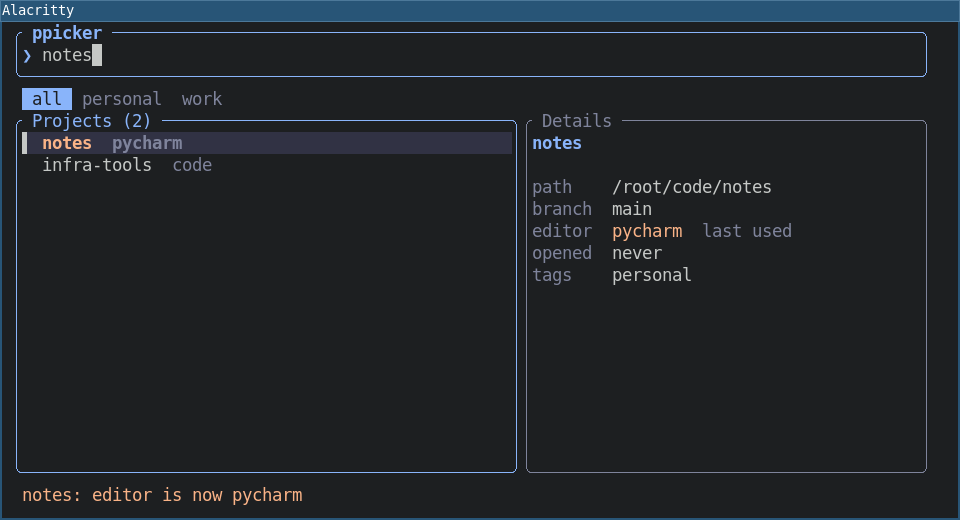
- ppicker-0.2.0/assets/07-workspace.png +0 -0
- ppicker-0.2.0/assets/08-workspace-open-with.png +0 -0
- ppicker-0.2.0/assets/hero.png +0 -0
- {ppicker-0.1.0 → ppicker-0.2.0}/docs/MIGRATION.md +9 -1
- {ppicker-0.1.0 → ppicker-0.2.0}/e2e/scenario.sh +36 -2
- ppicker-0.2.0/src/editors.rs +401 -0
- ppicker-0.2.0/src/exec.rs +66 -0
- {ppicker-0.1.0 → ppicker-0.2.0}/src/main.rs +109 -27
- {ppicker-0.1.0 → ppicker-0.2.0}/src/store.rs +175 -19
- {ppicker-0.1.0 → ppicker-0.2.0}/src/tui.rs +156 -38
- ppicker-0.1.0/assets/hero.png +0 -0
- ppicker-0.1.0/src/exec.rs +0 -49
- {ppicker-0.1.0 → ppicker-0.2.0}/.gitattributes +0 -0
- {ppicker-0.1.0 → ppicker-0.2.0}/.github/workflows/ci.yml +0 -0
- {ppicker-0.1.0 → ppicker-0.2.0}/.github/workflows/release.yml +0 -0
- {ppicker-0.1.0 → ppicker-0.2.0}/.gitignore +0 -0
- {ppicker-0.1.0 → ppicker-0.2.0}/assets/01-search.png +0 -0
- {ppicker-0.1.0 → ppicker-0.2.0}/assets/02-open-with.png +0 -0
- {ppicker-0.1.0 → ppicker-0.2.0}/assets/03-remembered.png +0 -0
- {ppicker-0.1.0 → ppicker-0.2.0}/assets/04-switch-editor.png +0 -0
- {ppicker-0.1.0 → ppicker-0.2.0}/assets/05-rofi-project.png +0 -0
- {ppicker-0.1.0 → ppicker-0.2.0}/assets/06-rofi-editor.png +0 -0
- {ppicker-0.1.0 → ppicker-0.2.0}/e2e/Dockerfile +0 -0
- {ppicker-0.1.0 → ppicker-0.2.0}/e2e/Dockerfile.dockerignore +0 -0
- {ppicker-0.1.0 → ppicker-0.2.0}/e2e/README.md +0 -0
- {ppicker-0.1.0 → ppicker-0.2.0}/e2e/i3config +0 -0
- {ppicker-0.1.0 → ppicker-0.2.0}/pyproject.toml +0 -0
- {ppicker-0.1.0 → ppicker-0.2.0}/src/menu.rs +0 -0
|
@@ -0,0 +1,23 @@
|
|
|
1
|
+
name: Publish to crates.io
|
|
2
|
+
on:
|
|
3
|
+
push:
|
|
4
|
+
tags: ["v*"]
|
|
5
|
+
workflow_dispatch:
|
|
6
|
+
inputs:
|
|
7
|
+
ref:
|
|
8
|
+
description: Tag to publish
|
|
9
|
+
default: v0.1.0
|
|
10
|
+
|
|
11
|
+
jobs:
|
|
12
|
+
crates:
|
|
13
|
+
runs-on: ubuntu-latest
|
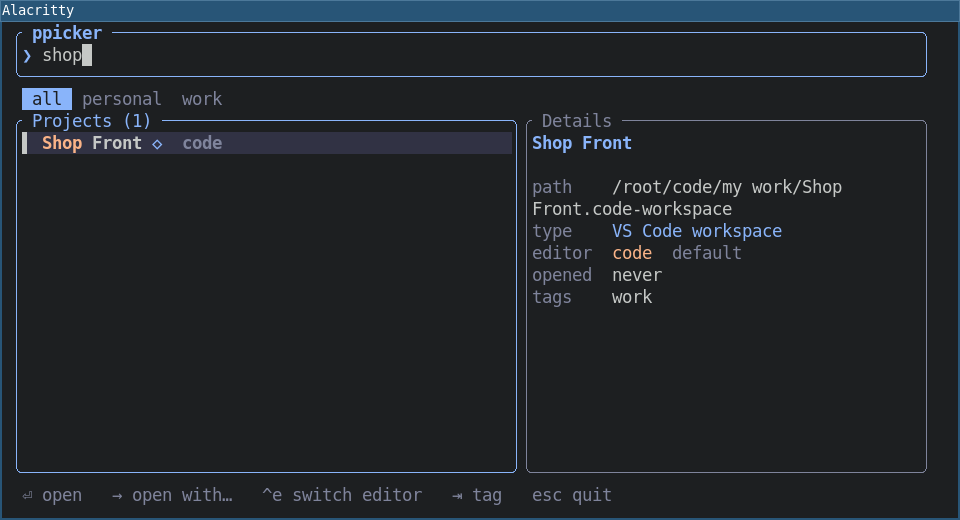
|
14
|
+
# The CRATE_IO secret lives in the `pypi` environment.
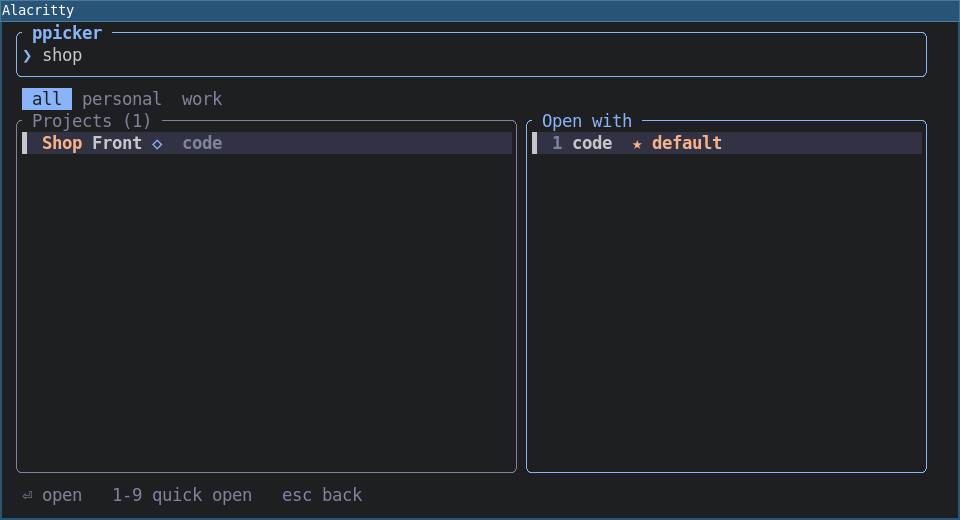
|
|
15
|
+
environment: pypi
|
|
16
|
+
steps:
|
|
17
|
+
- uses: actions/checkout@v4
|
|
18
|
+
with:
|
|
19
|
+
ref: ${{ inputs.ref || github.ref }}
|
|
20
|
+
- uses: dtolnay/rust-toolchain@stable
|
|
21
|
+
- run: cargo publish --locked
|
|
22
|
+
env:
|
|
23
|
+
CARGO_REGISTRY_TOKEN: ${{ secrets.CRATE_IO }}
|
|
@@ -1097,7 +1097,7 @@ checksum = "4a6394b9e965e73d0a289ee54f589087e2c676aedf60885baf52c76b771e4958"
|
|
|
1097
1097
|
|
|
1098
1098
|
[[package]]
|
|
1099
1099
|
name = "ppicker"
|
|
1100
|
-
version = "0.
|
|
1100
|
+
version = "0.2.0"
|
|
1101
1101
|
dependencies = [
|
|
1102
1102
|
"anyhow",
|
|
1103
1103
|
"clap",
|
|
@@ -1106,6 +1106,7 @@ dependencies = [
|
|
|
1106
1106
|
"ratatui",
|
|
1107
1107
|
"serde",
|
|
1108
1108
|
"toml",
|
|
1109
|
+
"which",
|
|
1109
1110
|
]
|
|
1110
1111
|
|
|
1111
1112
|
[[package]]
|
|
@@ -1923,6 +1924,15 @@ dependencies = [
|
|
|
1923
1924
|
"wezterm-dynamic",
|
|
1924
1925
|
]
|
|
1925
1926
|
|
|
1927
|
+
[[package]]
|
|
1928
|
+
name = "which"
|
|
1929
|
+
version = "8.0.6"
|
|
1930
|
+
source = "registry+https://github.com/rust-lang/crates.io-index"
|
|
1931
|
+
checksum = "bae2f2b2b816647a1cab1acc91f5bd20812d53cb344382635ec2181940c8034f"
|
|
1932
|
+
dependencies = [
|
|
1933
|
+
"libc",
|
|
1934
|
+
]
|
|
1935
|
+
|
|
1926
1936
|
[[package]]
|
|
1927
1937
|
name = "winapi"
|
|
1928
1938
|
version = "0.3.9"
|
|
@@ -1,6 +1,6 @@
|
|
|
1
1
|
[package]
|
|
2
2
|
name = "ppicker"
|
|
3
|
-
version = "0.
|
|
3
|
+
version = "0.2.0"
|
|
4
4
|
edition = "2024"
|
|
5
5
|
description = "Fast project picker for tiling window managers: open a project in your editor"
|
|
6
6
|
license = "MIT"
|
|
@@ -19,6 +19,7 @@ nucleo-matcher = "0.3.1"
|
|
|
19
19
|
ratatui = "0.30.2"
|
|
20
20
|
serde = { version = "1.0.229", features = ["derive"] }
|
|
21
21
|
toml = "1.2.1"
|
|
22
|
+
which = "8.0.6"
|
|
22
23
|
|
|
23
24
|
[profile.release]
|
|
24
25
|
opt-level = "z"
|
|
@@ -1,6 +1,6 @@
|
|
|
1
1
|
Metadata-Version: 2.4
|
|
2
2
|
Name: ppicker
|
|
3
|
-
Version: 0.
|
|
3
|
+
Version: 0.2.0
|
|
4
4
|
Classifier: Development Status :: 4 - Beta
|
|
5
5
|
Classifier: Environment :: Console
|
|
6
6
|
Classifier: Programming Language :: Rust
|
|
@@ -102,6 +102,31 @@ default.
|
|
|
102
102
|
|
|
103
103
|
|
|
104
104
|
|
|
105
|
+
### Workspaces, not just folders
|
|
106
|
+
|
|
107
|
+
A project does not have to be a folder. You can add a **workspace file** too, and ppicker opens it
|
|
108
|
+
the way the editor expects:
|
|
109
|
+
|
|
110
|
+
```shell
|
|
111
|
+
pp add ~/work/shop.code-workspace # a VS Code workspace
|
|
112
|
+
pp add ~/work/site.sublime-project # a Sublime Text project
|
|
113
|
+
pp scan ~/work --workspaces # also pick up workspace files while scanning
|
|
114
|
+
```
|
|
115
|
+
|
|
116
|
+
A workspace is named after its file (`Shop Front`) and marked with `◇` in the list; the details
|
|
117
|
+
panel says what kind it is.
|
|
118
|
+
|
|
119
|
+
|
|
120
|
+
|
|
121
|
+
A `.code-workspace` file means something only to VS Code, so ppicker offers only editors that can
|
|
122
|
+
open it. `Enter` uses the first VS Code editor in your `ides`, `→` lists just those (below, `code`
|
|
123
|
+
only: vim and PyCharm are left out), and `Ctrl-e` cycles only through them.
|
|
124
|
+
|
|
125
|
+
|
|
126
|
+
|
|
127
|
+
If none of your editors can open it, ppicker says which one to add instead of failing silently.
|
|
128
|
+
A folder and a workspace file are separate entries, so one repository can appear as both.
|
|
129
|
+
|
|
105
130
|
### Use rofi, wofi or fuzzel instead
|
|
106
131
|
|
|
107
132
|
If you already have a launcher you like, use it for the picking:
|
|
@@ -144,16 +169,55 @@ List the editors you use in the config file (run `pp paths` to see where it is).
|
|
|
144
169
|
the default for projects you have not opened yet:
|
|
145
170
|
|
|
146
171
|
```toml
|
|
147
|
-
ides = ["
|
|
172
|
+
ides = ["vscode", "pycharm", "zed"]
|
|
148
173
|
scan_dirs = ["/home/me/code"] # used by `pp scan` when you give no folder
|
|
149
174
|
```
|
|
150
175
|
|
|
151
|
-
|
|
152
|
-
|
|
153
|
-
|
|
176
|
+
Each entry is either a **name** ppicker knows, or a plain **command**.
|
|
177
|
+
|
|
178
|
+
### Names: the same editor on every system
|
|
179
|
+
|
|
180
|
+
Editor commands are called different things on different systems: `code` on Linux, `code.cmd` on
|
|
181
|
+
Windows, `codium`, a flatpak... A name stands for a list of commands, and ppicker runs the first
|
|
182
|
+
one it finds on your `PATH`. So the same config works everywhere:
|
|
183
|
+
|
|
184
|
+
| Name | Tries, in order |
|
|
185
|
+
|---|---|
|
|
186
|
+
| `vscode` | `code`, `code-insiders`, `codium`, `vscodium`, the VS Code flatpak |
|
|
187
|
+
| `pycharm` | `pycharm`, `pycharm-professional`, `pycharm-community`, `charm`, `pycharm64`, the PyCharm flatpaks |
|
|
188
|
+
| `idea`, `webstorm`, `goland`, `rustrover`, `clion`, `phpstorm`, `rider`, `rubymine` | the usual launcher name of each (and its `64` variant) |
|
|
189
|
+
| `sublime` | `subl`, `sublime_text`, `sublime-text` |
|
|
190
|
+
| `zed` | `zed`, `zeditor` |
|
|
191
|
+
| `cursor`, `windsurf` | the same name |
|
|
192
|
+
|
|
193
|
+
If a name is not found you get an error that lists what was tried.
|
|
194
|
+
|
|
195
|
+
### Plain commands
|
|
196
|
+
|
|
197
|
+
Anything else is run as written, for example `code`, `idea`, `code -n` or `alacritty -e nvim`.
|
|
198
|
+
Put a path with spaces in quotes: `"C:\Program Files\Some Editor\editor.exe"`. ppicker recognises
|
|
199
|
+
the well-known commands (`code`, `codium`, `cursor`, `subl`, `pycharm`, ...) so it knows which
|
|
200
|
+
projects they can open.
|
|
201
|
+
|
|
202
|
+
### Your own command list
|
|
203
|
+
|
|
204
|
+
If your install is somewhere unusual, or you want a different order, override a name (or define a
|
|
205
|
+
new one) in `config.toml`. The first command that exists is used:
|
|
206
|
+
|
|
207
|
+
```toml
|
|
208
|
+
[commands]
|
|
209
|
+
vscode = ['C:\Tools\VSCode\bin\code.cmd', "code"] # my install first, then whatever is on PATH
|
|
210
|
+
work = ["codium", "code"] # a new name, usable in `ides`
|
|
211
|
+
```
|
|
212
|
+
|
|
213
|
+
### How a project is opened
|
|
214
|
+
|
|
215
|
+
A folder is opened as `<editor> .` from inside the folder. A workspace file is opened as
|
|
216
|
+
`<editor> <file>` (see [Workspaces](https://github.com/roman-right/ppicker#workspaces-not-just-folders)). The editor is started detached,
|
|
217
|
+
so it keeps running after ppicker exits.
|
|
154
218
|
|
|
155
219
|
> **Terminal editors** such as vim or nvim need a terminal to run in. Use a command that starts
|
|
156
|
-
> one, for example `ides = ["
|
|
220
|
+
> one, for example `ides = ["vscode", "alacritty -e nvim"]`.
|
|
157
221
|
|
|
158
222
|
## Commands
|
|
159
223
|
|
|
@@ -168,8 +232,10 @@ pp editor myproj pycharm # set it without opening
|
|
|
168
232
|
pp editor myproj --reset # forget it, back to the default editor
|
|
169
233
|
pp add . --ide pycharm # register the current folder and set its editor
|
|
170
234
|
pp add . --name api -t work # custom name, add a tag (repeat -t for more)
|
|
235
|
+
pp add ~/w/shop.code-workspace # add a workspace file instead of a folder
|
|
171
236
|
pp scan ~/code -t work # add every git repository in a folder
|
|
172
|
-
pp
|
|
237
|
+
pp scan ~/code --workspaces # ...and the workspace files in it (one level down)
|
|
238
|
+
pp list # show projects with their editors (workspaces marked ◇)
|
|
173
239
|
pp rm myproj # remove from the list (files are untouched)
|
|
174
240
|
pp menu [--ask] # pick through rofi or another launcher
|
|
175
241
|
pp paths # where the config and project list are stored
|
|
@@ -201,6 +267,9 @@ Two small text files you can read and edit; `pp paths` prints the exact location
|
|
|
201
267
|
- `config.toml`: your settings (editors, scan folders).
|
|
202
268
|
- `projects.toml`: your projects, their tags, last-opened time and remembered editor.
|
|
203
269
|
|
|
270
|
+
To keep both somewhere else (a portable install, or to try things out without touching your
|
|
271
|
+
real list), set `PPICKER_HOME` to a folder; ppicker then uses `config/` and `data/` inside it.
|
|
272
|
+
|
|
204
273
|
## Moving from `code-compass`
|
|
205
274
|
|
|
206
275
|
ppicker replaces the old Qt-based `code-compass` package. See [docs/MIGRATION.md](https://github.com/roman-right/ppicker/blob/main/docs/MIGRATION.md)
|
|
@@ -87,6 +87,31 @@ default.
|
|
|
87
87
|
|
|
88
88
|

|
|
89
89
|
|
|
90
|
+
### Workspaces, not just folders
|
|
91
|
+
|
|
92
|
+
A project does not have to be a folder. You can add a **workspace file** too, and ppicker opens it
|
|
93
|
+
the way the editor expects:
|
|
94
|
+
|
|
95
|
+
```shell
|
|
96
|
+
pp add ~/work/shop.code-workspace # a VS Code workspace
|
|
97
|
+
pp add ~/work/site.sublime-project # a Sublime Text project
|
|
98
|
+
pp scan ~/work --workspaces # also pick up workspace files while scanning
|
|
99
|
+
```
|
|
100
|
+
|
|
101
|
+
A workspace is named after its file (`Shop Front`) and marked with `◇` in the list; the details
|
|
102
|
+
panel says what kind it is.
|
|
103
|
+
|
|
104
|
+

|
|
105
|
+
|
|
106
|
+
A `.code-workspace` file means something only to VS Code, so ppicker offers only editors that can
|
|
107
|
+
open it. `Enter` uses the first VS Code editor in your `ides`, `→` lists just those (below, `code`
|
|
108
|
+
only: vim and PyCharm are left out), and `Ctrl-e` cycles only through them.
|
|
109
|
+
|
|
110
|
+

|
|
111
|
+
|
|
112
|
+
If none of your editors can open it, ppicker says which one to add instead of failing silently.
|
|
113
|
+
A folder and a workspace file are separate entries, so one repository can appear as both.
|
|
114
|
+
|
|
90
115
|
### Use rofi, wofi or fuzzel instead
|
|
91
116
|
|
|
92
117
|
If you already have a launcher you like, use it for the picking:
|
|
@@ -129,16 +154,55 @@ List the editors you use in the config file (run `pp paths` to see where it is).
|
|
|
129
154
|
the default for projects you have not opened yet:
|
|
130
155
|
|
|
131
156
|
```toml
|
|
132
|
-
ides = ["
|
|
157
|
+
ides = ["vscode", "pycharm", "zed"]
|
|
133
158
|
scan_dirs = ["/home/me/code"] # used by `pp scan` when you give no folder
|
|
134
159
|
```
|
|
135
160
|
|
|
136
|
-
|
|
137
|
-
|
|
138
|
-
|
|
161
|
+
Each entry is either a **name** ppicker knows, or a plain **command**.
|
|
162
|
+
|
|
163
|
+
### Names: the same editor on every system
|
|
164
|
+
|
|
165
|
+
Editor commands are called different things on different systems: `code` on Linux, `code.cmd` on
|
|
166
|
+
Windows, `codium`, a flatpak... A name stands for a list of commands, and ppicker runs the first
|
|
167
|
+
one it finds on your `PATH`. So the same config works everywhere:
|
|
168
|
+
|
|
169
|
+
| Name | Tries, in order |
|
|
170
|
+
|---|---|
|
|
171
|
+
| `vscode` | `code`, `code-insiders`, `codium`, `vscodium`, the VS Code flatpak |
|
|
172
|
+
| `pycharm` | `pycharm`, `pycharm-professional`, `pycharm-community`, `charm`, `pycharm64`, the PyCharm flatpaks |
|
|
173
|
+
| `idea`, `webstorm`, `goland`, `rustrover`, `clion`, `phpstorm`, `rider`, `rubymine` | the usual launcher name of each (and its `64` variant) |
|
|
174
|
+
| `sublime` | `subl`, `sublime_text`, `sublime-text` |
|
|
175
|
+
| `zed` | `zed`, `zeditor` |
|
|
176
|
+
| `cursor`, `windsurf` | the same name |
|
|
177
|
+
|
|
178
|
+
If a name is not found you get an error that lists what was tried.
|
|
179
|
+
|
|
180
|
+
### Plain commands
|
|
181
|
+
|
|
182
|
+
Anything else is run as written, for example `code`, `idea`, `code -n` or `alacritty -e nvim`.
|
|
183
|
+
Put a path with spaces in quotes: `"C:\Program Files\Some Editor\editor.exe"`. ppicker recognises
|
|
184
|
+
the well-known commands (`code`, `codium`, `cursor`, `subl`, `pycharm`, ...) so it knows which
|
|
185
|
+
projects they can open.
|
|
186
|
+
|
|
187
|
+
### Your own command list
|
|
188
|
+
|
|
189
|
+
If your install is somewhere unusual, or you want a different order, override a name (or define a
|
|
190
|
+
new one) in `config.toml`. The first command that exists is used:
|
|
191
|
+
|
|
192
|
+
```toml
|
|
193
|
+
[commands]
|
|
194
|
+
vscode = ['C:\Tools\VSCode\bin\code.cmd', "code"] # my install first, then whatever is on PATH
|
|
195
|
+
work = ["codium", "code"] # a new name, usable in `ides`
|
|
196
|
+
```
|
|
197
|
+
|
|
198
|
+
### How a project is opened
|
|
199
|
+
|
|
200
|
+
A folder is opened as `<editor> .` from inside the folder. A workspace file is opened as
|
|
201
|
+
`<editor> <file>` (see [Workspaces](https://github.com/roman-right/ppicker#workspaces-not-just-folders)). The editor is started detached,
|
|
202
|
+
so it keeps running after ppicker exits.
|
|
139
203
|
|
|
140
204
|
> **Terminal editors** such as vim or nvim need a terminal to run in. Use a command that starts
|
|
141
|
-
> one, for example `ides = ["
|
|
205
|
+
> one, for example `ides = ["vscode", "alacritty -e nvim"]`.
|
|
142
206
|
|
|
143
207
|
## Commands
|
|
144
208
|
|
|
@@ -153,8 +217,10 @@ pp editor myproj pycharm # set it without opening
|
|
|
153
217
|
pp editor myproj --reset # forget it, back to the default editor
|
|
154
218
|
pp add . --ide pycharm # register the current folder and set its editor
|
|
155
219
|
pp add . --name api -t work # custom name, add a tag (repeat -t for more)
|
|
220
|
+
pp add ~/w/shop.code-workspace # add a workspace file instead of a folder
|
|
156
221
|
pp scan ~/code -t work # add every git repository in a folder
|
|
157
|
-
pp
|
|
222
|
+
pp scan ~/code --workspaces # ...and the workspace files in it (one level down)
|
|
223
|
+
pp list # show projects with their editors (workspaces marked ◇)
|
|
158
224
|
pp rm myproj # remove from the list (files are untouched)
|
|
159
225
|
pp menu [--ask] # pick through rofi or another launcher
|
|
160
226
|
pp paths # where the config and project list are stored
|
|
@@ -186,6 +252,9 @@ Two small text files you can read and edit; `pp paths` prints the exact location
|
|
|
186
252
|
- `config.toml`: your settings (editors, scan folders).
|
|
187
253
|
- `projects.toml`: your projects, their tags, last-opened time and remembered editor.
|
|
188
254
|
|
|
255
|
+
To keep both somewhere else (a portable install, or to try things out without touching your
|
|
256
|
+
real list), set `PPICKER_HOME` to a folder; ppicker then uses `config/` and `data/` inside it.
|
|
257
|
+
|
|
189
258
|
## Moving from `code-compass`
|
|
190
259
|
|
|
191
260
|
ppicker replaces the old Qt-based `code-compass` package. See [docs/MIGRATION.md](https://github.com/roman-right/ppicker/blob/main/docs/MIGRATION.md)
|
|
Binary file
|
|
Binary file
|
|
Binary file
|
|
@@ -9,7 +9,8 @@ what you need to do, and how to bring your projects with you.
|
|
|
9
9
|
1. **`ppicker` is released** on PyPI and crates.io. Its command is `pp`.
|
|
10
10
|
2. **`code-compass` 0.2.0 is released** as a final version. It still works, but prints a notice
|
|
11
11
|
when you start it and adds a `migrate` command that copies your projects to ppicker.
|
|
12
|
-
3. **A migration period of
|
|
12
|
+
3. **A short migration period of about two weeks** follows the 0.2.0 release (until late
|
|
13
|
+
November 2026).
|
|
13
14
|
4. **After that, the `code-compass` name on PyPI is handed over to a different, unrelated
|
|
14
15
|
project.** Old `code-compass` releases may be removed from PyPI at that point.
|
|
15
16
|
|
|
@@ -34,6 +35,13 @@ pipx install ppicker # or: uv tool install ppicker
|
|
|
34
35
|
pipx run code-compass==0.2.0 migrate
|
|
35
36
|
```
|
|
36
37
|
|
|
38
|
+
If the name on PyPI has already been handed over, install the final release straight from
|
|
39
|
+
GitHub instead; it is the same code:
|
|
40
|
+
|
|
41
|
+
```shell
|
|
42
|
+
pipx run --spec git+https://github.com/roman-right/ppicker@code-compass-v0.2.0 code-compass migrate
|
|
43
|
+
```
|
|
44
|
+
|
|
37
45
|
This reads `~/.config/code_compass/data.db` and adds every project to ppicker. If `pp` is on your
|
|
38
46
|
PATH it imports directly; otherwise it writes `ppicker-import.toml` and tells you to run
|
|
39
47
|
`pp import ppicker-import.toml`. Running it twice is harmless: projects are matched by path, so
|
|
@@ -13,9 +13,9 @@ sleep 2
|
|
|
13
13
|
|
|
14
14
|
# Fake editors that record where they were started, to prove the detached launch.
|
|
15
15
|
for ed in code pycharm vim; do
|
|
16
|
-
printf '#!/bin/sh\npwd > /tmp/%s_called\n' "$ed" > /usr/local/bin/$ed && chmod +x /usr/local/bin/$ed
|
|
16
|
+
printf '#!/bin/sh\npwd > /tmp/%s_called\nprintf "%%s\\n" "$@" > /tmp/%s_args\n' "$ed" "$ed" > /usr/local/bin/$ed && chmod +x /usr/local/bin/$ed
|
|
17
17
|
done
|
|
18
|
-
reset_calls() { rm -f /tmp/code_called /tmp/pycharm_called /tmp/vim_called; }
|
|
18
|
+
reset_calls() { rm -f /tmp/code_called /tmp/pycharm_called /tmp/vim_called /tmp/codium_called /tmp/*_args; }
|
|
19
19
|
|
|
20
20
|
# Fake projects.
|
|
21
21
|
mkdir -p ~/code && cd ~/code
|
|
@@ -88,6 +88,40 @@ sleep 1
|
|
|
88
88
|
check "pp open uses the editor given at add time (vim)" "[ \"\$(called vim)\" = /root/code/dotfiles ]"
|
|
89
89
|
$PP list
|
|
90
90
|
|
|
91
|
+
echo "=== 7. workspaces: a .code-workspace file (with a space in its path) is a project too ==="
|
|
92
|
+
mkdir -p "$HOME/code/my work"
|
|
93
|
+
WS="$HOME/code/my work/Shop Front.code-workspace"
|
|
94
|
+
printf '{"folders":[{"path":"."}]}' > "$WS"
|
|
95
|
+
printf 'not a project' > "$HOME/code/plain.txt"
|
|
96
|
+
$PP add "$WS" -t work
|
|
97
|
+
check "workspace listed as a workspace, named after the file" "$PP list --plain | grep -q '^Shop Front.*workspace$'"
|
|
98
|
+
check "a plain file is rejected" "! $PP add \$HOME/code/plain.txt >/dev/null 2>&1"
|
|
99
|
+
check "pycharm is refused for a workspace" "! $PP open 'Shop Front' pycharm >/dev/null 2>&1"
|
|
100
|
+
reset_calls
|
|
101
|
+
popup
|
|
102
|
+
xdotool type --delay 120 "shop"; sleep 1
|
|
103
|
+
shot 7-workspace # marked with a diamond, "type VS Code workspace", editor = code
|
|
104
|
+
xdotool key Right; sleep 1
|
|
105
|
+
shot 8-workspace-open-with # only editors that can open it
|
|
106
|
+
xdotool key Return; sleep 2
|
|
107
|
+
check "workspace opened by code from its own folder" "[ \"\$(called code)\" = '/root/code/my work' ]"
|
|
108
|
+
check "workspace file passed whole, spaces intact" "[ \"\$(cat /tmp/code_args)\" = '$WS' ]"
|
|
109
|
+
pkill alacritty 2>/dev/null; sleep 1
|
|
110
|
+
|
|
111
|
+
echo "--- 'vscode' finds whichever VS Code command exists (here only codium)"
|
|
112
|
+
reset_calls
|
|
113
|
+
mv /usr/local/bin/code /tmp/code.real
|
|
114
|
+
printf '#!/bin/sh\npwd > /tmp/codium_called\n' > /usr/local/bin/codium && chmod +x /usr/local/bin/codium
|
|
115
|
+
printf 'ides = ["vscode"]\n' > ~/.config/ppicker/config.toml
|
|
116
|
+
$PP editor "Shop Front" --reset >/dev/null # it remembered the literal `code` from above
|
|
117
|
+
$PP open "Shop Front"; sleep 1
|
|
118
|
+
check "vscode resolved to codium" "[ \"\$(called codium)\" = '/root/code/my work' ]"
|
|
119
|
+
mv /tmp/code.real /usr/local/bin/code; rm -f /usr/local/bin/codium
|
|
120
|
+
printf 'ides = ["pycharm", "vim"]\n' > ~/.config/ppicker/config.toml
|
|
121
|
+
$PP editor "Shop Front" --reset >/dev/null
|
|
122
|
+
check "no editor can open it: error says what to add" "$PP open 'Shop Front' 2>&1 | grep -q 'VS Code.*vscode'"
|
|
123
|
+
printf 'ides = ["code", "pycharm", "vim"]\n' > ~/.config/ppicker/config.toml
|
|
124
|
+
|
|
91
125
|
echo "=== overview: every project, each with the editor it was last opened in ==="
|
|
92
126
|
popup
|
|
93
127
|
shot 0-overview
|