poselab-mcp 0.1.0__tar.gz
This diff represents the content of publicly available package versions that have been released to one of the supported registries. The information contained in this diff is provided for informational purposes only and reflects changes between package versions as they appear in their respective public registries.
- poselab_mcp-0.1.0/.gitignore +220 -0
- poselab_mcp-0.1.0/LICENSE +21 -0
- poselab_mcp-0.1.0/PKG-INFO +142 -0
- poselab_mcp-0.1.0/PUBLISHING.md +53 -0
- poselab_mcp-0.1.0/README.md +122 -0
- poselab_mcp-0.1.0/docs/sample-rig.png +0 -0
- poselab_mcp-0.1.0/examples/rigs.example.json +39 -0
- poselab_mcp-0.1.0/examples/selftest.py +80 -0
- poselab_mcp-0.1.0/pyproject.toml +32 -0
- poselab_mcp-0.1.0/server.json +38 -0
- poselab_mcp-0.1.0/src/poselab_mcp/__init__.py +2 -0
- poselab_mcp-0.1.0/src/poselab_mcp/__main__.py +3 -0
- poselab_mcp-0.1.0/src/poselab_mcp/blender/lab.py +643 -0
- poselab_mcp-0.1.0/src/poselab_mcp/blender/sample.py +273 -0
- poselab_mcp-0.1.0/src/poselab_mcp/blender/worker.py +54 -0
- poselab_mcp-0.1.0/src/poselab_mcp/server.py +159 -0
- poselab_mcp-0.1.0/src/poselab_mcp/sheet.py +29 -0
- poselab_mcp-0.1.0/src/poselab_mcp/worker_client.py +110 -0
|
@@ -0,0 +1,220 @@
|
|
|
1
|
+
# Byte-compiled / optimized / DLL files
|
|
2
|
+
__pycache__/
|
|
3
|
+
*.py[codz]
|
|
4
|
+
*$py.class
|
|
5
|
+
|
|
6
|
+
# C extensions
|
|
7
|
+
*.so
|
|
8
|
+
|
|
9
|
+
# Distribution / packaging
|
|
10
|
+
.Python
|
|
11
|
+
build/
|
|
12
|
+
develop-eggs/
|
|
13
|
+
dist/
|
|
14
|
+
downloads/
|
|
15
|
+
eggs/
|
|
16
|
+
.eggs/
|
|
17
|
+
lib/
|
|
18
|
+
lib64/
|
|
19
|
+
parts/
|
|
20
|
+
sdist/
|
|
21
|
+
var/
|
|
22
|
+
wheels/
|
|
23
|
+
share/python-wheels/
|
|
24
|
+
*.egg-info/
|
|
25
|
+
.installed.cfg
|
|
26
|
+
*.egg
|
|
27
|
+
MANIFEST
|
|
28
|
+
|
|
29
|
+
# PyInstaller
|
|
30
|
+
# Usually these files are written by a python script from a template
|
|
31
|
+
# before PyInstaller builds the exe, so as to inject date/other infos into it.
|
|
32
|
+
*.manifest
|
|
33
|
+
*.spec
|
|
34
|
+
|
|
35
|
+
# Installer logs
|
|
36
|
+
pip-log.txt
|
|
37
|
+
pip-delete-this-directory.txt
|
|
38
|
+
|
|
39
|
+
# Unit test / coverage reports
|
|
40
|
+
htmlcov/
|
|
41
|
+
.tox/
|
|
42
|
+
.nox/
|
|
43
|
+
.coverage
|
|
44
|
+
.coverage.*
|
|
45
|
+
.cache
|
|
46
|
+
nosetests.xml
|
|
47
|
+
coverage.xml
|
|
48
|
+
*.cover
|
|
49
|
+
*.py.cover
|
|
50
|
+
*.lcov
|
|
51
|
+
.hypothesis/
|
|
52
|
+
.pytest_cache/
|
|
53
|
+
cover/
|
|
54
|
+
|
|
55
|
+
# Translations
|
|
56
|
+
*.mo
|
|
57
|
+
*.pot
|
|
58
|
+
|
|
59
|
+
# Django stuff:
|
|
60
|
+
*.log
|
|
61
|
+
local_settings.py
|
|
62
|
+
db.sqlite3
|
|
63
|
+
db.sqlite3-journal
|
|
64
|
+
|
|
65
|
+
# Flask stuff:
|
|
66
|
+
instance/
|
|
67
|
+
.webassets-cache
|
|
68
|
+
|
|
69
|
+
# Scrapy stuff:
|
|
70
|
+
.scrapy
|
|
71
|
+
|
|
72
|
+
# Sphinx documentation
|
|
73
|
+
docs/_build/
|
|
74
|
+
|
|
75
|
+
# PyBuilder
|
|
76
|
+
.pybuilder/
|
|
77
|
+
target/
|
|
78
|
+
|
|
79
|
+
# Jupyter Notebook
|
|
80
|
+
.ipynb_checkpoints
|
|
81
|
+
|
|
82
|
+
# IPython
|
|
83
|
+
profile_default/
|
|
84
|
+
ipython_config.py
|
|
85
|
+
|
|
86
|
+
# pyenv
|
|
87
|
+
# For a library or package, you might want to ignore these files since the code is
|
|
88
|
+
# intended to run in multiple environments; otherwise, check them in:
|
|
89
|
+
# .python-version
|
|
90
|
+
|
|
91
|
+
# pipenv
|
|
92
|
+
# According to pypa/pipenv#598, it is recommended to include Pipfile.lock in version control.
|
|
93
|
+
# However, in case of collaboration, if having platform-specific dependencies or dependencies
|
|
94
|
+
# having no cross-platform support, pipenv may install dependencies that don't work, or not
|
|
95
|
+
# install all needed dependencies.
|
|
96
|
+
# Pipfile.lock
|
|
97
|
+
|
|
98
|
+
# uv
|
|
99
|
+
# Similar to Pipfile.lock, it is generally recommended to include uv.lock in version control.
|
|
100
|
+
# This is especially recommended for binary packages to ensure reproducibility, and is more
|
|
101
|
+
# commonly ignored for libraries.
|
|
102
|
+
# uv.lock
|
|
103
|
+
|
|
104
|
+
# poetry
|
|
105
|
+
# Similar to Pipfile.lock, it is generally recommended to include poetry.lock in version control.
|
|
106
|
+
# This is especially recommended for binary packages to ensure reproducibility, and is more
|
|
107
|
+
# commonly ignored for libraries.
|
|
108
|
+
# https://python-poetry.org/docs/basic-usage/#commit-your-poetrylock-file-to-version-control
|
|
109
|
+
# poetry.lock
|
|
110
|
+
# poetry.toml
|
|
111
|
+
|
|
112
|
+
# pdm
|
|
113
|
+
# Similar to Pipfile.lock, it is generally recommended to include pdm.lock in version control.
|
|
114
|
+
# pdm recommends including project-wide configuration in pdm.toml, but excluding .pdm-python.
|
|
115
|
+
# https://pdm-project.org/en/latest/usage/project/#working-with-version-control
|
|
116
|
+
# pdm.lock
|
|
117
|
+
# pdm.toml
|
|
118
|
+
.pdm-python
|
|
119
|
+
.pdm-build/
|
|
120
|
+
|
|
121
|
+
# pixi
|
|
122
|
+
# Similar to Pipfile.lock, it is generally recommended to include pixi.lock in version control.
|
|
123
|
+
# pixi.lock
|
|
124
|
+
# Pixi creates a virtual environment in the .pixi directory, just like venv module creates one
|
|
125
|
+
# in the .venv directory. It is recommended not to include this directory in version control.
|
|
126
|
+
.pixi/*
|
|
127
|
+
!.pixi/config.toml
|
|
128
|
+
|
|
129
|
+
# PEP 582; used by e.g. github.com/David-OConnor/pyflow and github.com/pdm-project/pdm
|
|
130
|
+
__pypackages__/
|
|
131
|
+
|
|
132
|
+
# Celery stuff
|
|
133
|
+
celerybeat-schedule*
|
|
134
|
+
celerybeat.pid
|
|
135
|
+
|
|
136
|
+
# Redis
|
|
137
|
+
*.rdb
|
|
138
|
+
*.aof
|
|
139
|
+
*.pid
|
|
140
|
+
|
|
141
|
+
# RabbitMQ
|
|
142
|
+
mnesia/
|
|
143
|
+
rabbitmq/
|
|
144
|
+
rabbitmq-data/
|
|
145
|
+
|
|
146
|
+
# ActiveMQ
|
|
147
|
+
activemq-data/
|
|
148
|
+
|
|
149
|
+
# SageMath parsed files
|
|
150
|
+
*.sage.py
|
|
151
|
+
|
|
152
|
+
# Environments
|
|
153
|
+
.env
|
|
154
|
+
.envrc
|
|
155
|
+
.venv
|
|
156
|
+
env/
|
|
157
|
+
venv/
|
|
158
|
+
ENV/
|
|
159
|
+
env.bak/
|
|
160
|
+
venv.bak/
|
|
161
|
+
|
|
162
|
+
# Spyder project settings
|
|
163
|
+
.spyderproject
|
|
164
|
+
.spyproject
|
|
165
|
+
|
|
166
|
+
# Rope project settings
|
|
167
|
+
.ropeproject
|
|
168
|
+
|
|
169
|
+
# mkdocs/Zensical documentation
|
|
170
|
+
/site
|
|
171
|
+
|
|
172
|
+
# mypy
|
|
173
|
+
.mypy_cache/
|
|
174
|
+
.dmypy.json
|
|
175
|
+
dmypy.json
|
|
176
|
+
|
|
177
|
+
# Pyre type checker
|
|
178
|
+
.pyre/
|
|
179
|
+
|
|
180
|
+
# pytype static type analyzer
|
|
181
|
+
.pytype/
|
|
182
|
+
|
|
183
|
+
# Cython debug symbols
|
|
184
|
+
cython_debug/
|
|
185
|
+
|
|
186
|
+
# PyCharm
|
|
187
|
+
# JetBrains specific template is maintained in a separate JetBrains.gitignore that can
|
|
188
|
+
# be found at https://github.com/github/gitignore/blob/main/Global/JetBrains.gitignore
|
|
189
|
+
# and can be added to the global gitignore or merged into this file. For a more nuclear
|
|
190
|
+
# option (not recommended) you can uncomment the following to ignore the entire idea folder.
|
|
191
|
+
# .idea/
|
|
192
|
+
|
|
193
|
+
# Abstra
|
|
194
|
+
# Abstra is an AI-powered process automation framework.
|
|
195
|
+
# Ignore directories containing user credentials, local state, and settings.
|
|
196
|
+
# Learn more at https://abstra.io/docs
|
|
197
|
+
.abstra/
|
|
198
|
+
|
|
199
|
+
# Visual Studio Code
|
|
200
|
+
# Visual Studio Code specific template is maintained in a separate VisualStudioCode.gitignore that
|
|
201
|
+
# can be found at https://github.com/github/gitignore/blob/main/Global/VisualStudioCode.gitignore
|
|
202
|
+
# and can be added to the global gitignore or merged into this file. However, if you prefer, you
|
|
203
|
+
# could uncomment the following to ignore the entire vscode folder
|
|
204
|
+
# .vscode/
|
|
205
|
+
# Temporary file for partial code execution
|
|
206
|
+
tempCodeRunnerFile.py
|
|
207
|
+
|
|
208
|
+
# Ruff stuff:
|
|
209
|
+
.ruff_cache/
|
|
210
|
+
|
|
211
|
+
# PyPI configuration file
|
|
212
|
+
.pypirc
|
|
213
|
+
|
|
214
|
+
# Marimo
|
|
215
|
+
marimo/_static/
|
|
216
|
+
marimo/_lsp/
|
|
217
|
+
__marimo__/
|
|
218
|
+
|
|
219
|
+
# Streamlit
|
|
220
|
+
.streamlit/secrets.toml
|
|
@@ -0,0 +1,21 @@
|
|
|
1
|
+
MIT License
|
|
2
|
+
|
|
3
|
+
Copyright (c) 2026 Khoa Hoang
|
|
4
|
+
|
|
5
|
+
Permission is hereby granted, free of charge, to any person obtaining a copy
|
|
6
|
+
of this software and associated documentation files (the "Software"), to deal
|
|
7
|
+
in the Software without restriction, including without limitation the rights
|
|
8
|
+
to use, copy, modify, merge, publish, distribute, sublicense, and/or sell
|
|
9
|
+
copies of the Software, and to permit persons to whom the Software is
|
|
10
|
+
furnished to do so, subject to the following conditions:
|
|
11
|
+
|
|
12
|
+
The above copyright notice and this permission notice shall be included in all
|
|
13
|
+
copies or substantial portions of the Software.
|
|
14
|
+
|
|
15
|
+
THE SOFTWARE IS PROVIDED "AS IS", WITHOUT WARRANTY OF ANY KIND, EXPRESS OR
|
|
16
|
+
IMPLIED, INCLUDING BUT NOT LIMITED TO THE WARRANTIES OF MERCHANTABILITY,
|
|
17
|
+
FITNESS FOR A PARTICULAR PURPOSE AND NONINFRINGEMENT. IN NO EVENT SHALL THE
|
|
18
|
+
AUTHORS OR COPYRIGHT HOLDERS BE LIABLE FOR ANY CLAIM, DAMAGES OR OTHER
|
|
19
|
+
LIABILITY, WHETHER IN AN ACTION OF CONTRACT, TORT OR OTHERWISE, ARISING FROM,
|
|
20
|
+
OUT OF OR IN CONNECTION WITH THE SOFTWARE OR THE USE OR OTHER DEALINGS IN THE
|
|
21
|
+
SOFTWARE.
|
|
@@ -0,0 +1,142 @@
|
|
|
1
|
+
Metadata-Version: 2.5
|
|
2
|
+
Name: poselab-mcp
|
|
3
|
+
Version: 0.1.0
|
|
4
|
+
Summary: An MCP server of measured spatial answers for posing first-person arms and a rifle in Blender: clipping depth, what the eye sees, and a solver that says which goals no move can meet.
|
|
5
|
+
Project-URL: Homepage, https://github.com/hpdkhoa/poselab-mcp
|
|
6
|
+
Project-URL: Issues, https://github.com/hpdkhoa/poselab-mcp/issues
|
|
7
|
+
Author: Khoa Hoang
|
|
8
|
+
License-Expression: MIT
|
|
9
|
+
License-File: LICENSE
|
|
10
|
+
Keywords: animation,blender,first-person,game-development,mcp,spatial-reasoning
|
|
11
|
+
Classifier: Development Status :: 3 - Alpha
|
|
12
|
+
Classifier: Intended Audience :: Developers
|
|
13
|
+
Classifier: Programming Language :: Python :: 3
|
|
14
|
+
Classifier: Topic :: Games/Entertainment
|
|
15
|
+
Classifier: Topic :: Multimedia :: Graphics :: 3D Modeling
|
|
16
|
+
Requires-Python: >=3.10
|
|
17
|
+
Requires-Dist: mcp<3,>=2.0
|
|
18
|
+
Requires-Dist: pillow>=10
|
|
19
|
+
Description-Content-Type: text/markdown
|
|
20
|
+
|
|
21
|
+
# Pose Lab
|
|
22
|
+
|
|
23
|
+
<!-- mcp-name: io.github.hpdkhoa/poselab-mcp -->
|
|
24
|
+
|
|
25
|
+
**Measured spatial answers for posing first-person arms and a rifle in Blender, over MCP.**
|
|
26
|
+
|
|
27
|
+
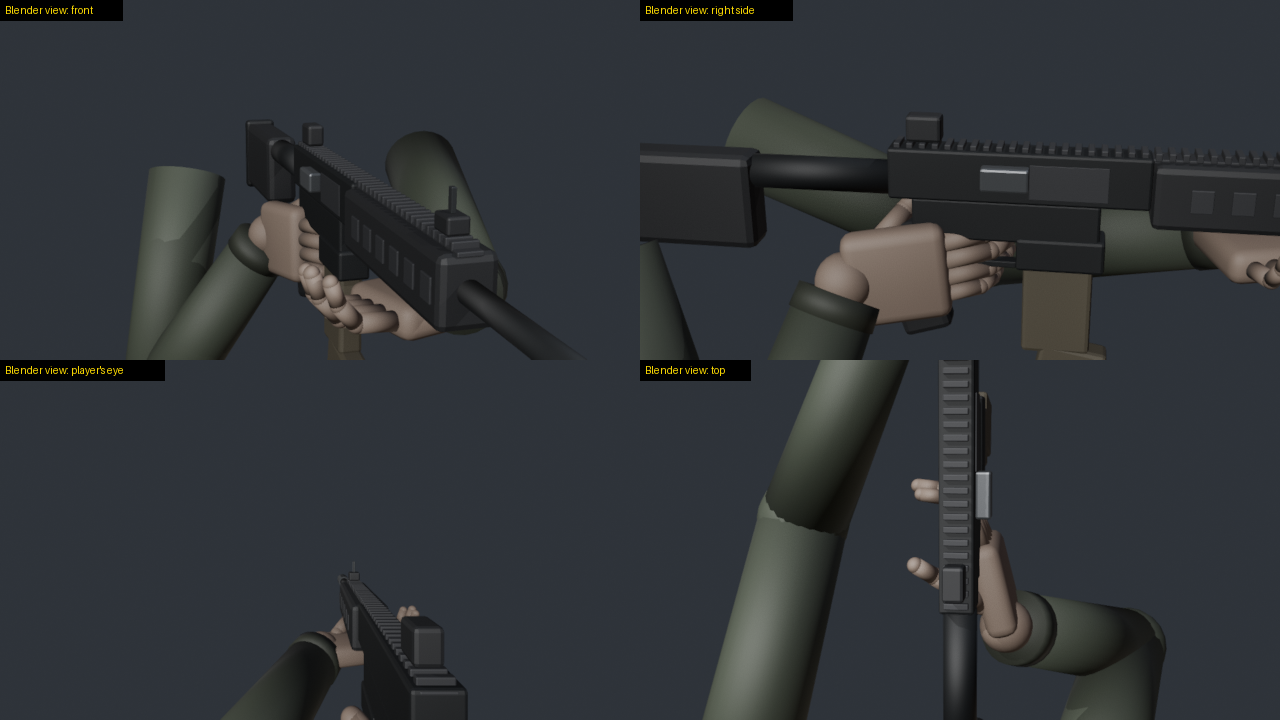
|
|
28
|
+
|
|
29
|
+
Models are weak at judging 3D space from pictures: which side of a rifle faces the eye, whether a finger sits inside
|
|
30
|
+
the receiver, whether any turn of the gun can ever show its ejection port. Pose Lab gives a model numbers instead. It reports positions in named frames and how deep anything clips. It
|
|
31
|
+
measures how squarely a surface faces the eye and what the eye can see. Its solver searches rifle moves against goals
|
|
32
|
+
and reports which goals no move can meet.
|
|
33
|
+
|
|
34
|
+
I built it while hand-making chamber checks for my first-person shooter. One question took me several full Blender
|
|
35
|
+
runs: can turning the rifle show its ejection port to the eye? With Pose Lab it is one `solve` call. On my game's AK
|
|
36
|
+
rig, turning alone met the goal in 0 of 60 samples. That is a fact of the geometry: the eye looks along the barrel.
|
|
37
|
+
Turning and moving the rifle met every goal in about 20 s. The built-in sample rig shows the same result: 0 of 60
|
|
38
|
+
samples for turning alone, and every goal met in 9 s for turning and moving.
|
|
39
|
+
|
|
40
|
+
## What it gives a model
|
|
41
|
+
|
|
42
|
+
| Tool | Answers |
|
|
43
|
+
|---|---|
|
|
44
|
+
| `list_rigs`, `load_rig`, `describe` | the rigs, the frames, the sign rules, named points, clips, moving parts |
|
|
45
|
+
| `pose_idle`, `pose_clip`, `move_part`, `snapshot` | put the rig in a pose: a clip at a time, the carrier drawn back, saved poses |
|
|
46
|
+
| `move_gun` | roll, swing, pitch and move the rifle; the hands keep their hold by arm IK |
|
|
47
|
+
| `reach` | a wrist onto a point by arm IK (try elbow poles to clear a forearm) |
|
|
48
|
+
| `where`, `distance` | positions in a named frame |
|
|
49
|
+
| `clearance` | how deep the rifle sits inside a forearm, palm or finger, and where |
|
|
50
|
+
| `faces_eye`, `visible`, `screen` | how squarely a surface faces the eye, how much of it the eye sees, where it falls on screen |
|
|
51
|
+
| `solve` | searches rifle moves against goals; reports each goal and how often any sample met it |
|
|
52
|
+
| `render` | a contact sheet: the player's eye and outside views, each tile labelled as a Blender view |
|
|
53
|
+
|
|
54
|
+
### Frames and signs
|
|
55
|
+
|
|
56
|
+
Every position goes in and comes out in a named frame, so no one has to guess axes:
|
|
57
|
+
|
|
58
|
+
* `gun`: the gun bone as it stands, Unreal-style axes, cm: +X the gun's left, +Y along the barrel, +Z up (the default)
|
|
59
|
+
* `arms`: the arms' space, Unreal-style axes, cm
|
|
60
|
+
* `view`: from the eye, cm: +X right, +Y forward, +Z up
|
|
61
|
+
|
|
62
|
+
Turns use the player's words: `roll` + turns the gun's right side up, `swing` + takes the muzzle left, `pitch` + the
|
|
63
|
+
muzzle up. Moves (`right`, `forward`, `up`) are in the view.
|
|
64
|
+
|
|
65
|
+
A hand round its grip touches the rifle on the idle pose already (a finger on the trigger, fingers round the
|
|
66
|
+
handguard). Call `clearance` at `pose_idle` for that baseline, and leave those segments out with `ignore` wildcards.
|
|
67
|
+
|
|
68
|
+
## Install
|
|
69
|
+
|
|
70
|
+
You need [Blender](https://www.blender.org/download/) and Python 3.10 or newer. I tested it on Windows 10 with
|
|
71
|
+
Blender 5.2.2 and Python 3.14. I have not tested macOS, Linux or older Blender versions yet.
|
|
72
|
+
|
|
73
|
+
```
|
|
74
|
+
uvx poselab-mcp
|
|
75
|
+
```
|
|
76
|
+
|
|
77
|
+
or `pip install poselab-mcp` and run `poselab-mcp`.
|
|
78
|
+
|
|
79
|
+
Add it to Claude Code:
|
|
80
|
+
|
|
81
|
+
```
|
|
82
|
+
claude mcp add poselab -- uvx poselab-mcp
|
|
83
|
+
```
|
|
84
|
+
|
|
85
|
+
or to any MCP client's configuration:
|
|
86
|
+
|
|
87
|
+
```json
|
|
88
|
+
{
|
|
89
|
+
"mcpServers": {
|
|
90
|
+
"poselab": {
|
|
91
|
+
"command": "uvx",
|
|
92
|
+
"args": ["poselab-mcp"],
|
|
93
|
+
"env": { "POSELAB_BLENDER": "C:/Program Files/Blender Foundation/Blender 5.2/blender.exe" }
|
|
94
|
+
}
|
|
95
|
+
}
|
|
96
|
+
}
|
|
97
|
+
```
|
|
98
|
+
|
|
99
|
+
### Settings
|
|
100
|
+
|
|
101
|
+
| Variable | Meaning |
|
|
102
|
+
|---|---|
|
|
103
|
+
| `POSELAB_BLENDER` | Blender's executable, if it is not on the PATH or in the usual install folder |
|
|
104
|
+
| `POSELAB_RIGS` | a `rigs.json` describing your own rigs (see `examples/rigs.example.json`) |
|
|
105
|
+
| `POSELAB_OUT` | the only folder Pose Lab writes to (renders, the worker's log); default `~/.poselab` |
|
|
106
|
+
|
|
107
|
+
## Rigs
|
|
108
|
+
|
|
109
|
+
**The built-in sample** (`load_rig {"rig": "sample"}`) needs no files. Pose Lab builds it in Blender from code: two
|
|
110
|
+
arms with Unreal mannequin bone names hold an AR-style rifle with a charging handle that slides back.
|
|
111
|
+
|
|
112
|
+
**Your own rigs** come from FBX files: the arms mesh, an idle pose, the rifle, and clips. Describe them in a
|
|
113
|
+
`rigs.json` (copy `examples/rigs.example.json`) and point `POSELAB_RIGS` at it. Clips can be FBX animations on the same
|
|
114
|
+
skeleton, or `<clip>.pose.json` bone data: `{"fps": 30, "frames": [{"bone": [[x, y, z], [w, x, y, z]], ...}, ...]}`,
|
|
115
|
+
local location and rotation per bone on the idle armature. (Blender misreads an FBX animation it exported itself when
|
|
116
|
+
it imports it again; bone data avoids that. `describe` reports each FBX clip's skeleton fit.)
|
|
117
|
+
|
|
118
|
+
## Safety
|
|
119
|
+
|
|
120
|
+
* Pose Lab only reads your rig files. It writes nothing but renders and its log, and only inside `POSELAB_OUT`.
|
|
121
|
+
* The Blender worker listens on 127.0.0.1 only, on a free port, and answers only requests that carry the session's
|
|
122
|
+
random token. It runs only Pose Lab's own commands.
|
|
123
|
+
|
|
124
|
+
## How it works
|
|
125
|
+
|
|
126
|
+
* `poselab_mcp/server.py`: the MCP server (the official Python SDK, stdio).
|
|
127
|
+
* `poselab_mcp/worker_client.py`: starts one headless Blender on the first call and keeps the rig loaded.
|
|
128
|
+
* `poselab_mcp/blender/lab.py`: inside Blender: the rig, the frames, the measures, the IK, the solver, the renders.
|
|
129
|
+
* `poselab_mcp/blender/sample.py`: the built-in sample rig.
|
|
130
|
+
|
|
131
|
+
## Test
|
|
132
|
+
|
|
133
|
+
```
|
|
134
|
+
python examples/selftest.py
|
|
135
|
+
```
|
|
136
|
+
|
|
137
|
+
It starts the server as an MCP client does and loads the sample rig. Then it replays the question above: turning
|
|
138
|
+
alone never shows the port, and turning and moving does. The contact sheet lands in `~/.poselab/renders/sheet.png`.
|
|
139
|
+
|
|
140
|
+
## License
|
|
141
|
+
|
|
142
|
+
MIT
|
|
@@ -0,0 +1,53 @@
|
|
|
1
|
+
# Publishing Pose Lab
|
|
2
|
+
|
|
3
|
+
The order matters. The MCP Registry accepts the listing only after the PyPI package is live. It also checks that the
|
|
4
|
+
README on PyPI carries `mcp-name: io.github.hpdkhoa/poselab-mcp`. README.md holds that line as an HTML comment.
|
|
5
|
+
|
|
6
|
+
## 1. GitHub
|
|
7
|
+
|
|
8
|
+
The GitHub repo already holds a first commit (its `.gitignore` and `LICENSE`). Build on it:
|
|
9
|
+
|
|
10
|
+
git init -b main
|
|
11
|
+
git remote add origin https://github.com/hpdkhoa/poselab-mcp.git
|
|
12
|
+
git fetch origin
|
|
13
|
+
git reset origin/main
|
|
14
|
+
git add .
|
|
15
|
+
git commit -F <message file>
|
|
16
|
+
git push -u origin main
|
|
17
|
+
|
|
18
|
+
`git reset origin/main` points the new branch at GitHub's commit and keeps every file here as it is.
|
|
19
|
+
|
|
20
|
+
## 2. PyPI
|
|
21
|
+
|
|
22
|
+
Make a PyPI account and an API token (pypi.org, Account settings, API tokens). Then, with uv:
|
|
23
|
+
|
|
24
|
+
uv build
|
|
25
|
+
uv publish --token <your PyPI token>
|
|
26
|
+
|
|
27
|
+
or with pip tools:
|
|
28
|
+
|
|
29
|
+
python -m pip install build twine
|
|
30
|
+
python -m build
|
|
31
|
+
python -m twine upload dist/*
|
|
32
|
+
|
|
33
|
+
Check it: `uvx poselab-mcp` starts the server (it waits for a client on stdin; Ctrl+C to stop).
|
|
34
|
+
|
|
35
|
+
## 3. The MCP Registry
|
|
36
|
+
|
|
37
|
+
Install the publisher (one of):
|
|
38
|
+
|
|
39
|
+
npm install -g mcp-publisher
|
|
40
|
+
# or download mcp-publisher from https://github.com/modelcontextprotocol/registry/releases
|
|
41
|
+
|
|
42
|
+
Then, in this folder (server.json is here):
|
|
43
|
+
|
|
44
|
+
mcp-publisher login github
|
|
45
|
+
mcp-publisher publish
|
|
46
|
+
|
|
47
|
+
`login github` proves you own the io.github.hpdkhoa namespace. Search for it afterwards:
|
|
48
|
+
https://registry.modelcontextprotocol.io/v0/servers?search=poselab
|
|
49
|
+
|
|
50
|
+
## Each release
|
|
51
|
+
|
|
52
|
+
Raise the version in three places: `pyproject.toml`, `src/poselab_mcp/__init__.py`, and `server.json` (both
|
|
53
|
+
`version` fields). Build and upload to PyPI first, then `mcp-publisher publish`.
|
|
@@ -0,0 +1,122 @@
|
|
|
1
|
+
# Pose Lab
|
|
2
|
+
|
|
3
|
+
<!-- mcp-name: io.github.hpdkhoa/poselab-mcp -->
|
|
4
|
+
|
|
5
|
+
**Measured spatial answers for posing first-person arms and a rifle in Blender, over MCP.**
|
|
6
|
+
|
|
7
|
+

|
|
8
|
+
|
|
9
|
+
Models are weak at judging 3D space from pictures: which side of a rifle faces the eye, whether a finger sits inside
|
|
10
|
+
the receiver, whether any turn of the gun can ever show its ejection port. Pose Lab gives a model numbers instead. It reports positions in named frames and how deep anything clips. It
|
|
11
|
+
measures how squarely a surface faces the eye and what the eye can see. Its solver searches rifle moves against goals
|
|
12
|
+
and reports which goals no move can meet.
|
|
13
|
+
|
|
14
|
+
I built it while hand-making chamber checks for my first-person shooter. One question took me several full Blender
|
|
15
|
+
runs: can turning the rifle show its ejection port to the eye? With Pose Lab it is one `solve` call. On my game's AK
|
|
16
|
+
rig, turning alone met the goal in 0 of 60 samples. That is a fact of the geometry: the eye looks along the barrel.
|
|
17
|
+
Turning and moving the rifle met every goal in about 20 s. The built-in sample rig shows the same result: 0 of 60
|
|
18
|
+
samples for turning alone, and every goal met in 9 s for turning and moving.
|
|
19
|
+
|
|
20
|
+
## What it gives a model
|
|
21
|
+
|
|
22
|
+
| Tool | Answers |
|
|
23
|
+
|---|---|
|
|
24
|
+
| `list_rigs`, `load_rig`, `describe` | the rigs, the frames, the sign rules, named points, clips, moving parts |
|
|
25
|
+
| `pose_idle`, `pose_clip`, `move_part`, `snapshot` | put the rig in a pose: a clip at a time, the carrier drawn back, saved poses |
|
|
26
|
+
| `move_gun` | roll, swing, pitch and move the rifle; the hands keep their hold by arm IK |
|
|
27
|
+
| `reach` | a wrist onto a point by arm IK (try elbow poles to clear a forearm) |
|
|
28
|
+
| `where`, `distance` | positions in a named frame |
|
|
29
|
+
| `clearance` | how deep the rifle sits inside a forearm, palm or finger, and where |
|
|
30
|
+
| `faces_eye`, `visible`, `screen` | how squarely a surface faces the eye, how much of it the eye sees, where it falls on screen |
|
|
31
|
+
| `solve` | searches rifle moves against goals; reports each goal and how often any sample met it |
|
|
32
|
+
| `render` | a contact sheet: the player's eye and outside views, each tile labelled as a Blender view |
|
|
33
|
+
|
|
34
|
+
### Frames and signs
|
|
35
|
+
|
|
36
|
+
Every position goes in and comes out in a named frame, so no one has to guess axes:
|
|
37
|
+
|
|
38
|
+
* `gun`: the gun bone as it stands, Unreal-style axes, cm: +X the gun's left, +Y along the barrel, +Z up (the default)
|
|
39
|
+
* `arms`: the arms' space, Unreal-style axes, cm
|
|
40
|
+
* `view`: from the eye, cm: +X right, +Y forward, +Z up
|
|
41
|
+
|
|
42
|
+
Turns use the player's words: `roll` + turns the gun's right side up, `swing` + takes the muzzle left, `pitch` + the
|
|
43
|
+
muzzle up. Moves (`right`, `forward`, `up`) are in the view.
|
|
44
|
+
|
|
45
|
+
A hand round its grip touches the rifle on the idle pose already (a finger on the trigger, fingers round the
|
|
46
|
+
handguard). Call `clearance` at `pose_idle` for that baseline, and leave those segments out with `ignore` wildcards.
|
|
47
|
+
|
|
48
|
+
## Install
|
|
49
|
+
|
|
50
|
+
You need [Blender](https://www.blender.org/download/) and Python 3.10 or newer. I tested it on Windows 10 with
|
|
51
|
+
Blender 5.2.2 and Python 3.14. I have not tested macOS, Linux or older Blender versions yet.
|
|
52
|
+
|
|
53
|
+
```
|
|
54
|
+
uvx poselab-mcp
|
|
55
|
+
```
|
|
56
|
+
|
|
57
|
+
or `pip install poselab-mcp` and run `poselab-mcp`.
|
|
58
|
+
|
|
59
|
+
Add it to Claude Code:
|
|
60
|
+
|
|
61
|
+
```
|
|
62
|
+
claude mcp add poselab -- uvx poselab-mcp
|
|
63
|
+
```
|
|
64
|
+
|
|
65
|
+
or to any MCP client's configuration:
|
|
66
|
+
|
|
67
|
+
```json
|
|
68
|
+
{
|
|
69
|
+
"mcpServers": {
|
|
70
|
+
"poselab": {
|
|
71
|
+
"command": "uvx",
|
|
72
|
+
"args": ["poselab-mcp"],
|
|
73
|
+
"env": { "POSELAB_BLENDER": "C:/Program Files/Blender Foundation/Blender 5.2/blender.exe" }
|
|
74
|
+
}
|
|
75
|
+
}
|
|
76
|
+
}
|
|
77
|
+
```
|
|
78
|
+
|
|
79
|
+
### Settings
|
|
80
|
+
|
|
81
|
+
| Variable | Meaning |
|
|
82
|
+
|---|---|
|
|
83
|
+
| `POSELAB_BLENDER` | Blender's executable, if it is not on the PATH or in the usual install folder |
|
|
84
|
+
| `POSELAB_RIGS` | a `rigs.json` describing your own rigs (see `examples/rigs.example.json`) |
|
|
85
|
+
| `POSELAB_OUT` | the only folder Pose Lab writes to (renders, the worker's log); default `~/.poselab` |
|
|
86
|
+
|
|
87
|
+
## Rigs
|
|
88
|
+
|
|
89
|
+
**The built-in sample** (`load_rig {"rig": "sample"}`) needs no files. Pose Lab builds it in Blender from code: two
|
|
90
|
+
arms with Unreal mannequin bone names hold an AR-style rifle with a charging handle that slides back.
|
|
91
|
+
|
|
92
|
+
**Your own rigs** come from FBX files: the arms mesh, an idle pose, the rifle, and clips. Describe them in a
|
|
93
|
+
`rigs.json` (copy `examples/rigs.example.json`) and point `POSELAB_RIGS` at it. Clips can be FBX animations on the same
|
|
94
|
+
skeleton, or `<clip>.pose.json` bone data: `{"fps": 30, "frames": [{"bone": [[x, y, z], [w, x, y, z]], ...}, ...]}`,
|
|
95
|
+
local location and rotation per bone on the idle armature. (Blender misreads an FBX animation it exported itself when
|
|
96
|
+
it imports it again; bone data avoids that. `describe` reports each FBX clip's skeleton fit.)
|
|
97
|
+
|
|
98
|
+
## Safety
|
|
99
|
+
|
|
100
|
+
* Pose Lab only reads your rig files. It writes nothing but renders and its log, and only inside `POSELAB_OUT`.
|
|
101
|
+
* The Blender worker listens on 127.0.0.1 only, on a free port, and answers only requests that carry the session's
|
|
102
|
+
random token. It runs only Pose Lab's own commands.
|
|
103
|
+
|
|
104
|
+
## How it works
|
|
105
|
+
|
|
106
|
+
* `poselab_mcp/server.py`: the MCP server (the official Python SDK, stdio).
|
|
107
|
+
* `poselab_mcp/worker_client.py`: starts one headless Blender on the first call and keeps the rig loaded.
|
|
108
|
+
* `poselab_mcp/blender/lab.py`: inside Blender: the rig, the frames, the measures, the IK, the solver, the renders.
|
|
109
|
+
* `poselab_mcp/blender/sample.py`: the built-in sample rig.
|
|
110
|
+
|
|
111
|
+
## Test
|
|
112
|
+
|
|
113
|
+
```
|
|
114
|
+
python examples/selftest.py
|
|
115
|
+
```
|
|
116
|
+
|
|
117
|
+
It starts the server as an MCP client does and loads the sample rig. Then it replays the question above: turning
|
|
118
|
+
alone never shows the port, and turning and moving does. The contact sheet lands in `~/.poselab/renders/sheet.png`.
|
|
119
|
+
|
|
120
|
+
## License
|
|
121
|
+
|
|
122
|
+
MIT
|
|
Binary file
|
|
@@ -0,0 +1,39 @@
|
|
|
1
|
+
{
|
|
2
|
+
"_about": "Your own rigs for Pose Lab: point POSELAB_RIGS at a file like this one. Folders are relative to this file. Points and normals are in the gun frame: the gun bone at the idle pose, Unreal-style axes, cm (+X the gun's left, +Y forward along the barrel, +Z up). The eye is in the arms' space, cm. Bone names default to the Unreal mannequin's; rename any under bones.",
|
|
3
|
+
"my_rifle": {
|
|
4
|
+
"title": "My rifle on my first-person arms",
|
|
5
|
+
"folder": "my_rifle",
|
|
6
|
+
"arms": "Arms.fbx",
|
|
7
|
+
"idle": "Arms_Idle.fbx",
|
|
8
|
+
"gun": "Rifle.fbx",
|
|
9
|
+
"gun_offset": [0.0, 0.0, 0.0],
|
|
10
|
+
"eye": [0.0, -2.3, 162.6],
|
|
11
|
+
"clips": {
|
|
12
|
+
"reload": "A_Reload.fbx",
|
|
13
|
+
"check": "A_ChamberCheck.pose.json"
|
|
14
|
+
},
|
|
15
|
+
"parts": {
|
|
16
|
+
"carrier": ["Bolt", "ChargingHandle"]
|
|
17
|
+
},
|
|
18
|
+
"points": {
|
|
19
|
+
"port": [-1.6, 2.0, 3.8],
|
|
20
|
+
"bore": [0.0, 0.0, 3.0],
|
|
21
|
+
"stock": [0.0, -25.0, 0.0],
|
|
22
|
+
"muzzle": [0.0, 48.0, 3.0]
|
|
23
|
+
},
|
|
24
|
+
"normals": {
|
|
25
|
+
"port": [-1.0, 0.0, 0.0]
|
|
26
|
+
},
|
|
27
|
+
"poles": {
|
|
28
|
+
"l": [45.0, -20.0, 95.0],
|
|
29
|
+
"r": [-45.0, -20.0, 95.0]
|
|
30
|
+
},
|
|
31
|
+
"bones": {
|
|
32
|
+
"gun": "ik_hand_gun",
|
|
33
|
+
"upperarm": "upperarm_{s}",
|
|
34
|
+
"lowerarm": "lowerarm_{s}",
|
|
35
|
+
"hand": "hand_{s}",
|
|
36
|
+
"finger": "{f}_{j}_{s}"
|
|
37
|
+
}
|
|
38
|
+
}
|
|
39
|
+
}
|
|
@@ -0,0 +1,80 @@
|
|
|
1
|
+
"""Pose Lab's end-to-end test: starts the server as an MCP client would (stdio), loads the sample rig, measures the
|
|
2
|
+
port on the rifle's right side from the eye, asks the solver whether turning alone can show it, then whether turning
|
|
3
|
+
and moving can, and saves a contact sheet.
|
|
4
|
+
|
|
5
|
+
python examples/selftest.py (needs Blender; see the README)
|
|
6
|
+
"""
|
|
7
|
+
import json
|
|
8
|
+
import subprocess
|
|
9
|
+
import sys
|
|
10
|
+
import time
|
|
11
|
+
|
|
12
|
+
|
|
13
|
+
class Client:
|
|
14
|
+
def __init__(self):
|
|
15
|
+
self.p = subprocess.Popen([sys.executable, "-m", "poselab_mcp"], stdin=subprocess.PIPE, stdout=subprocess.PIPE)
|
|
16
|
+
self.n = 0
|
|
17
|
+
|
|
18
|
+
def send(self, msg):
|
|
19
|
+
self.p.stdin.write((json.dumps(msg) + "\n").encode())
|
|
20
|
+
self.p.stdin.flush()
|
|
21
|
+
|
|
22
|
+
def rpc(self, method, params=None):
|
|
23
|
+
self.n += 1
|
|
24
|
+
self.send({"jsonrpc": "2.0", "id": self.n, "method": method, "params": params or {}})
|
|
25
|
+
while True:
|
|
26
|
+
reply = json.loads(self.p.stdout.readline())
|
|
27
|
+
if reply.get("id") == self.n:
|
|
28
|
+
return reply
|
|
29
|
+
|
|
30
|
+
def tool(self, _tool, **args):
|
|
31
|
+
t = time.time()
|
|
32
|
+
r = self.rpc("tools/call", {"name": _tool, "arguments": args})["result"]
|
|
33
|
+
texts = [c["text"] for c in r["content"] if c["type"] == "text"]
|
|
34
|
+
images = [c for c in r["content"] if c["type"] == "image"]
|
|
35
|
+
print("--- %s (%.1f s)%s%s" % (_tool, time.time() - t, " ERROR" if r.get("isError") else "", " + image" if images else ""))
|
|
36
|
+
print((texts[0] if texts else "")[:1500])
|
|
37
|
+
if r.get("isError"):
|
|
38
|
+
raise SystemExit(1)
|
|
39
|
+
data = r.get("structuredContent")
|
|
40
|
+
if isinstance(data, dict) and set(data) == {"result"}:
|
|
41
|
+
data = data["result"]
|
|
42
|
+
if data is None and texts:
|
|
43
|
+
try:
|
|
44
|
+
data = json.loads(texts[0])
|
|
45
|
+
except ValueError:
|
|
46
|
+
data = texts[0]
|
|
47
|
+
return data
|
|
48
|
+
|
|
49
|
+
|
|
50
|
+
def main():
|
|
51
|
+
c = Client()
|
|
52
|
+
init = c.rpc("initialize", {"protocolVersion": "2025-06-18", "capabilities": {}, "clientInfo": {"name": "selftest", "version": "0"}})
|
|
53
|
+
print("server:", init["result"]["serverInfo"])
|
|
54
|
+
c.send({"jsonrpc": "2.0", "method": "notifications/initialized"})
|
|
55
|
+
print("tools:", [t["name"] for t in c.rpc("tools/list")["result"]["tools"]])
|
|
56
|
+
c.tool("list_rigs")
|
|
57
|
+
c.tool("load_rig", rig="sample")
|
|
58
|
+
c.tool("clearance", parts="both") # the baseline: what the hands touch on the idle grip
|
|
59
|
+
c.tool("move_part", part="carrier", cm=4.0)
|
|
60
|
+
c.tool("faces_eye", point="port")
|
|
61
|
+
c.tool("visible", point="port")
|
|
62
|
+
c.tool("screen", point="port")
|
|
63
|
+
c.tool("snapshot", action="save", name="start")
|
|
64
|
+
grip = ["index*", "middle*", "ring*", "pinky*", "thumb*", "palm*"] # the hands keep their grips
|
|
65
|
+
goals = [{"type": "faces_eye", "point": "port", "min": 0.5},
|
|
66
|
+
{"type": "clearance", "parts": "both", "ignore": grip, "max_cm": 0.0},
|
|
67
|
+
{"type": "visible", "point": "port", "min": 0.6},
|
|
68
|
+
{"type": "on_screen", "point": "port"}]
|
|
69
|
+
# turning alone: the eye looks along the barrel, so no turn of the rifle about the shoulder shows the port
|
|
70
|
+
c.tool("solve", dofs={"roll": [-90, 90], "swing": [-40, 40]}, goals=goals, samples=60)
|
|
71
|
+
c.tool("snapshot", action="load", name="start")
|
|
72
|
+
# turning and moving: lowered and brought across in front of the face
|
|
73
|
+
c.tool("solve", dofs={"roll": [-30, 90], "swing": [-40, 40], "right": [-25, 10], "up": [-30, 5]}, goals=goals, samples=200, maximize=0)
|
|
74
|
+
c.tool("render", views=["eye", "right", "top", "front"])
|
|
75
|
+
c.p.stdin.close()
|
|
76
|
+
c.p.wait(timeout=60)
|
|
77
|
+
|
|
78
|
+
|
|
79
|
+
if __name__ == "__main__":
|
|
80
|
+
main()
|