plotille 3.7.1__tar.gz → 6.0.3__tar.gz
This diff represents the content of publicly available package versions that have been released to one of the supported registries. The information contained in this diff is provided for informational purposes only and reflects changes between package versions as they appear in their respective public registries.
- plotille-6.0.3/PKG-INFO +692 -0
- plotille-6.0.3/README.md +665 -0
- {plotille-3.7.1 → plotille-6.0.3}/plotille/__init__.py +15 -14
- plotille-6.0.3/plotille/_canvas.py +443 -0
- plotille-6.0.3/plotille/_cmaps.py +124 -0
- plotille-6.0.3/plotille/_cmaps_data.py +1601 -0
- plotille-6.0.3/plotille/_colors.py +379 -0
- plotille-6.0.3/plotille/_data_metadata.py +103 -0
- plotille-6.0.3/plotille/_dots.py +202 -0
- plotille-6.0.3/plotille/_figure.py +992 -0
- plotille-6.0.3/plotille/_figure_data.py +295 -0
- plotille-6.0.3/plotille/_graphs.py +404 -0
- {plotille-3.7.1 → plotille-6.0.3}/plotille/_input_formatter.py +96 -59
- plotille-6.0.3/plotille/_util.py +92 -0
- plotille-6.0.3/plotille/data.py +100 -0
- plotille-6.0.3/pyproject.toml +147 -0
- plotille-3.7.1/LICENSE.txt +0 -21
- plotille-3.7.1/PKG-INFO +0 -405
- plotille-3.7.1/README.md +0 -375
- plotille-3.7.1/plotille/_canvas.py +0 -255
- plotille-3.7.1/plotille/_colors.py +0 -226
- plotille-3.7.1/plotille/_dots.py +0 -158
- plotille-3.7.1/plotille/_figure.py +0 -451
- plotille-3.7.1/plotille/_graphs.py +0 -210
- plotille-3.7.1/plotille/_util.py +0 -125
- plotille-3.7.1/pyproject.toml +0 -61
- plotille-3.7.1/setup.py +0 -30
plotille-6.0.3/PKG-INFO
ADDED
|
@@ -0,0 +1,692 @@
|
|
|
1
|
+
Metadata-Version: 2.4
|
|
2
|
+
Name: plotille
|
|
3
|
+
Version: 6.0.3
|
|
4
|
+
Summary: Plot in the terminal using braille dots.
|
|
5
|
+
Keywords: plot,scatter,histogram,terminal,braille,unicode,timeseries
|
|
6
|
+
Author: Tammo Ippen
|
|
7
|
+
Author-email: Tammo Ippen <tammo.ippen@posteo.de>
|
|
8
|
+
License-Expression: MIT
|
|
9
|
+
Classifier: Environment :: Console
|
|
10
|
+
Classifier: License :: OSI Approved :: MIT License
|
|
11
|
+
Classifier: Intended Audience :: Science/Research
|
|
12
|
+
Classifier: Programming Language :: Python
|
|
13
|
+
Classifier: Programming Language :: Python :: 3
|
|
14
|
+
Classifier: Programming Language :: Python :: 3.10
|
|
15
|
+
Classifier: Programming Language :: Python :: 3.11
|
|
16
|
+
Classifier: Programming Language :: Python :: 3.12
|
|
17
|
+
Classifier: Programming Language :: Python :: 3.13
|
|
18
|
+
Classifier: Programming Language :: Python :: 3.14
|
|
19
|
+
Classifier: Programming Language :: Python :: Implementation :: CPython
|
|
20
|
+
Classifier: Programming Language :: Python :: Implementation :: PyPy
|
|
21
|
+
Classifier: Topic :: Scientific/Engineering :: Visualization
|
|
22
|
+
Classifier: Topic :: Terminals
|
|
23
|
+
Requires-Python: >=3.10, <4
|
|
24
|
+
Project-URL: Homepage, https://github.com/tammoippen/plotille
|
|
25
|
+
Project-URL: Repository, https://github.com/tammoippen/plotille
|
|
26
|
+
Description-Content-Type: text/markdown
|
|
27
|
+
|
|
28
|
+

|
|
29
|
+
|
|
30
|
+
# Plotille
|
|
31
|
+
|
|
32
|
+
[](https://github.com/tammoippen/plotille/actions/workflows/CI.yml)
|
|
33
|
+
[](https://codecov.io/gh/tammoippen/plotille)
|
|
34
|
+
[](https://img.shields.io/badge/cpython-3.10%2C%203.11%2C%203.12%2C%203.13%203.14-brightgreen.svg)
|
|
35
|
+
[](https://img.shields.io/badge/pypy-3.11-brightgreen.svg)
|
|
36
|
+
[](https://pypi.python.org/pypi/plotille)
|
|
37
|
+
[](https://pepy.tech/project/plotille)
|
|
38
|
+
[](https://pypi.python.org/pypi/plotille)
|
|
39
|
+
[](https://github.com/astral-sh/ruff)
|
|
40
|
+
[](https://github.com/astral-sh/uv)
|
|
41
|
+
|
|
42
|
+
Plots, scatter plots, histograms and heatmaps in the terminal using braille dots, and foreground and background colors - with no dependencies. Make complex figures using the Figure class or make fast and simple plots using graphing function - similar to a very small sibling to matplotlib. Or use the canvas to plot dots, lines and images yourself.
|
|
43
|
+
|
|
44
|
+
Install:
|
|
45
|
+
|
|
46
|
+
```sh
|
|
47
|
+
pip install plotille
|
|
48
|
+
```
|
|
49
|
+
|
|
50
|
+
Similar to other libraries:
|
|
51
|
+
|
|
52
|
+
- like [drawille](https://github.com/asciimoo/drawille), but focused on graphing – plus X/Y-axis.
|
|
53
|
+
- like [termplot](https://github.com/justnoise/termplot), but with braille (finer dots), left to right histogram and linear interpolation for plotting function.
|
|
54
|
+
- like [termgraph](https://github.com/sgeisler/termgraph) (not on pypi), but very different style.
|
|
55
|
+
- like [terminalplot](https://github.com/kressi/terminalplot), but with braille, X/Y-axis, histogram, linear interpolation.
|
|
56
|
+
|
|
57
|
+
Basic support for timeseries plotting is provided with release 3.2: for any `X` or `Y` values you can also add `datetime.datetime` or `numpy.datetime64` values. Labels are generated respecting the difference of `x_limits` and `y_limits`.
|
|
58
|
+
|
|
59
|
+
Support for heatmaps using background colors for figures and displaying images binary with braille, or in color with background colors using the canvas - provided with release 4.0
|
|
60
|
+
|
|
61
|
+
If you are still using python 2.7, please use plotille v4 or before. With v5 I am dropping support for python 2.7, as the effort to maintain the discontinued version is too much.
|
|
62
|
+
|
|
63
|
+
## Documentation
|
|
64
|
+
|
|
65
|
+
```python
|
|
66
|
+
In [1]: import plotille
|
|
67
|
+
In [2]: import numpy as np
|
|
68
|
+
In [3]: X = np.sort(np.random.normal(size=1000))
|
|
69
|
+
```
|
|
70
|
+
|
|
71
|
+
### Figure
|
|
72
|
+
|
|
73
|
+
To construct plots the recommended way is to use a `Figure`:
|
|
74
|
+
|
|
75
|
+
```python
|
|
76
|
+
In [4]: plotille.Figure?
|
|
77
|
+
Init signature: plotille.Figure() -> None
|
|
78
|
+
Docstring:
|
|
79
|
+
Figure class to compose multiple plots.
|
|
80
|
+
|
|
81
|
+
Within a Figure you can easily compose many plots, assign labels to plots
|
|
82
|
+
and define the properties of the underlying Canvas. Possible properties that
|
|
83
|
+
can be defined are:
|
|
84
|
+
|
|
85
|
+
width, height: int Define the number of characters in X / Y direction
|
|
86
|
+
which are used for plotting.
|
|
87
|
+
x_limits: DataValue Define the X limits of the reference coordinate system,
|
|
88
|
+
that will be plotted.
|
|
89
|
+
y_limits: DataValue Define the Y limits of the reference coordinate system,
|
|
90
|
+
that will be plotted.
|
|
91
|
+
color_mode: str Define the used color mode. See `plotille.color()`.
|
|
92
|
+
with_colors: bool Define, whether to use colors at all.
|
|
93
|
+
background: ColorDefinition Define the background color.
|
|
94
|
+
x_label, y_label: str Define the X / Y axis label.```
|
|
95
|
+
|
|
96
|
+
Basically, you create a `Figure`, define the properties and add your plots. Using the `show()` function, the `Figure` generates the plot using a new canvas:
|
|
97
|
+
|
|
98
|
+
```python
|
|
99
|
+
In [13] fig = plotille.Figure()
|
|
100
|
+
In [14] fig.width = 60
|
|
101
|
+
In [15] fig.height = 30
|
|
102
|
+
In [16] fig.set_x_limits(min_=-3, max_=3)
|
|
103
|
+
In [17] fig.set_y_limits(min_=-1, max_=1)
|
|
104
|
+
In [18] fig.color_mode = 'byte'
|
|
105
|
+
In [19] fig.plot([-0.5, 1], [-1, 1], lc=25, label='First line')
|
|
106
|
+
In [20] fig.scatter(X, np.sin(X), lc=100, label='sin')
|
|
107
|
+
In [21] fig.plot(X, (X+2)**2 , lc=200, label='square')
|
|
108
|
+
In [22] print(fig.show(legend=True))
|
|
109
|
+
```
|
|
110
|
+
|
|
111
|
+

|
|
112
|
+
|
|
113
|
+
The available plotting functions are:
|
|
114
|
+
|
|
115
|
+
```python
|
|
116
|
+
# create a plot with linear interpolation between points
|
|
117
|
+
Figure.plot(self, X, Y, lc=None, interp='linear', label=None, marker=None)
|
|
118
|
+
# create a scatter plot with no interpolation between points
|
|
119
|
+
Figure.scatter(self, X, Y, lc=None, label=None, marker=None)
|
|
120
|
+
# create a histogram over X
|
|
121
|
+
Figure.histogram(self, X, bins=160, lc=None)
|
|
122
|
+
# print texts at coordinates X, Y
|
|
123
|
+
Figure.text(self, X, Y, texts, lc=None)
|
|
124
|
+
|
|
125
|
+
# The following functions use relative coordinates on the canvas
|
|
126
|
+
# i.e. all coordinates are \in [0, 1]
|
|
127
|
+
# plot a vertical line at x
|
|
128
|
+
Figure.axvline(self, x, ymin=0, ymax=1, lc=None)
|
|
129
|
+
# plot a vertical rectangle from (xmin,ymin) to (xmax, ymax).
|
|
130
|
+
Figure.axvspan(self, xmin, xmax, ymin=0, ymax=1, lc=None)
|
|
131
|
+
# plot a horizontal line at y
|
|
132
|
+
Figure.axhline(self, y, xmin=0, xmax=1, lc=None)
|
|
133
|
+
# plot a horizontal rectangle from (xmin,ymin) to (xmax, ymax).
|
|
134
|
+
Figure.axhspan(self, ymin, ymax, xmin=0, xmax=1, lc=None)
|
|
135
|
+
|
|
136
|
+
# Display data as an image, i.e. on a 2D regular raster.
|
|
137
|
+
Figure.imgshow(self, X, cmap=None)
|
|
138
|
+
```
|
|
139
|
+
|
|
140
|
+
Other interesting functions are:
|
|
141
|
+
|
|
142
|
+
```python
|
|
143
|
+
# remove all plots, texts, spans and images from the figure
|
|
144
|
+
Figure.clear(self)
|
|
145
|
+
# Create a canvas, plot the registered plots and return the string for displaying the plot
|
|
146
|
+
Figure.show(self, legend=False)
|
|
147
|
+
```
|
|
148
|
+
|
|
149
|
+
Please have a look at the [`examples/`](./examples) folder.
|
|
150
|
+
|
|
151
|
+
### Graphing
|
|
152
|
+
|
|
153
|
+
There are some utility functions for fast graphing of single plots.
|
|
154
|
+
|
|
155
|
+
#### Plot
|
|
156
|
+
|
|
157
|
+
```python
|
|
158
|
+
In [4]: plotille.plot?
|
|
159
|
+
Signature:
|
|
160
|
+
plotille.plot(
|
|
161
|
+
X: Sequence[float | int] | Sequence[datetime.datetime],
|
|
162
|
+
Y: Sequence[float | int] | Sequence[datetime.datetime],
|
|
163
|
+
width: int = 80,
|
|
164
|
+
height: int = 40,
|
|
165
|
+
X_label: str = 'X',
|
|
166
|
+
Y_label: str = 'Y',
|
|
167
|
+
linesep: str = '\n',
|
|
168
|
+
interp: Optional[Literal['linear']] = 'linear',
|
|
169
|
+
x_min: float | int | datetime.datetime | None = None,
|
|
170
|
+
x_max: float | int | datetime.datetime | None = None,
|
|
171
|
+
y_min: float | int | datetime.datetime | None = None,
|
|
172
|
+
y_max: float | int | datetime.datetime | None = None,
|
|
173
|
+
lc: Union[str, int, ColorNames, tuple[int, int, int], Sequence[int], NoneType] = None,
|
|
174
|
+
bg: Union[str, int, ColorNames, tuple[int, int, int], Sequence[int], NoneType] = None,
|
|
175
|
+
color_mode: Literal['names', 'byte', 'rgb'] = 'names',
|
|
176
|
+
origin: bool = True,
|
|
177
|
+
marker: str | None = None,
|
|
178
|
+
) -> str
|
|
179
|
+
Docstring:
|
|
180
|
+
Create plot with X , Y values and linear interpolation between points
|
|
181
|
+
|
|
182
|
+
Parameters:
|
|
183
|
+
X: List[float] X values.
|
|
184
|
+
Y: List[float] Y values. X and Y must have the same number of entries.
|
|
185
|
+
width: int The number of characters for the width (columns) of the
|
|
186
|
+
canvas.
|
|
187
|
+
height: int The number of characters for the hight (rows) of the
|
|
188
|
+
canvas.
|
|
189
|
+
X_label: str Label for X-axis.
|
|
190
|
+
Y_label: str Label for Y-axis. max 8 characters. linesep: str The requested line separator. default: os.linesep
|
|
191
|
+
linesep: str The requested line separator. default: os.linesep
|
|
192
|
+
interp: Optional[str] Specify interpolation; values None, 'linear'
|
|
193
|
+
x_min, x_max: float Limits for the displayed X values.
|
|
194
|
+
y_min, y_max: float Limits for the displayed Y values.
|
|
195
|
+
lc: ColorDefinition Give the line color.
|
|
196
|
+
bg: ColorDefinition Give the background color.
|
|
197
|
+
color_mode: ColorMode Specify color input mode; 'names' (default), 'byte' or
|
|
198
|
+
'rgb' see plotille.color.__docs__
|
|
199
|
+
origin: bool Whether to print the origin. default: True
|
|
200
|
+
marker: str Instead of braille dots set a marker char for actual
|
|
201
|
+
values.
|
|
202
|
+
|
|
203
|
+
Returns:
|
|
204
|
+
str: plot over `X`, `Y`.
|
|
205
|
+
|
|
206
|
+
In [5]: print(plotille.plot(X, np.sin(X), height=30, width=60))
|
|
207
|
+
```
|
|
208
|
+
|
|
209
|
+

|
|
210
|
+
|
|
211
|
+
#### Scatter
|
|
212
|
+
|
|
213
|
+
```python
|
|
214
|
+
In [6]: plotille.scatter?
|
|
215
|
+
Signature:
|
|
216
|
+
plotille.scatter(
|
|
217
|
+
X: Sequence[float | int] | Sequence[datetime.datetime],
|
|
218
|
+
Y: Sequence[float | int] | Sequence[datetime.datetime],
|
|
219
|
+
width: int = 80,
|
|
220
|
+
height: int = 40,
|
|
221
|
+
X_label: str = 'X',
|
|
222
|
+
Y_label: str = 'Y',
|
|
223
|
+
linesep: str = '\n',
|
|
224
|
+
x_min: float | int | datetime.datetime | None = None,
|
|
225
|
+
x_max: float | int | datetime.datetime | None = None,
|
|
226
|
+
y_min: float | int | datetime.datetime | None = None,
|
|
227
|
+
y_max: float | int | datetime.datetime | None = None,
|
|
228
|
+
lc: Union[str, int, ColorNames, tuple[int, int, int], Sequence[int], NoneType] = None,
|
|
229
|
+
bg: Union[str, int, ColorNames, tuple[int, int, int], Sequence[int], NoneType] = None,
|
|
230
|
+
color_mode: Literal['names', 'byte', 'rgb'] = 'names',
|
|
231
|
+
origin: bool = True,
|
|
232
|
+
marker: str | None = None,
|
|
233
|
+
) -> str
|
|
234
|
+
Docstring:
|
|
235
|
+
Create scatter plot with X , Y values
|
|
236
|
+
|
|
237
|
+
Basically plotting without interpolation:
|
|
238
|
+
`plot(X, Y, ... , interp=None)`
|
|
239
|
+
|
|
240
|
+
Parameters:
|
|
241
|
+
X: List[float] X values.
|
|
242
|
+
Y: List[float] Y values. X and Y must have the same number of entries.
|
|
243
|
+
width: int The number of characters for the width (columns) of the
|
|
244
|
+
canvas.
|
|
245
|
+
height: int The number of characters for the hight (rows) of the
|
|
246
|
+
canvas. X_label: str Label for X-axis.
|
|
247
|
+
X_label: str Label for X-axis.
|
|
248
|
+
Y_label: str Label for Y-axis. max 8 characters.
|
|
249
|
+
linesep: str The requested line separator. default: os.linesep
|
|
250
|
+
x_min, x_max: float Limits for the displayed X values.
|
|
251
|
+
y_min, y_max: float Limits for the displayed Y values.
|
|
252
|
+
lc: ColorDefinition Give the line color.
|
|
253
|
+
bg: ColorDefinition Give the background color.
|
|
254
|
+
color_mode: ColorMode Specify color input mode; 'names' (default), 'byte' or
|
|
255
|
+
'rgb' see plotille.color.__docs__
|
|
256
|
+
origin: bool Whether to print the origin. default: True
|
|
257
|
+
marker: str Instead of braille dots set a marker char.
|
|
258
|
+
|
|
259
|
+
Returns:
|
|
260
|
+
str: scatter plot over `X`, `Y`.
|
|
261
|
+
|
|
262
|
+
In [7]: print(plotille.scatter(X, np.sin(X), height=30, width=60))
|
|
263
|
+
```
|
|
264
|
+
|
|
265
|
+

|
|
266
|
+
|
|
267
|
+
#### Hist
|
|
268
|
+
|
|
269
|
+
Inspired by [crappyhist](http://kevinastraight.x10host.com/2013/12/28/python-histograms-from-the-console/) (link is gone, but I made a [gist](https://gist.github.com/tammoippen/4474e838e969bf177155231ebba52386)).
|
|
270
|
+
|
|
271
|
+
```python
|
|
272
|
+
In [8]: plotille.hist?
|
|
273
|
+
Signature:
|
|
274
|
+
plotille.hist(
|
|
275
|
+
X: Sequence[float | int] | Sequence[datetime.datetime],
|
|
276
|
+
bins: int = 40,
|
|
277
|
+
width: int = 80,
|
|
278
|
+
log_scale: bool = False,
|
|
279
|
+
linesep: str = '\n',
|
|
280
|
+
lc: Union[str, int, ColorNames, tuple[int, int, int], Sequence[int], NoneType] = None,
|
|
281
|
+
bg: Union[str, int, ColorNames, tuple[int, int, int], Sequence[int], NoneType] = None,
|
|
282
|
+
color_mode: Literal['names', 'byte', 'rgb'] = 'names',
|
|
283
|
+
) -> str
|
|
284
|
+
Docstring:
|
|
285
|
+
Create histogram over `X` from left to right
|
|
286
|
+
|
|
287
|
+
The values on the left are the center of the bucket, i.e. `(bin[i] + bin[i+1]) / 2`.
|
|
288
|
+
The values on the right are the total counts of this bucket.
|
|
289
|
+
|
|
290
|
+
Parameters:
|
|
291
|
+
X: List[float] The items to count over.
|
|
292
|
+
bins: int The number of bins to put X entries in (rows).
|
|
293
|
+
width: int The number of characters for the width (columns).
|
|
294
|
+
log_scale: bool Scale the histogram with `log` function.
|
|
295
|
+
linesep: str The requested line separator. default: os.linesep
|
|
296
|
+
lc: ColorDefinition Give the line color.
|
|
297
|
+
bg: ColorDefinition Give the background color.
|
|
298
|
+
color_mode: ColorMode Specify color input mode; 'names' (default), 'byte' or
|
|
299
|
+
'rgb' see plotille.color.__docs__
|
|
300
|
+
|
|
301
|
+
Returns:
|
|
302
|
+
str: histogram over `X` from left to right.
|
|
303
|
+
|
|
304
|
+
In [9]: print(plotille.hist(np.random.normal(size=10000)))
|
|
305
|
+
```
|
|
306
|
+
|
|
307
|
+

|
|
308
|
+
|
|
309
|
+
#### Hist (aggregated)
|
|
310
|
+
|
|
311
|
+
This function allows you to create a histogram when your data is already aggregated (aka you don't have access to raw values, but you have access to bins and counts for each bin).
|
|
312
|
+
|
|
313
|
+
This comes handy when working with APIs such as [OpenTelemetry Metrics API](https://opentelemetry-python.readthedocs.io/en/latest/api/metrics.html)
|
|
314
|
+
where views such as [ExplicitBucketHistogramAggregation](https://opentelemetry-python.readthedocs.io/en/latest/sdk/metrics.view.html#opentelemetry.sdk.metrics.view.ExplicitBucketHistogramAggregation)
|
|
315
|
+
only expose access to aggregated values (counts for each bin / bucket).
|
|
316
|
+
|
|
317
|
+
```python
|
|
318
|
+
In [8]: plotille.hist_aggregated?
|
|
319
|
+
Signature:
|
|
320
|
+
plotille.hist_aggregated(
|
|
321
|
+
counts: list[int],
|
|
322
|
+
bins: Sequence[float],
|
|
323
|
+
width: int = 80,
|
|
324
|
+
log_scale: bool = False,
|
|
325
|
+
linesep: str = '\n',
|
|
326
|
+
lc: Union[str, int, ColorNames, tuple[int, int, int], Sequence[int], NoneType] = None,
|
|
327
|
+
bg: Union[str, int, ColorNames, tuple[int, int, int], Sequence[int], NoneType] = None,
|
|
328
|
+
color_mode: Literal['names', 'byte', 'rgb'] = 'names',
|
|
329
|
+
meta: plotille._data_metadata.DataMetadata | None = None,
|
|
330
|
+
) -> str
|
|
331
|
+
Docstring:
|
|
332
|
+
Create histogram for aggregated data.
|
|
333
|
+
|
|
334
|
+
Parameters:
|
|
335
|
+
counts: List[int] Counts for each bucket.
|
|
336
|
+
bins: List[float] Limits for the bins for the provided counts: limits for
|
|
337
|
+
bin `i` are `[bins[i], bins[i+1])`.
|
|
338
|
+
Hence, `len(bins) == len(counts) + 1`.
|
|
339
|
+
width: int The number of characters for the width (columns).
|
|
340
|
+
log_scale: bool Scale the histogram with `log` function.
|
|
341
|
+
linesep: str The requested line separator. default: os.linesep
|
|
342
|
+
lc: ColorDefinition Give the line color.
|
|
343
|
+
bg: ColorDefinition Give the background color.
|
|
344
|
+
color_mode: ColorMode Specify color input mode; 'names' (default), 'byte' or
|
|
345
|
+
'rgb' see plotille.color.__docs__
|
|
346
|
+
meta: DataMetadata | None For conversion of datetime values.
|
|
347
|
+
Returns:
|
|
348
|
+
str: histogram over `X` from left to right.
|
|
349
|
+
|
|
350
|
+
In [9]: counts = [1945, 0, 0, 0, 0, 0, 10555, 798, 0, 28351, 0]
|
|
351
|
+
In [10]: bins = [float('-inf'), 10, 50, 100, 200, 300, 500, 800, 1000, 2000, 10000, float('+inf')]
|
|
352
|
+
In [11]: print(plotille.hist_aggregated(counts, bins))
|
|
353
|
+
```
|
|
354
|
+
|
|
355
|
+
Keep in mind that there must always be n+1 bins (n is a total number of count values, 11 in the example above).
|
|
356
|
+
|
|
357
|
+
In this example the first bin is from [-inf, 10) with a count of 1945 and the last bin is from [10000, +inf] with a count of 0.
|
|
358
|
+
|
|
359
|
+

|
|
360
|
+
|
|
361
|
+
#### Histogram
|
|
362
|
+
|
|
363
|
+
There is also another more 'usual' histogram function available:
|
|
364
|
+
|
|
365
|
+
```python
|
|
366
|
+
In [10]: plotille.histogram?
|
|
367
|
+
Signature:
|
|
368
|
+
plotille.histogram(
|
|
369
|
+
X: Sequence[float | int] | Sequence[datetime.datetime],
|
|
370
|
+
bins: int = 160,
|
|
371
|
+
width: int = 80,
|
|
372
|
+
height: int = 40,
|
|
373
|
+
X_label: str = 'X',
|
|
374
|
+
Y_label: str = 'Counts',
|
|
375
|
+
linesep: str = '\n',
|
|
376
|
+
x_min: float | int | datetime.datetime | None = None,
|
|
377
|
+
x_max: float | int | datetime.datetime | None = None,
|
|
378
|
+
y_min: float | int | datetime.datetime | None = None,
|
|
379
|
+
y_max: float | int | datetime.datetime | None = None,
|
|
380
|
+
lc: Union[str, int, ColorNames, tuple[int, int, int], Sequence[int], NoneType] = None,
|
|
381
|
+
bg: Union[str, int, ColorNames, tuple[int, int, int], Sequence[int], NoneType] = None,
|
|
382
|
+
color_mode: Literal['names', 'byte', 'rgb'] = 'names',
|
|
383
|
+
) -> str
|
|
384
|
+
Docstring:
|
|
385
|
+
Create histogram over `X`
|
|
386
|
+
|
|
387
|
+
In contrast to `hist`, this is the more `usual` histogram from bottom
|
|
388
|
+
to up. The X-axis represents the values in `X` and the Y-axis is the
|
|
389
|
+
corresponding frequency.
|
|
390
|
+
|
|
391
|
+
Parameters:
|
|
392
|
+
X: List[float] The items to count over.
|
|
393
|
+
bins: int The number of bins to put X entries in (columns).
|
|
394
|
+
height: int The number of characters for the height (rows).
|
|
395
|
+
X_label: str Label for X-axis.
|
|
396
|
+
Y_label: str Label for Y-axis. max 8 characters.
|
|
397
|
+
linesep: str The requested line separator. default: os.linesep
|
|
398
|
+
x_min, x_max: float Limits for the displayed X values.
|
|
399
|
+
y_min, y_max: float Limits for the displayed Y values.
|
|
400
|
+
lc: ColorDefinition Give the line color.
|
|
401
|
+
bg: ColorDefinition Give the background color.
|
|
402
|
+
color_mode: ColorMode Specify color input mode; 'names' (default), 'byte' or
|
|
403
|
+
'rgb' see plotille.color.__docs__
|
|
404
|
+
|
|
405
|
+
Returns:
|
|
406
|
+
str: histogram over `X`.
|
|
407
|
+
|
|
408
|
+
In [11]: print(plotille.histogram(np.random.normal(size=10000)))
|
|
409
|
+
```
|
|
410
|
+
|
|
411
|
+

|
|
412
|
+
|
|
413
|
+
### Canvas
|
|
414
|
+
|
|
415
|
+
The underlying plotting area is modeled as the `Canvas` class:
|
|
416
|
+
|
|
417
|
+
```python
|
|
418
|
+
In [12]: plotille.Canvas?
|
|
419
|
+
Init signature:
|
|
420
|
+
plotille.Canvas(
|
|
421
|
+
width: int,
|
|
422
|
+
height: int,
|
|
423
|
+
xmin: Union[float, int] = 0,
|
|
424
|
+
ymin: Union[float, int] = 0,
|
|
425
|
+
xmax: Union[float, int] = 1,
|
|
426
|
+
ymax: Union[float, int] = 1,
|
|
427
|
+
background: Union[str, int, ColorNames, tuple[int, int, int], Sequence[int], NoneType] = None,
|
|
428
|
+
**color_kwargs: Any,
|
|
429
|
+
) -> None
|
|
430
|
+
Docstring:
|
|
431
|
+
A canvas object for plotting braille dots
|
|
432
|
+
|
|
433
|
+
A Canvas object has a `width` x `height` characters large canvas, in which it
|
|
434
|
+
can plot indivitual braille point, lines out of braille points, rectangles,...
|
|
435
|
+
Since a full braille character has 2 x 4 dots (⣿), the canvas has `width` * 2,
|
|
436
|
+
`height` * 4 dots to plot into in total.
|
|
437
|
+
|
|
438
|
+
It maintains two coordinate systems: a reference system with the limits (xmin, ymin)
|
|
439
|
+
in the lower left corner to (xmax, ymax) in the upper right corner is transformed
|
|
440
|
+
into the canvas discrete, i.e. dots, coordinate system (0, 0) to (`width` * 2,
|
|
441
|
+
`height` * 4). It does so transparently to clients of the Canvas, i.e. all plotting
|
|
442
|
+
functions only accept coordinates in the reference system. If the coordinates are
|
|
443
|
+
outside the reference system, they are not plotted.
|
|
444
|
+
Init docstring:
|
|
445
|
+
Initiate a Canvas object
|
|
446
|
+
|
|
447
|
+
Parameters:
|
|
448
|
+
width: int The number of characters for the width (columns) of
|
|
449
|
+
the canvas.
|
|
450
|
+
height: int The number of characters for the hight (rows) of the
|
|
451
|
+
canvas.
|
|
452
|
+
xmin, ymin: float Lower left corner of reference system.
|
|
453
|
+
xmax, ymax: float Upper right corner of reference system.
|
|
454
|
+
background: multiple Background color of the canvas.
|
|
455
|
+
**color_kwargs: More arguments to the color-function.
|
|
456
|
+
See `plotille.color()`.
|
|
457
|
+
|
|
458
|
+
Returns:
|
|
459
|
+
Canvas object
|
|
460
|
+
```
|
|
461
|
+
|
|
462
|
+
The most interesting functions are:
|
|
463
|
+
|
|
464
|
+
_point:_
|
|
465
|
+
|
|
466
|
+
```python
|
|
467
|
+
In [11]: plotille.Canvas.point?
|
|
468
|
+
Signature:
|
|
469
|
+
plotille.Canvas.point(
|
|
470
|
+
self,
|
|
471
|
+
x: Union[float, int],
|
|
472
|
+
y: Union[float, int],
|
|
473
|
+
set_: bool = True,
|
|
474
|
+
color: Union[str, int, ColorNames, tuple[int, int, int], Sequence[int], NoneType] = None,
|
|
475
|
+
marker: str | None = None,
|
|
476
|
+
) -> None
|
|
477
|
+
Docstring:
|
|
478
|
+
Put a point into the canvas at (x, y) [reference coordinate system]
|
|
479
|
+
|
|
480
|
+
Parameters:
|
|
481
|
+
x: float x-coordinate on reference system.
|
|
482
|
+
y: float y-coordinate on reference system.
|
|
483
|
+
set_: bool Whether to plot or remove the point.
|
|
484
|
+
color: multiple Color of the point.
|
|
485
|
+
marker: str Instead of braille dots set a marker char.
|
|
486
|
+
```
|
|
487
|
+
|
|
488
|
+
_line:_
|
|
489
|
+
|
|
490
|
+
```python
|
|
491
|
+
In [14]: plotille.Canvas.line?
|
|
492
|
+
Signature:
|
|
493
|
+
plotille.Canvas.line(
|
|
494
|
+
self,
|
|
495
|
+
x0: Union[float, int],
|
|
496
|
+
y0: Union[float, int],
|
|
497
|
+
x1: Union[float, int],
|
|
498
|
+
y1: Union[float, int],
|
|
499
|
+
set_: bool = True,
|
|
500
|
+
color: Union[str, int, ColorNames, tuple[int, int, int], Sequence[int], NoneType] = None,
|
|
501
|
+
) -> None
|
|
502
|
+
Docstring:
|
|
503
|
+
Plot line between point (x0, y0) and (x1, y1) [reference coordinate system].
|
|
504
|
+
|
|
505
|
+
Parameters:
|
|
506
|
+
x0, y0: float Point 0
|
|
507
|
+
x1, y1: float Point 1
|
|
508
|
+
set_: bool Whether to plot or remove the line.
|
|
509
|
+
color: multiple Color of the line.
|
|
510
|
+
```
|
|
511
|
+
|
|
512
|
+
_rect:_
|
|
513
|
+
|
|
514
|
+
```python
|
|
515
|
+
In [15]: plotille.Canvas.rect?
|
|
516
|
+
Signature:
|
|
517
|
+
plotille.Canvas.rect(
|
|
518
|
+
self,
|
|
519
|
+
xmin: Union[float, int],
|
|
520
|
+
ymin: Union[float, int],
|
|
521
|
+
xmax: Union[float, int],
|
|
522
|
+
ymax: Union[float, int],
|
|
523
|
+
set_: bool = True,
|
|
524
|
+
color: Union[str, int, ColorNames, tuple[int, int, int], Sequence[int], NoneType] = None,
|
|
525
|
+
) -> None
|
|
526
|
+
Docstring:
|
|
527
|
+
Plot rectangle with bbox (xmin, ymin) and (xmax, ymax).
|
|
528
|
+
|
|
529
|
+
In the reference coordinate system.
|
|
530
|
+
|
|
531
|
+
Parameters:
|
|
532
|
+
xmin, ymin: float Lower left corner of rectangle.
|
|
533
|
+
xmax, ymax: float Upper right corner of rectangle.
|
|
534
|
+
set_: bool Whether to plot or remove the rect.
|
|
535
|
+
color: multiple Color of the rect.
|
|
536
|
+
```
|
|
537
|
+
|
|
538
|
+
_text:_
|
|
539
|
+
|
|
540
|
+
```python
|
|
541
|
+
In [16]: plotille.Canvas.text?
|
|
542
|
+
Signature:
|
|
543
|
+
plotille.Canvas.text(
|
|
544
|
+
self,
|
|
545
|
+
x: Union[float, int],
|
|
546
|
+
y: Union[float, int],
|
|
547
|
+
text: str,
|
|
548
|
+
set_: bool = True,
|
|
549
|
+
color: Union[str, int, ColorNames, tuple[int, int, int], Sequence[int], NoneType] = None,
|
|
550
|
+
) -> None
|
|
551
|
+
Docstring:
|
|
552
|
+
Put some text into the canvas at (x, y) [reference coordinate system]
|
|
553
|
+
|
|
554
|
+
Parameters:
|
|
555
|
+
x: float x-coordinate on reference system.
|
|
556
|
+
y: float y-coordinate on reference system.
|
|
557
|
+
set_: bool Whether to set the text or clear the characters.
|
|
558
|
+
text: str The text to add.
|
|
559
|
+
color: multiple Color of the point.
|
|
560
|
+
```
|
|
561
|
+
|
|
562
|
+
_braille_image:_
|
|
563
|
+
|
|
564
|
+
```python
|
|
565
|
+
In [17]: plotille.Canvas.braille_image?
|
|
566
|
+
Signature:
|
|
567
|
+
plotille.Canvas.braille_image(
|
|
568
|
+
self,
|
|
569
|
+
pixels: Sequence[int],
|
|
570
|
+
threshold: int = 127,
|
|
571
|
+
inverse: bool = False,
|
|
572
|
+
color: Union[str, int, ColorNames, tuple[int, int, int], Sequence[int], NoneType] = None,
|
|
573
|
+
set_: bool = True,
|
|
574
|
+
) -> None
|
|
575
|
+
Docstring:
|
|
576
|
+
Print an image using braille dots into the canvas.
|
|
577
|
+
|
|
578
|
+
The pixels and braille dots in the canvas are a 1-to-1 mapping, hence
|
|
579
|
+
a 80 x 80 pixel image will need a 40 x 20 canvas.
|
|
580
|
+
|
|
581
|
+
Example:
|
|
582
|
+
from PIL import Image
|
|
583
|
+
import plotille as plt
|
|
584
|
+
|
|
585
|
+
img = Image.open("/path/to/image")
|
|
586
|
+
img = img.convert('L')
|
|
587
|
+
img = img.resize((80, 80))
|
|
588
|
+
cvs = plt.Canvas(40, 20)
|
|
589
|
+
cvs.braille_image(img.getdata(), 125)
|
|
590
|
+
print(cvs.plot())
|
|
591
|
+
|
|
592
|
+
Parameters:
|
|
593
|
+
pixels: list[number] All pixels of the image in one list.
|
|
594
|
+
threshold: float All pixels above this threshold will be
|
|
595
|
+
drawn.
|
|
596
|
+
inverse: bool Whether to invert the image.
|
|
597
|
+
color: multiple Color of the point.
|
|
598
|
+
set_: bool Whether to plot or remove the dots.
|
|
599
|
+
```
|
|
600
|
+
|
|
601
|
+
_image:_
|
|
602
|
+
|
|
603
|
+
```python
|
|
604
|
+
In [18]: plotille.Canvas.image?
|
|
605
|
+
Signature:
|
|
606
|
+
plotille.Canvas.image(
|
|
607
|
+
self,
|
|
608
|
+
pixels: Sequence[tuple[int, int, int] | Sequence[int] | None],
|
|
609
|
+
set_: bool = True,
|
|
610
|
+
) -> None
|
|
611
|
+
Docstring:
|
|
612
|
+
Print an image using background colors into the canvas.
|
|
613
|
+
|
|
614
|
+
The pixels of the image and the characters in the canvas are a
|
|
615
|
+
1-to-1 mapping, hence a 80 x 80 image will need a 80 x 80 canvas.
|
|
616
|
+
|
|
617
|
+
Example:
|
|
618
|
+
from PIL import Image
|
|
619
|
+
import plotille as plt
|
|
620
|
+
|
|
621
|
+
img = Image.open("/path/to/image")
|
|
622
|
+
img = img.convert('RGB')
|
|
623
|
+
img = img.resize((40, 40))
|
|
624
|
+
cvs = plt.Canvas(40, 40, mode='rgb')
|
|
625
|
+
cvs.image(img.getdata())
|
|
626
|
+
print(cvs.plot())
|
|
627
|
+
|
|
628
|
+
Parameters:
|
|
629
|
+
pixels: list[(R,G,B)] All pixels of the image in one list.
|
|
630
|
+
set_: bool Whether to plot or remove the background
|
|
631
|
+
colors.
|
|
632
|
+
```
|
|
633
|
+
|
|
634
|
+
_plot:_
|
|
635
|
+
|
|
636
|
+
```python
|
|
637
|
+
In [16]: plotille.Canvas.plot?
|
|
638
|
+
Signature: plotille.Canvas.plot(self, linesep: str = '\n') -> str
|
|
639
|
+
Docstring:
|
|
640
|
+
Transform canvas into `print`-able string
|
|
641
|
+
|
|
642
|
+
Parameters:
|
|
643
|
+
linesep: str The requested line separator. default: os.linesep
|
|
644
|
+
|
|
645
|
+
Returns:
|
|
646
|
+
unicode: The canvas as a string.
|
|
647
|
+
```
|
|
648
|
+
|
|
649
|
+
You can use it for example to plot a house in the terminal:
|
|
650
|
+
|
|
651
|
+
```python
|
|
652
|
+
In [17]: c = Canvas(width=40, height=20)
|
|
653
|
+
In [18]: c.rect(0.1, 0.1, 0.6, 0.6)
|
|
654
|
+
In [19]: c.line(0.1, 0.1, 0.6, 0.6)
|
|
655
|
+
In [20]: c.line(0.1, 0.6, 0.6, 0.1)
|
|
656
|
+
In [21]: c.line(0.1, 0.6, 0.35, 0.8)
|
|
657
|
+
In [22]: c.line(0.35, 0.8, 0.6, 0.6)
|
|
658
|
+
In [23]: print(c.plot())
|
|
659
|
+
```
|
|
660
|
+
|
|
661
|
+

|
|
662
|
+
|
|
663
|
+
Or you could render images with braille dots:
|
|
664
|
+
|
|
665
|
+
```python
|
|
666
|
+
In [24]: img = Image.open('https://github.com/tammoippen/plotille/raw/master/imgs/ich.jpg')
|
|
667
|
+
In [25]: img = img.convert('L')
|
|
668
|
+
In [26]: img = img.resize((80, 80))
|
|
669
|
+
In [27]: cvs = Canvas(40, 20)
|
|
670
|
+
In [28]: cvs.braille_image(img.getdata())
|
|
671
|
+
In [29]: print(cvs.plot())
|
|
672
|
+
```
|
|
673
|
+
|
|
674
|
+

|
|
675
|
+
|
|
676
|
+
Or you could render images with the background color of characters:
|
|
677
|
+
|
|
678
|
+
```python
|
|
679
|
+
In [24]: img = Image.open('https://github.com/tammoippen/plotille/raw/master/imgs/ich.jpg')
|
|
680
|
+
In [25]: img = img.convert('RGB')
|
|
681
|
+
In [25]: img = img.resize((80, 40))
|
|
682
|
+
In [27]: cvs = Canvas(80, 40, mode="rgb")
|
|
683
|
+
In [28]: cvs.image(img.getdata())
|
|
684
|
+
In [29]: print(cvs.plot())
|
|
685
|
+
```
|
|
686
|
+
|
|
687
|
+

|
|
688
|
+
|
|
689
|
+
## Stargazers over time
|
|
690
|
+
|
|
691
|
+
[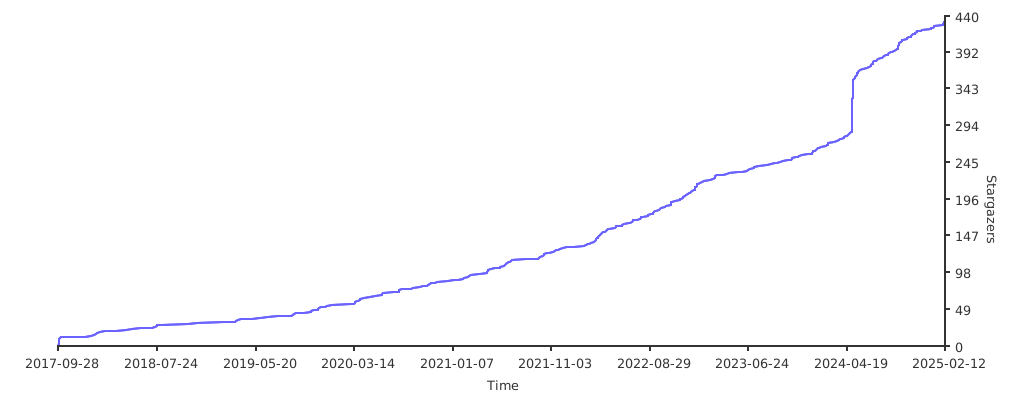](https://starchart.cc/tammoippen/plotille)
|
|
692
|
+
|