pgsrip 0.3.0__tar.gz → 0.3.1__tar.gz
This diff represents the content of publicly available package versions that have been released to one of the supported registries. The information contained in this diff is provided for informational purposes only and reflects changes between package versions as they appear in their respective public registries.
- pgsrip-0.3.1/.claude/skills/demo-gif/SKILL.md +121 -0
- {pgsrip-0.3.0 → pgsrip-0.3.1}/.github/workflows/publish.yml +1 -1
- {pgsrip-0.3.0 → pgsrip-0.3.1}/.github/workflows/test.yml +2 -2
- {pgsrip-0.3.0 → pgsrip-0.3.1}/CHANGELOG.md +9 -0
- {pgsrip-0.3.0 → pgsrip-0.3.1}/PKG-INFO +15 -4
- {pgsrip-0.3.0 → pgsrip-0.3.1}/README.md +13 -2
- {pgsrip-0.3.0 → pgsrip-0.3.1}/docs/architecture.md +2 -1
- pgsrip-0.3.1/docs/images/demo.gif +0 -0
- pgsrip-0.3.1/docs/images/icon-256.png +0 -0
- pgsrip-0.3.1/docs/images/icon-32.png +0 -0
- pgsrip-0.3.1/docs/images/icon-512.png +0 -0
- pgsrip-0.3.1/docs/images/icon-64.png +0 -0
- pgsrip-0.3.1/docs/images/icon.svg +1 -0
- pgsrip-0.3.1/docs/images/logo-dark.png +0 -0
- pgsrip-0.3.1/docs/images/logo-dark.svg +1 -0
- pgsrip-0.3.1/docs/images/logo-light.png +0 -0
- pgsrip-0.3.1/docs/images/logo-light.svg +1 -0
- pgsrip-0.3.1/docs/images/social.png +0 -0
- {pgsrip-0.3.0 → pgsrip-0.3.1}/pgsrip/engines/rapidocr.py +5 -1
- {pgsrip-0.3.0 → pgsrip-0.3.1}/pgsrip/formats/pgs.py +15 -4
- {pgsrip-0.3.0 → pgsrip-0.3.1}/pyproject.toml +5 -2
- pgsrip-0.3.1/scripts/brand.py +152 -0
- pgsrip-0.3.1/scripts/demo.Dockerfile +18 -0
- pgsrip-0.3.1/scripts/demo.sh +17 -0
- pgsrip-0.3.1/scripts/demo.tape +34 -0
- {pgsrip-0.3.0 → pgsrip-0.3.1}/tests/test_pgs.py +31 -0
- {pgsrip-0.3.0 → pgsrip-0.3.1}/uv.lock +121 -97
- {pgsrip-0.3.0 → pgsrip-0.3.1}/.claude/hooks/session_start.py +0 -0
- {pgsrip-0.3.0 → pgsrip-0.3.1}/.claude/rules/architecture.md +0 -0
- {pgsrip-0.3.0 → pgsrip-0.3.1}/.claude/rules/corrupted-data.md +0 -0
- {pgsrip-0.3.0 → pgsrip-0.3.1}/.claude/rules/knowledge.md +0 -0
- {pgsrip-0.3.0 → pgsrip-0.3.1}/.claude/rules/ocr-batching.md +0 -0
- {pgsrip-0.3.0 → pgsrip-0.3.1}/.claude/rules/rip-e2e-tests.md +0 -0
- {pgsrip-0.3.0 → pgsrip-0.3.1}/.claude/rules/tests.md +0 -0
- {pgsrip-0.3.0 → pgsrip-0.3.1}/.claude/rules/tooling.md +0 -0
- {pgsrip-0.3.0 → pgsrip-0.3.1}/.claude/settings.json +0 -0
- {pgsrip-0.3.0 → pgsrip-0.3.1}/.claude/skills/investigate/SKILL.md +0 -0
- {pgsrip-0.3.0 → pgsrip-0.3.1}/.claude/skills/investigate/templates/README.md +0 -0
- {pgsrip-0.3.0 → pgsrip-0.3.1}/.claude/skills/investigate/templates/findings.md +0 -0
- {pgsrip-0.3.0 → pgsrip-0.3.1}/.claude/skills/knowledge-audit/SKILL.md +0 -0
- {pgsrip-0.3.0 → pgsrip-0.3.1}/.claude/skills/plan/SKILL.md +0 -0
- {pgsrip-0.3.0 → pgsrip-0.3.1}/.claude/skills/plan/templates/plan.md +0 -0
- {pgsrip-0.3.0 → pgsrip-0.3.1}/.claude/skills/release/SKILL.md +0 -0
- {pgsrip-0.3.0 → pgsrip-0.3.1}/.claude/skills/resume/SKILL.md +0 -0
- {pgsrip-0.3.0 → pgsrip-0.3.1}/.claude/skills/ship/SKILL.md +0 -0
- {pgsrip-0.3.0 → pgsrip-0.3.1}/.claude/skills/spec/SKILL.md +0 -0
- {pgsrip-0.3.0 → pgsrip-0.3.1}/.claude/skills/spec/templates/spec.md +0 -0
- {pgsrip-0.3.0 → pgsrip-0.3.1}/.claude/skills/triage-issue/SKILL.md +0 -0
- {pgsrip-0.3.0 → pgsrip-0.3.1}/.claude/skills/writing-style/SKILL.md +0 -0
- {pgsrip-0.3.0 → pgsrip-0.3.1}/.claude/skills/writing-style/reference.md +0 -0
- {pgsrip-0.3.0 → pgsrip-0.3.1}/.dockerignore +0 -0
- {pgsrip-0.3.0 → pgsrip-0.3.1}/.github/ISSUE_TEMPLATE/bug_report.yml +0 -0
- {pgsrip-0.3.0 → pgsrip-0.3.1}/.github/ISSUE_TEMPLATE/config.yml +0 -0
- {pgsrip-0.3.0 → pgsrip-0.3.1}/.github/ISSUE_TEMPLATE/feature_request.yml +0 -0
- {pgsrip-0.3.0 → pgsrip-0.3.1}/.github/ISSUE_TEMPLATE/question.yml +0 -0
- {pgsrip-0.3.0 → pgsrip-0.3.1}/.github/dependabot.yml +0 -0
- {pgsrip-0.3.0 → pgsrip-0.3.1}/.github/pull_request_template.md +0 -0
- {pgsrip-0.3.0 → pgsrip-0.3.1}/.github/workflows/docker-publish.yml +0 -0
- {pgsrip-0.3.0 → pgsrip-0.3.1}/.gitignore +0 -0
- {pgsrip-0.3.0 → pgsrip-0.3.1}/.pre-commit-config.yaml +0 -0
- {pgsrip-0.3.0 → pgsrip-0.3.1}/CLAUDE.md +0 -0
- {pgsrip-0.3.0 → pgsrip-0.3.1}/CONTRIBUTING.md +0 -0
- {pgsrip-0.3.0 → pgsrip-0.3.1}/Dockerfile +0 -0
- {pgsrip-0.3.0 → pgsrip-0.3.1}/LICENSE +0 -0
- {pgsrip-0.3.0 → pgsrip-0.3.1}/docs/bug-reports.md +0 -0
- {pgsrip-0.3.0 → pgsrip-0.3.1}/docs/corrupted_data.md +0 -0
- {pgsrip-0.3.0 → pgsrip-0.3.1}/docs/images/before-after.png +0 -0
- {pgsrip-0.3.0 → pgsrip-0.3.1}/docs/ocr_batching.md +0 -0
- {pgsrip-0.3.0 → pgsrip-0.3.1}/docs/rip-e2e.md +0 -0
- {pgsrip-0.3.0 → pgsrip-0.3.1}/docs/usage.md +0 -0
- {pgsrip-0.3.0 → pgsrip-0.3.1}/docs/workflow.md +0 -0
- {pgsrip-0.3.0 → pgsrip-0.3.1}/pgsrip/__init__.py +0 -0
- {pgsrip-0.3.0 → pgsrip-0.3.1}/pgsrip/__main__.py +0 -0
- {pgsrip-0.3.0 → pgsrip-0.3.1}/pgsrip/api.py +0 -0
- {pgsrip-0.3.0 → pgsrip-0.3.1}/pgsrip/cli/__init__.py +0 -0
- {pgsrip-0.3.0 → pgsrip-0.3.1}/pgsrip/cli/plugins.py +0 -0
- {pgsrip-0.3.0 → pgsrip-0.3.1}/pgsrip/cue.py +0 -0
- {pgsrip-0.3.0 → pgsrip-0.3.1}/pgsrip/diagnostics.py +0 -0
- {pgsrip-0.3.0 → pgsrip-0.3.1}/pgsrip/engines/__init__.py +0 -0
- {pgsrip-0.3.0 → pgsrip-0.3.1}/pgsrip/engines/auto.py +0 -0
- {pgsrip-0.3.0 → pgsrip-0.3.1}/pgsrip/engines/base.py +0 -0
- {pgsrip-0.3.0 → pgsrip-0.3.1}/pgsrip/engines/chain.py +0 -0
- {pgsrip-0.3.0 → pgsrip-0.3.1}/pgsrip/engines/openai.py +0 -0
- {pgsrip-0.3.0 → pgsrip-0.3.1}/pgsrip/engines/tessdata.py +0 -0
- {pgsrip-0.3.0 → pgsrip-0.3.1}/pgsrip/engines/tesseract.py +0 -0
- {pgsrip-0.3.0 → pgsrip-0.3.1}/pgsrip/engines/tsv.py +0 -0
- {pgsrip-0.3.0 → pgsrip-0.3.1}/pgsrip/errors.py +0 -0
- {pgsrip-0.3.0 → pgsrip-0.3.1}/pgsrip/formats/__init__.py +0 -0
- {pgsrip-0.3.0 → pgsrip-0.3.1}/pgsrip/formats/scrub.py +0 -0
- {pgsrip-0.3.0 → pgsrip-0.3.1}/pgsrip/media.py +0 -0
- {pgsrip-0.3.0 → pgsrip-0.3.1}/pgsrip/media_path.py +0 -0
- {pgsrip-0.3.0 → pgsrip-0.3.1}/pgsrip/options.py +0 -0
- {pgsrip-0.3.0 → pgsrip-0.3.1}/pgsrip/plugin.py +0 -0
- {pgsrip-0.3.0 → pgsrip-0.3.1}/pgsrip/postprocessors/__init__.py +0 -0
- {pgsrip-0.3.0 → pgsrip-0.3.1}/pgsrip/postprocessors/base.py +0 -0
- {pgsrip-0.3.0 → pgsrip-0.3.1}/pgsrip/postprocessors/cleanit.py +0 -0
- {pgsrip-0.3.0 → pgsrip-0.3.1}/pgsrip/sources/__init__.py +0 -0
- {pgsrip-0.3.0 → pgsrip-0.3.1}/pgsrip/sources/base.py +0 -0
- {pgsrip-0.3.0 → pgsrip-0.3.1}/pgsrip/sources/mkvtoolnix.py +0 -0
- {pgsrip-0.3.0 → pgsrip-0.3.1}/pgsrip/sources/raw.py +0 -0
- {pgsrip-0.3.0 → pgsrip-0.3.1}/pgsrip/track_flags.py +0 -0
- {pgsrip-0.3.0 → pgsrip-0.3.1}/pgsrip/utils.py +0 -0
- {pgsrip-0.3.0 → pgsrip-0.3.1}/pgsrip/writers/__init__.py +0 -0
- {pgsrip-0.3.0 → pgsrip-0.3.1}/pgsrip/writers/base.py +0 -0
- {pgsrip-0.3.0 → pgsrip-0.3.1}/pgsrip/writers/srt.py +0 -0
- {pgsrip-0.3.0 → pgsrip-0.3.1}/scripts/check_knowledge.py +0 -0
- {pgsrip-0.3.0 → pgsrip-0.3.1}/scripts/test.sh +0 -0
- {pgsrip-0.3.0 → pgsrip-0.3.1}/tests/__init__.py +0 -0
- {pgsrip-0.3.0 → pgsrip-0.3.1}/tests/conftest.py +0 -0
- {pgsrip-0.3.0 → pgsrip-0.3.1}/tests/fabricate.py +0 -0
- {pgsrip-0.3.0 → pgsrip-0.3.1}/tests/samples/README.md +0 -0
- {pgsrip-0.3.0 → pgsrip-0.3.1}/tests/samples/placeholder.en.sup +0 -0
- {pgsrip-0.3.0 → pgsrip-0.3.1}/tests/test_api.py +0 -0
- {pgsrip-0.3.0 → pgsrip-0.3.1}/tests/test_check_knowledge.py +0 -0
- {pgsrip-0.3.0 → pgsrip-0.3.1}/tests/test_cli.py +0 -0
- {pgsrip-0.3.0 → pgsrip-0.3.1}/tests/test_diagnostics.py +0 -0
- {pgsrip-0.3.0 → pgsrip-0.3.1}/tests/test_engines.py +0 -0
- {pgsrip-0.3.0 → pgsrip-0.3.1}/tests/test_media.py +0 -0
- {pgsrip-0.3.0 → pgsrip-0.3.1}/tests/test_media_path.py +0 -0
- {pgsrip-0.3.0 → pgsrip-0.3.1}/tests/test_openai.py +0 -0
- {pgsrip-0.3.0 → pgsrip-0.3.1}/tests/test_postprocess.py +0 -0
- {pgsrip-0.3.0 → pgsrip-0.3.1}/tests/test_rapidocr.py +0 -0
- {pgsrip-0.3.0 → pgsrip-0.3.1}/tests/test_rip_e2e.py +0 -0
- {pgsrip-0.3.0 → pgsrip-0.3.1}/tests/test_rip_e2e.yml +0 -0
- {pgsrip-0.3.0 → pgsrip-0.3.1}/tests/test_samples.py +0 -0
- {pgsrip-0.3.0 → pgsrip-0.3.1}/tests/test_scrub.py +0 -0
- {pgsrip-0.3.0 → pgsrip-0.3.1}/tests/test_tessdata.py +0 -0
- {pgsrip-0.3.0 → pgsrip-0.3.1}/tests/test_track.py +0 -0
- {pgsrip-0.3.0 → pgsrip-0.3.1}/tests/test_track.yml +0 -0
- {pgsrip-0.3.0 → pgsrip-0.3.1}/tests/test_track_flags.py +0 -0
- {pgsrip-0.3.0 → pgsrip-0.3.1}/tests/test_utils.py +0 -0
- {pgsrip-0.3.0 → pgsrip-0.3.1}/tests/test_writers.py +0 -0
|
@@ -0,0 +1,121 @@
|
|
|
1
|
+
---
|
|
2
|
+
name: demo-gif
|
|
3
|
+
description: Record the README terminal demo docs/images/demo.gif with VHS, from a media file that the user gives. Use to make or update the demo GIF.
|
|
4
|
+
---
|
|
5
|
+
|
|
6
|
+
# Demo GIF
|
|
7
|
+
|
|
8
|
+
`docs/images/demo.gif` shows a pgsrip session in a terminal. VHS records it in a container:
|
|
9
|
+
|
|
10
|
+
- `scripts/demo.tape`: the session that VHS types and records. It is the source of the current GIF.
|
|
11
|
+
- `scripts/demo.Dockerfile`: the pgsrip image, plus VHS, ttyd, and Chromium.
|
|
12
|
+
- `scripts/demo.sh DIR`: builds the pgsrip image and the VHS image, mounts DIR on `/demo`, and records.
|
|
13
|
+
|
|
14
|
+
The media file is not in the repository. The user gives it.
|
|
15
|
+
|
|
16
|
+
## 1. Inputs
|
|
17
|
+
|
|
18
|
+
Get these values from the user. Use the default when the user does not give a value.
|
|
19
|
+
|
|
20
|
+
| Input | Default |
|
|
21
|
+
| --- | --- |
|
|
22
|
+
| Media file (`.mkv`, `.mks`, or `.sup`) | None. Ask for it. |
|
|
23
|
+
| Languages to rip | `en` and `pt-BR` |
|
|
24
|
+
| Other `pgsrip rip` options | None |
|
|
25
|
+
| File name in the GIF | `media.mkv` |
|
|
26
|
+
| Part of the media to use | The first 10 minutes |
|
|
27
|
+
|
|
28
|
+
Do not move or change the media file of the user.
|
|
29
|
+
|
|
30
|
+
## 2. Make a small sample
|
|
31
|
+
|
|
32
|
+
Work in `plans/demo-gif/` (gitignored). The sample goes in `plans/demo-gif/sample/`. This folder must
|
|
33
|
+
contain only the sample file, because the GIF shows `ls`.
|
|
34
|
+
|
|
35
|
+
1. List the tracks: `mkvmerge -J <media>`. Find the PGS track (`HDMV PGS`) of each language
|
|
36
|
+
(`language_ietf`). If a language has more than one PGS track, ask the user which one to use.
|
|
37
|
+
2. Cut the sample with only these PGS tracks:
|
|
38
|
+
|
|
39
|
+
```
|
|
40
|
+
mkvmerge -q -o plans/demo-gif/sample/media.mkv -D -A -s <id1>,<id2> --split parts:00:00:00-00:10:00 <media>
|
|
41
|
+
```
|
|
42
|
+
|
|
43
|
+
Keep `-D -A` (no video, no audio). The container reads the files through the mount of the Podman
|
|
44
|
+
machine. On Windows, this mount is very slow: a 4 GB sample stays at 0% until the tape stops. pgsrip
|
|
45
|
+
reads only the subtitle tracks, so the result is the same. `ls` shows only the names.
|
|
46
|
+
3. For a `.sup` file, copy the file to the sample folder. mkvmerge cannot cut it.
|
|
47
|
+
|
|
48
|
+
## 3. Rehearse
|
|
49
|
+
|
|
50
|
+
Run the rip on the host, then look at the result:
|
|
51
|
+
|
|
52
|
+
```
|
|
53
|
+
cd plans/demo-gif/sample
|
|
54
|
+
uv run --project <repo> pgsrip rip -l <lang> -l <lang> <options> media.mkv
|
|
55
|
+
grep -c -- '-->' *.srt
|
|
56
|
+
head -n 12 *.srt
|
|
57
|
+
```
|
|
58
|
+
|
|
59
|
+
- Each `.srt` must have cues, and the text must be correct. About 20 to 40 cues for each language is
|
|
60
|
+
good.
|
|
61
|
+
- If the first cue comes late, use a different part (`--split parts:<start>-<end>`).
|
|
62
|
+
- The tape deletes the `.srt` files before it records. You do not have to delete them.
|
|
63
|
+
|
|
64
|
+
## 4. Edit the tape
|
|
65
|
+
|
|
66
|
+
Edit `scripts/demo.tape`. Change only the lines that the inputs change:
|
|
67
|
+
|
|
68
|
+
- The `pgsrip rip` command: the languages, the options, and the file name.
|
|
69
|
+
- The `head -n 8 ...srt` command: the names of the output files (`<stem>.<language>.srt`). Show at most
|
|
70
|
+
two files. `-n 8` shows the first two cues when each cue has at most two lines.
|
|
71
|
+
- If you changed the file name, rename the sample file to the same name.
|
|
72
|
+
|
|
73
|
+
Keep the hidden setup at the top. It goes to `/demo`, deletes the `.srt` files, and sets the prompt to
|
|
74
|
+
`$ `. The GIF must not show the path.
|
|
75
|
+
|
|
76
|
+
## 5. Record
|
|
77
|
+
|
|
78
|
+
1. On Windows or macOS, start the Podman machine: `podman machine start`. It is not an error if it runs
|
|
79
|
+
already.
|
|
80
|
+
2. From the repository root, run `bash scripts/demo.sh plans/demo-gif/sample`. The first build takes
|
|
81
|
+
some minutes. The next runs take about 2 minutes.
|
|
82
|
+
3. The output ends with `Creating docs/images/demo.gif...`. If it ends with `recording failed`, the rip
|
|
83
|
+
took more than the 120 s wait of the tape. Make the sample smaller.
|
|
84
|
+
|
|
85
|
+
Known problems that the scripts already solve:
|
|
86
|
+
|
|
87
|
+
- Debian has no `ttyd` package. `scripts/demo.Dockerfile` downloads the static binary.
|
|
88
|
+
- Podman on Windows ignores `-f -`. Keep the VHS layer in `scripts/demo.Dockerfile`.
|
|
89
|
+
- Git Bash changes `/demo` into a Windows path. `scripts/demo.sh` sets `MSYS_NO_PATHCONV=1`.
|
|
90
|
+
|
|
91
|
+
## 6. Check the frames
|
|
92
|
+
|
|
93
|
+
Save some frames as PNG, then read them:
|
|
94
|
+
|
|
95
|
+
```
|
|
96
|
+
uv run --no-project --with pillow python -c "
|
|
97
|
+
from PIL import Image
|
|
98
|
+
im = Image.open('docs/images/demo.gif')
|
|
99
|
+
n = im.n_frames
|
|
100
|
+
print(im.size, n, 'frames', sum((im.seek(i), im.info.get('duration', 0))[1] for i in range(n)) / 1000, 's')
|
|
101
|
+
for k, f in enumerate([n // 2, n - 1]):
|
|
102
|
+
im.seek(f)
|
|
103
|
+
im.convert('RGB').save(f'plans/demo-gif/frame{k}.png')
|
|
104
|
+
"
|
|
105
|
+
```
|
|
106
|
+
|
|
107
|
+
Look for these problems:
|
|
108
|
+
|
|
109
|
+
- The first `ls` is not in the last frame: increase `Set Height` in the tape.
|
|
110
|
+
- A large empty area at the bottom of the last frame: decrease `Set Height`.
|
|
111
|
+
- A cue is cut in the middle: change `head -n`.
|
|
112
|
+
- The GIF is more than about 2 MB or 30 s: make the sample shorter.
|
|
113
|
+
|
|
114
|
+
Record again after each change. Delete the PNG files when you are done.
|
|
115
|
+
|
|
116
|
+
## 7. Finish
|
|
117
|
+
|
|
118
|
+
1. Show the last frame to the user, with the size and the duration of the GIF.
|
|
119
|
+
2. `README.md` shows `docs/images/demo.gif` with an absolute `raw.githubusercontent.com` URL, so that
|
|
120
|
+
PyPI shows it too. Change its alt text if the languages changed.
|
|
121
|
+
3. To commit, use the `ship` skill. Commit `docs/images/demo.gif` and `scripts/demo.tape` together.
|
|
@@ -26,7 +26,7 @@ jobs:
|
|
|
26
26
|
key: rapidocr-${{ hashFiles('uv.lock') }}
|
|
27
27
|
|
|
28
28
|
- name: Install uv
|
|
29
|
-
uses: astral-sh/setup-uv@v10.
|
|
29
|
+
uses: astral-sh/setup-uv@v10.4.0
|
|
30
30
|
with:
|
|
31
31
|
enable-cache: true
|
|
32
32
|
python-version: ${{ matrix.python-version }}
|
|
@@ -53,7 +53,7 @@ jobs:
|
|
|
53
53
|
uses: actions/checkout@v7
|
|
54
54
|
|
|
55
55
|
- name: Install uv
|
|
56
|
-
uses: astral-sh/setup-uv@v10.
|
|
56
|
+
uses: astral-sh/setup-uv@v10.4.0
|
|
57
57
|
with:
|
|
58
58
|
enable-cache: true
|
|
59
59
|
python-version: "3.13"
|
|
@@ -1,5 +1,14 @@
|
|
|
1
1
|
# Changelog
|
|
2
2
|
|
|
3
|
+
## 0.3.1
|
|
4
|
+
|
|
5
|
+
**release date:** 2026-11-29
|
|
6
|
+
|
|
7
|
+
- Fixed: a subtitle image that replaces the image on the screen, with no
|
|
8
|
+
clear before it, is a new subtitle. Before, pgsrip did not read it and
|
|
9
|
+
the subtitle before it stayed on the screen in its place
|
|
10
|
+
- Fixed: the `rapidocr` extra supports rapidocr 3.10
|
|
11
|
+
|
|
3
12
|
## 0.3.0
|
|
4
13
|
|
|
5
14
|
**release date:** 2026-09-29
|
|
@@ -1,6 +1,6 @@
|
|
|
1
1
|
Metadata-Version: 2.5
|
|
2
2
|
Name: pgsrip
|
|
3
|
-
Version: 0.3.
|
|
3
|
+
Version: 0.3.1
|
|
4
4
|
Summary: Rip your PGS subtitles
|
|
5
5
|
Project-URL: Repository, https://github.com/ratoaq2/pgsrip
|
|
6
6
|
Author: Rato
|
|
@@ -34,10 +34,17 @@ Requires-Dist: trakit>=0.2.3
|
|
|
34
34
|
Provides-Extra: rapidocr
|
|
35
35
|
Requires-Dist: onnxruntime>=1.30; ((sys_platform == 'win32' and (platform_machine == 'AMD64' or platform_machine == 'ARM64')) or (sys_platform == 'darwin' and platform_machine == 'arm64') or (sys_platform == 'linux' and (platform_machine == 'x86_64' or platform_machine == 'aarch64'))) and extra == 'rapidocr'
|
|
36
36
|
Requires-Dist: python-bidi>=0.6; ((sys_platform == 'win32' and (platform_machine == 'AMD64' or platform_machine == 'ARM64')) or (sys_platform == 'darwin' and platform_machine == 'arm64') or (sys_platform == 'linux' and (platform_machine == 'x86_64' or platform_machine == 'aarch64'))) and extra == 'rapidocr'
|
|
37
|
-
Requires-Dist: rapidocr<3.
|
|
37
|
+
Requires-Dist: rapidocr<3.11,>=3.9; ((sys_platform == 'win32' and (platform_machine == 'AMD64' or platform_machine == 'ARM64')) or (sys_platform == 'darwin' and platform_machine == 'arm64') or (sys_platform == 'linux' and (platform_machine == 'x86_64' or platform_machine == 'aarch64'))) and extra == 'rapidocr'
|
|
38
38
|
Description-Content-Type: text/markdown
|
|
39
39
|
|
|
40
|
-
|
|
40
|
+
<h2 align="center">
|
|
41
|
+
<picture>
|
|
42
|
+
<source media="(prefers-color-scheme: dark)" srcset="https://raw.githubusercontent.com/ratoaq2/pgsrip/main/docs/images/logo-dark.png">
|
|
43
|
+
<img alt="pgsrip" src="https://raw.githubusercontent.com/ratoaq2/pgsrip/main/docs/images/logo-light.png" width="420">
|
|
44
|
+
</picture>
|
|
45
|
+
<br>
|
|
46
|
+
Rip your PGS subtitles
|
|
47
|
+
</h2>
|
|
41
48
|
|
|
42
49
|
Convert image-based Blu-ray subtitles (PGS) in `.mkv`, `.mks`, and `.sup` files to text `.srt` files, with OCR.
|
|
43
50
|
|
|
@@ -47,13 +54,15 @@ Convert image-based Blu-ray subtitles (PGS) in `.mkv`, `.mks`, and `.sup` files
|
|
|
47
54
|
[](https://hub.docker.com/r/ratoaq2/pgsrip)
|
|
48
55
|
[](https://github.com/ratoaq2/pgsrip/blob/main/LICENSE)
|
|
49
56
|
|
|
50
|
-

|
|
51
58
|
|
|
52
59
|
## Why pgsrip
|
|
53
60
|
|
|
54
61
|
Blu-ray subtitles use the PGS format. A PGS subtitle is an image, not text. Many players, TVs, and subtitle
|
|
55
62
|
editors cannot show or edit these images.
|
|
56
63
|
|
|
64
|
+
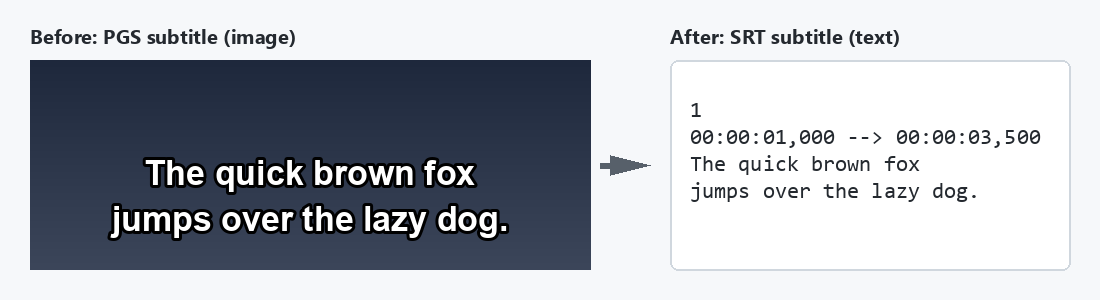
|
|
65
|
+
|
|
57
66
|
pgsrip reads the text in the images with [tesseract](https://github.com/tesseract-ocr/tesseract) OCR. When
|
|
58
67
|
tesseract is not installed, it uses [RapidOCR](docs/usage.md#rapidocr) (`pgsrip[rapidocr]`). Then it writes a `.srt` file next to your
|
|
59
68
|
video. It downloads the language data that it needs automatically.
|
|
@@ -331,3 +340,5 @@ See [CONTRIBUTING.md](CONTRIBUTING.md).
|
|
|
331
340
|
## License
|
|
332
341
|
|
|
333
342
|
[MIT](LICENSE)
|
|
343
|
+
|
|
344
|
+
The pgsrip name, logo, and icon are not covered by the MIT license. All rights reserved.
|
|
@@ -1,4 +1,11 @@
|
|
|
1
|
-
|
|
1
|
+
<h2 align="center">
|
|
2
|
+
<picture>
|
|
3
|
+
<source media="(prefers-color-scheme: dark)" srcset="https://raw.githubusercontent.com/ratoaq2/pgsrip/main/docs/images/logo-dark.png">
|
|
4
|
+
<img alt="pgsrip" src="https://raw.githubusercontent.com/ratoaq2/pgsrip/main/docs/images/logo-light.png" width="420">
|
|
5
|
+
</picture>
|
|
6
|
+
<br>
|
|
7
|
+
Rip your PGS subtitles
|
|
8
|
+
</h2>
|
|
2
9
|
|
|
3
10
|
Convert image-based Blu-ray subtitles (PGS) in `.mkv`, `.mks`, and `.sup` files to text `.srt` files, with OCR.
|
|
4
11
|
|
|
@@ -8,13 +15,15 @@ Convert image-based Blu-ray subtitles (PGS) in `.mkv`, `.mks`, and `.sup` files
|
|
|
8
15
|
[](https://hub.docker.com/r/ratoaq2/pgsrip)
|
|
9
16
|
[](https://github.com/ratoaq2/pgsrip/blob/main/LICENSE)
|
|
10
17
|
|
|
11
|
-

|
|
12
19
|
|
|
13
20
|
## Why pgsrip
|
|
14
21
|
|
|
15
22
|
Blu-ray subtitles use the PGS format. A PGS subtitle is an image, not text. Many players, TVs, and subtitle
|
|
16
23
|
editors cannot show or edit these images.
|
|
17
24
|
|
|
25
|
+

|
|
26
|
+
|
|
18
27
|
pgsrip reads the text in the images with [tesseract](https://github.com/tesseract-ocr/tesseract) OCR. When
|
|
19
28
|
tesseract is not installed, it uses [RapidOCR](docs/usage.md#rapidocr) (`pgsrip[rapidocr]`). Then it writes a `.srt` file next to your
|
|
20
29
|
video. It downloads the language data that it needs automatically.
|
|
@@ -292,3 +301,5 @@ See [CONTRIBUTING.md](CONTRIBUTING.md).
|
|
|
292
301
|
## License
|
|
293
302
|
|
|
294
303
|
[MIT](LICENSE)
|
|
304
|
+
|
|
305
|
+
The pgsrip name, logo, and icon are not covered by the MIT license. All rights reserved.
|
|
@@ -45,7 +45,8 @@
|
|
|
45
45
|
- `formats/pgs.py` — binary PGS segment format: PDS/ODS/PCS/WDS/END parsing (`read_segments`,
|
|
46
46
|
`read_display_sets`), RLE image decoding (`PgsImage`, `decode_rle_image`), the binary helpers (`to_int`,
|
|
47
47
|
`safe_get`, `to_time`). `Item`: one subtitle image with its times, cropped to its ink (`Item.box` is where the
|
|
48
|
-
ink is on the screen). `read_items` groups the display sets
|
|
48
|
+
ink is on the screen). `read_items` groups the display sets. A group starts at an epoch start, at an
|
|
49
|
+
acquisition point, or at a normal display set with a new image. `make_item` fixes or drops a corrupted
|
|
49
50
|
group. An `Item` has plain values: its times, its image, and its window position are never None. Malformed input is frequent: see `docs/corrupted_data.md`.
|
|
50
51
|
- `plugin.py` — `PluginOption`: the options that an engine or a post-processor declares for the CLI.
|
|
51
52
|
- `cue.py` — `Cue`: the text result of one item. The post-processors and the writers get the cues.
|
|
Binary file
|
|
Binary file
|
|
Binary file
|
|
Binary file
|
|
Binary file
|
|
@@ -0,0 +1 @@
|
|
|
1
|
+
<svg xmlns="http://www.w3.org/2000/svg" viewBox="0 0 100.0 100.0" width="100" height="100"><rect width="100" height="100" rx="22" fill="#1c1917"/><clipPath id="stick"><rect x="12" y="14" width="76" height="18" rx="3"/></clipPath><g clip-path="url(#stick)"><path d="M12 14 h14 l-10.8 18 h-14 Z" fill="#dc2626"/><path d="M26 14 h14 l-10.8 18 h-14 Z" fill="#fef3c7"/><path d="M40 14 h14 l-10.8 18 h-14 Z" fill="#dc2626"/><path d="M54 14 h14 l-10.8 18 h-14 Z" fill="#fef3c7"/><path d="M68 14 h14 l-10.8 18 h-14 Z" fill="#dc2626"/><path d="M82 14 h14 l-10.8 18 h-14 Z" fill="#fef3c7"/><path d="M96 14 h14 l-10.8 18 h-14 Z" fill="#dc2626"/></g><rect x="14.0" y="44.0" width="5.7" height="5.7" fill="#dc2626"/><rect x="29.0" y="44.0" width="5.7" height="5.7" fill="#dc2626"/><rect x="36.5" y="44.0" width="5.7" height="5.7" fill="#dc2626"/><rect x="14.0" y="51.5" width="5.7" height="5.7" fill="#dc2626"/><rect x="21.5" y="51.5" width="5.7" height="5.7" fill="#dc2626"/><rect x="36.5" y="51.5" width="5.7" height="5.7" fill="#dc2626"/><rect x="46.0" y="44" width="40.0" height="13.2" rx="6.6" fill="#fef3c7"/><rect x="14.0" y="66.0" width="5.7" height="5.7" fill="#dc2626"/><rect x="29.0" y="66.0" width="5.7" height="5.7" fill="#dc2626"/><rect x="36.5" y="66.0" width="5.7" height="5.7" fill="#dc2626"/><rect x="14.0" y="73.5" width="5.7" height="5.7" fill="#dc2626"/><rect x="21.5" y="73.5" width="5.7" height="5.7" fill="#dc2626"/><rect x="36.5" y="73.5" width="5.7" height="5.7" fill="#dc2626"/><rect x="46.0" y="66" width="24.0" height="13.2" rx="6.6" fill="#fef3c7"/></svg>
|
|
Binary file
|
|
@@ -0,0 +1 @@
|
|
|
1
|
+
<svg xmlns="http://www.w3.org/2000/svg" viewBox="0 0 350.5 100.0" width="351" height="100"><svg width="100" height="100" viewBox="0 0 100 100"><rect width="100" height="100" rx="22" fill="#1c1917"/><clipPath id="stick"><rect x="12" y="14" width="76" height="18" rx="3"/></clipPath><g clip-path="url(#stick)"><path d="M12 14 h14 l-10.8 18 h-14 Z" fill="#dc2626"/><path d="M26 14 h14 l-10.8 18 h-14 Z" fill="#fef3c7"/><path d="M40 14 h14 l-10.8 18 h-14 Z" fill="#dc2626"/><path d="M54 14 h14 l-10.8 18 h-14 Z" fill="#fef3c7"/><path d="M68 14 h14 l-10.8 18 h-14 Z" fill="#dc2626"/><path d="M82 14 h14 l-10.8 18 h-14 Z" fill="#fef3c7"/><path d="M96 14 h14 l-10.8 18 h-14 Z" fill="#dc2626"/></g><rect x="14.0" y="44.0" width="5.7" height="5.7" fill="#dc2626"/><rect x="29.0" y="44.0" width="5.7" height="5.7" fill="#dc2626"/><rect x="36.5" y="44.0" width="5.7" height="5.7" fill="#dc2626"/><rect x="14.0" y="51.5" width="5.7" height="5.7" fill="#dc2626"/><rect x="21.5" y="51.5" width="5.7" height="5.7" fill="#dc2626"/><rect x="36.5" y="51.5" width="5.7" height="5.7" fill="#dc2626"/><rect x="46.0" y="44" width="40.0" height="13.2" rx="6.6" fill="#fef3c7"/><rect x="14.0" y="66.0" width="5.7" height="5.7" fill="#dc2626"/><rect x="29.0" y="66.0" width="5.7" height="5.7" fill="#dc2626"/><rect x="36.5" y="66.0" width="5.7" height="5.7" fill="#dc2626"/><rect x="14.0" y="73.5" width="5.7" height="5.7" fill="#dc2626"/><rect x="21.5" y="73.5" width="5.7" height="5.7" fill="#dc2626"/><rect x="36.5" y="73.5" width="5.7" height="5.7" fill="#dc2626"/><rect x="46.0" y="66" width="24.0" height="13.2" rx="6.6" fill="#fef3c7"/></svg><g transform="translate(124 32.7)"><rect x="0.0" y="0.0" width="6.6" height="6.6" fill="#ef4444"/><rect x="7.0" y="0.0" width="6.6" height="6.6" fill="#ef4444"/><rect x="14.0" y="0.0" width="6.6" height="6.6" fill="#ef4444"/><rect x="0.0" y="7.0" width="6.6" height="6.6" fill="#ef4444"/><rect x="21.0" y="7.0" width="6.6" height="6.6" fill="#ef4444"/><rect x="0.0" y="14.0" width="6.6" height="6.6" fill="#ef4444"/><rect x="21.0" y="14.0" width="6.6" height="6.6" fill="#ef4444"/><rect x="0.0" y="21.0" width="6.6" height="6.6" fill="#ef4444"/><rect x="21.0" y="21.0" width="6.6" height="6.6" fill="#ef4444"/><rect x="0.0" y="28.0" width="6.6" height="6.6" fill="#ef4444"/><rect x="7.0" y="28.0" width="6.6" height="6.6" fill="#ef4444"/><rect x="14.0" y="28.0" width="6.6" height="6.6" fill="#ef4444"/><rect x="0.0" y="35.0" width="6.6" height="6.6" fill="#ef4444"/><rect x="0.0" y="42.0" width="6.6" height="6.6" fill="#ef4444"/><rect x="42.0" y="0.0" width="6.6" height="6.6" fill="#ef4444"/><rect x="49.0" y="0.0" width="6.6" height="6.6" fill="#ef4444"/><rect x="56.0" y="0.0" width="6.6" height="6.6" fill="#ef4444"/><rect x="35.0" y="7.0" width="6.6" height="6.6" fill="#ef4444"/><rect x="56.0" y="7.0" width="6.6" height="6.6" fill="#ef4444"/><rect x="35.0" y="14.0" width="6.6" height="6.6" fill="#ef4444"/><rect x="56.0" y="14.0" width="6.6" height="6.6" fill="#ef4444"/><rect x="35.0" y="21.0" width="6.6" height="6.6" fill="#ef4444"/><rect x="56.0" y="21.0" width="6.6" height="6.6" fill="#ef4444"/><rect x="42.0" y="28.0" width="6.6" height="6.6" fill="#ef4444"/><rect x="49.0" y="28.0" width="6.6" height="6.6" fill="#ef4444"/><rect x="56.0" y="28.0" width="6.6" height="6.6" fill="#ef4444"/><rect x="56.0" y="35.0" width="6.6" height="6.6" fill="#ef4444"/><rect x="35.0" y="42.0" width="6.6" height="6.6" fill="#ef4444"/><rect x="42.0" y="42.0" width="6.6" height="6.6" fill="#ef4444"/><rect x="49.0" y="42.0" width="6.6" height="6.6" fill="#ef4444"/><rect x="77.0" y="0.0" width="6.6" height="6.6" fill="#ef4444"/><rect x="84.0" y="0.0" width="6.6" height="6.6" fill="#ef4444"/><rect x="91.0" y="0.0" width="6.6" height="6.6" fill="#ef4444"/><rect x="70.0" y="7.0" width="6.6" height="6.6" fill="#ef4444"/><rect x="77.0" y="14.0" width="6.6" height="6.6" fill="#ef4444"/><rect x="84.0" y="14.0" width="6.6" height="6.6" fill="#ef4444"/><rect x="91.0" y="21.0" width="6.6" height="6.6" fill="#ef4444"/><rect x="70.0" y="28.0" width="6.6" height="6.6" fill="#ef4444"/><rect x="77.0" y="28.0" width="6.6" height="6.6" fill="#ef4444"/><rect x="84.0" y="28.0" width="6.6" height="6.6" fill="#ef4444"/><path transform="translate(109 0)" d="M18.18132075471698 19.715471698113205 16.157547169811323 7.801320754716979H19.12792452830189Q19.650188679245286 -0.6528301886792462 27.973773584905665 -0.6528301886792462Q32.90264150943396 -0.6528301886792462 35.53028301886793 2.9703773584905644Q38.15792452830189 6.593584905660375 38.15792452830189 13.415660377358488H29.377358490566042Q29.377358490566042 10.358738099359527 28.251226415094344 9.014746408170328Q27.125094339622645 7.670754716981129 24.61169811320755 7.670754716981129Q21.372515488594765 7.670754716981129 19.776918121655875 10.80400879653238Q18.18132075471698 13.93726287608363 18.18132075471698 19.715471698113205ZM2.0564150943396227 34.6V27.027169811320753H26.276415094339626V34.6ZM9.368113207547172 34.6V0.0H16.875660377358493L18.18132075471698 9.923018867924526V34.6ZM3.3620754716981134 7.572830188679244V0.0H16.41867924528302L17.071509433962266 7.572830188679244ZM56.633018867924534 34.6V1.9584905660377316H65.44622641509434V34.6ZM43.83754716981132 34.6V26.439622641509434H57.28584905660378V34.6ZM64.7933962264151 34.6V26.439622641509434H75.6956603773585V34.6ZM45.796037735849055 8.160377358490564V0.0H65.44622641509434V8.160377358490564ZM60.647924528301886 -4.667735849056605Q58.134528301886796 -4.667735849056605 56.567735849056604 -6.234528301886794Q55.00094339622642 -7.801320754716983 55.00094339622642 -10.31471698113208Q55.00094339622642 -12.828113207547176 56.567735849056604 -14.394905660377365Q58.134528301886796 -15.961698113207554 60.647924528301886 -15.961698113207554Q63.16132075471698 -15.961698113207554 64.72811320754718 -14.394905660377365Q66.29490566037737 -12.828113207547176 66.29490566037737 -10.31471698113208Q66.29490566037737 -7.801320754716983 64.72811320754718 -6.234528301886794Q63.16132075471698 -4.667735849056605 60.647924528301886 -4.667735849056605ZM83.26849056603774 49.615094339622644V0.0H91.46150943396226L92.11433962264151 7.3116981132075445V49.615094339622644ZM101.35188679245283 35.25283018867925Q97.72867924528302 35.25283018867925 95.54169811320754 33.52283018867925Q93.35471698113207 31.792830188679247 92.83245283018869 28.332830188679246H89.76415094339623L92.11433962264151 17.332641509433962Q92.11433962264151 22.35943396226415 93.61584905660376 24.64433962264151Q95.11735849056603 26.92924528301887 98.8711320754717 26.92924528301887Q102.20056603773585 26.92924528301887 103.91424528301887 24.51377358490566Q105.62792452830189 22.098301886792452 105.62792452830189 17.332641509433962Q105.62792452830189 12.73018867924528 103.86528301886793 10.200471698113205Q102.10264150943397 7.670754716981129 98.8711320754717 7.670754716981129Q95.50905660377359 7.670754716981129 93.81169811320754 9.988301886792451Q92.11433962264151 12.305849056603773 92.11433962264151 17.332641509433962L90.09056603773585 6.267169811320752H92.63660377358491Q93.2567924528302 2.7745283018867894 95.29688679245284 1.0608490566037716Q97.33698113207548 -0.6528301886792462 101.28660377358491 -0.6528301886792462Q107.7822641509434 -0.6528301886792462 111.35650943396227 4.04754716981132Q114.93075471698114 8.747924528301887 114.93075471698114 17.332641509433962Q114.93075471698114 25.98264150943396 111.35650943396227 30.617735849056604Q107.7822641509434 35.25283018867925 101.35188679245283 35.25283018867925Z" fill="#fef3c7"/></g></svg>
|
|
Binary file
|
|
@@ -0,0 +1 @@
|
|
|
1
|
+
<svg xmlns="http://www.w3.org/2000/svg" viewBox="0 0 350.5 100.0" width="351" height="100"><svg width="100" height="100" viewBox="0 0 100 100"><rect width="100" height="100" rx="22" fill="#1c1917"/><clipPath id="stick"><rect x="12" y="14" width="76" height="18" rx="3"/></clipPath><g clip-path="url(#stick)"><path d="M12 14 h14 l-10.8 18 h-14 Z" fill="#dc2626"/><path d="M26 14 h14 l-10.8 18 h-14 Z" fill="#fef3c7"/><path d="M40 14 h14 l-10.8 18 h-14 Z" fill="#dc2626"/><path d="M54 14 h14 l-10.8 18 h-14 Z" fill="#fef3c7"/><path d="M68 14 h14 l-10.8 18 h-14 Z" fill="#dc2626"/><path d="M82 14 h14 l-10.8 18 h-14 Z" fill="#fef3c7"/><path d="M96 14 h14 l-10.8 18 h-14 Z" fill="#dc2626"/></g><rect x="14.0" y="44.0" width="5.7" height="5.7" fill="#dc2626"/><rect x="29.0" y="44.0" width="5.7" height="5.7" fill="#dc2626"/><rect x="36.5" y="44.0" width="5.7" height="5.7" fill="#dc2626"/><rect x="14.0" y="51.5" width="5.7" height="5.7" fill="#dc2626"/><rect x="21.5" y="51.5" width="5.7" height="5.7" fill="#dc2626"/><rect x="36.5" y="51.5" width="5.7" height="5.7" fill="#dc2626"/><rect x="46.0" y="44" width="40.0" height="13.2" rx="6.6" fill="#fef3c7"/><rect x="14.0" y="66.0" width="5.7" height="5.7" fill="#dc2626"/><rect x="29.0" y="66.0" width="5.7" height="5.7" fill="#dc2626"/><rect x="36.5" y="66.0" width="5.7" height="5.7" fill="#dc2626"/><rect x="14.0" y="73.5" width="5.7" height="5.7" fill="#dc2626"/><rect x="21.5" y="73.5" width="5.7" height="5.7" fill="#dc2626"/><rect x="36.5" y="73.5" width="5.7" height="5.7" fill="#dc2626"/><rect x="46.0" y="66" width="24.0" height="13.2" rx="6.6" fill="#fef3c7"/></svg><g transform="translate(124 32.7)"><rect x="0.0" y="0.0" width="6.6" height="6.6" fill="#dc2626"/><rect x="7.0" y="0.0" width="6.6" height="6.6" fill="#dc2626"/><rect x="14.0" y="0.0" width="6.6" height="6.6" fill="#dc2626"/><rect x="0.0" y="7.0" width="6.6" height="6.6" fill="#dc2626"/><rect x="21.0" y="7.0" width="6.6" height="6.6" fill="#dc2626"/><rect x="0.0" y="14.0" width="6.6" height="6.6" fill="#dc2626"/><rect x="21.0" y="14.0" width="6.6" height="6.6" fill="#dc2626"/><rect x="0.0" y="21.0" width="6.6" height="6.6" fill="#dc2626"/><rect x="21.0" y="21.0" width="6.6" height="6.6" fill="#dc2626"/><rect x="0.0" y="28.0" width="6.6" height="6.6" fill="#dc2626"/><rect x="7.0" y="28.0" width="6.6" height="6.6" fill="#dc2626"/><rect x="14.0" y="28.0" width="6.6" height="6.6" fill="#dc2626"/><rect x="0.0" y="35.0" width="6.6" height="6.6" fill="#dc2626"/><rect x="0.0" y="42.0" width="6.6" height="6.6" fill="#dc2626"/><rect x="42.0" y="0.0" width="6.6" height="6.6" fill="#dc2626"/><rect x="49.0" y="0.0" width="6.6" height="6.6" fill="#dc2626"/><rect x="56.0" y="0.0" width="6.6" height="6.6" fill="#dc2626"/><rect x="35.0" y="7.0" width="6.6" height="6.6" fill="#dc2626"/><rect x="56.0" y="7.0" width="6.6" height="6.6" fill="#dc2626"/><rect x="35.0" y="14.0" width="6.6" height="6.6" fill="#dc2626"/><rect x="56.0" y="14.0" width="6.6" height="6.6" fill="#dc2626"/><rect x="35.0" y="21.0" width="6.6" height="6.6" fill="#dc2626"/><rect x="56.0" y="21.0" width="6.6" height="6.6" fill="#dc2626"/><rect x="42.0" y="28.0" width="6.6" height="6.6" fill="#dc2626"/><rect x="49.0" y="28.0" width="6.6" height="6.6" fill="#dc2626"/><rect x="56.0" y="28.0" width="6.6" height="6.6" fill="#dc2626"/><rect x="56.0" y="35.0" width="6.6" height="6.6" fill="#dc2626"/><rect x="35.0" y="42.0" width="6.6" height="6.6" fill="#dc2626"/><rect x="42.0" y="42.0" width="6.6" height="6.6" fill="#dc2626"/><rect x="49.0" y="42.0" width="6.6" height="6.6" fill="#dc2626"/><rect x="77.0" y="0.0" width="6.6" height="6.6" fill="#dc2626"/><rect x="84.0" y="0.0" width="6.6" height="6.6" fill="#dc2626"/><rect x="91.0" y="0.0" width="6.6" height="6.6" fill="#dc2626"/><rect x="70.0" y="7.0" width="6.6" height="6.6" fill="#dc2626"/><rect x="77.0" y="14.0" width="6.6" height="6.6" fill="#dc2626"/><rect x="84.0" y="14.0" width="6.6" height="6.6" fill="#dc2626"/><rect x="91.0" y="21.0" width="6.6" height="6.6" fill="#dc2626"/><rect x="70.0" y="28.0" width="6.6" height="6.6" fill="#dc2626"/><rect x="77.0" y="28.0" width="6.6" height="6.6" fill="#dc2626"/><rect x="84.0" y="28.0" width="6.6" height="6.6" fill="#dc2626"/><path transform="translate(109 0)" d="M18.18132075471698 19.715471698113205 16.157547169811323 7.801320754716979H19.12792452830189Q19.650188679245286 -0.6528301886792462 27.973773584905665 -0.6528301886792462Q32.90264150943396 -0.6528301886792462 35.53028301886793 2.9703773584905644Q38.15792452830189 6.593584905660375 38.15792452830189 13.415660377358488H29.377358490566042Q29.377358490566042 10.358738099359527 28.251226415094344 9.014746408170328Q27.125094339622645 7.670754716981129 24.61169811320755 7.670754716981129Q21.372515488594765 7.670754716981129 19.776918121655875 10.80400879653238Q18.18132075471698 13.93726287608363 18.18132075471698 19.715471698113205ZM2.0564150943396227 34.6V27.027169811320753H26.276415094339626V34.6ZM9.368113207547172 34.6V0.0H16.875660377358493L18.18132075471698 9.923018867924526V34.6ZM3.3620754716981134 7.572830188679244V0.0H16.41867924528302L17.071509433962266 7.572830188679244ZM56.633018867924534 34.6V1.9584905660377316H65.44622641509434V34.6ZM43.83754716981132 34.6V26.439622641509434H57.28584905660378V34.6ZM64.7933962264151 34.6V26.439622641509434H75.6956603773585V34.6ZM45.796037735849055 8.160377358490564V0.0H65.44622641509434V8.160377358490564ZM60.647924528301886 -4.667735849056605Q58.134528301886796 -4.667735849056605 56.567735849056604 -6.234528301886794Q55.00094339622642 -7.801320754716983 55.00094339622642 -10.31471698113208Q55.00094339622642 -12.828113207547176 56.567735849056604 -14.394905660377365Q58.134528301886796 -15.961698113207554 60.647924528301886 -15.961698113207554Q63.16132075471698 -15.961698113207554 64.72811320754718 -14.394905660377365Q66.29490566037737 -12.828113207547176 66.29490566037737 -10.31471698113208Q66.29490566037737 -7.801320754716983 64.72811320754718 -6.234528301886794Q63.16132075471698 -4.667735849056605 60.647924528301886 -4.667735849056605ZM83.26849056603774 49.615094339622644V0.0H91.46150943396226L92.11433962264151 7.3116981132075445V49.615094339622644ZM101.35188679245283 35.25283018867925Q97.72867924528302 35.25283018867925 95.54169811320754 33.52283018867925Q93.35471698113207 31.792830188679247 92.83245283018869 28.332830188679246H89.76415094339623L92.11433962264151 17.332641509433962Q92.11433962264151 22.35943396226415 93.61584905660376 24.64433962264151Q95.11735849056603 26.92924528301887 98.8711320754717 26.92924528301887Q102.20056603773585 26.92924528301887 103.91424528301887 24.51377358490566Q105.62792452830189 22.098301886792452 105.62792452830189 17.332641509433962Q105.62792452830189 12.73018867924528 103.86528301886793 10.200471698113205Q102.10264150943397 7.670754716981129 98.8711320754717 7.670754716981129Q95.50905660377359 7.670754716981129 93.81169811320754 9.988301886792451Q92.11433962264151 12.305849056603773 92.11433962264151 17.332641509433962L90.09056603773585 6.267169811320752H92.63660377358491Q93.2567924528302 2.7745283018867894 95.29688679245284 1.0608490566037716Q97.33698113207548 -0.6528301886792462 101.28660377358491 -0.6528301886792462Q107.7822641509434 -0.6528301886792462 111.35650943396227 4.04754716981132Q114.93075471698114 8.747924528301887 114.93075471698114 17.332641509433962Q114.93075471698114 25.98264150943396 111.35650943396227 30.617735849056604Q107.7822641509434 35.25283018867925 101.35188679245283 35.25283018867925Z" fill="#1c1917"/></g></svg>
|
|
Binary file
|
|
@@ -98,9 +98,13 @@ def read_lines(recognizer: typing.Any, images: list[npt.NDArray[typing.Any]]) ->
|
|
|
98
98
|
The same batches as `TextRecognizer.__call__`: lines of similar width go together. The decode is our own,
|
|
99
99
|
because RapidOCR gives only the mean score of a line, which hides one bad character.
|
|
100
100
|
"""
|
|
101
|
+
from rapidocr.ch_ppocr_rec import main as rec_main
|
|
101
102
|
from rapidocr.utils.model_resolver import normalize_lang
|
|
102
103
|
from rapidocr.utils.utils import reorder_bidi_for_display
|
|
103
104
|
|
|
105
|
+
# rapidocr 3.10 moved RTL_LANGS from the recognizer to its module.
|
|
106
|
+
rtl_langs = getattr(rec_main, 'RTL_LANGS', None) or recognizer.RTL_LANGS
|
|
107
|
+
|
|
104
108
|
characters = recognizer.postprocess_op.character
|
|
105
109
|
_, height, width = recognizer.rec_image_shape[:3]
|
|
106
110
|
ratios = [image.shape[1] / image.shape[0] for image in images]
|
|
@@ -114,7 +118,7 @@ def read_lines(recognizer: typing.Any, images: list[npt.NDArray[typing.Any]]) ->
|
|
|
114
118
|
for row, i in enumerate(chunk):
|
|
115
119
|
results[i] = ctc_decode(preds[row], characters)
|
|
116
120
|
|
|
117
|
-
if normalize_lang(recognizer.cfg.lang_type) in
|
|
121
|
+
if normalize_lang(recognizer.cfg.lang_type) in rtl_langs:
|
|
118
122
|
texts = reorder_bidi_for_display(tuple(text for text, _ in results))
|
|
119
123
|
results = [(str(text), score) for text, (_, score) in zip(texts, results, strict=True)]
|
|
120
124
|
|
|
@@ -453,6 +453,10 @@ class DisplaySet:
|
|
|
453
453
|
def is_start(self) -> bool:
|
|
454
454
|
return self.pcs.is_start()
|
|
455
455
|
|
|
456
|
+
def is_new_image(self) -> bool:
|
|
457
|
+
"""A normal display set with an object: it replaces the subtitle on the screen with no clear before it."""
|
|
458
|
+
return not self.is_start() and self.pcs.object_count > 0 and bool(self.ods_segments)
|
|
459
|
+
|
|
456
460
|
def error(self) -> str | None:
|
|
457
461
|
"""Why the display set cannot be read, or None."""
|
|
458
462
|
if not any(isinstance(s, PresentationCompositionSegment) for s in self.segments):
|
|
@@ -483,7 +487,7 @@ class DisplaySet:
|
|
|
483
487
|
def first_image(display_sets: typing.Iterable[DisplaySet]) -> PgsImage | None:
|
|
484
488
|
"""The image of the first display set that starts a subtitle."""
|
|
485
489
|
for ds in display_sets:
|
|
486
|
-
if not ds.
|
|
490
|
+
if not ds.is_start() and not ds.is_new_image():
|
|
487
491
|
continue
|
|
488
492
|
|
|
489
493
|
# the palette of the composition, else the last one. No palette: the item is dropped.
|
|
@@ -507,7 +511,7 @@ def read_items(display_sets: typing.Iterable[DisplaySet], name: str) -> list[Ite
|
|
|
507
511
|
logger.warning('%s Ignoring corrupted display set %d: %s', name, ds.index, error)
|
|
508
512
|
continue
|
|
509
513
|
|
|
510
|
-
if not groups or ds.is_start():
|
|
514
|
+
if not groups or ds.is_start() or ds.is_new_image():
|
|
511
515
|
groups.append([])
|
|
512
516
|
groups[-1].append(ds)
|
|
513
517
|
|
|
@@ -515,7 +519,8 @@ def read_items(display_sets: typing.Iterable[DisplaySet], name: str) -> list[Ite
|
|
|
515
519
|
items = []
|
|
516
520
|
for index, group in enumerate(groups):
|
|
517
521
|
next_start = starts[index + 1] if index + 1 < len(starts) else None
|
|
518
|
-
|
|
522
|
+
replaced = index + 1 < len(groups) and groups[index + 1][0].is_new_image()
|
|
523
|
+
item = make_item(index, group, next_start, replaced, name)
|
|
519
524
|
if item is not None:
|
|
520
525
|
items.append(item)
|
|
521
526
|
|
|
@@ -526,13 +531,19 @@ def start_time(display_sets: list[DisplaySet]) -> int | None:
|
|
|
526
531
|
return min((t for ds in display_sets if (t := ds.pcs.presentation_timestamp) is not None), default=None)
|
|
527
532
|
|
|
528
533
|
|
|
529
|
-
def make_item(
|
|
534
|
+
def make_item(
|
|
535
|
+
index: int, display_sets: list[DisplaySet], next_start: int | None, replaced: bool, name: str
|
|
536
|
+
) -> Item | None:
|
|
530
537
|
"""The item of a group of display sets. Fix a missing end time with the start of the next item.
|
|
531
538
|
|
|
539
|
+
A replaced item with no clear ends when the next item starts.
|
|
540
|
+
|
|
532
541
|
None when the item is corrupted.
|
|
533
542
|
"""
|
|
534
543
|
start = start_time(display_sets)
|
|
535
544
|
end = max((t for ds in display_sets if (t := ds.pcs.presentation_timestamp) is not None), default=None)
|
|
545
|
+
if replaced and next_start is not None and all(ds.pcs.object_count > 0 for ds in display_sets[1:]):
|
|
546
|
+
end = next_start
|
|
536
547
|
image = first_image(display_sets)
|
|
537
548
|
windows = [w for ds in display_sets if (w := ds.wds) and w.window_count > 0]
|
|
538
549
|
x_offset = min((x for w in windows if (x := w.x_offset) is not None), default=None)
|
|
@@ -1,6 +1,6 @@
|
|
|
1
1
|
[project]
|
|
2
2
|
name = "pgsrip"
|
|
3
|
-
version = "0.3.
|
|
3
|
+
version = "0.3.1"
|
|
4
4
|
description = "Rip your PGS subtitles"
|
|
5
5
|
authors = [
|
|
6
6
|
{ name = "Rato" },
|
|
@@ -56,7 +56,7 @@ dependencies = [
|
|
|
56
56
|
# an extra, not a dependency: onnxruntime has no musl Linux wheel and no sdist, and no marker can detect musl.
|
|
57
57
|
# The markers: the platforms with onnxruntime wheels. pgsrip.engines.rapidocr uses the raw model output: keep the minor version.
|
|
58
58
|
rapidocr = [
|
|
59
|
-
"rapidocr>=3.9,<3.
|
|
59
|
+
"rapidocr>=3.9,<3.11; (sys_platform == 'win32' and (platform_machine == 'AMD64' or platform_machine == 'ARM64')) or (sys_platform == 'darwin' and platform_machine == 'arm64') or (sys_platform == 'linux' and (platform_machine == 'x86_64' or platform_machine == 'aarch64'))",
|
|
60
60
|
"onnxruntime>=1.30; (sys_platform == 'win32' and (platform_machine == 'AMD64' or platform_machine == 'ARM64')) or (sys_platform == 'darwin' and platform_machine == 'arm64') or (sys_platform == 'linux' and (platform_machine == 'x86_64' or platform_machine == 'aarch64'))",
|
|
61
61
|
# RapidOCR puts the Arabic text in reading order with it
|
|
62
62
|
"python-bidi>=0.6; (sys_platform == 'win32' and (platform_machine == 'AMD64' or platform_machine == 'ARM64')) or (sys_platform == 'darwin' and platform_machine == 'arm64') or (sys_platform == 'linux' and (platform_machine == 'x86_64' or platform_machine == 'aarch64'))",
|
|
@@ -88,6 +88,9 @@ build-backend = "hatchling.build"
|
|
|
88
88
|
[tool.hatch.build.targets.wheel]
|
|
89
89
|
packages = ["pgsrip"]
|
|
90
90
|
|
|
91
|
+
[tool.hatch.build.targets.sdist]
|
|
92
|
+
exclude = ["scripts/brand"]
|
|
93
|
+
|
|
91
94
|
[tool.ruff]
|
|
92
95
|
line-length = 120
|
|
93
96
|
target-version = "py311"
|
|
@@ -0,0 +1,152 @@
|
|
|
1
|
+
"""Make the pgsrip logo, icon, and social preview card.
|
|
2
|
+
|
|
3
|
+
Run from the repository root:
|
|
4
|
+
|
|
5
|
+
uv run --no-project --with fonttools --with resvg-py python scripts/brand.py
|
|
6
|
+
|
|
7
|
+
It writes these files to docs/images/:
|
|
8
|
+
|
|
9
|
+
- logo-light.svg, logo-dark.svg, logo-light.png, logo-dark.png: the README header (GitHub light and dark mode)
|
|
10
|
+
- icon.svg, icon-32.png ... icon-512.png: favicon and avatar
|
|
11
|
+
- social.png: the GitHub social preview. Upload it by hand: Settings, General, Social preview.
|
|
12
|
+
|
|
13
|
+
The tagline on the social card is the `description` in pyproject.toml. The README shows the same
|
|
14
|
+
sentence under the logo. Change both together. To show new file formats, change FORMATS.
|
|
15
|
+
|
|
16
|
+
All text is drawn as paths from scripts/brand/CascadiaMono.ttf (SIL Open Font License, see
|
|
17
|
+
scripts/brand/OFL.txt). So the output does not depend on the fonts of the computer.
|
|
18
|
+
|
|
19
|
+
The pgsrip name, logo, and icon are not covered by the MIT license of this repository.
|
|
20
|
+
"""
|
|
21
|
+
|
|
22
|
+
import tomllib
|
|
23
|
+
from pathlib import Path
|
|
24
|
+
|
|
25
|
+
import resvg_py
|
|
26
|
+
from fontTools.pens.svgPathPen import SVGPathPen
|
|
27
|
+
from fontTools.pens.transformPen import TransformPen
|
|
28
|
+
from fontTools.ttLib import TTFont
|
|
29
|
+
from fontTools.varLib.instancer import instantiateVariableFont
|
|
30
|
+
|
|
31
|
+
ROOT = Path(__file__).resolve().parent.parent
|
|
32
|
+
OUT = ROOT / 'docs' / 'images'
|
|
33
|
+
FONT = ROOT / 'scripts' / 'brand' / 'CascadiaMono.ttf'
|
|
34
|
+
TAGLINE = tomllib.loads((ROOT / 'pyproject.toml').read_text(encoding='utf-8'))['project']['description']
|
|
35
|
+
FORMATS = '.mkv .mks .sup → .srt with OCR'
|
|
36
|
+
|
|
37
|
+
TILE, CREAM, RED, GRAY = '#1c1917', '#fef3c7', '#dc2626', '#a8a29e'
|
|
38
|
+
LIGHT = {'text': '#1c1917', 'red': RED}
|
|
39
|
+
DARK = {'text': CREAM, 'red': '#ef4444'}
|
|
40
|
+
GITHUB_DARK = '#0d1117'
|
|
41
|
+
|
|
42
|
+
# 'pgs' as pixel letters: 4 columns, 5 rows above the baseline, 2 rows below
|
|
43
|
+
GLYPHS = {
|
|
44
|
+
'p': ['1110', '1001', '1001', '1001', '1110', '1000', '1000'],
|
|
45
|
+
'g': ['0111', '1001', '1001', '1001', '0111', '0001', '1110'],
|
|
46
|
+
's': ['0111', '1000', '0110', '0001', '1110', '0000', '0000'],
|
|
47
|
+
}
|
|
48
|
+
CELL, GAP = 7, 0.4
|
|
49
|
+
X_HEIGHT = 5 * CELL - GAP
|
|
50
|
+
RIP_X = 3 * 5 * CELL + 4 # 'rip' starts after 'pgs', plus a small space
|
|
51
|
+
|
|
52
|
+
|
|
53
|
+
def font(weight: int) -> TTFont:
|
|
54
|
+
f = TTFont(FONT)
|
|
55
|
+
return instantiateVariableFont(f, {a.axisTag: weight if a.axisTag == 'wght' else None for a in f['fvar'].axes})
|
|
56
|
+
|
|
57
|
+
|
|
58
|
+
def text_path(f: TTFont, text: str, scale: float, baseline: float) -> tuple[str, float]:
|
|
59
|
+
"""Text as SVG path data, from x=0. Returns (d, width)."""
|
|
60
|
+
glyphs, cmap = f.getGlyphSet(), f.getBestCmap()
|
|
61
|
+
pen, x = SVGPathPen(glyphs), 0.0
|
|
62
|
+
for ch in text:
|
|
63
|
+
glyph = glyphs[cmap[ord(ch)]]
|
|
64
|
+
glyph.draw(TransformPen(pen, (scale, 0, 0, -scale, x, baseline)))
|
|
65
|
+
x += glyph.width * scale
|
|
66
|
+
return pen.getCommands(), x
|
|
67
|
+
|
|
68
|
+
|
|
69
|
+
def squares(x: float, y: float, rows: list[str], size: float, color: str, gap: float) -> str:
|
|
70
|
+
return ''.join(
|
|
71
|
+
f'<rect x="{x + c * size:.1f}" y="{y + r * size:.1f}" width="{size - gap:.1f}" height="{size - gap:.1f}" '
|
|
72
|
+
f'fill="{color}"/>'
|
|
73
|
+
for r, row in enumerate(rows)
|
|
74
|
+
for c, v in enumerate(row)
|
|
75
|
+
if v == '1'
|
|
76
|
+
)
|
|
77
|
+
|
|
78
|
+
|
|
79
|
+
def icon() -> str:
|
|
80
|
+
"""A clapperboard. Under the stick, two subtitle lines: red pixels that become cream text."""
|
|
81
|
+
stripes = ''.join(
|
|
82
|
+
f'<path d="M{x} 14 h14 l-10.8 18 h-14 Z" fill="{CREAM if i % 2 else RED}"/>'
|
|
83
|
+
for i, x in enumerate(range(12, 106, 14))
|
|
84
|
+
)
|
|
85
|
+
out = (
|
|
86
|
+
f'<rect width="100" height="100" rx="22" fill="{TILE}"/>'
|
|
87
|
+
'<clipPath id="stick"><rect x="12" y="14" width="76" height="18" rx="3"/></clipPath>'
|
|
88
|
+
f'<g clip-path="url(#stick)">{stripes}</g>'
|
|
89
|
+
)
|
|
90
|
+
s = 7.5
|
|
91
|
+
h = 2 * s - s * 0.24
|
|
92
|
+
for y, end in ((44, 86), (66, 70)):
|
|
93
|
+
x = 14 + 4 * s + 2
|
|
94
|
+
out += squares(14, y, ['1011', '1101'], s, RED, s * 0.24)
|
|
95
|
+
out += f'<rect x="{x}" y="{y}" width="{end - x}" height="{h:.1f}" rx="{h / 2:.1f}" fill="{CREAM}"/>'
|
|
96
|
+
return out
|
|
97
|
+
|
|
98
|
+
|
|
99
|
+
def logo(colors: dict[str, str], rip: tuple[str, float]) -> tuple[str, float]:
|
|
100
|
+
"""The icon, then 'pgs' in pixels and 'rip' in letters. Returns (SVG body, width). The height is 100."""
|
|
101
|
+
word = ''.join(squares(i * 5 * CELL, 0, GLYPHS[ch], CELL, colors['red'], GAP) for i, ch in enumerate('pgs'))
|
|
102
|
+
word += f'<path transform="translate({RIP_X} 0)" d="{rip[0]}" fill="{colors["text"]}"/>'
|
|
103
|
+
body = (
|
|
104
|
+
f'<svg width="100" height="100" viewBox="0 0 100 100">{icon()}</svg>'
|
|
105
|
+
f'<g transform="translate(124 {50 - X_HEIGHT / 2:.1f})">{word}</g>'
|
|
106
|
+
)
|
|
107
|
+
return body, 124 + RIP_X + rip[1]
|
|
108
|
+
|
|
109
|
+
|
|
110
|
+
def svg(body: str, w: float, h: float) -> str:
|
|
111
|
+
return (
|
|
112
|
+
f'<svg xmlns="http://www.w3.org/2000/svg" viewBox="0 0 {w:.1f} {h:.1f}" width="{w:.0f}" height="{h:.0f}">'
|
|
113
|
+
f'{body}</svg>'
|
|
114
|
+
)
|
|
115
|
+
|
|
116
|
+
|
|
117
|
+
def png(name: str, content: str, w: float, h: float) -> None:
|
|
118
|
+
data = resvg_py.svg_to_bytes(svg_string=content, width=round(w), height=round(h), skip_system_fonts=True)
|
|
119
|
+
(OUT / name).write_bytes(bytes(data))
|
|
120
|
+
|
|
121
|
+
|
|
122
|
+
def centered(f: TTFont, text: str, size: float, baseline: float, color: str) -> str:
|
|
123
|
+
d, w = text_path(f, text, size / f['head'].unitsPerEm, baseline)
|
|
124
|
+
return f'<path transform="translate({(1280 - w) / 2:.1f} 0)" d="{d}" fill="{color}"/>'
|
|
125
|
+
|
|
126
|
+
|
|
127
|
+
def main() -> None:
|
|
128
|
+
bold, regular = font(700), font(400)
|
|
129
|
+
rip = text_path(bold, 'rip', X_HEIGHT / bold['OS/2'].sxHeight, X_HEIGHT)
|
|
130
|
+
|
|
131
|
+
for name, colors in (('logo-light', LIGHT), ('logo-dark', DARK)):
|
|
132
|
+
body, w = logo(colors, rip)
|
|
133
|
+
(OUT / f'{name}.svg').write_text(svg(body, w, 100) + '\n', encoding='utf-8')
|
|
134
|
+
png(f'{name}.png', svg(body, w, 100), w * 4, 400)
|
|
135
|
+
|
|
136
|
+
(OUT / 'icon.svg').write_text(svg(icon(), 100, 100) + '\n', encoding='utf-8')
|
|
137
|
+
for size in (32, 64, 256, 512):
|
|
138
|
+
png(f'icon-{size}.png', svg(icon(), 100, 100), size, size)
|
|
139
|
+
|
|
140
|
+
body, w = logo(DARK, rip)
|
|
141
|
+
scale = 2.6
|
|
142
|
+
card = (
|
|
143
|
+
f'<rect width="1280" height="640" fill="{GITHUB_DARK}"/>'
|
|
144
|
+
f'<g transform="translate({(1280 - w * scale) / 2:.1f} 130) scale({scale})">{body}</g>'
|
|
145
|
+
+ centered(regular, TAGLINE, 44, 470, CREAM)
|
|
146
|
+
+ centered(regular, FORMATS, 28, 530, GRAY)
|
|
147
|
+
)
|
|
148
|
+
png('social.png', svg(card, 1280, 640), 1280, 640)
|
|
149
|
+
|
|
150
|
+
|
|
151
|
+
if __name__ == '__main__':
|
|
152
|
+
main()
|
|
@@ -0,0 +1,18 @@
|
|
|
1
|
+
# The pgsrip image with VHS, to record docs/images/demo.gif. See scripts/demo.sh.
|
|
2
|
+
FROM localhost/pgsrip:latest
|
|
3
|
+
|
|
4
|
+
ARG VHS_VERSION=0.12.1
|
|
5
|
+
ARG TTYD_VERSION=1.7.7
|
|
6
|
+
|
|
7
|
+
RUN apt-get update \
|
|
8
|
+
&& apt-get install -y --no-install-recommends ca-certificates curl chromium \
|
|
9
|
+
&& curl -sSL -o /usr/local/bin/ttyd https://github.com/tsl0922/ttyd/releases/download/${TTYD_VERSION}/ttyd.x86_64 \
|
|
10
|
+
&& chmod +x /usr/local/bin/ttyd \
|
|
11
|
+
&& curl -sSL -o /tmp/vhs.deb https://github.com/charmbracelet/vhs/releases/download/v${VHS_VERSION}/vhs_${VHS_VERSION}_amd64.deb \
|
|
12
|
+
&& apt-get install -y /tmp/vhs.deb \
|
|
13
|
+
&& apt-get clean \
|
|
14
|
+
&& rm -rf /var/lib/apt/lists/* /tmp/vhs.deb
|
|
15
|
+
|
|
16
|
+
ENV VHS_NO_SANDBOX=true
|
|
17
|
+
|
|
18
|
+
ENTRYPOINT ["vhs"]
|