personal-brain 0.1.0__tar.gz
This diff represents the content of publicly available package versions that have been released to one of the supported registries. The information contained in this diff is provided for informational purposes only and reflects changes between package versions as they appear in their respective public registries.
- personal_brain-0.1.0/.gitignore +13 -0
- personal_brain-0.1.0/LICENSE +21 -0
- personal_brain-0.1.0/PKG-INFO +215 -0
- personal_brain-0.1.0/README.md +199 -0
- personal_brain-0.1.0/pyproject.toml +35 -0
- personal_brain-0.1.0/src/personal_brain/__init__.py +3 -0
- personal_brain-0.1.0/src/personal_brain/cli.py +52 -0
- personal_brain-0.1.0/src/personal_brain/export_graph.py +95 -0
- personal_brain-0.1.0/src/personal_brain/export_shortlists.py +297 -0
- personal_brain-0.1.0/src/personal_brain/export_stories.py +155 -0
- personal_brain-0.1.0/src/personal_brain/layout_graph.py +60 -0
- personal_brain-0.1.0/src/personal_brain/load_graph.py +671 -0
- personal_brain-0.1.0/src/personal_brain/mcp_server.py +96 -0
- personal_brain-0.1.0/src/personal_brain/memory.py +330 -0
- personal_brain-0.1.0/src/personal_brain/paths.py +36 -0
- personal_brain-0.1.0/src/personal_brain/sample_data/enriched/batch_sample.json +14891 -0
- personal_brain-0.1.0/src/personal_brain/sample_data/enriched/companies_sample.json +511 -0
- personal_brain-0.1.0/src/personal_brain/sample_data/enriched/events_sample.json +160 -0
- personal_brain-0.1.0/src/personal_brain/sample_data/linkedin/Connections.csv +245 -0
- personal_brain-0.1.0/src/personal_brain/sample_data/linkedin/Education.csv +2 -0
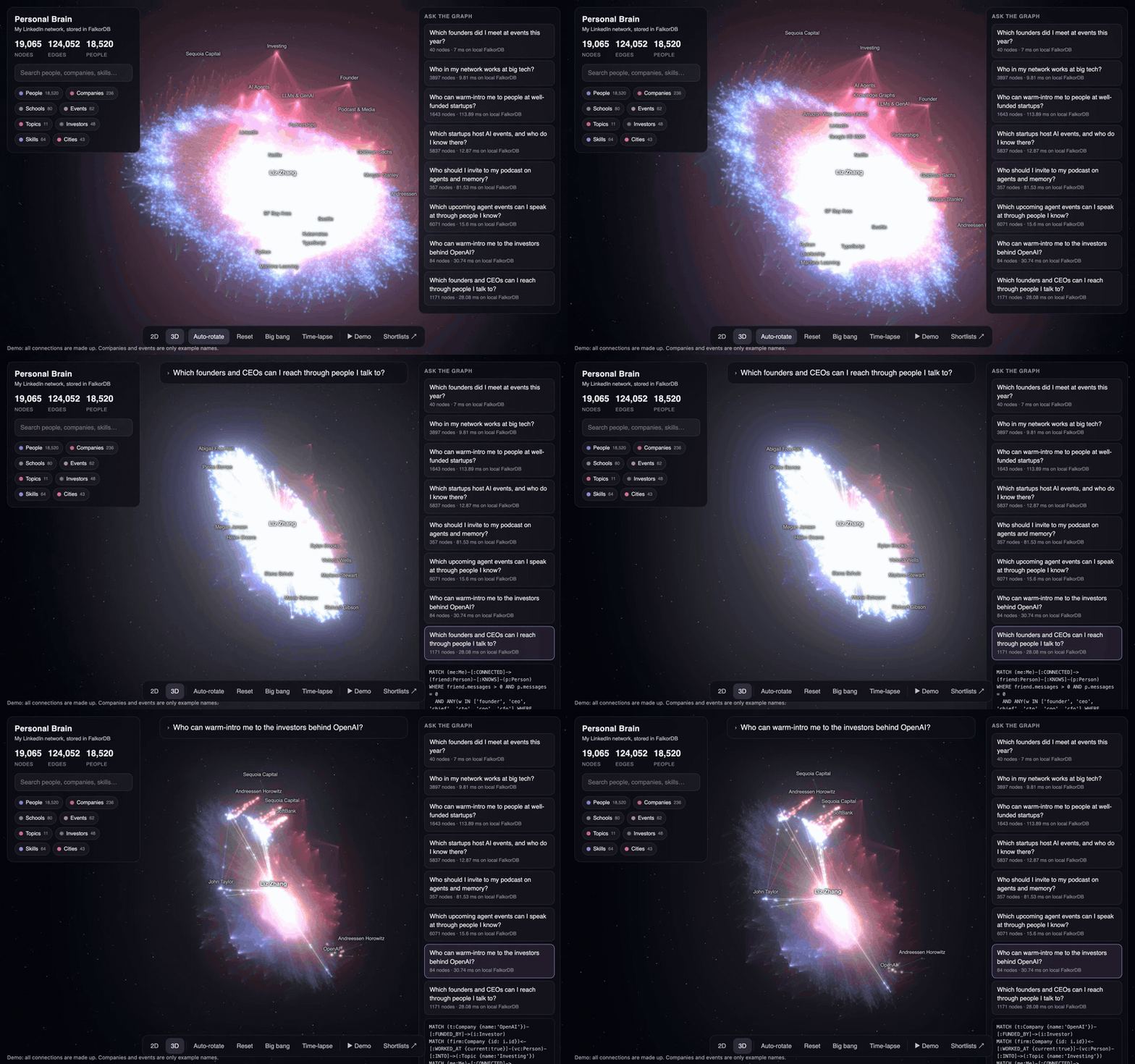
- personal_brain-0.1.0/src/personal_brain/sample_data/linkedin/Positions.csv +3 -0
- personal_brain-0.1.0/src/personal_brain/sample_data/linkedin/Profile.csv +2 -0
- personal_brain-0.1.0/src/personal_brain/sample_data/linkedin/messages.csv +438 -0
- personal_brain-0.1.0/src/personal_brain/server.py +157 -0
- personal_brain-0.1.0/src/personal_brain/viewer/index.html +971 -0
- personal_brain-0.1.0/src/personal_brain/viewer/shortlists.html +157 -0
- personal_brain-0.1.0/src/personal_brain/viewer/vendor/three/LICENSE +21 -0
- personal_brain-0.1.0/src/personal_brain/viewer/vendor/three/build/three.module.js +54571 -0
- personal_brain-0.1.0/src/personal_brain/viewer/vendor/three/examples/jsm/controls/OrbitControls.js +1523 -0
- personal_brain-0.1.0/src/personal_brain/viewer/vendor/three/examples/jsm/postprocessing/EffectComposer.js +231 -0
- personal_brain-0.1.0/src/personal_brain/viewer/vendor/three/examples/jsm/postprocessing/MaskPass.js +104 -0
- personal_brain-0.1.0/src/personal_brain/viewer/vendor/three/examples/jsm/postprocessing/OutputPass.js +97 -0
- personal_brain-0.1.0/src/personal_brain/viewer/vendor/three/examples/jsm/postprocessing/Pass.js +95 -0
- personal_brain-0.1.0/src/personal_brain/viewer/vendor/three/examples/jsm/postprocessing/RenderPass.js +99 -0
- personal_brain-0.1.0/src/personal_brain/viewer/vendor/three/examples/jsm/postprocessing/ShaderPass.js +77 -0
- personal_brain-0.1.0/src/personal_brain/viewer/vendor/three/examples/jsm/postprocessing/UnrealBloomPass.js +415 -0
- personal_brain-0.1.0/src/personal_brain/viewer/vendor/three/examples/jsm/shaders/CopyShader.js +45 -0
- personal_brain-0.1.0/src/personal_brain/viewer/vendor/three/examples/jsm/shaders/LuminosityHighPassShader.js +64 -0
- personal_brain-0.1.0/src/personal_brain/viewer/vendor/three/examples/jsm/shaders/OutputShader.js +85 -0
|
@@ -0,0 +1,21 @@
|
|
|
1
|
+
MIT License
|
|
2
|
+
|
|
3
|
+
Copyright (c) 2026 Liz Zhang
|
|
4
|
+
|
|
5
|
+
Permission is hereby granted, free of charge, to any person obtaining a copy
|
|
6
|
+
of this software and associated documentation files (the "Software"), to deal
|
|
7
|
+
in the Software without restriction, including without limitation the rights
|
|
8
|
+
to use, copy, modify, merge, publish, distribute, sublicense, and/or sell
|
|
9
|
+
copies of the Software, and to permit persons to whom the Software is
|
|
10
|
+
furnished to do so, subject to the following conditions:
|
|
11
|
+
|
|
12
|
+
The above copyright notice and this permission notice shall be included in all
|
|
13
|
+
copies or substantial portions of the Software.
|
|
14
|
+
|
|
15
|
+
THE SOFTWARE IS PROVIDED "AS IS", WITHOUT WARRANTY OF ANY KIND, EXPRESS OR
|
|
16
|
+
IMPLIED, INCLUDING BUT NOT LIMITED TO THE WARRANTIES OF MERCHANTABILITY,
|
|
17
|
+
FITNESS FOR A PARTICULAR PURPOSE AND NONINFRINGEMENT. IN NO EVENT SHALL THE
|
|
18
|
+
AUTHORS OR COPYRIGHT HOLDERS BE LIABLE FOR ANY CLAIM, DAMAGES OR OTHER
|
|
19
|
+
LIABILITY, WHETHER IN AN ACTION OF CONTRACT, TORT OR OTHERWISE, ARISING FROM,
|
|
20
|
+
OUT OF OR IN CONNECTION WITH THE SOFTWARE OR THE USE OR OTHER DEALINGS IN THE
|
|
21
|
+
SOFTWARE.
|
|
@@ -0,0 +1,215 @@
|
|
|
1
|
+
Metadata-Version: 2.5
|
|
2
|
+
Name: personal-brain
|
|
3
|
+
Version: 0.1.0
|
|
4
|
+
Summary: Your LinkedIn network as agent memory in FalkorDB: MCP tools to remember, find, ask and forget, plus a 3D viewer.
|
|
5
|
+
Project-URL: Homepage, https://github.com/zhang-liz/personal-brain
|
|
6
|
+
Project-URL: Demo, https://zhang-liz.github.io/personal-brain/
|
|
7
|
+
License-Expression: MIT
|
|
8
|
+
License-File: LICENSE
|
|
9
|
+
Keywords: agent-memory,falkordb,knowledge-graph,linkedin,mcp
|
|
10
|
+
Requires-Python: >=3.10
|
|
11
|
+
Requires-Dist: falkordb==1.2.0
|
|
12
|
+
Requires-Dist: igraph==0.11.8
|
|
13
|
+
Requires-Dist: mcp<3,>=2.3
|
|
14
|
+
Requires-Dist: redis
|
|
15
|
+
Description-Content-Type: text/markdown
|
|
16
|
+
|
|
17
|
+
# Personal Brain
|
|
18
|
+
|
|
19
|
+
Turn your LinkedIn network into a graph you can ask questions, stored in
|
|
20
|
+
[FalkorDB](https://www.falkordb.com/), and fly through it in 3D.
|
|
21
|
+
|
|
22
|
+
[](https://zhang-liz.github.io/personal-brain/)
|
|
23
|
+
|
|
24
|
+
**[Try the live demo](https://zhang-liz.github.io/personal-brain/)**. All connections in it are made up, and its companies and events are only example names. To rebuild it, see `scripts/build_demo.py`.
|
|
25
|
+
|
|
26
|
+
After every event you meet people. Two weeks later you forget who they were,
|
|
27
|
+
what they work on, and who could introduce you to whom. Personal Brain keeps
|
|
28
|
+
that memory as a graph: people, companies, schools, skills, events, topics,
|
|
29
|
+
investors and cities, plus inferred "who knows whom" links.
|
|
30
|
+
|
|
31
|
+
What the viewer does:
|
|
32
|
+
|
|
33
|
+
- Shows your whole network as a galaxy in WebGL (tested with 19k nodes and 117k edges), with a 2D / 3D toggle.
|
|
34
|
+
- **Time-lapse**: watch your network grow, connection by connection, with your events popping up.
|
|
35
|
+
- **Ask the graph**: a question types itself, then its Cypher query, then the answer lights up with light pulses along the paths. Example questions:
|
|
36
|
+
- Which founders did I meet at events this year?
|
|
37
|
+
- Who in my network works at big tech?
|
|
38
|
+
- Who can warm-intro me to people at well-funded startups?
|
|
39
|
+
- Which startups host AI events, and who do I know there?
|
|
40
|
+
- Who should I invite to my podcast on agents and memory?
|
|
41
|
+
- Which upcoming agent events can I speak at through people I know?
|
|
42
|
+
- **Shortlists**: ranked tables (and CSVs) of co-hosts & sponsors, podcast guests, upcoming events to speak at, and organizers you know. Every row says why it ranks there.
|
|
43
|
+
- **Remember**: type "Met Maya from Supabase at AI Engineer Summit, runs developer events" and it is written to FalkorDB live and appears in the galaxy.
|
|
44
|
+
- **Demo mode**: the whole show hands-free (press `D`).
|
|
45
|
+
- **Agent memory (MCP)**: Claude Code, or any MCP client, can find people, ask the graph, remember who you met and forget on request.
|
|
46
|
+
|
|
47
|
+
Everything runs on your laptop. The viewer works offline (three.js is vendored).
|
|
48
|
+
|
|
49
|
+
## Quick start: a sample network in 5 minutes
|
|
50
|
+
|
|
51
|
+
You need [uv](https://docs.astral.sh/uv/getting-started/installation/) and FalkorDB. `uvx` downloads the right Python for you.
|
|
52
|
+
|
|
53
|
+
The made-up sample network has 241 invented people, startups and events, in the same file formats as a real LinkedIn export. You can try everything before you download your own data.
|
|
54
|
+
|
|
55
|
+
**1. Start FalkorDB.** Run it in Docker, or see [FalkorDB Cloud](#falkordb-cloud):
|
|
56
|
+
|
|
57
|
+
```bash
|
|
58
|
+
docker run -p 6379:6379 -p 3000:3000 -it --rm falkordb/falkordb:latest
|
|
59
|
+
```
|
|
60
|
+
|
|
61
|
+
**2. Load the sample, and add the server to Claude Code:**
|
|
62
|
+
|
|
63
|
+
```bash
|
|
64
|
+
uvx personal-brain load --sample
|
|
65
|
+
claude mcp add personal-brain -- uvx personal-brain mcp
|
|
66
|
+
```
|
|
67
|
+
|
|
68
|
+
Try:
|
|
69
|
+
|
|
70
|
+
- "Who in my network works at Kestrel Graph?"
|
|
71
|
+
- "Who could introduce me to someone at a well-funded startup?"
|
|
72
|
+
- "I met Oskar Mensah at the Graph & RAG Meetup. He's building agent memory." (There are two Oskar Mensahs, so it asks which one.)
|
|
73
|
+
- "Forget that note."
|
|
74
|
+
|
|
75
|
+
**Other MCP clients:** use command `uvx`, arguments `personal-brain mcp` (stdio).
|
|
76
|
+
|
|
77
|
+
### FalkorDB Cloud
|
|
78
|
+
|
|
79
|
+
A free [FalkorDB Cloud](https://app.falkordb.cloud/) instance works without Docker. Pass its URL to the server, and add `--cloud` to `load` and `export`:
|
|
80
|
+
|
|
81
|
+
```bash
|
|
82
|
+
export FALKORDB_URL='falkors://user:password@host:port'
|
|
83
|
+
uvx personal-brain load --sample --cloud
|
|
84
|
+
claude mcp add personal-brain -e FALKORDB_URL="$FALKORDB_URL" -- uvx personal-brain mcp
|
|
85
|
+
```
|
|
86
|
+
|
|
87
|
+
Or put `FALKORDB_URL=...` in `~/.personal-brain/.env`.
|
|
88
|
+
|
|
89
|
+
## Use it as your agent's memory (MCP)
|
|
90
|
+
|
|
91
|
+
`uvx personal-brain mcp` gives your agent four tools on one graph:
|
|
92
|
+
|
|
93
|
+
| Tool | What it does |
|
|
94
|
+
|---|---|
|
|
95
|
+
| `remember` | Saves who you met, where they work and where you met. Matches the name to people already in the graph. When it is not sure which person you mean, it saves nothing and asks. A new company ends the old job and keeps it in the history. |
|
|
96
|
+
| `find` | Finds people, companies and events by name, in any script, typos and missing accents included. |
|
|
97
|
+
| `ask` | Runs a read-only Cypher query (FalkorDB refuses writes), with a 5 second limit and at most 50 rows. The tool description carries the schema. |
|
|
98
|
+
| `forget` | Forgets one note and everything it added, one relationship, or one person. A forgotten person stays out of future rebuilds. |
|
|
99
|
+
|
|
100
|
+
Every write hangs off a `Note` node, so you can trace each fact to the note that made it. `PB_GRAPH` picks the graph (default `network`). If FalkorDB is not running, the server still starts, and each tool says how to start it. Windows is not tested.
|
|
101
|
+
|
|
102
|
+
## How it works
|
|
103
|
+
|
|
104
|
+
```
|
|
105
|
+
LinkedIn data export ──┐
|
|
106
|
+
├─> load_graph.py ──> FalkorDB ──┬─> mcp_server.py ──> your agent
|
|
107
|
+
data/enriched/ ────────┘ (graph "network") ├─> export_graph.py ──> layout_graph.py ──> viewer
|
|
108
|
+
(optional) ├─> export_stories.py, export_shortlists.py ──> viewer
|
|
109
|
+
└─> server.py (live "Remember" API) ──> viewer
|
|
110
|
+
```
|
|
111
|
+
|
|
112
|
+
1. **Your LinkedIn export** gives connections (with the date you connected), your messages (only counts are used, never text), your posts, jobs and schools.
|
|
113
|
+
2. **Optional files in `data/enriched/`** add each connection's full job history, schools and skills, company funding, and upcoming events. They use the JSON format of `sample_data/enriched/`. This repo has no tool to collect them; everything works without them.
|
|
114
|
+
3. **load_graph.py** builds the graph and infers:
|
|
115
|
+
- `KNOWS` between two connections who worked at the same company or studied at the same school for 3+ months at the same time (at big schools, same start year only), who work at the same company now (when there is no job history), or who are in the same group chat.
|
|
116
|
+
- `Event` nodes: days when you added 5+ connections are probably events. Name them in `my_brain.json`.
|
|
117
|
+
- `Topic` interests (AI agents, agent memory, knowledge graphs, founders, investors, podcasts…) from headlines and skills.
|
|
118
|
+
- With enriched files only:
|
|
119
|
+
- Years of experience per technology from job titles and descriptions.
|
|
120
|
+
- `well_funded` startups: private, active, at most 5,000 people, and a Series round or 8+ investors.
|
|
121
|
+
- `City` from each profile's location, at metro level ("Berlin Metropolitan Area" and "Berlin" are one city; Palo Alto and San Jose are "SF Bay Area").
|
|
122
|
+
- Who hosts each upcoming event: a host who is your connection (LinkedIn match), or a company where you know people (host is the company, a host works there, or the title names it, like "Notion x Clover").
|
|
123
|
+
4. **export_graph.py + layout_graph.py** export the graph to JSON and compute a 2D layout (igraph DrL). In 3D, each node type sits on its own layer.
|
|
124
|
+
5. **export_stories.py** runs the "Ask the graph" Cypher queries on FalkorDB and saves the answers and timings for the viewer.
|
|
125
|
+
6. **export_shortlists.py** ranks co-hosts, podcast guests and places to speak with a simple score you can read and change.
|
|
126
|
+
|
|
127
|
+
### Graph schema
|
|
128
|
+
|
|
129
|
+
| Nodes | Edges |
|
|
130
|
+
|---|---|
|
|
131
|
+
| `Me`, `Person`, `Company`, `School`, `Skill`, `Topic`, `Event`, `Investor`, `City`, `Note` | `(Me)-[:CONNECTED]->(Person)`, `(Person)-[:WORKED_AT {title, start, end, current}]->(Company)`, `(Person)-[:STUDIED_AT]->(School)`, `(Person)-[:HAS_SKILL]->(Skill)`, `(Person)-[:HAS_EXPERIENCE {years}]->(Skill)`, `(Person)-[:INTO]->(Topic)`, `(Person)-[:KNOWS {via, place}]-(Person)`, `(Me)-[:ATTENDED]->(Event)`, `(Person)-[:MET_AT]->(Event)`, `(Company)-[:FUNDED_BY {lead, round}]->(Investor)`, `(Person)-[:LIVES_IN]->(City)`, `(Event {upcoming})-[:HOSTED_BY {via}]->(Person or Company)`, `(Event)-[:ABOUT]->(Topic)`, `(Event)-[:HELD_IN]->(City)`, `(Me)-[:MET]->(Person)` and `(Me)-[:WROTE]->(Note)-[:ABOUT]->(Person)` (from Remember) |
|
|
132
|
+
|
|
133
|
+
## Build your own
|
|
134
|
+
|
|
135
|
+
**1. Get your LinkedIn data.** LinkedIn > Settings > Data privacy > Get a copy of your data.
|
|
136
|
+
Two choices:
|
|
137
|
+
|
|
138
|
+
- **Connections only**: usually ready in about 10 minutes. You get people, their current company and title, and the day you connected. That is enough for the graph, events and the agent tools.
|
|
139
|
+
- **Download larger data archive**: ready in about a day. It adds your messages (only counts are used), posts, jobs and schools.
|
|
140
|
+
|
|
141
|
+
Unzip it into `~/.personal-brain` (the folder name contains `LinkedInDataExport`). `personal-brain --help` shows your data folder. To use another folder, set `PB_HOME`.
|
|
142
|
+
|
|
143
|
+
**Or start empty.** Skip the import. The MCP server creates you in an empty graph, and the graph grows as you tell your agent who you met.
|
|
144
|
+
|
|
145
|
+
Optional: copy [`my_brain.example.json`](my_brain.example.json) to `~/.personal-brain/my_brain.json` to name your events and list competitors.
|
|
146
|
+
|
|
147
|
+
**2. Build the graph and the viewer data.** Add `--cloud` to both when you use FalkorDB Cloud:
|
|
148
|
+
|
|
149
|
+
```bash
|
|
150
|
+
uvx personal-brain load
|
|
151
|
+
uvx personal-brain export
|
|
152
|
+
```
|
|
153
|
+
|
|
154
|
+
**3. Open it.**
|
|
155
|
+
|
|
156
|
+
```bash
|
|
157
|
+
uvx personal-brain view
|
|
158
|
+
```
|
|
159
|
+
|
|
160
|
+
Open http://127.0.0.1:8765 (shortlists: http://127.0.0.1:8765/shortlists.html). Keys: `2` / `3` switch views, `T` time-lapse, `B` big bang, `D` demo, `Esc` reset.
|
|
161
|
+
|
|
162
|
+
To explore in the FalkorDB Browser instead, see `docs/demo_queries.cypher`.
|
|
163
|
+
|
|
164
|
+
## Work on the code
|
|
165
|
+
|
|
166
|
+
You need Python 3.10 or newer, [uv](https://docs.astral.sh/uv/getting-started/installation/) and Docker. In a clone, your data folder is the clone itself, and Claude Code reads `.mcp.json` from any folder inside it.
|
|
167
|
+
|
|
168
|
+
```bash
|
|
169
|
+
git clone https://github.com/zhang-liz/personal-brain && cd personal-brain
|
|
170
|
+
python3 -m venv .venv && .venv/bin/pip install -e .
|
|
171
|
+
docker run -p 6379:6379 -p 3000:3000 -it --rm falkordb/falkordb:latest
|
|
172
|
+
```
|
|
173
|
+
|
|
174
|
+
Then, in another terminal, run the tests. They use throwaway graphs:
|
|
175
|
+
|
|
176
|
+
```bash
|
|
177
|
+
.venv/bin/python tests/test_memory.py # the memory tools (add --cloud to use FALKORDB_URL)
|
|
178
|
+
.venv/bin/python tests/test_mcp_server.py # the server, started the way an agent starts it
|
|
179
|
+
.venv/bin/python tests/test_package.py # the built package, used from another folder
|
|
180
|
+
```
|
|
181
|
+
|
|
182
|
+
## Your data stays yours
|
|
183
|
+
|
|
184
|
+
- Your data stays in `~/.personal-brain`, outside the package. Only you can open that folder. In a clone, the export, `data/`, `.env` and `my_brain.json` are in `.gitignore`. Never commit them.
|
|
185
|
+
- Message text is never read into the graph, only how many messages you exchanged with each person.
|
|
186
|
+
- `data/viewer/graph.json` and the shortlists in your data folder hold real names. Share screenshots, not those files.
|
|
187
|
+
- The local server listens on `127.0.0.1` only and serves only `data/viewer/`.
|
|
188
|
+
|
|
189
|
+
## Files
|
|
190
|
+
|
|
191
|
+
| Path | What it does |
|
|
192
|
+
|---|---|
|
|
193
|
+
| `src/personal_brain/cli.py` | The `personal-brain` command |
|
|
194
|
+
| `src/personal_brain/paths.py` | Where your data folder is |
|
|
195
|
+
| `src/personal_brain/load_graph.py` | Builds the FalkorDB graph and all inferred links |
|
|
196
|
+
| `src/personal_brain/export_graph.py` | Exports every node and edge to `data/viewer/graph.json` |
|
|
197
|
+
| `src/personal_brain/layout_graph.py` | Precomputes the layout |
|
|
198
|
+
| `src/personal_brain/export_stories.py` | The "Ask the graph" questions and their Cypher |
|
|
199
|
+
| `src/personal_brain/export_shortlists.py` | Ranked shortlists: co-hosts & sponsors, podcast guests, places to speak |
|
|
200
|
+
| `src/personal_brain/viewer/shortlists.html` | The shortlists page (filter, download CSV) |
|
|
201
|
+
| `src/personal_brain/server.py` | Serves the viewer and the live Remember / Forget API |
|
|
202
|
+
| `src/personal_brain/memory.py` | The memory itself: remember, find, ask, forget (used by the MCP server and the viewer) |
|
|
203
|
+
| `src/personal_brain/mcp_server.py` | The MCP server for Claude Code and other agents |
|
|
204
|
+
| `.mcp.json` | Tells Claude Code how to start the MCP server in a clone |
|
|
205
|
+
| `tests/` | End-to-end checks of the memory tools, the MCP server and the built package, on throwaway graphs |
|
|
206
|
+
| `src/personal_brain/sample_data/` | The made-up sample network |
|
|
207
|
+
| `scripts/make_sample_data.py` | Writes `sample_data/` |
|
|
208
|
+
| `src/personal_brain/viewer/index.html` | The WebGL viewer (three.js r170, MIT, vendored) |
|
|
209
|
+
| `docs/demo_queries.cypher` | Queries to paste into the FalkorDB Browser |
|
|
210
|
+
|
|
211
|
+
This is a demo-quality build made at a hackathon, not a product.
|
|
212
|
+
|
|
213
|
+
## License
|
|
214
|
+
|
|
215
|
+
MIT, see [LICENSE](LICENSE). three.js in `src/personal_brain/viewer/vendor/` is MIT too (its own LICENSE file).
|
|
@@ -0,0 +1,199 @@
|
|
|
1
|
+
# Personal Brain
|
|
2
|
+
|
|
3
|
+
Turn your LinkedIn network into a graph you can ask questions, stored in
|
|
4
|
+
[FalkorDB](https://www.falkordb.com/), and fly through it in 3D.
|
|
5
|
+
|
|
6
|
+
[](https://zhang-liz.github.io/personal-brain/)
|
|
7
|
+
|
|
8
|
+
**[Try the live demo](https://zhang-liz.github.io/personal-brain/)**. All connections in it are made up, and its companies and events are only example names. To rebuild it, see `scripts/build_demo.py`.
|
|
9
|
+
|
|
10
|
+
After every event you meet people. Two weeks later you forget who they were,
|
|
11
|
+
what they work on, and who could introduce you to whom. Personal Brain keeps
|
|
12
|
+
that memory as a graph: people, companies, schools, skills, events, topics,
|
|
13
|
+
investors and cities, plus inferred "who knows whom" links.
|
|
14
|
+
|
|
15
|
+
What the viewer does:
|
|
16
|
+
|
|
17
|
+
- Shows your whole network as a galaxy in WebGL (tested with 19k nodes and 117k edges), with a 2D / 3D toggle.
|
|
18
|
+
- **Time-lapse**: watch your network grow, connection by connection, with your events popping up.
|
|
19
|
+
- **Ask the graph**: a question types itself, then its Cypher query, then the answer lights up with light pulses along the paths. Example questions:
|
|
20
|
+
- Which founders did I meet at events this year?
|
|
21
|
+
- Who in my network works at big tech?
|
|
22
|
+
- Who can warm-intro me to people at well-funded startups?
|
|
23
|
+
- Which startups host AI events, and who do I know there?
|
|
24
|
+
- Who should I invite to my podcast on agents and memory?
|
|
25
|
+
- Which upcoming agent events can I speak at through people I know?
|
|
26
|
+
- **Shortlists**: ranked tables (and CSVs) of co-hosts & sponsors, podcast guests, upcoming events to speak at, and organizers you know. Every row says why it ranks there.
|
|
27
|
+
- **Remember**: type "Met Maya from Supabase at AI Engineer Summit, runs developer events" and it is written to FalkorDB live and appears in the galaxy.
|
|
28
|
+
- **Demo mode**: the whole show hands-free (press `D`).
|
|
29
|
+
- **Agent memory (MCP)**: Claude Code, or any MCP client, can find people, ask the graph, remember who you met and forget on request.
|
|
30
|
+
|
|
31
|
+
Everything runs on your laptop. The viewer works offline (three.js is vendored).
|
|
32
|
+
|
|
33
|
+
## Quick start: a sample network in 5 minutes
|
|
34
|
+
|
|
35
|
+
You need [uv](https://docs.astral.sh/uv/getting-started/installation/) and FalkorDB. `uvx` downloads the right Python for you.
|
|
36
|
+
|
|
37
|
+
The made-up sample network has 241 invented people, startups and events, in the same file formats as a real LinkedIn export. You can try everything before you download your own data.
|
|
38
|
+
|
|
39
|
+
**1. Start FalkorDB.** Run it in Docker, or see [FalkorDB Cloud](#falkordb-cloud):
|
|
40
|
+
|
|
41
|
+
```bash
|
|
42
|
+
docker run -p 6379:6379 -p 3000:3000 -it --rm falkordb/falkordb:latest
|
|
43
|
+
```
|
|
44
|
+
|
|
45
|
+
**2. Load the sample, and add the server to Claude Code:**
|
|
46
|
+
|
|
47
|
+
```bash
|
|
48
|
+
uvx personal-brain load --sample
|
|
49
|
+
claude mcp add personal-brain -- uvx personal-brain mcp
|
|
50
|
+
```
|
|
51
|
+
|
|
52
|
+
Try:
|
|
53
|
+
|
|
54
|
+
- "Who in my network works at Kestrel Graph?"
|
|
55
|
+
- "Who could introduce me to someone at a well-funded startup?"
|
|
56
|
+
- "I met Oskar Mensah at the Graph & RAG Meetup. He's building agent memory." (There are two Oskar Mensahs, so it asks which one.)
|
|
57
|
+
- "Forget that note."
|
|
58
|
+
|
|
59
|
+
**Other MCP clients:** use command `uvx`, arguments `personal-brain mcp` (stdio).
|
|
60
|
+
|
|
61
|
+
### FalkorDB Cloud
|
|
62
|
+
|
|
63
|
+
A free [FalkorDB Cloud](https://app.falkordb.cloud/) instance works without Docker. Pass its URL to the server, and add `--cloud` to `load` and `export`:
|
|
64
|
+
|
|
65
|
+
```bash
|
|
66
|
+
export FALKORDB_URL='falkors://user:password@host:port'
|
|
67
|
+
uvx personal-brain load --sample --cloud
|
|
68
|
+
claude mcp add personal-brain -e FALKORDB_URL="$FALKORDB_URL" -- uvx personal-brain mcp
|
|
69
|
+
```
|
|
70
|
+
|
|
71
|
+
Or put `FALKORDB_URL=...` in `~/.personal-brain/.env`.
|
|
72
|
+
|
|
73
|
+
## Use it as your agent's memory (MCP)
|
|
74
|
+
|
|
75
|
+
`uvx personal-brain mcp` gives your agent four tools on one graph:
|
|
76
|
+
|
|
77
|
+
| Tool | What it does |
|
|
78
|
+
|---|---|
|
|
79
|
+
| `remember` | Saves who you met, where they work and where you met. Matches the name to people already in the graph. When it is not sure which person you mean, it saves nothing and asks. A new company ends the old job and keeps it in the history. |
|
|
80
|
+
| `find` | Finds people, companies and events by name, in any script, typos and missing accents included. |
|
|
81
|
+
| `ask` | Runs a read-only Cypher query (FalkorDB refuses writes), with a 5 second limit and at most 50 rows. The tool description carries the schema. |
|
|
82
|
+
| `forget` | Forgets one note and everything it added, one relationship, or one person. A forgotten person stays out of future rebuilds. |
|
|
83
|
+
|
|
84
|
+
Every write hangs off a `Note` node, so you can trace each fact to the note that made it. `PB_GRAPH` picks the graph (default `network`). If FalkorDB is not running, the server still starts, and each tool says how to start it. Windows is not tested.
|
|
85
|
+
|
|
86
|
+
## How it works
|
|
87
|
+
|
|
88
|
+
```
|
|
89
|
+
LinkedIn data export ──┐
|
|
90
|
+
├─> load_graph.py ──> FalkorDB ──┬─> mcp_server.py ──> your agent
|
|
91
|
+
data/enriched/ ────────┘ (graph "network") ├─> export_graph.py ──> layout_graph.py ──> viewer
|
|
92
|
+
(optional) ├─> export_stories.py, export_shortlists.py ──> viewer
|
|
93
|
+
└─> server.py (live "Remember" API) ──> viewer
|
|
94
|
+
```
|
|
95
|
+
|
|
96
|
+
1. **Your LinkedIn export** gives connections (with the date you connected), your messages (only counts are used, never text), your posts, jobs and schools.
|
|
97
|
+
2. **Optional files in `data/enriched/`** add each connection's full job history, schools and skills, company funding, and upcoming events. They use the JSON format of `sample_data/enriched/`. This repo has no tool to collect them; everything works without them.
|
|
98
|
+
3. **load_graph.py** builds the graph and infers:
|
|
99
|
+
- `KNOWS` between two connections who worked at the same company or studied at the same school for 3+ months at the same time (at big schools, same start year only), who work at the same company now (when there is no job history), or who are in the same group chat.
|
|
100
|
+
- `Event` nodes: days when you added 5+ connections are probably events. Name them in `my_brain.json`.
|
|
101
|
+
- `Topic` interests (AI agents, agent memory, knowledge graphs, founders, investors, podcasts…) from headlines and skills.
|
|
102
|
+
- With enriched files only:
|
|
103
|
+
- Years of experience per technology from job titles and descriptions.
|
|
104
|
+
- `well_funded` startups: private, active, at most 5,000 people, and a Series round or 8+ investors.
|
|
105
|
+
- `City` from each profile's location, at metro level ("Berlin Metropolitan Area" and "Berlin" are one city; Palo Alto and San Jose are "SF Bay Area").
|
|
106
|
+
- Who hosts each upcoming event: a host who is your connection (LinkedIn match), or a company where you know people (host is the company, a host works there, or the title names it, like "Notion x Clover").
|
|
107
|
+
4. **export_graph.py + layout_graph.py** export the graph to JSON and compute a 2D layout (igraph DrL). In 3D, each node type sits on its own layer.
|
|
108
|
+
5. **export_stories.py** runs the "Ask the graph" Cypher queries on FalkorDB and saves the answers and timings for the viewer.
|
|
109
|
+
6. **export_shortlists.py** ranks co-hosts, podcast guests and places to speak with a simple score you can read and change.
|
|
110
|
+
|
|
111
|
+
### Graph schema
|
|
112
|
+
|
|
113
|
+
| Nodes | Edges |
|
|
114
|
+
|---|---|
|
|
115
|
+
| `Me`, `Person`, `Company`, `School`, `Skill`, `Topic`, `Event`, `Investor`, `City`, `Note` | `(Me)-[:CONNECTED]->(Person)`, `(Person)-[:WORKED_AT {title, start, end, current}]->(Company)`, `(Person)-[:STUDIED_AT]->(School)`, `(Person)-[:HAS_SKILL]->(Skill)`, `(Person)-[:HAS_EXPERIENCE {years}]->(Skill)`, `(Person)-[:INTO]->(Topic)`, `(Person)-[:KNOWS {via, place}]-(Person)`, `(Me)-[:ATTENDED]->(Event)`, `(Person)-[:MET_AT]->(Event)`, `(Company)-[:FUNDED_BY {lead, round}]->(Investor)`, `(Person)-[:LIVES_IN]->(City)`, `(Event {upcoming})-[:HOSTED_BY {via}]->(Person or Company)`, `(Event)-[:ABOUT]->(Topic)`, `(Event)-[:HELD_IN]->(City)`, `(Me)-[:MET]->(Person)` and `(Me)-[:WROTE]->(Note)-[:ABOUT]->(Person)` (from Remember) |
|
|
116
|
+
|
|
117
|
+
## Build your own
|
|
118
|
+
|
|
119
|
+
**1. Get your LinkedIn data.** LinkedIn > Settings > Data privacy > Get a copy of your data.
|
|
120
|
+
Two choices:
|
|
121
|
+
|
|
122
|
+
- **Connections only**: usually ready in about 10 minutes. You get people, their current company and title, and the day you connected. That is enough for the graph, events and the agent tools.
|
|
123
|
+
- **Download larger data archive**: ready in about a day. It adds your messages (only counts are used), posts, jobs and schools.
|
|
124
|
+
|
|
125
|
+
Unzip it into `~/.personal-brain` (the folder name contains `LinkedInDataExport`). `personal-brain --help` shows your data folder. To use another folder, set `PB_HOME`.
|
|
126
|
+
|
|
127
|
+
**Or start empty.** Skip the import. The MCP server creates you in an empty graph, and the graph grows as you tell your agent who you met.
|
|
128
|
+
|
|
129
|
+
Optional: copy [`my_brain.example.json`](my_brain.example.json) to `~/.personal-brain/my_brain.json` to name your events and list competitors.
|
|
130
|
+
|
|
131
|
+
**2. Build the graph and the viewer data.** Add `--cloud` to both when you use FalkorDB Cloud:
|
|
132
|
+
|
|
133
|
+
```bash
|
|
134
|
+
uvx personal-brain load
|
|
135
|
+
uvx personal-brain export
|
|
136
|
+
```
|
|
137
|
+
|
|
138
|
+
**3. Open it.**
|
|
139
|
+
|
|
140
|
+
```bash
|
|
141
|
+
uvx personal-brain view
|
|
142
|
+
```
|
|
143
|
+
|
|
144
|
+
Open http://127.0.0.1:8765 (shortlists: http://127.0.0.1:8765/shortlists.html). Keys: `2` / `3` switch views, `T` time-lapse, `B` big bang, `D` demo, `Esc` reset.
|
|
145
|
+
|
|
146
|
+
To explore in the FalkorDB Browser instead, see `docs/demo_queries.cypher`.
|
|
147
|
+
|
|
148
|
+
## Work on the code
|
|
149
|
+
|
|
150
|
+
You need Python 3.10 or newer, [uv](https://docs.astral.sh/uv/getting-started/installation/) and Docker. In a clone, your data folder is the clone itself, and Claude Code reads `.mcp.json` from any folder inside it.
|
|
151
|
+
|
|
152
|
+
```bash
|
|
153
|
+
git clone https://github.com/zhang-liz/personal-brain && cd personal-brain
|
|
154
|
+
python3 -m venv .venv && .venv/bin/pip install -e .
|
|
155
|
+
docker run -p 6379:6379 -p 3000:3000 -it --rm falkordb/falkordb:latest
|
|
156
|
+
```
|
|
157
|
+
|
|
158
|
+
Then, in another terminal, run the tests. They use throwaway graphs:
|
|
159
|
+
|
|
160
|
+
```bash
|
|
161
|
+
.venv/bin/python tests/test_memory.py # the memory tools (add --cloud to use FALKORDB_URL)
|
|
162
|
+
.venv/bin/python tests/test_mcp_server.py # the server, started the way an agent starts it
|
|
163
|
+
.venv/bin/python tests/test_package.py # the built package, used from another folder
|
|
164
|
+
```
|
|
165
|
+
|
|
166
|
+
## Your data stays yours
|
|
167
|
+
|
|
168
|
+
- Your data stays in `~/.personal-brain`, outside the package. Only you can open that folder. In a clone, the export, `data/`, `.env` and `my_brain.json` are in `.gitignore`. Never commit them.
|
|
169
|
+
- Message text is never read into the graph, only how many messages you exchanged with each person.
|
|
170
|
+
- `data/viewer/graph.json` and the shortlists in your data folder hold real names. Share screenshots, not those files.
|
|
171
|
+
- The local server listens on `127.0.0.1` only and serves only `data/viewer/`.
|
|
172
|
+
|
|
173
|
+
## Files
|
|
174
|
+
|
|
175
|
+
| Path | What it does |
|
|
176
|
+
|---|---|
|
|
177
|
+
| `src/personal_brain/cli.py` | The `personal-brain` command |
|
|
178
|
+
| `src/personal_brain/paths.py` | Where your data folder is |
|
|
179
|
+
| `src/personal_brain/load_graph.py` | Builds the FalkorDB graph and all inferred links |
|
|
180
|
+
| `src/personal_brain/export_graph.py` | Exports every node and edge to `data/viewer/graph.json` |
|
|
181
|
+
| `src/personal_brain/layout_graph.py` | Precomputes the layout |
|
|
182
|
+
| `src/personal_brain/export_stories.py` | The "Ask the graph" questions and their Cypher |
|
|
183
|
+
| `src/personal_brain/export_shortlists.py` | Ranked shortlists: co-hosts & sponsors, podcast guests, places to speak |
|
|
184
|
+
| `src/personal_brain/viewer/shortlists.html` | The shortlists page (filter, download CSV) |
|
|
185
|
+
| `src/personal_brain/server.py` | Serves the viewer and the live Remember / Forget API |
|
|
186
|
+
| `src/personal_brain/memory.py` | The memory itself: remember, find, ask, forget (used by the MCP server and the viewer) |
|
|
187
|
+
| `src/personal_brain/mcp_server.py` | The MCP server for Claude Code and other agents |
|
|
188
|
+
| `.mcp.json` | Tells Claude Code how to start the MCP server in a clone |
|
|
189
|
+
| `tests/` | End-to-end checks of the memory tools, the MCP server and the built package, on throwaway graphs |
|
|
190
|
+
| `src/personal_brain/sample_data/` | The made-up sample network |
|
|
191
|
+
| `scripts/make_sample_data.py` | Writes `sample_data/` |
|
|
192
|
+
| `src/personal_brain/viewer/index.html` | The WebGL viewer (three.js r170, MIT, vendored) |
|
|
193
|
+
| `docs/demo_queries.cypher` | Queries to paste into the FalkorDB Browser |
|
|
194
|
+
|
|
195
|
+
This is a demo-quality build made at a hackathon, not a product.
|
|
196
|
+
|
|
197
|
+
## License
|
|
198
|
+
|
|
199
|
+
MIT, see [LICENSE](LICENSE). three.js in `src/personal_brain/viewer/vendor/` is MIT too (its own LICENSE file).
|
|
@@ -0,0 +1,35 @@
|
|
|
1
|
+
[build-system]
|
|
2
|
+
requires = ["hatchling"]
|
|
3
|
+
build-backend = "hatchling.build"
|
|
4
|
+
|
|
5
|
+
[project]
|
|
6
|
+
name = "personal-brain"
|
|
7
|
+
dynamic = ["version"]
|
|
8
|
+
description = "Your LinkedIn network as agent memory in FalkorDB: MCP tools to remember, find, ask and forget, plus a 3D viewer."
|
|
9
|
+
readme = "README.md"
|
|
10
|
+
license = "MIT"
|
|
11
|
+
license-files = ["LICENSE"]
|
|
12
|
+
requires-python = ">=3.10"
|
|
13
|
+
keywords = ["mcp", "falkordb", "knowledge-graph", "agent-memory", "linkedin"]
|
|
14
|
+
dependencies = [
|
|
15
|
+
"falkordb==1.2.0",
|
|
16
|
+
"igraph==0.11.8",
|
|
17
|
+
"mcp>=2.3,<3",
|
|
18
|
+
"redis",
|
|
19
|
+
]
|
|
20
|
+
|
|
21
|
+
[project.urls]
|
|
22
|
+
Homepage = "https://github.com/zhang-liz/personal-brain"
|
|
23
|
+
Demo = "https://zhang-liz.github.io/personal-brain/"
|
|
24
|
+
|
|
25
|
+
[project.scripts]
|
|
26
|
+
personal-brain = "personal_brain.cli:main"
|
|
27
|
+
|
|
28
|
+
[tool.hatch.version]
|
|
29
|
+
path = "src/personal_brain/__init__.py"
|
|
30
|
+
|
|
31
|
+
[tool.hatch.build.targets.wheel]
|
|
32
|
+
packages = ["src/personal_brain"]
|
|
33
|
+
|
|
34
|
+
[tool.hatch.build.targets.sdist]
|
|
35
|
+
include = ["src", "README.md", "LICENSE", "pyproject.toml"]
|
|
@@ -0,0 +1,52 @@
|
|
|
1
|
+
"""The personal-brain command."""
|
|
2
|
+
|
|
3
|
+
import importlib
|
|
4
|
+
import sys
|
|
5
|
+
|
|
6
|
+
from personal_brain import __version__
|
|
7
|
+
from personal_brain.paths import HOME
|
|
8
|
+
|
|
9
|
+
USAGE = f"""personal-brain {__version__}: your LinkedIn network as agent memory in FalkorDB.
|
|
10
|
+
|
|
11
|
+
Commands:
|
|
12
|
+
mcp run the MCP server for your agent (stdio)
|
|
13
|
+
load [--sample] [--cloud] [--force]
|
|
14
|
+
build the graph from your LinkedIn export, or from the made-up sample
|
|
15
|
+
export [--cloud] write the viewer's data from the graph
|
|
16
|
+
view open the viewer's server on http://127.0.0.1:8765
|
|
17
|
+
|
|
18
|
+
Your data folder: {HOME}
|
|
19
|
+
"""
|
|
20
|
+
|
|
21
|
+
|
|
22
|
+
def run(module, *args):
|
|
23
|
+
"""Each module reads its options from sys.argv, some of them on import."""
|
|
24
|
+
sys.argv = [f"personal-brain {module}", *args]
|
|
25
|
+
importlib.import_module(f"personal_brain.{module}").main()
|
|
26
|
+
|
|
27
|
+
|
|
28
|
+
def main():
|
|
29
|
+
command, args = (sys.argv[1], sys.argv[2:]) if len(sys.argv) > 1 else ("", [])
|
|
30
|
+
if command == "--version":
|
|
31
|
+
print(f"personal-brain {__version__}")
|
|
32
|
+
elif command in ("mcp", "load", "export", "view"):
|
|
33
|
+
HOME.mkdir(parents=True, exist_ok=True, mode=0o700)
|
|
34
|
+
if command == "mcp":
|
|
35
|
+
run("mcp_server", *args)
|
|
36
|
+
elif command == "load":
|
|
37
|
+
run("load_graph", *args)
|
|
38
|
+
elif command == "view":
|
|
39
|
+
run("server", *args)
|
|
40
|
+
else:
|
|
41
|
+
run("export_graph", *args)
|
|
42
|
+
run("layout_graph", "--dims=2")
|
|
43
|
+
run("export_stories", *args)
|
|
44
|
+
run("export_shortlists", *args)
|
|
45
|
+
elif command in ("", "-h", "--help", "help"):
|
|
46
|
+
print(USAGE)
|
|
47
|
+
else:
|
|
48
|
+
sys.exit(f"Unknown command: {command}\n\n{USAGE}")
|
|
49
|
+
|
|
50
|
+
|
|
51
|
+
if __name__ == "__main__":
|
|
52
|
+
main()
|
|
@@ -0,0 +1,95 @@
|
|
|
1
|
+
"""THROWAWAY SPIKE: export the whole FalkorDB graph to JSON for the WebGL viewer.
|
|
2
|
+
|
|
3
|
+
Reads every node and edge, in pages (FalkorDB Cloud caps results at 10k rows),
|
|
4
|
+
and writes data/viewer/graph.json (gitignored: it has real names).
|
|
5
|
+
|
|
6
|
+
personal-brain export # local Docker FalkorDB
|
|
7
|
+
personal-brain export --cloud # FALKORDB_URL from the environment or .env
|
|
8
|
+
"""
|
|
9
|
+
|
|
10
|
+
import json
|
|
11
|
+
import os
|
|
12
|
+
import sys
|
|
13
|
+
import time
|
|
14
|
+
from pathlib import Path
|
|
15
|
+
|
|
16
|
+
from falkordb import FalkorDB
|
|
17
|
+
|
|
18
|
+
from personal_brain.paths import HOME, cloud_url
|
|
19
|
+
OUT = Path(os.environ.get("PB_VIEWER_DIR", HOME / "data" / "viewer")) / "graph.json"
|
|
20
|
+
PAGE = 500 # node ids per page
|
|
21
|
+
CAP = 10000 # FalkorDB Cloud result-set cap
|
|
22
|
+
|
|
23
|
+
|
|
24
|
+
def connect():
|
|
25
|
+
if "--cloud" in sys.argv:
|
|
26
|
+
return FalkorDB.from_url(cloud_url()), "FalkorDB Cloud"
|
|
27
|
+
return FalkorDB(host="localhost", port=6379), "local FalkorDB"
|
|
28
|
+
|
|
29
|
+
|
|
30
|
+
def main():
|
|
31
|
+
db, where = connect()
|
|
32
|
+
g = db.select_graph(os.environ.get("PB_GRAPH", "network"))
|
|
33
|
+
t0 = time.time()
|
|
34
|
+
max_id = g.query("MATCH (n) RETURN max(id(n))").result_set[0][0]
|
|
35
|
+
|
|
36
|
+
def edge_page(lo, hi):
|
|
37
|
+
rows = g.query("MATCH (a)-[r]->(b) WHERE id(a) >= $lo AND id(a) < $hi"
|
|
38
|
+
" RETURN id(a), id(b), type(r) ORDER BY id(r) LIMIT $cap",
|
|
39
|
+
{"lo": lo, "hi": hi, "cap": CAP}).result_set
|
|
40
|
+
if len(rows) < CAP:
|
|
41
|
+
return rows
|
|
42
|
+
if hi - lo == 1:
|
|
43
|
+
# One node with more edges than a result can hold (you, with 10k+ connections).
|
|
44
|
+
skip = 0
|
|
45
|
+
while len(rows) % CAP == 0 and len(rows) == skip + CAP:
|
|
46
|
+
skip += CAP
|
|
47
|
+
rows += g.query("MATCH (a)-[r]->(b) WHERE id(a) = $lo RETURN id(a), id(b), type(r)"
|
|
48
|
+
" ORDER BY id(r) SKIP $skip LIMIT $cap", {"lo": lo, "skip": skip, "cap": CAP}).result_set
|
|
49
|
+
return rows
|
|
50
|
+
mid = (lo + hi) // 2
|
|
51
|
+
return edge_page(lo, mid) + edge_page(mid, hi)
|
|
52
|
+
|
|
53
|
+
nodes, edges = {}, []
|
|
54
|
+
for lo in range(0, max_id + 1, PAGE):
|
|
55
|
+
params = {"lo": lo, "hi": lo + PAGE}
|
|
56
|
+
for nid, label, name, sub, when in g.query(
|
|
57
|
+
"MATCH (n) WHERE id(n) >= $lo AND id(n) < $hi"
|
|
58
|
+
" RETURN id(n), labels(n)[0], n.name, coalesce(n.headline, n.title, n.funding, n.summary, ''),"
|
|
59
|
+
" coalesce(n.connected_on, n.date, '')",
|
|
60
|
+
params).result_set:
|
|
61
|
+
nodes[nid] = [label, name or "", sub or "", when or ""]
|
|
62
|
+
edges += [tuple(row) for row in edge_page(lo, lo + PAGE)]
|
|
63
|
+
|
|
64
|
+
total = g.query("MATCH ()-[r]->() RETURN count(r)").result_set[0][0]
|
|
65
|
+
if total != len(edges):
|
|
66
|
+
sys.exit(f"exported {len(edges)} edges but graph has {total}")
|
|
67
|
+
|
|
68
|
+
# Re-index nodes 0..n-1 for the viewer's typed arrays.
|
|
69
|
+
ids = sorted(nodes)
|
|
70
|
+
index = {nid: i for i, nid in enumerate(ids)}
|
|
71
|
+
labels = sorted({n[0] for n in nodes.values()})
|
|
72
|
+
types = sorted({e[2] for e in edges})
|
|
73
|
+
degree = [0] * len(ids)
|
|
74
|
+
for a, b, _ in edges:
|
|
75
|
+
degree[index[a]] += 1
|
|
76
|
+
degree[index[b]] += 1
|
|
77
|
+
|
|
78
|
+
data = {
|
|
79
|
+
"source": where,
|
|
80
|
+
"labels": labels,
|
|
81
|
+
"types": types,
|
|
82
|
+
# node: [labelIndex, name, subtitle, degree, when (connected_on / event date)]
|
|
83
|
+
"nodes": [[labels.index(nodes[n][0]), nodes[n][1], nodes[n][2][:120], degree[index[n]],
|
|
84
|
+
nodes[n][3]] for n in ids],
|
|
85
|
+
# edge: [sourceIndex, targetIndex, typeIndex]
|
|
86
|
+
"edges": [[index[a], index[b], types.index(t)] for a, b, t in edges],
|
|
87
|
+
}
|
|
88
|
+
OUT.parent.mkdir(parents=True, exist_ok=True)
|
|
89
|
+
OUT.write_text(json.dumps(data, ensure_ascii=False, separators=(",", ":")))
|
|
90
|
+
print(f"exported from {where}: {len(ids)} nodes, {len(edges)} edges "
|
|
91
|
+
f"in {time.time() - t0:.1f}s -> {OUT} ({OUT.stat().st_size / 1e6:.1f} MB)")
|
|
92
|
+
|
|
93
|
+
|
|
94
|
+
if __name__ == "__main__":
|
|
95
|
+
main()
|