pendify 0.1.13__tar.gz → 0.1.14__tar.gz
This diff represents the content of publicly available package versions that have been released to one of the supported registries. The information contained in this diff is provided for informational purposes only and reflects changes between package versions as they appear in their respective public registries.
- {pendify-0.1.13/src/pendify.egg-info → pendify-0.1.14}/PKG-INFO +25 -5
- {pendify-0.1.13 → pendify-0.1.14}/README.md +24 -4
- {pendify-0.1.13 → pendify-0.1.14}/pyproject.toml +1 -1
- {pendify-0.1.13 → pendify-0.1.14}/src/pendify/__main__.py +65 -22
- {pendify-0.1.13 → pendify-0.1.14}/src/pendify/autoclick.py +36 -6
- {pendify-0.1.13 → pendify-0.1.14}/src/pendify/page.py +14 -4
- pendify-0.1.14/src/pendify/permission.py +107 -0
- {pendify-0.1.13 → pendify-0.1.14}/src/pendify/runfile.py +2 -1
- {pendify-0.1.13 → pendify-0.1.14}/src/pendify/tft_app.py +92 -13
- {pendify-0.1.13 → pendify-0.1.14}/src/pendify/tray.py +6 -1
- pendify-0.1.14/src/pendify/tray_macos.py +275 -0
- {pendify-0.1.13 → pendify-0.1.14}/src/pendify/update.py +2 -2
- {pendify-0.1.13 → pendify-0.1.14}/src/pendify/watcher.py +2 -0
- {pendify-0.1.13 → pendify-0.1.14/src/pendify.egg-info}/PKG-INFO +25 -5
- {pendify-0.1.13 → pendify-0.1.14}/src/pendify.egg-info/SOURCES.txt +2 -0
- {pendify-0.1.13 → pendify-0.1.14}/LICENSE +0 -0
- {pendify-0.1.13 → pendify-0.1.14}/MANIFEST.in +0 -0
- {pendify-0.1.13 → pendify-0.1.14}/setup.cfg +0 -0
- {pendify-0.1.13 → pendify-0.1.14}/src/pendify/__init__.py +0 -0
- {pendify-0.1.13 → pendify-0.1.14}/src/pendify/alert.py +0 -0
- {pendify-0.1.13 → pendify-0.1.14}/src/pendify/autostart.py +0 -0
- {pendify-0.1.13 → pendify-0.1.14}/src/pendify/client.py +0 -0
- {pendify-0.1.13 → pendify-0.1.14}/src/pendify/codes.py +0 -0
- {pendify-0.1.13 → pendify-0.1.14}/src/pendify/config.py +0 -0
- {pendify-0.1.13 → pendify-0.1.14}/src/pendify/icon.py +0 -0
- {pendify-0.1.13 → pendify-0.1.14}/src/pendify/macos/PendiFy +0 -0
- {pendify-0.1.13 → pendify-0.1.14}/src/pendify/pairing.py +0 -0
- {pendify-0.1.13 → pendify-0.1.14}/src/pendify/pendify.ico +0 -0
- {pendify-0.1.13 → pendify-0.1.14}/src/pendify/plate_almena.py +0 -0
- {pendify-0.1.13 → pendify-0.1.14}/src/pendify/qr.py +0 -0
- {pendify-0.1.13 → pendify-0.1.14}/src/pendify/sponsor_art.py +0 -0
- {pendify-0.1.13 → pendify-0.1.14}/src/pendify/worker.py +0 -0
- {pendify-0.1.13 → pendify-0.1.14}/src/pendify.egg-info/dependency_links.txt +0 -0
- {pendify-0.1.13 → pendify-0.1.14}/src/pendify.egg-info/top_level.txt +0 -0
|
@@ -1,6 +1,6 @@
|
|
|
1
1
|
Metadata-Version: 2.4
|
|
2
2
|
Name: pendify
|
|
3
|
-
Version: 0.1.
|
|
3
|
+
Version: 0.1.14
|
|
4
4
|
Summary: Pairs this PC with a phone account by a QR on a loopback page and sends it two kinds of alerts.
|
|
5
5
|
License-Expression: MIT
|
|
6
6
|
Project-URL: Homepage, https://github.com/ElkinDev/PendiFy
|
|
@@ -19,10 +19,12 @@ Dynamic: license-file
|
|
|
19
19
|
|
|
20
20
|
## Español
|
|
21
21
|
|
|
22
|
-
Un programa pequeño para Windows que avisa en tu teléfono cuando se encuentra tu partida y cuando empieza.
|
|
22
|
+
Un programa pequeño para **Windows y Mac** que avisa en tu teléfono cuando se encuentra tu partida y cuando empieza.
|
|
23
23
|
Se enlaza una sola vez con tu cuenta de Pendi leyendo un código QR, sin crear ninguna cuenta nueva.
|
|
24
24
|
Es gratis, no pide permisos de administrador y solo usa Python.
|
|
25
25
|
|
|
26
|
+
**Nuevo: soporte para Mac.** Funciona con el cliente de League of Legends y con la app de **Teamfight Tactics** para Mac, y en esa app acepta la partida por ti con un clic automático. Se instala con una línea en la Terminal: mira [macOS](#macos).
|
|
27
|
+
|
|
26
28
|
|
|
27
29
|
|
|
28
30
|
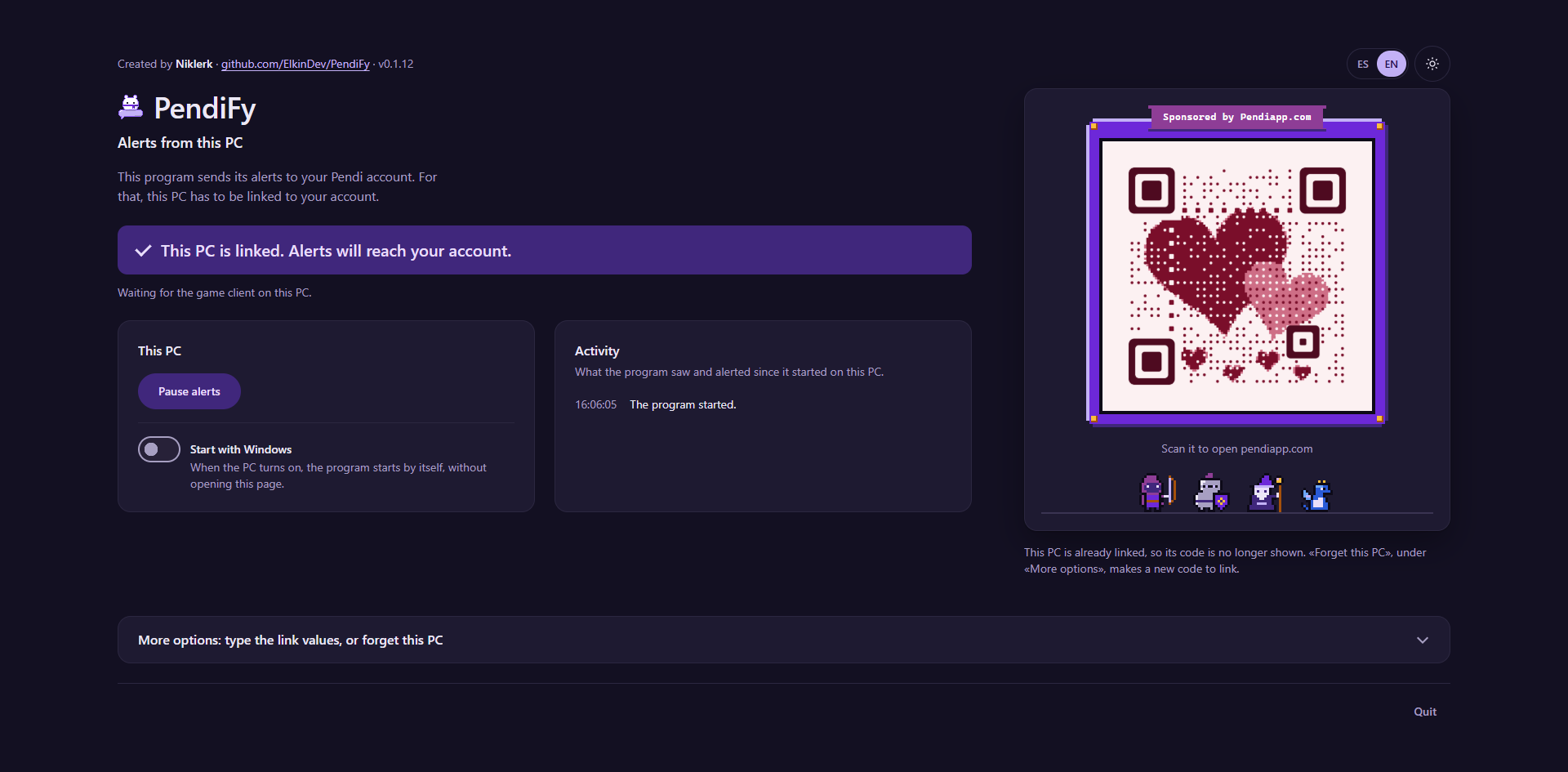
Así llega un aviso: el programa espera al cliente del juego, detecta la partida y envía el aviso a tu cuenta.
|
|
@@ -67,7 +69,8 @@ PendiFy también funciona en Mac (Apple Silicon o Intel) con League of Legends /
|
|
|
67
69
|
El instalador busca Python 3.10 o más nuevo (si no lo hay y tienes Homebrew, instala `python@3.12`), instala PendiFy en su propio entorno en `~/Library/Application Support/pendify/venv`, crea la app `PendiFy` en `~/Applications` (la encuentras con Spotlight o en Launchpad) y la inicia. Para actualizar, vuelve a pegar la misma línea.
|
|
68
70
|
|
|
69
71
|
- Iniciar: abre `PendiFy` desde Spotlight o Launchpad; si ya está abierto, abre su página.
|
|
70
|
-
- Detener: pulsa «Salir» en la página
|
|
72
|
+
- Detener: pulsa «Salir» en la página, o en el menú del icono de PendiFy en la barra de menús, arriba a la derecha.
|
|
73
|
+
- Icono en la barra de menús: un clic en el icono de PendiFy, arriba a la derecha, abre un menú para abrir la página, pausar o reanudar los avisos y salir del programa, también con la página y el navegador cerrados. No hay icono en el Dock.
|
|
71
74
|
- Iniciar con macOS: el interruptor «Iniciar con macOS» de la página crea un LaunchAgent solo para tu usuario, sin permisos de administrador.
|
|
72
75
|
- Configuración: `~/Library/Application Support/pendify/config.json`; el registro del programa queda en `pendify.log` en esa misma carpeta.
|
|
73
76
|
- Sonido: el aviso suena con los sonidos del sistema.
|
|
@@ -106,10 +109,12 @@ Licencia: MIT
|
|
|
106
109
|
|
|
107
110
|
## English
|
|
108
111
|
|
|
109
|
-
A small Windows
|
|
112
|
+
A small program for **Windows and Mac** that alerts your phone when your match is found and when it starts.
|
|
110
113
|
It links once to your Pendi account by scanning a QR code, with no new account of any kind.
|
|
111
114
|
It is free, needs no administrator rights and only uses Python.
|
|
112
115
|
|
|
116
|
+
**New: Mac support.** It works with the League of Legends client and with the **Teamfight Tactics** app for Mac, and in that app it accepts the match for you with an automatic click. It installs with one line in the Terminal: see [macOS](#macos-1).
|
|
117
|
+
|
|
113
118
|

|
|
114
119
|
|
|
115
120
|
How an alert arrives: the program waits for the game client, detects the match and sends the alert to your account.
|
|
@@ -154,7 +159,8 @@ PendiFy also runs on a Mac (Apple Silicon or Intel) with League of Legends / TFT
|
|
|
154
159
|
The installer looks for Python 3.10 or newer (with none and Homebrew present, it installs `python@3.12`), installs PendiFy in its own environment in `~/Library/Application Support/pendify/venv`, makes the `PendiFy` app in `~/Applications` (find it with Spotlight or in Launchpad) and starts it. To update, paste the same line again.
|
|
155
160
|
|
|
156
161
|
- Start: open `PendiFy` from Spotlight or Launchpad; if it already runs, its page opens.
|
|
157
|
-
- Stop: press "Quit" on the page
|
|
162
|
+
- Stop: press "Quit" on the page, or in the menu of the PendiFy icon in the menu bar, at the top right.
|
|
163
|
+
- Menu bar icon: a click on the PendiFy icon at the top right of the screen opens a menu that opens the page, pauses or resumes the alerts and quits the program, also with the page and the browser closed. There is no Dock icon.
|
|
158
164
|
- Start with macOS: the page's "Start with macOS" switch makes a LaunchAgent for your user only, with no administrator rights.
|
|
159
165
|
- Config: `~/Library/Application Support/pendify/config.json`; the program's log is `pendify.log` in that same folder.
|
|
160
166
|
- Sound: the alert plays the system's sounds.
|
|
@@ -204,3 +210,17 @@ The second sends one alert with the stored pair and prints one line with the ans
|
|
|
204
210
|
Both commands take `--data-dir <dir>`, used instead of `%APPDATA%` (the config file lives in a folder under it), and `--worker <address>`, used instead of the pairing service's address and accepted only as `http://127.0.0.1:<port>` or `http://localhost:<port>`, so a test run never reaches the real service. `--client-lockfile <file>` replaces the game client's lockfile, with no read of the running processes, and the client it names is reached over plain http on 127.0.0.1, so a test run never reaches a real client.
|
|
205
211
|
|
|
206
212
|
python -m unittest discover -s tests -v
|
|
213
|
+
|
|
214
|
+
### Releasing the macOS app
|
|
215
|
+
|
|
216
|
+
`install.sh` downloads `PendiFy.app` prebuilt, signed with the Developer ID of team BL4KZH338B and notarized by Apple, so that on any Mac the Login Items list and the permission prompts name the developer. It builds the app on the Mac instead while no release is published, when a check of the download (its sha256, its signature, its team) fails, or with `PENDIFY_BUILD_APP=1`. A release is made on the maintainer's Mac, whose login keychain holds the Developer ID Application identity of that team.
|
|
217
|
+
|
|
218
|
+
Once, store the notary credentials in the keychain under the profile `PendiFy`; the command asks for an app-specific password made for it in the Apple Account settings:
|
|
219
|
+
|
|
220
|
+
xcrun notarytool store-credentials PendiFy --apple-id <apple id> --team-id BL4KZH338B
|
|
221
|
+
|
|
222
|
+
Then, for each release, from a commit that is pushed, with no other change in the tree and `gh` signed in:
|
|
223
|
+
|
|
224
|
+
tools/release-macos-app.sh
|
|
225
|
+
|
|
226
|
+
It builds the app as `install.sh` builds it, signs it with the hardened runtime and a secure timestamp, has Apple notarize it, staples the ticket, publishes the zip as the GitHub release `macos-app-<version>` (the version in `pyproject.toml`, one release per version) and writes the zip's URL and sha256 into `install.sh`. Commit and push `install.sh` after the release: installs download the new app only once that `install.sh` is on `main`. `NOTARY_PROFILE` names another profile, and `tools/release-macos-app.sh --no-publish` only builds and signs the app into `build/macos-app`, with no notarization, no release and no change to `install.sh`.
|
|
@@ -2,10 +2,12 @@
|
|
|
2
2
|
|
|
3
3
|
## Español
|
|
4
4
|
|
|
5
|
-
Un programa pequeño para Windows que avisa en tu teléfono cuando se encuentra tu partida y cuando empieza.
|
|
5
|
+
Un programa pequeño para **Windows y Mac** que avisa en tu teléfono cuando se encuentra tu partida y cuando empieza.
|
|
6
6
|
Se enlaza una sola vez con tu cuenta de Pendi leyendo un código QR, sin crear ninguna cuenta nueva.
|
|
7
7
|
Es gratis, no pide permisos de administrador y solo usa Python.
|
|
8
8
|
|
|
9
|
+
**Nuevo: soporte para Mac.** Funciona con el cliente de League of Legends y con la app de **Teamfight Tactics** para Mac, y en esa app acepta la partida por ti con un clic automático. Se instala con una línea en la Terminal: mira [macOS](#macos).
|
|
10
|
+
|
|
9
11
|

|
|
10
12
|
|
|
11
13
|
Así llega un aviso: el programa espera al cliente del juego, detecta la partida y envía el aviso a tu cuenta.
|
|
@@ -50,7 +52,8 @@ PendiFy también funciona en Mac (Apple Silicon o Intel) con League of Legends /
|
|
|
50
52
|
El instalador busca Python 3.10 o más nuevo (si no lo hay y tienes Homebrew, instala `python@3.12`), instala PendiFy en su propio entorno en `~/Library/Application Support/pendify/venv`, crea la app `PendiFy` en `~/Applications` (la encuentras con Spotlight o en Launchpad) y la inicia. Para actualizar, vuelve a pegar la misma línea.
|
|
51
53
|
|
|
52
54
|
- Iniciar: abre `PendiFy` desde Spotlight o Launchpad; si ya está abierto, abre su página.
|
|
53
|
-
- Detener: pulsa «Salir» en la página
|
|
55
|
+
- Detener: pulsa «Salir» en la página, o en el menú del icono de PendiFy en la barra de menús, arriba a la derecha.
|
|
56
|
+
- Icono en la barra de menús: un clic en el icono de PendiFy, arriba a la derecha, abre un menú para abrir la página, pausar o reanudar los avisos y salir del programa, también con la página y el navegador cerrados. No hay icono en el Dock.
|
|
54
57
|
- Iniciar con macOS: el interruptor «Iniciar con macOS» de la página crea un LaunchAgent solo para tu usuario, sin permisos de administrador.
|
|
55
58
|
- Configuración: `~/Library/Application Support/pendify/config.json`; el registro del programa queda en `pendify.log` en esa misma carpeta.
|
|
56
59
|
- Sonido: el aviso suena con los sonidos del sistema.
|
|
@@ -89,10 +92,12 @@ Licencia: MIT
|
|
|
89
92
|
|
|
90
93
|
## English
|
|
91
94
|
|
|
92
|
-
A small Windows
|
|
95
|
+
A small program for **Windows and Mac** that alerts your phone when your match is found and when it starts.
|
|
93
96
|
It links once to your Pendi account by scanning a QR code, with no new account of any kind.
|
|
94
97
|
It is free, needs no administrator rights and only uses Python.
|
|
95
98
|
|
|
99
|
+
**New: Mac support.** It works with the League of Legends client and with the **Teamfight Tactics** app for Mac, and in that app it accepts the match for you with an automatic click. It installs with one line in the Terminal: see [macOS](#macos-1).
|
|
100
|
+
|
|
96
101
|

|
|
97
102
|
|
|
98
103
|
How an alert arrives: the program waits for the game client, detects the match and sends the alert to your account.
|
|
@@ -137,7 +142,8 @@ PendiFy also runs on a Mac (Apple Silicon or Intel) with League of Legends / TFT
|
|
|
137
142
|
The installer looks for Python 3.10 or newer (with none and Homebrew present, it installs `python@3.12`), installs PendiFy in its own environment in `~/Library/Application Support/pendify/venv`, makes the `PendiFy` app in `~/Applications` (find it with Spotlight or in Launchpad) and starts it. To update, paste the same line again.
|
|
138
143
|
|
|
139
144
|
- Start: open `PendiFy` from Spotlight or Launchpad; if it already runs, its page opens.
|
|
140
|
-
- Stop: press "Quit" on the page
|
|
145
|
+
- Stop: press "Quit" on the page, or in the menu of the PendiFy icon in the menu bar, at the top right.
|
|
146
|
+
- Menu bar icon: a click on the PendiFy icon at the top right of the screen opens a menu that opens the page, pauses or resumes the alerts and quits the program, also with the page and the browser closed. There is no Dock icon.
|
|
141
147
|
- Start with macOS: the page's "Start with macOS" switch makes a LaunchAgent for your user only, with no administrator rights.
|
|
142
148
|
- Config: `~/Library/Application Support/pendify/config.json`; the program's log is `pendify.log` in that same folder.
|
|
143
149
|
- Sound: the alert plays the system's sounds.
|
|
@@ -187,3 +193,17 @@ The second sends one alert with the stored pair and prints one line with the ans
|
|
|
187
193
|
Both commands take `--data-dir <dir>`, used instead of `%APPDATA%` (the config file lives in a folder under it), and `--worker <address>`, used instead of the pairing service's address and accepted only as `http://127.0.0.1:<port>` or `http://localhost:<port>`, so a test run never reaches the real service. `--client-lockfile <file>` replaces the game client's lockfile, with no read of the running processes, and the client it names is reached over plain http on 127.0.0.1, so a test run never reaches a real client.
|
|
188
194
|
|
|
189
195
|
python -m unittest discover -s tests -v
|
|
196
|
+
|
|
197
|
+
### Releasing the macOS app
|
|
198
|
+
|
|
199
|
+
`install.sh` downloads `PendiFy.app` prebuilt, signed with the Developer ID of team BL4KZH338B and notarized by Apple, so that on any Mac the Login Items list and the permission prompts name the developer. It builds the app on the Mac instead while no release is published, when a check of the download (its sha256, its signature, its team) fails, or with `PENDIFY_BUILD_APP=1`. A release is made on the maintainer's Mac, whose login keychain holds the Developer ID Application identity of that team.
|
|
200
|
+
|
|
201
|
+
Once, store the notary credentials in the keychain under the profile `PendiFy`; the command asks for an app-specific password made for it in the Apple Account settings:
|
|
202
|
+
|
|
203
|
+
xcrun notarytool store-credentials PendiFy --apple-id <apple id> --team-id BL4KZH338B
|
|
204
|
+
|
|
205
|
+
Then, for each release, from a commit that is pushed, with no other change in the tree and `gh` signed in:
|
|
206
|
+
|
|
207
|
+
tools/release-macos-app.sh
|
|
208
|
+
|
|
209
|
+
It builds the app as `install.sh` builds it, signs it with the hardened runtime and a secure timestamp, has Apple notarize it, staples the ticket, publishes the zip as the GitHub release `macos-app-<version>` (the version in `pyproject.toml`, one release per version) and writes the zip's URL and sha256 into `install.sh`. Commit and push `install.sh` after the release: installs download the new app only once that `install.sh` is on `main`. `NOTARY_PROFILE` names another profile, and `tools/release-macos-app.sh --no-publish` only builds and signs the app into `build/macos-app`, with no notarization, no release and no change to `install.sh`.
|
|
@@ -4,7 +4,7 @@ build-backend = "setuptools.build_meta"
|
|
|
4
4
|
|
|
5
5
|
[project]
|
|
6
6
|
name = "pendify"
|
|
7
|
-
version = "0.1.
|
|
7
|
+
version = "0.1.14"
|
|
8
8
|
description = "Pairs this PC with a phone account by a QR on a loopback page and sends it two kinds of alerts."
|
|
9
9
|
readme = "README.md"
|
|
10
10
|
license = "MIT"
|
|
@@ -8,13 +8,15 @@
|
|
|
8
8
|
python -m <package> ping <kind> one alert with the stored pair, one fixed line per answer
|
|
9
9
|
|
|
10
10
|
The page and the watcher stop together on Ctrl+C, on Ctrl+Break, on the page's quit button and on the quit of
|
|
11
|
-
the icon by the clock, which remove the run file and exit 0. One instance per config
|
|
12
|
-
opens the running page and exits 0, and one made while that program is still closing
|
|
11
|
+
the icon by the clock (in the menu bar on macOS), which remove the run file and exit 0. One instance per config
|
|
12
|
+
folder: a second start opens the running page and exits 0, and one made while that program is still closing
|
|
13
|
+
after its quit waits for
|
|
13
14
|
it to end and starts. A start of a newer version over a running older copy replaces it: the older copy is asked to
|
|
14
15
|
stop through its page's /replace with the run file's secret, or ended by its pid when it has no secret or its page
|
|
15
16
|
does not answer, and this start then claims the run file as a first one does. A restart the page asks for
|
|
16
17
|
(«Reiniciar ahora», once a newer version is installed, or the
|
|
17
|
-
icon's «Reiniciar para actualizar»)
|
|
18
|
+
icon's «Reiniciar para actualizar»), and the one asked on macOS once the Accessibility permission is granted while
|
|
19
|
+
this copy runs, starts a new copy once the run file is released: without --quiet, so its page
|
|
18
20
|
opens, and with the --dry, --data-dir, --worker and --client-lockfile of this one.
|
|
19
21
|
Where no console is attached (a pythonw start), the line a start ends on is also shown in a
|
|
20
22
|
message box. `--data-dir`, `--worker` and `--client-lockfile` are the
|
|
@@ -36,6 +38,7 @@ from pathlib import Path
|
|
|
36
38
|
from . import alert, autoclick, client, config, page, pairing, runfile, tft_app, update, watcher, worker
|
|
37
39
|
from .autostart import Autostart
|
|
38
40
|
from .tray import Tray
|
|
41
|
+
from .tray_macos import MenuBarIcon
|
|
39
42
|
|
|
40
43
|
TICK_SECONDS = 1.0
|
|
41
44
|
STOP_SECONDS = 5.0
|
|
@@ -52,6 +55,12 @@ PAGE_NOT_KNOWN_LINE = ("already running: the page of the program that runs is no
|
|
|
52
55
|
CLAIM_FAILED_LINE = "cannot start: the run file cannot be replaced: {path}"
|
|
53
56
|
FOLDER_FAILED_LINE = "cannot start: the config folder cannot be written: {path}"
|
|
54
57
|
RESTART_FAILED_LINE = "cannot restart: the new copy did not start; start the program again"
|
|
58
|
+
# Set only on the copy the Accessibility permission's grant restarts, through PendiFy.app's launcher, which keeps the
|
|
59
|
+
# environment: that copy never asks for such a restart itself, so two answers of macOS that disagree loop no restart.
|
|
60
|
+
GRANT_RESTART_ENV = "PENDIFY_GRANT_RESTART"
|
|
61
|
+
# Said by that copy when its own start still reads the permission not granted, the case that would have looped.
|
|
62
|
+
GRANT_RESTART_UNGRANTED_LINE = ("autoaccept: this copy was started by the restart for the Accessibility permission, "
|
|
63
|
+
"which still reads not granted; no further restart is asked")
|
|
55
64
|
# The line a start that replaced an older copy shows, in the page's language: the older copy's version, «desconocida»
|
|
56
65
|
# or "unknown" for a record with none, then this one's.
|
|
57
66
|
REPLACED_LINES = {"es": "Se reemplazó la copia anterior ({old}) por esta ({new}).",
|
|
@@ -67,7 +76,8 @@ _MB_SETFOREGROUND = 0x10000
|
|
|
67
76
|
# The restart's new copy: no console, its own process group, out of this one's.
|
|
68
77
|
_DETACHED_PROCESS = 0x00000008
|
|
69
78
|
_CREATE_NEW_PROCESS_GROUP = 0x00000200
|
|
70
|
-
# The icon by the clock
|
|
79
|
+
# The icon's picture, by the clock and in the menu bar: pendify.ico beside the modules, the file install.ps1 points
|
|
80
|
+
# the shortcuts at.
|
|
71
81
|
ICON_PATH = Path(__file__).with_name("pendify.ico")
|
|
72
82
|
|
|
73
83
|
|
|
@@ -183,11 +193,11 @@ def _ends(line, code, show):
|
|
|
183
193
|
return code
|
|
184
194
|
|
|
185
195
|
|
|
186
|
-
def _restart(args, spawn, show, opens_page):
|
|
196
|
+
def _restart(args, spawn, show, opens_page, granted=False):
|
|
187
197
|
"""The restart asked for, once the run file is free: a new copy of this program, detached and with no console,
|
|
188
198
|
which claims the run file as a first start does. One that opens its page, as every restart asked today does,
|
|
189
199
|
goes without --quiet; one that does not keeps this run's --quiet. This run's --dry, --data-dir, --worker and
|
|
190
|
-
--client-lockfile go with it either way."""
|
|
200
|
+
--client-lockfile go with it either way, and GRANT_RESTART_ENV only with the one the permission's grant asked."""
|
|
191
201
|
app = os.environ.get("PENDIFY_APP") if sys.platform == "darwin" else None # through PendiFy.app's launcher
|
|
192
202
|
command = ([app] if app else [sys.executable, "-m", __package__])
|
|
193
203
|
command += ["--quiet"] if args.quiet and not opens_page else []
|
|
@@ -198,7 +208,8 @@ def _restart(args, spawn, show, opens_page):
|
|
|
198
208
|
try:
|
|
199
209
|
detached = ({"creationflags": _DETACHED_PROCESS | _CREATE_NEW_PROCESS_GROUP} if os.name == "nt"
|
|
200
210
|
else {"start_new_session": True}) # Popen refuses creationflags off Windows
|
|
201
|
-
|
|
211
|
+
marker = {"env": {**os.environ, GRANT_RESTART_ENV: "1"}} if granted else {}
|
|
212
|
+
spawn(command, **detached, **marker, close_fds=True)
|
|
202
213
|
except OSError:
|
|
203
214
|
return _ends(RESTART_FAILED_LINE, 1, show)
|
|
204
215
|
return 0
|
|
@@ -270,11 +281,13 @@ def _ready_version(updater):
|
|
|
270
281
|
|
|
271
282
|
|
|
272
283
|
def _serve(args, store, base, timeout, opener, stop, delay, beep, show, clock, sleep, autostart, tray, updater,
|
|
273
|
-
spawn, terminate):
|
|
284
|
+
spawn, terminate, switch):
|
|
274
285
|
# A quiet start is the system's, at logon: it never opens the browser, and a start that ends well shows no box.
|
|
275
286
|
calm = (lambda line: None) if args.quiet else show
|
|
276
287
|
run = runfile.RunFile(store.path.parent, clock=clock, sleep=sleep)
|
|
277
288
|
replaced = None # the record of the older copy this start replaced
|
|
289
|
+
# Read once and dropped, so no later restart of this copy inherits it.
|
|
290
|
+
restarted_for_grant = os.environ.pop(GRANT_RESTART_ENV, None) == "1"
|
|
278
291
|
try:
|
|
279
292
|
holder = run.claim()
|
|
280
293
|
if holder is not None and holder["closing"] and run.wait_released(holder, CLOSING_WAIT_SECONDS):
|
|
@@ -300,7 +313,7 @@ def _serve(args, store, base, timeout, opener, stop, delay, beep, show, clock, s
|
|
|
300
313
|
opener(f"http://{page.ADDRESS}:{port}/")
|
|
301
314
|
show(ALREADY_RUNNING_LINE)
|
|
302
315
|
return 0
|
|
303
|
-
updating = None
|
|
316
|
+
updating, granted = None, threading.Event() # set once the restart asked is the permission grant's
|
|
304
317
|
try:
|
|
305
318
|
mode = update.OFF if args.no_update else store.read_update()
|
|
306
319
|
state = pairing.PairingState(store, lambda secret: worker.check(secret, base=base, timeout=timeout))
|
|
@@ -316,9 +329,25 @@ def _serve(args, store, base, timeout, opener, stop, delay, beep, show, clock, s
|
|
|
316
329
|
pass # unmarked, the finally marks it again; the stop goes on
|
|
317
330
|
stop.set()
|
|
318
331
|
|
|
319
|
-
|
|
332
|
+
def restart_granted():
|
|
333
|
+
# The Accessibility permission granted while this copy runs, which macOS keeps answering it as at its
|
|
334
|
+
# start: a new copy reads it, its page opened, as the person is likely in System Settings and this
|
|
335
|
+
# page's tab goes with this copy. Refused before the update exists and once this copy stops.
|
|
336
|
+
if updating is None or stop.is_set():
|
|
337
|
+
return False
|
|
338
|
+
granted.set()
|
|
339
|
+
updating.restart(opens_page=True)
|
|
340
|
+
return True
|
|
341
|
+
|
|
342
|
+
if switch is None: # the real switch, never in a test run, where macOS would be asked for the permission
|
|
343
|
+
switch = autoclick.Switch if getattr(args, "client_lockfile", None) is None else None
|
|
344
|
+
# A copy that grant restarted still asks for the permission and says it, but never asks that restart again.
|
|
345
|
+
clicking = (switch(store, restart=None if restarted_for_grant else restart_granted) if switch is not None
|
|
346
|
+
else None)
|
|
320
347
|
if clicking is not None and clicking.available and clicking.enabled():
|
|
321
|
-
|
|
348
|
+
# On by default: the permission is asked for at the start, not at the first pop.
|
|
349
|
+
if not clicking.ask() and restarted_for_grant:
|
|
350
|
+
print(GRANT_RESTART_UNGRANTED_LINE, flush=True)
|
|
322
351
|
pairing_page = page.PairingPage(state, watch=watch.snapshot, on_quit=quit_page, on_pause=watch.pause,
|
|
323
352
|
on_resume=watch.resume, autostart=autostart, events=watch.events,
|
|
324
353
|
autoaccept=clicking)
|
|
@@ -328,8 +357,9 @@ def _serve(args, store, base, timeout, opener, stop, delay, beep, show, clock, s
|
|
|
328
357
|
# page's quit, after the flag read below once the run file is free; pip's output goes to the config folder.
|
|
329
358
|
updating = updater(update.RUNNING_VERSION, mode, restart=quit_page, folder=store.path.parent)
|
|
330
359
|
pairing_page.updater = updating
|
|
331
|
-
# The icon by the clock, under --quiet as well: the way to stop a copy the Run key
|
|
332
|
-
# the page's, in the language the page resolves with no browser to
|
|
360
|
+
# The icon by the clock, or in the menu bar on macOS, under --quiet as well: the way to stop a copy the Run key
|
|
361
|
+
# or the LaunchAgent started. Its words are the page's, in the language the page resolves with no browser to
|
|
362
|
+
# ask: the kept choice, else Spanish.
|
|
333
363
|
icon = tray(url, on_open=lambda: opener(url), on_pause=watch.pause, on_resume=watch.resume,
|
|
334
364
|
on_quit=quit_page, paused=lambda: watch.paused,
|
|
335
365
|
words=lambda: page.WORDS[pairing_page.language_of(None)], icon_path=ICON_PATH,
|
|
@@ -353,13 +383,17 @@ def _serve(args, store, base, timeout, opener, stop, delay, beep, show, clock, s
|
|
|
353
383
|
watching.start()
|
|
354
384
|
while True:
|
|
355
385
|
state.tick()
|
|
356
|
-
|
|
386
|
+
# The icon's wait, the stop's own on Windows; on macOS it pumps AppKit's events on this, the main
|
|
387
|
+
# thread, where the menu bar's icon lives.
|
|
388
|
+
if icon.wait(stop, TICK_SECONDS):
|
|
357
389
|
break
|
|
358
390
|
except KeyboardInterrupt:
|
|
359
391
|
pass
|
|
360
392
|
finally:
|
|
361
393
|
stop.set()
|
|
362
394
|
updating.close() # the restart gate shuts at the quit
|
|
395
|
+
if clicking is not None:
|
|
396
|
+
clicking.close() # and the wait for the permission's grant ends
|
|
363
397
|
# First, so a start made while this one stops waits for it instead of opening a closing page: Ctrl+C
|
|
364
398
|
# and Ctrl+Break are marked only here, and the page's quit, marked already, is marked again.
|
|
365
399
|
try:
|
|
@@ -377,10 +411,15 @@ def _serve(args, store, base, timeout, opener, stop, delay, beep, show, clock, s
|
|
|
377
411
|
finally:
|
|
378
412
|
run.release()
|
|
379
413
|
if updating is not None and updating.restart_requested.is_set():
|
|
380
|
-
return _restart(args, spawn, show, updating.restart_opens_page)
|
|
414
|
+
return _restart(args, spawn, show, updating.restart_opens_page, granted.is_set())
|
|
381
415
|
return 0
|
|
382
416
|
|
|
383
417
|
|
|
418
|
+
def _icon_kind(platform):
|
|
419
|
+
"""The icon of this platform: in the menu bar on macOS, by the clock on Windows (and none elsewhere, said)."""
|
|
420
|
+
return MenuBarIcon if platform == "darwin" else Tray
|
|
421
|
+
|
|
422
|
+
|
|
384
423
|
def _break_as_interrupt():
|
|
385
424
|
"""Ctrl+Break stops the program as Ctrl+C does; only on Windows and only on the main thread."""
|
|
386
425
|
if not hasattr(signal, "SIGBREAK") or threading.current_thread() is not threading.main_thread():
|
|
@@ -390,14 +429,17 @@ def _break_as_interrupt():
|
|
|
390
429
|
|
|
391
430
|
def main(argv=None, *, opener=webbrowser.open, stop=None, timeout=worker.TIMEOUT_SECONDS, delay=None,
|
|
392
431
|
beep=alert.beep, box=_message_box, autostart=None, console=_console_attached, clock=time.monotonic,
|
|
393
|
-
sleep=time.sleep, tray=
|
|
432
|
+
sleep=time.sleep, tray=_icon_kind(sys.platform), updater=update.Updater, spawn=subprocess.Popen,
|
|
433
|
+
terminate=runfile.terminate, switch=None):
|
|
394
434
|
"""`beep`, `box` and `autostart` are the seams of the sound, of the message box and of the start with Windows
|
|
395
435
|
(the per-user Run value when None): a test run passes silent ones and a fake. `console` says whether a printed
|
|
396
|
-
line reaches anybody; `clock` and `sleep` time the run file's re-reads. `tray` makes the icon by the clock,
|
|
397
|
-
seam a test run fills with a fake, so no test shows a real icon. `updater` makes
|
|
398
|
-
the restart's new copy, the seams a test run fills with fakes, so no test reaches
|
|
399
|
-
copy. `terminate` ends an older copy by its pid when it cannot be asked to stop,
|
|
400
|
-
no test ends a process.
|
|
436
|
+
line reaches anybody; `clock` and `sleep` time the run file's re-reads. `tray` makes the icon by the clock, or
|
|
437
|
+
in the menu bar on macOS, the seam a test run fills with a fake, so no test shows a real icon. `updater` makes
|
|
438
|
+
the update and `spawn` starts the restart's new copy, the seams a test run fills with fakes, so no test reaches
|
|
439
|
+
PyPI, runs pip or starts a copy. `terminate` ends an older copy by its pid when it cannot be asked to stop,
|
|
440
|
+
the seam every test run fakes, so no test ends a process. `switch` makes the page's switch of the click on
|
|
441
|
+
accept (autoclick.Switch when None, and none under --client-lockfile), the seam a test run fills with a fake, so
|
|
442
|
+
no test asks macOS for a permission."""
|
|
401
443
|
args = _arguments(sys.argv[1:] if argv is None else argv)
|
|
402
444
|
store = config.ConfigStore(getattr(args, "data_dir", None) or config.default_base_dir())
|
|
403
445
|
base = getattr(args, "worker", worker.BASE_URL)
|
|
@@ -413,7 +455,8 @@ def main(argv=None, *, opener=webbrowser.open, stop=None, timeout=worker.TIMEOUT
|
|
|
413
455
|
try:
|
|
414
456
|
return _serve(args, store, base, timeout, opener, stop or threading.Event(),
|
|
415
457
|
delay or watcher.accept_delay, beep, show, clock, sleep,
|
|
416
|
-
autostart if autostart is not None else Autostart(), tray, updater, spawn, terminate
|
|
458
|
+
autostart if autostart is not None else Autostart(), tray, updater, spawn, terminate,
|
|
459
|
+
switch)
|
|
417
460
|
finally:
|
|
418
461
|
if previous is not None:
|
|
419
462
|
signal.signal(signal.SIGBREAK, previous)
|
|
@@ -7,6 +7,9 @@ a MacBook Pro's full screen; the game scales its interface with the window's hei
|
|
|
7
7
|
Nothing is clicked unless the app is the frontmost one and its window is found. Posting a click needs the
|
|
8
8
|
Accessibility permission (System Settings, Privacy & Security, Accessibility); without it nothing is clicked.
|
|
9
9
|
|
|
10
|
+
A grant made while this copy runs is awaited by the switch's poller (permission.py), which then asks for the restart
|
|
11
|
+
that lets the click use it.
|
|
12
|
+
|
|
10
13
|
Standard library only: CoreGraphics, CoreFoundation and ApplicationServices through ctypes, and osascript (JXA) for
|
|
11
14
|
the window's bounds and lsappinfo for the frontmost app.
|
|
12
15
|
"""
|
|
@@ -16,6 +19,8 @@ import subprocess
|
|
|
16
19
|
import sys
|
|
17
20
|
import time
|
|
18
21
|
|
|
22
|
+
from . import permission
|
|
23
|
+
|
|
19
24
|
APP_PATH = "/Applications/Teamfight Tactics.app"
|
|
20
25
|
SETTINGS_URL = "x-apple.systempreferences:com.apple.preference.security?Privacy_Accessibility"
|
|
21
26
|
OWNER_NAME = "TFTClient-Mac-Shipping"
|
|
@@ -179,30 +184,55 @@ def _post_click(x, y):
|
|
|
179
184
|
|
|
180
185
|
class Switch:
|
|
181
186
|
"""The page's switch of the click on accept, kept in config.json, on by default; available on macOS only. While
|
|
182
|
-
on, macOS is asked for the Accessibility permission, which its person grants once in System Settings.
|
|
187
|
+
on, macOS is asked for the Accessibility permission, which its person grants once in System Settings.
|
|
183
188
|
|
|
184
|
-
|
|
189
|
+
While on and not granted at an ask, its poller (permission.Poller, made with `run`, `wait` and `clock`) awaits the
|
|
190
|
+
grant and then calls `restart()`, which asks for this copy's restart and answers True once asked."""
|
|
191
|
+
|
|
192
|
+
def __init__(self, store, prompt=None, granted=trusted, run=subprocess.run, restart=None, wait=None,
|
|
193
|
+
clock=time.monotonic):
|
|
185
194
|
self._store, self._granted, self._run = store, granted, run
|
|
186
195
|
self._prompt = prompt if prompt is not None else (lambda: trusted(prompt=True))
|
|
196
|
+
# The poller reads the stored value itself, so a read that fails is never taken for the switch turned off.
|
|
197
|
+
self.poller = permission.Poller(self._stored, restart, run=run, wait=wait, clock=clock)
|
|
187
198
|
self.available = available()
|
|
188
199
|
|
|
189
200
|
def enabled(self):
|
|
201
|
+
"""True when the switch reads on; a read that fails reads off."""
|
|
202
|
+
return self._stored() is True
|
|
203
|
+
|
|
204
|
+
def _stored(self):
|
|
205
|
+
"""The switch as config.json holds it, True or False, or None when it cannot be read."""
|
|
190
206
|
try:
|
|
191
|
-
return self._store.read_autoaccept()
|
|
207
|
+
return bool(self._store.read_autoaccept())
|
|
192
208
|
except (OSError, ValueError):
|
|
193
|
-
return
|
|
209
|
+
return None
|
|
194
210
|
|
|
195
211
|
def enable(self):
|
|
212
|
+
"""On, then asked: the poller an ask starts reads the switch on."""
|
|
213
|
+
on = self._set(True)
|
|
196
214
|
self.ask()
|
|
197
|
-
return
|
|
215
|
+
return on
|
|
198
216
|
|
|
199
217
|
def ask(self):
|
|
200
218
|
"""macOS asked for the Accessibility permission (it shows its prompt only while not granted), and the
|
|
201
|
-
answer said on one line; at each start while the switch is on, as it is by default.
|
|
219
|
+
answer said on one line; at each start while the switch is on, as it is by default. Not granted, the poller
|
|
220
|
+
awaits the grant."""
|
|
202
221
|
granted = bool(self._prompt())
|
|
203
222
|
print(PERMISSION_LINES[granted], flush=True)
|
|
223
|
+
if not granted:
|
|
224
|
+
self.poller.start()
|
|
204
225
|
return granted
|
|
205
226
|
|
|
227
|
+
def close(self):
|
|
228
|
+
"""This copy stops: the poller's wait ends, and no restart is asked any more."""
|
|
229
|
+
self.poller.close()
|
|
230
|
+
|
|
231
|
+
def awaiting(self):
|
|
232
|
+
"""True while the poller awaits the grant, whose restart ends this copy; never in a copy with no restart to
|
|
233
|
+
ask for, which starts no poller."""
|
|
234
|
+
return self.poller.awaiting()
|
|
235
|
+
|
|
206
236
|
def disable(self):
|
|
207
237
|
return self._set(False)
|
|
208
238
|
|
|
@@ -134,6 +134,7 @@ WORDS = {
|
|
|
134
134
|
"perm_step3": "Si PendiFy no está en la lista, pulsa + y elige PendiFy en la carpeta Aplicaciones de tu usuario.",
|
|
135
135
|
"perm_open": "Abrir Ajustes",
|
|
136
136
|
"perm_picture": "Ajustes del Sistema, Accesibilidad: la fila de PendiFy con su interruptor encendido.",
|
|
137
|
+
"perm_restarting": "Reiniciando para usar el permiso. La página nueva se abre en unos segundos.",
|
|
137
138
|
"stopped": "El programa se detuvo: ya no vigila el cliente del juego ni envía avisos.",
|
|
138
139
|
"start_again": "Para volver a iniciarlo, abre el acceso directo del Escritorio o ejecuta "
|
|
139
140
|
"pythonw -m pendify (o python -m pendify para verlo en una consola).",
|
|
@@ -236,6 +237,7 @@ WORDS = {
|
|
|
236
237
|
"perm_step3": "If PendiFy is not in the list, press + and choose PendiFy in your user's Applications folder.",
|
|
237
238
|
"perm_open": "Open Settings",
|
|
238
239
|
"perm_picture": "System Settings, Accessibility: PendiFy's row with its switch turned on.",
|
|
240
|
+
"perm_restarting": "Restarting to use the permission. The new page opens in a few seconds.",
|
|
239
241
|
"stopped": "The program stopped: it no longer watches the game client or sends alerts.",
|
|
240
242
|
"start_again": "To start it again, open the shortcut on the Desktop or run pythonw -m pendify "
|
|
241
243
|
"(or python -m pendify to see it in a console).",
|
|
@@ -584,7 +586,9 @@ _SCRIPT = ("const s=document.getElementById('state');const w=document.getElement
|
|
|
584
586
|
# drawn in place of the state line; once asked, a poll that answers changes nothing and one that fails
|
|
585
587
|
# keeps the line. A page drawn while «Actualizar»'s install runs carries the words (data-restarting), so the
|
|
586
588
|
# restart that follows reads the same, and a poll that finds it ready draws them at once instead of
|
|
587
|
-
# reloading a page that is stopping.
|
|
589
|
+
# reloading a page that is stopping. A page drawn while the Accessibility permission is awaited carries the
|
|
590
|
+
# words of the restart its grant asks (data-perm-restarting), which a poll that fails draws in place of the
|
|
591
|
+
# closed sentence.
|
|
588
592
|
"const follows=s.dataset.restarting!==undefined;let asked=false;"
|
|
589
593
|
"function restarting(t){asked=true;s.textContent=t;s.dataset.shown='closed';}"
|
|
590
594
|
"const rf=document.querySelector('form[action=\"/restart\"]');"
|
|
@@ -610,8 +614,8 @@ _SCRIPT = ("const s=document.getElementById('state');const w=document.getElement
|
|
|
610
614
|
"const x=document.createElement('span');if(l.warn)x.className='warn';x.textContent=l.text;"
|
|
611
615
|
"li.append(t,x);o.insertBefore(li,o.firstChild);last=l.seq;}g.dataset.seq=String(last);"
|
|
612
616
|
"while(o.children.length>50)o.lastElementChild.remove();tabStop();}})"
|
|
613
|
-
".catch(()=>{if(asked)return;s.textContent=follows?s.dataset.restarting:
|
|
614
|
-
"s.dataset.shown='closed';}),5000);"
|
|
617
|
+
".catch(()=>{if(asked)return;s.textContent=follows?s.dataset.restarting:"
|
|
618
|
+
"(s.dataset.permRestarting||s.dataset.closed);s.dataset.shown='closed';}),5000);"
|
|
615
619
|
# The key shows for a minute: the reveal sets data-shown on the key, which swaps the mask for the code, and
|
|
616
620
|
# flips its own label; 60 s after a show the key is masked again; one timer, cleared on every press, so a
|
|
617
621
|
# hide by hand leaves none running. The sheet's function is named showKey here, since the script's first
|
|
@@ -1031,13 +1035,19 @@ class PairingPage:
|
|
|
1031
1035
|
follows = (updated is not None and self.updater.mode == update.NOTIFY
|
|
1032
1036
|
and updated["state"] in (update.INSTALLING, update.READY))
|
|
1033
1037
|
restarting = f' data-restarting="{words["update_restarting"]}"' if follows else ""
|
|
1038
|
+
# While the switch's poller awaits the Accessibility permission, its grant restarts this copy: the state line
|
|
1039
|
+
# carries those words apart (never as data-restarting, which an auto update's ready reads as a restart), and
|
|
1040
|
+
# the script draws them in place of the closed sentence once the program is gone.
|
|
1041
|
+
clicking = self.autoaccept
|
|
1042
|
+
awaited = (clicking is not None and clicking.enabled() and not clicking.granted() and clicking.awaiting())
|
|
1043
|
+
perm = f' data-perm-restarting="{words["perm_restarting"]}"' if awaited else ""
|
|
1034
1044
|
# What this is and what to do, with the QR card beside it on a wide window; the two other roads in one fold
|
|
1035
1045
|
# under it; the credit opens the top bar, and the quit sits at the foot, only beside a quit. The title row reads
|
|
1036
1046
|
# the program's name, its sentence under it.
|
|
1037
1047
|
link = [f'<div class="title-row"><img alt="" width="32" height="32" src="{ICON_URI}"><h1>{NAME}</h1>'
|
|
1038
1048
|
f"</div>", f'<p class="tagline">{words["title"]}</p>', f'<p class="intro">{words["intro"]}</p>',
|
|
1039
1049
|
f'<p id="state" role="status" data-shown="{str(snapshot["showCode"]).lower()}'
|
|
1040
|
-
f'{str(snapshot["relinkOffered"]).lower()}"{paused}{updating}{restarting} '
|
|
1050
|
+
f'{str(snapshot["relinkOffered"]).lower()}"{paused}{updating}{restarting}{perm} '
|
|
1041
1051
|
f'data-closed="{words["state_closed"]}">'
|
|
1042
1052
|
f'{words[_state_word(snapshot, seen)]}</p>']
|
|
1043
1053
|
link += self._update_line(words, token, updated)
|
|
@@ -0,0 +1,107 @@
|
|
|
1
|
+
"""The Accessibility permission awaited while this copy runs, macOS only, for the page's switch (autoclick.Switch).
|
|
2
|
+
|
|
3
|
+
A process keeps the answer macOS gave it at its start: AXIsProcessTrusted() never asks again in a process with no run
|
|
4
|
+
loop to hear the change, so a grant made while this copy runs is read by a child (trusted_now), which macOS judges as
|
|
5
|
+
PendiFy.app too, and the copy then asks for its own restart, whose new copy reads the permission granted. The Poller
|
|
6
|
+
does that on its own daemon thread, every few seconds for the first minutes after an ask, then seldom.
|
|
7
|
+
|
|
8
|
+
Standard library only: the child is this interpreter, isolated, calling the public AXIsProcessTrusted() through
|
|
9
|
+
ctypes, with no prompt.
|
|
10
|
+
"""
|
|
11
|
+
import subprocess
|
|
12
|
+
import sys
|
|
13
|
+
import threading
|
|
14
|
+
import time
|
|
15
|
+
|
|
16
|
+
IS_MAC = sys.platform == "darwin"
|
|
17
|
+
TIMEOUT = 5 # a child that does not answer in it is a no
|
|
18
|
+
# While the permission is awaited, how often a child asks macOS whether it was granted: every few seconds for the
|
|
19
|
+
# first minutes after an ask, while its person is likely in System Settings, then seldom.
|
|
20
|
+
PERMISSION_POLL_SECONDS = 3
|
|
21
|
+
PERMISSION_FAST_SECONDS = 10 * 60
|
|
22
|
+
PERMISSION_SLOW_POLL_SECONDS = 30
|
|
23
|
+
GRANTED_LINE = "autoaccept: the Accessibility permission was granted; restarting so the click can use it"
|
|
24
|
+
|
|
25
|
+
# The fresh check's program, run by a child of this interpreter: the public AXIsProcessTrusted(), no prompt.
|
|
26
|
+
_TRUSTED_NOW = ("import ctypes; ax = ctypes.CDLL(%r); ax.AXIsProcessTrusted.restype = ctypes.c_bool; "
|
|
27
|
+
"print('trusted' if ax.AXIsProcessTrusted() else 'untrusted')"
|
|
28
|
+
% "/System/Library/Frameworks/ApplicationServices.framework/ApplicationServices")
|
|
29
|
+
|
|
30
|
+
|
|
31
|
+
def trusted_now(run=subprocess.run):
|
|
32
|
+
"""True when macOS says now that this app may post clicks, asked by a new process, since this one keeps the
|
|
33
|
+
answer of its start; False for a no, for a child that fails or does not answer in TIMEOUT, and off macOS."""
|
|
34
|
+
if not IS_MAC:
|
|
35
|
+
return False
|
|
36
|
+
try:
|
|
37
|
+
done = run([sys.executable, "-I", "-c", _TRUSTED_NOW], capture_output=True, text=True, timeout=TIMEOUT)
|
|
38
|
+
except (OSError, subprocess.SubprocessError):
|
|
39
|
+
return False
|
|
40
|
+
return done.returncode == 0 and done.stdout.strip() == "trusted"
|
|
41
|
+
|
|
42
|
+
|
|
43
|
+
class Poller:
|
|
44
|
+
"""The grant awaited on its own daemon thread, one at most. `switched_on()` reads the page's switch, True, False,
|
|
45
|
+
or None for a read that failed, which neither ends the poller nor keeps it from starting; `restart()`
|
|
46
|
+
asks for this copy's restart and answers True once asked, and with none no poller starts; `run` starts the child;
|
|
47
|
+
`wait(seconds)` waits before each round and answers True once closed (the close's own wait when None); `clock`
|
|
48
|
+
times the rounds from the last start."""
|
|
49
|
+
|
|
50
|
+
def __init__(self, switched_on, restart, run=subprocess.run, wait=None, clock=time.monotonic):
|
|
51
|
+
self._switched_on, self._restart, self._run = switched_on, restart, run
|
|
52
|
+
self._closed = threading.Event()
|
|
53
|
+
self._wait = self._closed.wait if wait is None else wait
|
|
54
|
+
self._clock, self._asked_at = clock, None
|
|
55
|
+
# Held while the poller starts or ends, so a switch turned on as it ends is never left with none.
|
|
56
|
+
self._lock = threading.Lock()
|
|
57
|
+
self._polling = False
|
|
58
|
+
self.thread = None
|
|
59
|
+
|
|
60
|
+
def start(self):
|
|
61
|
+
"""After an ask that found the permission not granted: the fast rounds start again, and the poller with them
|
|
62
|
+
unless one runs, the switch is off, no restart can be asked for or the poller is closed."""
|
|
63
|
+
self._asked_at = self._clock()
|
|
64
|
+
with self._lock:
|
|
65
|
+
if self._polling or self._restart is None or self._closed.is_set() or self._switched_on() is False:
|
|
66
|
+
return
|
|
67
|
+
self._polling = True
|
|
68
|
+
self.thread = threading.Thread(target=self._rounds, name="autoaccept-permission", daemon=True)
|
|
69
|
+
self.thread.start()
|
|
70
|
+
|
|
71
|
+
def close(self):
|
|
72
|
+
"""This copy stops: the wait ends, and no restart is asked any more."""
|
|
73
|
+
self._closed.set()
|
|
74
|
+
|
|
75
|
+
def awaiting(self):
|
|
76
|
+
"""True while a poller runs and this copy is not closed, so its restart follows the grant; still True once
|
|
77
|
+
that restart is asked, until the close."""
|
|
78
|
+
return self._polling and not self._closed.is_set()
|
|
79
|
+
|
|
80
|
+
def _interval(self):
|
|
81
|
+
fast = self._clock() - self._asked_at < PERMISSION_FAST_SECONDS
|
|
82
|
+
return PERMISSION_POLL_SECONDS if fast else PERMISSION_SLOW_POLL_SECONDS
|
|
83
|
+
|
|
84
|
+
def _turned_off(self):
|
|
85
|
+
"""True, and the poller counted ended, once the switch reads off (a read that fails is not off); read under the
|
|
86
|
+
lock, so an ask that turns it on again starts a new one."""
|
|
87
|
+
with self._lock:
|
|
88
|
+
if self._switched_on() is False:
|
|
89
|
+
self._polling = False
|
|
90
|
+
return True
|
|
91
|
+
return False
|
|
92
|
+
|
|
93
|
+
def _rounds(self):
|
|
94
|
+
"""While the switch is on, a child asks macOS every PERMISSION_POLL_SECONDS for PERMISSION_FAST_SECONDS after
|
|
95
|
+
the last start, then every PERMISSION_SLOW_POLL_SECONDS; once it says granted and the restart is asked, said
|
|
96
|
+
on one line, the poller ends and none starts again. Ends as well at the close, and at a switch turned off while
|
|
97
|
+
the child asked."""
|
|
98
|
+
while not self._wait(self._interval()) and not self._closed.is_set():
|
|
99
|
+
if self._turned_off():
|
|
100
|
+
return
|
|
101
|
+
if not trusted_now(self._run) or self._closed.is_set():
|
|
102
|
+
continue
|
|
103
|
+
if self._turned_off(): # the child takes up to TIMEOUT: the switch is read again before the restart
|
|
104
|
+
return
|
|
105
|
+
if self._restart():
|
|
106
|
+
print(GRANTED_LINE, flush=True)
|
|
107
|
+
return # still polling: none starts again in a copy that stops for its restart
|
|
@@ -285,7 +285,8 @@ class RunFile:
|
|
|
285
285
|
self.path.parent.mkdir(parents=True, exist_ok=True)
|
|
286
286
|
except PermissionError:
|
|
287
287
|
raise FolderNotWritable(errno.EACCES, "the config folder cannot be made", str(self.path.parent)) from None
|
|
288
|
-
except FileExistsError: #
|
|
288
|
+
except (FileExistsError, NotADirectoryError): # a regular file where the folder or a parent goes: Windows
|
|
289
|
+
# raises the first, macOS and Linux the second
|
|
289
290
|
raise FolderNotWritable(errno.EACCES, "the config folder cannot be made", str(self.path.parent)) from None
|
|
290
291
|
for _ in range(3):
|
|
291
292
|
try:
|