pendify 0.1.11__tar.gz → 0.1.13__tar.gz
This diff represents the content of publicly available package versions that have been released to one of the supported registries. The information contained in this diff is provided for informational purposes only and reflects changes between package versions as they appear in their respective public registries.
- {pendify-0.1.11/src/pendify.egg-info → pendify-0.1.13}/PKG-INFO +49 -4
- {pendify-0.1.11 → pendify-0.1.13}/README.md +46 -2
- {pendify-0.1.11 → pendify-0.1.13}/pyproject.toml +4 -3
- {pendify-0.1.11 → pendify-0.1.13}/src/pendify/__main__.py +15 -4
- {pendify-0.1.11 → pendify-0.1.13}/src/pendify/alert.py +25 -1
- pendify-0.1.13/src/pendify/autoclick.py +225 -0
- {pendify-0.1.11 → pendify-0.1.13}/src/pendify/autostart.py +53 -4
- {pendify-0.1.11 → pendify-0.1.13}/src/pendify/client.py +42 -9
- {pendify-0.1.11 → pendify-0.1.13}/src/pendify/config.py +28 -3
- pendify-0.1.13/src/pendify/macos/PendiFy +0 -0
- {pendify-0.1.11 → pendify-0.1.13}/src/pendify/page.py +116 -6
- pendify-0.1.13/src/pendify/tft_app.py +218 -0
- {pendify-0.1.11 → pendify-0.1.13}/src/pendify/update.py +53 -22
- {pendify-0.1.11 → pendify-0.1.13}/src/pendify/watcher.py +28 -5
- {pendify-0.1.11 → pendify-0.1.13/src/pendify.egg-info}/PKG-INFO +49 -4
- {pendify-0.1.11 → pendify-0.1.13}/src/pendify.egg-info/SOURCES.txt +4 -1
- {pendify-0.1.11 → pendify-0.1.13}/LICENSE +0 -0
- {pendify-0.1.11 → pendify-0.1.13}/MANIFEST.in +0 -0
- {pendify-0.1.11 → pendify-0.1.13}/setup.cfg +0 -0
- {pendify-0.1.11 → pendify-0.1.13}/src/pendify/__init__.py +0 -0
- {pendify-0.1.11 → pendify-0.1.13}/src/pendify/codes.py +0 -0
- {pendify-0.1.11 → pendify-0.1.13}/src/pendify/icon.py +0 -0
- {pendify-0.1.11 → pendify-0.1.13}/src/pendify/pairing.py +0 -0
- {pendify-0.1.11 → pendify-0.1.13}/src/pendify/pendify.ico +0 -0
- {pendify-0.1.11 → pendify-0.1.13}/src/pendify/plate_almena.py +0 -0
- {pendify-0.1.11 → pendify-0.1.13}/src/pendify/qr.py +0 -0
- {pendify-0.1.11 → pendify-0.1.13}/src/pendify/runfile.py +0 -0
- {pendify-0.1.11 → pendify-0.1.13}/src/pendify/sponsor_art.py +0 -0
- {pendify-0.1.11 → pendify-0.1.13}/src/pendify/tray.py +0 -0
- {pendify-0.1.11 → pendify-0.1.13}/src/pendify/worker.py +0 -0
- {pendify-0.1.11 → pendify-0.1.13}/src/pendify.egg-info/dependency_links.txt +0 -0
- {pendify-0.1.11 → pendify-0.1.13}/src/pendify.egg-info/top_level.txt +0 -0
|
@@ -1,12 +1,13 @@
|
|
|
1
1
|
Metadata-Version: 2.4
|
|
2
2
|
Name: pendify
|
|
3
|
-
Version: 0.1.
|
|
3
|
+
Version: 0.1.13
|
|
4
4
|
Summary: Pairs this PC with a phone account by a QR on a loopback page and sends it two kinds of alerts.
|
|
5
5
|
License-Expression: MIT
|
|
6
6
|
Project-URL: Homepage, https://github.com/ElkinDev/PendiFy
|
|
7
7
|
Project-URL: Source, https://github.com/ElkinDev/PendiFy
|
|
8
|
-
Keywords: notifications,alerts,phone,qr,pairing,windows
|
|
8
|
+
Keywords: notifications,alerts,phone,qr,pairing,windows,macos
|
|
9
9
|
Classifier: Operating System :: Microsoft :: Windows
|
|
10
|
+
Classifier: Operating System :: MacOS
|
|
10
11
|
Classifier: Programming Language :: Python :: 3
|
|
11
12
|
Classifier: Programming Language :: Python :: 3 :: Only
|
|
12
13
|
Requires-Python: >=3.10
|
|
@@ -22,6 +23,12 @@ Un programa pequeño para Windows que avisa en tu teléfono cuando se encuentra
|
|
|
22
23
|
Se enlaza una sola vez con tu cuenta de Pendi leyendo un código QR, sin crear ninguna cuenta nueva.
|
|
23
24
|
Es gratis, no pide permisos de administrador y solo usa Python.
|
|
24
25
|
|
|
26
|
+
|
|
27
|
+
|
|
28
|
+
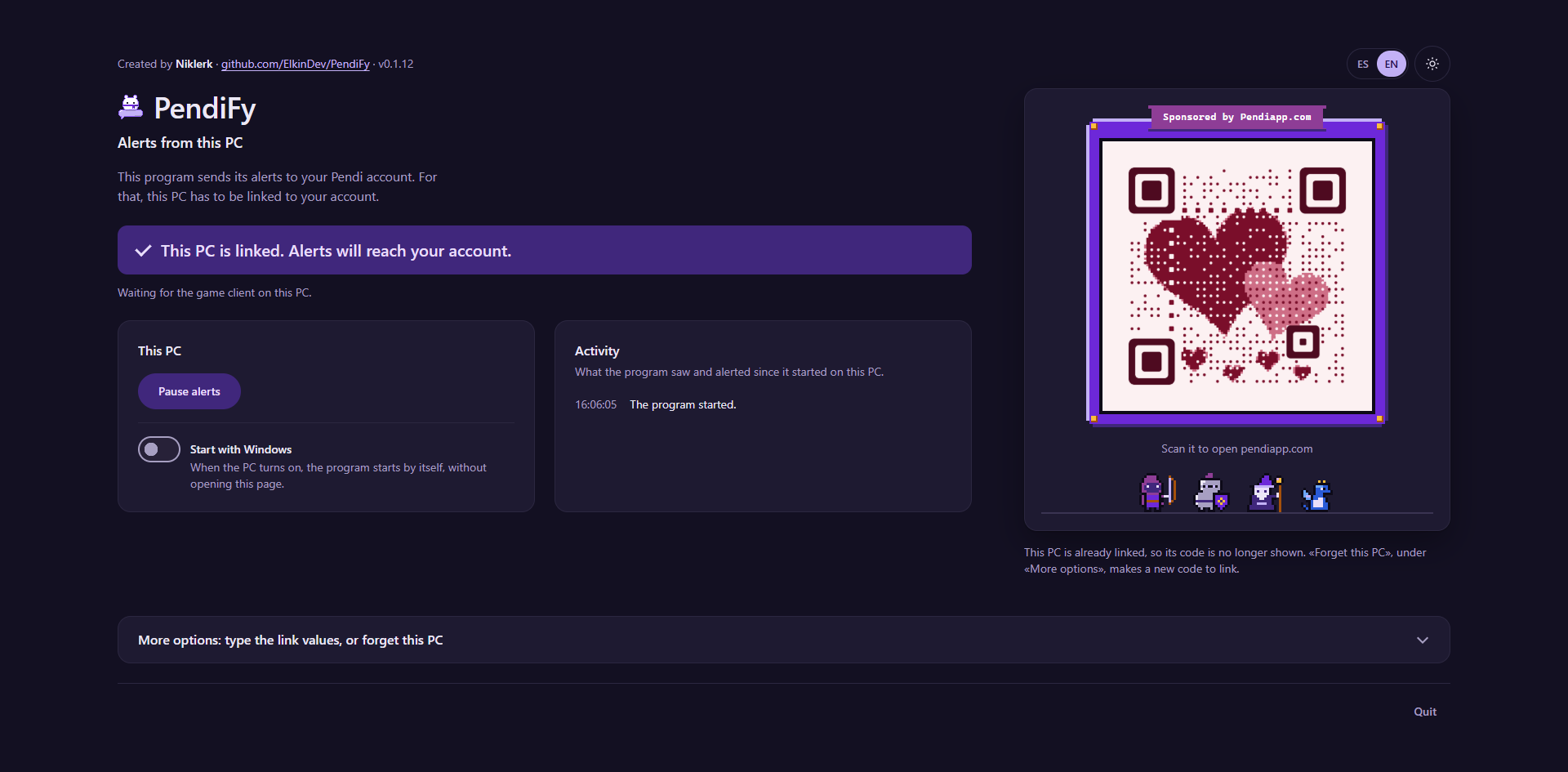
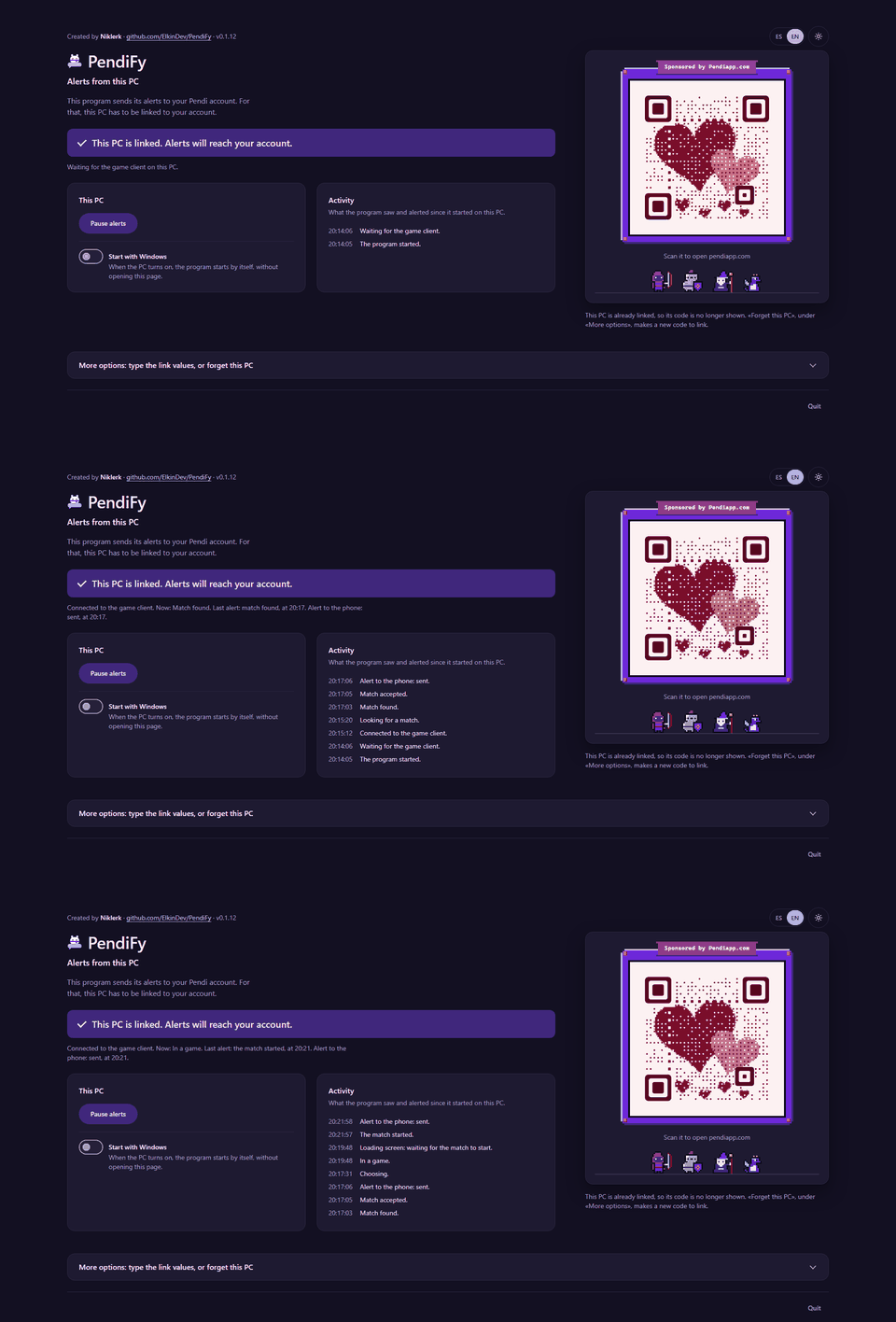
Así llega un aviso: el programa espera al cliente del juego, detecta la partida y envía el aviso a tu cuenta.
|
|
29
|
+
|
|
30
|
+
|
|
31
|
+
|
|
25
32
|
### Instalar
|
|
26
33
|
|
|
27
34
|
Pulsa Windows + R, pega esta línea completa y pulsa Enter. También sirve en PowerShell o en el Símbolo del sistema.
|
|
@@ -49,7 +56,23 @@ Si Windows responde que no encuentra `python`, usa `py` en su lugar: `py -m pip
|
|
|
49
56
|
|
|
50
57
|
Así no se crean los accesos directos en el Escritorio ni en el menú Inicio, y el inicio con Windows queda en el interruptor de la página. Para actualizar, pulsa «Salir» en la página, ejecuta otra vez la misma línea de pip y vuelve a iniciarlo. Para quitarlo, apaga primero el interruptor «Iniciar con Windows» en la página, pulsa «Salir» y después ejecuta `python -m pip uninstall pendify`. La configuración en `%APPDATA%\pendify`, con el enlace con el teléfono, se queda; puedes borrar esa carpeta a mano.
|
|
51
58
|
|
|
52
|
-
El programa revisa PyPI cada seis horas y, cuando hay una versión más nueva, la instala en segundo plano. La página ofrece entonces «Reiniciar ahora» para empezar a usarla. Para apagarlo, inícialo con `--no-update` o escribe `"update": "off"` en `%APPDATA%\pendify\config.json`. Las actualizaciones automáticas se instalan para tu usuario (--user).
|
|
59
|
+
El programa revisa PyPI cada seis horas y, cuando hay una versión más nueva, la instala en segundo plano. La página ofrece entonces «Reiniciar ahora» para empezar a usarla. Si la instalación falla, la página ofrece «Reintentar» en cualquier modo y, la primera vez que falla una versión, la siguiente revisión llega a los diez minutos. Para apagarlo, inícialo con `--no-update` o escribe `"update": "off"` en `%APPDATA%\pendify\config.json`. Las actualizaciones automáticas se instalan para tu usuario (--user).
|
|
60
|
+
|
|
61
|
+
### macOS
|
|
62
|
+
|
|
63
|
+
PendiFy también funciona en Mac (Apple Silicon o Intel) con League of Legends / TFT instalado. Abre la app Terminal, pega esta línea y pulsa Enter:
|
|
64
|
+
|
|
65
|
+
curl -fsSL https://raw.githubusercontent.com/ElkinDev/PendiFy/main/install.sh | bash
|
|
66
|
+
|
|
67
|
+
El instalador busca Python 3.10 o más nuevo (si no lo hay y tienes Homebrew, instala `python@3.12`), instala PendiFy en su propio entorno en `~/Library/Application Support/pendify/venv`, crea la app `PendiFy` en `~/Applications` (la encuentras con Spotlight o en Launchpad) y la inicia. Para actualizar, vuelve a pegar la misma línea.
|
|
68
|
+
|
|
69
|
+
- Iniciar: abre `PendiFy` desde Spotlight o Launchpad; si ya está abierto, abre su página.
|
|
70
|
+
- Detener: pulsa «Salir» en la página. En Mac no hay icono junto al reloj.
|
|
71
|
+
- Iniciar con macOS: el interruptor «Iniciar con macOS» de la página crea un LaunchAgent solo para tu usuario, sin permisos de administrador.
|
|
72
|
+
- Configuración: `~/Library/Application Support/pendify/config.json`; el registro del programa queda en `pendify.log` en esa misma carpeta.
|
|
73
|
+
- Sonido: el aviso suena con los sonidos del sistema.
|
|
74
|
+
- App de Teamfight Tactics: si juegas TFT con su app propia (sin el cliente de League), PendiFy lee el registro del juego y avisa a tu teléfono cuando aparece la partida y cuando empieza. Esa app no ofrece una forma de aceptar desde fuera; con el interruptor «Aceptar partida automáticamente» de la página, encendido por defecto, PendiFy pone TFT al frente y hace clic en Aceptar por ti (macOS pide una vez el permiso de Accesibilidad en Ajustes del Sistema > Privacidad y seguridad > Accesibilidad). Con el cliente de League se acepta solo como en Windows.
|
|
75
|
+
- Desinstalar: `curl -fsSL https://raw.githubusercontent.com/ElkinDev/PendiFy/main/uninstall.sh | bash`. Quita la app, el inicio con macOS y el entorno; la configuración se queda.
|
|
53
76
|
|
|
54
77
|
### Enlazar
|
|
55
78
|
|
|
@@ -87,6 +110,12 @@ A small Windows program that alerts your phone when your match is found and when
|
|
|
87
110
|
It links once to your Pendi account by scanning a QR code, with no new account of any kind.
|
|
88
111
|
It is free, needs no administrator rights and only uses Python.
|
|
89
112
|
|
|
113
|
+

|
|
114
|
+
|
|
115
|
+
How an alert arrives: the program waits for the game client, detects the match and sends the alert to your account.
|
|
116
|
+
|
|
117
|
+

|
|
118
|
+
|
|
90
119
|
### Install
|
|
91
120
|
|
|
92
121
|
Press Windows + R, paste this whole line and press Enter. It also works in PowerShell or the Command Prompt.
|
|
@@ -114,7 +143,23 @@ If Windows answers that `python` was not found, use `py` in its place: `py -m pi
|
|
|
114
143
|
|
|
115
144
|
This way leaves no shortcut on the Desktop or in the Start menu, and the start with Windows is the switch on the page. To update, press «Quit» on the page, run the same pip line again and start it again. To remove it, first turn off the «Start with Windows» switch on the page, press «Quit», then run `python -m pip uninstall pendify`. The configuration in `%APPDATA%\pendify`, with the link to the phone, stays; you can delete that folder by hand.
|
|
116
145
|
|
|
117
|
-
The program checks PyPI every six hours and, when a newer version exists, installs it in the background. The page then offers «Restart now» to start using it. To turn this off, start it with `--no-update` or write `"update": "off"` in `%APPDATA%\pendify\config.json`. Automatic updates install for your user (--user).
|
|
146
|
+
The program checks PyPI every six hours and, when a newer version exists, installs it in the background. The page then offers «Restart now» to start using it. If the install fails, the page offers «Try again» in either mode and, the first time a version fails, the next check comes ten minutes later. To turn this off, start it with `--no-update` or write `"update": "off"` in `%APPDATA%\pendify\config.json`. Automatic updates install for your user (--user).
|
|
147
|
+
|
|
148
|
+
### macOS
|
|
149
|
+
|
|
150
|
+
PendiFy also runs on a Mac (Apple Silicon or Intel) with League of Legends / TFT installed. Open the Terminal app, paste this line and press Enter:
|
|
151
|
+
|
|
152
|
+
curl -fsSL https://raw.githubusercontent.com/ElkinDev/PendiFy/main/install.sh | bash
|
|
153
|
+
|
|
154
|
+
The installer looks for Python 3.10 or newer (with none and Homebrew present, it installs `python@3.12`), installs PendiFy in its own environment in `~/Library/Application Support/pendify/venv`, makes the `PendiFy` app in `~/Applications` (find it with Spotlight or in Launchpad) and starts it. To update, paste the same line again.
|
|
155
|
+
|
|
156
|
+
- Start: open `PendiFy` from Spotlight or Launchpad; if it already runs, its page opens.
|
|
157
|
+
- Stop: press "Quit" on the page. On a Mac there is no icon by the clock.
|
|
158
|
+
- Start with macOS: the page's "Start with macOS" switch makes a LaunchAgent for your user only, with no administrator rights.
|
|
159
|
+
- Config: `~/Library/Application Support/pendify/config.json`; the program's log is `pendify.log` in that same folder.
|
|
160
|
+
- Sound: the alert plays the system's sounds.
|
|
161
|
+
- Teamfight Tactics app: if you play TFT with its own app (no League client), PendiFy reads the game's log and alerts your phone when the match is found and when it starts. That app offers no way to accept from outside; with the page's "Accept the match automatically" switch, on by default, PendiFy brings TFT to the front and clicks Accept for you (macOS asks once for the Accessibility permission in System Settings > Privacy & Security > Accessibility). With the League client it is accepted for you, as on Windows.
|
|
162
|
+
- Uninstall: `curl -fsSL https://raw.githubusercontent.com/ElkinDev/PendiFy/main/uninstall.sh | bash`. It removes the app, the start with macOS and the environment; the config is kept.
|
|
118
163
|
|
|
119
164
|
### Link
|
|
120
165
|
|
|
@@ -6,6 +6,12 @@ Un programa pequeño para Windows que avisa en tu teléfono cuando se encuentra
|
|
|
6
6
|
Se enlaza una sola vez con tu cuenta de Pendi leyendo un código QR, sin crear ninguna cuenta nueva.
|
|
7
7
|
Es gratis, no pide permisos de administrador y solo usa Python.
|
|
8
8
|
|
|
9
|
+

|
|
10
|
+
|
|
11
|
+
Así llega un aviso: el programa espera al cliente del juego, detecta la partida y envía el aviso a tu cuenta.
|
|
12
|
+
|
|
13
|
+

|
|
14
|
+
|
|
9
15
|
### Instalar
|
|
10
16
|
|
|
11
17
|
Pulsa Windows + R, pega esta línea completa y pulsa Enter. También sirve en PowerShell o en el Símbolo del sistema.
|
|
@@ -33,7 +39,23 @@ Si Windows responde que no encuentra `python`, usa `py` en su lugar: `py -m pip
|
|
|
33
39
|
|
|
34
40
|
Así no se crean los accesos directos en el Escritorio ni en el menú Inicio, y el inicio con Windows queda en el interruptor de la página. Para actualizar, pulsa «Salir» en la página, ejecuta otra vez la misma línea de pip y vuelve a iniciarlo. Para quitarlo, apaga primero el interruptor «Iniciar con Windows» en la página, pulsa «Salir» y después ejecuta `python -m pip uninstall pendify`. La configuración en `%APPDATA%\pendify`, con el enlace con el teléfono, se queda; puedes borrar esa carpeta a mano.
|
|
35
41
|
|
|
36
|
-
El programa revisa PyPI cada seis horas y, cuando hay una versión más nueva, la instala en segundo plano. La página ofrece entonces «Reiniciar ahora» para empezar a usarla. Para apagarlo, inícialo con `--no-update` o escribe `"update": "off"` en `%APPDATA%\pendify\config.json`. Las actualizaciones automáticas se instalan para tu usuario (--user).
|
|
42
|
+
El programa revisa PyPI cada seis horas y, cuando hay una versión más nueva, la instala en segundo plano. La página ofrece entonces «Reiniciar ahora» para empezar a usarla. Si la instalación falla, la página ofrece «Reintentar» en cualquier modo y, la primera vez que falla una versión, la siguiente revisión llega a los diez minutos. Para apagarlo, inícialo con `--no-update` o escribe `"update": "off"` en `%APPDATA%\pendify\config.json`. Las actualizaciones automáticas se instalan para tu usuario (--user).
|
|
43
|
+
|
|
44
|
+
### macOS
|
|
45
|
+
|
|
46
|
+
PendiFy también funciona en Mac (Apple Silicon o Intel) con League of Legends / TFT instalado. Abre la app Terminal, pega esta línea y pulsa Enter:
|
|
47
|
+
|
|
48
|
+
curl -fsSL https://raw.githubusercontent.com/ElkinDev/PendiFy/main/install.sh | bash
|
|
49
|
+
|
|
50
|
+
El instalador busca Python 3.10 o más nuevo (si no lo hay y tienes Homebrew, instala `python@3.12`), instala PendiFy en su propio entorno en `~/Library/Application Support/pendify/venv`, crea la app `PendiFy` en `~/Applications` (la encuentras con Spotlight o en Launchpad) y la inicia. Para actualizar, vuelve a pegar la misma línea.
|
|
51
|
+
|
|
52
|
+
- Iniciar: abre `PendiFy` desde Spotlight o Launchpad; si ya está abierto, abre su página.
|
|
53
|
+
- Detener: pulsa «Salir» en la página. En Mac no hay icono junto al reloj.
|
|
54
|
+
- Iniciar con macOS: el interruptor «Iniciar con macOS» de la página crea un LaunchAgent solo para tu usuario, sin permisos de administrador.
|
|
55
|
+
- Configuración: `~/Library/Application Support/pendify/config.json`; el registro del programa queda en `pendify.log` en esa misma carpeta.
|
|
56
|
+
- Sonido: el aviso suena con los sonidos del sistema.
|
|
57
|
+
- App de Teamfight Tactics: si juegas TFT con su app propia (sin el cliente de League), PendiFy lee el registro del juego y avisa a tu teléfono cuando aparece la partida y cuando empieza. Esa app no ofrece una forma de aceptar desde fuera; con el interruptor «Aceptar partida automáticamente» de la página, encendido por defecto, PendiFy pone TFT al frente y hace clic en Aceptar por ti (macOS pide una vez el permiso de Accesibilidad en Ajustes del Sistema > Privacidad y seguridad > Accesibilidad). Con el cliente de League se acepta solo como en Windows.
|
|
58
|
+
- Desinstalar: `curl -fsSL https://raw.githubusercontent.com/ElkinDev/PendiFy/main/uninstall.sh | bash`. Quita la app, el inicio con macOS y el entorno; la configuración se queda.
|
|
37
59
|
|
|
38
60
|
### Enlazar
|
|
39
61
|
|
|
@@ -71,6 +93,12 @@ A small Windows program that alerts your phone when your match is found and when
|
|
|
71
93
|
It links once to your Pendi account by scanning a QR code, with no new account of any kind.
|
|
72
94
|
It is free, needs no administrator rights and only uses Python.
|
|
73
95
|
|
|
96
|
+

|
|
97
|
+
|
|
98
|
+
How an alert arrives: the program waits for the game client, detects the match and sends the alert to your account.
|
|
99
|
+
|
|
100
|
+

|
|
101
|
+
|
|
74
102
|
### Install
|
|
75
103
|
|
|
76
104
|
Press Windows + R, paste this whole line and press Enter. It also works in PowerShell or the Command Prompt.
|
|
@@ -98,7 +126,23 @@ If Windows answers that `python` was not found, use `py` in its place: `py -m pi
|
|
|
98
126
|
|
|
99
127
|
This way leaves no shortcut on the Desktop or in the Start menu, and the start with Windows is the switch on the page. To update, press «Quit» on the page, run the same pip line again and start it again. To remove it, first turn off the «Start with Windows» switch on the page, press «Quit», then run `python -m pip uninstall pendify`. The configuration in `%APPDATA%\pendify`, with the link to the phone, stays; you can delete that folder by hand.
|
|
100
128
|
|
|
101
|
-
The program checks PyPI every six hours and, when a newer version exists, installs it in the background. The page then offers «Restart now» to start using it. To turn this off, start it with `--no-update` or write `"update": "off"` in `%APPDATA%\pendify\config.json`. Automatic updates install for your user (--user).
|
|
129
|
+
The program checks PyPI every six hours and, when a newer version exists, installs it in the background. The page then offers «Restart now» to start using it. If the install fails, the page offers «Try again» in either mode and, the first time a version fails, the next check comes ten minutes later. To turn this off, start it with `--no-update` or write `"update": "off"` in `%APPDATA%\pendify\config.json`. Automatic updates install for your user (--user).
|
|
130
|
+
|
|
131
|
+
### macOS
|
|
132
|
+
|
|
133
|
+
PendiFy also runs on a Mac (Apple Silicon or Intel) with League of Legends / TFT installed. Open the Terminal app, paste this line and press Enter:
|
|
134
|
+
|
|
135
|
+
curl -fsSL https://raw.githubusercontent.com/ElkinDev/PendiFy/main/install.sh | bash
|
|
136
|
+
|
|
137
|
+
The installer looks for Python 3.10 or newer (with none and Homebrew present, it installs `python@3.12`), installs PendiFy in its own environment in `~/Library/Application Support/pendify/venv`, makes the `PendiFy` app in `~/Applications` (find it with Spotlight or in Launchpad) and starts it. To update, paste the same line again.
|
|
138
|
+
|
|
139
|
+
- Start: open `PendiFy` from Spotlight or Launchpad; if it already runs, its page opens.
|
|
140
|
+
- Stop: press "Quit" on the page. On a Mac there is no icon by the clock.
|
|
141
|
+
- Start with macOS: the page's "Start with macOS" switch makes a LaunchAgent for your user only, with no administrator rights.
|
|
142
|
+
- Config: `~/Library/Application Support/pendify/config.json`; the program's log is `pendify.log` in that same folder.
|
|
143
|
+
- Sound: the alert plays the system's sounds.
|
|
144
|
+
- Teamfight Tactics app: if you play TFT with its own app (no League client), PendiFy reads the game's log and alerts your phone when the match is found and when it starts. That app offers no way to accept from outside; with the page's "Accept the match automatically" switch, on by default, PendiFy brings TFT to the front and clicks Accept for you (macOS asks once for the Accessibility permission in System Settings > Privacy & Security > Accessibility). With the League client it is accepted for you, as on Windows.
|
|
145
|
+
- Uninstall: `curl -fsSL https://raw.githubusercontent.com/ElkinDev/PendiFy/main/uninstall.sh | bash`. It removes the app, the start with macOS and the environment; the config is kept.
|
|
102
146
|
|
|
103
147
|
### Link
|
|
104
148
|
|
|
@@ -4,16 +4,17 @@ build-backend = "setuptools.build_meta"
|
|
|
4
4
|
|
|
5
5
|
[project]
|
|
6
6
|
name = "pendify"
|
|
7
|
-
version = "0.1.
|
|
7
|
+
version = "0.1.13"
|
|
8
8
|
description = "Pairs this PC with a phone account by a QR on a loopback page and sends it two kinds of alerts."
|
|
9
9
|
readme = "README.md"
|
|
10
10
|
license = "MIT"
|
|
11
11
|
license-files = ["LICENSE"]
|
|
12
12
|
requires-python = ">=3.10"
|
|
13
13
|
dependencies = []
|
|
14
|
-
keywords = ["notifications", "alerts", "phone", "qr", "pairing", "windows"]
|
|
14
|
+
keywords = ["notifications", "alerts", "phone", "qr", "pairing", "windows", "macos"]
|
|
15
15
|
classifiers = [
|
|
16
16
|
"Operating System :: Microsoft :: Windows",
|
|
17
|
+
"Operating System :: MacOS",
|
|
17
18
|
"Programming Language :: Python :: 3",
|
|
18
19
|
"Programming Language :: Python :: 3 :: Only",
|
|
19
20
|
]
|
|
@@ -24,4 +25,4 @@ Source = "https://github.com/ElkinDev/PendiFy"
|
|
|
24
25
|
|
|
25
26
|
# pip lays the icon beside the modules; install.ps1 points the shortcuts at it.
|
|
26
27
|
[tool.setuptools.package-data]
|
|
27
|
-
pendify = ["*.ico"]
|
|
28
|
+
pendify = ["*.ico", "macos/PendiFy"]
|
|
@@ -33,7 +33,7 @@ import urllib.request
|
|
|
33
33
|
import webbrowser
|
|
34
34
|
from pathlib import Path
|
|
35
35
|
|
|
36
|
-
from . import alert, client, config, page, pairing, runfile, update, watcher, worker
|
|
36
|
+
from . import alert, autoclick, client, config, page, pairing, runfile, tft_app, update, watcher, worker
|
|
37
37
|
from .autostart import Autostart
|
|
38
38
|
from .tray import Tray
|
|
39
39
|
|
|
@@ -140,6 +140,9 @@ def _watcher(args, store, state, base, timeout, stop, delay, beep):
|
|
|
140
140
|
lockfile = getattr(args, "client_lockfile", None)
|
|
141
141
|
if lockfile is None:
|
|
142
142
|
credentials, addresses = client.ClientCredentials(), client.real_addresses
|
|
143
|
+
if client.IS_MAC: # with no League client, the standalone TFT app read from its log
|
|
144
|
+
credentials = tft_app.EitherClient(credentials, tft_app.AppSession(
|
|
145
|
+
autoaccept=store.read_autoaccept, clicker=autoclick.Clicker()))
|
|
143
146
|
else:
|
|
144
147
|
credentials, addresses = client.ClientCredentials((str(lockfile),), run=None), client.loopback_addresses
|
|
145
148
|
alerter = alert.Alerter(store, state, lambda link_id, secret, kind: worker.ping(
|
|
@@ -185,13 +188,17 @@ def _restart(args, spawn, show, opens_page):
|
|
|
185
188
|
which claims the run file as a first start does. One that opens its page, as every restart asked today does,
|
|
186
189
|
goes without --quiet; one that does not keeps this run's --quiet. This run's --dry, --data-dir, --worker and
|
|
187
190
|
--client-lockfile go with it either way."""
|
|
188
|
-
|
|
191
|
+
app = os.environ.get("PENDIFY_APP") if sys.platform == "darwin" else None # through PendiFy.app's launcher
|
|
192
|
+
command = ([app] if app else [sys.executable, "-m", __package__])
|
|
193
|
+
command += ["--quiet"] if args.quiet and not opens_page else []
|
|
189
194
|
command += ["--dry"] if args.dry else []
|
|
190
195
|
for option in ("data_dir", "worker", "client_lockfile"):
|
|
191
196
|
if hasattr(args, option): # the parser's SUPPRESS: present only when this run was given it
|
|
192
197
|
command += ["--" + option.replace("_", "-"), str(getattr(args, option))]
|
|
193
198
|
try:
|
|
194
|
-
|
|
199
|
+
detached = ({"creationflags": _DETACHED_PROCESS | _CREATE_NEW_PROCESS_GROUP} if os.name == "nt"
|
|
200
|
+
else {"start_new_session": True}) # Popen refuses creationflags off Windows
|
|
201
|
+
spawn(command, **detached, close_fds=True)
|
|
195
202
|
except OSError:
|
|
196
203
|
return _ends(RESTART_FAILED_LINE, 1, show)
|
|
197
204
|
return 0
|
|
@@ -309,8 +316,12 @@ def _serve(args, store, base, timeout, opener, stop, delay, beep, show, clock, s
|
|
|
309
316
|
pass # unmarked, the finally marks it again; the stop goes on
|
|
310
317
|
stop.set()
|
|
311
318
|
|
|
319
|
+
clicking = autoclick.Switch(store) if getattr(args, "client_lockfile", None) is None else None
|
|
320
|
+
if clicking is not None and clicking.available and clicking.enabled():
|
|
321
|
+
clicking.ask() # on by default: the permission is asked for at the start, not at the first pop
|
|
312
322
|
pairing_page = page.PairingPage(state, watch=watch.snapshot, on_quit=quit_page, on_pause=watch.pause,
|
|
313
|
-
on_resume=watch.resume, autostart=autostart, events=watch.events
|
|
323
|
+
on_resume=watch.resume, autostart=autostart, events=watch.events,
|
|
324
|
+
autoaccept=clicking)
|
|
314
325
|
pairing_page.run = run # its /replace answers the secret the publish below writes
|
|
315
326
|
url = pairing_page.start()
|
|
316
327
|
# The update's rounds on their own thread (update.py), built once the page serves; its restart is the
|
|
@@ -6,6 +6,8 @@ for the page as the last ping. With no link id nothing is sent and nothing is qu
|
|
|
6
6
|
alone, with no kind and no ping. The console gets fixed lines only. listen() names the one callback told each ping's
|
|
7
7
|
result name and time right after they are recorded (the watcher's log, lane pclog).
|
|
8
8
|
"""
|
|
9
|
+
import subprocess
|
|
10
|
+
import sys
|
|
9
11
|
import threading
|
|
10
12
|
import time
|
|
11
13
|
|
|
@@ -13,7 +15,7 @@ from . import worker
|
|
|
13
15
|
|
|
14
16
|
try:
|
|
15
17
|
import winsound
|
|
16
|
-
except ImportError: # not Windows: the beep is silent, as in the script
|
|
18
|
+
except ImportError: # not Windows: system sounds on macOS, else the beep is silent, as in the script
|
|
17
19
|
winsound = None
|
|
18
20
|
|
|
19
21
|
BEEP_NOTES = (988, 1319) # S:167
|
|
@@ -23,6 +25,28 @@ PING_LINES = {"sent": "alert: sent to the phone", "refused": "alert: refused, li
|
|
|
23
25
|
"not_delivered": "alert: not delivered", "failed": "alert: failed"}
|
|
24
26
|
CONFIG_UNREADABLE_LINE = "alert: the config file could not be read, nothing was sent"
|
|
25
27
|
BEEP_FAILED_LINE = "alert: the sound device refused the beep"
|
|
28
|
+
# macOS has no winsound: each note of the siren is a short system sound, the low one Tink, the high one Glass.
|
|
29
|
+
MAC_SOUNDS = ("/System/Library/Sounds/Tink.aiff", "/System/Library/Sounds/Glass.aiff")
|
|
30
|
+
|
|
31
|
+
|
|
32
|
+
class MacSound:
|
|
33
|
+
"""winsound's Beep on macOS, played by afplay, so the siren keeps its two-note shape. A missing afplay or sound
|
|
34
|
+
fails as winsound does, with RuntimeError."""
|
|
35
|
+
|
|
36
|
+
def __init__(self, run=subprocess.run):
|
|
37
|
+
self._run = run
|
|
38
|
+
|
|
39
|
+
def Beep(self, frequency, milliseconds): # noqa: N802, winsound's own name
|
|
40
|
+
path = MAC_SOUNDS[0] if frequency < max(BEEP_NOTES) else MAC_SOUNDS[1]
|
|
41
|
+
try:
|
|
42
|
+
self._run(["/usr/bin/afplay", path], stdin=subprocess.DEVNULL, stdout=subprocess.DEVNULL,
|
|
43
|
+
stderr=subprocess.DEVNULL, timeout=5, check=True)
|
|
44
|
+
except (OSError, subprocess.SubprocessError):
|
|
45
|
+
raise RuntimeError("afplay could not play the sound") from None
|
|
46
|
+
|
|
47
|
+
|
|
48
|
+
if winsound is None and sys.platform == "darwin":
|
|
49
|
+
winsound = MacSound()
|
|
26
50
|
|
|
27
51
|
|
|
28
52
|
def _print(line):
|
|
@@ -0,0 +1,225 @@
|
|
|
1
|
+
"""The click on the TFT app's accept button, macOS only, turned on from the page.
|
|
2
|
+
|
|
3
|
+
The app serves no API to accept a match and takes no key for it, so its player's own click is made: the app is
|
|
4
|
+
brought to the front, its window read, the mouse moved onto the button, clicked, and put back where it was. The
|
|
5
|
+
button's place is a share of the window, the window's centre across and ACCEPT_DOWN of its height down, measured on
|
|
6
|
+
a MacBook Pro's full screen; the game scales its interface with the window's height, so the share holds at any size.
|
|
7
|
+
Nothing is clicked unless the app is the frontmost one and its window is found. Posting a click needs the
|
|
8
|
+
Accessibility permission (System Settings, Privacy & Security, Accessibility); without it nothing is clicked.
|
|
9
|
+
|
|
10
|
+
Standard library only: CoreGraphics, CoreFoundation and ApplicationServices through ctypes, and osascript (JXA) for
|
|
11
|
+
the window's bounds and lsappinfo for the frontmost app.
|
|
12
|
+
"""
|
|
13
|
+
import ctypes
|
|
14
|
+
import json
|
|
15
|
+
import subprocess
|
|
16
|
+
import sys
|
|
17
|
+
import time
|
|
18
|
+
|
|
19
|
+
APP_PATH = "/Applications/Teamfight Tactics.app"
|
|
20
|
+
SETTINGS_URL = "x-apple.systempreferences:com.apple.preference.security?Privacy_Accessibility"
|
|
21
|
+
OWNER_NAME = "TFTClient-Mac-Shipping"
|
|
22
|
+
ACCEPT_ACROSS = 0.5
|
|
23
|
+
ACCEPT_DOWN = 0.6085
|
|
24
|
+
FRONT_WAIT_SECONDS = 2.5 # the switch to the app's full-screen space takes about a second
|
|
25
|
+
SETTLE_SECONDS = 0.4
|
|
26
|
+
TIMEOUT = 5
|
|
27
|
+
|
|
28
|
+
PERMISSION_LINES = {True: "autoaccept: on, the Accessibility permission is granted",
|
|
29
|
+
False: "autoaccept: on, waiting for the Accessibility permission (System Settings, Privacy & "
|
|
30
|
+
"Security, Accessibility)"}
|
|
31
|
+
# Why a click was not made, said on one line.
|
|
32
|
+
NO_PERMISSION, NO_WINDOW, NOT_FRONT, BROKE = "no_permission", "no_window", "not_front", "broke"
|
|
33
|
+
|
|
34
|
+
_FRAMEWORKS = "/System/Library/Frameworks/{0}.framework/{0}"
|
|
35
|
+
_WINDOWS_JXA = """
|
|
36
|
+
ObjC.import("CoreGraphics"); ObjC.import("Foundation");
|
|
37
|
+
var list = ObjC.castRefToObject($.CGWindowListCopyWindowInfo(0, 0)), out = [];
|
|
38
|
+
for (var i = 0; i < list.count; i++) {
|
|
39
|
+
var w = list.objectAtIndex(i);
|
|
40
|
+
if (ObjC.unwrap(w.objectForKey("kCGWindowOwnerName")) !== "%s") continue;
|
|
41
|
+
if (ObjC.unwrap(w.objectForKey("kCGWindowLayer")) !== 0) continue;
|
|
42
|
+
var b = w.objectForKey("kCGWindowBounds");
|
|
43
|
+
out.push([ObjC.unwrap(b.objectForKey("X")), ObjC.unwrap(b.objectForKey("Y")),
|
|
44
|
+
ObjC.unwrap(b.objectForKey("Width")), ObjC.unwrap(b.objectForKey("Height"))]);
|
|
45
|
+
}
|
|
46
|
+
JSON.stringify(out)
|
|
47
|
+
""" % OWNER_NAME
|
|
48
|
+
|
|
49
|
+
|
|
50
|
+
class CGPoint(ctypes.Structure):
|
|
51
|
+
_fields_ = [("x", ctypes.c_double), ("y", ctypes.c_double)]
|
|
52
|
+
|
|
53
|
+
|
|
54
|
+
def available():
|
|
55
|
+
return sys.platform == "darwin"
|
|
56
|
+
|
|
57
|
+
|
|
58
|
+
def _frameworks():
|
|
59
|
+
"""(CoreGraphics, CoreFoundation, ApplicationServices), typed."""
|
|
60
|
+
cg = ctypes.CDLL(_FRAMEWORKS.format("CoreGraphics"))
|
|
61
|
+
cf = ctypes.CDLL(_FRAMEWORKS.format("CoreFoundation"))
|
|
62
|
+
ax = ctypes.CDLL(_FRAMEWORKS.format("ApplicationServices"))
|
|
63
|
+
cg.CGEventCreateMouseEvent.argtypes = (ctypes.c_void_p, ctypes.c_uint32, CGPoint, ctypes.c_uint32)
|
|
64
|
+
cg.CGEventCreateMouseEvent.restype = ctypes.c_void_p
|
|
65
|
+
cg.CGEventPost.argtypes = (ctypes.c_uint32, ctypes.c_void_p)
|
|
66
|
+
cg.CGEventCreate.argtypes = (ctypes.c_void_p,)
|
|
67
|
+
cg.CGEventCreate.restype = ctypes.c_void_p
|
|
68
|
+
cg.CGEventGetLocation.argtypes = (ctypes.c_void_p,)
|
|
69
|
+
cg.CGEventGetLocation.restype = CGPoint
|
|
70
|
+
cf.CFRelease.argtypes = (ctypes.c_void_p,)
|
|
71
|
+
cf.CFDictionaryCreate.argtypes = (ctypes.c_void_p, ctypes.POINTER(ctypes.c_void_p),
|
|
72
|
+
ctypes.POINTER(ctypes.c_void_p), ctypes.c_long, ctypes.c_void_p,
|
|
73
|
+
ctypes.c_void_p)
|
|
74
|
+
cf.CFDictionaryCreate.restype = ctypes.c_void_p
|
|
75
|
+
ax.AXIsProcessTrusted.restype = ctypes.c_bool
|
|
76
|
+
ax.AXIsProcessTrustedWithOptions.argtypes = (ctypes.c_void_p,)
|
|
77
|
+
ax.AXIsProcessTrustedWithOptions.restype = ctypes.c_bool
|
|
78
|
+
return cg, cf, ax
|
|
79
|
+
|
|
80
|
+
|
|
81
|
+
def trusted(prompt=False):
|
|
82
|
+
"""True when this process may post clicks; with `prompt`, macOS asks its person for the permission once."""
|
|
83
|
+
if not available():
|
|
84
|
+
return False
|
|
85
|
+
try:
|
|
86
|
+
_, cf, ax = _frameworks()
|
|
87
|
+
if not prompt:
|
|
88
|
+
return bool(ax.AXIsProcessTrusted())
|
|
89
|
+
key = ctypes.c_void_p.in_dll(ax, "kAXTrustedCheckOptionPrompt")
|
|
90
|
+
true = ctypes.c_void_p.in_dll(cf, "kCFBooleanTrue")
|
|
91
|
+
keys, values = (ctypes.c_void_p * 1)(key.value), (ctypes.c_void_p * 1)(true.value)
|
|
92
|
+
options = cf.CFDictionaryCreate(None, keys, values, 1,
|
|
93
|
+
ctypes.addressof(ctypes.c_char.in_dll(cf, "kCFTypeDictionaryKeyCallBacks")),
|
|
94
|
+
ctypes.addressof(ctypes.c_char.in_dll(cf, "kCFTypeDictionaryValueCallBacks")))
|
|
95
|
+
try:
|
|
96
|
+
return bool(ax.AXIsProcessTrustedWithOptions(options))
|
|
97
|
+
finally:
|
|
98
|
+
cf.CFRelease(options)
|
|
99
|
+
except (OSError, ValueError, AttributeError):
|
|
100
|
+
return False
|
|
101
|
+
|
|
102
|
+
|
|
103
|
+
def accept_point(bounds):
|
|
104
|
+
"""The button's point on the screen, in points, for the window's (x, y, width, height)."""
|
|
105
|
+
x, y, width, height = bounds
|
|
106
|
+
return x + width * ACCEPT_ACROSS, y + height * ACCEPT_DOWN
|
|
107
|
+
|
|
108
|
+
|
|
109
|
+
def _run(command, run):
|
|
110
|
+
try:
|
|
111
|
+
done = run(command, capture_output=True, text=True, timeout=TIMEOUT)
|
|
112
|
+
except (OSError, subprocess.SubprocessError):
|
|
113
|
+
return None
|
|
114
|
+
return done.stdout if done.returncode == 0 else None
|
|
115
|
+
|
|
116
|
+
|
|
117
|
+
def window_bounds(run=subprocess.run):
|
|
118
|
+
"""The app's largest window as (x, y, width, height) in points, or None."""
|
|
119
|
+
output = _run(["/usr/bin/osascript", "-l", "JavaScript", "-e", _WINDOWS_JXA], run)
|
|
120
|
+
try:
|
|
121
|
+
windows = json.loads(output) if output else []
|
|
122
|
+
except ValueError:
|
|
123
|
+
return None
|
|
124
|
+
windows = [w for w in windows if isinstance(w, list) and len(w) == 4 and w[2] > 200 and w[3] > 200]
|
|
125
|
+
return tuple(max(windows, key=lambda w: w[2] * w[3])) if windows else None
|
|
126
|
+
|
|
127
|
+
|
|
128
|
+
def app_in_front(run=subprocess.run):
|
|
129
|
+
"""True when the frontmost app is TFT's."""
|
|
130
|
+
front = _run(["/usr/bin/lsappinfo", "front"], run)
|
|
131
|
+
if not front:
|
|
132
|
+
return False
|
|
133
|
+
info = _run(["/usr/bin/lsappinfo", "info", "-only", "bundlepath", front.strip()], run) or ""
|
|
134
|
+
return "Teamfight Tactics.app" in info
|
|
135
|
+
|
|
136
|
+
|
|
137
|
+
class Clicker:
|
|
138
|
+
"""One click on the accept button: click() answers None when made, else why not. Every outside call is a seam."""
|
|
139
|
+
|
|
140
|
+
def __init__(self, run=subprocess.run, sleep=time.sleep, clock=time.monotonic, post=None, is_trusted=trusted):
|
|
141
|
+
self._run, self._sleep, self._clock, self._post, self._trusted = run, sleep, clock, post, is_trusted
|
|
142
|
+
|
|
143
|
+
def click(self):
|
|
144
|
+
if not self._trusted():
|
|
145
|
+
return NO_PERMISSION
|
|
146
|
+
if not app_in_front(self._run):
|
|
147
|
+
_run(["/usr/bin/open", "-a", APP_PATH], self._run) # to its space, in front
|
|
148
|
+
deadline = self._clock() + FRONT_WAIT_SECONDS
|
|
149
|
+
while not app_in_front(self._run):
|
|
150
|
+
if self._clock() >= deadline:
|
|
151
|
+
return NOT_FRONT
|
|
152
|
+
self._sleep(0.2)
|
|
153
|
+
self._sleep(SETTLE_SECONDS)
|
|
154
|
+
bounds = window_bounds(self._run)
|
|
155
|
+
if bounds is None:
|
|
156
|
+
return NO_WINDOW
|
|
157
|
+
try:
|
|
158
|
+
(self._post or _post_click)(*accept_point(bounds))
|
|
159
|
+
except (OSError, ValueError, AttributeError):
|
|
160
|
+
return BROKE
|
|
161
|
+
return None
|
|
162
|
+
|
|
163
|
+
|
|
164
|
+
def _post_click(x, y):
|
|
165
|
+
"""The mouse moved to (x, y), pressed and released there, then put back where it was."""
|
|
166
|
+
cg, cf, _ = _frameworks()
|
|
167
|
+
here = cg.CGEventCreate(None)
|
|
168
|
+
back = cg.CGEventGetLocation(here)
|
|
169
|
+
cf.CFRelease(here)
|
|
170
|
+
point = CGPoint(x, y)
|
|
171
|
+
# kCGEventMouseMoved 5, kCGEventLeftMouseDown 1, kCGEventLeftMouseUp 2; kCGHIDEventTap 0; kCGMouseButtonLeft 0.
|
|
172
|
+
for kind, at, pause in ((5, point, 0.08), (1, point, 0.06), (2, point, 0.15), (5, back, 0)):
|
|
173
|
+
event = cg.CGEventCreateMouseEvent(None, kind, at, 0)
|
|
174
|
+
cg.CGEventPost(0, event)
|
|
175
|
+
cf.CFRelease(event)
|
|
176
|
+
if pause:
|
|
177
|
+
time.sleep(pause)
|
|
178
|
+
|
|
179
|
+
|
|
180
|
+
class Switch:
|
|
181
|
+
"""The page's switch of the click on accept, kept in config.json, on by default; available on macOS only. While
|
|
182
|
+
on, macOS is asked for the Accessibility permission, which its person grants once in System Settings."""
|
|
183
|
+
|
|
184
|
+
def __init__(self, store, prompt=None, granted=trusted, run=subprocess.run):
|
|
185
|
+
self._store, self._granted, self._run = store, granted, run
|
|
186
|
+
self._prompt = prompt if prompt is not None else (lambda: trusted(prompt=True))
|
|
187
|
+
self.available = available()
|
|
188
|
+
|
|
189
|
+
def enabled(self):
|
|
190
|
+
try:
|
|
191
|
+
return self._store.read_autoaccept()
|
|
192
|
+
except (OSError, ValueError):
|
|
193
|
+
return False
|
|
194
|
+
|
|
195
|
+
def enable(self):
|
|
196
|
+
self.ask()
|
|
197
|
+
return self._set(True)
|
|
198
|
+
|
|
199
|
+
def ask(self):
|
|
200
|
+
"""macOS asked for the Accessibility permission (it shows its prompt only while not granted), and the
|
|
201
|
+
answer said on one line; at each start while the switch is on, as it is by default."""
|
|
202
|
+
granted = bool(self._prompt())
|
|
203
|
+
print(PERMISSION_LINES[granted], flush=True)
|
|
204
|
+
return granted
|
|
205
|
+
|
|
206
|
+
def disable(self):
|
|
207
|
+
return self._set(False)
|
|
208
|
+
|
|
209
|
+
def granted(self):
|
|
210
|
+
"""True once macOS lets this app click (the Accessibility permission); asks nothing."""
|
|
211
|
+
return bool(self._granted())
|
|
212
|
+
|
|
213
|
+
def open_settings(self):
|
|
214
|
+
"""System Settings, opened at its Accessibility list."""
|
|
215
|
+
try:
|
|
216
|
+
self._run(["/usr/bin/open", SETTINGS_URL], capture_output=True, timeout=TIMEOUT)
|
|
217
|
+
except (OSError, subprocess.SubprocessError):
|
|
218
|
+
pass
|
|
219
|
+
|
|
220
|
+
def _set(self, on):
|
|
221
|
+
try:
|
|
222
|
+
self._store.set_autoaccept(on)
|
|
223
|
+
except (OSError, ValueError): # a file that cannot be written, or no pair yet
|
|
224
|
+
return False
|
|
225
|
+
return True
|
|
@@ -1,4 +1,4 @@
|
|
|
1
|
-
"""The start with Windows: the per-user Run value, no administrator.
|
|
1
|
+
"""The start with Windows: the per-user Run value, no administrator; on macOS a per-user LaunchAgent.
|
|
2
2
|
|
|
3
3
|
The value `PendiFy` under HKEY_CURRENT_USER's Run key holds the start line of install.ps1 plus --quiet, so the
|
|
4
4
|
program starts at logon with no browser. Only the page writes it, on its person's ask; a start never writes it,
|
|
@@ -7,6 +7,7 @@ path; the real one imports winreg inside itself and takes the key path as an arg
|
|
|
7
7
|
scratch key. Where winreg cannot be imported the start with Windows is not available, and the page shows and
|
|
8
8
|
routes nothing of it. A registry failure is one sentence on stderr, by its type only, and changes nothing.
|
|
9
9
|
"""
|
|
10
|
+
import os
|
|
10
11
|
import sys
|
|
11
12
|
from pathlib import Path
|
|
12
13
|
|
|
@@ -14,6 +15,11 @@ RUN_KEY = r"Software\Microsoft\Windows\CurrentVersion\Run"
|
|
|
14
15
|
VALUE_NAME = "PendiFy"
|
|
15
16
|
START_ARGS = "-m pendify --quiet"
|
|
16
17
|
FAILED_LINE = "autostart: the start with Windows could not be {what} ({kind})"
|
|
18
|
+
LAUNCH_AGENT_LABEL = "io.github.elkindev.pendify"
|
|
19
|
+
# PendiFy.app's identifier (install.sh): named in the agent, so System Settings' login items show the app's name and
|
|
20
|
+
# icon rather than a bare executable's.
|
|
21
|
+
APP_BUNDLE_ID = "io.github.elkindev.pendify.app"
|
|
22
|
+
IS_MAC = sys.platform == "darwin"
|
|
17
23
|
|
|
18
24
|
|
|
19
25
|
class WindowsRegistry:
|
|
@@ -49,6 +55,44 @@ class WindowsRegistry:
|
|
|
49
55
|
pass
|
|
50
56
|
|
|
51
57
|
|
|
58
|
+
class LaunchAgent:
|
|
59
|
+
"""The macOS counterpart of the Run value: one per-user LaunchAgent plist, run at logon, no administrator.
|
|
60
|
+
read, write and delete, as WindowsRegistry; `write` takes the start line and keeps it as the plist's
|
|
61
|
+
ProgramArguments."""
|
|
62
|
+
|
|
63
|
+
def __init__(self, path=None, label=LAUNCH_AGENT_LABEL, log_path=None):
|
|
64
|
+
self.path = Path(path) if path is not None else Path.home() / "Library" / "LaunchAgents" / f"{label}.plist"
|
|
65
|
+
self.label = label
|
|
66
|
+
# The program's output, where the PendiFy app writes it too: launchd drops it otherwise.
|
|
67
|
+
self.log_path = (Path(log_path) if log_path is not None else
|
|
68
|
+
Path.home() / "Library" / "Application Support" / "pendify" / "pendify.log")
|
|
69
|
+
|
|
70
|
+
def read(self):
|
|
71
|
+
"""The plist's text, or None when it is missing."""
|
|
72
|
+
try:
|
|
73
|
+
return self.path.read_text(encoding="utf-8")
|
|
74
|
+
except FileNotFoundError:
|
|
75
|
+
return None
|
|
76
|
+
|
|
77
|
+
def write(self, text):
|
|
78
|
+
import plistlib
|
|
79
|
+
import shlex
|
|
80
|
+
|
|
81
|
+
agent = {"Label": self.label, "ProgramArguments": shlex.split(text), "RunAtLoad": True,
|
|
82
|
+
"ProcessType": "Interactive", "StandardOutPath": str(self.log_path),
|
|
83
|
+
"StandardErrorPath": str(self.log_path), "AssociatedBundleIdentifiers": [APP_BUNDLE_ID]}
|
|
84
|
+
self.path.parent.mkdir(parents=True, exist_ok=True)
|
|
85
|
+
with open(self.path, "wb") as handle:
|
|
86
|
+
plistlib.dump(agent, handle)
|
|
87
|
+
|
|
88
|
+
def delete(self):
|
|
89
|
+
"""The plist removed; a missing one is nothing to remove, no error."""
|
|
90
|
+
try:
|
|
91
|
+
self.path.unlink()
|
|
92
|
+
except FileNotFoundError:
|
|
93
|
+
pass
|
|
94
|
+
|
|
95
|
+
|
|
52
96
|
def _say_failure(what, failure):
|
|
53
97
|
print(FAILED_LINE.format(what=what, kind=type(failure).__name__), file=sys.stderr, flush=True)
|
|
54
98
|
|
|
@@ -60,8 +104,8 @@ class Autostart:
|
|
|
60
104
|
if registry is None:
|
|
61
105
|
try:
|
|
62
106
|
registry = WindowsRegistry()
|
|
63
|
-
except ImportError: # no winreg on this system:
|
|
64
|
-
registry = None
|
|
107
|
+
except ImportError: # no winreg on this system: a LaunchAgent on macOS, else nothing to keep
|
|
108
|
+
registry = LaunchAgent() if IS_MAC else None
|
|
65
109
|
self.registry = registry
|
|
66
110
|
self.available = registry is not None
|
|
67
111
|
self._executable = executable or sys.executable
|
|
@@ -86,7 +130,12 @@ class Autostart:
|
|
|
86
130
|
|
|
87
131
|
def command(self):
|
|
88
132
|
"""install.ps1's start line plus --quiet: pythonw.exe beside the interpreter when that file exists, else
|
|
89
|
-
the interpreter, quoted when its path holds a space (install.ps1's Format-Arg).
|
|
133
|
+
the interpreter, quoted when its path holds a space (install.ps1's Format-Arg). Started by PendiFy.app on
|
|
134
|
+
macOS (PENDIFY_APP, its launcher), the app's own executable, so the start at logon keeps the app's
|
|
135
|
+
permissions."""
|
|
136
|
+
app = os.environ.get("PENDIFY_APP") if IS_MAC else None
|
|
137
|
+
if app:
|
|
138
|
+
return f'"{app}" --quiet'
|
|
90
139
|
interpreter = Path(self._executable)
|
|
91
140
|
windowless = interpreter.with_name("pythonw.exe")
|
|
92
141
|
chosen = str(windowless if windowless.is_file() else interpreter)
|