pdf-redpen 0.2.0__tar.gz
This diff represents the content of publicly available package versions that have been released to one of the supported registries. The information contained in this diff is provided for informational purposes only and reflects changes between package versions as they appear in their respective public registries.
- pdf_redpen-0.2.0/.env.example +8 -0
- pdf_redpen-0.2.0/.github/ISSUE_TEMPLATE/bug.yml +22 -0
- pdf_redpen-0.2.0/.github/ISSUE_TEMPLATE/question.yml +11 -0
- pdf_redpen-0.2.0/.github/workflows/ci.yml +20 -0
- pdf_redpen-0.2.0/.gitignore +31 -0
- pdf_redpen-0.2.0/.python-version +1 -0
- pdf_redpen-0.2.0/CHANGELOG.md +55 -0
- pdf_redpen-0.2.0/LICENSE +21 -0
- pdf_redpen-0.2.0/NOTICE.md +23 -0
- pdf_redpen-0.2.0/PKG-INFO +316 -0
- pdf_redpen-0.2.0/README.ko.md +292 -0
- pdf_redpen-0.2.0/README.md +296 -0
- pdf_redpen-0.2.0/SECURITY.md +9 -0
- pdf_redpen-0.2.0/docs/images/01-hero.png +0 -0
- pdf_redpen-0.2.0/docs/images/02-demo-run.ko.png +0 -0
- pdf_redpen-0.2.0/docs/images/02-demo-run.png +0 -0
- pdf_redpen-0.2.0/docs/images/03-report-table.ko.png +0 -0
- pdf_redpen-0.2.0/docs/images/03-report-table.png +0 -0
- pdf_redpen-0.2.0/docs/images/04-recall-prompt.ko.png +0 -0
- pdf_redpen-0.2.0/docs/images/04-recall-prompt.png +0 -0
- pdf_redpen-0.2.0/docs/images/05-cap3-page1.png +0 -0
- pdf_redpen-0.2.0/docs/images/06-apply-clear.ko.png +0 -0
- pdf_redpen-0.2.0/docs/images/06-apply-clear.png +0 -0
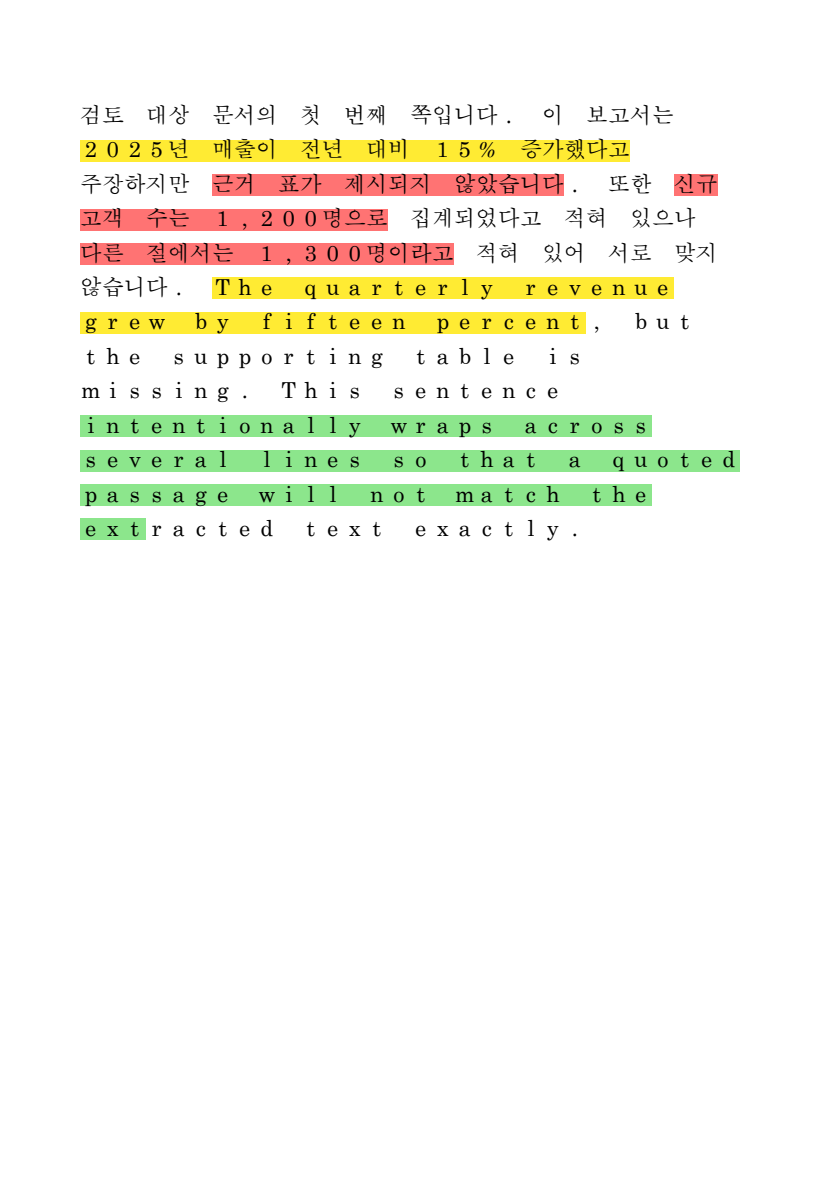
- pdf_redpen-0.2.0/docs/images/07-no-model.ko.png +0 -0
- pdf_redpen-0.2.0/docs/images/07-no-model.png +0 -0
- pdf_redpen-0.2.0/docs/images/08-page-out-of-range.ko.png +0 -0
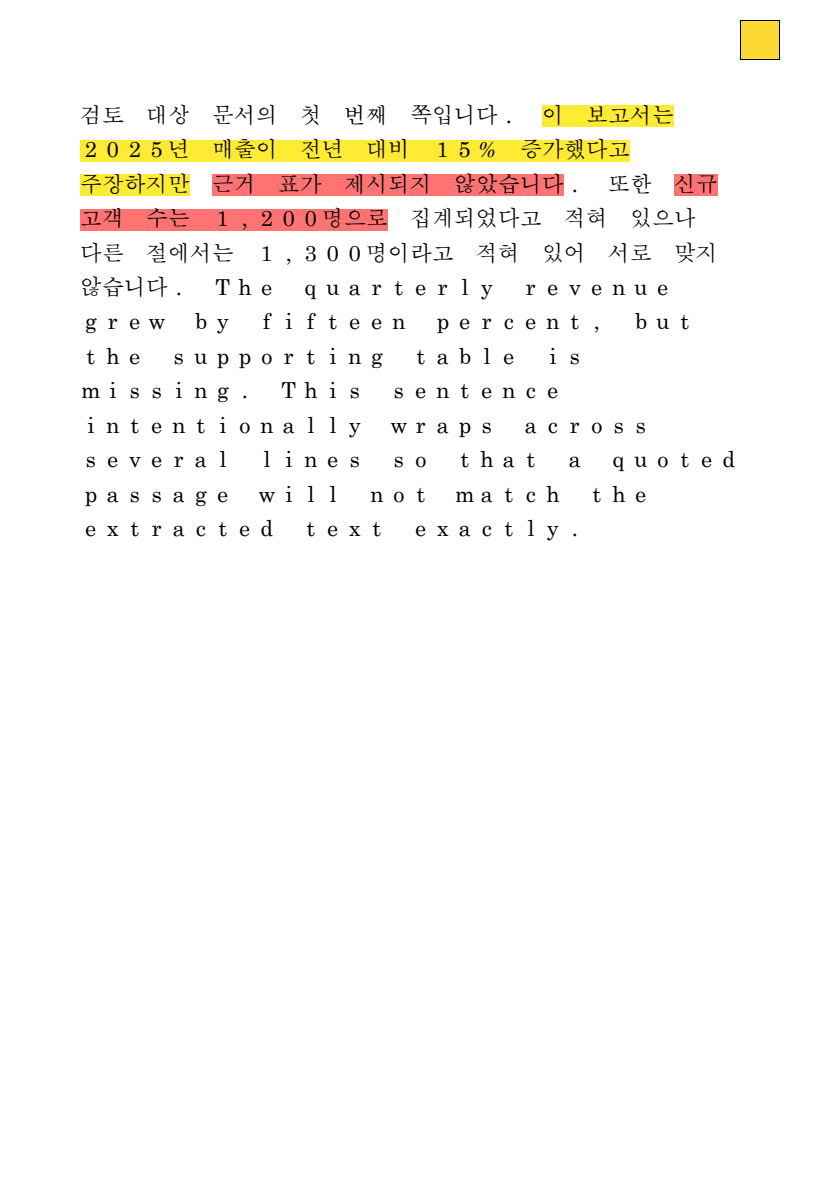
- pdf_redpen-0.2.0/docs/images/08-page-out-of-range.png +0 -0
- pdf_redpen-0.2.0/docs/images/09-lang-help.ko.png +0 -0
- pdf_redpen-0.2.0/docs/images/09-lang-help.png +0 -0
- pdf_redpen-0.2.0/examples/findings.json +12 -0
- pdf_redpen-0.2.0/examples/sample_embedded.pdf +0 -0
- pdf_redpen-0.2.0/pyproject.toml +42 -0
- pdf_redpen-0.2.0/scripts/make_sample_pdf.py +56 -0
- pdf_redpen-0.2.0/scripts/render_page.py +29 -0
- pdf_redpen-0.2.0/src/pdf_redpen/__init__.py +40 -0
- pdf_redpen-0.2.0/src/pdf_redpen/__main__.py +5 -0
- pdf_redpen-0.2.0/src/pdf_redpen/cli.py +222 -0
- pdf_redpen-0.2.0/src/pdf_redpen/data/recorded/page1_turn1.md +9 -0
- pdf_redpen-0.2.0/src/pdf_redpen/data/recorded/page1_turn2.md +4 -0
- pdf_redpen-0.2.0/src/pdf_redpen/data/recorded/page2_turn1.md +6 -0
- pdf_redpen-0.2.0/src/pdf_redpen/data/recorded/page2_turn2.md +1 -0
- pdf_redpen-0.2.0/src/pdf_redpen/data/review.md +5 -0
- pdf_redpen-0.2.0/src/pdf_redpen/data/sample_report.pdf +0 -0
- pdf_redpen-0.2.0/src/pdf_redpen/grounding.py +135 -0
- pdf_redpen-0.2.0/src/pdf_redpen/i18n.py +303 -0
- pdf_redpen-0.2.0/src/pdf_redpen/llm.py +111 -0
- pdf_redpen-0.2.0/src/pdf_redpen/models.py +140 -0
- pdf_redpen-0.2.0/src/pdf_redpen/pipeline.py +185 -0
- pdf_redpen-0.2.0/src/pdf_redpen/prompts.py +66 -0
- pdf_redpen-0.2.0/src/pdf_redpen/quads.py +50 -0
- pdf_redpen-0.2.0/src/pdf_redpen/recall.py +83 -0
- pdf_redpen-0.2.0/src/pdf_redpen/report.py +162 -0
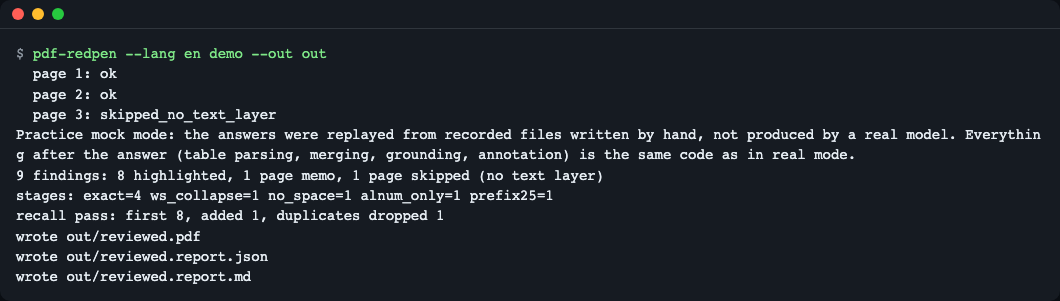
- pdf_redpen-0.2.0/src/pdf_redpen/table.py +125 -0
- pdf_redpen-0.2.0/src/pdf_redpen/textlayer.py +114 -0
- pdf_redpen-0.2.0/src/pdf_redpen/writer.py +206 -0
- pdf_redpen-0.2.0/tests/conftest.py +88 -0
- pdf_redpen-0.2.0/tests/test_annotate.py +56 -0
- pdf_redpen-0.2.0/tests/test_apply_clear.py +33 -0
- pdf_redpen-0.2.0/tests/test_cap.py +28 -0
- pdf_redpen-0.2.0/tests/test_cli.py +106 -0
- pdf_redpen-0.2.0/tests/test_demo.py +37 -0
- pdf_redpen-0.2.0/tests/test_grounding.py +82 -0
- pdf_redpen-0.2.0/tests/test_i18n.py +425 -0
- pdf_redpen-0.2.0/tests/test_ligature.py +112 -0
- pdf_redpen-0.2.0/tests/test_packaging.py +33 -0
- pdf_redpen-0.2.0/tests/test_progressive.py +54 -0
- pdf_redpen-0.2.0/tests/test_real_client.py +110 -0
- pdf_redpen-0.2.0/tests/test_recall.py +35 -0
- pdf_redpen-0.2.0/tests/test_table.py +59 -0
- pdf_redpen-0.2.0/tests/test_textlayer.py +48 -0
- pdf_redpen-0.2.0/uv.lock +568 -0
|
@@ -0,0 +1,8 @@
|
|
|
1
|
+
# Only needed for a real `pdf-redpen review` (demo, apply, clear and --mock need none of this).
|
|
2
|
+
# Load with: set -a; source .env; set +a
|
|
3
|
+
PDF_REDPEN_BASE_URL=http://localhost:11434/v1
|
|
4
|
+
PDF_REDPEN_MODEL=
|
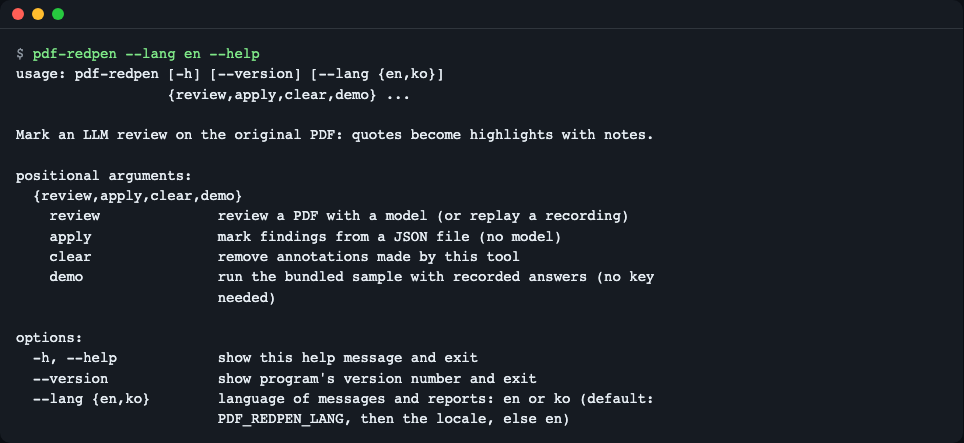
|
5
|
+
PDF_REDPEN_API_KEY=
|
|
6
|
+
PDF_REDPEN_TIMEOUT=120
|
|
7
|
+
# Screen language: en or ko (empty = follow the locale)
|
|
8
|
+
PDF_REDPEN_LANG=
|
|
@@ -0,0 +1,22 @@
|
|
|
1
|
+
name: 버그 / Bug
|
|
2
|
+
description: README대로 했는데 다르게 동작해요 / Something does not work as the README says
|
|
3
|
+
labels: [bug]
|
|
4
|
+
body:
|
|
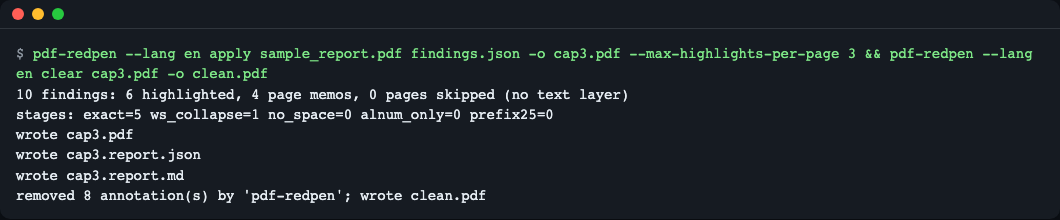
5
|
+
- type: textarea
|
|
6
|
+
id: what
|
|
7
|
+
attributes:
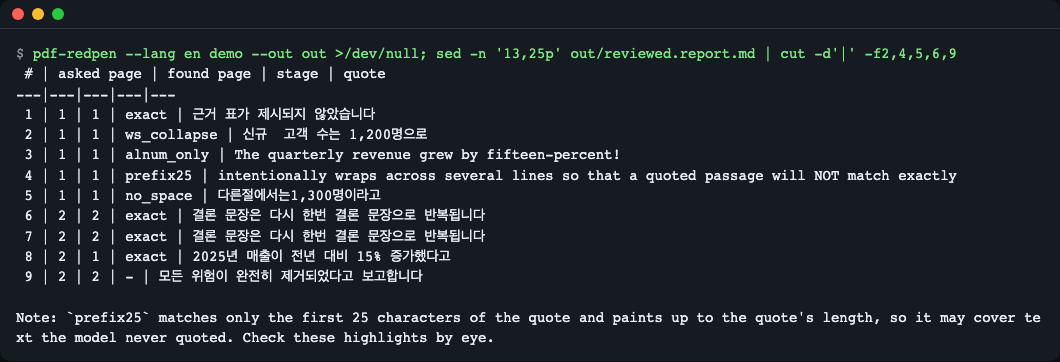
|
|
8
|
+
label: 무엇이 일어났나요? / What happened?
|
|
9
|
+
description: 실행한 명령과 나온 메시지를 그대로 붙여 주세요. / Paste the command and the output.
|
|
10
|
+
validations:
|
|
11
|
+
required: true
|
|
12
|
+
- type: textarea
|
|
13
|
+
id: expected
|
|
14
|
+
attributes:
|
|
15
|
+
label: 기대한 결과 / Expected
|
|
16
|
+
- type: input
|
|
17
|
+
id: env
|
|
18
|
+
attributes:
|
|
19
|
+
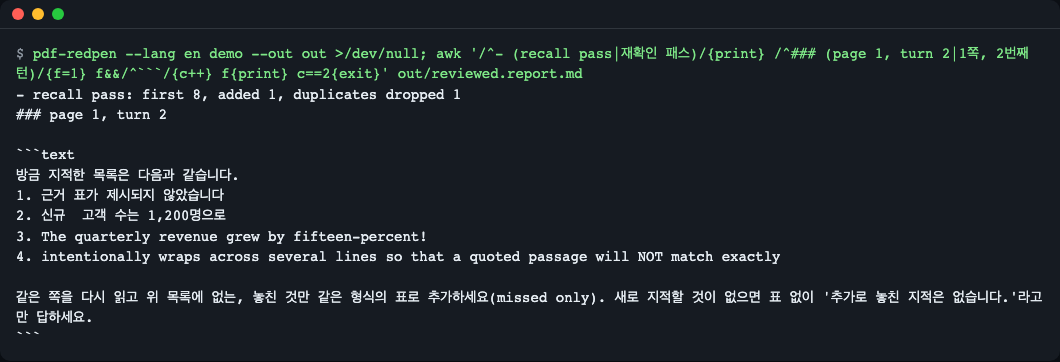
label: 환경 / Environment
|
|
20
|
+
placeholder: "macOS 15 (M3) · Ubuntu 24.04 · Windows 11 / uv 0.x / mock or real mode"
|
|
21
|
+
validations:
|
|
22
|
+
required: true
|
|
@@ -0,0 +1,11 @@
|
|
|
1
|
+
name: 질문 / Question
|
|
2
|
+
description: 이해가 안 되는 부분이나 더 알고 싶은 점 / Something unclear or worth explaining
|
|
3
|
+
labels: [question]
|
|
4
|
+
body:
|
|
5
|
+
- type: textarea
|
|
6
|
+
id: question
|
|
7
|
+
attributes:
|
|
8
|
+
label: 질문 / Question
|
|
9
|
+
description: README의 어느 부분(절 제목)에 대한 질문인지 알려 주세요. / Which README section is this about?
|
|
10
|
+
validations:
|
|
11
|
+
required: true
|
|
@@ -0,0 +1,20 @@
|
|
|
1
|
+
# 키·모델 없이 mock 모드로 전체 흐름을 검증한다.
|
|
2
|
+
name: ci
|
|
3
|
+
on:
|
|
4
|
+
push:
|
|
5
|
+
pull_request:
|
|
6
|
+
schedule:
|
|
7
|
+
- cron: "17 3 * * 1" # 매주 월요일 — 의존성·런타임이 바뀌어 깨지지 않았는지 정기 확인
|
|
8
|
+
workflow_dispatch:
|
|
9
|
+
jobs:
|
|
10
|
+
test:
|
|
11
|
+
runs-on: ubuntu-latest
|
|
12
|
+
strategy:
|
|
13
|
+
matrix:
|
|
14
|
+
python: ["3.11", "3.12"]
|
|
15
|
+
steps:
|
|
16
|
+
- uses: actions/checkout@v6
|
|
17
|
+
- uses: astral-sh/setup-uv@v7
|
|
18
|
+
- run: uv sync --locked --python ${{ matrix.python }}
|
|
19
|
+
- run: uv run --python ${{ matrix.python }} pytest -q
|
|
20
|
+
- run: uv run --python ${{ matrix.python }} pdf-redpen demo --out out
|
|
@@ -0,0 +1,31 @@
|
|
|
1
|
+
# Python
|
|
2
|
+
__pycache__/
|
|
3
|
+
*.py[cod]
|
|
4
|
+
.venv/
|
|
5
|
+
.pytest_cache/
|
|
6
|
+
.ruff_cache/
|
|
7
|
+
.mypy_cache/
|
|
8
|
+
*.egg-info/
|
|
9
|
+
|
|
10
|
+
# Node
|
|
11
|
+
node_modules/
|
|
12
|
+
dist/
|
|
13
|
+
.next/
|
|
14
|
+
|
|
15
|
+
# 실행 산출물·모델·데이터 캐시
|
|
16
|
+
runs/
|
|
17
|
+
outputs/
|
|
18
|
+
.cache/
|
|
19
|
+
*.safetensors
|
|
20
|
+
*.gguf
|
|
21
|
+
*.bin
|
|
22
|
+
|
|
23
|
+
# 환경·비밀
|
|
24
|
+
.env
|
|
25
|
+
.env.*
|
|
26
|
+
!.env.example
|
|
27
|
+
|
|
28
|
+
# OS·에디터
|
|
29
|
+
.DS_Store
|
|
30
|
+
.vscode/
|
|
31
|
+
.idea/
|
|
@@ -0,0 +1 @@
|
|
|
1
|
+
3.12
|
|
@@ -0,0 +1,55 @@
|
|
|
1
|
+
# Changelog
|
|
2
|
+
|
|
3
|
+
All notable changes to this project are documented here.
|
|
4
|
+
The format follows [Keep a Changelog](https://keepachangelog.com/en/1.1.0/) and the project
|
|
5
|
+
uses [Semantic Versioning](https://semver.org/).
|
|
6
|
+
|
|
7
|
+
## [0.2.0] - 2026-11-12
|
|
8
|
+
|
|
9
|
+
### Added
|
|
10
|
+
- Screen language: English and Korean. Pick it with the global option `pdf-redpen --lang en|ko <command>`, the `PDF_REDPEN_LANG` environment variable, or the locale (`LC_ALL`, `LC_MESSAGES`, `LANG`; a value starting with `ko` means Korean, anything else English). It covers `--help`, progress and summary lines, error messages and the Markdown report.
|
|
11
|
+
- File problems (read-only output folder, permission denied, disk full) now print a clear `error: cannot access <path>: <reason>` message with exit code 2 instead of `unexpected error: PermissionError`.
|
|
12
|
+
- `annotate_pdf(..., lang=)` and `pdf_redpen.i18n` (message table, `set_lang`).
|
|
13
|
+
|
|
14
|
+
### Changed
|
|
15
|
+
- The notes written into the PDF follow the screen language: `[not found]` / `[over cap]` / `(loose match)` in English, `[위치 못 찾음]` / `[상한 초과]` / `(느슨 일치)` in Korean. Before, they were always Korean, so English users now see English tags.
|
|
16
|
+
- `review --lang` is unchanged: it is still the prompt language (default `ko`), not the screen language. Its help text says so.
|
|
17
|
+
- `InputError` and `LLMError` carry a message id and parameters; `str(exc)` is still the English text.
|
|
18
|
+
|
|
19
|
+
### Unchanged
|
|
20
|
+
- `report.json` (always English), exit codes, environment variable names, prompts and the bundled data.
|
|
21
|
+
|
|
22
|
+
## [0.1.4] - 2026-11-10
|
|
23
|
+
|
|
24
|
+
### Fixed
|
|
25
|
+
- Find quotes written as `fi`/`fl` on PDFs whose text layer stores ligatures (U+FB00..U+FB06, common in LaTeX papers). Page text and quotes now share one compatibility normalisation; Hangul compatibility jamo are left as they are.
|
|
26
|
+
|
|
27
|
+
## [0.1.3] - 2026-11-10
|
|
28
|
+
|
|
29
|
+
### Changed
|
|
30
|
+
- Docs: replace the tool comparison table with a short when-to-use section.
|
|
31
|
+
|
|
32
|
+
## [0.1.2] - 2026-11-09
|
|
33
|
+
|
|
34
|
+
### Changed
|
|
35
|
+
- Docs: list Pillow in the license section and NOTICE, explain `clear --author`, note that `apply` also writes report files.
|
|
36
|
+
|
|
37
|
+
## [0.1.1] - 2026-11-09
|
|
38
|
+
|
|
39
|
+
### Security
|
|
40
|
+
- Require `pillow>=13.0.0` (transitive via pdfplumber); fixes all open Pillow advisories, whose first patched version is 13.0.0.
|
|
41
|
+
|
|
42
|
+
### Changed
|
|
43
|
+
- Minimum Python is now 3.11 (Pillow 13 requires it).
|
|
44
|
+
|
|
45
|
+
## [0.1.0] - 2026-11-09
|
|
46
|
+
|
|
47
|
+
### Added
|
|
48
|
+
- `review`: OpenAI-compatible chat client (urllib), `--mock DIR` replay, `--record DIR`, `--recall-pass`.
|
|
49
|
+
- `apply`: mark findings from a JSON file without any model.
|
|
50
|
+
- `clear`: remove only annotations whose author is `pdf-redpen`.
|
|
51
|
+
- `demo`: bundled 3-page sample with recorded (practice mock) answers.
|
|
52
|
+
- Five-stage quote grounding with duplicate avoidance and neighbour-page search.
|
|
53
|
+
- Standard `/Highlight` and `/Text` annotations with `/AP` appearance streams.
|
|
54
|
+
- Per-page highlight cap with a page memo, progressive save (`.part` + atomic replace).
|
|
55
|
+
- JSON and Markdown reports.
|
pdf_redpen-0.2.0/LICENSE
ADDED
|
@@ -0,0 +1,21 @@
|
|
|
1
|
+
MIT License
|
|
2
|
+
|
|
3
|
+
Copyright (c) 2026 LeeGyeongPil
|
|
4
|
+
|
|
5
|
+
Permission is hereby granted, free of charge, to any person obtaining a copy
|
|
6
|
+
of this software and associated documentation files (the "Software"), to deal
|
|
7
|
+
in the Software without restriction, including without limitation the rights
|
|
8
|
+
to use, copy, modify, merge, publish, distribute, sublicense, and/or sell
|
|
9
|
+
copies of the Software, and to permit persons to whom the Software is
|
|
10
|
+
furnished to do so, subject to the following conditions:
|
|
11
|
+
|
|
12
|
+
The above copyright notice and this permission notice shall be included in all
|
|
13
|
+
copies or substantial portions of the Software.
|
|
14
|
+
|
|
15
|
+
THE SOFTWARE IS PROVIDED "AS IS", WITHOUT WARRANTY OF ANY KIND, EXPRESS OR
|
|
16
|
+
IMPLIED, INCLUDING BUT NOT LIMITED TO THE WARRANTIES OF MERCHANTABILITY,
|
|
17
|
+
FITNESS FOR A PARTICULAR PURPOSE AND NONINFRINGEMENT. IN NO EVENT SHALL THE
|
|
18
|
+
AUTHORS OR COPYRIGHT HOLDERS BE LIABLE FOR ANY CLAIM, DAMAGES OR OTHER
|
|
19
|
+
LIABILITY, WHETHER IN AN ACTION OF CONTRACT, TORT OR OTHERWISE, ARISING FROM,
|
|
20
|
+
OUT OF OR IN CONNECTION WITH THE SOFTWARE OR THE USE OR OTHER DEALINGS IN THE
|
|
21
|
+
SOFTWARE.
|
|
@@ -0,0 +1,23 @@
|
|
|
1
|
+
# Notices
|
|
2
|
+
|
|
3
|
+
## Sample PDFs
|
|
4
|
+
|
|
5
|
+
`src/pdf_redpen/data/sample_report.pdf` and `examples/sample_embedded.pdf` contain text
|
|
6
|
+
written for this repository (fictional report sentences, no real company or person).
|
|
7
|
+
`sample_report.pdf` only references a CJK font by name and embeds no font file.
|
|
8
|
+
`examples/sample_embedded.pdf` embeds a subset of "Droid Sans Fallback Regular", the font
|
|
9
|
+
bundled with PyMuPDF (https://pymupdf.readthedocs.io/en/latest/font.html, checked 2026-11-09),
|
|
10
|
+
which is an Android distribution font under the Apache License 2.0.
|
|
11
|
+
Both files are generated by `scripts/make_sample_pdf.py`.
|
|
12
|
+
|
|
13
|
+
## Dependencies
|
|
14
|
+
|
|
15
|
+
| Package | Version | License |
|
|
16
|
+
|---|---|---|
|
|
17
|
+
| pdfplumber | 0.11.10 | MIT |
|
|
18
|
+
| pypdf | 7.0.0 | BSD-3-Clause |
|
|
19
|
+
| Pillow | >=13.0.0 | MIT-CMU |
|
|
20
|
+
| pytest (dev only) | 9.2.0 | MIT |
|
|
21
|
+
|
|
22
|
+
PyMuPDF (AGPL-3.0) is **not** a dependency. It is only needed to regenerate the sample PDFs
|
|
23
|
+
with `scripts/make_sample_pdf.py`, a development script that the package never imports.
|
|
@@ -0,0 +1,316 @@
|
|
|
1
|
+
Metadata-Version: 2.5
|
|
2
|
+
Name: pdf-redpen
|
|
3
|
+
Version: 0.2.0
|
|
4
|
+
Summary: Ground quotes from an LLM review to real PDF coordinates and mark them as standard highlight + note annotations.
|
|
5
|
+
Project-URL: Homepage, https://github.com/LeeGyeongPil/pdf-redpen
|
|
6
|
+
Project-URL: Repository, https://github.com/LeeGyeongPil/pdf-redpen
|
|
7
|
+
Project-URL: Issues, https://github.com/LeeGyeongPil/pdf-redpen/issues
|
|
8
|
+
Author: LeeGyeongPil
|
|
9
|
+
License-Expression: MIT
|
|
10
|
+
License-File: LICENSE
|
|
11
|
+
Keywords: annotation,grounding,highlight,llm,pdf,review
|
|
12
|
+
Classifier: Environment :: Console
|
|
13
|
+
Classifier: Programming Language :: Python :: 3
|
|
14
|
+
Classifier: Topic :: Text Processing
|
|
15
|
+
Requires-Python: >=3.11
|
|
16
|
+
Requires-Dist: pdfplumber==0.11.10
|
|
17
|
+
Requires-Dist: pillow>=13.0.0
|
|
18
|
+
Requires-Dist: pypdf==7.0.0
|
|
19
|
+
Description-Content-Type: text/markdown
|
|
20
|
+
|
|
21
|
+
# pdf-redpen
|
|
22
|
+
|
|
23
|
+
**English** | [한국어](https://github.com/LeeGyeongPil/pdf-redpen/blob/v0.2.0/README.ko.md)
|
|
24
|
+
|
|
25
|
+
pdf-redpen takes the sentences an LLM quoted while reviewing a PDF and finds them in the original file, even when the model changed spaces, punctuation or the page number. It then draws standard highlight + note annotations that open in any PDF viewer, turning a review note like "this sentence somewhere on page 3" into a highlighter mark and a sticky note at that exact spot. Try it with no API key: `uv tool install git+https://github.com/LeeGyeongPil/pdf-redpen && pdf-redpen demo --out out` (the demo replays hand-written recorded answers, a practice mock). MIT license.
|
|
26
|
+
|
|
27
|
+
|
|
28
|
+
*A picture of page 1 of the `reviewed.pdf` made by `pdf-redpen demo`. Sentences that span several lines are painted line by line. (The image renderer draws the Korean font with a substitute typeface, so the letter spacing looks wide, but the painted positions follow the character coordinates exactly.)*
|
|
29
|
+
|
|
30
|
+
## Who it is for
|
|
31
|
+
- People who have an LLM do a first review of a report, proposal or paper PDF, and find it tedious to go back and forth between the list of remarks and the original to find sentences
|
|
32
|
+
- People who have run into the problem that a sentence the model quoted "does not show up in search" (spaces, word spacing or punctuation changed, wrong page number)
|
|
33
|
+
- Developers who want to show the findings JSON from other tools, such as spell or terminology checkers, on top of a PDF
|
|
34
|
+
- People who want to see in numbers how many more findings appear when the LLM is asked once more, "did you miss anything?"
|
|
35
|
+
|
|
36
|
+
## Why it is needed (a red-pen analogy)
|
|
37
|
+
If a proofreader writes only "something is off somewhere on page 3", you end up rereading page 3. If they **draw a highlighter line on the odd sentence and stick a note beside it**, you can fix it right away. An LLM is good at the earlier part (finding a sentence and talking about it), but it cannot copy the quoted sentence **identically down to the last character**. This tool handles the follow-up work of tying that "nearly identical sentence" to the real character positions in the PDF.
|
|
38
|
+
|
|
39
|
+
## Installation
|
|
40
|
+
```bash
|
|
41
|
+
# Prerequisite: uv (Python package manager). Skip if you already have it.
|
|
42
|
+
curl -LsSf https://astral.sh/uv/install.sh | sh
|
|
43
|
+
# Install the tool (Python 3.11 or later)
|
|
44
|
+
uv tool install git+https://github.com/LeeGyeongPil/pdf-redpen
|
|
45
|
+
```
|
|
46
|
+
You can also clone it and use it without installing: `git clone https://github.com/LeeGyeongPil/pdf-redpen && cd pdf-redpen && uv sync && uv run pdf-redpen --version`
|
|
47
|
+
|
|
48
|
+
On a minimal Linux (for example a slim container), `curl`, `git` and `ca-certificates` are needed. The PDF-processing dependencies (pdfplumber, pypdf, Pillow) are all installed as wheels, so no separate system libraries are needed.
|
|
49
|
+
|
|
50
|
+
## Quick start
|
|
51
|
+
No key or model is needed.
|
|
52
|
+
|
|
53
|
+
```bash
|
|
54
|
+
pdf-redpen demo --out out
|
|
55
|
+
```
|
|
56
|
+
|
|
57
|
+
|
|
58
|
+
*The `demo` run screen (English; the screenshot adds `--lang en` to make the language explicit). Page 3 has no text layer, so the model is not called and the page is skipped. The quoted sentences in the sample report are Korean, so they stay Korean in every screen.*
|
|
59
|
+
|
|
60
|
+
> **This is a practice mock mode.** The model's responses are replaced by recorded files bundled in the repository (`src/pdf_redpen/data/recorded/`, **written by hand by a person and not the real output of any particular model**). What happens after a response arrives (table parsing, recall merge, locating, writing annotations) is **the same code** as in the real mode. A real model will flag more or fewer items, and different ones. The real mode can be much slower because of the model calls.
|
|
61
|
+
|
|
62
|
+
How to read it:
|
|
63
|
+
|
|
64
|
+
| Output | Meaning |
|
|
65
|
+
|---|---|
|
|
66
|
+
| `9 findings` | 9 findings produced by the model (the recording) |
|
|
67
|
+
| `8 highlighted` | 8 were located in the PDF and highlighted |
|
|
68
|
+
| `1 page memo` | 1 could not be found in the body and was written into that page's corner memo |
|
|
69
|
+
| `1 page skipped` | Pages without a text layer (scans, blank pages) are skipped |
|
|
70
|
+
| `stages: exact=4 ...` | A tally of which stage's matching method found each finding |
|
|
71
|
+
| `recall pass: first 8, added 1, ...` | 8 in the first pass, 1 added by asking again for "only what was missed", 1 duplicate removed |
|
|
72
|
+
|
|
73
|
+
Open `out/reviewed.pdf` in any PDF viewer. A finding that was located becomes a highlight (`/Highlight`) and its explanation is in the highlight's note (`/Contents`), visible when you click or hover over the highlight. Findings that were not located are gathered under `[not found]` in a single note icon at the page corner.
|
|
74
|
+
|
|
75
|
+
## Usage
|
|
76
|
+
|
|
77
|
+
| Command | What it does | Example |
|
|
78
|
+
|---|---|---|
|
|
79
|
+
| `demo` | Reviews the 3 bundled sample pages with recorded responses | `pdf-redpen demo --out out` |
|
|
80
|
+
| `review` | Reviews a PDF with a model and produces an annotated PDF and a report | `pdf-redpen review a.pdf --recall-pass -o a.reviewed.pdf` |
|
|
81
|
+
| `apply` | Attaches a findings JSON to a PDF, without a model | `pdf-redpen apply a.pdf findings.json -o a.marked.pdf` |
|
|
82
|
+
| `clear` | Removes only the annotations this tool added | `pdf-redpen clear a.marked.pdf -o a.clean.pdf` |
|
|
83
|
+
|
|
84
|
+
`review` options: `--instructions FILE` (review guidelines), `--mock DIR` (replay recordings), `--record DIR` (save responses), `--recall-pass` (ask again for what was missed), `--max-highlights-per-page N` (default 20), `--pages 1-3,5`, `--author`, `--lang ko|en` (the **prompt** language sent to the model, default `ko`; not the screen language, see below).
|
|
85
|
+
Exit codes:
|
|
86
|
+
- `0` Normal. It is 0 even if no findings were located (reported in the report), and if only some pages fail it prints `warning: N page(s) failed ...` to stderr and is still 0.
|
|
87
|
+
- `1` **All** pages sent to the model failed (`error: every page failed; ...`), or an unexpected error.
|
|
88
|
+
- `2` Input error (nonexistent file, bad JSON, out-of-range `page`, unknown `severity`, no model configured, etc.) or a file you cannot read or write (`error: cannot access <path>: <reason>`, for example a read-only output folder).
|
|
89
|
+
|
|
90
|
+
### Screen language (English / Korean)
|
|
91
|
+
Everything you read in the terminal (help, progress and summary lines, error messages) and the Markdown report can be shown in English or Korean. The notes written into the PDF follow the same language. The first one that is set wins:
|
|
92
|
+
|
|
93
|
+
| Priority | How | Example |
|
|
94
|
+
|---|---|---|
|
|
95
|
+
| 1 | Global option, placed **before** the command | `pdf-redpen --lang ko demo --out out` |
|
|
96
|
+
| 2 | Environment variable | `PDF_REDPEN_LANG=ko pdf-redpen demo --out out` |
|
|
97
|
+
| 3 | Locale: `LC_ALL`, then `LC_MESSAGES`, then `LANG` (a value starting with `ko` means Korean) | `LANG=ko_KR.UTF-8 pdf-redpen demo --out out` |
|
|
98
|
+
| 4 | Nothing set, or any other value | English |
|
|
99
|
+
|
|
100
|
+
|
|
101
|
+
*`pdf-redpen --lang en --help`. With `--lang ko` the same screen is shown in Korean. argparse's own headings (`usage:`, `positional arguments:`, `options:`) and the description lines of `-h` and `--version` stay English.*
|
|
102
|
+
|
|
103
|
+
- **`--lang` before the command is the screen language. `review --lang ko|en` after `review` is the prompt language** that is sent to the model (and it keeps its default `ko`). They are separate: `pdf-redpen --lang en review a.pdf --lang ko` shows English messages but asks the model in Korean.
|
|
104
|
+
- The notes inside the PDF are `[not found]`, `[over cap]` and `(loose match)` in English, and `[위치 못 찾음]`, `[상한 초과]` and `(느슨 일치)` in Korean. Versions before 0.2.0 always wrote the Korean ones.
|
|
105
|
+
- `report.json` is for machines and is always English, whatever the language. Status and stage codes (`highlighted`, `exact`, ...) are the same in both languages.
|
|
106
|
+
|
|
107
|
+
### Scenario 1. Review your own document with a local model
|
|
108
|
+
```bash
|
|
109
|
+
export PDF_REDPEN_BASE_URL=http://localhost:11434/v1 # OpenAI-compatible endpoint (e.g. Ollama)
|
|
110
|
+
export PDF_REDPEN_MODEL=<your-model-name>
|
|
111
|
+
pdf-redpen review report.pdf --instructions review.md --recall-pass --record rec -o report.reviewed.pdf
|
|
112
|
+
```
|
|
113
|
+
(`<your-model-name>` is a placeholder for the name of the model you have pulled.)
|
|
114
|
+
- It extracts the text of each page and sends it to the model, then picks the quotations from the response table and locates them.
|
|
115
|
+
- With `--record rec`, the responses are saved to `rec/page{n}_turn{k}.md`, so later you can reproduce the same result with `--mock rec` without a key or network (for sharing with a team or regression checks). When you replay files you recorded yourself, the report still carries the "practice mock" notice, but the content is that model's response, not something a person wrote. `--mock` and `--record` cannot be used together (giving both is exit code 2).
|
|
116
|
+
- This mode **sends the page text to the endpoint you specify.** For sensitive documents, use a local model.
|
|
117
|
+
|
|
118
|
+
If the endpoint is not up or the model name is wrong, the cause is shown per page in the terminal. If all the pages sent fail, the exit code is 1. (The example below was produced with `PDF_REDPEN_TIMEOUT=2` and `PDF_REDPEN_BASE_URL=http://127.0.0.1:9/v1`; with the default you would see `now 120s`.)
|
|
119
|
+
```text
|
|
120
|
+
page 1: error - LLMError: Could not reach http://127.0.0.1:9/v1/chat/completions (<urlopen error [Errno 61] Connection refused>). Is the server running? Local models can be slow; raise PDF_REDPEN_TIMEOUT (now 2s).
|
|
121
|
+
...
|
|
122
|
+
error: every page failed; see the causes above (or the Pages table in the report). Nothing was reviewed.
|
|
123
|
+
```
|
|
124
|
+
(With `--lang ko` the same lines appear in Korean.)
|
|
125
|
+
|
|
126
|
+
If you do not specify a model, it stops like this (exit code 2).
|
|
127
|
+
|
|
128
|
+

|
|
129
|
+
*An error screen shown on purpose (English). It tells you to set `PDF_REDPEN_MODEL` or use `demo` or `--mock`.*
|
|
130
|
+
|
|
131
|
+
### Scenario 2. Attach another tool's findings to a PDF (`apply`)
|
|
132
|
+
`findings.json` is an array like this (full example: [`examples/findings.json`](https://github.com/LeeGyeongPil/pdf-redpen/blob/v0.2.0/examples/findings.json)).
|
|
133
|
+
```json
|
|
134
|
+
[
|
|
135
|
+
{"page": 1, "quote": "근거 표가 제시되지 않았습니다", "comment": "근거 표 추가 필요", "severity": "high"},
|
|
136
|
+
{"page": 2, "quote": "존재하지 않는 문장입니다", "comment": "못 찾으면 페이지 메모로", "severity": "high"}
|
|
137
|
+
]
|
|
138
|
+
```
|
|
139
|
+
(In this sample, the first `quote` means "no supporting table is presented" and its `comment` is "supporting table needed"; the second `quote` is "a sentence that does not exist" and its `comment` is "if not found, as a page memo".)
|
|
140
|
+
|
|
141
|
+
`severity` is `high`, `medium` or `low` (colors: red, yellow, green) and may be omitted. Common aliases such as `critical`, `major` and `높음` ("high") are accepted, but unknown values (typos and the like) are rejected instead of silently becoming yellow.
|
|
142
|
+
|
|
143
|
+
If `page` exceeds the PDF's page count, **it stops with exit code 2 and does not create the output PDF**, so no finding disappears.
|
|
144
|
+
|
|
145
|
+

|
|
146
|
+
*An error screen shown on purpose (English). It tells you the item number (from 0) and the PDF's page count.*
|
|
147
|
+
|
|
148
|
+
An unknown `severity` is rejected with `error: f.json: item 0: unknown severity 'urgnt'; use high, medium or low (or omit 'severity').` (exit code 2).
|
|
149
|
+
|
|
150
|
+
### Scenario 3. A page with too many findings, and clearing to start over
|
|
151
|
+
The paths in this command (`src/...`, `examples/findings.json`) assume you run it in the folder where you cloned the repository. If you installed only with `pip` or `uv tool`, replace them with your own PDF and JSON paths.
|
|
152
|
+
|
|
153
|
+
```bash
|
|
154
|
+
pdf-redpen apply src/pdf_redpen/data/sample_report.pdf examples/findings.json -o cap3.pdf --max-highlights-per-page 3
|
|
155
|
+
pdf-redpen clear cap3.pdf -o clean.pdf
|
|
156
|
+
```
|
|
157
|
+
|
|
158
|
+
|
|
159
|
+
*Only up to 3 highlights are drawn on a page, and the rest are gathered into the page memo. `clear` removes only the 8 annotations whose author is `pdf-redpen` (6 highlights + 2 page memos, one per page).*
|
|
160
|
+
|
|
161
|
+
|
|
162
|
+
*Findings beyond the cap are gathered into a single yellow note icon at the top right as a `[over cap]` list.*
|
|
163
|
+
|
|
164
|
+
`clear` removes only annotations whose `/T` (author) is `pdf-redpen`, so annotations added by people stay. If you attached them with a different author through `review --author name`, you must also give `pdf-redpen clear a.pdf -o b.pdf --author name` when clearing. Like `review`, `apply` also creates `<name>.report.json` and `<name>.report.md` next to the output PDF.
|
|
165
|
+
|
|
166
|
+
## Reading the report
|
|
167
|
+
`review` and `demo` create `<name>.report.json` (for machines) and `<name>.report.md` (for people) next to the output PDF (for example `out/reviewed.report.md`). Details not visible in the terminal are here.
|
|
168
|
+
|
|
169
|
+
|
|
170
|
+
*Part of the Findings table of the English `reviewed.report.md` (only the columns `#`, `asked page`, `found page`, `stage` and `quote` are shown, cropped). Finding 8 was said to be on page 2 but was found on page 1, and 9 is `-` (not found), so it went to the page memo.*
|
|
171
|
+
|
|
172
|
+
**Findings table columns**: `#` number / `source` (`turn1` = first query, `recall` = recall query, `apply` = JSON input) / `asked page` (the page the model said) / `found page` (the page actually found) / `stage` (which match stage, `-` if not found) / `status` / `severity` / `quote` / `comment`.
|
|
173
|
+
|
|
174
|
+
| Finding `status` | Meaning | What you see in the PDF |
|
|
175
|
+
|---|---|---|
|
|
176
|
+
| `highlighted` | Located and painted | Highlight + note |
|
|
177
|
+
| `memo_not_found` | Not found in the body | `[not found]` list in the page corner note |
|
|
178
|
+
| `memo_overflow` | Exceeded the per-page highlight cap (`--max-highlights-per-page`) | `[over cap]` list in the page corner note |
|
|
179
|
+
|
|
180
|
+
**Pages table**: for each page, `status`, plus `first` (number of first-pass findings), `recall added`, `duplicates dropped`, `broken rows`, and `note`.
|
|
181
|
+
|
|
182
|
+
| Page `status` | Meaning |
|
|
183
|
+
|---|---|
|
|
184
|
+
| `ok` | Processed by calling the model |
|
|
185
|
+
| `skipped_no_text_layer` | No text layer, so the model was not called (the reason is in `note`) |
|
|
186
|
+
| `error` | The call for that page failed. The cause (for example `Could not reach ...`) is left in `note`, and the same cause also shows in the terminal |
|
|
187
|
+
|
|
188
|
+
If `note` contains `page text truncated before sending`, that page's text was cut at 12000 characters per page before going to the model, so findings in the latter part may be missing. Also, findings whose `stage` is `prefix25` may be painted longer than the quotation (see the 5-stage explanation below), so check them by eye.
|
|
189
|
+
|
|
190
|
+
## Configuration
|
|
191
|
+
Environment variables (needed only for the real `review`; not needed for `demo`, `apply`, `clear` or `review --mock`). Example: [`.env.example`](https://github.com/LeeGyeongPil/pdf-redpen/blob/v0.2.0/.env.example).
|
|
192
|
+
|
|
193
|
+
| Variable | Default | Description |
|
|
194
|
+
|---|---|---|
|
|
195
|
+
| `PDF_REDPEN_BASE_URL` | `http://localhost:11434/v1` | The front part of an OpenAI-compatible `chat/completions` endpoint |
|
|
196
|
+
| `PDF_REDPEN_MODEL` | (none, required) | Model name |
|
|
197
|
+
| `PDF_REDPEN_API_KEY` | (none) | If set, sent as `Authorization: Bearer`. Not recorded in code, reports or recording files |
|
|
198
|
+
| `PDF_REDPEN_TIMEOUT` | `120` | Seconds to wait for a response |
|
|
199
|
+
| `PDF_REDPEN_LANG` | (none) | Screen language `en` or `ko`; the global `--lang` option wins over it. Works for every command, including `demo` and `apply` |
|
|
200
|
+
|
|
201
|
+
## How it works
|
|
202
|
+
There are two key parts: **locating (grounding)** and the **recall pass**.
|
|
203
|
+
|
|
204
|
+
```mermaid
|
|
205
|
+
flowchart LR
|
|
206
|
+
A["Extract page text"] --> B["Query the model"]
|
|
207
|
+
B --> C["Parse response table"]
|
|
208
|
+
C -.->|--recall-pass| D["Recall query: only what was missed"]
|
|
209
|
+
D -.-> E["Parse table + dedupe"]
|
|
210
|
+
C --> F["5-stage locating"]
|
|
211
|
+
E -.-> F
|
|
212
|
+
F -->|found| G["Highlight + note"]
|
|
213
|
+
F -->|not found| H["Page corner note"]
|
|
214
|
+
G --> I["Annotated PDF + report"]
|
|
215
|
+
H --> I
|
|
216
|
+
```
|
|
217
|
+
|
|
218
|
+
1. **Extract text**: it flattens a page's text into one line of string, and for each character of the string remembers "the original character box number". The text sent to the model and the target being searched are the same string, so a copied sentence is always found. Pages without a text layer are skipped.
|
|
219
|
+
2. **Query**: for each page, the model is asked to answer in a "quoted original | finding | severity" table. Even if the table's header names or column order differ, or some rows are broken, it does not stop; it just counts each broken row and skips it.
|
|
220
|
+
3. **Recall query** (`--recall-pass`, the dotted line): after parsing the first-pass response table, it asks once more in the same conversation, "the list I just flagged is this, so add only what was missed." The point is to **show** the first-pass findings in the prompt, so only new findings are added rather than repeating the same things. The tables of the two responses are merged and duplicates are removed.
|
|
221
|
+
4. **5-stage locating**: it tries in order from strict to loose and uses the first stage that succeeds.
|
|
222
|
+
5. **Write annotations**: it makes a standard `/Highlight` with one rectangle (quad) per line, and also writes appearance information (`/AP`) so the highlight does not look different in each viewer. It saves to a temporary file (`.part`) page by page and replaces the whole, so even if it fails midway, the annotations of finished pages remain.
|
|
223
|
+
|
|
224
|
+
### 5-stage locating
|
|
225
|
+
|
|
226
|
+
| Stage | How it matches | Variation it catches |
|
|
227
|
+
|---|---|---|
|
|
228
|
+
| `exact` | The text as is | A normal quotation |
|
|
229
|
+
| `ws_collapse` | Runs of spaces and line breaks collapsed into one space | Double spaces, copied line breaks |
|
|
230
|
+
| `no_space` | All whitespace removed | Korean word-spacing errors |
|
|
231
|
+
| `alnum_only` | Compare letters and digits only | Punctuation and hyphen variations |
|
|
232
|
+
| `prefix25` | Match only the first 25 characters and paint to the quotation's length | Paraphrase of the latter part |
|
|
233
|
+
|
|
234
|
+
- If the same sentence appears twice, it avoids characters already painted and paints **the next occurrence** (findings 6 and 7 in the demo).
|
|
235
|
+
- If the model gets the page number wrong, it also looks in the neighboring pages (finding 8 in the demo: said page 2 but found on page 1).
|
|
236
|
+
- `prefix25` is the loosest, so it **can paint characters the model did not quote.** That is why it is the last resort, and the green tail ("ext") in the hero image above is an example. Check findings located at this stage by eye in the report.
|
|
237
|
+
|
|
238
|
+
For what the table columns mean, see "Reading the report" above.
|
|
239
|
+
|
|
240
|
+
### Why the recall pass is needed
|
|
241
|
+
**Recall** is "the share of the problems that actually exist that the model found". The recall of a single query can be low, to the point that asking the same model about the same document twice gives different numbers of findings. The **recall pass** is a further query to raise it: it keeps the first answer in the same conversation as an assistant message, shows the first-pass finding list again in the user message, and asks for **only what was missed** (implementation: `prompts.recall_turn`). The report lists the first-pass count and the added and de-duplicated counts separately. This technique **does not guarantee** a number of findings, and figures such as `added 1` in the demo are hand-written recorded values. Below is the recall prompt the demo actually sent.
|
|
242
|
+
|
|
243
|
+
|
|
244
|
+
*The prompt "the list I just flagged is as follows … add only what was missed (missed only)." and `recall pass: first 8, added 1, duplicates dropped 1`. The prompt body is in Korean because the prompt language (`review --lang`, which `demo` uses) defaults to `ko` and is separate from the screen language; the screen language only changes the surrounding lines. The awk pattern in the command matches both languages' headings.*
|
|
245
|
+
|
|
246
|
+
### A tour of the code
|
|
247
|
+
- [`src/pdf_redpen/grounding.py`](https://github.com/LeeGyeongPil/pdf-redpen/blob/v0.2.0/src/pdf_redpen/grounding.py): 5-stage locating (`ground`) and neighboring-page search (`ground_finding`).
|
|
248
|
+
- [`src/pdf_redpen/recall.py`](https://github.com/LeeGyeongPil/pdf-redpen/blob/v0.2.0/src/pdf_redpen/recall.py) and [`prompts.py`](https://github.com/LeeGyeongPil/pdf-redpen/blob/v0.2.0/src/pdf_redpen/prompts.py): the recall query and merging.
|
|
249
|
+
- [`src/pdf_redpen/writer.py`](https://github.com/LeeGyeongPil/pdf-redpen/blob/v0.2.0/src/pdf_redpen/writer.py) and [`quads.py`](https://github.com/LeeGyeongPil/pdf-redpen/blob/v0.2.0/src/pdf_redpen/quads.py): annotations and quad coordinates (PDF puts the origin at the bottom left while extracted coordinates put it at the top left, so a conversion is needed).
|
|
250
|
+
|
|
251
|
+
### Using it from Python
|
|
252
|
+
The sample paths in the example below also assume you run it in the folder where you cloned the repository.
|
|
253
|
+
|
|
254
|
+
```python
|
|
255
|
+
from pdf_redpen import Finding, annotate_pdf
|
|
256
|
+
|
|
257
|
+
report = annotate_pdf(
|
|
258
|
+
"src/pdf_redpen/data/sample_report.pdf",
|
|
259
|
+
[Finding(1, "근거 표가 제시되지 않았습니다", "근거 표 추가 필요"),
|
|
260
|
+
Finding(2, "존재하지 않는 문장입니다", "못 찾음")],
|
|
261
|
+
"marked.pdf",
|
|
262
|
+
)
|
|
263
|
+
for p in report.placements:
|
|
264
|
+
print(p.status, p.stage) # highlighted exact / memo_not_found None
|
|
265
|
+
```
|
|
266
|
+
|
|
267
|
+
| Public name | Description |
|
|
268
|
+
|---|---|
|
|
269
|
+
| `annotate_pdf(src, findings, dst, *, max_per_page=20, author=..., lang=None)` | Attaches a list of findings to a PDF, saves it to `dst` and returns a `Report`. `lang` (`"en"` or `"ko"`) sets the language of the notes in the PDF; the default is English unless `pdf_redpen.i18n.set_lang("ko")` was called (the CLI does this for you) |
|
|
270
|
+
| `Finding(page, quote, comment, severity=None)` | One finding |
|
|
271
|
+
| `Report` | Tallies such as `placements` (`status` and `stage` per finding) and `pages` |
|
|
272
|
+
| `ground(page, quote, used)` | Low-level function: it needs an internal `PageText`, so you normally use only `annotate_pdf` |
|
|
273
|
+
| `Match`, `InputError` | The match result type, and the input error exception |
|
|
274
|
+
|
|
275
|
+
## Limits
|
|
276
|
+
- Scanned PDFs and PDFs with broken characters (`cid`) have no text layer and are skipped (no OCR).
|
|
277
|
+
- In two-column layouts the character reading order can get mixed up, so multi-line quotations may not be found.
|
|
278
|
+
- The look of highlights and notes can differ slightly between viewers.
|
|
279
|
+
- The real mode depends on the model's speed, and the page text is sent to the endpoint.
|
|
280
|
+
- Known limits of the screen language: the screen language option goes before the command (`pdf-redpen --lang ko demo`), the headings and `-h`/`--version` description lines that argparse adds stay English, and the library's default PDF notes are English unless you pass `lang=`. The Korean screen calls the recorded responses "녹음" files (the practice-mode files), which is a wording quirk, not audio.
|
|
281
|
+
|
|
282
|
+
## When to use it
|
|
283
|
+
- This tool fits if you want to attach findings from an LLM or another tool to a standalone PDF file as annotations at the original's positions. Findings whose position could not be found are left as a page memo.
|
|
284
|
+
- If you handle several document formats or are in a .NET environment, look at [groupdocs ai-document-review-annotations-net](https://github.com/groupdocs-annotation/ai-document-review-annotations-net).
|
|
285
|
+
- If you manage paper annotations inside a Zotero library, look at [zotero-mcp](https://github.com/54yyyu/zotero-mcp).
|
|
286
|
+
- Other tools' features can change, so check the details yourself at each link. (The links were noted during the 2026-11-09 survey.)
|
|
287
|
+
|
|
288
|
+
## Troubleshooting
|
|
289
|
+
| Symptom | Cause | Fix |
|
|
290
|
+
|---|---|---|
|
|
291
|
+
| `error: No model configured ...` (exit code 2) | A real `review` without a model configured | Set `PDF_REDPEN_MODEL`, or use `demo` / `--mock DIR` |
|
|
292
|
+
| `error: cannot access <path>: ...` (exit code 2) | The output folder is read-only, does not exist or is full | Choose another `-o` path and check the permissions |
|
|
293
|
+
| The screen is in the wrong language | The locale or `PDF_REDPEN_LANG` decides it | Pass `--lang en` or `--lang ko` before the command |
|
|
294
|
+
| `unrecognized arguments: --lang en` (exit code 2) | The screen language option was placed after the command | Put it before the command: `pdf-redpen --lang ko demo` |
|
|
295
|
+
| A page is shown as `skipped_no_text_layer` | A scan, a blank page, or broken character mapping | Use a PDF with a text layer (OCR is not supported) |
|
|
296
|
+
| A finding becomes `memo_not_found` | The model made up a sentence that is not in the body | Check the page corner note. If needed, use `--recall-pass` or strengthen the instructions |
|
|
297
|
+
| The painted range is longer than the quotation | It was found at the `prefix25` stage | Check the stage in the report and inspect by eye |
|
|
298
|
+
| Annotations overlap after running the same PDF again | The previous annotations remain | Run `pdf-redpen clear` first |
|
|
299
|
+
|
|
300
|
+
## Development and contributing
|
|
301
|
+
```bash
|
|
302
|
+
git clone https://github.com/LeeGyeongPil/pdf-redpen && cd pdf-redpen
|
|
303
|
+
uv sync
|
|
304
|
+
uv run pytest
|
|
305
|
+
```
|
|
306
|
+
Only the script that regenerates the sample PDF (`scripts/make_sample_pdf.py`) needs PyMuPDF (AGPL-3.0), and the package does not use it. Please leave bugs and suggestions as issues. Change history is in [CHANGELOG.md](https://github.com/LeeGyeongPil/pdf-redpen/blob/v0.2.0/CHANGELOG.md).
|
|
307
|
+
|
|
308
|
+
## Learn more
|
|
309
|
+
Checked 2026-11-09.
|
|
310
|
+
- pypdf, adding annotations: https://pypdf.readthedocs.io/en/stable/user/adding-pdf-annotations.html
|
|
311
|
+
- pdfplumber: https://github.com/jsvine/pdfplumber
|
|
312
|
+
- The concept of tying model quotations to document coordinates (grounding): https://artifex.com/blog/grounding-in-document-extraction
|
|
313
|
+
- Tools in the same family: https://github.com/neuml/annotateai, https://github.com/onekin/AnnotateGPT
|
|
314
|
+
|
|
315
|
+
## License
|
|
316
|
+
MIT. Direct dependencies: pdfplumber (MIT), pypdf (BSD-3-Clause), Pillow (MIT-CMU) (indirect dependencies such as pypdfium2 and cryptography are Apache-2.0/BSD family). For the sample PDF's fonts and sources, see [NOTICE.md](https://github.com/LeeGyeongPil/pdf-redpen/blob/v0.2.0/NOTICE.md).
|