parquet-browser 1.0.0__tar.gz
This diff represents the content of publicly available package versions that have been released to one of the supported registries. The information contained in this diff is provided for informational purposes only and reflects changes between package versions as they appear in their respective public registries.
- parquet_browser-1.0.0/LICENSE +21 -0
- parquet_browser-1.0.0/PKG-INFO +208 -0
- parquet_browser-1.0.0/README.md +164 -0
- parquet_browser-1.0.0/pyproject.toml +42 -0
- parquet_browser-1.0.0/setup.cfg +4 -0
- parquet_browser-1.0.0/src/parquet_browser.egg-info/PKG-INFO +208 -0
- parquet_browser-1.0.0/src/parquet_browser.egg-info/SOURCES.txt +16 -0
- parquet_browser-1.0.0/src/parquet_browser.egg-info/dependency_links.txt +1 -0
- parquet_browser-1.0.0/src/parquet_browser.egg-info/entry_points.txt +4 -0
- parquet_browser-1.0.0/src/parquet_browser.egg-info/requires.txt +1 -0
- parquet_browser-1.0.0/src/parquet_browser.egg-info/top_level.txt +1 -0
- parquet_browser-1.0.0/src/parquet_viewer/__init__.py +3 -0
- parquet_browser-1.0.0/src/parquet_viewer/__main__.py +4 -0
- parquet_browser-1.0.0/src/parquet_viewer/server.py +942 -0
- parquet_browser-1.0.0/src/parquet_viewer/static/app.css +253 -0
- parquet_browser-1.0.0/src/parquet_viewer/static/app.js +784 -0
- parquet_browser-1.0.0/src/parquet_viewer/static/index.html +128 -0
- parquet_browser-1.0.0/tests/test_parquet_viewer.py +261 -0
|
@@ -0,0 +1,21 @@
|
|
|
1
|
+
MIT License
|
|
2
|
+
|
|
3
|
+
Copyright (c) 2026 abhandari73
|
|
4
|
+
|
|
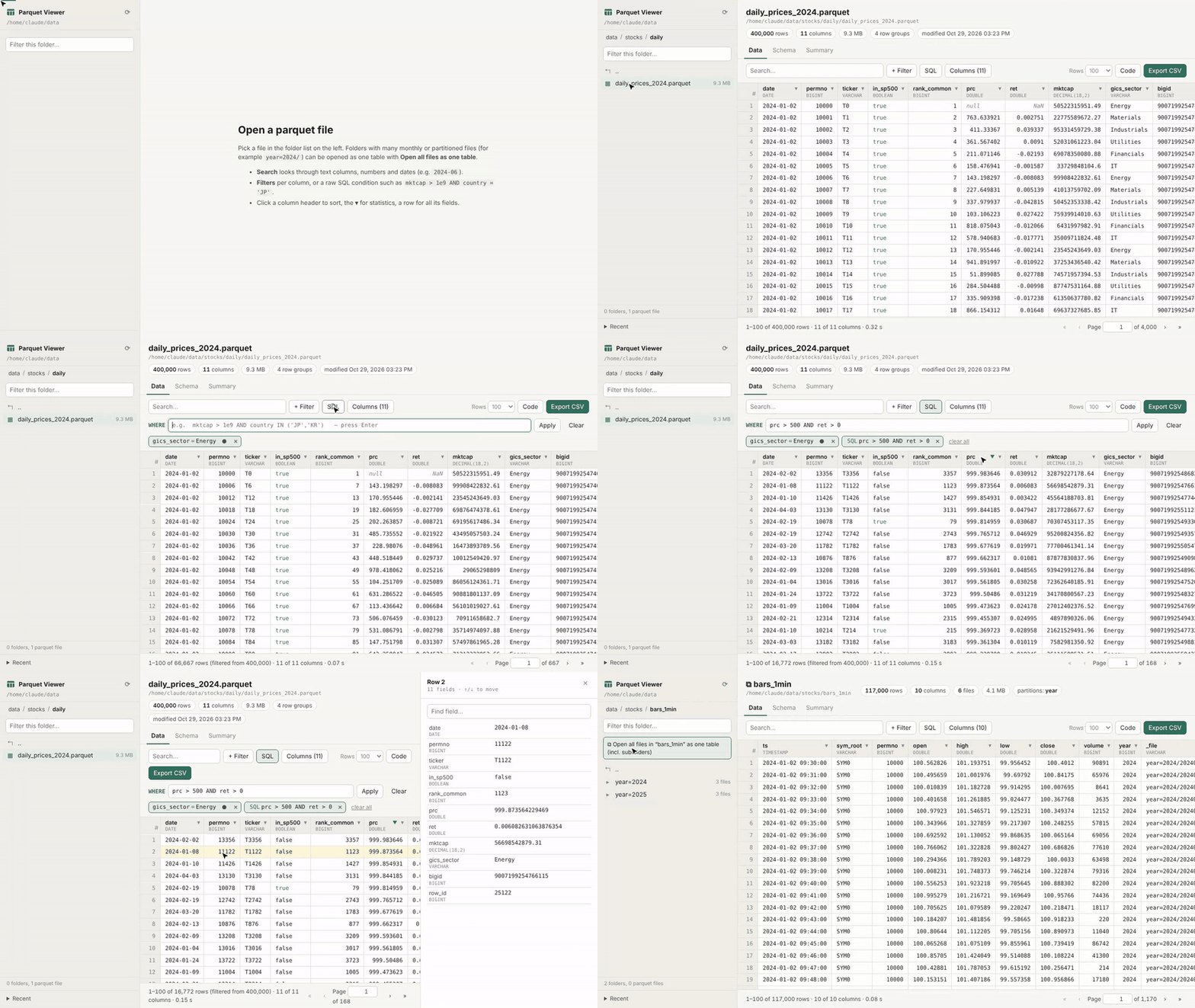
5
|
+
Permission is hereby granted, free of charge, to any person obtaining a copy
|
|
6
|
+
of this software and associated documentation files (the "Software"), to deal
|
|
7
|
+
in the Software without restriction, including without limitation the rights
|
|
8
|
+
to use, copy, modify, merge, publish, distribute, sublicense, and/or sell
|
|
9
|
+
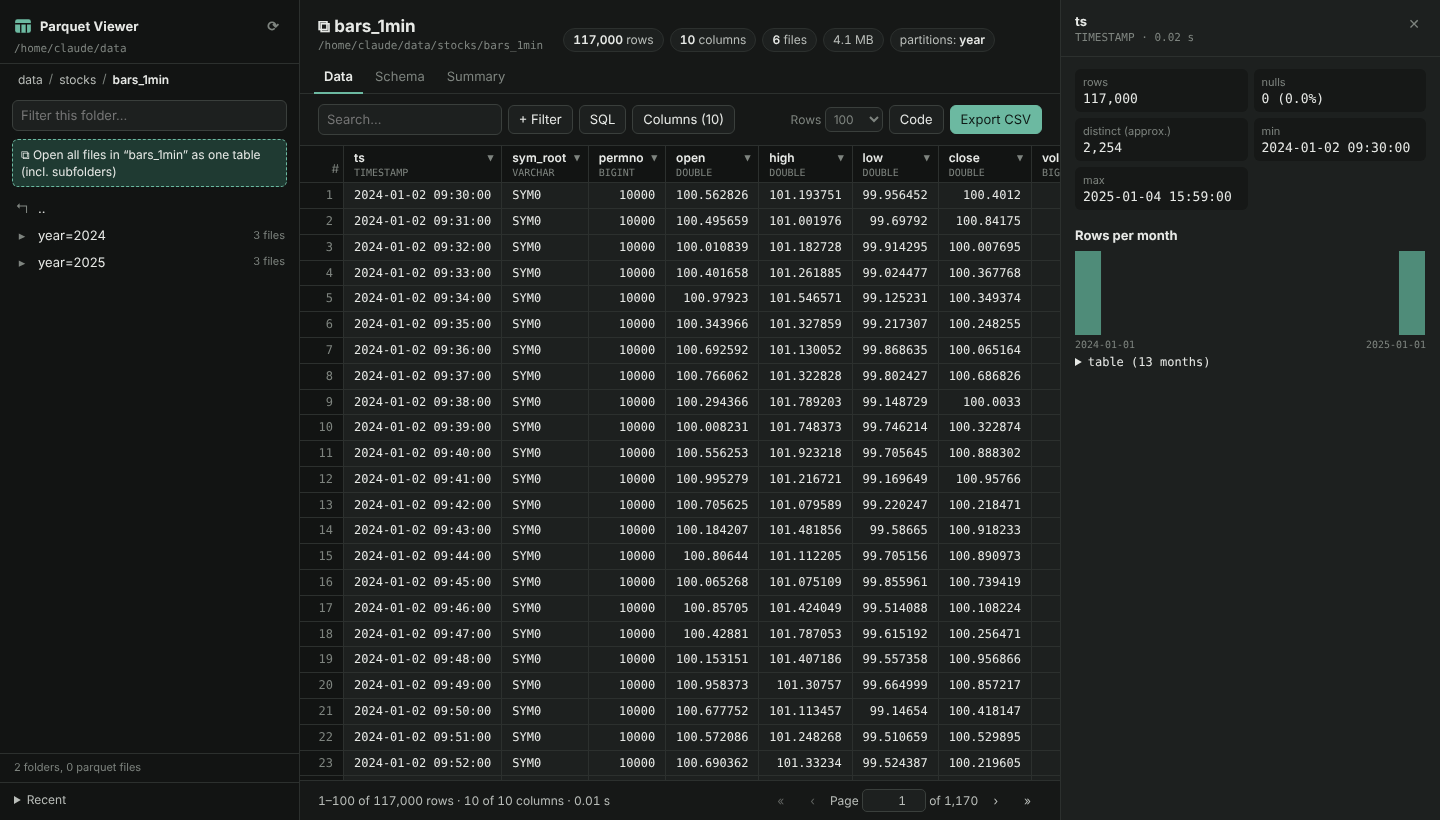
copies of the Software, and to permit persons to whom the Software is
|
|
10
|
+
furnished to do so, subject to the following conditions:
|
|
11
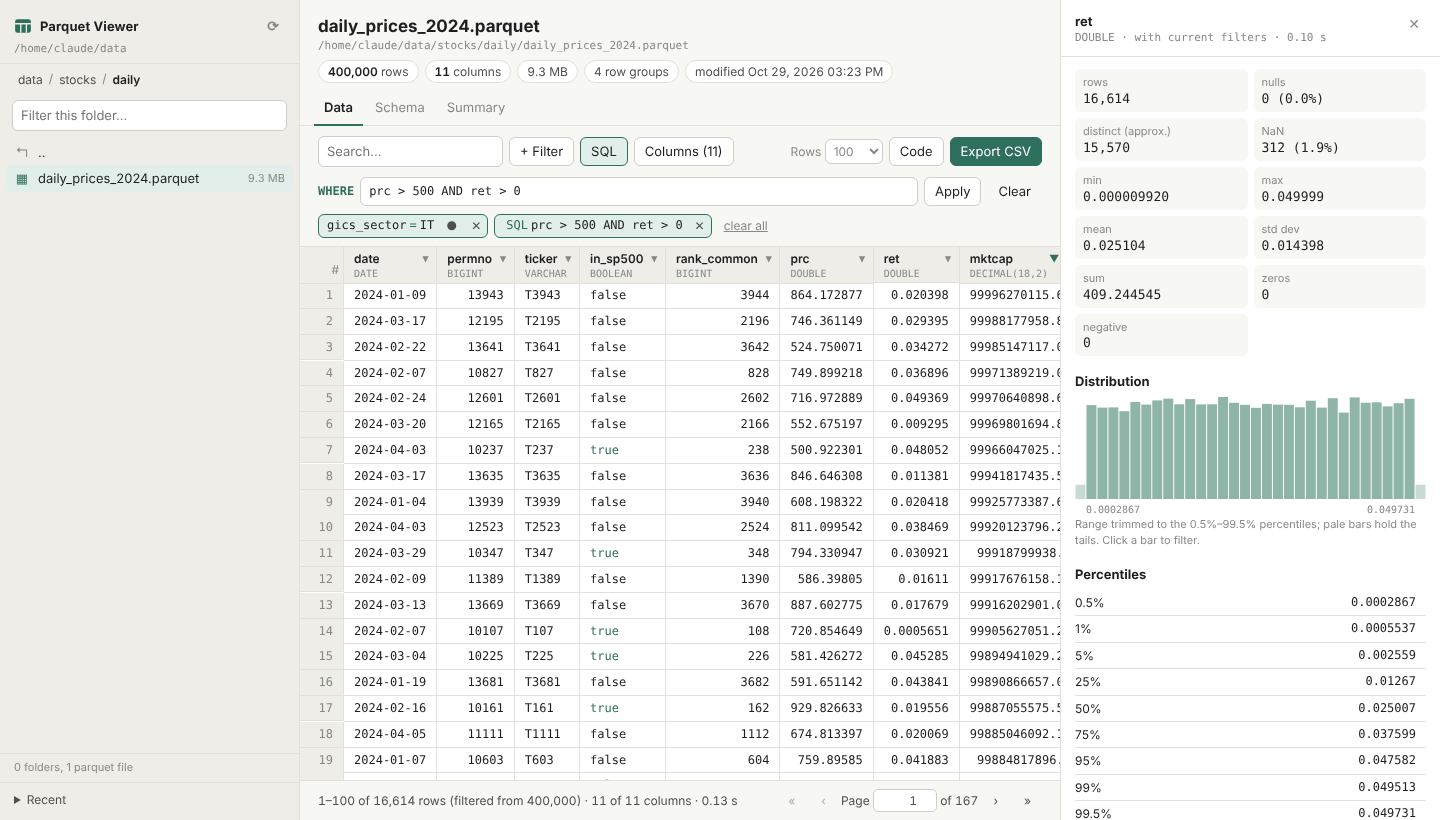
|
+
|
|
12
|
+
The above copyright notice and this permission notice shall be included in all
|
|
13
|
+
copies or substantial portions of the Software.
|
|
14
|
+
|
|
15
|
+
THE SOFTWARE IS PROVIDED "AS IS", WITHOUT WARRANTY OF ANY KIND, EXPRESS OR
|
|
16
|
+
IMPLIED, INCLUDING BUT NOT LIMITED TO THE WARRANTIES OF MERCHANTABILITY,
|
|
17
|
+
FITNESS FOR A PARTICULAR PURPOSE AND NONINFRINGEMENT. IN NO EVENT SHALL THE
|
|
18
|
+
AUTHORS OR COPYRIGHT HOLDERS BE LIABLE FOR ANY CLAIM, DAMAGES OR OTHER
|
|
19
|
+
LIABILITY, WHETHER IN AN ACTION OF CONTRACT, TORT OR OTHERWISE, ARISING FROM,
|
|
20
|
+
OUT OF OR IN CONNECTION WITH THE SOFTWARE OR THE USE OR OTHER DEALINGS IN THE
|
|
21
|
+
SOFTWARE.
|
|
@@ -0,0 +1,208 @@
|
|
|
1
|
+
Metadata-Version: 2.4
|
|
2
|
+
Name: parquet-browser
|
|
3
|
+
Version: 1.0.0
|
|
4
|
+
Summary: Browse, filter and inspect parquet files in your web browser - a local web app powered by DuckDB.
|
|
5
|
+
Author: abhandari73
|
|
6
|
+
License: MIT License
|
|
7
|
+
|
|
8
|
+
Copyright (c) 2026 abhandari73
|
|
9
|
+
|
|
10
|
+
Permission is hereby granted, free of charge, to any person obtaining a copy
|
|
11
|
+
of this software and associated documentation files (the "Software"), to deal
|
|
12
|
+
in the Software without restriction, including without limitation the rights
|
|
13
|
+
to use, copy, modify, merge, publish, distribute, sublicense, and/or sell
|
|
14
|
+
copies of the Software, and to permit persons to whom the Software is
|
|
15
|
+
furnished to do so, subject to the following conditions:
|
|
16
|
+
|
|
17
|
+
The above copyright notice and this permission notice shall be included in all
|
|
18
|
+
copies or substantial portions of the Software.
|
|
19
|
+
|
|
20
|
+
THE SOFTWARE IS PROVIDED "AS IS", WITHOUT WARRANTY OF ANY KIND, EXPRESS OR
|
|
21
|
+
IMPLIED, INCLUDING BUT NOT LIMITED TO THE WARRANTIES OF MERCHANTABILITY,
|
|
22
|
+
FITNESS FOR A PARTICULAR PURPOSE AND NONINFRINGEMENT. IN NO EVENT SHALL THE
|
|
23
|
+
AUTHORS OR COPYRIGHT HOLDERS BE LIABLE FOR ANY CLAIM, DAMAGES OR OTHER
|
|
24
|
+
LIABILITY, WHETHER IN AN ACTION OF CONTRACT, TORT OR OTHERWISE, ARISING FROM,
|
|
25
|
+
OUT OF OR IN CONNECTION WITH THE SOFTWARE OR THE USE OR OTHER DEALINGS IN THE
|
|
26
|
+
SOFTWARE.
|
|
27
|
+
|
|
28
|
+
Project-URL: Homepage, https://github.com/abhandari73/parquet-viewer
|
|
29
|
+
Project-URL: Issues, https://github.com/abhandari73/parquet-viewer/issues
|
|
30
|
+
Keywords: parquet,duckdb,viewer,data,browser,dataframe
|
|
31
|
+
Classifier: Programming Language :: Python :: 3
|
|
32
|
+
Classifier: License :: OSI Approved :: MIT License
|
|
33
|
+
Classifier: Operating System :: OS Independent
|
|
34
|
+
Classifier: Environment :: Web Environment
|
|
35
|
+
Classifier: Intended Audience :: Science/Research
|
|
36
|
+
Classifier: Intended Audience :: Developers
|
|
37
|
+
Classifier: Topic :: Scientific/Engineering :: Information Analysis
|
|
38
|
+
Classifier: Topic :: Database :: Front-Ends
|
|
39
|
+
Requires-Python: >=3.9
|
|
40
|
+
Description-Content-Type: text/markdown
|
|
41
|
+
License-File: LICENSE
|
|
42
|
+
Requires-Dist: duckdb>=1.1
|
|
43
|
+
Dynamic: license-file
|
|
44
|
+
|
|
45
|
+
# Parquet Viewer
|
|
46
|
+
|
|
47
|
+
Look inside a folder full of parquet files from your web browser — no Jupyter, no IPython, no
|
|
48
|
+
desktop app. Point it at a folder, click through the sub-folders, open a file (or a whole folder
|
|
49
|
+
of files as one table) and sort, search, filter and profile it.
|
|
50
|
+
|
|
51
|
+
```bash
|
|
52
|
+
pip install parquet-browser
|
|
53
|
+
pqv ~/data
|
|
54
|
+
```
|
|
55
|
+
|
|
56
|
+
Or try it without installing: `uvx parquet-browser ~/data`
|
|
57
|
+
|
|
58
|
+
|
|
59
|
+
|
|
60
|
+
Parquet is the best format for storing tables — small, fast, typed — but you can't just double-click
|
|
61
|
+
it. Looking inside usually means starting Python, loading pandas and printing a few rows, or exporting
|
|
62
|
+
to CSV so Excel can open it. This tool gives you the Excel-style "open, sort, filter, look" directly on
|
|
63
|
+
the parquet files.
|
|
64
|
+
|
|
65
|
+
Everything runs on your own computer: a tiny Python web server (standard library only) serves
|
|
66
|
+
the page, and [DuckDB](https://duckdb.org) reads the parquet files. Only the rows on screen are
|
|
67
|
+
read, so multi-GB files open instantly. The only dependency is `duckdb`; the page uses no CDN, so
|
|
68
|
+
it also works offline.
|
|
69
|
+
|
|
70
|
+
## Features
|
|
71
|
+
|
|
72
|
+
**Folder browser**
|
|
73
|
+
- Breadcrumbs, a filter box, file sizes and counts; only parquet files and folders are listed.
|
|
74
|
+
- **Open all files in a folder as one table** — for monthly/daily files or Hive-partitioned data
|
|
75
|
+
(`year=2024/month=01/…`). Every `*.parquet` file below the folder is read together, columns are
|
|
76
|
+
matched by name, `key=value` folder names become columns, and a `_file` column tells you which
|
|
77
|
+
file each row came from.
|
|
78
|
+
- Recent files and folders.
|
|
79
|
+
|
|
80
|
+
**Data**
|
|
81
|
+
- Paged grid (50–1,000 rows per page) with the column types in the header.
|
|
82
|
+
- **Sort** by clicking a header (asc → desc → off); Shift+click sorts by several columns.
|
|
83
|
+
- **Search** across columns: text contains the term, numbers equal it, dates start with it (`2024-06`).
|
|
84
|
+
- **Filters** per column: `= ≠ < ≤ > ≥`, between, in / not in, contains, starts / ends with, regex,
|
|
85
|
+
is null, is NaN. Filters show as chips you can edit, switch off or remove.
|
|
86
|
+
- **SQL condition** for anything else, e.g. `price > 100 AND country IN ('JP','KR')` or
|
|
87
|
+
`abs(ret) > 0.2 AND date >= '2024-01-01'` (any DuckDB expression).
|
|
88
|
+
- **Column picker** with search — handy for files with hundreds of columns.
|
|
89
|
+
- **Row detail** panel with every field of a row, a field search and ↑/↓ navigation; ⊕ filters on a value.
|
|
90
|
+
- **Column statistics**: nulls, NaN, distinct, min/max/mean/std/sum, percentiles, a histogram
|
|
91
|
+
(trimmed to the 0.5–99.5 % range so outliers don't flatten it), rows per day/month/year for dates,
|
|
92
|
+
most frequent values. Click a bar or a value to filter. Statistics follow the current filters.
|
|
93
|
+
- **Export CSV** of the filtered rows and visible columns (the whole result, not just the page).
|
|
94
|
+
- **Code**: the DuckDB SQL and a pandas snippet that reproduce the current view.
|
|
95
|
+
- The address bar holds the whole view (file, filters, sort, page), so you can bookmark or share it.
|
|
96
|
+
|
|
97
|
+
**Schema** — DuckDB and parquet types, compression, compressed/uncompressed size and nulls per column;
|
|
98
|
+
file metadata (rows, row groups, writer) and key/value metadata such as the pandas or Arrow schema.
|
|
99
|
+
|
|
100
|
+
**Summary** — min, max, approx. distinct, mean, std, quartiles and null % for all visible columns
|
|
101
|
+
(DuckDB `SUMMARIZE`), on demand.
|
|
102
|
+
|
|
103
|
+
Light and dark mode follow your system.
|
|
104
|
+
|
|
105
|
+
|
|
106
|
+
|
|
107
|
+
## Install
|
|
108
|
+
|
|
109
|
+
Python 3.9 or newer, on macOS or Linux. Windows is not supported yet (the tests don't pass there).
|
|
110
|
+
|
|
111
|
+
```bash
|
|
112
|
+
pip install parquet-browser # or: pipx install parquet-browser
|
|
113
|
+
uvx parquet-browser ~/data # run once without installing (needs uv)
|
|
114
|
+
```
|
|
115
|
+
|
|
116
|
+
Latest development version:
|
|
117
|
+
|
|
118
|
+
```bash
|
|
119
|
+
pip install git+https://github.com/abhandari73/parquet-viewer
|
|
120
|
+
```
|
|
121
|
+
|
|
122
|
+
or from a clone:
|
|
123
|
+
|
|
124
|
+
```bash
|
|
125
|
+
git clone https://github.com/abhandari73/parquet-viewer
|
|
126
|
+
cd parquet-viewer
|
|
127
|
+
pip install . # or: pip install -e . while developing
|
|
128
|
+
```
|
|
129
|
+
|
|
130
|
+
Without installing, `pip install duckdb` and run `PYTHONPATH=src python -m parquet_viewer ~/data`.
|
|
131
|
+
|
|
132
|
+
## Usage
|
|
133
|
+
|
|
134
|
+
```bash
|
|
135
|
+
pqv ~/data # opens http://localhost:8770 in your browser
|
|
136
|
+
pqv # browse the current folder
|
|
137
|
+
pqv ~/data --port 9000 --no-browser
|
|
138
|
+
```
|
|
139
|
+
|
|
140
|
+
| Option | Meaning |
|
|
141
|
+
|---|---|
|
|
142
|
+
| `ROOT` | Folder to browse (default: current folder). Nothing above it can be opened. |
|
|
143
|
+
| `--port N` | Port (default 8770). |
|
|
144
|
+
| `--no-browser` | Don't open a browser tab. |
|
|
145
|
+
| `--memory-limit 2GB` | Cap DuckDB's memory (useful on small machines). |
|
|
146
|
+
| `--threads N` | DuckDB threads. |
|
|
147
|
+
| `--show-hidden` | Also list hidden files and folders. |
|
|
148
|
+
| `--quiet` | Don't log requests. |
|
|
149
|
+
| `--host ADDR` | Listen address (default `127.0.0.1`). See Security before changing it. |
|
|
150
|
+
| `--version` | Show versions. |
|
|
151
|
+
|
|
152
|
+
`parquet-browser` and `parquet-viewer` are aliases for `pqv`, and `python -m parquet_viewer` works too.
|
|
153
|
+
|
|
154
|
+
|
|
155
|
+
|
|
156
|
+
### Files on another machine
|
|
157
|
+
|
|
158
|
+
Run the viewer on the remote machine and tunnel the port over SSH; the data never leaves that machine:
|
|
159
|
+
|
|
160
|
+
```bash
|
|
161
|
+
ssh -L 8770:localhost:8770 user@server 'pqv /path/to/data --no-browser --memory-limit 1GB'
|
|
162
|
+
# then open http://localhost:8770 locally
|
|
163
|
+
```
|
|
164
|
+
|
|
165
|
+
## Security
|
|
166
|
+
|
|
167
|
+
- Listens on `127.0.0.1` and only answers requests addressed to `localhost`, so other machines and
|
|
168
|
+
DNS-rebinding tricks can't reach it.
|
|
169
|
+
- API calls need a custom header, so other web sites open in your browser can't call it.
|
|
170
|
+
- Only files below `ROOT` can be opened. DuckDB itself is locked to that folder
|
|
171
|
+
(`allowed_directories`, `enable_external_access = false`, configuration locked), so the SQL box
|
|
172
|
+
can't read or write files elsewhere, and only a single `SELECT` statement is ever run.
|
|
173
|
+
- With `--host 0.0.0.0` anyone who can reach the port can read every file under `ROOT`.
|
|
174
|
+
|
|
175
|
+
## How it compares
|
|
176
|
+
|
|
177
|
+
| | This tool | [DuckDB UI](https://duckdb.org/docs/stable/core_extensions/ui) | Drag-and-drop web viewers | Desktop / terminal viewers |
|
|
178
|
+
|---|---|---|---|---|
|
|
179
|
+
| Browse a folder tree | ✓ | – (write SQL) | – (one file at a time) | some |
|
|
180
|
+
| Folder of files as one table | ✓ | via SQL | – | rarely |
|
|
181
|
+
| Click-to-filter, column stats | ✓ | partly | partly | varies |
|
|
182
|
+
| Files larger than RAM | ✓ (DuckDB streams) | ✓ | limited by browser memory | varies |
|
|
183
|
+
| Works offline | ✓ | – (UI loads from ui.duckdb.org) | ✓ | ✓ |
|
|
184
|
+
| Install | `pip install parquet-browser` | DuckDB CLI | none | app install |
|
|
185
|
+
|
|
186
|
+
If you mainly write SQL, the DuckDB UI is great. This tool is for quickly looking around a folder of
|
|
187
|
+
data files and slicing them without writing code.
|
|
188
|
+
|
|
189
|
+
## Notes
|
|
190
|
+
|
|
191
|
+
- Integers beyond ±2^53 (JavaScript's exact range) are shown as text so they stay exact.
|
|
192
|
+
- Timestamps with a time zone are shown as text.
|
|
193
|
+
- Floats in the grid are shortened to about 6 significant decimals; the row panel shows full precision.
|
|
194
|
+
- Opening a folder with thousands of files works, but the first count or sort reads every file.
|
|
195
|
+
|
|
196
|
+
## Development
|
|
197
|
+
|
|
198
|
+
```bash
|
|
199
|
+
pip install -e .
|
|
200
|
+
python tests/test_parquet_viewer.py # or: pytest
|
|
201
|
+
```
|
|
202
|
+
|
|
203
|
+
The server is `src/parquet_viewer/server.py`; the front end is plain HTML/CSS/JavaScript in
|
|
204
|
+
`src/parquet_viewer/static/` with no build step.
|
|
205
|
+
|
|
206
|
+
## License
|
|
207
|
+
|
|
208
|
+
MIT
|
|
@@ -0,0 +1,164 @@
|
|
|
1
|
+
# Parquet Viewer
|
|
2
|
+
|
|
3
|
+
Look inside a folder full of parquet files from your web browser — no Jupyter, no IPython, no
|
|
4
|
+
desktop app. Point it at a folder, click through the sub-folders, open a file (or a whole folder
|
|
5
|
+
of files as one table) and sort, search, filter and profile it.
|
|
6
|
+
|
|
7
|
+
```bash
|
|
8
|
+
pip install parquet-browser
|
|
9
|
+
pqv ~/data
|
|
10
|
+
```
|
|
11
|
+
|
|
12
|
+
Or try it without installing: `uvx parquet-browser ~/data`
|
|
13
|
+
|
|
14
|
+

|
|
15
|
+
|
|
16
|
+
Parquet is the best format for storing tables — small, fast, typed — but you can't just double-click
|
|
17
|
+
it. Looking inside usually means starting Python, loading pandas and printing a few rows, or exporting
|
|
18
|
+
to CSV so Excel can open it. This tool gives you the Excel-style "open, sort, filter, look" directly on
|
|
19
|
+
the parquet files.
|
|
20
|
+
|
|
21
|
+
Everything runs on your own computer: a tiny Python web server (standard library only) serves
|
|
22
|
+
the page, and [DuckDB](https://duckdb.org) reads the parquet files. Only the rows on screen are
|
|
23
|
+
read, so multi-GB files open instantly. The only dependency is `duckdb`; the page uses no CDN, so
|
|
24
|
+
it also works offline.
|
|
25
|
+
|
|
26
|
+
## Features
|
|
27
|
+
|
|
28
|
+
**Folder browser**
|
|
29
|
+
- Breadcrumbs, a filter box, file sizes and counts; only parquet files and folders are listed.
|
|
30
|
+
- **Open all files in a folder as one table** — for monthly/daily files or Hive-partitioned data
|
|
31
|
+
(`year=2024/month=01/…`). Every `*.parquet` file below the folder is read together, columns are
|
|
32
|
+
matched by name, `key=value` folder names become columns, and a `_file` column tells you which
|
|
33
|
+
file each row came from.
|
|
34
|
+
- Recent files and folders.
|
|
35
|
+
|
|
36
|
+
**Data**
|
|
37
|
+
- Paged grid (50–1,000 rows per page) with the column types in the header.
|
|
38
|
+
- **Sort** by clicking a header (asc → desc → off); Shift+click sorts by several columns.
|
|
39
|
+
- **Search** across columns: text contains the term, numbers equal it, dates start with it (`2024-06`).
|
|
40
|
+
- **Filters** per column: `= ≠ < ≤ > ≥`, between, in / not in, contains, starts / ends with, regex,
|
|
41
|
+
is null, is NaN. Filters show as chips you can edit, switch off or remove.
|
|
42
|
+
- **SQL condition** for anything else, e.g. `price > 100 AND country IN ('JP','KR')` or
|
|
43
|
+
`abs(ret) > 0.2 AND date >= '2024-01-01'` (any DuckDB expression).
|
|
44
|
+
- **Column picker** with search — handy for files with hundreds of columns.
|
|
45
|
+
- **Row detail** panel with every field of a row, a field search and ↑/↓ navigation; ⊕ filters on a value.
|
|
46
|
+
- **Column statistics**: nulls, NaN, distinct, min/max/mean/std/sum, percentiles, a histogram
|
|
47
|
+
(trimmed to the 0.5–99.5 % range so outliers don't flatten it), rows per day/month/year for dates,
|
|
48
|
+
most frequent values. Click a bar or a value to filter. Statistics follow the current filters.
|
|
49
|
+
- **Export CSV** of the filtered rows and visible columns (the whole result, not just the page).
|
|
50
|
+
- **Code**: the DuckDB SQL and a pandas snippet that reproduce the current view.
|
|
51
|
+
- The address bar holds the whole view (file, filters, sort, page), so you can bookmark or share it.
|
|
52
|
+
|
|
53
|
+
**Schema** — DuckDB and parquet types, compression, compressed/uncompressed size and nulls per column;
|
|
54
|
+
file metadata (rows, row groups, writer) and key/value metadata such as the pandas or Arrow schema.
|
|
55
|
+
|
|
56
|
+
**Summary** — min, max, approx. distinct, mean, std, quartiles and null % for all visible columns
|
|
57
|
+
(DuckDB `SUMMARIZE`), on demand.
|
|
58
|
+
|
|
59
|
+
Light and dark mode follow your system.
|
|
60
|
+
|
|
61
|
+

|
|
62
|
+
|
|
63
|
+
## Install
|
|
64
|
+
|
|
65
|
+
Python 3.9 or newer, on macOS or Linux. Windows is not supported yet (the tests don't pass there).
|
|
66
|
+
|
|
67
|
+
```bash
|
|
68
|
+
pip install parquet-browser # or: pipx install parquet-browser
|
|
69
|
+
uvx parquet-browser ~/data # run once without installing (needs uv)
|
|
70
|
+
```
|
|
71
|
+
|
|
72
|
+
Latest development version:
|
|
73
|
+
|
|
74
|
+
```bash
|
|
75
|
+
pip install git+https://github.com/abhandari73/parquet-viewer
|
|
76
|
+
```
|
|
77
|
+
|
|
78
|
+
or from a clone:
|
|
79
|
+
|
|
80
|
+
```bash
|
|
81
|
+
git clone https://github.com/abhandari73/parquet-viewer
|
|
82
|
+
cd parquet-viewer
|
|
83
|
+
pip install . # or: pip install -e . while developing
|
|
84
|
+
```
|
|
85
|
+
|
|
86
|
+
Without installing, `pip install duckdb` and run `PYTHONPATH=src python -m parquet_viewer ~/data`.
|
|
87
|
+
|
|
88
|
+
## Usage
|
|
89
|
+
|
|
90
|
+
```bash
|
|
91
|
+
pqv ~/data # opens http://localhost:8770 in your browser
|
|
92
|
+
pqv # browse the current folder
|
|
93
|
+
pqv ~/data --port 9000 --no-browser
|
|
94
|
+
```
|
|
95
|
+
|
|
96
|
+
| Option | Meaning |
|
|
97
|
+
|---|---|
|
|
98
|
+
| `ROOT` | Folder to browse (default: current folder). Nothing above it can be opened. |
|
|
99
|
+
| `--port N` | Port (default 8770). |
|
|
100
|
+
| `--no-browser` | Don't open a browser tab. |
|
|
101
|
+
| `--memory-limit 2GB` | Cap DuckDB's memory (useful on small machines). |
|
|
102
|
+
| `--threads N` | DuckDB threads. |
|
|
103
|
+
| `--show-hidden` | Also list hidden files and folders. |
|
|
104
|
+
| `--quiet` | Don't log requests. |
|
|
105
|
+
| `--host ADDR` | Listen address (default `127.0.0.1`). See Security before changing it. |
|
|
106
|
+
| `--version` | Show versions. |
|
|
107
|
+
|
|
108
|
+
`parquet-browser` and `parquet-viewer` are aliases for `pqv`, and `python -m parquet_viewer` works too.
|
|
109
|
+
|
|
110
|
+

|
|
111
|
+
|
|
112
|
+
### Files on another machine
|
|
113
|
+
|
|
114
|
+
Run the viewer on the remote machine and tunnel the port over SSH; the data never leaves that machine:
|
|
115
|
+
|
|
116
|
+
```bash
|
|
117
|
+
ssh -L 8770:localhost:8770 user@server 'pqv /path/to/data --no-browser --memory-limit 1GB'
|
|
118
|
+
# then open http://localhost:8770 locally
|
|
119
|
+
```
|
|
120
|
+
|
|
121
|
+
## Security
|
|
122
|
+
|
|
123
|
+
- Listens on `127.0.0.1` and only answers requests addressed to `localhost`, so other machines and
|
|
124
|
+
DNS-rebinding tricks can't reach it.
|
|
125
|
+
- API calls need a custom header, so other web sites open in your browser can't call it.
|
|
126
|
+
- Only files below `ROOT` can be opened. DuckDB itself is locked to that folder
|
|
127
|
+
(`allowed_directories`, `enable_external_access = false`, configuration locked), so the SQL box
|
|
128
|
+
can't read or write files elsewhere, and only a single `SELECT` statement is ever run.
|
|
129
|
+
- With `--host 0.0.0.0` anyone who can reach the port can read every file under `ROOT`.
|
|
130
|
+
|
|
131
|
+
## How it compares
|
|
132
|
+
|
|
133
|
+
| | This tool | [DuckDB UI](https://duckdb.org/docs/stable/core_extensions/ui) | Drag-and-drop web viewers | Desktop / terminal viewers |
|
|
134
|
+
|---|---|---|---|---|
|
|
135
|
+
| Browse a folder tree | ✓ | – (write SQL) | – (one file at a time) | some |
|
|
136
|
+
| Folder of files as one table | ✓ | via SQL | – | rarely |
|
|
137
|
+
| Click-to-filter, column stats | ✓ | partly | partly | varies |
|
|
138
|
+
| Files larger than RAM | ✓ (DuckDB streams) | ✓ | limited by browser memory | varies |
|
|
139
|
+
| Works offline | ✓ | – (UI loads from ui.duckdb.org) | ✓ | ✓ |
|
|
140
|
+
| Install | `pip install parquet-browser` | DuckDB CLI | none | app install |
|
|
141
|
+
|
|
142
|
+
If you mainly write SQL, the DuckDB UI is great. This tool is for quickly looking around a folder of
|
|
143
|
+
data files and slicing them without writing code.
|
|
144
|
+
|
|
145
|
+
## Notes
|
|
146
|
+
|
|
147
|
+
- Integers beyond ±2^53 (JavaScript's exact range) are shown as text so they stay exact.
|
|
148
|
+
- Timestamps with a time zone are shown as text.
|
|
149
|
+
- Floats in the grid are shortened to about 6 significant decimals; the row panel shows full precision.
|
|
150
|
+
- Opening a folder with thousands of files works, but the first count or sort reads every file.
|
|
151
|
+
|
|
152
|
+
## Development
|
|
153
|
+
|
|
154
|
+
```bash
|
|
155
|
+
pip install -e .
|
|
156
|
+
python tests/test_parquet_viewer.py # or: pytest
|
|
157
|
+
```
|
|
158
|
+
|
|
159
|
+
The server is `src/parquet_viewer/server.py`; the front end is plain HTML/CSS/JavaScript in
|
|
160
|
+
`src/parquet_viewer/static/` with no build step.
|
|
161
|
+
|
|
162
|
+
## License
|
|
163
|
+
|
|
164
|
+
MIT
|
|
@@ -0,0 +1,42 @@
|
|
|
1
|
+
[build-system]
|
|
2
|
+
requires = ["setuptools>=64"]
|
|
3
|
+
build-backend = "setuptools.build_meta"
|
|
4
|
+
|
|
5
|
+
[project]
|
|
6
|
+
name = "parquet-browser"
|
|
7
|
+
dynamic = ["version"]
|
|
8
|
+
description = "Browse, filter and inspect parquet files in your web browser - a local web app powered by DuckDB."
|
|
9
|
+
readme = "README.md"
|
|
10
|
+
license = {file = "LICENSE"}
|
|
11
|
+
authors = [{name = "abhandari73"}]
|
|
12
|
+
requires-python = ">=3.9"
|
|
13
|
+
dependencies = ["duckdb>=1.1"]
|
|
14
|
+
keywords = ["parquet", "duckdb", "viewer", "data", "browser", "dataframe"]
|
|
15
|
+
classifiers = [
|
|
16
|
+
"Programming Language :: Python :: 3",
|
|
17
|
+
"License :: OSI Approved :: MIT License",
|
|
18
|
+
"Operating System :: OS Independent",
|
|
19
|
+
"Environment :: Web Environment",
|
|
20
|
+
"Intended Audience :: Science/Research",
|
|
21
|
+
"Intended Audience :: Developers",
|
|
22
|
+
"Topic :: Scientific/Engineering :: Information Analysis",
|
|
23
|
+
"Topic :: Database :: Front-Ends",
|
|
24
|
+
]
|
|
25
|
+
|
|
26
|
+
[project.urls]
|
|
27
|
+
Homepage = "https://github.com/abhandari73/parquet-viewer"
|
|
28
|
+
Issues = "https://github.com/abhandari73/parquet-viewer/issues"
|
|
29
|
+
|
|
30
|
+
[project.scripts]
|
|
31
|
+
pqv = "parquet_viewer.server:main"
|
|
32
|
+
parquet-browser = "parquet_viewer.server:main"
|
|
33
|
+
parquet-viewer = "parquet_viewer.server:main"
|
|
34
|
+
|
|
35
|
+
[tool.setuptools.dynamic]
|
|
36
|
+
version = {attr = "parquet_viewer.__version__"}
|
|
37
|
+
|
|
38
|
+
[tool.setuptools.packages.find]
|
|
39
|
+
where = ["src"]
|
|
40
|
+
|
|
41
|
+
[tool.setuptools.package-data]
|
|
42
|
+
parquet_viewer = ["static/*"]
|
|
@@ -0,0 +1,208 @@
|
|
|
1
|
+
Metadata-Version: 2.4
|
|
2
|
+
Name: parquet-browser
|
|
3
|
+
Version: 1.0.0
|
|
4
|
+
Summary: Browse, filter and inspect parquet files in your web browser - a local web app powered by DuckDB.
|
|
5
|
+
Author: abhandari73
|
|
6
|
+
License: MIT License
|
|
7
|
+
|
|
8
|
+
Copyright (c) 2026 abhandari73
|
|
9
|
+
|
|
10
|
+
Permission is hereby granted, free of charge, to any person obtaining a copy
|
|
11
|
+
of this software and associated documentation files (the "Software"), to deal
|
|
12
|
+
in the Software without restriction, including without limitation the rights
|
|
13
|
+
to use, copy, modify, merge, publish, distribute, sublicense, and/or sell
|
|
14
|
+
copies of the Software, and to permit persons to whom the Software is
|
|
15
|
+
furnished to do so, subject to the following conditions:
|
|
16
|
+
|
|
17
|
+
The above copyright notice and this permission notice shall be included in all
|
|
18
|
+
copies or substantial portions of the Software.
|
|
19
|
+
|
|
20
|
+
THE SOFTWARE IS PROVIDED "AS IS", WITHOUT WARRANTY OF ANY KIND, EXPRESS OR
|
|
21
|
+
IMPLIED, INCLUDING BUT NOT LIMITED TO THE WARRANTIES OF MERCHANTABILITY,
|
|
22
|
+
FITNESS FOR A PARTICULAR PURPOSE AND NONINFRINGEMENT. IN NO EVENT SHALL THE
|
|
23
|
+
AUTHORS OR COPYRIGHT HOLDERS BE LIABLE FOR ANY CLAIM, DAMAGES OR OTHER
|
|
24
|
+
LIABILITY, WHETHER IN AN ACTION OF CONTRACT, TORT OR OTHERWISE, ARISING FROM,
|
|
25
|
+
OUT OF OR IN CONNECTION WITH THE SOFTWARE OR THE USE OR OTHER DEALINGS IN THE
|
|
26
|
+
SOFTWARE.
|
|
27
|
+
|
|
28
|
+
Project-URL: Homepage, https://github.com/abhandari73/parquet-viewer
|
|
29
|
+
Project-URL: Issues, https://github.com/abhandari73/parquet-viewer/issues
|
|
30
|
+
Keywords: parquet,duckdb,viewer,data,browser,dataframe
|
|
31
|
+
Classifier: Programming Language :: Python :: 3
|
|
32
|
+
Classifier: License :: OSI Approved :: MIT License
|
|
33
|
+
Classifier: Operating System :: OS Independent
|
|
34
|
+
Classifier: Environment :: Web Environment
|
|
35
|
+
Classifier: Intended Audience :: Science/Research
|
|
36
|
+
Classifier: Intended Audience :: Developers
|
|
37
|
+
Classifier: Topic :: Scientific/Engineering :: Information Analysis
|
|
38
|
+
Classifier: Topic :: Database :: Front-Ends
|
|
39
|
+
Requires-Python: >=3.9
|
|
40
|
+
Description-Content-Type: text/markdown
|
|
41
|
+
License-File: LICENSE
|
|
42
|
+
Requires-Dist: duckdb>=1.1
|
|
43
|
+
Dynamic: license-file
|
|
44
|
+
|
|
45
|
+
# Parquet Viewer
|
|
46
|
+
|
|
47
|
+
Look inside a folder full of parquet files from your web browser — no Jupyter, no IPython, no
|
|
48
|
+
desktop app. Point it at a folder, click through the sub-folders, open a file (or a whole folder
|
|
49
|
+
of files as one table) and sort, search, filter and profile it.
|
|
50
|
+
|
|
51
|
+
```bash
|
|
52
|
+
pip install parquet-browser
|
|
53
|
+
pqv ~/data
|
|
54
|
+
```
|
|
55
|
+
|
|
56
|
+
Or try it without installing: `uvx parquet-browser ~/data`
|
|
57
|
+
|
|
58
|
+

|
|
59
|
+
|
|
60
|
+
Parquet is the best format for storing tables — small, fast, typed — but you can't just double-click
|
|
61
|
+
it. Looking inside usually means starting Python, loading pandas and printing a few rows, or exporting
|
|
62
|
+
to CSV so Excel can open it. This tool gives you the Excel-style "open, sort, filter, look" directly on
|
|
63
|
+
the parquet files.
|
|
64
|
+
|
|
65
|
+
Everything runs on your own computer: a tiny Python web server (standard library only) serves
|
|
66
|
+
the page, and [DuckDB](https://duckdb.org) reads the parquet files. Only the rows on screen are
|
|
67
|
+
read, so multi-GB files open instantly. The only dependency is `duckdb`; the page uses no CDN, so
|
|
68
|
+
it also works offline.
|
|
69
|
+
|
|
70
|
+
## Features
|
|
71
|
+
|
|
72
|
+
**Folder browser**
|
|
73
|
+
- Breadcrumbs, a filter box, file sizes and counts; only parquet files and folders are listed.
|
|
74
|
+
- **Open all files in a folder as one table** — for monthly/daily files or Hive-partitioned data
|
|
75
|
+
(`year=2024/month=01/…`). Every `*.parquet` file below the folder is read together, columns are
|
|
76
|
+
matched by name, `key=value` folder names become columns, and a `_file` column tells you which
|
|
77
|
+
file each row came from.
|
|
78
|
+
- Recent files and folders.
|
|
79
|
+
|
|
80
|
+
**Data**
|
|
81
|
+
- Paged grid (50–1,000 rows per page) with the column types in the header.
|
|
82
|
+
- **Sort** by clicking a header (asc → desc → off); Shift+click sorts by several columns.
|
|
83
|
+
- **Search** across columns: text contains the term, numbers equal it, dates start with it (`2024-06`).
|
|
84
|
+
- **Filters** per column: `= ≠ < ≤ > ≥`, between, in / not in, contains, starts / ends with, regex,
|
|
85
|
+
is null, is NaN. Filters show as chips you can edit, switch off or remove.
|
|
86
|
+
- **SQL condition** for anything else, e.g. `price > 100 AND country IN ('JP','KR')` or
|
|
87
|
+
`abs(ret) > 0.2 AND date >= '2024-01-01'` (any DuckDB expression).
|
|
88
|
+
- **Column picker** with search — handy for files with hundreds of columns.
|
|
89
|
+
- **Row detail** panel with every field of a row, a field search and ↑/↓ navigation; ⊕ filters on a value.
|
|
90
|
+
- **Column statistics**: nulls, NaN, distinct, min/max/mean/std/sum, percentiles, a histogram
|
|
91
|
+
(trimmed to the 0.5–99.5 % range so outliers don't flatten it), rows per day/month/year for dates,
|
|
92
|
+
most frequent values. Click a bar or a value to filter. Statistics follow the current filters.
|
|
93
|
+
- **Export CSV** of the filtered rows and visible columns (the whole result, not just the page).
|
|
94
|
+
- **Code**: the DuckDB SQL and a pandas snippet that reproduce the current view.
|
|
95
|
+
- The address bar holds the whole view (file, filters, sort, page), so you can bookmark or share it.
|
|
96
|
+
|
|
97
|
+
**Schema** — DuckDB and parquet types, compression, compressed/uncompressed size and nulls per column;
|
|
98
|
+
file metadata (rows, row groups, writer) and key/value metadata such as the pandas or Arrow schema.
|
|
99
|
+
|
|
100
|
+
**Summary** — min, max, approx. distinct, mean, std, quartiles and null % for all visible columns
|
|
101
|
+
(DuckDB `SUMMARIZE`), on demand.
|
|
102
|
+
|
|
103
|
+
Light and dark mode follow your system.
|
|
104
|
+
|
|
105
|
+

|
|
106
|
+
|
|
107
|
+
## Install
|
|
108
|
+
|
|
109
|
+
Python 3.9 or newer, on macOS or Linux. Windows is not supported yet (the tests don't pass there).
|
|
110
|
+
|
|
111
|
+
```bash
|
|
112
|
+
pip install parquet-browser # or: pipx install parquet-browser
|
|
113
|
+
uvx parquet-browser ~/data # run once without installing (needs uv)
|
|
114
|
+
```
|
|
115
|
+
|
|
116
|
+
Latest development version:
|
|
117
|
+
|
|
118
|
+
```bash
|
|
119
|
+
pip install git+https://github.com/abhandari73/parquet-viewer
|
|
120
|
+
```
|
|
121
|
+
|
|
122
|
+
or from a clone:
|
|
123
|
+
|
|
124
|
+
```bash
|
|
125
|
+
git clone https://github.com/abhandari73/parquet-viewer
|
|
126
|
+
cd parquet-viewer
|
|
127
|
+
pip install . # or: pip install -e . while developing
|
|
128
|
+
```
|
|
129
|
+
|
|
130
|
+
Without installing, `pip install duckdb` and run `PYTHONPATH=src python -m parquet_viewer ~/data`.
|
|
131
|
+
|
|
132
|
+
## Usage
|
|
133
|
+
|
|
134
|
+
```bash
|
|
135
|
+
pqv ~/data # opens http://localhost:8770 in your browser
|
|
136
|
+
pqv # browse the current folder
|
|
137
|
+
pqv ~/data --port 9000 --no-browser
|
|
138
|
+
```
|
|
139
|
+
|
|
140
|
+
| Option | Meaning |
|
|
141
|
+
|---|---|
|
|
142
|
+
| `ROOT` | Folder to browse (default: current folder). Nothing above it can be opened. |
|
|
143
|
+
| `--port N` | Port (default 8770). |
|
|
144
|
+
| `--no-browser` | Don't open a browser tab. |
|
|
145
|
+
| `--memory-limit 2GB` | Cap DuckDB's memory (useful on small machines). |
|
|
146
|
+
| `--threads N` | DuckDB threads. |
|
|
147
|
+
| `--show-hidden` | Also list hidden files and folders. |
|
|
148
|
+
| `--quiet` | Don't log requests. |
|
|
149
|
+
| `--host ADDR` | Listen address (default `127.0.0.1`). See Security before changing it. |
|
|
150
|
+
| `--version` | Show versions. |
|
|
151
|
+
|
|
152
|
+
`parquet-browser` and `parquet-viewer` are aliases for `pqv`, and `python -m parquet_viewer` works too.
|
|
153
|
+
|
|
154
|
+

|
|
155
|
+
|
|
156
|
+
### Files on another machine
|
|
157
|
+
|
|
158
|
+
Run the viewer on the remote machine and tunnel the port over SSH; the data never leaves that machine:
|
|
159
|
+
|
|
160
|
+
```bash
|
|
161
|
+
ssh -L 8770:localhost:8770 user@server 'pqv /path/to/data --no-browser --memory-limit 1GB'
|
|
162
|
+
# then open http://localhost:8770 locally
|
|
163
|
+
```
|
|
164
|
+
|
|
165
|
+
## Security
|
|
166
|
+
|
|
167
|
+
- Listens on `127.0.0.1` and only answers requests addressed to `localhost`, so other machines and
|
|
168
|
+
DNS-rebinding tricks can't reach it.
|
|
169
|
+
- API calls need a custom header, so other web sites open in your browser can't call it.
|
|
170
|
+
- Only files below `ROOT` can be opened. DuckDB itself is locked to that folder
|
|
171
|
+
(`allowed_directories`, `enable_external_access = false`, configuration locked), so the SQL box
|
|
172
|
+
can't read or write files elsewhere, and only a single `SELECT` statement is ever run.
|
|
173
|
+
- With `--host 0.0.0.0` anyone who can reach the port can read every file under `ROOT`.
|
|
174
|
+
|
|
175
|
+
## How it compares
|
|
176
|
+
|
|
177
|
+
| | This tool | [DuckDB UI](https://duckdb.org/docs/stable/core_extensions/ui) | Drag-and-drop web viewers | Desktop / terminal viewers |
|
|
178
|
+
|---|---|---|---|---|
|
|
179
|
+
| Browse a folder tree | ✓ | – (write SQL) | – (one file at a time) | some |
|
|
180
|
+
| Folder of files as one table | ✓ | via SQL | – | rarely |
|
|
181
|
+
| Click-to-filter, column stats | ✓ | partly | partly | varies |
|
|
182
|
+
| Files larger than RAM | ✓ (DuckDB streams) | ✓ | limited by browser memory | varies |
|
|
183
|
+
| Works offline | ✓ | – (UI loads from ui.duckdb.org) | ✓ | ✓ |
|
|
184
|
+
| Install | `pip install parquet-browser` | DuckDB CLI | none | app install |
|
|
185
|
+
|
|
186
|
+
If you mainly write SQL, the DuckDB UI is great. This tool is for quickly looking around a folder of
|
|
187
|
+
data files and slicing them without writing code.
|
|
188
|
+
|
|
189
|
+
## Notes
|
|
190
|
+
|
|
191
|
+
- Integers beyond ±2^53 (JavaScript's exact range) are shown as text so they stay exact.
|
|
192
|
+
- Timestamps with a time zone are shown as text.
|
|
193
|
+
- Floats in the grid are shortened to about 6 significant decimals; the row panel shows full precision.
|
|
194
|
+
- Opening a folder with thousands of files works, but the first count or sort reads every file.
|
|
195
|
+
|
|
196
|
+
## Development
|
|
197
|
+
|
|
198
|
+
```bash
|
|
199
|
+
pip install -e .
|
|
200
|
+
python tests/test_parquet_viewer.py # or: pytest
|
|
201
|
+
```
|
|
202
|
+
|
|
203
|
+
The server is `src/parquet_viewer/server.py`; the front end is plain HTML/CSS/JavaScript in
|
|
204
|
+
`src/parquet_viewer/static/` with no build step.
|
|
205
|
+
|
|
206
|
+
## License
|
|
207
|
+
|
|
208
|
+
MIT
|
|
@@ -0,0 +1,16 @@
|
|
|
1
|
+
LICENSE
|
|
2
|
+
README.md
|
|
3
|
+
pyproject.toml
|
|
4
|
+
src/parquet_browser.egg-info/PKG-INFO
|
|
5
|
+
src/parquet_browser.egg-info/SOURCES.txt
|
|
6
|
+
src/parquet_browser.egg-info/dependency_links.txt
|
|
7
|
+
src/parquet_browser.egg-info/entry_points.txt
|
|
8
|
+
src/parquet_browser.egg-info/requires.txt
|
|
9
|
+
src/parquet_browser.egg-info/top_level.txt
|
|
10
|
+
src/parquet_viewer/__init__.py
|
|
11
|
+
src/parquet_viewer/__main__.py
|
|
12
|
+
src/parquet_viewer/server.py
|
|
13
|
+
src/parquet_viewer/static/app.css
|
|
14
|
+
src/parquet_viewer/static/app.js
|
|
15
|
+
src/parquet_viewer/static/index.html
|
|
16
|
+
tests/test_parquet_viewer.py
|
|
@@ -0,0 +1 @@
|
|
|
1
|
+
|