parllama 0.3.1__tar.gz
This diff represents the content of publicly available package versions that have been released to one of the supported registries. The information contained in this diff is provided for informational purposes only and reflects changes between package versions as they appear in their respective public registries.
- parllama-0.3.1/PKG-INFO +334 -0
- parllama-0.3.1/README.md +285 -0
- parllama-0.3.1/parllama/__init__.py +24 -0
- parllama-0.3.1/parllama/__main__.py +24 -0
- parllama-0.3.1/parllama/app.py +689 -0
- parllama-0.3.1/parllama/app.tcss +164 -0
- parllama-0.3.1/parllama/chat_manager.py +139 -0
- parllama-0.3.1/parllama/data_manager.py +297 -0
- parllama-0.3.1/parllama/dialogs/__init__.py +4 -0
- parllama-0.3.1/parllama/dialogs/error_dialog.py +27 -0
- parllama-0.3.1/parllama/dialogs/help_dialog.py +84 -0
- parllama-0.3.1/parllama/dialogs/information.py +14 -0
- parllama-0.3.1/parllama/dialogs/input_dialog.py +111 -0
- parllama-0.3.1/parllama/dialogs/model_details_dialog.py +142 -0
- parllama-0.3.1/parllama/dialogs/password_dialog.py +90 -0
- parllama-0.3.1/parllama/dialogs/text_dialog.py +78 -0
- parllama-0.3.1/parllama/dialogs/yes_no_dialog.py +113 -0
- parllama-0.3.1/parllama/docker_utils.py +116 -0
- parllama-0.3.1/parllama/help.md +160 -0
- parllama-0.3.1/parllama/icons.py +26 -0
- parllama-0.3.1/parllama/messages/__init__.py +4 -0
- parllama-0.3.1/parllama/messages/main.py +276 -0
- parllama-0.3.1/parllama/models/__init__.py +4 -0
- parllama-0.3.1/parllama/models/chat.py +336 -0
- parllama-0.3.1/parllama/models/jobs.py +40 -0
- parllama-0.3.1/parllama/models/ollama_data.py +107 -0
- parllama-0.3.1/parllama/models/settings_data.py +172 -0
- parllama-0.3.1/parllama/py.typed +0 -0
- parllama-0.3.1/parllama/screens/__init__.py +4 -0
- parllama-0.3.1/parllama/screens/main_screen.py +136 -0
- parllama-0.3.1/parllama/screens/main_screen.tcss +40 -0
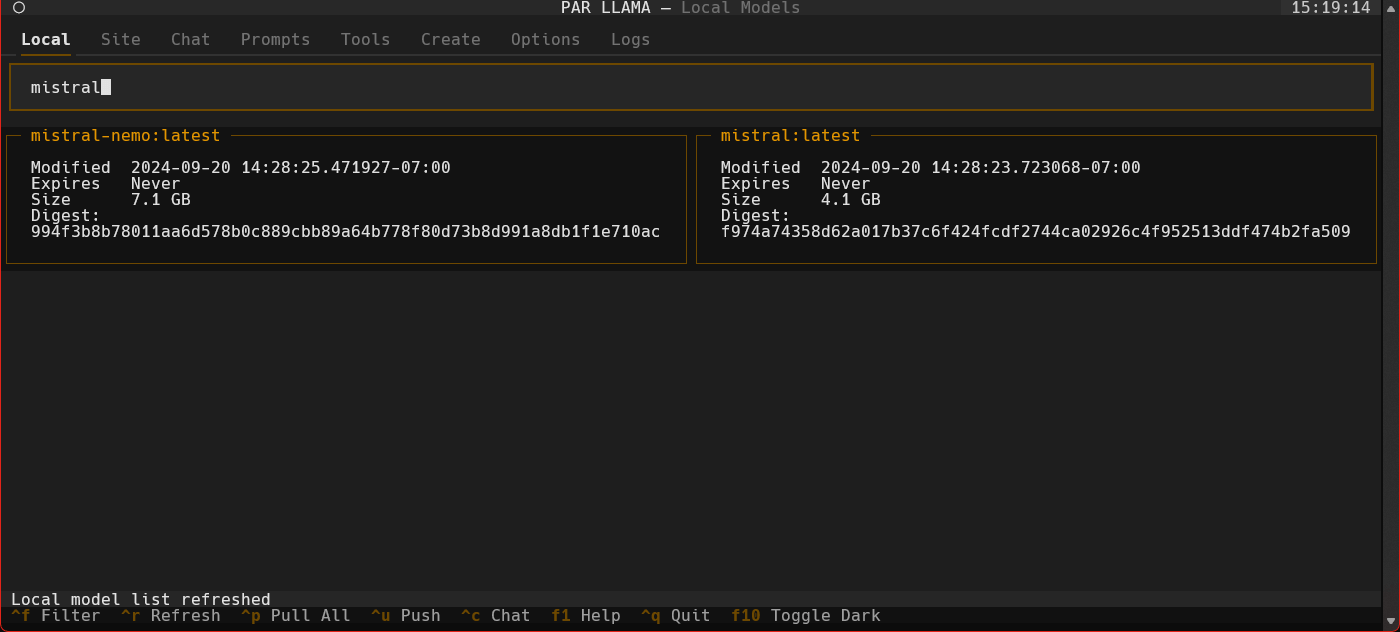
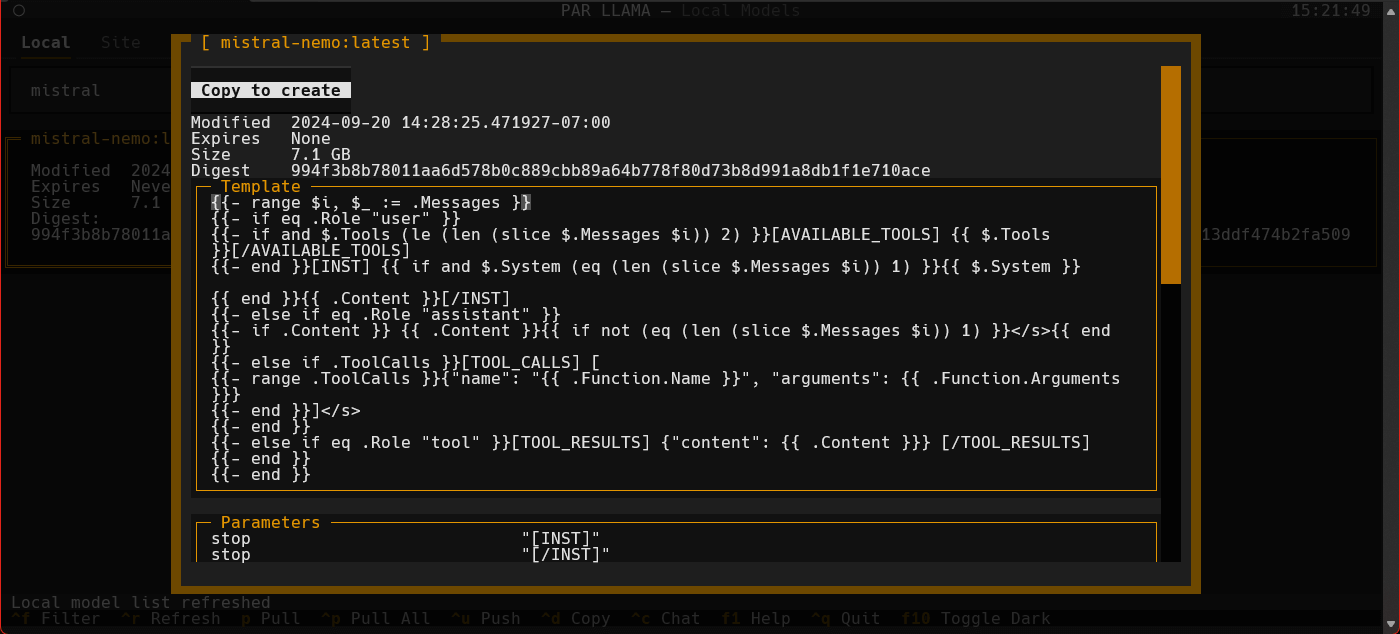
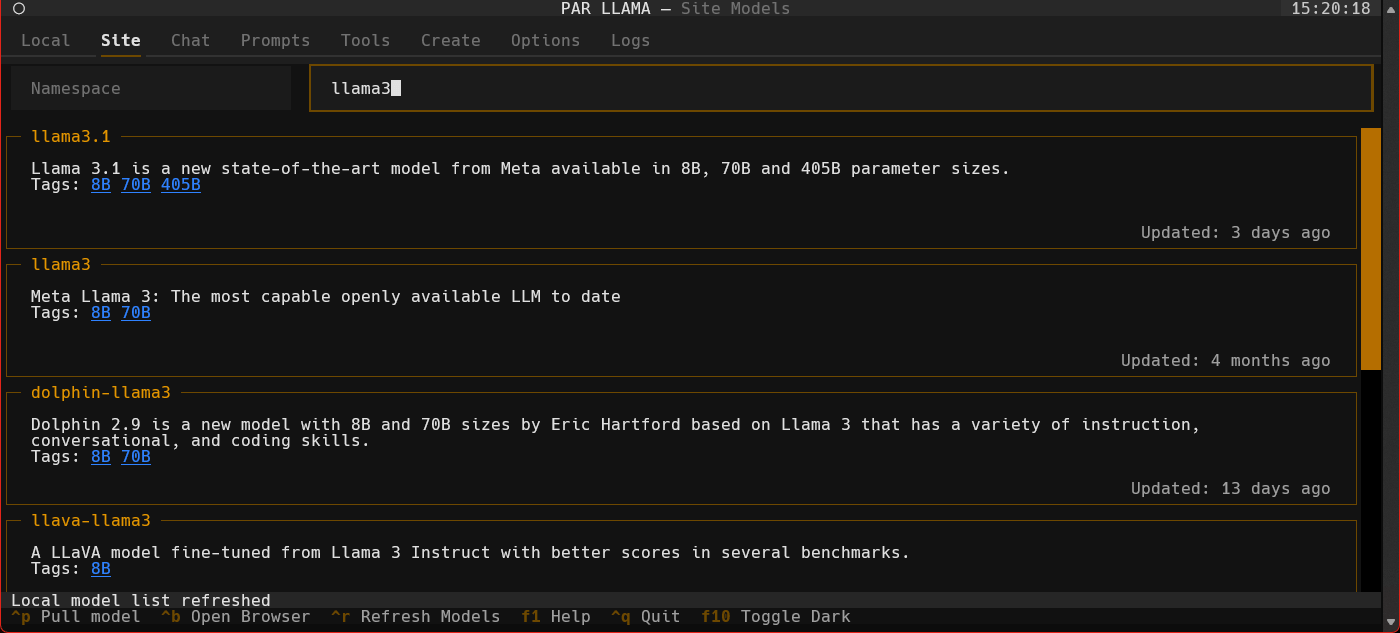
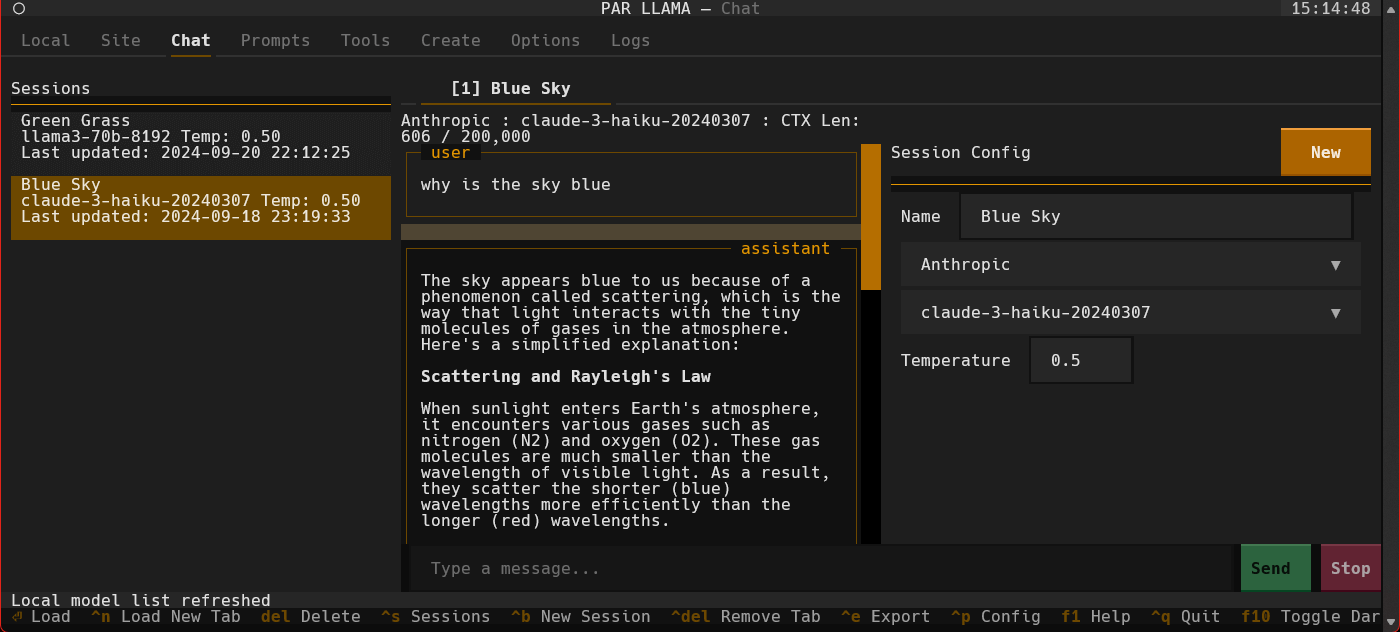
- parllama-0.3.1/parllama/screens/save_session.py +41 -0
- parllama-0.3.1/parllama/theme_manager.py +123 -0
- parllama-0.3.1/parllama/themes/__init__.py +4 -0
- parllama-0.3.1/parllama/themes/par.json +25 -0
- parllama-0.3.1/parllama/time_display.py +67 -0
- parllama-0.3.1/parllama/utils.py +641 -0
- parllama-0.3.1/parllama/widgets/__init__.py +4 -0
- parllama-0.3.1/parllama/widgets/chat_message.py +81 -0
- parllama-0.3.1/parllama/widgets/clickable_label.py +66 -0
- parllama-0.3.1/parllama/widgets/dbl_click_list_item.py +30 -0
- parllama-0.3.1/parllama/widgets/field_set.py +95 -0
- parllama-0.3.1/parllama/widgets/filter_input.py +24 -0
- parllama-0.3.1/parllama/widgets/hidden_input.py +61 -0
- parllama-0.3.1/parllama/widgets/input_tab_complete.py +45 -0
- parllama-0.3.1/parllama/widgets/local_model_grid_list.py +288 -0
- parllama-0.3.1/parllama/widgets/local_model_list_item.py +68 -0
- parllama-0.3.1/parllama/widgets/session_list.py +124 -0
- parllama-0.3.1/parllama/widgets/session_list_item.py +49 -0
- parllama-0.3.1/parllama/widgets/site_model_list_item.py +76 -0
- parllama-0.3.1/parllama/widgets/views/__init__.py +0 -0
- parllama-0.3.1/parllama/widgets/views/chat_tab.py +398 -0
- parllama-0.3.1/parllama/widgets/views/chat_view.py +403 -0
- parllama-0.3.1/parllama/widgets/views/create_model_view.py +119 -0
- parllama-0.3.1/parllama/widgets/views/local_model_view.py +277 -0
- parllama-0.3.1/parllama/widgets/views/log_view.py +90 -0
- parllama-0.3.1/parllama/widgets/views/model_tools_view.py +81 -0
- parllama-0.3.1/parllama/widgets/views/site_model_list_view.py +21 -0
- parllama-0.3.1/parllama/widgets/views/site_model_view.py +218 -0
- parllama-0.3.1/parllama.egg-info/PKG-INFO +334 -0
- parllama-0.3.1/parllama.egg-info/SOURCES.txt +66 -0
- parllama-0.3.1/parllama.egg-info/dependency_links.txt +1 -0
- parllama-0.3.1/parllama.egg-info/entry_points.txt +2 -0
- parllama-0.3.1/parllama.egg-info/requires.txt +18 -0
- parllama-0.3.1/parllama.egg-info/top_level.txt +1 -0
- parllama-0.3.1/pyproject.toml +3 -0
- parllama-0.3.1/setup.cfg +82 -0
parllama-0.3.1/PKG-INFO
ADDED
|
@@ -0,0 +1,334 @@
|
|
|
1
|
+
Metadata-Version: 2.1
|
|
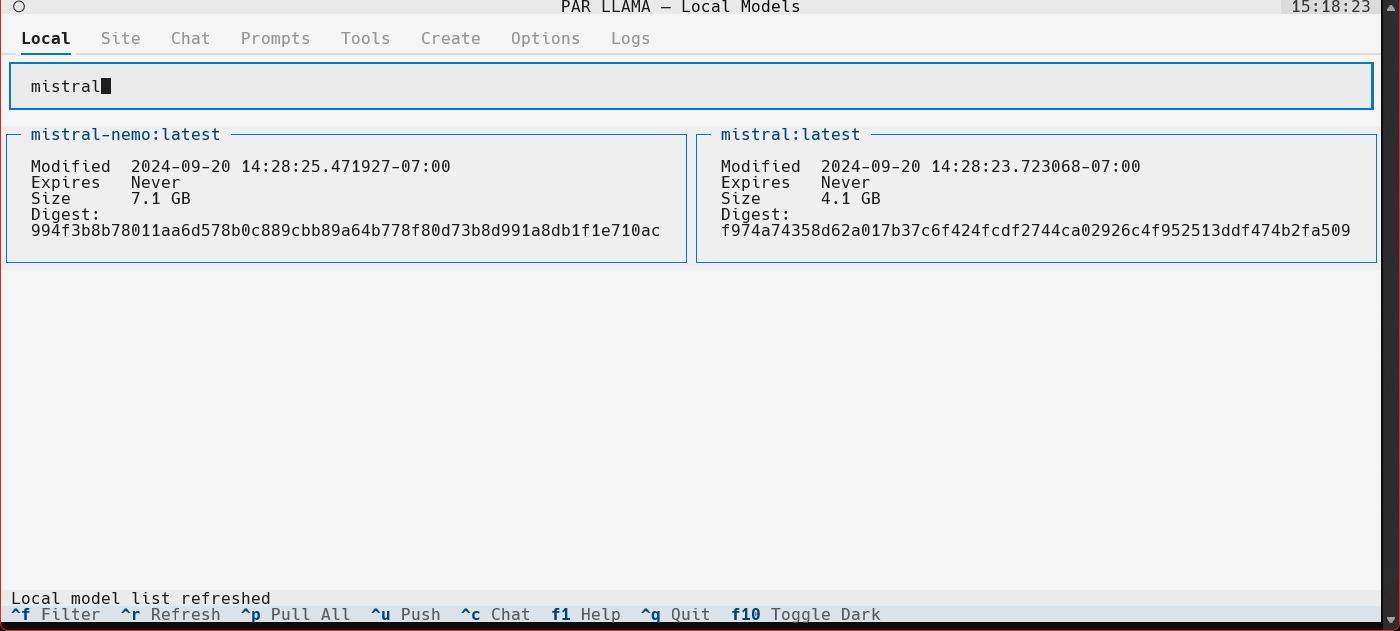
2
|
+
Name: parllama
|
|
3
|
+
Version: 0.3.1
|
|
4
|
+
Summary: Terminal UI for Ollama
|
|
5
|
+
Home-page: https://github.com/paulrobello/parllama
|
|
6
|
+
Author: Paul Robello
|
|
7
|
+
Author-email: probello@gmail.com
|
|
8
|
+
Maintainer: Paul Robello
|
|
9
|
+
Maintainer-email: probello@gmail.com
|
|
10
|
+
License: License :: OSI Approved :: MIT License
|
|
11
|
+
Project-URL: Documentation, https://github.com/paulrobello/parllama/blob/main/README.md
|
|
12
|
+
Project-URL: Source, https://github.com/paulrobello/parllama
|
|
13
|
+
Project-URL: Issues, https://github.com/paulrobello/parllama/issues
|
|
14
|
+
Project-URL: Discussions, https://github.com/paulrobello/parllama/discussions
|
|
15
|
+
Project-URL: Wiki, https://github.com/paulrobello/parllama/wiki
|
|
16
|
+
Keywords: ollama,ai,terminal,tui
|
|
17
|
+
Classifier: License :: OSI Approved :: MIT License
|
|
18
|
+
Classifier: Environment :: Console
|
|
19
|
+
Classifier: Development Status :: 4 - Beta
|
|
20
|
+
Classifier: Natural Language :: English
|
|
21
|
+
Classifier: Operating System :: OS Independent
|
|
22
|
+
Classifier: Programming Language :: Python :: 3
|
|
23
|
+
Classifier: Programming Language :: Python :: 3.10
|
|
24
|
+
Classifier: Programming Language :: Python :: 3.11
|
|
25
|
+
Classifier: Programming Language :: Python :: 3.12
|
|
26
|
+
Classifier: Topic :: Terminals
|
|
27
|
+
Classifier: Topic :: Scientific/Engineering :: Artificial Intelligence
|
|
28
|
+
Classifier: Typing :: Typed
|
|
29
|
+
Requires-Python: <3.13,>=3.10
|
|
30
|
+
Description-Content-Type: text/markdown
|
|
31
|
+
Requires-Dist: urllib3
|
|
32
|
+
Requires-Dist: requests
|
|
33
|
+
Requires-Dist: simplejson
|
|
34
|
+
Requires-Dist: attrs
|
|
35
|
+
Requires-Dist: certifi
|
|
36
|
+
Requires-Dist: requests-file
|
|
37
|
+
Requires-Dist: textual[syntax]>=0.69.0
|
|
38
|
+
Requires-Dist: textual-fspicker
|
|
39
|
+
Requires-Dist: asyncio
|
|
40
|
+
Requires-Dist: humanize
|
|
41
|
+
Requires-Dist: argparse
|
|
42
|
+
Requires-Dist: pyperclip
|
|
43
|
+
Requires-Dist: rich
|
|
44
|
+
Requires-Dist: python-dotenv
|
|
45
|
+
Requires-Dist: pydantic
|
|
46
|
+
Requires-Dist: ollama
|
|
47
|
+
Requires-Dist: bs4
|
|
48
|
+
Requires-Dist: docker
|
|
49
|
+
|
|
50
|
+
# PAR LLAMA
|
|
51
|
+
|
|
52
|
+
## Table of Contents
|
|
53
|
+
|
|
54
|
+
- [About](#about)
|
|
55
|
+
- [Screenshots](#screenshots)
|
|
56
|
+
- [Prerequisites](#prerequisites-for-running)
|
|
57
|
+
- [For Running](#prerequisites-for-running)
|
|
58
|
+
- [For Development](#prerequisites-for-dev)
|
|
59
|
+
- [For Model Quantization](#prerequisites-for-model-quantization)
|
|
60
|
+
- [Installation](#installing-from-mypi-using-pipx)
|
|
61
|
+
- [Using pipx](#installing-from-mypi-using-pipx)
|
|
62
|
+
- [Using pip](#installing-from-mypi-using-pip)
|
|
63
|
+
- [For Development](#installing-for-dev-mode)
|
|
64
|
+
- [Command Line Arguments](#command-line-arguments)
|
|
65
|
+
- [Environment Variables](#environment-variables)
|
|
66
|
+
- [Running PAR_LLAMA](#running-par_llama)
|
|
67
|
+
- [With pipx installation](#with-pipx-installation)
|
|
68
|
+
- [With pip installation](#with-pip-installation)
|
|
69
|
+
- [Under Windows WSL](#running-under-windows-wsl)
|
|
70
|
+
- [In Development Mode](#dev-mode)
|
|
71
|
+
- [Example Workflow](#example-workflow)
|
|
72
|
+
- [Themes](#themes)
|
|
73
|
+
- [Contributing](#contributing)
|
|
74
|
+
- [Roadmap](#roadmap)
|
|
75
|
+
- [What's New](#whats-new)
|
|
76
|
+
|
|
77
|
+
## About
|
|
78
|
+
PAR LLAMA is a TUI application designed for easy management and use of Ollama based LLMs.
|
|
79
|
+
The application was built with [Textual](https://textual.textualize.io/) and [Rich](https://github.com/Textualize/rich?tab=readme-ov-file)
|
|
80
|
+
|
|
81
|
+
### Screenshots
|
|
82
|
+
Supports Dark and Light mode as well as custom themes.
|
|
83
|
+
|
|
84
|
+
|
|
85
|
+
|
|
86
|
+
|
|
87
|
+
|
|
88
|
+
|
|
89
|
+
|
|
90
|
+
|
|
91
|
+
|
|
92
|
+
|
|
93
|
+
|
|
94
|
+
## Prerequisites for running
|
|
95
|
+
* Install and run [Ollama](https://ollama.com/download)
|
|
96
|
+
* Install Python 3.11 or newer
|
|
97
|
+
* On Windows the [Scoop](https://scoop.sh/) tool makes it easy to install and manage things like python.
|
|
98
|
+
|
|
99
|
+
## Prerequisites for dev
|
|
100
|
+
* Install pipenv
|
|
101
|
+
* Install GNU Compatible Make command
|
|
102
|
+
|
|
103
|
+
## Prerequisites for model quantization
|
|
104
|
+
If you want to be able to quantize custom models, download the following tool from the releases area:
|
|
105
|
+
[HuggingFaceModelDownloader](https://github.com/bodaay/HuggingFaceModelDownloader)
|
|
106
|
+
|
|
107
|
+
Install [Docker Desktop](https://www.docker.com/products/docker-desktop/)
|
|
108
|
+
|
|
109
|
+
Pull the docker image ollama/quantize
|
|
110
|
+
```bash
|
|
111
|
+
docker pull ollama/quantize
|
|
112
|
+
```
|
|
113
|
+
|
|
114
|
+
## Installing from mypi using pipx
|
|
115
|
+
If you don't have pipx installed you can run the following:
|
|
116
|
+
```bash
|
|
117
|
+
pip install pipx
|
|
118
|
+
pipx ensurepath
|
|
119
|
+
```
|
|
120
|
+
Once pipx is installed, run the following:
|
|
121
|
+
```bash
|
|
122
|
+
pipx install parllama
|
|
123
|
+
```
|
|
124
|
+
|
|
125
|
+
## Installing from mypi using pip
|
|
126
|
+
Create a virtual environment and install using pip
|
|
127
|
+
```bash
|
|
128
|
+
mkdir parllama
|
|
129
|
+
cd parllama
|
|
130
|
+
python -m venv venv
|
|
131
|
+
source venv/Scripts/activate
|
|
132
|
+
pip install parllama
|
|
133
|
+
```
|
|
134
|
+
|
|
135
|
+
## Installing for dev mode
|
|
136
|
+
Clone the repo and run the following from the root of the repo:
|
|
137
|
+
```bash
|
|
138
|
+
make first-setup
|
|
139
|
+
```
|
|
140
|
+
|
|
141
|
+
|
|
142
|
+
## Command line arguments
|
|
143
|
+
```
|
|
144
|
+
usage: parllama [-h] [-v] [-d DATA_DIR] [-u OLLAMA_URL] [-t THEME_NAME] [-m {dark,light}] [-s {local,site,tools,create,chat,logs}] [-p PS_POLL]
|
|
145
|
+
[--restore-defaults] [--clear-cache] [--purge-chats] [--no-save] [--no-chat-save]
|
|
146
|
+
|
|
147
|
+
PAR LLAMA -- Ollama TUI.
|
|
148
|
+
|
|
149
|
+
options:
|
|
150
|
+
-h, --help show this help message and exit
|
|
151
|
+
-v, --version Show version information.
|
|
152
|
+
-d DATA_DIR, --data-dir DATA_DIR
|
|
153
|
+
Data Directory. Defaults to ~/.parllama
|
|
154
|
+
-u OLLAMA_URL, --ollama-url OLLAMA_URL
|
|
155
|
+
URL of your Ollama instance. Defaults to http://localhost:11434
|
|
156
|
+
-t THEME_NAME, --theme-name THEME_NAME
|
|
157
|
+
Theme name. Defaults to par
|
|
158
|
+
-m {dark,light}, --theme-mode {dark,light}
|
|
159
|
+
Dark / Light mode. Defaults to dark
|
|
160
|
+
-s {local,site,tools,create,chat,logs}, --starting-screen {local,site,tools,create,chat,logs}
|
|
161
|
+
Starting screen. Defaults to local
|
|
162
|
+
-p PS_POLL, --ps-poll PS_POLL
|
|
163
|
+
Interval in seconds to poll ollama ps command. 0 = disable. Defaults to 3
|
|
164
|
+
--restore-defaults Restore default settings and theme
|
|
165
|
+
--clear-cache Clear cached data
|
|
166
|
+
--purge-chats Purge all chat history
|
|
167
|
+
--no-save Prevent saving settings for this session.
|
|
168
|
+
--no-chat-save Prevent saving chats for this session.
|
|
169
|
+
```
|
|
170
|
+
|
|
171
|
+
Unless you specify "--no-save" most flags such as -u, -t, -m, -s are sticky and will be used next time you start PAR_LLAMA.
|
|
172
|
+
|
|
173
|
+
## Environment Variables
|
|
174
|
+
* PARLLAMA_DATA_DIR - Used to set --data-dir
|
|
175
|
+
* PARLLAMA_THEME_NAME - Used to set --theme-name
|
|
176
|
+
* PARLLAMA_THEME_MODE - Used to set --theme-mode
|
|
177
|
+
* OLLAMA_URL - Used to set --ollama-url
|
|
178
|
+
|
|
179
|
+
## Running PAR_LLAMA
|
|
180
|
+
|
|
181
|
+
### with pipx installation
|
|
182
|
+
From anywhere:
|
|
183
|
+
```bash
|
|
184
|
+
parllama
|
|
185
|
+
```
|
|
186
|
+
|
|
187
|
+
### with pip installation
|
|
188
|
+
From parent folder of venv
|
|
189
|
+
```bash
|
|
190
|
+
source venv/Scripts/activate
|
|
191
|
+
parllama
|
|
192
|
+
```
|
|
193
|
+
|
|
194
|
+
## Running under Windows WSL
|
|
195
|
+
Ollama by default only listens to localhost for connections, so you must set the environment variable OLLAMA_HOST=0.0.0.0:11434
|
|
196
|
+
to make it listen on all interfaces.
|
|
197
|
+
**Note: this will allow connections to your Ollama server from other devices on any network you are connected to.**
|
|
198
|
+
If you have Ollama installed via the native Windows installer you must set OLLAMA_HOST=0.0.0.0:11434 in the "System Variable" section
|
|
199
|
+
of the "Environment Variables" control panel.
|
|
200
|
+
If you installed Ollama under WSL, setting the var with ```export OLLAMA_HOST=0.0.0.0:11434``` before starting the Ollama server will have it listen on all interfaces.
|
|
201
|
+
If your Ollama server is already running, stop and start it to ensure it picks up the new environment variable.
|
|
202
|
+
You can validate what interfaces the Ollama server is listening on by looking at the server.log file in the Ollama config folder.
|
|
203
|
+
You should see as one of the first few lines "OLLAMA_HOST:http://0.0.0.0:11434"
|
|
204
|
+
|
|
205
|
+
Now that the server is listening on all interfaces you must instruct PAR_LLAMA to use a custom Ollama connection url with the "-u" flag.
|
|
206
|
+
The command will look something like this:
|
|
207
|
+
```bash
|
|
208
|
+
parllama -u "http://$(hostname).local:11434"
|
|
209
|
+
```
|
|
210
|
+
Depending on your DNS setup if the above does not work, try this:
|
|
211
|
+
```bash
|
|
212
|
+
parllama -u "http://$(grep -m 1 nameserver /etc/resolv.conf | awk '{print $2}'):11434"
|
|
213
|
+
```
|
|
214
|
+
|
|
215
|
+
PAR_LLAMA will remember the -u flag so subsequent runs will not require that you specify it.
|
|
216
|
+
|
|
217
|
+
### Dev mode
|
|
218
|
+
From repo root:
|
|
219
|
+
```bash
|
|
220
|
+
make dev
|
|
221
|
+
```
|
|
222
|
+
|
|
223
|
+
## Example workflow
|
|
224
|
+
* Start parllama.
|
|
225
|
+
* Click the "Site" tab.
|
|
226
|
+
* Use ^R to fetch the latest models from Ollama.com.
|
|
227
|
+
* User the "Filter Site models" text box and type "llama3".
|
|
228
|
+
* Find the entry with title of "llama3".
|
|
229
|
+
* Click the blue tag "8B" to update the search box to read "llama3:8b".
|
|
230
|
+
* Press ^P to pull the model from Ollama to your local machine. Depending on the size of the model and your internet connection this can take a few min.
|
|
231
|
+
* Click the "Local" tab to see models that have been locally downloaded
|
|
232
|
+
* Select the "llama3:8b" entry and press ^C to jump to the "Chat" tab and auto select the model
|
|
233
|
+
* Type a message to the model such as "Why is the sky blue?". It will take a few seconds for Ollama to load the model. After which the LLMs answer will stream in.
|
|
234
|
+
* Towards the very top of the app you will see what model is loaded and what percent of it is loaded into the GPU / CPU. If a model cant be loaded 100% on the GPU it will run slower.
|
|
235
|
+
* To export your conversation as a Markdown file type "/session.export" in the message input box. This will open a export dialog.
|
|
236
|
+
* Type "/help" or "/?" to see what other slash commands are available.
|
|
237
|
+
|
|
238
|
+
## Themes
|
|
239
|
+
Themes are json files stored in the themes folder in the data directory which defaults to **~/.parllama/themes**
|
|
240
|
+
|
|
241
|
+
The default theme is "par" so can be located in **~/.parllama/themes/par.json**
|
|
242
|
+
|
|
243
|
+
Themes have a dark and light mode are in the following format:
|
|
244
|
+
```json
|
|
245
|
+
{
|
|
246
|
+
"dark": {
|
|
247
|
+
"primary": "#e49500",
|
|
248
|
+
"secondary": "#6e4800",
|
|
249
|
+
"warning": "#ffa62b",
|
|
250
|
+
"error": "#ba3c5b",
|
|
251
|
+
"success": "#4EBF71",
|
|
252
|
+
"accent": "#6e4800",
|
|
253
|
+
"panel": "#111",
|
|
254
|
+
"surface":"#1e1e1e",
|
|
255
|
+
"background":"#121212",
|
|
256
|
+
"dark": true
|
|
257
|
+
},
|
|
258
|
+
"light": {
|
|
259
|
+
"primary": "#004578",
|
|
260
|
+
"secondary": "#ffa62b",
|
|
261
|
+
"warning": "#ffa62b",
|
|
262
|
+
"error": "#ba3c5b",
|
|
263
|
+
"success": "#4EBF71",
|
|
264
|
+
"accent": "#0178D4",
|
|
265
|
+
"background":"#efefef",
|
|
266
|
+
"surface":"#f5f5f5",
|
|
267
|
+
"dark": false
|
|
268
|
+
}
|
|
269
|
+
}
|
|
270
|
+
```
|
|
271
|
+
|
|
272
|
+
You must specify at least one of light or dark for the theme to be usable.
|
|
273
|
+
|
|
274
|
+
Theme can be changed via command line with the ```--theme-name``` option.
|
|
275
|
+
|
|
276
|
+
## Contributing
|
|
277
|
+
Start by following the instructions in the section **Installing for dev mode**.
|
|
278
|
+
|
|
279
|
+
Please ensure that all pull requests are formatted with black, pass mypy and pylint with 10/10 checks.
|
|
280
|
+
You can run the make target **pre-commit** to ensure the pipeline will pass with your changes.
|
|
281
|
+
There is also a pre-commit config to that will assist with formatting and checks.
|
|
282
|
+
The easiest way to setup your environment to ensure smooth pull requests is:
|
|
283
|
+
|
|
284
|
+
If you don't have pipx installed you can run the following:
|
|
285
|
+
```bash
|
|
286
|
+
pip install pipx
|
|
287
|
+
pipx ensurepath
|
|
288
|
+
```
|
|
289
|
+
|
|
290
|
+
With pipx installed:
|
|
291
|
+
```bash
|
|
292
|
+
pipx install pre-commit
|
|
293
|
+
```
|
|
294
|
+
|
|
295
|
+
From repo root run the following:
|
|
296
|
+
```bash
|
|
297
|
+
pre-commit install
|
|
298
|
+
pre-commit run --all-files
|
|
299
|
+
```
|
|
300
|
+
After running the above all future commits will auto run pre-commit. pre-commit will fix what it can and show what
|
|
301
|
+
if anything remains to be fixed before the commit is allowed.
|
|
302
|
+
|
|
303
|
+
|
|
304
|
+
## Roadmap
|
|
305
|
+
|
|
306
|
+
**Where we are**
|
|
307
|
+
* Initial release - Find, maintain and create new models
|
|
308
|
+
* Basic chat with LLM
|
|
309
|
+
* Chat history / conversation management
|
|
310
|
+
* Chat tabs allow chat with multiple models at same time
|
|
311
|
+
|
|
312
|
+
**Where we're going**
|
|
313
|
+
* Chat using embeddings for local documents
|
|
314
|
+
* LLM tool use
|
|
315
|
+
|
|
316
|
+
## What's new
|
|
317
|
+
|
|
318
|
+
### v0.3.1
|
|
319
|
+
* Add chat tabs to support multiple sessions
|
|
320
|
+
* Added cli option to prevent saving chat history to disk
|
|
321
|
+
* Renamed / namespaced chat slash commands for better consistency and grouping
|
|
322
|
+
* Fixed application crash when ollama binary not found
|
|
323
|
+
|
|
324
|
+
### v0.3.0
|
|
325
|
+
* Added chat history panel and management to chat page
|
|
326
|
+
|
|
327
|
+
### v0.2.51
|
|
328
|
+
* Fix missing dependency in package
|
|
329
|
+
|
|
330
|
+
### v0.2.5
|
|
331
|
+
* Added slash commands to chat input
|
|
332
|
+
* Added ability to export chat to markdown file
|
|
333
|
+
* ctrl+c on local model list will jump to chat tab and select currently selected local model
|
|
334
|
+
* ctrl+c on chat tab will copy selected chat message
|
parllama-0.3.1/README.md
ADDED
|
@@ -0,0 +1,285 @@
|
|
|
1
|
+
# PAR LLAMA
|
|
2
|
+
|
|
3
|
+
## Table of Contents
|
|
4
|
+
|
|
5
|
+
- [About](#about)
|
|
6
|
+
- [Screenshots](#screenshots)
|
|
7
|
+
- [Prerequisites](#prerequisites-for-running)
|
|
8
|
+
- [For Running](#prerequisites-for-running)
|
|
9
|
+
- [For Development](#prerequisites-for-dev)
|
|
10
|
+
- [For Model Quantization](#prerequisites-for-model-quantization)
|
|
11
|
+
- [Installation](#installing-from-mypi-using-pipx)
|
|
12
|
+
- [Using pipx](#installing-from-mypi-using-pipx)
|
|
13
|
+
- [Using pip](#installing-from-mypi-using-pip)
|
|
14
|
+
- [For Development](#installing-for-dev-mode)
|
|
15
|
+
- [Command Line Arguments](#command-line-arguments)
|
|
16
|
+
- [Environment Variables](#environment-variables)
|
|
17
|
+
- [Running PAR_LLAMA](#running-par_llama)
|
|
18
|
+
- [With pipx installation](#with-pipx-installation)
|
|
19
|
+
- [With pip installation](#with-pip-installation)
|
|
20
|
+
- [Under Windows WSL](#running-under-windows-wsl)
|
|
21
|
+
- [In Development Mode](#dev-mode)
|
|
22
|
+
- [Example Workflow](#example-workflow)
|
|
23
|
+
- [Themes](#themes)
|
|
24
|
+
- [Contributing](#contributing)
|
|
25
|
+
- [Roadmap](#roadmap)
|
|
26
|
+
- [What's New](#whats-new)
|
|
27
|
+
|
|
28
|
+
## About
|
|
29
|
+
PAR LLAMA is a TUI application designed for easy management and use of Ollama based LLMs.
|
|
30
|
+
The application was built with [Textual](https://textual.textualize.io/) and [Rich](https://github.com/Textualize/rich?tab=readme-ov-file)
|
|
31
|
+
|
|
32
|
+
### Screenshots
|
|
33
|
+
Supports Dark and Light mode as well as custom themes.
|
|
34
|
+
|
|
35
|
+

|
|
36
|
+
|
|
37
|
+

|
|
38
|
+
|
|
39
|
+

|
|
40
|
+
|
|
41
|
+

|
|
42
|
+
|
|
43
|
+

|
|
44
|
+
|
|
45
|
+
## Prerequisites for running
|
|
46
|
+
* Install and run [Ollama](https://ollama.com/download)
|
|
47
|
+
* Install Python 3.11 or newer
|
|
48
|
+
* On Windows the [Scoop](https://scoop.sh/) tool makes it easy to install and manage things like python.
|
|
49
|
+
|
|
50
|
+
## Prerequisites for dev
|
|
51
|
+
* Install pipenv
|
|
52
|
+
* Install GNU Compatible Make command
|
|
53
|
+
|
|
54
|
+
## Prerequisites for model quantization
|
|
55
|
+
If you want to be able to quantize custom models, download the following tool from the releases area:
|
|
56
|
+
[HuggingFaceModelDownloader](https://github.com/bodaay/HuggingFaceModelDownloader)
|
|
57
|
+
|
|
58
|
+
Install [Docker Desktop](https://www.docker.com/products/docker-desktop/)
|
|
59
|
+
|
|
60
|
+
Pull the docker image ollama/quantize
|
|
61
|
+
```bash
|
|
62
|
+
docker pull ollama/quantize
|
|
63
|
+
```
|
|
64
|
+
|
|
65
|
+
## Installing from mypi using pipx
|
|
66
|
+
If you don't have pipx installed you can run the following:
|
|
67
|
+
```bash
|
|
68
|
+
pip install pipx
|
|
69
|
+
pipx ensurepath
|
|
70
|
+
```
|
|
71
|
+
Once pipx is installed, run the following:
|
|
72
|
+
```bash
|
|
73
|
+
pipx install parllama
|
|
74
|
+
```
|
|
75
|
+
|
|
76
|
+
## Installing from mypi using pip
|
|
77
|
+
Create a virtual environment and install using pip
|
|
78
|
+
```bash
|
|
79
|
+
mkdir parllama
|
|
80
|
+
cd parllama
|
|
81
|
+
python -m venv venv
|
|
82
|
+
source venv/Scripts/activate
|
|
83
|
+
pip install parllama
|
|
84
|
+
```
|
|
85
|
+
|
|
86
|
+
## Installing for dev mode
|
|
87
|
+
Clone the repo and run the following from the root of the repo:
|
|
88
|
+
```bash
|
|
89
|
+
make first-setup
|
|
90
|
+
```
|
|
91
|
+
|
|
92
|
+
|
|
93
|
+
## Command line arguments
|
|
94
|
+
```
|
|
95
|
+
usage: parllama [-h] [-v] [-d DATA_DIR] [-u OLLAMA_URL] [-t THEME_NAME] [-m {dark,light}] [-s {local,site,tools,create,chat,logs}] [-p PS_POLL]
|
|
96
|
+
[--restore-defaults] [--clear-cache] [--purge-chats] [--no-save] [--no-chat-save]
|
|
97
|
+
|
|
98
|
+
PAR LLAMA -- Ollama TUI.
|
|
99
|
+
|
|
100
|
+
options:
|
|
101
|
+
-h, --help show this help message and exit
|
|
102
|
+
-v, --version Show version information.
|
|
103
|
+
-d DATA_DIR, --data-dir DATA_DIR
|
|
104
|
+
Data Directory. Defaults to ~/.parllama
|
|
105
|
+
-u OLLAMA_URL, --ollama-url OLLAMA_URL
|
|
106
|
+
URL of your Ollama instance. Defaults to http://localhost:11434
|
|
107
|
+
-t THEME_NAME, --theme-name THEME_NAME
|
|
108
|
+
Theme name. Defaults to par
|
|
109
|
+
-m {dark,light}, --theme-mode {dark,light}
|
|
110
|
+
Dark / Light mode. Defaults to dark
|
|
111
|
+
-s {local,site,tools,create,chat,logs}, --starting-screen {local,site,tools,create,chat,logs}
|
|
112
|
+
Starting screen. Defaults to local
|
|
113
|
+
-p PS_POLL, --ps-poll PS_POLL
|
|
114
|
+
Interval in seconds to poll ollama ps command. 0 = disable. Defaults to 3
|
|
115
|
+
--restore-defaults Restore default settings and theme
|
|
116
|
+
--clear-cache Clear cached data
|
|
117
|
+
--purge-chats Purge all chat history
|
|
118
|
+
--no-save Prevent saving settings for this session.
|
|
119
|
+
--no-chat-save Prevent saving chats for this session.
|
|
120
|
+
```
|
|
121
|
+
|
|
122
|
+
Unless you specify "--no-save" most flags such as -u, -t, -m, -s are sticky and will be used next time you start PAR_LLAMA.
|
|
123
|
+
|
|
124
|
+
## Environment Variables
|
|
125
|
+
* PARLLAMA_DATA_DIR - Used to set --data-dir
|
|
126
|
+
* PARLLAMA_THEME_NAME - Used to set --theme-name
|
|
127
|
+
* PARLLAMA_THEME_MODE - Used to set --theme-mode
|
|
128
|
+
* OLLAMA_URL - Used to set --ollama-url
|
|
129
|
+
|
|
130
|
+
## Running PAR_LLAMA
|
|
131
|
+
|
|
132
|
+
### with pipx installation
|
|
133
|
+
From anywhere:
|
|
134
|
+
```bash
|
|
135
|
+
parllama
|
|
136
|
+
```
|
|
137
|
+
|
|
138
|
+
### with pip installation
|
|
139
|
+
From parent folder of venv
|
|
140
|
+
```bash
|
|
141
|
+
source venv/Scripts/activate
|
|
142
|
+
parllama
|
|
143
|
+
```
|
|
144
|
+
|
|
145
|
+
## Running under Windows WSL
|
|
146
|
+
Ollama by default only listens to localhost for connections, so you must set the environment variable OLLAMA_HOST=0.0.0.0:11434
|
|
147
|
+
to make it listen on all interfaces.
|
|
148
|
+
**Note: this will allow connections to your Ollama server from other devices on any network you are connected to.**
|
|
149
|
+
If you have Ollama installed via the native Windows installer you must set OLLAMA_HOST=0.0.0.0:11434 in the "System Variable" section
|
|
150
|
+
of the "Environment Variables" control panel.
|
|
151
|
+
If you installed Ollama under WSL, setting the var with ```export OLLAMA_HOST=0.0.0.0:11434``` before starting the Ollama server will have it listen on all interfaces.
|
|
152
|
+
If your Ollama server is already running, stop and start it to ensure it picks up the new environment variable.
|
|
153
|
+
You can validate what interfaces the Ollama server is listening on by looking at the server.log file in the Ollama config folder.
|
|
154
|
+
You should see as one of the first few lines "OLLAMA_HOST:http://0.0.0.0:11434"
|
|
155
|
+
|
|
156
|
+
Now that the server is listening on all interfaces you must instruct PAR_LLAMA to use a custom Ollama connection url with the "-u" flag.
|
|
157
|
+
The command will look something like this:
|
|
158
|
+
```bash
|
|
159
|
+
parllama -u "http://$(hostname).local:11434"
|
|
160
|
+
```
|
|
161
|
+
Depending on your DNS setup if the above does not work, try this:
|
|
162
|
+
```bash
|
|
163
|
+
parllama -u "http://$(grep -m 1 nameserver /etc/resolv.conf | awk '{print $2}'):11434"
|
|
164
|
+
```
|
|
165
|
+
|
|
166
|
+
PAR_LLAMA will remember the -u flag so subsequent runs will not require that you specify it.
|
|
167
|
+
|
|
168
|
+
### Dev mode
|
|
169
|
+
From repo root:
|
|
170
|
+
```bash
|
|
171
|
+
make dev
|
|
172
|
+
```
|
|
173
|
+
|
|
174
|
+
## Example workflow
|
|
175
|
+
* Start parllama.
|
|
176
|
+
* Click the "Site" tab.
|
|
177
|
+
* Use ^R to fetch the latest models from Ollama.com.
|
|
178
|
+
* User the "Filter Site models" text box and type "llama3".
|
|
179
|
+
* Find the entry with title of "llama3".
|
|
180
|
+
* Click the blue tag "8B" to update the search box to read "llama3:8b".
|
|
181
|
+
* Press ^P to pull the model from Ollama to your local machine. Depending on the size of the model and your internet connection this can take a few min.
|
|
182
|
+
* Click the "Local" tab to see models that have been locally downloaded
|
|
183
|
+
* Select the "llama3:8b" entry and press ^C to jump to the "Chat" tab and auto select the model
|
|
184
|
+
* Type a message to the model such as "Why is the sky blue?". It will take a few seconds for Ollama to load the model. After which the LLMs answer will stream in.
|
|
185
|
+
* Towards the very top of the app you will see what model is loaded and what percent of it is loaded into the GPU / CPU. If a model cant be loaded 100% on the GPU it will run slower.
|
|
186
|
+
* To export your conversation as a Markdown file type "/session.export" in the message input box. This will open a export dialog.
|
|
187
|
+
* Type "/help" or "/?" to see what other slash commands are available.
|
|
188
|
+
|
|
189
|
+
## Themes
|
|
190
|
+
Themes are json files stored in the themes folder in the data directory which defaults to **~/.parllama/themes**
|
|
191
|
+
|
|
192
|
+
The default theme is "par" so can be located in **~/.parllama/themes/par.json**
|
|
193
|
+
|
|
194
|
+
Themes have a dark and light mode are in the following format:
|
|
195
|
+
```json
|
|
196
|
+
{
|
|
197
|
+
"dark": {
|
|
198
|
+
"primary": "#e49500",
|
|
199
|
+
"secondary": "#6e4800",
|
|
200
|
+
"warning": "#ffa62b",
|
|
201
|
+
"error": "#ba3c5b",
|
|
202
|
+
"success": "#4EBF71",
|
|
203
|
+
"accent": "#6e4800",
|
|
204
|
+
"panel": "#111",
|
|
205
|
+
"surface":"#1e1e1e",
|
|
206
|
+
"background":"#121212",
|
|
207
|
+
"dark": true
|
|
208
|
+
},
|
|
209
|
+
"light": {
|
|
210
|
+
"primary": "#004578",
|
|
211
|
+
"secondary": "#ffa62b",
|
|
212
|
+
"warning": "#ffa62b",
|
|
213
|
+
"error": "#ba3c5b",
|
|
214
|
+
"success": "#4EBF71",
|
|
215
|
+
"accent": "#0178D4",
|
|
216
|
+
"background":"#efefef",
|
|
217
|
+
"surface":"#f5f5f5",
|
|
218
|
+
"dark": false
|
|
219
|
+
}
|
|
220
|
+
}
|
|
221
|
+
```
|
|
222
|
+
|
|
223
|
+
You must specify at least one of light or dark for the theme to be usable.
|
|
224
|
+
|
|
225
|
+
Theme can be changed via command line with the ```--theme-name``` option.
|
|
226
|
+
|
|
227
|
+
## Contributing
|
|
228
|
+
Start by following the instructions in the section **Installing for dev mode**.
|
|
229
|
+
|
|
230
|
+
Please ensure that all pull requests are formatted with black, pass mypy and pylint with 10/10 checks.
|
|
231
|
+
You can run the make target **pre-commit** to ensure the pipeline will pass with your changes.
|
|
232
|
+
There is also a pre-commit config to that will assist with formatting and checks.
|
|
233
|
+
The easiest way to setup your environment to ensure smooth pull requests is:
|
|
234
|
+
|
|
235
|
+
If you don't have pipx installed you can run the following:
|
|
236
|
+
```bash
|
|
237
|
+
pip install pipx
|
|
238
|
+
pipx ensurepath
|
|
239
|
+
```
|
|
240
|
+
|
|
241
|
+
With pipx installed:
|
|
242
|
+
```bash
|
|
243
|
+
pipx install pre-commit
|
|
244
|
+
```
|
|
245
|
+
|
|
246
|
+
From repo root run the following:
|
|
247
|
+
```bash
|
|
248
|
+
pre-commit install
|
|
249
|
+
pre-commit run --all-files
|
|
250
|
+
```
|
|
251
|
+
After running the above all future commits will auto run pre-commit. pre-commit will fix what it can and show what
|
|
252
|
+
if anything remains to be fixed before the commit is allowed.
|
|
253
|
+
|
|
254
|
+
|
|
255
|
+
## Roadmap
|
|
256
|
+
|
|
257
|
+
**Where we are**
|
|
258
|
+
* Initial release - Find, maintain and create new models
|
|
259
|
+
* Basic chat with LLM
|
|
260
|
+
* Chat history / conversation management
|
|
261
|
+
* Chat tabs allow chat with multiple models at same time
|
|
262
|
+
|
|
263
|
+
**Where we're going**
|
|
264
|
+
* Chat using embeddings for local documents
|
|
265
|
+
* LLM tool use
|
|
266
|
+
|
|
267
|
+
## What's new
|
|
268
|
+
|
|
269
|
+
### v0.3.1
|
|
270
|
+
* Add chat tabs to support multiple sessions
|
|
271
|
+
* Added cli option to prevent saving chat history to disk
|
|
272
|
+
* Renamed / namespaced chat slash commands for better consistency and grouping
|
|
273
|
+
* Fixed application crash when ollama binary not found
|
|
274
|
+
|
|
275
|
+
### v0.3.0
|
|
276
|
+
* Added chat history panel and management to chat page
|
|
277
|
+
|
|
278
|
+
### v0.2.51
|
|
279
|
+
* Fix missing dependency in package
|
|
280
|
+
|
|
281
|
+
### v0.2.5
|
|
282
|
+
* Added slash commands to chat input
|
|
283
|
+
* Added ability to export chat to markdown file
|
|
284
|
+
* ctrl+c on local model list will jump to chat tab and select currently selected local model
|
|
285
|
+
* ctrl+c on chat tab will copy selected chat message
|
|
@@ -0,0 +1,24 @@
|
|
|
1
|
+
"""PAR LLAMA TUI - A terminal user interface for Ollama."""
|
|
2
|
+
from __future__ import annotations
|
|
3
|
+
|
|
4
|
+
__author__ = "Paul Robello"
|
|
5
|
+
__copyright__ = "Copyright 2024, Paul Robello"
|
|
6
|
+
__credits__ = ["Paul Robello"]
|
|
7
|
+
__maintainer__ = "Paul Robello"
|
|
8
|
+
__email__ = "probello@gmail.com"
|
|
9
|
+
__version__ = "0.3.1"
|
|
10
|
+
__licence__ = "MIT"
|
|
11
|
+
__application_title__ = "PAR LLAMA"
|
|
12
|
+
__application_binary__ = "parllama"
|
|
13
|
+
|
|
14
|
+
__all__: list[str] = [
|
|
15
|
+
"__author__",
|
|
16
|
+
"__copyright__",
|
|
17
|
+
"__credits__",
|
|
18
|
+
"__maintainer__",
|
|
19
|
+
"__email__",
|
|
20
|
+
"__version__",
|
|
21
|
+
"__licence__",
|
|
22
|
+
"__application_title__",
|
|
23
|
+
"__application_binary__",
|
|
24
|
+
]
|
|
@@ -0,0 +1,24 @@
|
|
|
1
|
+
"""The main entry point for the application."""
|
|
2
|
+
from __future__ import annotations
|
|
3
|
+
|
|
4
|
+
import os
|
|
5
|
+
|
|
6
|
+
from parllama.app import ParLlamaApp
|
|
7
|
+
from parllama.models.settings_data import settings
|
|
8
|
+
|
|
9
|
+
if os.environ.get("DEBUG"):
|
|
10
|
+
import pydevd_pycharm # type: ignore
|
|
11
|
+
|
|
12
|
+
pydevd_pycharm.settrace(
|
|
13
|
+
"localhost", port=12345, suspend=False, patch_multiprocessing=True
|
|
14
|
+
)
|
|
15
|
+
|
|
16
|
+
|
|
17
|
+
def run() -> None:
|
|
18
|
+
"""Run the application."""
|
|
19
|
+
print(f"Settings folder {settings.data_dir}")
|
|
20
|
+
ParLlamaApp().run()
|
|
21
|
+
|
|
22
|
+
|
|
23
|
+
if __name__ == "__main__":
|
|
24
|
+
run()
|