panescape 0.1.0__tar.gz
This diff represents the content of publicly available package versions that have been released to one of the supported registries. The information contained in this diff is provided for informational purposes only and reflects changes between package versions as they appear in their respective public registries.
- panescape-0.1.0/LICENSE +21 -0
- panescape-0.1.0/PKG-INFO +619 -0
- panescape-0.1.0/README.md +589 -0
- panescape-0.1.0/pyproject.toml +57 -0
- panescape-0.1.0/setup.cfg +4 -0
- panescape-0.1.0/src/panescape/__init__.py +3 -0
- panescape-0.1.0/src/panescape/__main__.py +5 -0
- panescape-0.1.0/src/panescape/backends/__init__.py +27 -0
- panescape-0.1.0/src/panescape/backends/base.py +221 -0
- panescape-0.1.0/src/panescape/backends/gnome.py +246 -0
- panescape-0.1.0/src/panescape/backends/kde.py +191 -0
- panescape-0.1.0/src/panescape/backends/wlroots.py +221 -0
- panescape-0.1.0/src/panescape/calibrate.py +184 -0
- panescape-0.1.0/src/panescape/cli.py +512 -0
- panescape-0.1.0/src/panescape/config.py +322 -0
- panescape-0.1.0/src/panescape/gui/__init__.py +76 -0
- panescape-0.1.0/src/panescape/gui/apply_tab.py +819 -0
- panescape-0.1.0/src/panescape/gui/common.py +75 -0
- panescape-0.1.0/src/panescape/gui/desk_view.py +326 -0
- panescape-0.1.0/src/panescape/gui/layout_editor.py +1188 -0
- panescape-0.1.0/src/panescape/gui/main_window.py +227 -0
- panescape-0.1.0/src/panescape/gui/pictures_tab.py +654 -0
- panescape-0.1.0/src/panescape/gui/unsplash_tab.py +510 -0
- panescape-0.1.0/src/panescape/gui/widgets.py +154 -0
- panescape-0.1.0/src/panescape/layout.py +140 -0
- panescape-0.1.0/src/panescape/models.py +60 -0
- panescape-0.1.0/src/panescape/project.py +1065 -0
- panescape-0.1.0/src/panescape/py.typed +0 -0
- panescape-0.1.0/src/panescape/render.py +181 -0
- panescape-0.1.0/src/panescape/skeleton.py +118 -0
- panescape-0.1.0/src/panescape/tags.py +223 -0
- panescape-0.1.0/src/panescape/units.py +98 -0
- panescape-0.1.0/src/panescape/unsplash.py +528 -0
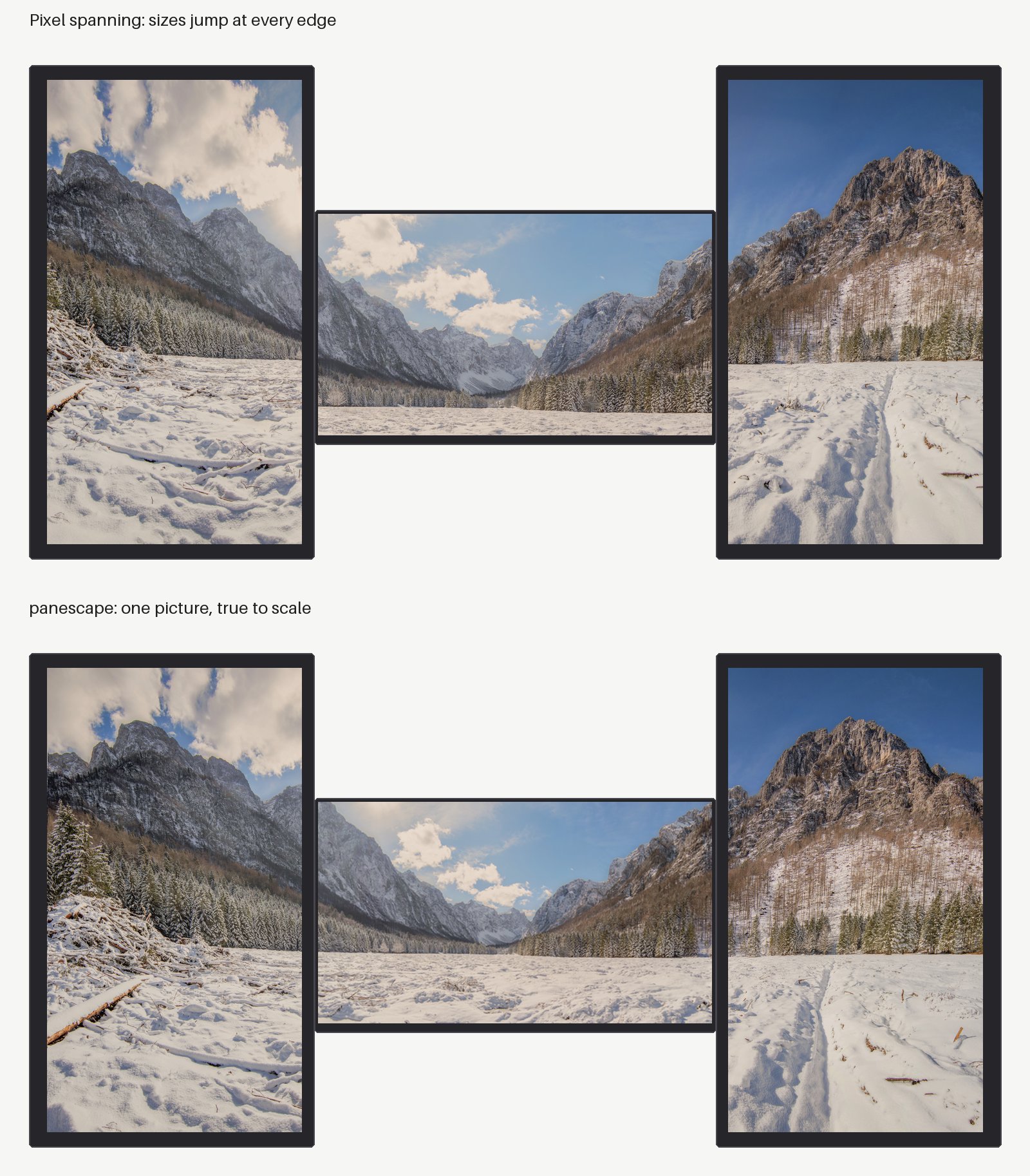
- panescape-0.1.0/src/panescape/yamledit.py +86 -0
- panescape-0.1.0/src/panescape.egg-info/PKG-INFO +619 -0
- panescape-0.1.0/src/panescape.egg-info/SOURCES.txt +54 -0
- panescape-0.1.0/src/panescape.egg-info/dependency_links.txt +1 -0
- panescape-0.1.0/src/panescape.egg-info/entry_points.txt +6 -0
- panescape-0.1.0/src/panescape.egg-info/requires.txt +14 -0
- panescape-0.1.0/src/panescape.egg-info/top_level.txt +1 -0
- panescape-0.1.0/tests/test_apply_tab.py +148 -0
- panescape-0.1.0/tests/test_calibrate.py +34 -0
- panescape-0.1.0/tests/test_conflicts.py +42 -0
- panescape-0.1.0/tests/test_geometry.py +62 -0
- panescape-0.1.0/tests/test_gnome.py +48 -0
- panescape-0.1.0/tests/test_grid.py +110 -0
- panescape-0.1.0/tests/test_gui.py +178 -0
- panescape-0.1.0/tests/test_kde.py +98 -0
- panescape-0.1.0/tests/test_pictures.py +206 -0
- panescape-0.1.0/tests/test_project.py +155 -0
- panescape-0.1.0/tests/test_render.py +42 -0
- panescape-0.1.0/tests/test_setups.py +103 -0
- panescape-0.1.0/tests/test_tags.py +31 -0
- panescape-0.1.0/tests/test_unsplash.py +272 -0
- panescape-0.1.0/tests/test_unsplash_tab.py +160 -0
- panescape-0.1.0/tests/test_wlroots.py +176 -0
panescape-0.1.0/LICENSE
ADDED
|
@@ -0,0 +1,21 @@
|
|
|
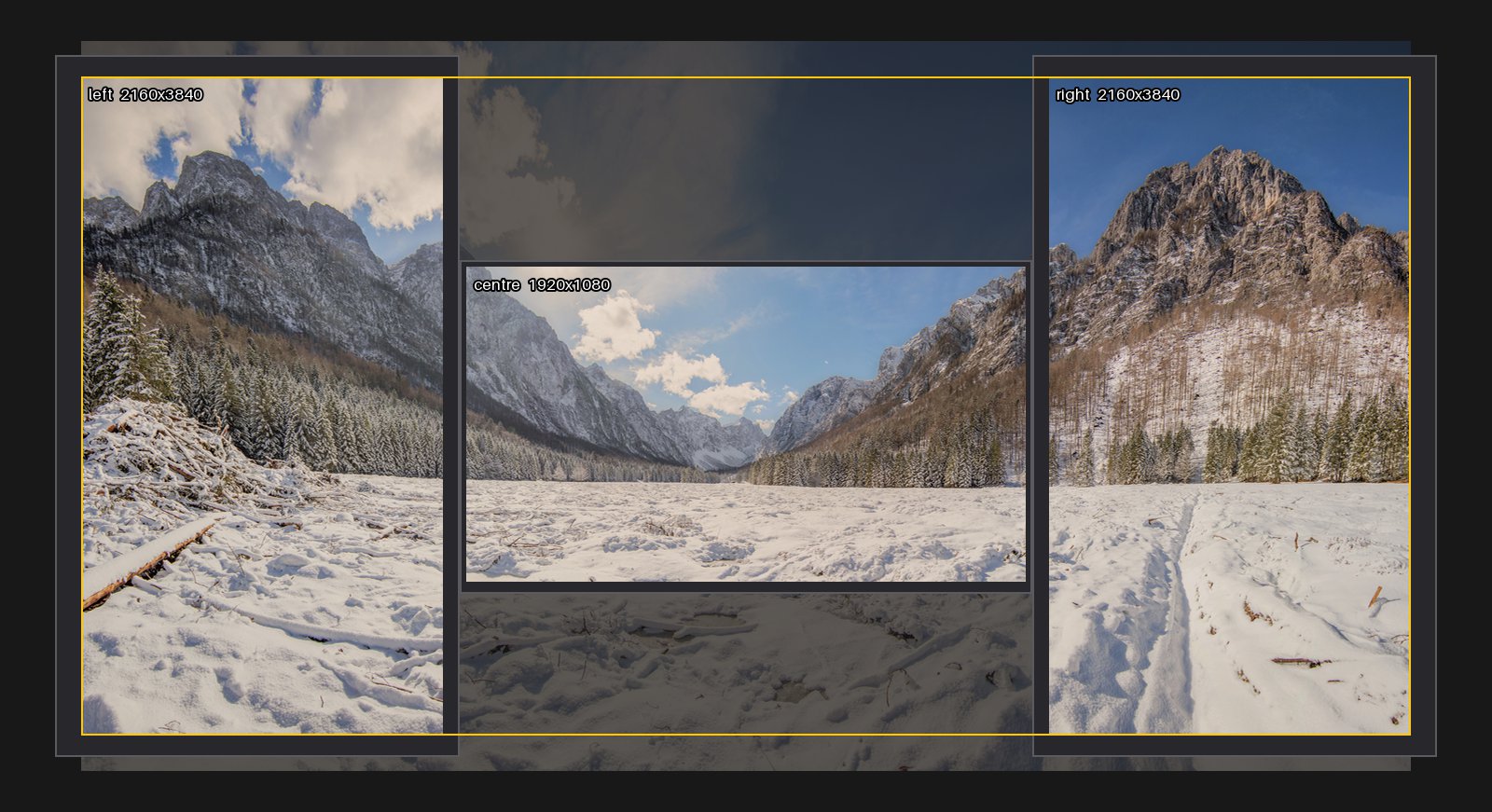
1
|
+
MIT License
|
|
2
|
+
|
|
3
|
+
Copyright (c) 2026 Kieran Ralston
|
|
4
|
+
|
|
5
|
+
Permission is hereby granted, free of charge, to any person obtaining a copy
|
|
6
|
+
of this software and associated documentation files (the "Software"), to deal
|
|
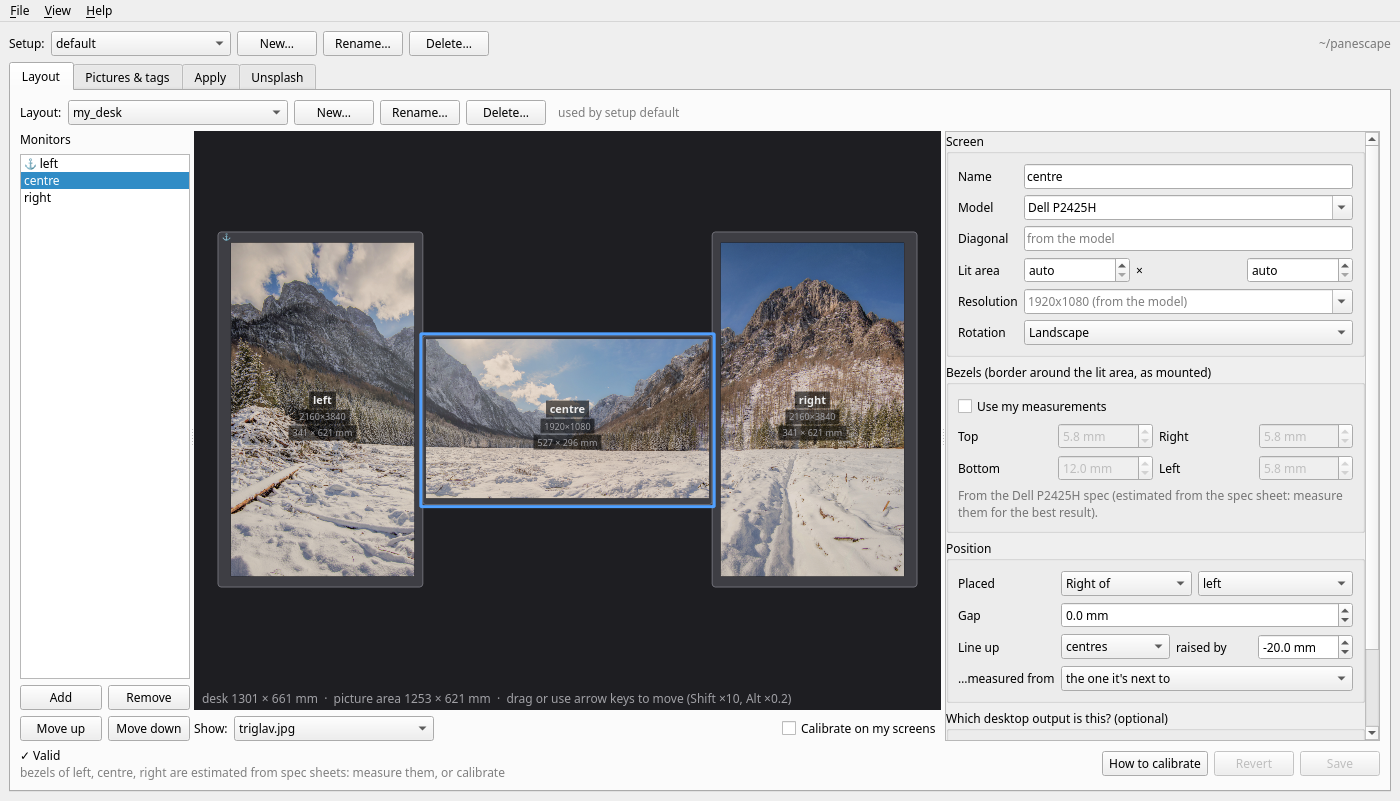
7
|
+
in the Software without restriction, including without limitation the rights
|
|
8
|
+
to use, copy, modify, merge, publish, distribute, sublicense, and/or sell
|
|
9
|
+
copies of the Software, and to permit persons to whom the Software is
|
|
10
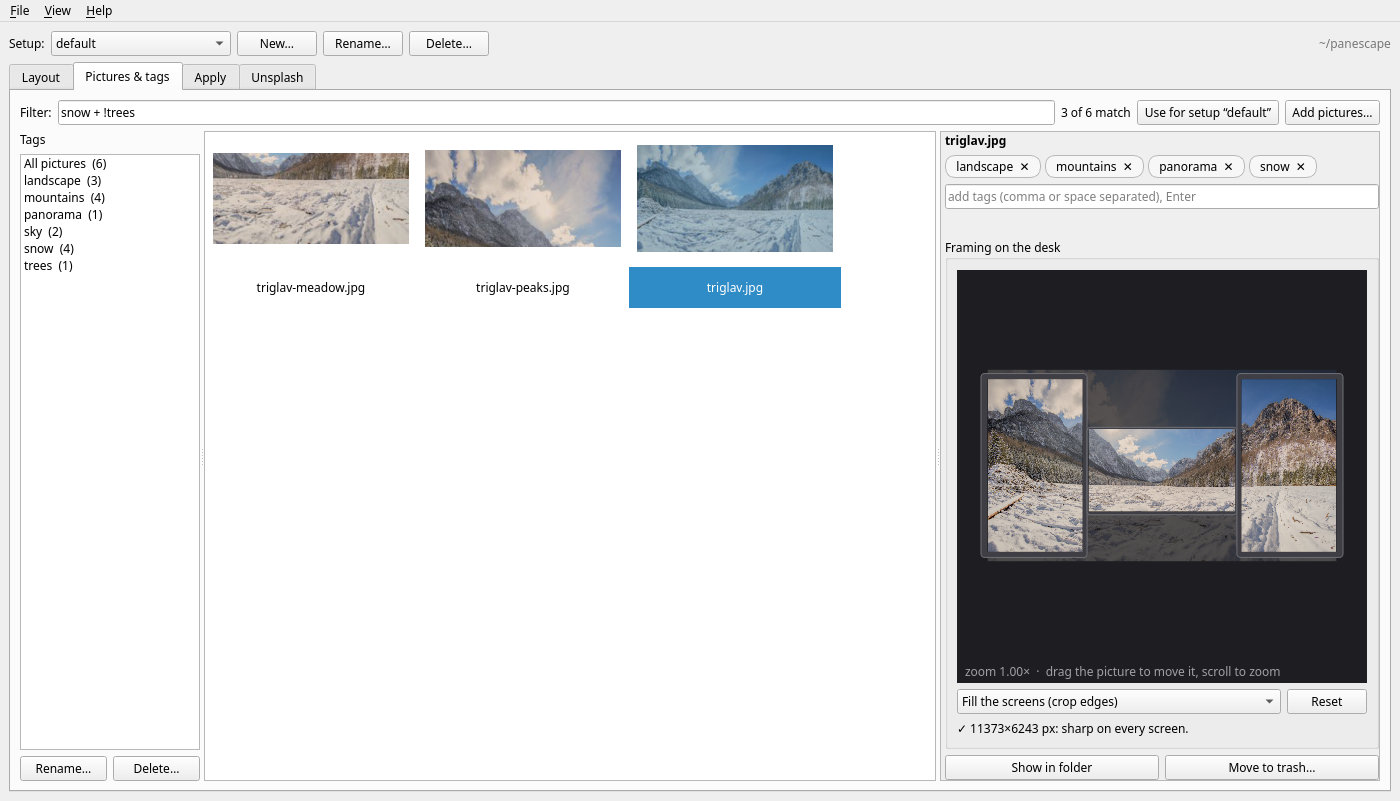
|
+
furnished to do so, subject to the following conditions:
|
|
11
|
+
|
|
12
|
+
The above copyright notice and this permission notice shall be included in all
|
|
13
|
+
copies or substantial portions of the Software.
|
|
14
|
+
|
|
15
|
+
THE SOFTWARE IS PROVIDED "AS IS", WITHOUT WARRANTY OF ANY KIND, EXPRESS OR
|
|
16
|
+
IMPLIED, INCLUDING BUT NOT LIMITED TO THE WARRANTIES OF MERCHANTABILITY,
|
|
17
|
+
FITNESS FOR A PARTICULAR PURPOSE AND NONINFRINGEMENT. IN NO EVENT SHALL THE
|
|
18
|
+
AUTHORS OR COPYRIGHT HOLDERS BE LIABLE FOR ANY CLAIM, DAMAGES OR OTHER
|
|
19
|
+
LIABILITY, WHETHER IN AN ACTION OF CONTRACT, TORT OR OTHERWISE, ARISING FROM,
|
|
20
|
+
OUT OF OR IN CONNECTION WITH THE SOFTWARE OR THE USE OR OTHER DEALINGS IN THE
|
|
21
|
+
SOFTWARE.
|
panescape-0.1.0/PKG-INFO
ADDED
|
@@ -0,0 +1,619 @@
|
|
|
1
|
+
Metadata-Version: 2.4
|
|
2
|
+
Name: panescape
|
|
3
|
+
Version: 0.1.0
|
|
4
|
+
Summary: True-to-scale wallpapers across monitors of different sizes, resolutions and orientations (Linux: GNOME, KDE Plasma, sway, Hyprland)
|
|
5
|
+
Author: Kieran Ralston
|
|
6
|
+
License-Expression: MIT
|
|
7
|
+
Project-URL: Homepage, https://github.com/keo99/panescape
|
|
8
|
+
Project-URL: Issues, https://github.com/keo99/panescape/issues
|
|
9
|
+
Keywords: wallpaper,multi-monitor,gnome,slideshow,bezel
|
|
10
|
+
Classifier: Environment :: Console
|
|
11
|
+
Classifier: Environment :: X11 Applications :: Qt
|
|
12
|
+
Classifier: Operating System :: POSIX :: Linux
|
|
13
|
+
Classifier: Programming Language :: Python :: 3
|
|
14
|
+
Classifier: Topic :: Desktop Environment
|
|
15
|
+
Requires-Python: >=3.10
|
|
16
|
+
Description-Content-Type: text/markdown
|
|
17
|
+
License-File: LICENSE
|
|
18
|
+
Requires-Dist: Pillow>=10.1
|
|
19
|
+
Requires-Dist: PyYAML>=6
|
|
20
|
+
Requires-Dist: ruamel.yaml>=0.18
|
|
21
|
+
Provides-Extra: gui
|
|
22
|
+
Requires-Dist: PySide6-Essentials>=6.5; extra == "gui"
|
|
23
|
+
Requires-Dist: keyring>=23; extra == "gui"
|
|
24
|
+
Provides-Extra: test
|
|
25
|
+
Requires-Dist: pytest>=7; extra == "test"
|
|
26
|
+
Provides-Extra: dev
|
|
27
|
+
Requires-Dist: pytest>=7; extra == "dev"
|
|
28
|
+
Requires-Dist: ruff>=0.6; extra == "dev"
|
|
29
|
+
Dynamic: license-file
|
|
30
|
+
|
|
31
|
+
# panescape
|
|
32
|
+
|
|
33
|
+
[](https://github.com/keo99/panescape/actions/workflows/ci.yml)
|
|
34
|
+
|
|
35
|
+
**True-to-scale wallpapers for multi-monitor setups on Linux.** Your monitors
|
|
36
|
+
become panes of one window onto a single picture, even when they differ in size,
|
|
37
|
+
resolution, orientation and height.
|
|
38
|
+
|
|
39
|
+
|
|
40
|
+
|
|
41
|
+
Most spanning tools work in **pixels**. A 28" 4K panel packs about 1.7× more
|
|
42
|
+
pixels per millimetre than a 24" 1080p panel, so with pixel spanning the picture
|
|
43
|
+
changes size at every screen edge and the horizon breaks. panescape works in
|
|
44
|
+
**millimetres**. It uses each panel's real lit area, the bezels, the gaps and the
|
|
45
|
+
vertical offsets you measure. Then it resamples each monitor's slice to that
|
|
46
|
+
monitor's native resolution.
|
|
47
|
+
|
|
48
|
+
## Quick start
|
|
49
|
+
|
|
50
|
+
```bash
|
|
51
|
+
pipx install panescape
|
|
52
|
+
mkdir ~/panescape && cd ~/panescape
|
|
53
|
+
panescape init # pictures/, configurations/, backgrounds/, setup.yml
|
|
54
|
+
panescape detect --write my_desk # config skeleton from your current displays
|
|
55
|
+
$EDITOR configurations/my_desk.yml # set gaps, offsets, bezels (mm)
|
|
56
|
+
panescape calibrate --watch # test pattern; re-applies on every save
|
|
57
|
+
cp ~/Pictures/some-wide-photo.jpg pictures/
|
|
58
|
+
panescape make # check backgrounds/my_desk/*/preview.jpg
|
|
59
|
+
panescape apply
|
|
60
|
+
```
|
|
61
|
+
|
|
62
|
+
Prefer a window? `pipx install 'panescape[gui]'`,
|
|
63
|
+
then run `panescape-gui` (see [The window](#the-window)).
|
|
64
|
+
|
|
65
|
+
`preview.jpg` draws your desk to scale. The yellow outline is the part of the photo that was used:
|
|
66
|
+
|
|
67
|
+
|
|
68
|
+
|
|
69
|
+
**Status:** applies wallpapers and slideshows on **GNOME** (tested on GNOME 50 /
|
|
70
|
+
Ubuntu 26.04, Wayland, with fractional scaling), **KDE Plasma 6** (tested with Plasma 6.6; see
|
|
71
|
+
[KDE Plasma](#kde-plasma)), and **sway** and **Hyprland** (tested with sway
|
|
72
|
+
1.11, and Hyprland 0.53 with hyprpaper 0.8; see [sway and Hyprland](#sway-and-hyprland)). On other desktops panescape makes
|
|
73
|
+
native-resolution images per monitor for you to set with your own tool (see
|
|
74
|
+
[Other desktops](#other-desktops)). Python ≥ 3.10; the dependencies are
|
|
75
|
+
Pillow, PyYAML and ruamel.yaml, plus PySide6 for the optional window.
|
|
76
|
+
|
|
77
|
+
### Why not HydraPaper or a "spanned" wallpaper?
|
|
78
|
+
|
|
79
|
+
Those work too. You give them one image per monitor, or one image stretched over
|
|
80
|
+
the desktop, and they place it in pixel space. panescape decides *what each
|
|
81
|
+
monitor should show* from the physical layout, and builds the images those
|
|
82
|
+
tools need. On GNOME it applies them directly, slideshows included, with
|
|
83
|
+
nothing running in the background.
|
|
84
|
+
|
|
85
|
+
If you used HydraPaper before, switch off its daemon in HydraPaper's
|
|
86
|
+
preferences. Otherwise it re-applies its own wallpaper whenever the displays
|
|
87
|
+
change, for example when the monitors wake up. panescape warns when it sees
|
|
88
|
+
HydraPaper's daemon or Variety running.
|
|
89
|
+
|
|
90
|
+
## The window
|
|
91
|
+
|
|
92
|
+
```bash
|
|
93
|
+
pipx install 'panescape[gui]'
|
|
94
|
+
panescape-gui # or: panescape gui
|
|
95
|
+
```
|
|
96
|
+
|
|
97
|
+
|
|
98
|
+
|
|
99
|
+
It edits the same files as the command line, keeping your comments, so you
|
|
100
|
+
can switch between the two whenever you like.
|
|
101
|
+
|
|
102
|
+
- **Setup** (top bar): choose which [setup](#setupyml) is active, or create,
|
|
103
|
+
rename and delete setups.
|
|
104
|
+
- **Layout:** pick the configuration the active setup uses, or make a new one
|
|
105
|
+
from the monitors connected now, as a copy, or from scratch. Each monitor has
|
|
106
|
+
a form for its model or size, resolution, rotation, bezels, position and gap.
|
|
107
|
+
Mistakes show up as you type, not when you apply.
|
|
108
|
+
- **Drag monitors** on the to-scale desk, or select one and use the arrow keys
|
|
109
|
+
(0.5 mm steps; Shift ×10, Alt ×0.2). This changes the `gap` and the
|
|
110
|
+
`v_pos`/`h_pos` offsets.
|
|
111
|
+
- **Show** a picture or the calibration pattern across the desk.
|
|
112
|
+
- **Calibrate on my screens** puts the [test pattern](#calibrating) on your
|
|
113
|
+
real monitors and redraws it as you drag or type. Your wallpaper comes back
|
|
114
|
+
when you switch it off or close the window.
|
|
115
|
+
|
|
116
|
+
|
|
117
|
+
|
|
118
|
+
The **Pictures & tags** tab:
|
|
119
|
+
|
|
120
|
+
- **Add pictures** with the button, or drop files from your file manager onto
|
|
121
|
+
the grid. They're copied into `pictures/`.
|
|
122
|
+
- **Tag** the selected pictures: type tags and press Enter. Click a tag's ✕ to
|
|
123
|
+
remove it. With several pictures selected, a tag that only some of them have
|
|
124
|
+
shows as e.g. `sea 2/5`; click it to give it to all of them.
|
|
125
|
+
- **Manage tags** in the sidebar, which shows how many pictures have each one.
|
|
126
|
+
Click a tag to filter by it, or Ctrl+click to add it to the filter. Rename a
|
|
127
|
+
tag to an existing one to merge them.
|
|
128
|
+
- **Filter** with the same syntax as `setup.yml` (`landscape + water +
|
|
129
|
+
!mountains`). **Use for setup** saves the filter to the active setup.
|
|
130
|
+
- **Frame** a picture: drag it across the desk preview and scroll to zoom. The
|
|
131
|
+
parts that will be cut off show faintly, and a note warns when a screen would
|
|
132
|
+
show the picture enlarged (soft). The framing is saved in
|
|
133
|
+
`pictures/crops.yml` and used by every setup.
|
|
134
|
+
|
|
135
|
+
If a panescape wallpaper is on the desktop, it updates a couple of seconds
|
|
136
|
+
after a change.
|
|
137
|
+
|
|
138
|
+
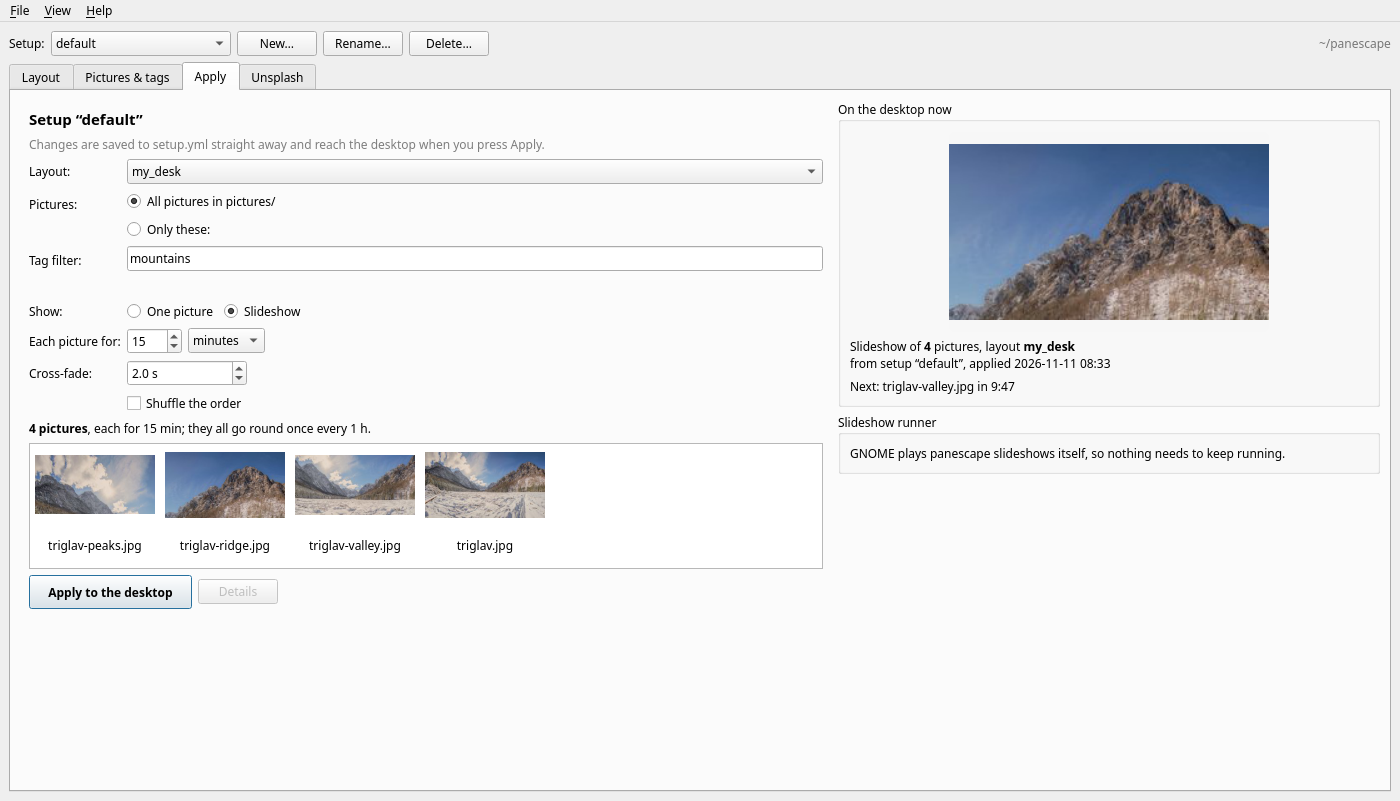
|
|
139
|
+
|
|
140
|
+
The **Apply** tab:
|
|
141
|
+
|
|
142
|
+
- **Edit the active setup:** its layout, all pictures or a chosen list
|
|
143
|
+
(names or patterns like `city-*`), the tag filter, one picture or a
|
|
144
|
+
slideshow, how long each picture stays, the cross-fade and shuffling. Each
|
|
145
|
+
change is saved to `setup.yml` straight away, with your comments kept.
|
|
146
|
+
- **Check the selection:** the tab shows which pictures the setup picks and how
|
|
147
|
+
long a full round of the slideshow takes.
|
|
148
|
+
- **Apply to the desktop** puts it on your screens. **Details** shows the log.
|
|
149
|
+
- **On the desktop now:** the picture showing, what comes next and when, and
|
|
150
|
+
a note when the setup has changed since it was applied.
|
|
151
|
+
- **Slideshow runner** (sway, Hyprland, KDE): see whether it's running, start
|
|
152
|
+
or stop it, and have it start when you log in. On sway and Hyprland the tab
|
|
153
|
+
gives you the line to add to your config, with a Copy button, and notices
|
|
154
|
+
when your config already has it. It also lets you choose the wallpaper tool
|
|
155
|
+
(`setter`).
|
|
156
|
+
|
|
157
|
+
|
|
158
|
+
|
|
159
|
+
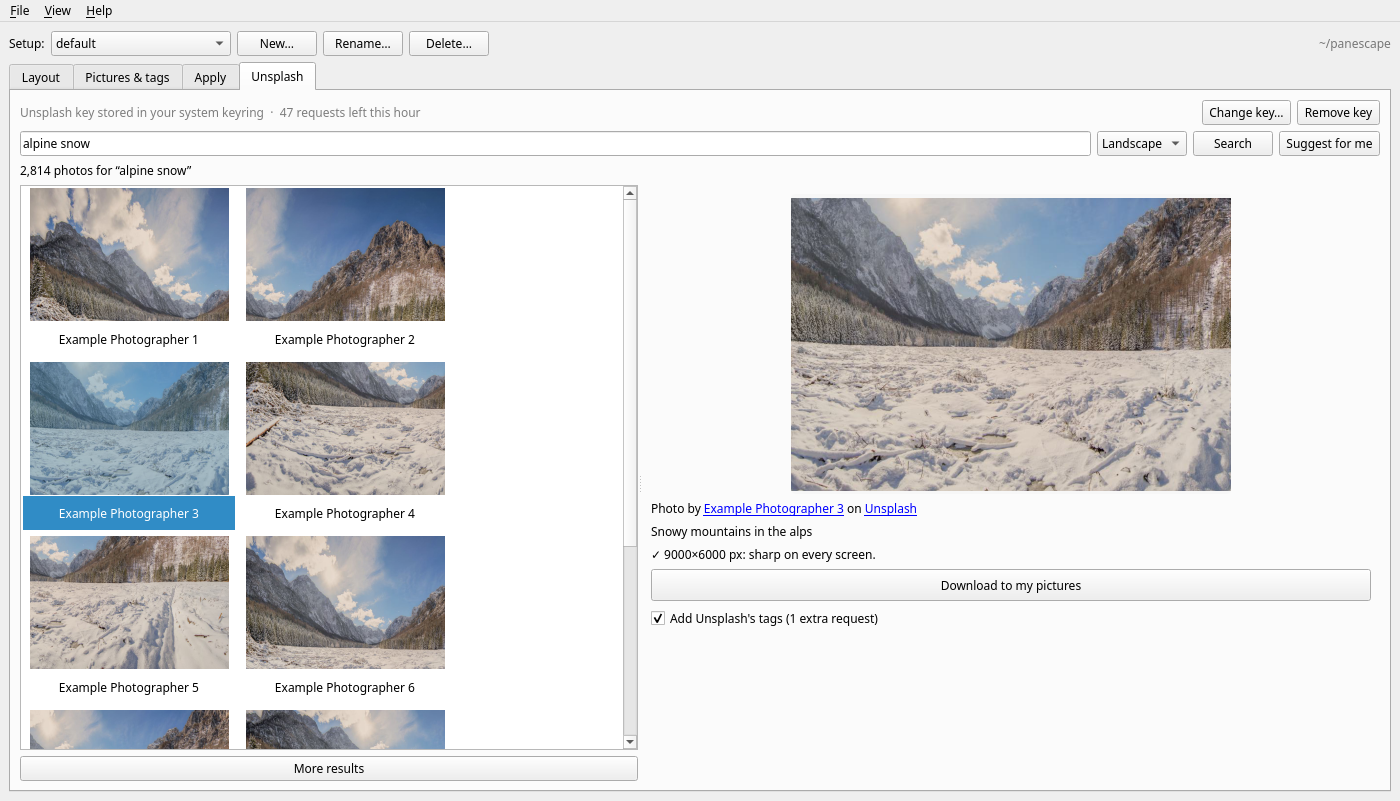
The **Unsplash** tab finds new pictures (the screenshot shows made-up sample
|
|
160
|
+
results):
|
|
161
|
+
|
|
162
|
+
- **Search** Unsplash (landscape photos by default, since they suit a wide
|
|
163
|
+
desk), or press **Suggest for me** for photos like the ones you have, based
|
|
164
|
+
on your most used tags. Photos you already have are left out of the
|
|
165
|
+
suggestions.
|
|
166
|
+
- **Choose a photo** to see it larger, with its photographer and a note on
|
|
167
|
+
whether it's sharp enough for your desk.
|
|
168
|
+
- **Download to my pictures** saves it into `pictures/` (named like
|
|
169
|
+
`ann-lee-Zx3abcDEF12-unsplash.jpg`). The photo's Unsplash tags are added,
|
|
170
|
+
minus generic ones like "hd wallpapers", and the credit goes in
|
|
171
|
+
`pictures/credits.yml`. The Pictures tab then shows "Photo by … on Unsplash".
|
|
172
|
+
|
|
173
|
+
### Your Unsplash access key
|
|
174
|
+
|
|
175
|
+
Searching needs a free key of your own: create an application at
|
|
176
|
+
[unsplash.com/oauth/applications](https://unsplash.com/oauth/applications) and
|
|
177
|
+
paste its **Access Key** (not the Secret key) into the tab. A new key allows 50
|
|
178
|
+
requests an hour, and search results are cached for an hour to save them.
|
|
179
|
+
Showing pictures doesn't count, and neither does the image file itself.
|
|
180
|
+
A download uses one request for the download report Unsplash requires,
|
|
181
|
+
plus one more with **Add Unsplash's tags** ticked, because search results
|
|
182
|
+
don't include tags. Unticked, the picture is tagged from your search words
|
|
183
|
+
and the photo's description instead.
|
|
184
|
+
|
|
185
|
+
How panescape looks after the key:
|
|
186
|
+
|
|
187
|
+
- **Checked before it's saved:** panescape makes one request with the key
|
|
188
|
+
first, and stores it only if Unsplash accepts it.
|
|
189
|
+
- **Where it's stored:** in your system keyring (GNOME Keyring, KWallet, …)
|
|
190
|
+
if you have one; otherwise in `~/.config/panescape/unsplash-key`, which
|
|
191
|
+
only you can read. The environment variable `PANESCAPE_UNSPLASH_KEY`, if
|
|
192
|
+
set, takes precedence.
|
|
193
|
+
- **Where it never goes:** your project folder, `setup.yml`, the window's
|
|
194
|
+
settings or the cache. The window never shows it again after you save it.
|
|
195
|
+
- **Who receives it:** only `https://api.unsplash.com`, in a request header,
|
|
196
|
+
never in a web address. panescape refuses redirects to anywhere else and
|
|
197
|
+
removes the key from any error message.
|
|
198
|
+
- **Removing it:** **Remove key** deletes it from the keyring and from the
|
|
199
|
+
file.
|
|
200
|
+
|
|
201
|
+
Following Unsplash's API guidelines, pictures are shown straight from
|
|
202
|
+
Unsplash's own links (never copied into a cache), every download is reported
|
|
203
|
+
to Unsplash so the photographer gets credit, and photographers and Unsplash
|
|
204
|
+
are credited with links.
|
|
205
|
+
|
|
206
|
+
The Unsplash tab is for personal use with your own key: each person makes
|
|
207
|
+
their own application and keeps within its limits. panescape is not
|
|
208
|
+
affiliated with or endorsed by Unsplash.
|
|
209
|
+
|
|
210
|
+
## How a project folder looks
|
|
211
|
+
|
|
212
|
+
```
|
|
213
|
+
pictures/ your source images (+ tags.yml, crops.yml, credits.yml)
|
|
214
|
+
configurations/my_desk.yml physical description of a monitor setup
|
|
215
|
+
setup.yml what `panescape apply` puts on the desktop
|
|
216
|
+
backgrounds/<config>/<image>/
|
|
217
|
+
1_left.png 2_centre.png … one native-resolution image per monitor
|
|
218
|
+
preview.jpg to-scale picture of the desk with bezels
|
|
219
|
+
meta.json geometry used (mm, source pixel boxes, upscale)
|
|
220
|
+
gnome-….png the combined image GNOME displays
|
|
221
|
+
```
|
|
222
|
+
|
|
223
|
+
Commands run in the current folder. Point them elsewhere with `--root DIR` or
|
|
224
|
+
`PANESCAPE_ROOT`. Examples are in [`examples/`](https://github.com/keo99/panescape/tree/main/examples/).
|
|
225
|
+
|
|
226
|
+
## Usage
|
|
227
|
+
|
|
228
|
+
```bash
|
|
229
|
+
panescape make # slice every image in pictures/ (cached)
|
|
230
|
+
panescape make sunset.jpg --anchor top # one image, cut from the top
|
|
231
|
+
panescape make --apply # make, then apply (several images = slideshow)
|
|
232
|
+
|
|
233
|
+
panescape apply # apply what setup.yml describes
|
|
234
|
+
panescape apply sunset.jpg # just this image
|
|
235
|
+
panescape apply a.jpg b.jpg "city-*" --interval 10m --transition 2s --shuffle
|
|
236
|
+
panescape add new.jpg # pin an image into the current slideshow
|
|
237
|
+
panescape sync # re-check tags / pictures / setup.yml and update
|
|
238
|
+
panescape tag new.jpg -a landscape # tag an image (updates a running slideshow)
|
|
239
|
+
panescape tags 'landscape + !night' # list images matching a filter
|
|
240
|
+
panescape calibrate --watch # millimetre test pattern while you tune the config
|
|
241
|
+
panescape status # configs, what's been made, what's applied
|
|
242
|
+
panescape setup # list the setups in setup.yml (* = active)
|
|
243
|
+
panescape setup evening --apply # switch to another setup and apply it
|
|
244
|
+
panescape gui # open the window
|
|
245
|
+
panescape-apply … # same as `panescape apply …`
|
|
246
|
+
```
|
|
247
|
+
|
|
248
|
+
Use `--dry-run` to build everything without changing the wallpaper. Use `-c NAME` to
|
|
249
|
+
pick a configuration, and `--force` to re-render. For the best result, use a
|
|
250
|
+
source image at least as many pixels wide as your desk needs. `make` warns
|
|
251
|
+
when a screen would be enlarged.
|
|
252
|
+
|
|
253
|
+
## Configuration (`configurations/*.yml`)
|
|
254
|
+
|
|
255
|
+
Lengths are in mm unless you give a unit (`28in`, `2.5cm`). For a single row,
|
|
256
|
+
list the monitors **left to right**. Stacks, grids and other arrangements are
|
|
257
|
+
covered in [Layouts](#layouts-rows-stacks-and-grids).
|
|
258
|
+
|
|
259
|
+
```yaml
|
|
260
|
+
name: desk_H
|
|
261
|
+
monitors:
|
|
262
|
+
- name: left
|
|
263
|
+
model: Samsung U28E590 # built-in specs (see src/panescape/models.py)
|
|
264
|
+
serial: ABC1234567 # pin to a physical screen (from `panescape detect`)
|
|
265
|
+
rotation: portrait-right # landscape | portrait-right | portrait-left | landscape-flipped
|
|
266
|
+
bezel: {left: 24, right: 16, top: 20, bottom: 20} # measured, as mounted
|
|
267
|
+
|
|
268
|
+
- name: centre
|
|
269
|
+
resolution: FHD # or 1920x1080, 4K, QHD, …; always the panel's native mode
|
|
270
|
+
size: 24in # diagonal; or active_area: [527.04, 296.46] (landscape, mm)
|
|
271
|
+
bezel: 6 # all sides; or [top, right, bottom, left]
|
|
272
|
+
gap: 0 # mm from the previous housing (negative = overlap)
|
|
273
|
+
v_pos: -20 # mm, + is up, relative to the first monitor
|
|
274
|
+
v_align: center # measure v_pos between centres | tops | bottoms
|
|
275
|
+
|
|
276
|
+
- name: right
|
|
277
|
+
model: Samsung U28E590
|
|
278
|
+
rotation: portrait-left
|
|
279
|
+
v_pos: 0
|
|
280
|
+
|
|
281
|
+
crop:
|
|
282
|
+
anchor: center # center, top, bottom-left, … or [x, y] in 0..1
|
|
283
|
+
zoom: 1.0 # > 1 crops tighter
|
|
284
|
+
fit: cover # cover (fill and crop) | contain (whole image, bars)
|
|
285
|
+
output:
|
|
286
|
+
format: png # png | jpg | webp
|
|
287
|
+
# png_compression: 1 # 0-9: higher = smaller files, much slower (same pixels)
|
|
288
|
+
```
|
|
289
|
+
|
|
290
|
+
Every monitor key:
|
|
291
|
+
|
|
292
|
+
| key | meaning |
|
|
293
|
+
|---|---|
|
|
294
|
+
| `name` | Label, used in output file names |
|
|
295
|
+
| `model` | Looked up in the built-in database. Supplies resolution, exact active area and estimated bezels |
|
|
296
|
+
| `resolution` | Native mode, e.g. `3840x2160`, `4K` or `FHD` |
|
|
297
|
+
| `size` | Diagonal (default unit: inches). Used only if there's no `model` or `active_area` |
|
|
298
|
+
| `active_area` | `[w, h]` of the lit area in mm, landscape. This is the most precise option |
|
|
299
|
+
| `rotation` / `orientation` | GNOME Settings name, or `vertical` / `horizontal` |
|
|
300
|
+
| `bezel` | Number, `[t, r, b, l]`, or `{left, right, top, bottom, x, y}`, measured **as mounted** |
|
|
301
|
+
| `right_of` / `left_of` / `below` / `above` | Place this monitor next to another one, by name (see [Layouts](#layouts-rows-stacks-and-grids)) |
|
|
302
|
+
| `gap` | Distance between this housing and the one it's placed next to (negative = overlap) |
|
|
303
|
+
| `v_pos`, `v_align`, `v_ref` | Side-by-side monitors: vertical offset (+ is up), which edges it's measured between (`center`/`top`/`bottom`), and the reference monitor |
|
|
304
|
+
| `h_pos`, `h_align`, `h_ref` | Stacked monitors: horizontal offset (+ is right), which edges it's measured between (`center`/`left`/`right`), and the reference monitor |
|
|
305
|
+
| `position` | `[x, y]` of the housing's top-left in mm (y down), for arrangements the keys above can't describe |
|
|
306
|
+
| `serial` / `connector` / `product` | Pin to a specific screen. Without these, screens are matched to the desktop by their arrangement |
|
|
307
|
+
|
|
308
|
+
`defaults:` at the top level sets `gap`, `bezel`, `v_align` or `h_align` for every monitor.
|
|
309
|
+
|
|
310
|
+
**Precision tips**
|
|
311
|
+
|
|
312
|
+
1. Use `model` or `active_area`. Nominal diagonals are rounded, and a "28 inch"
|
|
313
|
+
panel is not exactly 28 inches.
|
|
314
|
+
2. Measure your bezels with a ruler. Spec-sheet bezels are estimates, because
|
|
315
|
+
manufacturers rarely split top and bottom.
|
|
316
|
+
3. Measure `v_pos` / `h_pos` between the edges that are easiest to measure, and set `v_align` / `h_align` to match.
|
|
317
|
+
4. Look at `preview.jpg`. It is drawn to scale.
|
|
318
|
+
5. Finish with `panescape calibrate --watch` (see [Calibrating](#calibrating)).
|
|
319
|
+
|
|
320
|
+
## Layouts: rows, stacks and grids
|
|
321
|
+
|
|
322
|
+
The first monitor is the anchor. Every other monitor is placed relative to
|
|
323
|
+
another one. The order in the file doesn't matter, as long as the references
|
|
324
|
+
don't go round in a circle.
|
|
325
|
+
|
|
326
|
+
| arrangement | how to write it |
|
|
327
|
+
|---|---|
|
|
328
|
+
| A row | List the monitors left to right with no placement key. Each sits right of the previous one, and `v_pos` is measured from the **first** monitor |
|
|
329
|
+
| Beside a monitor | `right_of: NAME` or `left_of: NAME`, plus `gap`. `v_pos` is measured from NAME, unless `v_ref` says otherwise |
|
|
330
|
+
| Above or below | `below: NAME` or `above: NAME`, plus `gap` (vertical) and `h_pos` / `h_align` (horizontal offset from NAME, or `h_ref`) |
|
|
331
|
+
| Anything else | `position: [x, y]`, the housing's top-left in mm |
|
|
332
|
+
|
|
333
|
+
A 2×2 grid ([full example](https://github.com/keo99/panescape/blob/main/examples/configurations/grid-2x2.yml)):
|
|
334
|
+
|
|
335
|
+
```yaml
|
|
336
|
+
monitors:
|
|
337
|
+
- name: top-left
|
|
338
|
+
model: …
|
|
339
|
+
- name: top-right
|
|
340
|
+
right_of: top-left
|
|
341
|
+
gap: 1
|
|
342
|
+
v_align: top # tops level
|
|
343
|
+
- name: bottom-left
|
|
344
|
+
below: top-left
|
|
345
|
+
gap: 2
|
|
346
|
+
h_align: left # left edges level
|
|
347
|
+
- name: bottom-right
|
|
348
|
+
right_of: bottom-left
|
|
349
|
+
gap: 1
|
|
350
|
+
v_align: top
|
|
351
|
+
```
|
|
352
|
+
|
|
353
|
+
Other examples: [a laptop under a monitor](https://github.com/keo99/panescape/blob/main/examples/configurations/laptop-under-monitor.yml),
|
|
354
|
+
[portrait-landscape-portrait](https://github.com/keo99/panescape/blob/main/examples/configurations/portrait-landscape-portrait.yml).
|
|
355
|
+
|
|
356
|
+
`panescape detect --write NAME` writes this structure for you from the desktop's
|
|
357
|
+
arrangement (rows, stacks and grids), with the measured numbers left at 0. When
|
|
358
|
+
applying, config monitors are matched to the desktop's screens by **arrangement**,
|
|
359
|
+
so a grid pairs up correctly. Use `serial:` to pin a monitor if two arrangements
|
|
360
|
+
could be confused.
|
|
361
|
+
|
|
362
|
+
## Calibrating
|
|
363
|
+
|
|
364
|
+
In the window, tick **Calibrate on my screens** on the Layout tab and drag
|
|
365
|
+
the monitors until the lines meet. From the command line:
|
|
366
|
+
|
|
367
|
+
```bash
|
|
368
|
+
panescape calibrate --watch # Ctrl+C puts your wallpaper back
|
|
369
|
+
panescape calibrate # apply once; undo with --restore (or panescape apply)
|
|
370
|
+
```
|
|
371
|
+
|
|
372
|
+
This puts a test pattern across your screens, drawn in physical millimetres
|
|
373
|
+
from your configuration:
|
|
374
|
+
|
|
375
|
+
- **Cyan horizontal and yellow vertical lines** every 50 mm.
|
|
376
|
+
- **Orange and green 45° lines** every 100 mm.
|
|
377
|
+
- **A magenta circle.**
|
|
378
|
+
- **Rulers** along every screen edge, in desk millimetres. On screens dense
|
|
379
|
+
enough, they have 1 mm ticks.
|
|
380
|
+
- **Each screen's settings**, plus the configured distance to its neighbours' lit
|
|
381
|
+
areas ("lit gap").
|
|
382
|
+
|
|
383
|
+
With `--watch`, editing and saving the configuration re-applies the pattern in
|
|
384
|
+
about a second. When the config matches reality, every line runs straight
|
|
385
|
+
across the bezels. To fix it:
|
|
386
|
+
|
|
387
|
+
1. **Spacing.** Measure the lit gaps with a ruler and adjust `gap` (or `bezel`)
|
|
388
|
+
until they match the numbers shown.
|
|
389
|
+
2. **Side-by-side screens.** Read both edge rulers at the same physical height,
|
|
390
|
+
then: `v_pos += this screen's reading − the other screen's reading`.
|
|
391
|
+
3. **Stacked screens.** Use the yellow lines and the top/bottom rulers, then:
|
|
392
|
+
`h_pos += the other screen's reading − this screen's reading`.
|
|
393
|
+
4. **Check.** The diagonals and the circle should now be straight and continuous.
|
|
394
|
+
|
|
395
|
+
**Angled screens:** if your outer screens are turned or tilted towards you,
|
|
396
|
+
they don't lie in one plane, so the ruler readings don't line up exactly.
|
|
397
|
+
Instead, tune from your seat, matching lines near eye level. Lines far above or
|
|
398
|
+
below that height will drift slightly on the angled screens.
|
|
399
|
+
|
|
400
|
+
Without a supported desktop, the pattern is written as per-monitor images in
|
|
401
|
+
`backgrounds/<config>/calibration/`.
|
|
402
|
+
|
|
403
|
+
## `setup.yml`
|
|
404
|
+
|
|
405
|
+
```yaml
|
|
406
|
+
configuration: desk_H
|
|
407
|
+
mode: slideshow # single | slideshow
|
|
408
|
+
images: all # or a list of names / globs / {file, anchor, zoom}
|
|
409
|
+
interval: 15m
|
|
410
|
+
transition: 2s
|
|
411
|
+
shuffle: false
|
|
412
|
+
```
|
|
413
|
+
|
|
414
|
+
Images that aren't made yet, or have changed, are rendered automatically.
|
|
415
|
+
|
|
416
|
+
### Several setups
|
|
417
|
+
|
|
418
|
+
`setup.yml` can hold several named setups, for example a calm one for work
|
|
419
|
+
and a colourful one for the evening:
|
|
420
|
+
|
|
421
|
+
```yaml
|
|
422
|
+
active: work # what apply / sync / the slideshow follow
|
|
423
|
+
setter: swww # keys out here are shared by every setup
|
|
424
|
+
setups:
|
|
425
|
+
work:
|
|
426
|
+
configuration: desk_H
|
|
427
|
+
filter: minimal + !people
|
|
428
|
+
interval: 1h
|
|
429
|
+
evening:
|
|
430
|
+
configuration: desk_H
|
|
431
|
+
filter: landscape + sunset
|
|
432
|
+
interval: 10m
|
|
433
|
+
```
|
|
434
|
+
|
|
435
|
+
Switch with `panescape setup evening` (add `--apply` to apply straight away),
|
|
436
|
+
`panescape apply --setup evening`, or the Setup menu in the window. A
|
|
437
|
+
`setup.yml` without `setups:`, like the one above, is a single setup called
|
|
438
|
+
`default`. Creating a second setup in the window converts the file for you,
|
|
439
|
+
and comments are kept.
|
|
440
|
+
|
|
441
|
+
## Keeping the slideshow up to date
|
|
442
|
+
|
|
443
|
+
`apply` saves the **selection rule** (`images`, `filter`, `mode`, …), not just the
|
|
444
|
+
list of files that matched it at the time:
|
|
445
|
+
|
|
446
|
+
- `panescape apply` with no images follows `setup.yml`. Each re-check reads
|
|
447
|
+
`setup.yml` again, so edits to it count too. Options you give on the command line
|
|
448
|
+
(e.g. `--filter`, `--interval`) override it and are remembered.
|
|
449
|
+
- `panescape apply a.jpg "city-*" --filter night` follows that rule instead. Globs
|
|
450
|
+
pick up new matching files; file names are fixed.
|
|
451
|
+
|
|
452
|
+
The rule is re-checked by:
|
|
453
|
+
|
|
454
|
+
| command | what happens |
|
|
455
|
+
|---|---|
|
|
456
|
+
| `panescape tag …` | after saving tags, updates the running wallpaper (skip with `--no-sync`) |
|
|
457
|
+
| `panescape sync` | after hand-editing `tags.yml` or `setup.yml`, or adding or deleting pictures |
|
|
458
|
+
| `panescape add IMAGES` / `--filter F` | **pins** images: they stay even if they later stop matching the rule. Adding to a single image turns it into a slideshow |
|
|
459
|
+
|
|
460
|
+
A re-check renders new matches, drops images that stopped matching or were
|
|
461
|
+
deleted, and prints `+`/`-` for each change. It does nothing if the result is
|
|
462
|
+
unchanged. The image that is on screen stays on screen, at the same point in
|
|
463
|
+
its interval, so an update doesn't restart the slideshow. With `shuffle`, existing
|
|
464
|
+
images keep their order and new ones are inserted at random places.
|
|
465
|
+
|
|
466
|
+
A fresh `panescape apply` replaces the rule, clears the pins and starts from
|
|
467
|
+
the first image.
|
|
468
|
+
|
|
469
|
+
## Tags and filters
|
|
470
|
+
|
|
471
|
+
Tags live in `pictures/tags.yml`. You can edit the file by hand or use the CLI:
|
|
472
|
+
|
|
473
|
+
```yaml
|
|
474
|
+
lake-dawn.jpg: [landscape, water]
|
|
475
|
+
alps.jpg: [landscape, mountains, snow]
|
|
476
|
+
"city-*": [urban, night] # globs tag every match
|
|
477
|
+
```
|
|
478
|
+
|
|
479
|
+
```bash
|
|
480
|
+
panescape tag lake-dawn.jpg "beach-*" -a landscape water # -r to remove, --clear to reset
|
|
481
|
+
panescape tags # list images, tags and counts
|
|
482
|
+
panescape tags 'landscape + water + !mountains' # preview a filter
|
|
483
|
+
panescape apply --filter 'landscape + water + !mountains' # one-off, overrides setup.yml
|
|
484
|
+
panescape add --filter beach # pin everything tagged beach right now
|
|
485
|
+
```
|
|
486
|
+
|
|
487
|
+
In `setup.yml`, `filter:` narrows `images:`. Use `images: all` to filter the whole folder.
|
|
488
|
+
|
|
489
|
+
| syntax | meaning |
|
|
490
|
+
|---|---|
|
|
491
|
+
| `a + b`, `a & b`, `a and b`, `a b` | AND |
|
|
492
|
+
| `a \| b`, `a , b`, `a or b` | OR |
|
|
493
|
+
| `!a`, `not a` | NOT (binds tightest) |
|
|
494
|
+
| `( … )` | grouping |
|
|
495
|
+
| `city*` | glob on tag names |
|
|
496
|
+
|
|
497
|
+
Tags are case-insensitive, untagged images match `!x`, and `!*` matches
|
|
498
|
+
pictures with no tags at all. Comments you add to `tags.yml` are kept when the
|
|
499
|
+
command line or the window edits it.
|
|
500
|
+
|
|
501
|
+
## Framing a picture
|
|
502
|
+
|
|
503
|
+
By default each picture is centred and scaled to fill the desk. To frame one
|
|
504
|
+
differently, drag it in the window's Pictures tab, or write it in
|
|
505
|
+
`pictures/crops.yml`:
|
|
506
|
+
|
|
507
|
+
```yaml
|
|
508
|
+
tall-photo.jpg: {anchor: [0.5, 0.2], zoom: 1.2} # higher up, a little closer
|
|
509
|
+
panorama.jpg: {fit: contain} # whole picture, black bars
|
|
510
|
+
```
|
|
511
|
+
|
|
512
|
+
Later settings win: the configuration's `crop:`, then `setup.yml`'s `crop:`,
|
|
513
|
+
then `crops.yml`, then an image entry in `setup.yml`'s `images:` list, then
|
|
514
|
+
`--anchor`/`--zoom`/`--fit` on the command line.
|
|
515
|
+
|
|
516
|
+
## How applying works on GNOME
|
|
517
|
+
|
|
518
|
+
GNOME has one wallpaper for the whole desktop. In `spanned` mode, Mutter
|
|
519
|
+
stretches it over the bounding box of the *logical* monitor layout. Each monitor
|
|
520
|
+
then samples its own part at its own scale factor. panescape builds that
|
|
521
|
+
combined image at the largest scale factor, so HiDPI screens get native pixels,
|
|
522
|
+
and places each monitor's slice in its rectangle. It then sets
|
|
523
|
+
`org.gnome.desktop.background` with gsettings. Slideshows use GNOME's native
|
|
524
|
+
background XML, so nothing runs in the background. If you rearrange your
|
|
525
|
+
displays in Settings, run `panescape apply` again.
|
|
526
|
+
|
|
527
|
+
panescape always calls the system `/usr/bin/gsettings`. Conda and Anaconda put
|
|
528
|
+
their own `gsettings` first on `PATH`. That copy has no dconf backend, so it reports
|
|
529
|
+
success while changing nothing. After setting the wallpaper, panescape reads the
|
|
530
|
+
value back from dconf to check that it was stored.
|
|
531
|
+
|
|
532
|
+
The physical layout (config) and GNOME's arrangement (Settings > Displays) are
|
|
533
|
+
separate. Moving the mouse between screens uses GNOME's arrangement, and the
|
|
534
|
+
picture uses your measured layout.
|
|
535
|
+
|
|
536
|
+
## sway and Hyprland
|
|
537
|
+
|
|
538
|
+
On these compositors every output gets its own native-resolution slice, so no
|
|
539
|
+
combined image is needed. panescape reads the layout from `swaymsg -t get_outputs`
|
|
540
|
+
or `hyprctl monitors -j`. It sets the wallpaper with the first of these tools
|
|
541
|
+
that works:
|
|
542
|
+
|
|
543
|
+
| setter | how |
|
|
544
|
+
|---|---|
|
|
545
|
+
| `sway` | sway's own `output NAME bg FILE fill` (sway runs swaybg itself) |
|
|
546
|
+
| `hyprpaper` | `hyprctl hyprpaper wallpaper` (start hyprpaper in your Hyprland autostart) |
|
|
547
|
+
| `swww` | `swww img --outputs NAME`, with a fade for slideshow transitions (needs `swww-daemon` running) |
|
|
548
|
+
| `swaybg` | a `swaybg` process that panescape starts and replaces |
|
|
549
|
+
|
|
550
|
+
To force one, set `setter: swww` in `setup.yml` or `PANESCAPE_SETTER=swww` in
|
|
551
|
+
the environment.
|
|
552
|
+
|
|
553
|
+
**Slideshows:** these desktops have no synced multi-monitor slideshow, so
|
|
554
|
+
`panescape slideshow` changes every output together on schedule. `apply`
|
|
555
|
+
starts it in the background when you apply a slideshow. Add it to your
|
|
556
|
+
compositor's autostart so it survives logging out:
|
|
557
|
+
|
|
558
|
+
```
|
|
559
|
+
# sway (~/.config/sway/config)
|
|
560
|
+
exec panescape --root ~/panescape slideshow
|
|
561
|
+
# Hyprland
|
|
562
|
+
exec-once = panescape --root ~/panescape slideshow
|
|
563
|
+
```
|
|
564
|
+
|
|
565
|
+
It picks up `apply`, `add`, `sync` and `tag` changes by itself and pauses while
|
|
566
|
+
`calibrate` is running. `panescape slideshow --stop` stops it, and
|
|
567
|
+
`panescape status` shows whether it's running. Everything else (`calibrate`,
|
|
568
|
+
`detect`, tags, rules) works the same as on GNOME.
|
|
569
|
+
|
|
570
|
+
## KDE Plasma
|
|
571
|
+
|
|
572
|
+
Plasma has a wallpaper per screen, so each monitor gets its native slice.
|
|
573
|
+
panescape reads the layout with `kscreen-doctor -j` and sets the wallpapers
|
|
574
|
+
through Plasma's scripting interface (`org.kde.PlasmaShell.evaluateScript` on
|
|
575
|
+
D-Bus), for every activity. Plasma numbers screens instead of naming them, so
|
|
576
|
+
outputs are matched to Plasma's screens by position.
|
|
577
|
+
|
|
578
|
+
**Slideshows:** Plasma's own slideshow runs each screen separately, so it can't
|
|
579
|
+
keep them in step. As on sway and Hyprland, `panescape slideshow` switches all
|
|
580
|
+
screens together. `apply` starts it, and
|
|
581
|
+
`panescape slideshow --autostart` adds a login entry in `~/.config/autostart`
|
|
582
|
+
(`--no-autostart` removes it).
|
|
583
|
+
|
|
584
|
+
## Other desktops
|
|
585
|
+
|
|
586
|
+
`backgrounds/<config>/<image>/N_name.png` are plain per-monitor images that you
|
|
587
|
+
can set with any tool, for example `feh`, Cinnamon or HydraPaper. Backends
|
|
588
|
+
for more desktops are welcome; see `src/panescape/backends/`.
|
|
589
|
+
|
|
590
|
+
## Adding a monitor model
|
|
591
|
+
|
|
592
|
+
Add an entry to `src/panescape/models.py`, using the spec sheet's active area,
|
|
593
|
+
outer size without stand, and the bezels if you've measured them. Then open a PR.
|
|
594
|
+
|
|
595
|
+
## Development
|
|
596
|
+
|
|
597
|
+
```bash
|
|
598
|
+
pip install -e '.[dev,gui]'
|
|
599
|
+
pytest # GUI tests run headless (QT_QPA_PLATFORM=offscreen)
|
|
600
|
+
ruff check .
|
|
601
|
+
python docs/make_images.py # rebuild the README images and the window screenshots
|
|
602
|
+
```
|
|
603
|
+
|
|
604
|
+
The latest unreleased version: `pipx install 'panescape[gui] @ git+https://github.com/keo99/panescape'`.
|
|
605
|
+
|
|
606
|
+
**Releasing:** set `__version__` in `src/panescape/__init__.py`, commit, then
|
|
607
|
+
`git tag v0.1.0 && git push origin main v0.1.0`. The release workflow checks
|
|
608
|
+
that the tag matches the version, runs the tests, and publishes to PyPI.
|
|
609
|
+
|
|
610
|
+
## Credits
|
|
611
|
+
|
|
612
|
+
README images use "Panorama of the valley of the Triglav mountain massif" by
|
|
613
|
+
otrow_photography, released under
|
|
614
|
+
[CC0 1.0](https://creativecommons.org/publicdomain/zero/1.0/) via
|
|
615
|
+
[Wikimedia Commons](https://commons.wikimedia.org/wiki/File:Panorama_of_the_valley_of_the_Triglav_mountain_massif.jpg).
|
|
616
|
+
|
|
617
|
+
## License
|
|
618
|
+
|
|
619
|
+
MIT © Kieran Ralston
|