pacebar 0.1.0__tar.gz
This diff represents the content of publicly available package versions that have been released to one of the supported registries. The information contained in this diff is provided for informational purposes only and reflects changes between package versions as they appear in their respective public registries.
- pacebar-0.1.0/.gitattributes +6 -0
- pacebar-0.1.0/.gitignore +29 -0
- pacebar-0.1.0/LICENSE +21 -0
- pacebar-0.1.0/PKG-INFO +193 -0
- pacebar-0.1.0/README.md +163 -0
- pacebar-0.1.0/docs/images/editor.png +0 -0
- pacebar-0.1.0/docs/images/minimized.png +0 -0
- pacebar-0.1.0/docs/images/strip.png +0 -0
- pacebar-0.1.0/entry.py +13 -0
- pacebar-0.1.0/pacebar.spec +45 -0
- pacebar-0.1.0/pyproject.toml +52 -0
- pacebar-0.1.0/scripts/build.bat +7 -0
- pacebar-0.1.0/scripts/build.sh +6 -0
- pacebar-0.1.0/scripts/run.bat +4 -0
- pacebar-0.1.0/scripts/run.sh +5 -0
- pacebar-0.1.0/src/pacebar/__init__.py +3 -0
- pacebar-0.1.0/src/pacebar/__main__.py +20 -0
- pacebar-0.1.0/src/pacebar/app.py +24 -0
- pacebar-0.1.0/src/pacebar/constants.py +29 -0
- pacebar-0.1.0/src/pacebar/editor/__init__.py +5 -0
- pacebar-0.1.0/src/pacebar/editor/fields.py +91 -0
- pacebar-0.1.0/src/pacebar/editor/row.py +83 -0
- pacebar-0.1.0/src/pacebar/editor/window.py +178 -0
- pacebar-0.1.0/src/pacebar/formatting.py +14 -0
- pacebar-0.1.0/src/pacebar/overlay/__init__.py +5 -0
- pacebar-0.1.0/src/pacebar/overlay/bar.py +80 -0
- pacebar-0.1.0/src/pacebar/overlay/controller.py +154 -0
- pacebar-0.1.0/src/pacebar/overlay/hotkeys.py +112 -0
- pacebar-0.1.0/src/pacebar/overlay/square.py +42 -0
- pacebar-0.1.0/src/pacebar/paths.py +20 -0
- pacebar-0.1.0/src/pacebar/persistence.py +24 -0
- pacebar-0.1.0/src/pacebar/timing.py +94 -0
- pacebar-0.1.0/uv.lock +412 -0
pacebar-0.1.0/.gitignore
ADDED
|
@@ -0,0 +1,29 @@
|
|
|
1
|
+
# Python
|
|
2
|
+
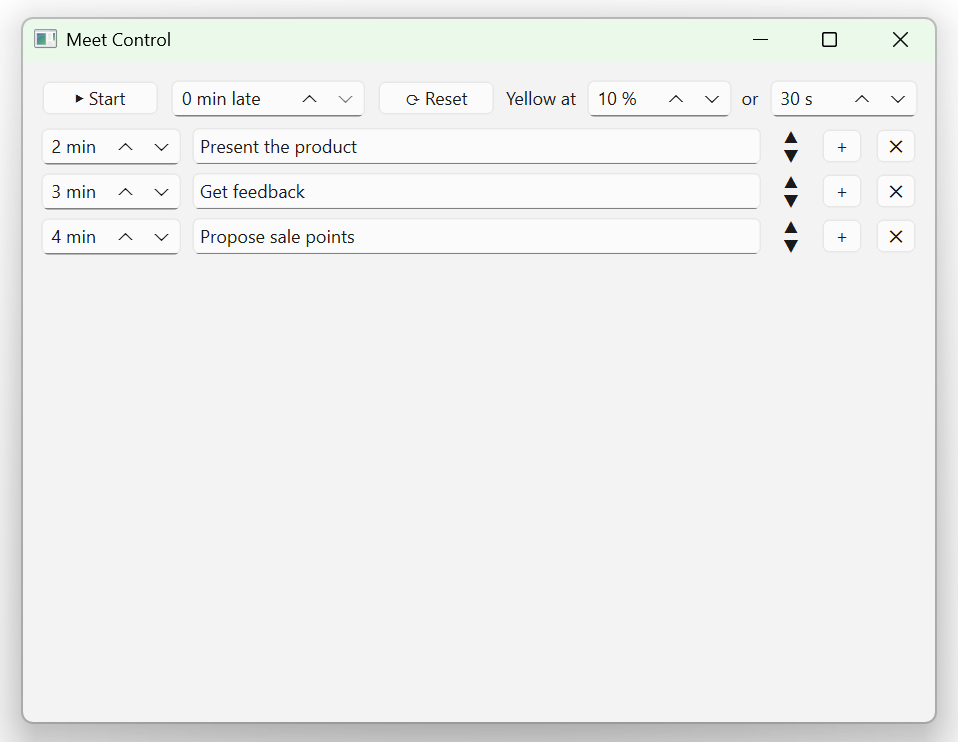
__pycache__/
|
|
3
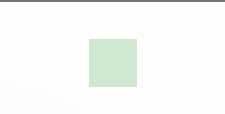
|
+
*.py[cod]
|
|
4
|
+
.venv/
|
|
5
|
+
*.egg-info/
|
|
6
|
+
|
|
7
|
+
# uv
|
|
8
|
+
.uv/
|
|
9
|
+
|
|
10
|
+
# PyInstaller build output (pacebar.spec IS tracked — it is our build config)
|
|
11
|
+
build/
|
|
12
|
+
dist/
|
|
13
|
+
|
|
14
|
+
# Tooling caches
|
|
15
|
+
.ruff_cache/
|
|
16
|
+
|
|
17
|
+
# IDEs
|
|
18
|
+
.idea/
|
|
19
|
+
.vscode/
|
|
20
|
+
|
|
21
|
+
# Claude Code (local config / session state)
|
|
22
|
+
.claude/
|
|
23
|
+
|
|
24
|
+
# App runtime state (written next to the app on each Start)
|
|
25
|
+
pacebar_last_run.json
|
|
26
|
+
|
|
27
|
+
# OS
|
|
28
|
+
.DS_Store
|
|
29
|
+
Thumbs.db
|
pacebar-0.1.0/LICENSE
ADDED
|
@@ -0,0 +1,21 @@
|
|
|
1
|
+
MIT License
|
|
2
|
+
|
|
3
|
+
Copyright (c) 2026 Roman Voronov
|
|
4
|
+
|
|
5
|
+
Permission is hereby granted, free of charge, to any person obtaining a copy
|
|
6
|
+
of this software and associated documentation files (the "Software"), to deal
|
|
7
|
+
in the Software without restriction, including without limitation the rights
|
|
8
|
+
to use, copy, modify, merge, publish, distribute, sublicense, and/or sell
|
|
9
|
+
copies of the Software, and to permit persons to whom the Software is
|
|
10
|
+
furnished to do so, subject to the following conditions:
|
|
11
|
+
|
|
12
|
+
The above copyright notice and this permission notice shall be included in all
|
|
13
|
+
copies or substantial portions of the Software.
|
|
14
|
+
|
|
15
|
+
THE SOFTWARE IS PROVIDED "AS IS", WITHOUT WARRANTY OF ANY KIND, EXPRESS OR
|
|
16
|
+
IMPLIED, INCLUDING BUT NOT LIMITED TO THE WARRANTIES OF MERCHANTABILITY,
|
|
17
|
+
FITNESS FOR A PARTICULAR PURPOSE AND NONINFRINGEMENT. IN NO EVENT SHALL THE
|
|
18
|
+
AUTHORS OR COPYRIGHT HOLDERS BE LIABLE FOR ANY CLAIM, DAMAGES OR OTHER
|
|
19
|
+
LIABILITY, WHETHER IN AN ACTION OF CONTRACT, TORT OR OTHERWISE, ARISING FROM,
|
|
20
|
+
OUT OF OR IN CONNECTION WITH THE SOFTWARE OR THE USE OR OTHER DEALINGS IN THE
|
|
21
|
+
SOFTWARE.
|
pacebar-0.1.0/PKG-INFO
ADDED
|
@@ -0,0 +1,193 @@
|
|
|
1
|
+
Metadata-Version: 2.4
|
|
2
|
+
Name: pacebar
|
|
3
|
+
Version: 0.1.0
|
|
4
|
+
Summary: Floating top-strip pacing timer for timeboxed stages — meetings, talks, workouts, even cooking — with countdown and color signalling.
|
|
5
|
+
Author-email: Roman Voronov <roman.voronov.python.developer@gmail.com>
|
|
6
|
+
License-Expression: MIT
|
|
7
|
+
License-File: LICENSE
|
|
8
|
+
Keywords: countdown,meeting,overlay,pacing,presentation,pyside6,timer
|
|
9
|
+
Classifier: Development Status :: 4 - Beta
|
|
10
|
+
Classifier: Environment :: Win32 (MS Windows)
|
|
11
|
+
Classifier: Environment :: X11 Applications :: Qt
|
|
12
|
+
Classifier: Intended Audience :: End Users/Desktop
|
|
13
|
+
Classifier: Operating System :: Microsoft :: Windows
|
|
14
|
+
Classifier: Operating System :: POSIX :: Linux
|
|
15
|
+
Classifier: Programming Language :: Python :: 3
|
|
16
|
+
Classifier: Programming Language :: Python :: 3.10
|
|
17
|
+
Classifier: Programming Language :: Python :: 3.11
|
|
18
|
+
Classifier: Programming Language :: Python :: 3.12
|
|
19
|
+
Classifier: Programming Language :: Python :: 3.13
|
|
20
|
+
Classifier: Topic :: Office/Business
|
|
21
|
+
Classifier: Topic :: Utilities
|
|
22
|
+
Requires-Python: >=3.10
|
|
23
|
+
Requires-Dist: pynput>=1.7
|
|
24
|
+
Requires-Dist: pyside6>=6.6
|
|
25
|
+
Provides-Extra: build
|
|
26
|
+
Requires-Dist: pyinstaller>=6.3; extra == 'build'
|
|
27
|
+
Provides-Extra: dev
|
|
28
|
+
Requires-Dist: ruff>=0.6; extra == 'dev'
|
|
29
|
+
Description-Content-Type: text/markdown
|
|
30
|
+
|
|
31
|
+
# PaceBar
|
|
32
|
+
|
|
33
|
+

|
|
34
|
+

|
|
35
|
+

|
|
36
|
+

|
|
37
|
+
|
|
38
|
+
A small desktop tool that keeps you on time through any sequence of timed stages —
|
|
39
|
+
a sales call, a talk, a workout, even a recipe. You enter the stages and how many
|
|
40
|
+
minutes each should take; on **Start** a flat,
|
|
41
|
+
always-on-top strip appears across the top of the screen and counts the current
|
|
42
|
+
section down. The strip is **green** while you are on pace, **pastel yellow** when
|
|
43
|
+
the section is almost over, and **pastel red** once you have run over — so you can
|
|
44
|
+
feel the pacing without staring at numbers.
|
|
45
|
+
|
|
46
|
+
Written in Python with **PySide6**. Built cross-platform (Windows + Linux);
|
|
47
|
+
**tested and working on Windows 11**, **not yet tested on Linux** (feedback welcome).
|
|
48
|
+
|
|
49
|
+
## Screenshots
|
|
50
|
+
|
|
51
|
+
The setup window — one row per section, plus the start / lateness / reset toolbar:
|
|
52
|
+
|
|
53
|
+
|
|
54
|
+
|
|
55
|
+
The running strip (here ~2 minutes left on the current section, next section as a
|
|
56
|
+
button), and the minimized square that signals status by color alone:
|
|
57
|
+
|
|
58
|
+

|
|
59
|
+
|
|
60
|
+
|
|
61
|
+
|
|
62
|
+
## Requirements
|
|
63
|
+
|
|
64
|
+
- [uv](https://docs.astral.sh/uv/) (manages the virtual environment and dependencies)
|
|
65
|
+
- Python 3.10+ (uv can install it for you)
|
|
66
|
+
|
|
67
|
+
## Install
|
|
68
|
+
|
|
69
|
+
```bash
|
|
70
|
+
pip install pacebar
|
|
71
|
+
pacebar
|
|
72
|
+
```
|
|
73
|
+
|
|
74
|
+
This pulls in PySide6 automatically and adds a `pacebar` command. (Prefer the
|
|
75
|
+
standalone exe if you don't want a Python environment at all — see below.)
|
|
76
|
+
|
|
77
|
+
## Run from source
|
|
78
|
+
|
|
79
|
+
```bash
|
|
80
|
+
uv sync # create the venv and install dependencies
|
|
81
|
+
uv run pacebar
|
|
82
|
+
```
|
|
83
|
+
|
|
84
|
+
Or run it in **one click** — double-click the script for your OS:
|
|
85
|
+
|
|
86
|
+
- **Windows:** `scripts\run.bat`
|
|
87
|
+
- **Linux / macOS:** `scripts/run.sh`
|
|
88
|
+
|
|
89
|
+
(`uv sync` runs automatically the first time `uv run` is used.)
|
|
90
|
+
|
|
91
|
+
## Build a standalone executable
|
|
92
|
+
|
|
93
|
+
One click: double-click `scripts\build.bat` (Windows) or `scripts/build.sh`
|
|
94
|
+
(Linux / macOS). Or run it manually:
|
|
95
|
+
|
|
96
|
+
```bash
|
|
97
|
+
uv run --extra build pyinstaller --noconfirm --clean pacebar.spec
|
|
98
|
+
```
|
|
99
|
+
|
|
100
|
+
The build is driven by [`pacebar.spec`](pacebar.spec) (a single
|
|
101
|
+
`--windowed --onefile` build). The result lands in `dist/` (`pacebar.exe` on
|
|
102
|
+
Windows) — one shareable file; it starts a touch slower because it unpacks to a temp
|
|
103
|
+
dir on launch.
|
|
104
|
+
|
|
105
|
+
PyInstaller does **not** cross-compile: it freezes for the OS you run the build on.
|
|
106
|
+
Build on Windows to get the `.exe`, and on Linux (or WSL) to get a Linux binary — each
|
|
107
|
+
runs only on its own platform. For a platform-independent option, use `pip install`
|
|
108
|
+
above instead.
|
|
109
|
+
|
|
110
|
+
## Lint & format
|
|
111
|
+
|
|
112
|
+
```bash
|
|
113
|
+
uv run ruff format . # format
|
|
114
|
+
uv run ruff check . # lint
|
|
115
|
+
```
|
|
116
|
+
|
|
117
|
+
## Publishing to PyPI (maintainer)
|
|
118
|
+
|
|
119
|
+
```bash
|
|
120
|
+
uv build # builds the wheel + sdist into dist/
|
|
121
|
+
uv publish dist/pacebar-* # upload (needs a PyPI account + API token)
|
|
122
|
+
```
|
|
123
|
+
|
|
124
|
+
The `pacebar-*` glob is deliberate: it uploads only the wheel and sdist and skips
|
|
125
|
+
`pacebar.exe`, which also lives in `dist/`. Test on TestPyPI first
|
|
126
|
+
(`uv publish --publish-url https://test.pypi.org/legacy/ ...`), and make sure the
|
|
127
|
+
project name is still available on PyPI before the first real upload.
|
|
128
|
+
|
|
129
|
+
## How to use
|
|
130
|
+
|
|
131
|
+
**Setup window**
|
|
132
|
+
|
|
133
|
+
- Each row is one section: **minutes** (whole positive number — arrows or type) and a
|
|
134
|
+
**name** (max 30 characters; it blinks red if you try to type more).
|
|
135
|
+
- **Tab / Shift+Tab** move between the two fields of the current row only.
|
|
136
|
+
**Up / Down** (while in the name field) jump to the name field of the row above /
|
|
137
|
+
below. **Enter** adds a new row. The `+` button also adds one; the ▲/▼ control
|
|
138
|
+
reorders; `✕` deletes.
|
|
139
|
+
- **Start** is top-left. Next to it is **minutes late** — how late the meeting is
|
|
140
|
+
actually starting (subtracted from the first section). **Reset** clears everything
|
|
141
|
+
back to one empty row (no confirmation, by design).
|
|
142
|
+
- **Yellow at … % or … s** controls the warning threshold: the strip turns yellow
|
|
143
|
+
when the remaining time drops below *whichever is larger* — that percentage of the
|
|
144
|
+
section, or that many seconds.
|
|
145
|
+
|
|
146
|
+
**Running strip** (left → right)
|
|
147
|
+
|
|
148
|
+
- ◀ **Back** — roll back one section. It resumes on the same global timeline: with the
|
|
149
|
+
time it still had if you switched early, or already overdue if you had overrun it.
|
|
150
|
+
- **Timer** — counts the current section down; format `HH:MM:SS` with the hours group
|
|
151
|
+
hidden when no section is an hour or longer. Goes negative when you run over.
|
|
152
|
+
- **Current section name.**
|
|
153
|
+
- **→ Next section** — click to advance. On the last section it reads **→ End**;
|
|
154
|
+
clicking it exits the program.
|
|
155
|
+
- ▢ **Minimize** — collapses to a small square that signals status by color only.
|
|
156
|
+
Drag it anywhere; click it to restore the full strip.
|
|
157
|
+
- ✕ **Cancel** — quits the program.
|
|
158
|
+
|
|
159
|
+
**Global hotkeys** (work even when another app is focused), laid out like game
|
|
160
|
+
left/right (D = forward, A = back):
|
|
161
|
+
|
|
162
|
+
- **Ctrl+Alt+D** — next section (right); on the last section it triggers **End** (exit)
|
|
163
|
+
- **Ctrl+Alt+A** — back (left)
|
|
164
|
+
|
|
165
|
+
> Chosen to stay clear of common conflicts: plain Alt+A mutes the mic in Zoom and
|
|
166
|
+
> Alt+D jumps to the browser address bar. On non-US layouts Ctrl+Alt equals AltGr,
|
|
167
|
+
> but that only matters while typing into a text field, not during a call.
|
|
168
|
+
|
|
169
|
+
> The strip is intentionally visible to everyone on a screen share — it keeps the
|
|
170
|
+
> whole call honest about time. There is deliberately **no pause**: business calls
|
|
171
|
+
> have hard stops.
|
|
172
|
+
|
|
173
|
+
## Saved state
|
|
174
|
+
|
|
175
|
+
On every Start the schedule (order, minutes, names — no lateness, no thresholds) is
|
|
176
|
+
written to `pacebar_last_run.json`, and it is loaded back the next time you launch. This
|
|
177
|
+
also makes the tool handy for rehearsing a talk.
|
|
178
|
+
|
|
179
|
+
The file lives **next to the running exe**, so each copy of the app keeps its own
|
|
180
|
+
typical call scenario — drop a copy in a different project folder and it remembers a
|
|
181
|
+
different schedule. (When running from source there is no exe, so it uses the current
|
|
182
|
+
working directory instead.)
|
|
183
|
+
|
|
184
|
+
## Notes & limitations
|
|
185
|
+
|
|
186
|
+
- Global hotkeys need the `pynput` package (already a dependency). On Linux they work
|
|
187
|
+
under **X11**; under **Wayland** they may be blocked — the on-strip buttons always
|
|
188
|
+
work regardless.
|
|
189
|
+
- Always-on-top is reliable over windowed apps (Zoom/Meet/Teams). A few apps in true
|
|
190
|
+
fullscreen-exclusive mode can still cover any topmost window.
|
|
191
|
+
- The strip width is fixed for the run from the widest section name and worst-case
|
|
192
|
+
timer. An extreme overrun (more minutes over than the longest section) can still
|
|
193
|
+
nudge the timer width.
|
pacebar-0.1.0/README.md
ADDED
|
@@ -0,0 +1,163 @@
|
|
|
1
|
+
# PaceBar
|
|
2
|
+
|
|
3
|
+

|
|
4
|
+

|
|
5
|
+

|
|
6
|
+

|
|
7
|
+
|
|
8
|
+
A small desktop tool that keeps you on time through any sequence of timed stages —
|
|
9
|
+
a sales call, a talk, a workout, even a recipe. You enter the stages and how many
|
|
10
|
+
minutes each should take; on **Start** a flat,
|
|
11
|
+
always-on-top strip appears across the top of the screen and counts the current
|
|
12
|
+
section down. The strip is **green** while you are on pace, **pastel yellow** when
|
|
13
|
+
the section is almost over, and **pastel red** once you have run over — so you can
|
|
14
|
+
feel the pacing without staring at numbers.
|
|
15
|
+
|
|
16
|
+
Written in Python with **PySide6**. Built cross-platform (Windows + Linux);
|
|
17
|
+
**tested and working on Windows 11**, **not yet tested on Linux** (feedback welcome).
|
|
18
|
+
|
|
19
|
+
## Screenshots
|
|
20
|
+
|
|
21
|
+
The setup window — one row per section, plus the start / lateness / reset toolbar:
|
|
22
|
+
|
|
23
|
+

|
|
24
|
+
|
|
25
|
+
The running strip (here ~2 minutes left on the current section, next section as a
|
|
26
|
+
button), and the minimized square that signals status by color alone:
|
|
27
|
+
|
|
28
|
+

|
|
29
|
+
|
|
30
|
+

|
|
31
|
+
|
|
32
|
+
## Requirements
|
|
33
|
+
|
|
34
|
+
- [uv](https://docs.astral.sh/uv/) (manages the virtual environment and dependencies)
|
|
35
|
+
- Python 3.10+ (uv can install it for you)
|
|
36
|
+
|
|
37
|
+
## Install
|
|
38
|
+
|
|
39
|
+
```bash
|
|
40
|
+
pip install pacebar
|
|
41
|
+
pacebar
|
|
42
|
+
```
|
|
43
|
+
|
|
44
|
+
This pulls in PySide6 automatically and adds a `pacebar` command. (Prefer the
|
|
45
|
+
standalone exe if you don't want a Python environment at all — see below.)
|
|
46
|
+
|
|
47
|
+
## Run from source
|
|
48
|
+
|
|
49
|
+
```bash
|
|
50
|
+
uv sync # create the venv and install dependencies
|
|
51
|
+
uv run pacebar
|
|
52
|
+
```
|
|
53
|
+
|
|
54
|
+
Or run it in **one click** — double-click the script for your OS:
|
|
55
|
+
|
|
56
|
+
- **Windows:** `scripts\run.bat`
|
|
57
|
+
- **Linux / macOS:** `scripts/run.sh`
|
|
58
|
+
|
|
59
|
+
(`uv sync` runs automatically the first time `uv run` is used.)
|
|
60
|
+
|
|
61
|
+
## Build a standalone executable
|
|
62
|
+
|
|
63
|
+
One click: double-click `scripts\build.bat` (Windows) or `scripts/build.sh`
|
|
64
|
+
(Linux / macOS). Or run it manually:
|
|
65
|
+
|
|
66
|
+
```bash
|
|
67
|
+
uv run --extra build pyinstaller --noconfirm --clean pacebar.spec
|
|
68
|
+
```
|
|
69
|
+
|
|
70
|
+
The build is driven by [`pacebar.spec`](pacebar.spec) (a single
|
|
71
|
+
`--windowed --onefile` build). The result lands in `dist/` (`pacebar.exe` on
|
|
72
|
+
Windows) — one shareable file; it starts a touch slower because it unpacks to a temp
|
|
73
|
+
dir on launch.
|
|
74
|
+
|
|
75
|
+
PyInstaller does **not** cross-compile: it freezes for the OS you run the build on.
|
|
76
|
+
Build on Windows to get the `.exe`, and on Linux (or WSL) to get a Linux binary — each
|
|
77
|
+
runs only on its own platform. For a platform-independent option, use `pip install`
|
|
78
|
+
above instead.
|
|
79
|
+
|
|
80
|
+
## Lint & format
|
|
81
|
+
|
|
82
|
+
```bash
|
|
83
|
+
uv run ruff format . # format
|
|
84
|
+
uv run ruff check . # lint
|
|
85
|
+
```
|
|
86
|
+
|
|
87
|
+
## Publishing to PyPI (maintainer)
|
|
88
|
+
|
|
89
|
+
```bash
|
|
90
|
+
uv build # builds the wheel + sdist into dist/
|
|
91
|
+
uv publish dist/pacebar-* # upload (needs a PyPI account + API token)
|
|
92
|
+
```
|
|
93
|
+
|
|
94
|
+
The `pacebar-*` glob is deliberate: it uploads only the wheel and sdist and skips
|
|
95
|
+
`pacebar.exe`, which also lives in `dist/`. Test on TestPyPI first
|
|
96
|
+
(`uv publish --publish-url https://test.pypi.org/legacy/ ...`), and make sure the
|
|
97
|
+
project name is still available on PyPI before the first real upload.
|
|
98
|
+
|
|
99
|
+
## How to use
|
|
100
|
+
|
|
101
|
+
**Setup window**
|
|
102
|
+
|
|
103
|
+
- Each row is one section: **minutes** (whole positive number — arrows or type) and a
|
|
104
|
+
**name** (max 30 characters; it blinks red if you try to type more).
|
|
105
|
+
- **Tab / Shift+Tab** move between the two fields of the current row only.
|
|
106
|
+
**Up / Down** (while in the name field) jump to the name field of the row above /
|
|
107
|
+
below. **Enter** adds a new row. The `+` button also adds one; the ▲/▼ control
|
|
108
|
+
reorders; `✕` deletes.
|
|
109
|
+
- **Start** is top-left. Next to it is **minutes late** — how late the meeting is
|
|
110
|
+
actually starting (subtracted from the first section). **Reset** clears everything
|
|
111
|
+
back to one empty row (no confirmation, by design).
|
|
112
|
+
- **Yellow at … % or … s** controls the warning threshold: the strip turns yellow
|
|
113
|
+
when the remaining time drops below *whichever is larger* — that percentage of the
|
|
114
|
+
section, or that many seconds.
|
|
115
|
+
|
|
116
|
+
**Running strip** (left → right)
|
|
117
|
+
|
|
118
|
+
- ◀ **Back** — roll back one section. It resumes on the same global timeline: with the
|
|
119
|
+
time it still had if you switched early, or already overdue if you had overrun it.
|
|
120
|
+
- **Timer** — counts the current section down; format `HH:MM:SS` with the hours group
|
|
121
|
+
hidden when no section is an hour or longer. Goes negative when you run over.
|
|
122
|
+
- **Current section name.**
|
|
123
|
+
- **→ Next section** — click to advance. On the last section it reads **→ End**;
|
|
124
|
+
clicking it exits the program.
|
|
125
|
+
- ▢ **Minimize** — collapses to a small square that signals status by color only.
|
|
126
|
+
Drag it anywhere; click it to restore the full strip.
|
|
127
|
+
- ✕ **Cancel** — quits the program.
|
|
128
|
+
|
|
129
|
+
**Global hotkeys** (work even when another app is focused), laid out like game
|
|
130
|
+
left/right (D = forward, A = back):
|
|
131
|
+
|
|
132
|
+
- **Ctrl+Alt+D** — next section (right); on the last section it triggers **End** (exit)
|
|
133
|
+
- **Ctrl+Alt+A** — back (left)
|
|
134
|
+
|
|
135
|
+
> Chosen to stay clear of common conflicts: plain Alt+A mutes the mic in Zoom and
|
|
136
|
+
> Alt+D jumps to the browser address bar. On non-US layouts Ctrl+Alt equals AltGr,
|
|
137
|
+
> but that only matters while typing into a text field, not during a call.
|
|
138
|
+
|
|
139
|
+
> The strip is intentionally visible to everyone on a screen share — it keeps the
|
|
140
|
+
> whole call honest about time. There is deliberately **no pause**: business calls
|
|
141
|
+
> have hard stops.
|
|
142
|
+
|
|
143
|
+
## Saved state
|
|
144
|
+
|
|
145
|
+
On every Start the schedule (order, minutes, names — no lateness, no thresholds) is
|
|
146
|
+
written to `pacebar_last_run.json`, and it is loaded back the next time you launch. This
|
|
147
|
+
also makes the tool handy for rehearsing a talk.
|
|
148
|
+
|
|
149
|
+
The file lives **next to the running exe**, so each copy of the app keeps its own
|
|
150
|
+
typical call scenario — drop a copy in a different project folder and it remembers a
|
|
151
|
+
different schedule. (When running from source there is no exe, so it uses the current
|
|
152
|
+
working directory instead.)
|
|
153
|
+
|
|
154
|
+
## Notes & limitations
|
|
155
|
+
|
|
156
|
+
- Global hotkeys need the `pynput` package (already a dependency). On Linux they work
|
|
157
|
+
under **X11**; under **Wayland** they may be blocked — the on-strip buttons always
|
|
158
|
+
work regardless.
|
|
159
|
+
- Always-on-top is reliable over windowed apps (Zoom/Meet/Teams). A few apps in true
|
|
160
|
+
fullscreen-exclusive mode can still cover any topmost window.
|
|
161
|
+
- The strip width is fixed for the run from the widest section name and worst-case
|
|
162
|
+
timer. An extreme overrun (more minutes over than the longest section) can still
|
|
163
|
+
nudge the timer width.
|
|
Binary file
|
|
Binary file
|
|
Binary file
|
pacebar-0.1.0/entry.py
ADDED
|
@@ -0,0 +1,13 @@
|
|
|
1
|
+
"""Frozen-build entry point.
|
|
2
|
+
|
|
3
|
+
PyInstaller runs its entry script as the top-level ``__main__`` module with no
|
|
4
|
+
package context, which breaks the relative imports inside ``pacebar``.
|
|
5
|
+
This launcher uses an absolute import so the package loads normally.
|
|
6
|
+
"""
|
|
7
|
+
|
|
8
|
+
import sys
|
|
9
|
+
|
|
10
|
+
from pacebar.__main__ import main
|
|
11
|
+
|
|
12
|
+
if __name__ == "__main__":
|
|
13
|
+
sys.exit(main())
|
|
@@ -0,0 +1,45 @@
|
|
|
1
|
+
# -*- mode: python ; coding: utf-8 -*-
|
|
2
|
+
# Standard one-file build. Entry point is entry.py (absolute imports) rather than
|
|
3
|
+
# the package __main__, which would build but crash at launch when frozen.
|
|
4
|
+
|
|
5
|
+
from PyInstaller.utils.hooks import collect_submodules
|
|
6
|
+
|
|
7
|
+
# pynput loads its platform backend dynamically (importlib), so PyInstaller's
|
|
8
|
+
# static analysis misses it. Without these the global hotkeys silently die.
|
|
9
|
+
_HIDDEN_IMPORTS = collect_submodules("pynput")
|
|
10
|
+
|
|
11
|
+
a = Analysis(
|
|
12
|
+
['entry.py'],
|
|
13
|
+
pathex=['src'],
|
|
14
|
+
binaries=[],
|
|
15
|
+
datas=[],
|
|
16
|
+
hiddenimports=_HIDDEN_IMPORTS,
|
|
17
|
+
hookspath=[],
|
|
18
|
+
hooksconfig={},
|
|
19
|
+
runtime_hooks=[],
|
|
20
|
+
excludes=[],
|
|
21
|
+
noarchive=False,
|
|
22
|
+
optimize=0,
|
|
23
|
+
)
|
|
24
|
+
pyz = PYZ(a.pure)
|
|
25
|
+
|
|
26
|
+
exe = EXE(
|
|
27
|
+
pyz,
|
|
28
|
+
a.scripts,
|
|
29
|
+
a.binaries,
|
|
30
|
+
a.datas,
|
|
31
|
+
[],
|
|
32
|
+
name='pacebar',
|
|
33
|
+
debug=False,
|
|
34
|
+
bootloader_ignore_signals=False,
|
|
35
|
+
strip=False,
|
|
36
|
+
upx=False, # avoid antivirus false-positives on packed Qt DLLs
|
|
37
|
+
upx_exclude=[],
|
|
38
|
+
runtime_tmpdir=None,
|
|
39
|
+
console=False, # GUI app, no console window
|
|
40
|
+
disable_windowed_traceback=False,
|
|
41
|
+
argv_emulation=False,
|
|
42
|
+
target_arch=None,
|
|
43
|
+
codesign_identity=None,
|
|
44
|
+
entitlements_file=None,
|
|
45
|
+
)
|
|
@@ -0,0 +1,52 @@
|
|
|
1
|
+
[project]
|
|
2
|
+
name = "pacebar"
|
|
3
|
+
version = "0.1.0"
|
|
4
|
+
description = "Floating top-strip pacing timer for timeboxed stages — meetings, talks, workouts, even cooking — with countdown and color signalling."
|
|
5
|
+
readme = "README.md"
|
|
6
|
+
requires-python = ">=3.10"
|
|
7
|
+
license = "MIT"
|
|
8
|
+
license-files = ["LICENSE"]
|
|
9
|
+
authors = [
|
|
10
|
+
{ name = "Roman Voronov", email = "roman.voronov.python.developer@gmail.com" },
|
|
11
|
+
]
|
|
12
|
+
keywords = ["meeting", "timer", "countdown", "presentation", "pacing", "overlay", "pyside6"]
|
|
13
|
+
classifiers = [
|
|
14
|
+
"Development Status :: 4 - Beta",
|
|
15
|
+
"Environment :: X11 Applications :: Qt",
|
|
16
|
+
"Environment :: Win32 (MS Windows)",
|
|
17
|
+
"Intended Audience :: End Users/Desktop",
|
|
18
|
+
"Operating System :: Microsoft :: Windows",
|
|
19
|
+
"Operating System :: POSIX :: Linux",
|
|
20
|
+
"Programming Language :: Python :: 3",
|
|
21
|
+
"Programming Language :: Python :: 3.10",
|
|
22
|
+
"Programming Language :: Python :: 3.11",
|
|
23
|
+
"Programming Language :: Python :: 3.12",
|
|
24
|
+
"Programming Language :: Python :: 3.13",
|
|
25
|
+
"Topic :: Office/Business",
|
|
26
|
+
"Topic :: Utilities",
|
|
27
|
+
]
|
|
28
|
+
dependencies = [
|
|
29
|
+
"PySide6>=6.6",
|
|
30
|
+
"pynput>=1.7",
|
|
31
|
+
]
|
|
32
|
+
|
|
33
|
+
[project.optional-dependencies]
|
|
34
|
+
build = ["pyinstaller>=6.3"]
|
|
35
|
+
dev = ["ruff>=0.6"]
|
|
36
|
+
|
|
37
|
+
[project.scripts]
|
|
38
|
+
pacebar = "pacebar.__main__:main"
|
|
39
|
+
|
|
40
|
+
[tool.ruff]
|
|
41
|
+
line-length = 100
|
|
42
|
+
src = ["src"]
|
|
43
|
+
|
|
44
|
+
[tool.ruff.lint]
|
|
45
|
+
select = ["E", "F", "I", "W", "B", "UP"]
|
|
46
|
+
|
|
47
|
+
[build-system]
|
|
48
|
+
requires = ["hatchling"]
|
|
49
|
+
build-backend = "hatchling.build"
|
|
50
|
+
|
|
51
|
+
[tool.hatch.build.targets.wheel]
|
|
52
|
+
packages = ["src/pacebar"]
|
|
@@ -0,0 +1,20 @@
|
|
|
1
|
+
"""Entry point: `python -m pacebar` / the `pacebar` script / the exe."""
|
|
2
|
+
|
|
3
|
+
import sys
|
|
4
|
+
|
|
5
|
+
from PySide6.QtWidgets import QApplication
|
|
6
|
+
|
|
7
|
+
from .app import App
|
|
8
|
+
from .constants import APP_DISPLAY_NAME
|
|
9
|
+
|
|
10
|
+
|
|
11
|
+
def main() -> int:
|
|
12
|
+
qt_application = QApplication(sys.argv)
|
|
13
|
+
qt_application.setApplicationName(APP_DISPLAY_NAME)
|
|
14
|
+
app = App()
|
|
15
|
+
app.show()
|
|
16
|
+
return qt_application.exec()
|
|
17
|
+
|
|
18
|
+
|
|
19
|
+
if __name__ == "__main__":
|
|
20
|
+
sys.exit(main())
|
|
@@ -0,0 +1,24 @@
|
|
|
1
|
+
"""Application controller: wires the editor to a run, persists the run on start."""
|
|
2
|
+
|
|
3
|
+
from PySide6.QtWidgets import QApplication
|
|
4
|
+
|
|
5
|
+
from .editor import EditorWindow
|
|
6
|
+
from .overlay import RunController
|
|
7
|
+
from .persistence import save_sections
|
|
8
|
+
|
|
9
|
+
|
|
10
|
+
class App:
|
|
11
|
+
def __init__(self):
|
|
12
|
+
self.editor = EditorWindow()
|
|
13
|
+
self.editor.start_requested.connect(self._start_run)
|
|
14
|
+
self.run: RunController | None = None
|
|
15
|
+
|
|
16
|
+
def show(self):
|
|
17
|
+
self.editor.show()
|
|
18
|
+
|
|
19
|
+
def _start_run(self, sections, lateness_seconds, yellow_percent, yellow_seconds):
|
|
20
|
+
# Persist the schedule (order + minutes + names only) as the run begins.
|
|
21
|
+
save_sections(sections)
|
|
22
|
+
self.editor.hide()
|
|
23
|
+
self.run = RunController(sections, lateness_seconds, yellow_percent, yellow_seconds)
|
|
24
|
+
self.run.finished.connect(QApplication.instance().quit)
|
|
@@ -0,0 +1,29 @@
|
|
|
1
|
+
"""Constants shared across modules.
|
|
2
|
+
|
|
3
|
+
Purely cosmetic, single-use dimensions live next to the code that uses them;
|
|
4
|
+
this file holds values that are shared or worth tuning in one place.
|
|
5
|
+
"""
|
|
6
|
+
|
|
7
|
+
# Identity and storage
|
|
8
|
+
APP_DISPLAY_NAME = "PaceBar"
|
|
9
|
+
LAST_RUN_FILENAME = "pacebar_last_run.json"
|
|
10
|
+
|
|
11
|
+
# Section / editor limits and defaults
|
|
12
|
+
MIN_SECTION_MINUTES = 1
|
|
13
|
+
MAX_SECTION_MINUTES = 999
|
|
14
|
+
MAX_LATENESS_MINUTES = 999
|
|
15
|
+
MAX_SECTION_NAME_LENGTH = 30
|
|
16
|
+
MAX_YELLOW_PERCENT = 100
|
|
17
|
+
MAX_YELLOW_SECONDS = 3600
|
|
18
|
+
DEFAULT_YELLOW_PERCENT = 10
|
|
19
|
+
DEFAULT_YELLOW_SECONDS = 30
|
|
20
|
+
|
|
21
|
+
# Overlay rendering
|
|
22
|
+
RENDER_INTERVAL_MS = 100 # ~10 Hz; the smallest shown unit is one second
|
|
23
|
+
OVERLAY_FONT_POINT_INCREASE = 2
|
|
24
|
+
OVERLAY_HEIGHT_FACTOR = 1.6
|
|
25
|
+
|
|
26
|
+
# Pastel status colors for the strip and minimized square
|
|
27
|
+
PASTEL_GREEN = "#cfe8cf"
|
|
28
|
+
PASTEL_YELLOW = "#f6efb4"
|
|
29
|
+
PASTEL_RED = "#f2c4c4"
|