orca-keychron 0.1.0__tar.gz
This diff represents the content of publicly available package versions that have been released to one of the supported registries. The information contained in this diff is provided for informational purposes only and reflects changes between package versions as they appear in their respective public registries.
- orca_keychron-0.1.0/LICENSE +21 -0
- orca_keychron-0.1.0/MANIFEST.in +2 -0
- orca_keychron-0.1.0/PKG-INFO +336 -0
- orca_keychron-0.1.0/README.ko.md +315 -0
- orca_keychron-0.1.0/README.md +310 -0
- orca_keychron-0.1.0/assets/img1.png +0 -0
- orca_keychron-0.1.0/assets/img2.png +0 -0
- orca_keychron-0.1.0/pyproject.toml +44 -0
- orca_keychron-0.1.0/setup.cfg +4 -0
- orca_keychron-0.1.0/src/orca_keychron/__init__.py +3 -0
- orca_keychron-0.1.0/src/orca_keychron/__main__.py +4 -0
- orca_keychron-0.1.0/src/orca_keychron/autostart.py +106 -0
- orca_keychron-0.1.0/src/orca_keychron/cli.py +351 -0
- orca_keychron-0.1.0/src/orca_keychron/config.py +111 -0
- orca_keychron-0.1.0/src/orca_keychron/digit_hold.py +222 -0
- orca_keychron-0.1.0/src/orca_keychron/indicator.py +156 -0
- orca_keychron-0.1.0/src/orca_keychron/keychron_hid.py +265 -0
- orca_keychron-0.1.0/src/orca_keychron/models.py +25 -0
- orca_keychron-0.1.0/src/orca_keychron/orca_navigation.py +92 -0
- orca_keychron-0.1.0/src/orca_keychron/orca_status.py +103 -0
- orca_keychron-0.1.0/src/orca_keychron/permissions.py +41 -0
- orca_keychron-0.1.0/src/orca_keychron/rendering.py +40 -0
- orca_keychron-0.1.0/src/orca_keychron/worktree_tracker.py +143 -0
- orca_keychron-0.1.0/src/orca_keychron.egg-info/PKG-INFO +336 -0
- orca_keychron-0.1.0/src/orca_keychron.egg-info/SOURCES.txt +38 -0
- orca_keychron-0.1.0/src/orca_keychron.egg-info/dependency_links.txt +1 -0
- orca_keychron-0.1.0/src/orca_keychron.egg-info/entry_points.txt +2 -0
- orca_keychron-0.1.0/src/orca_keychron.egg-info/requires.txt +6 -0
- orca_keychron-0.1.0/src/orca_keychron.egg-info/top_level.txt +1 -0
- orca_keychron-0.1.0/tests/test_autostart.py +67 -0
- orca_keychron-0.1.0/tests/test_cli.py +130 -0
- orca_keychron-0.1.0/tests/test_config.py +36 -0
- orca_keychron-0.1.0/tests/test_digit_hold.py +151 -0
- orca_keychron-0.1.0/tests/test_indicator.py +143 -0
- orca_keychron-0.1.0/tests/test_keychron_hid.py +155 -0
- orca_keychron-0.1.0/tests/test_orca_navigation.py +93 -0
- orca_keychron-0.1.0/tests/test_orca_status.py +42 -0
- orca_keychron-0.1.0/tests/test_permissions.py +44 -0
- orca_keychron-0.1.0/tests/test_rendering.py +46 -0
- orca_keychron-0.1.0/tests/test_worktree_tracker.py +169 -0
|
@@ -0,0 +1,21 @@
|
|
|
1
|
+
MIT License
|
|
2
|
+
|
|
3
|
+
Copyright (c) 2026 KMGeon
|
|
4
|
+
|
|
5
|
+
Permission is hereby granted, free of charge, to any person obtaining a copy
|
|
6
|
+
of this software and associated documentation files (the "Software"), to deal
|
|
7
|
+
in the Software without restriction, including without limitation the rights
|
|
8
|
+
to use, copy, modify, merge, publish, distribute, sublicense, and/or sell
|
|
9
|
+
copies of the Software, and to permit persons to whom the Software is
|
|
10
|
+
furnished to do so, subject to the following conditions:
|
|
11
|
+
|
|
12
|
+
The above copyright notice and this permission notice shall be included in all
|
|
13
|
+
copies or substantial portions of the Software.
|
|
14
|
+
|
|
15
|
+
THE SOFTWARE IS PROVIDED "AS IS", WITHOUT WARRANTY OF ANY KIND, EXPRESS OR
|
|
16
|
+
IMPLIED, INCLUDING BUT NOT LIMITED TO THE WARRANTIES OF MERCHANTABILITY,
|
|
17
|
+
FITNESS FOR A PARTICULAR PURPOSE AND NONINFRINGEMENT. IN NO EVENT SHALL THE
|
|
18
|
+
AUTHORS OR COPYRIGHT HOLDERS BE LIABLE FOR ANY CLAIM, DAMAGES OR OTHER
|
|
19
|
+
LIABILITY, WHETHER IN AN ACTION OF CONTRACT, TORT OR OTHERWISE, ARISING FROM,
|
|
20
|
+
OUT OF OR IN CONNECTION WITH THE SOFTWARE OR THE USE OR OTHER DEALINGS IN THE
|
|
21
|
+
SOFTWARE.
|
|
@@ -0,0 +1,336 @@
|
|
|
1
|
+
Metadata-Version: 2.4
|
|
2
|
+
Name: orca-keychron
|
|
3
|
+
Version: 0.1.0
|
|
4
|
+
Summary: Show Orca agent lifecycle states on a Keychron keyboard
|
|
5
|
+
Author: KMGeon
|
|
6
|
+
License-Expression: MIT
|
|
7
|
+
Project-URL: Homepage, https://github.com/KMGeon/orca-keychron
|
|
8
|
+
Project-URL: Repository, https://github.com/KMGeon/orca-keychron
|
|
9
|
+
Project-URL: Issues, https://github.com/KMGeon/orca-keychron/issues
|
|
10
|
+
Keywords: orca,keychron,rgb,ai-agents,developer-tools
|
|
11
|
+
Classifier: Development Status :: 3 - Alpha
|
|
12
|
+
Classifier: Environment :: MacOS X
|
|
13
|
+
Classifier: Operating System :: MacOS
|
|
14
|
+
Classifier: Programming Language :: Python :: 3
|
|
15
|
+
Classifier: Programming Language :: Python :: 3 :: Only
|
|
16
|
+
Classifier: Topic :: Software Development :: User Interfaces
|
|
17
|
+
Requires-Python: >=3.9
|
|
18
|
+
Description-Content-Type: text/markdown
|
|
19
|
+
License-File: LICENSE
|
|
20
|
+
Requires-Dist: hidapi>=0.14.0
|
|
21
|
+
Requires-Dist: pynput<1.8,>=1.7.7
|
|
22
|
+
Provides-Extra: dev
|
|
23
|
+
Requires-Dist: pytest>=8.0; extra == "dev"
|
|
24
|
+
Requires-Dist: ruff>=0.6; extra == "dev"
|
|
25
|
+
Dynamic: license-file
|
|
26
|
+
|
|
27
|
+
<div align="center">
|
|
28
|
+
|
|
29
|
+
# Orca Keychron
|
|
30
|
+
|
|
31
|
+
### 10x your Orca agents—without watching every terminal.
|
|
32
|
+
|
|
33
|
+
Turn your Keychron keyboard into a live command center for every Orca worktree.
|
|
34
|
+
|
|
35
|
+

|
|
36
|
+

|
|
37
|
+

|
|
38
|
+
|
|
39
|
+
**English** · [한국어](https://github.com/KMGeon/orca-keychron/blob/main/README.ko.md)
|
|
40
|
+
|
|
41
|
+
</div>
|
|
42
|
+
|
|
43
|
+
|
|
44
|
+
|
|
45
|
+
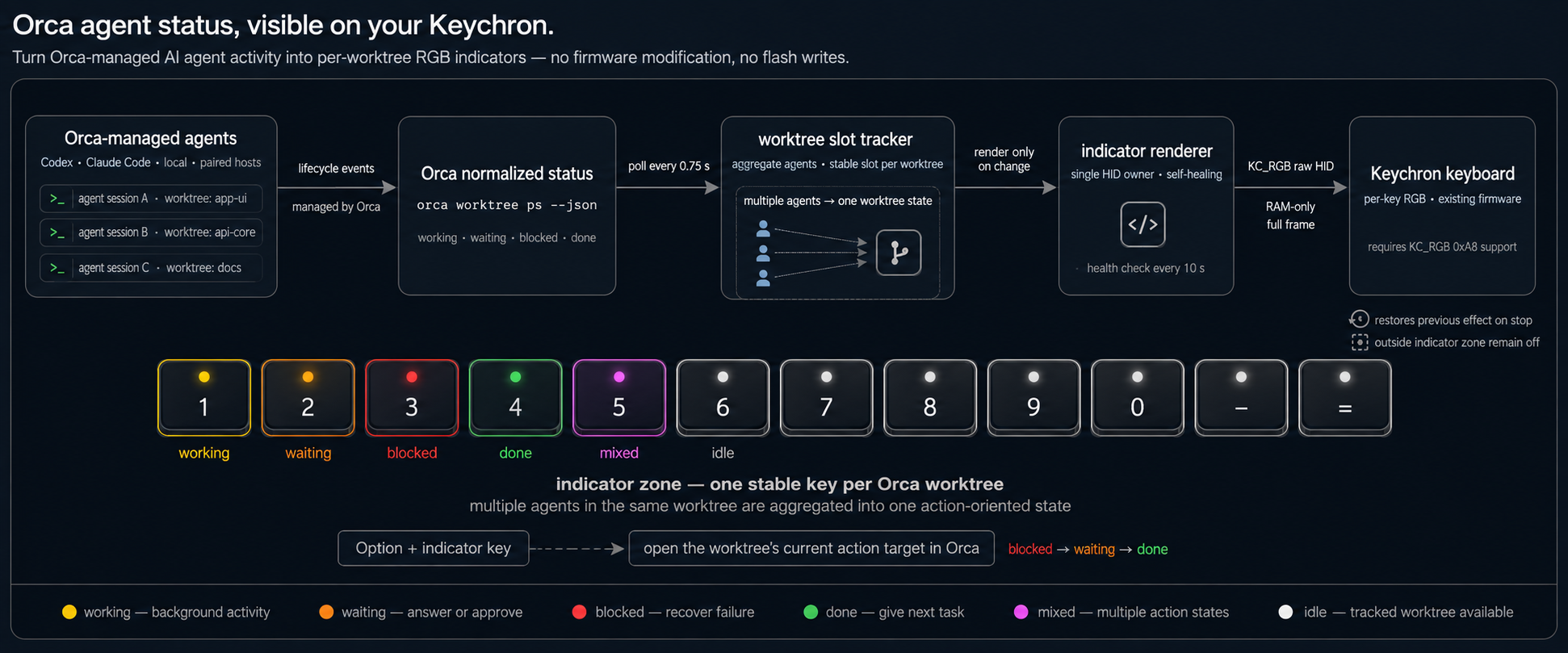
`orca-keychron` maps each Orca worktree to a stable key and renders its agent state with
|
|
46
|
+
per-key RGB. See which agents are working, waiting, blocked, or done—and press one shortcut
|
|
47
|
+
to jump directly to the worktree that needs you.
|
|
48
|
+
|
|
49
|
+
Any coding agent reported by Orca works automatically, including Codex, Claude Code, Grok,
|
|
50
|
+
local sessions, and agents running on paired hosts. No agent-specific hooks are installed.
|
|
51
|
+
|
|
52
|
+
> [!IMPORTANT]
|
|
53
|
+
> This project requires a Keychron keyboard whose firmware implements the per-key `KC_RGB`
|
|
54
|
+
> command `0xA8`. It has been verified on the **Keychron Q65 Max**. Other models are detected
|
|
55
|
+
> and tested by the setup command before any persistent service is installed.
|
|
56
|
+
|
|
57
|
+
<p align="center">
|
|
58
|
+
<img src="https://raw.githubusercontent.com/KMGeon/orca-keychron/main/assets/img2.png" alt="Orca worktree status lights on a Keychron Q65 Max" width="720">
|
|
59
|
+
</p>
|
|
60
|
+
|
|
61
|
+
## What it does
|
|
62
|
+
|
|
63
|
+
- Assigns one stable indicator key to each active Orca worktree.
|
|
64
|
+
- Aggregates multiple agents in the same worktree into one action-oriented state.
|
|
65
|
+
- Opens a worktree's current action target with `Option` plus its indicator key.
|
|
66
|
+
- Includes agents from local and paired Orca hosts by default.
|
|
67
|
+
- Uses the stock Keychron firmware and writes RGB frames to RAM only.
|
|
68
|
+
|
|
69
|
+
## Status colors
|
|
70
|
+
|
|
71
|
+
| Orca worktree state | Indicator | What it means |
|
|
72
|
+
|---|---|---|
|
|
73
|
+
| **Working** | 🟡 Yellow | Agent activity is in progress |
|
|
74
|
+
| **Waiting** | 🟠 Orange | An answer or approval is required |
|
|
75
|
+
| **Blocked** | 🔴 Red | The current turn failed or needs recovery |
|
|
76
|
+
| **Done** | 🟢 Green | The worktree is ready for its next task |
|
|
77
|
+
| **Mixed** | 🟣 Magenta | Multiple action states need attention |
|
|
78
|
+
| **Idle** | ⚪ White | The tracked worktree is available |
|
|
79
|
+
|
|
80
|
+
`working` is background activity and does not create a mixed state by itself. Historical
|
|
81
|
+
`done` rows are ignored until the same pane has first been observed live, preventing stale
|
|
82
|
+
sessions from filling the indicator zone.
|
|
83
|
+
|
|
84
|
+
## Quick start
|
|
85
|
+
|
|
86
|
+
### Requirements
|
|
87
|
+
|
|
88
|
+
- macOS with Python 3.9 or newer
|
|
89
|
+
- [uv](https://docs.astral.sh/uv/) installed
|
|
90
|
+
- Orca running with the `orca` CLI available on `PATH`
|
|
91
|
+
- A compatible Keychron keyboard connected over USB
|
|
92
|
+
|
|
93
|
+
Most Keychron keyboards do not expose the required raw HID interface over Bluetooth.
|
|
94
|
+
|
|
95
|
+
### Install
|
|
96
|
+
|
|
97
|
+
```bash
|
|
98
|
+
uv tool install orca-keychron
|
|
99
|
+
orca-keychron setup
|
|
100
|
+
```
|
|
101
|
+
|
|
102
|
+
The interactive setup:
|
|
103
|
+
|
|
104
|
+
1. Verifies the Orca connection.
|
|
105
|
+
2. Detects the keyboard and verifies `KC_RGB` support.
|
|
106
|
+
3. Previews the default indicator zone, then restores the previous lighting.
|
|
107
|
+
4. Saves the keyboard configuration and requests the required macOS permissions.
|
|
108
|
+
5. Installs and starts a per-user login service.
|
|
109
|
+
|
|
110
|
+
After setup, the indicator starts automatically at login. The default zone is the number
|
|
111
|
+
row: `1 2 3 4 5 6 7 8 9 0 - =`.
|
|
112
|
+
|
|
113
|
+
### Verify
|
|
114
|
+
|
|
115
|
+
```bash
|
|
116
|
+
orca-keychron status
|
|
117
|
+
orca-keychron autostart status
|
|
118
|
+
```
|
|
119
|
+
|
|
120
|
+
`status` reads Orca without touching keyboard lighting. A healthy background installation
|
|
121
|
+
reports `Login autostart installed and loaded`.
|
|
122
|
+
|
|
123
|
+
### One-off use
|
|
124
|
+
|
|
125
|
+
Run without keeping the package installed or registering automatic startup:
|
|
126
|
+
|
|
127
|
+
```bash
|
|
128
|
+
uvx orca-keychron setup --no-autostart
|
|
129
|
+
uvx orca-keychron run
|
|
130
|
+
```
|
|
131
|
+
|
|
132
|
+
### Upgrade or uninstall
|
|
133
|
+
|
|
134
|
+
```bash
|
|
135
|
+
# Upgrade
|
|
136
|
+
uv tool upgrade orca-keychron
|
|
137
|
+
|
|
138
|
+
# Uninstall the service and command
|
|
139
|
+
orca-keychron autostart uninstall
|
|
140
|
+
uv tool uninstall orca-keychron
|
|
141
|
+
```
|
|
142
|
+
|
|
143
|
+
The saved configuration and logs remain under
|
|
144
|
+
`~/Library/Application Support/orca-keychron/` so an uninstall does not unexpectedly
|
|
145
|
+
delete user data. Remove that directory separately only if you no longer need it.
|
|
146
|
+
|
|
147
|
+
## Keyboard navigation
|
|
148
|
+
|
|
149
|
+
Press `Option` plus a lit indicator key while Orca is frontmost to open that worktree's
|
|
150
|
+
current action target. When several agents in the same worktree need attention, repeated
|
|
151
|
+
presses cycle through them in this order:
|
|
152
|
+
|
|
153
|
+
```text
|
|
154
|
+
blocked → waiting → done
|
|
155
|
+
```
|
|
156
|
+
|
|
157
|
+
Plain number keys and `Control`, `Command`, or mixed-modifier shortcuts are never
|
|
158
|
+
intercepted. Option-number shortcuts in other frontmost applications pass through
|
|
159
|
+
normally. Pressing an unassigned indicator key while Orca is frontmost does nothing.
|
|
160
|
+
|
|
161
|
+
## How it works
|
|
162
|
+
|
|
163
|
+
```text
|
|
164
|
+
Orca-managed agents
|
|
165
|
+
│ normalized lifecycle state
|
|
166
|
+
▼
|
|
167
|
+
orca worktree ps --json
|
|
168
|
+
│ poll every 0.75 seconds
|
|
169
|
+
▼
|
|
170
|
+
stable worktree slot tracker
|
|
171
|
+
│ aggregate agents per worktree
|
|
172
|
+
▼
|
|
173
|
+
indicator renderer + action-target tracker
|
|
174
|
+
│ KC_RGB raw HID, RAM only
|
|
175
|
+
▼
|
|
176
|
+
Keychron per-key RGB
|
|
177
|
+
```
|
|
178
|
+
|
|
179
|
+
Orca already normalizes agent activity as `working`, `waiting`, `blocked`, and `done`.
|
|
180
|
+
This project consumes that public status surface instead of adding another set of Codex,
|
|
181
|
+
Claude Code, or Grok lifecycle hooks.
|
|
182
|
+
|
|
183
|
+
A single long-running process polls Orca, owns the keyboard HID handle, updates RGB only
|
|
184
|
+
when the rendered state changes, and checks the selected lighting effect every 10 seconds.
|
|
185
|
+
|
|
186
|
+
## Configuration
|
|
187
|
+
|
|
188
|
+
Setup saves configuration to:
|
|
189
|
+
|
|
190
|
+
```text
|
|
191
|
+
~/Library/Application Support/orca-keychron/config.json
|
|
192
|
+
```
|
|
193
|
+
|
|
194
|
+
Choose a different indicator zone during setup:
|
|
195
|
+
|
|
196
|
+
```bash
|
|
197
|
+
orca-keychron setup --leds 1,2,3,4,5,6,7,8,9,10
|
|
198
|
+
```
|
|
199
|
+
|
|
200
|
+
LED indices are firmware positions, not printed key labels, and can vary by keyboard.
|
|
201
|
+
Setup previews the selected indices before saving them.
|
|
202
|
+
|
|
203
|
+
Common runtime options:
|
|
204
|
+
|
|
205
|
+
| Option | Purpose |
|
|
206
|
+
|---|---|
|
|
207
|
+
| `--open-hold 0.3` | Require a short hold before opening a worktree |
|
|
208
|
+
| `--poll-interval 0.75` | Change the Orca status polling interval |
|
|
209
|
+
| `--leds 1,2,3` | Override the saved indicator LED indices |
|
|
210
|
+
| `--host local` | Include only one host; repeat to include several hosts |
|
|
211
|
+
| `--orca-command orca-dev` | Use a different Orca CLI command |
|
|
212
|
+
|
|
213
|
+
Run `orca-keychron <command> --help` for the complete command reference.
|
|
214
|
+
|
|
215
|
+
## macOS permissions
|
|
216
|
+
|
|
217
|
+
Keyboard navigation requires both **Accessibility** and **Input Monitoring** permission.
|
|
218
|
+
Allow the installed Python process or the terminal that runs the indicator under:
|
|
219
|
+
|
|
220
|
+
```text
|
|
221
|
+
System Settings → Privacy & Security → Accessibility
|
|
222
|
+
System Settings → Privacy & Security → Input Monitoring
|
|
223
|
+
```
|
|
224
|
+
|
|
225
|
+
Then restart the background service:
|
|
226
|
+
|
|
227
|
+
```bash
|
|
228
|
+
orca-keychron autostart install
|
|
229
|
+
```
|
|
230
|
+
|
|
231
|
+
Unsigned Python tools do not have a stable macOS permission identity. If macOS continues
|
|
232
|
+
to report that permission is required, remove the stale entry, add the currently installed
|
|
233
|
+
Python process or terminal again, and reinstall the service. Packaging this project as a
|
|
234
|
+
signed macOS application would be required to remove that platform limitation entirely.
|
|
235
|
+
|
|
236
|
+
## Protocol and safety
|
|
237
|
+
|
|
238
|
+
- Discovers Keychron VID `0x3434`, usage page `0xFF60`, and usage `0x61`.
|
|
239
|
+
- Uses VIA channel 3 and per-key effect `23`.
|
|
240
|
+
- Sends full RGB frames to keyboard RAM; it never sends `SaveLedConf`.
|
|
241
|
+
- Keeps LEDs outside the indicator zone off while the indicator is active.
|
|
242
|
+
- Restores the previous effect and brightness when the process stops normally.
|
|
243
|
+
|
|
244
|
+
Custom RAM-only frame contents from an existing per-key or mixed effect cannot be read
|
|
245
|
+
back from the supported protocol. If you were using one before starting the indicator,
|
|
246
|
+
reapply that lighting profile after stopping it.
|
|
247
|
+
|
|
248
|
+
The project does not collect telemetry or send agent state to its own network service. It
|
|
249
|
+
invokes the configured Orca CLI and writes only its local configuration and service logs.
|
|
250
|
+
|
|
251
|
+
Keychron Launcher uses the same raw HID channel. Close long-running Launcher lighting
|
|
252
|
+
animations if either application becomes unresponsive or overwrites the other's colors.
|
|
253
|
+
|
|
254
|
+
## Troubleshooting
|
|
255
|
+
|
|
256
|
+
### No lights appear
|
|
257
|
+
|
|
258
|
+
```bash
|
|
259
|
+
orca-keychron status
|
|
260
|
+
orca-keychron autostart status
|
|
261
|
+
orca-keychron run
|
|
262
|
+
```
|
|
263
|
+
|
|
264
|
+
Running in the foreground prints the failure immediately. Background logs are stored at:
|
|
265
|
+
|
|
266
|
+
```text
|
|
267
|
+
~/Library/Application Support/orca-keychron/logs/stdout.log
|
|
268
|
+
~/Library/Application Support/orca-keychron/logs/stderr.log
|
|
269
|
+
```
|
|
270
|
+
|
|
271
|
+
### No Keychron raw HID interface found
|
|
272
|
+
|
|
273
|
+
Connect the keyboard directly over USB instead of Bluetooth. Close Keychron Launcher and
|
|
274
|
+
retry. Some docks and KVMs do not forward the required HID interface reliably.
|
|
275
|
+
|
|
276
|
+
### Firmware does not enable `KC_RGB`
|
|
277
|
+
|
|
278
|
+
The connected firmware cannot address individual LEDs through command `0xA8`. Standard
|
|
279
|
+
VIA lighting support is not enough. This tool deliberately does not fall back to a
|
|
280
|
+
whole-keyboard effect because that would remove the per-worktree display.
|
|
281
|
+
|
|
282
|
+
### Option-key navigation does not work
|
|
283
|
+
|
|
284
|
+
Confirm that the indicator's Python process or terminal has Accessibility and Input
|
|
285
|
+
Monitoring permission, then restart it with:
|
|
286
|
+
|
|
287
|
+
```bash
|
|
288
|
+
orca-keychron autostart install
|
|
289
|
+
```
|
|
290
|
+
|
|
291
|
+
### Lighting resets or becomes unresponsive
|
|
292
|
+
|
|
293
|
+
Close Keychron Launcher animations, reconnect the keyboard over USB, and restart the
|
|
294
|
+
indicator. Only one process should control the raw HID lighting channel at a time.
|
|
295
|
+
|
|
296
|
+
## Development
|
|
297
|
+
|
|
298
|
+
```bash
|
|
299
|
+
python3 -m venv .venv
|
|
300
|
+
.venv/bin/pip install -e '.[dev]'
|
|
301
|
+
.venv/bin/pytest
|
|
302
|
+
.venv/bin/ruff check .
|
|
303
|
+
```
|
|
304
|
+
|
|
305
|
+
Project structure:
|
|
306
|
+
|
|
307
|
+
```text
|
|
308
|
+
src/orca_keychron/ CLI, Orca integration, navigation, tracking, and HID rendering
|
|
309
|
+
tests/ Unit and behavior tests
|
|
310
|
+
assets/img1.png Architecture and interaction overview used in this README
|
|
311
|
+
assets/img2.png Keychron Q65 Max hardware photo used in this README
|
|
312
|
+
```
|
|
313
|
+
|
|
314
|
+
## Contributing
|
|
315
|
+
|
|
316
|
+
Bug reports, compatibility results, documentation improvements, and focused pull requests
|
|
317
|
+
are welcome. Fork and clone the repository, create a focused branch, and use the development
|
|
318
|
+
commands above. For hardware reports, include the Keychron model, connection type, macOS
|
|
319
|
+
version, and the output of this read-only probe:
|
|
320
|
+
|
|
321
|
+
```bash
|
|
322
|
+
orca-keychron probe
|
|
323
|
+
```
|
|
324
|
+
|
|
325
|
+
Before opening a pull request, run:
|
|
326
|
+
|
|
327
|
+
```bash
|
|
328
|
+
.venv/bin/pytest
|
|
329
|
+
.venv/bin/ruff check .
|
|
330
|
+
```
|
|
331
|
+
|
|
332
|
+
Do not include personal Orca state, local paths, or configuration files in issues.
|
|
333
|
+
|
|
334
|
+
## License
|
|
335
|
+
|
|
336
|
+
Released under the [MIT License](https://github.com/KMGeon/orca-keychron/blob/main/LICENSE).
|
|
@@ -0,0 +1,315 @@
|
|
|
1
|
+
<div align="center">
|
|
2
|
+
|
|
3
|
+
# Orca Keychron
|
|
4
|
+
|
|
5
|
+
### 모든 터미널을 지켜보지 않고 Orca 에이전트를 10배 더 효율적으로 운영하세요.
|
|
6
|
+
|
|
7
|
+
Keychron 키보드를 모든 Orca 워크트리의 실시간 명령 센터로 바꿔보세요.
|
|
8
|
+
|
|
9
|
+

|
|
10
|
+

|
|
11
|
+

|
|
12
|
+
|
|
13
|
+
[English](https://github.com/KMGeon/orca-keychron/blob/main/README.md) · **한국어**
|
|
14
|
+
|
|
15
|
+
</div>
|
|
16
|
+
|
|
17
|
+

|
|
18
|
+
|
|
19
|
+
`orca-keychron`은 각 Orca 워크트리를 고정된 키에 할당하고 에이전트 상태를 키별
|
|
20
|
+
RGB로 표시합니다. 어떤 에이전트가 작업 중인지, 입력을 기다리는지, 막혔는지 또는
|
|
21
|
+
완료됐는지 확인하고 단축키 한 번으로 바로 해당 워크트리로 이동할 수 있습니다.
|
|
22
|
+
|
|
23
|
+
Codex, Claude Code, Grok, 로컬 세션, 페어링된 호스트의 에이전트 등 Orca가 표시하는
|
|
24
|
+
모든 코딩 에이전트가 자동으로 연동됩니다. 에이전트별 훅은 별도로 설치하지 않습니다.
|
|
25
|
+
|
|
26
|
+
> [!IMPORTANT]
|
|
27
|
+
> 이 프로젝트를 사용하려면 Keychron 키보드 펌웨어가 키별 `KC_RGB` 명령 `0xA8`을
|
|
28
|
+
> 지원해야 합니다. **Keychron Q65 Max**에서 검증했습니다. 다른 모델은 영구 서비스를
|
|
29
|
+
> 설치하기 전에 setup 명령이 자동으로 감지하고 지원 여부를 확인합니다.
|
|
30
|
+
|
|
31
|
+
<p align="center">
|
|
32
|
+
<img src="https://raw.githubusercontent.com/KMGeon/orca-keychron/main/assets/img2.png" alt="Keychron Q65 Max에 표시되는 Orca 워크트리 상태 조명" width="720">
|
|
33
|
+
</p>
|
|
34
|
+
|
|
35
|
+
## 주요 기능
|
|
36
|
+
|
|
37
|
+
- 활성 Orca 워크트리마다 고정된 상태 표시 키를 하나씩 할당합니다.
|
|
38
|
+
- 같은 워크트리의 여러 에이전트 상태를 행동 중심의 단일 상태로 집계합니다.
|
|
39
|
+
- `Option`과 상태 표시 키를 눌러 해당 워크트리의 현재 작업 대상으로 이동합니다.
|
|
40
|
+
- 기본적으로 로컬 호스트와 페어링된 Orca 호스트의 에이전트를 모두 포함합니다.
|
|
41
|
+
- Keychron 기본 펌웨어를 사용하며 RGB 프레임을 RAM에만 기록합니다.
|
|
42
|
+
|
|
43
|
+
## 상태 색상
|
|
44
|
+
|
|
45
|
+
| Orca 워크트리 상태 | 표시 색상 | 의미 |
|
|
46
|
+
|---|---|---|
|
|
47
|
+
| **작업 중(Working)** | 🟡 노란색 | 에이전트가 작업하고 있습니다 |
|
|
48
|
+
| **대기 중(Waiting)** | 🟠 주황색 | 답변이나 승인이 필요합니다 |
|
|
49
|
+
| **차단됨(Blocked)** | 🔴 빨간색 | 현재 작업이 실패했거나 복구가 필요합니다 |
|
|
50
|
+
| **완료(Done)** | 🟢 초록색 | 다음 작업을 받을 준비가 됐습니다 |
|
|
51
|
+
| **혼합(Mixed)** | 🟣 자홍색 | 여러 종류의 상태를 확인해야 합니다 |
|
|
52
|
+
| **유휴(Idle)** | ⚪ 흰색 | 추적 중인 워크트리를 사용할 수 있습니다 |
|
|
53
|
+
|
|
54
|
+
`working`은 백그라운드 활동으로 취급하므로 그 자체로 혼합 상태를 만들지 않습니다.
|
|
55
|
+
같은 pane이 실제 실행 상태로 한 번 이상 관찰되기 전까지 과거의 `done` 행은 무시하여
|
|
56
|
+
오래된 세션이 상태 표시 영역을 차지하지 않도록 합니다.
|
|
57
|
+
|
|
58
|
+
## 빠른 시작
|
|
59
|
+
|
|
60
|
+
### 요구 사항
|
|
61
|
+
|
|
62
|
+
- Python 3.9 이상이 설치된 macOS
|
|
63
|
+
- [uv](https://docs.astral.sh/uv/) 설치
|
|
64
|
+
- Orca가 실행 중이며 `orca` CLI를 `PATH`에서 사용할 수 있는 환경
|
|
65
|
+
- USB로 연결된 호환 Keychron 키보드
|
|
66
|
+
|
|
67
|
+
대부분의 Keychron 키보드는 Bluetooth 연결에서 필요한 raw HID 인터페이스를 제공하지
|
|
68
|
+
않습니다.
|
|
69
|
+
|
|
70
|
+
### 설치
|
|
71
|
+
|
|
72
|
+
```bash
|
|
73
|
+
uv tool install orca-keychron
|
|
74
|
+
orca-keychron setup
|
|
75
|
+
```
|
|
76
|
+
|
|
77
|
+
대화형 setup은 다음 작업을 수행합니다.
|
|
78
|
+
|
|
79
|
+
1. Orca 연결을 확인합니다.
|
|
80
|
+
2. 키보드를 감지하고 `KC_RGB` 지원 여부를 확인합니다.
|
|
81
|
+
3. 기본 상태 표시 영역을 미리 보여준 뒤 기존 조명으로 복원합니다.
|
|
82
|
+
4. 키보드 설정을 저장하고 필요한 macOS 권한을 요청합니다.
|
|
83
|
+
5. 사용자별 로그인 서비스를 설치하고 상태 표시기를 시작합니다.
|
|
84
|
+
|
|
85
|
+
setup이 끝나면 로그인할 때 상태 표시기가 자동으로 시작됩니다. 기본 영역은 숫자 행
|
|
86
|
+
`1 2 3 4 5 6 7 8 9 0 - =`입니다.
|
|
87
|
+
|
|
88
|
+
### 확인
|
|
89
|
+
|
|
90
|
+
```bash
|
|
91
|
+
orca-keychron status
|
|
92
|
+
orca-keychron autostart status
|
|
93
|
+
```
|
|
94
|
+
|
|
95
|
+
`status`는 키보드 조명을 변경하지 않고 Orca 상태만 읽습니다. 백그라운드 설치가
|
|
96
|
+
정상이면 `Login autostart installed and loaded`가 출력됩니다.
|
|
97
|
+
|
|
98
|
+
### 일회성 실행
|
|
99
|
+
|
|
100
|
+
패키지를 계속 설치해 두거나 자동 시작을 등록하지 않고 실행할 수 있습니다.
|
|
101
|
+
|
|
102
|
+
```bash
|
|
103
|
+
uvx orca-keychron setup --no-autostart
|
|
104
|
+
uvx orca-keychron run
|
|
105
|
+
```
|
|
106
|
+
|
|
107
|
+
### 업그레이드 또는 제거
|
|
108
|
+
|
|
109
|
+
```bash
|
|
110
|
+
# 업그레이드
|
|
111
|
+
uv tool upgrade orca-keychron
|
|
112
|
+
|
|
113
|
+
# 서비스와 명령 제거
|
|
114
|
+
orca-keychron autostart uninstall
|
|
115
|
+
uv tool uninstall orca-keychron
|
|
116
|
+
```
|
|
117
|
+
|
|
118
|
+
제거 과정에서 사용자 데이터를 예기치 않게 삭제하지 않도록 저장된 설정과 로그는
|
|
119
|
+
`~/Library/Application Support/orca-keychron/`에 남겨둡니다. 더 이상 필요하지 않은
|
|
120
|
+
경우에만 해당 디렉터리를 별도로 삭제하세요.
|
|
121
|
+
|
|
122
|
+
## 키보드 탐색
|
|
123
|
+
|
|
124
|
+
Orca가 가장 앞에 있을 때 `Option`과 켜져 있는 상태 표시 키를 함께 누르면 해당
|
|
125
|
+
워크트리의 현재 작업 대상이 열립니다. 같은 워크트리에 확인이 필요한 에이전트가
|
|
126
|
+
여러 개 있으면 키를 반복해서 눌러 다음 순서로 이동할 수 있습니다.
|
|
127
|
+
|
|
128
|
+
```text
|
|
129
|
+
blocked → waiting → done
|
|
130
|
+
```
|
|
131
|
+
|
|
132
|
+
일반 숫자 키와 `Control`, `Command` 또는 여러 modifier를 조합한 단축키는 가로채지
|
|
133
|
+
않습니다. 다른 애플리케이션이 가장 앞에 있을 때의 Option-숫자 단축키도 그대로
|
|
134
|
+
전달됩니다. Orca가 가장 앞에 있을 때 할당되지 않은 표시 키를 누르면 아무 동작도
|
|
135
|
+
하지 않습니다.
|
|
136
|
+
|
|
137
|
+
## 동작 방식
|
|
138
|
+
|
|
139
|
+
```text
|
|
140
|
+
Orca가 관리하는 에이전트
|
|
141
|
+
│ 정규화된 생명주기 상태
|
|
142
|
+
▼
|
|
143
|
+
orca worktree ps --json
|
|
144
|
+
│ 0.75초마다 조회
|
|
145
|
+
▼
|
|
146
|
+
고정된 워크트리 슬롯 추적기
|
|
147
|
+
│ 워크트리별 에이전트 집계
|
|
148
|
+
▼
|
|
149
|
+
상태 렌더러 + 작업 대상 추적기
|
|
150
|
+
│ KC_RGB raw HID, RAM 전용
|
|
151
|
+
▼
|
|
152
|
+
Keychron 키별 RGB
|
|
153
|
+
```
|
|
154
|
+
|
|
155
|
+
Orca는 에이전트 활동을 이미 `working`, `waiting`, `blocked`, `done`으로 정규화합니다.
|
|
156
|
+
이 프로젝트는 Codex, Claude Code 또는 Grok 생명주기 훅을 다시 설치하지 않고 Orca가
|
|
157
|
+
공개하는 상태 정보를 사용합니다.
|
|
158
|
+
|
|
159
|
+
하나의 장기 실행 프로세스가 Orca 상태를 조회하고 키보드 HID 핸들을 소유합니다.
|
|
160
|
+
렌더링된 상태가 바뀔 때만 RGB를 갱신하며 10초마다 선택한 조명 효과를 확인합니다.
|
|
161
|
+
|
|
162
|
+
## 설정
|
|
163
|
+
|
|
164
|
+
setup은 다음 위치에 설정을 저장합니다.
|
|
165
|
+
|
|
166
|
+
```text
|
|
167
|
+
~/Library/Application Support/orca-keychron/config.json
|
|
168
|
+
```
|
|
169
|
+
|
|
170
|
+
setup에서 다른 상태 표시 영역을 선택할 수 있습니다.
|
|
171
|
+
|
|
172
|
+
```bash
|
|
173
|
+
orca-keychron setup --leds 1,2,3,4,5,6,7,8,9,10
|
|
174
|
+
```
|
|
175
|
+
|
|
176
|
+
LED 인덱스는 키에 인쇄된 문자가 아니라 펌웨어 내부 위치이므로 키보드마다 다를 수
|
|
177
|
+
있습니다. setup은 선택한 인덱스를 저장하기 전에 키보드에서 미리 보여줍니다.
|
|
178
|
+
|
|
179
|
+
자주 사용하는 실행 옵션은 다음과 같습니다.
|
|
180
|
+
|
|
181
|
+
| 옵션 | 용도 |
|
|
182
|
+
|---|---|
|
|
183
|
+
| `--open-hold 0.3` | 워크트리를 열기 전에 짧게 누르고 있도록 설정합니다 |
|
|
184
|
+
| `--poll-interval 0.75` | Orca 상태 조회 주기를 변경합니다 |
|
|
185
|
+
| `--leds 1,2,3` | 저장된 상태 표시 LED 인덱스를 덮어씁니다 |
|
|
186
|
+
| `--host local` | 특정 호스트만 포함합니다. 여러 호스트를 포함하려면 반복합니다 |
|
|
187
|
+
| `--orca-command orca-dev` | 다른 Orca CLI 명령을 사용합니다 |
|
|
188
|
+
|
|
189
|
+
전체 명령 안내는 `orca-keychron <command> --help`로 확인할 수 있습니다.
|
|
190
|
+
|
|
191
|
+
## macOS 권한
|
|
192
|
+
|
|
193
|
+
키보드 탐색 기능에는 **손쉬운 사용**과 **입력 모니터링** 권한이 모두 필요합니다.
|
|
194
|
+
다음 설정에서 설치된 Python 프로세스 또는 상태 표시기를 실행하는 터미널을
|
|
195
|
+
허용하세요.
|
|
196
|
+
|
|
197
|
+
```text
|
|
198
|
+
시스템 설정 → 개인정보 보호 및 보안 → 손쉬운 사용
|
|
199
|
+
시스템 설정 → 개인정보 보호 및 보안 → 입력 모니터링
|
|
200
|
+
```
|
|
201
|
+
|
|
202
|
+
그런 다음 백그라운드 서비스를 다시 시작합니다.
|
|
203
|
+
|
|
204
|
+
```bash
|
|
205
|
+
orca-keychron autostart install
|
|
206
|
+
```
|
|
207
|
+
|
|
208
|
+
서명되지 않은 Python 도구는 macOS 권한 식별자가 안정적이지 않습니다. macOS에서
|
|
209
|
+
권한이 계속 필요하다고 표시되면 오래된 항목을 제거하고 현재 설치된 Python 프로세스
|
|
210
|
+
또는 터미널을 다시 추가한 뒤 서비스를 재설치하세요. 이 플랫폼 제약을 완전히
|
|
211
|
+
제거하려면 프로젝트를 서명된 macOS 애플리케이션으로 패키징해야 합니다.
|
|
212
|
+
|
|
213
|
+
## 프로토콜과 안전성
|
|
214
|
+
|
|
215
|
+
- Keychron VID `0x3434`, usage page `0xFF60`, usage `0x61`을 탐색합니다.
|
|
216
|
+
- VIA 채널 3과 키별 효과 `23`을 사용합니다.
|
|
217
|
+
- 전체 RGB 프레임을 키보드 RAM에만 전송하며 `SaveLedConf`는 사용하지 않습니다.
|
|
218
|
+
- 상태 표시기가 실행되는 동안 표시 영역 밖의 LED는 끕니다.
|
|
219
|
+
- 프로세스가 정상적으로 종료되면 기존 효과와 밝기를 복원합니다.
|
|
220
|
+
|
|
221
|
+
지원하는 프로토콜에서는 기존 키별 효과 또는 혼합 효과의 RAM 전용 프레임 내용을
|
|
222
|
+
다시 읽을 수 없습니다. 상태 표시기를 실행하기 전에 이러한 조명을 사용했다면 종료한
|
|
223
|
+
후 해당 조명 프로필을 다시 적용하세요.
|
|
224
|
+
|
|
225
|
+
이 프로젝트는 텔레메트리를 수집하거나 자체 네트워크 서비스로 에이전트 상태를
|
|
226
|
+
전송하지 않습니다. 설정된 Orca CLI를 호출하고 로컬 설정 및 서비스 로그만 기록합니다.
|
|
227
|
+
|
|
228
|
+
Keychron Launcher도 같은 raw HID 채널을 사용합니다. 두 애플리케이션 중 하나가
|
|
229
|
+
응답하지 않거나 색상을 덮어쓰면 장시간 실행 중인 Launcher 조명 애니메이션을
|
|
230
|
+
종료하세요.
|
|
231
|
+
|
|
232
|
+
## 문제 해결
|
|
233
|
+
|
|
234
|
+
### 불이 들어오지 않는 경우
|
|
235
|
+
|
|
236
|
+
```bash
|
|
237
|
+
orca-keychron status
|
|
238
|
+
orca-keychron autostart status
|
|
239
|
+
orca-keychron run
|
|
240
|
+
```
|
|
241
|
+
|
|
242
|
+
포그라운드에서 실행하면 오류가 즉시 출력됩니다. 백그라운드 로그는 다음 위치에
|
|
243
|
+
저장됩니다.
|
|
244
|
+
|
|
245
|
+
```text
|
|
246
|
+
~/Library/Application Support/orca-keychron/logs/stdout.log
|
|
247
|
+
~/Library/Application Support/orca-keychron/logs/stderr.log
|
|
248
|
+
```
|
|
249
|
+
|
|
250
|
+
### Keychron raw HID 인터페이스를 찾지 못하는 경우
|
|
251
|
+
|
|
252
|
+
Bluetooth 대신 USB로 키보드를 직접 연결하세요. Keychron Launcher를 종료한 뒤 다시
|
|
253
|
+
시도하세요. 일부 독과 KVM은 필요한 HID 인터페이스를 안정적으로 전달하지 못합니다.
|
|
254
|
+
|
|
255
|
+
### 펌웨어에서 `KC_RGB`를 지원하지 않는 경우
|
|
256
|
+
|
|
257
|
+
연결된 펌웨어가 명령 `0xA8`로 개별 LED를 제어할 수 없는 상태입니다. 일반 VIA 조명
|
|
258
|
+
지원만으로는 충분하지 않습니다. 워크트리별 표시가 사라지는 것을 막기 위해 전체
|
|
259
|
+
키보드 효과로 대체하지 않습니다.
|
|
260
|
+
|
|
261
|
+
### Option 키 탐색이 동작하지 않는 경우
|
|
262
|
+
|
|
263
|
+
상태 표시기를 실행하는 Python 프로세스 또는 터미널에 손쉬운 사용과 입력 모니터링
|
|
264
|
+
권한이 있는지 확인한 뒤 다음 명령으로 다시 시작하세요.
|
|
265
|
+
|
|
266
|
+
```bash
|
|
267
|
+
orca-keychron autostart install
|
|
268
|
+
```
|
|
269
|
+
|
|
270
|
+
### 조명이 초기화되거나 응답하지 않는 경우
|
|
271
|
+
|
|
272
|
+
Keychron Launcher 애니메이션을 종료하고 키보드를 USB로 다시 연결한 뒤 상태 표시기를
|
|
273
|
+
재시작하세요. 한 번에 하나의 프로세스만 raw HID 조명 채널을 제어해야 합니다.
|
|
274
|
+
|
|
275
|
+
## 개발
|
|
276
|
+
|
|
277
|
+
```bash
|
|
278
|
+
python3 -m venv .venv
|
|
279
|
+
.venv/bin/pip install -e '.[dev]'
|
|
280
|
+
.venv/bin/pytest
|
|
281
|
+
.venv/bin/ruff check .
|
|
282
|
+
```
|
|
283
|
+
|
|
284
|
+
프로젝트 구조는 다음과 같습니다.
|
|
285
|
+
|
|
286
|
+
```text
|
|
287
|
+
src/orca_keychron/ CLI, Orca 연동, 탐색, 추적, HID 렌더링
|
|
288
|
+
tests/ 단위 테스트와 동작 테스트
|
|
289
|
+
assets/img1.png 이 README에서 사용하는 아키텍처 및 상호작용 이미지
|
|
290
|
+
assets/img2.png 이 README에서 사용하는 Keychron Q65 Max 실물 사진
|
|
291
|
+
```
|
|
292
|
+
|
|
293
|
+
## 기여하기
|
|
294
|
+
|
|
295
|
+
버그 제보, 호환성 결과, 문서 개선, 범위가 명확한 pull request를 환영합니다. 저장소를
|
|
296
|
+
fork하고 clone한 뒤 별도 브랜치를 만들고 위의 개발 명령을 사용하세요. 하드웨어 관련
|
|
297
|
+
제보에는 Keychron 모델, 연결 방식, macOS 버전과 다음 읽기 전용 probe 결과를
|
|
298
|
+
포함해 주세요.
|
|
299
|
+
|
|
300
|
+
```bash
|
|
301
|
+
orca-keychron probe
|
|
302
|
+
```
|
|
303
|
+
|
|
304
|
+
Pull request를 열기 전에 다음 명령을 실행하세요.
|
|
305
|
+
|
|
306
|
+
```bash
|
|
307
|
+
.venv/bin/pytest
|
|
308
|
+
.venv/bin/ruff check .
|
|
309
|
+
```
|
|
310
|
+
|
|
311
|
+
Issue에는 개인 Orca 상태, 로컬 경로 또는 설정 파일을 포함하지 마세요.
|
|
312
|
+
|
|
313
|
+
## 라이선스
|
|
314
|
+
|
|
315
|
+
[MIT License](https://github.com/KMGeon/orca-keychron/blob/main/LICENSE)에 따라 배포됩니다.
|