openlive 0.1.3__tar.gz
This diff represents the content of publicly available package versions that have been released to one of the supported registries. The information contained in this diff is provided for informational purposes only and reflects changes between package versions as they appear in their respective public registries.
- openlive-0.1.3/.gitignore +15 -0
- openlive-0.1.3/CHANGELOG.md +44 -0
- openlive-0.1.3/LICENSE +21 -0
- openlive-0.1.3/PKG-INFO +203 -0
- openlive-0.1.3/PRIVACY.md +49 -0
- openlive-0.1.3/README.es.md +175 -0
- openlive-0.1.3/README.md +175 -0
- openlive-0.1.3/config.example.toml +35 -0
- openlive-0.1.3/install.ps1 +45 -0
- openlive-0.1.3/install.sh +65 -0
- openlive-0.1.3/pyproject.toml +60 -0
- openlive-0.1.3/scripts/demo.tape +62 -0
- openlive-0.1.3/scripts/screenshots.py +42 -0
- openlive-0.1.3/src/openlive/__init__.py +1 -0
- openlive-0.1.3/src/openlive/__main__.py +5 -0
- openlive-0.1.3/src/openlive/channels.py +53 -0
- openlive-0.1.3/src/openlive/chat.py +418 -0
- openlive-0.1.3/src/openlive/chatview.py +456 -0
- openlive-0.1.3/src/openlive/cli.py +43 -0
- openlive-0.1.3/src/openlive/common.py +64 -0
- openlive-0.1.3/src/openlive/config.py +187 -0
- openlive-0.1.3/src/openlive/demo.py +80 -0
- openlive-0.1.3/src/openlive/google.py +186 -0
- openlive-0.1.3/src/openlive/i18n.py +248 -0
- openlive-0.1.3/src/openlive/kick.py +100 -0
- openlive-0.1.3/src/openlive/mpv/openlive.lua +167 -0
- openlive-0.1.3/src/openlive/mpv/openlive_ui.lua +576 -0
- openlive-0.1.3/src/openlive/net.py +46 -0
- openlive-0.1.3/src/openlive/onboard.py +602 -0
- openlive-0.1.3/src/openlive/player.py +466 -0
- openlive-0.1.3/src/openlive/settings.py +169 -0
- openlive-0.1.3/src/openlive/text.py +56 -0
- openlive-0.1.3/src/openlive/tui.py +955 -0
- openlive-0.1.3/src/openlive/twitch.py +200 -0
- openlive-0.1.3/src/openlive/updater.py +120 -0
- openlive-0.1.3/src/openlive/youtube.py +221 -0
- openlive-0.1.3/tests/conftest.py +28 -0
- openlive-0.1.3/tests/test_chatview.py +68 -0
- openlive-0.1.3/tests/test_google.py +83 -0
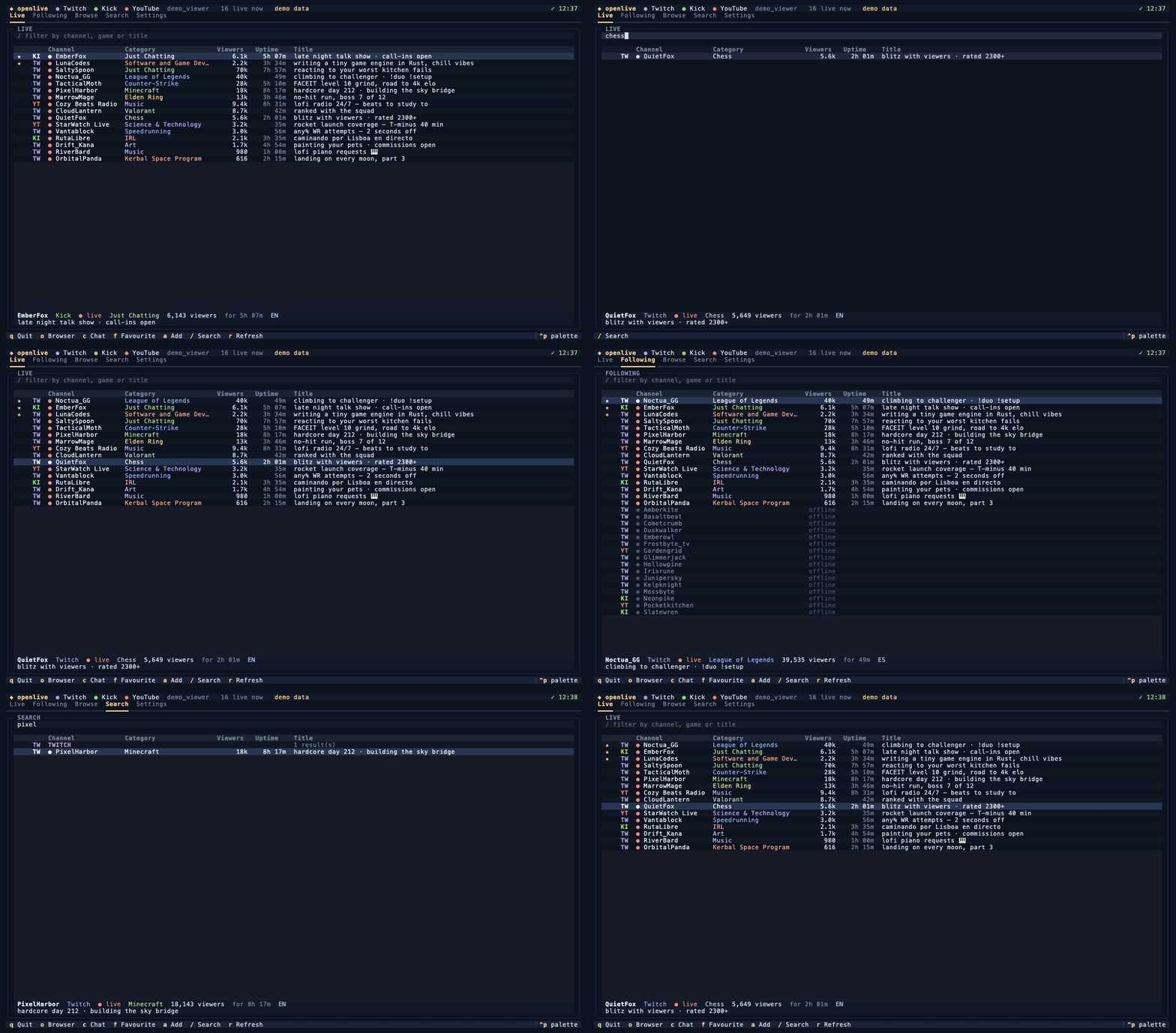
- openlive-0.1.3/tests/test_platforms.py +80 -0
- openlive-0.1.3/tests/test_player.py +173 -0
- openlive-0.1.3/tests/test_tui.py +297 -0
- openlive-0.1.3/tests/test_twitch.py +93 -0
- openlive-0.1.3/tests/test_updater.py +59 -0
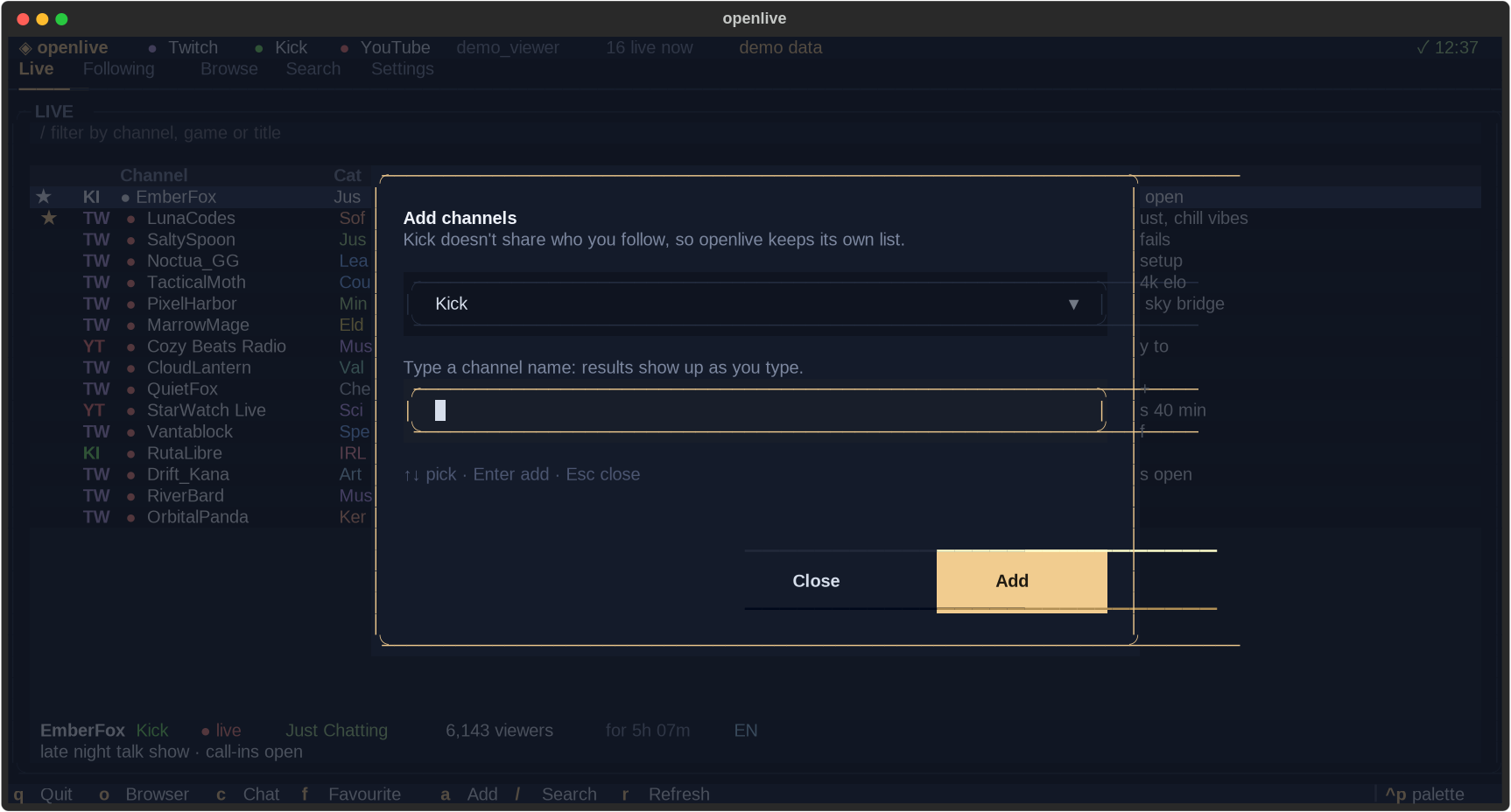
|
@@ -0,0 +1,44 @@
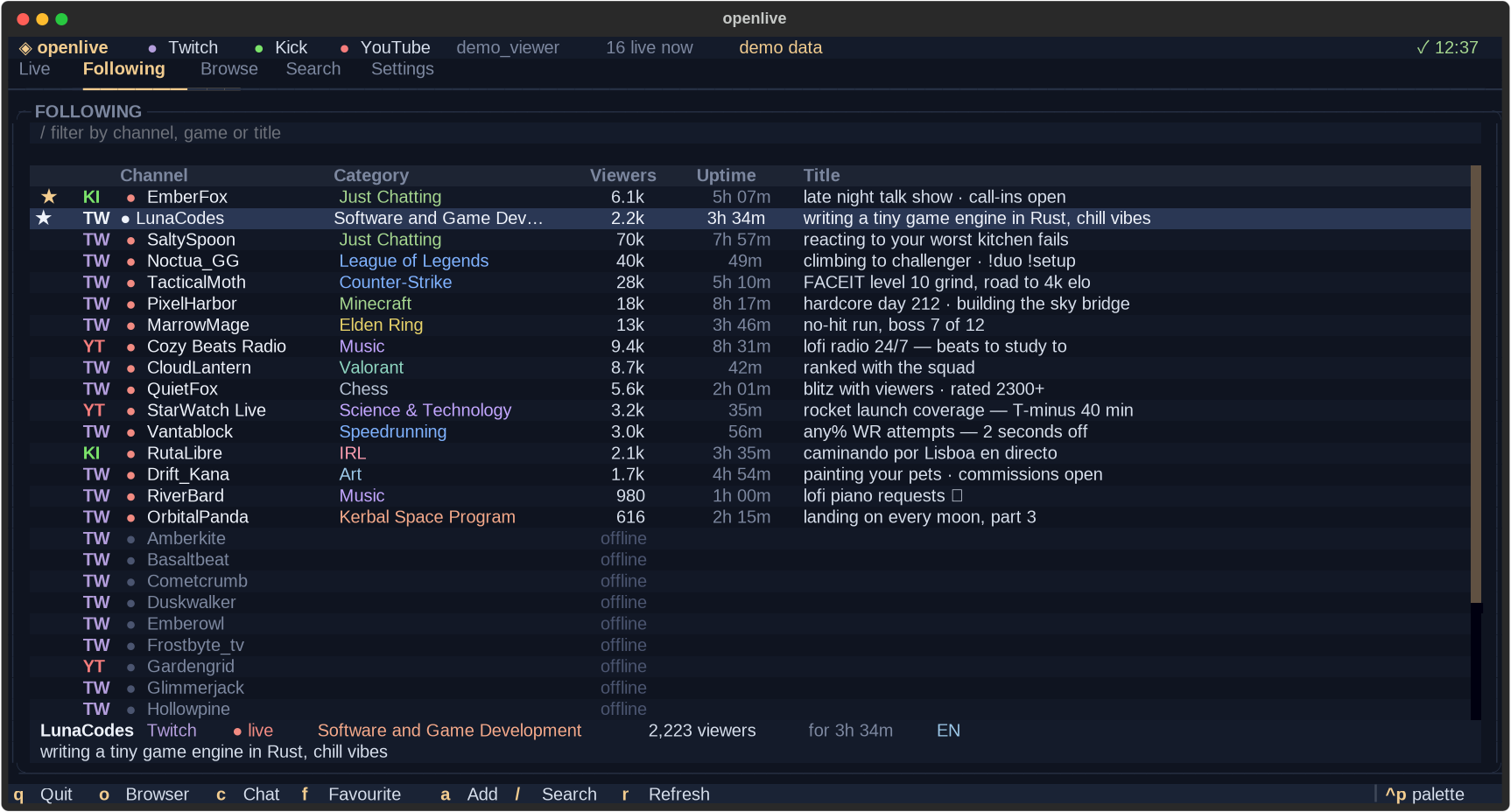
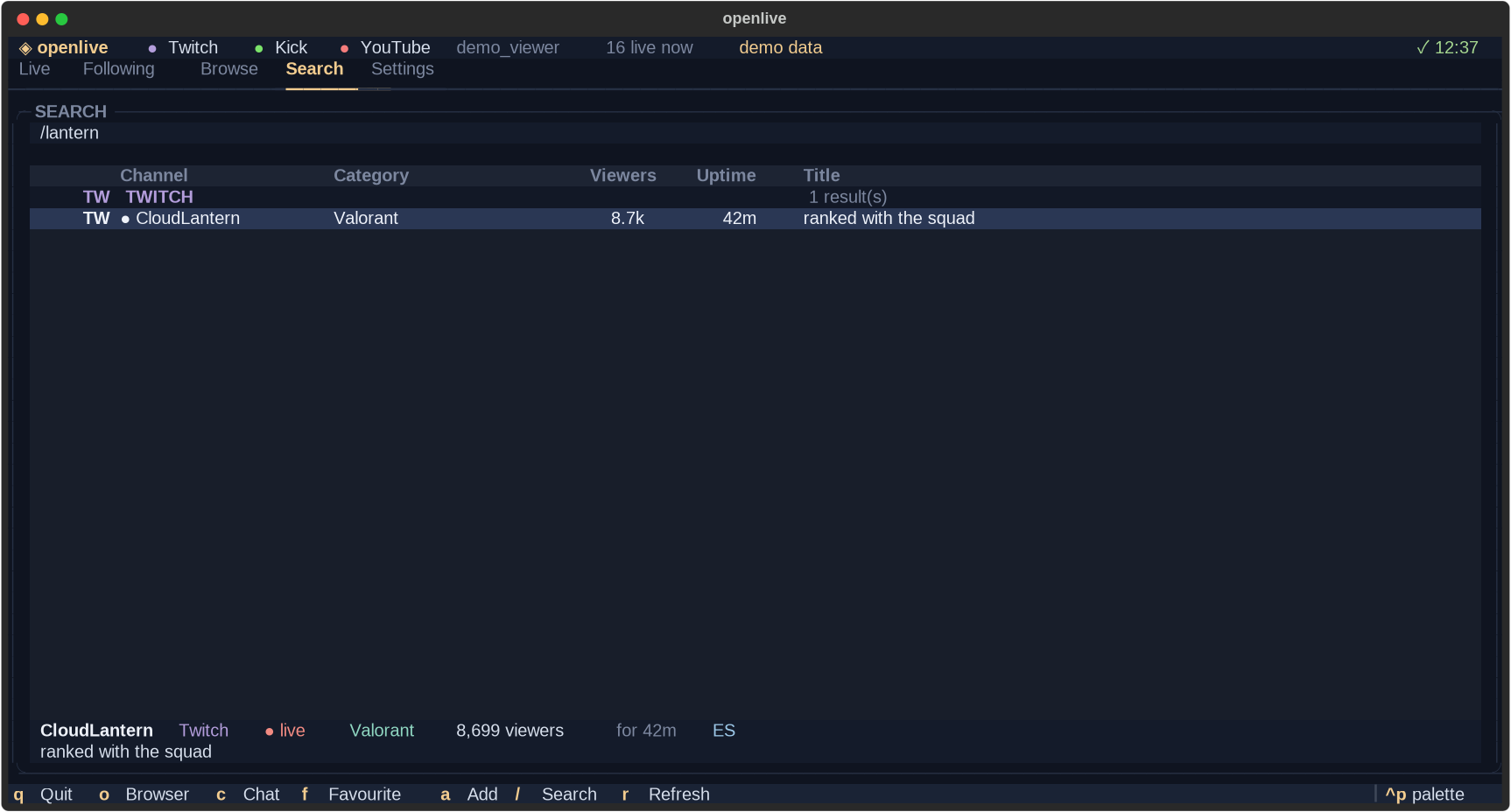
|
|
|
1
|
+
# Changelog
|
|
2
|
+
|
|
3
|
+
## 0.1.3 — 2026-11-28
|
|
4
|
+
|
|
5
|
+
- On PyPI: `pipx install openlive` or `uv tool install openlive`. Those installs update themselves too (uv) or show the command to run (pipx, pip).
|
|
6
|
+
- Looks for a new version every time openlive starts and once an hour while it is open (it was every 6 hours).
|
|
7
|
+
|
|
8
|
+
## 0.1.2 — 2026-11-28
|
|
9
|
+
|
|
10
|
+
- Player: a Quality button lists the stream's resolutions; picking one carries on from the same moment.
|
|
11
|
+
- Player: when you go back, a "Go live" button next to how far behind you are jumps to the newest moment. It also works now after a short rewind on Kick and YouTube.
|
|
12
|
+
- Windows: no console window opens next to the player.
|
|
13
|
+
- Windows: dragging the volume or the timeline no longer moves the window.
|
|
14
|
+
|
|
15
|
+
## 0.1.1 — 2026-11-28
|
|
16
|
+
|
|
17
|
+
- Fixed a crash when opening a stream (Python 3.12 can't read the signature of `set.discard`).
|
|
18
|
+
|
|
19
|
+
## 0.1.0 — 2026-11-28
|
|
20
|
+
|
|
21
|
+
First public version, rewritten from a personal shell script.
|
|
22
|
+
|
|
23
|
+
- Terminal dashboard (Textual): Live, Following, Browse and Search tabs.
|
|
24
|
+
- Sign in with Twitch by entering a code on twitch.tv/activate. No keys to create or paste.
|
|
25
|
+
- Watch in your own player (mpv, IINA or VLC) through streamlink; open the channel or its chat in the browser.
|
|
26
|
+
- Favourites on top, filter, click a header to sort, auto refresh.
|
|
27
|
+
- Just run `openlive`; `--text`, `--demo` and `--lang` are the only flags.
|
|
28
|
+
- Kick and YouTube live streams next to Twitch, each with its own colour; show or hide them with t, k, y.
|
|
29
|
+
- Kick / YouTube channel lists you keep in openlive (a adds, x removes); import YouTube subscriptions from Google Takeout.
|
|
30
|
+
- Sign in with Google (a code, like Twitch) to bring your YouTube subscriptions; RSS + cheap API checks keep quota low.
|
|
31
|
+
- Kick channel search as you type in the add dialog.
|
|
32
|
+
- Rewind live streams in mpv, even to before you opened them (Twitch and Kick to the stream start, YouTube up to ~1 h with DVR); End returns to live. openlive runs mpv with its own setup: a control bar in openlive's colours and a Twitch chat sidebar (c hides it).
|
|
33
|
+
- The player's chat shows emoji and Twitch emotes, keeps 2000 messages (scroll back with the wheel; it waits and counts new ones), can be paused, and lets you write (Enter). Writing asks Twitch for `user:write:chat`.
|
|
34
|
+
- Search covers Twitch, Kick and YouTube at once, one section per platform, and works without a Twitch sign-in.
|
|
35
|
+
- New player look: vector icons, volume slider (↑/↓, remembered), live pill, tooltips, draggable timeline, full-screen button. The chat starts closed; c or its button opens it.
|
|
36
|
+
- No player yet? openlive offers to install mpv (brew, winget, or the Linux line to copy), finds it in the usual Windows folders, and warns once about an mpv older than 0.38.
|
|
37
|
+
- One-line installers for macOS/Linux (install.sh) and Windows (install.ps1): uv, openlive and mpv, nothing needed first.
|
|
38
|
+
- openlive checks GitHub for a newer version and updates itself in the background (u); installers refetch the latest code.
|
|
39
|
+
- mpv is the player unless another one is chosen in Settings (no silent fallback to VLC/IINA).
|
|
40
|
+
- Sign-in dialog: Copy code button (copies the code without dashes).
|
|
41
|
+
- Settings tab (5): accounts, Kick channels, rewind, chat, one player per streamer, player, quality, language.
|
|
42
|
+
- One click on a row opens it (Textual needed a second click on the same cell); a streamer already playing isn't opened twice unless you turn that off in Settings.
|
|
43
|
+
- First-run platform picker (p to change it later). Optional YouTube Data API key.
|
|
44
|
+
- English and Spanish.
|
openlive-0.1.3/LICENSE
ADDED
|
@@ -0,0 +1,21 @@
|
|
|
1
|
+
MIT License
|
|
2
|
+
|
|
3
|
+
Copyright (c) 2026 xlydevs
|
|
4
|
+
|
|
5
|
+
Permission is hereby granted, free of charge, to any person obtaining a copy
|
|
6
|
+
of this software and associated documentation files (the "Software"), to deal
|
|
7
|
+
in the Software without restriction, including without limitation the rights
|
|
8
|
+
to use, copy, modify, merge, publish, distribute, sublicense, and/or sell
|
|
9
|
+
copies of the Software, and to permit persons to whom the Software is
|
|
10
|
+
furnished to do so, subject to the following conditions:
|
|
11
|
+
|
|
12
|
+
The above copyright notice and this permission notice shall be included in all
|
|
13
|
+
copies or substantial portions of the Software.
|
|
14
|
+
|
|
15
|
+
THE SOFTWARE IS PROVIDED "AS IS", WITHOUT WARRANTY OF ANY KIND, EXPRESS OR
|
|
16
|
+
IMPLIED, INCLUDING BUT NOT LIMITED TO THE WARRANTIES OF MERCHANTABILITY,
|
|
17
|
+
FITNESS FOR A PARTICULAR PURPOSE AND NONINFRINGEMENT. IN NO EVENT SHALL THE
|
|
18
|
+
AUTHORS OR COPYRIGHT HOLDERS BE LIABLE FOR ANY CLAIM, DAMAGES OR OTHER
|
|
19
|
+
LIABILITY, WHETHER IN AN ACTION OF CONTRACT, TORT OR OTHERWISE, ARISING FROM,
|
|
20
|
+
OUT OF OR IN CONNECTION WITH THE SOFTWARE OR THE USE OR OTHER DEALINGS IN THE
|
|
21
|
+
SOFTWARE.
|
openlive-0.1.3/PKG-INFO
ADDED
|
@@ -0,0 +1,203 @@
|
|
|
1
|
+
Metadata-Version: 2.5
|
|
2
|
+
Name: openlive
|
|
3
|
+
Version: 0.1.3
|
|
4
|
+
Summary: Who you watch is live right now? A terminal dashboard for Twitch, Kick and YouTube live streams, with rewind and chat in mpv.
|
|
5
|
+
Project-URL: Homepage, https://github.com/xlydevs/openlive
|
|
6
|
+
Project-URL: Issues, https://github.com/xlydevs/openlive/issues
|
|
7
|
+
Project-URL: Changelog, https://github.com/xlydevs/openlive/blob/main/CHANGELOG.md
|
|
8
|
+
Author: xlydevs
|
|
9
|
+
License-Expression: MIT
|
|
10
|
+
License-File: LICENSE
|
|
11
|
+
Keywords: kick,live,mpv,streamlink,streams,textual,tui,twitch,youtube
|
|
12
|
+
Classifier: Development Status :: 4 - Beta
|
|
13
|
+
Classifier: Environment :: Console
|
|
14
|
+
Classifier: Intended Audience :: End Users/Desktop
|
|
15
|
+
Classifier: Operating System :: OS Independent
|
|
16
|
+
Classifier: Programming Language :: Python :: 3
|
|
17
|
+
Classifier: Topic :: Multimedia :: Video
|
|
18
|
+
Requires-Python: >=3.11
|
|
19
|
+
Requires-Dist: pillow>=10.1
|
|
20
|
+
Requires-Dist: streamlink>=7.0
|
|
21
|
+
Requires-Dist: textual>=8.0
|
|
22
|
+
Requires-Dist: yt-dlp>=2025.1.1
|
|
23
|
+
Provides-Extra: dev
|
|
24
|
+
Requires-Dist: pytest-asyncio>=0.23; extra == 'dev'
|
|
25
|
+
Requires-Dist: pytest>=8; extra == 'dev'
|
|
26
|
+
Requires-Dist: ruff>=0.6; extra == 'dev'
|
|
27
|
+
Description-Content-Type: text/markdown
|
|
28
|
+
|
|
29
|
+
# openlive
|
|
30
|
+
|
|
31
|
+
**Who you watch is live right now?** `openlive` is a terminal dashboard of the Twitch, Kick and YouTube channels you watch that are streaming at this moment. Pick one and it plays in your own video player (mpv, IINA or VLC), not in a browser tab.
|
|
32
|
+
|
|
33
|
+
It runs on your computer and talks only to those sites. Twitch sign-in takes a code, not keys: you open twitch.tv/activate, check the code and press Activate. YouTube works the same way with Google, to bring your subscriptions. Kick needs no account.
|
|
34
|
+
|
|
35
|
+
[Español](README.es.md)
|
|
36
|
+
|
|
37
|
+
|
|
38
|
+
|
|
39
|
+
## Features
|
|
40
|
+
|
|
41
|
+
- **Live first, every platform in one list.** The channels you watch that are live, with category, viewers, uptime and title, tagged `TW`, `KI` or `YT`. It refreshes on its own every minute.
|
|
42
|
+
- **Watch without the browser.** `Enter` opens the stream in mpv, IINA or VLC. `o` opens the channel in the browser, `c` pops out its chat.
|
|
43
|
+
- **Rewind the live stream, even to before you opened it.** With mpv, `←` goes back and `End` returns to live: on Twitch and Kick back to the start of the stream, on YouTube up to an hour when the channel allows it.
|
|
44
|
+
- **Twitch follows, no keys.** Sign in once with a code; your follows come from your account. No developer account, no Client ID, no secret to copy.
|
|
45
|
+
- **YouTube subscriptions with Google.** Sign in once with a code (`g`); openlive only reads your subscriptions. YouTube shows live streams only, never videos.
|
|
46
|
+
- **Kick search as you type.** `a`, type a few letters, pick the channel. Kick doesn't share who you follow, so openlive keeps that list.
|
|
47
|
+
- **Show or hide a platform.** Click its chip in the top bar, or press `t`, `k` or `y`.
|
|
48
|
+
- **Following, Browse and Search.** Everyone you watch (live first), the top streams on Twitch, and one search across Twitch, Kick and YouTube, with a section per platform.
|
|
49
|
+
- **A player that looks like openlive.** mpv with its own control bar: vector icons, a volume slider (remembered between streams), a live pill that takes you back, tooltips and a timeline you can drag.
|
|
50
|
+
- **Chat next to the video.** A Twitch chat sidebar in mpv, closed until you open it, with emoji and Twitch emotes. Scroll back with the mouse wheel (the chat waits for you and counts new messages), pause it, and write with `Enter`.
|
|
51
|
+
- **Settings tab.** Sign in and out, your Kick channels, rewind or live only, open the chat on start, one player per streamer, player, quality and language (`5`).
|
|
52
|
+
- **Favourites on top.** `f` pins a channel to the top of every list.
|
|
53
|
+
- **Mouse and keyboard.** Click a header to sort, `/` to filter. Works from 80 columns up.
|
|
54
|
+
- **English and Spanish.**
|
|
55
|
+
|
|
56
|
+
| Following | Add Kick / YouTube channels |
|
|
57
|
+
|---|---|
|
|
58
|
+
|  |  |
|
|
59
|
+
| **Search (every platform)** | **Settings** |
|
|
60
|
+
|  | 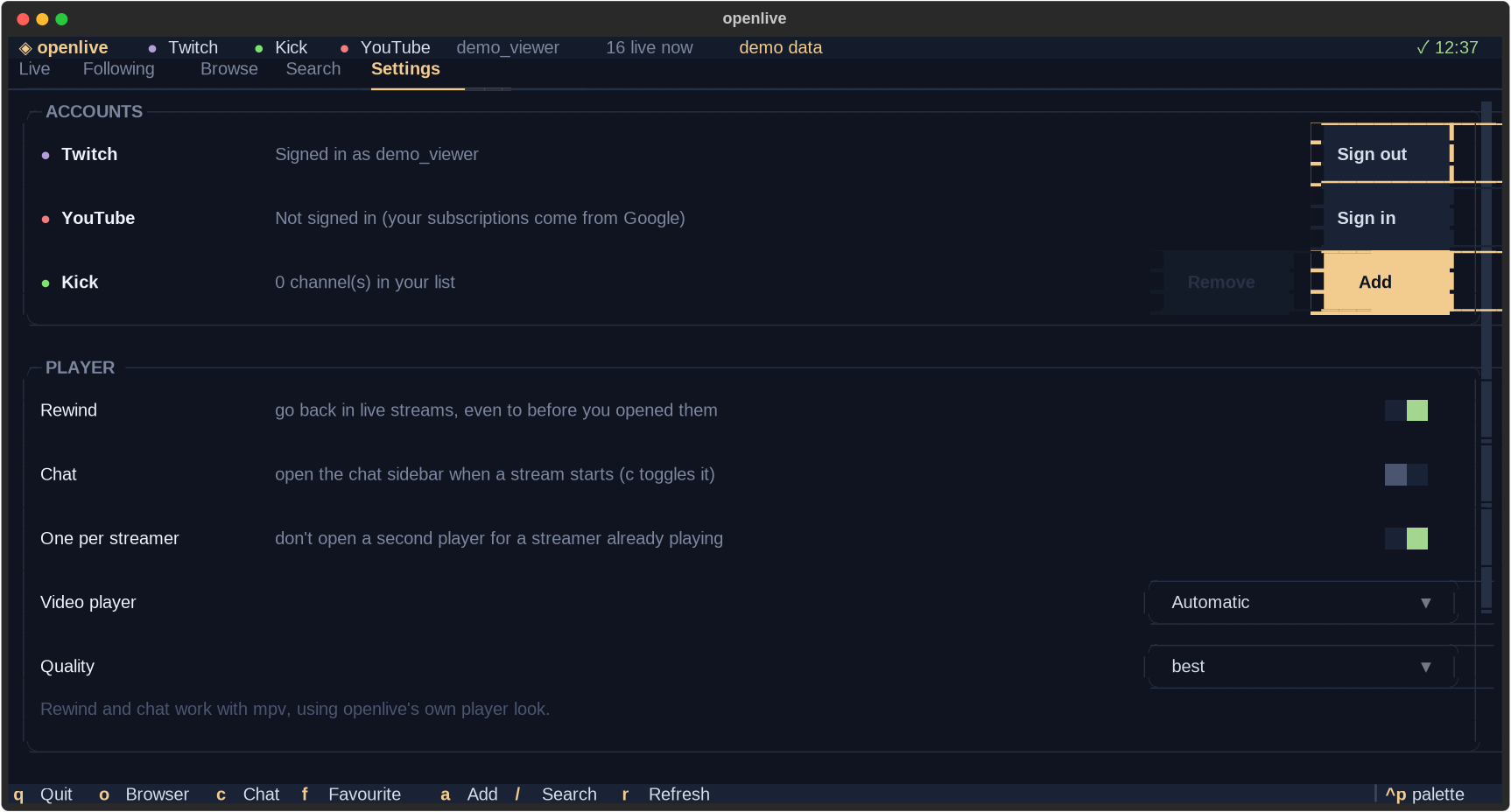 |
|
|
61
|
+
|
|
62
|
+
## Install
|
|
63
|
+
|
|
64
|
+
You don't need Python or anything else first. Open a terminal and paste one line.
|
|
65
|
+
|
|
66
|
+
**macOS and Linux** (Terminal):
|
|
67
|
+
|
|
68
|
+
```bash
|
|
69
|
+
curl -LsSf https://raw.githubusercontent.com/xlydevs/openlive/main/install.sh | sh
|
|
70
|
+
```
|
|
71
|
+
|
|
72
|
+
**Windows** (PowerShell):
|
|
73
|
+
|
|
74
|
+
```powershell
|
|
75
|
+
irm https://raw.githubusercontent.com/xlydevs/openlive/main/install.ps1 | iex
|
|
76
|
+
```
|
|
77
|
+
|
|
78
|
+
It installs [uv](https://docs.astral.sh/uv/) (one small program that brings its own Python), then openlive, then the [mpv](https://mpv.io) player if it's missing (Homebrew on macOS, winget on Windows, your package manager on Linux). Then open a new terminal and run:
|
|
79
|
+
|
|
80
|
+
```bash
|
|
81
|
+
openlive
|
|
82
|
+
```
|
|
83
|
+
|
|
84
|
+
**Updates:** when a new version is out, openlive tells you and updates itself in the background with one click (`u` brings the dialog back; on Windows it finishes when you close openlive). You can also paste the same line again. To remove it: `uv tool uninstall openlive`. You can read both scripts first: [install.sh](install.sh), [install.ps1](install.ps1).
|
|
85
|
+
|
|
86
|
+
Already have Python 3.11+? `pipx install openlive` or `uv tool install openlive` (from [PyPI](https://pypi.org/project/openlive/)) work too; you install mpv yourself. openlive plays in mpv; IINA or VLC can be picked in Settings, without rewind and chat.
|
|
87
|
+
|
|
88
|
+
If there's still no player, openlive offers to install mpv the first time you open a stream (Homebrew on macOS, winget on Windows; on Linux it shows the `sudo apt/dnf/pacman` line to run). It also looks for mpv where Windows installers put it, and says once if your mpv is too old to write in the chat (0.38+).
|
|
89
|
+
|
|
90
|
+
The first time, openlive asks which platforms you watch. Twitch and YouTube then ask you to sign in with a code; Kick asks for a few channels.
|
|
91
|
+
|
|
92
|
+
Try it without any account. The demo uses made-up channels and reads and writes nothing:
|
|
93
|
+
|
|
94
|
+
```bash
|
|
95
|
+
openlive --demo
|
|
96
|
+
```
|
|
97
|
+
|
|
98
|
+
From source:
|
|
99
|
+
|
|
100
|
+
```bash
|
|
101
|
+
git clone https://github.com/xlydevs/openlive && cd openlive
|
|
102
|
+
uv venv && uv pip install -e ".[dev]"
|
|
103
|
+
.venv/bin/openlive
|
|
104
|
+
```
|
|
105
|
+
|
|
106
|
+
## Usage
|
|
107
|
+
|
|
108
|
+
```text
|
|
109
|
+
openlive open the dashboard (first run: pick platforms, sign in)
|
|
110
|
+
openlive --text print who is live and exit (also used when piping: openlive | less)
|
|
111
|
+
openlive --demo made-up channels
|
|
112
|
+
openlive --lang es interface language (default: system locale)
|
|
113
|
+
```
|
|
114
|
+
|
|
115
|
+
**Keys:**
|
|
116
|
+
- `1`–`5` switch tabs: Live, Following, Browse, Search, Settings.
|
|
117
|
+
- `↑`/`↓` move, `Enter` watch (offline channels open in the browser).
|
|
118
|
+
- `o` open in the browser, `c` chat, `f` favourite.
|
|
119
|
+
- `a` add Kick / YouTube channels, `x` remove the selected one from your list.
|
|
120
|
+
- `t`, `k`, `y` show or hide Twitch, Kick, YouTube; `p` choose platforms.
|
|
121
|
+
- `/` filter the list (in Search: type a channel or game and press `Enter`; it searches every platform you use), `Esc` clear it.
|
|
122
|
+
- `r` refresh, `l` sign in to Twitch, `g` sign in with Google, `Ctrl+P` command palette (sign out is there), `q` quit.
|
|
123
|
+
- Click a column header to sort; click again to reverse.
|
|
124
|
+
|
|
125
|
+
**In the player (mpv):**
|
|
126
|
+
- `←`/`→` 10 seconds back or forward, `Shift+←`/`Shift+→` 5 minutes.
|
|
127
|
+
- `End` (or `l`) back to live, `Space` pause, `↑`/`↓` volume, `m` mute, `f` full screen.
|
|
128
|
+
- `c` opens or closes the chat (it starts closed; Settings can open it on start).
|
|
129
|
+
- Chat: mouse wheel or `PgUp`/`PgDn` to scroll back, the pause button to stop it, `Enter` (or **Write**) to write.
|
|
130
|
+
- Move the mouse for the control bar: click the timeline to jump, `● −5:03` to return to live.
|
|
131
|
+
|
|
132
|
+
**YouTube without signing in:** in [Google Takeout](https://takeout.google.com/takeout/custom/youtube) pick only YouTube → subscriptions, export, unzip, and paste the path of `subscriptions.csv` in the `a` dialog.
|
|
133
|
+
|
|
134
|
+
## How it works
|
|
135
|
+
|
|
136
|
+
Twitch uses its [device code flow](https://dev.twitch.tv/docs/authentication/getting-tokens-oauth/#device-code-grant-flow) and asks for two permissions: `user:read:follows`, to read who you follow, and `user:write:chat`, to send what you write in the player's chat. It can't follow, unfollow or change anything else on your account. If you signed in before writing was added, sign in again (`l`) to write.
|
|
137
|
+
|
|
138
|
+
Google uses the same kind of code sign-in and asks for `youtube.readonly`: openlive reads your subscriptions and nothing else. To spend almost no API quota, it reads each channel's RSS feed and only asks the API about new videos; videos already known to be finished are remembered.
|
|
139
|
+
|
|
140
|
+
**Google sign-in while openlive is new:** until Google reviews openlive's app, it only lets in accounts added as testers and shows an "unverified app" warning. Until then you can import your subscriptions from Takeout, add channels by hand, or use your own Google client (`[youtube] client_id` and `client_secret`, a "TVs and Limited Input devices" client).
|
|
141
|
+
|
|
142
|
+
Kick has no public way for an app like this to read who you follow, so openlive keeps its own list of channels and checks each one.
|
|
143
|
+
|
|
144
|
+
| Platform | What | Where it comes from |
|
|
145
|
+
|---|---|---|
|
|
146
|
+
| Twitch | Live, Following | Helix `streams/followed`, `channels/followed` |
|
|
147
|
+
| Twitch | Browse, Search | Helix `streams` (top by viewers; `browse_language` filters it), `search/channels` |
|
|
148
|
+
| Kick | search | `kick.com/api/search` (public, no key) |
|
|
149
|
+
| YouTube | search | yt-dlp on YouTube's search page with its "Live" filter (no API quota) |
|
|
150
|
+
| Kick | live check | `kick.com/api/v2/channels/<slug>` (public, no key) |
|
|
151
|
+
| YouTube | subscriptions | `subscriptions?mine=true` (signed in with Google) |
|
|
152
|
+
| YouTube | live check | RSS feed + `videos.list` (signed in or with an API key), otherwise the channel's `/live` page |
|
|
153
|
+
| Twitch | chat | read anonymously from Twitch's chat server; emotes from `static-cdn.jtvnw.net`; writing through Helix `chat/messages` |
|
|
154
|
+
| Twitch | rewind | Helix `videos`: the recording Twitch keeps of the live stream, which grows as it goes on |
|
|
155
|
+
| Kick | rewind | `kick.com/api/v2/channels/<slug>/videos`: its recording of the live stream |
|
|
156
|
+
| YouTube | rewind | yt-dlp: the separate video and audio playlists keep the channel's DVR window (up to ~1 h) |
|
|
157
|
+
| All | playback | mpv with openlive's own setup (its control bar, chat sidebar and rewind script, in `src/openlive/mpv/`); other players through `streamlink` |
|
|
158
|
+
|
|
159
|
+
**Honest note:** Kick's channel API and YouTube's `/live` page are not official, documented APIs. They work today and need no keys, but either site can change them and break the check until openlive is updated. With a [YouTube Data API key](https://console.cloud.google.com/apis/library/youtube.googleapis.com) (`[youtube] api_key` in the config, free quota is plenty) YouTube uses the official API instead.
|
|
160
|
+
|
|
161
|
+
Files it keeps:
|
|
162
|
+
|
|
163
|
+
| File | What |
|
|
164
|
+
|---|---|
|
|
165
|
+
| `~/.config/openlive/config.toml` | optional settings: platforms, player, quality, language, YouTube key… see [config.example.toml](config.example.toml) |
|
|
166
|
+
| `~/.local/share/openlive/auth.json` | your Twitch sign-in token (only readable by you) |
|
|
167
|
+
| `~/.local/share/openlive/google_auth.json` | your Google sign-in token (only readable by you) |
|
|
168
|
+
| `~/.local/share/openlive/youtube_subs.json`, `youtube_seen.json` | your subscriptions (refreshed every 12 h) and videos known not to be live |
|
|
169
|
+
| `~/.local/share/openlive/mpv/` | openlive's mpv setup; your own `~/.config/mpv` is left alone |
|
|
170
|
+
| `~/.local/share/openlive/emotes/` | Twitch emote images already downloaded |
|
|
171
|
+
| `~/.local/share/openlive/channels.json` | your Kick and YouTube channels |
|
|
172
|
+
| `~/.local/share/openlive/favourites.json` | your favourites |
|
|
173
|
+
| `~/.local/share/openlive/cache.json` | last Live list, so the app opens instantly |
|
|
174
|
+
|
|
175
|
+
On Windows they live in `%APPDATA%\openlive` and `%LOCALAPPDATA%\openlive`. `$OPENLIVE_CONFIG` and `$OPENLIVE_DATA_DIR` override them.
|
|
176
|
+
|
|
177
|
+
**Rewinding:** Twitch needs the streamer to keep past broadcasts (most do; sub-only ones can't be opened). YouTube rewinds only on channels with DVR on. Without either, mpv can still go back to the moment you opened the stream. `player_ui = "plain"` uses your own mpv setup instead, without rewind.
|
|
178
|
+
|
|
179
|
+
**Chat:** a Twitch chat sidebar in mpv (`c` opens it). openlive draws it as an image (with Pillow) because mpv's own text renderer can't show colour emoji. It keeps the last 2000 messages. Joined emoji (👩💻) show their first part, and 7TV/BTTV emotes show as text. There's no chat for Kick and YouTube yet. Writing needs mpv 0.38 or newer.
|
|
180
|
+
|
|
181
|
+
**Not supported:** chat inside the terminal, VODs of past streams, clips and regular YouTube videos, Browse on Kick or YouTube (no public API for it). Ads and sub-only streams behave as they do in streamlink.
|
|
182
|
+
|
|
183
|
+
**Privacy:** nothing is sent anywhere but Twitch, Kick, YouTube and Google (for the sign-in). No analytics. Full text: [PRIVACY.md](PRIVACY.md).
|
|
184
|
+
|
|
185
|
+
## Development
|
|
186
|
+
|
|
187
|
+
```bash
|
|
188
|
+
uv venv && uv pip install -e ".[dev]"
|
|
189
|
+
.venv/bin/python -m pytest -q # tests never touch the network or your real token
|
|
190
|
+
uvx ruff check .
|
|
191
|
+
.venv/bin/python scripts/screenshots.py # docs/screenshots/*.svg from demo data
|
|
192
|
+
vhs scripts/demo.tape # docs/demo.gif
|
|
193
|
+
```
|
|
194
|
+
|
|
195
|
+
Shipping an update: raise `__version__` in `src/openlive/__init__.py` and push to `main`. openlive checks for it every time it starts and once an hour while open, then offers to update.
|
|
196
|
+
|
|
197
|
+
Using your own Twitch app: create a **Public** app at [dev.twitch.tv](https://dev.twitch.tv/console/apps/create) (redirect `http://localhost`), then set `client_id` in the config or `$OPENLIVE_CLIENT_ID`.
|
|
198
|
+
|
|
199
|
+
openlive is not affiliated with or endorsed by Twitch, Kick or YouTube.
|
|
200
|
+
|
|
201
|
+
## License
|
|
202
|
+
|
|
203
|
+
[MIT](LICENSE)
|
|
@@ -0,0 +1,49 @@
|
|
|
1
|
+
# Privacy policy
|
|
2
|
+
|
|
3
|
+
*Last updated: 26 November 2026* · [Español](#política-de-privacidad)
|
|
4
|
+
|
|
5
|
+
openlive is an open-source program that runs on your own computer. It has no server, no accounts of its own and no analytics. The people who make openlive never receive your data.
|
|
6
|
+
|
|
7
|
+
## What openlive reads
|
|
8
|
+
|
|
9
|
+
- **Twitch** (if you sign in): your user name and the channels you follow, to show which are live. Scopes: `user:read:follows`, and `user:write:chat` to send chat messages you type yourself.
|
|
10
|
+
- **YouTube / Google** (if you sign in): your YouTube subscriptions, to show which channels are live. Scope: `https://www.googleapis.com/auth/youtube.readonly` (read only). openlive never posts, likes, subscribes or changes anything in your Google account.
|
|
11
|
+
- **Kick**: only the public pages of the channels you add. No sign-in.
|
|
12
|
+
|
|
13
|
+
## Where your data goes
|
|
14
|
+
|
|
15
|
+
Everything stays on your computer: sign-in tokens, your channel lists and settings are saved in openlive's folders in your user account (`~/.local/share/openlive` and `~/.config/openlive`, or `%LOCALAPPDATA%` / `%APPDATA%` on Windows). Token files are readable only by your user where the system allows it.
|
|
16
|
+
|
|
17
|
+
openlive only talks to Twitch, Kick, YouTube and Google to fetch what it shows, and to GitHub to check for a newer version of openlive. Nothing is sold, shared or sent to anyone else.
|
|
18
|
+
|
|
19
|
+
## Google user data
|
|
20
|
+
|
|
21
|
+
openlive's use and transfer of information received from Google APIs adheres to the [Google API Services User Data Policy](https://developers.google.com/terms/api-services-user-data-policy), including the Limited Use requirements. YouTube data is used only to show you which of your subscriptions are live, inside openlive, on your computer.
|
|
22
|
+
|
|
23
|
+
## Removing your data
|
|
24
|
+
|
|
25
|
+
- Sign out in openlive's Settings tab (5): openlive revokes the token and deletes it.
|
|
26
|
+
- Revoke access any time at [myaccount.google.com/permissions](https://myaccount.google.com/permissions) (Google) or [twitch.tv/settings/connections](https://www.twitch.tv/settings/connections) (Twitch).
|
|
27
|
+
- Uninstall with `uv tool uninstall openlive` and delete the folders above to remove everything.
|
|
28
|
+
|
|
29
|
+
## Contact
|
|
30
|
+
|
|
31
|
+
Questions: open an issue at [github.com/xlydevs/openlive/issues](https://github.com/xlydevs/openlive/issues) or write to xlydevs@gmail.com.
|
|
32
|
+
|
|
33
|
+
---
|
|
34
|
+
|
|
35
|
+
# Política de privacidad
|
|
36
|
+
|
|
37
|
+
*Última actualización: 26 de noviembre de 2026*
|
|
38
|
+
|
|
39
|
+
openlive es un programa de código abierto que se ejecuta en tu propio ordenador. No tiene servidor, ni cuentas propias, ni analíticas. Quienes hacen openlive nunca reciben tus datos.
|
|
40
|
+
|
|
41
|
+
- **Twitch** (si inicias sesión): tu nombre de usuario y los canales que sigues, para ver cuáles están en directo; y enviar al chat los mensajes que tú escribes.
|
|
42
|
+
- **YouTube / Google** (si inicias sesión): tus suscripciones de YouTube, solo lectura (`youtube.readonly`), para ver cuáles están en directo. openlive nunca publica, da me gusta, se suscribe ni cambia nada en tu cuenta.
|
|
43
|
+
- **Kick**: solo las páginas públicas de los canales que añades.
|
|
44
|
+
|
|
45
|
+
Todo se guarda en tu ordenador (tokens, listas de canales y ajustes). openlive solo se conecta a Twitch, Kick, YouTube y Google para obtener lo que muestra, y a GitHub para ver si hay una versión nueva. No se vende, comparte ni envía nada a nadie más. El uso de los datos de las API de Google cumple la [Política de datos de usuario de los servicios de API de Google](https://developers.google.com/terms/api-services-user-data-policy), incluidos los requisitos de Uso Limitado.
|
|
46
|
+
|
|
47
|
+
Para borrar tus datos: cierra sesión en Ajustes (5), revoca el acceso en [myaccount.google.com/permissions](https://myaccount.google.com/permissions) o en [twitch.tv/settings/connections](https://www.twitch.tv/settings/connections), y desinstala con `uv tool uninstall openlive` borrando las carpetas de openlive.
|
|
48
|
+
|
|
49
|
+
Contacto: [github.com/xlydevs/openlive/issues](https://github.com/xlydevs/openlive/issues) o xlydevs@gmail.com.
|
|
@@ -0,0 +1,175 @@
|
|
|
1
|
+
# openlive
|
|
2
|
+
|
|
3
|
+
**¿Quién de los que ves está en directo ahora?** `openlive` es un panel en la terminal con los canales de Twitch, Kick y YouTube que ves y que están emitiendo en este momento. Eliges uno y se abre en tu propio reproductor (mpv, IINA o VLC), no en una pestaña del navegador.
|
|
4
|
+
|
|
5
|
+
Funciona en tu ordenador y solo habla con esas webs. Para entrar en Twitch basta un código, sin claves: abres twitch.tv/activate, compruebas el código y pulsas Activar. YouTube funciona igual con Google, para traer tus suscripciones. Kick no necesita cuenta.
|
|
6
|
+
|
|
7
|
+
[English](README.md)
|
|
8
|
+
|
|
9
|
+

|
|
10
|
+
|
|
11
|
+
## Funciones
|
|
12
|
+
|
|
13
|
+
- **Primero los directos, todas las plataformas en una lista.** Los canales que ves que están en directo, con categoría, espectadores, tiempo y título, marcados `TW`, `KI` o `YT`. Se recarga solo cada minuto.
|
|
14
|
+
- **Sin navegador.** `Enter` abre el directo en mpv, IINA o VLC. `o` abre el canal en el navegador y `c` abre su chat aparte.
|
|
15
|
+
- **Rebobina el directo, incluso a antes de abrirlo.** Con mpv, `←` retrocede y `Fin` vuelve al directo: en Twitch y Kick hasta el principio del directo, en YouTube hasta una hora si el canal lo permite.
|
|
16
|
+
- **Seguidos de Twitch, sin claves.** Inicias sesión una vez con un código y tus seguidos salen de tu cuenta. Sin cuenta de desarrollador, sin Client ID, sin secretos que copiar.
|
|
17
|
+
- **Suscripciones de YouTube con Google.** Inicias sesión una vez con un código (`g`); openlive solo lee tus suscripciones. De YouTube solo salen directos, nunca vídeos.
|
|
18
|
+
- **Kick: buscas mientras escribes.** `a`, unas letras y eliges el canal. Kick no dice a quién sigues, así que openlive guarda esa lista.
|
|
19
|
+
- **Muestra u oculta una plataforma.** Haz clic en su etiqueta de la barra superior o pulsa `t`, `k` o `y`.
|
|
20
|
+
- **Siguiendo, Explorar y Buscar.** Todos los que ves (primero los que están en directo), los directos más vistos de Twitch y una sola búsqueda en Twitch, Kick y YouTube, con una sección por plataforma.
|
|
21
|
+
- **Un reproductor con el estilo de openlive.** mpv con su propia barra: iconos vectoriales, barra de volumen (se recuerda entre directos), una pastilla de directo que te devuelve a él, tooltips y una línea de tiempo que puedes arrastrar.
|
|
22
|
+
- **El chat junto al vídeo.** Una barra lateral con el chat de Twitch en mpv, cerrada hasta que la abres, con emojis y emotes de Twitch. Con la rueda del ratón vuelves atrás (el chat te espera y cuenta los mensajes nuevos), puedes pausarlo y escribes con `Enter`.
|
|
23
|
+
- **Pestaña de Ajustes.** Iniciar y cerrar sesión, tus canales de Kick, rebobinar o solo directo, abrir el chat al empezar, un reproductor por streamer, reproductor, calidad e idioma (`5`).
|
|
24
|
+
- **Favoritos arriba.** `f` fija un canal arriba en todas las listas.
|
|
25
|
+
- **Ratón y teclado.** Clic en una cabecera para ordenar, `/` para filtrar. Funciona desde 80 columnas.
|
|
26
|
+
- **Inglés y español.**
|
|
27
|
+
|
|
28
|
+
| Siguiendo | Añadir canales de Kick / YouTube |
|
|
29
|
+
|---|---|
|
|
30
|
+
|  |  |
|
|
31
|
+
| **Buscar (todas las plataformas)** | **Ajustes** |
|
|
32
|
+
|  |  |
|
|
33
|
+
|
|
34
|
+
## Instalación
|
|
35
|
+
|
|
36
|
+
No necesitas tener Python ni nada instalado. Abre una terminal y pega una línea.
|
|
37
|
+
|
|
38
|
+
**macOS y Linux** (Terminal):
|
|
39
|
+
|
|
40
|
+
```bash
|
|
41
|
+
curl -LsSf https://raw.githubusercontent.com/xlydevs/openlive/main/install.sh | sh
|
|
42
|
+
```
|
|
43
|
+
|
|
44
|
+
**Windows** (PowerShell):
|
|
45
|
+
|
|
46
|
+
```powershell
|
|
47
|
+
irm https://raw.githubusercontent.com/xlydevs/openlive/main/install.ps1 | iex
|
|
48
|
+
```
|
|
49
|
+
|
|
50
|
+
Instala [uv](https://docs.astral.sh/uv/) (un programa pequeño que trae su propio Python), después openlive y, si falta, el reproductor [mpv](https://mpv.io) (con Homebrew en macOS, winget en Windows y tu gestor de paquetes en Linux). Luego abre una terminal nueva y ejecuta:
|
|
51
|
+
|
|
52
|
+
```bash
|
|
53
|
+
openlive
|
|
54
|
+
```
|
|
55
|
+
|
|
56
|
+
**Actualizaciones:** cuando sale una versión nueva, openlive te avisa y se actualiza en segundo plano con un clic (`u` vuelve a mostrar el aviso; en Windows termina cuando cierras openlive). También puedes pegar la misma línea otra vez. Para quitarlo: `uv tool uninstall openlive`. Puedes leer antes los dos scripts: [install.sh](install.sh), [install.ps1](install.ps1).
|
|
57
|
+
|
|
58
|
+
¿Ya tienes Python 3.11+? También vale `pipx install openlive` o `uv tool install openlive` (desde [PyPI](https://pypi.org/project/openlive/)); mpv lo instalas tú. openlive reproduce en mpv; en Ajustes puedes elegir IINA o VLC, sin rebobinado ni chat.
|
|
59
|
+
|
|
60
|
+
Si aun así no tienes reproductor, openlive se ofrece a instalar mpv la primera vez que abres un directo (con Homebrew en macOS y winget en Windows; en Linux te enseña la línea `sudo apt/dnf/pacman` que debes ejecutar). También busca mpv donde lo dejan los instaladores de Windows y avisa una vez si tu mpv es demasiado antiguo para escribir en el chat (0.38+).
|
|
61
|
+
|
|
62
|
+
La primera vez, openlive te pregunta qué plataformas ves. Después Twitch y YouTube te piden iniciar sesión con un código, y Kick te pide algunos canales.
|
|
63
|
+
|
|
64
|
+
Pruébalo sin ninguna cuenta. La demo usa canales inventados y no lee ni escribe nada:
|
|
65
|
+
|
|
66
|
+
```bash
|
|
67
|
+
openlive --demo
|
|
68
|
+
```
|
|
69
|
+
|
|
70
|
+
Desde el código:
|
|
71
|
+
|
|
72
|
+
```bash
|
|
73
|
+
git clone https://github.com/xlydevs/openlive && cd openlive
|
|
74
|
+
uv venv && uv pip install -e ".[dev]"
|
|
75
|
+
.venv/bin/openlive
|
|
76
|
+
```
|
|
77
|
+
|
|
78
|
+
## Uso
|
|
79
|
+
|
|
80
|
+
```text
|
|
81
|
+
openlive abre el panel (la primera vez: eliges plataformas e inicias sesión)
|
|
82
|
+
openlive --text muestra quién está en directo y sale (también al usar una tubería: openlive | less)
|
|
83
|
+
openlive --demo canales inventados
|
|
84
|
+
openlive --lang en idioma de la interfaz (por defecto: el del sistema)
|
|
85
|
+
```
|
|
86
|
+
|
|
87
|
+
**Teclas:**
|
|
88
|
+
- `1`–`5` cambian de pestaña: En directo, Siguiendo, Explorar, Buscar, Ajustes.
|
|
89
|
+
- `↑`/`↓` moverse, `Enter` ver (los canales offline se abren en el navegador).
|
|
90
|
+
- `o` abrir en el navegador, `c` chat, `f` favorito.
|
|
91
|
+
- `a` añadir canales de Kick / YouTube, `x` quitar de tu lista el seleccionado.
|
|
92
|
+
- `t`, `k`, `y` muestran u ocultan Twitch, Kick y YouTube; `p` elige las plataformas.
|
|
93
|
+
- `/` filtra la lista (en Buscar: escribe un canal o juego y pulsa `Enter`; busca en todas las plataformas que usas), `Esc` lo borra.
|
|
94
|
+
- `r` recargar, `l` iniciar sesión en Twitch, `g` iniciar sesión con Google, `Ctrl+P` paleta de comandos (ahí está cerrar sesión), `q` salir.
|
|
95
|
+
- Clic en la cabecera de una columna para ordenar; otro clic invierte el orden.
|
|
96
|
+
|
|
97
|
+
**En el reproductor (mpv):**
|
|
98
|
+
- `←`/`→` 10 segundos atrás o adelante, `Mayús+←`/`Mayús+→` 5 minutos.
|
|
99
|
+
- `Fin` (o `l`) vuelve al directo, `Espacio` pausa, `↑`/`↓` volumen, `m` silencio, `f` pantalla completa.
|
|
100
|
+
- `c` abre o cierra el chat (empieza cerrado; en Ajustes puedes hacer que se abra al empezar).
|
|
101
|
+
- Chat: rueda del ratón o `RePág`/`AvPág` para ver mensajes anteriores, el botón de pausa para pararlo, `Enter` (o **Escribir**) para escribir.
|
|
102
|
+
- Mueve el ratón para ver la barra de controles: clic en la línea de tiempo para saltar, en `● −5:03` para volver al directo.
|
|
103
|
+
|
|
104
|
+
**YouTube sin iniciar sesión:** en [Google Takeout](https://takeout.google.com/takeout/custom/youtube) marca solo YouTube → suscripciones, exporta, descomprime y pega la ruta de `subscriptions.csv` en el diálogo de `a`.
|
|
105
|
+
|
|
106
|
+
## Cómo funciona
|
|
107
|
+
|
|
108
|
+
Twitch usa su [flujo de código de dispositivo](https://dev.twitch.tv/docs/authentication/getting-tokens-oauth/#device-code-grant-flow) y pide dos permisos: `user:read:follows`, para leer a quién sigues, y `user:write:chat`, para enviar lo que escribes en el chat del reproductor. No puede seguir ni dejar de seguir canales ni cambiar nada más de tu cuenta. Si iniciaste sesión antes de que se pudiera escribir, vuelve a iniciarla (`l`) para escribir.
|
|
109
|
+
|
|
110
|
+
Google usa el mismo tipo de inicio de sesión con código y pide `youtube.readonly`: openlive lee tus suscripciones y nada más. Para gastar casi nada de cuota de la API, lee el feed RSS de cada canal y solo pregunta a la API por los vídeos nuevos; los que ya sabe que han terminado los recuerda.
|
|
111
|
+
|
|
112
|
+
**Google mientras openlive es nuevo:** hasta que Google revise la app de openlive, solo deja entrar a las cuentas añadidas como testers y muestra un aviso de "app no verificada". Mientras tanto puedes importar tus suscripciones desde Takeout, añadir canales a mano o usar tu propio cliente de Google (`[youtube] client_id` y `client_secret`, un cliente de tipo "TVs and Limited Input devices").
|
|
113
|
+
|
|
114
|
+
Kick no ofrece una forma pública de que una app así lea a quién sigues, así que openlive guarda su propia lista de canales y comprueba cada uno.
|
|
115
|
+
|
|
116
|
+
| Plataforma | Qué | De dónde sale |
|
|
117
|
+
|---|---|---|
|
|
118
|
+
| Twitch | En directo, Siguiendo | Helix `streams/followed`, `channels/followed` |
|
|
119
|
+
| Twitch | Explorar, Buscar | Helix `streams` (los más vistos; `browse_language` los filtra), `search/channels` |
|
|
120
|
+
| Kick | buscar | `kick.com/api/search` (pública, sin clave) |
|
|
121
|
+
| YouTube | buscar | yt-dlp sobre la página de búsqueda de YouTube con su filtro "En directo" (sin gastar cuota de la API) |
|
|
122
|
+
| Kick | comprobar directo | `kick.com/api/v2/channels/<slug>` (pública, sin clave) |
|
|
123
|
+
| YouTube | suscripciones | `subscriptions?mine=true` (con la sesión de Google) |
|
|
124
|
+
| YouTube | comprobar directo | feed RSS + `videos.list` (con sesión o clave de API); si no, la página `/live` del canal |
|
|
125
|
+
| Twitch | chat | leído de forma anónima del servidor de chat de Twitch; emotes de `static-cdn.jtvnw.net`; escribir con Helix `chat/messages` |
|
|
126
|
+
| Twitch | rebobinar | Helix `videos`: la grabación que Twitch hace del directo, que crece mientras emite |
|
|
127
|
+
| Kick | rebobinar | `kick.com/api/v2/channels/<slug>/videos`: su grabación del directo |
|
|
128
|
+
| YouTube | rebobinar | yt-dlp: las listas separadas de vídeo y audio guardan la ventana DVR del canal (hasta ~1 h) |
|
|
129
|
+
| Todas | reproducción | mpv con la configuración propia de openlive (su barra de controles, el chat lateral y el script para rebobinar, en `src/openlive/mpv/`); otros reproductores con `streamlink` |
|
|
130
|
+
|
|
131
|
+
**Aviso sincero:** la API de canales de Kick y la página `/live` de YouTube no son APIs oficiales ni documentadas. Hoy funcionan y no piden claves, pero cualquiera de las dos webs puede cambiarlas y romper la comprobación hasta que se actualice openlive. Con una [clave de la API de datos de YouTube](https://console.cloud.google.com/apis/library/youtube.googleapis.com) (`[youtube] api_key` en la configuración; la cuota gratuita sobra) YouTube usa la API oficial.
|
|
132
|
+
|
|
133
|
+
Ficheros que guarda:
|
|
134
|
+
|
|
135
|
+
| Fichero | Qué |
|
|
136
|
+
|---|---|
|
|
137
|
+
| `~/.config/openlive/config.toml` | ajustes opcionales: plataformas, reproductor, calidad, idioma, clave de YouTube… mira [config.example.toml](config.example.toml) |
|
|
138
|
+
| `~/.local/share/openlive/auth.json` | tu token de Twitch (solo lo puedes leer tú) |
|
|
139
|
+
| `~/.local/share/openlive/google_auth.json` | tu token de Google (solo lo puedes leer tú) |
|
|
140
|
+
| `~/.local/share/openlive/youtube_subs.json`, `youtube_seen.json` | tus suscripciones (se renuevan cada 12 h) y los vídeos que ya sabe que no son directos |
|
|
141
|
+
| `~/.local/share/openlive/mpv/` | la configuración de mpv de openlive; tu `~/.config/mpv` no se toca |
|
|
142
|
+
| `~/.local/share/openlive/emotes/` | las imágenes de emotes de Twitch ya descargadas |
|
|
143
|
+
| `~/.local/share/openlive/channels.json` | tus canales de Kick y YouTube |
|
|
144
|
+
| `~/.local/share/openlive/favourites.json` | tus favoritos |
|
|
145
|
+
| `~/.local/share/openlive/cache.json` | la última lista de directos, para que la app abra al instante |
|
|
146
|
+
|
|
147
|
+
En Windows están en `%APPDATA%\openlive` y `%LOCALAPPDATA%\openlive`. `$OPENLIVE_CONFIG` y `$OPENLIVE_DATA_DIR` los cambian.
|
|
148
|
+
|
|
149
|
+
**Rebobinar:** en Twitch el streamer tiene que guardar sus directos (casi todos lo hacen; los que son solo para suscriptores no se pueden abrir). En YouTube solo se puede en canales con DVR. Si no, mpv puede volver igualmente hasta el momento en que abriste el directo. `player_ui = "plain"` usa tu propia configuración de mpv, sin rebobinar.
|
|
150
|
+
|
|
151
|
+
**Chat:** una barra lateral con el chat de Twitch en mpv (`c` la abre). openlive la dibuja como imagen (con Pillow) porque el motor de texto de mpv no sabe mostrar emojis en color. Guarda los últimos 2000 mensajes. Los emojis compuestos (👩💻) muestran solo su primera parte y los emotes de 7TV/BTTV salen como texto. Todavía no hay chat de Kick ni de YouTube. Para escribir hace falta mpv 0.38 o más nuevo.
|
|
152
|
+
|
|
153
|
+
**No incluye:** chat dentro de la terminal; VODs de directos pasados, clips ni vídeos normales de YouTube; Explorar en Kick o YouTube (no hay API pública para eso). Los anuncios y los directos solo para suscriptores se comportan como en streamlink.
|
|
154
|
+
|
|
155
|
+
**Privacidad:** no se envía nada a ningún sitio salvo a Twitch, Kick, YouTube y Google (para iniciar sesión). Sin analíticas. Texto completo: [PRIVACY.md](PRIVACY.md).
|
|
156
|
+
|
|
157
|
+
## Desarrollo
|
|
158
|
+
|
|
159
|
+
```bash
|
|
160
|
+
uv venv && uv pip install -e ".[dev]"
|
|
161
|
+
.venv/bin/python -m pytest -q # los tests nunca usan la red ni tu token real
|
|
162
|
+
uvx ruff check .
|
|
163
|
+
.venv/bin/python scripts/screenshots.py # docs/screenshots/*.svg con datos de demo
|
|
164
|
+
vhs scripts/demo.tape # docs/demo.gif
|
|
165
|
+
```
|
|
166
|
+
|
|
167
|
+
Publicar una actualización: sube `__version__` en `src/openlive/__init__.py` y haz push a `main`. openlive lo comprueba cada vez que se abre y una vez por hora mientras está abierto, y entonces ofrece actualizarse.
|
|
168
|
+
|
|
169
|
+
Usar tu propia app de Twitch: crea una app **Public** en [dev.twitch.tv](https://dev.twitch.tv/console/apps/create) (redirección `http://localhost`) y pon `client_id` en la configuración o en `$OPENLIVE_CLIENT_ID`.
|
|
170
|
+
|
|
171
|
+
openlive no está afiliado a Twitch, Kick ni YouTube, ni cuenta con su respaldo.
|
|
172
|
+
|
|
173
|
+
## Licencia
|
|
174
|
+
|
|
175
|
+
[MIT](LICENSE)
|