opengood.py-ml-plot 1.11.0__tar.gz → 2.1.0__tar.gz
This diff represents the content of publicly available package versions that have been released to one of the supported registries. The information contained in this diff is provided for informational purposes only and reflects changes between package versions as they appear in their respective public registries.
- {opengood_py_ml_plot-1.11.0/src/opengood.py_ml_plot.egg-info → opengood_py_ml_plot-2.1.0}/PKG-INFO +91 -27
- {opengood_py_ml_plot-1.11.0 → opengood_py_ml_plot-2.1.0}/README.md +90 -26
- {opengood_py_ml_plot-1.11.0 → opengood_py_ml_plot-2.1.0}/pyproject.toml +1 -1
- opengood_py_ml_plot-2.1.0/src/opengood/py_ml_plot/__init__.py +5 -0
- opengood_py_ml_plot-2.1.0/src/opengood/py_ml_plot/classification_plot.py +74 -0
- {opengood_py_ml_plot-1.11.0 → opengood_py_ml_plot-2.1.0/src/opengood.py_ml_plot.egg-info}/PKG-INFO +91 -27
- opengood_py_ml_plot-1.11.0/src/opengood/py_ml_plot/__init__.py +0 -5
- opengood_py_ml_plot-1.11.0/src/opengood/py_ml_plot/classification_plot.py +0 -43
- {opengood_py_ml_plot-1.11.0 → opengood_py_ml_plot-2.1.0}/LICENSE +0 -0
- {opengood_py_ml_plot-1.11.0 → opengood_py_ml_plot-2.1.0}/setup.cfg +0 -0
- {opengood_py_ml_plot-1.11.0 → opengood_py_ml_plot-2.1.0}/src/opengood/__init__.py +0 -0
- {opengood_py_ml_plot-1.11.0 → opengood_py_ml_plot-2.1.0}/src/opengood.py_ml_plot.egg-info/SOURCES.txt +0 -0
- {opengood_py_ml_plot-1.11.0 → opengood_py_ml_plot-2.1.0}/src/opengood.py_ml_plot.egg-info/dependency_links.txt +0 -0
- {opengood_py_ml_plot-1.11.0 → opengood_py_ml_plot-2.1.0}/src/opengood.py_ml_plot.egg-info/requires.txt +0 -0
- {opengood_py_ml_plot-1.11.0 → opengood_py_ml_plot-2.1.0}/src/opengood.py_ml_plot.egg-info/top_level.txt +0 -0
{opengood_py_ml_plot-1.11.0/src/opengood.py_ml_plot.egg-info → opengood_py_ml_plot-2.1.0}/PKG-INFO
RENAMED
|
@@ -1,6 +1,6 @@
|
|
|
1
1
|
Metadata-Version: 2.4
|
|
2
2
|
Name: opengood.py_ml_plot
|
|
3
|
-
Version: 1.
|
|
3
|
+
Version: 2.1.0
|
|
4
4
|
Summary: Modules containing reusable functions for machine learning visualization plotting
|
|
5
5
|
Author-email: OpenGood <ai@opengood.ai>
|
|
6
6
|
License: MIT License
|
|
@@ -65,31 +65,46 @@ plotting
|
|
|
65
65
|
python3 -m pip install opengood.py-ml-plot
|
|
66
66
|
```
|
|
67
67
|
|
|
68
|
-
**Note:** See *Release* version badge above for latest version.
|
|
68
|
+
**Note:** See *Release* version badge above for the latest version.
|
|
69
|
+
|
|
70
|
+
---
|
|
69
71
|
|
|
70
72
|
## Features
|
|
71
73
|
|
|
72
74
|
### Classification Model Plotting
|
|
73
75
|
|
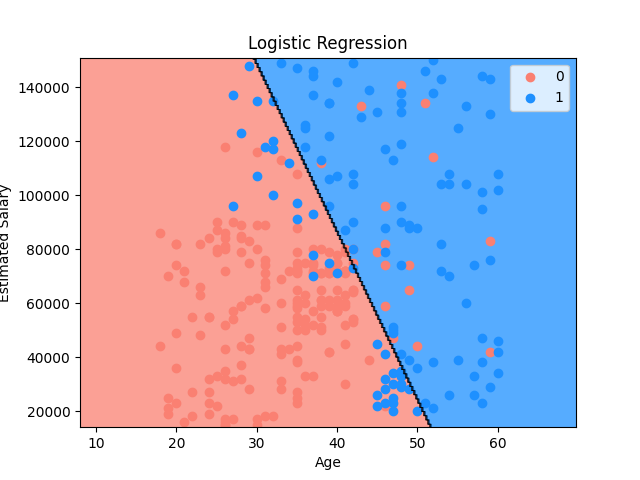
|
74
|
-
#### Display 2-D Classification Plot
|
|
76
|
+
#### Set Up and Display 2-D Classification Plot
|
|
77
|
+
|
|
78
|
+
Set up a 2-D classification model plot then display its result visualization.
|
|
79
|
+
|
|
80
|
+
**Notes:**
|
|
75
81
|
|
|
76
|
-
|
|
82
|
+
* The example below uses a dataset to train a logistic regression model then
|
|
83
|
+
display the plot for the training set
|
|
84
|
+
* For feature scaling, if required, implement the feature scaling logic in the
|
|
85
|
+
`feature_scaling` lambda
|
|
86
|
+
* For predictions, implement the prediction logic in the `predict` lambda
|
|
77
87
|
|
|
78
88
|
```python
|
|
89
|
+
import os
|
|
90
|
+
|
|
91
|
+
import numpy as np
|
|
79
92
|
import pandas as pd
|
|
93
|
+
from matplotlib import pyplot as plt
|
|
80
94
|
from matplotlib.colors import ListedColormap
|
|
81
95
|
from sklearn.linear_model import LogisticRegression
|
|
82
96
|
from sklearn.model_selection import train_test_split
|
|
83
97
|
from sklearn.preprocessing import StandardScaler
|
|
84
98
|
|
|
85
|
-
from opengood.py_ml_plot import
|
|
99
|
+
from src.opengood.py_ml_plot import setup_classification_plot
|
|
100
|
+
|
|
101
|
+
resource_path = os.path.join(os.path.dirname(__file__), "../resources", "data.csv")
|
|
102
|
+
dataset = pd.read_csv(resource_path)
|
|
86
103
|
|
|
87
|
-
dataset = pd.read_csv("data.csv")
|
|
88
104
|
x = dataset.iloc[:, :-1].values
|
|
89
105
|
y = dataset.iloc[:, -1].values
|
|
90
106
|
|
|
91
|
-
x_train, _, y_train,
|
|
92
|
-
random_state=0)
|
|
107
|
+
x_train, _, y_train, _ = train_test_split(x, y, test_size=0.2, random_state=0)
|
|
93
108
|
|
|
94
109
|
sc = StandardScaler()
|
|
95
110
|
x_train = sc.fit_transform(x_train)
|
|
@@ -97,46 +112,93 @@ x_train = sc.fit_transform(x_train)
|
|
|
97
112
|
classifier = LogisticRegression(random_state=0)
|
|
98
113
|
classifier.fit(x_train, y_train)
|
|
99
114
|
|
|
100
|
-
|
|
101
|
-
x_train,
|
|
102
|
-
y_train,
|
|
103
|
-
|
|
104
|
-
|
|
105
|
-
|
|
106
|
-
"
|
|
107
|
-
|
|
108
|
-
|
|
115
|
+
setup_classification_plot(
|
|
116
|
+
x=x_train,
|
|
117
|
+
y=y_train,
|
|
118
|
+
cmap=ListedColormap(("salmon", "dodgerblue")),
|
|
119
|
+
title="Logistic Regression",
|
|
120
|
+
x_label="Age",
|
|
121
|
+
y_label="Estimated Salary",
|
|
122
|
+
feature_scale=lambda x_set, y_set: (
|
|
123
|
+
sc.inverse_transform(x_set), y_set
|
|
124
|
+
),
|
|
125
|
+
predict=lambda x1, x2: (
|
|
126
|
+
classifier.predict(
|
|
127
|
+
sc.transform(
|
|
128
|
+
np.array([x1.ravel(), x2.ravel()]).T)
|
|
129
|
+
).reshape(x1.shape)
|
|
130
|
+
),
|
|
109
131
|
)
|
|
132
|
+
|
|
133
|
+
plt.show()
|
|
110
134
|
```
|
|
111
135
|
|
|
112
136
|
##### Output
|
|
113
137
|
|
|
114
|
-
|
|
139
|
+
|
|
140
|
+
---
|
|
115
141
|
|
|
116
142
|
##### Visualization Logic
|
|
117
143
|
|
|
118
|
-
|
|
144
|
+
###### Feature Scale Lambda Logic
|
|
145
|
+
|
|
146
|
+
`feature_scale` lambda implementation logic for function
|
|
147
|
+
`setup_classification_plot` is as follows:
|
|
148
|
+
|
|
149
|
+
* Inverse feature scaling is invoked via a featuring scaling object, such as
|
|
150
|
+
the `StandardScalar` object `sc` created earlier for feature scaling
|
|
151
|
+
* `x_set` and `y_set` are assigned non-feature scaled values of the matrix of
|
|
152
|
+
features and the dependent variable
|
|
153
|
+
* `x_set` values are inverted from their feature-scaled values in `x`
|
|
154
|
+
* `y_set` values are not inverted and taken directly from `y`
|
|
155
|
+
|
|
156
|
+
###### Predict Lambda Logic
|
|
157
|
+
|
|
158
|
+
`predict` lambda implementation logic for function `setup_classification_plot`
|
|
159
|
+
is as follows:
|
|
160
|
+
|
|
161
|
+
* Classifier object `classifier` method `predict` is invoked
|
|
162
|
+
* Since the values of the reshaped 2D array are not feature scaled, the
|
|
163
|
+
values are feature scaled via the `transform` method on the `sc`
|
|
164
|
+
object
|
|
165
|
+
* This method call is not required for models that do not require feature
|
|
166
|
+
scaling
|
|
167
|
+
* `ravel` function from the NumPy library is used to flatten a
|
|
168
|
+
multidimensional array into a one-dimensional array
|
|
169
|
+
* `x1` and `x2` are flatten into a 1D array via the `ravel` function
|
|
170
|
+
* They are then combined via the `array` function from the NumPy
|
|
171
|
+
library into a 2D array
|
|
172
|
+
* The result is then reshaped via the `reshape` function to match
|
|
173
|
+
the shape of `x1`
|
|
174
|
+
|
|
175
|
+
###### Setup Plot Visualization Logic
|
|
176
|
+
|
|
177
|
+
Visualization implementation logic for function `setup_classification_plot` is
|
|
119
178
|
as follows:
|
|
120
179
|
|
|
121
180
|
* `ListedColormap` class from the Matplotlib library creates an object that
|
|
122
181
|
generates a colormap visual from a list of colors
|
|
123
|
-
* `x_set` and `y_set` are
|
|
124
|
-
|
|
125
|
-
|
|
126
|
-
|
|
182
|
+
* If the `feature_scale` lambda is defined, `x_set` and `y_set` are
|
|
183
|
+
assigned non-feature scaled values of the matrix of features and the dependent
|
|
184
|
+
variable from the sets using a feature scaling object, such as the
|
|
185
|
+
`StandardScalar` object created earlier for feature scaling
|
|
186
|
+
* `x_set` values are inverted from their feature-scaled values in `x`
|
|
127
187
|
* `y_set` values are not inverted and taken directly from `y`
|
|
188
|
+
* If the `feature_scale` lambda is not defined, `x_set` and `y_set` are
|
|
189
|
+
assigned the values of `x` and `y`, respectively
|
|
128
190
|
* `meshgrid` function from the NumPy library returns a tuple of coordinate
|
|
129
191
|
matrices from coordinate vectors
|
|
130
|
-
*
|
|
192
|
+
* Two sets of matrices (`x1` and `x2`) are returned with coordinate vectors
|
|
131
193
|
* `x1`
|
|
132
194
|
* `arange` function is called with a defined start and stop interval
|
|
133
195
|
* `x_set[:, 0]` returns all the rows for feature `x1`
|
|
134
196
|
* `start` parameter
|
|
135
|
-
* Start of interval
|
|
197
|
+
* Start of an interval
|
|
136
198
|
* `x_set[:, 0].min()` returns the minimum value for feature `x1`
|
|
137
199
|
* Value of `10` is subtracted for padding
|
|
138
200
|
* `stop` parameter
|
|
139
|
-
* End of interval
|
|
201
|
+
* End of an interval
|
|
140
202
|
* `x_set[:, 0].max()` returns the maximum value for feature `x1`
|
|
141
203
|
* Value of `10` is added for padding
|
|
142
204
|
* `step` parameter
|
|
@@ -146,7 +208,7 @@ as follows:
|
|
|
146
208
|
* `arange` function is called with a defined start and stop interval
|
|
147
209
|
* `x_set[:, 1]` returns all the rows for feature `x2`
|
|
148
210
|
* `start` parameter
|
|
149
|
-
* Start of interval
|
|
211
|
+
* Start of an interval
|
|
150
212
|
* `x_set[:, 1].min()` returns the minimum value for feature `x2`
|
|
151
213
|
* Value of `1000` is subtracted for padding
|
|
152
214
|
* Value of `1000` is used instead of `10` due to the difference
|
|
@@ -158,6 +220,8 @@ as follows:
|
|
|
158
220
|
* `step` parameter
|
|
159
221
|
* Spacing between values
|
|
160
222
|
* Value of `0.25` is added for spacing
|
|
223
|
+
* The prediction logic implemented in the `preodict` lambda is executed, and
|
|
224
|
+
the result is assigned to `y_pred`, containing the predictions
|
|
161
225
|
* `contourf` function from the Matplotlib library is used for creating filled
|
|
162
226
|
contour plots
|
|
163
227
|
* It visualizes 3D data in 2D by drawing filled contours representing
|
|
@@ -24,31 +24,46 @@ plotting
|
|
|
24
24
|
python3 -m pip install opengood.py-ml-plot
|
|
25
25
|
```
|
|
26
26
|
|
|
27
|
-
**Note:** See *Release* version badge above for latest version.
|
|
27
|
+
**Note:** See *Release* version badge above for the latest version.
|
|
28
|
+
|
|
29
|
+
---
|
|
28
30
|
|
|
29
31
|
## Features
|
|
30
32
|
|
|
31
33
|
### Classification Model Plotting
|
|
32
34
|
|
|
33
|
-
#### Display 2-D Classification Plot
|
|
35
|
+
#### Set Up and Display 2-D Classification Plot
|
|
36
|
+
|
|
37
|
+
Set up a 2-D classification model plot then display its result visualization.
|
|
38
|
+
|
|
39
|
+
**Notes:**
|
|
34
40
|
|
|
35
|
-
|
|
41
|
+
* The example below uses a dataset to train a logistic regression model then
|
|
42
|
+
display the plot for the training set
|
|
43
|
+
* For feature scaling, if required, implement the feature scaling logic in the
|
|
44
|
+
`feature_scaling` lambda
|
|
45
|
+
* For predictions, implement the prediction logic in the `predict` lambda
|
|
36
46
|
|
|
37
47
|
```python
|
|
48
|
+
import os
|
|
49
|
+
|
|
50
|
+
import numpy as np
|
|
38
51
|
import pandas as pd
|
|
52
|
+
from matplotlib import pyplot as plt
|
|
39
53
|
from matplotlib.colors import ListedColormap
|
|
40
54
|
from sklearn.linear_model import LogisticRegression
|
|
41
55
|
from sklearn.model_selection import train_test_split
|
|
42
56
|
from sklearn.preprocessing import StandardScaler
|
|
43
57
|
|
|
44
|
-
from opengood.py_ml_plot import
|
|
58
|
+
from src.opengood.py_ml_plot import setup_classification_plot
|
|
59
|
+
|
|
60
|
+
resource_path = os.path.join(os.path.dirname(__file__), "../resources", "data.csv")
|
|
61
|
+
dataset = pd.read_csv(resource_path)
|
|
45
62
|
|
|
46
|
-
dataset = pd.read_csv("data.csv")
|
|
47
63
|
x = dataset.iloc[:, :-1].values
|
|
48
64
|
y = dataset.iloc[:, -1].values
|
|
49
65
|
|
|
50
|
-
x_train, _, y_train,
|
|
51
|
-
random_state=0)
|
|
66
|
+
x_train, _, y_train, _ = train_test_split(x, y, test_size=0.2, random_state=0)
|
|
52
67
|
|
|
53
68
|
sc = StandardScaler()
|
|
54
69
|
x_train = sc.fit_transform(x_train)
|
|
@@ -56,46 +71,93 @@ x_train = sc.fit_transform(x_train)
|
|
|
56
71
|
classifier = LogisticRegression(random_state=0)
|
|
57
72
|
classifier.fit(x_train, y_train)
|
|
58
73
|
|
|
59
|
-
|
|
60
|
-
x_train,
|
|
61
|
-
y_train,
|
|
62
|
-
|
|
63
|
-
|
|
64
|
-
|
|
65
|
-
"
|
|
66
|
-
|
|
67
|
-
|
|
74
|
+
setup_classification_plot(
|
|
75
|
+
x=x_train,
|
|
76
|
+
y=y_train,
|
|
77
|
+
cmap=ListedColormap(("salmon", "dodgerblue")),
|
|
78
|
+
title="Logistic Regression",
|
|
79
|
+
x_label="Age",
|
|
80
|
+
y_label="Estimated Salary",
|
|
81
|
+
feature_scale=lambda x_set, y_set: (
|
|
82
|
+
sc.inverse_transform(x_set), y_set
|
|
83
|
+
),
|
|
84
|
+
predict=lambda x1, x2: (
|
|
85
|
+
classifier.predict(
|
|
86
|
+
sc.transform(
|
|
87
|
+
np.array([x1.ravel(), x2.ravel()]).T)
|
|
88
|
+
).reshape(x1.shape)
|
|
89
|
+
),
|
|
68
90
|
)
|
|
91
|
+
|
|
92
|
+
plt.show()
|
|
69
93
|
```
|
|
70
94
|
|
|
71
95
|
##### Output
|
|
72
96
|
|
|
73
|
-

|
|
98
|
+
|
|
99
|
+
---
|
|
74
100
|
|
|
75
101
|
##### Visualization Logic
|
|
76
102
|
|
|
77
|
-
|
|
103
|
+
###### Feature Scale Lambda Logic
|
|
104
|
+
|
|
105
|
+
`feature_scale` lambda implementation logic for function
|
|
106
|
+
`setup_classification_plot` is as follows:
|
|
107
|
+
|
|
108
|
+
* Inverse feature scaling is invoked via a featuring scaling object, such as
|
|
109
|
+
the `StandardScalar` object `sc` created earlier for feature scaling
|
|
110
|
+
* `x_set` and `y_set` are assigned non-feature scaled values of the matrix of
|
|
111
|
+
features and the dependent variable
|
|
112
|
+
* `x_set` values are inverted from their feature-scaled values in `x`
|
|
113
|
+
* `y_set` values are not inverted and taken directly from `y`
|
|
114
|
+
|
|
115
|
+
###### Predict Lambda Logic
|
|
116
|
+
|
|
117
|
+
`predict` lambda implementation logic for function `setup_classification_plot`
|
|
118
|
+
is as follows:
|
|
119
|
+
|
|
120
|
+
* Classifier object `classifier` method `predict` is invoked
|
|
121
|
+
* Since the values of the reshaped 2D array are not feature scaled, the
|
|
122
|
+
values are feature scaled via the `transform` method on the `sc`
|
|
123
|
+
object
|
|
124
|
+
* This method call is not required for models that do not require feature
|
|
125
|
+
scaling
|
|
126
|
+
* `ravel` function from the NumPy library is used to flatten a
|
|
127
|
+
multidimensional array into a one-dimensional array
|
|
128
|
+
* `x1` and `x2` are flatten into a 1D array via the `ravel` function
|
|
129
|
+
* They are then combined via the `array` function from the NumPy
|
|
130
|
+
library into a 2D array
|
|
131
|
+
* The result is then reshaped via the `reshape` function to match
|
|
132
|
+
the shape of `x1`
|
|
133
|
+
|
|
134
|
+
###### Setup Plot Visualization Logic
|
|
135
|
+
|
|
136
|
+
Visualization implementation logic for function `setup_classification_plot` is
|
|
78
137
|
as follows:
|
|
79
138
|
|
|
80
139
|
* `ListedColormap` class from the Matplotlib library creates an object that
|
|
81
140
|
generates a colormap visual from a list of colors
|
|
82
|
-
* `x_set` and `y_set` are
|
|
83
|
-
|
|
84
|
-
|
|
85
|
-
|
|
141
|
+
* If the `feature_scale` lambda is defined, `x_set` and `y_set` are
|
|
142
|
+
assigned non-feature scaled values of the matrix of features and the dependent
|
|
143
|
+
variable from the sets using a feature scaling object, such as the
|
|
144
|
+
`StandardScalar` object created earlier for feature scaling
|
|
145
|
+
* `x_set` values are inverted from their feature-scaled values in `x`
|
|
86
146
|
* `y_set` values are not inverted and taken directly from `y`
|
|
147
|
+
* If the `feature_scale` lambda is not defined, `x_set` and `y_set` are
|
|
148
|
+
assigned the values of `x` and `y`, respectively
|
|
87
149
|
* `meshgrid` function from the NumPy library returns a tuple of coordinate
|
|
88
150
|
matrices from coordinate vectors
|
|
89
|
-
*
|
|
151
|
+
* Two sets of matrices (`x1` and `x2`) are returned with coordinate vectors
|
|
90
152
|
* `x1`
|
|
91
153
|
* `arange` function is called with a defined start and stop interval
|
|
92
154
|
* `x_set[:, 0]` returns all the rows for feature `x1`
|
|
93
155
|
* `start` parameter
|
|
94
|
-
* Start of interval
|
|
156
|
+
* Start of an interval
|
|
95
157
|
* `x_set[:, 0].min()` returns the minimum value for feature `x1`
|
|
96
158
|
* Value of `10` is subtracted for padding
|
|
97
159
|
* `stop` parameter
|
|
98
|
-
* End of interval
|
|
160
|
+
* End of an interval
|
|
99
161
|
* `x_set[:, 0].max()` returns the maximum value for feature `x1`
|
|
100
162
|
* Value of `10` is added for padding
|
|
101
163
|
* `step` parameter
|
|
@@ -105,7 +167,7 @@ as follows:
|
|
|
105
167
|
* `arange` function is called with a defined start and stop interval
|
|
106
168
|
* `x_set[:, 1]` returns all the rows for feature `x2`
|
|
107
169
|
* `start` parameter
|
|
108
|
-
* Start of interval
|
|
170
|
+
* Start of an interval
|
|
109
171
|
* `x_set[:, 1].min()` returns the minimum value for feature `x2`
|
|
110
172
|
* Value of `1000` is subtracted for padding
|
|
111
173
|
* Value of `1000` is used instead of `10` due to the difference
|
|
@@ -117,6 +179,8 @@ as follows:
|
|
|
117
179
|
* `step` parameter
|
|
118
180
|
* Spacing between values
|
|
119
181
|
* Value of `0.25` is added for spacing
|
|
182
|
+
* The prediction logic implemented in the `preodict` lambda is executed, and
|
|
183
|
+
the result is assigned to `y_pred`, containing the predictions
|
|
120
184
|
* `contourf` function from the Matplotlib library is used for creating filled
|
|
121
185
|
contour plots
|
|
122
186
|
* It visualizes 3D data in 2D by drawing filled contours representing
|
|
@@ -4,7 +4,7 @@ build-backend = "setuptools.build_meta"
|
|
|
4
4
|
|
|
5
5
|
[project]
|
|
6
6
|
name = "opengood.py_ml_plot"
|
|
7
|
-
version = "1.
|
|
7
|
+
version = "2.1.0"
|
|
8
8
|
description = "Modules containing reusable functions for machine learning visualization plotting"
|
|
9
9
|
authors = [
|
|
10
10
|
{ name = "OpenGood", email = "ai@opengood.ai" }
|
|
@@ -0,0 +1,74 @@
|
|
|
1
|
+
import matplotlib.pyplot as plt
|
|
2
|
+
import numpy as np
|
|
3
|
+
from matplotlib.colors import ListedColormap
|
|
4
|
+
|
|
5
|
+
|
|
6
|
+
def setup_classification_plot(
|
|
7
|
+
x,
|
|
8
|
+
y,
|
|
9
|
+
cmap: ListedColormap,
|
|
10
|
+
title,
|
|
11
|
+
x_label,
|
|
12
|
+
y_label,
|
|
13
|
+
feature_scale: lambda x1, y1: (),
|
|
14
|
+
predict: lambda x1, x2: (),
|
|
15
|
+
):
|
|
16
|
+
"""
|
|
17
|
+
Sets up a classification plot with decision boundaries and classified regions.
|
|
18
|
+
|
|
19
|
+
This function creates a visualization of a classification model's decision boundaries
|
|
20
|
+
and the resulting classified regions. It plots the training data points colored by their
|
|
21
|
+
class and overlays the decision boundaries of the classifier.
|
|
22
|
+
|
|
23
|
+
Args:
|
|
24
|
+
x: Feature data, typically a 2D array where each row is a sample and each column is a feature.
|
|
25
|
+
y: Target data, typically a 1D array of class labels.
|
|
26
|
+
cmap (ListedColormap): Colormap for visualizing different classes.
|
|
27
|
+
title (str): Title for the plot.
|
|
28
|
+
x_label (str): Label for the x-axis.
|
|
29
|
+
y_label (str): Label for the y-axis.
|
|
30
|
+
feature_scale (callable): Function to transform the feature data for visualization.
|
|
31
|
+
Should take x and y as input and return the transformed x and y.
|
|
32
|
+
If None, no transformation is applied.
|
|
33
|
+
predict (callable): Function to predict class labels for the mesh grid points.
|
|
34
|
+
Should take x1 and x2 (mesh grid coordinates) as input and return predicted classes.
|
|
35
|
+
|
|
36
|
+
Returns:
|
|
37
|
+
bool: True if the plot was successfully created.
|
|
38
|
+
|
|
39
|
+
Example:
|
|
40
|
+
>>> setup_classification_plot(
|
|
41
|
+
... x=x_train,
|
|
42
|
+
... y=y_train,
|
|
43
|
+
... cmap=ListedColormap(("salmon", "dodgerblue")),
|
|
44
|
+
... title="Logistic Regression",
|
|
45
|
+
... x_label="Feature 1",
|
|
46
|
+
... y_label="Feature 2",
|
|
47
|
+
... feature_scale=lambda x_set, y_set: (x_set, y_set),
|
|
48
|
+
... predict=lambda x1, x2: classifier.predict(np.array([x1.ravel(), x2.ravel()]).T).reshape(x1.shape)
|
|
49
|
+
... )
|
|
50
|
+
"""
|
|
51
|
+
if feature_scale is not None:
|
|
52
|
+
x_set, y_set = feature_scale(x, y)
|
|
53
|
+
else:
|
|
54
|
+
x_set, y_set = x, y
|
|
55
|
+
x1, x2 = np.meshgrid(
|
|
56
|
+
np.arange(start=x_set[:, 0].min() - 10, stop=x_set[:, 0].max() + 10, step=0.25),
|
|
57
|
+
np.arange(
|
|
58
|
+
start=x_set[:, 1].min() - 1000, stop=x_set[:, 1].max() + 1000, step=0.25
|
|
59
|
+
),
|
|
60
|
+
)
|
|
61
|
+
y_pred = predict(x1, x2)
|
|
62
|
+
plt.contourf(x1, x2, y_pred, alpha=0.75, cmap=cmap)
|
|
63
|
+
plt.contour(x1, x2, y_pred, colors="black", alpha=0.5, linewidths=0.5)
|
|
64
|
+
plt.xlim(x1.min(), x1.max())
|
|
65
|
+
plt.ylim(x2.min(), x2.max())
|
|
66
|
+
for i, j in enumerate(np.unique(y_set)):
|
|
67
|
+
plt.scatter(
|
|
68
|
+
x_set[y_set == j, 0], x_set[y_set == j, 1], c=cmap.colors[i], label=j
|
|
69
|
+
)
|
|
70
|
+
plt.title(title)
|
|
71
|
+
plt.xlabel(x_label)
|
|
72
|
+
plt.ylabel(y_label)
|
|
73
|
+
plt.legend()
|
|
74
|
+
return True
|
{opengood_py_ml_plot-1.11.0 → opengood_py_ml_plot-2.1.0/src/opengood.py_ml_plot.egg-info}/PKG-INFO
RENAMED
|
@@ -1,6 +1,6 @@
|
|
|
1
1
|
Metadata-Version: 2.4
|
|
2
2
|
Name: opengood.py_ml_plot
|
|
3
|
-
Version: 1.
|
|
3
|
+
Version: 2.1.0
|
|
4
4
|
Summary: Modules containing reusable functions for machine learning visualization plotting
|
|
5
5
|
Author-email: OpenGood <ai@opengood.ai>
|
|
6
6
|
License: MIT License
|
|
@@ -65,31 +65,46 @@ plotting
|
|
|
65
65
|
python3 -m pip install opengood.py-ml-plot
|
|
66
66
|
```
|
|
67
67
|
|
|
68
|
-
**Note:** See *Release* version badge above for latest version.
|
|
68
|
+
**Note:** See *Release* version badge above for the latest version.
|
|
69
|
+
|
|
70
|
+
---
|
|
69
71
|
|
|
70
72
|
## Features
|
|
71
73
|
|
|
72
74
|
### Classification Model Plotting
|
|
73
75
|
|
|
74
|
-
#### Display 2-D Classification Plot
|
|
76
|
+
#### Set Up and Display 2-D Classification Plot
|
|
77
|
+
|
|
78
|
+
Set up a 2-D classification model plot then display its result visualization.
|
|
79
|
+
|
|
80
|
+
**Notes:**
|
|
75
81
|
|
|
76
|
-
|
|
82
|
+
* The example below uses a dataset to train a logistic regression model then
|
|
83
|
+
display the plot for the training set
|
|
84
|
+
* For feature scaling, if required, implement the feature scaling logic in the
|
|
85
|
+
`feature_scaling` lambda
|
|
86
|
+
* For predictions, implement the prediction logic in the `predict` lambda
|
|
77
87
|
|
|
78
88
|
```python
|
|
89
|
+
import os
|
|
90
|
+
|
|
91
|
+
import numpy as np
|
|
79
92
|
import pandas as pd
|
|
93
|
+
from matplotlib import pyplot as plt
|
|
80
94
|
from matplotlib.colors import ListedColormap
|
|
81
95
|
from sklearn.linear_model import LogisticRegression
|
|
82
96
|
from sklearn.model_selection import train_test_split
|
|
83
97
|
from sklearn.preprocessing import StandardScaler
|
|
84
98
|
|
|
85
|
-
from opengood.py_ml_plot import
|
|
99
|
+
from src.opengood.py_ml_plot import setup_classification_plot
|
|
100
|
+
|
|
101
|
+
resource_path = os.path.join(os.path.dirname(__file__), "../resources", "data.csv")
|
|
102
|
+
dataset = pd.read_csv(resource_path)
|
|
86
103
|
|
|
87
|
-
dataset = pd.read_csv("data.csv")
|
|
88
104
|
x = dataset.iloc[:, :-1].values
|
|
89
105
|
y = dataset.iloc[:, -1].values
|
|
90
106
|
|
|
91
|
-
x_train, _, y_train,
|
|
92
|
-
random_state=0)
|
|
107
|
+
x_train, _, y_train, _ = train_test_split(x, y, test_size=0.2, random_state=0)
|
|
93
108
|
|
|
94
109
|
sc = StandardScaler()
|
|
95
110
|
x_train = sc.fit_transform(x_train)
|
|
@@ -97,46 +112,93 @@ x_train = sc.fit_transform(x_train)
|
|
|
97
112
|
classifier = LogisticRegression(random_state=0)
|
|
98
113
|
classifier.fit(x_train, y_train)
|
|
99
114
|
|
|
100
|
-
|
|
101
|
-
x_train,
|
|
102
|
-
y_train,
|
|
103
|
-
|
|
104
|
-
|
|
105
|
-
|
|
106
|
-
"
|
|
107
|
-
|
|
108
|
-
|
|
115
|
+
setup_classification_plot(
|
|
116
|
+
x=x_train,
|
|
117
|
+
y=y_train,
|
|
118
|
+
cmap=ListedColormap(("salmon", "dodgerblue")),
|
|
119
|
+
title="Logistic Regression",
|
|
120
|
+
x_label="Age",
|
|
121
|
+
y_label="Estimated Salary",
|
|
122
|
+
feature_scale=lambda x_set, y_set: (
|
|
123
|
+
sc.inverse_transform(x_set), y_set
|
|
124
|
+
),
|
|
125
|
+
predict=lambda x1, x2: (
|
|
126
|
+
classifier.predict(
|
|
127
|
+
sc.transform(
|
|
128
|
+
np.array([x1.ravel(), x2.ravel()]).T)
|
|
129
|
+
).reshape(x1.shape)
|
|
130
|
+
),
|
|
109
131
|
)
|
|
132
|
+
|
|
133
|
+
plt.show()
|
|
110
134
|
```
|
|
111
135
|
|
|
112
136
|
##### Output
|
|
113
137
|
|
|
114
|
-

|
|
139
|
+
|
|
140
|
+
---
|
|
115
141
|
|
|
116
142
|
##### Visualization Logic
|
|
117
143
|
|
|
118
|
-
|
|
144
|
+
###### Feature Scale Lambda Logic
|
|
145
|
+
|
|
146
|
+
`feature_scale` lambda implementation logic for function
|
|
147
|
+
`setup_classification_plot` is as follows:
|
|
148
|
+
|
|
149
|
+
* Inverse feature scaling is invoked via a featuring scaling object, such as
|
|
150
|
+
the `StandardScalar` object `sc` created earlier for feature scaling
|
|
151
|
+
* `x_set` and `y_set` are assigned non-feature scaled values of the matrix of
|
|
152
|
+
features and the dependent variable
|
|
153
|
+
* `x_set` values are inverted from their feature-scaled values in `x`
|
|
154
|
+
* `y_set` values are not inverted and taken directly from `y`
|
|
155
|
+
|
|
156
|
+
###### Predict Lambda Logic
|
|
157
|
+
|
|
158
|
+
`predict` lambda implementation logic for function `setup_classification_plot`
|
|
159
|
+
is as follows:
|
|
160
|
+
|
|
161
|
+
* Classifier object `classifier` method `predict` is invoked
|
|
162
|
+
* Since the values of the reshaped 2D array are not feature scaled, the
|
|
163
|
+
values are feature scaled via the `transform` method on the `sc`
|
|
164
|
+
object
|
|
165
|
+
* This method call is not required for models that do not require feature
|
|
166
|
+
scaling
|
|
167
|
+
* `ravel` function from the NumPy library is used to flatten a
|
|
168
|
+
multidimensional array into a one-dimensional array
|
|
169
|
+
* `x1` and `x2` are flatten into a 1D array via the `ravel` function
|
|
170
|
+
* They are then combined via the `array` function from the NumPy
|
|
171
|
+
library into a 2D array
|
|
172
|
+
* The result is then reshaped via the `reshape` function to match
|
|
173
|
+
the shape of `x1`
|
|
174
|
+
|
|
175
|
+
###### Setup Plot Visualization Logic
|
|
176
|
+
|
|
177
|
+
Visualization implementation logic for function `setup_classification_plot` is
|
|
119
178
|
as follows:
|
|
120
179
|
|
|
121
180
|
* `ListedColormap` class from the Matplotlib library creates an object that
|
|
122
181
|
generates a colormap visual from a list of colors
|
|
123
|
-
* `x_set` and `y_set` are
|
|
124
|
-
|
|
125
|
-
|
|
126
|
-
|
|
182
|
+
* If the `feature_scale` lambda is defined, `x_set` and `y_set` are
|
|
183
|
+
assigned non-feature scaled values of the matrix of features and the dependent
|
|
184
|
+
variable from the sets using a feature scaling object, such as the
|
|
185
|
+
`StandardScalar` object created earlier for feature scaling
|
|
186
|
+
* `x_set` values are inverted from their feature-scaled values in `x`
|
|
127
187
|
* `y_set` values are not inverted and taken directly from `y`
|
|
188
|
+
* If the `feature_scale` lambda is not defined, `x_set` and `y_set` are
|
|
189
|
+
assigned the values of `x` and `y`, respectively
|
|
128
190
|
* `meshgrid` function from the NumPy library returns a tuple of coordinate
|
|
129
191
|
matrices from coordinate vectors
|
|
130
|
-
*
|
|
192
|
+
* Two sets of matrices (`x1` and `x2`) are returned with coordinate vectors
|
|
131
193
|
* `x1`
|
|
132
194
|
* `arange` function is called with a defined start and stop interval
|
|
133
195
|
* `x_set[:, 0]` returns all the rows for feature `x1`
|
|
134
196
|
* `start` parameter
|
|
135
|
-
* Start of interval
|
|
197
|
+
* Start of an interval
|
|
136
198
|
* `x_set[:, 0].min()` returns the minimum value for feature `x1`
|
|
137
199
|
* Value of `10` is subtracted for padding
|
|
138
200
|
* `stop` parameter
|
|
139
|
-
* End of interval
|
|
201
|
+
* End of an interval
|
|
140
202
|
* `x_set[:, 0].max()` returns the maximum value for feature `x1`
|
|
141
203
|
* Value of `10` is added for padding
|
|
142
204
|
* `step` parameter
|
|
@@ -146,7 +208,7 @@ as follows:
|
|
|
146
208
|
* `arange` function is called with a defined start and stop interval
|
|
147
209
|
* `x_set[:, 1]` returns all the rows for feature `x2`
|
|
148
210
|
* `start` parameter
|
|
149
|
-
* Start of interval
|
|
211
|
+
* Start of an interval
|
|
150
212
|
* `x_set[:, 1].min()` returns the minimum value for feature `x2`
|
|
151
213
|
* Value of `1000` is subtracted for padding
|
|
152
214
|
* Value of `1000` is used instead of `10` due to the difference
|
|
@@ -158,6 +220,8 @@ as follows:
|
|
|
158
220
|
* `step` parameter
|
|
159
221
|
* Spacing between values
|
|
160
222
|
* Value of `0.25` is added for spacing
|
|
223
|
+
* The prediction logic implemented in the `preodict` lambda is executed, and
|
|
224
|
+
the result is assigned to `y_pred`, containing the predictions
|
|
161
225
|
* `contourf` function from the Matplotlib library is used for creating filled
|
|
162
226
|
contour plots
|
|
163
227
|
* It visualizes 3D data in 2D by drawing filled contours representing
|
|
@@ -1,43 +0,0 @@
|
|
|
1
|
-
import matplotlib.pyplot as plt
|
|
2
|
-
import numpy as np
|
|
3
|
-
from matplotlib.colors import ListedColormap
|
|
4
|
-
from sklearn.linear_model import LogisticRegression
|
|
5
|
-
from sklearn.preprocessing import StandardScaler
|
|
6
|
-
|
|
7
|
-
|
|
8
|
-
def display_classification_plot(
|
|
9
|
-
x,
|
|
10
|
-
y,
|
|
11
|
-
feature_scaler: StandardScaler,
|
|
12
|
-
classifier: LogisticRegression,
|
|
13
|
-
cmap: ListedColormap,
|
|
14
|
-
title,
|
|
15
|
-
x_label,
|
|
16
|
-
y_label,
|
|
17
|
-
):
|
|
18
|
-
x_set, y_set = feature_scaler.inverse_transform(x), y
|
|
19
|
-
x1, x2 = np.meshgrid(
|
|
20
|
-
np.arange(start=x_set[:, 0].min() - 10, stop=x_set[:, 0].max() + 10, step=0.25),
|
|
21
|
-
np.arange(
|
|
22
|
-
start=x_set[:, 1].min() - 1000, stop=x_set[:, 1].max() + 1000, step=0.25
|
|
23
|
-
),
|
|
24
|
-
)
|
|
25
|
-
plt.contourf(
|
|
26
|
-
x1,
|
|
27
|
-
x2,
|
|
28
|
-
classifier.predict(
|
|
29
|
-
feature_scaler.transform(np.array([x1.ravel(), x2.ravel()]).T)
|
|
30
|
-
).reshape(x1.shape),
|
|
31
|
-
alpha=0.75,
|
|
32
|
-
cmap=cmap,
|
|
33
|
-
)
|
|
34
|
-
plt.xlim(x1.min(), x1.max())
|
|
35
|
-
plt.ylim(x2.min(), x2.max())
|
|
36
|
-
for i, j in enumerate(np.unique(y_set)):
|
|
37
|
-
plt.scatter(x_set[y_set == j, 0], x_set[y_set == j, 1], c=cmap(i), label=j)
|
|
38
|
-
plt.title(title)
|
|
39
|
-
plt.xlabel(x_label)
|
|
40
|
-
plt.ylabel(y_label)
|
|
41
|
-
plt.legend()
|
|
42
|
-
plt.show()
|
|
43
|
-
return True
|
|
File without changes
|
|
File without changes
|
|
File without changes
|
|
File without changes
|
|
File without changes
|
|
File without changes
|
|
File without changes
|