opendots 0.2.0__tar.gz
This diff represents the content of publicly available package versions that have been released to one of the supported registries. The information contained in this diff is provided for informational purposes only and reflects changes between package versions as they appear in their respective public registries.
- opendots-0.2.0/CHANGELOG.md +36 -0
- opendots-0.2.0/LICENSE +21 -0
- opendots-0.2.0/MANIFEST.in +4 -0
- opendots-0.2.0/NOTICE +5 -0
- opendots-0.2.0/PKG-INFO +216 -0
- opendots-0.2.0/README.md +194 -0
- opendots-0.2.0/deploy/docker-entrypoint.sh +16 -0
- opendots-0.2.0/deploy/opendots.service.example +16 -0
- opendots-0.2.0/docs/DEVELOPMENT.md +180 -0
- opendots-0.2.0/docs/EVENTS.md +197 -0
- opendots-0.2.0/docs/GOALS_AND_EVENTS.md +315 -0
- opendots-0.2.0/docs/IMPLEMENTATION.md +167 -0
- opendots-0.2.0/docs/NOTIFICATIONS.md +154 -0
- opendots-0.2.0/docs/PLUGINS.md +240 -0
- opendots-0.2.0/docs/PROVIDERS.md +228 -0
- opendots-0.2.0/docs/ROADMAP.md +30 -0
- opendots-0.2.0/docs/VALIDATION.md +139 -0
- opendots-0.2.0/examples/config.json +163 -0
- opendots-0.2.0/examples/five-events.json +7 -0
- opendots-0.2.0/examples/goal-agent.json +61 -0
- opendots-0.2.0/examples/live-cases/scale.json +228 -0
- opendots-0.2.0/examples/live-cases/set-2.json +80 -0
- opendots-0.2.0/examples/workspaces/kubernetes/MAINTAINER.md +6 -0
- opendots-0.2.0/examples/workspaces/kubernetes/check.py +11 -0
- opendots-0.2.0/examples/workspaces/kubernetes/deployment.json +5 -0
- opendots-0.2.0/examples/workspaces/react/SCOUT.md +7 -0
- opendots-0.2.0/examples/workspaces/react/check.py +9 -0
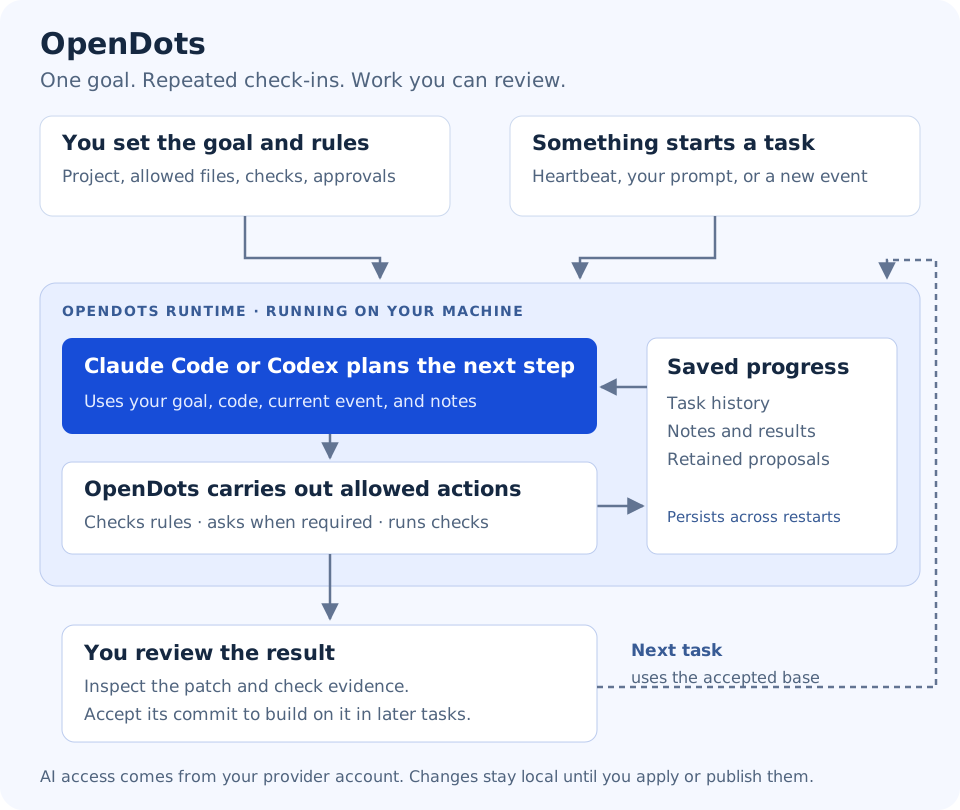
- opendots-0.2.0/examples/workspaces/react/src/SearchButton.jsx +3 -0
- opendots-0.2.0/install.sh +50 -0
- opendots-0.2.0/opendots/__init__.py +3 -0
- opendots-0.2.0/opendots/__main__.py +172 -0
- opendots-0.2.0/opendots/agents.py +287 -0
- opendots-0.2.0/opendots/builtin_plugins.py +71 -0
- opendots-0.2.0/opendots/config.py +240 -0
- opendots-0.2.0/opendots/connectors/__init__.py +1 -0
- opendots-0.2.0/opendots/connectors/github.py +114 -0
- opendots-0.2.0/opendots/connectors/jsonl.py +57 -0
- opendots-0.2.0/opendots/engine.py +456 -0
- opendots-0.2.0/opendots/evidence.py +45 -0
- opendots-0.2.0/opendots/extensions.py +25 -0
- opendots-0.2.0/opendots/goals.py +26 -0
- opendots-0.2.0/opendots/http_client.py +53 -0
- opendots-0.2.0/opendots/maintenance.py +105 -0
- opendots-0.2.0/opendots/model_providers.py +245 -0
- opendots-0.2.0/opendots/notifications.py +235 -0
- opendots-0.2.0/opendots/plugins.py +187 -0
- opendots-0.2.0/opendots/process_guard.py +64 -0
- opendots-0.2.0/opendots/sandbox.py +38 -0
- opendots-0.2.0/opendots/schema.py +34 -0
- opendots-0.2.0/opendots/server.py +210 -0
- opendots-0.2.0/opendots/service.py +58 -0
- opendots-0.2.0/opendots/setup.py +129 -0
- opendots-0.2.0/opendots/sources.py +237 -0
- opendots-0.2.0/opendots/store.py +431 -0
- opendots-0.2.0/opendots/templates/config.json +163 -0
- opendots-0.2.0/opendots/templates/workspaces/kubernetes/MAINTAINER.md +6 -0
- opendots-0.2.0/opendots/templates/workspaces/kubernetes/check.py +11 -0
- opendots-0.2.0/opendots/templates/workspaces/kubernetes/deployment.json +5 -0
- opendots-0.2.0/opendots/templates/workspaces/react/SCOUT.md +7 -0
- opendots-0.2.0/opendots/templates/workspaces/react/check.py +9 -0
- opendots-0.2.0/opendots/templates/workspaces/react/src/SearchButton.jsx +3 -0
- opendots-0.2.0/opendots/terminal.py +359 -0
- opendots-0.2.0/opendots/tools.py +262 -0
- opendots-0.2.0/opendots/web/app.js +205 -0
- opendots-0.2.0/opendots/web/index.html +21 -0
- opendots-0.2.0/opendots/web/opendots-logo.png +0 -0
- opendots-0.2.0/opendots/web/style.css +11 -0
- opendots-0.2.0/opendots/workspaces.py +139 -0
- opendots-0.2.0/opendots.egg-info/PKG-INFO +216 -0
- opendots-0.2.0/opendots.egg-info/SOURCES.txt +87 -0
- opendots-0.2.0/opendots.egg-info/dependency_links.txt +1 -0
- opendots-0.2.0/opendots.egg-info/entry_points.txt +3 -0
- opendots-0.2.0/opendots.egg-info/top_level.txt +2 -0
- opendots-0.2.0/pyproject.toml +38 -0
- opendots-0.2.0/setup.cfg +4 -0
- opendots-0.2.0/spots/__init__.py +9 -0
- opendots-0.2.0/spots/__main__.py +6 -0
- opendots-0.2.0/tests/test_audit_fixes.py +432 -0
- opendots-0.2.0/tests/test_claude.py +97 -0
- opendots-0.2.0/tests/test_events.py +153 -0
- opendots-0.2.0/tests/test_evidence.py +157 -0
- opendots-0.2.0/tests/test_extensions.py +326 -0
- opendots-0.2.0/tests/test_goal_guide.py +57 -0
- opendots-0.2.0/tests/test_maintenance.py +78 -0
- opendots-0.2.0/tests/test_model_providers.py +226 -0
- opendots-0.2.0/tests/test_notifications.py +177 -0
- opendots-0.2.0/tests/test_onboarding.py +39 -0
- opendots-0.2.0/tests/test_plugins.py +311 -0
- opendots-0.2.0/tests/test_runtime.py +291 -0
|
@@ -0,0 +1,36 @@
|
|
|
1
|
+
# OpenDots 0.2.0
|
|
2
|
+
|
|
3
|
+
This release develops the local prototype with a prompt-first terminal client,
|
|
4
|
+
safer proposal handling, packaged setup, and runtime maintenance.
|
|
5
|
+
|
|
6
|
+
- Exact-action approvals bind check commands, workspace content and owner policy.
|
|
7
|
+
- Write scopes reject symlink bypasses and protect owner validation harnesses.
|
|
8
|
+
- Failed checks can trigger bounded repair; completion requires current evidence.
|
|
9
|
+
- Complete binary-capable Git patches are retained without preview truncation.
|
|
10
|
+
- Completed proposals require explicit acceptance before future tasks use them.
|
|
11
|
+
- Source synchronization creates new snapshots while preserving old proposals.
|
|
12
|
+
- Prompt-first terminal UI supports reviews, history, activity, cancellation,
|
|
13
|
+
proposal acceptance, command completion and input editing.
|
|
14
|
+
- Packaged `init`, `doctor`, Bash installation and user systemd lifecycle commands.
|
|
15
|
+
- Non-root Docker deployment initializes persistent configuration on first run.
|
|
16
|
+
- Durable daily invocation budgets, queue limits, priority aging and source health.
|
|
17
|
+
- Bounded connector polling, poisoned-line quarantine, gap reporting and deduplication.
|
|
18
|
+
- Explicitly enabled package extensions and typed custom tool arguments.
|
|
19
|
+
- Offline backup, verified restore, and preview-first workspace retention.
|
|
20
|
+
- CI covers Python 3.11–3.13, installed wheels, Bubblewrap and container lifecycle.
|
|
21
|
+
|
|
22
|
+
## Upgrade notes
|
|
23
|
+
|
|
24
|
+
Back up runtime data before upgrading and install into a new environment. Stop
|
|
25
|
+
old services before switching their executable to the new environment.
|
|
26
|
+
|
|
27
|
+
Existing `latest_branch` metadata does not automatically become an accepted
|
|
28
|
+
base. Review the relevant completed proposal and explicitly accept its commit.
|
|
29
|
+
Omitted `write_paths` in JSON configuration now grants no write access. Default
|
|
30
|
+
protected paths include `check.py`, `tests/**` and `.github/**`; review your scopes
|
|
31
|
+
and checks when migrating. Shipped demo configurations now require validation.
|
|
32
|
+
|
|
33
|
+
A draft GitHub release contains the wheel, source archive, installer and SHA-256
|
|
34
|
+
checksums after validation. Publishing the draft is a maintainer action. Packages
|
|
35
|
+
are not automatically published to PyPI. OpenDots remains a local alpha; live
|
|
36
|
+
Codex behavior and stronger deployment boundaries require separate validation.
|
opendots-0.2.0/LICENSE
ADDED
|
@@ -0,0 +1,21 @@
|
|
|
1
|
+
MIT License
|
|
2
|
+
|
|
3
|
+
Copyright (c) 2026 Shashank Shekhar Singh
|
|
4
|
+
|
|
5
|
+
Permission is hereby granted, free of charge, to any person obtaining a copy
|
|
6
|
+
of this software and associated documentation files (the "Software"), to deal
|
|
7
|
+
in the Software without restriction, including without limitation the rights
|
|
8
|
+
to use, copy, modify, merge, publish, distribute, sublicense, and/or sell
|
|
9
|
+
copies of the Software, and to permit persons to whom the Software is
|
|
10
|
+
furnished to do so, subject to the following conditions:
|
|
11
|
+
|
|
12
|
+
The above copyright notice and this permission notice shall be included in all
|
|
13
|
+
copies or substantial portions of the Software.
|
|
14
|
+
|
|
15
|
+
THE SOFTWARE IS PROVIDED "AS IS", WITHOUT WARRANTY OF ANY KIND, EXPRESS OR
|
|
16
|
+
IMPLIED, INCLUDING BUT NOT LIMITED TO THE WARRANTIES OF MERCHANTABILITY,
|
|
17
|
+
FITNESS FOR A PARTICULAR PURPOSE AND NONINFRINGEMENT. IN NO EVENT SHALL THE
|
|
18
|
+
AUTHORS OR COPYRIGHT HOLDERS BE LIABLE FOR ANY CLAIM, DAMAGES OR OTHER
|
|
19
|
+
LIABILITY, WHETHER IN AN ACTION OF CONTRACT, TORT OR OTHERWISE, ARISING FROM,
|
|
20
|
+
OUT OF OR IN CONNECTION WITH THE SOFTWARE OR THE USE OR OTHER DEALINGS IN THE
|
|
21
|
+
SOFTWARE.
|
opendots-0.2.0/NOTICE
ADDED
|
@@ -0,0 +1,5 @@
|
|
|
1
|
+
OpenDots includes source previously distributed under the name Spots.
|
|
2
|
+
Original source notice: Copyright (c) 2026 Spots contributors.
|
|
3
|
+
That source was distributed under the MIT license. The permission and warranty
|
|
4
|
+
terms are reproduced in LICENSE. The repository owner's existing LICENSE has
|
|
5
|
+
been preserved without modification.
|
opendots-0.2.0/PKG-INFO
ADDED
|
@@ -0,0 +1,216 @@
|
|
|
1
|
+
Metadata-Version: 2.4
|
|
2
|
+
Name: opendots
|
|
3
|
+
Version: 0.2.0
|
|
4
|
+
Summary: Event-driven agents with persistent targets and reviewable local actions
|
|
5
|
+
License-Expression: MIT
|
|
6
|
+
Project-URL: Homepage, https://github.com/Shashankss1205/OpenDots
|
|
7
|
+
Project-URL: Repository, https://github.com/Shashankss1205/OpenDots
|
|
8
|
+
Project-URL: Issues, https://github.com/Shashankss1205/OpenDots/issues
|
|
9
|
+
Project-URL: Documentation, https://github.com/Shashankss1205/OpenDots/tree/main/docs
|
|
10
|
+
Keywords: agents,automation,terminal,event-driven
|
|
11
|
+
Classifier: Development Status :: 3 - Alpha
|
|
12
|
+
Classifier: Operating System :: POSIX :: Linux
|
|
13
|
+
Classifier: Programming Language :: Python :: 3
|
|
14
|
+
Classifier: Programming Language :: Python :: 3.11
|
|
15
|
+
Classifier: Programming Language :: Python :: 3.12
|
|
16
|
+
Classifier: Programming Language :: Python :: 3.13
|
|
17
|
+
Requires-Python: >=3.11
|
|
18
|
+
Description-Content-Type: text/markdown
|
|
19
|
+
License-File: LICENSE
|
|
20
|
+
License-File: NOTICE
|
|
21
|
+
Dynamic: license-file
|
|
22
|
+
|
|
23
|
+
# OpenDots
|
|
24
|
+
|
|
25
|
+
|
|
26
|
+
|
|
27
|
+
**Give an agent your goal. Connect the information it needs. Review the work it proposes.**
|
|
28
|
+
|
|
29
|
+
OpenDots runs on your computer and coordinates CLI agents, cloud models or local Ollama models around a goal you choose. It listens for incoming information, keeps task history and notes, and can check progress on a schedule. You choose the project, allowed changes, checks, and approval rules.
|
|
30
|
+
|
|
31
|
+
A **heartbeat** is a scheduled check-in. An **event** is a message from you or a connected tool. A **target** is one configured agent with its own goal. The **runtime** is the process you leave running.
|
|
32
|
+
|
|
33
|
+
## What can it do?
|
|
34
|
+
|
|
35
|
+
- Pursue your saved goal using Claude Code, Codex, OpenAI, Anthropic, compatible APIs or Ollama.
|
|
36
|
+
- React to terminal requests, local HTTP messages, JSONL files, and GitHub activity.
|
|
37
|
+
- Assess matching events against each goal, with a visible confidence estimate and reason.
|
|
38
|
+
- Revisit progress on a configurable heartbeat schedule.
|
|
39
|
+
- Read project files, propose scoped edits, and run checks you configure.
|
|
40
|
+
- Ask for approval, retain local patches, and preserve history across restarts.
|
|
41
|
+
- Send [notifications](https://github.com/Shashankss1205/OpenDots/blob/main/docs/NOTIFICATIONS.md) to local files or configured webhooks, including Slack/Discord formats.
|
|
42
|
+
- Manage multiple agents through a terminal or a local web interface.
|
|
43
|
+
- Extend providers, tools and polling or persistent event listeners through a [shared plugin framework](https://github.com/Shashankss1205/OpenDots/blob/main/docs/PLUGINS.md).
|
|
44
|
+
|
|
45
|
+
This is a local prototype. It does not automatically publish PRs, deploy applications, or pull upstream changes. Model access comes from your provider account. Checks prove only what you configure them to test.
|
|
46
|
+
|
|
47
|
+
Inspect loaded integrations with `opendots plugins`, `/plugins` in the TUI, or **Loaded plugins** in the web interface. Connection status appears under `/listeners`. Slack and Discord require a connector plugin or an external bridge; they are not bundled integrations.
|
|
48
|
+
|
|
49
|
+
## What you need
|
|
50
|
+
|
|
51
|
+
- **Linux, Python 3.11+, Git, and Bubblewrap** with working namespaces for isolated checks.
|
|
52
|
+
- **Model access**: a signed-in Claude Code/Codex CLI, an API key, or a running Ollama server with a model. See [provider setup](https://github.com/Shashankss1205/OpenDots/blob/main/docs/PROVIDERS.md).
|
|
53
|
+
- **Your own project directory and a goal** you want the agent to pursue.
|
|
54
|
+
|
|
55
|
+
On Ubuntu/Debian, install prerequisites with `sudo apt-get install python3 python3-venv git bubblewrap curl`. Check `python3 --version` is at least 3.11. Docker and a GitHub token are not needed to start.
|
|
56
|
+
|
|
57
|
+
## Install OpenDots
|
|
58
|
+
|
|
59
|
+
Choose **one** method.
|
|
60
|
+
|
|
61
|
+
### Option A: install from PyPI
|
|
62
|
+
|
|
63
|
+
With [pipx](https://pipx.pypa.io/stable/installation/) installed:
|
|
64
|
+
|
|
65
|
+
```bash
|
|
66
|
+
pipx install opendots
|
|
67
|
+
pipx ensurepath
|
|
68
|
+
```
|
|
69
|
+
|
|
70
|
+
Alternatively, install in a Python virtual environment with `python -m pip install opendots`.
|
|
71
|
+
|
|
72
|
+
### Option B: download and run the installer
|
|
73
|
+
|
|
74
|
+
```bash
|
|
75
|
+
curl -fsSLo install-opendots.sh https://raw.githubusercontent.com/Shashankss1205/OpenDots/main/install.sh
|
|
76
|
+
bash install-opendots.sh
|
|
77
|
+
```
|
|
78
|
+
|
|
79
|
+
The script installs into a separate Python environment without sudo. Follow its printed PATH instruction; with the default location:
|
|
80
|
+
|
|
81
|
+
```bash
|
|
82
|
+
export PATH="$HOME/.local/share/opendots/runtime/bin:$PATH"
|
|
83
|
+
```
|
|
84
|
+
|
|
85
|
+
Add that line to your shell startup file for new terminals. `--prefix DIR` chooses a different installation directory; `--ref COMMIT` pins a reviewed revision. Existing installations are not overwritten.
|
|
86
|
+
|
|
87
|
+
### Option C: install the Python package from GitHub
|
|
88
|
+
|
|
89
|
+
With [pipx](https://pipx.pypa.io/stable/installation/) installed:
|
|
90
|
+
|
|
91
|
+
```bash
|
|
92
|
+
pipx install 'git+https://github.com/Shashankss1205/OpenDots.git'
|
|
93
|
+
pipx ensurepath
|
|
94
|
+
```
|
|
95
|
+
|
|
96
|
+
Open a new terminal if pipx asks you to. All methods provide the `opendots` command.
|
|
97
|
+
|
|
98
|
+
## Start with your project and your goal
|
|
99
|
+
|
|
100
|
+
### 1. Create your configuration
|
|
101
|
+
|
|
102
|
+
First sign in to your chosen CLI (`claude auth login`, or `codex login`). From your project's directory, replace the goal text below with your own objective:
|
|
103
|
+
|
|
104
|
+
```bash
|
|
105
|
+
opendots init --workspace "$PWD" --goal "Describe what you want this agent to achieve" --backend claude
|
|
106
|
+
```
|
|
107
|
+
|
|
108
|
+
Use `--backend codex` if that is your provider. For OpenAI, Anthropic, compatible APIs or Ollama, follow the [model setup commands](https://github.com/Shashankss1205/OpenDots/blob/main/docs/PROVIDERS.md#direct-apis-and-local-models). No sample project, predefined repair, or demo event is created.
|
|
109
|
+
|
|
110
|
+
The command prints your configuration path. By default it is `~/.config/opendots/config.json` (or under `XDG_CONFIG_HOME`). Open that file to review your saved goal and settings. Normal setup starts with **reads and notes allowed, no writable paths, no configured checks, model goal-relevance assessment enabled, and no heartbeat**. Before enabling changes, set `write_paths`, `checks`, and `required_checks` for your project.
|
|
111
|
+
|
|
112
|
+
Want periodic work? Add `--heartbeat 1800` to `init` for a 30-minute check-in. A heartbeat can start work immediately when the runtime starts, and uses your provider's allowance. You can also configure schedules later.
|
|
113
|
+
|
|
114
|
+
### 2. Check the setup, then start the runtime
|
|
115
|
+
|
|
116
|
+
```bash
|
|
117
|
+
opendots doctor
|
|
118
|
+
opendots serve
|
|
119
|
+
```
|
|
120
|
+
|
|
121
|
+
Continue only when `doctor` reports top-level `"ok": true`. It checks configuration, executables, authentication, and isolation; it is not proof of a completed live model task. Leave the `serve` terminal open.
|
|
122
|
+
|
|
123
|
+
If you used `init --directory DIR`, pass the printed path explicitly: `opendots --config DIR/config.json doctor` and `opendots --config DIR/config.json serve`. Configuration and runtime data must stay outside your project directory.
|
|
124
|
+
|
|
125
|
+
### 3. Open an interface
|
|
126
|
+
|
|
127
|
+
In another terminal:
|
|
128
|
+
|
|
129
|
+
```bash
|
|
130
|
+
opendots
|
|
131
|
+
```
|
|
132
|
+
|
|
133
|
+
Or open **http://127.0.0.1:8765** on the same machine. Both interfaces use the same runtime.
|
|
134
|
+
|
|
135
|
+
## Talk to your agent
|
|
136
|
+
|
|
137
|
+
Type these commands inside the OpenDots terminal interface, not your shell:
|
|
138
|
+
|
|
139
|
+
```text
|
|
140
|
+
/agents
|
|
141
|
+
/use project
|
|
142
|
+
```
|
|
143
|
+
|
|
144
|
+
Then type a normal message about your goal. It becomes an `owner.request` event for the selected agent. The agent can investigate, save notes, or explain a blocker. It cannot write until you configure allowed paths and approve the proposed action.
|
|
145
|
+
|
|
146
|
+
| Command | What it does |
|
|
147
|
+
| --- | --- |
|
|
148
|
+
| `/listeners` | See configured sources, subscriptions, schedules, and relevance settings. |
|
|
149
|
+
| `/notifications` | See notification destinations and delivery status. |
|
|
150
|
+
| `/plugins` | Inspect loaded plugins, versions, and the capabilities each owns. |
|
|
151
|
+
| `/events` / `/event ID` | Browse received events and inspect payloads, routing reasons, and confidence. |
|
|
152
|
+
| `/send TYPE MESSAGE` | Create a message with your chosen event type. |
|
|
153
|
+
| `/connect` | Learn how to connect an event producer. |
|
|
154
|
+
| `/providers` | Show models, provider profiles and agent assignments. |
|
|
155
|
+
| `/status` | Show the provider, source health, and model usage. |
|
|
156
|
+
| `/activity` | See what is happening. |
|
|
157
|
+
| `/reviews` | Find work waiting for approval. |
|
|
158
|
+
| `/review ID` | Inspect the action for the task number shown. |
|
|
159
|
+
| `/approve ID` | Request approval; type the requested confirmation to permit that exact action. |
|
|
160
|
+
| `/work ID` | Inspect task results and check evidence. |
|
|
161
|
+
| `/proposal ID` | Inspect a completed patch and its acceptance command. |
|
|
162
|
+
| `/pause` / `/resume` | Stop or resume the selected agent taking new work. |
|
|
163
|
+
| `/help` | Show all commands. |
|
|
164
|
+
|
|
165
|
+
Accepting a completed proposal makes its commit the base of future tasks; it does not change your original checkout or push code. Pause the agent and finish or cancel active work before acceptance. Editing your saved goal or subscriptions requires restarting the runtime.
|
|
166
|
+
|
|
167
|
+
`/quit` or Ctrl+D disconnects the interface. **Ctrl+C in the `serve` terminal stops the runtime.** Pausing does not cancel active work or stop incoming messages from queuing.
|
|
168
|
+
|
|
169
|
+
## Connect incoming information
|
|
170
|
+
|
|
171
|
+
Use `/listeners` and `/events` in the terminal, or **What is listening?** and **Received events** in the web interface. The web form can preview and send arbitrary JSON payloads.
|
|
172
|
+
|
|
173
|
+
A **source** brings messages into OpenDots. A **subscription** specifies which message types an agent listens to. Setting up one without the other does not create useful work.
|
|
174
|
+
|
|
175
|
+
| Method | How information arrives |
|
|
176
|
+
| --- | --- |
|
|
177
|
+
| Terminal / web form | You submit a message. |
|
|
178
|
+
| HTTP | Your tool sends a JSON event to `POST /api/events`. |
|
|
179
|
+
| JSONL | Your tool appends one JSON object per line to a watched inbox. |
|
|
180
|
+
| GitHub polling | OpenDots periodically fetches new repository activity. |
|
|
181
|
+
| GitHub webhook | A separately configured receiver forwards signed deliveries. |
|
|
182
|
+
| Heartbeat | OpenDots emits a scheduled event while running. |
|
|
183
|
+
|
|
184
|
+
**[Create events and connect sources](https://github.com/Shashankss1205/OpenDots/blob/main/docs/EVENTS.md)** explains each setup with producer commands, subscription rules, and how confidence controls execution. New setups assess matching events before actions; uncertain decisions block work for inspection. Confidence is a model estimate, not a calibrated probability.
|
|
185
|
+
|
|
186
|
+
Native Slack, email, Kafka, Redis, and arbitrary filesystem-watch adapters are not built in. External tools can bridge into HTTP or JSONL. GitHub activity does not automatically refresh the agent's source-code snapshot.
|
|
187
|
+
|
|
188
|
+
## Documentation
|
|
189
|
+
|
|
190
|
+
- [Notifications](https://github.com/Shashankss1205/OpenDots/blob/main/docs/NOTIFICATIONS.md): configure alerts, webhooks, retries and delivery history.
|
|
191
|
+
|
|
192
|
+
- [Plugins](https://github.com/Shashankss1205/OpenDots/blob/main/docs/PLUGINS.md): install packages and build providers, tools, polling adapters or persistent listeners.
|
|
193
|
+
- [Events and listeners](https://github.com/Shashankss1205/OpenDots/blob/main/docs/EVENTS.md): create messages, connect tools, inspect history and relevance.
|
|
194
|
+
- [Provider setup](https://github.com/Shashankss1205/OpenDots/blob/main/docs/PROVIDERS.md): CLI authentication, API keys, local models and per-agent model profiles.
|
|
195
|
+
- [Implementation](https://github.com/Shashankss1205/OpenDots/blob/main/docs/IMPLEMENTATION.md): configuration, policies, event routing, and storage.
|
|
196
|
+
- [Development and operations](https://github.com/Shashankss1205/OpenDots/blob/main/docs/DEVELOPMENT.md): checks, packaging, services, backup, and source refresh.
|
|
197
|
+
- [Validation](https://github.com/Shashankss1205/OpenDots/blob/main/docs/VALIDATION.md): tested behavior and remaining live-provider validation.
|
|
198
|
+
- [Roadmap](https://github.com/Shashankss1205/OpenDots/blob/main/docs/ROADMAP.md) and [Contributing](https://github.com/Shashankss1205/OpenDots/blob/main/CONTRIBUTING.md).
|
|
199
|
+
|
|
200
|
+
<details>
|
|
201
|
+
<summary>Show me a demo or a worked sample</summary>
|
|
202
|
+
|
|
203
|
+
Demos are optional and separate from normal setup. For deterministic fixtures:
|
|
204
|
+
|
|
205
|
+
```bash
|
|
206
|
+
opendots init --demo --directory "$HOME/.config/opendots-demo"
|
|
207
|
+
opendots --config "$HOME/.config/opendots-demo/config.json" serve --port 8766
|
|
208
|
+
```
|
|
209
|
+
|
|
210
|
+
Open http://127.0.0.1:8766 and explicitly select the five-event demo. It uses no model and makes no changes to a real cluster or upstream repository.
|
|
211
|
+
|
|
212
|
+
For a fully worked real-provider sample using OpenDots' own source, see [the optional goal walkthrough](https://github.com/Shashankss1205/OpenDots/blob/main/docs/GOALS_AND_EVENTS.md). Its predefined goal and syntax check are illustrative; they are not applied to your project by normal setup.
|
|
213
|
+
|
|
214
|
+
</details>
|
|
215
|
+
|
|
216
|
+
OpenDots is an independent experiment inspired by OpenAI's Dots idea. MIT licensed; see [LICENSE](https://github.com/Shashankss1205/OpenDots/blob/main/LICENSE) and [NOTICE](https://github.com/Shashankss1205/OpenDots/blob/main/NOTICE).
|
opendots-0.2.0/README.md
ADDED
|
@@ -0,0 +1,194 @@
|
|
|
1
|
+
# OpenDots
|
|
2
|
+
|
|
3
|
+

|
|
4
|
+
|
|
5
|
+
**Give an agent your goal. Connect the information it needs. Review the work it proposes.**
|
|
6
|
+
|
|
7
|
+
OpenDots runs on your computer and coordinates CLI agents, cloud models or local Ollama models around a goal you choose. It listens for incoming information, keeps task history and notes, and can check progress on a schedule. You choose the project, allowed changes, checks, and approval rules.
|
|
8
|
+
|
|
9
|
+
A **heartbeat** is a scheduled check-in. An **event** is a message from you or a connected tool. A **target** is one configured agent with its own goal. The **runtime** is the process you leave running.
|
|
10
|
+
|
|
11
|
+
## What can it do?
|
|
12
|
+
|
|
13
|
+
- Pursue your saved goal using Claude Code, Codex, OpenAI, Anthropic, compatible APIs or Ollama.
|
|
14
|
+
- React to terminal requests, local HTTP messages, JSONL files, and GitHub activity.
|
|
15
|
+
- Assess matching events against each goal, with a visible confidence estimate and reason.
|
|
16
|
+
- Revisit progress on a configurable heartbeat schedule.
|
|
17
|
+
- Read project files, propose scoped edits, and run checks you configure.
|
|
18
|
+
- Ask for approval, retain local patches, and preserve history across restarts.
|
|
19
|
+
- Send [notifications](https://github.com/Shashankss1205/OpenDots/blob/main/docs/NOTIFICATIONS.md) to local files or configured webhooks, including Slack/Discord formats.
|
|
20
|
+
- Manage multiple agents through a terminal or a local web interface.
|
|
21
|
+
- Extend providers, tools and polling or persistent event listeners through a [shared plugin framework](https://github.com/Shashankss1205/OpenDots/blob/main/docs/PLUGINS.md).
|
|
22
|
+
|
|
23
|
+
This is a local prototype. It does not automatically publish PRs, deploy applications, or pull upstream changes. Model access comes from your provider account. Checks prove only what you configure them to test.
|
|
24
|
+
|
|
25
|
+
Inspect loaded integrations with `opendots plugins`, `/plugins` in the TUI, or **Loaded plugins** in the web interface. Connection status appears under `/listeners`. Slack and Discord require a connector plugin or an external bridge; they are not bundled integrations.
|
|
26
|
+
|
|
27
|
+
## What you need
|
|
28
|
+
|
|
29
|
+
- **Linux, Python 3.11+, Git, and Bubblewrap** with working namespaces for isolated checks.
|
|
30
|
+
- **Model access**: a signed-in Claude Code/Codex CLI, an API key, or a running Ollama server with a model. See [provider setup](https://github.com/Shashankss1205/OpenDots/blob/main/docs/PROVIDERS.md).
|
|
31
|
+
- **Your own project directory and a goal** you want the agent to pursue.
|
|
32
|
+
|
|
33
|
+
On Ubuntu/Debian, install prerequisites with `sudo apt-get install python3 python3-venv git bubblewrap curl`. Check `python3 --version` is at least 3.11. Docker and a GitHub token are not needed to start.
|
|
34
|
+
|
|
35
|
+
## Install OpenDots
|
|
36
|
+
|
|
37
|
+
Choose **one** method.
|
|
38
|
+
|
|
39
|
+
### Option A: install from PyPI
|
|
40
|
+
|
|
41
|
+
With [pipx](https://pipx.pypa.io/stable/installation/) installed:
|
|
42
|
+
|
|
43
|
+
```bash
|
|
44
|
+
pipx install opendots
|
|
45
|
+
pipx ensurepath
|
|
46
|
+
```
|
|
47
|
+
|
|
48
|
+
Alternatively, install in a Python virtual environment with `python -m pip install opendots`.
|
|
49
|
+
|
|
50
|
+
### Option B: download and run the installer
|
|
51
|
+
|
|
52
|
+
```bash
|
|
53
|
+
curl -fsSLo install-opendots.sh https://raw.githubusercontent.com/Shashankss1205/OpenDots/main/install.sh
|
|
54
|
+
bash install-opendots.sh
|
|
55
|
+
```
|
|
56
|
+
|
|
57
|
+
The script installs into a separate Python environment without sudo. Follow its printed PATH instruction; with the default location:
|
|
58
|
+
|
|
59
|
+
```bash
|
|
60
|
+
export PATH="$HOME/.local/share/opendots/runtime/bin:$PATH"
|
|
61
|
+
```
|
|
62
|
+
|
|
63
|
+
Add that line to your shell startup file for new terminals. `--prefix DIR` chooses a different installation directory; `--ref COMMIT` pins a reviewed revision. Existing installations are not overwritten.
|
|
64
|
+
|
|
65
|
+
### Option C: install the Python package from GitHub
|
|
66
|
+
|
|
67
|
+
With [pipx](https://pipx.pypa.io/stable/installation/) installed:
|
|
68
|
+
|
|
69
|
+
```bash
|
|
70
|
+
pipx install 'git+https://github.com/Shashankss1205/OpenDots.git'
|
|
71
|
+
pipx ensurepath
|
|
72
|
+
```
|
|
73
|
+
|
|
74
|
+
Open a new terminal if pipx asks you to. All methods provide the `opendots` command.
|
|
75
|
+
|
|
76
|
+
## Start with your project and your goal
|
|
77
|
+
|
|
78
|
+
### 1. Create your configuration
|
|
79
|
+
|
|
80
|
+
First sign in to your chosen CLI (`claude auth login`, or `codex login`). From your project's directory, replace the goal text below with your own objective:
|
|
81
|
+
|
|
82
|
+
```bash
|
|
83
|
+
opendots init --workspace "$PWD" --goal "Describe what you want this agent to achieve" --backend claude
|
|
84
|
+
```
|
|
85
|
+
|
|
86
|
+
Use `--backend codex` if that is your provider. For OpenAI, Anthropic, compatible APIs or Ollama, follow the [model setup commands](https://github.com/Shashankss1205/OpenDots/blob/main/docs/PROVIDERS.md#direct-apis-and-local-models). No sample project, predefined repair, or demo event is created.
|
|
87
|
+
|
|
88
|
+
The command prints your configuration path. By default it is `~/.config/opendots/config.json` (or under `XDG_CONFIG_HOME`). Open that file to review your saved goal and settings. Normal setup starts with **reads and notes allowed, no writable paths, no configured checks, model goal-relevance assessment enabled, and no heartbeat**. Before enabling changes, set `write_paths`, `checks`, and `required_checks` for your project.
|
|
89
|
+
|
|
90
|
+
Want periodic work? Add `--heartbeat 1800` to `init` for a 30-minute check-in. A heartbeat can start work immediately when the runtime starts, and uses your provider's allowance. You can also configure schedules later.
|
|
91
|
+
|
|
92
|
+
### 2. Check the setup, then start the runtime
|
|
93
|
+
|
|
94
|
+
```bash
|
|
95
|
+
opendots doctor
|
|
96
|
+
opendots serve
|
|
97
|
+
```
|
|
98
|
+
|
|
99
|
+
Continue only when `doctor` reports top-level `"ok": true`. It checks configuration, executables, authentication, and isolation; it is not proof of a completed live model task. Leave the `serve` terminal open.
|
|
100
|
+
|
|
101
|
+
If you used `init --directory DIR`, pass the printed path explicitly: `opendots --config DIR/config.json doctor` and `opendots --config DIR/config.json serve`. Configuration and runtime data must stay outside your project directory.
|
|
102
|
+
|
|
103
|
+
### 3. Open an interface
|
|
104
|
+
|
|
105
|
+
In another terminal:
|
|
106
|
+
|
|
107
|
+
```bash
|
|
108
|
+
opendots
|
|
109
|
+
```
|
|
110
|
+
|
|
111
|
+
Or open **http://127.0.0.1:8765** on the same machine. Both interfaces use the same runtime.
|
|
112
|
+
|
|
113
|
+
## Talk to your agent
|
|
114
|
+
|
|
115
|
+
Type these commands inside the OpenDots terminal interface, not your shell:
|
|
116
|
+
|
|
117
|
+
```text
|
|
118
|
+
/agents
|
|
119
|
+
/use project
|
|
120
|
+
```
|
|
121
|
+
|
|
122
|
+
Then type a normal message about your goal. It becomes an `owner.request` event for the selected agent. The agent can investigate, save notes, or explain a blocker. It cannot write until you configure allowed paths and approve the proposed action.
|
|
123
|
+
|
|
124
|
+
| Command | What it does |
|
|
125
|
+
| --- | --- |
|
|
126
|
+
| `/listeners` | See configured sources, subscriptions, schedules, and relevance settings. |
|
|
127
|
+
| `/notifications` | See notification destinations and delivery status. |
|
|
128
|
+
| `/plugins` | Inspect loaded plugins, versions, and the capabilities each owns. |
|
|
129
|
+
| `/events` / `/event ID` | Browse received events and inspect payloads, routing reasons, and confidence. |
|
|
130
|
+
| `/send TYPE MESSAGE` | Create a message with your chosen event type. |
|
|
131
|
+
| `/connect` | Learn how to connect an event producer. |
|
|
132
|
+
| `/providers` | Show models, provider profiles and agent assignments. |
|
|
133
|
+
| `/status` | Show the provider, source health, and model usage. |
|
|
134
|
+
| `/activity` | See what is happening. |
|
|
135
|
+
| `/reviews` | Find work waiting for approval. |
|
|
136
|
+
| `/review ID` | Inspect the action for the task number shown. |
|
|
137
|
+
| `/approve ID` | Request approval; type the requested confirmation to permit that exact action. |
|
|
138
|
+
| `/work ID` | Inspect task results and check evidence. |
|
|
139
|
+
| `/proposal ID` | Inspect a completed patch and its acceptance command. |
|
|
140
|
+
| `/pause` / `/resume` | Stop or resume the selected agent taking new work. |
|
|
141
|
+
| `/help` | Show all commands. |
|
|
142
|
+
|
|
143
|
+
Accepting a completed proposal makes its commit the base of future tasks; it does not change your original checkout or push code. Pause the agent and finish or cancel active work before acceptance. Editing your saved goal or subscriptions requires restarting the runtime.
|
|
144
|
+
|
|
145
|
+
`/quit` or Ctrl+D disconnects the interface. **Ctrl+C in the `serve` terminal stops the runtime.** Pausing does not cancel active work or stop incoming messages from queuing.
|
|
146
|
+
|
|
147
|
+
## Connect incoming information
|
|
148
|
+
|
|
149
|
+
Use `/listeners` and `/events` in the terminal, or **What is listening?** and **Received events** in the web interface. The web form can preview and send arbitrary JSON payloads.
|
|
150
|
+
|
|
151
|
+
A **source** brings messages into OpenDots. A **subscription** specifies which message types an agent listens to. Setting up one without the other does not create useful work.
|
|
152
|
+
|
|
153
|
+
| Method | How information arrives |
|
|
154
|
+
| --- | --- |
|
|
155
|
+
| Terminal / web form | You submit a message. |
|
|
156
|
+
| HTTP | Your tool sends a JSON event to `POST /api/events`. |
|
|
157
|
+
| JSONL | Your tool appends one JSON object per line to a watched inbox. |
|
|
158
|
+
| GitHub polling | OpenDots periodically fetches new repository activity. |
|
|
159
|
+
| GitHub webhook | A separately configured receiver forwards signed deliveries. |
|
|
160
|
+
| Heartbeat | OpenDots emits a scheduled event while running. |
|
|
161
|
+
|
|
162
|
+
**[Create events and connect sources](https://github.com/Shashankss1205/OpenDots/blob/main/docs/EVENTS.md)** explains each setup with producer commands, subscription rules, and how confidence controls execution. New setups assess matching events before actions; uncertain decisions block work for inspection. Confidence is a model estimate, not a calibrated probability.
|
|
163
|
+
|
|
164
|
+
Native Slack, email, Kafka, Redis, and arbitrary filesystem-watch adapters are not built in. External tools can bridge into HTTP or JSONL. GitHub activity does not automatically refresh the agent's source-code snapshot.
|
|
165
|
+
|
|
166
|
+
## Documentation
|
|
167
|
+
|
|
168
|
+
- [Notifications](https://github.com/Shashankss1205/OpenDots/blob/main/docs/NOTIFICATIONS.md): configure alerts, webhooks, retries and delivery history.
|
|
169
|
+
|
|
170
|
+
- [Plugins](https://github.com/Shashankss1205/OpenDots/blob/main/docs/PLUGINS.md): install packages and build providers, tools, polling adapters or persistent listeners.
|
|
171
|
+
- [Events and listeners](https://github.com/Shashankss1205/OpenDots/blob/main/docs/EVENTS.md): create messages, connect tools, inspect history and relevance.
|
|
172
|
+
- [Provider setup](https://github.com/Shashankss1205/OpenDots/blob/main/docs/PROVIDERS.md): CLI authentication, API keys, local models and per-agent model profiles.
|
|
173
|
+
- [Implementation](https://github.com/Shashankss1205/OpenDots/blob/main/docs/IMPLEMENTATION.md): configuration, policies, event routing, and storage.
|
|
174
|
+
- [Development and operations](https://github.com/Shashankss1205/OpenDots/blob/main/docs/DEVELOPMENT.md): checks, packaging, services, backup, and source refresh.
|
|
175
|
+
- [Validation](https://github.com/Shashankss1205/OpenDots/blob/main/docs/VALIDATION.md): tested behavior and remaining live-provider validation.
|
|
176
|
+
- [Roadmap](https://github.com/Shashankss1205/OpenDots/blob/main/docs/ROADMAP.md) and [Contributing](https://github.com/Shashankss1205/OpenDots/blob/main/CONTRIBUTING.md).
|
|
177
|
+
|
|
178
|
+
<details>
|
|
179
|
+
<summary>Show me a demo or a worked sample</summary>
|
|
180
|
+
|
|
181
|
+
Demos are optional and separate from normal setup. For deterministic fixtures:
|
|
182
|
+
|
|
183
|
+
```bash
|
|
184
|
+
opendots init --demo --directory "$HOME/.config/opendots-demo"
|
|
185
|
+
opendots --config "$HOME/.config/opendots-demo/config.json" serve --port 8766
|
|
186
|
+
```
|
|
187
|
+
|
|
188
|
+
Open http://127.0.0.1:8766 and explicitly select the five-event demo. It uses no model and makes no changes to a real cluster or upstream repository.
|
|
189
|
+
|
|
190
|
+
For a fully worked real-provider sample using OpenDots' own source, see [the optional goal walkthrough](https://github.com/Shashankss1205/OpenDots/blob/main/docs/GOALS_AND_EVENTS.md). Its predefined goal and syntax check are illustrative; they are not applied to your project by normal setup.
|
|
191
|
+
|
|
192
|
+
</details>
|
|
193
|
+
|
|
194
|
+
OpenDots is an independent experiment inspired by OpenAI's Dots idea. MIT licensed; see [LICENSE](https://github.com/Shashankss1205/OpenDots/blob/main/LICENSE) and [NOTICE](https://github.com/Shashankss1205/OpenDots/blob/main/NOTICE).
|
|
@@ -0,0 +1,16 @@
|
|
|
1
|
+
#!/bin/sh
|
|
2
|
+
set -eu
|
|
3
|
+
runtime_config="${OPENDOTS_CONFIG:-/data/config.json}"
|
|
4
|
+
if [ ! -f "$runtime_config" ]; then
|
|
5
|
+
if [ "$runtime_config" != /data/config.json ]; then
|
|
6
|
+
echo "Configured file is missing: $runtime_config" >&2
|
|
7
|
+
exit 1
|
|
8
|
+
fi
|
|
9
|
+
if [ "${OPENDOTS_DEMO:-0}" = 1 ]; then
|
|
10
|
+
opendots init --demo --directory /data
|
|
11
|
+
else
|
|
12
|
+
echo 'Mount your real config and set OPENDOTS_CONFIG. Optional fixtures require OPENDOTS_DEMO=1.' >&2
|
|
13
|
+
exit 1
|
|
14
|
+
fi
|
|
15
|
+
fi
|
|
16
|
+
exec opendots --config "$runtime_config" "$@"
|
|
@@ -0,0 +1,16 @@
|
|
|
1
|
+
[Unit]
|
|
2
|
+
Description=OpenDots local event-driven agent runtime
|
|
3
|
+
After=network-online.target
|
|
4
|
+
Wants=network-online.target
|
|
5
|
+
|
|
6
|
+
[Service]
|
|
7
|
+
Type=simple
|
|
8
|
+
WorkingDirectory=/absolute/path/to/opendots
|
|
9
|
+
ExecStart=/usr/bin/python3 -m opendots --config /absolute/path/to/your/config.json serve
|
|
10
|
+
Restart=on-failure
|
|
11
|
+
RestartSec=5
|
|
12
|
+
TimeoutStopSec=240
|
|
13
|
+
Environment=PYTHONDONTWRITEBYTECODE=1
|
|
14
|
+
|
|
15
|
+
[Install]
|
|
16
|
+
WantedBy=default.target
|