open-diagram 0.1.0__tar.gz
This diff represents the content of publicly available package versions that have been released to one of the supported registries. The information contained in this diff is provided for informational purposes only and reflects changes between package versions as they appear in their respective public registries.
- open_diagram-0.1.0/LICENSE +21 -0
- open_diagram-0.1.0/PKG-INFO +162 -0
- open_diagram-0.1.0/README.md +144 -0
- open_diagram-0.1.0/pyproject.toml +31 -0
- open_diagram-0.1.0/setup.cfg +4 -0
- open_diagram-0.1.0/src/open_diagram/__init__.py +13 -0
- open_diagram-0.1.0/src/open_diagram/__main__.py +27 -0
- open_diagram-0.1.0/src/open_diagram/blocks.py +521 -0
- open_diagram-0.1.0/src/open_diagram/diagram.py +559 -0
- open_diagram-0.1.0/src/open_diagram/fonts/Inter-Bold.ttf +0 -0
- open_diagram-0.1.0/src/open_diagram/fonts/Inter-Medium.ttf +0 -0
- open_diagram-0.1.0/src/open_diagram/fonts/Inter-Regular.ttf +0 -0
- open_diagram-0.1.0/src/open_diagram/fonts/Inter-SemiBold.ttf +0 -0
- open_diagram-0.1.0/src/open_diagram/fonts/OFL.txt +92 -0
- open_diagram-0.1.0/src/open_diagram/fonts.py +161 -0
- open_diagram-0.1.0/src/open_diagram/render.py +72 -0
- open_diagram-0.1.0/src/open_diagram/svg.py +88 -0
- open_diagram-0.1.0/src/open_diagram/theme.py +138 -0
- open_diagram-0.1.0/src/open_diagram.egg-info/PKG-INFO +162 -0
- open_diagram-0.1.0/src/open_diagram.egg-info/SOURCES.txt +22 -0
- open_diagram-0.1.0/src/open_diagram.egg-info/dependency_links.txt +1 -0
- open_diagram-0.1.0/src/open_diagram.egg-info/requires.txt +4 -0
- open_diagram-0.1.0/src/open_diagram.egg-info/top_level.txt +1 -0
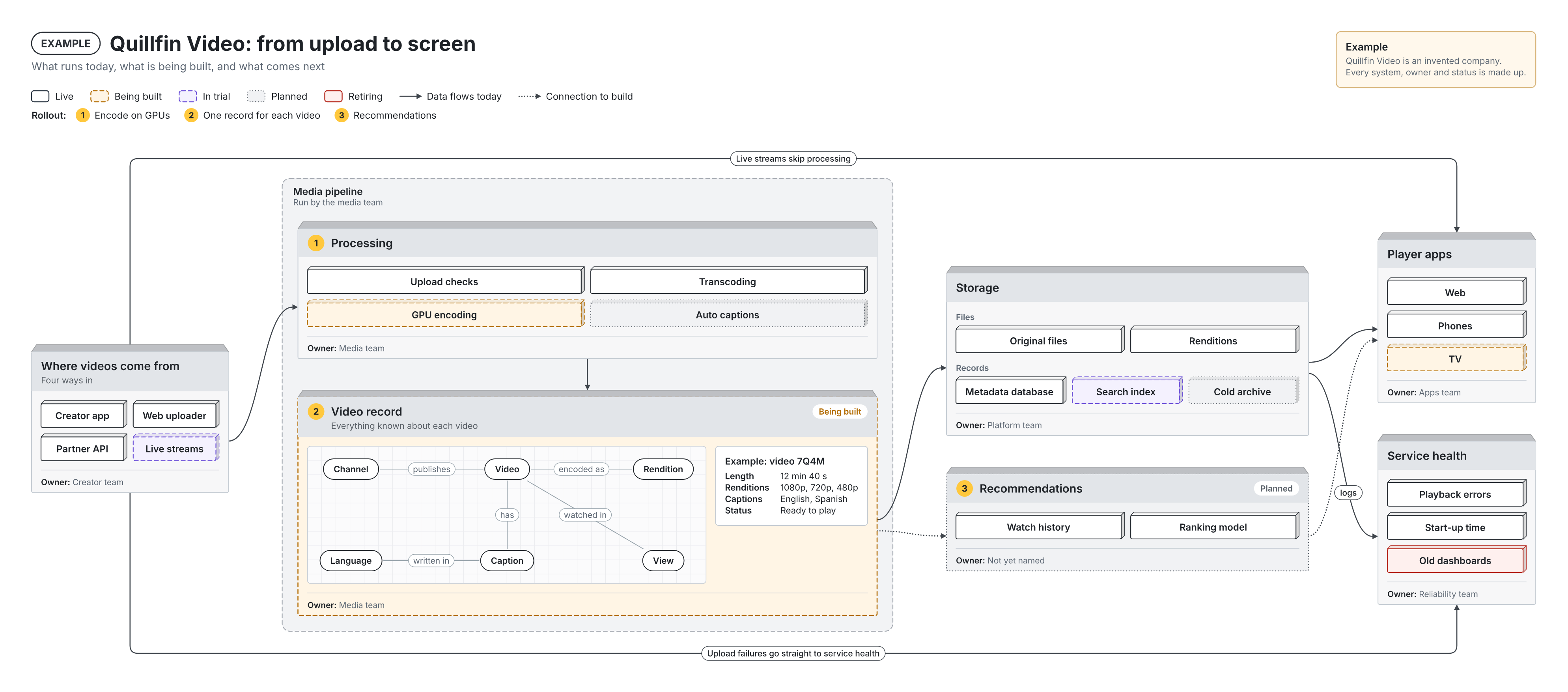
- open_diagram-0.1.0/tests/test_open_diagram.py +141 -0
|
@@ -0,0 +1,21 @@
|
|
|
1
|
+
MIT License
|
|
2
|
+
|
|
3
|
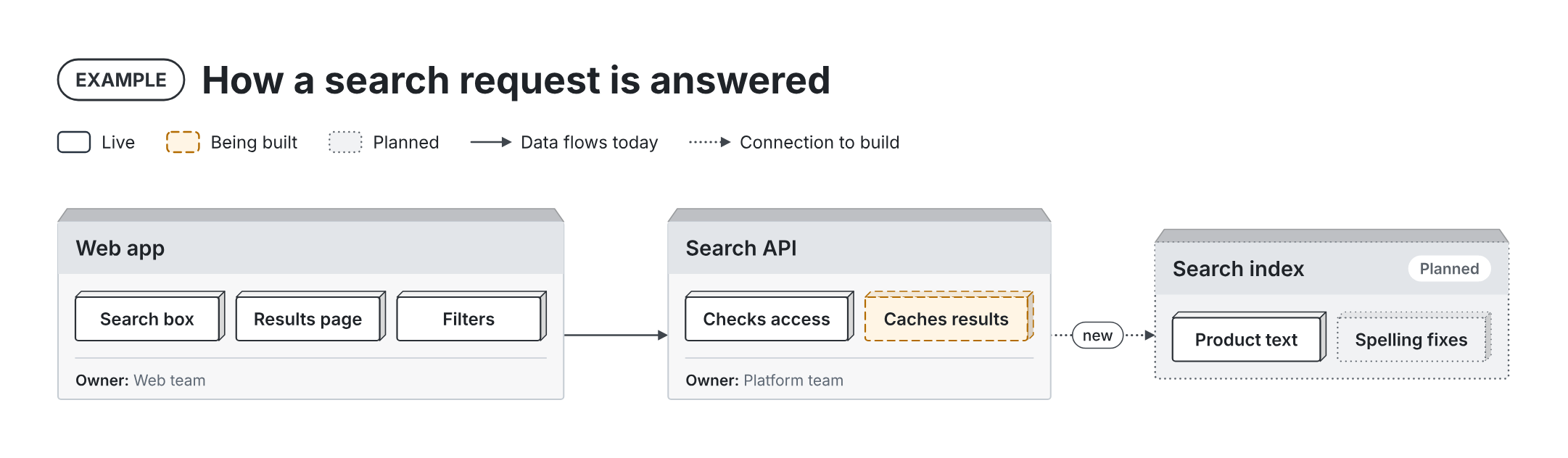
+
Copyright (c) 2026 Luke Deasy
|
|
4
|
+
|
|
5
|
+
Permission is hereby granted, free of charge, to any person obtaining a copy
|
|
6
|
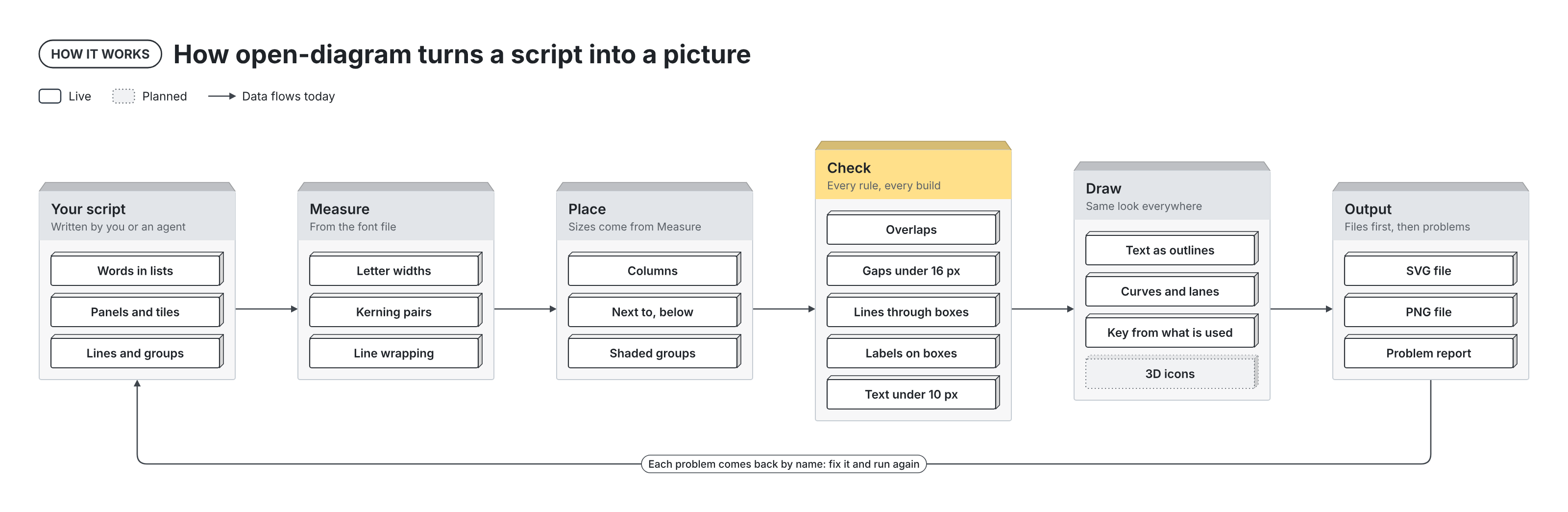
+
of this software and associated documentation files (the "Software"), to deal
|
|
7
|
+
in the Software without restriction, including without limitation the rights
|
|
8
|
+
to use, copy, modify, merge, publish, distribute, sublicense, and/or sell
|
|
9
|
+
copies of the Software, and to permit persons to whom the Software is
|
|
10
|
+
furnished to do so, subject to the following conditions:
|
|
11
|
+
|
|
12
|
+
The above copyright notice and this permission notice shall be included in all
|
|
13
|
+
copies or substantial portions of the Software.
|
|
14
|
+
|
|
15
|
+
THE SOFTWARE IS PROVIDED "AS IS", WITHOUT WARRANTY OF ANY KIND, EXPRESS OR
|
|
16
|
+
IMPLIED, INCLUDING BUT NOT LIMITED TO THE WARRANTIES OF MERCHANTABILITY,
|
|
17
|
+
FITNESS FOR A PARTICULAR PURPOSE AND NONINFRINGEMENT. IN NO EVENT SHALL THE
|
|
18
|
+
AUTHORS OR COPYRIGHT HOLDERS BE LIABLE FOR ANY CLAIM, DAMAGES OR OTHER
|
|
19
|
+
LIABILITY, WHETHER IN AN ACTION OF CONTRACT, TORT OR OTHERWISE, ARISING FROM,
|
|
20
|
+
OUT OF OR IN CONNECTION WITH THE SOFTWARE OR THE USE OR OTHER DEALINGS IN THE
|
|
21
|
+
SOFTWARE.
|
|
@@ -0,0 +1,162 @@
|
|
|
1
|
+
Metadata-Version: 2.4
|
|
2
|
+
Name: open-diagram
|
|
3
|
+
Version: 0.1.0
|
|
4
|
+
Summary: Python building blocks for dense architecture diagrams that check their own layout
|
|
5
|
+
Author: Luke Deasy
|
|
6
|
+
License-Expression: MIT
|
|
7
|
+
Project-URL: Homepage, https://github.com/lukendeasy/open-diagram
|
|
8
|
+
Keywords: diagram,svg,architecture,agents,visualization
|
|
9
|
+
Classifier: Programming Language :: Python :: 3
|
|
10
|
+
Classifier: Topic :: Multimedia :: Graphics
|
|
11
|
+
Requires-Python: >=3.9
|
|
12
|
+
Description-Content-Type: text/markdown
|
|
13
|
+
License-File: LICENSE
|
|
14
|
+
Requires-Dist: fonttools>=4.40
|
|
15
|
+
Provides-Extra: png
|
|
16
|
+
Requires-Dist: pillow>=9; extra == "png"
|
|
17
|
+
Dynamic: license-file
|
|
18
|
+
|
|
19
|
+
# open-diagram
|
|
20
|
+
|
|
21
|
+
Python building blocks for dense architecture diagrams that check their own layout.
|
|
22
|
+
|
|
23
|
+
|
|
24
|
+
|
|
25
|
+
You describe panels, tiles, lines and groups in a short Python script. open-diagram measures every label from the font, places the blocks, and checks the result. If two panels collide or a line runs through a panel, the build says so by name. The output is an SVG (a picture made of shapes, sharp at any size) and a PNG.
|
|
26
|
+
|
|
27
|
+
The same blocks draw software systems, release pipelines, layered stacks, data models and business processes. It is built to be written by an AI agent such as Claude, Codex or Cursor, as well as by people. The checks catch layout mistakes before anyone looks at the picture, so a first attempt usually comes out clean.
|
|
28
|
+
|
|
29
|
+
## Install
|
|
30
|
+
|
|
31
|
+
```bash
|
|
32
|
+
pip install open-diagram
|
|
33
|
+
```
|
|
34
|
+
|
|
35
|
+
For the newest unreleased code: `pip install git+https://github.com/lukendeasy/open-diagram`.
|
|
36
|
+
|
|
37
|
+
open-diagram needs Python 3.9 or later and fontTools, which pip installs for you. To make PNG files it also needs Google Chrome, Chromium or Microsoft Edge. If yours is not in the usual place, set the `CHROME` environment variable to its path. The SVG is always written, browser or not.
|
|
38
|
+
|
|
39
|
+
## Quick start
|
|
40
|
+
|
|
41
|
+
```python
|
|
42
|
+
from open_diagram import Diagram, Panel, Tile
|
|
43
|
+
|
|
44
|
+
d = Diagram("How a search request is answered", tag="EXAMPLE")
|
|
45
|
+
app = d.add(Panel("Web app", ["Search box", "Results page", "Filters"], footer="Owner: Web team"))
|
|
46
|
+
api = d.right_of(app, Panel("Search API", [Tile("Checks access"), Tile("Caches results", status="building")],
|
|
47
|
+
footer="Owner: Platform team"), align="center")
|
|
48
|
+
index = d.right_of(api, Panel("Search index", ["Product text", Tile("Spelling fixes", status="planned")],
|
|
49
|
+
status="planned"), align="center")
|
|
50
|
+
d.link(app, api)
|
|
51
|
+
d.link(api, index, kind="planned", label="new")
|
|
52
|
+
d.save("quickstart") # writes quickstart.svg and quickstart.png
|
|
53
|
+
```
|
|
54
|
+
|
|
55
|
+
|
|
56
|
+
|
|
57
|
+
The key at the top lists only the statuses and line kinds the picture uses.
|
|
58
|
+
|
|
59
|
+
## Why a first attempt comes out clean
|
|
60
|
+
|
|
61
|
+
- **Every label is measured before it is placed.** Widths come from the font's own spacing and kerning, so each box fits its words.
|
|
62
|
+
- **The build checks the layout and names each problem.** For example: `'Storage' and 'Recommendations' are only 9 px apart (minimum 16)` or `line 'Where videos come from' -> 'Storage' crosses 'Processing'; route it with via_x/via_y, move a block, or pass cross_ok=True`. `save()` writes the files, prints a summary, then raises `LayoutError` with the full list.
|
|
63
|
+
- **Text is drawn as shapes.** The SVG looks the same in a browser, PowerPoint, Keynote or Figma, with or without the font installed. Inter comes bundled.
|
|
64
|
+
- **Words stay apart from layout.** Keep labels in lists at the top of the script. Changing a word does not move anything by hand.
|
|
65
|
+
|
|
66
|
+
|
|
67
|
+
|
|
68
|
+
## Examples
|
|
69
|
+
|
|
70
|
+
Each example is one script in [`examples/`](https://github.com/lukendeasy/open-diagram/tree/main/examples). Run any of them with `python3 examples/<name>.py`.
|
|
71
|
+
|
|
72
|
+
| Example | Shows |
|
|
73
|
+
| --- | --- |
|
|
74
|
+
| [`systems_map.py`](https://github.com/lukendeasy/open-diagram/blob/main/examples/systems_map.py) | A video platform from upload to screen: columns, a group, steps, statuses, owners, a small data map with a worked example, and lanes above and below the picture |
|
|
75
|
+
| [`how_it_works.py`](https://github.com/lukendeasy/open-diagram/blob/main/examples/how_it_works.py) | How open-diagram itself works, drawn with open-diagram |
|
|
76
|
+
| [`pipeline.py`](https://github.com/lukendeasy/open-diagram/blob/main/examples/pipeline.py) | A release pipeline from pull request to production, with a rollback lane |
|
|
77
|
+
| [`card_payment.py`](https://github.com/lukendeasy/open-diagram/blob/main/examples/card_payment.py) | What happens when you tap a card: numbered steps for the order of events, return paths above and below |
|
|
78
|
+
| [`layers.py`](https://github.com/lukendeasy/open-diagram/blob/main/examples/layers.py) | A web product as stacked layers, with a side panel |
|
|
79
|
+
| [`concept_map.py`](https://github.com/lukendeasy/open-diagram/blob/main/examples/concept_map.py) | How git stores a project: its objects and links, with a worked example |
|
|
80
|
+
| [`smart_home.py`](https://github.com/lukendeasy/open-diagram/blob/main/examples/smart_home.py) | A smart home from sensor to phone, with a planned overnight update path |
|
|
81
|
+
| [`incident_response.py`](https://github.com/lukendeasy/open-diagram/blob/main/examples/incident_response.py) | How a team handles an outage, from the first alert to the lessons learned |
|
|
82
|
+
| [`business_map.py`](https://github.com/lukendeasy/open-diagram/blob/main/examples/business_map.py) | Not only software: a furniture store from order to doorstep |
|
|
83
|
+
| [`quickstart.py`](https://github.com/lukendeasy/open-diagram/blob/main/examples/quickstart.py) | The code above |
|
|
84
|
+
|
|
85
|
+
<p>
|
|
86
|
+
<img src="https://raw.githubusercontent.com/lukendeasy/open-diagram/main/docs/images/pipeline.png" alt="Release pipeline example" width="54%">
|
|
87
|
+
<img src="https://raw.githubusercontent.com/lukendeasy/open-diagram/main/docs/images/layers.png" alt="Stacked layers example" width="40%">
|
|
88
|
+
</p>
|
|
89
|
+
<p>
|
|
90
|
+
<img src="https://raw.githubusercontent.com/lukendeasy/open-diagram/main/docs/images/card_payment.png" alt="Card payment example" width="49%">
|
|
91
|
+
<img src="https://raw.githubusercontent.com/lukendeasy/open-diagram/main/docs/images/smart_home.png" alt="Smart home example" width="45%">
|
|
92
|
+
</p>
|
|
93
|
+
<p>
|
|
94
|
+
<img src="https://raw.githubusercontent.com/lukendeasy/open-diagram/main/docs/images/concept_map.png" alt="Git data model example" width="47%">
|
|
95
|
+
<img src="https://raw.githubusercontent.com/lukendeasy/open-diagram/main/docs/images/incident_response.png" alt="Outage response example" width="47%">
|
|
96
|
+
</p>
|
|
97
|
+
<p>
|
|
98
|
+
<img src="https://raw.githubusercontent.com/lukendeasy/open-diagram/main/docs/images/business_map.png" alt="Business process example" width="70%">
|
|
99
|
+
</p>
|
|
100
|
+
|
|
101
|
+
## Building blocks
|
|
102
|
+
|
|
103
|
+
| Block | What it draws |
|
|
104
|
+
| --- | --- |
|
|
105
|
+
| `Panel(title, *sections, sub=, status=, step=, footer=, tone=)` | The main box: a colored header, sections stacked inside, an optional footer such as "Owner: Data team" |
|
|
106
|
+
| `Tiles(items, cols=, label=)` | A grid of tiles with one cell size. A plain list of labels inside a `Panel` becomes `Tiles` |
|
|
107
|
+
| `Tile(label, sub=, status=, icon=)` | One small box. `icon` takes a PNG or SVG file you supply |
|
|
108
|
+
| `Card(title, rows, intro=)` | A worked example: rows of name and value |
|
|
109
|
+
| `Graph(nodes, links, at)` | Things on a grid, joined by labelled lines. The build reports labels that touch nodes |
|
|
110
|
+
| `Row(*sections)` | Sections side by side inside a panel |
|
|
111
|
+
| `Text(text)` | A wrapped paragraph |
|
|
112
|
+
| `Note(title, *lines)` | A boxed note for the top right, such as "Draft" |
|
|
113
|
+
|
|
114
|
+
| Diagram method | What it does |
|
|
115
|
+
| --- | --- |
|
|
116
|
+
| `add(block, x, y)` | Place a block at a position |
|
|
117
|
+
| `right_of(ref, block, align=)` and `below(ref, block, align=)` | Place a block next to another, with the theme's gap |
|
|
118
|
+
| `columns([[...], [...]])` and `stack([...])` | Place columns left to right, each one top to bottom |
|
|
119
|
+
| `group(label, members, sub=)` | A shaded, dashed area around some blocks |
|
|
120
|
+
| `link(a, b, kind=, label=, start=, end=, via_x=, via_y=)` | An arrow. `kind="planned"` is dotted. `via_y` routes it through a lane, for example above everything |
|
|
121
|
+
| `save(path)` | Write the SVG and PNG, print a summary, raise `LayoutError` if there are problems |
|
|
122
|
+
| `render()` | Return the SVG text and a report without writing files |
|
|
123
|
+
|
|
124
|
+
## Statuses, colors and sizes
|
|
125
|
+
|
|
126
|
+
Panels have light gray headers and yellow step numbers. Each panel has a sloped top and each tile a raised edge, for a light 3D look; `Theme(lid=0, depth=0)` turns it off. `tone="accent"` gives a panel a soft yellow header, and `tone="dark"` a charcoal one. Header text turns white by itself on a dark header.
|
|
127
|
+
|
|
128
|
+
Statuses are shown by color and by word: Live, Being built, In trial, Planned and Retiring. Change them, or anything else, with a `Theme`:
|
|
129
|
+
|
|
130
|
+
```python
|
|
131
|
+
from open_diagram import Diagram, Status, Theme
|
|
132
|
+
|
|
133
|
+
theme = Theme(tones={"default": "#2B3036", "neutral": "#6A7078", "accent": "#FFC83D", "dark": "#111418"})
|
|
134
|
+
theme.statuses["pilot"] = Status("Pilot", stroke="#8E24AA", fill="#F6EDF9", dash="dashed")
|
|
135
|
+
d = Diagram("My picture", theme=theme)
|
|
136
|
+
```
|
|
137
|
+
|
|
138
|
+
## Use it with an AI agent
|
|
139
|
+
|
|
140
|
+
The folder [`skills/open-diagram/`](https://github.com/lukendeasy/open-diagram/tree/main/skills/open-diagram) is an Agent Skill: instructions an agent loads when it needs them. For Claude Code, copy it into your skills folder:
|
|
141
|
+
|
|
142
|
+
```bash
|
|
143
|
+
cp -r skills/open-diagram ~/.claude/skills/
|
|
144
|
+
```
|
|
145
|
+
|
|
146
|
+
Then ask for a picture in plain words, for example: "Draw a systems map of our checkout, warehouse and reporting, with what is live and what is planned." The skill tells the agent to plan the columns, write the script, run it, fix each named problem, and look at the PNG before it answers.
|
|
147
|
+
|
|
148
|
+
Agents changing the library itself should start with [AGENTS.md](https://github.com/lukendeasy/open-diagram/blob/main/AGENTS.md).
|
|
149
|
+
|
|
150
|
+
## Run the tests
|
|
151
|
+
|
|
152
|
+
```bash
|
|
153
|
+
python3 -m unittest discover -s tests
|
|
154
|
+
```
|
|
155
|
+
|
|
156
|
+
## Soundtrack
|
|
157
|
+
|
|
158
|
+
We recommend listening to music by The Gathering Field while you build.
|
|
159
|
+
|
|
160
|
+
## License
|
|
161
|
+
|
|
162
|
+
MIT, in [LICENSE](https://github.com/lukendeasy/open-diagram/blob/main/LICENSE). The bundled Inter font is by The Inter Project Authors, under the SIL Open Font License 1.1, in [src/open_diagram/fonts/OFL.txt](https://github.com/lukendeasy/open-diagram/blob/main/src/open_diagram/fonts/OFL.txt).
|
|
@@ -0,0 +1,144 @@
|
|
|
1
|
+
# open-diagram
|
|
2
|
+
|
|
3
|
+
Python building blocks for dense architecture diagrams that check their own layout.
|
|
4
|
+
|
|
5
|
+

|
|
6
|
+
|
|
7
|
+
You describe panels, tiles, lines and groups in a short Python script. open-diagram measures every label from the font, places the blocks, and checks the result. If two panels collide or a line runs through a panel, the build says so by name. The output is an SVG (a picture made of shapes, sharp at any size) and a PNG.
|
|
8
|
+
|
|
9
|
+
The same blocks draw software systems, release pipelines, layered stacks, data models and business processes. It is built to be written by an AI agent such as Claude, Codex or Cursor, as well as by people. The checks catch layout mistakes before anyone looks at the picture, so a first attempt usually comes out clean.
|
|
10
|
+
|
|
11
|
+
## Install
|
|
12
|
+
|
|
13
|
+
```bash
|
|
14
|
+
pip install open-diagram
|
|
15
|
+
```
|
|
16
|
+
|
|
17
|
+
For the newest unreleased code: `pip install git+https://github.com/lukendeasy/open-diagram`.
|
|
18
|
+
|
|
19
|
+
open-diagram needs Python 3.9 or later and fontTools, which pip installs for you. To make PNG files it also needs Google Chrome, Chromium or Microsoft Edge. If yours is not in the usual place, set the `CHROME` environment variable to its path. The SVG is always written, browser or not.
|
|
20
|
+
|
|
21
|
+
## Quick start
|
|
22
|
+
|
|
23
|
+
```python
|
|
24
|
+
from open_diagram import Diagram, Panel, Tile
|
|
25
|
+
|
|
26
|
+
d = Diagram("How a search request is answered", tag="EXAMPLE")
|
|
27
|
+
app = d.add(Panel("Web app", ["Search box", "Results page", "Filters"], footer="Owner: Web team"))
|
|
28
|
+
api = d.right_of(app, Panel("Search API", [Tile("Checks access"), Tile("Caches results", status="building")],
|
|
29
|
+
footer="Owner: Platform team"), align="center")
|
|
30
|
+
index = d.right_of(api, Panel("Search index", ["Product text", Tile("Spelling fixes", status="planned")],
|
|
31
|
+
status="planned"), align="center")
|
|
32
|
+
d.link(app, api)
|
|
33
|
+
d.link(api, index, kind="planned", label="new")
|
|
34
|
+
d.save("quickstart") # writes quickstart.svg and quickstart.png
|
|
35
|
+
```
|
|
36
|
+
|
|
37
|
+

|
|
38
|
+
|
|
39
|
+
The key at the top lists only the statuses and line kinds the picture uses.
|
|
40
|
+
|
|
41
|
+
## Why a first attempt comes out clean
|
|
42
|
+
|
|
43
|
+
- **Every label is measured before it is placed.** Widths come from the font's own spacing and kerning, so each box fits its words.
|
|
44
|
+
- **The build checks the layout and names each problem.** For example: `'Storage' and 'Recommendations' are only 9 px apart (minimum 16)` or `line 'Where videos come from' -> 'Storage' crosses 'Processing'; route it with via_x/via_y, move a block, or pass cross_ok=True`. `save()` writes the files, prints a summary, then raises `LayoutError` with the full list.
|
|
45
|
+
- **Text is drawn as shapes.** The SVG looks the same in a browser, PowerPoint, Keynote or Figma, with or without the font installed. Inter comes bundled.
|
|
46
|
+
- **Words stay apart from layout.** Keep labels in lists at the top of the script. Changing a word does not move anything by hand.
|
|
47
|
+
|
|
48
|
+

|
|
49
|
+
|
|
50
|
+
## Examples
|
|
51
|
+
|
|
52
|
+
Each example is one script in [`examples/`](https://github.com/lukendeasy/open-diagram/tree/main/examples). Run any of them with `python3 examples/<name>.py`.
|
|
53
|
+
|
|
54
|
+
| Example | Shows |
|
|
55
|
+
| --- | --- |
|
|
56
|
+
| [`systems_map.py`](https://github.com/lukendeasy/open-diagram/blob/main/examples/systems_map.py) | A video platform from upload to screen: columns, a group, steps, statuses, owners, a small data map with a worked example, and lanes above and below the picture |
|
|
57
|
+
| [`how_it_works.py`](https://github.com/lukendeasy/open-diagram/blob/main/examples/how_it_works.py) | How open-diagram itself works, drawn with open-diagram |
|
|
58
|
+
| [`pipeline.py`](https://github.com/lukendeasy/open-diagram/blob/main/examples/pipeline.py) | A release pipeline from pull request to production, with a rollback lane |
|
|
59
|
+
| [`card_payment.py`](https://github.com/lukendeasy/open-diagram/blob/main/examples/card_payment.py) | What happens when you tap a card: numbered steps for the order of events, return paths above and below |
|
|
60
|
+
| [`layers.py`](https://github.com/lukendeasy/open-diagram/blob/main/examples/layers.py) | A web product as stacked layers, with a side panel |
|
|
61
|
+
| [`concept_map.py`](https://github.com/lukendeasy/open-diagram/blob/main/examples/concept_map.py) | How git stores a project: its objects and links, with a worked example |
|
|
62
|
+
| [`smart_home.py`](https://github.com/lukendeasy/open-diagram/blob/main/examples/smart_home.py) | A smart home from sensor to phone, with a planned overnight update path |
|
|
63
|
+
| [`incident_response.py`](https://github.com/lukendeasy/open-diagram/blob/main/examples/incident_response.py) | How a team handles an outage, from the first alert to the lessons learned |
|
|
64
|
+
| [`business_map.py`](https://github.com/lukendeasy/open-diagram/blob/main/examples/business_map.py) | Not only software: a furniture store from order to doorstep |
|
|
65
|
+
| [`quickstart.py`](https://github.com/lukendeasy/open-diagram/blob/main/examples/quickstart.py) | The code above |
|
|
66
|
+
|
|
67
|
+
<p>
|
|
68
|
+
<img src="https://raw.githubusercontent.com/lukendeasy/open-diagram/main/docs/images/pipeline.png" alt="Release pipeline example" width="54%">
|
|
69
|
+
<img src="https://raw.githubusercontent.com/lukendeasy/open-diagram/main/docs/images/layers.png" alt="Stacked layers example" width="40%">
|
|
70
|
+
</p>
|
|
71
|
+
<p>
|
|
72
|
+
<img src="https://raw.githubusercontent.com/lukendeasy/open-diagram/main/docs/images/card_payment.png" alt="Card payment example" width="49%">
|
|
73
|
+
<img src="https://raw.githubusercontent.com/lukendeasy/open-diagram/main/docs/images/smart_home.png" alt="Smart home example" width="45%">
|
|
74
|
+
</p>
|
|
75
|
+
<p>
|
|
76
|
+
<img src="https://raw.githubusercontent.com/lukendeasy/open-diagram/main/docs/images/concept_map.png" alt="Git data model example" width="47%">
|
|
77
|
+
<img src="https://raw.githubusercontent.com/lukendeasy/open-diagram/main/docs/images/incident_response.png" alt="Outage response example" width="47%">
|
|
78
|
+
</p>
|
|
79
|
+
<p>
|
|
80
|
+
<img src="https://raw.githubusercontent.com/lukendeasy/open-diagram/main/docs/images/business_map.png" alt="Business process example" width="70%">
|
|
81
|
+
</p>
|
|
82
|
+
|
|
83
|
+
## Building blocks
|
|
84
|
+
|
|
85
|
+
| Block | What it draws |
|
|
86
|
+
| --- | --- |
|
|
87
|
+
| `Panel(title, *sections, sub=, status=, step=, footer=, tone=)` | The main box: a colored header, sections stacked inside, an optional footer such as "Owner: Data team" |
|
|
88
|
+
| `Tiles(items, cols=, label=)` | A grid of tiles with one cell size. A plain list of labels inside a `Panel` becomes `Tiles` |
|
|
89
|
+
| `Tile(label, sub=, status=, icon=)` | One small box. `icon` takes a PNG or SVG file you supply |
|
|
90
|
+
| `Card(title, rows, intro=)` | A worked example: rows of name and value |
|
|
91
|
+
| `Graph(nodes, links, at)` | Things on a grid, joined by labelled lines. The build reports labels that touch nodes |
|
|
92
|
+
| `Row(*sections)` | Sections side by side inside a panel |
|
|
93
|
+
| `Text(text)` | A wrapped paragraph |
|
|
94
|
+
| `Note(title, *lines)` | A boxed note for the top right, such as "Draft" |
|
|
95
|
+
|
|
96
|
+
| Diagram method | What it does |
|
|
97
|
+
| --- | --- |
|
|
98
|
+
| `add(block, x, y)` | Place a block at a position |
|
|
99
|
+
| `right_of(ref, block, align=)` and `below(ref, block, align=)` | Place a block next to another, with the theme's gap |
|
|
100
|
+
| `columns([[...], [...]])` and `stack([...])` | Place columns left to right, each one top to bottom |
|
|
101
|
+
| `group(label, members, sub=)` | A shaded, dashed area around some blocks |
|
|
102
|
+
| `link(a, b, kind=, label=, start=, end=, via_x=, via_y=)` | An arrow. `kind="planned"` is dotted. `via_y` routes it through a lane, for example above everything |
|
|
103
|
+
| `save(path)` | Write the SVG and PNG, print a summary, raise `LayoutError` if there are problems |
|
|
104
|
+
| `render()` | Return the SVG text and a report without writing files |
|
|
105
|
+
|
|
106
|
+
## Statuses, colors and sizes
|
|
107
|
+
|
|
108
|
+
Panels have light gray headers and yellow step numbers. Each panel has a sloped top and each tile a raised edge, for a light 3D look; `Theme(lid=0, depth=0)` turns it off. `tone="accent"` gives a panel a soft yellow header, and `tone="dark"` a charcoal one. Header text turns white by itself on a dark header.
|
|
109
|
+
|
|
110
|
+
Statuses are shown by color and by word: Live, Being built, In trial, Planned and Retiring. Change them, or anything else, with a `Theme`:
|
|
111
|
+
|
|
112
|
+
```python
|
|
113
|
+
from open_diagram import Diagram, Status, Theme
|
|
114
|
+
|
|
115
|
+
theme = Theme(tones={"default": "#2B3036", "neutral": "#6A7078", "accent": "#FFC83D", "dark": "#111418"})
|
|
116
|
+
theme.statuses["pilot"] = Status("Pilot", stroke="#8E24AA", fill="#F6EDF9", dash="dashed")
|
|
117
|
+
d = Diagram("My picture", theme=theme)
|
|
118
|
+
```
|
|
119
|
+
|
|
120
|
+
## Use it with an AI agent
|
|
121
|
+
|
|
122
|
+
The folder [`skills/open-diagram/`](https://github.com/lukendeasy/open-diagram/tree/main/skills/open-diagram) is an Agent Skill: instructions an agent loads when it needs them. For Claude Code, copy it into your skills folder:
|
|
123
|
+
|
|
124
|
+
```bash
|
|
125
|
+
cp -r skills/open-diagram ~/.claude/skills/
|
|
126
|
+
```
|
|
127
|
+
|
|
128
|
+
Then ask for a picture in plain words, for example: "Draw a systems map of our checkout, warehouse and reporting, with what is live and what is planned." The skill tells the agent to plan the columns, write the script, run it, fix each named problem, and look at the PNG before it answers.
|
|
129
|
+
|
|
130
|
+
Agents changing the library itself should start with [AGENTS.md](https://github.com/lukendeasy/open-diagram/blob/main/AGENTS.md).
|
|
131
|
+
|
|
132
|
+
## Run the tests
|
|
133
|
+
|
|
134
|
+
```bash
|
|
135
|
+
python3 -m unittest discover -s tests
|
|
136
|
+
```
|
|
137
|
+
|
|
138
|
+
## Soundtrack
|
|
139
|
+
|
|
140
|
+
We recommend listening to music by The Gathering Field while you build.
|
|
141
|
+
|
|
142
|
+
## License
|
|
143
|
+
|
|
144
|
+
MIT, in [LICENSE](https://github.com/lukendeasy/open-diagram/blob/main/LICENSE). The bundled Inter font is by The Inter Project Authors, under the SIL Open Font License 1.1, in [src/open_diagram/fonts/OFL.txt](https://github.com/lukendeasy/open-diagram/blob/main/src/open_diagram/fonts/OFL.txt).
|
|
@@ -0,0 +1,31 @@
|
|
|
1
|
+
[build-system]
|
|
2
|
+
requires = ["setuptools>=77"]
|
|
3
|
+
build-backend = "setuptools.build_meta"
|
|
4
|
+
|
|
5
|
+
[project]
|
|
6
|
+
name = "open-diagram"
|
|
7
|
+
version = "0.1.0"
|
|
8
|
+
description = "Python building blocks for dense architecture diagrams that check their own layout"
|
|
9
|
+
readme = "README.md"
|
|
10
|
+
license = "MIT"
|
|
11
|
+
license-files = ["LICENSE"]
|
|
12
|
+
authors = [{ name = "Luke Deasy" }]
|
|
13
|
+
requires-python = ">=3.9"
|
|
14
|
+
dependencies = ["fonttools>=4.40"]
|
|
15
|
+
keywords = ["diagram", "svg", "architecture", "agents", "visualization"]
|
|
16
|
+
classifiers = [
|
|
17
|
+
"Programming Language :: Python :: 3",
|
|
18
|
+
"Topic :: Multimedia :: Graphics",
|
|
19
|
+
]
|
|
20
|
+
|
|
21
|
+
[project.optional-dependencies]
|
|
22
|
+
png = ["pillow>=9"]
|
|
23
|
+
|
|
24
|
+
[project.urls]
|
|
25
|
+
Homepage = "https://github.com/lukendeasy/open-diagram"
|
|
26
|
+
|
|
27
|
+
[tool.setuptools.packages.find]
|
|
28
|
+
where = ["src"]
|
|
29
|
+
|
|
30
|
+
[tool.setuptools.package-data]
|
|
31
|
+
open_diagram = ["fonts/*.ttf", "fonts/*.txt"]
|
|
@@ -0,0 +1,13 @@
|
|
|
1
|
+
"""open-diagram: building blocks for dense architecture diagrams that check their own layout."""
|
|
2
|
+
from .blocks import Block, Card, Graph, Note, Panel, Row, Text, Tile, Tiles
|
|
3
|
+
from .diagram import Diagram, LayoutError, Link, Placed, Report
|
|
4
|
+
from .fonts import text_width, wrap
|
|
5
|
+
from .render import find_chrome, svg_to_png
|
|
6
|
+
from .theme import Status, Theme
|
|
7
|
+
|
|
8
|
+
__version__ = "0.1.0"
|
|
9
|
+
|
|
10
|
+
__all__ = [
|
|
11
|
+
"Block", "Card", "Diagram", "Graph", "LayoutError", "Link", "Note", "Panel", "Placed", "Report", "Row",
|
|
12
|
+
"Status", "Text", "Theme", "Tile", "Tiles", "find_chrome", "svg_to_png", "text_width", "wrap",
|
|
13
|
+
]
|
|
@@ -0,0 +1,27 @@
|
|
|
1
|
+
"""Convert an SVG to a PNG: python -m open_diagram picture.svg [--scale 2]"""
|
|
2
|
+
import argparse
|
|
3
|
+
import re
|
|
4
|
+
import sys
|
|
5
|
+
|
|
6
|
+
from .render import svg_to_png
|
|
7
|
+
|
|
8
|
+
|
|
9
|
+
def main() -> None:
|
|
10
|
+
ap = argparse.ArgumentParser(prog="python -m open_diagram", description=__doc__)
|
|
11
|
+
ap.add_argument("svg")
|
|
12
|
+
ap.add_argument("--scale", type=float, default=2.0)
|
|
13
|
+
a = ap.parse_args()
|
|
14
|
+
with open(a.svg, encoding="utf-8") as fh:
|
|
15
|
+
head = fh.read(2000)
|
|
16
|
+
w = re.search(r'width="([\d.]+)"', head)
|
|
17
|
+
h = re.search(r'height="([\d.]+)"', head)
|
|
18
|
+
if not (w and h):
|
|
19
|
+
sys.exit("the SVG needs width and height attributes")
|
|
20
|
+
out = a.svg[:-4] + ".png" if a.svg.lower().endswith(".svg") else a.svg + ".png"
|
|
21
|
+
if not svg_to_png(a.svg, out, float(w.group(1)), float(h.group(1)), a.scale):
|
|
22
|
+
sys.exit("PNG not written: Chrome or Chromium not found (set the CHROME environment variable to its path)")
|
|
23
|
+
print(f"wrote {out}")
|
|
24
|
+
|
|
25
|
+
|
|
26
|
+
if __name__ == "__main__":
|
|
27
|
+
main()
|