ntermqt 0.1.1__tar.gz → 0.1.5__tar.gz
This diff represents the content of publicly available package versions that have been released to one of the supported registries. The information contained in this diff is provided for informational purposes only and reflects changes between package versions as they appear in their respective public registries.
- {ntermqt-0.1.1/ntermqt.egg-info → ntermqt-0.1.5}/PKG-INFO +156 -21
- {ntermqt-0.1.1 → ntermqt-0.1.5}/README.md +147 -20
- {ntermqt-0.1.1 → ntermqt-0.1.5}/nterm/__main__.py +180 -9
- {ntermqt-0.1.1 → ntermqt-0.1.5}/nterm/manager/tree.py +125 -42
- ntermqt-0.1.5/nterm/parser/api_help_dialog.py +607 -0
- ntermqt-0.1.5/nterm/parser/ntc_download_dialog.py +372 -0
- ntermqt-0.1.5/nterm/parser/tfsm_engine.py +246 -0
- ntermqt-0.1.5/nterm/parser/tfsm_fire.py +237 -0
- ntermqt-0.1.5/nterm/parser/tfsm_fire_tester.py +2329 -0
- ntermqt-0.1.5/nterm/scripting/__init__.py +43 -0
- ntermqt-0.1.5/nterm/scripting/api.py +1354 -0
- ntermqt-0.1.5/nterm/scripting/cli.py +305 -0
- ntermqt-0.1.5/nterm/session/local_terminal.py +225 -0
- {ntermqt-0.1.1 → ntermqt-0.1.5}/nterm/session/pty_transport.py +105 -91
- {ntermqt-0.1.1 → ntermqt-0.1.5}/nterm/terminal/bridge.py +10 -0
- {ntermqt-0.1.1 → ntermqt-0.1.5}/nterm/terminal/resources/terminal.html +9 -4
- {ntermqt-0.1.1 → ntermqt-0.1.5}/nterm/terminal/resources/terminal.js +14 -1
- {ntermqt-0.1.1 → ntermqt-0.1.5}/nterm/terminal/widget.py +73 -2
- {ntermqt-0.1.1 → ntermqt-0.1.5}/nterm/theme/engine.py +45 -0
- ntermqt-0.1.5/nterm/theme/themes/clean.yaml +0 -0
- ntermqt-0.1.5/nterm/theme/themes/nord_hybrid.yaml +43 -0
- {ntermqt-0.1.1 → ntermqt-0.1.5}/nterm/vault/store.py +3 -3
- {ntermqt-0.1.1 → ntermqt-0.1.5/ntermqt.egg-info}/PKG-INFO +156 -21
- {ntermqt-0.1.1 → ntermqt-0.1.5}/ntermqt.egg-info/SOURCES.txt +11 -0
- {ntermqt-0.1.1 → ntermqt-0.1.5}/ntermqt.egg-info/entry_points.txt +1 -0
- ntermqt-0.1.5/ntermqt.egg-info/requires.txt +28 -0
- {ntermqt-0.1.1 → ntermqt-0.1.5}/pyproject.toml +11 -2
- ntermqt-0.1.1/ntermqt.egg-info/requires.txt +0 -15
- {ntermqt-0.1.1 → ntermqt-0.1.5}/MANIFEST.in +0 -0
- {ntermqt-0.1.1 → ntermqt-0.1.5}/nterm/__init__.py +0 -0
- {ntermqt-0.1.1 → ntermqt-0.1.5}/nterm/askpass/__init__.py +0 -0
- {ntermqt-0.1.1 → ntermqt-0.1.5}/nterm/askpass/server.py +0 -0
- {ntermqt-0.1.1 → ntermqt-0.1.5}/nterm/config.py +0 -0
- {ntermqt-0.1.1 → ntermqt-0.1.5}/nterm/connection/__init__.py +0 -0
- {ntermqt-0.1.1 → ntermqt-0.1.5}/nterm/connection/profile.py +0 -0
- {ntermqt-0.1.1 → ntermqt-0.1.5}/nterm/manager/__init__.py +0 -0
- {ntermqt-0.1.1 → ntermqt-0.1.5}/nterm/manager/connect_dialog.py +0 -0
- {ntermqt-0.1.1 → ntermqt-0.1.5}/nterm/manager/editor.py +0 -0
- {ntermqt-0.1.1 → ntermqt-0.1.5}/nterm/manager/io.py +0 -0
- {ntermqt-0.1.1 → ntermqt-0.1.5}/nterm/manager/models.py +0 -0
- {ntermqt-0.1.1 → ntermqt-0.1.5}/nterm/manager/settings.py +0 -0
- /ntermqt-0.1.1/nterm/theme/themes/clean.yaml → /ntermqt-0.1.5/nterm/parser/__init__.py +0 -0
- {ntermqt-0.1.1 → ntermqt-0.1.5}/nterm/resources.py +0 -0
- {ntermqt-0.1.1 → ntermqt-0.1.5}/nterm/session/__init__.py +0 -0
- {ntermqt-0.1.1 → ntermqt-0.1.5}/nterm/session/askpass_ssh.py +0 -0
- {ntermqt-0.1.1 → ntermqt-0.1.5}/nterm/session/base.py +0 -0
- {ntermqt-0.1.1 → ntermqt-0.1.5}/nterm/session/interactive_ssh.py +0 -0
- {ntermqt-0.1.1 → ntermqt-0.1.5}/nterm/session/ssh.py +0 -0
- {ntermqt-0.1.1 → ntermqt-0.1.5}/nterm/terminal/__init__.py +0 -0
- {ntermqt-0.1.1 → ntermqt-0.1.5}/nterm/terminal/resources/xterm-addon-fit.min.js +0 -0
- {ntermqt-0.1.1 → ntermqt-0.1.5}/nterm/terminal/resources/xterm-addon-unicode11.min.js +0 -0
- {ntermqt-0.1.1 → ntermqt-0.1.5}/nterm/terminal/resources/xterm-addon-web-links.min.js +0 -0
- {ntermqt-0.1.1 → ntermqt-0.1.5}/nterm/terminal/resources/xterm.css +0 -0
- {ntermqt-0.1.1 → ntermqt-0.1.5}/nterm/terminal/resources/xterm.min.js +0 -0
- {ntermqt-0.1.1 → ntermqt-0.1.5}/nterm/theme/__init__.py +0 -0
- {ntermqt-0.1.1 → ntermqt-0.1.5}/nterm/theme/stylesheet.py +0 -0
- {ntermqt-0.1.1 → ntermqt-0.1.5}/nterm/theme/themes/default.yaml +0 -0
- {ntermqt-0.1.1 → ntermqt-0.1.5}/nterm/theme/themes/dracula.yaml +0 -0
- {ntermqt-0.1.1 → ntermqt-0.1.5}/nterm/theme/themes/enterprise_dark.yaml +0 -0
- {ntermqt-0.1.1 → ntermqt-0.1.5}/nterm/theme/themes/enterprise_hybrid.yaml +0 -0
- {ntermqt-0.1.1 → ntermqt-0.1.5}/nterm/theme/themes/enterprise_light.yaml +0 -0
- {ntermqt-0.1.1 → ntermqt-0.1.5}/nterm/theme/themes/gruvbox_dark.yaml +0 -0
- {ntermqt-0.1.1 → ntermqt-0.1.5}/nterm/theme/themes/gruvbox_hybrid.yaml +0 -0
- {ntermqt-0.1.1 → ntermqt-0.1.5}/nterm/theme/themes/gruvbox_light.yaml +0 -0
- {ntermqt-0.1.1 → ntermqt-0.1.5}/nterm/vault/__init__.py +0 -0
- {ntermqt-0.1.1 → ntermqt-0.1.5}/nterm/vault/credential_manager.py +0 -0
- {ntermqt-0.1.1 → ntermqt-0.1.5}/nterm/vault/keychain.py +0 -0
- {ntermqt-0.1.1 → ntermqt-0.1.5}/nterm/vault/manager_ui.py +0 -0
- {ntermqt-0.1.1 → ntermqt-0.1.5}/nterm/vault/profile.py +0 -0
- {ntermqt-0.1.1 → ntermqt-0.1.5}/nterm/vault/resolver.py +0 -0
- {ntermqt-0.1.1 → ntermqt-0.1.5}/ntermqt.egg-info/dependency_links.txt +0 -0
- {ntermqt-0.1.1 → ntermqt-0.1.5}/ntermqt.egg-info/top_level.txt +0 -0
- {ntermqt-0.1.1 → ntermqt-0.1.5}/setup.cfg +0 -0
|
@@ -1,6 +1,6 @@
|
|
|
1
1
|
Metadata-Version: 2.4
|
|
2
2
|
Name: ntermqt
|
|
3
|
-
Version: 0.1.
|
|
3
|
+
Version: 0.1.5
|
|
4
4
|
Summary: Modern SSH terminal widget for PyQt6 with credential vault and jump host support
|
|
5
5
|
Author: Scott Peterman
|
|
6
6
|
License: GPL-3.0
|
|
@@ -25,6 +25,12 @@ Requires-Dist: PyQt6-WebEngine>=6.4.0
|
|
|
25
25
|
Requires-Dist: paramiko>=3.0.0
|
|
26
26
|
Requires-Dist: cryptography>=41.0.0
|
|
27
27
|
Requires-Dist: pyyaml>=6.0
|
|
28
|
+
Requires-Dist: click>=8.0.0
|
|
29
|
+
Requires-Dist: ipython>=8.0.0
|
|
30
|
+
Requires-Dist: requests>=2.10.0
|
|
31
|
+
Requires-Dist: textfsm>=2.0.0
|
|
32
|
+
Requires-Dist: pexpect>=4.8.0; sys_platform != "win32"
|
|
33
|
+
Requires-Dist: pywinpty>=2.0.0; sys_platform == "win32"
|
|
28
34
|
Provides-Extra: keyring
|
|
29
35
|
Requires-Dist: keyring>=24.0.0; extra == "keyring"
|
|
30
36
|
Provides-Extra: dev
|
|
@@ -33,6 +39,8 @@ Requires-Dist: black; extra == "dev"
|
|
|
33
39
|
Requires-Dist: pyinstaller; extra == "dev"
|
|
34
40
|
Requires-Dist: build; extra == "dev"
|
|
35
41
|
Requires-Dist: twine; extra == "dev"
|
|
42
|
+
Provides-Extra: all
|
|
43
|
+
Requires-Dist: keyring>=24.0.0; extra == "all"
|
|
36
44
|
|
|
37
45
|
# nterm
|
|
38
46
|
|
|
@@ -50,9 +58,11 @@ Built for managing hundreds of devices through bastion hosts with hardware secur
|
|
|
50
58
|
|
|
51
59
|
**Terminal**
|
|
52
60
|
- xterm.js rendering via QWebEngineView — full VT100/ANSI support
|
|
53
|
-
-
|
|
61
|
+
- 12 built-in themes: Catppuccin, Dracula, Nord, Solarized, Gruvbox, Enterprise variants
|
|
62
|
+
- Hybrid themes: dark UI chrome with light terminal for readability
|
|
54
63
|
- Custom YAML themes with independent terminal and UI colors
|
|
55
64
|
- Tab or window per session — pop sessions to separate windows
|
|
65
|
+
- Session capture to file (clean text, ANSI stripped)
|
|
56
66
|
- Unicode, emoji, box-drawing characters
|
|
57
67
|
|
|
58
68
|
**Authentication**
|
|
@@ -74,6 +84,12 @@ Built for managing hundreds of devices through bastion hosts with hardware secur
|
|
|
74
84
|
- Cross-platform keychain: macOS Keychain, Windows Credential Locker, Linux Secret Service
|
|
75
85
|
- Full PyQt6 management UI
|
|
76
86
|
|
|
87
|
+
**Scripting API** *(Experimental)*
|
|
88
|
+
- Query device inventory and credentials programmatically
|
|
89
|
+
- Built-in IPython console with API pre-loaded
|
|
90
|
+
- CLI for shell scripts and automation
|
|
91
|
+
- Foundation for MCP tools and agentic workflows
|
|
92
|
+
|
|
77
93
|
---
|
|
78
94
|
|
|
79
95
|
## Screenshots
|
|
@@ -88,15 +104,48 @@ Built for managing hundreds of devices through bastion hosts with hardware secur
|
|
|
88
104
|
|
|
89
105
|
---
|
|
90
106
|
|
|
107
|
+
## Dev Console
|
|
108
|
+
|
|
109
|
+
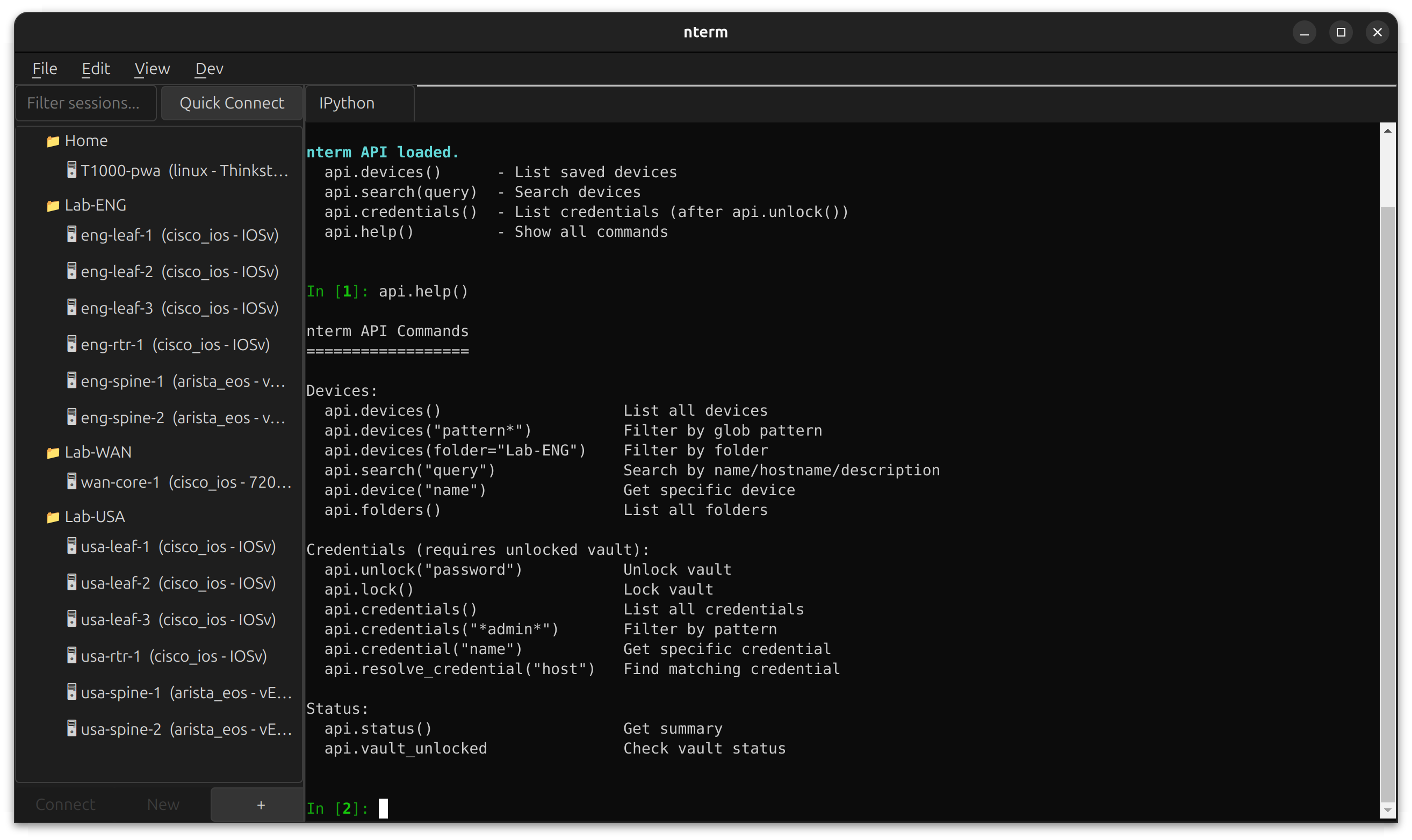
nterm includes a built-in development console accessible via **Dev → IPython** or **Dev → Shell**. Open in a tab alongside your SSH sessions, or pop out to a separate window.
|
|
110
|
+
|
|
111
|
+
|
|
112
|
+
|
|
113
|
+
The IPython console runs in the same Python environment as nterm, with the scripting API pre-loaded. Query your device inventory, inspect credentials, and prototype automation workflows without leaving the app.
|
|
114
|
+
|
|
115
|
+
```python
|
|
116
|
+
# Available immediately when IPython opens
|
|
117
|
+
api.devices() # List all saved devices
|
|
118
|
+
api.search("leaf") # Search by name/hostname
|
|
119
|
+
api.credentials() # List credentials (after api.unlock())
|
|
120
|
+
api.help() # Show all commands
|
|
121
|
+
```
|
|
122
|
+
|
|
123
|
+
**Use cases:**
|
|
124
|
+
- Debug connection issues with live access to session objects
|
|
125
|
+
- Prototype automation scripts against your real device inventory
|
|
126
|
+
- Test credential resolution patterns
|
|
127
|
+
- Build and test MCP tools interactively
|
|
128
|
+
|
|
129
|
+
Requires the `scripting` extra: `pip install ntermqt[scripting]`
|
|
130
|
+
|
|
131
|
+
---
|
|
132
|
+
|
|
91
133
|
## Installation
|
|
92
134
|
|
|
135
|
+
### Be aware due to a naming conflict, the pypi package is actually "ntermqt"
|
|
136
|
+
|
|
93
137
|
### From PyPI
|
|
94
138
|
|
|
139
|
+
https://pypi.org/project/ntermqt/
|
|
140
|
+
|
|
95
141
|
```bash
|
|
96
|
-
pip install
|
|
142
|
+
pip install ntermqt
|
|
143
|
+
|
|
144
|
+
# With optional scripting support (IPython)
|
|
145
|
+
pip install ntermqt[scripting]
|
|
97
146
|
|
|
98
|
-
#
|
|
99
|
-
pip install
|
|
147
|
+
# With all optional features
|
|
148
|
+
pip install ntermqt[all]
|
|
100
149
|
|
|
101
150
|
# Run
|
|
102
151
|
nterm
|
|
@@ -114,10 +163,7 @@ source .venv/bin/activate # Linux/macOS
|
|
|
114
163
|
# .venv\Scripts\activate # Windows
|
|
115
164
|
|
|
116
165
|
# Install in development mode
|
|
117
|
-
pip install -e .
|
|
118
|
-
|
|
119
|
-
# Optional: system keychain support
|
|
120
|
-
pip install keyring
|
|
166
|
+
pip install -e ".[all]"
|
|
121
167
|
|
|
122
168
|
# Run
|
|
123
169
|
nterm
|
|
@@ -137,12 +183,70 @@ python -m nterm
|
|
|
137
183
|
|
|
138
184
|
| Platform | PTY | Keychain |
|
|
139
185
|
|----------|-----|----------|
|
|
140
|
-
| Linux | ✅
|
|
141
|
-
| macOS | ✅
|
|
186
|
+
| Linux | ✅ pexpect | Secret Service |
|
|
187
|
+
| macOS | ✅ pexpect | macOS Keychain |
|
|
142
188
|
| Windows 10+ | ✅ pywinpty | Credential Locker |
|
|
143
189
|
|
|
144
190
|
---
|
|
145
191
|
|
|
192
|
+
## Scripting API *(Experimental)*
|
|
193
|
+
|
|
194
|
+
nterm includes a scripting API for programmatic access to your device inventory and credential vault. Use it from IPython, CLI, or Python scripts.
|
|
195
|
+
|
|
196
|
+
### IPython Console
|
|
197
|
+
|
|
198
|
+
Open **Dev → IPython → Open in Tab** to get an interactive console with the API pre-loaded:
|
|
199
|
+
|
|
200
|
+
```python
|
|
201
|
+
api.devices() # List all saved devices
|
|
202
|
+
api.search("leaf") # Search by name/hostname
|
|
203
|
+
api.devices("eng-*") # Glob pattern filter
|
|
204
|
+
|
|
205
|
+
api.unlock("vault-password") # Unlock credential vault
|
|
206
|
+
api.credentials() # List credentials (metadata only)
|
|
207
|
+
|
|
208
|
+
api.help() # Show all commands
|
|
209
|
+
```
|
|
210
|
+
|
|
211
|
+
### CLI
|
|
212
|
+
|
|
213
|
+
```bash
|
|
214
|
+
nterm-cli devices # List all devices
|
|
215
|
+
nterm-cli search leaf # Search devices
|
|
216
|
+
nterm-cli device eng-leaf-1 # Device details
|
|
217
|
+
nterm-cli credentials --unlock # List credentials
|
|
218
|
+
nterm-cli --json devices # JSON output for scripting
|
|
219
|
+
```
|
|
220
|
+
|
|
221
|
+
### Python Scripts
|
|
222
|
+
|
|
223
|
+
```python
|
|
224
|
+
from nterm.scripting import NTermAPI
|
|
225
|
+
|
|
226
|
+
api = NTermAPI()
|
|
227
|
+
|
|
228
|
+
# Query devices
|
|
229
|
+
for device in api.devices("*spine*"):
|
|
230
|
+
print(f"{device.name}: {device.hostname}")
|
|
231
|
+
|
|
232
|
+
# Work with credentials
|
|
233
|
+
api.unlock("vault-password")
|
|
234
|
+
cred = api.credential("lab-admin")
|
|
235
|
+
print(f"Username: {cred.username}")
|
|
236
|
+
```
|
|
237
|
+
|
|
238
|
+
### Roadmap
|
|
239
|
+
|
|
240
|
+
The scripting API is the foundation for:
|
|
241
|
+
|
|
242
|
+
- **Command execution** — `api.connect()` and `api.send()` for programmatic device interaction
|
|
243
|
+
- **Batch operations** — Fan out commands across device groups
|
|
244
|
+
- **MCP tool integration** — Expose nterm capabilities to AI agents
|
|
245
|
+
|
|
246
|
+
See [scripting/README.md](nterm/scripting/README.md) for full API documentation.
|
|
247
|
+
|
|
248
|
+
---
|
|
249
|
+
|
|
146
250
|
## Quick Start
|
|
147
251
|
|
|
148
252
|
### As a Widget
|
|
@@ -203,19 +307,33 @@ session.connect()
|
|
|
203
307
|
|
|
204
308
|
## Themes
|
|
205
309
|
|
|
206
|
-
|
|
310
|
+
nterm includes 12 built-in themes covering dark, light, and hybrid styles.
|
|
311
|
+
|
|
312
|
+
### Built-in Themes
|
|
207
313
|
|
|
208
314
|
```python
|
|
209
|
-
|
|
210
|
-
Theme.
|
|
211
|
-
Theme.
|
|
212
|
-
Theme.
|
|
213
|
-
Theme.
|
|
214
|
-
Theme.
|
|
215
|
-
Theme.
|
|
315
|
+
# Dark themes
|
|
316
|
+
Theme.default() # Catppuccin Mocha
|
|
317
|
+
Theme.dracula() # Dracula
|
|
318
|
+
Theme.nord() # Nord
|
|
319
|
+
Theme.solarized_dark() # Solarized Dark
|
|
320
|
+
Theme.gruvbox_dark() # Gruvbox Dark
|
|
321
|
+
Theme.enterprise_dark() # Microsoft-inspired dark
|
|
322
|
+
|
|
323
|
+
# Light themes
|
|
324
|
+
Theme.gruvbox_light() # Gruvbox Light
|
|
325
|
+
Theme.enterprise_light() # Microsoft-inspired light
|
|
326
|
+
Theme.clean() # Warm paper tones
|
|
327
|
+
|
|
328
|
+
# Hybrid themes (dark UI + light terminal)
|
|
329
|
+
Theme.gruvbox_hybrid() # Gruvbox dark chrome, light terminal
|
|
330
|
+
Theme.nord_hybrid() # Nord polar night chrome, snow storm terminal
|
|
331
|
+
Theme.enterprise_hybrid() # VS Code-style dark/light split
|
|
216
332
|
```
|
|
217
333
|
|
|
218
|
-
|
|
334
|
+
**Hybrid themes** combine a dark application chrome (menus, tabs, sidebars) with a light terminal for maximum readability — ideal for long sessions reviewing configs or logs.
|
|
335
|
+
|
|
336
|
+
### Custom YAML Themes
|
|
219
337
|
|
|
220
338
|
```yaml
|
|
221
339
|
# ~/.nterm/themes/my-theme.yaml
|
|
@@ -244,6 +362,19 @@ accent_color: "#7aa2f7"
|
|
|
244
362
|
|
|
245
363
|
---
|
|
246
364
|
|
|
365
|
+
## Session Capture
|
|
366
|
+
|
|
367
|
+
Capture session output to a file for documentation, auditing, or extracting config snippets.
|
|
368
|
+
|
|
369
|
+
**Right-click in terminal → Start Capture...** to begin recording. Output is saved as clean text with ANSI escape sequences stripped — ready for grep, diff, or pasting into tickets.
|
|
370
|
+
|
|
371
|
+
- Per-session capture (each tab independent)
|
|
372
|
+
- File dialog for save location
|
|
373
|
+
- Menu shows active capture filename
|
|
374
|
+
- Auto-stops when session closes
|
|
375
|
+
|
|
376
|
+
---
|
|
377
|
+
|
|
247
378
|
## Jump Hosts
|
|
248
379
|
|
|
249
380
|
```python
|
|
@@ -289,6 +420,7 @@ nterm/
|
|
|
289
420
|
├── session/
|
|
290
421
|
│ ├── ssh.py # SSHSession (Paramiko) with legacy fallback
|
|
291
422
|
│ ├── interactive_ssh.py # Native SSH + PTY
|
|
423
|
+
│ ├── local_terminal.py # Local shell/IPython sessions
|
|
292
424
|
│ └── pty_transport.py # Cross-platform PTY
|
|
293
425
|
├── terminal/
|
|
294
426
|
│ ├── widget.py # TerminalWidget (PyQt6 + xterm.js)
|
|
@@ -300,7 +432,10 @@ nterm/
|
|
|
300
432
|
│ ├── store.py # Encrypted credential storage
|
|
301
433
|
│ ├── resolver.py # Pattern-based resolution
|
|
302
434
|
│ └── manager_ui.py # PyQt6 credential manager
|
|
303
|
-
|
|
435
|
+
├── manager/ # Session tree, connection dialogs
|
|
436
|
+
└── scripting/ # API, CLI, automation support
|
|
437
|
+
├── api.py # NTermAPI class
|
|
438
|
+
└── cli.py # nterm-cli entry point
|
|
304
439
|
```
|
|
305
440
|
|
|
306
441
|
---
|
|
@@ -14,9 +14,11 @@ Built for managing hundreds of devices through bastion hosts with hardware secur
|
|
|
14
14
|
|
|
15
15
|
**Terminal**
|
|
16
16
|
- xterm.js rendering via QWebEngineView — full VT100/ANSI support
|
|
17
|
-
-
|
|
17
|
+
- 12 built-in themes: Catppuccin, Dracula, Nord, Solarized, Gruvbox, Enterprise variants
|
|
18
|
+
- Hybrid themes: dark UI chrome with light terminal for readability
|
|
18
19
|
- Custom YAML themes with independent terminal and UI colors
|
|
19
20
|
- Tab or window per session — pop sessions to separate windows
|
|
21
|
+
- Session capture to file (clean text, ANSI stripped)
|
|
20
22
|
- Unicode, emoji, box-drawing characters
|
|
21
23
|
|
|
22
24
|
**Authentication**
|
|
@@ -38,6 +40,12 @@ Built for managing hundreds of devices through bastion hosts with hardware secur
|
|
|
38
40
|
- Cross-platform keychain: macOS Keychain, Windows Credential Locker, Linux Secret Service
|
|
39
41
|
- Full PyQt6 management UI
|
|
40
42
|
|
|
43
|
+
**Scripting API** *(Experimental)*
|
|
44
|
+
- Query device inventory and credentials programmatically
|
|
45
|
+
- Built-in IPython console with API pre-loaded
|
|
46
|
+
- CLI for shell scripts and automation
|
|
47
|
+
- Foundation for MCP tools and agentic workflows
|
|
48
|
+
|
|
41
49
|
---
|
|
42
50
|
|
|
43
51
|
## Screenshots
|
|
@@ -52,15 +60,48 @@ Built for managing hundreds of devices through bastion hosts with hardware secur
|
|
|
52
60
|
|
|
53
61
|
---
|
|
54
62
|
|
|
63
|
+
## Dev Console
|
|
64
|
+
|
|
65
|
+
nterm includes a built-in development console accessible via **Dev → IPython** or **Dev → Shell**. Open in a tab alongside your SSH sessions, or pop out to a separate window.
|
|
66
|
+
|
|
67
|
+

|
|
68
|
+
|
|
69
|
+
The IPython console runs in the same Python environment as nterm, with the scripting API pre-loaded. Query your device inventory, inspect credentials, and prototype automation workflows without leaving the app.
|
|
70
|
+
|
|
71
|
+
```python
|
|
72
|
+
# Available immediately when IPython opens
|
|
73
|
+
api.devices() # List all saved devices
|
|
74
|
+
api.search("leaf") # Search by name/hostname
|
|
75
|
+
api.credentials() # List credentials (after api.unlock())
|
|
76
|
+
api.help() # Show all commands
|
|
77
|
+
```
|
|
78
|
+
|
|
79
|
+
**Use cases:**
|
|
80
|
+
- Debug connection issues with live access to session objects
|
|
81
|
+
- Prototype automation scripts against your real device inventory
|
|
82
|
+
- Test credential resolution patterns
|
|
83
|
+
- Build and test MCP tools interactively
|
|
84
|
+
|
|
85
|
+
Requires the `scripting` extra: `pip install ntermqt[scripting]`
|
|
86
|
+
|
|
87
|
+
---
|
|
88
|
+
|
|
55
89
|
## Installation
|
|
56
90
|
|
|
91
|
+
### Be aware due to a naming conflict, the pypi package is actually "ntermqt"
|
|
92
|
+
|
|
57
93
|
### From PyPI
|
|
58
94
|
|
|
95
|
+
https://pypi.org/project/ntermqt/
|
|
96
|
+
|
|
59
97
|
```bash
|
|
60
|
-
pip install
|
|
98
|
+
pip install ntermqt
|
|
99
|
+
|
|
100
|
+
# With optional scripting support (IPython)
|
|
101
|
+
pip install ntermqt[scripting]
|
|
61
102
|
|
|
62
|
-
#
|
|
63
|
-
pip install
|
|
103
|
+
# With all optional features
|
|
104
|
+
pip install ntermqt[all]
|
|
64
105
|
|
|
65
106
|
# Run
|
|
66
107
|
nterm
|
|
@@ -78,10 +119,7 @@ source .venv/bin/activate # Linux/macOS
|
|
|
78
119
|
# .venv\Scripts\activate # Windows
|
|
79
120
|
|
|
80
121
|
# Install in development mode
|
|
81
|
-
pip install -e .
|
|
82
|
-
|
|
83
|
-
# Optional: system keychain support
|
|
84
|
-
pip install keyring
|
|
122
|
+
pip install -e ".[all]"
|
|
85
123
|
|
|
86
124
|
# Run
|
|
87
125
|
nterm
|
|
@@ -101,12 +139,70 @@ python -m nterm
|
|
|
101
139
|
|
|
102
140
|
| Platform | PTY | Keychain |
|
|
103
141
|
|----------|-----|----------|
|
|
104
|
-
| Linux | ✅
|
|
105
|
-
| macOS | ✅
|
|
142
|
+
| Linux | ✅ pexpect | Secret Service |
|
|
143
|
+
| macOS | ✅ pexpect | macOS Keychain |
|
|
106
144
|
| Windows 10+ | ✅ pywinpty | Credential Locker |
|
|
107
145
|
|
|
108
146
|
---
|
|
109
147
|
|
|
148
|
+
## Scripting API *(Experimental)*
|
|
149
|
+
|
|
150
|
+
nterm includes a scripting API for programmatic access to your device inventory and credential vault. Use it from IPython, CLI, or Python scripts.
|
|
151
|
+
|
|
152
|
+
### IPython Console
|
|
153
|
+
|
|
154
|
+
Open **Dev → IPython → Open in Tab** to get an interactive console with the API pre-loaded:
|
|
155
|
+
|
|
156
|
+
```python
|
|
157
|
+
api.devices() # List all saved devices
|
|
158
|
+
api.search("leaf") # Search by name/hostname
|
|
159
|
+
api.devices("eng-*") # Glob pattern filter
|
|
160
|
+
|
|
161
|
+
api.unlock("vault-password") # Unlock credential vault
|
|
162
|
+
api.credentials() # List credentials (metadata only)
|
|
163
|
+
|
|
164
|
+
api.help() # Show all commands
|
|
165
|
+
```
|
|
166
|
+
|
|
167
|
+
### CLI
|
|
168
|
+
|
|
169
|
+
```bash
|
|
170
|
+
nterm-cli devices # List all devices
|
|
171
|
+
nterm-cli search leaf # Search devices
|
|
172
|
+
nterm-cli device eng-leaf-1 # Device details
|
|
173
|
+
nterm-cli credentials --unlock # List credentials
|
|
174
|
+
nterm-cli --json devices # JSON output for scripting
|
|
175
|
+
```
|
|
176
|
+
|
|
177
|
+
### Python Scripts
|
|
178
|
+
|
|
179
|
+
```python
|
|
180
|
+
from nterm.scripting import NTermAPI
|
|
181
|
+
|
|
182
|
+
api = NTermAPI()
|
|
183
|
+
|
|
184
|
+
# Query devices
|
|
185
|
+
for device in api.devices("*spine*"):
|
|
186
|
+
print(f"{device.name}: {device.hostname}")
|
|
187
|
+
|
|
188
|
+
# Work with credentials
|
|
189
|
+
api.unlock("vault-password")
|
|
190
|
+
cred = api.credential("lab-admin")
|
|
191
|
+
print(f"Username: {cred.username}")
|
|
192
|
+
```
|
|
193
|
+
|
|
194
|
+
### Roadmap
|
|
195
|
+
|
|
196
|
+
The scripting API is the foundation for:
|
|
197
|
+
|
|
198
|
+
- **Command execution** — `api.connect()` and `api.send()` for programmatic device interaction
|
|
199
|
+
- **Batch operations** — Fan out commands across device groups
|
|
200
|
+
- **MCP tool integration** — Expose nterm capabilities to AI agents
|
|
201
|
+
|
|
202
|
+
See [scripting/README.md](nterm/scripting/README.md) for full API documentation.
|
|
203
|
+
|
|
204
|
+
---
|
|
205
|
+
|
|
110
206
|
## Quick Start
|
|
111
207
|
|
|
112
208
|
### As a Widget
|
|
@@ -167,19 +263,33 @@ session.connect()
|
|
|
167
263
|
|
|
168
264
|
## Themes
|
|
169
265
|
|
|
170
|
-
|
|
266
|
+
nterm includes 12 built-in themes covering dark, light, and hybrid styles.
|
|
267
|
+
|
|
268
|
+
### Built-in Themes
|
|
171
269
|
|
|
172
270
|
```python
|
|
173
|
-
|
|
174
|
-
Theme.
|
|
175
|
-
Theme.
|
|
176
|
-
Theme.
|
|
177
|
-
Theme.
|
|
178
|
-
Theme.
|
|
179
|
-
Theme.
|
|
271
|
+
# Dark themes
|
|
272
|
+
Theme.default() # Catppuccin Mocha
|
|
273
|
+
Theme.dracula() # Dracula
|
|
274
|
+
Theme.nord() # Nord
|
|
275
|
+
Theme.solarized_dark() # Solarized Dark
|
|
276
|
+
Theme.gruvbox_dark() # Gruvbox Dark
|
|
277
|
+
Theme.enterprise_dark() # Microsoft-inspired dark
|
|
278
|
+
|
|
279
|
+
# Light themes
|
|
280
|
+
Theme.gruvbox_light() # Gruvbox Light
|
|
281
|
+
Theme.enterprise_light() # Microsoft-inspired light
|
|
282
|
+
Theme.clean() # Warm paper tones
|
|
283
|
+
|
|
284
|
+
# Hybrid themes (dark UI + light terminal)
|
|
285
|
+
Theme.gruvbox_hybrid() # Gruvbox dark chrome, light terminal
|
|
286
|
+
Theme.nord_hybrid() # Nord polar night chrome, snow storm terminal
|
|
287
|
+
Theme.enterprise_hybrid() # VS Code-style dark/light split
|
|
180
288
|
```
|
|
181
289
|
|
|
182
|
-
|
|
290
|
+
**Hybrid themes** combine a dark application chrome (menus, tabs, sidebars) with a light terminal for maximum readability — ideal for long sessions reviewing configs or logs.
|
|
291
|
+
|
|
292
|
+
### Custom YAML Themes
|
|
183
293
|
|
|
184
294
|
```yaml
|
|
185
295
|
# ~/.nterm/themes/my-theme.yaml
|
|
@@ -208,6 +318,19 @@ accent_color: "#7aa2f7"
|
|
|
208
318
|
|
|
209
319
|
---
|
|
210
320
|
|
|
321
|
+
## Session Capture
|
|
322
|
+
|
|
323
|
+
Capture session output to a file for documentation, auditing, or extracting config snippets.
|
|
324
|
+
|
|
325
|
+
**Right-click in terminal → Start Capture...** to begin recording. Output is saved as clean text with ANSI escape sequences stripped — ready for grep, diff, or pasting into tickets.
|
|
326
|
+
|
|
327
|
+
- Per-session capture (each tab independent)
|
|
328
|
+
- File dialog for save location
|
|
329
|
+
- Menu shows active capture filename
|
|
330
|
+
- Auto-stops when session closes
|
|
331
|
+
|
|
332
|
+
---
|
|
333
|
+
|
|
211
334
|
## Jump Hosts
|
|
212
335
|
|
|
213
336
|
```python
|
|
@@ -253,6 +376,7 @@ nterm/
|
|
|
253
376
|
├── session/
|
|
254
377
|
│ ├── ssh.py # SSHSession (Paramiko) with legacy fallback
|
|
255
378
|
│ ├── interactive_ssh.py # Native SSH + PTY
|
|
379
|
+
│ ├── local_terminal.py # Local shell/IPython sessions
|
|
256
380
|
│ └── pty_transport.py # Cross-platform PTY
|
|
257
381
|
├── terminal/
|
|
258
382
|
│ ├── widget.py # TerminalWidget (PyQt6 + xterm.js)
|
|
@@ -264,7 +388,10 @@ nterm/
|
|
|
264
388
|
│ ├── store.py # Encrypted credential storage
|
|
265
389
|
│ ├── resolver.py # Pattern-based resolution
|
|
266
390
|
│ └── manager_ui.py # PyQt6 credential manager
|
|
267
|
-
|
|
391
|
+
├── manager/ # Session tree, connection dialogs
|
|
392
|
+
└── scripting/ # API, CLI, automation support
|
|
393
|
+
├── api.py # NTermAPI class
|
|
394
|
+
└── cli.py # nterm-cli entry point
|
|
268
395
|
```
|
|
269
396
|
|
|
270
397
|
---
|