npcsh 0.3.24__tar.gz → 0.3.26__tar.gz
This diff represents the content of publicly available package versions that have been released to one of the supported registries. The information contained in this diff is provided for informational purposes only and reflects changes between package versions as they appear in their respective public registries.
- {npcsh-0.3.24/npcsh.egg-info → npcsh-0.3.26}/PKG-INFO +360 -196
- {npcsh-0.3.24 → npcsh-0.3.26}/README.md +356 -189
- {npcsh-0.3.24 → npcsh-0.3.26}/npcsh/llm_funcs.py +218 -51
- {npcsh-0.3.24 → npcsh-0.3.26}/npcsh/npc_compiler.py +256 -24
- {npcsh-0.3.24 → npcsh-0.3.26}/npcsh/shell.py +149 -56
- {npcsh-0.3.24 → npcsh-0.3.26}/npcsh/shell_helpers.py +17 -0
- {npcsh-0.3.24 → npcsh-0.3.26/npcsh.egg-info}/PKG-INFO +360 -196
- {npcsh-0.3.24 → npcsh-0.3.26}/npcsh.egg-info/SOURCES.txt +1 -0
- {npcsh-0.3.24 → npcsh-0.3.26}/npcsh.egg-info/requires.txt +1 -5
- {npcsh-0.3.24 → npcsh-0.3.26}/setup.py +6 -6
- npcsh-0.3.26/tests/test_npcteam.py +149 -0
- {npcsh-0.3.24 → npcsh-0.3.26}/tests/test_shell_helpers.py +11 -25
- {npcsh-0.3.24 → npcsh-0.3.26}/LICENSE +0 -0
- {npcsh-0.3.24 → npcsh-0.3.26}/MANIFEST.in +0 -0
- {npcsh-0.3.24 → npcsh-0.3.26}/npcsh/__init__.py +0 -0
- {npcsh-0.3.24 → npcsh-0.3.26}/npcsh/audio.py +0 -0
- {npcsh-0.3.24 → npcsh-0.3.26}/npcsh/cli.py +0 -0
- {npcsh-0.3.24 → npcsh-0.3.26}/npcsh/command_history.py +0 -0
- {npcsh-0.3.24 → npcsh-0.3.26}/npcsh/conversation.py +0 -0
- {npcsh-0.3.24 → npcsh-0.3.26}/npcsh/data_models.py +0 -0
- {npcsh-0.3.24 → npcsh-0.3.26}/npcsh/dataframes.py +0 -0
- {npcsh-0.3.24 → npcsh-0.3.26}/npcsh/embeddings.py +0 -0
- {npcsh-0.3.24 → npcsh-0.3.26}/npcsh/helpers.py +0 -0
- {npcsh-0.3.24 → npcsh-0.3.26}/npcsh/image.py +0 -0
- {npcsh-0.3.24 → npcsh-0.3.26}/npcsh/image_gen.py +0 -0
- {npcsh-0.3.24 → npcsh-0.3.26}/npcsh/knowledge_graph.py +0 -0
- {npcsh-0.3.24 → npcsh-0.3.26}/npcsh/load_data.py +0 -0
- {npcsh-0.3.24 → npcsh-0.3.26}/npcsh/main.py +0 -0
- {npcsh-0.3.24 → npcsh-0.3.26}/npcsh/model_runner.py +0 -0
- {npcsh-0.3.24 → npcsh-0.3.26}/npcsh/npc_sysenv.py +0 -0
- {npcsh-0.3.24 → npcsh-0.3.26}/npcsh/npc_team/assembly_lines/test_pipeline.py +0 -0
- {npcsh-0.3.24 → npcsh-0.3.26}/npcsh/npc_team/corca.npc +0 -0
- {npcsh-0.3.24 → npcsh-0.3.26}/npcsh/npc_team/foreman.npc +0 -0
- {npcsh-0.3.24 → npcsh-0.3.26}/npcsh/npc_team/npcsh.ctx +0 -0
- {npcsh-0.3.24 → npcsh-0.3.26}/npcsh/npc_team/sibiji.npc +0 -0
- {npcsh-0.3.24 → npcsh-0.3.26}/npcsh/npc_team/templates/analytics/celona.npc +0 -0
- {npcsh-0.3.24 → npcsh-0.3.26}/npcsh/npc_team/templates/hr_support/raone.npc +0 -0
- {npcsh-0.3.24 → npcsh-0.3.26}/npcsh/npc_team/templates/humanities/eriane.npc +0 -0
- {npcsh-0.3.24 → npcsh-0.3.26}/npcsh/npc_team/templates/it_support/lineru.npc +0 -0
- {npcsh-0.3.24 → npcsh-0.3.26}/npcsh/npc_team/templates/marketing/slean.npc +0 -0
- {npcsh-0.3.24 → npcsh-0.3.26}/npcsh/npc_team/templates/philosophy/maurawa.npc +0 -0
- {npcsh-0.3.24 → npcsh-0.3.26}/npcsh/npc_team/templates/sales/turnic.npc +0 -0
- {npcsh-0.3.24 → npcsh-0.3.26}/npcsh/npc_team/templates/software/welxor.npc +0 -0
- {npcsh-0.3.24 → npcsh-0.3.26}/npcsh/npc_team/tools/calculator.tool +0 -0
- {npcsh-0.3.24 → npcsh-0.3.26}/npcsh/npc_team/tools/generic_search.tool +0 -0
- {npcsh-0.3.24 → npcsh-0.3.26}/npcsh/npc_team/tools/image_generation.tool +0 -0
- {npcsh-0.3.24 → npcsh-0.3.26}/npcsh/npc_team/tools/local_search.tool +0 -0
- {npcsh-0.3.24 → npcsh-0.3.26}/npcsh/npc_team/tools/screen_cap.tool +0 -0
- {npcsh-0.3.24 → npcsh-0.3.26}/npcsh/npc_team/tools/sql_executor.tool +0 -0
- {npcsh-0.3.24 → npcsh-0.3.26}/npcsh/plonk.py +0 -0
- {npcsh-0.3.24 → npcsh-0.3.26}/npcsh/response.py +0 -0
- {npcsh-0.3.24 → npcsh-0.3.26}/npcsh/search.py +0 -0
- {npcsh-0.3.24 → npcsh-0.3.26}/npcsh/serve.py +0 -0
- {npcsh-0.3.24 → npcsh-0.3.26}/npcsh/stream.py +0 -0
- {npcsh-0.3.24 → npcsh-0.3.26}/npcsh/video.py +0 -0
- {npcsh-0.3.24 → npcsh-0.3.26}/npcsh.egg-info/dependency_links.txt +0 -0
- {npcsh-0.3.24 → npcsh-0.3.26}/npcsh.egg-info/entry_points.txt +0 -0
- {npcsh-0.3.24 → npcsh-0.3.26}/npcsh.egg-info/top_level.txt +0 -0
- {npcsh-0.3.24 → npcsh-0.3.26}/setup.cfg +0 -0
- {npcsh-0.3.24 → npcsh-0.3.26}/tests/test_chromadb.py +0 -0
- {npcsh-0.3.24 → npcsh-0.3.26}/tests/test_embedding_check.py +0 -0
- {npcsh-0.3.24 → npcsh-0.3.26}/tests/test_embedding_methods.py +0 -0
- {npcsh-0.3.24 → npcsh-0.3.26}/tests/test_helpers.py +0 -0
- {npcsh-0.3.24 → npcsh-0.3.26}/tests/test_knowledge_graph_rag.py +0 -0
- {npcsh-0.3.24 → npcsh-0.3.26}/tests/test_llm_funcs.py +0 -0
- {npcsh-0.3.24 → npcsh-0.3.26}/tests/test_networkx_vis.py +0 -0
- {npcsh-0.3.24 → npcsh-0.3.26}/tests/test_npc_compiler.py +0 -0
- {npcsh-0.3.24 → npcsh-0.3.26}/tests/test_npcsh.py +0 -0
- {npcsh-0.3.24 → npcsh-0.3.26}/tests/test_tool_use.py +0 -0
|
@@ -1,6 +1,6 @@
|
|
|
1
|
-
Metadata-Version: 2.
|
|
1
|
+
Metadata-Version: 2.4
|
|
2
2
|
Name: npcsh
|
|
3
|
-
Version: 0.3.
|
|
3
|
+
Version: 0.3.26
|
|
4
4
|
Summary: npcsh is a command line tool for integrating LLMs into everyday workflows and for orchestrating teams of NPCs.
|
|
5
5
|
Home-page: https://github.com/cagostino/npcsh
|
|
6
6
|
Author: Christopher Agostino
|
|
@@ -27,7 +27,6 @@ Requires-Dist: opencv-python
|
|
|
27
27
|
Requires-Dist: librosa
|
|
28
28
|
Requires-Dist: openai
|
|
29
29
|
Requires-Dist: jinja2
|
|
30
|
-
Requires-Dist: pyautogui
|
|
31
30
|
Requires-Dist: pandas
|
|
32
31
|
Requires-Dist: matplotlib
|
|
33
32
|
Requires-Dist: IPython
|
|
@@ -37,14 +36,11 @@ Requires-Dist: markdown
|
|
|
37
36
|
Requires-Dist: PyYAML
|
|
38
37
|
Requires-Dist: langchain
|
|
39
38
|
Requires-Dist: langchain_community
|
|
40
|
-
Requires-Dist:
|
|
41
|
-
Requires-Dist: pyaudio
|
|
39
|
+
Requires-Dist: pyautogui
|
|
42
40
|
Requires-Dist: pygments
|
|
43
41
|
Requires-Dist: pyttsx3
|
|
44
42
|
Requires-Dist: kuzu
|
|
45
43
|
Requires-Dist: chromadb
|
|
46
|
-
Requires-Dist: gtts
|
|
47
|
-
Requires-Dist: playsound==1.2.2
|
|
48
44
|
Requires-Dist: termcolor
|
|
49
45
|
Requires-Dist: colorama
|
|
50
46
|
Requires-Dist: python-dotenv
|
|
@@ -59,6 +55,7 @@ Dynamic: classifier
|
|
|
59
55
|
Dynamic: description
|
|
60
56
|
Dynamic: description-content-type
|
|
61
57
|
Dynamic: home-page
|
|
58
|
+
Dynamic: license-file
|
|
62
59
|
Dynamic: requires-dist
|
|
63
60
|
Dynamic: requires-python
|
|
64
61
|
Dynamic: summary
|
|
@@ -71,7 +68,7 @@ Dynamic: summary
|
|
|
71
68
|
# npcsh
|
|
72
69
|
|
|
73
70
|
|
|
74
|
-
- `npcsh` is a python-based
|
|
71
|
+
- `npcsh` is a python-based AI Agent framework designed to integrate Large Language Models (LLMs) and Agents into one's daily workflow by making them available and easily configurable through a command line shell as well as an extensible python library.
|
|
75
72
|
|
|
76
73
|
- **Smart Interpreter**: `npcsh` leverages the power of LLMs to understand your natural language commands and questions, executing tasks, answering queries, and providing relevant information from local files and the web.
|
|
77
74
|
|
|
@@ -82,10 +79,9 @@ Dynamic: summary
|
|
|
82
79
|
|
|
83
80
|
* **Extensible with Python:** `npcsh`'s python package provides useful functions for interacting with LLMs, including explicit coverage for popular providers like ollama, anthropic, openai, gemini, deepseek, and openai-like providers. Each macro has a corresponding function and these can be used in python scripts. `npcsh`'s functions are purpose-built to simplify NPC interactions but NPCs are not required for them to work if you don't see the need.
|
|
84
81
|
|
|
85
|
-
* **Simple, Powerful CLI:** Use the `npc` CLI commands to
|
|
86
|
-
|
|
87
|
-
* **Shell Strengths:** Execute bash commands directly. Use your favorite command-line tools like VIM, Emacs, ipython, sqlite3, git. Pipe the output of these commands to LLMs or pass LLM results to bash commands.
|
|
82
|
+
* **Simple, Powerful CLI:** Use the `npc` CLI commands to run `npcsh` macros or commands from one's regular shell. Set up a flask server so you can expose your NPC team for use as a backend service. You can also use the `npc` CLI to run SQL models defined in your project, execute assembly lines, and verify the integrity of your NPC team's interrelations. `npcsh`'s NPCs take advantage of jinja templating to reference other NPCs and tools in their properties, and the `npc` CLI can be used to verify these references.
|
|
88
83
|
|
|
84
|
+
* **Powerful Tool integrations:** `npcsh` has built-in tools for users to have agents execute code, analyze data, generate images, search the web, and more. Tools can be defined in YAML files as part of project-specific `npc_team`s or in the global `~/.npcsh/npc_team` directory or simply in python scripts. Once compiled, the tools can be used as macros in the `npc` cli as well as `/{tool_name}` commands in the `npcsh` shell.
|
|
89
85
|
|
|
90
86
|
|
|
91
87
|
Interested to stay in the loop and to hear the latest and greatest about `npcsh` ? Be sure to sign up for the [npcsh newsletter](https://forms.gle/n1NzQmwjsV4xv1B2A)!
|
|
@@ -112,6 +108,335 @@ Users can take advantage of `npcsh` through its custom shell or through a comman
|
|
|
112
108
|
| Voice Chat | npc whisper 'npc_name' | /whisper |
|
|
113
109
|
|
|
114
110
|
|
|
111
|
+
## Python Examples
|
|
112
|
+
Integrate npcsh into your Python projects for additional flexibility. Below are a few examples of how to use the library programmatically.
|
|
113
|
+
|
|
114
|
+
|
|
115
|
+
|
|
116
|
+
### Example 1: Creating and Using an NPC
|
|
117
|
+
This example shows how to create and initialize an NPC and use it to answer a question.
|
|
118
|
+
```bash
|
|
119
|
+
import sqlite3
|
|
120
|
+
from npcsh.npc_compiler import NPC
|
|
121
|
+
|
|
122
|
+
# Set up database connection
|
|
123
|
+
db_path = '~/npcsh_history.db'
|
|
124
|
+
conn = sqlite3.connect(db_path)
|
|
125
|
+
|
|
126
|
+
# Load NPC from a file
|
|
127
|
+
npc = NPC(
|
|
128
|
+
name='Simon Bolivar',
|
|
129
|
+
db_conn=conn,
|
|
130
|
+
primary_directive='Liberate South America from the Spanish Royalists.',
|
|
131
|
+
model='gpt-4o-mini',
|
|
132
|
+
provider='openai',
|
|
133
|
+
)
|
|
134
|
+
|
|
135
|
+
response = npc.get_llm_response("What is the most important territory to retain in the Andes mountains?")
|
|
136
|
+
print(response['response'])
|
|
137
|
+
```
|
|
138
|
+
```bash
|
|
139
|
+
'The most important territory to retain in the Andes mountains for the cause of liberation in South America would be the region of Quito in present-day Ecuador. This area is strategically significant due to its location and access to key trade routes. It also acts as a vital link between the northern and southern parts of the continent, influencing both military movements and the morale of the independence struggle. Retaining control over Quito would bolster efforts to unite various factions in the fight against Spanish colonial rule across the Andean states.'
|
|
140
|
+
```
|
|
141
|
+
### Example 2: Using an NPC to Analyze Data
|
|
142
|
+
This example shows how to use an NPC to perform data analysis on a DataFrame using LLM commands.
|
|
143
|
+
```bash
|
|
144
|
+
from npcsh.npc_compiler import NPC
|
|
145
|
+
import sqlite3
|
|
146
|
+
import os
|
|
147
|
+
# Set up database connection
|
|
148
|
+
db_path = '~/npcsh_history.db'
|
|
149
|
+
conn = sqlite3.connect(os.path.expanduser(db_path))
|
|
150
|
+
|
|
151
|
+
# make a table to put into npcsh_history.db or change this example to use an existing table in a database you have
|
|
152
|
+
import pandas as pd
|
|
153
|
+
data = {
|
|
154
|
+
'customer_feedback': ['The product is great!', 'The service was terrible.', 'I love the new feature.'],
|
|
155
|
+
'customer_id': [1, 2, 3],
|
|
156
|
+
'customer_rating': [5, 1, 3],
|
|
157
|
+
'timestamp': ['2022-01-01', '2022-01-02', '2022-01-03']
|
|
158
|
+
}
|
|
159
|
+
|
|
160
|
+
|
|
161
|
+
df = pd.DataFrame(data)
|
|
162
|
+
df.to_sql('customer_feedback', conn, if_exists='replace', index=False)
|
|
163
|
+
|
|
164
|
+
|
|
165
|
+
npc = NPC(
|
|
166
|
+
name='Felix',
|
|
167
|
+
db_conn=conn,
|
|
168
|
+
primary_directive='Analyze customer feedback for sentiment.',
|
|
169
|
+
model='gpt-4o-mini',
|
|
170
|
+
provider='openai',
|
|
171
|
+
)
|
|
172
|
+
response = npc.analyze_db_data('Provide a detailed report on the data contained in the `customer_feedback` table?')
|
|
173
|
+
|
|
174
|
+
|
|
175
|
+
```
|
|
176
|
+
|
|
177
|
+
|
|
178
|
+
### Example 3: Creating and Using a Tool
|
|
179
|
+
You can define a tool and execute it from within your Python script.
|
|
180
|
+
Here we'll create a tool that will take in a pdf file, extract the text, and then answer a user request about the text.
|
|
181
|
+
|
|
182
|
+
```bash
|
|
183
|
+
from npcsh.npc_compiler import Tool, NPC
|
|
184
|
+
import sqlite3
|
|
185
|
+
import os
|
|
186
|
+
|
|
187
|
+
from jinja2 import Environment, FileSystemLoader
|
|
188
|
+
|
|
189
|
+
# Create a proper Jinja environment
|
|
190
|
+
jinja_env = Environment(loader=FileSystemLoader('.'))
|
|
191
|
+
|
|
192
|
+
|
|
193
|
+
tool_data = {
|
|
194
|
+
"tool_name": "pdf_analyzer",
|
|
195
|
+
"inputs": ["request", "file"],
|
|
196
|
+
"steps": [{ # Make this a list with one dict inside
|
|
197
|
+
"engine": "python",
|
|
198
|
+
"code": """
|
|
199
|
+
try:
|
|
200
|
+
import fitz # PyMuPDF
|
|
201
|
+
|
|
202
|
+
shared_context = {}
|
|
203
|
+
shared_context['inputs'] = '{{request}}'
|
|
204
|
+
|
|
205
|
+
pdf_path = '{{file}}'
|
|
206
|
+
|
|
207
|
+
|
|
208
|
+
|
|
209
|
+
# Open the PDF
|
|
210
|
+
doc = fitz.open(pdf_path)
|
|
211
|
+
text = ""
|
|
212
|
+
|
|
213
|
+
# Extract text from each page
|
|
214
|
+
for page_num in range(len(doc)):
|
|
215
|
+
page = doc[page_num]
|
|
216
|
+
text += page.get_text()
|
|
217
|
+
|
|
218
|
+
# Close the document
|
|
219
|
+
doc.close()
|
|
220
|
+
|
|
221
|
+
print(f"Extracted text length: {len(text)}")
|
|
222
|
+
if len(text) > 100:
|
|
223
|
+
print(f"First 100 characters: {text[:100]}...")
|
|
224
|
+
|
|
225
|
+
shared_context['extracted_text'] = text
|
|
226
|
+
print("Text extraction completed successfully")
|
|
227
|
+
|
|
228
|
+
except Exception as e:
|
|
229
|
+
error_msg = f"Error processing PDF: {str(e)}"
|
|
230
|
+
print(error_msg)
|
|
231
|
+
shared_context['extracted_text'] = f"Error: {error_msg}"
|
|
232
|
+
"""
|
|
233
|
+
},
|
|
234
|
+
{
|
|
235
|
+
"engine": "natural",
|
|
236
|
+
"code": """
|
|
237
|
+
{% if shared_context and shared_context.extracted_text %}
|
|
238
|
+
{% if shared_context.extracted_text.startswith('Error:') %}
|
|
239
|
+
{{ shared_context.extracted_text }}
|
|
240
|
+
{% else %}
|
|
241
|
+
Here is the text extracted from the PDF:
|
|
242
|
+
|
|
243
|
+
{{ shared_context.extracted_text }}
|
|
244
|
+
|
|
245
|
+
Please provide a response to user request: {{ request }} using the information extracted above.
|
|
246
|
+
{% endif %}
|
|
247
|
+
{% else %}
|
|
248
|
+
Error: No text was extracted from the PDF.
|
|
249
|
+
{% endif %}
|
|
250
|
+
"""
|
|
251
|
+
},]
|
|
252
|
+
}
|
|
253
|
+
|
|
254
|
+
# Instantiate the tool
|
|
255
|
+
tool = Tool(tool_data)
|
|
256
|
+
|
|
257
|
+
# Create an NPC instance
|
|
258
|
+
npc = NPC(
|
|
259
|
+
name='starlana',
|
|
260
|
+
primary_directive='Analyze text from Astrophysics papers with a keen attention to theoretical machinations and mechanisms.',
|
|
261
|
+
model = 'llama3.2',
|
|
262
|
+
provider='ollama',
|
|
263
|
+
db_conn=sqlite3.connect(os.path.expanduser('~/npcsh_database.db'))
|
|
264
|
+
)
|
|
265
|
+
|
|
266
|
+
# Define input values dictionary
|
|
267
|
+
input_values = {
|
|
268
|
+
"request": "what is the point of the yuan and narayanan work?",
|
|
269
|
+
"file": os.path.abspath("test_data/yuan2004.pdf")
|
|
270
|
+
}
|
|
271
|
+
|
|
272
|
+
print(f"Attempting to read file: {input_values['file']}")
|
|
273
|
+
print(f"File exists: {os.path.exists(input_values['file'])}")
|
|
274
|
+
|
|
275
|
+
# Execute the tool
|
|
276
|
+
output = tool.execute(input_values, npc.tools_dict, jinja_env, 'Sample Command',model=npc.model, provider=npc.provider, npc=npc)
|
|
277
|
+
|
|
278
|
+
print('Tool Output:', output)
|
|
279
|
+
```
|
|
280
|
+
|
|
281
|
+
### Example 4: Orchestrating a team
|
|
282
|
+
|
|
283
|
+
|
|
284
|
+
|
|
285
|
+
```python
|
|
286
|
+
import pandas as pd
|
|
287
|
+
import numpy as np
|
|
288
|
+
import os
|
|
289
|
+
from npcsh.npc_compiler import NPC, NPCTeam, Tool
|
|
290
|
+
|
|
291
|
+
|
|
292
|
+
# Create test data and save to CSV
|
|
293
|
+
def create_test_data(filepath="sales_data.csv"):
|
|
294
|
+
sales_data = pd.DataFrame(
|
|
295
|
+
{
|
|
296
|
+
"date": pd.date_range(start="2024-01-01", periods=90),
|
|
297
|
+
"revenue": np.random.normal(10000, 2000, 90),
|
|
298
|
+
"customer_count": np.random.poisson(100, 90),
|
|
299
|
+
"avg_ticket": np.random.normal(100, 20, 90),
|
|
300
|
+
"region": np.random.choice(["North", "South", "East", "West"], 90),
|
|
301
|
+
"channel": np.random.choice(["Online", "Store", "Mobile"], 90),
|
|
302
|
+
}
|
|
303
|
+
)
|
|
304
|
+
|
|
305
|
+
# Add patterns to make data more realistic
|
|
306
|
+
sales_data["revenue"] *= 1 + 0.3 * np.sin(
|
|
307
|
+
np.pi * np.arange(90) / 30
|
|
308
|
+
) # Seasonal pattern
|
|
309
|
+
sales_data.loc[sales_data["channel"] == "Mobile", "revenue"] *= 1.1 # Mobile growth
|
|
310
|
+
sales_data.loc[
|
|
311
|
+
sales_data["channel"] == "Online", "customer_count"
|
|
312
|
+
] *= 1.2 # Online customer growth
|
|
313
|
+
|
|
314
|
+
sales_data.to_csv(filepath, index=False)
|
|
315
|
+
return filepath, sales_data
|
|
316
|
+
|
|
317
|
+
|
|
318
|
+
code_execution_tool = Tool(
|
|
319
|
+
{
|
|
320
|
+
"tool_name": "execute_code",
|
|
321
|
+
"description": """Executes a Python code block with access to pandas,
|
|
322
|
+
numpy, and matplotlib.
|
|
323
|
+
Results should be stored in the 'results' dict to be returned.
|
|
324
|
+
The only input should be a single code block with \n characters included.
|
|
325
|
+
The code block must use only the libraries or methods contained withen the
|
|
326
|
+
pandas, numpy, and matplotlib libraries or using builtin methods.
|
|
327
|
+
do not include any json formatting or markdown formatting.
|
|
328
|
+
|
|
329
|
+
When generating your script, the final output must be encoded in a variable
|
|
330
|
+
named "output". e.g.
|
|
331
|
+
|
|
332
|
+
output = some_analysis_function(inputs, derived_data_from_inputs)
|
|
333
|
+
Adapt accordingly based on the scope of the analysis
|
|
334
|
+
|
|
335
|
+
""",
|
|
336
|
+
"inputs": ["script"],
|
|
337
|
+
"steps": [
|
|
338
|
+
{
|
|
339
|
+
"engine": "python",
|
|
340
|
+
"code": """{{script}}""",
|
|
341
|
+
}
|
|
342
|
+
],
|
|
343
|
+
}
|
|
344
|
+
)
|
|
345
|
+
|
|
346
|
+
# Analytics team definition
|
|
347
|
+
analytics_team = [
|
|
348
|
+
{
|
|
349
|
+
"name": "analyst",
|
|
350
|
+
"primary_directive": "You analyze sales performance data, focusing on revenue trends, customer behavior metrics, and market indicators. Your expertise is in extracting actionable insights from complex datasets.",
|
|
351
|
+
"model": "gpt-4o-mini",
|
|
352
|
+
"provider": "openai",
|
|
353
|
+
"tools": [code_execution_tool], # Only the code execution tool
|
|
354
|
+
},
|
|
355
|
+
{
|
|
356
|
+
"name": "researcher",
|
|
357
|
+
"primary_directive": "You specialize in causal analysis and experimental design. Given data insights, you determine what factors drive observed patterns and design tests to validate hypotheses.",
|
|
358
|
+
"model": "gpt-4o-mini",
|
|
359
|
+
"provider": "openai",
|
|
360
|
+
"tools": [code_execution_tool], # Only the code execution tool
|
|
361
|
+
},
|
|
362
|
+
{
|
|
363
|
+
"name": "engineer",
|
|
364
|
+
"primary_directive": "You implement data pipelines and optimize data processing. When given analysis requirements, you create efficient workflows to automate insights generation.",
|
|
365
|
+
"model": "gpt-4o-mini",
|
|
366
|
+
"provider": "openai",
|
|
367
|
+
"tools": [code_execution_tool], # Only the code execution tool
|
|
368
|
+
},
|
|
369
|
+
]
|
|
370
|
+
|
|
371
|
+
|
|
372
|
+
def create_analytics_team():
|
|
373
|
+
# Initialize NPCs with just the code execution tool
|
|
374
|
+
npcs = []
|
|
375
|
+
for npc_data in analytics_team:
|
|
376
|
+
npc = NPC(
|
|
377
|
+
name=npc_data["name"],
|
|
378
|
+
primary_directive=npc_data["primary_directive"],
|
|
379
|
+
model=npc_data["model"],
|
|
380
|
+
provider=npc_data["provider"],
|
|
381
|
+
tools=[code_execution_tool], # Only code execution tool
|
|
382
|
+
)
|
|
383
|
+
npcs.append(npc)
|
|
384
|
+
|
|
385
|
+
# Create coordinator with just code execution tool
|
|
386
|
+
coordinator = NPC(
|
|
387
|
+
name="coordinator",
|
|
388
|
+
primary_directive="You coordinate the analytics team, ensuring each specialist contributes their expertise effectively. You synthesize insights and manage the workflow.",
|
|
389
|
+
model="gpt-4o-mini",
|
|
390
|
+
provider="openai",
|
|
391
|
+
tools=[code_execution_tool], # Only code execution tool
|
|
392
|
+
)
|
|
393
|
+
|
|
394
|
+
# Create team
|
|
395
|
+
team = NPCTeam(npcs=npcs, foreman=coordinator)
|
|
396
|
+
return team
|
|
397
|
+
|
|
398
|
+
|
|
399
|
+
def main():
|
|
400
|
+
# Create and save test data
|
|
401
|
+
data_path, sales_data = create_test_data()
|
|
402
|
+
|
|
403
|
+
# Initialize team
|
|
404
|
+
team = create_analytics_team()
|
|
405
|
+
|
|
406
|
+
# Run analysis - updated prompt to reflect code execution approach
|
|
407
|
+
results = team.orchestrate(
|
|
408
|
+
f"""
|
|
409
|
+
Analyze the sales data at {data_path} to:
|
|
410
|
+
1. Identify key performance drivers
|
|
411
|
+
2. Determine if mobile channel growth is significant
|
|
412
|
+
3. Recommend tests to validate growth hypotheses
|
|
413
|
+
|
|
414
|
+
Here is a header for the data file at {data_path}:
|
|
415
|
+
{sales_data.head()}
|
|
416
|
+
|
|
417
|
+
When working with dates, ensure that date columns are converted from raw strings. e.g. use the pd.to_datetime function.
|
|
418
|
+
|
|
419
|
+
|
|
420
|
+
When working with potentially messy data, handle null values by using nan versions of numpy functions or
|
|
421
|
+
by filtering them with a mask .
|
|
422
|
+
|
|
423
|
+
Use Python code execution to perform the analysis - load the data and perform statistical analysis directly.
|
|
424
|
+
"""
|
|
425
|
+
)
|
|
426
|
+
|
|
427
|
+
print(results)
|
|
428
|
+
|
|
429
|
+
# Cleanup
|
|
430
|
+
os.remove(data_path)
|
|
431
|
+
|
|
432
|
+
|
|
433
|
+
if __name__ == "__main__":
|
|
434
|
+
main()
|
|
435
|
+
|
|
436
|
+
```
|
|
437
|
+
|
|
438
|
+
|
|
439
|
+
|
|
115
440
|
## Star History
|
|
116
441
|
|
|
117
442
|
[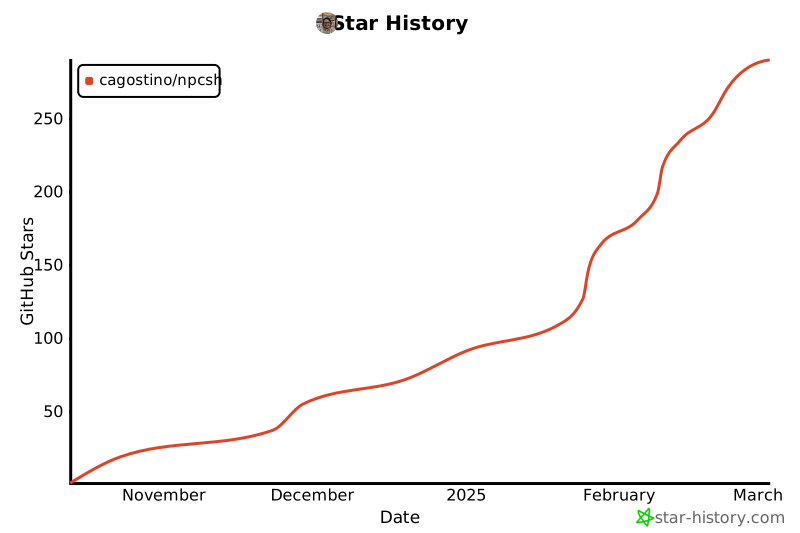](https://star-history.com/#cagostino/npcsh&Date)
|
|
@@ -137,7 +462,10 @@ ollama pull llava:7b
|
|
|
137
462
|
ollama pull nomic-embed-text
|
|
138
463
|
pip install npcsh
|
|
139
464
|
```
|
|
140
|
-
|
|
465
|
+
If you'd like to install the abilities to use STT and TTS, additionall install the following
|
|
466
|
+
```
|
|
467
|
+
pip install openai-whisper pyaudio gtts playsound
|
|
468
|
+
```
|
|
141
469
|
|
|
142
470
|
|
|
143
471
|
|
|
@@ -153,7 +481,7 @@ ollama pull llava:7b
|
|
|
153
481
|
ollama pull nomic-embed-text
|
|
154
482
|
pip install npcsh
|
|
155
483
|
```
|
|
156
|
-
###
|
|
484
|
+
### Windows Install
|
|
157
485
|
|
|
158
486
|
Download and install ollama exe.
|
|
159
487
|
|
|
@@ -799,6 +1127,7 @@ Citation Links: ['https://en.wikipedia.org/wiki/List_of_presidents_of_the_United
|
|
|
799
1127
|
|
|
800
1128
|
Bash:
|
|
801
1129
|
|
|
1130
|
+
```bash
|
|
802
1131
|
(npcsh) caug@pop-os:~/npcww/npcsh$ npc search 'simon bolivar' -sp perplexity
|
|
803
1132
|
Loaded .env file from /home/caug/npcww/npcsh
|
|
804
1133
|
urls ['https://en.wikipedia.org/wiki/Sim%C3%B3n_Bol%C3%ADvar', 'https://www.britannica.com/biography/Simon-Bolivar', 'https://en.wikipedia.org/wiki/File:Sim%C3%B3n_Bol%C3%ADvar_2.jpg', 'https://www.historytoday.com/archive/simon-bolivar-and-spanish-revolutions', 'https://kids.britannica.com/kids/article/Sim%C3%B3n-Bol%C3%ADvar/352872']
|
|
@@ -1069,9 +1398,10 @@ Tools are defined as YAMLs with `.tool` extension within the npc_team/tools dire
|
|
|
1069
1398
|
Here is an example of a tool file:
|
|
1070
1399
|
```yaml
|
|
1071
1400
|
tool_name: "screen_capture_analysis_tool"
|
|
1401
|
+
description: Captures the whole screen and sends the image for analysis
|
|
1072
1402
|
inputs:
|
|
1073
1403
|
- "prompt"
|
|
1074
|
-
|
|
1404
|
+
steps:
|
|
1075
1405
|
- engine: "python"
|
|
1076
1406
|
code: |
|
|
1077
1407
|
# Capture the screen
|
|
@@ -1079,30 +1409,22 @@ preprocess:
|
|
|
1079
1409
|
import datetime
|
|
1080
1410
|
import os
|
|
1081
1411
|
from PIL import Image
|
|
1082
|
-
|
|
1083
|
-
|
|
1084
|
-
|
|
1085
|
-
|
|
1086
|
-
|
|
1087
|
-
screenshot.
|
|
1088
|
-
|
|
1089
|
-
|
|
1090
|
-
|
|
1091
|
-
|
|
1092
|
-
|
|
1093
|
-
|
|
1094
|
-
|
|
1095
|
-
|
|
1096
|
-
|
|
1097
|
-
|
|
1098
|
-
prompt:
|
|
1099
|
-
engine: "natural"
|
|
1100
|
-
code: ""
|
|
1101
|
-
postprocess:
|
|
1102
|
-
- engine: "natural"
|
|
1103
|
-
code: |
|
|
1104
|
-
Screenshot captured and saved as {{ filename }}.
|
|
1105
|
-
Analysis Result: {{ llm_output }}
|
|
1412
|
+
import time
|
|
1413
|
+
from npcsh.image import analyze_image_base, capture_screenshot
|
|
1414
|
+
|
|
1415
|
+
out = capture_screenshot(npc = npc, full = True)
|
|
1416
|
+
|
|
1417
|
+
llm_response = analyze_image_base( '{{prompt}}' + "\n\nAttached is a screenshot of my screen currently. Please use this to evaluate the situation. If the user asked for you to explain what's on their screen or something similar, they are referring to the details contained within the attached image. You do not need to actually view their screen. You do not need to mention that you cannot view or interpret images directly. You only need to answer the user's request based on the attached screenshot!",
|
|
1418
|
+
out['file_path'],
|
|
1419
|
+
out['filename'],
|
|
1420
|
+
npc=npc,
|
|
1421
|
+
**out['model_kwargs'])
|
|
1422
|
+
# To this:
|
|
1423
|
+
if isinstance(llm_response, dict):
|
|
1424
|
+
llm_response = llm_response.get('response', 'No response from image analysis')
|
|
1425
|
+
else:
|
|
1426
|
+
llm_response = 'No response from image analysis'
|
|
1427
|
+
|
|
1106
1428
|
```
|
|
1107
1429
|
|
|
1108
1430
|
|
|
@@ -1415,164 +1737,6 @@ results = runner.execute_pipeline()
|
|
|
1415
1737
|
Note, in the future we will aim to separate compilation and running so that we will have a compilation step that is more like a jinja rendering of the relevant information so that it can be more easily audited.
|
|
1416
1738
|
|
|
1417
1739
|
|
|
1418
|
-
## Python Examples
|
|
1419
|
-
Integrate npcsh into your Python projects for additional flexibility. Below are a few examples of how to use the library programmatically.
|
|
1420
|
-
|
|
1421
|
-
|
|
1422
|
-
|
|
1423
|
-
### Example 1: Creating and Using an NPC
|
|
1424
|
-
This example shows how to create and initialize an NPC and use it to answer a question.
|
|
1425
|
-
```bash
|
|
1426
|
-
import sqlite3
|
|
1427
|
-
from npcsh.npc_compiler import NPC
|
|
1428
|
-
|
|
1429
|
-
# Set up database connection
|
|
1430
|
-
db_path = '~/npcsh_history.db'
|
|
1431
|
-
conn = sqlite3.connect(db_path)
|
|
1432
|
-
|
|
1433
|
-
# Load NPC from a file
|
|
1434
|
-
npc = NPC(db_conn=conn,
|
|
1435
|
-
name='Simon Bolivar',
|
|
1436
|
-
primary_directive='Liberate South America from the Spanish Royalists.',
|
|
1437
|
-
model='gpt-4o-mini',
|
|
1438
|
-
provider='openai',
|
|
1439
|
-
)
|
|
1440
|
-
|
|
1441
|
-
response = npc.get_llm_response("What is the most important territory to retain in the Andes mountains?")
|
|
1442
|
-
print(response['response'])
|
|
1443
|
-
```
|
|
1444
|
-
```bash
|
|
1445
|
-
'The most important territory to retain in the Andes mountains for the cause of liberation in South America would be the region of Quito in present-day Ecuador. This area is strategically significant due to its location and access to key trade routes. It also acts as a vital link between the northern and southern parts of the continent, influencing both military movements and the morale of the independence struggle. Retaining control over Quito would bolster efforts to unite various factions in the fight against Spanish colonial rule across the Andean states.'
|
|
1446
|
-
```
|
|
1447
|
-
### Example 2: Using an NPC to Analyze Data
|
|
1448
|
-
This example shows how to use an NPC to perform data analysis on a DataFrame using LLM commands.
|
|
1449
|
-
```bash
|
|
1450
|
-
from npcsh.npc_compiler import NPC
|
|
1451
|
-
import sqlite3
|
|
1452
|
-
import os
|
|
1453
|
-
# Set up database connection
|
|
1454
|
-
db_path = '~/npcsh_history.db'
|
|
1455
|
-
conn = sqlite3.connect(os.path.expanduser(db_path))
|
|
1456
|
-
|
|
1457
|
-
# make a table to put into npcsh_history.db or change this example to use an existing table in a database you have
|
|
1458
|
-
import pandas as pd
|
|
1459
|
-
data = {
|
|
1460
|
-
'customer_feedback': ['The product is great!', 'The service was terrible.', 'I love the new feature.'],
|
|
1461
|
-
'customer_id': [1, 2, 3],
|
|
1462
|
-
'customer_rating': [5, 1, 3],
|
|
1463
|
-
'timestamp': ['2022-01-01', '2022-01-02', '2022-01-03']
|
|
1464
|
-
}
|
|
1465
|
-
|
|
1466
|
-
|
|
1467
|
-
df = pd.DataFrame(data)
|
|
1468
|
-
df.to_sql('customer_feedback', conn, if_exists='replace', index=False)
|
|
1469
|
-
|
|
1470
|
-
|
|
1471
|
-
npc = NPC(db_conn=conn,
|
|
1472
|
-
name='Felix',
|
|
1473
|
-
primary_directive='Analyze customer feedback for sentiment.',
|
|
1474
|
-
model='llama3.2',
|
|
1475
|
-
provider='ollama',
|
|
1476
|
-
)
|
|
1477
|
-
response = npc.analyze_db_data('Provide a detailed report on the data contained in the `customer_feedback` table?')
|
|
1478
|
-
|
|
1479
|
-
|
|
1480
|
-
```
|
|
1481
|
-
|
|
1482
|
-
|
|
1483
|
-
### Example 3: Creating and Using a Tool
|
|
1484
|
-
You can define a tool and execute it from within your Python script.
|
|
1485
|
-
Here we'll create a tool that will take in a pdf file, extract the text, and then answer a user request about the text.
|
|
1486
|
-
|
|
1487
|
-
```bash
|
|
1488
|
-
from npcsh.npc_compiler import Tool, NPC
|
|
1489
|
-
import sqlite3
|
|
1490
|
-
import os
|
|
1491
|
-
|
|
1492
|
-
tool_data = {
|
|
1493
|
-
"tool_name": "pdf_analyzer",
|
|
1494
|
-
"inputs": ["request", "file"],
|
|
1495
|
-
"steps": [{ # Make this a list with one dict inside
|
|
1496
|
-
"engine": "python",
|
|
1497
|
-
"code": """
|
|
1498
|
-
try:
|
|
1499
|
-
import fitz # PyMuPDF
|
|
1500
|
-
|
|
1501
|
-
shared_context = {}
|
|
1502
|
-
shared_context['inputs'] = inputs
|
|
1503
|
-
|
|
1504
|
-
pdf_path = inputs['file']
|
|
1505
|
-
print(f"Processing PDF file: {pdf_path}")
|
|
1506
|
-
|
|
1507
|
-
# Open the PDF
|
|
1508
|
-
doc = fitz.open(pdf_path)
|
|
1509
|
-
text = ""
|
|
1510
|
-
|
|
1511
|
-
# Extract text from each page
|
|
1512
|
-
for page_num in range(len(doc)):
|
|
1513
|
-
page = doc[page_num]
|
|
1514
|
-
text += page.get_text()
|
|
1515
|
-
|
|
1516
|
-
# Close the document
|
|
1517
|
-
doc.close()
|
|
1518
|
-
|
|
1519
|
-
print(f"Extracted text length: {len(text)}")
|
|
1520
|
-
if len(text) > 100:
|
|
1521
|
-
print(f"First 100 characters: {text[:100]}...")
|
|
1522
|
-
|
|
1523
|
-
shared_context['extracted_text'] = text
|
|
1524
|
-
print("Text extraction completed successfully")
|
|
1525
|
-
|
|
1526
|
-
except Exception as e:
|
|
1527
|
-
error_msg = f"Error processing PDF: {str(e)}"
|
|
1528
|
-
print(error_msg)
|
|
1529
|
-
shared_context['extracted_text'] = f"Error: {error_msg}"
|
|
1530
|
-
"""
|
|
1531
|
-
},
|
|
1532
|
-
{
|
|
1533
|
-
"engine": "natural",
|
|
1534
|
-
"code": """
|
|
1535
|
-
{% if shared_context and shared_context.extracted_text %}
|
|
1536
|
-
{% if shared_context.extracted_text.startswith('Error:') %}
|
|
1537
|
-
{{ shared_context.extracted_text }}
|
|
1538
|
-
{% else %}
|
|
1539
|
-
Here is the text extracted from the PDF:
|
|
1540
|
-
|
|
1541
|
-
{{ shared_context.extracted_text }}
|
|
1542
|
-
|
|
1543
|
-
Please provide a response to user request: {{ inputs.request }} using the information extracted above.
|
|
1544
|
-
{% endif %}
|
|
1545
|
-
{% else %}
|
|
1546
|
-
Error: No text was extracted from the PDF.
|
|
1547
|
-
{% endif %}
|
|
1548
|
-
"""
|
|
1549
|
-
},]
|
|
1550
|
-
|
|
1551
|
-
# Instantiate the tool
|
|
1552
|
-
tool = Tool(tool_data)
|
|
1553
|
-
|
|
1554
|
-
# Create an NPC instance
|
|
1555
|
-
npc = NPC(
|
|
1556
|
-
name='starlana',
|
|
1557
|
-
primary_directive='Analyze text from Astrophysics papers with a keen attention to theoretical machinations and mechanisms.',
|
|
1558
|
-
db_conn=sqlite3.connect(os.path.expanduser('~/npcsh_database.db'))
|
|
1559
|
-
)
|
|
1560
|
-
|
|
1561
|
-
# Define input values dictionary
|
|
1562
|
-
input_values = {
|
|
1563
|
-
"request": "what is the point of the yuan and narayanan work?",
|
|
1564
|
-
"file": os.path.abspath("test_data/yuan2004.pdf")
|
|
1565
|
-
}
|
|
1566
|
-
|
|
1567
|
-
print(f"Attempting to read file: {input_values['file']}")
|
|
1568
|
-
print(f"File exists: {os.path.exists(input_values['file'])}")
|
|
1569
|
-
|
|
1570
|
-
# Execute the tool
|
|
1571
|
-
output = tool.execute(input_values, npc.tools_dict, None, 'Sample Command', npc)
|
|
1572
|
-
|
|
1573
|
-
print('Tool Output:', output)
|
|
1574
|
-
```
|
|
1575
|
-
|
|
1576
1740
|
## npcsql: SQL Integration and pipelines (UNDER CONSTRUCTION)
|
|
1577
1741
|
|
|
1578
1742
|
|