normalize-tabular-data 0.1.1__tar.gz → 0.1.2__tar.gz
This diff represents the content of publicly available package versions that have been released to one of the supported registries. The information contained in this diff is provided for informational purposes only and reflects changes between package versions as they appear in their respective public registries.
- {normalize_tabular_data-0.1.1 → normalize_tabular_data-0.1.2}/PKG-INFO +69 -15
- {normalize_tabular_data-0.1.1 → normalize_tabular_data-0.1.2}/README.md +68 -14
- {normalize_tabular_data-0.1.1 → normalize_tabular_data-0.1.2}/pyproject.toml +1 -1
- {normalize_tabular_data-0.1.1 → normalize_tabular_data-0.1.2}/pyproject.toml.orig +1 -1
- normalize_tabular_data-0.1.2/src/normalize_tabular_data/__init__.py +152 -0
- {normalize_tabular_data-0.1.1 → normalize_tabular_data-0.1.2}/src/normalize_tabular_data/app.py +41 -39
- {normalize_tabular_data-0.1.1 → normalize_tabular_data-0.1.2}/src/normalize_tabular_data/io.py +9 -9
- {normalize_tabular_data-0.1.1 → normalize_tabular_data-0.1.2}/src/normalize_tabular_data/ops.py +52 -2
- normalize_tabular_data-0.1.1/src/normalize_tabular_data/__init__.py +0 -18
- {normalize_tabular_data-0.1.1 → normalize_tabular_data-0.1.2}/LICENSE +0 -0
- {normalize_tabular_data-0.1.1 → normalize_tabular_data-0.1.2}/src/normalize_tabular_data/__main__.py +0 -0
- {normalize_tabular_data-0.1.1 → normalize_tabular_data-0.1.2}/src/normalize_tabular_data/screens.py +0 -0
- {normalize_tabular_data-0.1.1 → normalize_tabular_data-0.1.2}/src/normalize_tabular_data/widgets.py +0 -0
|
@@ -1,6 +1,6 @@
|
|
|
1
1
|
Metadata-Version: 2.4
|
|
2
2
|
Name: normalize-tabular-data
|
|
3
|
-
Version: 0.1.
|
|
3
|
+
Version: 0.1.2
|
|
4
4
|
Summary: TUI for normalizing tabular data with polars
|
|
5
5
|
Author: David Mertz, Ph.D.
|
|
6
6
|
Author-email: David Mertz, Ph.D. <mertz@gnosis.cx>
|
|
@@ -26,6 +26,8 @@ Load a file, see a preview, build up a pipeline of normalization operations
|
|
|
26
26
|
combine/split columns, drop columns), then save the
|
|
27
27
|
cleaned result.
|
|
28
28
|
|
|
29
|
+
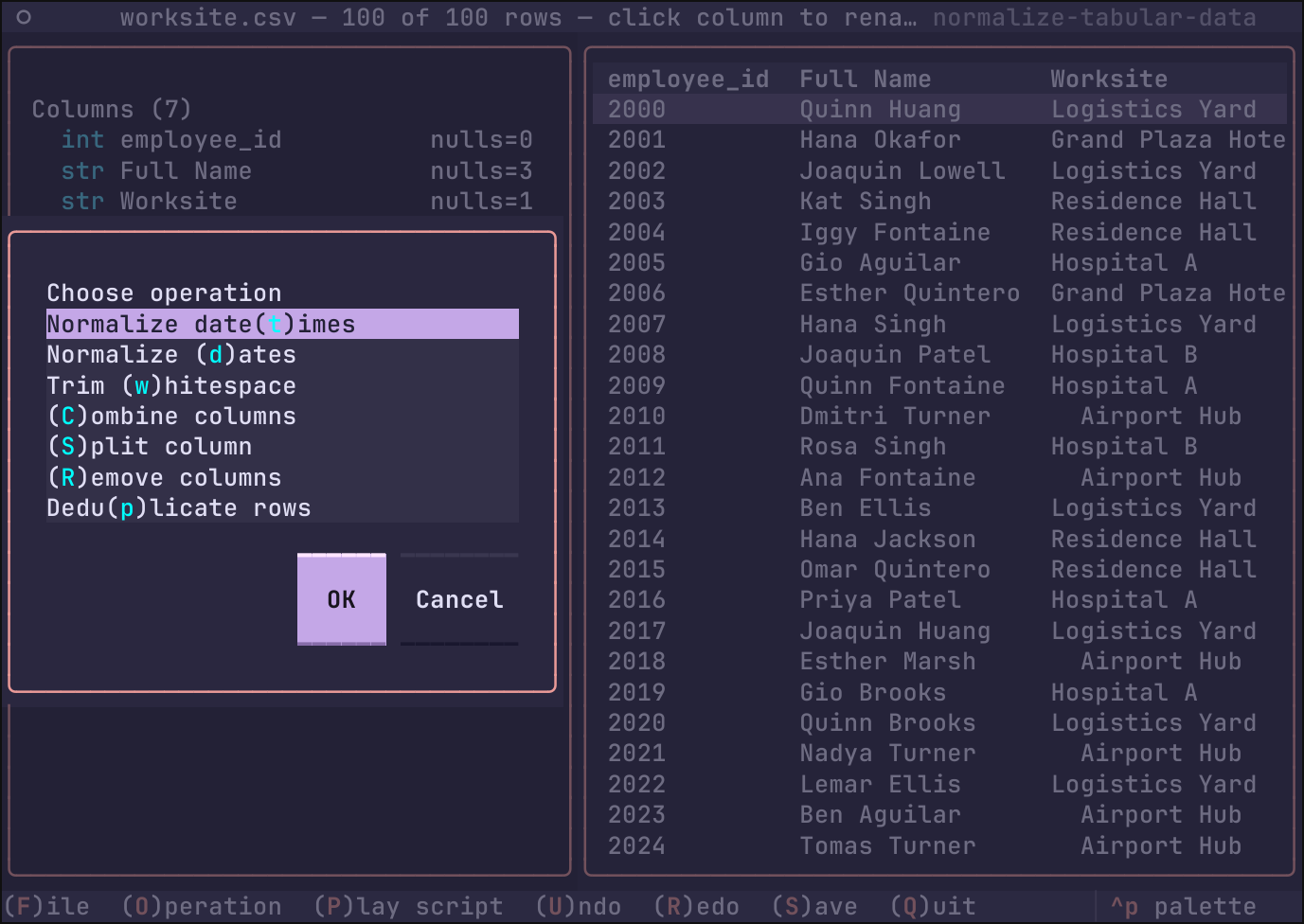
|
|
30
|
+
|
|
29
31
|
## Running
|
|
30
32
|
|
|
31
33
|
### Persistent install
|
|
@@ -43,15 +45,64 @@ uv tool upgrade normalize-tabular-data
|
|
|
43
45
|
```bash
|
|
44
46
|
uvx normalize-tabular-data
|
|
45
47
|
# pin a specific version:
|
|
46
|
-
uvx normalize-tabular-data==0.1.
|
|
48
|
+
uvx normalize-tabular-data==0.1.1
|
|
47
49
|
```
|
|
48
50
|
|
|
49
|
-
###
|
|
51
|
+
### From a git checkout
|
|
52
|
+
|
|
53
|
+
Within the directory of the cloned repository:
|
|
50
54
|
|
|
51
55
|
```bash
|
|
52
56
|
uv run normalize-tabular-data
|
|
53
57
|
```
|
|
54
58
|
|
|
59
|
+
## Command line
|
|
60
|
+
|
|
61
|
+
An optional `FILE` argument names a table to open at startup, as if you
|
|
62
|
+
had picked it from the in-app dialog.
|
|
63
|
+
|
|
64
|
+
```bash
|
|
65
|
+
normalize-tabular-data data/members.csv # or with uvx/uv run
|
|
66
|
+
uvx normalize-tabular-data data/members.tsv
|
|
67
|
+
```
|
|
68
|
+
|
|
69
|
+
If the file is missing or its format cannot be read, the TUI still
|
|
70
|
+
starts — it shows an alert toast and you can open something else.
|
|
71
|
+
|
|
72
|
+
### Open with a script
|
|
73
|
+
|
|
74
|
+
With `--script/-s`, an `.ntd` script is played on `FILE` as soon as it
|
|
75
|
+
loads (same flow as the `p` key, same stop-and-rollback on a step that
|
|
76
|
+
does not fit the file):
|
|
77
|
+
|
|
78
|
+
```bash
|
|
79
|
+
uvx normalize-tabular-data data/members.csv -s data/members.ntd
|
|
80
|
+
```
|
|
81
|
+
|
|
82
|
+
### Headless run (`-x`, `--run`)
|
|
83
|
+
|
|
84
|
+
`--run/-x` skips the TUI: it opens `FILE`, plays `SCRIPT` step by step,
|
|
85
|
+
saves the result and exits. Each operation prints to stdout as it is
|
|
86
|
+
applied; anything else — including a failing step, named and rolled
|
|
87
|
+
back exactly as the interactive player would — goes to stderr with a
|
|
88
|
+
nonzero exit code.
|
|
89
|
+
|
|
90
|
+
```bash
|
|
91
|
+
# saves data/members-normalized.csv next to the original
|
|
92
|
+
uvx normalize-tabular-data members.csv -s members.ntd -x
|
|
93
|
+
|
|
94
|
+
# choose the destination (format taken from its extension):
|
|
95
|
+
uvx normalize-tabular-data members.csv -s members.ntd -x -o out/members.parquet
|
|
96
|
+
|
|
97
|
+
# write the CSV to a pipe instead:
|
|
98
|
+
uvx normalize-tabular-data members.csv -s members.ntd -x -o - | gzip > clean.csv.gz
|
|
99
|
+
```
|
|
100
|
+
|
|
101
|
+
With `-o -` (attached `-o-` works too), the transformed table is written
|
|
102
|
+
to stdout itself and the step lines are suppressed, so stdout carries
|
|
103
|
+
only the data. After a successful run the confirmation line goes to
|
|
104
|
+
stderr.
|
|
105
|
+
|
|
55
106
|
## Usage
|
|
56
107
|
|
|
57
108
|
Launch with `normalize-tabular-data`. Keys:
|
|
@@ -69,7 +120,8 @@ Launch with `normalize-tabular-data`. Keys:
|
|
|
69
120
|
## Operations
|
|
70
121
|
|
|
71
122
|
- **Normalize dates** — parse a messy date column of *any* input format into
|
|
72
|
-
canonical UTC
|
|
123
|
+
canonical UTC `year-month-dayThh:mm:ss` values (second resolution;
|
|
124
|
+
fractional parts are truncated); unparseable values become null.
|
|
73
125
|
- **Trim whitespace** — strip edges and collapse internal whitespace runs,
|
|
74
126
|
per selected columns.
|
|
75
127
|
- Rename a column — click its header in the preview and type the new name.
|
|
@@ -98,24 +150,26 @@ The script is plain ASCII text, one operation per line, e.g.:
|
|
|
98
150
|
|
|
99
151
|
```
|
|
100
152
|
# normalize-tabular-data script
|
|
101
|
-
# source:
|
|
102
|
-
# table: /data/
|
|
153
|
+
# source: worksite.csv
|
|
154
|
+
# table: /data/worksite-normalized.csv
|
|
103
155
|
# saved: 2026-10-05T12:30:11
|
|
104
|
-
|
|
105
|
-
|
|
156
|
+
date_normalize(column="Signed Up")
|
|
157
|
+
trim_collapse(columns=["Full Name", "Worksite", "Job Class"])
|
|
158
|
+
split_column(column="Full Name", delimiter="")
|
|
159
|
+
rename_single(column="Full Name_1", new_name="First Name")
|
|
160
|
+
rename_single(column="Full Name_2", new_name="Last Name")
|
|
106
161
|
```
|
|
107
162
|
|
|
108
163
|
## Playing a script back
|
|
109
164
|
|
|
110
165
|
Press `p` (available while a file is loaded) to pick a script file: the
|
|
111
166
|
dialog previews the highlighted `.ntd` file (syntax-highlighted, first 40
|
|
112
|
-
lines) before you confirm. Its operations are applied, in order, to the table
|
|
113
|
-
cannot be performed against the currently loaded
|
|
114
|
-
renames, trims or splits is missing, the operation is
|
|
115
|
-
stops with an alert naming the failing step, and every step
|
|
116
|
-
already applied is rolled back, so the table is left exactly as
|
|
117
|
-
|
|
118
|
-

|
|
167
|
+
lines) before you confirm. Its operations are applied, in order, to the table
|
|
168
|
+
you have open. If any step cannot be performed against the currently loaded
|
|
169
|
+
file — a column it renames, trims or splits is missing, the operation is
|
|
170
|
+
unknown — playing stops with an alert naming the failing step, and every step
|
|
171
|
+
the script had already applied is rolled back, so the table is left exactly as
|
|
172
|
+
it was.
|
|
119
173
|
|
|
120
174
|
## Publishing
|
|
121
175
|
|
|
@@ -10,6 +10,8 @@ Load a file, see a preview, build up a pipeline of normalization operations
|
|
|
10
10
|
combine/split columns, drop columns), then save the
|
|
11
11
|
cleaned result.
|
|
12
12
|
|
|
13
|
+

|
|
14
|
+
|
|
13
15
|
## Running
|
|
14
16
|
|
|
15
17
|
### Persistent install
|
|
@@ -27,15 +29,64 @@ uv tool upgrade normalize-tabular-data
|
|
|
27
29
|
```bash
|
|
28
30
|
uvx normalize-tabular-data
|
|
29
31
|
# pin a specific version:
|
|
30
|
-
uvx normalize-tabular-data==0.1.
|
|
32
|
+
uvx normalize-tabular-data==0.1.1
|
|
31
33
|
```
|
|
32
34
|
|
|
33
|
-
###
|
|
35
|
+
### From a git checkout
|
|
36
|
+
|
|
37
|
+
Within the directory of the cloned repository:
|
|
34
38
|
|
|
35
39
|
```bash
|
|
36
40
|
uv run normalize-tabular-data
|
|
37
41
|
```
|
|
38
42
|
|
|
43
|
+
## Command line
|
|
44
|
+
|
|
45
|
+
An optional `FILE` argument names a table to open at startup, as if you
|
|
46
|
+
had picked it from the in-app dialog.
|
|
47
|
+
|
|
48
|
+
```bash
|
|
49
|
+
normalize-tabular-data data/members.csv # or with uvx/uv run
|
|
50
|
+
uvx normalize-tabular-data data/members.tsv
|
|
51
|
+
```
|
|
52
|
+
|
|
53
|
+
If the file is missing or its format cannot be read, the TUI still
|
|
54
|
+
starts — it shows an alert toast and you can open something else.
|
|
55
|
+
|
|
56
|
+
### Open with a script
|
|
57
|
+
|
|
58
|
+
With `--script/-s`, an `.ntd` script is played on `FILE` as soon as it
|
|
59
|
+
loads (same flow as the `p` key, same stop-and-rollback on a step that
|
|
60
|
+
does not fit the file):
|
|
61
|
+
|
|
62
|
+
```bash
|
|
63
|
+
uvx normalize-tabular-data data/members.csv -s data/members.ntd
|
|
64
|
+
```
|
|
65
|
+
|
|
66
|
+
### Headless run (`-x`, `--run`)
|
|
67
|
+
|
|
68
|
+
`--run/-x` skips the TUI: it opens `FILE`, plays `SCRIPT` step by step,
|
|
69
|
+
saves the result and exits. Each operation prints to stdout as it is
|
|
70
|
+
applied; anything else — including a failing step, named and rolled
|
|
71
|
+
back exactly as the interactive player would — goes to stderr with a
|
|
72
|
+
nonzero exit code.
|
|
73
|
+
|
|
74
|
+
```bash
|
|
75
|
+
# saves data/members-normalized.csv next to the original
|
|
76
|
+
uvx normalize-tabular-data members.csv -s members.ntd -x
|
|
77
|
+
|
|
78
|
+
# choose the destination (format taken from its extension):
|
|
79
|
+
uvx normalize-tabular-data members.csv -s members.ntd -x -o out/members.parquet
|
|
80
|
+
|
|
81
|
+
# write the CSV to a pipe instead:
|
|
82
|
+
uvx normalize-tabular-data members.csv -s members.ntd -x -o - | gzip > clean.csv.gz
|
|
83
|
+
```
|
|
84
|
+
|
|
85
|
+
With `-o -` (attached `-o-` works too), the transformed table is written
|
|
86
|
+
to stdout itself and the step lines are suppressed, so stdout carries
|
|
87
|
+
only the data. After a successful run the confirmation line goes to
|
|
88
|
+
stderr.
|
|
89
|
+
|
|
39
90
|
## Usage
|
|
40
91
|
|
|
41
92
|
Launch with `normalize-tabular-data`. Keys:
|
|
@@ -53,7 +104,8 @@ Launch with `normalize-tabular-data`. Keys:
|
|
|
53
104
|
## Operations
|
|
54
105
|
|
|
55
106
|
- **Normalize dates** — parse a messy date column of *any* input format into
|
|
56
|
-
canonical UTC
|
|
107
|
+
canonical UTC `year-month-dayThh:mm:ss` values (second resolution;
|
|
108
|
+
fractional parts are truncated); unparseable values become null.
|
|
57
109
|
- **Trim whitespace** — strip edges and collapse internal whitespace runs,
|
|
58
110
|
per selected columns.
|
|
59
111
|
- Rename a column — click its header in the preview and type the new name.
|
|
@@ -82,24 +134,26 @@ The script is plain ASCII text, one operation per line, e.g.:
|
|
|
82
134
|
|
|
83
135
|
```
|
|
84
136
|
# normalize-tabular-data script
|
|
85
|
-
# source:
|
|
86
|
-
# table: /data/
|
|
137
|
+
# source: worksite.csv
|
|
138
|
+
# table: /data/worksite-normalized.csv
|
|
87
139
|
# saved: 2026-10-05T12:30:11
|
|
88
|
-
|
|
89
|
-
|
|
140
|
+
date_normalize(column="Signed Up")
|
|
141
|
+
trim_collapse(columns=["Full Name", "Worksite", "Job Class"])
|
|
142
|
+
split_column(column="Full Name", delimiter="")
|
|
143
|
+
rename_single(column="Full Name_1", new_name="First Name")
|
|
144
|
+
rename_single(column="Full Name_2", new_name="Last Name")
|
|
90
145
|
```
|
|
91
146
|
|
|
92
147
|
## Playing a script back
|
|
93
148
|
|
|
94
149
|
Press `p` (available while a file is loaded) to pick a script file: the
|
|
95
150
|
dialog previews the highlighted `.ntd` file (syntax-highlighted, first 40
|
|
96
|
-
lines) before you confirm. Its operations are applied, in order, to the table
|
|
97
|
-
cannot be performed against the currently loaded
|
|
98
|
-
renames, trims or splits is missing, the operation is
|
|
99
|
-
stops with an alert naming the failing step, and every step
|
|
100
|
-
already applied is rolled back, so the table is left exactly as
|
|
101
|
-
|
|
102
|
-

|
|
151
|
+
lines) before you confirm. Its operations are applied, in order, to the table
|
|
152
|
+
you have open. If any step cannot be performed against the currently loaded
|
|
153
|
+
file — a column it renames, trims or splits is missing, the operation is
|
|
154
|
+
unknown — playing stops with an alert naming the failing step, and every step
|
|
155
|
+
the script had already applied is rolled back, so the table is left exactly as
|
|
156
|
+
it was.
|
|
103
157
|
|
|
104
158
|
## Publishing
|
|
105
159
|
|
|
@@ -0,0 +1,152 @@
|
|
|
1
|
+
"""normalize-tabular-data: TUI for normalizing tabular data with polars."""
|
|
2
|
+
|
|
3
|
+
from __future__ import annotations
|
|
4
|
+
|
|
5
|
+
import argparse
|
|
6
|
+
import sys
|
|
7
|
+
from pathlib import Path
|
|
8
|
+
|
|
9
|
+
__version__ = "0.1.2"
|
|
10
|
+
|
|
11
|
+
|
|
12
|
+
def _run_script(path: Path, script_path: Path, output: Path | None) -> int:
|
|
13
|
+
"""`--run` mode: play SCRIPT against FILE and save the result, no TUI.
|
|
14
|
+
|
|
15
|
+
Operation steps print to STDOUT as they are applied (suppressed when
|
|
16
|
+
STDOUT itself is the output, so the only thing there is the table);
|
|
17
|
+
every other message, including any step failure, goes to STDERR and
|
|
18
|
+
exits nonzero. A failed script leaves nothing written."""
|
|
19
|
+
from normalize_tabular_data import io
|
|
20
|
+
from normalize_tabular_data.ops import Pipeline, apply_script_steps
|
|
21
|
+
|
|
22
|
+
try:
|
|
23
|
+
steps = io.read_script(script_path)
|
|
24
|
+
except Exception as exc:
|
|
25
|
+
print(f"Could not read {script_path.name}: {exc}", file=sys.stderr)
|
|
26
|
+
return 1
|
|
27
|
+
if not steps:
|
|
28
|
+
print(f"{script_path.name} contains no operations", file=sys.stderr)
|
|
29
|
+
return 1
|
|
30
|
+
try:
|
|
31
|
+
fmt = io.detect_format(path)
|
|
32
|
+
table = io.read_table(path, fmt)
|
|
33
|
+
except Exception as exc:
|
|
34
|
+
print(f"Could not read {path.name}: {exc}", file=sys.stderr)
|
|
35
|
+
return 1
|
|
36
|
+
|
|
37
|
+
pipeline = Pipeline(source=table)
|
|
38
|
+
op_log: list[tuple[str, dict]] = []
|
|
39
|
+
to_stdout = output is not None and str(output) == "-"
|
|
40
|
+
if not to_stdout:
|
|
41
|
+
for key, params in steps:
|
|
42
|
+
print(io.step_line(key, params))
|
|
43
|
+
|
|
44
|
+
def fail(reason: str) -> None:
|
|
45
|
+
print(reason, file=sys.stderr)
|
|
46
|
+
|
|
47
|
+
if not apply_script_steps(steps, pipeline, op_log, fail):
|
|
48
|
+
return 1
|
|
49
|
+
# the transformed frame lives in the pipeline; the `table` variable
|
|
50
|
+
# still holds the raw source
|
|
51
|
+
table = pipeline.current()
|
|
52
|
+
|
|
53
|
+
out_path = (
|
|
54
|
+
None if to_stdout else (output or path.with_stem(path.stem + "-normalized"))
|
|
55
|
+
)
|
|
56
|
+
try:
|
|
57
|
+
if out_path is None:
|
|
58
|
+
if fmt not in ("csv", "tsv", "jsonl"):
|
|
59
|
+
print(
|
|
60
|
+
f"{fmt!r} is not a text format: it cannot be written to "
|
|
61
|
+
"STDOUT. Name an --output file with a csv/tsv/jsonl "
|
|
62
|
+
"extension instead.",
|
|
63
|
+
file=sys.stderr,
|
|
64
|
+
)
|
|
65
|
+
return 1
|
|
66
|
+
if fmt == "csv":
|
|
67
|
+
table.write_csv(sys.stdout)
|
|
68
|
+
elif fmt == "tsv":
|
|
69
|
+
table.write_csv(sys.stdout, separator="\t")
|
|
70
|
+
else:
|
|
71
|
+
table.write_ndjson(sys.stdout)
|
|
72
|
+
else:
|
|
73
|
+
out_fmt = io.detect_format(out_path)
|
|
74
|
+
if out_path.suffix.lower() == ".xls":
|
|
75
|
+
print(
|
|
76
|
+
".xls cannot be written; use --output <name>.xlsx", file=sys.stderr
|
|
77
|
+
)
|
|
78
|
+
return 1
|
|
79
|
+
io.write_table(table, out_path, out_fmt)
|
|
80
|
+
except Exception as exc:
|
|
81
|
+
print(f"Save failed: {exc}", file=sys.stderr)
|
|
82
|
+
return 1
|
|
83
|
+
|
|
84
|
+
count = len(steps)
|
|
85
|
+
landing = "STDOUT" if out_path is None else str(out_path)
|
|
86
|
+
print(
|
|
87
|
+
f"Applied {count} step{'s' if count != 1 else ''} from "
|
|
88
|
+
f"{script_path.name} -> {landing}",
|
|
89
|
+
file=sys.stderr,
|
|
90
|
+
)
|
|
91
|
+
return 0
|
|
92
|
+
|
|
93
|
+
|
|
94
|
+
def main() -> None:
|
|
95
|
+
parser = argparse.ArgumentParser(
|
|
96
|
+
prog="normalize-tabular-data",
|
|
97
|
+
description="A terminal UI for normalizing tabular data with polars.",
|
|
98
|
+
)
|
|
99
|
+
parser.add_argument(
|
|
100
|
+
"file",
|
|
101
|
+
nargs="?",
|
|
102
|
+
type=Path,
|
|
103
|
+
metavar="FILE",
|
|
104
|
+
help="table file to open at startup (csv, tsv, jsonl, parquet, xlsx)",
|
|
105
|
+
)
|
|
106
|
+
parser.add_argument(
|
|
107
|
+
"-s",
|
|
108
|
+
"--script",
|
|
109
|
+
type=Path,
|
|
110
|
+
metavar="SCRIPT",
|
|
111
|
+
help="an .ntd operation script to play on FILE after opening it",
|
|
112
|
+
)
|
|
113
|
+
parser.add_argument(
|
|
114
|
+
"-o",
|
|
115
|
+
"--output",
|
|
116
|
+
type=Path,
|
|
117
|
+
metavar="PATH",
|
|
118
|
+
help="where --run saves the transformed table: a path whose format "
|
|
119
|
+
"is its extension, or - for STDOUT (default: the FILE stem plus "
|
|
120
|
+
"-normalized, same directory and extension)",
|
|
121
|
+
)
|
|
122
|
+
parser.add_argument(
|
|
123
|
+
"-x",
|
|
124
|
+
"--run",
|
|
125
|
+
action="store_true",
|
|
126
|
+
help="open FILE, play SCRIPT step by step, save the result and "
|
|
127
|
+
"exit (no UI; requires FILE and --script)",
|
|
128
|
+
)
|
|
129
|
+
argv = sys.argv[1:]
|
|
130
|
+
args = parser.parse_args(argv)
|
|
131
|
+
|
|
132
|
+
if args.script is not None and args.file is None:
|
|
133
|
+
parser.error("--script needs a FILE to open")
|
|
134
|
+
if args.output is not None and not args.run:
|
|
135
|
+
parser.error("--output only applies with --run")
|
|
136
|
+
if args.run:
|
|
137
|
+
if args.file is None:
|
|
138
|
+
parser.error("--run needs a FILE to open")
|
|
139
|
+
if args.script is None:
|
|
140
|
+
parser.error("--run needs --script (there would be nothing to play)")
|
|
141
|
+
raise SystemExit(_run_script(args.file, args.script, args.output))
|
|
142
|
+
|
|
143
|
+
try:
|
|
144
|
+
from normalize_tabular_data.app import NormalizeApp
|
|
145
|
+
except ImportError as exc: # helpful message if an optional engine is missing
|
|
146
|
+
print(
|
|
147
|
+
f"normalize-tabular-data is missing a dependency ({exc}).\n"
|
|
148
|
+
"Reinstall with: uv tool install --force --reinstall normalize-tabular-data",
|
|
149
|
+
file=sys.stderr,
|
|
150
|
+
)
|
|
151
|
+
raise SystemExit(1)
|
|
152
|
+
NormalizeApp(initial_file=args.file, initial_script=args.script).run()
|
{normalize_tabular_data-0.1.1 → normalize_tabular_data-0.1.2}/src/normalize_tabular_data/app.py
RENAMED
|
@@ -28,6 +28,7 @@ from normalize_tabular_data.ops import (
|
|
|
28
28
|
Operation,
|
|
29
29
|
Pipeline,
|
|
30
30
|
analyze_column,
|
|
31
|
+
apply_script_steps as ops_apply_script_steps,
|
|
31
32
|
)
|
|
32
33
|
from normalize_tabular_data.screens import (
|
|
33
34
|
ModalDialog,
|
|
@@ -270,8 +271,22 @@ class NormalizeApp(App[None]):
|
|
|
270
271
|
}
|
|
271
272
|
"""
|
|
272
273
|
|
|
273
|
-
def __init__(
|
|
274
|
+
def __init__(
|
|
275
|
+
self,
|
|
276
|
+
initial_file: str | Path | None = None,
|
|
277
|
+
initial_script: str | Path | None = None,
|
|
278
|
+
) -> None:
|
|
274
279
|
super().__init__()
|
|
280
|
+
# filesystem path to open when the app starts (the optional file
|
|
281
|
+
# named on the command line); loaded like a file chosen in-app
|
|
282
|
+
self.initial_file: Path | None = (
|
|
283
|
+
Path(initial_file) if initial_file is not None else None
|
|
284
|
+
)
|
|
285
|
+
# .ntd script played automatically once that file is loaded (the
|
|
286
|
+
# optional --script named on the command line); requires a file
|
|
287
|
+
self.initial_script: Path | None = (
|
|
288
|
+
Path(initial_script) if initial_script is not None else None
|
|
289
|
+
)
|
|
275
290
|
self.path: Path | None = None
|
|
276
291
|
self.pipeline: Pipeline | None = None
|
|
277
292
|
self.analyzed: dict[str, Any] = {}
|
|
@@ -341,6 +356,11 @@ class NormalizeApp(App[None]):
|
|
|
341
356
|
def on_mount(self) -> None:
|
|
342
357
|
self.push_screen(MainScreen())
|
|
343
358
|
self._refresh_steps()
|
|
359
|
+
# the command line's file, if any, is opened once the main screen
|
|
360
|
+
# is composed; load_path toasts a readable alert instead of
|
|
361
|
+
# crashing if it is unreadable or has an unsupported format
|
|
362
|
+
if self.initial_file is not None:
|
|
363
|
+
self.call_after_refresh(self.load_path, self.initial_file)
|
|
344
364
|
|
|
345
365
|
# --- data plumbing ---------------------------------------------------
|
|
346
366
|
|
|
@@ -386,6 +406,11 @@ class NormalizeApp(App[None]):
|
|
|
386
406
|
# pipeline is now set: re-evaluate the footer's enabled keys
|
|
387
407
|
self.screen.refresh_bindings()
|
|
388
408
|
self.notify(f"Loaded {path.name} ({df.height:,} rows x {df.width} columns)")
|
|
409
|
+
# --script named on the command line: play it as soon as its file
|
|
410
|
+
# is on screen (same flow as the P key, with the same rollback)
|
|
411
|
+
if self.initial_script is not None:
|
|
412
|
+
self.play_script_file(self.initial_script)
|
|
413
|
+
self.initial_script = None
|
|
389
414
|
|
|
390
415
|
def analyze_columns(self) -> None:
|
|
391
416
|
if self.pipeline is None:
|
|
@@ -499,50 +524,27 @@ class NormalizeApp(App[None]):
|
|
|
499
524
|
return
|
|
500
525
|
started_applied = len(self.pipeline.applied)
|
|
501
526
|
started_log = len(self.op_log)
|
|
502
|
-
|
|
503
|
-
|
|
504
|
-
|
|
505
|
-
|
|
506
|
-
|
|
507
|
-
|
|
508
|
-
|
|
509
|
-
|
|
510
|
-
|
|
511
|
-
|
|
512
|
-
|
|
513
|
-
|
|
514
|
-
|
|
515
|
-
|
|
516
|
-
|
|
517
|
-
except Exception as exc:
|
|
518
|
-
self._rollback_script(
|
|
519
|
-
index,
|
|
520
|
-
started_applied,
|
|
521
|
-
started_log,
|
|
522
|
-
f"Step {index} of {len(steps)} ({op.title}) failed: {exc}",
|
|
523
|
-
)
|
|
524
|
-
return
|
|
525
|
-
self.op_log.append((key, dict(params)))
|
|
527
|
+
|
|
528
|
+
def alert(reason: str) -> None:
|
|
529
|
+
# same alert the player has always shown: step description plus
|
|
530
|
+
# how much of the script had to be rolled back
|
|
531
|
+
undid = len(self.pipeline.applied) - started_applied
|
|
532
|
+
detail = (
|
|
533
|
+
f" — rolled back {undid} step{'s' if undid != 1 else ''}"
|
|
534
|
+
if undid
|
|
535
|
+
else ""
|
|
536
|
+
)
|
|
537
|
+
self.refresh_all()
|
|
538
|
+
self.notify(f"{reason}{detail}", severity="error")
|
|
539
|
+
|
|
540
|
+
if not ops_apply_script_steps(steps, self.pipeline, self.op_log, alert):
|
|
541
|
+
return
|
|
526
542
|
self.refresh_all()
|
|
527
543
|
count = len(steps)
|
|
528
544
|
self.notify(
|
|
529
545
|
f"Applied {count} step{'s' if count != 1 else ''} from {script_path.name}"
|
|
530
546
|
)
|
|
531
547
|
|
|
532
|
-
def _rollback_script(
|
|
533
|
-
self, step: int, started_applied: int, started_log: int, reason: str
|
|
534
|
-
) -> None:
|
|
535
|
-
"""Undo everything a partially played script applied, then alert."""
|
|
536
|
-
undid = len(self.pipeline.applied) - started_applied
|
|
537
|
-
del self.pipeline.applied[started_applied:]
|
|
538
|
-
self.pipeline.redo_stack.clear()
|
|
539
|
-
del self.op_log[started_log:]
|
|
540
|
-
self.refresh_all()
|
|
541
|
-
detail = (
|
|
542
|
-
f" — rolled back {undid} step{'s' if undid != 1 else ''}" if undid else ""
|
|
543
|
-
)
|
|
544
|
-
self.notify(f"{reason}{detail}", severity="error")
|
|
545
|
-
|
|
546
548
|
def _apply_now(self, op: Operation, params: dict[str, Any]) -> None:
|
|
547
549
|
try:
|
|
548
550
|
self.pipeline.apply(op, params)
|
{normalize_tabular_data-0.1.1 → normalize_tabular_data-0.1.2}/src/normalize_tabular_data/io.py
RENAMED
|
@@ -104,21 +104,21 @@ def write_table(
|
|
|
104
104
|
SCRIPT_SUFFIX = ".ntd"
|
|
105
105
|
|
|
106
106
|
|
|
107
|
+
def step_line(key: str, params: dict) -> str:
|
|
108
|
+
"""One operation description: `<key>(<param>=<json value>, ...)`."""
|
|
109
|
+
return f"{key}({', '.join(f'{p}={json.dumps(v)}' for p, v in params.items())})"
|
|
110
|
+
|
|
111
|
+
|
|
107
112
|
def script_text(steps: list[tuple[str, dict]], header_fields: dict[str, str]) -> str:
|
|
108
113
|
"""Human-readable ASCII text, one operation description per line.
|
|
109
114
|
|
|
110
|
-
Every operation is `<key>(<param>=<json value>, ...)`
|
|
111
|
-
readable while remaining mechanically parseable for a
|
|
112
|
-
"apply a script" capability. `header_fields` become leading `#`
|
|
115
|
+
Every operation is `step_line()`'s `<key>(<param>=<json value>, ...)`
|
|
116
|
+
so the lines stay readable while remaining mechanically parseable for a
|
|
117
|
+
future "apply a script" capability. `header_fields` become leading `#`
|
|
113
118
|
comment lines (source file, save time, ...)"""
|
|
114
119
|
lines = ["# normalize-tabular-data script"]
|
|
115
120
|
lines += [f"# {text}" for text in header_fields.values() if text]
|
|
116
|
-
lines += [
|
|
117
|
-
f"{key}("
|
|
118
|
-
+ ", ".join(f"{param}={json.dumps(value)}" for param, value in params.items())
|
|
119
|
-
+ ")"
|
|
120
|
-
for key, params in steps
|
|
121
|
-
]
|
|
121
|
+
lines += [step_line(key, params) for key, params in steps]
|
|
122
122
|
return "\n".join(lines) + "\n"
|
|
123
123
|
|
|
124
124
|
|
{normalize_tabular_data-0.1.1 → normalize_tabular_data-0.1.2}/src/normalize_tabular_data/ops.py
RENAMED
|
@@ -48,8 +48,17 @@ def _apply_date_normalize(df: pl.DataFrame, p: dict[str, Any]) -> pl.DataFrame:
|
|
|
48
48
|
series = df.get_column(col)
|
|
49
49
|
if series.dtype != pl.String:
|
|
50
50
|
series = series.cast(pl.String)
|
|
51
|
-
#
|
|
52
|
-
|
|
51
|
+
# canonical UTC at second resolution: polars has no second-unit
|
|
52
|
+
# Datetime (ns/us/ms only, all of which print sub-second digits in
|
|
53
|
+
# every export), so the normalized column is the truncated
|
|
54
|
+
# `year-month-dayThh:mm:ss` string; fractional parts are dropped and
|
|
55
|
+
# unparseable values become null
|
|
56
|
+
return df.with_columns(
|
|
57
|
+
date_parser.parse_series(series)
|
|
58
|
+
.dt.truncate("1s")
|
|
59
|
+
.dt.to_string("%Y-%m-%dT%H:%M:%S")
|
|
60
|
+
.alias(col)
|
|
61
|
+
)
|
|
53
62
|
|
|
54
63
|
|
|
55
64
|
def _apply_trim_collapse(df: pl.DataFrame, p: dict[str, Any]) -> pl.DataFrame:
|
|
@@ -224,6 +233,47 @@ RENAME_OP = Operation(
|
|
|
224
233
|
PLAY_REGISTRY: dict[str, Operation] = {**OP_REGISTRY, RENAME_OP.key: RENAME_OP}
|
|
225
234
|
|
|
226
235
|
|
|
236
|
+
def apply_script_steps(
|
|
237
|
+
steps: list[tuple[str, dict]],
|
|
238
|
+
pipeline: Pipeline,
|
|
239
|
+
op_log: list[tuple[str, Any]],
|
|
240
|
+
on_failure: Callable[[str], None],
|
|
241
|
+
) -> bool:
|
|
242
|
+
"""Apply a played script's steps to `pipeline`, all-or-nothing.
|
|
243
|
+
|
|
244
|
+
Each step is resolved against PLAY_REGISTRY, applied, and logged to
|
|
245
|
+
`op_log` (the same keys the interactive player records). On the first
|
|
246
|
+
step that is impossible for the currently loaded file the work done so
|
|
247
|
+
far is rolled back — `pipeline.applied` and `op_log` truncated to where
|
|
248
|
+
the script started and the redo stack cleared — and the failure reason
|
|
249
|
+
is passed to `on_failure`. Returns False when a step failed, in which
|
|
250
|
+
case `pipeline` is left exactly as it was before the call."""
|
|
251
|
+
started_applied = len(pipeline.applied)
|
|
252
|
+
started_log = len(op_log)
|
|
253
|
+
|
|
254
|
+
def give_up(reason: str) -> None:
|
|
255
|
+
del pipeline.applied[started_applied:]
|
|
256
|
+
pipeline.redo_stack.clear()
|
|
257
|
+
del op_log[started_log:]
|
|
258
|
+
on_failure(reason)
|
|
259
|
+
|
|
260
|
+
for index, (key, params) in enumerate(steps, 1):
|
|
261
|
+
op = PLAY_REGISTRY.get(key)
|
|
262
|
+
if op is None:
|
|
263
|
+
give_up(f"Step {index}: {key!r} is not a known operation")
|
|
264
|
+
return False
|
|
265
|
+
try:
|
|
266
|
+
pipeline.apply(op, params)
|
|
267
|
+
# the pipeline refolds lazily; fold now so an op-specific error
|
|
268
|
+
# (e.g. unparseable dates) rolls back this step too
|
|
269
|
+
pipeline.current()
|
|
270
|
+
except Exception as exc:
|
|
271
|
+
give_up(f"Step {index} of {len(steps)} ({op.title}) failed: {exc}")
|
|
272
|
+
return False
|
|
273
|
+
op_log.append((key, dict(params)))
|
|
274
|
+
return True
|
|
275
|
+
|
|
276
|
+
|
|
227
277
|
# --- pipeline ---------------------------------------------------------------
|
|
228
278
|
|
|
229
279
|
|
|
@@ -1,18 +0,0 @@
|
|
|
1
|
-
"""normalize-tabular-data: TUI for normalizing tabular data with polars."""
|
|
2
|
-
|
|
3
|
-
__version__ = "0.1.0"
|
|
4
|
-
|
|
5
|
-
|
|
6
|
-
def main() -> None:
|
|
7
|
-
try:
|
|
8
|
-
from normalize_tabular_data.app import NormalizeApp
|
|
9
|
-
except ImportError as exc: # helpful message if an optional engine is missing
|
|
10
|
-
import sys
|
|
11
|
-
|
|
12
|
-
print(
|
|
13
|
-
f"normalize-tabular-data is missing a dependency ({exc}).\n"
|
|
14
|
-
"Reinstall with: uv tool install --force --reinstall normalize-tabular-data",
|
|
15
|
-
file=sys.stderr,
|
|
16
|
-
)
|
|
17
|
-
raise SystemExit(1)
|
|
18
|
-
NormalizeApp().run()
|
|
File without changes
|
{normalize_tabular_data-0.1.1 → normalize_tabular_data-0.1.2}/src/normalize_tabular_data/__main__.py
RENAMED
|
File without changes
|
{normalize_tabular_data-0.1.1 → normalize_tabular_data-0.1.2}/src/normalize_tabular_data/screens.py
RENAMED
|
File without changes
|
{normalize_tabular_data-0.1.1 → normalize_tabular_data-0.1.2}/src/normalize_tabular_data/widgets.py
RENAMED
|
File without changes
|