nonebot-plugin-status-zmd 0.1.0__tar.gz
This diff represents the content of publicly available package versions that have been released to one of the supported registries. The information contained in this diff is provided for informational purposes only and reflects changes between package versions as they appear in their respective public registries.
- nonebot_plugin_status_zmd-0.1.0/.github/workflows/pypi-publish.yml +90 -0
- nonebot_plugin_status_zmd-0.1.0/.gitignore +18 -0
- nonebot_plugin_status_zmd-0.1.0/CHANGELOG.md +26 -0
- nonebot_plugin_status_zmd-0.1.0/LICENSE +21 -0
- nonebot_plugin_status_zmd-0.1.0/PKG-INFO +256 -0
- nonebot_plugin_status_zmd-0.1.0/README.md +223 -0
- nonebot_plugin_status_zmd-0.1.0/nonebot_plugin_status_zmd/__init__.py +66 -0
- nonebot_plugin_status_zmd-0.1.0/nonebot_plugin_status_zmd/bot_info.py +291 -0
- nonebot_plugin_status_zmd-0.1.0/nonebot_plugin_status_zmd/cmd.py +66 -0
- nonebot_plugin_status_zmd-0.1.0/nonebot_plugin_status_zmd/collectors.py +531 -0
- nonebot_plugin_status_zmd-0.1.0/nonebot_plugin_status_zmd/config.py +218 -0
- nonebot_plugin_status_zmd-0.1.0/nonebot_plugin_status_zmd/render/__init__.py +70 -0
- nonebot_plugin_status_zmd-0.1.0/nonebot_plugin_status_zmd/render/backend.py +131 -0
- nonebot_plugin_status_zmd-0.1.0/nonebot_plugin_status_zmd/render/env.py +83 -0
- nonebot_plugin_status_zmd-0.1.0/nonebot_plugin_status_zmd/render/icons.py +126 -0
- nonebot_plugin_status_zmd-0.1.0/nonebot_plugin_status_zmd/render/model.py +401 -0
- nonebot_plugin_status_zmd-0.1.0/nonebot_plugin_status_zmd/render/svg.py +222 -0
- nonebot_plugin_status_zmd-0.1.0/nonebot_plugin_status_zmd/res/css/index.css +772 -0
- nonebot_plugin_status_zmd-0.1.0/nonebot_plugin_status_zmd/res/templates/index.html.jinja +53 -0
- nonebot_plugin_status_zmd-0.1.0/nonebot_plugin_status_zmd/res/templates/macros.html.jinja +198 -0
- nonebot_plugin_status_zmd-0.1.0/nonebot_plugin_status_zmd/sampler.py +251 -0
- nonebot_plugin_status_zmd-0.1.0/nonebot_plugin_status_zmd/storage.py +82 -0
- nonebot_plugin_status_zmd-0.1.0/nonebot_plugin_status_zmd/utils.py +206 -0
- nonebot_plugin_status_zmd-0.1.0/pyproject.toml +89 -0
|
@@ -0,0 +1,90 @@
|
|
|
1
|
+
# 发布到 PyPI:推 vX.Y.Z tag 时构建并上传(其余情况只做构建检查)。
|
|
2
|
+
#
|
|
3
|
+
# 首次使用前在 PyPI 配置一次 Trusted Publisher(不需要长期 token):
|
|
4
|
+
# PyPI → Your projects → Manage → Publishing → Add a pending publisher
|
|
5
|
+
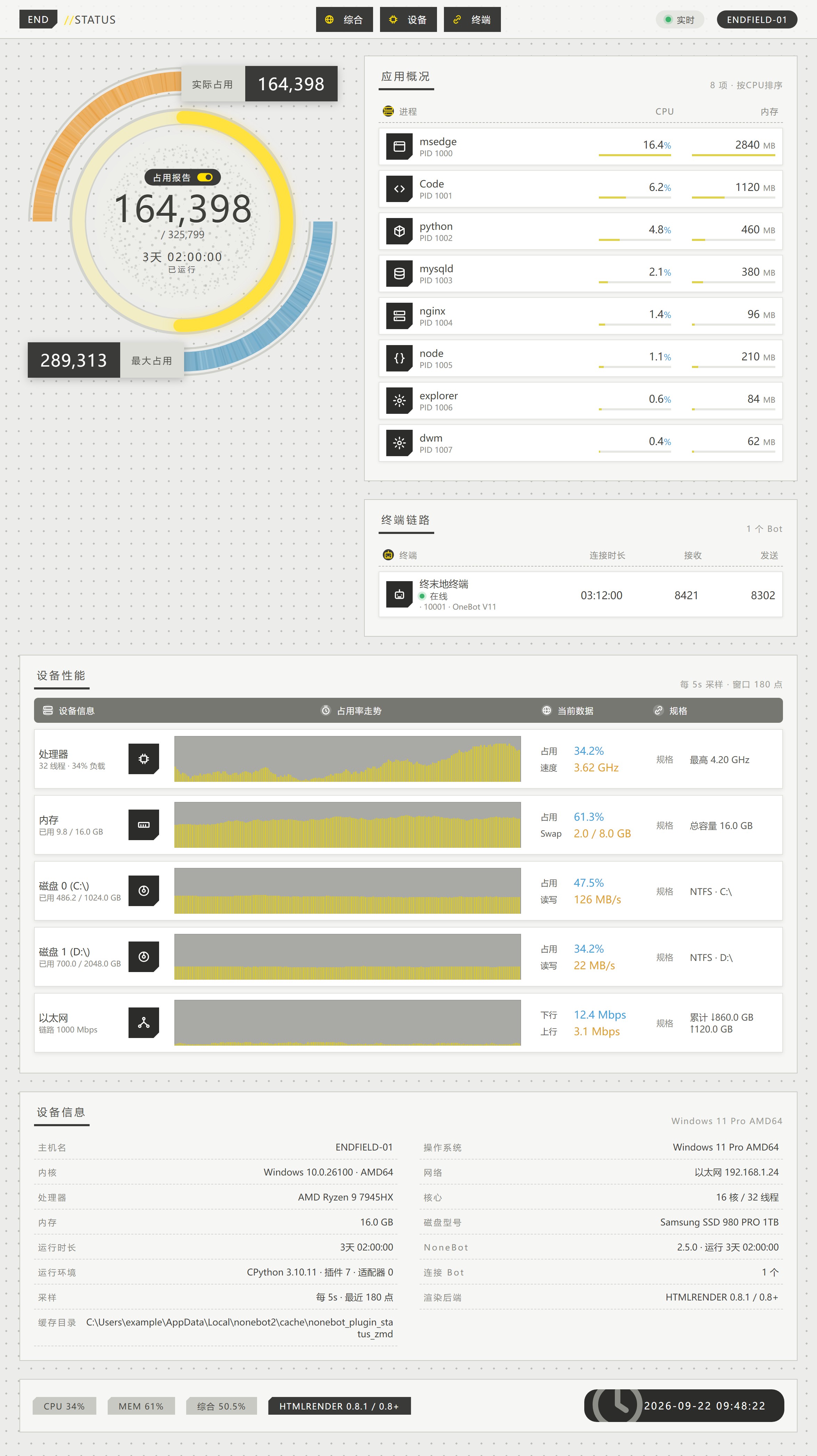
# Owner: Funny1Potato
|
|
6
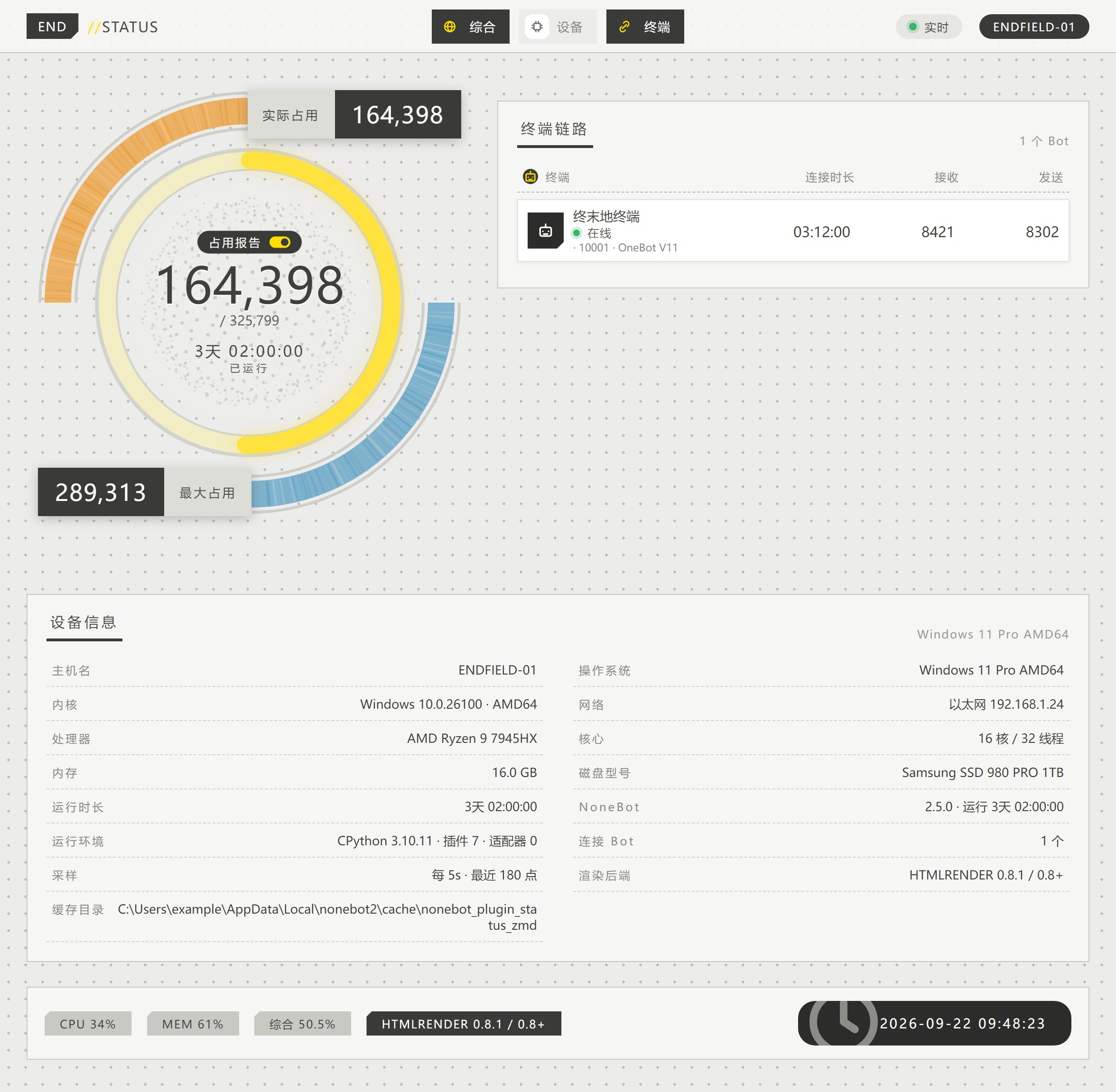
|
+
# Repository: nonebot-plugin-status-zmd
|
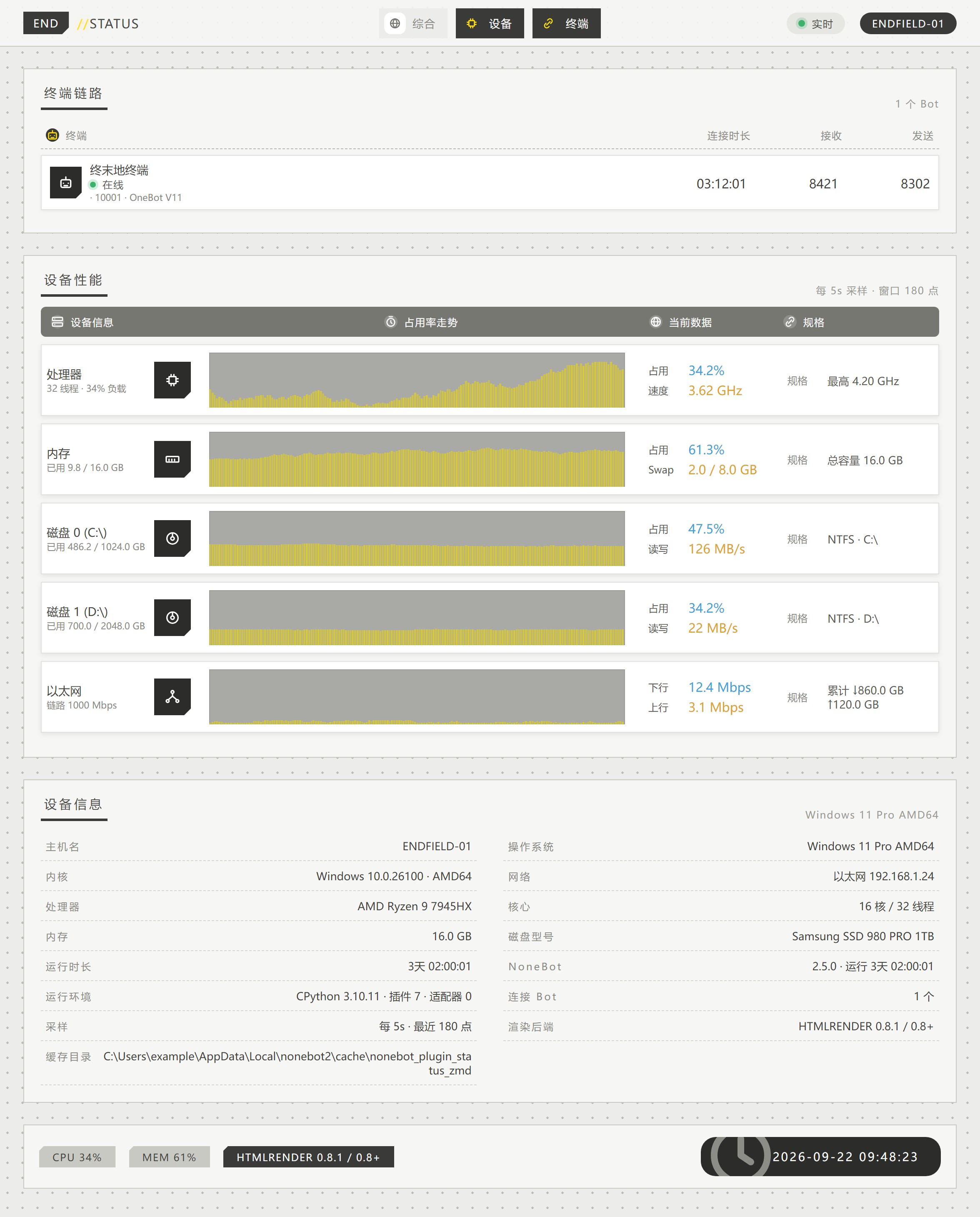
|
7
|
+
# Workflow name: pypi-publish.yml
|
|
8
|
+
# Environment: pypi
|
|
9
|
+
#
|
|
10
|
+
# 不想用 Trusted Publisher 的话,也可以改用 API token:在仓库 Secrets 里加
|
|
11
|
+
# PYPI_API_TOKEN,然后按下文 publish 步骤里的注释改。
|
|
12
|
+
|
|
13
|
+
name: Publish to PyPI
|
|
14
|
+
|
|
15
|
+
on:
|
|
16
|
+
push:
|
|
17
|
+
branches: [main]
|
|
18
|
+
tags: ["v*"]
|
|
19
|
+
pull_request:
|
|
20
|
+
workflow_dispatch:
|
|
21
|
+
|
|
22
|
+
permissions:
|
|
23
|
+
contents: read
|
|
24
|
+
|
|
25
|
+
jobs:
|
|
26
|
+
build:
|
|
27
|
+
name: 构建
|
|
28
|
+
runs-on: ubuntu-latest
|
|
29
|
+
steps:
|
|
30
|
+
- uses: actions/checkout@v4
|
|
31
|
+
|
|
32
|
+
- uses: actions/setup-python@v5
|
|
33
|
+
with:
|
|
34
|
+
python-version: "3.12"
|
|
35
|
+
|
|
36
|
+
- name: 安装 build
|
|
37
|
+
run: python -m pip install --upgrade build
|
|
38
|
+
|
|
39
|
+
- name: 校验 tag 与 __version__ 一致
|
|
40
|
+
if: startsWith(github.ref, 'refs/tags/v')
|
|
41
|
+
env:
|
|
42
|
+
TAG: ${{ github.ref_name }}
|
|
43
|
+
run: |
|
|
44
|
+
python - <<'PY'
|
|
45
|
+
import os, pathlib, re, sys
|
|
46
|
+
|
|
47
|
+
tag = os.environ["TAG"].lstrip("v")
|
|
48
|
+
src = pathlib.Path("nonebot_plugin_status_zmd/__init__.py").read_text(encoding="utf-8")
|
|
49
|
+
ver = re.search(r'__version__\s*=\s*"([^"]+)"', src).group(1)
|
|
50
|
+
print(f"tag={tag} __version__={ver}")
|
|
51
|
+
sys.exit(0 if tag == ver else 1)
|
|
52
|
+
PY
|
|
53
|
+
|
|
54
|
+
- name: 构建 sdist 与 wheel
|
|
55
|
+
run: python -m build
|
|
56
|
+
|
|
57
|
+
- name: 检查 wheel 内容
|
|
58
|
+
run: |
|
|
59
|
+
listing=$(unzip -l dist/*.whl)
|
|
60
|
+
echo "$listing"
|
|
61
|
+
# 前端资源必须打进去,否则装完渲染没样式
|
|
62
|
+
echo "$listing" | grep -q "nonebot_plugin_status_zmd/res/css/index.css"
|
|
63
|
+
echo "$listing" | grep -q "nonebot_plugin_status_zmd/res/templates/index.html.jinja"
|
|
64
|
+
if echo "$listing" | grep -qE "/(tests|tools)/"; then
|
|
65
|
+
echo "wheel 里混进了本地开发目录"; exit 1
|
|
66
|
+
fi
|
|
67
|
+
|
|
68
|
+
- uses: actions/upload-artifact@v4
|
|
69
|
+
with:
|
|
70
|
+
name: dist
|
|
71
|
+
path: dist/
|
|
72
|
+
|
|
73
|
+
publish:
|
|
74
|
+
name: 上传 PyPI
|
|
75
|
+
needs: build
|
|
76
|
+
if: startsWith(github.ref, 'refs/tags/v')
|
|
77
|
+
runs-on: ubuntu-latest
|
|
78
|
+
environment: pypi
|
|
79
|
+
permissions:
|
|
80
|
+
id-token: write # Trusted Publishing 靠这个换临时凭据
|
|
81
|
+
steps:
|
|
82
|
+
- uses: actions/download-artifact@v4
|
|
83
|
+
with:
|
|
84
|
+
name: dist
|
|
85
|
+
path: dist/
|
|
86
|
+
|
|
87
|
+
- uses: pypa/gh-action-pypi-publish@release/v1
|
|
88
|
+
# 改用 API token 时:去掉上面的 id-token 权限,并改成
|
|
89
|
+
# with:
|
|
90
|
+
# password: ${{ secrets.PYPI_API_TOKEN }}
|
|
@@ -0,0 +1,26 @@
|
|
|
1
|
+
# 更新日志
|
|
2
|
+
|
|
3
|
+
版本用 git tag(`vX.Y.Z`)标记,未发布到 PyPI。
|
|
4
|
+
|
|
5
|
+
## v0.1.0
|
|
6
|
+
|
|
7
|
+
首个版本。
|
|
8
|
+
|
|
9
|
+
- 终末地风格状态图:电量环(含径向条纹、粒子点云、双装饰弧)、应用概况、终端链路、
|
|
10
|
+
设备性能走势、设备信息、底栏
|
|
11
|
+
- 三种版式(`full` / `gauge` / `perf`)与板块级开关,设备性能区支持逐设备开关
|
|
12
|
+
(`STZMD_DEVICES`:`cpu` / `mem` / `disk` / `net`,列表顺序即图上顺序)
|
|
13
|
+
- `psutil` 跨平台采集:CPU、内存/Swap、磁盘容量与读写、网络速率、进程列表
|
|
14
|
+
- CPU 占用自己用 `cpu_times` 差值计算,并在启动时建立基准,首张图即有真实值
|
|
15
|
+
- 启动期采集有超时预算(`STZMD_COLLECT_TIMEOUT`),慢 I/O 不会拖住机器人启动
|
|
16
|
+
- 常驻周期采样 + 历史窗口,走势图按窗口渲染
|
|
17
|
+
- NoneBot 自身状态:运行时长、Bot 连接时长、收发计数、Bot 列表与头像
|
|
18
|
+
- `nonebot-plugin-htmlrender` 0.6 / 0.7 / 0.8+ 三版本兼容层
|
|
19
|
+
- 支持 nonebot2 2.3.0 及以上,依赖下限压到各自最早可用版本:`apscheduler 0.4.0`、
|
|
20
|
+
`alconna 0.37.0`、`uninfo 0.2.0`、`htmlrender 0.3.3`、`localstore 0.7.1`、
|
|
21
|
+
`psutil 5.9.0`、`py-cpuinfo 8.0.0`、`jinja2 3.0.3`、`anyio 3.4.0`、`httpx 0.26.0`
|
|
22
|
+
- `apscheduler < 0.4.0`、`alconna < 0.37.0` 仍在用 pydantic v1 的 `BaseSettings` /
|
|
23
|
+
`Undefined`,在 nonebot2 2.3(pydantic v2)下导入即失败,故不能更低
|
|
24
|
+
- 已实测:nonebot2 2.3.0 + 上述最低版本组合跑通全部测试与出图;2.5 那套同样全过
|
|
25
|
+
- 缓存走 `nonebot-plugin-localstore`(Bot 头像、渲染失败的 HTML)
|
|
26
|
+
- `tools/preview.py` 预览工具:不启动机器人即可出 HTML / PNG
|
|
@@ -0,0 +1,21 @@
|
|
|
1
|
+
MIT License
|
|
2
|
+
|
|
3
|
+
Copyright (c) 2026 Funny1Potato
|
|
4
|
+
|
|
5
|
+
Permission is hereby granted, free of charge, to any person obtaining a copy
|
|
6
|
+
of this software and associated documentation files (the "Software"), to deal
|
|
7
|
+
in the Software without restriction, including without limitation the rights
|
|
8
|
+
to use, copy, modify, merge, publish, distribute, sublicense, and/or sell
|
|
9
|
+
copies of the Software, and to permit persons to whom the Software is
|
|
10
|
+
furnished to do so, subject to the following conditions:
|
|
11
|
+
|
|
12
|
+
The above copyright notice and this permission notice shall be included in all
|
|
13
|
+
copies or substantial portions of the Software.
|
|
14
|
+
|
|
15
|
+
THE SOFTWARE IS PROVIDED "AS IS", WITHOUT WARRANTY OF ANY KIND, EXPRESS OR
|
|
16
|
+
IMPLIED, INCLUDING BUT NOT LIMITED TO THE WARRANTIES OF MERCHANTABILITY,
|
|
17
|
+
FITNESS FOR A PARTICULAR PURPOSE AND NONINFRINGEMENT. IN NO EVENT SHALL THE
|
|
18
|
+
AUTHORS OR COPYRIGHT HOLDERS BE LIABLE FOR ANY CLAIM, DAMAGES OR OTHER
|
|
19
|
+
LIABILITY, WHETHER IN AN ACTION OF CONTRACT, TORT OR OTHERWISE, ARISING FROM,
|
|
20
|
+
OUT OF OR IN CONNECTION WITH THE SOFTWARE OR THE USE OR OTHER DEALINGS IN THE
|
|
21
|
+
SOFTWARE.
|
|
@@ -0,0 +1,256 @@
|
|
|
1
|
+
Metadata-Version: 2.5
|
|
2
|
+
Name: nonebot-plugin-status-zmd
|
|
3
|
+
Version: 0.1.0
|
|
4
|
+
Summary: 以《明日方舟:终末地》协议核心面板风格展示机器人所在服务器运行状态的 NoneBot2 插件
|
|
5
|
+
Author: Funny1Potato
|
|
6
|
+
License: MIT
|
|
7
|
+
License-File: LICENSE
|
|
8
|
+
Keywords: endfield,nonebot,nonebot2,plugin,psutil,status,zmd
|
|
9
|
+
Classifier: Programming Language :: Python :: 3.10
|
|
10
|
+
Classifier: Programming Language :: Python :: 3.11
|
|
11
|
+
Classifier: Programming Language :: Python :: 3.12
|
|
12
|
+
Classifier: Programming Language :: Python :: 3.13
|
|
13
|
+
Requires-Python: <4.0,>=3.10
|
|
14
|
+
Requires-Dist: anyio>=3.4.0
|
|
15
|
+
Requires-Dist: httpx>=0.26.0
|
|
16
|
+
Requires-Dist: jinja2>=3.0.3
|
|
17
|
+
Requires-Dist: nonebot-plugin-alconna>=0.37.0
|
|
18
|
+
Requires-Dist: nonebot-plugin-apscheduler>=0.4.0
|
|
19
|
+
Requires-Dist: nonebot-plugin-htmlrender>=0.3.3
|
|
20
|
+
Requires-Dist: nonebot-plugin-localstore>=0.7.1
|
|
21
|
+
Requires-Dist: nonebot-plugin-uninfo>=0.2.0
|
|
22
|
+
Requires-Dist: nonebot2>=2.3.0
|
|
23
|
+
Requires-Dist: psutil>=5.9.0
|
|
24
|
+
Requires-Dist: py-cpuinfo>=8.0.0
|
|
25
|
+
Provides-Extra: dev
|
|
26
|
+
Requires-Dist: poethepoet>=0.30.0; extra == 'dev'
|
|
27
|
+
Requires-Dist: pytest-asyncio>=0.24.0; extra == 'dev'
|
|
28
|
+
Requires-Dist: pytest>=8.0.0; extra == 'dev'
|
|
29
|
+
Requires-Dist: ruff>=0.6.0; extra == 'dev'
|
|
30
|
+
Provides-Extra: htmlrender8
|
|
31
|
+
Requires-Dist: nonebot-plugin-htmlrender[playwright]>=0.8.0; extra == 'htmlrender8'
|
|
32
|
+
Description-Content-Type: text/markdown
|
|
33
|
+
|
|
34
|
+
<div align="center">
|
|
35
|
+
<a href="https://v2.nonebot.dev/store">
|
|
36
|
+
<img src="https://raw.githubusercontent.com/fllesser/nonebot-plugin-template/refs/heads/resource/.docs/NoneBotPlugin.svg" width="310" alt="logo"></a>
|
|
37
|
+
|
|
38
|
+
## ✨ NoneBot-Plugin-Status-Zmd ✨
|
|
39
|
+
|
|
40
|
+
以《明日方舟:终末地》协议核心面板风格展示服务器运行状态的 NoneBot2 插件
|
|
41
|
+
|
|
42
|
+
<p>
|
|
43
|
+
<img src="https://img.shields.io/badge/python-3.10+-blue?style=flat-square&logo=python&logoColor=white" alt="python">
|
|
44
|
+
<img src="https://img.shields.io/badge/nonebot-2.3+-red?style=flat-square" alt="nonebot">
|
|
45
|
+
</p>
|
|
46
|
+
|
|
47
|
+
</div>
|
|
48
|
+
|
|
49
|
+
## 📖 介绍
|
|
50
|
+
|
|
51
|
+
发一条 `status`,得到一张协议核心面板风格的设备状态图:圆形电量环 + 设备性能走势 + 应用概况 + 终端链路 + 设备信息表。
|
|
52
|
+
|
|
53
|
+
### 📷 效果图
|
|
54
|
+
|
|
55
|
+
<details>
|
|
56
|
+
<summary>点击展开</summary>
|
|
57
|
+
|
|
58
|
+
**`STZMD_LAYOUT=full`** —— 综合长图(默认)
|
|
59
|
+
|
|
60
|
+
|
|
61
|
+
|
|
62
|
+
**`STZMD_LAYOUT=gauge`** —— 只出电量环
|
|
63
|
+
|
|
64
|
+
|
|
65
|
+
|
|
66
|
+
**`STZMD_LAYOUT=perf`** —— 只出设备性能
|
|
67
|
+
|
|
68
|
+
|
|
69
|
+
</details>
|
|
70
|
+
|
|
71
|
+
## 💿 安装
|
|
72
|
+
|
|
73
|
+
<details open>
|
|
74
|
+
<summary>使用 nb-cli 安装</summary>
|
|
75
|
+
在 nonebot2 项目的根目录下打开命令行, 输入以下指令安装(暂未上架,请先使用包管理器安装)
|
|
76
|
+
|
|
77
|
+
nb plugin install nonebot-plugin-status-zmd
|
|
78
|
+
|
|
79
|
+
</details>
|
|
80
|
+
|
|
81
|
+
|
|
82
|
+
<details>
|
|
83
|
+
<summary>使用包管理器安装</summary>
|
|
84
|
+
|
|
85
|
+
```bash
|
|
86
|
+
pip install nonebot-plugin-status-zmd
|
|
87
|
+
```
|
|
88
|
+
|
|
89
|
+
在 `pyproject.toml` 中添加:
|
|
90
|
+
|
|
91
|
+
```toml
|
|
92
|
+
[tool.nonebot]
|
|
93
|
+
plugins = ["nonebot_plugin_status_zmd"]
|
|
94
|
+
```
|
|
95
|
+
|
|
96
|
+
</details>
|
|
97
|
+
|
|
98
|
+
### ⚠️ 渲染后端
|
|
99
|
+
|
|
100
|
+
插件通过 `nonebot-plugin-htmlrender` 渲染页面,**0.6 / 0.7 / 0.8+ 都支持**,
|
|
101
|
+
但从 0.8 起它不再内置浏览器后端,需要额外两步:
|
|
102
|
+
|
|
103
|
+
```bash
|
|
104
|
+
# htmlrender >= 0.8:装 Playwright 后端(0.6 / 0.7 自带,跳过这步)
|
|
105
|
+
pip install "nonebot-plugin-htmlrender[playwright]>=0.8"
|
|
106
|
+
# 或装本插件提供的配套 extra(等价)
|
|
107
|
+
pip install "/path/to/nonebot-plugin-status-zmd[htmlrender8]"
|
|
108
|
+
|
|
109
|
+
# 任一版本都需要浏览器内核
|
|
110
|
+
playwright install chromium
|
|
111
|
+
# Debian/Ubuntu、容器、CI 建议带上系统依赖
|
|
112
|
+
playwright install --with-deps chromium
|
|
113
|
+
```
|
|
114
|
+
|
|
115
|
+
```properties
|
|
116
|
+
# htmlrender >= 0.8 还需要在 .env 里选 Provider(0.6 / 0.7 不用)
|
|
117
|
+
RENDER={"provider":"playwright","startup":"warmup"}
|
|
118
|
+
```
|
|
119
|
+
|
|
120
|
+
> 另外 htmlrender 0.7 起把浏览器目录搬到了 localstore 数据目录(首次启动的日志里会打印具体路径)。如果出图报 `Executable doesn't exist`,把`PLAYWRIGHT_BROWSERS_PATH` 指到那个目录再装一次即可,例如:
|
|
121
|
+
> ```bash
|
|
122
|
+
> set "PLAYWRIGHT_BROWSERS_PATH=%LOCALAPPDATA%\nonebot2\nonebot_plugin_htmlrender"
|
|
123
|
+
> playwright install chromium
|
|
124
|
+
> ```
|
|
125
|
+
|
|
126
|
+
后端不可用时插件**不会**启动失败,而是打印一条带修复步骤的告警,并在指令触发时把同样的提示发给使用者。
|
|
127
|
+
|
|
128
|
+
## 🎉 使用
|
|
129
|
+
|
|
130
|
+
```text
|
|
131
|
+
status
|
|
132
|
+
系统状态
|
|
133
|
+
```
|
|
134
|
+
|
|
135
|
+
指令名可用 `STZMD_COMMAND` 修改。默认**仅 SUPERUSER**可用。
|
|
136
|
+
|
|
137
|
+
> NoneBot 默认只把 `/` 开头的消息当命令,想直接发 `status` 触发,需要把空字符串加进 `COMMAND_START`:
|
|
138
|
+
>
|
|
139
|
+
> ```properties
|
|
140
|
+
> COMMAND_START=["", "/"]
|
|
141
|
+
> ```
|
|
142
|
+
|
|
143
|
+
## ⚙️ 配置
|
|
144
|
+
|
|
145
|
+
在 `.env` 或 `.env.prod` 中添加;全部为可选项,可以开箱即用:
|
|
146
|
+
|
|
147
|
+
```env
|
|
148
|
+
# --- 触发与权限 ---
|
|
149
|
+
STZMD_COMMAND=["status", "系统状态"] # 触发指令,第一个为主指令,其余为别名
|
|
150
|
+
STZMD_ONLY_SUPERUSER=true # 是否仅 SUPERUSER 可用(状态图含主机名/IP/进程/磁盘,不建议公开)
|
|
151
|
+
STZMD_NEED_AT=false # 是否需要 @ 机器人才能触发
|
|
152
|
+
STZMD_REPLY_TARGET=true # 是否回复触发者那条消息
|
|
153
|
+
|
|
154
|
+
# --- 版式 ---
|
|
155
|
+
STZMD_LAYOUT=full # full=综合长图 / gauge=只出电量环 / perf=只出设备性能
|
|
156
|
+
STZMD_BLOCKS=["header", "gauge", "apps", "bots", "perf", "specs", "footer"] # 板块开关,可选 header / gauge / apps / bots / perf / specs / footer
|
|
157
|
+
STZMD_DEVICES=["cpu", "mem", "disk", "net"] # 设备性能区逐设备开关,可选 cpu / mem / disk / net,列表顺序即图上顺序
|
|
158
|
+
# STZMD_HOST_NAME=ENDFIELD-01 # 顶栏显示的主机名,默认用系统主机名
|
|
159
|
+
|
|
160
|
+
# --- 电量环 ---
|
|
161
|
+
STZMD_GAUGE_VALUE_MAX=325799 # 环中间大数字的分母(终末地游戏口径)
|
|
162
|
+
STZMD_GAUGE_CPU_WEIGHT=0.4 # 综合占用里 CPU 的权重
|
|
163
|
+
STZMD_GAUGE_MEM_WEIGHT=0.6 # 综合占用里内存的权重(综合占用 = CPU×权重 + 内存×权重)
|
|
164
|
+
|
|
165
|
+
# --- 渲染 ---
|
|
166
|
+
STZMD_PIC_FORMAT=jpeg # 出图格式:jpeg / png
|
|
167
|
+
STZMD_PIC_QUALITY=90 # 出图质量(jpeg 有效)
|
|
168
|
+
STZMD_DEVICE_SCALE_FACTOR=2 # 出图缩放倍率,2 表示按 2 倍分辨率渲染(更清晰、体积更大)
|
|
169
|
+
STZMD_RENDER_TIMEOUT=30 # 单张图渲染超时(秒)
|
|
170
|
+
# STZMD_FONT_FAMILY="Noto Sans CJK SC" # CSS 字体栈覆盖,默认用系统字体
|
|
171
|
+
# STZMD_FONT_PATH=/xxx/xxx.ttc # 指定字体文件并内联进图片(≤ 8MB),字形一致性最稳
|
|
172
|
+
# STZMD_EXTRA_CSS=/path/to/custom.css # 追加自定义 CSS
|
|
173
|
+
|
|
174
|
+
# --- 采样 ---
|
|
175
|
+
STZMD_COLLECT_INTERVAL=5 # 后台常驻采样间隔(秒)
|
|
176
|
+
STZMD_HISTORY_SIZE=180 # 走势图保留的采样点数(窗口 = 间隔 × 点数,默认约 15 分钟)
|
|
177
|
+
STZMD_COLLECT_TIMEOUT=15 # 单次采集的等待上限(秒),超时先继续、不拖住启动
|
|
178
|
+
STZMD_PROC_LEN=8 # 应用概况里列出的进程数
|
|
179
|
+
STZMD_PROC_SORT_BY=cpu # 进程排序依据:cpu / mem
|
|
180
|
+
STZMD_IGNORE_PARTS=[] # 忽略的分区(正则),如 ["^/boot"]
|
|
181
|
+
STZMD_IGNORE_NETS=["^lo(op)?\\d*$|^(Loopback|本地连接)"] # 忽略的网卡(正则)
|
|
182
|
+
STZMD_IGNORE_PROCS=["^System Idle Process$"] # 忽略的进程(正则)
|
|
183
|
+
STZMD_PROC_CPU_MAX_100P=false # 进程 CPU 是否按单核算(false = 折算成整机占比,与任务管理器口径一致)
|
|
184
|
+
|
|
185
|
+
# --- Bot 状态 ---
|
|
186
|
+
STZMD_COUNT_MESSAGE_SENT=true # 是否统计发送消息数(按各适配器的发消息 API 名计数)
|
|
187
|
+
STZMD_SHOW_BOT_AVATAR=true # 是否拉取 Bot 头像
|
|
188
|
+
STZMD_DISCONNECT_RESET_COUNTER=true # Bot 断开时是否清零收发计数
|
|
189
|
+
STZMD_REQ_TIMEOUT=10 # 拉取头像 / Bot 信息的超时(秒)
|
|
190
|
+
|
|
191
|
+
# --- 全局 ---
|
|
192
|
+
# PROXY=http://127.0.0.1:7890 # 拉取 Bot 头像走的代理(NoneBot 全局配置,非本插件专属)
|
|
193
|
+
```
|
|
194
|
+
|
|
195
|
+
### 版式与板块的关系
|
|
196
|
+
|
|
197
|
+
`STZMD_LAYOUT` 决定整体容器结构,`STZMD_BLOCKS` 决定渲染哪些板块,只有两者都允许的
|
|
198
|
+
板块才会出现:
|
|
199
|
+
|
|
200
|
+
| 版式 | 允许的板块 |
|
|
201
|
+
| --- | --- |
|
|
202
|
+
| `full` | 全部:顶栏 +(电量环 \| 应用概况+终端链路)+ 设备性能 + 设备信息 + 底栏 |
|
|
203
|
+
| `gauge` | 顶栏 + 电量环 + 终端链路 + 设备信息 + 底栏 |
|
|
204
|
+
| `perf` | 顶栏 + 设备性能 + 终端链路 + 设备信息 + 底栏 |
|
|
205
|
+
|
|
206
|
+
各板块对应图上哪一块:
|
|
207
|
+
|
|
208
|
+
| 板块 | 内容 |
|
|
209
|
+
| --- | --- |
|
|
210
|
+
| `header` | 顶栏:主机名、系统、采样间隔与历史窗口 |
|
|
211
|
+
| `gauge` | 电量环:综合占用、CPU / 内存占比、运行时长 |
|
|
212
|
+
| `apps` | 应用概况:进程的 CPU / 内存占用条(按 `STZMD_PROC_SORT_BY` 排序取前 `STZMD_PROC_LEN` 个) |
|
|
213
|
+
| `bots` | 终端链路:Bot 列表与头像、连接时长、收发计数、NoneBot 版本与插件数 |
|
|
214
|
+
| `perf` | 设备性能:走势柱 + 当前占用 + 速度 + 规格 |
|
|
215
|
+
| `specs` | 设备信息表(底部) |
|
|
216
|
+
| `footer` | 底栏:生成时间、渲染后端 |
|
|
217
|
+
|
|
218
|
+
### 设备性能区出哪几行
|
|
219
|
+
|
|
220
|
+
`STZMD_DEVICES` 控制设备性能区里出哪几行(可只留 `["cpu", "mem"]` 做轻量监控,或 `["net"]` 只看网络):
|
|
221
|
+
|
|
222
|
+
| 取值 | 对应行 |
|
|
223
|
+
| --- | --- |
|
|
224
|
+
| `cpu` | 处理器(占用 / 频率 / 最高频率) |
|
|
225
|
+
| `mem` | 内存(占用 / Swap / 总容量) |
|
|
226
|
+
| `disk` | 每个分区一行(容量占用 / 读写 / 文件系统),受 `STZMD_IGNORE_PARTS` 过滤 |
|
|
227
|
+
| `net` | 每张网卡一行(下行 / 上行 / 链路),受 `STZMD_IGNORE_NETS` 过滤 |
|
|
228
|
+
|
|
229
|
+
> 不含 GPU:显卡指标跨平台差异太大,本插件不采集。
|
|
230
|
+
|
|
231
|
+
### 启动期采集超时
|
|
232
|
+
|
|
233
|
+
宿主机的挂载点失联时(比如掉线的网络盘),采集可能阻塞很久。启动期(静态信息 + 基准 + 首采)**共用一份** `STZMD_COLLECT_TIMEOUT` 总预算:超时**不会**中断采集,只是先放行——机器人照常启动,数据由下个采样周期补上;若出图时仍没有数据,会直接回一句「状态数据还没准备好」而不是卡住。
|
|
234
|
+
|
|
235
|
+
|
|
236
|
+
## 💡 鸣谢
|
|
237
|
+
|
|
238
|
+
### [QinAnze/zmd-manager](https://github.com/QinAnze/zmd-manager)
|
|
239
|
+
|
|
240
|
+
- UI视觉规范参考:电量环、配色、点阵底纹、走势柱、切角图标块
|
|
241
|
+
|
|
242
|
+
### [lgc-NB2Dev/nonebot-plugin-picstatus](https://github.com/lgc-NB2Dev/nonebot-plugin-picstatus)
|
|
243
|
+
|
|
244
|
+
- 采集器组织方式、渲染管线与「指令带图」的整体思路
|
|
245
|
+
|
|
246
|
+
### [kexue-z/nonebot-plugin-htmlrender](https://github.com/kexue-z/nonebot-plugin-htmlrender)
|
|
247
|
+
|
|
248
|
+
- HTML 渲染后端
|
|
249
|
+
|
|
250
|
+
### [nonebot/plugin-alconna](https://github.com/nonebot/plugin-alconna)
|
|
251
|
+
|
|
252
|
+
- 多平台指令解析与发送
|
|
253
|
+
|
|
254
|
+
## 📄 许可
|
|
255
|
+
|
|
256
|
+
MIT
|
|
@@ -0,0 +1,223 @@
|
|
|
1
|
+
<div align="center">
|
|
2
|
+
<a href="https://v2.nonebot.dev/store">
|
|
3
|
+
<img src="https://raw.githubusercontent.com/fllesser/nonebot-plugin-template/refs/heads/resource/.docs/NoneBotPlugin.svg" width="310" alt="logo"></a>
|
|
4
|
+
|
|
5
|
+
## ✨ NoneBot-Plugin-Status-Zmd ✨
|
|
6
|
+
|
|
7
|
+
以《明日方舟:终末地》协议核心面板风格展示服务器运行状态的 NoneBot2 插件
|
|
8
|
+
|
|
9
|
+
<p>
|
|
10
|
+
<img src="https://img.shields.io/badge/python-3.10+-blue?style=flat-square&logo=python&logoColor=white" alt="python">
|
|
11
|
+
<img src="https://img.shields.io/badge/nonebot-2.3+-red?style=flat-square" alt="nonebot">
|
|
12
|
+
</p>
|
|
13
|
+
|
|
14
|
+
</div>
|
|
15
|
+
|
|
16
|
+
## 📖 介绍
|
|
17
|
+
|
|
18
|
+
发一条 `status`,得到一张协议核心面板风格的设备状态图:圆形电量环 + 设备性能走势 + 应用概况 + 终端链路 + 设备信息表。
|
|
19
|
+
|
|
20
|
+
### 📷 效果图
|
|
21
|
+
|
|
22
|
+
<details>
|
|
23
|
+
<summary>点击展开</summary>
|
|
24
|
+
|
|
25
|
+
**`STZMD_LAYOUT=full`** —— 综合长图(默认)
|
|
26
|
+
|
|
27
|
+

|
|
28
|
+
|
|
29
|
+
**`STZMD_LAYOUT=gauge`** —— 只出电量环
|
|
30
|
+
|
|
31
|
+

|
|
32
|
+
|
|
33
|
+
**`STZMD_LAYOUT=perf`** —— 只出设备性能
|
|
34
|
+
|
|
35
|
+

|
|
36
|
+
</details>
|
|
37
|
+
|
|
38
|
+
## 💿 安装
|
|
39
|
+
|
|
40
|
+
<details open>
|
|
41
|
+
<summary>使用 nb-cli 安装</summary>
|
|
42
|
+
在 nonebot2 项目的根目录下打开命令行, 输入以下指令安装(暂未上架,请先使用包管理器安装)
|
|
43
|
+
|
|
44
|
+
nb plugin install nonebot-plugin-status-zmd
|
|
45
|
+
|
|
46
|
+
</details>
|
|
47
|
+
|
|
48
|
+
|
|
49
|
+
<details>
|
|
50
|
+
<summary>使用包管理器安装</summary>
|
|
51
|
+
|
|
52
|
+
```bash
|
|
53
|
+
pip install nonebot-plugin-status-zmd
|
|
54
|
+
```
|
|
55
|
+
|
|
56
|
+
在 `pyproject.toml` 中添加:
|
|
57
|
+
|
|
58
|
+
```toml
|
|
59
|
+
[tool.nonebot]
|
|
60
|
+
plugins = ["nonebot_plugin_status_zmd"]
|
|
61
|
+
```
|
|
62
|
+
|
|
63
|
+
</details>
|
|
64
|
+
|
|
65
|
+
### ⚠️ 渲染后端
|
|
66
|
+
|
|
67
|
+
插件通过 `nonebot-plugin-htmlrender` 渲染页面,**0.6 / 0.7 / 0.8+ 都支持**,
|
|
68
|
+
但从 0.8 起它不再内置浏览器后端,需要额外两步:
|
|
69
|
+
|
|
70
|
+
```bash
|
|
71
|
+
# htmlrender >= 0.8:装 Playwright 后端(0.6 / 0.7 自带,跳过这步)
|
|
72
|
+
pip install "nonebot-plugin-htmlrender[playwright]>=0.8"
|
|
73
|
+
# 或装本插件提供的配套 extra(等价)
|
|
74
|
+
pip install "/path/to/nonebot-plugin-status-zmd[htmlrender8]"
|
|
75
|
+
|
|
76
|
+
# 任一版本都需要浏览器内核
|
|
77
|
+
playwright install chromium
|
|
78
|
+
# Debian/Ubuntu、容器、CI 建议带上系统依赖
|
|
79
|
+
playwright install --with-deps chromium
|
|
80
|
+
```
|
|
81
|
+
|
|
82
|
+
```properties
|
|
83
|
+
# htmlrender >= 0.8 还需要在 .env 里选 Provider(0.6 / 0.7 不用)
|
|
84
|
+
RENDER={"provider":"playwright","startup":"warmup"}
|
|
85
|
+
```
|
|
86
|
+
|
|
87
|
+
> 另外 htmlrender 0.7 起把浏览器目录搬到了 localstore 数据目录(首次启动的日志里会打印具体路径)。如果出图报 `Executable doesn't exist`,把`PLAYWRIGHT_BROWSERS_PATH` 指到那个目录再装一次即可,例如:
|
|
88
|
+
> ```bash
|
|
89
|
+
> set "PLAYWRIGHT_BROWSERS_PATH=%LOCALAPPDATA%\nonebot2\nonebot_plugin_htmlrender"
|
|
90
|
+
> playwright install chromium
|
|
91
|
+
> ```
|
|
92
|
+
|
|
93
|
+
后端不可用时插件**不会**启动失败,而是打印一条带修复步骤的告警,并在指令触发时把同样的提示发给使用者。
|
|
94
|
+
|
|
95
|
+
## 🎉 使用
|
|
96
|
+
|
|
97
|
+
```text
|
|
98
|
+
status
|
|
99
|
+
系统状态
|
|
100
|
+
```
|
|
101
|
+
|
|
102
|
+
指令名可用 `STZMD_COMMAND` 修改。默认**仅 SUPERUSER**可用。
|
|
103
|
+
|
|
104
|
+
> NoneBot 默认只把 `/` 开头的消息当命令,想直接发 `status` 触发,需要把空字符串加进 `COMMAND_START`:
|
|
105
|
+
>
|
|
106
|
+
> ```properties
|
|
107
|
+
> COMMAND_START=["", "/"]
|
|
108
|
+
> ```
|
|
109
|
+
|
|
110
|
+
## ⚙️ 配置
|
|
111
|
+
|
|
112
|
+
在 `.env` 或 `.env.prod` 中添加;全部为可选项,可以开箱即用:
|
|
113
|
+
|
|
114
|
+
```env
|
|
115
|
+
# --- 触发与权限 ---
|
|
116
|
+
STZMD_COMMAND=["status", "系统状态"] # 触发指令,第一个为主指令,其余为别名
|
|
117
|
+
STZMD_ONLY_SUPERUSER=true # 是否仅 SUPERUSER 可用(状态图含主机名/IP/进程/磁盘,不建议公开)
|
|
118
|
+
STZMD_NEED_AT=false # 是否需要 @ 机器人才能触发
|
|
119
|
+
STZMD_REPLY_TARGET=true # 是否回复触发者那条消息
|
|
120
|
+
|
|
121
|
+
# --- 版式 ---
|
|
122
|
+
STZMD_LAYOUT=full # full=综合长图 / gauge=只出电量环 / perf=只出设备性能
|
|
123
|
+
STZMD_BLOCKS=["header", "gauge", "apps", "bots", "perf", "specs", "footer"] # 板块开关,可选 header / gauge / apps / bots / perf / specs / footer
|
|
124
|
+
STZMD_DEVICES=["cpu", "mem", "disk", "net"] # 设备性能区逐设备开关,可选 cpu / mem / disk / net,列表顺序即图上顺序
|
|
125
|
+
# STZMD_HOST_NAME=ENDFIELD-01 # 顶栏显示的主机名,默认用系统主机名
|
|
126
|
+
|
|
127
|
+
# --- 电量环 ---
|
|
128
|
+
STZMD_GAUGE_VALUE_MAX=325799 # 环中间大数字的分母(终末地游戏口径)
|
|
129
|
+
STZMD_GAUGE_CPU_WEIGHT=0.4 # 综合占用里 CPU 的权重
|
|
130
|
+
STZMD_GAUGE_MEM_WEIGHT=0.6 # 综合占用里内存的权重(综合占用 = CPU×权重 + 内存×权重)
|
|
131
|
+
|
|
132
|
+
# --- 渲染 ---
|
|
133
|
+
STZMD_PIC_FORMAT=jpeg # 出图格式:jpeg / png
|
|
134
|
+
STZMD_PIC_QUALITY=90 # 出图质量(jpeg 有效)
|
|
135
|
+
STZMD_DEVICE_SCALE_FACTOR=2 # 出图缩放倍率,2 表示按 2 倍分辨率渲染(更清晰、体积更大)
|
|
136
|
+
STZMD_RENDER_TIMEOUT=30 # 单张图渲染超时(秒)
|
|
137
|
+
# STZMD_FONT_FAMILY="Noto Sans CJK SC" # CSS 字体栈覆盖,默认用系统字体
|
|
138
|
+
# STZMD_FONT_PATH=/xxx/xxx.ttc # 指定字体文件并内联进图片(≤ 8MB),字形一致性最稳
|
|
139
|
+
# STZMD_EXTRA_CSS=/path/to/custom.css # 追加自定义 CSS
|
|
140
|
+
|
|
141
|
+
# --- 采样 ---
|
|
142
|
+
STZMD_COLLECT_INTERVAL=5 # 后台常驻采样间隔(秒)
|
|
143
|
+
STZMD_HISTORY_SIZE=180 # 走势图保留的采样点数(窗口 = 间隔 × 点数,默认约 15 分钟)
|
|
144
|
+
STZMD_COLLECT_TIMEOUT=15 # 单次采集的等待上限(秒),超时先继续、不拖住启动
|
|
145
|
+
STZMD_PROC_LEN=8 # 应用概况里列出的进程数
|
|
146
|
+
STZMD_PROC_SORT_BY=cpu # 进程排序依据:cpu / mem
|
|
147
|
+
STZMD_IGNORE_PARTS=[] # 忽略的分区(正则),如 ["^/boot"]
|
|
148
|
+
STZMD_IGNORE_NETS=["^lo(op)?\\d*$|^(Loopback|本地连接)"] # 忽略的网卡(正则)
|
|
149
|
+
STZMD_IGNORE_PROCS=["^System Idle Process$"] # 忽略的进程(正则)
|
|
150
|
+
STZMD_PROC_CPU_MAX_100P=false # 进程 CPU 是否按单核算(false = 折算成整机占比,与任务管理器口径一致)
|
|
151
|
+
|
|
152
|
+
# --- Bot 状态 ---
|
|
153
|
+
STZMD_COUNT_MESSAGE_SENT=true # 是否统计发送消息数(按各适配器的发消息 API 名计数)
|
|
154
|
+
STZMD_SHOW_BOT_AVATAR=true # 是否拉取 Bot 头像
|
|
155
|
+
STZMD_DISCONNECT_RESET_COUNTER=true # Bot 断开时是否清零收发计数
|
|
156
|
+
STZMD_REQ_TIMEOUT=10 # 拉取头像 / Bot 信息的超时(秒)
|
|
157
|
+
|
|
158
|
+
# --- 全局 ---
|
|
159
|
+
# PROXY=http://127.0.0.1:7890 # 拉取 Bot 头像走的代理(NoneBot 全局配置,非本插件专属)
|
|
160
|
+
```
|
|
161
|
+
|
|
162
|
+
### 版式与板块的关系
|
|
163
|
+
|
|
164
|
+
`STZMD_LAYOUT` 决定整体容器结构,`STZMD_BLOCKS` 决定渲染哪些板块,只有两者都允许的
|
|
165
|
+
板块才会出现:
|
|
166
|
+
|
|
167
|
+
| 版式 | 允许的板块 |
|
|
168
|
+
| --- | --- |
|
|
169
|
+
| `full` | 全部:顶栏 +(电量环 \| 应用概况+终端链路)+ 设备性能 + 设备信息 + 底栏 |
|
|
170
|
+
| `gauge` | 顶栏 + 电量环 + 终端链路 + 设备信息 + 底栏 |
|
|
171
|
+
| `perf` | 顶栏 + 设备性能 + 终端链路 + 设备信息 + 底栏 |
|
|
172
|
+
|
|
173
|
+
各板块对应图上哪一块:
|
|
174
|
+
|
|
175
|
+
| 板块 | 内容 |
|
|
176
|
+
| --- | --- |
|
|
177
|
+
| `header` | 顶栏:主机名、系统、采样间隔与历史窗口 |
|
|
178
|
+
| `gauge` | 电量环:综合占用、CPU / 内存占比、运行时长 |
|
|
179
|
+
| `apps` | 应用概况:进程的 CPU / 内存占用条(按 `STZMD_PROC_SORT_BY` 排序取前 `STZMD_PROC_LEN` 个) |
|
|
180
|
+
| `bots` | 终端链路:Bot 列表与头像、连接时长、收发计数、NoneBot 版本与插件数 |
|
|
181
|
+
| `perf` | 设备性能:走势柱 + 当前占用 + 速度 + 规格 |
|
|
182
|
+
| `specs` | 设备信息表(底部) |
|
|
183
|
+
| `footer` | 底栏:生成时间、渲染后端 |
|
|
184
|
+
|
|
185
|
+
### 设备性能区出哪几行
|
|
186
|
+
|
|
187
|
+
`STZMD_DEVICES` 控制设备性能区里出哪几行(可只留 `["cpu", "mem"]` 做轻量监控,或 `["net"]` 只看网络):
|
|
188
|
+
|
|
189
|
+
| 取值 | 对应行 |
|
|
190
|
+
| --- | --- |
|
|
191
|
+
| `cpu` | 处理器(占用 / 频率 / 最高频率) |
|
|
192
|
+
| `mem` | 内存(占用 / Swap / 总容量) |
|
|
193
|
+
| `disk` | 每个分区一行(容量占用 / 读写 / 文件系统),受 `STZMD_IGNORE_PARTS` 过滤 |
|
|
194
|
+
| `net` | 每张网卡一行(下行 / 上行 / 链路),受 `STZMD_IGNORE_NETS` 过滤 |
|
|
195
|
+
|
|
196
|
+
> 不含 GPU:显卡指标跨平台差异太大,本插件不采集。
|
|
197
|
+
|
|
198
|
+
### 启动期采集超时
|
|
199
|
+
|
|
200
|
+
宿主机的挂载点失联时(比如掉线的网络盘),采集可能阻塞很久。启动期(静态信息 + 基准 + 首采)**共用一份** `STZMD_COLLECT_TIMEOUT` 总预算:超时**不会**中断采集,只是先放行——机器人照常启动,数据由下个采样周期补上;若出图时仍没有数据,会直接回一句「状态数据还没准备好」而不是卡住。
|
|
201
|
+
|
|
202
|
+
|
|
203
|
+
## 💡 鸣谢
|
|
204
|
+
|
|
205
|
+
### [QinAnze/zmd-manager](https://github.com/QinAnze/zmd-manager)
|
|
206
|
+
|
|
207
|
+
- UI视觉规范参考:电量环、配色、点阵底纹、走势柱、切角图标块
|
|
208
|
+
|
|
209
|
+
### [lgc-NB2Dev/nonebot-plugin-picstatus](https://github.com/lgc-NB2Dev/nonebot-plugin-picstatus)
|
|
210
|
+
|
|
211
|
+
- 采集器组织方式、渲染管线与「指令带图」的整体思路
|
|
212
|
+
|
|
213
|
+
### [kexue-z/nonebot-plugin-htmlrender](https://github.com/kexue-z/nonebot-plugin-htmlrender)
|
|
214
|
+
|
|
215
|
+
- HTML 渲染后端
|
|
216
|
+
|
|
217
|
+
### [nonebot/plugin-alconna](https://github.com/nonebot/plugin-alconna)
|
|
218
|
+
|
|
219
|
+
- 多平台指令解析与发送
|
|
220
|
+
|
|
221
|
+
## 📄 许可
|
|
222
|
+
|
|
223
|
+
MIT
|