nolo-voluma 0.1.0__tar.gz
This diff represents the content of publicly available package versions that have been released to one of the supported registries. The information contained in this diff is provided for informational purposes only and reflects changes between package versions as they appear in their respective public registries.
- nolo_voluma-0.1.0/LICENSE +21 -0
- nolo_voluma-0.1.0/MANIFEST.in +2 -0
- nolo_voluma-0.1.0/PKG-INFO +69 -0
- nolo_voluma-0.1.0/README.md +45 -0
- nolo_voluma-0.1.0/pyproject.toml +38 -0
- nolo_voluma-0.1.0/setup.cfg +4 -0
- nolo_voluma-0.1.0/setup.py +26 -0
- nolo_voluma-0.1.0/src/nolo_voluma/VOLUMA.app/Contents/Helpers/voluma-helper +0 -0
- nolo_voluma-0.1.0/src/nolo_voluma/VOLUMA.app/Contents/Info.plist +16 -0
- nolo_voluma-0.1.0/src/nolo_voluma/VOLUMA.app/Contents/MacOS/Voluma +0 -0
- nolo_voluma-0.1.0/src/nolo_voluma/VOLUMA.app/Contents/Resources/AppIcon.icns +0 -0
- nolo_voluma-0.1.0/src/nolo_voluma/VOLUMA.app/Contents/_CodeSignature/CodeResources +137 -0
- nolo_voluma-0.1.0/src/nolo_voluma/__init__.py +5 -0
- nolo_voluma-0.1.0/src/nolo_voluma/cli.py +73 -0
- nolo_voluma-0.1.0/src/nolo_voluma.egg-info/PKG-INFO +69 -0
- nolo_voluma-0.1.0/src/nolo_voluma.egg-info/SOURCES.txt +17 -0
- nolo_voluma-0.1.0/src/nolo_voluma.egg-info/dependency_links.txt +1 -0
- nolo_voluma-0.1.0/src/nolo_voluma.egg-info/entry_points.txt +2 -0
- nolo_voluma-0.1.0/src/nolo_voluma.egg-info/top_level.txt +1 -0
|
@@ -0,0 +1,21 @@
|
|
|
1
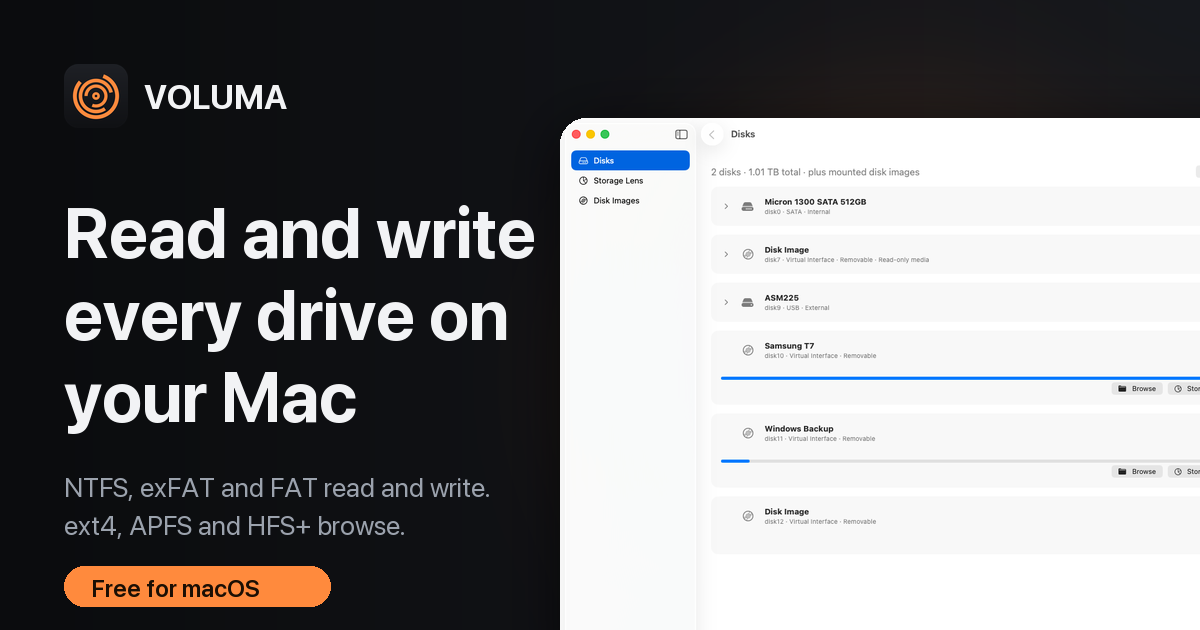
|
+
MIT License
|
|
2
|
+
|
|
3
|
+
Copyright (c) 2026 Festo Kasalu Magembe
|
|
4
|
+
|
|
5
|
+
Permission is hereby granted, free of charge, to any person obtaining a copy
|
|
6
|
+
of this software and associated documentation files (the "Software"), to deal
|
|
7
|
+
in the Software without restriction, including without limitation the rights
|
|
8
|
+
to use, copy, modify, merge, publish, distribute, sublicense, and/or sell
|
|
9
|
+
copies of the Software, and to permit persons to whom the Software is
|
|
10
|
+
furnished to do so, subject to the following conditions:
|
|
11
|
+
|
|
12
|
+
The above copyright notice and this permission notice shall be included in all
|
|
13
|
+
copies or substantial portions of the Software.
|
|
14
|
+
|
|
15
|
+
THE SOFTWARE IS PROVIDED "AS IS", WITHOUT WARRANTY OF ANY KIND, EXPRESS OR
|
|
16
|
+
IMPLIED, INCLUDING BUT NOT LIMITED TO THE WARRANTIES OF MERCHANTABILITY,
|
|
17
|
+
FITNESS FOR A PARTICULAR PURPOSE AND NONINFRINGEMENT. IN NO EVENT SHALL THE
|
|
18
|
+
AUTHORS OR COPYRIGHT HOLDERS BE LIABLE FOR ANY CLAIM, DAMAGES OR OTHER
|
|
19
|
+
LIABILITY, WHETHER IN AN ACTION OF CONTRACT, TORT OR OTHERWISE, ARISING FROM,
|
|
20
|
+
OUT OF OR IN CONNECTION WITH THE SOFTWARE OR THE USE OR OTHER DEALINGS IN THE
|
|
21
|
+
SOFTWARE.
|
|
@@ -0,0 +1,69 @@
|
|
|
1
|
+
Metadata-Version: 2.4
|
|
2
|
+
Name: nolo-voluma
|
|
3
|
+
Version: 0.1.0
|
|
4
|
+
Summary: VOLUMA: a native macOS explorer that reads and writes NTFS, exFAT and FAT and browses ext4, APFS and HFS+. Run it with `voluma`.
|
|
5
|
+
Author-email: Festo Kasalu Magembe <festomanolo@icloud.com>
|
|
6
|
+
License-Expression: MIT
|
|
7
|
+
Project-URL: Homepage, https://festomanolo.com/voluma/
|
|
8
|
+
Project-URL: Source, https://github.com/festomanolo/voluma
|
|
9
|
+
Project-URL: Download, https://github.com/festomanolo/voluma/releases/latest
|
|
10
|
+
Project-URL: Write to NTFS on Mac, https://festomanolo.com/voluma/guides/write-to-ntfs-on-mac/
|
|
11
|
+
Keywords: ntfs,macos,filesystem,ext4,apfs,hfs+,exfat,fat32,disk,write ntfs on mac,disk explorer
|
|
12
|
+
Classifier: Development Status :: 4 - Beta
|
|
13
|
+
Classifier: Environment :: MacOS X
|
|
14
|
+
Classifier: Intended Audience :: End Users/Desktop
|
|
15
|
+
Classifier: Intended Audience :: System Administrators
|
|
16
|
+
Classifier: Operating System :: MacOS :: MacOS X
|
|
17
|
+
Classifier: Programming Language :: Python :: 3
|
|
18
|
+
Classifier: Topic :: System :: Filesystems
|
|
19
|
+
Classifier: Topic :: Utilities
|
|
20
|
+
Requires-Python: >=3.8
|
|
21
|
+
Description-Content-Type: text/markdown
|
|
22
|
+
License-File: LICENSE
|
|
23
|
+
Dynamic: license-file
|
|
24
|
+
|
|
25
|
+
# VOLUMA for macOS
|
|
26
|
+
|
|
27
|
+
Read and write every drive on your Mac. VOLUMA is a native macOS app that **writes to NTFS**, exFAT and FAT drives and **browses ext4, APFS and HFS+**, copies between drives (and with Finder), and shows where your disk space went.
|
|
28
|
+
|
|
29
|
+
```bash
|
|
30
|
+
pip install nolo-voluma
|
|
31
|
+
voluma
|
|
32
|
+
```
|
|
33
|
+
|
|
34
|
+
|
|
35
|
+
|
|
36
|
+
## What you get
|
|
37
|
+
|
|
38
|
+
- **Write to NTFS** on drives macOS mounts read-only. VOLUMA unmounts the volume, asks for your administrator password once, writes with its own NTFS driver, and gives the drive back to macOS. It refuses drives Windows left dirty or hibernated.
|
|
39
|
+
- **Read** ext2/3/4, APFS and HFS+. **Read and write** exFAT and FAT12/16/32.
|
|
40
|
+
- **Storage Lens**: scans 3.3 million files in about 50 seconds (4.8x faster than `du` in our test), by type, with Finder-style drill-down.
|
|
41
|
+
- **Copy and paste** between any two drives. A name clash never overwrites.
|
|
42
|
+
- **Eject** external drives from the same screen.
|
|
43
|
+
|
|
44
|
+
## Commands
|
|
45
|
+
|
|
46
|
+
| Command | What it does |
|
|
47
|
+
|---|---|
|
|
48
|
+
| `voluma` | open the app |
|
|
49
|
+
| `voluma install` | copy `VOLUMA.app` to `/Applications` (`--user` for `~/Applications`) |
|
|
50
|
+
| `voluma where` | print where the bundled app lives |
|
|
51
|
+
| `voluma --version` | print the version |
|
|
52
|
+
|
|
53
|
+
pip does not mark the files it installs as downloaded from the internet, so macOS normally opens the app without the "unidentified developer" warning that a downloaded zip triggers. If you do see one, right-click the app and choose Open.
|
|
54
|
+
|
|
55
|
+
## Requirements
|
|
56
|
+
|
|
57
|
+
macOS 14 or later, Apple Silicon or Intel (universal build). The Apple Silicon half was built and tested on an Intel Mac and has not yet been run on real Apple Silicon hardware.
|
|
58
|
+
|
|
59
|
+
## Be careful with NTFS writes
|
|
60
|
+
|
|
61
|
+
NTFS writing is checked against ntfs-3g's own consistency tools and against deliberately corrupted volumes, but **not against Windows chkdsk**. Back up anything you cannot replace.
|
|
62
|
+
|
|
63
|
+
## Links
|
|
64
|
+
|
|
65
|
+
- Website, benchmarks and guides: https://festomanolo.com/voluma/
|
|
66
|
+
- Source and releases: https://github.com/festomanolo/voluma
|
|
67
|
+
- How to write to NTFS on a Mac: https://festomanolo.com/voluma/guides/write-to-ntfs-on-mac/
|
|
68
|
+
|
|
69
|
+
MIT licensed.
|
|
@@ -0,0 +1,45 @@
|
|
|
1
|
+
# VOLUMA for macOS
|
|
2
|
+
|
|
3
|
+
Read and write every drive on your Mac. VOLUMA is a native macOS app that **writes to NTFS**, exFAT and FAT drives and **browses ext4, APFS and HFS+**, copies between drives (and with Finder), and shows where your disk space went.
|
|
4
|
+
|
|
5
|
+
```bash
|
|
6
|
+
pip install nolo-voluma
|
|
7
|
+
voluma
|
|
8
|
+
```
|
|
9
|
+
|
|
10
|
+

|
|
11
|
+
|
|
12
|
+
## What you get
|
|
13
|
+
|
|
14
|
+
- **Write to NTFS** on drives macOS mounts read-only. VOLUMA unmounts the volume, asks for your administrator password once, writes with its own NTFS driver, and gives the drive back to macOS. It refuses drives Windows left dirty or hibernated.
|
|
15
|
+
- **Read** ext2/3/4, APFS and HFS+. **Read and write** exFAT and FAT12/16/32.
|
|
16
|
+
- **Storage Lens**: scans 3.3 million files in about 50 seconds (4.8x faster than `du` in our test), by type, with Finder-style drill-down.
|
|
17
|
+
- **Copy and paste** between any two drives. A name clash never overwrites.
|
|
18
|
+
- **Eject** external drives from the same screen.
|
|
19
|
+
|
|
20
|
+
## Commands
|
|
21
|
+
|
|
22
|
+
| Command | What it does |
|
|
23
|
+
|---|---|
|
|
24
|
+
| `voluma` | open the app |
|
|
25
|
+
| `voluma install` | copy `VOLUMA.app` to `/Applications` (`--user` for `~/Applications`) |
|
|
26
|
+
| `voluma where` | print where the bundled app lives |
|
|
27
|
+
| `voluma --version` | print the version |
|
|
28
|
+
|
|
29
|
+
pip does not mark the files it installs as downloaded from the internet, so macOS normally opens the app without the "unidentified developer" warning that a downloaded zip triggers. If you do see one, right-click the app and choose Open.
|
|
30
|
+
|
|
31
|
+
## Requirements
|
|
32
|
+
|
|
33
|
+
macOS 14 or later, Apple Silicon or Intel (universal build). The Apple Silicon half was built and tested on an Intel Mac and has not yet been run on real Apple Silicon hardware.
|
|
34
|
+
|
|
35
|
+
## Be careful with NTFS writes
|
|
36
|
+
|
|
37
|
+
NTFS writing is checked against ntfs-3g's own consistency tools and against deliberately corrupted volumes, but **not against Windows chkdsk**. Back up anything you cannot replace.
|
|
38
|
+
|
|
39
|
+
## Links
|
|
40
|
+
|
|
41
|
+
- Website, benchmarks and guides: https://festomanolo.com/voluma/
|
|
42
|
+
- Source and releases: https://github.com/festomanolo/voluma
|
|
43
|
+
- How to write to NTFS on a Mac: https://festomanolo.com/voluma/guides/write-to-ntfs-on-mac/
|
|
44
|
+
|
|
45
|
+
MIT licensed.
|
|
@@ -0,0 +1,38 @@
|
|
|
1
|
+
[build-system]
|
|
2
|
+
requires = ["setuptools>=64", "wheel"]
|
|
3
|
+
build-backend = "setuptools.build_meta"
|
|
4
|
+
|
|
5
|
+
[project]
|
|
6
|
+
name = "nolo-voluma"
|
|
7
|
+
version = "0.1.0"
|
|
8
|
+
description = "VOLUMA: a native macOS explorer that reads and writes NTFS, exFAT and FAT and browses ext4, APFS and HFS+. Run it with `voluma`."
|
|
9
|
+
readme = "README.md"
|
|
10
|
+
license = "MIT"
|
|
11
|
+
license-files = ["LICENSE"]
|
|
12
|
+
requires-python = ">=3.8"
|
|
13
|
+
authors = [{ name = "Festo Kasalu Magembe", email = "festomanolo@icloud.com" }]
|
|
14
|
+
keywords = ["ntfs", "macos", "filesystem", "ext4", "apfs", "hfs+", "exfat", "fat32", "disk", "write ntfs on mac", "disk explorer"]
|
|
15
|
+
classifiers = [
|
|
16
|
+
"Development Status :: 4 - Beta",
|
|
17
|
+
"Environment :: MacOS X",
|
|
18
|
+
"Intended Audience :: End Users/Desktop",
|
|
19
|
+
"Intended Audience :: System Administrators",
|
|
20
|
+
"Operating System :: MacOS :: MacOS X",
|
|
21
|
+
"Programming Language :: Python :: 3",
|
|
22
|
+
"Topic :: System :: Filesystems",
|
|
23
|
+
"Topic :: Utilities",
|
|
24
|
+
]
|
|
25
|
+
|
|
26
|
+
[project.urls]
|
|
27
|
+
Homepage = "https://festomanolo.com/voluma/"
|
|
28
|
+
Source = "https://github.com/festomanolo/voluma"
|
|
29
|
+
Download = "https://github.com/festomanolo/voluma/releases/latest"
|
|
30
|
+
"Write to NTFS on Mac" = "https://festomanolo.com/voluma/guides/write-to-ntfs-on-mac/"
|
|
31
|
+
|
|
32
|
+
[project.scripts]
|
|
33
|
+
voluma = "nolo_voluma.cli:main"
|
|
34
|
+
|
|
35
|
+
[tool.setuptools]
|
|
36
|
+
package-dir = { "" = "src" }
|
|
37
|
+
packages = ["nolo_voluma"]
|
|
38
|
+
include-package-data = true
|
|
@@ -0,0 +1,26 @@
|
|
|
1
|
+
"""Platform wheel: the package carries the signed universal VOLUMA.app, so it is tagged for macOS only."""
|
|
2
|
+
import os
|
|
3
|
+
import sys
|
|
4
|
+
from setuptools import setup
|
|
5
|
+
from wheel.bdist_wheel import bdist_wheel
|
|
6
|
+
|
|
7
|
+
HERE = os.path.dirname(os.path.abspath(__file__))
|
|
8
|
+
APP = os.path.join(HERE, "src", "nolo_voluma", "VOLUMA.app", "Contents", "MacOS", "Voluma")
|
|
9
|
+
|
|
10
|
+
|
|
11
|
+
class MacWheel(bdist_wheel):
|
|
12
|
+
def finalize_options(self):
|
|
13
|
+
super().finalize_options()
|
|
14
|
+
self.root_is_pure = False # contains a compiled app, not just Python
|
|
15
|
+
|
|
16
|
+
def get_tag(self):
|
|
17
|
+
return "py3", "none", "macosx_14_0_universal2"
|
|
18
|
+
|
|
19
|
+
|
|
20
|
+
# Fail loudly instead of installing something that cannot run: this is a macOS app.
|
|
21
|
+
if sys.platform != "darwin" and any(a in sys.argv for a in ("bdist_wheel", "install", "develop", "build")):
|
|
22
|
+
sys.exit("nolo-voluma is a macOS app (macOS 14 or later). It cannot be installed on this platform.")
|
|
23
|
+
if not os.path.exists(APP):
|
|
24
|
+
sys.exit("VOLUMA.app is missing from src/nolo_voluma. Run pypi/build.sh, which copies it in from target/dist.")
|
|
25
|
+
|
|
26
|
+
setup(cmdclass={"bdist_wheel": MacWheel})
|
|
@@ -0,0 +1,16 @@
|
|
|
1
|
+
<?xml version="1.0" encoding="UTF-8"?>
|
|
2
|
+
<!DOCTYPE plist PUBLIC "-//Apple//DTD PLIST 1.0//EN" "http://www.apple.com/DTDs/PropertyList-1.0.dtd">
|
|
3
|
+
<plist version="1.0"><dict>
|
|
4
|
+
<key>CFBundleName</key><string>VOLUMA</string>
|
|
5
|
+
<key>CFBundleDisplayName</key><string>VOLUMA</string>
|
|
6
|
+
<key>CFBundleIdentifier</key><string>com.festomanolo.voluma</string>
|
|
7
|
+
<key>CFBundleExecutable</key><string>Voluma</string>
|
|
8
|
+
<key>CFBundleIconFile</key><string>AppIcon</string>
|
|
9
|
+
<key>CFBundlePackageType</key><string>APPL</string>
|
|
10
|
+
<key>CFBundleShortVersionString</key><string>0.1.0</string>
|
|
11
|
+
<key>CFBundleVersion</key><string>0.1.0</string>
|
|
12
|
+
<key>LSMinimumSystemVersion</key><string>14.0</string>
|
|
13
|
+
<key>LSApplicationCategoryType</key><string>public.app-category.utilities</string>
|
|
14
|
+
<key>NSHighResolutionCapable</key><true/>
|
|
15
|
+
<key>NSHumanReadableCopyright</key><string>Copyright 2026 Festo Kasalu Magembe. MIT licence.</string>
|
|
16
|
+
</dict></plist>
|
|
Binary file
|
|
@@ -0,0 +1,137 @@
|
|
|
1
|
+
<?xml version="1.0" encoding="UTF-8"?>
|
|
2
|
+
<!DOCTYPE plist PUBLIC "-//Apple//DTD PLIST 1.0//EN" "http://www.apple.com/DTDs/PropertyList-1.0.dtd">
|
|
3
|
+
<plist version="1.0">
|
|
4
|
+
<dict>
|
|
5
|
+
<key>files</key>
|
|
6
|
+
<dict>
|
|
7
|
+
<key>Resources/AppIcon.icns</key>
|
|
8
|
+
<data>
|
|
9
|
+
09WqLw4QU9md+Ue9tDZ0K9AUm3c=
|
|
10
|
+
</data>
|
|
11
|
+
</dict>
|
|
12
|
+
<key>files2</key>
|
|
13
|
+
<dict>
|
|
14
|
+
<key>Helpers/voluma-helper</key>
|
|
15
|
+
<dict>
|
|
16
|
+
<key>cdhash</key>
|
|
17
|
+
<data>
|
|
18
|
+
tOhFt/OhmTpSvAhk9zjWv3AdtBs=
|
|
19
|
+
</data>
|
|
20
|
+
<key>requirement</key>
|
|
21
|
+
<string>cdhash H"b4e845b7f3a1993a52bc0864f738d6bf701db41b" or cdhash H"eb71256f9fa82895d99a4afb27ce40ff3aaf476d"</string>
|
|
22
|
+
</dict>
|
|
23
|
+
<key>Resources/AppIcon.icns</key>
|
|
24
|
+
<dict>
|
|
25
|
+
<key>hash2</key>
|
|
26
|
+
<data>
|
|
27
|
+
6rweOO6tIRJw8bBu0UHmmfcH+Qb0no7IEQnn4Jw9gis=
|
|
28
|
+
</data>
|
|
29
|
+
</dict>
|
|
30
|
+
</dict>
|
|
31
|
+
<key>rules</key>
|
|
32
|
+
<dict>
|
|
33
|
+
<key>^Resources/</key>
|
|
34
|
+
<true/>
|
|
35
|
+
<key>^Resources/.*\.lproj/</key>
|
|
36
|
+
<dict>
|
|
37
|
+
<key>optional</key>
|
|
38
|
+
<true/>
|
|
39
|
+
<key>weight</key>
|
|
40
|
+
<real>1000</real>
|
|
41
|
+
</dict>
|
|
42
|
+
<key>^Resources/.*\.lproj/locversion.plist$</key>
|
|
43
|
+
<dict>
|
|
44
|
+
<key>omit</key>
|
|
45
|
+
<true/>
|
|
46
|
+
<key>weight</key>
|
|
47
|
+
<real>1100</real>
|
|
48
|
+
</dict>
|
|
49
|
+
<key>^Resources/Base\.lproj/</key>
|
|
50
|
+
<dict>
|
|
51
|
+
<key>weight</key>
|
|
52
|
+
<real>1010</real>
|
|
53
|
+
</dict>
|
|
54
|
+
<key>^version.plist$</key>
|
|
55
|
+
<true/>
|
|
56
|
+
</dict>
|
|
57
|
+
<key>rules2</key>
|
|
58
|
+
<dict>
|
|
59
|
+
<key>.*\.dSYM($|/)</key>
|
|
60
|
+
<dict>
|
|
61
|
+
<key>weight</key>
|
|
62
|
+
<real>11</real>
|
|
63
|
+
</dict>
|
|
64
|
+
<key>^(.*/)?\.DS_Store$</key>
|
|
65
|
+
<dict>
|
|
66
|
+
<key>omit</key>
|
|
67
|
+
<true/>
|
|
68
|
+
<key>weight</key>
|
|
69
|
+
<real>2000</real>
|
|
70
|
+
</dict>
|
|
71
|
+
<key>^(Frameworks|SharedFrameworks|PlugIns|Plug-ins|XPCServices|Helpers|MacOS|Library/(Automator|Spotlight|LoginItems))/</key>
|
|
72
|
+
<dict>
|
|
73
|
+
<key>nested</key>
|
|
74
|
+
<true/>
|
|
75
|
+
<key>weight</key>
|
|
76
|
+
<real>10</real>
|
|
77
|
+
</dict>
|
|
78
|
+
<key>^.*</key>
|
|
79
|
+
<true/>
|
|
80
|
+
<key>^Info\.plist$</key>
|
|
81
|
+
<dict>
|
|
82
|
+
<key>omit</key>
|
|
83
|
+
<true/>
|
|
84
|
+
<key>weight</key>
|
|
85
|
+
<real>20</real>
|
|
86
|
+
</dict>
|
|
87
|
+
<key>^PkgInfo$</key>
|
|
88
|
+
<dict>
|
|
89
|
+
<key>omit</key>
|
|
90
|
+
<true/>
|
|
91
|
+
<key>weight</key>
|
|
92
|
+
<real>20</real>
|
|
93
|
+
</dict>
|
|
94
|
+
<key>^Resources/</key>
|
|
95
|
+
<dict>
|
|
96
|
+
<key>weight</key>
|
|
97
|
+
<real>20</real>
|
|
98
|
+
</dict>
|
|
99
|
+
<key>^Resources/.*\.lproj/</key>
|
|
100
|
+
<dict>
|
|
101
|
+
<key>optional</key>
|
|
102
|
+
<true/>
|
|
103
|
+
<key>weight</key>
|
|
104
|
+
<real>1000</real>
|
|
105
|
+
</dict>
|
|
106
|
+
<key>^Resources/.*\.lproj/locversion.plist$</key>
|
|
107
|
+
<dict>
|
|
108
|
+
<key>omit</key>
|
|
109
|
+
<true/>
|
|
110
|
+
<key>weight</key>
|
|
111
|
+
<real>1100</real>
|
|
112
|
+
</dict>
|
|
113
|
+
<key>^Resources/Base\.lproj/</key>
|
|
114
|
+
<dict>
|
|
115
|
+
<key>weight</key>
|
|
116
|
+
<real>1010</real>
|
|
117
|
+
</dict>
|
|
118
|
+
<key>^[^/]+$</key>
|
|
119
|
+
<dict>
|
|
120
|
+
<key>nested</key>
|
|
121
|
+
<true/>
|
|
122
|
+
<key>weight</key>
|
|
123
|
+
<real>10</real>
|
|
124
|
+
</dict>
|
|
125
|
+
<key>^embedded\.provisionprofile$</key>
|
|
126
|
+
<dict>
|
|
127
|
+
<key>weight</key>
|
|
128
|
+
<real>20</real>
|
|
129
|
+
</dict>
|
|
130
|
+
<key>^version\.plist$</key>
|
|
131
|
+
<dict>
|
|
132
|
+
<key>weight</key>
|
|
133
|
+
<real>20</real>
|
|
134
|
+
</dict>
|
|
135
|
+
</dict>
|
|
136
|
+
</dict>
|
|
137
|
+
</plist>
|
|
@@ -0,0 +1,73 @@
|
|
|
1
|
+
"""The `voluma` command: start the app from a terminal, find it, or copy it into Applications."""
|
|
2
|
+
import argparse
|
|
3
|
+
import os
|
|
4
|
+
import platform
|
|
5
|
+
import shutil
|
|
6
|
+
import subprocess
|
|
7
|
+
import sys
|
|
8
|
+
|
|
9
|
+
from . import APP_PATH, __version__
|
|
10
|
+
|
|
11
|
+
HELP = """\
|
|
12
|
+
usage: voluma [command]
|
|
13
|
+
|
|
14
|
+
voluma open VOLUMA
|
|
15
|
+
voluma where print where the bundled VOLUMA.app is
|
|
16
|
+
voluma install copy VOLUMA.app to /Applications (or ~/Applications with --user)
|
|
17
|
+
voluma --version print the version
|
|
18
|
+
"""
|
|
19
|
+
|
|
20
|
+
|
|
21
|
+
def _require_mac() -> None:
|
|
22
|
+
if sys.platform != "darwin":
|
|
23
|
+
sys.exit("voluma: VOLUMA is a macOS app (macOS 14 or later).")
|
|
24
|
+
mac = platform.mac_ver()[0].split(".")
|
|
25
|
+
if mac and mac[0].isdigit() and int(mac[0]) < 14:
|
|
26
|
+
sys.exit(f"voluma: needs macOS 14 or later (this is {platform.mac_ver()[0]}).")
|
|
27
|
+
if not os.path.isdir(APP_PATH):
|
|
28
|
+
sys.exit("voluma: the app bundle is missing from this install. Reinstall with: pip install --force-reinstall nolo-voluma")
|
|
29
|
+
|
|
30
|
+
|
|
31
|
+
def _launch() -> int:
|
|
32
|
+
_require_mac()
|
|
33
|
+
# `open` hands the app to LaunchServices, so the terminal is free again immediately.
|
|
34
|
+
return subprocess.call(["open", APP_PATH])
|
|
35
|
+
|
|
36
|
+
|
|
37
|
+
def _install(user: bool) -> int:
|
|
38
|
+
_require_mac()
|
|
39
|
+
dest_dir = os.path.expanduser("~/Applications") if user else "/Applications"
|
|
40
|
+
os.makedirs(dest_dir, exist_ok=True)
|
|
41
|
+
dest = os.path.join(dest_dir, "VOLUMA.app")
|
|
42
|
+
if os.path.exists(dest):
|
|
43
|
+
shutil.rmtree(dest)
|
|
44
|
+
# ditto keeps the code signature, permissions and extended attributes intact; shutil.copytree can lose them.
|
|
45
|
+
rc = subprocess.call(["ditto", APP_PATH, dest])
|
|
46
|
+
if rc == 0:
|
|
47
|
+
print(f"Installed {dest}")
|
|
48
|
+
return rc
|
|
49
|
+
|
|
50
|
+
|
|
51
|
+
def main(argv=None) -> int:
|
|
52
|
+
p = argparse.ArgumentParser(prog="voluma", add_help=False)
|
|
53
|
+
p.add_argument("command", nargs="?", choices=["where", "install"])
|
|
54
|
+
p.add_argument("--user", action="store_true")
|
|
55
|
+
p.add_argument("-V", "--version", action="store_true")
|
|
56
|
+
p.add_argument("-h", "--help", action="store_true")
|
|
57
|
+
a = p.parse_args(argv)
|
|
58
|
+
if a.help:
|
|
59
|
+
print(HELP, end="")
|
|
60
|
+
return 0
|
|
61
|
+
if a.version:
|
|
62
|
+
print(f"voluma {__version__}")
|
|
63
|
+
return 0
|
|
64
|
+
if a.command == "where":
|
|
65
|
+
print(APP_PATH)
|
|
66
|
+
return 0
|
|
67
|
+
if a.command == "install":
|
|
68
|
+
return _install(a.user)
|
|
69
|
+
return _launch()
|
|
70
|
+
|
|
71
|
+
|
|
72
|
+
if __name__ == "__main__":
|
|
73
|
+
sys.exit(main())
|
|
@@ -0,0 +1,69 @@
|
|
|
1
|
+
Metadata-Version: 2.4
|
|
2
|
+
Name: nolo-voluma
|
|
3
|
+
Version: 0.1.0
|
|
4
|
+
Summary: VOLUMA: a native macOS explorer that reads and writes NTFS, exFAT and FAT and browses ext4, APFS and HFS+. Run it with `voluma`.
|
|
5
|
+
Author-email: Festo Kasalu Magembe <festomanolo@icloud.com>
|
|
6
|
+
License-Expression: MIT
|
|
7
|
+
Project-URL: Homepage, https://festomanolo.com/voluma/
|
|
8
|
+
Project-URL: Source, https://github.com/festomanolo/voluma
|
|
9
|
+
Project-URL: Download, https://github.com/festomanolo/voluma/releases/latest
|
|
10
|
+
Project-URL: Write to NTFS on Mac, https://festomanolo.com/voluma/guides/write-to-ntfs-on-mac/
|
|
11
|
+
Keywords: ntfs,macos,filesystem,ext4,apfs,hfs+,exfat,fat32,disk,write ntfs on mac,disk explorer
|
|
12
|
+
Classifier: Development Status :: 4 - Beta
|
|
13
|
+
Classifier: Environment :: MacOS X
|
|
14
|
+
Classifier: Intended Audience :: End Users/Desktop
|
|
15
|
+
Classifier: Intended Audience :: System Administrators
|
|
16
|
+
Classifier: Operating System :: MacOS :: MacOS X
|
|
17
|
+
Classifier: Programming Language :: Python :: 3
|
|
18
|
+
Classifier: Topic :: System :: Filesystems
|
|
19
|
+
Classifier: Topic :: Utilities
|
|
20
|
+
Requires-Python: >=3.8
|
|
21
|
+
Description-Content-Type: text/markdown
|
|
22
|
+
License-File: LICENSE
|
|
23
|
+
Dynamic: license-file
|
|
24
|
+
|
|
25
|
+
# VOLUMA for macOS
|
|
26
|
+
|
|
27
|
+
Read and write every drive on your Mac. VOLUMA is a native macOS app that **writes to NTFS**, exFAT and FAT drives and **browses ext4, APFS and HFS+**, copies between drives (and with Finder), and shows where your disk space went.
|
|
28
|
+
|
|
29
|
+
```bash
|
|
30
|
+
pip install nolo-voluma
|
|
31
|
+
voluma
|
|
32
|
+
```
|
|
33
|
+
|
|
34
|
+

|
|
35
|
+
|
|
36
|
+
## What you get
|
|
37
|
+
|
|
38
|
+
- **Write to NTFS** on drives macOS mounts read-only. VOLUMA unmounts the volume, asks for your administrator password once, writes with its own NTFS driver, and gives the drive back to macOS. It refuses drives Windows left dirty or hibernated.
|
|
39
|
+
- **Read** ext2/3/4, APFS and HFS+. **Read and write** exFAT and FAT12/16/32.
|
|
40
|
+
- **Storage Lens**: scans 3.3 million files in about 50 seconds (4.8x faster than `du` in our test), by type, with Finder-style drill-down.
|
|
41
|
+
- **Copy and paste** between any two drives. A name clash never overwrites.
|
|
42
|
+
- **Eject** external drives from the same screen.
|
|
43
|
+
|
|
44
|
+
## Commands
|
|
45
|
+
|
|
46
|
+
| Command | What it does |
|
|
47
|
+
|---|---|
|
|
48
|
+
| `voluma` | open the app |
|
|
49
|
+
| `voluma install` | copy `VOLUMA.app` to `/Applications` (`--user` for `~/Applications`) |
|
|
50
|
+
| `voluma where` | print where the bundled app lives |
|
|
51
|
+
| `voluma --version` | print the version |
|
|
52
|
+
|
|
53
|
+
pip does not mark the files it installs as downloaded from the internet, so macOS normally opens the app without the "unidentified developer" warning that a downloaded zip triggers. If you do see one, right-click the app and choose Open.
|
|
54
|
+
|
|
55
|
+
## Requirements
|
|
56
|
+
|
|
57
|
+
macOS 14 or later, Apple Silicon or Intel (universal build). The Apple Silicon half was built and tested on an Intel Mac and has not yet been run on real Apple Silicon hardware.
|
|
58
|
+
|
|
59
|
+
## Be careful with NTFS writes
|
|
60
|
+
|
|
61
|
+
NTFS writing is checked against ntfs-3g's own consistency tools and against deliberately corrupted volumes, but **not against Windows chkdsk**. Back up anything you cannot replace.
|
|
62
|
+
|
|
63
|
+
## Links
|
|
64
|
+
|
|
65
|
+
- Website, benchmarks and guides: https://festomanolo.com/voluma/
|
|
66
|
+
- Source and releases: https://github.com/festomanolo/voluma
|
|
67
|
+
- How to write to NTFS on a Mac: https://festomanolo.com/voluma/guides/write-to-ntfs-on-mac/
|
|
68
|
+
|
|
69
|
+
MIT licensed.
|
|
@@ -0,0 +1,17 @@
|
|
|
1
|
+
LICENSE
|
|
2
|
+
MANIFEST.in
|
|
3
|
+
README.md
|
|
4
|
+
pyproject.toml
|
|
5
|
+
setup.py
|
|
6
|
+
src/nolo_voluma/__init__.py
|
|
7
|
+
src/nolo_voluma/cli.py
|
|
8
|
+
src/nolo_voluma.egg-info/PKG-INFO
|
|
9
|
+
src/nolo_voluma.egg-info/SOURCES.txt
|
|
10
|
+
src/nolo_voluma.egg-info/dependency_links.txt
|
|
11
|
+
src/nolo_voluma.egg-info/entry_points.txt
|
|
12
|
+
src/nolo_voluma.egg-info/top_level.txt
|
|
13
|
+
src/nolo_voluma/VOLUMA.app/Contents/Info.plist
|
|
14
|
+
src/nolo_voluma/VOLUMA.app/Contents/Helpers/voluma-helper
|
|
15
|
+
src/nolo_voluma/VOLUMA.app/Contents/MacOS/Voluma
|
|
16
|
+
src/nolo_voluma/VOLUMA.app/Contents/Resources/AppIcon.icns
|
|
17
|
+
src/nolo_voluma/VOLUMA.app/Contents/_CodeSignature/CodeResources
|
|
@@ -0,0 +1 @@
|
|
|
1
|
+
|
|
@@ -0,0 +1 @@
|
|
|
1
|
+
nolo_voluma
|