nodeeditor-qtpy 0.8.1__tar.gz
This diff represents the content of publicly available package versions that have been released to one of the supported registries. The information contained in this diff is provided for informational purposes only and reflects changes between package versions as they appear in their respective public registries.
- nodeeditor_qtpy-0.8.1/CHANGES.md +31 -0
- nodeeditor_qtpy-0.8.1/HISTORY.rst +249 -0
- nodeeditor_qtpy-0.8.1/LICENCE +23 -0
- nodeeditor_qtpy-0.8.1/PKG-INFO +165 -0
- nodeeditor_qtpy-0.8.1/README.md +133 -0
- nodeeditor_qtpy-0.8.1/docs/CONTRIBUTING.md +89 -0
- nodeeditor_qtpy-0.8.1/docs/api/color-scheme.md +3 -0
- nodeeditor_qtpy-0.8.1/docs/api/content.md +10 -0
- nodeeditor_qtpy-0.8.1/docs/api/edge.md +15 -0
- nodeeditor_qtpy-0.8.1/docs/api/editor-widget.md +4 -0
- nodeeditor_qtpy-0.8.1/docs/api/editor-window.md +4 -0
- nodeeditor_qtpy-0.8.1/docs/api/graph.md +4 -0
- nodeeditor_qtpy-0.8.1/docs/api/graphics.md +16 -0
- nodeeditor_qtpy-0.8.1/docs/api/group.md +7 -0
- nodeeditor_qtpy-0.8.1/docs/api/index.md +29 -0
- nodeeditor_qtpy-0.8.1/docs/api/node.md +5 -0
- nodeeditor_qtpy-0.8.1/docs/api/scene.md +7 -0
- nodeeditor_qtpy-0.8.1/docs/api/serializable.md +16 -0
- nodeeditor_qtpy-0.8.1/docs/api/socket-shapes.md +4 -0
- nodeeditor_qtpy-0.8.1/docs/api/socket.md +3 -0
- nodeeditor_qtpy-0.8.1/docs/api/utils.md +5 -0
- nodeeditor_qtpy-0.8.1/docs/events.md +44 -0
- nodeeditor_qtpy-0.8.1/docs/guides/coding-standards.md +36 -0
- nodeeditor_qtpy-0.8.1/docs/guides/edge-labels.md +53 -0
- nodeeditor_qtpy-0.8.1/docs/guides/graph-algorithms.md +136 -0
- nodeeditor_qtpy-0.8.1/docs/guides/group-nodes.md +147 -0
- nodeeditor_qtpy-0.8.1/docs/guides/multi-input-nodes.md +225 -0
- nodeeditor_qtpy-0.8.1/docs/guides/node-grouping.md +311 -0
- nodeeditor_qtpy-0.8.1/docs/guides/node-labels.md +59 -0
- nodeeditor_qtpy-0.8.1/docs/guides/socket-shapes.md +143 -0
- nodeeditor_qtpy-0.8.1/docs/images/edge-labels.png +0 -0
- nodeeditor_qtpy-0.8.1/docs/images/graph-algorithms.png +0 -0
- nodeeditor_qtpy-0.8.1/docs/images/group-collapsed.png +0 -0
- nodeeditor_qtpy-0.8.1/docs/images/group-nodes.png +0 -0
- nodeeditor_qtpy-0.8.1/docs/images/multi-input.png +0 -0
- nodeeditor_qtpy-0.8.1/docs/images/node-labels.png +0 -0
- nodeeditor_qtpy-0.8.1/docs/images/quickstart.png +0 -0
- nodeeditor_qtpy-0.8.1/docs/images/socket-shapes.png +0 -0
- nodeeditor_qtpy-0.8.1/docs/index.md +67 -0
- nodeeditor_qtpy-0.8.1/docs/installation.md +67 -0
- nodeeditor_qtpy-0.8.1/docs/quickstart.md +125 -0
- nodeeditor_qtpy-0.8.1/docs/screenshot-calculator.png +0 -0
- nodeeditor_qtpy-0.8.1/docs/screenshot-example.png +0 -0
- nodeeditor_qtpy-0.8.1/examples/calculator_ss_1.png +0 -0
- nodeeditor_qtpy-0.8.1/examples/example_calculator/calc_conf.py +51 -0
- nodeeditor_qtpy-0.8.1/examples/example_calculator/calc_drag_listbox.py +68 -0
- nodeeditor_qtpy-0.8.1/examples/example_calculator/calc_graph_inspector.py +289 -0
- nodeeditor_qtpy-0.8.1/examples/example_calculator/calc_node_base.py +204 -0
- nodeeditor_qtpy-0.8.1/examples/example_calculator/calc_sub_window.py +439 -0
- nodeeditor_qtpy-0.8.1/examples/example_calculator/calc_window.py +408 -0
- nodeeditor_qtpy-0.8.1/examples/example_calculator/example.json +253 -0
- nodeeditor_qtpy-0.8.1/examples/example_calculator/example2.json +325 -0
- nodeeditor_qtpy-0.8.1/examples/example_calculator/example3.json +228 -0
- nodeeditor_qtpy-0.8.1/examples/example_calculator/icons/File Output.png +0 -0
- nodeeditor_qtpy-0.8.1/examples/example_calculator/icons/add.png +0 -0
- nodeeditor_qtpy-0.8.1/examples/example_calculator/icons/divide.png +0 -0
- nodeeditor_qtpy-0.8.1/examples/example_calculator/icons/dot.png +0 -0
- nodeeditor_qtpy-0.8.1/examples/example_calculator/icons/icons.psd +0 -0
- nodeeditor_qtpy-0.8.1/examples/example_calculator/icons/in.png +0 -0
- nodeeditor_qtpy-0.8.1/examples/example_calculator/icons/mul.png +0 -0
- nodeeditor_qtpy-0.8.1/examples/example_calculator/icons/out.png +0 -0
- nodeeditor_qtpy-0.8.1/examples/example_calculator/icons/status_icons.png +0 -0
- nodeeditor_qtpy-0.8.1/examples/example_calculator/icons/status_icons.psd +0 -0
- nodeeditor_qtpy-0.8.1/examples/example_calculator/icons/sub.png +0 -0
- nodeeditor_qtpy-0.8.1/examples/example_calculator/main.py +17 -0
- nodeeditor_qtpy-0.8.1/examples/example_calculator/nodes/__init__.py +8 -0
- nodeeditor_qtpy-0.8.1/examples/example_calculator/nodes/check.py +71 -0
- nodeeditor_qtpy-0.8.1/examples/example_calculator/nodes/input.py +62 -0
- nodeeditor_qtpy-0.8.1/examples/example_calculator/nodes/multi_input.py +78 -0
- nodeeditor_qtpy-0.8.1/examples/example_calculator/nodes/operations.py +74 -0
- nodeeditor_qtpy-0.8.1/examples/example_calculator/nodes/output.py +85 -0
- nodeeditor_qtpy-0.8.1/examples/example_calculator/qss/nodeeditor-dark.qss +90 -0
- nodeeditor_qtpy-0.8.1/examples/example_calculator/qss/nodeeditor.qss +103 -0
- nodeeditor_qtpy-0.8.1/examples/example_calculator/qss/nodeeditor.styl +43 -0
- nodeeditor_qtpy-0.8.1/examples/example_calculator/qss/nodeeditor_dark_resources.py +509 -0
- nodeeditor_qtpy-0.8.1/examples/example_color_config.py +313 -0
- nodeeditor_qtpy-0.8.1/examples/example_socket_shapes.py +223 -0
- nodeeditor_qtpy-0.8.1/examples/example_test/graph.json +132 -0
- nodeeditor_qtpy-0.8.1/examples/example_test/graph2.json +105 -0
- nodeeditor_qtpy-0.8.1/examples/example_test/main_ex2.py +21 -0
- nodeeditor_qtpy-0.8.1/mkdocs.yml +113 -0
- nodeeditor_qtpy-0.8.1/nodeeditor/__init__.py +93 -0
- nodeeditor_qtpy-0.8.1/nodeeditor/node_colors_config.py +343 -0
- nodeeditor_qtpy-0.8.1/nodeeditor/node_content_widget.py +129 -0
- nodeeditor_qtpy-0.8.1/nodeeditor/node_decorators.py +65 -0
- nodeeditor_qtpy-0.8.1/nodeeditor/node_edge.py +518 -0
- nodeeditor_qtpy-0.8.1/nodeeditor/node_edge_dragging.py +185 -0
- nodeeditor_qtpy-0.8.1/nodeeditor/node_edge_intersect.py +219 -0
- nodeeditor_qtpy-0.8.1/nodeeditor/node_edge_rerouting.py +216 -0
- nodeeditor_qtpy-0.8.1/nodeeditor/node_edge_snapping.py +95 -0
- nodeeditor_qtpy-0.8.1/nodeeditor/node_edge_validators.py +82 -0
- nodeeditor_qtpy-0.8.1/nodeeditor/node_editor_widget.py +257 -0
- nodeeditor_qtpy-0.8.1/nodeeditor/node_editor_window.py +448 -0
- nodeeditor_qtpy-0.8.1/nodeeditor/node_graph.py +583 -0
- nodeeditor_qtpy-0.8.1/nodeeditor/node_graphics_cutline.py +57 -0
- nodeeditor_qtpy-0.8.1/nodeeditor/node_graphics_edge.py +375 -0
- nodeeditor_qtpy-0.8.1/nodeeditor/node_graphics_edge_path.py +226 -0
- nodeeditor_qtpy-0.8.1/nodeeditor/node_graphics_node.py +693 -0
- nodeeditor_qtpy-0.8.1/nodeeditor/node_graphics_scene.py +369 -0
- nodeeditor_qtpy-0.8.1/nodeeditor/node_graphics_socket.py +262 -0
- nodeeditor_qtpy-0.8.1/nodeeditor/node_graphics_view.py +907 -0
- nodeeditor_qtpy-0.8.1/nodeeditor/node_group.py +1286 -0
- nodeeditor_qtpy-0.8.1/nodeeditor/node_group_node.py +5 -0
- nodeeditor_qtpy-0.8.1/nodeeditor/node_icon_content_widget.py +176 -0
- nodeeditor_qtpy-0.8.1/nodeeditor/node_icon_graphics_node.py +524 -0
- nodeeditor_qtpy-0.8.1/nodeeditor/node_multi_input_node.py +450 -0
- nodeeditor_qtpy-0.8.1/nodeeditor/node_node.py +848 -0
- nodeeditor_qtpy-0.8.1/nodeeditor/node_scene.py +1106 -0
- nodeeditor_qtpy-0.8.1/nodeeditor/node_scene_clipboard.py +314 -0
- nodeeditor_qtpy-0.8.1/nodeeditor/node_scene_history.py +556 -0
- nodeeditor_qtpy-0.8.1/nodeeditor/node_serializable.py +43 -0
- nodeeditor_qtpy-0.8.1/nodeeditor/node_socket.py +445 -0
- nodeeditor_qtpy-0.8.1/nodeeditor/node_socket_shapes.py +261 -0
- nodeeditor_qtpy-0.8.1/nodeeditor/py.typed +0 -0
- nodeeditor_qtpy-0.8.1/nodeeditor/qss/nodestyle.qss +3 -0
- nodeeditor_qtpy-0.8.1/nodeeditor/utils.py +108 -0
- nodeeditor_qtpy-0.8.1/nodeeditor/utils_no_qt.py +21 -0
- nodeeditor_qtpy-0.8.1/pyproject.toml +98 -0
- nodeeditor_qtpy-0.8.1/pyproject.toml.orig +103 -0
- nodeeditor_qtpy-0.8.1/requirements_docs.txt +10 -0
- nodeeditor_qtpy-0.8.1/tests/__init__.py +1 -0
- nodeeditor_qtpy-0.8.1/tests/test_000_import.py +23 -0
- nodeeditor_qtpy-0.8.1/tests/test_100_multi_input.py +387 -0
- nodeeditor_qtpy-0.8.1/tests/test_110_socket_shapes.py +277 -0
- nodeeditor_qtpy-0.8.1/tests/test_120_graph.py +331 -0
- nodeeditor_qtpy-0.8.1/tests/test_200_detail_policy.py +95 -0
- nodeeditor_qtpy-0.8.1/tests/test_300_hover_colors.py +217 -0
|
@@ -0,0 +1,31 @@
|
|
|
1
|
+
Changelog (PyNodeEditor)
|
|
2
|
+
========================
|
|
3
|
+
|
|
4
|
+
0.9.6
|
|
5
|
+
-----
|
|
6
|
+
|
|
7
|
+
- QDMGraphicsEdgeDirect and QDMGraphicsEdgeBezier no longer derive from QDMGraphicsEdge
|
|
8
|
+
- QDMGraphicsEdge is now always used to represent graphics edge, and internaly got stored an instance of GraphicsEdgePathBase
|
|
9
|
+
- logic of calculating Direct and Bezier edges has moved to node_graphics_edge_path.py file into respective classes GraphicsEdgePathDirect and GraphicsEdgePathBezier
|
|
10
|
+
- possibility for NodeEditorWidget to override QDMGraphicsView class by setting `GraphicsView_class` class variable
|
|
11
|
+
|
|
12
|
+
0.9.5
|
|
13
|
+
-----
|
|
14
|
+
|
|
15
|
+
- fixed panning issue when drag edge caused by DragEdge being selectable edge
|
|
16
|
+
|
|
17
|
+
0.9.4
|
|
18
|
+
-----
|
|
19
|
+
|
|
20
|
+
- improvements to selection and edges
|
|
21
|
+
|
|
22
|
+
0.9.3
|
|
23
|
+
-----
|
|
24
|
+
|
|
25
|
+
- improved deserialization even with selections now
|
|
26
|
+
|
|
27
|
+
0.9.2
|
|
28
|
+
-----
|
|
29
|
+
|
|
30
|
+
- First polished and tested version of the library
|
|
31
|
+
- After 54 tutorials: https://www.blenderfreak.com/tutorials/node-editor-tutorial-series/
|
|
@@ -0,0 +1,249 @@
|
|
|
1
|
+
History
|
|
2
|
+
=======
|
|
3
|
+
|
|
4
|
+
Release history for **qtpy-nodeeditor**.
|
|
5
|
+
|
|
6
|
+
This file tracks releases of this project. For the pre-fork upstream
|
|
7
|
+
`PyNodeEditor <https://github.com/benbyjones/PyQtNodeEditor>`_ lineage that
|
|
8
|
+
this code started from, see `CHANGES.md <CHANGES.md>`_.
|
|
9
|
+
|
|
10
|
+
0.8 - 2026-10-21
|
|
11
|
+
----------------
|
|
12
|
+
|
|
13
|
+
**Features**
|
|
14
|
+
|
|
15
|
+
- Configurable socket shapes: nodes declare per-side, per-type socket shapes
|
|
16
|
+
through ``input_socket_shapes`` / ``output_socket_shapes`` (with an ``'*'``
|
|
17
|
+
wildcard, circle fallback), over a new ``nodeeditor.node_socket_shapes``
|
|
18
|
+
registry (`register_socket_shape`) with built-in ``circle``, ``square``,
|
|
19
|
+
``triangle`` and ``chevron`` presets and support for custom point tuples,
|
|
20
|
+
shape classes, and drawing callbacks. Shape outlines double as hit areas, and
|
|
21
|
+
unknown names fall back to the circle instead of raising. Serialization is
|
|
22
|
+
unchanged.
|
|
23
|
+
- Socket hover highlight: sockets now accept hover events and paint a highlight
|
|
24
|
+
when hovered, kept separate from the ``isHighlighted`` flag used for edge
|
|
25
|
+
snapping.
|
|
26
|
+
- Per-element level-of-detail policy: the canvas' single "drop detail below the
|
|
27
|
+
zoom threshold" boolean became a policy map over the node's elements
|
|
28
|
+
(``content``, ``label``, ``sockets``), each ``always``, ``auto`` or ``never``
|
|
29
|
+
(`Scene.set_detail_policy`), with answers readable per element through
|
|
30
|
+
``detail_enabled``. Applications can register and query elements of their own.
|
|
31
|
+
- The level-of-detail threshold is a per-instance value
|
|
32
|
+
(``detail_lod_threshold``) instead of a class constant, so each scene can
|
|
33
|
+
move the point where it simplifies.
|
|
34
|
+
- ``setDetailState`` broadcasts the resolved state to items; ``setDetailVisible``
|
|
35
|
+
stays for callers outside the scene with its old drop-everything meaning.
|
|
36
|
+
|
|
37
|
+
**Performance**
|
|
38
|
+
|
|
39
|
+
- Zoom-based detail switching and grid level culling for large graphs: a grid
|
|
40
|
+
level whose on-screen spacing falls under ``MIN_GRID_SPACING_PX`` is not
|
|
41
|
+
drawn, since it reads as a wash and costs time proportional to its line
|
|
42
|
+
count.
|
|
43
|
+
|
|
44
|
+
**Docs**
|
|
45
|
+
|
|
46
|
+
- Added ``docs/SOCKET_SHAPES.md`` with a usage guide, the
|
|
47
|
+
``examples/example_socket_shapes.py`` demo (including a custom class and a
|
|
48
|
+
callback shape), and expanded ``docs/MULTI_INPUT_NODES.md``.
|
|
49
|
+
|
|
50
|
+
**Tests**
|
|
51
|
+
|
|
52
|
+
- Added ``tests/test_110_socket_shapes.py`` for shape registration, resolution,
|
|
53
|
+
hit areas, hover and serialization neutrality, and
|
|
54
|
+
``tests/test_200_detail_policy.py`` for policy resolution, broadcasting and
|
|
55
|
+
threshold overrides.
|
|
56
|
+
|
|
57
|
+
0.7 - 2026-09-29
|
|
58
|
+
----------------
|
|
59
|
+
|
|
60
|
+
**Features**
|
|
61
|
+
|
|
62
|
+
- Added centralized color configuration for edges, sockets, and node hover
|
|
63
|
+
highlights, with scene helpers to refresh existing graphics items.
|
|
64
|
+
- Added an interactive color configuration example with theme selection.
|
|
65
|
+
|
|
66
|
+
**Fixes**
|
|
67
|
+
|
|
68
|
+
- Preserve the existing socket type palette and transparent fallback when
|
|
69
|
+
applying color configuration, and restore node colors when resetting defaults.
|
|
70
|
+
- Preserve upstream grouping behavior while applying color changes.
|
|
71
|
+
- Renamed a case-colliding scene fixture for Windows compatibility.
|
|
72
|
+
|
|
73
|
+
**Tests**
|
|
74
|
+
|
|
75
|
+
- Added headless regression coverage for color updates, icon nodes, the color
|
|
76
|
+
demo, and group collapse/expand and serialization with node and edge labels.
|
|
77
|
+
|
|
78
|
+
0.6 - 2026-09-27
|
|
79
|
+
----------------
|
|
80
|
+
|
|
81
|
+
**Features**
|
|
82
|
+
|
|
83
|
+
- Added ``MultiInputNode``: a node whose input `Socket` accepts any number of
|
|
84
|
+
`Edges` and reads them in an explicit, persisted order. It defines no
|
|
85
|
+
``__init__``, so it can be mixed into an existing node hierarchy without
|
|
86
|
+
changing its constructor chain. Every input socket is multi-edged by default;
|
|
87
|
+
set ``multi_input_socket`` with ``multi_input_all_inputs = False`` to make
|
|
88
|
+
only one socket do so.
|
|
89
|
+
- Reading: ``getOrderedEdges``, ``getOrderedSources``, ``getOrderedValues``,
|
|
90
|
+
``getOrderedNodes``, and ``describeInputOrder``. ``getOrderedValues`` returns
|
|
91
|
+
one entry per connected `Edge`, substituting ``None`` for a source that fails
|
|
92
|
+
to evaluate, so its length always matches the connection count.
|
|
93
|
+
- Reordering: ``setEdgeOrder``, ``setEdgeOrderByNodes``, ``moveEdgeTo``,
|
|
94
|
+
``moveEdgeBy`` (clamped at both ends), ``swapEdges``, ``reverseEdgeOrder``,
|
|
95
|
+
and ``compactEdgeOrder``. A partial order list is accepted; the remaining
|
|
96
|
+
`Edges` keep their relative order. Successful reorders mark the node and its
|
|
97
|
+
descendants dirty so they re-evaluate.
|
|
98
|
+
- Order labels: when ``show_input_order_labels`` is ``True`` (the default), each
|
|
99
|
+
`Edge` on the ordered input is labeled ``#1``, ``#2``, ... Labels are kept in
|
|
100
|
+
sync on connection, reorder, and removal, and are cleared on detach only when
|
|
101
|
+
they still match the ``#N`` pattern, so a custom label set from code is never
|
|
102
|
+
destroyed. Set the flag to ``False`` to opt out.
|
|
103
|
+
- ``Edge.input_index``: the 0-based read position of an `Edge` on its end
|
|
104
|
+
(input) `Socket`, settable at construction as ``Edge(..., input_index=n)`` to
|
|
105
|
+
insert at a slot instead of appending. Output sockets are never ordered and
|
|
106
|
+
reset the value to ``-1``.
|
|
107
|
+
- ``Socket`` ordering API: ``addEdge`` accepts an ``index``, and
|
|
108
|
+
``orderedEdges``, ``edgeIndex``, ``compactEdgeOrder``, ``setEdgeOrder``,
|
|
109
|
+
``moveEdgeTo``, and ``swapEdges`` round out the set. The owning input `Socket`
|
|
110
|
+
keeps read positions gap free after every add and remove, so the order stays
|
|
111
|
+
compact through every connection path without per-path plumbing.
|
|
112
|
+
- ``input_index`` is persisted by ``Edge.serialize()`` / ``deserialize()``.
|
|
113
|
+
Because the number travels on the `Edge`, the order survives save/load,
|
|
114
|
+
copy/paste, and undo/redo even when the file's ``"edges"`` array is shuffled.
|
|
115
|
+
Files written before this release load in connection order.
|
|
116
|
+
- Calculator example: new ``Sum`` node (op code ``OP_NODE_SUM``), plus
|
|
117
|
+
*Reverse Input Order*, *Move First/Last Input to Last/First* in the node
|
|
118
|
+
context menu and *Move Input Earlier/Later* in the edge context menu. Each
|
|
119
|
+
action stores an undo-history entry. Menu entries are gated on the target
|
|
120
|
+
actually being a ``MultiInputNode`` with 2+ edges.
|
|
121
|
+
|
|
122
|
+
**Fixes**
|
|
123
|
+
|
|
124
|
+
- Rerouting an `Edge` onto a multi-edged input no longer drops the socket's
|
|
125
|
+
other `Edges`; each moved `Edge` lands at the read position it held on the
|
|
126
|
+
old socket. Single-edged inputs still replace, as before.
|
|
127
|
+
|
|
128
|
+
**Docs and tests**
|
|
129
|
+
|
|
130
|
+
- Added ``docs/MULTI_INPUT_NODES.md`` and the Sphinx page for
|
|
131
|
+
``nodeeditor.node_multi_input_node``.
|
|
132
|
+
- Added ``tests/test_100_multi_input.py`` covering read order, reordering,
|
|
133
|
+
label handling, and persistence.
|
|
134
|
+
|
|
135
|
+
0.5 - 2026-09-27
|
|
136
|
+
----------------
|
|
137
|
+
|
|
138
|
+
**Features**
|
|
139
|
+
|
|
140
|
+
- Node labels: added ``QDMGraphicsNodeLabel``, a floating single-line text box
|
|
141
|
+
that is editable by the user, integrated into both ``QDMGraphicsNode`` and
|
|
142
|
+
``QDMIconGraphicsNode``. Supports styling, visibility, offset, and edit
|
|
143
|
+
handling.
|
|
144
|
+
- Exposed the node label API on ``Node``: ``setNodeLabel``, ``getNodeLabel``,
|
|
145
|
+
``clearNodeLabel``, ``setNodeLabelVisible``, ``isNodeLabelVisible``,
|
|
146
|
+
``setNodeLabelOffset``, plus a ``labelChanged`` signal.
|
|
147
|
+
- Edge labels: added a code-set, read-only label to ``QDMGraphicsEdge`` and
|
|
148
|
+
``Edge``, constructible as ``Edge(..., label=...)`` and mutable through the
|
|
149
|
+
``label`` property (``getLabel`` / ``setLabel``), with rendering and
|
|
150
|
+
bounding-box updates.
|
|
151
|
+
- Node label ``label_text`` / ``label_visible`` / ``label_offset`` and edge
|
|
152
|
+
labels are persisted across ``serialize`` / ``deserialize``.
|
|
153
|
+
- Added ``docs/NODE_LABELS.md`` and ``docs/EDGE_LABELS.md``.
|
|
154
|
+
|
|
155
|
+
0.4 - 2026-09-26
|
|
156
|
+
----------------
|
|
157
|
+
|
|
158
|
+
**Features**
|
|
159
|
+
|
|
160
|
+
- ``SceneHistory.restoring()``: nestable context manager backed by a
|
|
161
|
+
restore-depth counter, replacing the ``is_restoring_history`` flag. A callback
|
|
162
|
+
fired mid-restore can no longer re-enable history storage and record a bogus
|
|
163
|
+
stamp. ``is_restoring_history`` is retained as a property for legacy callers
|
|
164
|
+
that assign to it.
|
|
165
|
+
- ``SceneHistory.storeHistory()`` gained ``merge_key`` and ``merge``, coalescing
|
|
166
|
+
consecutive related stores (for example a burst of keystrokes) into a single
|
|
167
|
+
undo step. Merging only happens at the tip of the stack, so a redo tail is
|
|
168
|
+
never rewritten.
|
|
169
|
+
- ``history_limit`` is now an optional ``SceneHistory`` constructor argument;
|
|
170
|
+
``None`` (the default) means unlimited. Previously hard-coded to 32.
|
|
171
|
+
- ``storeHistory()`` now returns ``bool`` reporting whether a stamp was pushed.
|
|
172
|
+
- Added ``SceneHistory.currentText()`` and ``nextText()`` for describing the
|
|
173
|
+
next undo/redo step, and ``removeHistoryModifiedListener()``.
|
|
174
|
+
- Added ``Scene.undo()``, ``redo()``, ``canUndo()``, and ``canRedo()`` so
|
|
175
|
+
subclasses can layer an alternative undo backend. ``NodeEditorWindow`` now
|
|
176
|
+
routes Edit Undo/Redo through the ``Scene`` rather than calling
|
|
177
|
+
``scene.history`` directly.
|
|
178
|
+
|
|
179
|
+
**Fixes**
|
|
180
|
+
|
|
181
|
+
- ``history_stamp_callback`` is resolved defensively via a dedicated dispatch
|
|
182
|
+
helper. A stamp whose node has since been deleted, or one whose content class
|
|
183
|
+
never implemented the callback, no longer aborts the restore. Exceptions
|
|
184
|
+
raised by the callback are logged instead of propagating.
|
|
185
|
+
|
|
186
|
+
**Docs**
|
|
187
|
+
|
|
188
|
+
- Rewrote ``docs/NODE_GROUPING.md`` as a complete usage guide: grouping API,
|
|
189
|
+
collapse/expand with per-edge stubs, appearance, serialization format,
|
|
190
|
+
selection model, the three distinct delete operations, and troubleshooting.
|
|
191
|
+
|
|
192
|
+
0.3 - 2026-09-12
|
|
193
|
+
----------------
|
|
194
|
+
|
|
195
|
+
**Dependencies**
|
|
196
|
+
|
|
197
|
+
- Pinned ``orjson>=3.12.0``.
|
|
198
|
+
|
|
199
|
+
0.2 - 2026-09-11
|
|
200
|
+
----------------
|
|
201
|
+
|
|
202
|
+
**Features**
|
|
203
|
+
|
|
204
|
+
- Node grouping, developed through a ``Group`` class refactor of the earlier
|
|
205
|
+
``GroupNode`` container. ``Group`` is a pure visual container and
|
|
206
|
+
intentionally not a ``Node``: no sockets, no evaluation, no content widget.
|
|
207
|
+
- Group actions for the Edit menu: group selected nodes, ungroup, and
|
|
208
|
+
collapse/expand, with keyboard shortcuts.
|
|
209
|
+
- Drag-and-drop support for moving nodes into a group, with drop highlighting.
|
|
210
|
+
- Group serialization, including collapse state, and saving/loading of
|
|
211
|
+
container expand/collapse.
|
|
212
|
+
- Correct edge drawing and correct internal-edge handling for collapsed groups.
|
|
213
|
+
- Hit-testing improvements: the expanded group body is click-through, and
|
|
214
|
+
header context-menu handling was refined.
|
|
215
|
+
- ``Scene.addGroup`` / ``removeGroup`` / ``getGroupById`` /
|
|
216
|
+
``findCollapsedGroupForNode`` / ``findGroupForDrop`` / ``dropNodesIntoGroup``
|
|
217
|
+
helpers, and a ``parent_group`` attribute on ``Node``.
|
|
218
|
+
|
|
219
|
+
**Fixes**
|
|
220
|
+
|
|
221
|
+
- Edge intersection logic now validates edges before modification, uses the
|
|
222
|
+
proper edge class, and notifies node connections on auto-splits.
|
|
223
|
+
- Fixed a bug where internal edges of a group were removed on collapse.
|
|
224
|
+
- More robust edge deserialization error handling, and a new
|
|
225
|
+
``restoreExpandedVisuals`` method.
|
|
226
|
+
|
|
227
|
+
**Project**
|
|
228
|
+
|
|
229
|
+
- ``QDMNodeIconContentWidget`` accepts an optional ``parent`` argument.
|
|
230
|
+
- Refactored child ID retrieval in ``Scene`` for readability.
|
|
231
|
+
- Adopted ``uv`` for project and lock management.
|
|
232
|
+
|
|
233
|
+
0.1.8 and earlier - 2025-01-28 to 2025-10-22
|
|
234
|
+
--------------------------------------------
|
|
235
|
+
|
|
236
|
+
Pre-grouping baseline. The project was imported from upstream at ``0.9.15``
|
|
237
|
+
and renumbered from ``0.1.0``; ``pyproject.toml`` was introduced at ``0.1.0``
|
|
238
|
+
on 2026-09-09.
|
|
239
|
+
|
|
240
|
+
- Switched data transfer from node-based to socket-based, and the backing
|
|
241
|
+
format from ``json`` to ``orjson`` with a ``.tds`` file extension.
|
|
242
|
+
- New undo/redo implementation, and shift+scroll to zoom horizontally.
|
|
243
|
+
- Icon-based nodes, in the style of Alteryx / n8n, with enhanced icon handling
|
|
244
|
+
in the node UI and improved evaluation logging.
|
|
245
|
+
- Type hints with ``mypy`` checks, and a ``py.typed`` marker.
|
|
246
|
+
- Grid show/hide, and text inside sockets.
|
|
247
|
+
- Edge-handling improvements: cancel with ``Esc`` or by clicking outside, and
|
|
248
|
+
alt+click on a socket to get the socket.
|
|
249
|
+
- Fixed a bug where a rubber-band box was created when no item was created.
|
|
@@ -0,0 +1,23 @@
|
|
|
1
|
+
MIT License
|
|
2
|
+
|
|
3
|
+
Copyright (c) 2019, Pavel Křupala
|
|
4
|
+
Copyright (c) 2024-2026, Azad Kshitij
|
|
5
|
+
|
|
6
|
+
Permission is hereby granted, free of charge, to any person obtaining a copy
|
|
7
|
+
of this software and associated documentation files (the "Software"), to deal
|
|
8
|
+
in the Software without restriction, including without limitation the rights
|
|
9
|
+
to use, copy, modify, merge, publish, distribute, sublicense, and/or sell
|
|
10
|
+
copies of the Software, and to permit persons to whom the Software is
|
|
11
|
+
furnished to do so, subject to the following conditions:
|
|
12
|
+
|
|
13
|
+
The above copyright notice and this permission notice shall be included in all
|
|
14
|
+
copies or substantial portions of the Software.
|
|
15
|
+
|
|
16
|
+
THE SOFTWARE IS PROVIDED "AS IS", WITHOUT WARRANTY OF ANY KIND, EXPRESS OR
|
|
17
|
+
IMPLIED, INCLUDING BUT NOT LIMITED TO THE WARRANTIES OF MERCHANTABILITY,
|
|
18
|
+
FITNESS FOR A PARTICULAR PURPOSE AND NONINFRINGEMENT. IN NO EVENT SHALL THE
|
|
19
|
+
AUTHORS OR COPYRIGHT HOLDERS BE LIABLE FOR ANY CLAIM, DAMAGES OR OTHER
|
|
20
|
+
LIABILITY, WHETHER IN AN ACTION OF CONTRACT, TORT OR OTHERWISE, ARISING FROM,
|
|
21
|
+
OUT OF OR IN CONNECTION WITH THE SOFTWARE OR THE USE OR OTHER DEALINGS IN THE
|
|
22
|
+
SOFTWARE.
|
|
23
|
+
|
|
@@ -0,0 +1,165 @@
|
|
|
1
|
+
Metadata-Version: 2.4
|
|
2
|
+
Name: nodeeditor-qtpy
|
|
3
|
+
Version: 0.8.1
|
|
4
|
+
Summary: Framework for building node editors and graph UIs in Qt, independent of the Qt binding (PyQt5/PyQt6/PySide2/PySide6 via QtPy)
|
|
5
|
+
Keywords: node editor,nodeeditor,node graph,graph,visual programming,qt,qtpy,pyqt6,pyside6
|
|
6
|
+
Author: Azad Kshitij
|
|
7
|
+
Author-email: Azad Kshitij <azadkshitij08302001@gmail.com>
|
|
8
|
+
License-Expression: MIT
|
|
9
|
+
License-File: LICENCE
|
|
10
|
+
Classifier: Development Status :: 4 - Beta
|
|
11
|
+
Classifier: Intended Audience :: Developers
|
|
12
|
+
Classifier: Operating System :: OS Independent
|
|
13
|
+
Classifier: Programming Language :: Python :: 3
|
|
14
|
+
Classifier: Programming Language :: Python :: 3.10
|
|
15
|
+
Classifier: Programming Language :: Python :: 3.11
|
|
16
|
+
Classifier: Programming Language :: Python :: 3.12
|
|
17
|
+
Classifier: Programming Language :: Python :: 3.13
|
|
18
|
+
Classifier: Topic :: Software Development :: User Interfaces
|
|
19
|
+
Classifier: Typing :: Typed
|
|
20
|
+
Requires-Dist: orjson>=3.12.0
|
|
21
|
+
Requires-Dist: qtpy>=2.4.3
|
|
22
|
+
Requires-Dist: pyqt6>=6.0 ; extra == 'pyqt6'
|
|
23
|
+
Requires-Dist: pyside6>=6.0 ; extra == 'pyside6'
|
|
24
|
+
Requires-Python: >=3.10
|
|
25
|
+
Project-URL: Homepage, https://github.com/AzadKshitij/qtpy-nodeeditor
|
|
26
|
+
Project-URL: Repository, https://github.com/AzadKshitij/qtpy-nodeeditor.git
|
|
27
|
+
Project-URL: Issues, https://github.com/AzadKshitij/qtpy-nodeeditor/issues
|
|
28
|
+
Project-URL: Changelog, https://github.com/AzadKshitij/qtpy-nodeeditor/blob/master/HISTORY.rst
|
|
29
|
+
Provides-Extra: pyqt6
|
|
30
|
+
Provides-Extra: pyside6
|
|
31
|
+
Description-Content-Type: text/markdown
|
|
32
|
+
|
|
33
|
+
# nodeeditor-qtpy
|
|
34
|
+
|
|
35
|
+
A node editor framework for Qt. Build interactive graph interfaces out of
|
|
36
|
+
draggable nodes, connectable sockets and edges, with undo/redo, JSON
|
|
37
|
+
serialization and support for your own evaluation logic.
|
|
38
|
+
|
|
39
|
+
The distribution is called `nodeeditor-qtpy`; the import package is `nodeeditor`.
|
|
40
|
+
The framework itself is binding-agnostic: it talks to Qt through
|
|
41
|
+
[QtPy](https://github.com/spyder-ide/qtpy), so it runs on PyQt5, PySide2,
|
|
42
|
+
PyQt6 and PySide6.
|
|
43
|
+
|
|
44
|
+
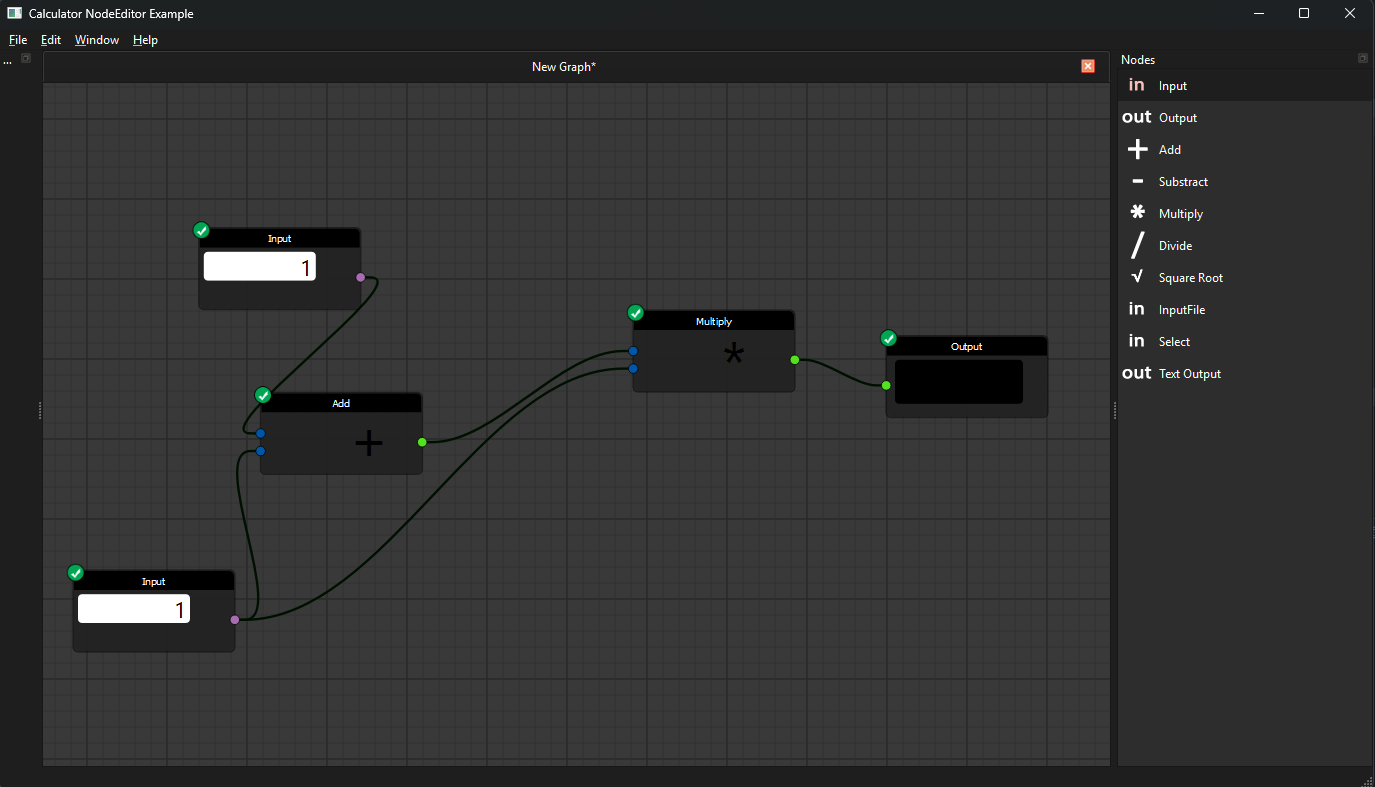
|
|
45
|
+
|
|
46
|
+
## Features
|
|
47
|
+
|
|
48
|
+
- full framework for customizable nodes, sockets and edges
|
|
49
|
+
- undo / redo and serialization into JSON files in a VCS friendly way
|
|
50
|
+
- support for implementing evaluation logic
|
|
51
|
+
- hovering effects, dragging edges, cutting lines, snapping and more
|
|
52
|
+
- node groups, multi-input nodes, custom socket shapes and color schemes
|
|
53
|
+
- ready-made examples you can copy from
|
|
54
|
+
|
|
55
|
+
## Requirements
|
|
56
|
+
|
|
57
|
+
- Python 3.10+
|
|
58
|
+
- A Qt binding: PyQt6 or PySide6 (any Qt 5/6 binding QtPy supports works)
|
|
59
|
+
|
|
60
|
+
## Installation
|
|
61
|
+
|
|
62
|
+
From PyPI, including a Qt binding:
|
|
63
|
+
|
|
64
|
+
```
|
|
65
|
+
pip install nodeeditor-qtpy[pyqt6]
|
|
66
|
+
```
|
|
67
|
+
|
|
68
|
+
or, for PySide6:
|
|
69
|
+
|
|
70
|
+
```
|
|
71
|
+
pip install nodeeditor-qtpy[pyside6]
|
|
72
|
+
```
|
|
73
|
+
|
|
74
|
+
Without an extra, the package installs no binding and uses whichever
|
|
75
|
+
PyQt5/PySide2/PyQt6/PySide6 you already have. When several are installed,
|
|
76
|
+
QtPy picks one from the `QT_API` environment variable.
|
|
77
|
+
|
|
78
|
+
Directly from source code to get the latest version:
|
|
79
|
+
|
|
80
|
+
```
|
|
81
|
+
pip install "nodeeditor-qtpy[pyqt6] @ git+https://github.com/AzadKshitij/qtpy-nodeeditor.git"
|
|
82
|
+
```
|
|
83
|
+
|
|
84
|
+
Or clone the repository:
|
|
85
|
+
|
|
86
|
+
```
|
|
87
|
+
git clone https://github.com/AzadKshitij/qtpy-nodeeditor.git
|
|
88
|
+
```
|
|
89
|
+
|
|
90
|
+
## Quick start
|
|
91
|
+
|
|
92
|
+
A node is a `Node` belonging to a `Scene`. Give it sockets, then connect an
|
|
93
|
+
output socket to an input socket with an `Edge`:
|
|
94
|
+
|
|
95
|
+
```python
|
|
96
|
+
import sys
|
|
97
|
+
|
|
98
|
+
from qtpy.QtWidgets import QApplication
|
|
99
|
+
|
|
100
|
+
from nodeeditor.node_editor_widget import NodeEditorWidget
|
|
101
|
+
from nodeeditor.node_node import Node
|
|
102
|
+
from nodeeditor.node_edge import Edge
|
|
103
|
+
|
|
104
|
+
app = QApplication(sys.argv)
|
|
105
|
+
|
|
106
|
+
editor = NodeEditorWidget()
|
|
107
|
+
scene = editor.scene
|
|
108
|
+
|
|
109
|
+
# a node with one output socket
|
|
110
|
+
source = Node(scene, title="Value", outputs=[1], output_text=["out"])
|
|
111
|
+
|
|
112
|
+
# a node with one input socket
|
|
113
|
+
sink = Node(scene, title="Print", inputs=[1], input_text=["in"])
|
|
114
|
+
|
|
115
|
+
# connect the output of the first node to the input of the second
|
|
116
|
+
Edge(scene, source.outputs[0], sink.inputs[0])
|
|
117
|
+
|
|
118
|
+
editor.show()
|
|
119
|
+
sys.exit(app.exec())
|
|
120
|
+
```
|
|
121
|
+
|
|
122
|
+
`NodeEditorWidget` creates the `Scene` for you. Use `Scene` on its own when
|
|
123
|
+
you want to drive the graph without a widget:
|
|
124
|
+
|
|
125
|
+
```python
|
|
126
|
+
from nodeeditor.node_scene import Scene
|
|
127
|
+
from nodeeditor.node_node import Node
|
|
128
|
+
|
|
129
|
+
scene = Scene()
|
|
130
|
+
node = Node(scene, title="Value", outputs=[1], output_text=["out"])
|
|
131
|
+
```
|
|
132
|
+
|
|
133
|
+
The `inputs` and `outputs` lists hold socket types, and the matching
|
|
134
|
+
`input_text` / `output_text` lists hold the labels drawn next to them. Both
|
|
135
|
+
`Node` and `Edge` register themselves with the scene when created, so there is
|
|
136
|
+
nothing to add by hand.
|
|
137
|
+
|
|
138
|
+
## Import names
|
|
139
|
+
|
|
140
|
+
```python
|
|
141
|
+
from nodeeditor import NodeEditorColorScheme, get_socket_shape
|
|
142
|
+
from nodeeditor.node_scene import Scene
|
|
143
|
+
from nodeeditor.node_node import Node
|
|
144
|
+
from nodeeditor.node_edge import Edge
|
|
145
|
+
```
|
|
146
|
+
|
|
147
|
+
## Credits
|
|
148
|
+
|
|
149
|
+
This project is a fork of the original
|
|
150
|
+
[PyQt Node Editor](https://gitlab.com/pavel.krupala/pyqt-node-editor) by
|
|
151
|
+
[Pavel Křupala](https://gitlab.com/pavel.krupala), which is released under the
|
|
152
|
+
MIT licence. The original author is credited in [LICENCE](LICENCE), and the
|
|
153
|
+
history of the upstream project is kept in
|
|
154
|
+
[CHANGES.md](CHANGES.md) and [HISTORY.rst](HISTORY.rst).
|
|
155
|
+
|
|
156
|
+
## Links
|
|
157
|
+
|
|
158
|
+
- [Documentation](https://azadkshitij.github.io/qtpy-nodeeditor/)
|
|
159
|
+
- [Examples](https://github.com/AzadKshitij/qtpy-nodeeditor/tree/main/examples)
|
|
160
|
+
- [Original project](https://gitlab.com/pavel.krupala/pyqt-node-editor)
|
|
161
|
+
- [Contribute](https://github.com/AzadKshitij/qtpy-nodeeditor/blob/main/CONTRIBUTING.md)
|
|
162
|
+
- [Issues](https://github.com/AzadKshitij/qtpy-nodeeditor/issues)
|
|
163
|
+
- [Pull requests](https://github.com/AzadKshitij/qtpy-nodeeditor/pulls)
|
|
164
|
+
- [Release history](https://github.com/AzadKshitij/qtpy-nodeeditor/blob/main/HISTORY.rst)
|
|
165
|
+
- [Upstream changelog (pre-fork)](https://github.com/AzadKshitij/qtpy-nodeeditor/blob/main/CHANGES.md)
|
|
@@ -0,0 +1,133 @@
|
|
|
1
|
+
# nodeeditor-qtpy
|
|
2
|
+
|
|
3
|
+
A node editor framework for Qt. Build interactive graph interfaces out of
|
|
4
|
+
draggable nodes, connectable sockets and edges, with undo/redo, JSON
|
|
5
|
+
serialization and support for your own evaluation logic.
|
|
6
|
+
|
|
7
|
+
The distribution is called `nodeeditor-qtpy`; the import package is `nodeeditor`.
|
|
8
|
+
The framework itself is binding-agnostic: it talks to Qt through
|
|
9
|
+
[QtPy](https://github.com/spyder-ide/qtpy), so it runs on PyQt5, PySide2,
|
|
10
|
+
PyQt6 and PySide6.
|
|
11
|
+
|
|
12
|
+

|
|
13
|
+
|
|
14
|
+
## Features
|
|
15
|
+
|
|
16
|
+
- full framework for customizable nodes, sockets and edges
|
|
17
|
+
- undo / redo and serialization into JSON files in a VCS friendly way
|
|
18
|
+
- support for implementing evaluation logic
|
|
19
|
+
- hovering effects, dragging edges, cutting lines, snapping and more
|
|
20
|
+
- node groups, multi-input nodes, custom socket shapes and color schemes
|
|
21
|
+
- ready-made examples you can copy from
|
|
22
|
+
|
|
23
|
+
## Requirements
|
|
24
|
+
|
|
25
|
+
- Python 3.10+
|
|
26
|
+
- A Qt binding: PyQt6 or PySide6 (any Qt 5/6 binding QtPy supports works)
|
|
27
|
+
|
|
28
|
+
## Installation
|
|
29
|
+
|
|
30
|
+
From PyPI, including a Qt binding:
|
|
31
|
+
|
|
32
|
+
```
|
|
33
|
+
pip install nodeeditor-qtpy[pyqt6]
|
|
34
|
+
```
|
|
35
|
+
|
|
36
|
+
or, for PySide6:
|
|
37
|
+
|
|
38
|
+
```
|
|
39
|
+
pip install nodeeditor-qtpy[pyside6]
|
|
40
|
+
```
|
|
41
|
+
|
|
42
|
+
Without an extra, the package installs no binding and uses whichever
|
|
43
|
+
PyQt5/PySide2/PyQt6/PySide6 you already have. When several are installed,
|
|
44
|
+
QtPy picks one from the `QT_API` environment variable.
|
|
45
|
+
|
|
46
|
+
Directly from source code to get the latest version:
|
|
47
|
+
|
|
48
|
+
```
|
|
49
|
+
pip install "nodeeditor-qtpy[pyqt6] @ git+https://github.com/AzadKshitij/qtpy-nodeeditor.git"
|
|
50
|
+
```
|
|
51
|
+
|
|
52
|
+
Or clone the repository:
|
|
53
|
+
|
|
54
|
+
```
|
|
55
|
+
git clone https://github.com/AzadKshitij/qtpy-nodeeditor.git
|
|
56
|
+
```
|
|
57
|
+
|
|
58
|
+
## Quick start
|
|
59
|
+
|
|
60
|
+
A node is a `Node` belonging to a `Scene`. Give it sockets, then connect an
|
|
61
|
+
output socket to an input socket with an `Edge`:
|
|
62
|
+
|
|
63
|
+
```python
|
|
64
|
+
import sys
|
|
65
|
+
|
|
66
|
+
from qtpy.QtWidgets import QApplication
|
|
67
|
+
|
|
68
|
+
from nodeeditor.node_editor_widget import NodeEditorWidget
|
|
69
|
+
from nodeeditor.node_node import Node
|
|
70
|
+
from nodeeditor.node_edge import Edge
|
|
71
|
+
|
|
72
|
+
app = QApplication(sys.argv)
|
|
73
|
+
|
|
74
|
+
editor = NodeEditorWidget()
|
|
75
|
+
scene = editor.scene
|
|
76
|
+
|
|
77
|
+
# a node with one output socket
|
|
78
|
+
source = Node(scene, title="Value", outputs=[1], output_text=["out"])
|
|
79
|
+
|
|
80
|
+
# a node with one input socket
|
|
81
|
+
sink = Node(scene, title="Print", inputs=[1], input_text=["in"])
|
|
82
|
+
|
|
83
|
+
# connect the output of the first node to the input of the second
|
|
84
|
+
Edge(scene, source.outputs[0], sink.inputs[0])
|
|
85
|
+
|
|
86
|
+
editor.show()
|
|
87
|
+
sys.exit(app.exec())
|
|
88
|
+
```
|
|
89
|
+
|
|
90
|
+
`NodeEditorWidget` creates the `Scene` for you. Use `Scene` on its own when
|
|
91
|
+
you want to drive the graph without a widget:
|
|
92
|
+
|
|
93
|
+
```python
|
|
94
|
+
from nodeeditor.node_scene import Scene
|
|
95
|
+
from nodeeditor.node_node import Node
|
|
96
|
+
|
|
97
|
+
scene = Scene()
|
|
98
|
+
node = Node(scene, title="Value", outputs=[1], output_text=["out"])
|
|
99
|
+
```
|
|
100
|
+
|
|
101
|
+
The `inputs` and `outputs` lists hold socket types, and the matching
|
|
102
|
+
`input_text` / `output_text` lists hold the labels drawn next to them. Both
|
|
103
|
+
`Node` and `Edge` register themselves with the scene when created, so there is
|
|
104
|
+
nothing to add by hand.
|
|
105
|
+
|
|
106
|
+
## Import names
|
|
107
|
+
|
|
108
|
+
```python
|
|
109
|
+
from nodeeditor import NodeEditorColorScheme, get_socket_shape
|
|
110
|
+
from nodeeditor.node_scene import Scene
|
|
111
|
+
from nodeeditor.node_node import Node
|
|
112
|
+
from nodeeditor.node_edge import Edge
|
|
113
|
+
```
|
|
114
|
+
|
|
115
|
+
## Credits
|
|
116
|
+
|
|
117
|
+
This project is a fork of the original
|
|
118
|
+
[PyQt Node Editor](https://gitlab.com/pavel.krupala/pyqt-node-editor) by
|
|
119
|
+
[Pavel Křupala](https://gitlab.com/pavel.krupala), which is released under the
|
|
120
|
+
MIT licence. The original author is credited in [LICENCE](LICENCE), and the
|
|
121
|
+
history of the upstream project is kept in
|
|
122
|
+
[CHANGES.md](CHANGES.md) and [HISTORY.rst](HISTORY.rst).
|
|
123
|
+
|
|
124
|
+
## Links
|
|
125
|
+
|
|
126
|
+
- [Documentation](https://azadkshitij.github.io/qtpy-nodeeditor/)
|
|
127
|
+
- [Examples](https://github.com/AzadKshitij/qtpy-nodeeditor/tree/main/examples)
|
|
128
|
+
- [Original project](https://gitlab.com/pavel.krupala/pyqt-node-editor)
|
|
129
|
+
- [Contribute](https://github.com/AzadKshitij/qtpy-nodeeditor/blob/main/CONTRIBUTING.md)
|
|
130
|
+
- [Issues](https://github.com/AzadKshitij/qtpy-nodeeditor/issues)
|
|
131
|
+
- [Pull requests](https://github.com/AzadKshitij/qtpy-nodeeditor/pulls)
|
|
132
|
+
- [Release history](https://github.com/AzadKshitij/qtpy-nodeeditor/blob/main/HISTORY.rst)
|
|
133
|
+
- [Upstream changelog (pre-fork)](https://github.com/AzadKshitij/qtpy-nodeeditor/blob/main/CHANGES.md)
|
|
@@ -0,0 +1,89 @@
|
|
|
1
|
+
# Documentation tooling
|
|
2
|
+
|
|
3
|
+
The site is built with [MkDocs](https://www.mkdocs.org/) and the
|
|
4
|
+
[Material for MkDocs](https://squidfunk.github.io/mkdocs-material/) theme.
|
|
5
|
+
The API reference is generated from the source with
|
|
6
|
+
[mkdocstrings](https://mkdocstrings.github.io/).
|
|
7
|
+
|
|
8
|
+
## Requirements
|
|
9
|
+
|
|
10
|
+
```
|
|
11
|
+
pip install -r requirements_docs.txt
|
|
12
|
+
```
|
|
13
|
+
|
|
14
|
+
## Build locally
|
|
15
|
+
|
|
16
|
+
```
|
|
17
|
+
mkdocs serve
|
|
18
|
+
```
|
|
19
|
+
|
|
20
|
+
The site is then available at <http://127.0.0.1:8000/> and rebuilds on save.
|
|
21
|
+
|
|
22
|
+
## Build once
|
|
23
|
+
|
|
24
|
+
```
|
|
25
|
+
mkdocs build --strict
|
|
26
|
+
```
|
|
27
|
+
|
|
28
|
+
`--strict` turns warnings into errors, which is what the CI workflow uses, so
|
|
29
|
+
a broken link or a malformed docstring fails the build instead of shipping.
|
|
30
|
+
|
|
31
|
+
## Layout
|
|
32
|
+
|
|
33
|
+
```
|
|
34
|
+
docs/
|
|
35
|
+
index.md home page
|
|
36
|
+
installation.md install options
|
|
37
|
+
quickstart.md first graph
|
|
38
|
+
events.md the event system
|
|
39
|
+
guides/ task-focused guides
|
|
40
|
+
api/ mkdocstrings pages, one per module group
|
|
41
|
+
images/ screenshots used by the guides
|
|
42
|
+
```
|
|
43
|
+
|
|
44
|
+
The `nav` section of `mkdocs.yml` decides the sidebar. Pages that exist but
|
|
45
|
+
are not listed there are still built, they just do not show up in the
|
|
46
|
+
navigation.
|
|
47
|
+
|
|
48
|
+
## The images in the guides
|
|
49
|
+
|
|
50
|
+
Every guide opens with a picture. The files live in `docs/images/`, and each
|
|
51
|
+
one is referenced from the page listed below. To use your own screenshot
|
|
52
|
+
instead, **replace the file with the same name** — no markdown needs editing.
|
|
53
|
+
|
|
54
|
+
| File | Shows | Used by |
|
|
55
|
+
| --- | --- | --- |
|
|
56
|
+
| `docs/images/quickstart.png` | two connected nodes | `index.md`, `quickstart.md` |
|
|
57
|
+
| `docs/images/socket-shapes.png` | circle, square, triangle and chevron sockets | `guides/socket-shapes.md` |
|
|
58
|
+
| `docs/images/node-labels.png` | floating labels above nodes | `guides/node-labels.md` |
|
|
59
|
+
| `docs/images/edge-labels.png` | edges carrying labels | `guides/edge-labels.md` |
|
|
60
|
+
| `docs/images/group-nodes.png` | a group around two nodes | `guides/group-nodes.md`, `guides/node-grouping.md` |
|
|
61
|
+
| `docs/images/group-collapsed.png` | the same group collapsed | `guides/group-nodes.md`, `guides/node-grouping.md` |
|
|
62
|
+
| `docs/images/multi-input.png` | three nodes feeding one multi-input node | `guides/multi-input-nodes.md` |
|
|
63
|
+
| `docs/images/graph-algorithms.png` | a graph with the shortest path highlighted | `guides/graph-algorithms.md` |
|
|
64
|
+
| `docs/screenshot-calculator.png` | the calculator example | `index.md` |
|
|
65
|
+
| `docs/screenshot-example.png` | the editor window | `quickstart.md` |
|
|
66
|
+
|
|
67
|
+
To add a picture to a page, drop the file into `docs/images/` and reference it
|
|
68
|
+
relative to the page:
|
|
69
|
+
|
|
70
|
+
```markdown
|
|
71
|
+

|
|
72
|
+
```
|
|
73
|
+
|
|
74
|
+
Pages in `docs/` use `images/my-picture.png`, pages in `docs/guides/` use
|
|
75
|
+
`../images/my-picture.png`.
|
|
76
|
+
|
|
77
|
+
## Regenerating the images
|
|
78
|
+
|
|
79
|
+
The screenshots in `docs/images/` are produced by a script, so they can be
|
|
80
|
+
refreshed when the look of the editor changes:
|
|
81
|
+
|
|
82
|
+
```
|
|
83
|
+
python scripts/make_doc_images.py
|
|
84
|
+
```
|
|
85
|
+
|
|
86
|
+
The script paints the scene into a `QImage` instead of taking a screenshot of
|
|
87
|
+
a window, so it needs a working Qt platform plugin but no visible screen. Do
|
|
88
|
+
not run it with `QT_QPA_PLATFORM=offscreen`: that platform has no fonts, and
|
|
89
|
+
the text comes out as empty boxes.
|