noah-code 0.6.0__tar.gz → 0.8.0__tar.gz
This diff represents the content of publicly available package versions that have been released to one of the supported registries. The information contained in this diff is provided for informational purposes only and reflects changes between package versions as they appear in their respective public registries.
- {noah_code-0.6.0 → noah_code-0.8.0}/PKG-INFO +65 -4
- {noah_code-0.6.0 → noah_code-0.8.0}/README.md +64 -3
- noah_code-0.8.0/docs/assets/noah-command-menu.svg +160 -0
- noah_code-0.8.0/docs/assets/noah-in-action.svg +195 -0
- noah_code-0.8.0/docs/assets/noah-permissions.svg +172 -0
- {noah_code-0.6.0 → noah_code-0.8.0}/docs/extensions.md +16 -2
- {noah_code-0.6.0 → noah_code-0.8.0}/docs/interactive-reference.md +58 -8
- noah_code-0.8.0/docs/releases/v0.7.0.md +51 -0
- noah_code-0.8.0/docs/releases/v0.8.0.md +55 -0
- {noah_code-0.6.0 → noah_code-0.8.0}/docs/reliability.md +22 -0
- {noah_code-0.6.0 → noah_code-0.8.0}/pyproject.toml +1 -1
- noah_code-0.8.0/scripts/capture_readme.py +193 -0
- {noah_code-0.6.0 → noah_code-0.8.0}/src/noah_code/__init__.py +1 -1
- {noah_code-0.6.0 → noah_code-0.8.0}/src/noah_code/agent.py +26 -1
- {noah_code-0.6.0 → noah_code-0.8.0}/src/noah_code/agents.py +45 -2
- {noah_code-0.6.0 → noah_code-0.8.0}/src/noah_code/cli.py +60 -38
- {noah_code-0.6.0 → noah_code-0.8.0}/src/noah_code/commands.py +6 -0
- {noah_code-0.6.0 → noah_code-0.8.0}/src/noah_code/host.py +118 -16
- noah_code-0.8.0/src/noah_code/teams.py +159 -0
- {noah_code-0.6.0 → noah_code-0.8.0}/src/noah_code/tools/memory_tools.py +6 -0
- {noah_code-0.6.0 → noah_code-0.8.0}/src/noah_code/tools/plan_tools.py +7 -0
- {noah_code-0.6.0 → noah_code-0.8.0}/src/noah_code/tools/process_tools.py +37 -15
- {noah_code-0.6.0 → noah_code-0.8.0}/src/noah_code/tools/task_tools.py +206 -13
- {noah_code-0.6.0 → noah_code-0.8.0}/src/noah_code/tools/workspace_tools.py +37 -10
- noah_code-0.8.0/src/noah_code/ui/command_menu.py +83 -0
- noah_code-0.8.0/src/noah_code/ui/team_screen.py +97 -0
- {noah_code-0.6.0 → noah_code-0.8.0}/src/noah_code/ui/textual.css +194 -10
- {noah_code-0.6.0 → noah_code-0.8.0}/src/noah_code/ui/textual_app.py +372 -166
- noah_code-0.8.0/src/noah_code/verification.py +312 -0
- {noah_code-0.6.0 → noah_code-0.8.0}/tests/test_agent_security.py +65 -0
- {noah_code-0.6.0 → noah_code-0.8.0}/tests/test_agents.py +19 -0
- {noah_code-0.6.0 → noah_code-0.8.0}/tests/test_cli.py +76 -0
- {noah_code-0.6.0 → noah_code-0.8.0}/tests/test_commands.py +14 -0
- {noah_code-0.6.0 → noah_code-0.8.0}/tests/test_host.py +185 -0
- noah_code-0.8.0/tests/test_run_exit.py +191 -0
- {noah_code-0.6.0 → noah_code-0.8.0}/tests/test_task_tools.py +74 -1
- noah_code-0.8.0/tests/test_teams.py +295 -0
- {noah_code-0.6.0 → noah_code-0.8.0}/tests/test_textual_tui.py +157 -15
- noah_code-0.8.0/tests/test_tui_approvals.py +107 -0
- noah_code-0.8.0/tests/test_tui_command_menu.py +96 -0
- noah_code-0.8.0/tests/test_tui_editing.py +135 -0
- {noah_code-0.6.0 → noah_code-0.8.0}/tests/test_tui_history_dialogs.py +4 -3
- {noah_code-0.6.0 → noah_code-0.8.0}/tests/test_tui_review_receipt.py +67 -28
- noah_code-0.8.0/tests/test_tui_teams.py +162 -0
- noah_code-0.8.0/tests/test_verification.py +262 -0
- noah_code-0.8.0/tests/test_verification_tools.py +119 -0
- {noah_code-0.6.0 → noah_code-0.8.0}/uv.lock +1 -1
- noah_code-0.6.0/docs/assets/noah-in-action.svg +0 -234
- noah_code-0.6.0/tests/test_run_exit.py +0 -113
- {noah_code-0.6.0 → noah_code-0.8.0}/.github/workflows/ci.yml +0 -0
- {noah_code-0.6.0 → noah_code-0.8.0}/.github/workflows/release.yml +0 -0
- {noah_code-0.6.0 → noah_code-0.8.0}/.gitignore +0 -0
- {noah_code-0.6.0 → noah_code-0.8.0}/.pre-commit-config.yaml +0 -0
- {noah_code-0.6.0 → noah_code-0.8.0}/docs/assets/noah-logo.svg +0 -0
- {noah_code-0.6.0 → noah_code-0.8.0}/docs/configuration.md +0 -0
- {noah_code-0.6.0 → noah_code-0.8.0}/docs/development.md +0 -0
- {noah_code-0.6.0 → noah_code-0.8.0}/docs/releases/v0.1.0.md +0 -0
- {noah_code-0.6.0 → noah_code-0.8.0}/docs/releases/v0.1.1.md +0 -0
- {noah_code-0.6.0 → noah_code-0.8.0}/docs/releases/v0.2.0.md +0 -0
- {noah_code-0.6.0 → noah_code-0.8.0}/docs/releases/v0.2.1.md +0 -0
- {noah_code-0.6.0 → noah_code-0.8.0}/docs/releases/v0.2.2.md +0 -0
- {noah_code-0.6.0 → noah_code-0.8.0}/docs/releases/v0.2.3.md +0 -0
- {noah_code-0.6.0 → noah_code-0.8.0}/docs/releases/v0.2.4.md +0 -0
- {noah_code-0.6.0 → noah_code-0.8.0}/docs/releases/v0.3.0.md +0 -0
- {noah_code-0.6.0 → noah_code-0.8.0}/docs/releases/v0.4.0.md +0 -0
- {noah_code-0.6.0 → noah_code-0.8.0}/docs/releases/v0.4.1.md +0 -0
- {noah_code-0.6.0 → noah_code-0.8.0}/docs/releases/v0.5.0.md +0 -0
- {noah_code-0.6.0 → noah_code-0.8.0}/docs/releases/v0.5.1.md +0 -0
- {noah_code-0.6.0 → noah_code-0.8.0}/docs/releases/v0.6.0.md +0 -0
- {noah_code-0.6.0 → noah_code-0.8.0}/docs/security.md +0 -0
- {noah_code-0.6.0 → noah_code-0.8.0}/install.sh +0 -0
- {noah_code-0.6.0 → noah_code-0.8.0}/src/noah_code/__main__.py +0 -0
- {noah_code-0.6.0 → noah_code-0.8.0}/src/noah_code/approvals.py +0 -0
- {noah_code-0.6.0 → noah_code-0.8.0}/src/noah_code/budget.py +0 -0
- {noah_code-0.6.0 → noah_code-0.8.0}/src/noah_code/checkpoints.py +0 -0
- {noah_code-0.6.0 → noah_code-0.8.0}/src/noah_code/composer.py +0 -0
- {noah_code-0.6.0 → noah_code-0.8.0}/src/noah_code/config.py +0 -0
- {noah_code-0.6.0 → noah_code-0.8.0}/src/noah_code/credentials.py +0 -0
- {noah_code-0.6.0 → noah_code-0.8.0}/src/noah_code/custom_commands.py +0 -0
- {noah_code-0.6.0 → noah_code-0.8.0}/src/noah_code/event_bridge.py +0 -0
- {noah_code-0.6.0 → noah_code-0.8.0}/src/noah_code/events.py +0 -0
- {noah_code-0.6.0 → noah_code-0.8.0}/src/noah_code/github.py +0 -0
- {noah_code-0.6.0 → noah_code-0.8.0}/src/noah_code/hooks.py +0 -0
- {noah_code-0.6.0 → noah_code-0.8.0}/src/noah_code/llm.py +0 -0
- {noah_code-0.6.0 → noah_code-0.8.0}/src/noah_code/llm_replies.py +0 -0
- {noah_code-0.6.0 → noah_code-0.8.0}/src/noah_code/macos_sandbox.py +0 -0
- {noah_code-0.6.0 → noah_code-0.8.0}/src/noah_code/mcp_setup.py +0 -0
- {noah_code-0.6.0 → noah_code-0.8.0}/src/noah_code/nooa_compat.py +0 -0
- {noah_code-0.6.0 → noah_code-0.8.0}/src/noah_code/permissions.py +0 -0
- {noah_code-0.6.0 → noah_code-0.8.0}/src/noah_code/predict.py +0 -0
- {noah_code-0.6.0 → noah_code-0.8.0}/src/noah_code/project_notes.py +0 -0
- {noah_code-0.6.0 → noah_code-0.8.0}/src/noah_code/providers.py +0 -0
- {noah_code-0.6.0 → noah_code-0.8.0}/src/noah_code/redaction.py +0 -0
- {noah_code-0.6.0 → noah_code-0.8.0}/src/noah_code/runtime_state.py +0 -0
- {noah_code-0.6.0 → noah_code-0.8.0}/src/noah_code/secure_files.py +0 -0
- {noah_code-0.6.0 → noah_code-0.8.0}/src/noah_code/sessions.py +0 -0
- {noah_code-0.6.0 → noah_code-0.8.0}/src/noah_code/skills_setup.py +0 -0
- {noah_code-0.6.0 → noah_code-0.8.0}/src/noah_code/snapshots.py +0 -0
- {noah_code-0.6.0 → noah_code-0.8.0}/src/noah_code/steer.py +0 -0
- {noah_code-0.6.0 → noah_code-0.8.0}/src/noah_code/summarization.py +0 -0
- {noah_code-0.6.0 → noah_code-0.8.0}/src/noah_code/telemetry.py +0 -0
- {noah_code-0.6.0 → noah_code-0.8.0}/src/noah_code/themes.py +0 -0
- {noah_code-0.6.0 → noah_code-0.8.0}/src/noah_code/tool_output.py +0 -0
- {noah_code-0.6.0 → noah_code-0.8.0}/src/noah_code/tools/__init__.py +0 -0
- {noah_code-0.6.0 → noah_code-0.8.0}/src/noah_code/tools/diff_tools.py +0 -0
- {noah_code-0.6.0 → noah_code-0.8.0}/src/noah_code/tools/git_tools.py +0 -0
- {noah_code-0.6.0 → noah_code-0.8.0}/src/noah_code/tools/github_tools.py +0 -0
- {noah_code-0.6.0 → noah_code-0.8.0}/src/noah_code/tools/lsp_tools.py +0 -0
- {noah_code-0.6.0 → noah_code-0.8.0}/src/noah_code/tools/media_tools.py +0 -0
- {noah_code-0.6.0 → noah_code-0.8.0}/src/noah_code/tools/question_tools.py +0 -0
- {noah_code-0.6.0 → noah_code-0.8.0}/src/noah_code/tools/web_tools.py +0 -0
- {noah_code-0.6.0 → noah_code-0.8.0}/src/noah_code/ui/__init__.py +0 -0
- {noah_code-0.6.0 → noah_code-0.8.0}/src/noah_code/ui/console.py +0 -0
- {noah_code-0.6.0 → noah_code-0.8.0}/src/noah_code/ui/protocol.py +0 -0
- {noah_code-0.6.0 → noah_code-0.8.0}/src/noah_code/updates.py +0 -0
- {noah_code-0.6.0 → noah_code-0.8.0}/src/noah_code/usage.py +0 -0
- {noah_code-0.6.0 → noah_code-0.8.0}/src/noah_code/workspace.py +0 -0
- {noah_code-0.6.0 → noah_code-0.8.0}/src/noah_code/worktree.py +0 -0
- {noah_code-0.6.0 → noah_code-0.8.0}/tests/conftest.py +0 -0
- {noah_code-0.6.0 → noah_code-0.8.0}/tests/test_approvals.py +0 -0
- {noah_code-0.6.0 → noah_code-0.8.0}/tests/test_budget.py +0 -0
- {noah_code-0.6.0 → noah_code-0.8.0}/tests/test_cache_context.py +0 -0
- {noah_code-0.6.0 → noah_code-0.8.0}/tests/test_checkpoints.py +0 -0
- {noah_code-0.6.0 → noah_code-0.8.0}/tests/test_compaction_eviction.py +0 -0
- {noah_code-0.6.0 → noah_code-0.8.0}/tests/test_composer.py +0 -0
- {noah_code-0.6.0 → noah_code-0.8.0}/tests/test_config.py +0 -0
- {noah_code-0.6.0 → noah_code-0.8.0}/tests/test_console_ui.py +0 -0
- {noah_code-0.6.0 → noah_code-0.8.0}/tests/test_credentials.py +0 -0
- {noah_code-0.6.0 → noah_code-0.8.0}/tests/test_custom_commands.py +0 -0
- {noah_code-0.6.0 → noah_code-0.8.0}/tests/test_diff_tools.py +0 -0
- {noah_code-0.6.0 → noah_code-0.8.0}/tests/test_efficiency.py +0 -0
- {noah_code-0.6.0 → noah_code-0.8.0}/tests/test_event_bridge.py +0 -0
- {noah_code-0.6.0 → noah_code-0.8.0}/tests/test_event_bridge_and_shell.py +0 -0
- {noah_code-0.6.0 → noah_code-0.8.0}/tests/test_git_tools.py +0 -0
- {noah_code-0.6.0 → noah_code-0.8.0}/tests/test_github.py +0 -0
- {noah_code-0.6.0 → noah_code-0.8.0}/tests/test_hooks.py +0 -0
- {noah_code-0.6.0 → noah_code-0.8.0}/tests/test_installer.py +0 -0
- {noah_code-0.6.0 → noah_code-0.8.0}/tests/test_lean_reasoning.py +0 -0
- {noah_code-0.6.0 → noah_code-0.8.0}/tests/test_llm.py +0 -0
- {noah_code-0.6.0 → noah_code-0.8.0}/tests/test_llm_replies.py +0 -0
- {noah_code-0.6.0 → noah_code-0.8.0}/tests/test_lsp_tools.py +0 -0
- {noah_code-0.6.0 → noah_code-0.8.0}/tests/test_mcp_setup.py +0 -0
- {noah_code-0.6.0 → noah_code-0.8.0}/tests/test_nooa_migration.py +0 -0
- {noah_code-0.6.0 → noah_code-0.8.0}/tests/test_permissions.py +0 -0
- {noah_code-0.6.0 → noah_code-0.8.0}/tests/test_plan_memory_tools.py +0 -0
- {noah_code-0.6.0 → noah_code-0.8.0}/tests/test_process_tools.py +0 -0
- {noah_code-0.6.0 → noah_code-0.8.0}/tests/test_project_notes.py +0 -0
- {noah_code-0.6.0 → noah_code-0.8.0}/tests/test_prompt_scorecard.py +0 -0
- {noah_code-0.6.0 → noah_code-0.8.0}/tests/test_providers.py +0 -0
- {noah_code-0.6.0 → noah_code-0.8.0}/tests/test_question_tools.py +0 -0
- {noah_code-0.6.0 → noah_code-0.8.0}/tests/test_redaction.py +0 -0
- {noah_code-0.6.0 → noah_code-0.8.0}/tests/test_runtime_state.py +0 -0
- {noah_code-0.6.0 → noah_code-0.8.0}/tests/test_sessions.py +0 -0
- {noah_code-0.6.0 → noah_code-0.8.0}/tests/test_skills_setup.py +0 -0
- {noah_code-0.6.0 → noah_code-0.8.0}/tests/test_snapshots.py +0 -0
- {noah_code-0.6.0 → noah_code-0.8.0}/tests/test_steer.py +0 -0
- {noah_code-0.6.0 → noah_code-0.8.0}/tests/test_summarization.py +0 -0
- {noah_code-0.6.0 → noah_code-0.8.0}/tests/test_telemetry.py +0 -0
- {noah_code-0.6.0 → noah_code-0.8.0}/tests/test_tool_output.py +0 -0
- {noah_code-0.6.0 → noah_code-0.8.0}/tests/test_tui_composer_queue.py +0 -0
- {noah_code-0.6.0 → noah_code-0.8.0}/tests/test_tui_layout.py +0 -0
- {noah_code-0.6.0 → noah_code-0.8.0}/tests/test_updates.py +0 -0
- {noah_code-0.6.0 → noah_code-0.8.0}/tests/test_wave1_e2e.py +0 -0
- {noah_code-0.6.0 → noah_code-0.8.0}/tests/test_web_tools.py +0 -0
- {noah_code-0.6.0 → noah_code-0.8.0}/tests/test_workspace_tools.py +0 -0
- {noah_code-0.6.0 → noah_code-0.8.0}/tests/test_worktree.py +0 -0
|
@@ -1,6 +1,6 @@
|
|
|
1
1
|
Metadata-Version: 2.5
|
|
2
2
|
Name: noah-code
|
|
3
|
-
Version: 0.
|
|
3
|
+
Version: 0.8.0
|
|
4
4
|
Summary: Noah Code terminal coding agent, built on NVIDIA OO Agents (NOOA)
|
|
5
5
|
Project-URL: Homepage, https://github.com/skundu42/noah-code
|
|
6
6
|
Project-URL: Documentation, https://github.com/skundu42/noah-code#readme
|
|
@@ -58,12 +58,12 @@ Description-Content-Type: text/markdown
|
|
|
58
58
|
|
|
59
59
|
</div>
|
|
60
60
|
|
|
61
|
-
|
|
62
62
|
|
|
63
|
-
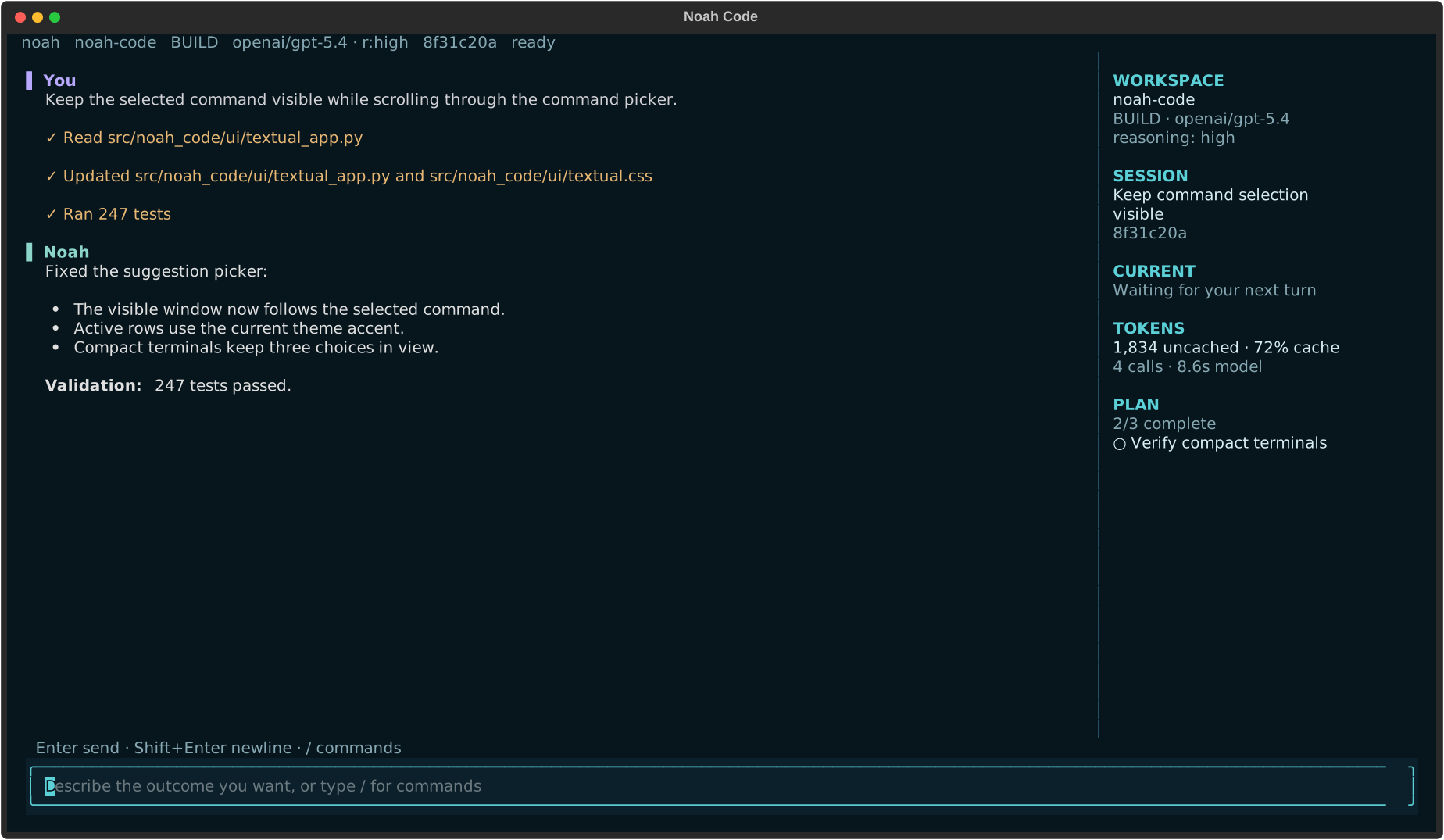
<p align="center"><sub>The real Textual interface
|
|
63
|
+
<p align="center"><sub>The real Textual interface with deterministic sample data: a build team hands pagination changes to a read-only reviewer.</sub></p>
|
|
64
64
|
|
|
65
65
|
Noah keeps the conversation central while the sidebar tracks the current action, changed files,
|
|
66
|
-
and
|
|
66
|
+
active plan, and agent handoffs. Tool execution stays visible, completed work compacts into
|
|
67
67
|
readable records, and every session remains scoped to its repository.
|
|
68
68
|
|
|
69
69
|
Built on the [NVIDIA OO Agents (NOOA)](https://github.com/NVIDIA-NeMo/labs-OO-Agents) runtime.
|
|
@@ -109,6 +109,10 @@ configuration or session history.
|
|
|
109
109
|
**plan** mode, with ordered `allow`, `ask`, and `deny` permission rules.
|
|
110
110
|
- **Extensible workflows.** Add slash commands, opt-in skills, MCP servers, or markdown subagents;
|
|
111
111
|
attach `@files` and images when the task needs more context.
|
|
112
|
+
- **Coordinated agent teams.** Launch a build, review, or investigation workflow from `F9` or
|
|
113
|
+
`/team`. Specialists hand off findings between phases, and the live work ledger shows progress.
|
|
114
|
+
Teams share session budgets and approvals; read-only work can run concurrently while edits
|
|
115
|
+
use one serialized mutation lane.
|
|
112
116
|
- **Long-running by design.** Provider retries and configurable fallback models handle transient
|
|
113
117
|
failures, while workspace leases, bounded artifacts, durable process ownership, and `/health`
|
|
114
118
|
keep unattended sessions observable.
|
|
@@ -125,6 +129,18 @@ Find the cause of the failing parser tests, implement the smallest safe fix, and
|
|
|
125
129
|
focused test file.
|
|
126
130
|
```
|
|
127
131
|
|
|
132
|
+
For work that benefits from several perspectives, give a team one clear objective:
|
|
133
|
+
|
|
134
|
+
```text
|
|
135
|
+
/team build Add pagination to the search endpoint and cover its edge cases
|
|
136
|
+
/team review Find regressions in the current changes
|
|
137
|
+
/team investigate Trace why login fails after a session expires
|
|
138
|
+
```
|
|
139
|
+
|
|
140
|
+
Build teams analyze, implement, then review. Review and investigation teams stay read-only,
|
|
141
|
+
including in plan mode. Press `F9` to choose a workflow and edit its objective before sending;
|
|
142
|
+
use `F4` to inspect live team progress. In the console, `/team` lists the workflows.
|
|
143
|
+
|
|
128
144
|
Useful launch modes:
|
|
129
145
|
|
|
130
146
|
```bash
|
|
@@ -137,6 +153,9 @@ noah --mode plan .
|
|
|
137
153
|
# Run one task and exit
|
|
138
154
|
noah run "Explain how authentication is wired" .
|
|
139
155
|
|
|
156
|
+
# Emit one structured result on stdout (progress goes to stderr)
|
|
157
|
+
noah run --json "Fix the failing unit test" .
|
|
158
|
+
|
|
140
159
|
# Allow actions that would normally ask; explicit deny rules still apply
|
|
141
160
|
noah run --auto "Fix the failing unit test" .
|
|
142
161
|
|
|
@@ -148,6 +167,13 @@ noah --session SESSION_ID .
|
|
|
148
167
|
noah --console .
|
|
149
168
|
```
|
|
150
169
|
|
|
170
|
+
`run --json` reports `status` (`completed`, `needs_input`, `failed`, or `cancelled`),
|
|
171
|
+
`exit_code`, `explanation`, `session_id`, `run_id`, session `usage`, and recorded `checks`.
|
|
172
|
+
Check `status` when automating: a request for input keeps the existing exit code 0,
|
|
173
|
+
but its status is `needs_input`. Check results are separate from task completion;
|
|
174
|
+
an empty list means no checks were recorded. Errors keep nonzero exit codes and
|
|
175
|
+
Ctrl+C returns 130. Delegated agents also retain `needs_input` in the work ledger.
|
|
176
|
+
|
|
151
177
|
Check the installation and resolved configuration with:
|
|
152
178
|
|
|
153
179
|
```bash
|
|
@@ -162,6 +188,15 @@ means netcat, `noah` or `noah-code` is recommended.
|
|
|
162
188
|
|
|
163
189
|
## Inside the TUI
|
|
164
190
|
|
|
191
|
+
The interface keeps frequent actions within reach:
|
|
192
|
+
|
|
193
|
+
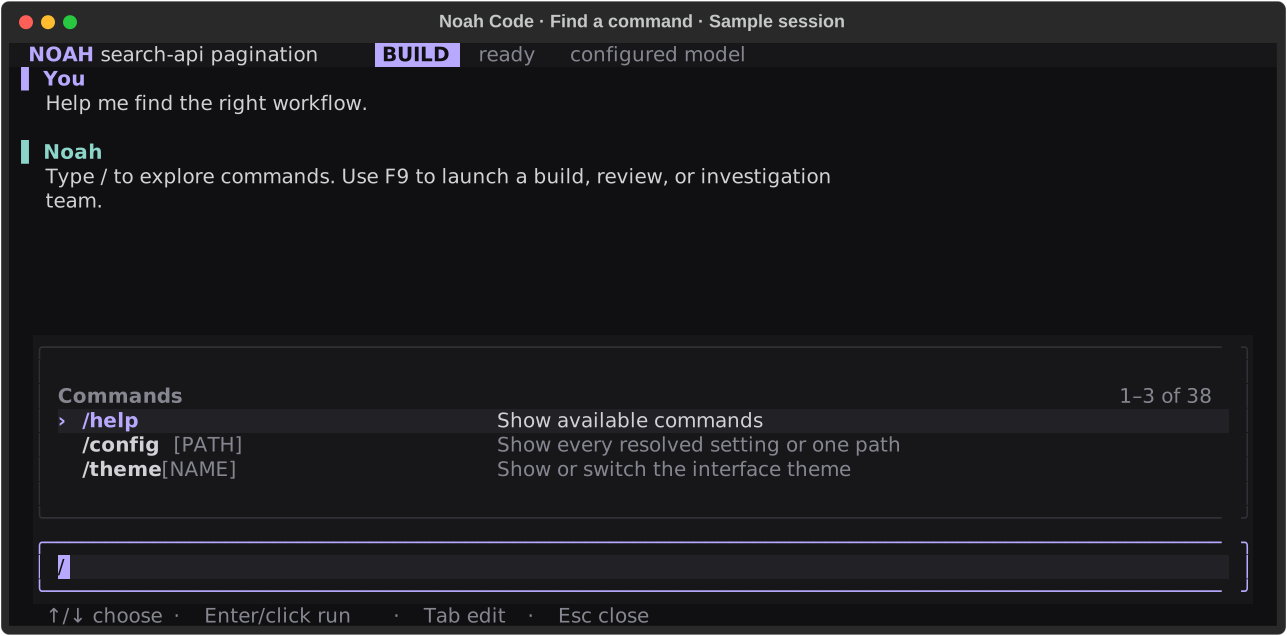
- **Readable commands.** Aligned descriptions, muted argument hints, and a subtle selection row
|
|
194
|
+
make slash commands easier to scan. Use arrows, Enter, Tab, or the mouse.
|
|
195
|
+
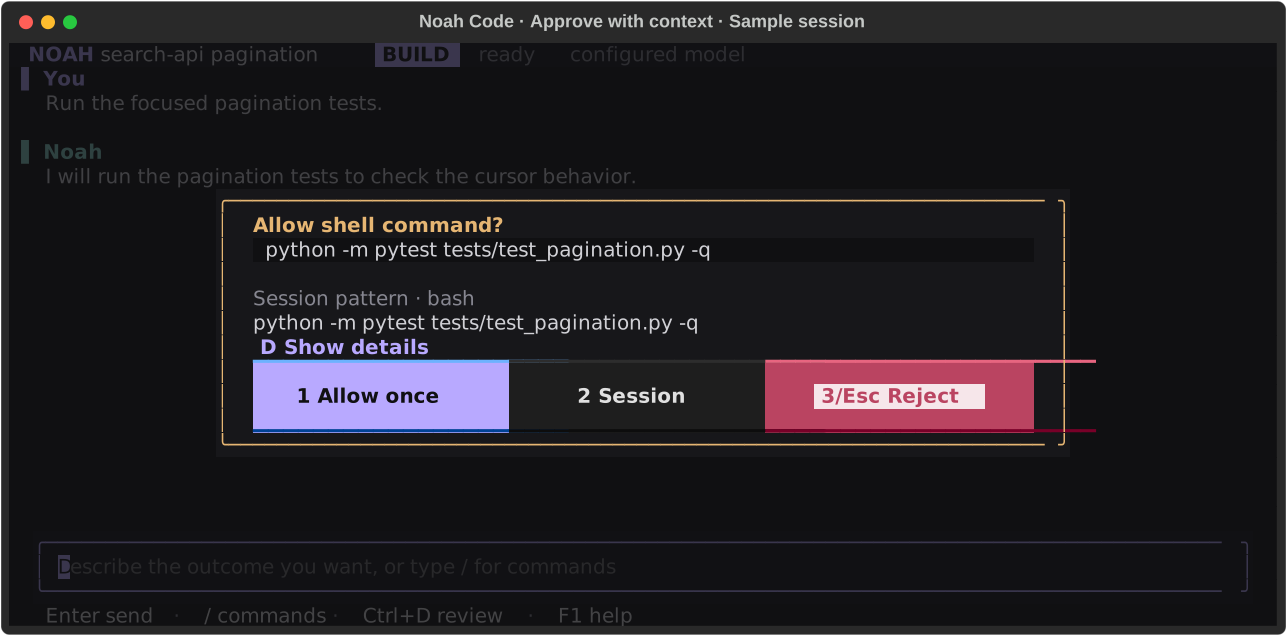
- **Compact approvals.** See the command and session scope together; expand the reason and rule
|
|
196
|
+
with `D`. Long targets scroll, and approval buttons stay visible in small terminals.
|
|
197
|
+
- **Inspectable teams.** Use `F9` to launch a workflow and `F4` to search assignments, filter work
|
|
198
|
+
needing attention, and read agent results.
|
|
199
|
+
|
|
165
200
|
Type `/` to search the full command and configuration reference. The most common controls are:
|
|
166
201
|
|
|
167
202
|
| Control | Action |
|
|
@@ -170,9 +205,14 @@ Type `/` to search the full command and configuration reference. The most common
|
|
|
170
205
|
| `Shift+Enter` / `Ctrl+J` | Insert a newline |
|
|
171
206
|
| `Alt+Enter` | Expand or collapse the composer |
|
|
172
207
|
| `Alt+Z` | Restore a displaced draft |
|
|
208
|
+
| Click / arrows in the prompt | Position the editing cursor |
|
|
209
|
+
| `Ctrl+A` / `Ctrl+X` / `Ctrl+V` | Select all / cut / paste prompt text |
|
|
210
|
+
| `Ctrl+Z` / `Ctrl+Y` | Undo / redo prompt edits |
|
|
211
|
+
| `Ctrl+Home` / `Ctrl+End` | Jump to the beginning / end of the prompt; Shift selects |
|
|
173
212
|
| Drag, then `Cmd+C` / `Ctrl+Shift+C` | Select and copy TUI text |
|
|
174
213
|
| `Ctrl+Shift+C` with no selection | Copy the latest Noah reply |
|
|
175
214
|
| `Ctrl+G` | Open the searchable skills picker |
|
|
215
|
+
| `Ctrl+P` | Search and run slash commands |
|
|
176
216
|
| `Ctrl+L` | Open the model picker |
|
|
177
217
|
| `Ctrl+R` | Search and recall a prior prompt |
|
|
178
218
|
| `Ctrl+T` | Expand or collapse live tool output |
|
|
@@ -180,6 +220,7 @@ Type `/` to search the full command and configuration reference. The most common
|
|
|
180
220
|
| `Alt+Up` | Recall the newest queued prompt for editing |
|
|
181
221
|
| `Ctrl+]` | Return to live transcript output |
|
|
182
222
|
| `Tab` / `Shift+Tab` | Navigate focus; Tab completes suggestions |
|
|
223
|
+
| `Enter` or click a command | Run the selected slash command or open its picker; required arguments stay editable |
|
|
183
224
|
| `Ctrl+B` | Switch between build and plan mode |
|
|
184
225
|
| `Ctrl+D` | Review changes while working or idle |
|
|
185
226
|
| `Ctrl+C` | Stop the current run and pause queued follow-ups |
|
|
@@ -188,6 +229,7 @@ Type `/` to search the full command and configuration reference. The most common
|
|
|
188
229
|
| `F4` | Open the live agent, terminal, and job ledger |
|
|
189
230
|
| `F5` | Edit, reorder, resume, or discard queued follow-ups |
|
|
190
231
|
| `F8` | Show or hide the sidebar |
|
|
232
|
+
| `F9` | Choose a build, review, or investigation team workflow |
|
|
191
233
|
| `Shift+F7` | Focus or leave the scrollable context rail |
|
|
192
234
|
| `/model` | Configure a provider or switch the session model |
|
|
193
235
|
| `/theme` | Choose Atom One Dark, Noah Ocean, Graphite, or High Contrast |
|
|
@@ -197,6 +239,7 @@ Type `/` to search the full command and configuration reference. The most common
|
|
|
197
239
|
| `/health` | Inspect durable run, job, inbox, event, and artifact state |
|
|
198
240
|
| `/tokens` | Inspect tokens, cache usage, prefix stability, model wait, and tool output |
|
|
199
241
|
| `/efficiency` | Switch between `fast`, `balanced`, and `deep` budgets |
|
|
242
|
+
| `/team WORKFLOW OBJECTIVE` | Run a coordinated team, or queue it while another turn is active |
|
|
200
243
|
|
|
201
244
|
On wide terminals, the side rail prioritizes the active operation, delegated agents, named
|
|
202
245
|
terminals, Git branch and change counts, session, model usage, update state, and plan. Git status is refreshed in the background at turn
|
|
@@ -205,6 +248,20 @@ large Noah wordmark until the first prompt, then becomes the conversation and ex
|
|
|
205
248
|
The composer footer keeps contextual keys and compact token, cache, and cost telemetry visible at
|
|
206
249
|
every terminal width where they fit.
|
|
207
250
|
|
|
251
|
+
<details>
|
|
252
|
+
<summary>See the command menu and compact approval dialog</summary>
|
|
253
|
+
|
|
254
|
+
|
|
255
|
+
|
|
256
|
+
*The real command menu, captured with deterministic sample conversation data.*
|
|
257
|
+
|
|
258
|
+
|
|
259
|
+
|
|
260
|
+
*The real approval dialog with a sample request. Screenshots illustrate UI behavior, not a live
|
|
261
|
+
provider run or test result.*
|
|
262
|
+
|
|
263
|
+
</details>
|
|
264
|
+
|
|
208
265
|
## Sessions and crash recovery
|
|
209
266
|
|
|
210
267
|
Start a new session with `noah .`, resume the latest repository session with
|
|
@@ -282,6 +339,10 @@ uv run pytest tests
|
|
|
282
339
|
uv build
|
|
283
340
|
```
|
|
284
341
|
|
|
342
|
+
Regenerate the README screenshots from deterministic sample data with
|
|
343
|
+
`uv run python scripts/capture_readme.py`. This renders the real Textual widgets without making
|
|
344
|
+
provider calls or changing a workspace.
|
|
345
|
+
|
|
285
346
|
See the [development guide](docs/development.md) for platform checks and the release process.
|
|
286
347
|
|
|
287
348
|
## License
|
|
@@ -12,12 +12,12 @@
|
|
|
12
12
|
|
|
13
13
|
</div>
|
|
14
14
|
|
|
15
|
-

|
|
16
16
|
|
|
17
|
-
<p align="center"><sub>The real Textual interface
|
|
17
|
+
<p align="center"><sub>The real Textual interface with deterministic sample data: a build team hands pagination changes to a read-only reviewer.</sub></p>
|
|
18
18
|
|
|
19
19
|
Noah keeps the conversation central while the sidebar tracks the current action, changed files,
|
|
20
|
-
and
|
|
20
|
+
active plan, and agent handoffs. Tool execution stays visible, completed work compacts into
|
|
21
21
|
readable records, and every session remains scoped to its repository.
|
|
22
22
|
|
|
23
23
|
Built on the [NVIDIA OO Agents (NOOA)](https://github.com/NVIDIA-NeMo/labs-OO-Agents) runtime.
|
|
@@ -63,6 +63,10 @@ configuration or session history.
|
|
|
63
63
|
**plan** mode, with ordered `allow`, `ask`, and `deny` permission rules.
|
|
64
64
|
- **Extensible workflows.** Add slash commands, opt-in skills, MCP servers, or markdown subagents;
|
|
65
65
|
attach `@files` and images when the task needs more context.
|
|
66
|
+
- **Coordinated agent teams.** Launch a build, review, or investigation workflow from `F9` or
|
|
67
|
+
`/team`. Specialists hand off findings between phases, and the live work ledger shows progress.
|
|
68
|
+
Teams share session budgets and approvals; read-only work can run concurrently while edits
|
|
69
|
+
use one serialized mutation lane.
|
|
66
70
|
- **Long-running by design.** Provider retries and configurable fallback models handle transient
|
|
67
71
|
failures, while workspace leases, bounded artifacts, durable process ownership, and `/health`
|
|
68
72
|
keep unattended sessions observable.
|
|
@@ -79,6 +83,18 @@ Find the cause of the failing parser tests, implement the smallest safe fix, and
|
|
|
79
83
|
focused test file.
|
|
80
84
|
```
|
|
81
85
|
|
|
86
|
+
For work that benefits from several perspectives, give a team one clear objective:
|
|
87
|
+
|
|
88
|
+
```text
|
|
89
|
+
/team build Add pagination to the search endpoint and cover its edge cases
|
|
90
|
+
/team review Find regressions in the current changes
|
|
91
|
+
/team investigate Trace why login fails after a session expires
|
|
92
|
+
```
|
|
93
|
+
|
|
94
|
+
Build teams analyze, implement, then review. Review and investigation teams stay read-only,
|
|
95
|
+
including in plan mode. Press `F9` to choose a workflow and edit its objective before sending;
|
|
96
|
+
use `F4` to inspect live team progress. In the console, `/team` lists the workflows.
|
|
97
|
+
|
|
82
98
|
Useful launch modes:
|
|
83
99
|
|
|
84
100
|
```bash
|
|
@@ -91,6 +107,9 @@ noah --mode plan .
|
|
|
91
107
|
# Run one task and exit
|
|
92
108
|
noah run "Explain how authentication is wired" .
|
|
93
109
|
|
|
110
|
+
# Emit one structured result on stdout (progress goes to stderr)
|
|
111
|
+
noah run --json "Fix the failing unit test" .
|
|
112
|
+
|
|
94
113
|
# Allow actions that would normally ask; explicit deny rules still apply
|
|
95
114
|
noah run --auto "Fix the failing unit test" .
|
|
96
115
|
|
|
@@ -102,6 +121,13 @@ noah --session SESSION_ID .
|
|
|
102
121
|
noah --console .
|
|
103
122
|
```
|
|
104
123
|
|
|
124
|
+
`run --json` reports `status` (`completed`, `needs_input`, `failed`, or `cancelled`),
|
|
125
|
+
`exit_code`, `explanation`, `session_id`, `run_id`, session `usage`, and recorded `checks`.
|
|
126
|
+
Check `status` when automating: a request for input keeps the existing exit code 0,
|
|
127
|
+
but its status is `needs_input`. Check results are separate from task completion;
|
|
128
|
+
an empty list means no checks were recorded. Errors keep nonzero exit codes and
|
|
129
|
+
Ctrl+C returns 130. Delegated agents also retain `needs_input` in the work ledger.
|
|
130
|
+
|
|
105
131
|
Check the installation and resolved configuration with:
|
|
106
132
|
|
|
107
133
|
```bash
|
|
@@ -116,6 +142,15 @@ means netcat, `noah` or `noah-code` is recommended.
|
|
|
116
142
|
|
|
117
143
|
## Inside the TUI
|
|
118
144
|
|
|
145
|
+
The interface keeps frequent actions within reach:
|
|
146
|
+
|
|
147
|
+
- **Readable commands.** Aligned descriptions, muted argument hints, and a subtle selection row
|
|
148
|
+
make slash commands easier to scan. Use arrows, Enter, Tab, or the mouse.
|
|
149
|
+
- **Compact approvals.** See the command and session scope together; expand the reason and rule
|
|
150
|
+
with `D`. Long targets scroll, and approval buttons stay visible in small terminals.
|
|
151
|
+
- **Inspectable teams.** Use `F9` to launch a workflow and `F4` to search assignments, filter work
|
|
152
|
+
needing attention, and read agent results.
|
|
153
|
+
|
|
119
154
|
Type `/` to search the full command and configuration reference. The most common controls are:
|
|
120
155
|
|
|
121
156
|
| Control | Action |
|
|
@@ -124,9 +159,14 @@ Type `/` to search the full command and configuration reference. The most common
|
|
|
124
159
|
| `Shift+Enter` / `Ctrl+J` | Insert a newline |
|
|
125
160
|
| `Alt+Enter` | Expand or collapse the composer |
|
|
126
161
|
| `Alt+Z` | Restore a displaced draft |
|
|
162
|
+
| Click / arrows in the prompt | Position the editing cursor |
|
|
163
|
+
| `Ctrl+A` / `Ctrl+X` / `Ctrl+V` | Select all / cut / paste prompt text |
|
|
164
|
+
| `Ctrl+Z` / `Ctrl+Y` | Undo / redo prompt edits |
|
|
165
|
+
| `Ctrl+Home` / `Ctrl+End` | Jump to the beginning / end of the prompt; Shift selects |
|
|
127
166
|
| Drag, then `Cmd+C` / `Ctrl+Shift+C` | Select and copy TUI text |
|
|
128
167
|
| `Ctrl+Shift+C` with no selection | Copy the latest Noah reply |
|
|
129
168
|
| `Ctrl+G` | Open the searchable skills picker |
|
|
169
|
+
| `Ctrl+P` | Search and run slash commands |
|
|
130
170
|
| `Ctrl+L` | Open the model picker |
|
|
131
171
|
| `Ctrl+R` | Search and recall a prior prompt |
|
|
132
172
|
| `Ctrl+T` | Expand or collapse live tool output |
|
|
@@ -134,6 +174,7 @@ Type `/` to search the full command and configuration reference. The most common
|
|
|
134
174
|
| `Alt+Up` | Recall the newest queued prompt for editing |
|
|
135
175
|
| `Ctrl+]` | Return to live transcript output |
|
|
136
176
|
| `Tab` / `Shift+Tab` | Navigate focus; Tab completes suggestions |
|
|
177
|
+
| `Enter` or click a command | Run the selected slash command or open its picker; required arguments stay editable |
|
|
137
178
|
| `Ctrl+B` | Switch between build and plan mode |
|
|
138
179
|
| `Ctrl+D` | Review changes while working or idle |
|
|
139
180
|
| `Ctrl+C` | Stop the current run and pause queued follow-ups |
|
|
@@ -142,6 +183,7 @@ Type `/` to search the full command and configuration reference. The most common
|
|
|
142
183
|
| `F4` | Open the live agent, terminal, and job ledger |
|
|
143
184
|
| `F5` | Edit, reorder, resume, or discard queued follow-ups |
|
|
144
185
|
| `F8` | Show or hide the sidebar |
|
|
186
|
+
| `F9` | Choose a build, review, or investigation team workflow |
|
|
145
187
|
| `Shift+F7` | Focus or leave the scrollable context rail |
|
|
146
188
|
| `/model` | Configure a provider or switch the session model |
|
|
147
189
|
| `/theme` | Choose Atom One Dark, Noah Ocean, Graphite, or High Contrast |
|
|
@@ -151,6 +193,7 @@ Type `/` to search the full command and configuration reference. The most common
|
|
|
151
193
|
| `/health` | Inspect durable run, job, inbox, event, and artifact state |
|
|
152
194
|
| `/tokens` | Inspect tokens, cache usage, prefix stability, model wait, and tool output |
|
|
153
195
|
| `/efficiency` | Switch between `fast`, `balanced`, and `deep` budgets |
|
|
196
|
+
| `/team WORKFLOW OBJECTIVE` | Run a coordinated team, or queue it while another turn is active |
|
|
154
197
|
|
|
155
198
|
On wide terminals, the side rail prioritizes the active operation, delegated agents, named
|
|
156
199
|
terminals, Git branch and change counts, session, model usage, update state, and plan. Git status is refreshed in the background at turn
|
|
@@ -159,6 +202,20 @@ large Noah wordmark until the first prompt, then becomes the conversation and ex
|
|
|
159
202
|
The composer footer keeps contextual keys and compact token, cache, and cost telemetry visible at
|
|
160
203
|
every terminal width where they fit.
|
|
161
204
|
|
|
205
|
+
<details>
|
|
206
|
+
<summary>See the command menu and compact approval dialog</summary>
|
|
207
|
+
|
|
208
|
+

|
|
209
|
+
|
|
210
|
+
*The real command menu, captured with deterministic sample conversation data.*
|
|
211
|
+
|
|
212
|
+

|
|
213
|
+
|
|
214
|
+
*The real approval dialog with a sample request. Screenshots illustrate UI behavior, not a live
|
|
215
|
+
provider run or test result.*
|
|
216
|
+
|
|
217
|
+
</details>
|
|
218
|
+
|
|
162
219
|
## Sessions and crash recovery
|
|
163
220
|
|
|
164
221
|
Start a new session with `noah .`, resume the latest repository session with
|
|
@@ -236,6 +293,10 @@ uv run pytest tests
|
|
|
236
293
|
uv build
|
|
237
294
|
```
|
|
238
295
|
|
|
296
|
+
Regenerate the README screenshots from deterministic sample data with
|
|
297
|
+
`uv run python scripts/capture_readme.py`. This renders the real Textual widgets without making
|
|
298
|
+
provider calls or changing a workspace.
|
|
299
|
+
|
|
239
300
|
See the [development guide](docs/development.md) for platform checks and the release process.
|
|
240
301
|
|
|
241
302
|
## License
|
|
@@ -0,0 +1,160 @@
|
|
|
1
|
+
<svg class="rich-terminal" viewBox="0 0 1287 635.5999999999999" xmlns="http://www.w3.org/2000/svg">
|
|
2
|
+
<!-- Generated with Rich https://www.textualize.io -->
|
|
3
|
+
<style>
|
|
4
|
+
|
|
5
|
+
@font-face {
|
|
6
|
+
font-family: "Fira Code";
|
|
7
|
+
src: local("FiraCode-Regular"),
|
|
8
|
+
url("https://cdnjs.cloudflare.com/ajax/libs/firacode/6.2.0/woff2/FiraCode-Regular.woff2") format("woff2"),
|
|
9
|
+
url("https://cdnjs.cloudflare.com/ajax/libs/firacode/6.2.0/woff/FiraCode-Regular.woff") format("woff");
|
|
10
|
+
font-style: normal;
|
|
11
|
+
font-weight: 400;
|
|
12
|
+
}
|
|
13
|
+
@font-face {
|
|
14
|
+
font-family: "Fira Code";
|
|
15
|
+
src: local("FiraCode-Bold"),
|
|
16
|
+
url("https://cdnjs.cloudflare.com/ajax/libs/firacode/6.2.0/woff2/FiraCode-Bold.woff2") format("woff2"),
|
|
17
|
+
url("https://cdnjs.cloudflare.com/ajax/libs/firacode/6.2.0/woff/FiraCode-Bold.woff") format("woff");
|
|
18
|
+
font-style: bold;
|
|
19
|
+
font-weight: 700;
|
|
20
|
+
}
|
|
21
|
+
|
|
22
|
+
.terminal-2895778690-matrix {
|
|
23
|
+
font-family: Fira Code, monospace;
|
|
24
|
+
font-size: 20px;
|
|
25
|
+
line-height: 24.4px;
|
|
26
|
+
font-variant-east-asian: full-width;
|
|
27
|
+
}
|
|
28
|
+
|
|
29
|
+
.terminal-2895778690-title {
|
|
30
|
+
font-size: 18px;
|
|
31
|
+
font-weight: bold;
|
|
32
|
+
font-family: arial;
|
|
33
|
+
}
|
|
34
|
+
|
|
35
|
+
.terminal-2895778690-r1 { fill: #c5c8c6 }
|
|
36
|
+
.terminal-2895778690-r2 { fill: #b8a9ff;font-weight: bold }
|
|
37
|
+
.terminal-2895778690-r3 { fill: #d1d1d6 }
|
|
38
|
+
.terminal-2895778690-r4 { fill: #101012;font-weight: bold }
|
|
39
|
+
.terminal-2895778690-r5 { fill: #868690 }
|
|
40
|
+
.terminal-2895778690-r6 { fill: #e0e0e0 }
|
|
41
|
+
.terminal-2895778690-r7 { fill: #8bd5ca;font-weight: bold }
|
|
42
|
+
.terminal-2895778690-r8 { fill: #303036 }
|
|
43
|
+
.terminal-2895778690-r9 { fill: #868690;font-weight: bold }
|
|
44
|
+
.terminal-2895778690-r10 { fill: #d1d1d6;font-weight: bold }
|
|
45
|
+
.terminal-2895778690-r11 { fill: #b8a9ff }
|
|
46
|
+
.terminal-2895778690-r12 { fill: #101012 }
|
|
47
|
+
</style>
|
|
48
|
+
|
|
49
|
+
<defs>
|
|
50
|
+
<clipPath id="terminal-2895778690-clip-terminal">
|
|
51
|
+
<rect x="0" y="0" width="1267.8" height="584.5999999999999" />
|
|
52
|
+
</clipPath>
|
|
53
|
+
<clipPath id="terminal-2895778690-line-0">
|
|
54
|
+
<rect x="0" y="1.5" width="1268.8" height="24.65"/>
|
|
55
|
+
</clipPath>
|
|
56
|
+
<clipPath id="terminal-2895778690-line-1">
|
|
57
|
+
<rect x="0" y="25.9" width="1268.8" height="24.65"/>
|
|
58
|
+
</clipPath>
|
|
59
|
+
<clipPath id="terminal-2895778690-line-2">
|
|
60
|
+
<rect x="0" y="50.3" width="1268.8" height="24.65"/>
|
|
61
|
+
</clipPath>
|
|
62
|
+
<clipPath id="terminal-2895778690-line-3">
|
|
63
|
+
<rect x="0" y="74.7" width="1268.8" height="24.65"/>
|
|
64
|
+
</clipPath>
|
|
65
|
+
<clipPath id="terminal-2895778690-line-4">
|
|
66
|
+
<rect x="0" y="99.1" width="1268.8" height="24.65"/>
|
|
67
|
+
</clipPath>
|
|
68
|
+
<clipPath id="terminal-2895778690-line-5">
|
|
69
|
+
<rect x="0" y="123.5" width="1268.8" height="24.65"/>
|
|
70
|
+
</clipPath>
|
|
71
|
+
<clipPath id="terminal-2895778690-line-6">
|
|
72
|
+
<rect x="0" y="147.9" width="1268.8" height="24.65"/>
|
|
73
|
+
</clipPath>
|
|
74
|
+
<clipPath id="terminal-2895778690-line-7">
|
|
75
|
+
<rect x="0" y="172.3" width="1268.8" height="24.65"/>
|
|
76
|
+
</clipPath>
|
|
77
|
+
<clipPath id="terminal-2895778690-line-8">
|
|
78
|
+
<rect x="0" y="196.7" width="1268.8" height="24.65"/>
|
|
79
|
+
</clipPath>
|
|
80
|
+
<clipPath id="terminal-2895778690-line-9">
|
|
81
|
+
<rect x="0" y="221.1" width="1268.8" height="24.65"/>
|
|
82
|
+
</clipPath>
|
|
83
|
+
<clipPath id="terminal-2895778690-line-10">
|
|
84
|
+
<rect x="0" y="245.5" width="1268.8" height="24.65"/>
|
|
85
|
+
</clipPath>
|
|
86
|
+
<clipPath id="terminal-2895778690-line-11">
|
|
87
|
+
<rect x="0" y="269.9" width="1268.8" height="24.65"/>
|
|
88
|
+
</clipPath>
|
|
89
|
+
<clipPath id="terminal-2895778690-line-12">
|
|
90
|
+
<rect x="0" y="294.3" width="1268.8" height="24.65"/>
|
|
91
|
+
</clipPath>
|
|
92
|
+
<clipPath id="terminal-2895778690-line-13">
|
|
93
|
+
<rect x="0" y="318.7" width="1268.8" height="24.65"/>
|
|
94
|
+
</clipPath>
|
|
95
|
+
<clipPath id="terminal-2895778690-line-14">
|
|
96
|
+
<rect x="0" y="343.1" width="1268.8" height="24.65"/>
|
|
97
|
+
</clipPath>
|
|
98
|
+
<clipPath id="terminal-2895778690-line-15">
|
|
99
|
+
<rect x="0" y="367.5" width="1268.8" height="24.65"/>
|
|
100
|
+
</clipPath>
|
|
101
|
+
<clipPath id="terminal-2895778690-line-16">
|
|
102
|
+
<rect x="0" y="391.9" width="1268.8" height="24.65"/>
|
|
103
|
+
</clipPath>
|
|
104
|
+
<clipPath id="terminal-2895778690-line-17">
|
|
105
|
+
<rect x="0" y="416.3" width="1268.8" height="24.65"/>
|
|
106
|
+
</clipPath>
|
|
107
|
+
<clipPath id="terminal-2895778690-line-18">
|
|
108
|
+
<rect x="0" y="440.7" width="1268.8" height="24.65"/>
|
|
109
|
+
</clipPath>
|
|
110
|
+
<clipPath id="terminal-2895778690-line-19">
|
|
111
|
+
<rect x="0" y="465.1" width="1268.8" height="24.65"/>
|
|
112
|
+
</clipPath>
|
|
113
|
+
<clipPath id="terminal-2895778690-line-20">
|
|
114
|
+
<rect x="0" y="489.5" width="1268.8" height="24.65"/>
|
|
115
|
+
</clipPath>
|
|
116
|
+
<clipPath id="terminal-2895778690-line-21">
|
|
117
|
+
<rect x="0" y="513.9" width="1268.8" height="24.65"/>
|
|
118
|
+
</clipPath>
|
|
119
|
+
<clipPath id="terminal-2895778690-line-22">
|
|
120
|
+
<rect x="0" y="538.3" width="1268.8" height="24.65"/>
|
|
121
|
+
</clipPath>
|
|
122
|
+
</defs>
|
|
123
|
+
|
|
124
|
+
<rect fill="#292929" stroke="rgba(255,255,255,0.35)" stroke-width="1" x="1" y="1" width="1285" height="633.6" rx="8"/><text class="terminal-2895778690-title" fill="#c5c8c6" text-anchor="middle" x="642" y="27">Noah Code · Find a command · Sample session</text>
|
|
125
|
+
<g transform="translate(26,22)">
|
|
126
|
+
<circle cx="0" cy="0" r="7" fill="#ff5f57"/>
|
|
127
|
+
<circle cx="22" cy="0" r="7" fill="#febc2e"/>
|
|
128
|
+
<circle cx="44" cy="0" r="7" fill="#28c840"/>
|
|
129
|
+
</g>
|
|
130
|
+
|
|
131
|
+
<g transform="translate(9, 41)" clip-path="url(#terminal-2895778690-clip-terminal)">
|
|
132
|
+
<rect fill="#17171a" x="0" y="1.5" width="12.2" height="24.65" shape-rendering="crispEdges"/><rect fill="#17171a" x="12.2" y="1.5" width="73.2" height="24.65" shape-rendering="crispEdges"/><rect fill="#17171a" x="85.4" y="1.5" width="280.6" height="24.65" shape-rendering="crispEdges"/><rect fill="#b8a9ff" x="366" y="1.5" width="85.4" height="24.65" shape-rendering="crispEdges"/><rect fill="#17171a" x="451.4" y="1.5" width="97.6" height="24.65" shape-rendering="crispEdges"/><rect fill="#17171a" x="549" y="1.5" width="219.6" height="24.65" shape-rendering="crispEdges"/><rect fill="#17171a" x="768.6" y="1.5" width="488" height="24.65" shape-rendering="crispEdges"/><rect fill="#17171a" x="1256.6" y="1.5" width="12.2" height="24.65" shape-rendering="crispEdges"/><rect fill="#101012" x="0" y="25.9" width="12.2" height="24.65" shape-rendering="crispEdges"/><rect fill="#101012" x="12.2" y="25.9" width="61" height="24.65" shape-rendering="crispEdges"/><rect fill="#101012" x="73.2" y="25.9" width="1110.2" height="24.65" shape-rendering="crispEdges"/><rect fill="#101012" x="1183.4" y="25.9" width="24.4" height="24.65" shape-rendering="crispEdges"/><rect fill="#101012" x="1207.8" y="25.9" width="12.2" height="24.65" shape-rendering="crispEdges"/><rect fill="#101012" x="1220" y="25.9" width="48.8" height="24.65" shape-rendering="crispEdges"/><rect fill="#101012" x="0" y="50.3" width="12.2" height="24.65" shape-rendering="crispEdges"/><rect fill="#101012" x="12.2" y="50.3" width="24.4" height="24.65" shape-rendering="crispEdges"/><rect fill="#101012" x="36.6" y="50.3" width="390.4" height="24.65" shape-rendering="crispEdges"/><rect fill="#101012" x="427" y="50.3" width="756.4" height="24.65" shape-rendering="crispEdges"/><rect fill="#101012" x="1183.4" y="50.3" width="24.4" height="24.65" shape-rendering="crispEdges"/><rect fill="#101012" x="1207.8" y="50.3" width="12.2" height="24.65" shape-rendering="crispEdges"/><rect fill="#101012" x="1220" y="50.3" width="48.8" height="24.65" shape-rendering="crispEdges"/><rect fill="#101012" x="0" y="74.7" width="12.2" height="24.65" shape-rendering="crispEdges"/><rect fill="#101012" x="12.2" y="74.7" width="414.8" height="24.65" shape-rendering="crispEdges"/><rect fill="#101012" x="427" y="74.7" width="756.4" height="24.65" shape-rendering="crispEdges"/><rect fill="#101012" x="1183.4" y="74.7" width="24.4" height="24.65" shape-rendering="crispEdges"/><rect fill="#101012" x="1207.8" y="74.7" width="12.2" height="24.65" shape-rendering="crispEdges"/><rect fill="#101012" x="1220" y="74.7" width="48.8" height="24.65" shape-rendering="crispEdges"/><rect fill="#101012" x="0" y="99.1" width="12.2" height="24.65" shape-rendering="crispEdges"/><rect fill="#101012" x="12.2" y="99.1" width="73.2" height="24.65" shape-rendering="crispEdges"/><rect fill="#101012" x="85.4" y="99.1" width="1098" height="24.65" shape-rendering="crispEdges"/><rect fill="#101012" x="1183.4" y="99.1" width="24.4" height="24.65" shape-rendering="crispEdges"/><rect fill="#101012" x="1207.8" y="99.1" width="12.2" height="24.65" shape-rendering="crispEdges"/><rect fill="#101012" x="1220" y="99.1" width="48.8" height="24.65" shape-rendering="crispEdges"/><rect fill="#101012" x="0" y="123.5" width="12.2" height="24.65" shape-rendering="crispEdges"/><rect fill="#101012" x="12.2" y="123.5" width="24.4" height="24.65" shape-rendering="crispEdges"/><rect fill="#101012" x="36.6" y="123.5" width="951.6" height="24.65" shape-rendering="crispEdges"/><rect fill="#101012" x="988.2" y="123.5" width="195.2" height="24.65" shape-rendering="crispEdges"/><rect fill="#101012" x="1183.4" y="123.5" width="24.4" height="24.65" shape-rendering="crispEdges"/><rect fill="#101012" x="1207.8" y="123.5" width="12.2" height="24.65" shape-rendering="crispEdges"/><rect fill="#101012" x="1220" y="123.5" width="48.8" height="24.65" shape-rendering="crispEdges"/><rect fill="#101012" x="0" y="147.9" width="12.2" height="24.65" shape-rendering="crispEdges"/><rect fill="#101012" x="12.2" y="147.9" width="24.4" height="24.65" shape-rendering="crispEdges"/><rect fill="#101012" x="36.6" y="147.9" width="61" height="24.65" shape-rendering="crispEdges"/><rect fill="#101012" x="97.6" y="147.9" width="890.6" height="24.65" shape-rendering="crispEdges"/><rect fill="#101012" x="988.2" y="147.9" width="195.2" height="24.65" shape-rendering="crispEdges"/><rect fill="#101012" x="1183.4" y="147.9" width="24.4" height="24.65" shape-rendering="crispEdges"/><rect fill="#101012" x="1207.8" y="147.9" width="12.2" height="24.65" shape-rendering="crispEdges"/><rect fill="#101012" x="1220" y="147.9" width="48.8" height="24.65" shape-rendering="crispEdges"/><rect fill="#101012" x="0" y="172.3" width="12.2" height="24.65" shape-rendering="crispEdges"/><rect fill="#101012" x="12.2" y="172.3" width="976" height="24.65" shape-rendering="crispEdges"/><rect fill="#101012" x="988.2" y="172.3" width="195.2" height="24.65" shape-rendering="crispEdges"/><rect fill="#101012" x="1183.4" y="172.3" width="24.4" height="24.65" shape-rendering="crispEdges"/><rect fill="#101012" x="1207.8" y="172.3" width="12.2" height="24.65" shape-rendering="crispEdges"/><rect fill="#101012" x="1220" y="172.3" width="48.8" height="24.65" shape-rendering="crispEdges"/><rect fill="#101012" x="0" y="196.7" width="12.2" height="24.65" shape-rendering="crispEdges"/><rect fill="#101012" x="12.2" y="196.7" width="1171.2" height="24.65" shape-rendering="crispEdges"/><rect fill="#101012" x="1183.4" y="196.7" width="24.4" height="24.65" shape-rendering="crispEdges"/><rect fill="#101012" x="1207.8" y="196.7" width="12.2" height="24.65" shape-rendering="crispEdges"/><rect fill="#101012" x="1220" y="196.7" width="48.8" height="24.65" shape-rendering="crispEdges"/><rect fill="#101012" x="0" y="221.1" width="12.2" height="24.65" shape-rendering="crispEdges"/><rect fill="#101012" x="12.2" y="221.1" width="1171.2" height="24.65" shape-rendering="crispEdges"/><rect fill="#101012" x="1183.4" y="221.1" width="24.4" height="24.65" shape-rendering="crispEdges"/><rect fill="#101012" x="1207.8" y="221.1" width="12.2" height="24.65" shape-rendering="crispEdges"/><rect fill="#101012" x="1220" y="221.1" width="48.8" height="24.65" shape-rendering="crispEdges"/><rect fill="#101012" x="0" y="245.5" width="12.2" height="24.65" shape-rendering="crispEdges"/><rect fill="#101012" x="12.2" y="245.5" width="1171.2" height="24.65" shape-rendering="crispEdges"/><rect fill="#101012" x="1183.4" y="245.5" width="24.4" height="24.65" shape-rendering="crispEdges"/><rect fill="#101012" x="1207.8" y="245.5" width="12.2" height="24.65" shape-rendering="crispEdges"/><rect fill="#101012" x="1220" y="245.5" width="48.8" height="24.65" shape-rendering="crispEdges"/><rect fill="#101012" x="0" y="269.9" width="12.2" height="24.65" shape-rendering="crispEdges"/><rect fill="#101012" x="12.2" y="269.9" width="1171.2" height="24.65" shape-rendering="crispEdges"/><rect fill="#101012" x="1183.4" y="269.9" width="24.4" height="24.65" shape-rendering="crispEdges"/><rect fill="#101012" x="1207.8" y="269.9" width="12.2" height="24.65" shape-rendering="crispEdges"/><rect fill="#101012" x="1220" y="269.9" width="48.8" height="24.65" shape-rendering="crispEdges"/><rect fill="#101012" x="0" y="294.3" width="24.4" height="24.65" shape-rendering="crispEdges"/><rect fill="#17171a" x="24.4" y="294.3" width="12.2" height="24.65" shape-rendering="crispEdges"/><rect fill="#17171a" x="36.6" y="294.3" width="1195.6" height="24.65" shape-rendering="crispEdges"/><rect fill="#17171a" x="1232.2" y="294.3" width="12.2" height="24.65" shape-rendering="crispEdges"/><rect fill="#101012" x="1244.4" y="294.3" width="24.4" height="24.65" shape-rendering="crispEdges"/><rect fill="#101012" x="0" y="318.7" width="24.4" height="24.65" shape-rendering="crispEdges"/><rect fill="#17171a" x="24.4" y="318.7" width="12.2" height="24.65" shape-rendering="crispEdges"/><rect fill="#17171a" x="36.6" y="318.7" width="1195.6" height="24.65" shape-rendering="crispEdges"/><rect fill="#17171a" x="1232.2" y="318.7" width="12.2" height="24.65" shape-rendering="crispEdges"/><rect fill="#101012" x="1244.4" y="318.7" width="24.4" height="24.65" shape-rendering="crispEdges"/><rect fill="#101012" x="0" y="343.1" width="24.4" height="24.65" shape-rendering="crispEdges"/><rect fill="#17171a" x="24.4" y="343.1" width="12.2" height="24.65" shape-rendering="crispEdges"/><rect fill="#17171a" x="36.6" y="343.1" width="12.2" height="24.65" shape-rendering="crispEdges"/><rect fill="#17171a" x="48.8" y="343.1" width="1061.4" height="24.65" shape-rendering="crispEdges"/><rect fill="#17171a" x="1110.2" y="343.1" width="109.8" height="24.65" shape-rendering="crispEdges"/><rect fill="#17171a" x="1220" y="343.1" width="12.2" height="24.65" shape-rendering="crispEdges"/><rect fill="#17171a" x="1232.2" y="343.1" width="12.2" height="24.65" shape-rendering="crispEdges"/><rect fill="#101012" x="1244.4" y="343.1" width="24.4" height="24.65" shape-rendering="crispEdges"/><rect fill="#101012" x="0" y="367.5" width="24.4" height="24.65" shape-rendering="crispEdges"/><rect fill="#17171a" x="24.4" y="367.5" width="12.2" height="24.65" shape-rendering="crispEdges"/><rect fill="#17171a" x="36.6" y="367.5" width="12.2" height="24.65" shape-rendering="crispEdges"/><rect fill="#222226" x="48.8" y="367.5" width="24.4" height="24.65" shape-rendering="crispEdges"/><rect fill="#222226" x="73.2" y="367.5" width="390.4" height="24.65" shape-rendering="crispEdges"/><rect fill="#222226" x="463.6" y="367.5" width="24.4" height="24.65" shape-rendering="crispEdges"/><rect fill="#222226" x="488" y="367.5" width="280.6" height="24.65" shape-rendering="crispEdges"/><rect fill="#222226" x="768.6" y="367.5" width="451.4" height="24.65" shape-rendering="crispEdges"/><rect fill="#17171a" x="1220" y="367.5" width="12.2" height="24.65" shape-rendering="crispEdges"/><rect fill="#17171a" x="1232.2" y="367.5" width="12.2" height="24.65" shape-rendering="crispEdges"/><rect fill="#101012" x="1244.4" y="367.5" width="24.4" height="24.65" shape-rendering="crispEdges"/><rect fill="#101012" x="0" y="391.9" width="24.4" height="24.65" shape-rendering="crispEdges"/><rect fill="#17171a" x="24.4" y="391.9" width="12.2" height="24.65" shape-rendering="crispEdges"/><rect fill="#17171a" x="36.6" y="391.9" width="12.2" height="24.65" shape-rendering="crispEdges"/><rect fill="#17171a" x="48.8" y="391.9" width="24.4" height="24.65" shape-rendering="crispEdges"/><rect fill="#17171a" x="73.2" y="391.9" width="85.4" height="24.65" shape-rendering="crispEdges"/><rect fill="#17171a" x="158.6" y="391.9" width="85.4" height="24.65" shape-rendering="crispEdges"/><rect fill="#17171a" x="244" y="391.9" width="219.6" height="24.65" shape-rendering="crispEdges"/><rect fill="#17171a" x="463.6" y="391.9" width="24.4" height="24.65" shape-rendering="crispEdges"/><rect fill="#17171a" x="488" y="391.9" width="475.8" height="24.65" shape-rendering="crispEdges"/><rect fill="#17171a" x="963.8" y="391.9" width="256.2" height="24.65" shape-rendering="crispEdges"/><rect fill="#17171a" x="1220" y="391.9" width="12.2" height="24.65" shape-rendering="crispEdges"/><rect fill="#17171a" x="1232.2" y="391.9" width="12.2" height="24.65" shape-rendering="crispEdges"/><rect fill="#101012" x="1244.4" y="391.9" width="24.4" height="24.65" shape-rendering="crispEdges"/><rect fill="#101012" x="0" y="416.3" width="24.4" height="24.65" shape-rendering="crispEdges"/><rect fill="#17171a" x="24.4" y="416.3" width="12.2" height="24.65" shape-rendering="crispEdges"/><rect fill="#17171a" x="36.6" y="416.3" width="12.2" height="24.65" shape-rendering="crispEdges"/><rect fill="#17171a" x="48.8" y="416.3" width="24.4" height="24.65" shape-rendering="crispEdges"/><rect fill="#17171a" x="73.2" y="416.3" width="73.2" height="24.65" shape-rendering="crispEdges"/><rect fill="#17171a" x="146.4" y="416.3" width="85.4" height="24.65" shape-rendering="crispEdges"/><rect fill="#17171a" x="231.8" y="416.3" width="231.8" height="24.65" shape-rendering="crispEdges"/><rect fill="#17171a" x="463.6" y="416.3" width="24.4" height="24.65" shape-rendering="crispEdges"/><rect fill="#17171a" x="488" y="416.3" width="414.8" height="24.65" shape-rendering="crispEdges"/><rect fill="#17171a" x="902.8" y="416.3" width="317.2" height="24.65" shape-rendering="crispEdges"/><rect fill="#17171a" x="1220" y="416.3" width="12.2" height="24.65" shape-rendering="crispEdges"/><rect fill="#17171a" x="1232.2" y="416.3" width="12.2" height="24.65" shape-rendering="crispEdges"/><rect fill="#101012" x="1244.4" y="416.3" width="24.4" height="24.65" shape-rendering="crispEdges"/><rect fill="#101012" x="0" y="440.7" width="24.4" height="24.65" shape-rendering="crispEdges"/><rect fill="#17171a" x="24.4" y="440.7" width="12.2" height="24.65" shape-rendering="crispEdges"/><rect fill="#17171a" x="36.6" y="440.7" width="1195.6" height="24.65" shape-rendering="crispEdges"/><rect fill="#17171a" x="1232.2" y="440.7" width="12.2" height="24.65" shape-rendering="crispEdges"/><rect fill="#101012" x="1244.4" y="440.7" width="24.4" height="24.65" shape-rendering="crispEdges"/><rect fill="#101012" x="0" y="465.1" width="24.4" height="24.65" shape-rendering="crispEdges"/><rect fill="#17171a" x="24.4" y="465.1" width="12.2" height="24.65" shape-rendering="crispEdges"/><rect fill="#17171a" x="36.6" y="465.1" width="1195.6" height="24.65" shape-rendering="crispEdges"/><rect fill="#17171a" x="1232.2" y="465.1" width="12.2" height="24.65" shape-rendering="crispEdges"/><rect fill="#101012" x="1244.4" y="465.1" width="24.4" height="24.65" shape-rendering="crispEdges"/><rect fill="#101012" x="0" y="489.5" width="24.4" height="24.65" shape-rendering="crispEdges"/><rect fill="#17171a" x="24.4" y="489.5" width="12.2" height="24.65" shape-rendering="crispEdges"/><rect fill="#17171a" x="36.6" y="489.5" width="1195.6" height="24.65" shape-rendering="crispEdges"/><rect fill="#17171a" x="1232.2" y="489.5" width="12.2" height="24.65" shape-rendering="crispEdges"/><rect fill="#101012" x="1244.4" y="489.5" width="24.4" height="24.65" shape-rendering="crispEdges"/><rect fill="#101012" x="0" y="513.9" width="24.4" height="24.65" shape-rendering="crispEdges"/><rect fill="#17171a" x="24.4" y="513.9" width="12.2" height="24.65" shape-rendering="crispEdges"/><rect fill="#17171a" x="36.6" y="513.9" width="12.2" height="24.65" shape-rendering="crispEdges"/><rect fill="#b8a9ff" x="48.8" y="513.9" width="12.2" height="24.65" shape-rendering="crispEdges"/><rect fill="#222226" x="61" y="513.9" width="12.2" height="24.65" shape-rendering="crispEdges"/><rect fill="#222226" x="73.2" y="513.9" width="1146.8" height="24.65" shape-rendering="crispEdges"/><rect fill="#17171a" x="1220" y="513.9" width="12.2" height="24.65" shape-rendering="crispEdges"/><rect fill="#17171a" x="1232.2" y="513.9" width="12.2" height="24.65" shape-rendering="crispEdges"/><rect fill="#101012" x="1244.4" y="513.9" width="24.4" height="24.65" shape-rendering="crispEdges"/><rect fill="#101012" x="0" y="538.3" width="24.4" height="24.65" shape-rendering="crispEdges"/><rect fill="#17171a" x="24.4" y="538.3" width="12.2" height="24.65" shape-rendering="crispEdges"/><rect fill="#17171a" x="36.6" y="538.3" width="1195.6" height="24.65" shape-rendering="crispEdges"/><rect fill="#17171a" x="1232.2" y="538.3" width="12.2" height="24.65" shape-rendering="crispEdges"/><rect fill="#101012" x="1244.4" y="538.3" width="24.4" height="24.65" shape-rendering="crispEdges"/><rect fill="#101012" x="0" y="562.7" width="36.6" height="24.65" shape-rendering="crispEdges"/><rect fill="#101012" x="36.6" y="562.7" width="122" height="24.65" shape-rendering="crispEdges"/><rect fill="#101012" x="158.6" y="562.7" width="36.6" height="24.65" shape-rendering="crispEdges"/><rect fill="#101012" x="195.2" y="562.7" width="183" height="24.65" shape-rendering="crispEdges"/><rect fill="#101012" x="378.2" y="562.7" width="36.6" height="24.65" shape-rendering="crispEdges"/><rect fill="#101012" x="414.8" y="562.7" width="97.6" height="24.65" shape-rendering="crispEdges"/><rect fill="#101012" x="512.4" y="562.7" width="36.6" height="24.65" shape-rendering="crispEdges"/><rect fill="#101012" x="549" y="562.7" width="109.8" height="24.65" shape-rendering="crispEdges"/><rect fill="#101012" x="658.8" y="562.7" width="573.4" height="24.65" shape-rendering="crispEdges"/><rect fill="#101012" x="1232.2" y="562.7" width="36.6" height="24.65" shape-rendering="crispEdges"/>
|
|
133
|
+
<g class="terminal-2895778690-matrix">
|
|
134
|
+
<text class="terminal-2895778690-r2" x="12.2" y="20" textLength="73.2" clip-path="url(#terminal-2895778690-line-0)"> NOAH </text><text class="terminal-2895778690-r3" x="85.4" y="20" textLength="280.6" clip-path="url(#terminal-2895778690-line-0)"> search-api pagination </text><text class="terminal-2895778690-r4" x="366" y="20" textLength="85.4" clip-path="url(#terminal-2895778690-line-0)"> BUILD </text><text class="terminal-2895778690-r5" x="451.4" y="20" textLength="97.6" clip-path="url(#terminal-2895778690-line-0)">   ready</text><text class="terminal-2895778690-r5" x="549" y="20" textLength="219.6" clip-path="url(#terminal-2895778690-line-0)">  configured model</text><text class="terminal-2895778690-r1" x="1268.8" y="20" textLength="12.2" clip-path="url(#terminal-2895778690-line-0)">
|
|
135
|
+
</text><text class="terminal-2895778690-r2" x="12.2" y="44.4" textLength="61" clip-path="url(#terminal-2895778690-line-1)">▌ You</text><text class="terminal-2895778690-r1" x="1268.8" y="44.4" textLength="12.2" clip-path="url(#terminal-2895778690-line-1)">
|
|
136
|
+
</text><text class="terminal-2895778690-r3" x="36.6" y="68.8" textLength="390.4" clip-path="url(#terminal-2895778690-line-2)">Help me find the right workflow.</text><text class="terminal-2895778690-r1" x="1268.8" y="68.8" textLength="12.2" clip-path="url(#terminal-2895778690-line-2)">
|
|
137
|
+
</text><text class="terminal-2895778690-r1" x="1268.8" y="93.2" textLength="12.2" clip-path="url(#terminal-2895778690-line-3)">
|
|
138
|
+
</text><text class="terminal-2895778690-r7" x="12.2" y="117.6" textLength="73.2" clip-path="url(#terminal-2895778690-line-4)">▌ Noah</text><text class="terminal-2895778690-r1" x="1268.8" y="117.6" textLength="12.2" clip-path="url(#terminal-2895778690-line-4)">
|
|
139
|
+
</text><text class="terminal-2895778690-r3" x="36.6" y="142" textLength="951.6" clip-path="url(#terminal-2895778690-line-5)">Type / to explore commands. Use F9 to launch a build, review, or investigation</text><text class="terminal-2895778690-r1" x="1268.8" y="142" textLength="12.2" clip-path="url(#terminal-2895778690-line-5)">
|
|
140
|
+
</text><text class="terminal-2895778690-r3" x="36.6" y="166.4" textLength="61" clip-path="url(#terminal-2895778690-line-6)">team.</text><text class="terminal-2895778690-r1" x="1268.8" y="166.4" textLength="12.2" clip-path="url(#terminal-2895778690-line-6)">
|
|
141
|
+
</text><text class="terminal-2895778690-r1" x="1268.8" y="190.8" textLength="12.2" clip-path="url(#terminal-2895778690-line-7)">
|
|
142
|
+
</text><text class="terminal-2895778690-r1" x="1268.8" y="215.2" textLength="12.2" clip-path="url(#terminal-2895778690-line-8)">
|
|
143
|
+
</text><text class="terminal-2895778690-r1" x="1268.8" y="239.6" textLength="12.2" clip-path="url(#terminal-2895778690-line-9)">
|
|
144
|
+
</text><text class="terminal-2895778690-r1" x="1268.8" y="264" textLength="12.2" clip-path="url(#terminal-2895778690-line-10)">
|
|
145
|
+
</text><text class="terminal-2895778690-r1" x="1268.8" y="288.4" textLength="12.2" clip-path="url(#terminal-2895778690-line-11)">
|
|
146
|
+
</text><text class="terminal-2895778690-r8" x="24.4" y="312.8" textLength="12.2" clip-path="url(#terminal-2895778690-line-12)">╭</text><text class="terminal-2895778690-r8" x="36.6" y="312.8" textLength="1195.6" clip-path="url(#terminal-2895778690-line-12)">──────────────────────────────────────────────────────────────────────────────────────────────────</text><text class="terminal-2895778690-r8" x="1232.2" y="312.8" textLength="12.2" clip-path="url(#terminal-2895778690-line-12)">╮</text><text class="terminal-2895778690-r1" x="1268.8" y="312.8" textLength="12.2" clip-path="url(#terminal-2895778690-line-12)">
|
|
147
|
+
</text><text class="terminal-2895778690-r8" x="24.4" y="337.2" textLength="12.2" clip-path="url(#terminal-2895778690-line-13)">│</text><text class="terminal-2895778690-r8" x="1232.2" y="337.2" textLength="12.2" clip-path="url(#terminal-2895778690-line-13)">│</text><text class="terminal-2895778690-r1" x="1268.8" y="337.2" textLength="12.2" clip-path="url(#terminal-2895778690-line-13)">
|
|
148
|
+
</text><text class="terminal-2895778690-r8" x="24.4" y="361.6" textLength="12.2" clip-path="url(#terminal-2895778690-line-14)">│</text><text class="terminal-2895778690-r9" x="48.8" y="361.6" textLength="1061.4" clip-path="url(#terminal-2895778690-line-14)">Commands                                                                               </text><text class="terminal-2895778690-r5" x="1110.2" y="361.6" textLength="109.8" clip-path="url(#terminal-2895778690-line-14)">1–3 of 38</text><text class="terminal-2895778690-r8" x="1232.2" y="361.6" textLength="12.2" clip-path="url(#terminal-2895778690-line-14)">│</text><text class="terminal-2895778690-r1" x="1268.8" y="361.6" textLength="12.2" clip-path="url(#terminal-2895778690-line-14)">
|
|
149
|
+
</text><text class="terminal-2895778690-r8" x="24.4" y="386" textLength="12.2" clip-path="url(#terminal-2895778690-line-15)">│</text><text class="terminal-2895778690-r2" x="48.8" y="386" textLength="24.4" clip-path="url(#terminal-2895778690-line-15)">› </text><text class="terminal-2895778690-r2" x="73.2" y="386" textLength="390.4" clip-path="url(#terminal-2895778690-line-15)">/help                           </text><text class="terminal-2895778690-r3" x="488" y="386" textLength="280.6" clip-path="url(#terminal-2895778690-line-15)">Show available commands</text><text class="terminal-2895778690-r8" x="1232.2" y="386" textLength="12.2" clip-path="url(#terminal-2895778690-line-15)">│</text><text class="terminal-2895778690-r1" x="1268.8" y="386" textLength="12.2" clip-path="url(#terminal-2895778690-line-15)">
|
|
150
|
+
</text><text class="terminal-2895778690-r8" x="24.4" y="410.4" textLength="12.2" clip-path="url(#terminal-2895778690-line-16)">│</text><text class="terminal-2895778690-r10" x="73.2" y="410.4" textLength="85.4" clip-path="url(#terminal-2895778690-line-16)">/config</text><text class="terminal-2895778690-r5" x="158.6" y="410.4" textLength="85.4" clip-path="url(#terminal-2895778690-line-16)"> [PATH]</text><text class="terminal-2895778690-r5" x="488" y="410.4" textLength="475.8" clip-path="url(#terminal-2895778690-line-16)">Show every resolved setting or one path</text><text class="terminal-2895778690-r8" x="1232.2" y="410.4" textLength="12.2" clip-path="url(#terminal-2895778690-line-16)">│</text><text class="terminal-2895778690-r1" x="1268.8" y="410.4" textLength="12.2" clip-path="url(#terminal-2895778690-line-16)">
|
|
151
|
+
</text><text class="terminal-2895778690-r8" x="24.4" y="434.8" textLength="12.2" clip-path="url(#terminal-2895778690-line-17)">│</text><text class="terminal-2895778690-r10" x="73.2" y="434.8" textLength="73.2" clip-path="url(#terminal-2895778690-line-17)">/theme</text><text class="terminal-2895778690-r5" x="146.4" y="434.8" textLength="85.4" clip-path="url(#terminal-2895778690-line-17)"> [NAME]</text><text class="terminal-2895778690-r5" x="488" y="434.8" textLength="414.8" clip-path="url(#terminal-2895778690-line-17)">Show or switch the interface theme</text><text class="terminal-2895778690-r8" x="1232.2" y="434.8" textLength="12.2" clip-path="url(#terminal-2895778690-line-17)">│</text><text class="terminal-2895778690-r1" x="1268.8" y="434.8" textLength="12.2" clip-path="url(#terminal-2895778690-line-17)">
|
|
152
|
+
</text><text class="terminal-2895778690-r8" x="24.4" y="459.2" textLength="12.2" clip-path="url(#terminal-2895778690-line-18)">│</text><text class="terminal-2895778690-r8" x="1232.2" y="459.2" textLength="12.2" clip-path="url(#terminal-2895778690-line-18)">│</text><text class="terminal-2895778690-r1" x="1268.8" y="459.2" textLength="12.2" clip-path="url(#terminal-2895778690-line-18)">
|
|
153
|
+
</text><text class="terminal-2895778690-r8" x="24.4" y="483.6" textLength="12.2" clip-path="url(#terminal-2895778690-line-19)">╰</text><text class="terminal-2895778690-r8" x="36.6" y="483.6" textLength="1195.6" clip-path="url(#terminal-2895778690-line-19)">──────────────────────────────────────────────────────────────────────────────────────────────────</text><text class="terminal-2895778690-r8" x="1232.2" y="483.6" textLength="12.2" clip-path="url(#terminal-2895778690-line-19)">╯</text><text class="terminal-2895778690-r1" x="1268.8" y="483.6" textLength="12.2" clip-path="url(#terminal-2895778690-line-19)">
|
|
154
|
+
</text><text class="terminal-2895778690-r11" x="24.4" y="508" textLength="12.2" clip-path="url(#terminal-2895778690-line-20)">╭</text><text class="terminal-2895778690-r11" x="36.6" y="508" textLength="1195.6" clip-path="url(#terminal-2895778690-line-20)">──────────────────────────────────────────────────────────────────────────────────────────────────</text><text class="terminal-2895778690-r11" x="1232.2" y="508" textLength="12.2" clip-path="url(#terminal-2895778690-line-20)">╮</text><text class="terminal-2895778690-r1" x="1268.8" y="508" textLength="12.2" clip-path="url(#terminal-2895778690-line-20)">
|
|
155
|
+
</text><text class="terminal-2895778690-r11" x="24.4" y="532.4" textLength="12.2" clip-path="url(#terminal-2895778690-line-21)">│</text><text class="terminal-2895778690-r12" x="48.8" y="532.4" textLength="12.2" clip-path="url(#terminal-2895778690-line-21)">/</text><text class="terminal-2895778690-r11" x="1232.2" y="532.4" textLength="12.2" clip-path="url(#terminal-2895778690-line-21)">│</text><text class="terminal-2895778690-r1" x="1268.8" y="532.4" textLength="12.2" clip-path="url(#terminal-2895778690-line-21)">
|
|
156
|
+
</text><text class="terminal-2895778690-r11" x="24.4" y="556.8" textLength="12.2" clip-path="url(#terminal-2895778690-line-22)">╰</text><text class="terminal-2895778690-r11" x="36.6" y="556.8" textLength="1195.6" clip-path="url(#terminal-2895778690-line-22)">──────────────────────────────────────────────────────────────────────────────────────────────────</text><text class="terminal-2895778690-r11" x="1232.2" y="556.8" textLength="12.2" clip-path="url(#terminal-2895778690-line-22)">╯</text><text class="terminal-2895778690-r1" x="1268.8" y="556.8" textLength="12.2" clip-path="url(#terminal-2895778690-line-22)">
|
|
157
|
+
</text><text class="terminal-2895778690-r5" x="36.6" y="581.2" textLength="122" clip-path="url(#terminal-2895778690-line-23)">↑/↓ choose</text><text class="terminal-2895778690-r5" x="158.6" y="581.2" textLength="36.6" clip-path="url(#terminal-2895778690-line-23)"> · </text><text class="terminal-2895778690-r5" x="195.2" y="581.2" textLength="183" clip-path="url(#terminal-2895778690-line-23)">Enter/click run</text><text class="terminal-2895778690-r5" x="378.2" y="581.2" textLength="36.6" clip-path="url(#terminal-2895778690-line-23)"> · </text><text class="terminal-2895778690-r5" x="414.8" y="581.2" textLength="97.6" clip-path="url(#terminal-2895778690-line-23)">Tab edit</text><text class="terminal-2895778690-r5" x="512.4" y="581.2" textLength="36.6" clip-path="url(#terminal-2895778690-line-23)"> · </text><text class="terminal-2895778690-r5" x="549" y="581.2" textLength="109.8" clip-path="url(#terminal-2895778690-line-23)">Esc close</text>
|
|
158
|
+
</g>
|
|
159
|
+
</g>
|
|
160
|
+
</svg>
|