nexus-tui 0.1.14__tar.gz → 0.1.16__tar.gz
This diff represents the content of publicly available package versions that have been released to one of the supported registries. The information contained in this diff is provided for informational purposes only and reflects changes between package versions as they appear in their respective public registries.
- nexus_tui-0.1.16/PKG-INFO +200 -0
- nexus_tui-0.1.16/README.md +187 -0
- {nexus_tui-0.1.14 → nexus_tui-0.1.16}/nexus/config.py +9 -1
- {nexus_tui-0.1.14 → nexus_tui-0.1.16}/nexus/screens/create_project.py +0 -4
- {nexus_tui-0.1.14 → nexus_tui-0.1.16}/nexus/screens/help.py +5 -4
- {nexus_tui-0.1.14 → nexus_tui-0.1.16}/nexus/screens/project_picker.py +24 -3
- nexus_tui-0.1.16/nexus/screens/tool_selector.py +242 -0
- {nexus_tui-0.1.14 → nexus_tui-0.1.16}/nexus/state.py +6 -2
- {nexus_tui-0.1.14 → nexus_tui-0.1.16}/nexus/style.tcss +69 -20
- nexus_tui-0.1.16/nexus/widgets/footer.py +108 -0
- nexus_tui-0.1.16/nexus/widgets/tool_browser.py +253 -0
- {nexus_tui-0.1.14 → nexus_tui-0.1.16}/nexus/widgets/tool_list_item.py +4 -8
- {nexus_tui-0.1.14 → nexus_tui-0.1.16}/pyproject.toml +2 -1
- nexus_tui-0.1.14/PKG-INFO +0 -150
- nexus_tui-0.1.14/README.md +0 -137
- nexus_tui-0.1.14/nexus/screens/tool_selector.py +0 -500
- {nexus_tui-0.1.14 → nexus_tui-0.1.16}/.gitignore +0 -0
- {nexus_tui-0.1.14 → nexus_tui-0.1.16}/LICENSE +0 -0
- {nexus_tui-0.1.14 → nexus_tui-0.1.16}/nexus/__init__.py +0 -0
- {nexus_tui-0.1.14 → nexus_tui-0.1.16}/nexus/app.py +0 -0
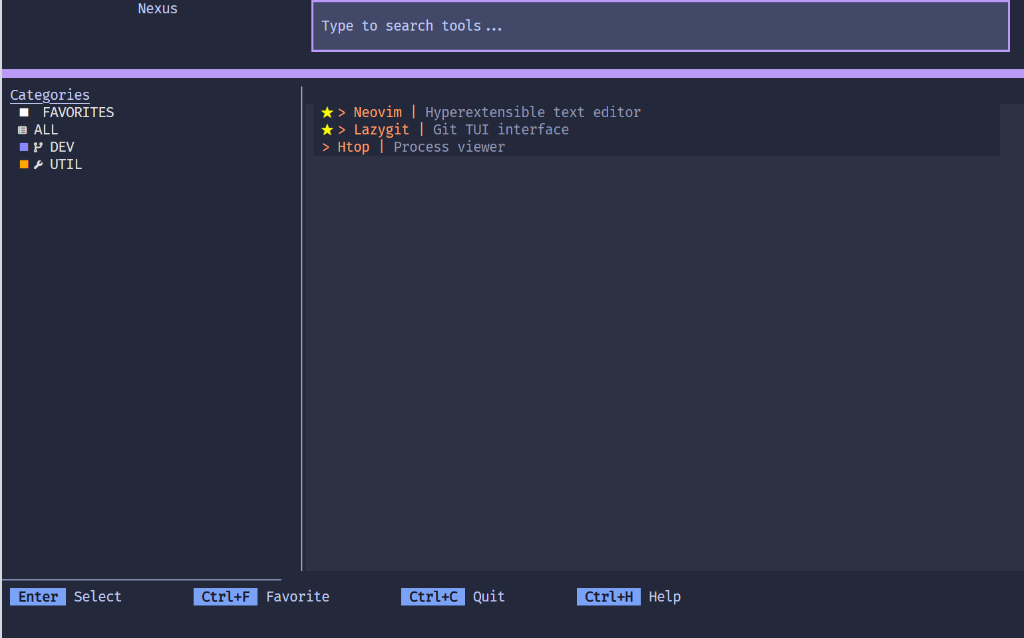
- {nexus_tui-0.1.14 → nexus_tui-0.1.16}/nexus/container.py +0 -0
- {nexus_tui-0.1.14 → nexus_tui-0.1.16}/nexus/logger.py +0 -0
- {nexus_tui-0.1.14 → nexus_tui-0.1.16}/nexus/models.py +0 -0
- {nexus_tui-0.1.14 → nexus_tui-0.1.16}/nexus/screens/__init__.py +0 -0
- {nexus_tui-0.1.14 → nexus_tui-0.1.16}/nexus/screens/error.py +0 -0
- {nexus_tui-0.1.14 → nexus_tui-0.1.16}/nexus/screens/theme_picker.py +0 -0
- {nexus_tui-0.1.14 → nexus_tui-0.1.16}/nexus/services/__init__.py +0 -0
- {nexus_tui-0.1.14 → nexus_tui-0.1.16}/nexus/services/executor.py +0 -0
- {nexus_tui-0.1.14 → nexus_tui-0.1.16}/nexus/services/scanner.py +0 -0
- {nexus_tui-0.1.14 → nexus_tui-0.1.16}/nexus/tools.toml +0 -0
- {nexus_tui-0.1.14 → nexus_tui-0.1.16}/nexus/widgets/__init__.py +0 -0
|
@@ -0,0 +1,200 @@
|
|
|
1
|
+
Metadata-Version: 2.4
|
|
2
|
+
Name: nexus-tui
|
|
3
|
+
Version: 0.1.16
|
|
4
|
+
Summary: A TUI orchestrator to manage your installed terminal tools—access everything through a single command
|
|
5
|
+
License-File: LICENSE
|
|
6
|
+
Requires-Python: >=3.12
|
|
7
|
+
Requires-Dist: platformdirs>=4.0.0
|
|
8
|
+
Requires-Dist: pydantic>=2.12.5
|
|
9
|
+
Requires-Dist: structlog>=24.1.0
|
|
10
|
+
Requires-Dist: textual>=0.86.0
|
|
11
|
+
Requires-Dist: thefuzz>=0.20.0
|
|
12
|
+
Description-Content-Type: text/markdown
|
|
13
|
+
|
|
14
|
+
# Nexus
|
|
15
|
+
|
|
16
|
+
Nexus is a terminal dashboard that lets you launch your favorite CLI and TUI tools (like Neovim, Git UIs, or custom scripts) from a single interactive menu. No memorizing commands or directories required.
|
|
17
|
+
|
|
18
|
+
Think of Nexus as a launcher for terminal tools, similar to how Raycast or Alfred launch GUI apps.
|
|
19
|
+
|
|
20
|
+
**Source Code**: https://github.com/jdluu/Nexus
|
|
21
|
+
|
|
22
|
+
|
|
23
|
+
*Caption: Main dashboard showing projects and tools.*
|
|
24
|
+
|
|
25
|
+
## Prerequisites
|
|
26
|
+
|
|
27
|
+
* Python 3.12 or newer.
|
|
28
|
+
* The [`uv`](https://docs.astral.sh/uv/) package manager.
|
|
29
|
+
* **Recommended**: A modern terminal emulator with TrueColor support (e.g., [Windows Terminal](https://aka.ms/terminal), [ghostty](https://ghostty.org/), [Kitty](https://sw.kovidgoyal.net/kitty/), or [WezTerm](https://wezfurlong.org/wezterm/)).
|
|
30
|
+
* **Recommended**: A [Nerd Font](https://www.nerdfonts.com/) for optimal icon rendering.
|
|
31
|
+
|
|
32
|
+
## Installation
|
|
33
|
+
|
|
34
|
+
It is recommended to use `uv`, a fast Python package and tool manager (similar to pipx), for a clean, isolated global installation.
|
|
35
|
+
|
|
36
|
+
```bash
|
|
37
|
+
# Install globally so you can run 'nexus' from anywhere
|
|
38
|
+
uv tool install nexus-tui
|
|
39
|
+
```
|
|
40
|
+
|
|
41
|
+
**Alternative (Standard pip)**:
|
|
42
|
+
You can also install via pip, though it is recommended `uv` or `pipx` to keep dependencies isolated.
|
|
43
|
+
```bash
|
|
44
|
+
pip install nexus-tui
|
|
45
|
+
```
|
|
46
|
+
|
|
47
|
+
### Upgrade
|
|
48
|
+
|
|
49
|
+
To update to the latest version:
|
|
50
|
+
```bash
|
|
51
|
+
uv tool upgrade nexus-tui
|
|
52
|
+
```
|
|
53
|
+
|
|
54
|
+
### Local Development
|
|
55
|
+
|
|
56
|
+
For contributors who want to modify the source code:
|
|
57
|
+
|
|
58
|
+
```bash
|
|
59
|
+
git clone https://github.com/jdluu/Nexus
|
|
60
|
+
cd Nexus
|
|
61
|
+
uv tool install --editable .
|
|
62
|
+
```
|
|
63
|
+
|
|
64
|
+
## Cross Platform Support
|
|
65
|
+
|
|
66
|
+
Nexus supports Linux, MacOS, and Windows.
|
|
67
|
+
|
|
68
|
+
* **Linux**: Fully supported on standard terminals.
|
|
69
|
+
* **MacOS**: Fully supported.
|
|
70
|
+
* **Windows**: Recommended to use PowerShell 7 or Git Bash within Windows Terminal.
|
|
71
|
+
|
|
72
|
+
*Note: Some tools you launch may behave differently depending on your shell and operating system.*
|
|
73
|
+
|
|
74
|
+
## Configuration
|
|
75
|
+
|
|
76
|
+
Nexus utilizes standard configuration paths. You can find your config file at the location listed in the **First Run** section above.
|
|
77
|
+
|
|
78
|
+
### Minimal Starter Config
|
|
79
|
+
|
|
80
|
+
Copy this into your `tools.toml` to get started immediately:
|
|
81
|
+
|
|
82
|
+
```toml
|
|
83
|
+
# Define where your code projects live
|
|
84
|
+
project_root = "~/Projects"
|
|
85
|
+
|
|
86
|
+
# Add a simple tool to open a shell in the selected project
|
|
87
|
+
[[tool]]
|
|
88
|
+
label = "Shell"
|
|
89
|
+
category = "UTIL"
|
|
90
|
+
description = "Open a shell in the project"
|
|
91
|
+
command = "$SHELL"
|
|
92
|
+
requires_project = true
|
|
93
|
+
```
|
|
94
|
+
|
|
95
|
+
### Understanding "Projects"
|
|
96
|
+
|
|
97
|
+
A **Project** is any directory found inside your `project_root`. Nexus scans this folder and lets you select a specific project before launching a tool.
|
|
98
|
+
|
|
99
|
+
For example, if you select the "Shell" tool above, Nexus will ask you to pick a project (e.g., `~/Projects/MyApp`). It then launches `$SHELL` inside that directory.
|
|
100
|
+
|
|
101
|
+
### Tool Definitions
|
|
102
|
+
|
|
103
|
+
Tools are defined using the `[[tool]]` table.
|
|
104
|
+
|
|
105
|
+
```toml
|
|
106
|
+
[[tool]]
|
|
107
|
+
label = "Neovim"
|
|
108
|
+
category = "DEV"
|
|
109
|
+
description = "Text editor"
|
|
110
|
+
command = "nvim"
|
|
111
|
+
requires_project = true
|
|
112
|
+
```
|
|
113
|
+
|
|
114
|
+
* **label**: The display name.
|
|
115
|
+
* **category**: The grouping identifier (e.g., DEV, UTIL).
|
|
116
|
+
* **description**: A short explanation of the function.
|
|
117
|
+
* **command**: The executable command line instruction.
|
|
118
|
+
* **requires_project**: If `true`, Nexus prompts for a project before running. If `false`, it runs immediately in the current directory.
|
|
119
|
+
|
|
120
|
+
### Keybindings
|
|
121
|
+
|
|
122
|
+
Nexus comes with default keybindings (see **Controls** below). You can override them in the `[keybindings]` section of your config.
|
|
123
|
+
|
|
124
|
+
```toml
|
|
125
|
+
[keybindings]
|
|
126
|
+
# Override default quit to Alt+Q
|
|
127
|
+
quit = "alt+q"
|
|
128
|
+
# Override favorite toggle
|
|
129
|
+
toggle_favorite = "ctrl+f"
|
|
130
|
+
```
|
|
131
|
+
|
|
132
|
+
## First Run Experience
|
|
133
|
+
|
|
134
|
+
1. Run `nexus` from your terminal.
|
|
135
|
+
2. Nexus creates a default configuration file at:
|
|
136
|
+
* **Linux**: `~/.config/nexus/tools.toml`
|
|
137
|
+
* **MacOS**: `~/Library/Application Support/Nexus/tools.toml`
|
|
138
|
+
* **Windows**: `%LOCALAPPDATA%\Nexus\tools.toml`
|
|
139
|
+
3. On first launch, you will see an empty dashboard.
|
|
140
|
+
4. Edit the configuration file (see below) to add your tools and project roots.
|
|
141
|
+
5. Restart Nexus to see your changes.
|
|
142
|
+
|
|
143
|
+
### Features
|
|
144
|
+
|
|
145
|
+
* **Smart Search**: Instantly find what you need with fuzzy matching, so you don't have to remember exact names.
|
|
146
|
+
* **Persistence**: Nexus remembers your recent projects and favorite tools, so common workflows are always one keystroke away.
|
|
147
|
+
* **Favorites**: Pin your most-used tools to the top of the list for quick access.
|
|
148
|
+
|
|
149
|
+
### Controls
|
|
150
|
+
|
|
151
|
+
* **Arrow Keys**: Navigate through lists.
|
|
152
|
+
* **Enter**: Confirm selection or launch tool.
|
|
153
|
+
* **Ctrl+F**: Toggle the favorite status of a tool.
|
|
154
|
+
* **TypeAnywhere**: Instantly filter lists by typing in the search bar.
|
|
155
|
+
* **Esc**: Reset the search filter.
|
|
156
|
+
* **Ctrl+B**: Go back (on picker screens).
|
|
157
|
+
* **Ctrl+C**: Exit the application.
|
|
158
|
+
* **Ctrl+H**: Show Help / Controls.
|
|
159
|
+
|
|
160
|
+
## FAQ & Troubleshooting
|
|
161
|
+
|
|
162
|
+
### Does Nexus discover tools automatically?
|
|
163
|
+
No. You must define your tools in `tools.toml` so you have full control over what appears in your dashboard.
|
|
164
|
+
|
|
165
|
+
### Is this a replacement for my shell?
|
|
166
|
+
No. Nexus is a dashboard. When you launch a tool, it temporarily suspends itself to let the tool take over your terminal found. When the tool exits, Nexus returns.
|
|
167
|
+
|
|
168
|
+
### My icons look broken (rectangles or question marks).
|
|
169
|
+
This usually means you aren't using a **Nerd Font**.
|
|
170
|
+
1. Download a font from [Nerd Fonts](https://www.nerdfonts.com/).
|
|
171
|
+
2. Install it on your system.
|
|
172
|
+
3. Configure your terminal emulator to use that font.
|
|
173
|
+
|
|
174
|
+
### I see a blank screen on launch.
|
|
175
|
+
Check that your `tools.toml` file exists and has at least one valid `[[tool]]` entry. See the **Configuration** section for a minimal example.
|
|
176
|
+
|
|
177
|
+
## Development (For Contributors)
|
|
178
|
+
|
|
179
|
+
To configure the development environment:
|
|
180
|
+
|
|
181
|
+
1. Synchronize dependencies:
|
|
182
|
+
```bash
|
|
183
|
+
uv sync
|
|
184
|
+
```
|
|
185
|
+
|
|
186
|
+
2. Run the application locally:
|
|
187
|
+
```bash
|
|
188
|
+
uv run nexus
|
|
189
|
+
```
|
|
190
|
+
|
|
191
|
+
3. Execute the comprehensive test suite:
|
|
192
|
+
```bash
|
|
193
|
+
uv run pytest --cov=nexus
|
|
194
|
+
```
|
|
195
|
+
|
|
196
|
+
4. Perform static analysis and type checking:
|
|
197
|
+
```bash
|
|
198
|
+
uv run ruff check .
|
|
199
|
+
uv run mypy .
|
|
200
|
+
```
|
|
@@ -0,0 +1,187 @@
|
|
|
1
|
+
# Nexus
|
|
2
|
+
|
|
3
|
+
Nexus is a terminal dashboard that lets you launch your favorite CLI and TUI tools (like Neovim, Git UIs, or custom scripts) from a single interactive menu. No memorizing commands or directories required.
|
|
4
|
+
|
|
5
|
+
Think of Nexus as a launcher for terminal tools, similar to how Raycast or Alfred launch GUI apps.
|
|
6
|
+
|
|
7
|
+
**Source Code**: https://github.com/jdluu/Nexus
|
|
8
|
+
|
|
9
|
+

|
|
10
|
+
*Caption: Main dashboard showing projects and tools.*
|
|
11
|
+
|
|
12
|
+
## Prerequisites
|
|
13
|
+
|
|
14
|
+
* Python 3.12 or newer.
|
|
15
|
+
* The [`uv`](https://docs.astral.sh/uv/) package manager.
|
|
16
|
+
* **Recommended**: A modern terminal emulator with TrueColor support (e.g., [Windows Terminal](https://aka.ms/terminal), [ghostty](https://ghostty.org/), [Kitty](https://sw.kovidgoyal.net/kitty/), or [WezTerm](https://wezfurlong.org/wezterm/)).
|
|
17
|
+
* **Recommended**: A [Nerd Font](https://www.nerdfonts.com/) for optimal icon rendering.
|
|
18
|
+
|
|
19
|
+
## Installation
|
|
20
|
+
|
|
21
|
+
It is recommended to use `uv`, a fast Python package and tool manager (similar to pipx), for a clean, isolated global installation.
|
|
22
|
+
|
|
23
|
+
```bash
|
|
24
|
+
# Install globally so you can run 'nexus' from anywhere
|
|
25
|
+
uv tool install nexus-tui
|
|
26
|
+
```
|
|
27
|
+
|
|
28
|
+
**Alternative (Standard pip)**:
|
|
29
|
+
You can also install via pip, though it is recommended `uv` or `pipx` to keep dependencies isolated.
|
|
30
|
+
```bash
|
|
31
|
+
pip install nexus-tui
|
|
32
|
+
```
|
|
33
|
+
|
|
34
|
+
### Upgrade
|
|
35
|
+
|
|
36
|
+
To update to the latest version:
|
|
37
|
+
```bash
|
|
38
|
+
uv tool upgrade nexus-tui
|
|
39
|
+
```
|
|
40
|
+
|
|
41
|
+
### Local Development
|
|
42
|
+
|
|
43
|
+
For contributors who want to modify the source code:
|
|
44
|
+
|
|
45
|
+
```bash
|
|
46
|
+
git clone https://github.com/jdluu/Nexus
|
|
47
|
+
cd Nexus
|
|
48
|
+
uv tool install --editable .
|
|
49
|
+
```
|
|
50
|
+
|
|
51
|
+
## Cross Platform Support
|
|
52
|
+
|
|
53
|
+
Nexus supports Linux, MacOS, and Windows.
|
|
54
|
+
|
|
55
|
+
* **Linux**: Fully supported on standard terminals.
|
|
56
|
+
* **MacOS**: Fully supported.
|
|
57
|
+
* **Windows**: Recommended to use PowerShell 7 or Git Bash within Windows Terminal.
|
|
58
|
+
|
|
59
|
+
*Note: Some tools you launch may behave differently depending on your shell and operating system.*
|
|
60
|
+
|
|
61
|
+
## Configuration
|
|
62
|
+
|
|
63
|
+
Nexus utilizes standard configuration paths. You can find your config file at the location listed in the **First Run** section above.
|
|
64
|
+
|
|
65
|
+
### Minimal Starter Config
|
|
66
|
+
|
|
67
|
+
Copy this into your `tools.toml` to get started immediately:
|
|
68
|
+
|
|
69
|
+
```toml
|
|
70
|
+
# Define where your code projects live
|
|
71
|
+
project_root = "~/Projects"
|
|
72
|
+
|
|
73
|
+
# Add a simple tool to open a shell in the selected project
|
|
74
|
+
[[tool]]
|
|
75
|
+
label = "Shell"
|
|
76
|
+
category = "UTIL"
|
|
77
|
+
description = "Open a shell in the project"
|
|
78
|
+
command = "$SHELL"
|
|
79
|
+
requires_project = true
|
|
80
|
+
```
|
|
81
|
+
|
|
82
|
+
### Understanding "Projects"
|
|
83
|
+
|
|
84
|
+
A **Project** is any directory found inside your `project_root`. Nexus scans this folder and lets you select a specific project before launching a tool.
|
|
85
|
+
|
|
86
|
+
For example, if you select the "Shell" tool above, Nexus will ask you to pick a project (e.g., `~/Projects/MyApp`). It then launches `$SHELL` inside that directory.
|
|
87
|
+
|
|
88
|
+
### Tool Definitions
|
|
89
|
+
|
|
90
|
+
Tools are defined using the `[[tool]]` table.
|
|
91
|
+
|
|
92
|
+
```toml
|
|
93
|
+
[[tool]]
|
|
94
|
+
label = "Neovim"
|
|
95
|
+
category = "DEV"
|
|
96
|
+
description = "Text editor"
|
|
97
|
+
command = "nvim"
|
|
98
|
+
requires_project = true
|
|
99
|
+
```
|
|
100
|
+
|
|
101
|
+
* **label**: The display name.
|
|
102
|
+
* **category**: The grouping identifier (e.g., DEV, UTIL).
|
|
103
|
+
* **description**: A short explanation of the function.
|
|
104
|
+
* **command**: The executable command line instruction.
|
|
105
|
+
* **requires_project**: If `true`, Nexus prompts for a project before running. If `false`, it runs immediately in the current directory.
|
|
106
|
+
|
|
107
|
+
### Keybindings
|
|
108
|
+
|
|
109
|
+
Nexus comes with default keybindings (see **Controls** below). You can override them in the `[keybindings]` section of your config.
|
|
110
|
+
|
|
111
|
+
```toml
|
|
112
|
+
[keybindings]
|
|
113
|
+
# Override default quit to Alt+Q
|
|
114
|
+
quit = "alt+q"
|
|
115
|
+
# Override favorite toggle
|
|
116
|
+
toggle_favorite = "ctrl+f"
|
|
117
|
+
```
|
|
118
|
+
|
|
119
|
+
## First Run Experience
|
|
120
|
+
|
|
121
|
+
1. Run `nexus` from your terminal.
|
|
122
|
+
2. Nexus creates a default configuration file at:
|
|
123
|
+
* **Linux**: `~/.config/nexus/tools.toml`
|
|
124
|
+
* **MacOS**: `~/Library/Application Support/Nexus/tools.toml`
|
|
125
|
+
* **Windows**: `%LOCALAPPDATA%\Nexus\tools.toml`
|
|
126
|
+
3. On first launch, you will see an empty dashboard.
|
|
127
|
+
4. Edit the configuration file (see below) to add your tools and project roots.
|
|
128
|
+
5. Restart Nexus to see your changes.
|
|
129
|
+
|
|
130
|
+
### Features
|
|
131
|
+
|
|
132
|
+
* **Smart Search**: Instantly find what you need with fuzzy matching, so you don't have to remember exact names.
|
|
133
|
+
* **Persistence**: Nexus remembers your recent projects and favorite tools, so common workflows are always one keystroke away.
|
|
134
|
+
* **Favorites**: Pin your most-used tools to the top of the list for quick access.
|
|
135
|
+
|
|
136
|
+
### Controls
|
|
137
|
+
|
|
138
|
+
* **Arrow Keys**: Navigate through lists.
|
|
139
|
+
* **Enter**: Confirm selection or launch tool.
|
|
140
|
+
* **Ctrl+F**: Toggle the favorite status of a tool.
|
|
141
|
+
* **TypeAnywhere**: Instantly filter lists by typing in the search bar.
|
|
142
|
+
* **Esc**: Reset the search filter.
|
|
143
|
+
* **Ctrl+B**: Go back (on picker screens).
|
|
144
|
+
* **Ctrl+C**: Exit the application.
|
|
145
|
+
* **Ctrl+H**: Show Help / Controls.
|
|
146
|
+
|
|
147
|
+
## FAQ & Troubleshooting
|
|
148
|
+
|
|
149
|
+
### Does Nexus discover tools automatically?
|
|
150
|
+
No. You must define your tools in `tools.toml` so you have full control over what appears in your dashboard.
|
|
151
|
+
|
|
152
|
+
### Is this a replacement for my shell?
|
|
153
|
+
No. Nexus is a dashboard. When you launch a tool, it temporarily suspends itself to let the tool take over your terminal found. When the tool exits, Nexus returns.
|
|
154
|
+
|
|
155
|
+
### My icons look broken (rectangles or question marks).
|
|
156
|
+
This usually means you aren't using a **Nerd Font**.
|
|
157
|
+
1. Download a font from [Nerd Fonts](https://www.nerdfonts.com/).
|
|
158
|
+
2. Install it on your system.
|
|
159
|
+
3. Configure your terminal emulator to use that font.
|
|
160
|
+
|
|
161
|
+
### I see a blank screen on launch.
|
|
162
|
+
Check that your `tools.toml` file exists and has at least one valid `[[tool]]` entry. See the **Configuration** section for a minimal example.
|
|
163
|
+
|
|
164
|
+
## Development (For Contributors)
|
|
165
|
+
|
|
166
|
+
To configure the development environment:
|
|
167
|
+
|
|
168
|
+
1. Synchronize dependencies:
|
|
169
|
+
```bash
|
|
170
|
+
uv sync
|
|
171
|
+
```
|
|
172
|
+
|
|
173
|
+
2. Run the application locally:
|
|
174
|
+
```bash
|
|
175
|
+
uv run nexus
|
|
176
|
+
```
|
|
177
|
+
|
|
178
|
+
3. Execute the comprehensive test suite:
|
|
179
|
+
```bash
|
|
180
|
+
uv run pytest --cov=nexus
|
|
181
|
+
```
|
|
182
|
+
|
|
183
|
+
4. Perform static analysis and type checking:
|
|
184
|
+
```bash
|
|
185
|
+
uv run ruff check .
|
|
186
|
+
uv run mypy .
|
|
187
|
+
```
|
|
@@ -63,8 +63,11 @@ def _load_config_data() -> dict[str, Any]:
|
|
|
63
63
|
if "project_root" in data:
|
|
64
64
|
merged_data["project_root"] = data["project_root"]
|
|
65
65
|
|
|
66
|
-
except
|
|
66
|
+
except (tomllib.TOMLDecodeError, PermissionError) as e:
|
|
67
67
|
CONFIG_ERRORS.append(f"Error in {path.name}: {e}")
|
|
68
|
+
except Exception as e:
|
|
69
|
+
# Catch-all for other unexpected IO errors
|
|
70
|
+
CONFIG_ERRORS.append(f"Unexpected error reading {path.name}: {e}")
|
|
68
71
|
|
|
69
72
|
for path in CONFIG_PATHS:
|
|
70
73
|
merge_from_file(path)
|
|
@@ -109,11 +112,16 @@ def get_tools() -> list[Tool]:
|
|
|
109
112
|
Returns:
|
|
110
113
|
A list of Tool objects.
|
|
111
114
|
"""
|
|
115
|
+
from pydantic import ValidationError
|
|
116
|
+
|
|
112
117
|
tools = []
|
|
113
118
|
config = _load_config_data()
|
|
114
119
|
for t in config.get("tool", []):
|
|
115
120
|
try:
|
|
116
121
|
tools.append(Tool(**t))
|
|
122
|
+
except ValidationError as e:
|
|
123
|
+
# Pydantic validation error
|
|
124
|
+
CONFIG_ERRORS.append(f"Invalid tool definition (Validation): {e}")
|
|
117
125
|
except Exception as e:
|
|
118
126
|
CONFIG_ERRORS.append(f"Invalid tool definition: {e}")
|
|
119
127
|
continue
|
|
@@ -41,10 +41,11 @@ class HelpScreen(ModalScreen[None]):
|
|
|
41
41
|
- Type any character to start searching tools.
|
|
42
42
|
- `Esc` : Clear search or Go Back.
|
|
43
43
|
|
|
44
|
-
**
|
|
45
|
-
- `Ctrl+
|
|
46
|
-
- `Ctrl+
|
|
47
|
-
-
|
|
44
|
+
**Actions**
|
|
45
|
+
- `Ctrl+F` : Toggle Favorite
|
|
46
|
+
- `Ctrl+T` : Open Theme Picker
|
|
47
|
+
- `Ctrl+C` : Quit Application
|
|
48
|
+
- `Ctrl+H` or `?` : Show this Help Screen
|
|
48
49
|
"""
|
|
49
50
|
)
|
|
50
51
|
|
|
@@ -10,10 +10,11 @@ from nexus.config import get_project_root
|
|
|
10
10
|
from nexus.models import Project, Tool
|
|
11
11
|
from typing import Any
|
|
12
12
|
from nexus.widgets.tool_list_item import ProjectListItem
|
|
13
|
+
from nexus.widgets.footer import NexusFooter, KeyBadge
|
|
13
14
|
from textual.app import ComposeResult
|
|
14
15
|
from textual.containers import Container
|
|
15
16
|
from textual.screen import Screen
|
|
16
|
-
from textual.widgets import
|
|
17
|
+
from textual.widgets import Header, Input, Label, ListItem, ListView, LoadingIndicator
|
|
17
18
|
from thefuzz import process
|
|
18
19
|
|
|
19
20
|
|
|
@@ -43,6 +44,8 @@ class ProjectPicker(Screen[None]):
|
|
|
43
44
|
("down", "cursor_down", "Next Item"),
|
|
44
45
|
("up", "cursor_up", "Previous Item"),
|
|
45
46
|
("enter", "select_current", "Select"),
|
|
47
|
+
("ctrl+b", "back", "Back"),
|
|
48
|
+
("ctrl+c", "quit", "Quit"),
|
|
46
49
|
]
|
|
47
50
|
|
|
48
51
|
def compose(self) -> ComposeResult:
|
|
@@ -63,7 +66,11 @@ class ProjectPicker(Screen[None]):
|
|
|
63
66
|
yield Label(
|
|
64
67
|
"No projects found", id="projects-empty", classes="empty-state hidden"
|
|
65
68
|
)
|
|
66
|
-
yield
|
|
69
|
+
yield NexusFooter(key_defs=[
|
|
70
|
+
("Enter", "Select", "select_current"),
|
|
71
|
+
("Ctrl+B", "Back", "back"),
|
|
72
|
+
("Ctrl+C", "Quit", "quit"),
|
|
73
|
+
])
|
|
67
74
|
|
|
68
75
|
async def on_mount(self) -> None:
|
|
69
76
|
"""Called when the screen is mounted.
|
|
@@ -247,4 +254,18 @@ class ProjectPicker(Screen[None]):
|
|
|
247
254
|
"""Selects the currently highlighted item."""
|
|
248
255
|
project_list = self.query_one("#project-list", ListView)
|
|
249
256
|
if project_list.index is not None:
|
|
250
|
-
self._select_item(project_list.children[project_list.index])
|
|
257
|
+
self._select_item(project_list.children[project_list.index])
|
|
258
|
+
|
|
259
|
+
def action_back(self) -> None:
|
|
260
|
+
"""Go back to the previous screen."""
|
|
261
|
+
self.app.pop_screen()
|
|
262
|
+
|
|
263
|
+
def on_key_badge_pressed(self, message: KeyBadge.Pressed) -> None:
|
|
264
|
+
"""Handle footer clicks."""
|
|
265
|
+
action = message.action
|
|
266
|
+
if action == "select_current":
|
|
267
|
+
self.action_select_current()
|
|
268
|
+
elif action == "back":
|
|
269
|
+
self.action_back()
|
|
270
|
+
elif action == "quit":
|
|
271
|
+
self.app.exit()
|