neural-network-digits 1.2.0__tar.gz
This diff represents the content of publicly available package versions that have been released to one of the supported registries. The information contained in this diff is provided for informational purposes only and reflects changes between package versions as they appear in their respective public registries.
- neural_network_digits-1.2.0/.gitignore +23 -0
- neural_network_digits-1.2.0/CHANGELOG.md +94 -0
- neural_network_digits-1.2.0/LICENSE +21 -0
- neural_network_digits-1.2.0/PKG-INFO +454 -0
- neural_network_digits-1.2.0/README.md +416 -0
- neural_network_digits-1.2.0/nn_digits/__init__.py +12 -0
- neural_network_digits-1.2.0/nn_digits/__main__.py +4 -0
- neural_network_digits-1.2.0/nn_digits/assistant/__init__.py +1 -0
- neural_network_digits-1.2.0/nn_digits/assistant/brain.py +316 -0
- neural_network_digits-1.2.0/nn_digits/assistant/knowledge.py +287 -0
- neural_network_digits-1.2.0/nn_digits/assistant/rules.py +275 -0
- neural_network_digits-1.2.0/nn_digits/assistant/search.py +91 -0
- neural_network_digits-1.2.0/nn_digits/cli.py +248 -0
- neural_network_digits-1.2.0/nn_digits/gui/__init__.py +1 -0
- neural_network_digits-1.2.0/nn_digits/gui/app_state.py +73 -0
- neural_network_digits-1.2.0/nn_digits/gui/assistant.py +327 -0
- neural_network_digits-1.2.0/nn_digits/gui/base.py +524 -0
- neural_network_digits-1.2.0/nn_digits/gui/drawing_board.py +311 -0
- neural_network_digits-1.2.0/nn_digits/gui/lab.py +256 -0
- neural_network_digits-1.2.0/nn_digits/gui/pick.py +145 -0
- neural_network_digits-1.2.0/nn_digits/gui/tab_data.py +178 -0
- neural_network_digits-1.2.0/nn_digits/gui/tab_draw.py +51 -0
- neural_network_digits-1.2.0/nn_digits/gui/tab_evaluation.py +309 -0
- neural_network_digits-1.2.0/nn_digits/gui/tab_info.py +243 -0
- neural_network_digits-1.2.0/nn_digits/gui/tab_inside.py +329 -0
- neural_network_digits-1.2.0/nn_digits/gui/tab_training.py +380 -0
- neural_network_digits-1.2.0/nn_digits/gui/window.py +197 -0
- neural_network_digits-1.2.0/nn_digits/i18n.py +47 -0
- neural_network_digits-1.2.0/nn_digits/locales/it.json +719 -0
- neural_network_digits-1.2.0/nn_digits/neural_net/__init__.py +1 -0
- neural_network_digits-1.2.0/nn_digits/neural_net/charts.py +502 -0
- neural_network_digits-1.2.0/nn_digits/neural_net/data.py +203 -0
- neural_network_digits-1.2.0/nn_digits/neural_net/network.py +139 -0
- neural_network_digits-1.2.0/nn_digits/neural_net/storage.py +85 -0
- neural_network_digits-1.2.0/nn_digits/neural_net/training.py +110 -0
- neural_network_digits-1.2.0/nn_digits/project.py +27 -0
- neural_network_digits-1.2.0/nn_digits/updater.py +158 -0
- neural_network_digits-1.2.0/pyproject.toml +83 -0
- neural_network_digits-1.2.0/requirements.txt +3 -0
|
@@ -0,0 +1,23 @@
|
|
|
1
|
+
# Everything the program creates: downloaded photos (~11 MB), trained model, charts, settings.
|
|
2
|
+
# It is created again from the interface (tabs 1 and 2) or with start.bat download / start.bat train
|
|
3
|
+
data/
|
|
4
|
+
|
|
5
|
+
# Python
|
|
6
|
+
__pycache__/
|
|
7
|
+
*.py[cod]
|
|
8
|
+
.pytest_cache/
|
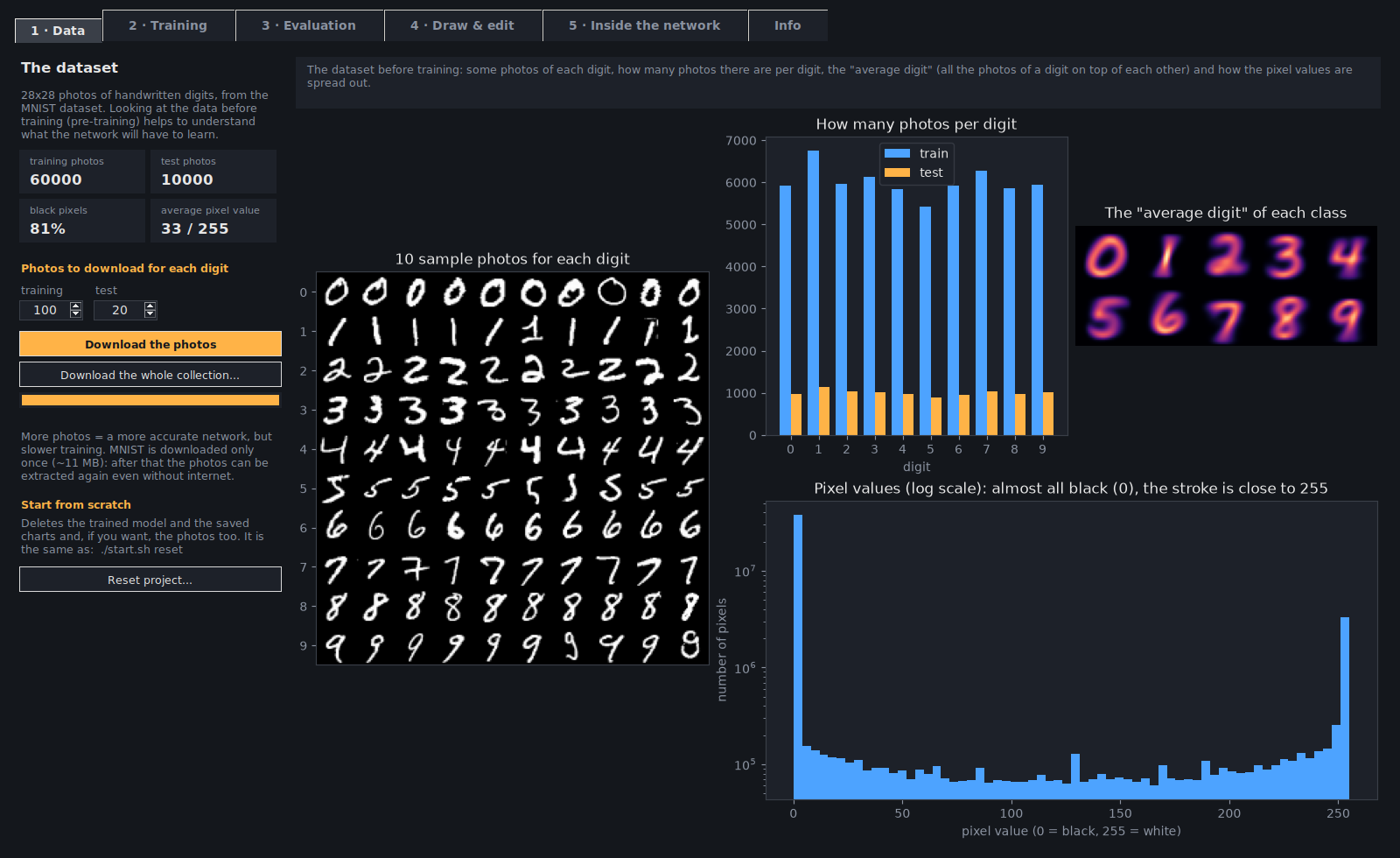
|
9
|
+
# The package for PyPI built by python -m build
|
|
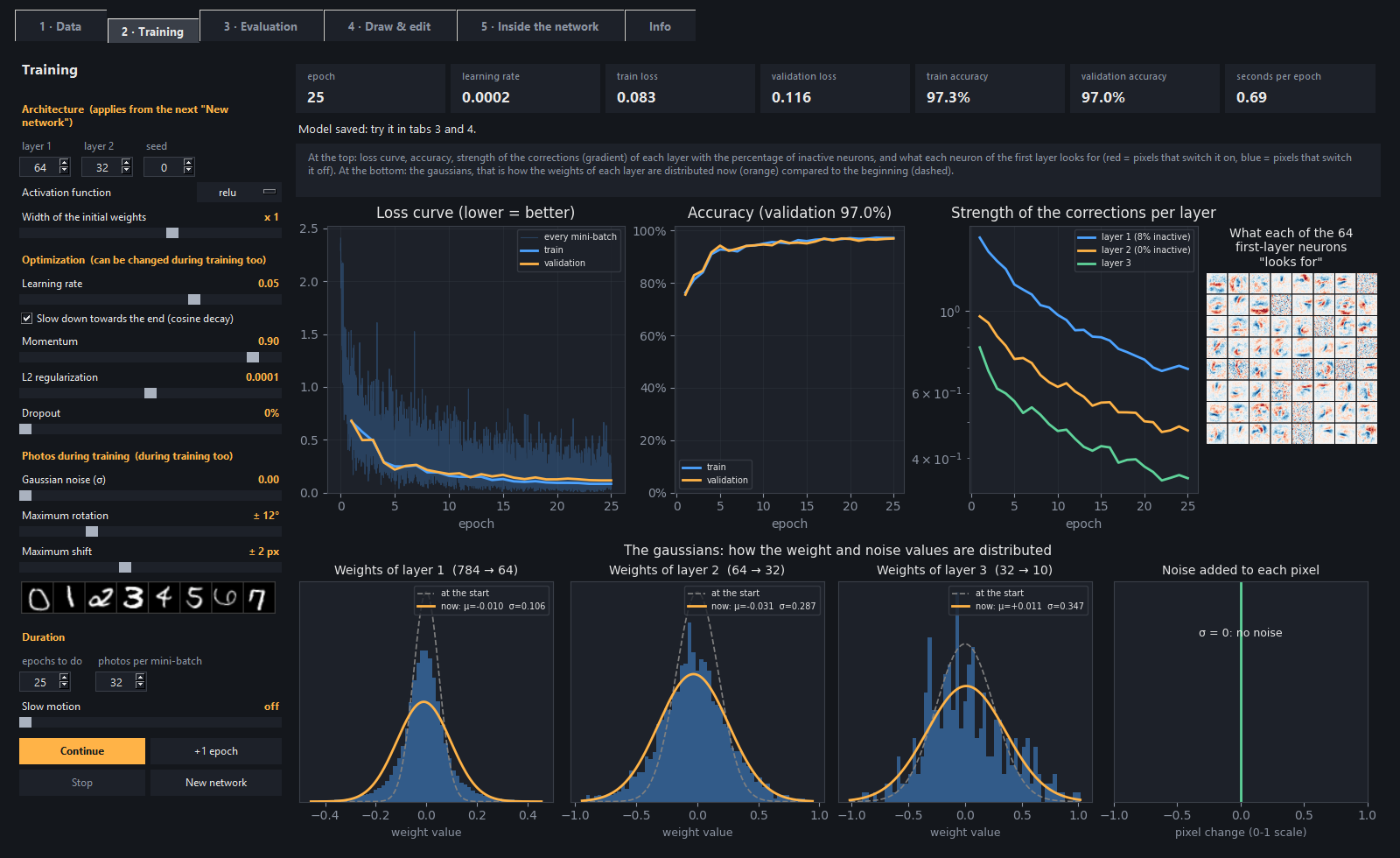
10
|
+
dist/
|
|
11
|
+
build/
|
|
12
|
+
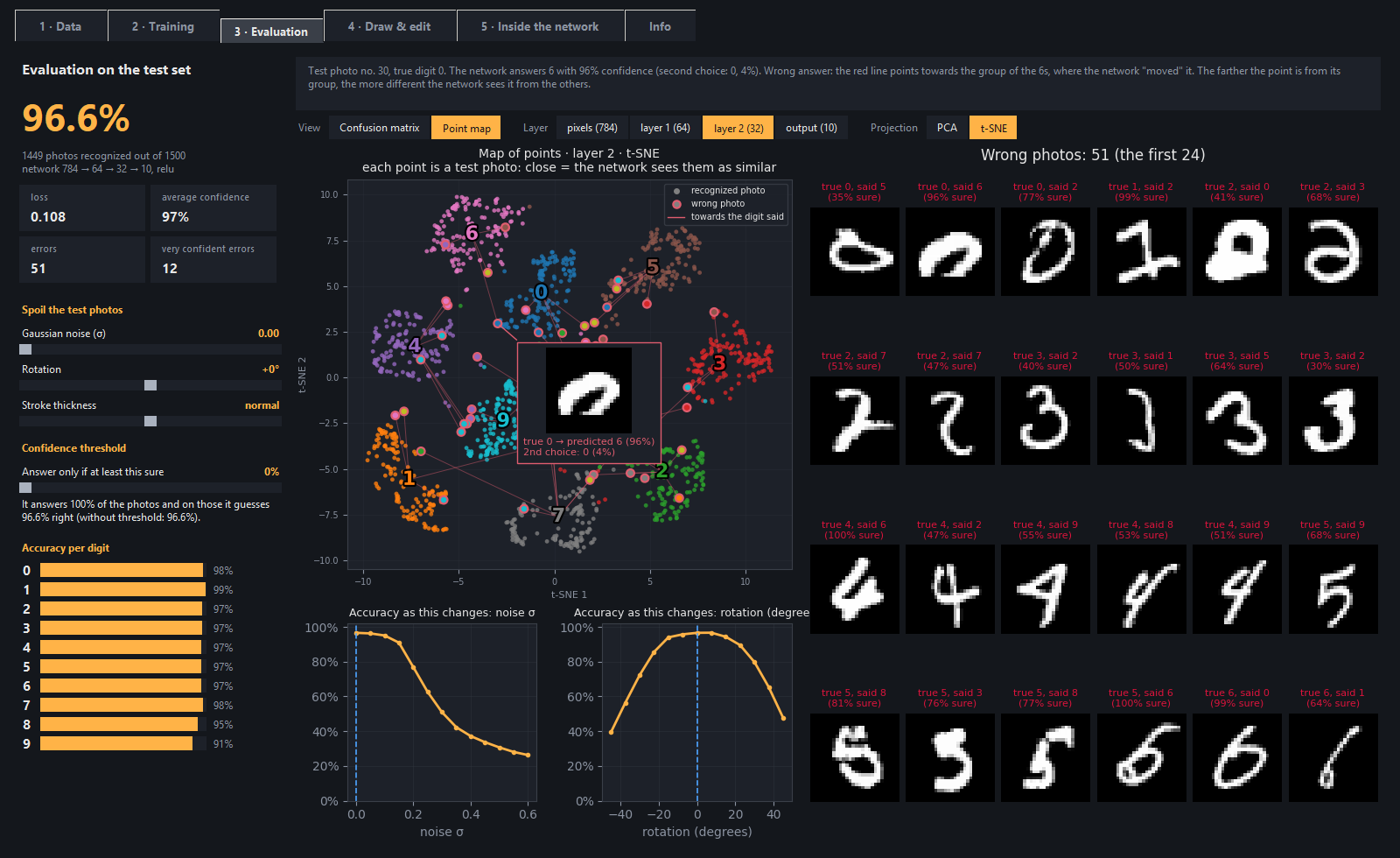
*.egg-info/
|
|
13
|
+
.venv/
|
|
14
|
+
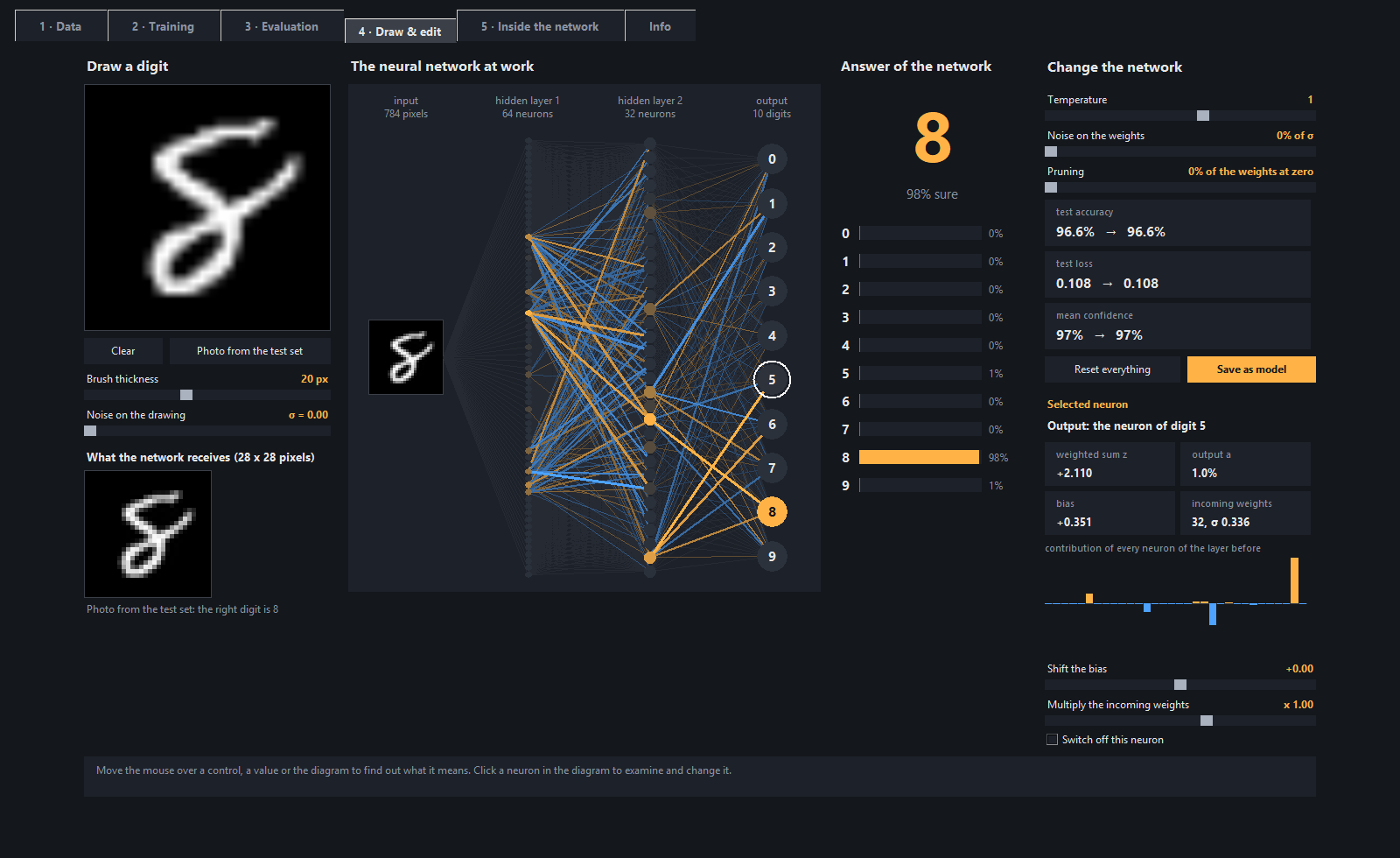
venv/
|
|
15
|
+
env/
|
|
16
|
+
|
|
17
|
+
# Editor and system
|
|
18
|
+
.vscode/
|
|
19
|
+
.idea/
|
|
20
|
+
*.code-workspace
|
|
21
|
+
Thumbs.db
|
|
22
|
+
Desktop.ini
|
|
23
|
+
.DS_Store
|
|
@@ -0,0 +1,94 @@
|
|
|
1
|
+
# Changelog
|
|
2
|
+
|
|
3
|
+
All the versions of the program, newest first. The format is the one of
|
|
4
|
+
[Keep a Changelog](https://keepachangelog.com/en/1.1.0/) and the version numbers follow
|
|
5
|
+
[semantic versioning](https://semver.org/): MAJOR.MINOR.PATCH.
|
|
6
|
+
|
|
7
|
+
The paragraph of each version becomes the text of its GitHub release and shows up in the program
|
|
8
|
+
when the update is offered.
|
|
9
|
+
|
|
10
|
+
## [1.2.0] - 2026-09-26
|
|
11
|
+
|
|
12
|
+
- **On PyPI**: the program can be installed with `pipx install neural-network-digits` (or
|
|
13
|
+
`pip install neural-network-digits`) and started with the `neural-network-digits` command, on Windows,
|
|
14
|
+
Linux and macOS. Installed like this, the photos, the model and the settings go in the folder of the user,
|
|
15
|
+
and the program tells you to update with `pipx upgrade neural-network-digits`.
|
|
16
|
+
- The code is now in the `nn_digits` folder. `start.bat`, `./start.sh` and `python start.py` work as before,
|
|
17
|
+
and `python -m nn_digits` works too. Updating from the program moves the files by itself: your photos,
|
|
18
|
+
model and settings in `data/` stay where they are.
|
|
19
|
+
- The windows that talk about the photos show the folder where they really are.
|
|
20
|
+
- Discussions are open on GitHub for questions and ideas, and there is a *Sponsor* button.
|
|
21
|
+
|
|
22
|
+
## [1.1.1] - 2026-09-26
|
|
23
|
+
|
|
24
|
+
- **Pick on single charts**: in every tab Pick frames and explains only the chart under the mouse (the loss
|
|
25
|
+
curve, the confusion matrix, one wrong photo, one step of the calculation...), not the whole figure. The
|
|
26
|
+
tiles with the numbers are explained one at a time too.
|
|
27
|
+
- **The language** is chosen at the top right, next to *Pick (F1)*: EN or IT. It is no longer in the Info tab.
|
|
28
|
+
- Before each answer the assistant "thinks" for a moment, with a short animation (at most 0.6 seconds).
|
|
29
|
+
- Every chart with nothing to show is crossed out by a thin X: no photos yet, no epoch done, no noise,
|
|
30
|
+
curves still being computed, no wrong photo, nothing drawn, no neuron selected.
|
|
31
|
+
- Fix: Pick called the numbers of the last epoch "seconds per epoch".
|
|
32
|
+
|
|
33
|
+
## [1.1.0] - 2026-09-25
|
|
34
|
+
|
|
35
|
+
- **The Assistant**: a panel on the right of the window (F2, or the *Assistant* button at the top right).
|
|
36
|
+
Ask it questions in English or Italian: "what is overfitting?", "how is it going?", "what should I do
|
|
37
|
+
now?", "is something wrong?". It answers looking at what is really happening in the open tab (epochs,
|
|
38
|
+
accuracy, learning rate in use, photos, drawing), tells you where to see each thing and suggests an
|
|
39
|
+
experiment to try.
|
|
40
|
+
- **Pick** (F1): move the mouse over the controls and click one, and the assistant explains what it does and
|
|
41
|
+
what it is worth now. While Pick is on, the clicks do not move or start anything.
|
|
42
|
+
- **Hints**: the assistant notices the most common mistakes (a learning rate too high or too low, a network
|
|
43
|
+
that explodes or does not learn, overfitting, too many inactive neurons, extreme settings, test photos
|
|
44
|
+
spoiled more than the training ones) and offers a fix you can apply with one click. They can be switched
|
|
45
|
+
off.
|
|
46
|
+
- It is not an AI model: a small search engine written in NumPy and a few rules. Nothing to download, and it
|
|
47
|
+
answers instantly.
|
|
48
|
+
|
|
49
|
+
## [1.0.3] - 2026-09-25
|
|
50
|
+
|
|
51
|
+
- For who wants to contribute: CONTRIBUTING.md, CODE_OF_CONDUCT.md, SECURITY.md and the templates for
|
|
52
|
+
issues and pull requests.
|
|
53
|
+
- README: the Info, Branches and CI/CD sections are gone.
|
|
54
|
+
- The zip of the update no longer contains the README animation (7.5 MB less to download).
|
|
55
|
+
|
|
56
|
+
## [1.0.2] - 2026-09-25
|
|
57
|
+
|
|
58
|
+
- **The whole collection**: in the Data tab the new *Download the whole collection...* button saves all the
|
|
59
|
+
70,000 photos of MNIST. First a window tells you how much space they take. From the terminal:
|
|
60
|
+
`download --all`. With all the photos the network gets to about 98.5% on the test photos.
|
|
61
|
+
- The photos load in a moment even when there are many: they are also saved in a single quick copy
|
|
62
|
+
(`data/photos/train.npz` and `test.npz`), because reading thousands of PNG files took minutes.
|
|
63
|
+
- Evaluation tab: the robustness curves are computed in the background, so the window no longer freezes,
|
|
64
|
+
and the points map shows at most 1000 photos (t-SNE on 10,000 would take minutes).
|
|
65
|
+
- README: animated intro at the top, new Data tab screenshot.
|
|
66
|
+
|
|
67
|
+
## [1.0.1] - 2026-09-25
|
|
68
|
+
|
|
69
|
+
- **Linux and macOS**: new `start.sh` launcher. The first time it creates a virtual environment in `.venv`
|
|
70
|
+
with the libraries, and if Tkinter or venv are missing it says what to install.
|
|
71
|
+
- The updates installed from inside the program keep `start.sh` executable.
|
|
72
|
+
- Data tab: every control and chart has its explanation when you hover it with the mouse.
|
|
73
|
+
- The messages that suggest a command show the right one for the system (`start.bat` or `./start.sh`).
|
|
74
|
+
- On macOS the right mouse button clears the drawing board too.
|
|
75
|
+
- The explanation of the initial weights says "LeCun" (for sigmoid and tanh) instead of "Xavier".
|
|
76
|
+
- README: macOS instructions and corrections.
|
|
77
|
+
|
|
78
|
+
## [1.0.0] - 2026-09-25
|
|
79
|
+
|
|
80
|
+
First public version.
|
|
81
|
+
|
|
82
|
+
- Neural network written from scratch with NumPy: forward, softmax, cross-entropy, backpropagation, SGD with
|
|
83
|
+
momentum, L2, dropout, relu, leaky relu, sigmoid and tanh activations.
|
|
84
|
+
- Graphical interface with 5 tabs, plus the Info page:
|
|
85
|
+
- **Data**: MNIST download, dataset exploration, reset;
|
|
86
|
+
- **Training**: live, with loss curve, weight gaussians and dozens of knobs;
|
|
87
|
+
- **Evaluation**: photos damaged on purpose, confidence threshold, confusion matrix and points map
|
|
88
|
+
(PCA and t-SNE);
|
|
89
|
+
- **Draw & edit**: drawing board and lab to change biases, weights and neurons;
|
|
90
|
+
- **Inside the network**: the math of every layer and the softmax steps, with the temperature.
|
|
91
|
+
- Every step from the terminal too (`start.bat <command>`).
|
|
92
|
+
- English and Italian interface, with a language selector in the Info tab.
|
|
93
|
+
- A Changelog page in the Info tab.
|
|
94
|
+
- Update check at startup and one-click install of the new version.
|
|
@@ -0,0 +1,21 @@
|
|
|
1
|
+
MIT License
|
|
2
|
+
|
|
3
|
+
Copyright (c) 2026 Luigi Tanzillo
|
|
4
|
+
|
|
5
|
+
Permission is hereby granted, free of charge, to any person obtaining a copy
|
|
6
|
+
of this software and associated documentation files (the "Software"), to deal
|
|
7
|
+
in the Software without restriction, including without limitation the rights
|
|
8
|
+
to use, copy, modify, merge, publish, distribute, sublicense, and/or sell
|
|
9
|
+
copies of the Software, and to permit persons to whom the Software is
|
|
10
|
+
furnished to do so, subject to the following conditions:
|
|
11
|
+
|
|
12
|
+
The above copyright notice and this permission notice shall be included in all
|
|
13
|
+
copies or substantial portions of the Software.
|
|
14
|
+
|
|
15
|
+
THE SOFTWARE IS PROVIDED "AS IS", WITHOUT WARRANTY OF ANY KIND, EXPRESS OR
|
|
16
|
+
IMPLIED, INCLUDING BUT NOT LIMITED TO THE WARRANTIES OF MERCHANTABILITY,
|
|
17
|
+
FITNESS FOR A PARTICULAR PURPOSE AND NONINFRINGEMENT. IN NO EVENT SHALL THE
|
|
18
|
+
AUTHORS OR COPYRIGHT HOLDERS BE LIABLE FOR ANY CLAIM, DAMAGES OR OTHER
|
|
19
|
+
LIABILITY, WHETHER IN AN ACTION OF CONTRACT, TORT OR OTHERWISE, ARISING FROM,
|
|
20
|
+
OUT OF OR IN CONNECTION WITH THE SOFTWARE OR THE USE OR OTHER DEALINGS IN THE
|
|
21
|
+
SOFTWARE.
|
|
@@ -0,0 +1,454 @@
|
|
|
1
|
+
Metadata-Version: 2.5
|
|
2
|
+
Name: neural-network-digits
|
|
3
|
+
Version: 1.2.0
|
|
4
|
+
Summary: A neural network written from scratch in NumPy that learns handwritten digits (MNIST), with an educational interface to watch it learn and look inside it
|
|
5
|
+
Project-URL: Homepage, https://github.com/dev-luigi/neural-network-digits
|
|
6
|
+
Project-URL: Changelog, https://github.com/dev-luigi/neural-network-digits/blob/main/CHANGELOG.md
|
|
7
|
+
Project-URL: Issues, https://github.com/dev-luigi/neural-network-digits/issues
|
|
8
|
+
Project-URL: Discussions, https://github.com/dev-luigi/neural-network-digits/discussions
|
|
9
|
+
Project-URL: Funding, https://github.com/sponsors/dev-luigi
|
|
10
|
+
Author: Luigi Tanzillo
|
|
11
|
+
License-Expression: MIT
|
|
12
|
+
License-File: LICENSE
|
|
13
|
+
Keywords: backpropagation,education,from scratch,machine learning,mnist,neural network,numpy,tkinter
|
|
14
|
+
Classifier: Development Status :: 5 - Production/Stable
|
|
15
|
+
Classifier: Environment :: MacOS X
|
|
16
|
+
Classifier: Environment :: Win32 (MS Windows)
|
|
17
|
+
Classifier: Environment :: X11 Applications
|
|
18
|
+
Classifier: Intended Audience :: Education
|
|
19
|
+
Classifier: Intended Audience :: Science/Research
|
|
20
|
+
Classifier: Natural Language :: English
|
|
21
|
+
Classifier: Natural Language :: Italian
|
|
22
|
+
Classifier: Operating System :: OS Independent
|
|
23
|
+
Classifier: Programming Language :: Python :: 3
|
|
24
|
+
Classifier: Programming Language :: Python :: 3 :: Only
|
|
25
|
+
Classifier: Programming Language :: Python :: 3.9
|
|
26
|
+
Classifier: Programming Language :: Python :: 3.10
|
|
27
|
+
Classifier: Programming Language :: Python :: 3.11
|
|
28
|
+
Classifier: Programming Language :: Python :: 3.12
|
|
29
|
+
Classifier: Programming Language :: Python :: 3.13
|
|
30
|
+
Classifier: Topic :: Education
|
|
31
|
+
Classifier: Topic :: Scientific/Engineering :: Artificial Intelligence
|
|
32
|
+
Classifier: Topic :: Scientific/Engineering :: Image Recognition
|
|
33
|
+
Requires-Python: >=3.9
|
|
34
|
+
Requires-Dist: matplotlib>=3.6
|
|
35
|
+
Requires-Dist: numpy>=1.22
|
|
36
|
+
Requires-Dist: pillow>=9.1
|
|
37
|
+
Description-Content-Type: text/markdown
|
|
38
|
+
|
|
39
|
+
<h1 align="center">🧠 Neural network from scratch</h1>
|
|
40
|
+
|
|
41
|
+
<p align="center"><strong>Handwritten digit recognition in pure Python + NumPy — watch the network learn, tweak it while it learns, and get your hands inside it.</strong></p>
|
|
42
|
+
|
|
43
|
+
<p align="center">
|
|
44
|
+
<img alt="Training a network live — loss curve, accuracy and weight gaussians — then drawing digits in the Draw & edit tab and watching the network recognise them" src="https://raw.githubusercontent.com/dev-luigi/neural-network-digits/main/docs/intro.webp">
|
|
45
|
+
</p>
|
|
46
|
+
|
|
47
|
+
<p align="center">
|
|
48
|
+
<a href="https://github.com/dev-luigi/neural-network-digits/actions/workflows/ci.yml"><img alt="CI" src="https://github.com/dev-luigi/neural-network-digits/actions/workflows/ci.yml/badge.svg"></a>
|
|
49
|
+
<a href="https://github.com/dev-luigi/neural-network-digits/releases/latest"><img alt="Latest version" src="https://img.shields.io/github/v/release/dev-luigi/neural-network-digits?label=version&color=8B5CF6"></a>
|
|
50
|
+
<a href="https://pypi.org/project/neural-network-digits/"><img alt="PyPI" src="https://img.shields.io/pypi/v/neural-network-digits?label=PyPI&color=3775A9&logo=pypi&logoColor=white"></a>
|
|
51
|
+
<a href="https://www.python.org/"><img alt="Python 3.9+" src="https://img.shields.io/badge/Python-3.9%2B-3776AB?logo=python&logoColor=white"></a>
|
|
52
|
+
<a href="https://numpy.org/"><img alt="Only NumPy" src="https://img.shields.io/badge/only-NumPy-013243?logo=numpy&logoColor=white"></a>
|
|
53
|
+
<a href="https://matplotlib.org/"><img alt="Tkinter + matplotlib" src="https://img.shields.io/badge/GUI-Tkinter%20%2B%20matplotlib-11557C"></a>
|
|
54
|
+
<a href="https://docs.pytest.org/"><img alt="Tested with pytest" src="https://img.shields.io/badge/tested%20with-pytest-0A9EDC?logo=pytest&logoColor=white"></a>
|
|
55
|
+
<img alt="Platforms: Windows, Linux, macOS" src="https://img.shields.io/badge/platform-Windows%20%7C%20Linux%20%7C%20macOS-0078D6">
|
|
56
|
+
<img alt="Languages: English, Italian" src="https://img.shields.io/badge/UI-English%20%7C%20Italiano-06B6D4">
|
|
57
|
+
<a href="https://github.com/dev-luigi/neural-network-digits/blob/main/LICENSE"><img alt="License: MIT" src="https://img.shields.io/badge/License-MIT-22C55E"></a>
|
|
58
|
+
</p>
|
|
59
|
+
|
|
60
|
+
<p align="center">
|
|
61
|
+
<a href="#features">Features</a> •
|
|
62
|
+
<a href="#quick-start">Quick Start</a> •
|
|
63
|
+
<a href="#tech-stack">Tech Stack</a> •
|
|
64
|
+
<a href="#from-the-terminal">Terminal</a> •
|
|
65
|
+
<a href="#experiments-to-try">Experiments</a> •
|
|
66
|
+
<a href="#development">Development</a>
|
|
67
|
+
</p>
|
|
68
|
+
|
|
69
|
+
A small neural network written **from scratch in Python + NumPy** (no PyTorch or TensorFlow) that learns
|
|
70
|
+
to recognize the handwritten digits of the MNIST dataset, with an **educational graphical interface** to
|
|
71
|
+
watch it learn, change its parameters while it learns and get your hands inside the trained network.
|
|
72
|
+
The interface is available in English and Italian (the **EN | IT** selector at the top right, next to Pick).
|
|
73
|
+
|
|
74
|
+
---
|
|
75
|
+
|
|
76
|
+
## Features
|
|
77
|
+
|
|
78
|
+
- **The network, line by line**: forward, softmax, cross-entropy, backpropagation, SGD with momentum,
|
|
79
|
+
L2, dropout, 4 activation functions. All in a file of ~140 lines, commented in simple English
|
|
80
|
+
([`nn_digits/neural_net/network.py`](https://github.com/dev-luigi/neural-network-digits/blob/main/nn_digits/neural_net/network.py)).
|
|
81
|
+
- **Every step**: downloading the data, exploring it before training, training, evaluating, experimenting.
|
|
82
|
+
- **An interface with 5 tabs**, with dozens of knobs and an explanation for every control (just
|
|
83
|
+
hover it with the mouse).
|
|
84
|
+
- **A built-in assistant, without AI models**: it answers questions looking at the real state of the network,
|
|
85
|
+
explains any control you click and tells you when something looks wrong, with a fix to apply in one click.
|
|
86
|
+
- **From the terminal too**: downloading, exploring, training, evaluating and the drawing board are also
|
|
87
|
+
commands.
|
|
88
|
+
- **Installed in one line** with `pipx install neural-network-digits`, or as a zip with a double-click.
|
|
89
|
+
- **Automatic updates** from the GitHub releases, with one click.
|
|
90
|
+
|
|
91
|
+
### 1 · Data — the pre-training
|
|
92
|
+
How many photos to download (or the whole collection: all the 70,000 photos of MNIST, after a window that tells
|
|
93
|
+
you how much space they take), what the dataset looks like before training (examples, photos per digit,
|
|
94
|
+
"average digit", pixel values) and the project reset.
|
|
95
|
+
|
|
96
|
+
|
|
97
|
+
|
|
98
|
+
### 2 · Training — watch it learn
|
|
99
|
+
Loss curve (for every mini-batch and for every epoch), accuracy, strength of the corrections per layer with the
|
|
100
|
+
inactive neurons, what every neuron of the first layer "looks for" and **the gaussians** of the weights (now
|
|
101
|
+
compared with the start) and of the noise.
|
|
102
|
+
|
|
103
|
+
- **Architecture**: neurons per layer, activation function (relu, leaky relu, sigmoid, tanh),
|
|
104
|
+
width of the initial weights, seed.
|
|
105
|
+
- **Optimization**, which can be changed during training too: learning rate with
|
|
106
|
+
*cosine decay*, momentum, L2, dropout, mini-batch.
|
|
107
|
+
- **Photos**, these too can be changed during training: gaussian noise, random rotation and shift, with
|
|
108
|
+
preview.
|
|
109
|
+
- **Control**: pause, "+1 epoch" and slow motion.
|
|
110
|
+
|
|
111
|
+
|
|
112
|
+
|
|
113
|
+
### 3 · Evaluation — confusion matrix and points map
|
|
114
|
+
Accuracy on photos never seen before. The photos can be "damaged" (noise, rotation, stroke thickness)
|
|
115
|
+
and you can set a confidence threshold: below it the network says "I don't know", and you see how many
|
|
116
|
+
photos it still answers and how many of those it gets right. There are also the robustness curves and the
|
|
117
|
+
wrong photos.
|
|
118
|
+
|
|
119
|
+
The big chart switches from the **confusion matrix** to the **points map**: every photo is a point
|
|
120
|
+
on a plane (PCA or t-SNE, written in NumPy), layer by layer. You can see the digits separate, and when you
|
|
121
|
+
hover a point with the mouse the photo and the answer of the network show up.
|
|
122
|
+
|
|
123
|
+
|
|
124
|
+
|
|
125
|
+
### 4 · Draw & edit — the lab
|
|
126
|
+
You draw a digit and see the neurons light up. Click a neuron to see weighted sum, output,
|
|
127
|
+
bias and weights, and you can shift its bias, multiply its weights or switch it off. There are also global
|
|
128
|
+
knobs (temperature, noise on the weights, pruning), and the effect on the test accuracy shows up right away.
|
|
129
|
+
The edited network can be saved.
|
|
130
|
+
|
|
131
|
+
|
|
132
|
+
|
|
133
|
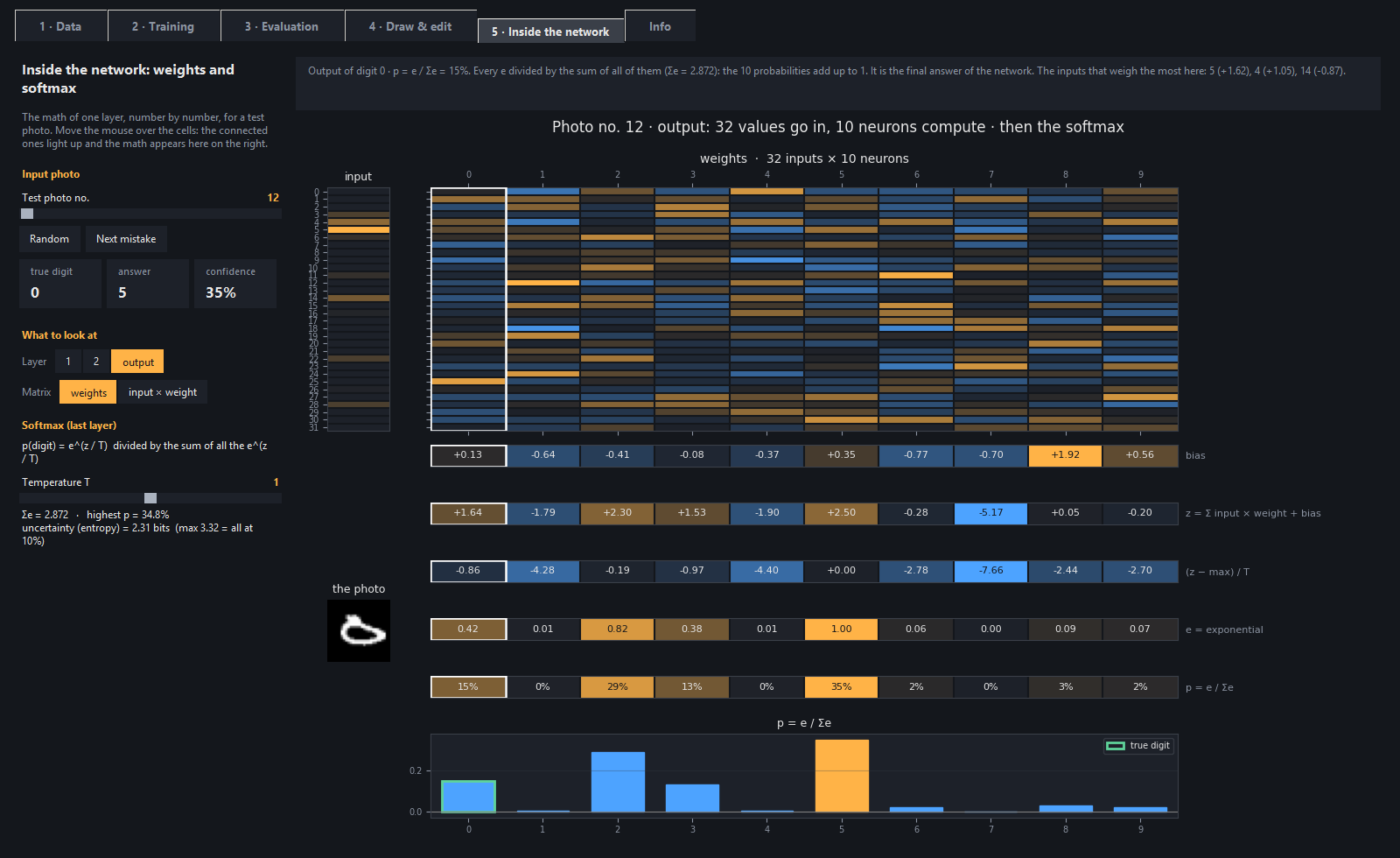
+
### 5 · Inside the network — the math, cell by cell
|
|
134
|
+
The math of a layer number by number, with colored cells like in the "LLM visualizers":
|
|
135
|
+
- the input values and the weight matrix (or input × weight);
|
|
136
|
+
- the bias, the weighted sum and the activation;
|
|
137
|
+
- for the last layer, the **softmax steps** (z − max, exponential, division by the sum), with
|
|
138
|
+
the **temperature** knob.
|
|
139
|
+
|
|
140
|
+
When you hover a cell, the connected ones light up and the math is explained.
|
|
141
|
+
|
|
142
|
+
|
|
143
|
+
|
|
144
|
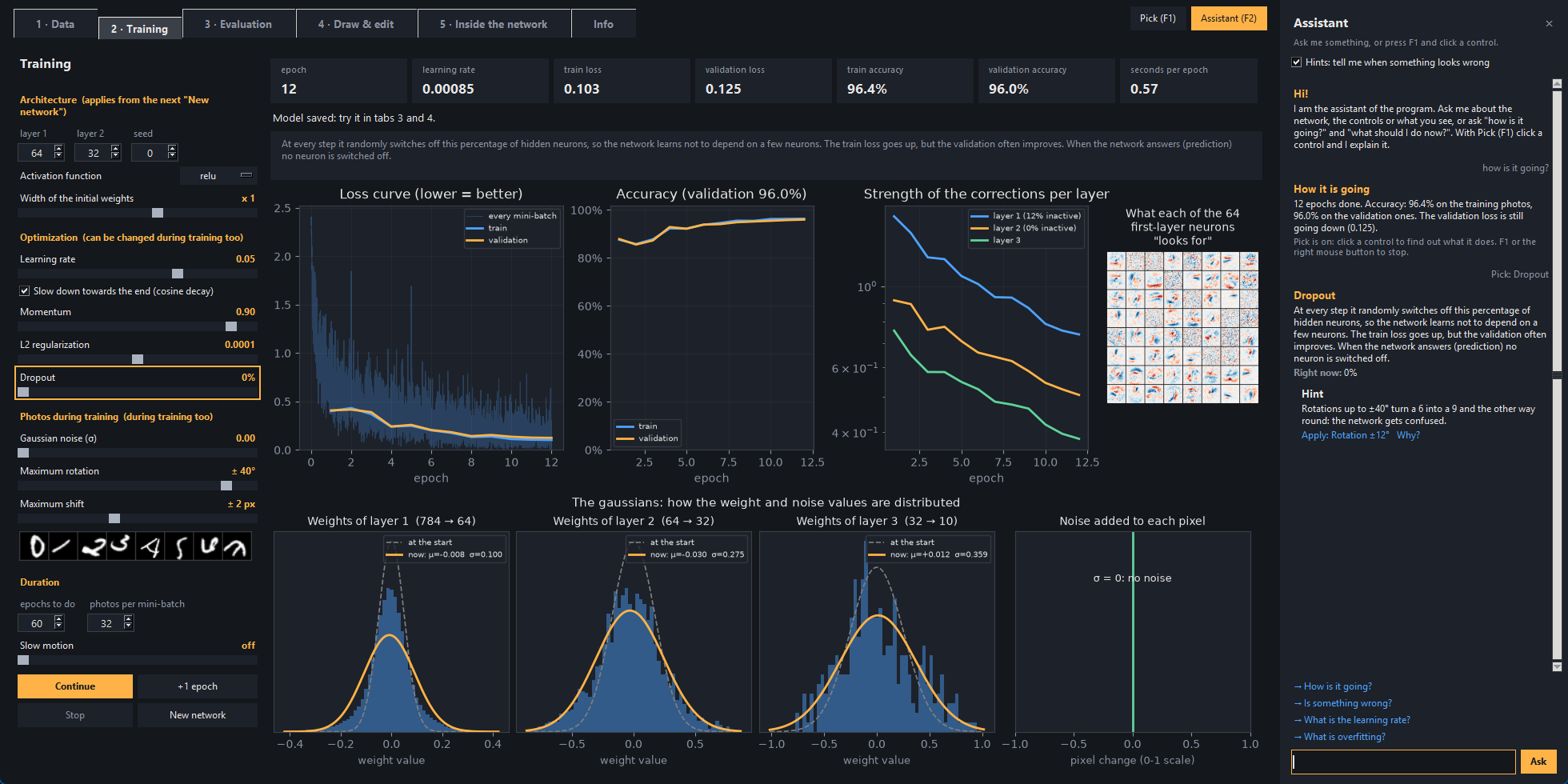
+
### The assistant — ask, pick, hints
|
|
145
|
+
A side panel (**F2**, or the *Assistant* button at the top right) that knows the program and sees what is
|
|
146
|
+
happening in it:
|
|
147
|
+
|
|
148
|
+
- **Questions**, in English or Italian: "what is overfitting?", "how is it going?", "what should I do now?",
|
|
149
|
+
"is something wrong?". The answers use the real state of the open tab: the epochs done, the accuracy, the
|
|
150
|
+
learning rate in use, the photos downloaded, the drawing on the board. Every answer also says where to see
|
|
151
|
+
that thing in the program and suggests an experiment to try.
|
|
152
|
+
- **Pick** (**F1**): hover the controls and they get an orange frame; click one and the assistant explains what it
|
|
153
|
+
does and what it is worth now. The charts are picked one at a time (the loss curve, one gaussian, one wrong
|
|
154
|
+
photo, one row of the math...), and so are the tiles with the numbers. While Pick is on, the clicks do not
|
|
155
|
+
reach the controls, so nothing starts by mistake.
|
|
156
|
+
- **Hints** (they can be switched off): the assistant notices the most common mistakes, like a learning rate
|
|
157
|
+
that is too high (the network explodes or does not learn), overfitting, too many inactive neurons, extreme
|
|
158
|
+
settings, or test photos spoiled much more than the training ones. Each hint has an *Apply* link that
|
|
159
|
+
fixes it in one click and a *Why?* link that explains the concept behind it.
|
|
160
|
+
|
|
161
|
+
It is not a language model, on purpose: the answers come from a small search engine (TF-IDF, written in NumPy
|
|
162
|
+
in [`nn_digits/assistant/search.py`](https://github.com/dev-luigi/neural-network-digits/blob/main/nn_digits/assistant/search.py)) over a glossary of neural networks and
|
|
163
|
+
the explanations of the controls, and the hints are simple rules
|
|
164
|
+
([`nn_digits/assistant/rules.py`](https://github.com/dev-luigi/neural-network-digits/blob/main/nn_digits/assistant/rules.py)). It needs nothing
|
|
165
|
+
to download, it answers in a moment and it never makes things up about the numbers it reads.
|
|
166
|
+
|
|
167
|
+
|
|
168
|
+
|
|
169
|
+
---
|
|
170
|
+
|
|
171
|
+
## Quick Start
|
|
172
|
+
|
|
173
|
+
You need **Python 3.9 or newer**. There are two ways to install the program.
|
|
174
|
+
|
|
175
|
+
### With pip
|
|
176
|
+
|
|
177
|
+
```bash
|
|
178
|
+
pipx install neural-network-digits # or: pip install neural-network-digits
|
|
179
|
+
neural-network-digits # opens the interface
|
|
180
|
+
```
|
|
181
|
+
|
|
182
|
+
[pipx](https://pipx.pypa.io) puts the program in an environment of its own and the `neural-network-digits`
|
|
183
|
+
command in the PATH. On Linux Tkinter must be installed first (see the table below). The photos, the model and
|
|
184
|
+
the settings go in the folder of your user: `%APPDATA%\neural-network-digits` on Windows,
|
|
185
|
+
`~/Library/Application Support/neural-network-digits` on macOS and `~/.local/share/neural-network-digits`
|
|
186
|
+
on Linux.
|
|
187
|
+
|
|
188
|
+
### With the zip
|
|
189
|
+
|
|
190
|
+
Download the zip of the latest version from the
|
|
191
|
+
[Releases](https://github.com/dev-luigi/neural-network-digits/releases/latest) page and extract it.
|
|
192
|
+
|
|
193
|
+
**Windows**: double-click **`start.bat`**. The first time it installs the libraries by itself (numpy, pillow,
|
|
194
|
+
matplotlib), then it opens the interface.
|
|
195
|
+
|
|
196
|
+
**Linux and macOS**: open a terminal in the extracted folder and run **`./start.sh`**. The first time it
|
|
197
|
+
creates a virtual environment in `.venv` and installs the libraries there (the Python of the system is not
|
|
198
|
+
touched), then it opens the interface. It needs Tkinter and venv: if one is missing, `start.sh` tells you
|
|
199
|
+
what to install.
|
|
200
|
+
|
|
201
|
+
| System | Once, before the first start |
|
|
202
|
+
|---|---|
|
|
203
|
+
| Ubuntu / Debian | `sudo apt install python3-venv python3-tk` |
|
|
204
|
+
| Fedora | `sudo dnf install python3-tkinter` |
|
|
205
|
+
| Arch | `sudo pacman -S tk` |
|
|
206
|
+
| macOS | Python from [python.org](https://www.python.org/downloads/macos/) (Tkinter included; the Python that comes with macOS has a Tkinter that is too old) |
|
|
207
|
+
|
|
208
|
+
Tested on Windows 11, Ubuntu 24.04, Debian 12, Fedora 44 and Arch Linux; on macOS the automatic tests
|
|
209
|
+
and `start.sh` run at every push (CI).
|
|
210
|
+
|
|
211
|
+
### The first start
|
|
212
|
+
|
|
213
|
+
There are no photos yet:
|
|
214
|
+
|
|
215
|
+
1. in the **1 · Data** tab press *Download the photos* (MNIST, ~11 MB, only once);
|
|
216
|
+
2. in the **2 · Training** tab press *Start*: with the starting settings (1000 photos,
|
|
217
|
+
60 epochs) it takes less than half a minute and gets to about 91% on the test photos.
|
|
218
|
+
With more photos (for example 700 per digit) it gets to about 96%, and with the whole collection
|
|
219
|
+
(60,000 photos) to about 98.5%, but the training takes about 5 minutes.
|
|
220
|
+
|
|
221
|
+
### Updates
|
|
222
|
+
|
|
223
|
+
Every time the interface opens, the program asks GitHub whether a new version is out (you can turn this
|
|
224
|
+
off in the **Info** tab). If there is one, it shows the changes and offers:
|
|
225
|
+
- **Update now**: downloads the new version, replaces the program files and restarts. The
|
|
226
|
+
`data/` folder (photos, model, settings) is not touched, and if something goes wrong
|
|
227
|
+
the old files are put back.
|
|
228
|
+
- **Later** or **Skip this version**.
|
|
229
|
+
|
|
230
|
+
From the terminal it is `start.bat update` (on Linux and macOS `./start.sh update`). If you downloaded the project
|
|
231
|
+
with `git clone`, update with `git pull` instead. If you installed it with pip, the program tells you when a new
|
|
232
|
+
version is out and you update it with `pipx upgrade neural-network-digits` (or `pip install -U neural-network-digits`).
|
|
233
|
+
|
|
234
|
+
---
|
|
235
|
+
|
|
236
|
+
## Tech Stack
|
|
237
|
+
|
|
238
|
+
| Component | Technology |
|
|
239
|
+
|---|---|
|
|
240
|
+
| Neural network | Python / NumPy — written from scratch, no ML framework |
|
|
241
|
+
| Interface | Tkinter |
|
|
242
|
+
| Charts | matplotlib (loss, gaussians, confusion matrix, PCA / t-SNE map) |
|
|
243
|
+
| Images | Pillow |
|
|
244
|
+
| Dataset | MNIST (downloaded by the program from the Data tab, not in the repository) |
|
|
245
|
+
| Languages | English / Italian (`nn_digits/i18n.py` + `nn_digits/locales/it.json`) |
|
|
246
|
+
| Tests | pytest (headless on Linux with xvfb) |
|
|
247
|
+
| Package | [PyPI](https://pypi.org/project/neural-network-digits/), built with hatchling |
|
|
248
|
+
| CI/CD | GitHub Actions — tests on Windows, Linux and macOS, automatic releases (GitHub and PyPI) from tags |
|
|
249
|
+
|
|
250
|
+
---
|
|
251
|
+
|
|
252
|
+
## From the terminal
|
|
253
|
+
|
|
254
|
+
The same steps, without the interface (on Linux and macOS: `./start.sh` instead of `start.bat`; installed
|
|
255
|
+
with pip: `neural-network-digits`):
|
|
256
|
+
|
|
257
|
+
```text
|
|
258
|
+
start.bat download --per-digit 100 1. downloads the photos (with --all the whole collection)
|
|
259
|
+
start.bat explore 2. pre-training: charts about the dataset
|
|
260
|
+
start.bat train --epochs 60 --lr 0.05 3. trains (also --noise --dropout --activation tanh ...)
|
|
261
|
+
start.bat evaluate --noise 0.3 4. tests on the test photos (also --rotation --thickness --map t-SNE)
|
|
262
|
+
start.bat draw 5. only drawing board and lab
|
|
263
|
+
start.bat reset [--all] deletes model and charts (with --all the photos too)
|
|
264
|
+
start.bat update checks whether there is a new version and installs it
|
|
265
|
+
start.bat --version shows the installed version
|
|
266
|
+
```
|
|
267
|
+
|
|
268
|
+
`start.bat train --help` shows all the options. The charts are saved in `data/charts/` (installed with pip,
|
|
269
|
+
in the `charts` folder of the data).
|
|
270
|
+
|
|
271
|
+
---
|
|
272
|
+
|
|
273
|
+
## How the network works, in short
|
|
274
|
+
|
|
275
|
+
```text
|
|
276
|
+
784 pixels → 64 neurons → 32 neurons → 10 outputs (one per digit)
|
|
277
|
+
```
|
|
278
|
+
|
|
279
|
+
1. **Forward**: every neuron makes a weighted sum of its inputs plus a bias (z) and applies
|
|
280
|
+
the activation (a). The last layer turns the 10 scores into probabilities with the **softmax**.
|
|
281
|
+
2. **Loss**: the cross-entropy measures how low the probability given to the right digit is.
|
|
282
|
+
3. **Backpropagation**: from the output back to the input, it computes how much every weight contributed
|
|
283
|
+
to the error, and corrects it a little (gradient descent with momentum).
|
|
284
|
+
4. **The gaussians**: at the start the weights are random numbers taken from a gaussian (He initialization
|
|
285
|
+
for relu and leaky relu, LeCun for sigmoid and tanh); during training their distribution widens and
|
|
286
|
+
changes shape.
|
|
287
|
+
|
|
288
|
+
---
|
|
289
|
+
|
|
290
|
+
## Experiments to try
|
|
291
|
+
|
|
292
|
+
- **Learning rate at 1**: the network stops learning. Look at the inactive neurons and at the
|
|
293
|
+
gaussians that widen out of all proportion.
|
|
294
|
+
- **Sigmoid with 2 layers**: it learns more slowly. Look at the strength of the corrections of the first layer.
|
|
295
|
+
- **Initial width x0.1 and x5**: the signal dies out or explodes.
|
|
296
|
+
- **Noise 0 versus noise 0.3 in training**: train with noise 0 and try the damaged photos in the
|
|
297
|
+
Evaluation tab, then train again with noise 0.3 and compare.
|
|
298
|
+
- **Maximum rotation 0 versus 30°**, then evaluate with the rotation at 25°.
|
|
299
|
+
- **Dropout 50%**: the train loss goes up. And the validation one?
|
|
300
|
+
- **Softmax and temperature**: in the Inside the network tab, with "Next mistake" find an uncertain photo,
|
|
301
|
+
then set the temperature to 0.1 and to 10. Does the answer change?
|
|
302
|
+
- **Points map layer by layer** (pixels → layer 1 → layer 2 → output): watch the groups
|
|
303
|
+
of digits separate. Then raise the noise: where do the points end up?
|
|
304
|
+
- **In the lab**:
|
|
305
|
+
- switch off the most active neurons while you draw a 7, until the answer changes;
|
|
306
|
+
- prune 90% of the weights;
|
|
307
|
+
- raise the temperature (the answer does not change, the confidence does).
|
|
308
|
+
|
|
309
|
+
---
|
|
310
|
+
|
|
311
|
+
## Development
|
|
312
|
+
|
|
313
|
+
### Setup and tests
|
|
314
|
+
|
|
315
|
+
```bash
|
|
316
|
+
git clone https://github.com/dev-luigi/neural-network-digits.git
|
|
317
|
+
cd neural-network-digits
|
|
318
|
+
git checkout develop
|
|
319
|
+
|
|
320
|
+
pip install -r requirements.txt -r requirements-dev.txt
|
|
321
|
+
python -m pytest
|
|
322
|
+
python start.py
|
|
323
|
+
```
|
|
324
|
+
|
|
325
|
+
On Linux and macOS let `./start.sh` create the `.venv` with the libraries, then use its Python:
|
|
326
|
+
`.venv/bin/python -m pip install -r requirements-dev.txt` and `.venv/bin/python -m pytest`.
|
|
327
|
+
|
|
328
|
+
The tests check:
|
|
329
|
+
- backpropagation, compared with the gradient computed numerically;
|
|
330
|
+
- learning with all the activations, and the softmax;
|
|
331
|
+
- the saving of the photos and their quick copy, the preparation of the photos and all the charts;
|
|
332
|
+
- the install of updates: `data/` is not touched, dangerous zips are refused
|
|
333
|
+
and the old files go back in place if something goes wrong, also coming from the versions before `nn_digits/`;
|
|
334
|
+
- the package for PyPI: its files, the command, the libraries and where the data goes;
|
|
335
|
+
- the release tool: the version and the changes in CHANGELOG.md;
|
|
336
|
+
- the translations: every text has its Italian version;
|
|
337
|
+
- the opening of all the tabs of the interface.
|
|
338
|
+
|
|
339
|
+
### Publishing a new version
|
|
340
|
+
|
|
341
|
+
Versions follow [semantic versioning](https://semver.org/) `MAJOR.MINOR.PATCH`:
|
|
342
|
+
- **PATCH** to fix bugs;
|
|
343
|
+
- **MINOR** for new features;
|
|
344
|
+
- **MAJOR** for changes that break something (for example saved models that are no longer compatible).
|
|
345
|
+
|
|
346
|
+
On the `develop` branch:
|
|
347
|
+
|
|
348
|
+
```bash
|
|
349
|
+
python tools/release.py prepare 1.1.0 # changes the version and opens the paragraph in CHANGELOG.md
|
|
350
|
+
# ...write the changes in CHANGELOG.md, commit, push and merge develop into main with a pull request...
|
|
351
|
+
```
|
|
352
|
+
|
|
353
|
+
Then, from the `main` branch:
|
|
354
|
+
|
|
355
|
+
```bash
|
|
356
|
+
python tools/release.py publish # tests, tag v1.1.0 and push: the CI/CD does the rest
|
|
357
|
+
```
|
|
358
|
+
|
|
359
|
+
The CI/CD publishes the release on GitHub with the zip, then the package on PyPI: that last step waits for
|
|
360
|
+
your approval (Actions tab, the run of the release, *Review deployments*). PyPI trusts this repository's
|
|
361
|
+
workflow (Trusted Publishing), so there is no password or token to keep.
|
|
362
|
+
|
|
363
|
+
---
|
|
364
|
+
|
|
365
|
+
## Project Structure
|
|
366
|
+
|
|
367
|
+
```
|
|
368
|
+
neural-network-digits/
|
|
369
|
+
├── start.bat # double-click = graphical interface (Windows)
|
|
370
|
+
├── start.sh # ./start.sh = graphical interface (Linux, macOS), in its own .venv
|
|
371
|
+
├── start.py # starts the zip and git copies: interface or a step from the terminal
|
|
372
|
+
├── project.py # only for the updates from version 1.1.1 and older (the real one is in nn_digits/)
|
|
373
|
+
├── requirements.txt # the libraries: numpy, pillow, matplotlib (requirements-dev.txt: pytest)
|
|
374
|
+
├── pyproject.toml # the package for PyPI and the settings of the tests
|
|
375
|
+
├── CHANGELOG.md # the changes of every version
|
|
376
|
+
├── LICENSE # MIT
|
|
377
|
+
├── nn_digits/ # the program: the package that pip installs
|
|
378
|
+
│ ├── cli.py # the terminal commands (start.py and the neural-network-digits command start here)
|
|
379
|
+
│ ├── project.py # name, version, author and addresses of the program
|
|
380
|
+
│ ├── updater.py # check and install of new versions from GitHub
|
|
381
|
+
│ ├── i18n.py # languages: tr() gives every text in the chosen language
|
|
382
|
+
│ ├── locales/it.json # the Italian translations
|
|
383
|
+
│ ├── neural_net/ # the "brain", without windows
|
|
384
|
+
│ │ ├── network.py # forward, softmax, loss, backpropagation (read this first!)
|
|
385
|
+
│ │ ├── data.py # photos: download, loading, preparation, noise, alterations
|
|
386
|
+
│ │ ├── training.py # the training loop, one epoch at a time, and the tests on the test photos
|
|
387
|
+
│ │ ├── charts.py # all the charts (loss, gaussians, confusion, points map, softmax...)
|
|
388
|
+
│ │ └── storage.py # where the files are saved (data/ or the folder of the user), and the reset
|
|
389
|
+
│ ├── assistant/ # the assistant, without windows
|
|
390
|
+
│ │ ├── brain.py # how it answers a question, looking at the state of the program
|
|
391
|
+
│ │ ├── knowledge.py # the glossary, what every tab shows, the experiments to try
|
|
392
|
+
│ │ ├── rules.py # the hints: the rules that notice the common mistakes
|
|
393
|
+
│ │ └── search.py # the small search engine (TF-IDF with NumPy)
|
|
394
|
+
│ └── gui/ # the window (Tkinter + matplotlib)
|
|
395
|
+
│ ├── window.py # the window with the 5 tabs and the Info tab
|
|
396
|
+
│ ├── tab_*.py # one tab per file (tab_info.py also offers the updates)
|
|
397
|
+
│ ├── drawing_board.py # the drawing board and the diagram of the network (tab 4)
|
|
398
|
+
│ ├── lab.py # the changes to the trained network (tab 4)
|
|
399
|
+
│ ├── assistant.py # the assistant panel (F2)
|
|
400
|
+
│ ├── pick.py # Pick (F1): click a control to have it explained
|
|
401
|
+
│ ├── app_state.py # the state of the program, in a dictionary for the assistant
|
|
402
|
+
│ └── base.py # colors and pieces of interface reused by all the tabs
|
|
403
|
+
├── docs/ # the screenshots of this README
|
|
404
|
+
├── tests/ # the automatic tests (pytest)
|
|
405
|
+
├── tools/ # release.py publishes a new version, check_package.py checks the package for PyPI
|
|
406
|
+
├── .github/workflows/ # the CI/CD: tests at every push, release (GitHub and PyPI) at every tag
|
|
407
|
+
└── data/ # created by the program: photos, model, charts, settings (excluded from git)
|
|
408
|
+
```
|
|
409
|
+
|
|
410
|
+
The logic (`nn_digits/neural_net/`) does not depend on the interface: both the tabs and the terminal commands
|
|
411
|
+
use it.
|
|
412
|
+
|
|
413
|
+
---
|
|
414
|
+
|
|
415
|
+
## Data
|
|
416
|
+
|
|
417
|
+
The photos come from the [MNIST](https://yann.lecun.com/exdb/mnist/) dataset by Yann LeCun, Corinna Cortes and
|
|
418
|
+
Christopher J.C. Burges, distributed under the
|
|
419
|
+
[CC BY-SA 3.0](https://creativecommons.org/licenses/by-sa/3.0/) license. The program downloads them from the
|
|
420
|
+
public copy used by Keras/TensorFlow and does not include them in the repository.
|
|
421
|
+
|
|
422
|
+
---
|
|
423
|
+
|
|
424
|
+
## Community
|
|
425
|
+
|
|
426
|
+
Questions, ideas and what you did with the program go in the
|
|
427
|
+
[Discussions](https://github.com/dev-luigi/neural-network-digits/discussions); bugs in the
|
|
428
|
+
[issues](https://github.com/dev-luigi/neural-network-digits/issues/new/choose). If the project is useful to you,
|
|
429
|
+
a star helps other people find it, and you can support it with
|
|
430
|
+
[GitHub Sponsors](https://github.com/sponsors/dev-luigi).
|
|
431
|
+
|
|
432
|
+
---
|
|
433
|
+
|
|
434
|
+
## License
|
|
435
|
+
|
|
436
|
+
The code is distributed under the [MIT](https://github.com/dev-luigi/neural-network-digits/blob/main/LICENSE) license.
|
|
437
|
+
|
|
438
|
+
---
|
|
439
|
+
|
|
440
|
+
## Author
|
|
441
|
+
|
|
442
|
+
**Luigi Tanzillo** — [luigitanzillo.it](https://luigitanzillo.it) · [github.com/dev-luigi](https://github.com/dev-luigi)
|
|
443
|
+
|
|
444
|
+
---
|
|
445
|
+
|
|
446
|
+
## Star History
|
|
447
|
+
|
|
448
|
+
<a href="https://www.star-history.com/?repos=dev-luigi%2Fneural-network-digits&type=date&legend=top-left">
|
|
449
|
+
<picture>
|
|
450
|
+
<source media="(prefers-color-scheme: dark)" srcset="https://api.star-history.com/chart?repos=dev-luigi/neural-network-digits&type=date&theme=dark&legend=top-left" />
|
|
451
|
+
<source media="(prefers-color-scheme: light)" srcset="https://api.star-history.com/chart?repos=dev-luigi/neural-network-digits&type=date&legend=top-left" />
|
|
452
|
+
<img alt="Star History Chart" src="https://api.star-history.com/chart?repos=dev-luigi/neural-network-digits&type=date&legend=top-left" />
|
|
453
|
+
</picture>
|
|
454
|
+
</a>
|