netscanqt 0.1.0__tar.gz
This diff represents the content of publicly available package versions that have been released to one of the supported registries. The information contained in this diff is provided for informational purposes only and reflects changes between package versions as they appear in their respective public registries.
- netscanqt-0.1.0/PKG-INFO +354 -0
- netscanqt-0.1.0/README.md +323 -0
- netscanqt-0.1.0/netscanqt/__init__.py +44 -0
- netscanqt-0.1.0/netscanqt/__main__.py +6 -0
- netscanqt-0.1.0/netscanqt/cli.py +170 -0
- netscanqt-0.1.0/netscanqt/corpus.py +96 -0
- netscanqt-0.1.0/netscanqt/engine.py +369 -0
- netscanqt-0.1.0/netscanqt/fingerprint.py +229 -0
- netscanqt-0.1.0/netscanqt/gui.py +480 -0
- netscanqt-0.1.0/netscanqt/output.py +98 -0
- netscanqt-0.1.0/netscanqt/recog.py +135 -0
- netscanqt-0.1.0/netscanqt/report.py +157 -0
- netscanqt-0.1.0/pyproject.toml +70 -0
netscanqt-0.1.0/PKG-INFO
ADDED
|
@@ -0,0 +1,354 @@
|
|
|
1
|
+
Metadata-Version: 2.4
|
|
2
|
+
Name: netscanqt
|
|
3
|
+
Version: 0.1.0
|
|
4
|
+
Summary: Dual-mode (CLI + PyQt6) async TCP connect scanner
|
|
5
|
+
Project-URL: Homepage, https://github.com/scottpeterman/netscanqt
|
|
6
|
+
Project-URL: Repository, https://github.com/scottpeterman/netscanqt
|
|
7
|
+
Project-URL: Issues, https://github.com/scottpeterman/netscanqt/issues
|
|
8
|
+
Author: Scott Peterman
|
|
9
|
+
License-Expression: GPL-3.0-or-later
|
|
10
|
+
Keywords: asyncio,cli,network,port-scanner,pyqt6
|
|
11
|
+
Classifier: Development Status :: 4 - Beta
|
|
12
|
+
Classifier: Environment :: Console
|
|
13
|
+
Classifier: Environment :: X11 Applications :: Qt
|
|
14
|
+
Classifier: Intended Audience :: Information Technology
|
|
15
|
+
Classifier: Intended Audience :: System Administrators
|
|
16
|
+
Classifier: Operating System :: OS Independent
|
|
17
|
+
Classifier: Programming Language :: Python :: 3
|
|
18
|
+
Classifier: Programming Language :: Python :: 3.10
|
|
19
|
+
Classifier: Programming Language :: Python :: 3.11
|
|
20
|
+
Classifier: Programming Language :: Python :: 3.12
|
|
21
|
+
Classifier: Programming Language :: Python :: 3.13
|
|
22
|
+
Classifier: Topic :: System :: Networking
|
|
23
|
+
Classifier: Topic :: System :: Networking :: Monitoring
|
|
24
|
+
Classifier: Topic :: System :: Systems Administration
|
|
25
|
+
Requires-Python: >=3.10
|
|
26
|
+
Provides-Extra: gui
|
|
27
|
+
Requires-Dist: pyqt6>=6.6; extra == 'gui'
|
|
28
|
+
Provides-Extra: rich
|
|
29
|
+
Requires-Dist: rich>=13; extra == 'rich'
|
|
30
|
+
Description-Content-Type: text/markdown
|
|
31
|
+
|
|
32
|
+
# netscanqt
|
|
33
|
+
|
|
34
|
+
A fast, async TCP **connect scanner** with one engine and two front ends: a
|
|
35
|
+
streaming command-line tool and an optional PyQt6 GUI. It scans, optionally
|
|
36
|
+
discovers live hosts first, and optionally **fingerprints** the services it
|
|
37
|
+
finds against the Recog database.
|
|
38
|
+
|
|
39
|
+
It does not use raw sockets — no root, no `libpcap`, no `CAP_NET_RAW`. It runs
|
|
40
|
+
as an ordinary user on a headless jump box, which is exactly where it's meant to
|
|
41
|
+
live. The scanning core is pure standard library; the GUI, the prettier CLI
|
|
42
|
+
output, and the network features (fingerprint corpus download) are all opt-in,
|
|
43
|
+
so a plain `pip install` pulls in nothing you don't need.
|
|
44
|
+
|
|
45
|
+
> netscanqt is a reachability scanner with service identification, not an nmap
|
|
46
|
+
> replacement. It tells you which TCP ports answer and makes a best effort to
|
|
47
|
+
> name the service behind them. It does not do SYN/stealth scans, UDP, OS
|
|
48
|
+
> fingerprinting, or NSE-style scripting. If you need those, run nmap.
|
|
49
|
+
|
|
50
|
+
<p align="center">
|
|
51
|
+
<img src="https://raw.githubusercontent.com/scottpeterman/netscanqt/refs/heads/main/screenshots/slides.gif"
|
|
52
|
+
alt="netscanqt GUI: a /24 scan with discovery and service fingerprinting, showing open ports with product and version columns"
|
|
53
|
+
width="640">
|
|
54
|
+
</p>
|
|
55
|
+
|
|
56
|
+
---
|
|
57
|
+
|
|
58
|
+
## Install
|
|
59
|
+
|
|
60
|
+
```bash
|
|
61
|
+
# CLI + engine — zero non-stdlib dependencies
|
|
62
|
+
pip install netscanqt
|
|
63
|
+
|
|
64
|
+
# add extras as needed
|
|
65
|
+
pip install netscanqt[rich] # prettier CLI tables + progress bars
|
|
66
|
+
pip install netscanqt[gui] # the PyQt6 desktop GUI
|
|
67
|
+
pip install netscanqt[gui,rich] # everything
|
|
68
|
+
```
|
|
69
|
+
|
|
70
|
+
From source, with an editable install for development:
|
|
71
|
+
|
|
72
|
+
```bash
|
|
73
|
+
git clone https://github.com/scottpeterman/netscanqt
|
|
74
|
+
cd netscanqt
|
|
75
|
+
pip install -e .[gui,rich]
|
|
76
|
+
```
|
|
77
|
+
|
|
78
|
+
Requires Python 3.10+.
|
|
79
|
+
|
|
80
|
+
Launching:
|
|
81
|
+
|
|
82
|
+
```bash
|
|
83
|
+
netscanqt ... # CLI console script
|
|
84
|
+
python -m netscanqt ... # module form, same CLI
|
|
85
|
+
netscanqt-gui # GUI (prints an install hint without the [gui] extra)
|
|
86
|
+
netscanqt-fetch-fingerprints # download the Recog corpus (see Fingerprinting)
|
|
87
|
+
```
|
|
88
|
+
|
|
89
|
+
---
|
|
90
|
+
|
|
91
|
+
## Quick start
|
|
92
|
+
|
|
93
|
+
```bash
|
|
94
|
+
# scan the well-known ports across a /24
|
|
95
|
+
netscanqt 10.0.0.0/24
|
|
96
|
+
|
|
97
|
+
# discover live hosts first, then full-scan only those
|
|
98
|
+
netscanqt 10.0.0.0/24 -d
|
|
99
|
+
|
|
100
|
+
# discover, scan, and identify the services on open ports
|
|
101
|
+
netscanqt 10.0.0.0/24 -d -F
|
|
102
|
+
```
|
|
103
|
+
|
|
104
|
+

|
|
105
|
+
|
|
106
|
+
---
|
|
107
|
+
|
|
108
|
+
## CLI guide
|
|
109
|
+
|
|
110
|
+
### Synopsis
|
|
111
|
+
|
|
112
|
+
```
|
|
113
|
+
netscanqt [options] TARGET [TARGET ...]
|
|
114
|
+
```
|
|
115
|
+
|
|
116
|
+
### Targets
|
|
117
|
+
|
|
118
|
+
One or more hosts, IP addresses, or CIDR blocks, space-separated. CIDR blocks
|
|
119
|
+
expand to their usable host addresses; bare IPs and hostnames pass through to
|
|
120
|
+
the resolver.
|
|
121
|
+
|
|
122
|
+
```bash
|
|
123
|
+
netscanqt 10.0.0.0/24 192.168.1.1 host.example.com
|
|
124
|
+
```
|
|
125
|
+
|
|
126
|
+
### Ports (`-p` / `--ports`)
|
|
127
|
+
|
|
128
|
+
| Form | Meaning |
|
|
129
|
+
| ------------- | -------------------------------- |
|
|
130
|
+
| `22,80,443` | an explicit list |
|
|
131
|
+
| `1-1024` | an inclusive range |
|
|
132
|
+
| `22,8000-8100`| lists and ranges combined |
|
|
133
|
+
| `all` (or `-`)| every port, 1–65535 |
|
|
134
|
+
|
|
135
|
+
Default: `1-1024`.
|
|
136
|
+
|
|
137
|
+
### Options
|
|
138
|
+
|
|
139
|
+
| Flag | Default | Description |
|
|
140
|
+
| ----------------------- | ------- | ------------------------------------------------------------------ |
|
|
141
|
+
| `-p`, `--ports` | `1-1024`| ports to scan (see forms above) |
|
|
142
|
+
| `-c`, `--concurrency` | `500` | number of simultaneous connects |
|
|
143
|
+
| `-t`, `--timeout` | `1.0` | per-connect timeout, in seconds |
|
|
144
|
+
| `-r`, `--retries` | `1` | extra attempts on timeout before a port is marked filtered |
|
|
145
|
+
| `--filtered` | off | also report filtered ports, not just open ones |
|
|
146
|
+
| `-d`, `--discover` | off | liveness-sweep the range first; full-scan only hosts that answer |
|
|
147
|
+
| `--discovery-timeout` | `0.5` | per-probe timeout for the liveness pass |
|
|
148
|
+
| `-F`, `--fingerprint` | off | identify services on open ports (banner grab + Recog match) |
|
|
149
|
+
| `--recog-dir` | | path to a Recog `xml/` directory (overrides cache and env) |
|
|
150
|
+
| `--fingerprint-timeout` | `2.0` | per-service timeout for the fingerprint pass |
|
|
151
|
+
| `-o`, `--output` | `text` | output format: `text`, `json`, or `csv` |
|
|
152
|
+
| `-q`, `--quiet` | off | suppress the progress line on stderr |
|
|
153
|
+
| `--no-color` | off | force plain text even if `rich` is installed |
|
|
154
|
+
| `--version` | | print version and exit |
|
|
155
|
+
|
|
156
|
+
### Discovery (`-d`) — and why it matters
|
|
157
|
+
|
|
158
|
+
On a sparse range, most addresses are dark, and without discovery every port on
|
|
159
|
+
every dead host is probed until it times out — a `/24 × 1-1024` is ~260,000
|
|
160
|
+
connects, almost all waiting on silence.
|
|
161
|
+
|
|
162
|
+
With `-d`, netscanqt first sweeps a small set of liveness ports
|
|
163
|
+
(`22, 80, 443, 445, 3389`) with a short timeout, keeps only the hosts that
|
|
164
|
+
respond, then full-scans just those. A host counts as **alive if any probe is
|
|
165
|
+
open _or_ closed** — a closed port (an immediate RST) proves a host is there
|
|
166
|
+
just as well as an open one; only silence means dead. On a typical sparse `/24`
|
|
167
|
+
that turns hundreds of thousands of probes into a few thousand, and minutes into
|
|
168
|
+
seconds. Use it whenever you're scanning a range rather than a known host list.
|
|
169
|
+
|
|
170
|
+
### Tuning for a fast, reliable LAN
|
|
171
|
+
|
|
172
|
+
```bash
|
|
173
|
+
netscanqt 10.0.0.0/24 -d -t 0.4 -r 0
|
|
174
|
+
```
|
|
175
|
+
|
|
176
|
+
`-t 0.4` shortens the wait on non-responders; `-r 0` drops the retry so each
|
|
177
|
+
dead probe costs one timeout instead of two.
|
|
178
|
+
|
|
179
|
+
> **File descriptors.** `--concurrency` is bounded by your open-file limit
|
|
180
|
+
> (`ulimit -n`, often 1024). Push past it and the OS refuses sockets; netscanqt
|
|
181
|
+
> treats that refusal like an unreachable port, so you'd get *wrong* results,
|
|
182
|
+
> not an error. If you raise concurrency, raise the fd limit with it.
|
|
183
|
+
|
|
184
|
+
---
|
|
185
|
+
|
|
186
|
+
## Fingerprinting (`-F`)
|
|
187
|
+
|
|
188
|
+
`-F` adds a second pass over the open ports: it connects, grabs an identifying
|
|
189
|
+
string (an HTTP `Server` header, a self-announced banner), and matches it
|
|
190
|
+
against the [Recog](https://github.com/rapid7/recog) fingerprint database to
|
|
191
|
+
report a product, version, and CPE. The scan stays a clean reachability layer;
|
|
192
|
+
fingerprinting is a separate stage layered on top.
|
|
193
|
+
|
|
194
|
+
### Getting the corpus
|
|
195
|
+
|
|
196
|
+
netscanqt ships only a tiny built-in sample (a handful of fingerprints), so out
|
|
197
|
+
of the box `-F` identifies very little. Download the full corpus once:
|
|
198
|
+
|
|
199
|
+
```bash
|
|
200
|
+
netscanqt-fetch-fingerprints # into ~/.cache/netscanqt/recog
|
|
201
|
+
netscanqt-fetch-fingerprints --ref v3.1.4 # pin a tag for a reproducible set
|
|
202
|
+
netscanqt-fetch-fingerprints --dest ./recog # somewhere explicit
|
|
203
|
+
```
|
|
204
|
+
|
|
205
|
+
This pulls ~50 XML files (~3 MB) as a single tarball — no GitHub API, so no rate
|
|
206
|
+
limiting. Run it once from a box with internet; every scan afterward loads the
|
|
207
|
+
corpus locally and offline, which is what keeps `-F` usable on airgapped jump
|
|
208
|
+
boxes. The full corpus is ~4,300 fingerprints.
|
|
209
|
+
|
|
210
|
+
### Where fingerprints are loaded from
|
|
211
|
+
|
|
212
|
+
Resolved in this order, first match wins:
|
|
213
|
+
|
|
214
|
+
1. `--recog-dir PATH`
|
|
215
|
+
2. `$NETSCANQT_RECOG_DIR`
|
|
216
|
+
3. the downloaded cache (`~/.cache/netscanqt/recog`)
|
|
217
|
+
4. the built-in sample
|
|
218
|
+
|
|
219
|
+
So once you've run the fetch command, both the CLI and GUI pick up the full
|
|
220
|
+
corpus with no further configuration.
|
|
221
|
+
|
|
222
|
+
### What it can and can't identify
|
|
223
|
+
|
|
224
|
+
Self-announcing services are covered: HTTP/HTTPS (Apache, IIS, nginx),
|
|
225
|
+
IPP/CUPS, SSH, and the FTP/SMTP/POP/IMAP greeters. Silent or
|
|
226
|
+
client-speaks-first services (PostgreSQL, MSSQL, raw 9100) stay unidentified
|
|
227
|
+
because they need a real protocol exchange to elicit a response. When no
|
|
228
|
+
fingerprint matches, the raw banner is shown instead of a blank — so you always
|
|
229
|
+
see what the service actually said.
|
|
230
|
+
|
|
231
|
+
---
|
|
232
|
+
|
|
233
|
+
## Output formats (`-o`)
|
|
234
|
+
|
|
235
|
+
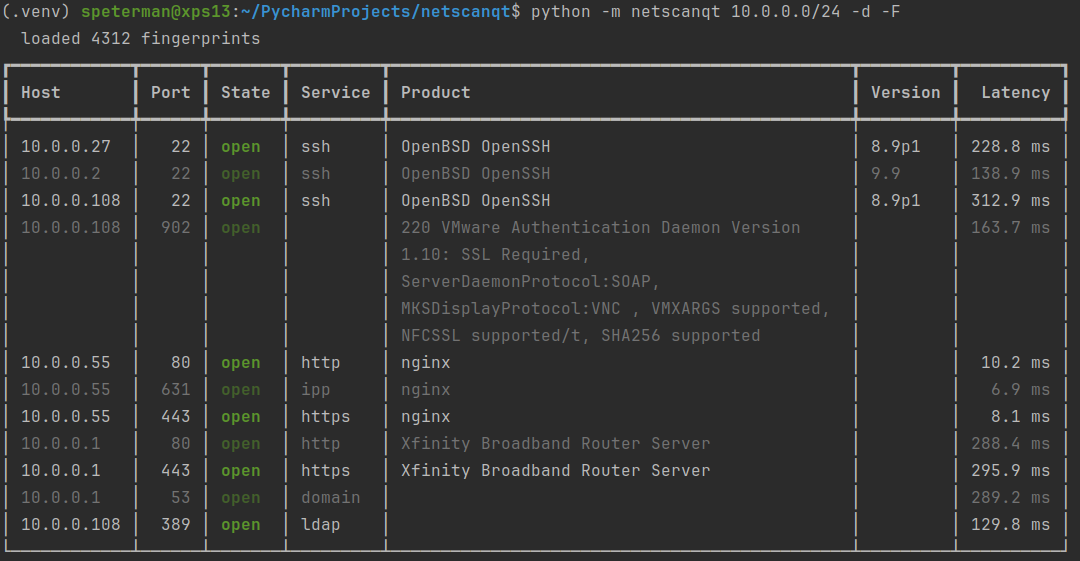
**text** (default) renders a table — a `rich` table with colored states and a
|
|
236
|
+
phased progress bar if the `[rich]` extra is installed and you're on a terminal,
|
|
237
|
+
or aligned plain text otherwise (also used automatically when piping):
|
|
238
|
+
|
|
239
|
+
```
|
|
240
|
+
Host Port State Service Product Version Latency
|
|
241
|
+
10.0.0.27 22 open ssh OpenBSD OpenSSH 8.9p1 2.7 ms
|
|
242
|
+
10.0.0.55 631 open ipp nginx 54.9 ms
|
|
243
|
+
10.0.0.1 443 open https Xfinity Broadband ... 153.6 ms
|
|
244
|
+
```
|
|
245
|
+
|
|
246
|
+
|
|
247
|
+
|
|
248
|
+
**json** emits one array after the scan completes; **csv** writes a header plus
|
|
249
|
+
rows. With `-F`, both include `product`, `version`, `cpe`, `os`, and the raw
|
|
250
|
+
`banner`.
|
|
251
|
+
|
|
252
|
+
```bash
|
|
253
|
+
# discover + fingerprint a /24, pull the SSH hosts out with jq
|
|
254
|
+
netscanqt 10.0.0.0/24 -d -F -o json -q | jq '.[] | select(.port == 22)'
|
|
255
|
+
|
|
256
|
+
# CSV inventory with service identification
|
|
257
|
+
netscanqt 10.0.0.0/24 -d -F -o csv -q > inventory.csv
|
|
258
|
+
```
|
|
259
|
+
|
|
260
|
+
### Exit codes
|
|
261
|
+
|
|
262
|
+
| Code | Meaning |
|
|
263
|
+
| ---- | ------------------------------------------------------------------- |
|
|
264
|
+
| `0` | completed |
|
|
265
|
+
| `2` | bad input, fingerprint load failure, or GUI launched without `[gui]`|
|
|
266
|
+
| `130`| interrupted (Ctrl-C) — sockets are closed cleanly on the way out |
|
|
267
|
+
|
|
268
|
+
---
|
|
269
|
+
|
|
270
|
+
## GUI
|
|
271
|
+
|
|
272
|
+
```bash
|
|
273
|
+
netscanqt-gui
|
|
274
|
+
```
|
|
275
|
+
|
|
276
|
+
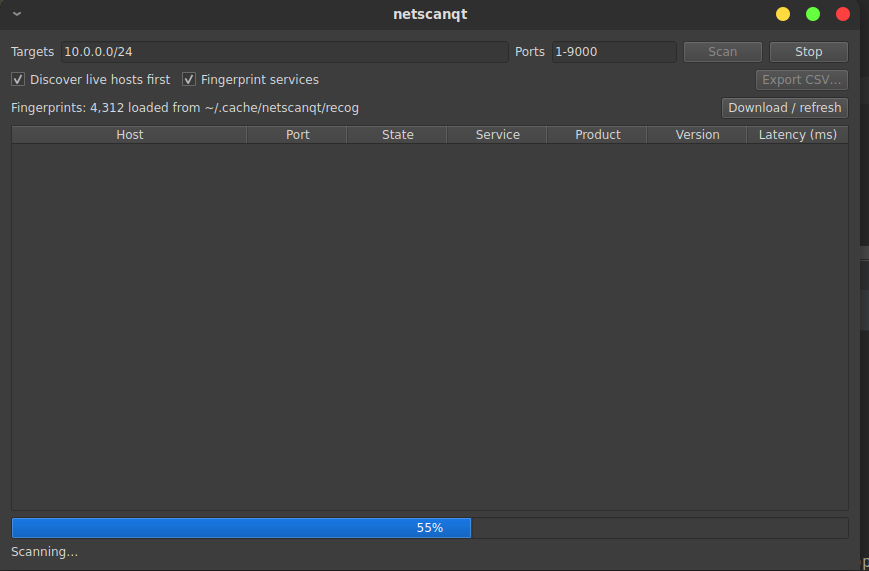
Enter targets and ports, tick **Discover live hosts first** and/or **Fingerprint
|
|
277
|
+
services**, and hit Scan. Results stream into the table — with Product and
|
|
278
|
+
Version columns when fingerprinting — and the progress bar relabels itself
|
|
279
|
+
across the discovery, scan, and fingerprint phases. Stop cancels cleanly. It's
|
|
280
|
+
the same engine and the same fingerprint corpus as the CLI; the window is just
|
|
281
|
+
another way to build a scan configuration.
|
|
282
|
+
|
|
283
|
+
|
|
284
|
+
|
|
285
|
+
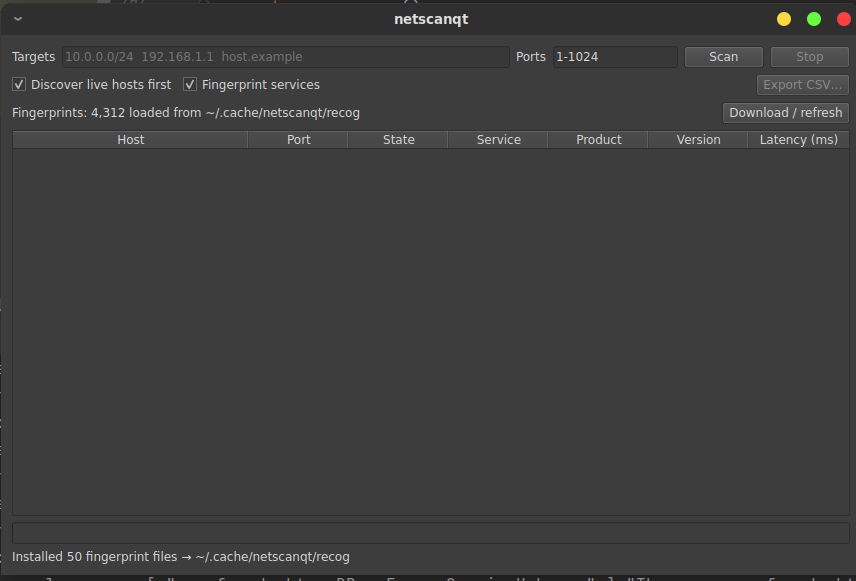
The corpus the GUI matches against is the same one the CLI resolves, and it can
|
|
286
|
+
be inspected and downloaded from the window — the count shown is exactly what
|
|
287
|
+
`-F` will match against.
|
|
288
|
+
|
|
289
|
+
|
|
290
|
+
|
|
291
|
+
---
|
|
292
|
+
|
|
293
|
+
## Using the engine as a library
|
|
294
|
+
|
|
295
|
+
The scanner and the fingerprinter are importable on their own; the CLI and GUI
|
|
296
|
+
are thin drivers over them. The engine yields structured events and never
|
|
297
|
+
prints:
|
|
298
|
+
|
|
299
|
+
```python
|
|
300
|
+
import asyncio
|
|
301
|
+
from netscanqt import scan, ScanConfig, ScanResult, ScanProgress
|
|
302
|
+
from netscanqt import enrich, load_recog
|
|
303
|
+
|
|
304
|
+
async def main():
|
|
305
|
+
config = ScanConfig.from_specs(["10.0.0.0/24"], ports="22,80,443", discover=True)
|
|
306
|
+
opens = [e async for e in scan(config) if isinstance(e, ScanResult)]
|
|
307
|
+
|
|
308
|
+
recog = load_recog() # downloaded cache, env, or built-in sample
|
|
309
|
+
async for er in enrich(opens, recog):
|
|
310
|
+
product = er.fingerprint.get("service.product") if er.fingerprint else er.banner
|
|
311
|
+
print(f"{er.result.host}:{er.result.port} {product}")
|
|
312
|
+
|
|
313
|
+
asyncio.run(main())
|
|
314
|
+
```
|
|
315
|
+
|
|
316
|
+
`scan()` and `enrich()` are async generators. Stop iterating, `break`, or
|
|
317
|
+
`aclose()` and in-flight probes are cancelled and their sockets closed —
|
|
318
|
+
cancellation is part of the contract, which is why both front ends get a clean
|
|
319
|
+
Stop for free.
|
|
320
|
+
|
|
321
|
+
---
|
|
322
|
+
|
|
323
|
+
## How it works
|
|
324
|
+
|
|
325
|
+
**One engine, two drivers.** `engine.py` knows how to scan and nothing else — no
|
|
326
|
+
formatting, no argparse, no Qt. Both shells exist only to construct a
|
|
327
|
+
`ScanConfig` and consume the events `scan()` yields. A CLI flag and a GUI
|
|
328
|
+
checkbox are the same thing: a field on the config.
|
|
329
|
+
|
|
330
|
+
**Concurrency, not parallelism.** Connect-scanning is I/O-bound — every worker
|
|
331
|
+
waits on the network, not the CPU — so the engine uses a pool of asyncio workers
|
|
332
|
+
over a single thread. Threads or multiprocessing would buy nothing; the only way
|
|
333
|
+
to go faster is to stop waiting on dead hosts, which is what discovery does.
|
|
334
|
+
|
|
335
|
+
**Layered passes.** Discovery, the scan, and fingerprinting are distinct passes
|
|
336
|
+
that compose: each consumes the previous one's output rather than complicating
|
|
337
|
+
it. Fingerprint matching is a pure function, so it's the one piece that could
|
|
338
|
+
move to a process pool if service-identification volume ever made regex matching
|
|
339
|
+
a CPU bottleneck.
|
|
340
|
+
|
|
341
|
+
---
|
|
342
|
+
|
|
343
|
+
## Notes
|
|
344
|
+
|
|
345
|
+
Scan only hosts and networks you own or are explicitly authorized to scan.
|
|
346
|
+
Unauthorized port scanning may be illegal where you are.
|
|
347
|
+
|
|
348
|
+
The Recog fingerprint database is © Rapid7 and contributors, licensed under
|
|
349
|
+
BSD-2-Clause; it is downloaded at the user's request and is not redistributed
|
|
350
|
+
with netscanqt.
|
|
351
|
+
|
|
352
|
+
## License
|
|
353
|
+
|
|
354
|
+
GPL-3.0-or-later.
|
|
@@ -0,0 +1,323 @@
|
|
|
1
|
+
# netscanqt
|
|
2
|
+
|
|
3
|
+
A fast, async TCP **connect scanner** with one engine and two front ends: a
|
|
4
|
+
streaming command-line tool and an optional PyQt6 GUI. It scans, optionally
|
|
5
|
+
discovers live hosts first, and optionally **fingerprints** the services it
|
|
6
|
+
finds against the Recog database.
|
|
7
|
+
|
|
8
|
+
It does not use raw sockets — no root, no `libpcap`, no `CAP_NET_RAW`. It runs
|
|
9
|
+
as an ordinary user on a headless jump box, which is exactly where it's meant to
|
|
10
|
+
live. The scanning core is pure standard library; the GUI, the prettier CLI
|
|
11
|
+
output, and the network features (fingerprint corpus download) are all opt-in,
|
|
12
|
+
so a plain `pip install` pulls in nothing you don't need.
|
|
13
|
+
|
|
14
|
+
> netscanqt is a reachability scanner with service identification, not an nmap
|
|
15
|
+
> replacement. It tells you which TCP ports answer and makes a best effort to
|
|
16
|
+
> name the service behind them. It does not do SYN/stealth scans, UDP, OS
|
|
17
|
+
> fingerprinting, or NSE-style scripting. If you need those, run nmap.
|
|
18
|
+
|
|
19
|
+
<p align="center">
|
|
20
|
+
<img src="https://raw.githubusercontent.com/scottpeterman/netscanqt/refs/heads/main/screenshots/slides.gif"
|
|
21
|
+
alt="netscanqt GUI: a /24 scan with discovery and service fingerprinting, showing open ports with product and version columns"
|
|
22
|
+
width="640">
|
|
23
|
+
</p>
|
|
24
|
+
|
|
25
|
+
---
|
|
26
|
+
|
|
27
|
+
## Install
|
|
28
|
+
|
|
29
|
+
```bash
|
|
30
|
+
# CLI + engine — zero non-stdlib dependencies
|
|
31
|
+
pip install netscanqt
|
|
32
|
+
|
|
33
|
+
# add extras as needed
|
|
34
|
+
pip install netscanqt[rich] # prettier CLI tables + progress bars
|
|
35
|
+
pip install netscanqt[gui] # the PyQt6 desktop GUI
|
|
36
|
+
pip install netscanqt[gui,rich] # everything
|
|
37
|
+
```
|
|
38
|
+
|
|
39
|
+
From source, with an editable install for development:
|
|
40
|
+
|
|
41
|
+
```bash
|
|
42
|
+
git clone https://github.com/scottpeterman/netscanqt
|
|
43
|
+
cd netscanqt
|
|
44
|
+
pip install -e .[gui,rich]
|
|
45
|
+
```
|
|
46
|
+
|
|
47
|
+
Requires Python 3.10+.
|
|
48
|
+
|
|
49
|
+
Launching:
|
|
50
|
+
|
|
51
|
+
```bash
|
|
52
|
+
netscanqt ... # CLI console script
|
|
53
|
+
python -m netscanqt ... # module form, same CLI
|
|
54
|
+
netscanqt-gui # GUI (prints an install hint without the [gui] extra)
|
|
55
|
+
netscanqt-fetch-fingerprints # download the Recog corpus (see Fingerprinting)
|
|
56
|
+
```
|
|
57
|
+
|
|
58
|
+
---
|
|
59
|
+
|
|
60
|
+
## Quick start
|
|
61
|
+
|
|
62
|
+
```bash
|
|
63
|
+
# scan the well-known ports across a /24
|
|
64
|
+
netscanqt 10.0.0.0/24
|
|
65
|
+
|
|
66
|
+
# discover live hosts first, then full-scan only those
|
|
67
|
+
netscanqt 10.0.0.0/24 -d
|
|
68
|
+
|
|
69
|
+
# discover, scan, and identify the services on open ports
|
|
70
|
+
netscanqt 10.0.0.0/24 -d -F
|
|
71
|
+
```
|
|
72
|
+
|
|
73
|
+

|
|
74
|
+
|
|
75
|
+
---
|
|
76
|
+
|
|
77
|
+
## CLI guide
|
|
78
|
+
|
|
79
|
+
### Synopsis
|
|
80
|
+
|
|
81
|
+
```
|
|
82
|
+
netscanqt [options] TARGET [TARGET ...]
|
|
83
|
+
```
|
|
84
|
+
|
|
85
|
+
### Targets
|
|
86
|
+
|
|
87
|
+
One or more hosts, IP addresses, or CIDR blocks, space-separated. CIDR blocks
|
|
88
|
+
expand to their usable host addresses; bare IPs and hostnames pass through to
|
|
89
|
+
the resolver.
|
|
90
|
+
|
|
91
|
+
```bash
|
|
92
|
+
netscanqt 10.0.0.0/24 192.168.1.1 host.example.com
|
|
93
|
+
```
|
|
94
|
+
|
|
95
|
+
### Ports (`-p` / `--ports`)
|
|
96
|
+
|
|
97
|
+
| Form | Meaning |
|
|
98
|
+
| ------------- | -------------------------------- |
|
|
99
|
+
| `22,80,443` | an explicit list |
|
|
100
|
+
| `1-1024` | an inclusive range |
|
|
101
|
+
| `22,8000-8100`| lists and ranges combined |
|
|
102
|
+
| `all` (or `-`)| every port, 1–65535 |
|
|
103
|
+
|
|
104
|
+
Default: `1-1024`.
|
|
105
|
+
|
|
106
|
+
### Options
|
|
107
|
+
|
|
108
|
+
| Flag | Default | Description |
|
|
109
|
+
| ----------------------- | ------- | ------------------------------------------------------------------ |
|
|
110
|
+
| `-p`, `--ports` | `1-1024`| ports to scan (see forms above) |
|
|
111
|
+
| `-c`, `--concurrency` | `500` | number of simultaneous connects |
|
|
112
|
+
| `-t`, `--timeout` | `1.0` | per-connect timeout, in seconds |
|
|
113
|
+
| `-r`, `--retries` | `1` | extra attempts on timeout before a port is marked filtered |
|
|
114
|
+
| `--filtered` | off | also report filtered ports, not just open ones |
|
|
115
|
+
| `-d`, `--discover` | off | liveness-sweep the range first; full-scan only hosts that answer |
|
|
116
|
+
| `--discovery-timeout` | `0.5` | per-probe timeout for the liveness pass |
|
|
117
|
+
| `-F`, `--fingerprint` | off | identify services on open ports (banner grab + Recog match) |
|
|
118
|
+
| `--recog-dir` | | path to a Recog `xml/` directory (overrides cache and env) |
|
|
119
|
+
| `--fingerprint-timeout` | `2.0` | per-service timeout for the fingerprint pass |
|
|
120
|
+
| `-o`, `--output` | `text` | output format: `text`, `json`, or `csv` |
|
|
121
|
+
| `-q`, `--quiet` | off | suppress the progress line on stderr |
|
|
122
|
+
| `--no-color` | off | force plain text even if `rich` is installed |
|
|
123
|
+
| `--version` | | print version and exit |
|
|
124
|
+
|
|
125
|
+
### Discovery (`-d`) — and why it matters
|
|
126
|
+
|
|
127
|
+
On a sparse range, most addresses are dark, and without discovery every port on
|
|
128
|
+
every dead host is probed until it times out — a `/24 × 1-1024` is ~260,000
|
|
129
|
+
connects, almost all waiting on silence.
|
|
130
|
+
|
|
131
|
+
With `-d`, netscanqt first sweeps a small set of liveness ports
|
|
132
|
+
(`22, 80, 443, 445, 3389`) with a short timeout, keeps only the hosts that
|
|
133
|
+
respond, then full-scans just those. A host counts as **alive if any probe is
|
|
134
|
+
open _or_ closed** — a closed port (an immediate RST) proves a host is there
|
|
135
|
+
just as well as an open one; only silence means dead. On a typical sparse `/24`
|
|
136
|
+
that turns hundreds of thousands of probes into a few thousand, and minutes into
|
|
137
|
+
seconds. Use it whenever you're scanning a range rather than a known host list.
|
|
138
|
+
|
|
139
|
+
### Tuning for a fast, reliable LAN
|
|
140
|
+
|
|
141
|
+
```bash
|
|
142
|
+
netscanqt 10.0.0.0/24 -d -t 0.4 -r 0
|
|
143
|
+
```
|
|
144
|
+
|
|
145
|
+
`-t 0.4` shortens the wait on non-responders; `-r 0` drops the retry so each
|
|
146
|
+
dead probe costs one timeout instead of two.
|
|
147
|
+
|
|
148
|
+
> **File descriptors.** `--concurrency` is bounded by your open-file limit
|
|
149
|
+
> (`ulimit -n`, often 1024). Push past it and the OS refuses sockets; netscanqt
|
|
150
|
+
> treats that refusal like an unreachable port, so you'd get *wrong* results,
|
|
151
|
+
> not an error. If you raise concurrency, raise the fd limit with it.
|
|
152
|
+
|
|
153
|
+
---
|
|
154
|
+
|
|
155
|
+
## Fingerprinting (`-F`)
|
|
156
|
+
|
|
157
|
+
`-F` adds a second pass over the open ports: it connects, grabs an identifying
|
|
158
|
+
string (an HTTP `Server` header, a self-announced banner), and matches it
|
|
159
|
+
against the [Recog](https://github.com/rapid7/recog) fingerprint database to
|
|
160
|
+
report a product, version, and CPE. The scan stays a clean reachability layer;
|
|
161
|
+
fingerprinting is a separate stage layered on top.
|
|
162
|
+
|
|
163
|
+
### Getting the corpus
|
|
164
|
+
|
|
165
|
+
netscanqt ships only a tiny built-in sample (a handful of fingerprints), so out
|
|
166
|
+
of the box `-F` identifies very little. Download the full corpus once:
|
|
167
|
+
|
|
168
|
+
```bash
|
|
169
|
+
netscanqt-fetch-fingerprints # into ~/.cache/netscanqt/recog
|
|
170
|
+
netscanqt-fetch-fingerprints --ref v3.1.4 # pin a tag for a reproducible set
|
|
171
|
+
netscanqt-fetch-fingerprints --dest ./recog # somewhere explicit
|
|
172
|
+
```
|
|
173
|
+
|
|
174
|
+
This pulls ~50 XML files (~3 MB) as a single tarball — no GitHub API, so no rate
|
|
175
|
+
limiting. Run it once from a box with internet; every scan afterward loads the
|
|
176
|
+
corpus locally and offline, which is what keeps `-F` usable on airgapped jump
|
|
177
|
+
boxes. The full corpus is ~4,300 fingerprints.
|
|
178
|
+
|
|
179
|
+
### Where fingerprints are loaded from
|
|
180
|
+
|
|
181
|
+
Resolved in this order, first match wins:
|
|
182
|
+
|
|
183
|
+
1. `--recog-dir PATH`
|
|
184
|
+
2. `$NETSCANQT_RECOG_DIR`
|
|
185
|
+
3. the downloaded cache (`~/.cache/netscanqt/recog`)
|
|
186
|
+
4. the built-in sample
|
|
187
|
+
|
|
188
|
+
So once you've run the fetch command, both the CLI and GUI pick up the full
|
|
189
|
+
corpus with no further configuration.
|
|
190
|
+
|
|
191
|
+
### What it can and can't identify
|
|
192
|
+
|
|
193
|
+
Self-announcing services are covered: HTTP/HTTPS (Apache, IIS, nginx),
|
|
194
|
+
IPP/CUPS, SSH, and the FTP/SMTP/POP/IMAP greeters. Silent or
|
|
195
|
+
client-speaks-first services (PostgreSQL, MSSQL, raw 9100) stay unidentified
|
|
196
|
+
because they need a real protocol exchange to elicit a response. When no
|
|
197
|
+
fingerprint matches, the raw banner is shown instead of a blank — so you always
|
|
198
|
+
see what the service actually said.
|
|
199
|
+
|
|
200
|
+
---
|
|
201
|
+
|
|
202
|
+
## Output formats (`-o`)
|
|
203
|
+
|
|
204
|
+
**text** (default) renders a table — a `rich` table with colored states and a
|
|
205
|
+
phased progress bar if the `[rich]` extra is installed and you're on a terminal,
|
|
206
|
+
or aligned plain text otherwise (also used automatically when piping):
|
|
207
|
+
|
|
208
|
+
```
|
|
209
|
+
Host Port State Service Product Version Latency
|
|
210
|
+
10.0.0.27 22 open ssh OpenBSD OpenSSH 8.9p1 2.7 ms
|
|
211
|
+
10.0.0.55 631 open ipp nginx 54.9 ms
|
|
212
|
+
10.0.0.1 443 open https Xfinity Broadband ... 153.6 ms
|
|
213
|
+
```
|
|
214
|
+
|
|
215
|
+

|
|
216
|
+
|
|
217
|
+
**json** emits one array after the scan completes; **csv** writes a header plus
|
|
218
|
+
rows. With `-F`, both include `product`, `version`, `cpe`, `os`, and the raw
|
|
219
|
+
`banner`.
|
|
220
|
+
|
|
221
|
+
```bash
|
|
222
|
+
# discover + fingerprint a /24, pull the SSH hosts out with jq
|
|
223
|
+
netscanqt 10.0.0.0/24 -d -F -o json -q | jq '.[] | select(.port == 22)'
|
|
224
|
+
|
|
225
|
+
# CSV inventory with service identification
|
|
226
|
+
netscanqt 10.0.0.0/24 -d -F -o csv -q > inventory.csv
|
|
227
|
+
```
|
|
228
|
+
|
|
229
|
+
### Exit codes
|
|
230
|
+
|
|
231
|
+
| Code | Meaning |
|
|
232
|
+
| ---- | ------------------------------------------------------------------- |
|
|
233
|
+
| `0` | completed |
|
|
234
|
+
| `2` | bad input, fingerprint load failure, or GUI launched without `[gui]`|
|
|
235
|
+
| `130`| interrupted (Ctrl-C) — sockets are closed cleanly on the way out |
|
|
236
|
+
|
|
237
|
+
---
|
|
238
|
+
|
|
239
|
+
## GUI
|
|
240
|
+
|
|
241
|
+
```bash
|
|
242
|
+
netscanqt-gui
|
|
243
|
+
```
|
|
244
|
+
|
|
245
|
+
Enter targets and ports, tick **Discover live hosts first** and/or **Fingerprint
|
|
246
|
+
services**, and hit Scan. Results stream into the table — with Product and
|
|
247
|
+
Version columns when fingerprinting — and the progress bar relabels itself
|
|
248
|
+
across the discovery, scan, and fingerprint phases. Stop cancels cleanly. It's
|
|
249
|
+
the same engine and the same fingerprint corpus as the CLI; the window is just
|
|
250
|
+
another way to build a scan configuration.
|
|
251
|
+
|
|
252
|
+

|
|
253
|
+
|
|
254
|
+
The corpus the GUI matches against is the same one the CLI resolves, and it can
|
|
255
|
+
be inspected and downloaded from the window — the count shown is exactly what
|
|
256
|
+
`-F` will match against.
|
|
257
|
+
|
|
258
|
+

|
|
259
|
+
|
|
260
|
+
---
|
|
261
|
+
|
|
262
|
+
## Using the engine as a library
|
|
263
|
+
|
|
264
|
+
The scanner and the fingerprinter are importable on their own; the CLI and GUI
|
|
265
|
+
are thin drivers over them. The engine yields structured events and never
|
|
266
|
+
prints:
|
|
267
|
+
|
|
268
|
+
```python
|
|
269
|
+
import asyncio
|
|
270
|
+
from netscanqt import scan, ScanConfig, ScanResult, ScanProgress
|
|
271
|
+
from netscanqt import enrich, load_recog
|
|
272
|
+
|
|
273
|
+
async def main():
|
|
274
|
+
config = ScanConfig.from_specs(["10.0.0.0/24"], ports="22,80,443", discover=True)
|
|
275
|
+
opens = [e async for e in scan(config) if isinstance(e, ScanResult)]
|
|
276
|
+
|
|
277
|
+
recog = load_recog() # downloaded cache, env, or built-in sample
|
|
278
|
+
async for er in enrich(opens, recog):
|
|
279
|
+
product = er.fingerprint.get("service.product") if er.fingerprint else er.banner
|
|
280
|
+
print(f"{er.result.host}:{er.result.port} {product}")
|
|
281
|
+
|
|
282
|
+
asyncio.run(main())
|
|
283
|
+
```
|
|
284
|
+
|
|
285
|
+
`scan()` and `enrich()` are async generators. Stop iterating, `break`, or
|
|
286
|
+
`aclose()` and in-flight probes are cancelled and their sockets closed —
|
|
287
|
+
cancellation is part of the contract, which is why both front ends get a clean
|
|
288
|
+
Stop for free.
|
|
289
|
+
|
|
290
|
+
---
|
|
291
|
+
|
|
292
|
+
## How it works
|
|
293
|
+
|
|
294
|
+
**One engine, two drivers.** `engine.py` knows how to scan and nothing else — no
|
|
295
|
+
formatting, no argparse, no Qt. Both shells exist only to construct a
|
|
296
|
+
`ScanConfig` and consume the events `scan()` yields. A CLI flag and a GUI
|
|
297
|
+
checkbox are the same thing: a field on the config.
|
|
298
|
+
|
|
299
|
+
**Concurrency, not parallelism.** Connect-scanning is I/O-bound — every worker
|
|
300
|
+
waits on the network, not the CPU — so the engine uses a pool of asyncio workers
|
|
301
|
+
over a single thread. Threads or multiprocessing would buy nothing; the only way
|
|
302
|
+
to go faster is to stop waiting on dead hosts, which is what discovery does.
|
|
303
|
+
|
|
304
|
+
**Layered passes.** Discovery, the scan, and fingerprinting are distinct passes
|
|
305
|
+
that compose: each consumes the previous one's output rather than complicating
|
|
306
|
+
it. Fingerprint matching is a pure function, so it's the one piece that could
|
|
307
|
+
move to a process pool if service-identification volume ever made regex matching
|
|
308
|
+
a CPU bottleneck.
|
|
309
|
+
|
|
310
|
+
---
|
|
311
|
+
|
|
312
|
+
## Notes
|
|
313
|
+
|
|
314
|
+
Scan only hosts and networks you own or are explicitly authorized to scan.
|
|
315
|
+
Unauthorized port scanning may be illegal where you are.
|
|
316
|
+
|
|
317
|
+
The Recog fingerprint database is © Rapid7 and contributors, licensed under
|
|
318
|
+
BSD-2-Clause; it is downloaded at the user's request and is not redistributed
|
|
319
|
+
with netscanqt.
|
|
320
|
+
|
|
321
|
+
## License
|
|
322
|
+
|
|
323
|
+
GPL-3.0-or-later.
|