netbox-render 0.1.3__tar.gz → 0.1.5__tar.gz
This diff represents the content of publicly available package versions that have been released to one of the supported registries. The information contained in this diff is provided for informational purposes only and reflects changes between package versions as they appear in their respective public registries.
- netbox_render-0.1.5/PKG-INFO +127 -0
- netbox_render-0.1.5/README.md +96 -0
- netbox_render-0.1.5/netbox_render/version.py +1 -0
- netbox_render-0.1.5/netbox_render.egg-info/PKG-INFO +127 -0
- {netbox_render-0.1.3 → netbox_render-0.1.5}/netbox_render.egg-info/SOURCES.txt +1 -0
- netbox_render-0.1.5/netbox_render.egg-info/requires.txt +4 -0
- {netbox_render-0.1.3 → netbox_render-0.1.5}/pyproject.toml +20 -1
- netbox_render-0.1.3/PKG-INFO +0 -138
- netbox_render-0.1.3/README.md +0 -119
- netbox_render-0.1.3/netbox_render/version.py +0 -1
- netbox_render-0.1.3/netbox_render.egg-info/PKG-INFO +0 -138
- {netbox_render-0.1.3 → netbox_render-0.1.5}/LICENSE +0 -0
- {netbox_render-0.1.3 → netbox_render-0.1.5}/netbox_render/__init__.py +0 -0
- {netbox_render-0.1.3 → netbox_render-0.1.5}/netbox_render/elevation_patch.py +0 -0
- {netbox_render-0.1.3 → netbox_render-0.1.5}/netbox_render/version_check.py +0 -0
- {netbox_render-0.1.3 → netbox_render-0.1.5}/netbox_render.egg-info/dependency_links.txt +0 -0
- {netbox_render-0.1.3 → netbox_render-0.1.5}/netbox_render.egg-info/top_level.txt +0 -0
- {netbox_render-0.1.3 → netbox_render-0.1.5}/setup.cfg +0 -0
- {netbox_render-0.1.3 → netbox_render-0.1.5}/tests/test_elevation_patch.py +0 -0
|
@@ -0,0 +1,127 @@
|
|
|
1
|
+
Metadata-Version: 2.4
|
|
2
|
+
Name: netbox-render
|
|
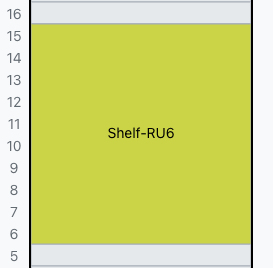
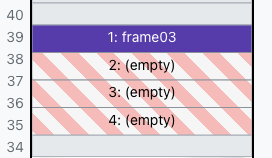
3
|
+
Version: 0.1.5
|
|
4
|
+
Summary: NetBox plugin for subdivided device bay rack elevation rendering
|
|
5
|
+
Author-email: Parag Mehta <pmehta@pmehta.com>
|
|
6
|
+
License-Expression: Apache-2.0
|
|
7
|
+
Project-URL: Homepage, https://pypi.org/project/netbox-render/
|
|
8
|
+
Project-URL: GitHub, https://github.com/paragm/netbox-render
|
|
9
|
+
Project-URL: Repository, https://github.com/paragm/netbox-render.git
|
|
10
|
+
Project-URL: Documentation, https://github.com/paragm/netbox-render/blob/main/docs/shelf-devices-guide.md
|
|
11
|
+
Project-URL: Changelog, https://github.com/paragm/netbox-render/blob/main/CHANGELOG.md
|
|
12
|
+
Project-URL: Issues, https://github.com/paragm/netbox-render/issues
|
|
13
|
+
Keywords: netbox-render,netbox,netbox-plugin,netbox plugin,netbox community plugin
|
|
14
|
+
Classifier: Development Status :: 5 - Production/Stable
|
|
15
|
+
Classifier: Framework :: Django
|
|
16
|
+
Classifier: Framework :: Django :: 5
|
|
17
|
+
Classifier: Intended Audience :: System Administrators
|
|
18
|
+
Classifier: Operating System :: OS Independent
|
|
19
|
+
Classifier: Programming Language :: Python :: 3
|
|
20
|
+
Classifier: Programming Language :: Python :: 3.12
|
|
21
|
+
Classifier: Programming Language :: Python :: 3.13
|
|
22
|
+
Classifier: Programming Language :: Python :: 3.14
|
|
23
|
+
Classifier: Topic :: System :: Networking
|
|
24
|
+
Requires-Python: >=3.12.0
|
|
25
|
+
Description-Content-Type: text/markdown
|
|
26
|
+
License-File: LICENSE
|
|
27
|
+
Provides-Extra: dev
|
|
28
|
+
Requires-Dist: pytest; extra == "dev"
|
|
29
|
+
Requires-Dist: ruff; extra == "dev"
|
|
30
|
+
Dynamic: license-file
|
|
31
|
+
|
|
32
|
+
<p align="center">
|
|
33
|
+
<img src="https://raw.githubusercontent.com/paragm/netbox-render/main/docs/images/icon.svg" alt="netbox-render" width="128" height="128">
|
|
34
|
+
</p>
|
|
35
|
+
|
|
36
|
+
# netbox-render
|
|
37
|
+
|
|
38
|
+
A NetBox plugin I wrote to fix a visibility gap in rack elevations: devices with device bays render as a single opaque block, hiding what's actually installed. This plugin subdivides that block into labeled, color-coded, clickable sections — one per bay.
|
|
39
|
+
|
|
40
|
+
## What it does
|
|
41
|
+
|
|
42
|
+
Out of the box, NetBox shows a device-bay device as one rectangle with an occupancy count like "3/4". To see what's installed, you have to click into the parent and check the Device Bays tab.
|
|
43
|
+
|
|
44
|
+
I patched `RackElevationSVG._draw_device` so each bay gets its own section showing:
|
|
45
|
+
|
|
46
|
+
- Bay index (1, 2, 3, ...) sorted by bay name
|
|
47
|
+
- Child device name, or "(empty)"
|
|
48
|
+
- Role color on the front face (rear renders grey, matching stock behavior)
|
|
49
|
+
- Clickable link to the child device page
|
|
50
|
+
|
|
51
|
+
Devices without bays are untouched.
|
|
52
|
+
|
|
53
|
+
### Before and after
|
|
54
|
+
|
|
55
|
+
| Without plugin | With plugin |
|
|
56
|
+
|:-:|:-:|
|
|
57
|
+
|  |  |
|
|
58
|
+
| Single opaque block | Subdivided with bay labels and role colors |
|
|
59
|
+
|
|
60
|
+
### Bay ordering
|
|
61
|
+
|
|
62
|
+
Bays sort alphabetically by name — there's no numeric position field in NetBox's device bay model. Name them "Slot 01", "Slot 02", etc. for predictable ordering.
|
|
63
|
+
|
|
64
|
+
## Compatibility
|
|
65
|
+
|
|
66
|
+
| NetBox | Plugin | Status |
|
|
67
|
+
|--------|--------|--------|
|
|
68
|
+
| 4.6.x | 0.1.5 | Tested |
|
|
69
|
+
|
|
70
|
+
Startup checks verify the patched method signature hasn't changed. If it has, the plugin raises a `RuntimeError` instead of loading.
|
|
71
|
+
|
|
72
|
+
## Installation
|
|
73
|
+
|
|
74
|
+
```bash
|
|
75
|
+
pip install netbox-render
|
|
76
|
+
```
|
|
77
|
+
|
|
78
|
+
Add to `configuration.py`:
|
|
79
|
+
|
|
80
|
+
```python
|
|
81
|
+
PLUGINS = ['netbox_render']
|
|
82
|
+
```
|
|
83
|
+
|
|
84
|
+
Restart NetBox:
|
|
85
|
+
|
|
86
|
+
```bash
|
|
87
|
+
sudo systemctl restart netbox netbox-rq
|
|
88
|
+
```
|
|
89
|
+
|
|
90
|
+
For development: `pip install -e .`
|
|
91
|
+
|
|
92
|
+
## Configuration
|
|
93
|
+
|
|
94
|
+
One option in `PLUGINS_CONFIG`:
|
|
95
|
+
|
|
96
|
+
```python
|
|
97
|
+
PLUGINS_CONFIG = {
|
|
98
|
+
'netbox_render': {
|
|
99
|
+
'enable_images': True, # default: False
|
|
100
|
+
},
|
|
101
|
+
}
|
|
102
|
+
```
|
|
103
|
+
|
|
104
|
+
When enabled, bay sections show the child device type's front/rear image with a text label overlay. Requires restart.
|
|
105
|
+
|
|
106
|
+
## Shelf device guide
|
|
107
|
+
|
|
108
|
+
See [Shelf-devices Guide](https://raw.githubusercontent.com/paragm/netbox-render/main/docs/shelf-devices-guide.md) for a walkthrough on modeling rack shelves using device bays and how this plugin renders them.
|
|
109
|
+
|
|
110
|
+
## Known limitations
|
|
111
|
+
|
|
112
|
+
- Bay ordering is name-based, not positional — no way around this without modifying NetBox's data model
|
|
113
|
+
- Images off by default
|
|
114
|
+
- Rear face always renders grey (matches stock NetBox)
|
|
115
|
+
- Both faces show the same bay breakdown
|
|
116
|
+
- No migrations, no DB changes — rendering only
|
|
117
|
+
- Monkeypatch approach: I patch an internal method, so test after every NetBox upgrade
|
|
118
|
+
|
|
119
|
+
## Support
|
|
120
|
+
|
|
121
|
+
- **Bugs / feature requests**: [GitHub Issues](https://github.com/paragm/netbox-render/issues)
|
|
122
|
+
- **Questions**: [GitHub Discussions](https://github.com/paragm/netbox-render/discussions)
|
|
123
|
+
- **Security**: [Security Advisories](https://github.com/paragm/netbox-render/security/advisories/new) (not public issues)
|
|
124
|
+
|
|
125
|
+
## License
|
|
126
|
+
|
|
127
|
+
Apache-2.0
|
|
@@ -0,0 +1,96 @@
|
|
|
1
|
+
<p align="center">
|
|
2
|
+
<img src="https://raw.githubusercontent.com/paragm/netbox-render/main/docs/images/icon.svg" alt="netbox-render" width="128" height="128">
|
|
3
|
+
</p>
|
|
4
|
+
|
|
5
|
+
# netbox-render
|
|
6
|
+
|
|
7
|
+
A NetBox plugin I wrote to fix a visibility gap in rack elevations: devices with device bays render as a single opaque block, hiding what's actually installed. This plugin subdivides that block into labeled, color-coded, clickable sections — one per bay.
|
|
8
|
+
|
|
9
|
+
## What it does
|
|
10
|
+
|
|
11
|
+
Out of the box, NetBox shows a device-bay device as one rectangle with an occupancy count like "3/4". To see what's installed, you have to click into the parent and check the Device Bays tab.
|
|
12
|
+
|
|
13
|
+
I patched `RackElevationSVG._draw_device` so each bay gets its own section showing:
|
|
14
|
+
|
|
15
|
+
- Bay index (1, 2, 3, ...) sorted by bay name
|
|
16
|
+
- Child device name, or "(empty)"
|
|
17
|
+
- Role color on the front face (rear renders grey, matching stock behavior)
|
|
18
|
+
- Clickable link to the child device page
|
|
19
|
+
|
|
20
|
+
Devices without bays are untouched.
|
|
21
|
+
|
|
22
|
+
### Before and after
|
|
23
|
+
|
|
24
|
+
| Without plugin | With plugin |
|
|
25
|
+
|:-:|:-:|
|
|
26
|
+
|  |  |
|
|
27
|
+
| Single opaque block | Subdivided with bay labels and role colors |
|
|
28
|
+
|
|
29
|
+
### Bay ordering
|
|
30
|
+
|
|
31
|
+
Bays sort alphabetically by name — there's no numeric position field in NetBox's device bay model. Name them "Slot 01", "Slot 02", etc. for predictable ordering.
|
|
32
|
+
|
|
33
|
+
## Compatibility
|
|
34
|
+
|
|
35
|
+
| NetBox | Plugin | Status |
|
|
36
|
+
|--------|--------|--------|
|
|
37
|
+
| 4.6.x | 0.1.5 | Tested |
|
|
38
|
+
|
|
39
|
+
Startup checks verify the patched method signature hasn't changed. If it has, the plugin raises a `RuntimeError` instead of loading.
|
|
40
|
+
|
|
41
|
+
## Installation
|
|
42
|
+
|
|
43
|
+
```bash
|
|
44
|
+
pip install netbox-render
|
|
45
|
+
```
|
|
46
|
+
|
|
47
|
+
Add to `configuration.py`:
|
|
48
|
+
|
|
49
|
+
```python
|
|
50
|
+
PLUGINS = ['netbox_render']
|
|
51
|
+
```
|
|
52
|
+
|
|
53
|
+
Restart NetBox:
|
|
54
|
+
|
|
55
|
+
```bash
|
|
56
|
+
sudo systemctl restart netbox netbox-rq
|
|
57
|
+
```
|
|
58
|
+
|
|
59
|
+
For development: `pip install -e .`
|
|
60
|
+
|
|
61
|
+
## Configuration
|
|
62
|
+
|
|
63
|
+
One option in `PLUGINS_CONFIG`:
|
|
64
|
+
|
|
65
|
+
```python
|
|
66
|
+
PLUGINS_CONFIG = {
|
|
67
|
+
'netbox_render': {
|
|
68
|
+
'enable_images': True, # default: False
|
|
69
|
+
},
|
|
70
|
+
}
|
|
71
|
+
```
|
|
72
|
+
|
|
73
|
+
When enabled, bay sections show the child device type's front/rear image with a text label overlay. Requires restart.
|
|
74
|
+
|
|
75
|
+
## Shelf device guide
|
|
76
|
+
|
|
77
|
+
See [Shelf-devices Guide](https://raw.githubusercontent.com/paragm/netbox-render/main/docs/shelf-devices-guide.md) for a walkthrough on modeling rack shelves using device bays and how this plugin renders them.
|
|
78
|
+
|
|
79
|
+
## Known limitations
|
|
80
|
+
|
|
81
|
+
- Bay ordering is name-based, not positional — no way around this without modifying NetBox's data model
|
|
82
|
+
- Images off by default
|
|
83
|
+
- Rear face always renders grey (matches stock NetBox)
|
|
84
|
+
- Both faces show the same bay breakdown
|
|
85
|
+
- No migrations, no DB changes — rendering only
|
|
86
|
+
- Monkeypatch approach: I patch an internal method, so test after every NetBox upgrade
|
|
87
|
+
|
|
88
|
+
## Support
|
|
89
|
+
|
|
90
|
+
- **Bugs / feature requests**: [GitHub Issues](https://github.com/paragm/netbox-render/issues)
|
|
91
|
+
- **Questions**: [GitHub Discussions](https://github.com/paragm/netbox-render/discussions)
|
|
92
|
+
- **Security**: [Security Advisories](https://github.com/paragm/netbox-render/security/advisories/new) (not public issues)
|
|
93
|
+
|
|
94
|
+
## License
|
|
95
|
+
|
|
96
|
+
Apache-2.0
|
|
@@ -0,0 +1 @@
|
|
|
1
|
+
__version__ = "0.1.5"
|
|
@@ -0,0 +1,127 @@
|
|
|
1
|
+
Metadata-Version: 2.4
|
|
2
|
+
Name: netbox-render
|
|
3
|
+
Version: 0.1.5
|
|
4
|
+
Summary: NetBox plugin for subdivided device bay rack elevation rendering
|
|
5
|
+
Author-email: Parag Mehta <pmehta@pmehta.com>
|
|
6
|
+
License-Expression: Apache-2.0
|
|
7
|
+
Project-URL: Homepage, https://pypi.org/project/netbox-render/
|
|
8
|
+
Project-URL: GitHub, https://github.com/paragm/netbox-render
|
|
9
|
+
Project-URL: Repository, https://github.com/paragm/netbox-render.git
|
|
10
|
+
Project-URL: Documentation, https://github.com/paragm/netbox-render/blob/main/docs/shelf-devices-guide.md
|
|
11
|
+
Project-URL: Changelog, https://github.com/paragm/netbox-render/blob/main/CHANGELOG.md
|
|
12
|
+
Project-URL: Issues, https://github.com/paragm/netbox-render/issues
|
|
13
|
+
Keywords: netbox-render,netbox,netbox-plugin,netbox plugin,netbox community plugin
|
|
14
|
+
Classifier: Development Status :: 5 - Production/Stable
|
|
15
|
+
Classifier: Framework :: Django
|
|
16
|
+
Classifier: Framework :: Django :: 5
|
|
17
|
+
Classifier: Intended Audience :: System Administrators
|
|
18
|
+
Classifier: Operating System :: OS Independent
|
|
19
|
+
Classifier: Programming Language :: Python :: 3
|
|
20
|
+
Classifier: Programming Language :: Python :: 3.12
|
|
21
|
+
Classifier: Programming Language :: Python :: 3.13
|
|
22
|
+
Classifier: Programming Language :: Python :: 3.14
|
|
23
|
+
Classifier: Topic :: System :: Networking
|
|
24
|
+
Requires-Python: >=3.12.0
|
|
25
|
+
Description-Content-Type: text/markdown
|
|
26
|
+
License-File: LICENSE
|
|
27
|
+
Provides-Extra: dev
|
|
28
|
+
Requires-Dist: pytest; extra == "dev"
|
|
29
|
+
Requires-Dist: ruff; extra == "dev"
|
|
30
|
+
Dynamic: license-file
|
|
31
|
+
|
|
32
|
+
<p align="center">
|
|
33
|
+
<img src="https://raw.githubusercontent.com/paragm/netbox-render/main/docs/images/icon.svg" alt="netbox-render" width="128" height="128">
|
|
34
|
+
</p>
|
|
35
|
+
|
|
36
|
+
# netbox-render
|
|
37
|
+
|
|
38
|
+
A NetBox plugin I wrote to fix a visibility gap in rack elevations: devices with device bays render as a single opaque block, hiding what's actually installed. This plugin subdivides that block into labeled, color-coded, clickable sections — one per bay.
|
|
39
|
+
|
|
40
|
+
## What it does
|
|
41
|
+
|
|
42
|
+
Out of the box, NetBox shows a device-bay device as one rectangle with an occupancy count like "3/4". To see what's installed, you have to click into the parent and check the Device Bays tab.
|
|
43
|
+
|
|
44
|
+
I patched `RackElevationSVG._draw_device` so each bay gets its own section showing:
|
|
45
|
+
|
|
46
|
+
- Bay index (1, 2, 3, ...) sorted by bay name
|
|
47
|
+
- Child device name, or "(empty)"
|
|
48
|
+
- Role color on the front face (rear renders grey, matching stock behavior)
|
|
49
|
+
- Clickable link to the child device page
|
|
50
|
+
|
|
51
|
+
Devices without bays are untouched.
|
|
52
|
+
|
|
53
|
+
### Before and after
|
|
54
|
+
|
|
55
|
+
| Without plugin | With plugin |
|
|
56
|
+
|:-:|:-:|
|
|
57
|
+
|  |  |
|
|
58
|
+
| Single opaque block | Subdivided with bay labels and role colors |
|
|
59
|
+
|
|
60
|
+
### Bay ordering
|
|
61
|
+
|
|
62
|
+
Bays sort alphabetically by name — there's no numeric position field in NetBox's device bay model. Name them "Slot 01", "Slot 02", etc. for predictable ordering.
|
|
63
|
+
|
|
64
|
+
## Compatibility
|
|
65
|
+
|
|
66
|
+
| NetBox | Plugin | Status |
|
|
67
|
+
|--------|--------|--------|
|
|
68
|
+
| 4.6.x | 0.1.5 | Tested |
|
|
69
|
+
|
|
70
|
+
Startup checks verify the patched method signature hasn't changed. If it has, the plugin raises a `RuntimeError` instead of loading.
|
|
71
|
+
|
|
72
|
+
## Installation
|
|
73
|
+
|
|
74
|
+
```bash
|
|
75
|
+
pip install netbox-render
|
|
76
|
+
```
|
|
77
|
+
|
|
78
|
+
Add to `configuration.py`:
|
|
79
|
+
|
|
80
|
+
```python
|
|
81
|
+
PLUGINS = ['netbox_render']
|
|
82
|
+
```
|
|
83
|
+
|
|
84
|
+
Restart NetBox:
|
|
85
|
+
|
|
86
|
+
```bash
|
|
87
|
+
sudo systemctl restart netbox netbox-rq
|
|
88
|
+
```
|
|
89
|
+
|
|
90
|
+
For development: `pip install -e .`
|
|
91
|
+
|
|
92
|
+
## Configuration
|
|
93
|
+
|
|
94
|
+
One option in `PLUGINS_CONFIG`:
|
|
95
|
+
|
|
96
|
+
```python
|
|
97
|
+
PLUGINS_CONFIG = {
|
|
98
|
+
'netbox_render': {
|
|
99
|
+
'enable_images': True, # default: False
|
|
100
|
+
},
|
|
101
|
+
}
|
|
102
|
+
```
|
|
103
|
+
|
|
104
|
+
When enabled, bay sections show the child device type's front/rear image with a text label overlay. Requires restart.
|
|
105
|
+
|
|
106
|
+
## Shelf device guide
|
|
107
|
+
|
|
108
|
+
See [Shelf-devices Guide](https://raw.githubusercontent.com/paragm/netbox-render/main/docs/shelf-devices-guide.md) for a walkthrough on modeling rack shelves using device bays and how this plugin renders them.
|
|
109
|
+
|
|
110
|
+
## Known limitations
|
|
111
|
+
|
|
112
|
+
- Bay ordering is name-based, not positional — no way around this without modifying NetBox's data model
|
|
113
|
+
- Images off by default
|
|
114
|
+
- Rear face always renders grey (matches stock NetBox)
|
|
115
|
+
- Both faces show the same bay breakdown
|
|
116
|
+
- No migrations, no DB changes — rendering only
|
|
117
|
+
- Monkeypatch approach: I patch an internal method, so test after every NetBox upgrade
|
|
118
|
+
|
|
119
|
+
## Support
|
|
120
|
+
|
|
121
|
+
- **Bugs / feature requests**: [GitHub Issues](https://github.com/paragm/netbox-render/issues)
|
|
122
|
+
- **Questions**: [GitHub Discussions](https://github.com/paragm/netbox-render/discussions)
|
|
123
|
+
- **Security**: [Security Advisories](https://github.com/paragm/netbox-render/security/advisories/new) (not public issues)
|
|
124
|
+
|
|
125
|
+
## License
|
|
126
|
+
|
|
127
|
+
Apache-2.0
|
|
@@ -6,6 +6,7 @@ build-backend = "setuptools.build_meta"
|
|
|
6
6
|
name = "netbox-render"
|
|
7
7
|
dynamic = ["version"]
|
|
8
8
|
description = "NetBox plugin for subdivided device bay rack elevation rendering"
|
|
9
|
+
keywords = ['netbox-render', 'netbox', 'netbox-plugin', 'netbox plugin', 'netbox community plugin']
|
|
9
10
|
readme = "README.md"
|
|
10
11
|
requires-python = ">=3.12.0"
|
|
11
12
|
license = "Apache-2.0"
|
|
@@ -13,15 +14,26 @@ authors = [
|
|
|
13
14
|
{name = "Parag Mehta", email = "pmehta@pmehta.com"},
|
|
14
15
|
]
|
|
15
16
|
classifiers = [
|
|
17
|
+
"Development Status :: 5 - Production/Stable",
|
|
16
18
|
"Framework :: Django",
|
|
19
|
+
"Framework :: Django :: 5",
|
|
20
|
+
"Intended Audience :: System Administrators",
|
|
21
|
+
"Operating System :: OS Independent",
|
|
17
22
|
"Programming Language :: Python :: 3",
|
|
18
23
|
"Programming Language :: Python :: 3.12",
|
|
19
24
|
"Programming Language :: Python :: 3.13",
|
|
20
25
|
"Programming Language :: Python :: 3.14",
|
|
26
|
+
"Topic :: System :: Networking",
|
|
21
27
|
]
|
|
22
28
|
|
|
29
|
+
[project.optional-dependencies]
|
|
30
|
+
dev = ["pytest", "ruff"]
|
|
31
|
+
|
|
23
32
|
[project.urls]
|
|
24
|
-
Homepage = "https://
|
|
33
|
+
Homepage = "https://pypi.org/project/netbox-render/"
|
|
34
|
+
GitHub = "https://github.com/paragm/netbox-render"
|
|
35
|
+
Repository = "https://github.com/paragm/netbox-render.git"
|
|
36
|
+
Documentation = "https://github.com/paragm/netbox-render/blob/main/docs/shelf-devices-guide.md"
|
|
25
37
|
Changelog = "https://github.com/paragm/netbox-render/blob/main/CHANGELOG.md"
|
|
26
38
|
Issues = "https://github.com/paragm/netbox-render/issues"
|
|
27
39
|
|
|
@@ -31,3 +43,10 @@ version = {attr = "netbox_render.version.__version__"}
|
|
|
31
43
|
[tool.setuptools.packages.find]
|
|
32
44
|
include = ["netbox_render*"]
|
|
33
45
|
exclude = ["tests*"]
|
|
46
|
+
|
|
47
|
+
[tool.ruff]
|
|
48
|
+
target-version = "py312"
|
|
49
|
+
line-length = 120
|
|
50
|
+
|
|
51
|
+
[tool.pytest.ini_options]
|
|
52
|
+
testpaths = ["tests"]
|
netbox_render-0.1.3/PKG-INFO
DELETED
|
@@ -1,138 +0,0 @@
|
|
|
1
|
-
Metadata-Version: 2.4
|
|
2
|
-
Name: netbox-render
|
|
3
|
-
Version: 0.1.3
|
|
4
|
-
Summary: NetBox plugin for subdivided device bay rack elevation rendering
|
|
5
|
-
Author-email: Parag Mehta <pmehta@pmehta.com>
|
|
6
|
-
License-Expression: Apache-2.0
|
|
7
|
-
Project-URL: Homepage, https://github.com/paragm/netbox-render
|
|
8
|
-
Project-URL: Changelog, https://github.com/paragm/netbox-render/blob/main/CHANGELOG.md
|
|
9
|
-
Project-URL: Issues, https://github.com/paragm/netbox-render/issues
|
|
10
|
-
Classifier: Framework :: Django
|
|
11
|
-
Classifier: Programming Language :: Python :: 3
|
|
12
|
-
Classifier: Programming Language :: Python :: 3.12
|
|
13
|
-
Classifier: Programming Language :: Python :: 3.13
|
|
14
|
-
Classifier: Programming Language :: Python :: 3.14
|
|
15
|
-
Requires-Python: >=3.12.0
|
|
16
|
-
Description-Content-Type: text/markdown
|
|
17
|
-
License-File: LICENSE
|
|
18
|
-
Dynamic: license-file
|
|
19
|
-
|
|
20
|
-
# netbox-render
|
|
21
|
-
|
|
22
|
-
A NetBox plugin that subdivides device bay rectangles in rack elevation SVGs to show per-bay labels, role colors, and clickable links to child devices.
|
|
23
|
-
|
|
24
|
-
## What it does
|
|
25
|
-
|
|
26
|
-
NetBox's rack elevation view renders devices with device bays as a single opaque rectangle, showing only an occupancy count (e.g. "3/4"). Child devices installed in bays are invisible — you must click into the parent device and check its Device Bays tab to see what's installed.
|
|
27
|
-
|
|
28
|
-
This plugin patches the elevation renderer so that any device with device bays has its rectangle subdivided into one section per bay. Each section shows:
|
|
29
|
-
|
|
30
|
-
- A **sequential index number** (1, 2, 3, ...) based on bay name sort order
|
|
31
|
-
- The **child device name** installed in that bay, or **(empty)** if no device is installed
|
|
32
|
-
- **Role-based coloring** matching the child device's assigned role (front face only; rear face renders grey, consistent with stock NetBox behavior)
|
|
33
|
-
- A **clickable link** to the child device's detail page (empty bays are not clickable)
|
|
34
|
-
|
|
35
|
-
Devices without device bays are completely unaffected — their rendering is identical to stock NetBox.
|
|
36
|
-
|
|
37
|
-
### Bay ordering caveat
|
|
38
|
-
|
|
39
|
-
Bay sections are numbered sequentially (1, 2, 3, ...) in the order the device's bays sort by name. NetBox device bays have no separate numeric position field, so this ordering reflects alphabetical/natural sort of bay names, **not** a silkscreen-printed slot number on the physical hardware. For example, if bays are named "Bay A", "Bay B", "Bay C", they will be numbered 1, 2, 3 in that order.
|
|
40
|
-
|
|
41
|
-
## Compatibility
|
|
42
|
-
|
|
43
|
-
| NetBox Version | Plugin Version | Status |
|
|
44
|
-
|---------------|---------------|--------|
|
|
45
|
-
| 4.6.x | 0.1.0 | Tested |
|
|
46
|
-
|
|
47
|
-
The plugin declares `min_version = '4.6.0'` and `max_version = '4.6.99'` in its configuration. NetBox will refuse to load the plugin if the version falls outside this range, displaying a clear error at startup.
|
|
48
|
-
|
|
49
|
-
Additionally, the plugin verifies the internal method signature it patches (`RackElevationSVG._draw_device`) at startup. If the signature doesn't match what's expected, the plugin raises a `RuntimeError` with a descriptive message rather than silently producing incorrect renderings. This guards against internal API changes within the supported version range.
|
|
50
|
-
|
|
51
|
-
## Installation
|
|
52
|
-
|
|
53
|
-
1. Install the plugin into your NetBox virtual environment:
|
|
54
|
-
|
|
55
|
-
```bash
|
|
56
|
-
pip install netbox-render
|
|
57
|
-
```
|
|
58
|
-
|
|
59
|
-
Or for development:
|
|
60
|
-
|
|
61
|
-
```bash
|
|
62
|
-
cd /path/to/netbox-render
|
|
63
|
-
pip install -e .
|
|
64
|
-
```
|
|
65
|
-
|
|
66
|
-
2. Add the plugin to your NetBox configuration (`configuration.py`):
|
|
67
|
-
|
|
68
|
-
```python
|
|
69
|
-
PLUGINS = [
|
|
70
|
-
'netbox_render',
|
|
71
|
-
]
|
|
72
|
-
```
|
|
73
|
-
|
|
74
|
-
3. Restart NetBox:
|
|
75
|
-
|
|
76
|
-
```bash
|
|
77
|
-
sudo systemctl restart netbox netbox-rq
|
|
78
|
-
```
|
|
79
|
-
|
|
80
|
-
A restart is required for the plugin to take effect. This is standard behavior for all NetBox plugins and is not a bug.
|
|
81
|
-
|
|
82
|
-
## Configuration
|
|
83
|
-
|
|
84
|
-
The plugin supports one configuration option, set through NetBox's standard `PLUGINS_CONFIG` in `configuration.py`:
|
|
85
|
-
|
|
86
|
-
### `enable_images`
|
|
87
|
-
|
|
88
|
-
Controls whether device type images are rendered inside each bay section.
|
|
89
|
-
|
|
90
|
-
| Setting | Default | Behavior |
|
|
91
|
-
|---------|---------|----------|
|
|
92
|
-
| `enable_images` | `False` | Name-only text labels in each bay section |
|
|
93
|
-
|
|
94
|
-
To enable image rendering:
|
|
95
|
-
|
|
96
|
-
```python
|
|
97
|
-
PLUGINS_CONFIG = {
|
|
98
|
-
'netbox_render': {
|
|
99
|
-
'enable_images': True,
|
|
100
|
-
},
|
|
101
|
-
}
|
|
102
|
-
```
|
|
103
|
-
|
|
104
|
-
When enabled, each bay section with an installed child device will display the child device type's front or rear image (matching the elevation face being viewed), with a text label overlay for readability.
|
|
105
|
-
|
|
106
|
-
Changing this setting requires a NetBox restart to take effect.
|
|
107
|
-
|
|
108
|
-
## Shelf device modeling guide
|
|
109
|
-
|
|
110
|
-
If you are new to representing shelf-mounted devices in NetBox, see [docs/shelf-devices-guide.md](docs/shelf-devices-guide.md) for a step-by-step walkthrough covering how to create shelf device types, child device types, and how this plugin improves their rack elevation rendering.
|
|
111
|
-
|
|
112
|
-
## Known limitations
|
|
113
|
-
|
|
114
|
-
- **Bay ordering is name-based**: Section numbering reflects alphabetical/natural sort of bay names, not physical slot positions. There is no way to override this without adding fields to the NetBox data model, which is explicitly out of scope.
|
|
115
|
-
- **No images by default**: Device type images in bay sections are disabled by default and must be explicitly enabled via configuration.
|
|
116
|
-
- **Rear face coloring**: Bay sections on the rear face render as grey (the stock "blocked" pattern), consistent with how NetBox renders rear-facing devices. Only the front (mounted) face shows role-based colors.
|
|
117
|
-
- **Front/rear parity**: Both front and rear elevation views show the same subdivided bay breakdown. There is no face-specific filtering of bays.
|
|
118
|
-
- **No data model changes**: This plugin makes no migrations and adds no database fields. It is a rendering-only modification.
|
|
119
|
-
- **Monkeypatch approach**: Because NetBox provides no plugin hook for SVG elevation rendering, this plugin patches an internal method at runtime. The signature check at startup mitigates the risk of silent breakage, but NetBox version upgrades should always be tested with this plugin before deploying to production.
|
|
120
|
-
|
|
121
|
-
## Validation checklist
|
|
122
|
-
|
|
123
|
-
After installing the plugin on a live NetBox instance, verify the following:
|
|
124
|
-
|
|
125
|
-
- [ ] **No-bay regression**: A device with no device bays renders exactly as it did before the plugin was installed. This is the most important check — compare the elevation visually with and without the plugin.
|
|
126
|
-
- [ ] **All-empty bays**: A device with device bays defined but no child devices installed renders subdivided sections, all showing "(empty)".
|
|
127
|
-
- [ ] **Partially filled bays**: A device with some bays filled and some empty renders a mix of named child devices and "(empty)" sections, in the correct relative order (by bay name sort).
|
|
128
|
-
- [ ] **Click navigation**: Clicking a subdivided section with a child device installed navigates to that child device's detail page.
|
|
129
|
-
- [ ] **Empty bay click**: Clicking an empty bay section does not navigate anywhere (no link).
|
|
130
|
-
- [ ] **Role colors (front)**: On the front face, each bay section with a child device is colored according to the child device's role color.
|
|
131
|
-
- [ ] **Grey rear face**: On the rear face, bay sections render as grey (blocked pattern), matching stock behavior for rear-facing devices.
|
|
132
|
-
- [ ] **Default config (no images)**: With `enable_images` at its default (`False`), bay sections show name-only text labels.
|
|
133
|
-
- [ ] **Image config override**: After setting `enable_images: True` in `PLUGINS_CONFIG` and restarting, bay sections display device type images alongside labels.
|
|
134
|
-
- [ ] **Version check**: The plugin starts cleanly on a compatible NetBox version (4.6.x). If tested against an incompatible version, it produces a clear startup error rather than loading silently.
|
|
135
|
-
|
|
136
|
-
## License
|
|
137
|
-
|
|
138
|
-
Apache-2.0
|
netbox_render-0.1.3/README.md
DELETED
|
@@ -1,119 +0,0 @@
|
|
|
1
|
-
# netbox-render
|
|
2
|
-
|
|
3
|
-
A NetBox plugin that subdivides device bay rectangles in rack elevation SVGs to show per-bay labels, role colors, and clickable links to child devices.
|
|
4
|
-
|
|
5
|
-
## What it does
|
|
6
|
-
|
|
7
|
-
NetBox's rack elevation view renders devices with device bays as a single opaque rectangle, showing only an occupancy count (e.g. "3/4"). Child devices installed in bays are invisible — you must click into the parent device and check its Device Bays tab to see what's installed.
|
|
8
|
-
|
|
9
|
-
This plugin patches the elevation renderer so that any device with device bays has its rectangle subdivided into one section per bay. Each section shows:
|
|
10
|
-
|
|
11
|
-
- A **sequential index number** (1, 2, 3, ...) based on bay name sort order
|
|
12
|
-
- The **child device name** installed in that bay, or **(empty)** if no device is installed
|
|
13
|
-
- **Role-based coloring** matching the child device's assigned role (front face only; rear face renders grey, consistent with stock NetBox behavior)
|
|
14
|
-
- A **clickable link** to the child device's detail page (empty bays are not clickable)
|
|
15
|
-
|
|
16
|
-
Devices without device bays are completely unaffected — their rendering is identical to stock NetBox.
|
|
17
|
-
|
|
18
|
-
### Bay ordering caveat
|
|
19
|
-
|
|
20
|
-
Bay sections are numbered sequentially (1, 2, 3, ...) in the order the device's bays sort by name. NetBox device bays have no separate numeric position field, so this ordering reflects alphabetical/natural sort of bay names, **not** a silkscreen-printed slot number on the physical hardware. For example, if bays are named "Bay A", "Bay B", "Bay C", they will be numbered 1, 2, 3 in that order.
|
|
21
|
-
|
|
22
|
-
## Compatibility
|
|
23
|
-
|
|
24
|
-
| NetBox Version | Plugin Version | Status |
|
|
25
|
-
|---------------|---------------|--------|
|
|
26
|
-
| 4.6.x | 0.1.0 | Tested |
|
|
27
|
-
|
|
28
|
-
The plugin declares `min_version = '4.6.0'` and `max_version = '4.6.99'` in its configuration. NetBox will refuse to load the plugin if the version falls outside this range, displaying a clear error at startup.
|
|
29
|
-
|
|
30
|
-
Additionally, the plugin verifies the internal method signature it patches (`RackElevationSVG._draw_device`) at startup. If the signature doesn't match what's expected, the plugin raises a `RuntimeError` with a descriptive message rather than silently producing incorrect renderings. This guards against internal API changes within the supported version range.
|
|
31
|
-
|
|
32
|
-
## Installation
|
|
33
|
-
|
|
34
|
-
1. Install the plugin into your NetBox virtual environment:
|
|
35
|
-
|
|
36
|
-
```bash
|
|
37
|
-
pip install netbox-render
|
|
38
|
-
```
|
|
39
|
-
|
|
40
|
-
Or for development:
|
|
41
|
-
|
|
42
|
-
```bash
|
|
43
|
-
cd /path/to/netbox-render
|
|
44
|
-
pip install -e .
|
|
45
|
-
```
|
|
46
|
-
|
|
47
|
-
2. Add the plugin to your NetBox configuration (`configuration.py`):
|
|
48
|
-
|
|
49
|
-
```python
|
|
50
|
-
PLUGINS = [
|
|
51
|
-
'netbox_render',
|
|
52
|
-
]
|
|
53
|
-
```
|
|
54
|
-
|
|
55
|
-
3. Restart NetBox:
|
|
56
|
-
|
|
57
|
-
```bash
|
|
58
|
-
sudo systemctl restart netbox netbox-rq
|
|
59
|
-
```
|
|
60
|
-
|
|
61
|
-
A restart is required for the plugin to take effect. This is standard behavior for all NetBox plugins and is not a bug.
|
|
62
|
-
|
|
63
|
-
## Configuration
|
|
64
|
-
|
|
65
|
-
The plugin supports one configuration option, set through NetBox's standard `PLUGINS_CONFIG` in `configuration.py`:
|
|
66
|
-
|
|
67
|
-
### `enable_images`
|
|
68
|
-
|
|
69
|
-
Controls whether device type images are rendered inside each bay section.
|
|
70
|
-
|
|
71
|
-
| Setting | Default | Behavior |
|
|
72
|
-
|---------|---------|----------|
|
|
73
|
-
| `enable_images` | `False` | Name-only text labels in each bay section |
|
|
74
|
-
|
|
75
|
-
To enable image rendering:
|
|
76
|
-
|
|
77
|
-
```python
|
|
78
|
-
PLUGINS_CONFIG = {
|
|
79
|
-
'netbox_render': {
|
|
80
|
-
'enable_images': True,
|
|
81
|
-
},
|
|
82
|
-
}
|
|
83
|
-
```
|
|
84
|
-
|
|
85
|
-
When enabled, each bay section with an installed child device will display the child device type's front or rear image (matching the elevation face being viewed), with a text label overlay for readability.
|
|
86
|
-
|
|
87
|
-
Changing this setting requires a NetBox restart to take effect.
|
|
88
|
-
|
|
89
|
-
## Shelf device modeling guide
|
|
90
|
-
|
|
91
|
-
If you are new to representing shelf-mounted devices in NetBox, see [docs/shelf-devices-guide.md](docs/shelf-devices-guide.md) for a step-by-step walkthrough covering how to create shelf device types, child device types, and how this plugin improves their rack elevation rendering.
|
|
92
|
-
|
|
93
|
-
## Known limitations
|
|
94
|
-
|
|
95
|
-
- **Bay ordering is name-based**: Section numbering reflects alphabetical/natural sort of bay names, not physical slot positions. There is no way to override this without adding fields to the NetBox data model, which is explicitly out of scope.
|
|
96
|
-
- **No images by default**: Device type images in bay sections are disabled by default and must be explicitly enabled via configuration.
|
|
97
|
-
- **Rear face coloring**: Bay sections on the rear face render as grey (the stock "blocked" pattern), consistent with how NetBox renders rear-facing devices. Only the front (mounted) face shows role-based colors.
|
|
98
|
-
- **Front/rear parity**: Both front and rear elevation views show the same subdivided bay breakdown. There is no face-specific filtering of bays.
|
|
99
|
-
- **No data model changes**: This plugin makes no migrations and adds no database fields. It is a rendering-only modification.
|
|
100
|
-
- **Monkeypatch approach**: Because NetBox provides no plugin hook for SVG elevation rendering, this plugin patches an internal method at runtime. The signature check at startup mitigates the risk of silent breakage, but NetBox version upgrades should always be tested with this plugin before deploying to production.
|
|
101
|
-
|
|
102
|
-
## Validation checklist
|
|
103
|
-
|
|
104
|
-
After installing the plugin on a live NetBox instance, verify the following:
|
|
105
|
-
|
|
106
|
-
- [ ] **No-bay regression**: A device with no device bays renders exactly as it did before the plugin was installed. This is the most important check — compare the elevation visually with and without the plugin.
|
|
107
|
-
- [ ] **All-empty bays**: A device with device bays defined but no child devices installed renders subdivided sections, all showing "(empty)".
|
|
108
|
-
- [ ] **Partially filled bays**: A device with some bays filled and some empty renders a mix of named child devices and "(empty)" sections, in the correct relative order (by bay name sort).
|
|
109
|
-
- [ ] **Click navigation**: Clicking a subdivided section with a child device installed navigates to that child device's detail page.
|
|
110
|
-
- [ ] **Empty bay click**: Clicking an empty bay section does not navigate anywhere (no link).
|
|
111
|
-
- [ ] **Role colors (front)**: On the front face, each bay section with a child device is colored according to the child device's role color.
|
|
112
|
-
- [ ] **Grey rear face**: On the rear face, bay sections render as grey (blocked pattern), matching stock behavior for rear-facing devices.
|
|
113
|
-
- [ ] **Default config (no images)**: With `enable_images` at its default (`False`), bay sections show name-only text labels.
|
|
114
|
-
- [ ] **Image config override**: After setting `enable_images: True` in `PLUGINS_CONFIG` and restarting, bay sections display device type images alongside labels.
|
|
115
|
-
- [ ] **Version check**: The plugin starts cleanly on a compatible NetBox version (4.6.x). If tested against an incompatible version, it produces a clear startup error rather than loading silently.
|
|
116
|
-
|
|
117
|
-
## License
|
|
118
|
-
|
|
119
|
-
Apache-2.0
|
|
@@ -1 +0,0 @@
|
|
|
1
|
-
__version__ = "0.1.3"
|
|
@@ -1,138 +0,0 @@
|
|
|
1
|
-
Metadata-Version: 2.4
|
|
2
|
-
Name: netbox-render
|
|
3
|
-
Version: 0.1.3
|
|
4
|
-
Summary: NetBox plugin for subdivided device bay rack elevation rendering
|
|
5
|
-
Author-email: Parag Mehta <pmehta@pmehta.com>
|
|
6
|
-
License-Expression: Apache-2.0
|
|
7
|
-
Project-URL: Homepage, https://github.com/paragm/netbox-render
|
|
8
|
-
Project-URL: Changelog, https://github.com/paragm/netbox-render/blob/main/CHANGELOG.md
|
|
9
|
-
Project-URL: Issues, https://github.com/paragm/netbox-render/issues
|
|
10
|
-
Classifier: Framework :: Django
|
|
11
|
-
Classifier: Programming Language :: Python :: 3
|
|
12
|
-
Classifier: Programming Language :: Python :: 3.12
|
|
13
|
-
Classifier: Programming Language :: Python :: 3.13
|
|
14
|
-
Classifier: Programming Language :: Python :: 3.14
|
|
15
|
-
Requires-Python: >=3.12.0
|
|
16
|
-
Description-Content-Type: text/markdown
|
|
17
|
-
License-File: LICENSE
|
|
18
|
-
Dynamic: license-file
|
|
19
|
-
|
|
20
|
-
# netbox-render
|
|
21
|
-
|
|
22
|
-
A NetBox plugin that subdivides device bay rectangles in rack elevation SVGs to show per-bay labels, role colors, and clickable links to child devices.
|
|
23
|
-
|
|
24
|
-
## What it does
|
|
25
|
-
|
|
26
|
-
NetBox's rack elevation view renders devices with device bays as a single opaque rectangle, showing only an occupancy count (e.g. "3/4"). Child devices installed in bays are invisible — you must click into the parent device and check its Device Bays tab to see what's installed.
|
|
27
|
-
|
|
28
|
-
This plugin patches the elevation renderer so that any device with device bays has its rectangle subdivided into one section per bay. Each section shows:
|
|
29
|
-
|
|
30
|
-
- A **sequential index number** (1, 2, 3, ...) based on bay name sort order
|
|
31
|
-
- The **child device name** installed in that bay, or **(empty)** if no device is installed
|
|
32
|
-
- **Role-based coloring** matching the child device's assigned role (front face only; rear face renders grey, consistent with stock NetBox behavior)
|
|
33
|
-
- A **clickable link** to the child device's detail page (empty bays are not clickable)
|
|
34
|
-
|
|
35
|
-
Devices without device bays are completely unaffected — their rendering is identical to stock NetBox.
|
|
36
|
-
|
|
37
|
-
### Bay ordering caveat
|
|
38
|
-
|
|
39
|
-
Bay sections are numbered sequentially (1, 2, 3, ...) in the order the device's bays sort by name. NetBox device bays have no separate numeric position field, so this ordering reflects alphabetical/natural sort of bay names, **not** a silkscreen-printed slot number on the physical hardware. For example, if bays are named "Bay A", "Bay B", "Bay C", they will be numbered 1, 2, 3 in that order.
|
|
40
|
-
|
|
41
|
-
## Compatibility
|
|
42
|
-
|
|
43
|
-
| NetBox Version | Plugin Version | Status |
|
|
44
|
-
|---------------|---------------|--------|
|
|
45
|
-
| 4.6.x | 0.1.0 | Tested |
|
|
46
|
-
|
|
47
|
-
The plugin declares `min_version = '4.6.0'` and `max_version = '4.6.99'` in its configuration. NetBox will refuse to load the plugin if the version falls outside this range, displaying a clear error at startup.
|
|
48
|
-
|
|
49
|
-
Additionally, the plugin verifies the internal method signature it patches (`RackElevationSVG._draw_device`) at startup. If the signature doesn't match what's expected, the plugin raises a `RuntimeError` with a descriptive message rather than silently producing incorrect renderings. This guards against internal API changes within the supported version range.
|
|
50
|
-
|
|
51
|
-
## Installation
|
|
52
|
-
|
|
53
|
-
1. Install the plugin into your NetBox virtual environment:
|
|
54
|
-
|
|
55
|
-
```bash
|
|
56
|
-
pip install netbox-render
|
|
57
|
-
```
|
|
58
|
-
|
|
59
|
-
Or for development:
|
|
60
|
-
|
|
61
|
-
```bash
|
|
62
|
-
cd /path/to/netbox-render
|
|
63
|
-
pip install -e .
|
|
64
|
-
```
|
|
65
|
-
|
|
66
|
-
2. Add the plugin to your NetBox configuration (`configuration.py`):
|
|
67
|
-
|
|
68
|
-
```python
|
|
69
|
-
PLUGINS = [
|
|
70
|
-
'netbox_render',
|
|
71
|
-
]
|
|
72
|
-
```
|
|
73
|
-
|
|
74
|
-
3. Restart NetBox:
|
|
75
|
-
|
|
76
|
-
```bash
|
|
77
|
-
sudo systemctl restart netbox netbox-rq
|
|
78
|
-
```
|
|
79
|
-
|
|
80
|
-
A restart is required for the plugin to take effect. This is standard behavior for all NetBox plugins and is not a bug.
|
|
81
|
-
|
|
82
|
-
## Configuration
|
|
83
|
-
|
|
84
|
-
The plugin supports one configuration option, set through NetBox's standard `PLUGINS_CONFIG` in `configuration.py`:
|
|
85
|
-
|
|
86
|
-
### `enable_images`
|
|
87
|
-
|
|
88
|
-
Controls whether device type images are rendered inside each bay section.
|
|
89
|
-
|
|
90
|
-
| Setting | Default | Behavior |
|
|
91
|
-
|---------|---------|----------|
|
|
92
|
-
| `enable_images` | `False` | Name-only text labels in each bay section |
|
|
93
|
-
|
|
94
|
-
To enable image rendering:
|
|
95
|
-
|
|
96
|
-
```python
|
|
97
|
-
PLUGINS_CONFIG = {
|
|
98
|
-
'netbox_render': {
|
|
99
|
-
'enable_images': True,
|
|
100
|
-
},
|
|
101
|
-
}
|
|
102
|
-
```
|
|
103
|
-
|
|
104
|
-
When enabled, each bay section with an installed child device will display the child device type's front or rear image (matching the elevation face being viewed), with a text label overlay for readability.
|
|
105
|
-
|
|
106
|
-
Changing this setting requires a NetBox restart to take effect.
|
|
107
|
-
|
|
108
|
-
## Shelf device modeling guide
|
|
109
|
-
|
|
110
|
-
If you are new to representing shelf-mounted devices in NetBox, see [docs/shelf-devices-guide.md](docs/shelf-devices-guide.md) for a step-by-step walkthrough covering how to create shelf device types, child device types, and how this plugin improves their rack elevation rendering.
|
|
111
|
-
|
|
112
|
-
## Known limitations
|
|
113
|
-
|
|
114
|
-
- **Bay ordering is name-based**: Section numbering reflects alphabetical/natural sort of bay names, not physical slot positions. There is no way to override this without adding fields to the NetBox data model, which is explicitly out of scope.
|
|
115
|
-
- **No images by default**: Device type images in bay sections are disabled by default and must be explicitly enabled via configuration.
|
|
116
|
-
- **Rear face coloring**: Bay sections on the rear face render as grey (the stock "blocked" pattern), consistent with how NetBox renders rear-facing devices. Only the front (mounted) face shows role-based colors.
|
|
117
|
-
- **Front/rear parity**: Both front and rear elevation views show the same subdivided bay breakdown. There is no face-specific filtering of bays.
|
|
118
|
-
- **No data model changes**: This plugin makes no migrations and adds no database fields. It is a rendering-only modification.
|
|
119
|
-
- **Monkeypatch approach**: Because NetBox provides no plugin hook for SVG elevation rendering, this plugin patches an internal method at runtime. The signature check at startup mitigates the risk of silent breakage, but NetBox version upgrades should always be tested with this plugin before deploying to production.
|
|
120
|
-
|
|
121
|
-
## Validation checklist
|
|
122
|
-
|
|
123
|
-
After installing the plugin on a live NetBox instance, verify the following:
|
|
124
|
-
|
|
125
|
-
- [ ] **No-bay regression**: A device with no device bays renders exactly as it did before the plugin was installed. This is the most important check — compare the elevation visually with and without the plugin.
|
|
126
|
-
- [ ] **All-empty bays**: A device with device bays defined but no child devices installed renders subdivided sections, all showing "(empty)".
|
|
127
|
-
- [ ] **Partially filled bays**: A device with some bays filled and some empty renders a mix of named child devices and "(empty)" sections, in the correct relative order (by bay name sort).
|
|
128
|
-
- [ ] **Click navigation**: Clicking a subdivided section with a child device installed navigates to that child device's detail page.
|
|
129
|
-
- [ ] **Empty bay click**: Clicking an empty bay section does not navigate anywhere (no link).
|
|
130
|
-
- [ ] **Role colors (front)**: On the front face, each bay section with a child device is colored according to the child device's role color.
|
|
131
|
-
- [ ] **Grey rear face**: On the rear face, bay sections render as grey (blocked pattern), matching stock behavior for rear-facing devices.
|
|
132
|
-
- [ ] **Default config (no images)**: With `enable_images` at its default (`False`), bay sections show name-only text labels.
|
|
133
|
-
- [ ] **Image config override**: After setting `enable_images: True` in `PLUGINS_CONFIG` and restarting, bay sections display device type images alongside labels.
|
|
134
|
-
- [ ] **Version check**: The plugin starts cleanly on a compatible NetBox version (4.6.x). If tested against an incompatible version, it produces a clear startup error rather than loading silently.
|
|
135
|
-
|
|
136
|
-
## License
|
|
137
|
-
|
|
138
|
-
Apache-2.0
|
|
File without changes
|
|
File without changes
|
|
File without changes
|
|
File without changes
|
|
File without changes
|
|
File without changes
|
|
File without changes
|
|
File without changes
|