netbox-custom-objects-tab 1.0.0__tar.gz
This diff represents the content of publicly available package versions that have been released to one of the supported registries. The information contained in this diff is provided for informational purposes only and reflects changes between package versions as they appear in their respective public registries.
- netbox_custom_objects_tab-1.0.0/LICENSE +182 -0
- netbox_custom_objects_tab-1.0.0/PKG-INFO +203 -0
- netbox_custom_objects_tab-1.0.0/README.md +178 -0
- netbox_custom_objects_tab-1.0.0/netbox_custom_objects_tab/__init__.py +36 -0
- netbox_custom_objects_tab-1.0.0/netbox_custom_objects_tab/urls.py +4 -0
- netbox_custom_objects_tab-1.0.0/netbox_custom_objects_tab/views.py +372 -0
- netbox_custom_objects_tab-1.0.0/netbox_custom_objects_tab.egg-info/PKG-INFO +203 -0
- netbox_custom_objects_tab-1.0.0/netbox_custom_objects_tab.egg-info/SOURCES.txt +12 -0
- netbox_custom_objects_tab-1.0.0/netbox_custom_objects_tab.egg-info/dependency_links.txt +1 -0
- netbox_custom_objects_tab-1.0.0/netbox_custom_objects_tab.egg-info/requires.txt +6 -0
- netbox_custom_objects_tab-1.0.0/netbox_custom_objects_tab.egg-info/top_level.txt +1 -0
- netbox_custom_objects_tab-1.0.0/pyproject.toml +40 -0
- netbox_custom_objects_tab-1.0.0/setup.cfg +4 -0
- netbox_custom_objects_tab-1.0.0/tests/test_register_tabs.py +281 -0
|
@@ -0,0 +1,182 @@
|
|
|
1
|
+
Apache License
|
|
2
|
+
Version 2.0, January 2004
|
|
3
|
+
http://www.apache.org/licenses/
|
|
4
|
+
|
|
5
|
+
TERMS AND CONDITIONS FOR USE, REPRODUCTION, AND DISTRIBUTION
|
|
6
|
+
|
|
7
|
+
1. Definitions.
|
|
8
|
+
|
|
9
|
+
"License" shall mean the terms and conditions for use, reproduction,
|
|
10
|
+
and distribution as defined by Sections 1 through 9 of this document.
|
|
11
|
+
|
|
12
|
+
"Licensor" shall mean the copyright owner or entity authorized by
|
|
13
|
+
the copyright owner that is granting the License.
|
|
14
|
+
|
|
15
|
+
"Legal Entity" shall mean the union of the acting entity and all
|
|
16
|
+
other entities that control, are controlled by, or are under common
|
|
17
|
+
control with that entity. For the purposes of this definition,
|
|
18
|
+
"control" means (i) the power, direct or indirect, to cause the
|
|
19
|
+
direction or management of such entity, whether by contract or
|
|
20
|
+
otherwise, or (ii) ownership of fifty percent (50%) or more of the
|
|
21
|
+
outstanding shares, or (iii) beneficial ownership of such entity.
|
|
22
|
+
|
|
23
|
+
"You" (or "Your") shall mean an individual or Legal Entity
|
|
24
|
+
exercising permissions granted by this License.
|
|
25
|
+
|
|
26
|
+
"Source" form shall mean the preferred form for making modifications,
|
|
27
|
+
including but not limited to software source code, documentation
|
|
28
|
+
source, and configuration files.
|
|
29
|
+
|
|
30
|
+
"Object" form shall mean any form resulting from mechanical
|
|
31
|
+
transformation or translation of a Source form, including but
|
|
32
|
+
not limited to compiled object code, generated documentation,
|
|
33
|
+
and conversions to other media types.
|
|
34
|
+
|
|
35
|
+
"Work" shall mean the work of authorship made available under
|
|
36
|
+
the License, as indicated by a copyright notice that is included in
|
|
37
|
+
or attached to the work (an example is provided in the Appendix below).
|
|
38
|
+
|
|
39
|
+
"Derivative Works" shall mean any work, whether in Source or Object
|
|
40
|
+
form, that is based on (or derived from) the Work and for which the
|
|
41
|
+
editorial revisions, annotations, elaborations, or other modifications
|
|
42
|
+
represent, as a whole, an original work of authorship. For the purposes
|
|
43
|
+
of this License, Derivative Works shall not include works that remain
|
|
44
|
+
separable from, or merely link (or bind by name) to the interfaces of,
|
|
45
|
+
the Work and Derivative Works thereof.
|
|
46
|
+
|
|
47
|
+
"Contribution" shall mean, as submitted to the Licensor for inclusion
|
|
48
|
+
in the Work by the copyright owner or by an individual or Legal Entity
|
|
49
|
+
authorized to submit on behalf of the copyright owner. For the purposes
|
|
50
|
+
of this definition, "submitted" means any form of electronic, verbal,
|
|
51
|
+
or written communication sent to the Licensor or its representatives,
|
|
52
|
+
including but not limited to communication on electronic mailing lists,
|
|
53
|
+
source code control systems, and issue tracking systems that are managed
|
|
54
|
+
by, or on behalf of, the Licensor for the purpose of discussing and
|
|
55
|
+
improving the Work, but excluding communication that is conspicuously
|
|
56
|
+
marked or designated in writing by the copyright owner as "Not a
|
|
57
|
+
Contribution."
|
|
58
|
+
|
|
59
|
+
"Contributor" shall mean Licensor and any Legal Entity on behalf of
|
|
60
|
+
whom a Contribution has been received by the Licensor and included
|
|
61
|
+
within the Work.
|
|
62
|
+
|
|
63
|
+
2. Grant of Copyright License. Subject to the terms and conditions of
|
|
64
|
+
this License, each Contributor hereby grants to You a perpetual,
|
|
65
|
+
worldwide, non-exclusive, no-charge, royalty-free, irrevocable
|
|
66
|
+
copyright license to reproduce, prepare Derivative Works of,
|
|
67
|
+
publicly display, publicly perform, sublicense, and distribute the
|
|
68
|
+
Work and such Derivative Works in Source or Object form.
|
|
69
|
+
|
|
70
|
+
3. Grant of Patent License. Subject to the terms and conditions of
|
|
71
|
+
this License, each Contributor hereby grants to You a perpetual,
|
|
72
|
+
worldwide, non-exclusive, no-charge, royalty-free, irrevocable
|
|
73
|
+
(except as stated in this section) patent license to make, have made,
|
|
74
|
+
use, offer to sell, sell, import, and otherwise transfer the Work,
|
|
75
|
+
where such license applies only to those patent contributions
|
|
76
|
+
Licensable by such Contributor that are necessarily infringed by
|
|
77
|
+
their Contributor contribution(s) alone or by the combination of
|
|
78
|
+
their Contributor contribution(s) with the Work to which such
|
|
79
|
+
Contribution(s) was submitted. If You institute patent litigation
|
|
80
|
+
against any entity (including a cross-claim or counterclaim in a
|
|
81
|
+
lawsuit) alleging that the Work or any patent claim embodied in the
|
|
82
|
+
Work constitutes direct or contributory patent infringement, then
|
|
83
|
+
any patent licenses granted to You under this License for that Work
|
|
84
|
+
shall terminate as of the date such litigation is filed.
|
|
85
|
+
|
|
86
|
+
4. Redistribution. You may reproduce and distribute copies of the
|
|
87
|
+
Work or Derivative Works thereof in any medium, with or without
|
|
88
|
+
modifications, and in Source or Object form, provided that You
|
|
89
|
+
meet the following conditions:
|
|
90
|
+
|
|
91
|
+
(a) You must give any other recipients of the Work or Derivative
|
|
92
|
+
Works a copy of this License; and
|
|
93
|
+
|
|
94
|
+
(b) You must cause any modified files to carry prominent notices
|
|
95
|
+
stating that You changed the files; and
|
|
96
|
+
|
|
97
|
+
(c) You must retain, in the Source form of any Derivative Works
|
|
98
|
+
that You distribute, all copyright, patent, trademark, and
|
|
99
|
+
attribution notices from the Source form of the Work,
|
|
100
|
+
excluding those notices that do not pertain to any part of
|
|
101
|
+
the Derivative Works; and
|
|
102
|
+
|
|
103
|
+
(d) If the Work includes a "NOTICE" text file as part of its
|
|
104
|
+
distribution, You must include a readable copy of the
|
|
105
|
+
attribution notices contained within such NOTICE file, in
|
|
106
|
+
at least one of the following places: within a NOTICE text
|
|
107
|
+
file distributed as part of the Derivative Works; within
|
|
108
|
+
the Source form or documentation, if provided along with the
|
|
109
|
+
Derivative Works; or, within a display generated by the
|
|
110
|
+
Derivative Works, if and wherever such third-party notices
|
|
111
|
+
normally appear. The contents of the NOTICE file are for
|
|
112
|
+
informational purposes only and do not modify the License.
|
|
113
|
+
You may add Your own attribution notices within Derivative
|
|
114
|
+
Works that You distribute, alongside or in addition to the
|
|
115
|
+
NOTICE text from the Work, provided that such additional
|
|
116
|
+
attribution notices cannot be construed as modifying the
|
|
117
|
+
License.
|
|
118
|
+
|
|
119
|
+
You may add Your own license statement for Your modifications and
|
|
120
|
+
may provide additional grant of rights to use, copy, modify, merge,
|
|
121
|
+
publish, distribute, sublicense, and/or sell copies of the
|
|
122
|
+
Contribution, either on its own terms, or under the terms of this
|
|
123
|
+
License, subject to conditions as required in Section 4.
|
|
124
|
+
|
|
125
|
+
5. Submission of Contributions. Unless You explicitly state otherwise,
|
|
126
|
+
any Contribution intentionally submitted for inclusion in the Work
|
|
127
|
+
by You to the Licensor shall be under the terms and conditions of
|
|
128
|
+
this License, without any additional terms or conditions.
|
|
129
|
+
Notwithstanding the above, nothing herein shall supersede or modify
|
|
130
|
+
the terms of any separate license agreement you may have executed
|
|
131
|
+
with Licensor regarding such Contributions.
|
|
132
|
+
|
|
133
|
+
6. Trademarks. This License does not grant permission to use the trade
|
|
134
|
+
names, trademarks, service marks, or product names of the Licensor,
|
|
135
|
+
except as required for reasonable and customary use in describing the
|
|
136
|
+
origin of the Work and reproducing the content of the NOTICE file.
|
|
137
|
+
|
|
138
|
+
7. Disclaimer of Warranty. Unless required by applicable law or
|
|
139
|
+
agreed to in writing, Licensor provides the Work (and each
|
|
140
|
+
Contributor provides its Contributions) on an "AS IS" BASIS,
|
|
141
|
+
WITHOUT WARRANTIES OR CONDITIONS OF ANY KIND, either express or
|
|
142
|
+
implied, including, without limitation, any warranties or conditions
|
|
143
|
+
of TITLE, NON-INFRINGEMENT, MERCHANTABILITY, or FITNESS FOR A
|
|
144
|
+
PARTICULAR PURPOSE. You are solely responsible for determining the
|
|
145
|
+
appropriateness of using or reproducing the Work and assume any
|
|
146
|
+
risks associated with Your exercise of permissions under this License.
|
|
147
|
+
|
|
148
|
+
8. Limitation of Liability. In no event and under no legal theory,
|
|
149
|
+
whether in tort (including negligence), contract, or otherwise,
|
|
150
|
+
unless required by applicable law (such as deliberate and grossly
|
|
151
|
+
negligent acts) or agreed to in writing, shall any Contributor be
|
|
152
|
+
liable to You for damages, including any direct, indirect, special,
|
|
153
|
+
incidental, or exemplary damages of any character arising as a
|
|
154
|
+
result of this License or out of the use or inability to use the
|
|
155
|
+
Work (including but not limited to damages for loss of goodwill,
|
|
156
|
+
work stoppage, computer failure or malfunction, or all other
|
|
157
|
+
commercial damages or losses), even if such Contributor has been
|
|
158
|
+
advised of the possibility of such damages.
|
|
159
|
+
|
|
160
|
+
9. Accepting Warranty or Additional Liability. While redistributing
|
|
161
|
+
the Work or Derivative Works thereof, You may choose to offer,
|
|
162
|
+
and charge a fee for, acceptance of support, warranty, indemnity,
|
|
163
|
+
or other liability obligations and/or rights consistent with this
|
|
164
|
+
License. However, in accepting such obligations, You may offer only
|
|
165
|
+
conditions that are (1) consistent with the terms of this License,
|
|
166
|
+
and (2) consistent with the applicable law of Your jurisdiction.
|
|
167
|
+
|
|
168
|
+
END OF TERMS AND CONDITIONS
|
|
169
|
+
|
|
170
|
+
Copyright 2024 Jan Krupa <jan.krupa@cesnet.cz>
|
|
171
|
+
|
|
172
|
+
Licensed under the Apache License, Version 2.0 (the "License");
|
|
173
|
+
you may not use this file except in compliance with the License.
|
|
174
|
+
You may obtain a copy of the License at
|
|
175
|
+
|
|
176
|
+
http://www.apache.org/licenses/LICENSE-2.0
|
|
177
|
+
|
|
178
|
+
Unless required by applicable law or agreed to in writing, software
|
|
179
|
+
distributed under the License is distributed on an "AS IS" BASIS,
|
|
180
|
+
WITHOUT WARRANTIES OR CONDITIONS OF ANY KIND, either express or implied.
|
|
181
|
+
See the License for the specific language governing permissions and
|
|
182
|
+
limitations under the License.
|
|
@@ -0,0 +1,203 @@
|
|
|
1
|
+
Metadata-Version: 2.4
|
|
2
|
+
Name: netbox-custom-objects-tab
|
|
3
|
+
Version: 1.0.0
|
|
4
|
+
Summary: NetBox plugin that adds a Custom Objects tab to object detail pages
|
|
5
|
+
Author-email: Jan Krupa <jan.krupa@cesnet.cz>
|
|
6
|
+
License-Expression: Apache-2.0
|
|
7
|
+
Project-URL: Homepage, https://github.com/CESNET/netbox-custom-objects-tab
|
|
8
|
+
Project-URL: Issues, https://github.com/CESNET/netbox-custom-objects-tab/issues
|
|
9
|
+
Keywords: netbox,plugin,custom-objects
|
|
10
|
+
Classifier: Development Status :: 5 - Production/Stable
|
|
11
|
+
Classifier: Framework :: Django
|
|
12
|
+
Classifier: Topic :: System :: Networking
|
|
13
|
+
Classifier: Intended Audience :: System Administrators
|
|
14
|
+
Classifier: Programming Language :: Python :: 3
|
|
15
|
+
Classifier: Programming Language :: Python :: 3.12
|
|
16
|
+
Requires-Python: >=3.12
|
|
17
|
+
Description-Content-Type: text/markdown
|
|
18
|
+
License-File: LICENSE
|
|
19
|
+
Provides-Extra: dev
|
|
20
|
+
Requires-Dist: pytest; extra == "dev"
|
|
21
|
+
Requires-Dist: pytest-django; extra == "dev"
|
|
22
|
+
Requires-Dist: ruff; extra == "dev"
|
|
23
|
+
Requires-Dist: django-tables2; extra == "dev"
|
|
24
|
+
Dynamic: license-file
|
|
25
|
+
|
|
26
|
+
# netbox-custom-objects-tab
|
|
27
|
+
|
|
28
|
+
A NetBox 4.5.x plugin that adds a **Custom Objects** tab to standard object detail pages,
|
|
29
|
+
showing any Custom Object instances from the `netbox_custom_objects` plugin that reference
|
|
30
|
+
those objects via OBJECT or MULTIOBJECT fields.
|
|
31
|
+
|
|
32
|
+
The tab includes **pagination**, **text search**, **column sorting**, **type filtering**,
|
|
33
|
+
and **tag filtering**, with HTMX-powered partial updates so table interactions don't reload
|
|
34
|
+
the full page.
|
|
35
|
+
|
|
36
|
+
## Screenshot
|
|
37
|
+
|
|
38
|
+
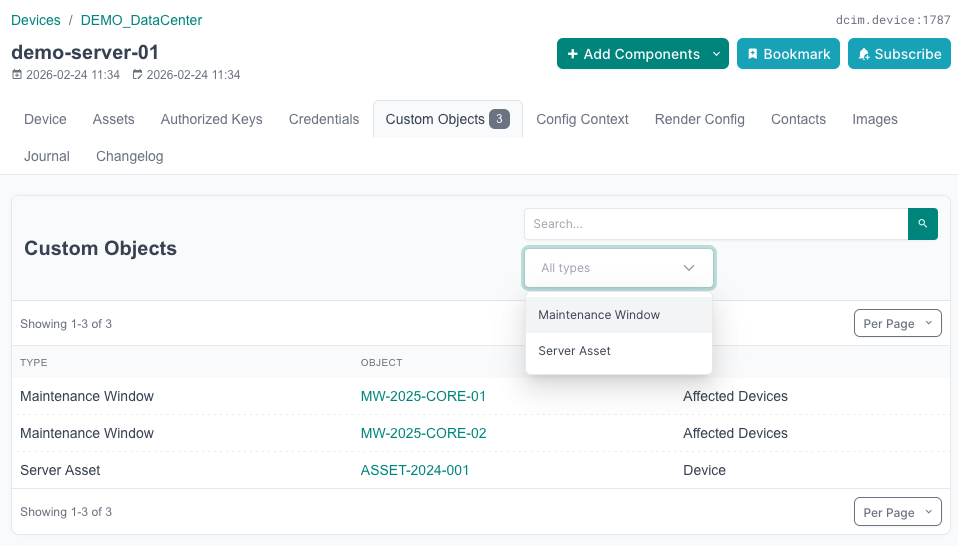
|
|
39
|
+
|
|
40
|
+
## Requirements
|
|
41
|
+
|
|
42
|
+
- NetBox 4.5.0 – 4.5.99
|
|
43
|
+
- `netbox_custom_objects` plugin installed and configured
|
|
44
|
+
|
|
45
|
+
## Compatibility
|
|
46
|
+
|
|
47
|
+
| Plugin version | NetBox version |
|
|
48
|
+
|----------------|----------------|
|
|
49
|
+
| 1.0.x | 4.5.x |
|
|
50
|
+
|
|
51
|
+
## Installation
|
|
52
|
+
|
|
53
|
+
```bash
|
|
54
|
+
source /opt/netbox/venv/bin/activate
|
|
55
|
+
pip install -e /opt/custom_objects_additional_tab_plugin/
|
|
56
|
+
```
|
|
57
|
+
|
|
58
|
+
Add to NetBox `configuration.py`:
|
|
59
|
+
|
|
60
|
+
```python
|
|
61
|
+
PLUGINS = [
|
|
62
|
+
'netbox_custom_objects',
|
|
63
|
+
'netbox_custom_objects_tab',
|
|
64
|
+
]
|
|
65
|
+
|
|
66
|
+
# Optional — defaults shown below
|
|
67
|
+
PLUGINS_CONFIG = {
|
|
68
|
+
'netbox_custom_objects_tab': {
|
|
69
|
+
'models': ['dcim.*', 'ipam.*', 'virtualization.*', 'tenancy.*', 'contacts.*'],
|
|
70
|
+
'label': 'Custom Objects',
|
|
71
|
+
'weight': 2000,
|
|
72
|
+
}
|
|
73
|
+
}
|
|
74
|
+
```
|
|
75
|
+
|
|
76
|
+
Restart NetBox. No database migrations required.
|
|
77
|
+
|
|
78
|
+
## Configuration
|
|
79
|
+
|
|
80
|
+
| Setting | Default | Description |
|
|
81
|
+
|----------|---------|-------------|
|
|
82
|
+
| `models` | `['dcim.*', 'ipam.*', 'virtualization.*', 'tenancy.*', 'contacts.*']` | Models that get the Custom Objects tab. Accepts `app_label.model_name` strings **or** `app_label.*` wildcards to register every model in an app. |
|
|
83
|
+
| `label` | `'Custom Objects'` | Text displayed on the tab. |
|
|
84
|
+
| `weight` | `2000` | Controls tab position in the tab bar; lower values appear further left. |
|
|
85
|
+
|
|
86
|
+
### Examples
|
|
87
|
+
|
|
88
|
+
```python
|
|
89
|
+
# Default — all common NetBox apps
|
|
90
|
+
'models': ['dcim.*', 'ipam.*', 'virtualization.*', 'tenancy.*', 'contacts.*']
|
|
91
|
+
|
|
92
|
+
# Only specific models
|
|
93
|
+
'models': ['dcim.device', 'dcim.site', 'ipam.prefix']
|
|
94
|
+
|
|
95
|
+
# Mix wildcards and specifics
|
|
96
|
+
'models': ['dcim.*', 'virtualization.*', 'ipam.ipaddress']
|
|
97
|
+
|
|
98
|
+
# Third-party plugin models work identically
|
|
99
|
+
'models': ['dcim.*', 'ipam.*', 'inventory_monitor.*']
|
|
100
|
+
```
|
|
101
|
+
|
|
102
|
+
Third-party plugin models are fully supported — Django treats plugin apps and built-in apps
|
|
103
|
+
the same way in the app registry. Add the plugin's app label and restart NetBox once.
|
|
104
|
+
|
|
105
|
+
The tab is hidden automatically (`hide_if_empty=True`) when no custom objects reference
|
|
106
|
+
the object being viewed, so it only appears when relevant.
|
|
107
|
+
|
|
108
|
+
## Features
|
|
109
|
+
|
|
110
|
+
### Pagination
|
|
111
|
+
Results are paginated using NetBox's standard `EnhancedPaginator`. The page size respects
|
|
112
|
+
the user's personal NetBox preference and can be overridden with `?per_page=N` in the URL.
|
|
113
|
+
Page controls appear at the top and bottom of the table.
|
|
114
|
+
|
|
115
|
+
### Text search
|
|
116
|
+
A search box in the card header filters results by:
|
|
117
|
+
- Custom Object instance display name
|
|
118
|
+
- Custom Object Type name
|
|
119
|
+
- Field label
|
|
120
|
+
|
|
121
|
+
Filtering uses the `?q=` query parameter and is applied before pagination.
|
|
122
|
+
|
|
123
|
+
### Type filter
|
|
124
|
+
A dropdown (shown when 2 or more Custom Object Types are present) lets you narrow
|
|
125
|
+
results to a single type. Uses the `?type=<slug>` query parameter. The dropdown
|
|
126
|
+
auto-submits on selection and is populated from the types actually present in the
|
|
127
|
+
current result set.
|
|
128
|
+
|
|
129
|
+
### Tag filter
|
|
130
|
+
A dropdown (shown when at least one linked Custom Object has a tag) lets you narrow
|
|
131
|
+
results to objects with a specific tag. Uses the `?tag=<slug>` query parameter. The
|
|
132
|
+
dropdown auto-submits on selection and is populated from the tags present across the
|
|
133
|
+
full result set. Tag data is pre-fetched in bulk so there is no N+1 query cost.
|
|
134
|
+
|
|
135
|
+
### Column sorting
|
|
136
|
+
Clicking the **Type**, **Object**, or **Field** column header sorts the table
|
|
137
|
+
in-memory. A second click on the same header reverses the direction. The active
|
|
138
|
+
column shows an up/down arrow icon. Sort state is preserved when the search form
|
|
139
|
+
is submitted.
|
|
140
|
+
|
|
141
|
+
### HTMX / Partial updates
|
|
142
|
+
Pagination clicks, column sort clicks, search form submissions, type-dropdown changes,
|
|
143
|
+
and tag-dropdown changes all update the table zone in-place using HTMX — no full page
|
|
144
|
+
reload. The URL is updated via `pushState` so links stay shareable and the browser back
|
|
145
|
+
button returns to the previous filter/page state.
|
|
146
|
+
|
|
147
|
+
### Value column
|
|
148
|
+
Each row includes a **Value** column showing the actual field value on the Custom
|
|
149
|
+
Object instance:
|
|
150
|
+
- **Object** fields: a link to the related object.
|
|
151
|
+
- **Multi-Object** fields: comma-separated links to the related objects, truncated
|
|
152
|
+
at 3 with an ellipsis when more are present.
|
|
153
|
+
|
|
154
|
+
### Configure Table
|
|
155
|
+
A **Configure Table** button in the card header opens a NetBox modal that lets
|
|
156
|
+
authenticated users show, hide, and reorder the table columns (Type, Object, Value,
|
|
157
|
+
Field, Tags). Preferences are stored per-user in `UserConfig` and respected on every
|
|
158
|
+
subsequent page load, including HTMX partial updates. The Actions column is always
|
|
159
|
+
visible and cannot be hidden.
|
|
160
|
+
|
|
161
|
+
### Action buttons
|
|
162
|
+
Each row has right-aligned action buttons, shown only when the user has the relevant permission:
|
|
163
|
+
|
|
164
|
+
- **Edit** (pencil icon) — links to the Custom Object instance's edit page. Shown when the user has `change` permission on the object.
|
|
165
|
+
- **Delete** (trash icon) — links to the Custom Object instance's delete confirmation page. Shown when the user has `delete` permission on the object.
|
|
166
|
+
|
|
167
|
+
Users without either permission see no action buttons in the row. After completing either
|
|
168
|
+
action, NetBox redirects back to the Custom Objects tab on the same parent object.
|
|
169
|
+
|
|
170
|
+
### Efficient badge counts
|
|
171
|
+
The tab badge (shown in the tab bar on every detail page) is computed with a
|
|
172
|
+
`COUNT(*)` query per field — no object rows are fetched. Full object rows are only
|
|
173
|
+
loaded when the tab itself is opened. This keeps detail page loads fast even when
|
|
174
|
+
thousands of custom objects reference an object.
|
|
175
|
+
|
|
176
|
+
## How It Works
|
|
177
|
+
|
|
178
|
+
When a Custom Object Type has a field of type **Object** or **Multi-Object** pointing to
|
|
179
|
+
a NetBox model (e.g. Device), any Custom Object instances with that field set will appear
|
|
180
|
+
in the "Custom Objects" tab on the referenced object's detail page.
|
|
181
|
+
|
|
182
|
+
The tab displays:
|
|
183
|
+
|
|
184
|
+
| Column | Content |
|
|
185
|
+
|--------|---------|
|
|
186
|
+
| **Type** | Custom Object Type name (sortable); links to the type detail page when the user has view permission |
|
|
187
|
+
| **Object** | Link to the Custom Object instance (sortable) |
|
|
188
|
+
| **Value** | The value stored in the linking field — a link for Object fields, comma-separated links for Multi-Object fields |
|
|
189
|
+
| **Field** | The field that holds the reference (sortable) |
|
|
190
|
+
| **Tags** | Colored tag badges assigned to the Custom Object instance; `—` when none |
|
|
191
|
+
| *(actions)* | Edit and Delete buttons, each shown only when the user has the corresponding permission |
|
|
192
|
+
|
|
193
|
+
## Support
|
|
194
|
+
|
|
195
|
+
- Open an issue on [GitHub](https://github.com/CESNET/netbox-custom-objects-tab/issues)
|
|
196
|
+
|
|
197
|
+
## Contributing
|
|
198
|
+
|
|
199
|
+
Pull requests are welcome. For significant changes, please open an issue first.
|
|
200
|
+
|
|
201
|
+
## License
|
|
202
|
+
|
|
203
|
+
Apache-2.0
|
|
@@ -0,0 +1,178 @@
|
|
|
1
|
+
# netbox-custom-objects-tab
|
|
2
|
+
|
|
3
|
+
A NetBox 4.5.x plugin that adds a **Custom Objects** tab to standard object detail pages,
|
|
4
|
+
showing any Custom Object instances from the `netbox_custom_objects` plugin that reference
|
|
5
|
+
those objects via OBJECT or MULTIOBJECT fields.
|
|
6
|
+
|
|
7
|
+
The tab includes **pagination**, **text search**, **column sorting**, **type filtering**,
|
|
8
|
+
and **tag filtering**, with HTMX-powered partial updates so table interactions don't reload
|
|
9
|
+
the full page.
|
|
10
|
+
|
|
11
|
+
## Screenshot
|
|
12
|
+
|
|
13
|
+

|
|
14
|
+
|
|
15
|
+
## Requirements
|
|
16
|
+
|
|
17
|
+
- NetBox 4.5.0 – 4.5.99
|
|
18
|
+
- `netbox_custom_objects` plugin installed and configured
|
|
19
|
+
|
|
20
|
+
## Compatibility
|
|
21
|
+
|
|
22
|
+
| Plugin version | NetBox version |
|
|
23
|
+
|----------------|----------------|
|
|
24
|
+
| 1.0.x | 4.5.x |
|
|
25
|
+
|
|
26
|
+
## Installation
|
|
27
|
+
|
|
28
|
+
```bash
|
|
29
|
+
source /opt/netbox/venv/bin/activate
|
|
30
|
+
pip install -e /opt/custom_objects_additional_tab_plugin/
|
|
31
|
+
```
|
|
32
|
+
|
|
33
|
+
Add to NetBox `configuration.py`:
|
|
34
|
+
|
|
35
|
+
```python
|
|
36
|
+
PLUGINS = [
|
|
37
|
+
'netbox_custom_objects',
|
|
38
|
+
'netbox_custom_objects_tab',
|
|
39
|
+
]
|
|
40
|
+
|
|
41
|
+
# Optional — defaults shown below
|
|
42
|
+
PLUGINS_CONFIG = {
|
|
43
|
+
'netbox_custom_objects_tab': {
|
|
44
|
+
'models': ['dcim.*', 'ipam.*', 'virtualization.*', 'tenancy.*', 'contacts.*'],
|
|
45
|
+
'label': 'Custom Objects',
|
|
46
|
+
'weight': 2000,
|
|
47
|
+
}
|
|
48
|
+
}
|
|
49
|
+
```
|
|
50
|
+
|
|
51
|
+
Restart NetBox. No database migrations required.
|
|
52
|
+
|
|
53
|
+
## Configuration
|
|
54
|
+
|
|
55
|
+
| Setting | Default | Description |
|
|
56
|
+
|----------|---------|-------------|
|
|
57
|
+
| `models` | `['dcim.*', 'ipam.*', 'virtualization.*', 'tenancy.*', 'contacts.*']` | Models that get the Custom Objects tab. Accepts `app_label.model_name` strings **or** `app_label.*` wildcards to register every model in an app. |
|
|
58
|
+
| `label` | `'Custom Objects'` | Text displayed on the tab. |
|
|
59
|
+
| `weight` | `2000` | Controls tab position in the tab bar; lower values appear further left. |
|
|
60
|
+
|
|
61
|
+
### Examples
|
|
62
|
+
|
|
63
|
+
```python
|
|
64
|
+
# Default — all common NetBox apps
|
|
65
|
+
'models': ['dcim.*', 'ipam.*', 'virtualization.*', 'tenancy.*', 'contacts.*']
|
|
66
|
+
|
|
67
|
+
# Only specific models
|
|
68
|
+
'models': ['dcim.device', 'dcim.site', 'ipam.prefix']
|
|
69
|
+
|
|
70
|
+
# Mix wildcards and specifics
|
|
71
|
+
'models': ['dcim.*', 'virtualization.*', 'ipam.ipaddress']
|
|
72
|
+
|
|
73
|
+
# Third-party plugin models work identically
|
|
74
|
+
'models': ['dcim.*', 'ipam.*', 'inventory_monitor.*']
|
|
75
|
+
```
|
|
76
|
+
|
|
77
|
+
Third-party plugin models are fully supported — Django treats plugin apps and built-in apps
|
|
78
|
+
the same way in the app registry. Add the plugin's app label and restart NetBox once.
|
|
79
|
+
|
|
80
|
+
The tab is hidden automatically (`hide_if_empty=True`) when no custom objects reference
|
|
81
|
+
the object being viewed, so it only appears when relevant.
|
|
82
|
+
|
|
83
|
+
## Features
|
|
84
|
+
|
|
85
|
+
### Pagination
|
|
86
|
+
Results are paginated using NetBox's standard `EnhancedPaginator`. The page size respects
|
|
87
|
+
the user's personal NetBox preference and can be overridden with `?per_page=N` in the URL.
|
|
88
|
+
Page controls appear at the top and bottom of the table.
|
|
89
|
+
|
|
90
|
+
### Text search
|
|
91
|
+
A search box in the card header filters results by:
|
|
92
|
+
- Custom Object instance display name
|
|
93
|
+
- Custom Object Type name
|
|
94
|
+
- Field label
|
|
95
|
+
|
|
96
|
+
Filtering uses the `?q=` query parameter and is applied before pagination.
|
|
97
|
+
|
|
98
|
+
### Type filter
|
|
99
|
+
A dropdown (shown when 2 or more Custom Object Types are present) lets you narrow
|
|
100
|
+
results to a single type. Uses the `?type=<slug>` query parameter. The dropdown
|
|
101
|
+
auto-submits on selection and is populated from the types actually present in the
|
|
102
|
+
current result set.
|
|
103
|
+
|
|
104
|
+
### Tag filter
|
|
105
|
+
A dropdown (shown when at least one linked Custom Object has a tag) lets you narrow
|
|
106
|
+
results to objects with a specific tag. Uses the `?tag=<slug>` query parameter. The
|
|
107
|
+
dropdown auto-submits on selection and is populated from the tags present across the
|
|
108
|
+
full result set. Tag data is pre-fetched in bulk so there is no N+1 query cost.
|
|
109
|
+
|
|
110
|
+
### Column sorting
|
|
111
|
+
Clicking the **Type**, **Object**, or **Field** column header sorts the table
|
|
112
|
+
in-memory. A second click on the same header reverses the direction. The active
|
|
113
|
+
column shows an up/down arrow icon. Sort state is preserved when the search form
|
|
114
|
+
is submitted.
|
|
115
|
+
|
|
116
|
+
### HTMX / Partial updates
|
|
117
|
+
Pagination clicks, column sort clicks, search form submissions, type-dropdown changes,
|
|
118
|
+
and tag-dropdown changes all update the table zone in-place using HTMX — no full page
|
|
119
|
+
reload. The URL is updated via `pushState` so links stay shareable and the browser back
|
|
120
|
+
button returns to the previous filter/page state.
|
|
121
|
+
|
|
122
|
+
### Value column
|
|
123
|
+
Each row includes a **Value** column showing the actual field value on the Custom
|
|
124
|
+
Object instance:
|
|
125
|
+
- **Object** fields: a link to the related object.
|
|
126
|
+
- **Multi-Object** fields: comma-separated links to the related objects, truncated
|
|
127
|
+
at 3 with an ellipsis when more are present.
|
|
128
|
+
|
|
129
|
+
### Configure Table
|
|
130
|
+
A **Configure Table** button in the card header opens a NetBox modal that lets
|
|
131
|
+
authenticated users show, hide, and reorder the table columns (Type, Object, Value,
|
|
132
|
+
Field, Tags). Preferences are stored per-user in `UserConfig` and respected on every
|
|
133
|
+
subsequent page load, including HTMX partial updates. The Actions column is always
|
|
134
|
+
visible and cannot be hidden.
|
|
135
|
+
|
|
136
|
+
### Action buttons
|
|
137
|
+
Each row has right-aligned action buttons, shown only when the user has the relevant permission:
|
|
138
|
+
|
|
139
|
+
- **Edit** (pencil icon) — links to the Custom Object instance's edit page. Shown when the user has `change` permission on the object.
|
|
140
|
+
- **Delete** (trash icon) — links to the Custom Object instance's delete confirmation page. Shown when the user has `delete` permission on the object.
|
|
141
|
+
|
|
142
|
+
Users without either permission see no action buttons in the row. After completing either
|
|
143
|
+
action, NetBox redirects back to the Custom Objects tab on the same parent object.
|
|
144
|
+
|
|
145
|
+
### Efficient badge counts
|
|
146
|
+
The tab badge (shown in the tab bar on every detail page) is computed with a
|
|
147
|
+
`COUNT(*)` query per field — no object rows are fetched. Full object rows are only
|
|
148
|
+
loaded when the tab itself is opened. This keeps detail page loads fast even when
|
|
149
|
+
thousands of custom objects reference an object.
|
|
150
|
+
|
|
151
|
+
## How It Works
|
|
152
|
+
|
|
153
|
+
When a Custom Object Type has a field of type **Object** or **Multi-Object** pointing to
|
|
154
|
+
a NetBox model (e.g. Device), any Custom Object instances with that field set will appear
|
|
155
|
+
in the "Custom Objects" tab on the referenced object's detail page.
|
|
156
|
+
|
|
157
|
+
The tab displays:
|
|
158
|
+
|
|
159
|
+
| Column | Content |
|
|
160
|
+
|--------|---------|
|
|
161
|
+
| **Type** | Custom Object Type name (sortable); links to the type detail page when the user has view permission |
|
|
162
|
+
| **Object** | Link to the Custom Object instance (sortable) |
|
|
163
|
+
| **Value** | The value stored in the linking field — a link for Object fields, comma-separated links for Multi-Object fields |
|
|
164
|
+
| **Field** | The field that holds the reference (sortable) |
|
|
165
|
+
| **Tags** | Colored tag badges assigned to the Custom Object instance; `—` when none |
|
|
166
|
+
| *(actions)* | Edit and Delete buttons, each shown only when the user has the corresponding permission |
|
|
167
|
+
|
|
168
|
+
## Support
|
|
169
|
+
|
|
170
|
+
- Open an issue on [GitHub](https://github.com/CESNET/netbox-custom-objects-tab/issues)
|
|
171
|
+
|
|
172
|
+
## Contributing
|
|
173
|
+
|
|
174
|
+
Pull requests are welcome. For significant changes, please open an issue first.
|
|
175
|
+
|
|
176
|
+
## License
|
|
177
|
+
|
|
178
|
+
Apache-2.0
|
|
@@ -0,0 +1,36 @@
|
|
|
1
|
+
from netbox.plugins import PluginConfig
|
|
2
|
+
|
|
3
|
+
|
|
4
|
+
class NetBoxCustomObjectsTabConfig(PluginConfig):
|
|
5
|
+
name = "netbox_custom_objects_tab"
|
|
6
|
+
verbose_name = "Custom Objects Tab"
|
|
7
|
+
description = 'Adds a "Custom Objects" tab to NetBox object detail pages'
|
|
8
|
+
version = "1.0.0"
|
|
9
|
+
author = "Jan Krupa"
|
|
10
|
+
author_email = "jan.krupa@cesnet.cz"
|
|
11
|
+
base_url = "custom-objects-tab"
|
|
12
|
+
min_version = "4.5.0"
|
|
13
|
+
max_version = "4.5.99"
|
|
14
|
+
default_settings = {
|
|
15
|
+
# app_label.model_name strings, or app_label.* to include all models in an app.
|
|
16
|
+
"models": [
|
|
17
|
+
"dcim.*",
|
|
18
|
+
"ipam.*",
|
|
19
|
+
"virtualization.*",
|
|
20
|
+
"tenancy.*",
|
|
21
|
+
"contacts.*",
|
|
22
|
+
],
|
|
23
|
+
# Label shown on the tab; override in PLUGINS_CONFIG.
|
|
24
|
+
"label": "Custom Objects",
|
|
25
|
+
# Tab sort weight; lower values appear further left.
|
|
26
|
+
"weight": 2000,
|
|
27
|
+
}
|
|
28
|
+
|
|
29
|
+
def ready(self):
|
|
30
|
+
super().ready()
|
|
31
|
+
from . import views
|
|
32
|
+
|
|
33
|
+
views.register_tabs()
|
|
34
|
+
|
|
35
|
+
|
|
36
|
+
config = NetBoxCustomObjectsTabConfig
|