napari-plugin-manager 0.1.0a2__tar.gz → 0.1.2__tar.gz
This diff represents the content of publicly available package versions that have been released to one of the supported registries. The information contained in this diff is provided for informational purposes only and reflects changes between package versions as they appear in their respective public registries.
- napari_plugin_manager-0.1.2/.github/dependabot.yml +10 -0
- napari_plugin_manager-0.1.2/.github/workflows/deploy_docs.yml +60 -0
- {napari-plugin-manager-0.1.0a2 → napari_plugin_manager-0.1.2}/.github/workflows/test_and_deploy.yml +9 -10
- {napari-plugin-manager-0.1.0a2 → napari_plugin_manager-0.1.2}/.gitignore +34 -0
- {napari-plugin-manager-0.1.0a2 → napari_plugin_manager-0.1.2}/.pre-commit-config.yaml +10 -7
- napari_plugin_manager-0.1.2/Makefile +43 -0
- napari_plugin_manager-0.1.2/PKG-INFO +257 -0
- napari_plugin_manager-0.1.2/README.md +175 -0
- napari_plugin_manager-0.1.2/RELEASE.md +21 -0
- napari_plugin_manager-0.1.2/docs/_static/favicon/logo-noborder-180.png +0 -0
- napari_plugin_manager-0.1.2/docs/_static/favicon/logo-silhouette-192.png +0 -0
- napari_plugin_manager-0.1.2/docs/_static/favicon/logo-silhouette-dark-light.svg +28 -0
- napari_plugin_manager-0.1.2/docs/_templates/navbar-project.html +4 -0
- napari_plugin_manager-0.1.2/docs/_toc.yml +4 -0
- napari_plugin_manager-0.1.2/docs/conf.py +150 -0
- napari_plugin_manager-0.1.2/docs/developers/contributing.md +186 -0
- napari_plugin_manager-0.1.2/docs/index.md +2 -0
- napari_plugin_manager-0.1.2/images/description.png +0 -0
- napari_plugin_manager-0.1.2/images/filter.png +0 -0
- napari_plugin_manager-0.1.2/images/install.png +0 -0
- napari_plugin_manager-0.1.2/images/logo.png +0 -0
- napari_plugin_manager-0.1.2/images/status.png +0 -0
- napari_plugin_manager-0.1.2/images/uninstall.png +0 -0
- napari_plugin_manager-0.1.2/images/update.png +0 -0
- napari_plugin_manager-0.1.2/napari_plugin_manager/__init__.py +0 -0
- napari_plugin_manager-0.1.2/napari_plugin_manager/_tests/__init__.py +0 -0
- napari_plugin_manager-0.1.2/napari_plugin_manager/_tests/conftest.py +63 -0
- {napari-plugin-manager-0.1.0a2 → napari_plugin_manager-0.1.2}/napari_plugin_manager/_tests/test_installer_process.py +179 -67
- napari_plugin_manager-0.1.2/napari_plugin_manager/_tests/test_npe2api.py +54 -0
- napari_plugin_manager-0.1.2/napari_plugin_manager/_tests/test_qt_plugin_dialog.py +583 -0
- napari_plugin_manager-0.1.2/napari_plugin_manager/_tests/test_utils.py +27 -0
- napari_plugin_manager-0.1.2/napari_plugin_manager/_version.py +16 -0
- napari_plugin_manager-0.1.2/napari_plugin_manager/npe2api.py +131 -0
- {napari-plugin-manager-0.1.0a2 → napari_plugin_manager-0.1.2}/napari_plugin_manager/qt_package_installer.py +166 -60
- napari_plugin_manager-0.1.2/napari_plugin_manager/qt_plugin_dialog.py +1550 -0
- napari_plugin_manager-0.1.2/napari_plugin_manager/qt_widgets.py +14 -0
- napari_plugin_manager-0.1.2/napari_plugin_manager/styles.qss +383 -0
- napari_plugin_manager-0.1.2/napari_plugin_manager/utils.py +22 -0
- napari_plugin_manager-0.1.2/napari_plugin_manager.egg-info/PKG-INFO +257 -0
- napari_plugin_manager-0.1.2/napari_plugin_manager.egg-info/SOURCES.txt +47 -0
- napari_plugin_manager-0.1.2/napari_plugin_manager.egg-info/requires.txt +24 -0
- {napari-plugin-manager-0.1.0a2 → napari_plugin_manager-0.1.2}/pyproject.toml +26 -3
- {napari-plugin-manager-0.1.0a2 → napari_plugin_manager-0.1.2}/tox.ini +1 -1
- napari-plugin-manager-0.1.0a2/PKG-INFO +0 -99
- napari-plugin-manager-0.1.0a2/README.md +0 -38
- napari-plugin-manager-0.1.0a2/napari_plugin_manager/_tests/conftest.py +0 -18
- napari-plugin-manager-0.1.0a2/napari_plugin_manager/_tests/test_qt_plugin_dialog.py +0 -374
- napari-plugin-manager-0.1.0a2/napari_plugin_manager/_version.py +0 -4
- napari-plugin-manager-0.1.0a2/napari_plugin_manager/qt_plugin_dialog.py +0 -1086
- napari-plugin-manager-0.1.0a2/napari_plugin_manager.egg-info/PKG-INFO +0 -99
- napari-plugin-manager-0.1.0a2/napari_plugin_manager.egg-info/SOURCES.txt +0 -20
- napari-plugin-manager-0.1.0a2/napari_plugin_manager.egg-info/requires.txt +0 -10
- {napari-plugin-manager-0.1.0a2 → napari_plugin_manager-0.1.2}/LICENSE +0 -0
- {napari-plugin-manager-0.1.0a2/napari_plugin_manager → napari_plugin_manager-0.1.2/docs}/__init__.py +0 -0
- /napari-plugin-manager-0.1.0a2/napari_plugin_manager/_tests/__init__.py → /napari_plugin_manager-0.1.2/docs/_static/custom.css +0 -0
- {napari-plugin-manager-0.1.0a2 → napari_plugin_manager-0.1.2}/napari_plugin_manager.egg-info/dependency_links.txt +0 -0
- {napari-plugin-manager-0.1.0a2 → napari_plugin_manager-0.1.2}/napari_plugin_manager.egg-info/top_level.txt +0 -0
- {napari-plugin-manager-0.1.0a2 → napari_plugin_manager-0.1.2}/setup.cfg +0 -0
|
@@ -0,0 +1,60 @@
|
|
|
1
|
+
name: Deploy Documentation
|
|
2
|
+
|
|
3
|
+
on:
|
|
4
|
+
push:
|
|
5
|
+
branches:
|
|
6
|
+
- main
|
|
7
|
+
tags:
|
|
8
|
+
- 'v*'
|
|
9
|
+
workflow_dispatch:
|
|
10
|
+
|
|
11
|
+
# Only allow one docs build at a time so that overlapping stale builds will get
|
|
12
|
+
# cancelled automatically.
|
|
13
|
+
concurrency:
|
|
14
|
+
group: deploy_docs
|
|
15
|
+
cancel-in-progress: true
|
|
16
|
+
|
|
17
|
+
jobs:
|
|
18
|
+
build-and-deploy:
|
|
19
|
+
name: Build & Deploy
|
|
20
|
+
runs-on: ubuntu-latest
|
|
21
|
+
|
|
22
|
+
permissions:
|
|
23
|
+
contents: write # so we can write to github pages without a token
|
|
24
|
+
pages: write # to deploy to Pages
|
|
25
|
+
id-token: write # to verify the deployment originates from an appropriate source
|
|
26
|
+
|
|
27
|
+
steps:
|
|
28
|
+
- name: Clone repo
|
|
29
|
+
uses: actions/checkout@v4
|
|
30
|
+
|
|
31
|
+
- uses: actions/setup-python@v5
|
|
32
|
+
with:
|
|
33
|
+
python-version: "3.10"
|
|
34
|
+
|
|
35
|
+
- uses: tlambert03/setup-qt-libs@v1
|
|
36
|
+
|
|
37
|
+
- name: Install Dependencies
|
|
38
|
+
run: |
|
|
39
|
+
python -m pip install --upgrade pip
|
|
40
|
+
python -m pip install "napari[all]"
|
|
41
|
+
python -m pip install -e ".[docs]"
|
|
42
|
+
|
|
43
|
+
- name: Build Docs
|
|
44
|
+
uses: aganders3/headless-gui@v2
|
|
45
|
+
with:
|
|
46
|
+
run: make docs
|
|
47
|
+
|
|
48
|
+
- name: Check file tree contents
|
|
49
|
+
run: tree
|
|
50
|
+
|
|
51
|
+
# At a minimum this job should upload artifacts using actions/upload-pages-artifact
|
|
52
|
+
- name: Upload GitHub Pages artifact
|
|
53
|
+
uses: actions/upload-pages-artifact@v3
|
|
54
|
+
with:
|
|
55
|
+
name: github-pages
|
|
56
|
+
path: docs/_build
|
|
57
|
+
|
|
58
|
+
- name: Deploy to GitHub Pages
|
|
59
|
+
id: deployment
|
|
60
|
+
uses: actions/deploy-pages@v4 # or specific "vX.X.X" version tag for this action
|
{napari-plugin-manager-0.1.0a2 → napari_plugin_manager-0.1.2}/.github/workflows/test_and_deploy.yml
RENAMED
|
@@ -30,7 +30,7 @@ jobs:
|
|
|
30
30
|
strategy:
|
|
31
31
|
fail-fast: false
|
|
32
32
|
matrix:
|
|
33
|
-
platform: [ubuntu-latest, windows-latest, macos-
|
|
33
|
+
platform: [ubuntu-latest, windows-latest, macos-13]
|
|
34
34
|
python-version: ["3.9", "3.10", "3.11"]
|
|
35
35
|
napari: ["latest", "repo"]
|
|
36
36
|
exclude:
|
|
@@ -41,10 +41,10 @@ jobs:
|
|
|
41
41
|
platform: "windows-latest"
|
|
42
42
|
|
|
43
43
|
steps:
|
|
44
|
-
- uses: actions/checkout@
|
|
44
|
+
- uses: actions/checkout@v4
|
|
45
45
|
|
|
46
46
|
- name: Set up Python ${{ matrix.python-version }}
|
|
47
|
-
uses: actions/setup-python@
|
|
47
|
+
uses: actions/setup-python@v5
|
|
48
48
|
with:
|
|
49
49
|
python-version: ${{ matrix.python-version }}
|
|
50
50
|
|
|
@@ -64,7 +64,7 @@ jobs:
|
|
|
64
64
|
pip install setuptools tox tox-gh-actions
|
|
65
65
|
|
|
66
66
|
- name: Test with tox
|
|
67
|
-
uses: aganders3/headless-gui@
|
|
67
|
+
uses: aganders3/headless-gui@v2
|
|
68
68
|
with:
|
|
69
69
|
run: python -m tox -vv
|
|
70
70
|
env:
|
|
@@ -74,11 +74,10 @@ jobs:
|
|
|
74
74
|
# PySide6 only functional with Python 3.10+
|
|
75
75
|
TOX_SKIP_ENV: ".*py39-PySide6.*"
|
|
76
76
|
|
|
77
|
-
- name: pre-commit
|
|
78
|
-
uses: pre-commit/action@v3.0.0
|
|
79
|
-
|
|
80
77
|
- name: Coverage
|
|
81
|
-
uses: codecov/codecov-action@
|
|
78
|
+
uses: codecov/codecov-action@v4
|
|
79
|
+
env:
|
|
80
|
+
CODECOV_TOKEN: ${{ secrets.CODECOV_TOKEN }}
|
|
82
81
|
|
|
83
82
|
deploy:
|
|
84
83
|
# this will run when you have tagged a commit, starting with "v*"
|
|
@@ -90,9 +89,9 @@ jobs:
|
|
|
90
89
|
permissions:
|
|
91
90
|
id-token: write
|
|
92
91
|
steps:
|
|
93
|
-
- uses: actions/checkout@
|
|
92
|
+
- uses: actions/checkout@v4
|
|
94
93
|
- name: Set up Python
|
|
95
|
-
uses: actions/setup-python@
|
|
94
|
+
uses: actions/setup-python@v5
|
|
96
95
|
with:
|
|
97
96
|
python-version: "3.x"
|
|
98
97
|
- name: Install dependencies
|
|
@@ -83,3 +83,37 @@ target/
|
|
|
83
83
|
|
|
84
84
|
# ruff stuff
|
|
85
85
|
.ruff_cache/
|
|
86
|
+
|
|
87
|
+
# spyder stuff
|
|
88
|
+
.spyproject/
|
|
89
|
+
|
|
90
|
+
# Environment variables file
|
|
91
|
+
.env
|
|
92
|
+
|
|
93
|
+
# Sphinx documentation
|
|
94
|
+
docs/_build/
|
|
95
|
+
|
|
96
|
+
# MkDocs documentation
|
|
97
|
+
/site/
|
|
98
|
+
|
|
99
|
+
# PyBuilder
|
|
100
|
+
target/
|
|
101
|
+
|
|
102
|
+
# IPython Notebook
|
|
103
|
+
.ipynb_checkpoints
|
|
104
|
+
|
|
105
|
+
# pyenv
|
|
106
|
+
.python-version
|
|
107
|
+
|
|
108
|
+
# OS
|
|
109
|
+
.DS_Store
|
|
110
|
+
|
|
111
|
+
# written by setuptools_scm
|
|
112
|
+
*/_version.py
|
|
113
|
+
|
|
114
|
+
# vscode
|
|
115
|
+
.vscode
|
|
116
|
+
|
|
117
|
+
# Images
|
|
118
|
+
docs/images/
|
|
119
|
+
|
|
@@ -4,24 +4,27 @@ repos:
|
|
|
4
4
|
hooks:
|
|
5
5
|
- id: absolufy-imports
|
|
6
6
|
- repo: https://github.com/hadialqattan/pycln
|
|
7
|
-
rev: v2.
|
|
7
|
+
rev: v2.4.0
|
|
8
8
|
hooks:
|
|
9
9
|
- id: pycln
|
|
10
|
-
- repo: https://github.com/psf/black
|
|
11
|
-
rev:
|
|
10
|
+
- repo: https://github.com/psf/black-pre-commit-mirror
|
|
11
|
+
rev: 24.8.0
|
|
12
12
|
hooks:
|
|
13
13
|
- id: black
|
|
14
14
|
pass_filenames: true
|
|
15
|
-
- repo: https://github.com/
|
|
16
|
-
rev: v0.
|
|
15
|
+
- repo: https://github.com/astral-sh/ruff-pre-commit
|
|
16
|
+
rev: v0.6.3
|
|
17
17
|
hooks:
|
|
18
18
|
- id: ruff
|
|
19
19
|
- repo: https://github.com/seddonym/import-linter
|
|
20
|
-
rev:
|
|
20
|
+
rev: v2.0
|
|
21
21
|
hooks:
|
|
22
22
|
- id: import-linter
|
|
23
23
|
stages: [manual]
|
|
24
24
|
- repo: https://github.com/python-jsonschema/check-jsonschema
|
|
25
|
-
rev: 0.
|
|
25
|
+
rev: 0.29.2
|
|
26
26
|
hooks:
|
|
27
27
|
- id: check-github-workflows
|
|
28
|
+
|
|
29
|
+
ci:
|
|
30
|
+
autoupdate_schedule: monthly
|
|
@@ -0,0 +1,43 @@
|
|
|
1
|
+
.PHONY: docs clean
|
|
2
|
+
|
|
3
|
+
SPHINXOPTS =
|
|
4
|
+
|
|
5
|
+
mkfile_path := $(abspath $(lastword $(MAKEFILE_LIST)))
|
|
6
|
+
current_dir := $(dir $(mkfile_path))
|
|
7
|
+
docs_dir := $(current_dir)docs
|
|
8
|
+
|
|
9
|
+
clean:
|
|
10
|
+
echo clean
|
|
11
|
+
echo $(current_dir)
|
|
12
|
+
rm -rf $(docs_dir)/_build/
|
|
13
|
+
rm -rf $(docs_dir)/images/
|
|
14
|
+
mkdir $(docs_dir)/images/
|
|
15
|
+
cp images/*.png $(docs_dir)/images/
|
|
16
|
+
|
|
17
|
+
docs-build:
|
|
18
|
+
NAPARI_CONFIG="" NAPARI_APPLICATION_IPY_INTERACTIVE=0 sphinx-build -b html docs/ docs/_build $(SPHINXOPTS)
|
|
19
|
+
|
|
20
|
+
docs-xvfb:
|
|
21
|
+
NAPARI_CONFIG="" NAPARI_APPLICATION_IPY_INTERACTIVE=0 xvfb-run --auto-servernum sphinx-build -b html docs/ docs/_build $(SPHINXOPTS)
|
|
22
|
+
|
|
23
|
+
docs: clean docs-build
|
|
24
|
+
|
|
25
|
+
serve:
|
|
26
|
+
python -m http.server -d $(docs_dir)/_build
|
|
27
|
+
# Implies noplot, but no clean - call 'make clean' manually if needed
|
|
28
|
+
# Autogenerated paths need to be ignored to prevent reload loops
|
|
29
|
+
html-live:
|
|
30
|
+
NAPARI_APPLICATION_IPY_INTERACTIVE=0 \
|
|
31
|
+
sphinx-autobuild \
|
|
32
|
+
-b html \
|
|
33
|
+
docs/ \
|
|
34
|
+
docs/_build \
|
|
35
|
+
--open-browser \
|
|
36
|
+
--port=0 \
|
|
37
|
+
$(SPHINXOPTS)
|
|
38
|
+
|
|
39
|
+
html-noplot: clean
|
|
40
|
+
NAPARI_APPLICATION_IPY_INTERACTIVE=0 sphinx-build -b html docs/ docs/_build $(SPHINXOPTS)
|
|
41
|
+
|
|
42
|
+
linkcheck-files:
|
|
43
|
+
NAPARI_APPLICATION_IPY_INTERACTIVE=0 sphinx-build -b linkcheck --color docs/ docs/_build ${FILES} $(SPHINXOPTS)
|
|
@@ -0,0 +1,257 @@
|
|
|
1
|
+
Metadata-Version: 2.1
|
|
2
|
+
Name: napari-plugin-manager
|
|
3
|
+
Version: 0.1.2
|
|
4
|
+
Summary: Install plugins for napari, in napari.
|
|
5
|
+
Author-email: napari team <napari-steering-council@googlegroups.com>
|
|
6
|
+
License: BSD 3-Clause License
|
|
7
|
+
|
|
8
|
+
Copyright (c) 2018, Napari
|
|
9
|
+
All rights reserved.
|
|
10
|
+
|
|
11
|
+
Redistribution and use in source and binary forms, with or without
|
|
12
|
+
modification, are permitted provided that the following conditions are met:
|
|
13
|
+
|
|
14
|
+
* Redistributions of source code must retain the above copyright notice, this
|
|
15
|
+
list of conditions and the following disclaimer.
|
|
16
|
+
|
|
17
|
+
* Redistributions in binary form must reproduce the above copyright notice,
|
|
18
|
+
this list of conditions and the following disclaimer in the documentation
|
|
19
|
+
and/or other materials provided with the distribution.
|
|
20
|
+
|
|
21
|
+
* Neither the name of the copyright holder nor the names of its
|
|
22
|
+
contributors may be used to endorse or promote products derived from
|
|
23
|
+
this software without specific prior written permission.
|
|
24
|
+
|
|
25
|
+
THIS SOFTWARE IS PROVIDED BY THE COPYRIGHT HOLDERS AND CONTRIBUTORS "AS IS"
|
|
26
|
+
AND ANY EXPRESS OR IMPLIED WARRANTIES, INCLUDING, BUT NOT LIMITED TO, THE
|
|
27
|
+
IMPLIED WARRANTIES OF MERCHANTABILITY AND FITNESS FOR A PARTICULAR PURPOSE ARE
|
|
28
|
+
DISCLAIMED. IN NO EVENT SHALL THE COPYRIGHT HOLDER OR CONTRIBUTORS BE LIABLE
|
|
29
|
+
FOR ANY DIRECT, INDIRECT, INCIDENTAL, SPECIAL, EXEMPLARY, OR CONSEQUENTIAL
|
|
30
|
+
DAMAGES (INCLUDING, BUT NOT LIMITED TO, PROCUREMENT OF SUBSTITUTE GOODS OR
|
|
31
|
+
SERVICES; LOSS OF USE, DATA, OR PROFITS; OR BUSINESS INTERRUPTION) HOWEVER
|
|
32
|
+
CAUSED AND ON ANY THEORY OF LIABILITY, WHETHER IN CONTRACT, STRICT LIABILITY,
|
|
33
|
+
OR TORT (INCLUDING NEGLIGENCE OR OTHERWISE) ARISING IN ANY WAY OUT OF THE USE
|
|
34
|
+
OF THIS SOFTWARE, EVEN IF ADVISED OF THE POSSIBILITY OF SUCH DAMAGE.
|
|
35
|
+
|
|
36
|
+
Project-URL: homepage, https://github.com/napari/napari-plugin-manager
|
|
37
|
+
Classifier: Development Status :: 3 - Alpha
|
|
38
|
+
Classifier: Environment :: X11 Applications :: Qt
|
|
39
|
+
Classifier: Framework :: napari
|
|
40
|
+
Classifier: Intended Audience :: Education
|
|
41
|
+
Classifier: Intended Audience :: Science/Research
|
|
42
|
+
Classifier: License :: OSI Approved :: BSD License
|
|
43
|
+
Classifier: Programming Language :: C
|
|
44
|
+
Classifier: Programming Language :: Python
|
|
45
|
+
Classifier: Programming Language :: Python :: 3 :: Only
|
|
46
|
+
Classifier: Programming Language :: Python :: 3.9
|
|
47
|
+
Classifier: Programming Language :: Python :: 3.10
|
|
48
|
+
Classifier: Programming Language :: Python :: 3.11
|
|
49
|
+
Classifier: Topic :: Scientific/Engineering
|
|
50
|
+
Classifier: Topic :: Scientific/Engineering :: Visualization
|
|
51
|
+
Classifier: Topic :: Scientific/Engineering :: Information Analysis
|
|
52
|
+
Classifier: Topic :: Scientific/Engineering :: Bio-Informatics
|
|
53
|
+
Classifier: Topic :: Utilities
|
|
54
|
+
Classifier: Operating System :: Microsoft :: Windows
|
|
55
|
+
Classifier: Operating System :: POSIX
|
|
56
|
+
Classifier: Operating System :: Unix
|
|
57
|
+
Classifier: Operating System :: MacOS
|
|
58
|
+
Requires-Python: >=3.8
|
|
59
|
+
Description-Content-Type: text/markdown
|
|
60
|
+
License-File: LICENSE
|
|
61
|
+
Requires-Dist: npe2
|
|
62
|
+
Requires-Dist: qtpy
|
|
63
|
+
Requires-Dist: superqt
|
|
64
|
+
Requires-Dist: pip
|
|
65
|
+
Provides-Extra: dev
|
|
66
|
+
Requires-Dist: PyQt5; extra == "dev"
|
|
67
|
+
Requires-Dist: pre-commit; extra == "dev"
|
|
68
|
+
Provides-Extra: testing
|
|
69
|
+
Requires-Dist: flaky; extra == "testing"
|
|
70
|
+
Requires-Dist: pytest; extra == "testing"
|
|
71
|
+
Requires-Dist: pytest-cov; extra == "testing"
|
|
72
|
+
Requires-Dist: pytest-qt; extra == "testing"
|
|
73
|
+
Requires-Dist: virtualenv; extra == "testing"
|
|
74
|
+
Provides-Extra: docs
|
|
75
|
+
Requires-Dist: sphinx>6; extra == "docs"
|
|
76
|
+
Requires-Dist: sphinx-autobuild; extra == "docs"
|
|
77
|
+
Requires-Dist: sphinx-external-toc; extra == "docs"
|
|
78
|
+
Requires-Dist: sphinx-copybutton; extra == "docs"
|
|
79
|
+
Requires-Dist: sphinx-favicon; extra == "docs"
|
|
80
|
+
Requires-Dist: myst-nb; extra == "docs"
|
|
81
|
+
Requires-Dist: napari-sphinx-theme>=0.3.0; extra == "docs"
|
|
82
|
+
|
|
83
|
+
# napari-plugin-manager
|
|
84
|
+
|
|
85
|
+
[](https://github.com/napari/napari-plugin-manager/raw/main/LICENSE)
|
|
86
|
+
[](https://pypi.org/project/napari-plugin-manager)
|
|
87
|
+
[](https://python.org)
|
|
88
|
+
[](https://github.com/napari/napari-plugin-manager/actions/workflows/test_and_deploy.yml)
|
|
89
|
+
[](https://codecov.io/gh/napari/napari-plugin-manager)
|
|
90
|
+
|
|
91
|
+
[napari] plugin manager to provide a graphical user interface for installing
|
|
92
|
+
[napari] plugins.
|
|
93
|
+
|
|
94
|
+
You can read the documentation at [napari.org/napari-plugin-manager](https://napari.org/napari-plugin-manager).
|
|
95
|
+
|
|
96
|
+
## Overview
|
|
97
|
+
|
|
98
|
+
The `napari-plugin-manager` used to be part of the [napari] codebase before the 0.5.x release
|
|
99
|
+
series. It's now maintained as a separate project and package to allow uncoupled iterations outside
|
|
100
|
+
of the `napari` release cycle.
|
|
101
|
+
|
|
102
|
+
Future work will allow other applications with a plugin ecosytem to customize and
|
|
103
|
+
use the `plugin-manager`. This package remains under active development and contributions
|
|
104
|
+
are very welcome. Please [open an issue] to discuss potential improvements.
|
|
105
|
+
|
|
106
|
+
This package currently provides:
|
|
107
|
+
|
|
108
|
+
- A package installer process queue that supports both [pip] and [conda] installs.
|
|
109
|
+
- An easy to use GUI for searching, installing, uninstalling and updating plugins that make part of
|
|
110
|
+
the napari ecosystem. Each plugin entry provides a summary and information on the authors that
|
|
111
|
+
created the package. The REST API used to query for plugins and plugin information is provided by
|
|
112
|
+
the [npe2api service](https://api.napari.org).
|
|
113
|
+
- The ability to install other packages via URL of by dragging and dropping artifacts from [PyPI].
|
|
114
|
+
|
|
115
|
+
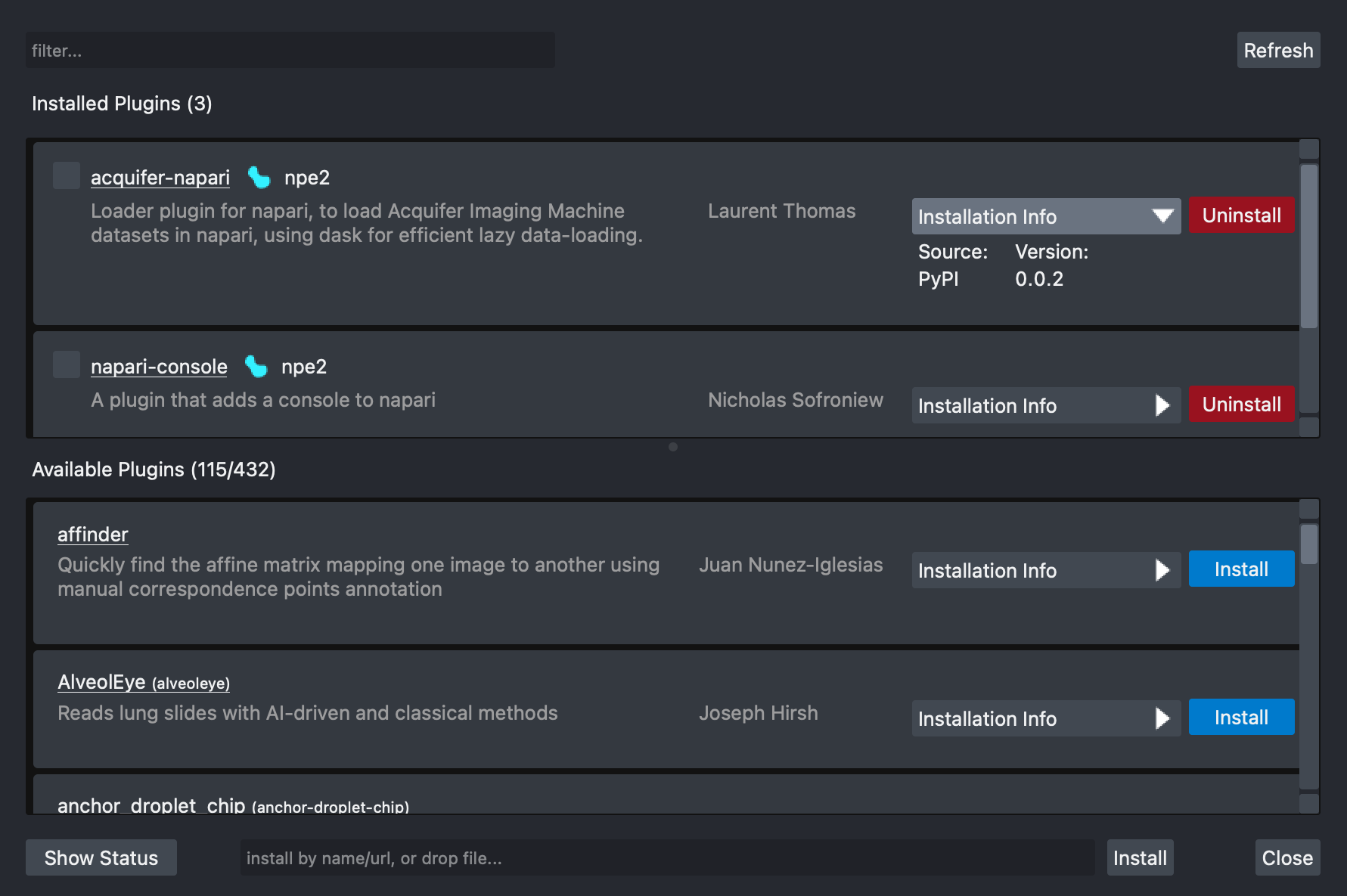
|
|
116
|
+
|
|
117
|
+
`napari-plugin-manager` knows how to detect if napari was installed using `conda` or `pip` and
|
|
118
|
+
provide the appropriate default installer tool on the `Installation Info` dropdown for each plugin.
|
|
119
|
+
|
|
120
|
+
`conda` provides an efficient dependency solver that guarantees the stability and correctness of
|
|
121
|
+
the napari installation and work environment. This is the reason why `conda` is the default tool
|
|
122
|
+
used for the [napari
|
|
123
|
+
bundle](https://napari.org/stable/tutorials/fundamentals/installation_bundle_conda.html), a 1-click
|
|
124
|
+
installer available for Mac, Linux and Windows. This installation method is best if you mainly want
|
|
125
|
+
to use napari as a standalone GUI app. However, certain plugins may not be supported.
|
|
126
|
+
|
|
127
|
+
## Installation
|
|
128
|
+
|
|
129
|
+
### PyPI
|
|
130
|
+
|
|
131
|
+
`napari-plugin-manager` is available through the Python Package Index and can be installed using [pip].
|
|
132
|
+
|
|
133
|
+
```bash
|
|
134
|
+
pip install napari-plugin-manager
|
|
135
|
+
```
|
|
136
|
+
|
|
137
|
+
### Conda
|
|
138
|
+
|
|
139
|
+
`napari-plugin-manager` is also available for install using [conda] through the [conda-forge channel](https://conda-forge.org/docs/#what-is-conda-forge).
|
|
140
|
+
|
|
141
|
+
|
|
142
|
+
```bash
|
|
143
|
+
conda install napari-plugin-manager -c conda-forge
|
|
144
|
+
```
|
|
145
|
+
|
|
146
|
+
## Using the napari plugin manager
|
|
147
|
+
|
|
148
|
+
### Enabling/Disabling plugins
|
|
149
|
+
|
|
150
|
+
Installed plugins found on the current napari installation are displayed on the top list of the UI.
|
|
151
|
+
|
|
152
|
+
Users of napari can choose to enable/disable a specific plugin by checking/unchecking the checkbox
|
|
153
|
+
to the left of each plugin item in the list.
|
|
154
|
+
|
|
155
|
+
### Filtering
|
|
156
|
+
|
|
157
|
+
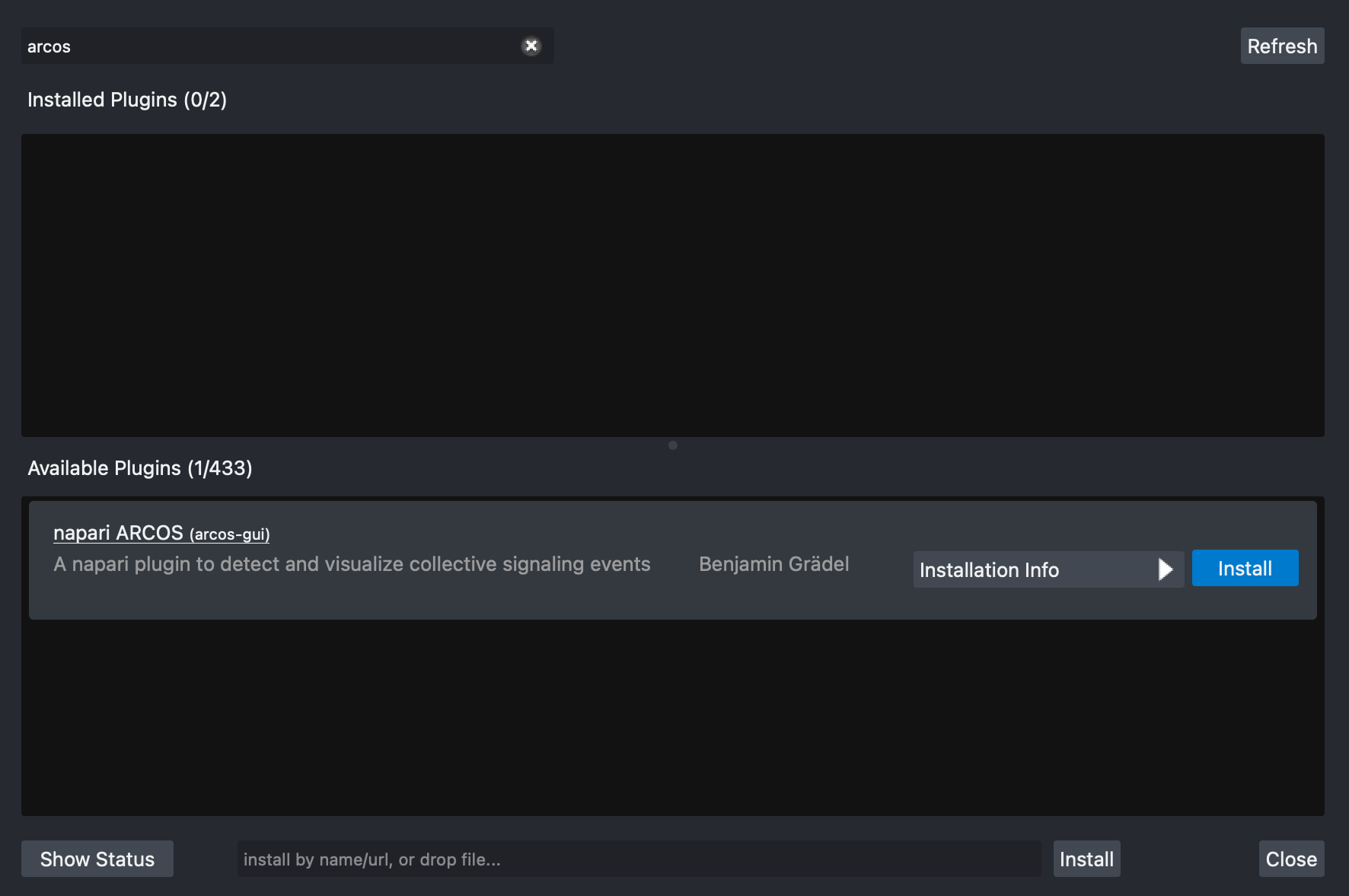
You can filter available plugins by name or description by typing on the search box
|
|
158
|
+
on the top left corner of the UI. Only plugins that match the filter criteria will be shown.
|
|
159
|
+
|
|
160
|
+
In the image below filtering by the word `arcos` yields a single plugin, the
|
|
161
|
+
`arcos-gui` plugin. Notice that plugins that provide a display name, will show
|
|
162
|
+
the package name to the right in parenthesis.
|
|
163
|
+
|
|
164
|
+
|
|
165
|
+
|
|
166
|
+
### Refreshing
|
|
167
|
+
|
|
168
|
+
If a new plugin has been released but it is not available on the list, you can click on the
|
|
169
|
+
`Refresh` button located at the top right corner, to clear the cache and load all newly
|
|
170
|
+
available plugins.
|
|
171
|
+
|
|
172
|
+
### Installing a plugin
|
|
173
|
+
|
|
174
|
+
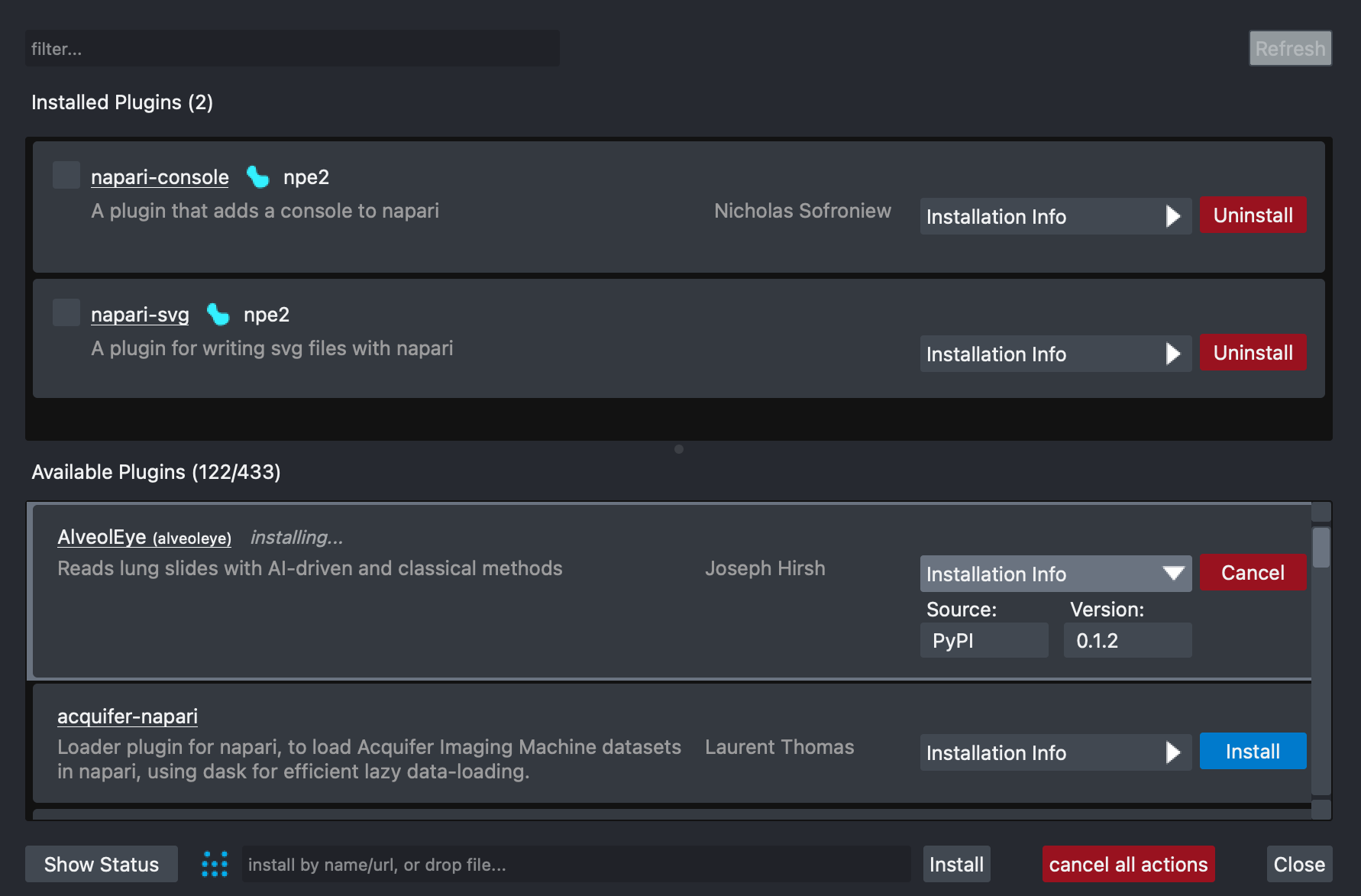
To install a plugin:
|
|
175
|
+
|
|
176
|
+
1. Select it by scrolling the available plugins list on the bottom, or by directly
|
|
177
|
+
filtering by name or description.
|
|
178
|
+
2. Select the tool (`conda` or `pip`) and version on the `Installation Info` dropdown.
|
|
179
|
+
3. Start the installation process by clicking on the `Install` button.
|
|
180
|
+
|
|
181
|
+
You can cancel the process at any time by clicking the `Cancel` button of each plugin.
|
|
182
|
+
|
|
183
|
+
**Note**: Not all napari plugins are currently available on conda via the
|
|
184
|
+
[conda-forge channel](https://anaconda.org/conda-forge/). Some plugins will require
|
|
185
|
+
a restart to be properly configured.
|
|
186
|
+
|
|
187
|
+
|
|
188
|
+
|
|
189
|
+
### Uninstalling a plugin
|
|
190
|
+
|
|
191
|
+
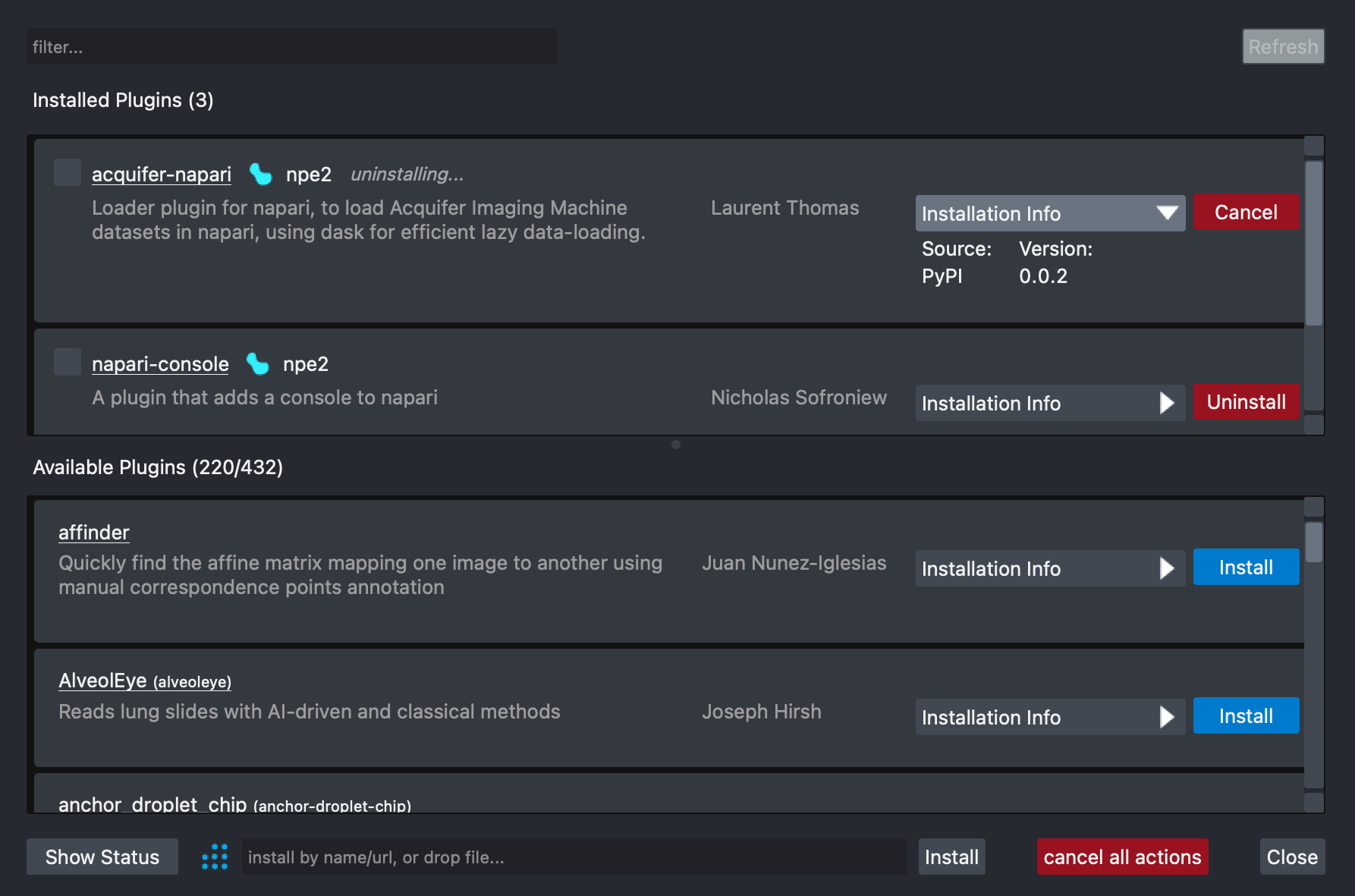
To uninstall a plugin:
|
|
192
|
+
|
|
193
|
+
1. Select it by scrolling the installed plugins list on the top, or by directly
|
|
194
|
+
filtering by name or description.
|
|
195
|
+
2. Start the removal process by clicking on the `Uninstall` button.
|
|
196
|
+
|
|
197
|
+
You can cancel the process at any time by clicking the `Cancel` button of each plugin.
|
|
198
|
+
|
|
199
|
+
**Note**: Some plugins will require a restart to be properly removed.
|
|
200
|
+
|
|
201
|
+
|
|
202
|
+
|
|
203
|
+
### Updating a plugin
|
|
204
|
+
|
|
205
|
+
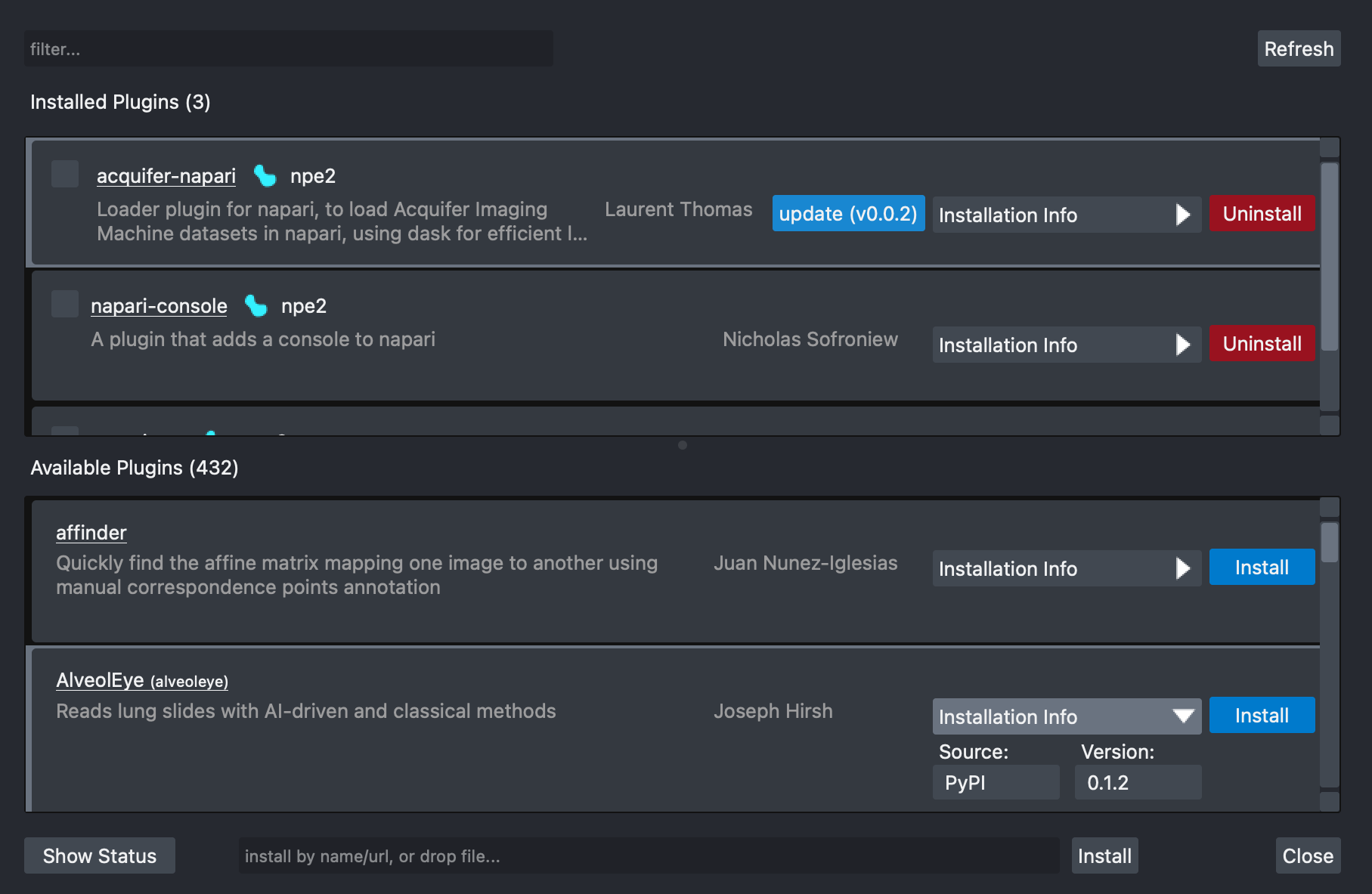
When a new version of an installed plugin is available, an `Update (vX.Y.Z)`
|
|
206
|
+
button will appear to the left of the `Installation Info` dropdown.
|
|
207
|
+
|
|
208
|
+
To update a plugin:
|
|
209
|
+
|
|
210
|
+
1. Select it by scrolling the install plugins list on the top, or by directly
|
|
211
|
+
filtering by name or description.
|
|
212
|
+
2. Start the update process by clicking on the `Update (vX.Y.Z)` button.
|
|
213
|
+
|
|
214
|
+
You can cancel the process at any time by clicking the `Cancel` button of each plugin.
|
|
215
|
+
|
|
216
|
+
|
|
217
|
+
|
|
218
|
+
### Batch actions
|
|
219
|
+
|
|
220
|
+
You don't need wait for one action to finish before you can start another one. You can add more
|
|
221
|
+
tasks to the queue (install/uninstall/update) by clicking on the corresponding action buttons
|
|
222
|
+
plugin by plugin. The actions will be carried out sequentially and in the order in which you
|
|
223
|
+
started them.
|
|
224
|
+
|
|
225
|
+
You can cancel all the started installer actions at any time by clicking `Cancel all`
|
|
226
|
+
button at the bottom of the UI.
|
|
227
|
+
|
|
228
|
+
## Troubleshooting
|
|
229
|
+
|
|
230
|
+
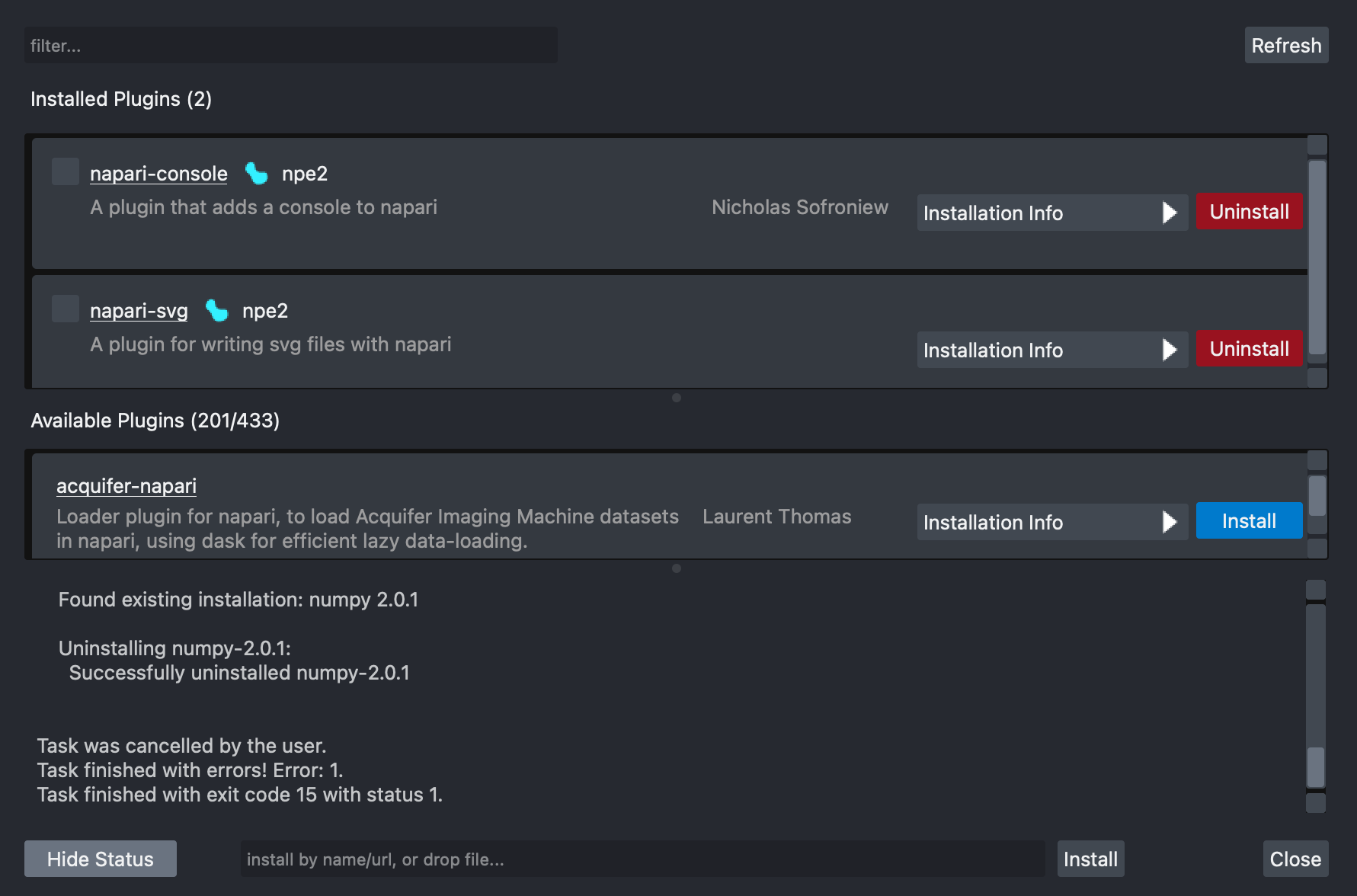
In order to visualize more detailed information on the installer process output, you can
|
|
231
|
+
click on the `Show status` button located at the bottom left corner of the UI. To hide
|
|
232
|
+
this detailed information you can click on the `Hide status` button.
|
|
233
|
+
|
|
234
|
+
Some issues that you might experience when using the installer include:
|
|
235
|
+
|
|
236
|
+
* Incompatible packages due to conflicting dependencies.
|
|
237
|
+
* Network connectivity errors.
|
|
238
|
+
|
|
239
|
+
|
|
240
|
+
|
|
241
|
+
## License
|
|
242
|
+
|
|
243
|
+
Distributed under the terms of the [BSD-3] license, "napari-plugin-manager" is free and open source
|
|
244
|
+
software.
|
|
245
|
+
|
|
246
|
+
## Issues
|
|
247
|
+
|
|
248
|
+
If you encounter any problems, please [file an issue] along with a detailed description.
|
|
249
|
+
|
|
250
|
+
[napari]: https://github.com/napari/napari
|
|
251
|
+
[@napari]: https://github.com/napari
|
|
252
|
+
[BSD-3]: http://opensource.org/licenses/BSD-3-Clause
|
|
253
|
+
[file an issue]: https://github.com/napari/napari-plugin-manager/issues
|
|
254
|
+
[open an issue]: https://github.com/napari/napari-plugin-manager/issues
|
|
255
|
+
[pip]: https://pypi.org/project/pip/
|
|
256
|
+
[conda]: https://conda.org
|
|
257
|
+
[PyPI]: https://pypi.org/
|
|
@@ -0,0 +1,175 @@
|
|
|
1
|
+
# napari-plugin-manager
|
|
2
|
+
|
|
3
|
+
[](https://github.com/napari/napari-plugin-manager/raw/main/LICENSE)
|
|
4
|
+
[](https://pypi.org/project/napari-plugin-manager)
|
|
5
|
+
[](https://python.org)
|
|
6
|
+
[](https://github.com/napari/napari-plugin-manager/actions/workflows/test_and_deploy.yml)
|
|
7
|
+
[](https://codecov.io/gh/napari/napari-plugin-manager)
|
|
8
|
+
|
|
9
|
+
[napari] plugin manager to provide a graphical user interface for installing
|
|
10
|
+
[napari] plugins.
|
|
11
|
+
|
|
12
|
+
You can read the documentation at [napari.org/napari-plugin-manager](https://napari.org/napari-plugin-manager).
|
|
13
|
+
|
|
14
|
+
## Overview
|
|
15
|
+
|
|
16
|
+
The `napari-plugin-manager` used to be part of the [napari] codebase before the 0.5.x release
|
|
17
|
+
series. It's now maintained as a separate project and package to allow uncoupled iterations outside
|
|
18
|
+
of the `napari` release cycle.
|
|
19
|
+
|
|
20
|
+
Future work will allow other applications with a plugin ecosytem to customize and
|
|
21
|
+
use the `plugin-manager`. This package remains under active development and contributions
|
|
22
|
+
are very welcome. Please [open an issue] to discuss potential improvements.
|
|
23
|
+
|
|
24
|
+
This package currently provides:
|
|
25
|
+
|
|
26
|
+
- A package installer process queue that supports both [pip] and [conda] installs.
|
|
27
|
+
- An easy to use GUI for searching, installing, uninstalling and updating plugins that make part of
|
|
28
|
+
the napari ecosystem. Each plugin entry provides a summary and information on the authors that
|
|
29
|
+
created the package. The REST API used to query for plugins and plugin information is provided by
|
|
30
|
+
the [npe2api service](https://api.napari.org).
|
|
31
|
+
- The ability to install other packages via URL of by dragging and dropping artifacts from [PyPI].
|
|
32
|
+
|
|
33
|
+

|
|
34
|
+
|
|
35
|
+
`napari-plugin-manager` knows how to detect if napari was installed using `conda` or `pip` and
|
|
36
|
+
provide the appropriate default installer tool on the `Installation Info` dropdown for each plugin.
|
|
37
|
+
|
|
38
|
+
`conda` provides an efficient dependency solver that guarantees the stability and correctness of
|
|
39
|
+
the napari installation and work environment. This is the reason why `conda` is the default tool
|
|
40
|
+
used for the [napari
|
|
41
|
+
bundle](https://napari.org/stable/tutorials/fundamentals/installation_bundle_conda.html), a 1-click
|
|
42
|
+
installer available for Mac, Linux and Windows. This installation method is best if you mainly want
|
|
43
|
+
to use napari as a standalone GUI app. However, certain plugins may not be supported.
|
|
44
|
+
|
|
45
|
+
## Installation
|
|
46
|
+
|
|
47
|
+
### PyPI
|
|
48
|
+
|
|
49
|
+
`napari-plugin-manager` is available through the Python Package Index and can be installed using [pip].
|
|
50
|
+
|
|
51
|
+
```bash
|
|
52
|
+
pip install napari-plugin-manager
|
|
53
|
+
```
|
|
54
|
+
|
|
55
|
+
### Conda
|
|
56
|
+
|
|
57
|
+
`napari-plugin-manager` is also available for install using [conda] through the [conda-forge channel](https://conda-forge.org/docs/#what-is-conda-forge).
|
|
58
|
+
|
|
59
|
+
|
|
60
|
+
```bash
|
|
61
|
+
conda install napari-plugin-manager -c conda-forge
|
|
62
|
+
```
|
|
63
|
+
|
|
64
|
+
## Using the napari plugin manager
|
|
65
|
+
|
|
66
|
+
### Enabling/Disabling plugins
|
|
67
|
+
|
|
68
|
+
Installed plugins found on the current napari installation are displayed on the top list of the UI.
|
|
69
|
+
|
|
70
|
+
Users of napari can choose to enable/disable a specific plugin by checking/unchecking the checkbox
|
|
71
|
+
to the left of each plugin item in the list.
|
|
72
|
+
|
|
73
|
+
### Filtering
|
|
74
|
+
|
|
75
|
+
You can filter available plugins by name or description by typing on the search box
|
|
76
|
+
on the top left corner of the UI. Only plugins that match the filter criteria will be shown.
|
|
77
|
+
|
|
78
|
+
In the image below filtering by the word `arcos` yields a single plugin, the
|
|
79
|
+
`arcos-gui` plugin. Notice that plugins that provide a display name, will show
|
|
80
|
+
the package name to the right in parenthesis.
|
|
81
|
+
|
|
82
|
+

|
|
83
|
+
|
|
84
|
+
### Refreshing
|
|
85
|
+
|
|
86
|
+
If a new plugin has been released but it is not available on the list, you can click on the
|
|
87
|
+
`Refresh` button located at the top right corner, to clear the cache and load all newly
|
|
88
|
+
available plugins.
|
|
89
|
+
|
|
90
|
+
### Installing a plugin
|
|
91
|
+
|
|
92
|
+
To install a plugin:
|
|
93
|
+
|
|
94
|
+
1. Select it by scrolling the available plugins list on the bottom, or by directly
|
|
95
|
+
filtering by name or description.
|
|
96
|
+
2. Select the tool (`conda` or `pip`) and version on the `Installation Info` dropdown.
|
|
97
|
+
3. Start the installation process by clicking on the `Install` button.
|
|
98
|
+
|
|
99
|
+
You can cancel the process at any time by clicking the `Cancel` button of each plugin.
|
|
100
|
+
|
|
101
|
+
**Note**: Not all napari plugins are currently available on conda via the
|
|
102
|
+
[conda-forge channel](https://anaconda.org/conda-forge/). Some plugins will require
|
|
103
|
+
a restart to be properly configured.
|
|
104
|
+
|
|
105
|
+

|
|
106
|
+
|
|
107
|
+
### Uninstalling a plugin
|
|
108
|
+
|
|
109
|
+
To uninstall a plugin:
|
|
110
|
+
|
|
111
|
+
1. Select it by scrolling the installed plugins list on the top, or by directly
|
|
112
|
+
filtering by name or description.
|
|
113
|
+
2. Start the removal process by clicking on the `Uninstall` button.
|
|
114
|
+
|
|
115
|
+
You can cancel the process at any time by clicking the `Cancel` button of each plugin.
|
|
116
|
+
|
|
117
|
+
**Note**: Some plugins will require a restart to be properly removed.
|
|
118
|
+
|
|
119
|
+

|
|
120
|
+
|
|
121
|
+
### Updating a plugin
|
|
122
|
+
|
|
123
|
+
When a new version of an installed plugin is available, an `Update (vX.Y.Z)`
|
|
124
|
+
button will appear to the left of the `Installation Info` dropdown.
|
|
125
|
+
|
|
126
|
+
To update a plugin:
|
|
127
|
+
|
|
128
|
+
1. Select it by scrolling the install plugins list on the top, or by directly
|
|
129
|
+
filtering by name or description.
|
|
130
|
+
2. Start the update process by clicking on the `Update (vX.Y.Z)` button.
|
|
131
|
+
|
|
132
|
+
You can cancel the process at any time by clicking the `Cancel` button of each plugin.
|
|
133
|
+
|
|
134
|
+

|
|
135
|
+
|
|
136
|
+
### Batch actions
|
|
137
|
+
|
|
138
|
+
You don't need wait for one action to finish before you can start another one. You can add more
|
|
139
|
+
tasks to the queue (install/uninstall/update) by clicking on the corresponding action buttons
|
|
140
|
+
plugin by plugin. The actions will be carried out sequentially and in the order in which you
|
|
141
|
+
started them.
|
|
142
|
+
|
|
143
|
+
You can cancel all the started installer actions at any time by clicking `Cancel all`
|
|
144
|
+
button at the bottom of the UI.
|
|
145
|
+
|
|
146
|
+
## Troubleshooting
|
|
147
|
+
|
|
148
|
+
In order to visualize more detailed information on the installer process output, you can
|
|
149
|
+
click on the `Show status` button located at the bottom left corner of the UI. To hide
|
|
150
|
+
this detailed information you can click on the `Hide status` button.
|
|
151
|
+
|
|
152
|
+
Some issues that you might experience when using the installer include:
|
|
153
|
+
|
|
154
|
+
* Incompatible packages due to conflicting dependencies.
|
|
155
|
+
* Network connectivity errors.
|
|
156
|
+
|
|
157
|
+

|
|
158
|
+
|
|
159
|
+
## License
|
|
160
|
+
|
|
161
|
+
Distributed under the terms of the [BSD-3] license, "napari-plugin-manager" is free and open source
|
|
162
|
+
software.
|
|
163
|
+
|
|
164
|
+
## Issues
|
|
165
|
+
|
|
166
|
+
If you encounter any problems, please [file an issue] along with a detailed description.
|
|
167
|
+
|
|
168
|
+
[napari]: https://github.com/napari/napari
|
|
169
|
+
[@napari]: https://github.com/napari
|
|
170
|
+
[BSD-3]: http://opensource.org/licenses/BSD-3-Clause
|
|
171
|
+
[file an issue]: https://github.com/napari/napari-plugin-manager/issues
|
|
172
|
+
[open an issue]: https://github.com/napari/napari-plugin-manager/issues
|
|
173
|
+
[pip]: https://pypi.org/project/pip/
|
|
174
|
+
[conda]: https://conda.org
|
|
175
|
+
[PyPI]: https://pypi.org/
|