napari-etsam 1.1.0__tar.gz
This diff represents the content of publicly available package versions that have been released to one of the supported registries. The information contained in this diff is provided for informational purposes only and reflects changes between package versions as they appear in their respective public registries.
- napari_etsam-1.1.0/.copier-answers.yml +19 -0
- napari_etsam-1.1.0/.gitignore +84 -0
- napari_etsam-1.1.0/LICENSE +21 -0
- napari_etsam-1.1.0/PKG-INFO +137 -0
- napari_etsam-1.1.0/README.md +101 -0
- napari_etsam-1.1.0/pyproject.toml +104 -0
- napari_etsam-1.1.0/setup.cfg +4 -0
- napari_etsam-1.1.0/src/napari_etsam/__init__.py +8 -0
- napari_etsam-1.1.0/src/napari_etsam/_reader.py +41 -0
- napari_etsam-1.1.0/src/napari_etsam/_version.py +24 -0
- napari_etsam-1.1.0/src/napari_etsam/_widget.py +573 -0
- napari_etsam-1.1.0/src/napari_etsam/_writer.py +33 -0
- napari_etsam-1.1.0/src/napari_etsam/etsam_env.py +257 -0
- napari_etsam-1.1.0/src/napari_etsam/etsam_run.py +218 -0
- napari_etsam-1.1.0/src/napari_etsam/etsam_worker.py +179 -0
- napari_etsam-1.1.0/src/napari_etsam/napari.yaml +34 -0
- napari_etsam-1.1.0/src/napari_etsam.egg-info/PKG-INFO +137 -0
- napari_etsam-1.1.0/src/napari_etsam.egg-info/SOURCES.txt +22 -0
- napari_etsam-1.1.0/src/napari_etsam.egg-info/dependency_links.txt +1 -0
- napari_etsam-1.1.0/src/napari_etsam.egg-info/entry_points.txt +2 -0
- napari_etsam-1.1.0/src/napari_etsam.egg-info/requires.txt +7 -0
- napari_etsam-1.1.0/src/napari_etsam.egg-info/scm_file_list.json +17 -0
- napari_etsam-1.1.0/src/napari_etsam.egg-info/scm_version.json +8 -0
- napari_etsam-1.1.0/src/napari_etsam.egg-info/top_level.txt +1 -0
|
@@ -0,0 +1,19 @@
|
|
|
1
|
+
# Changes here will be overwritten by Copier; NEVER EDIT MANUALLY
|
|
2
|
+
_commit: 21ac40a
|
|
3
|
+
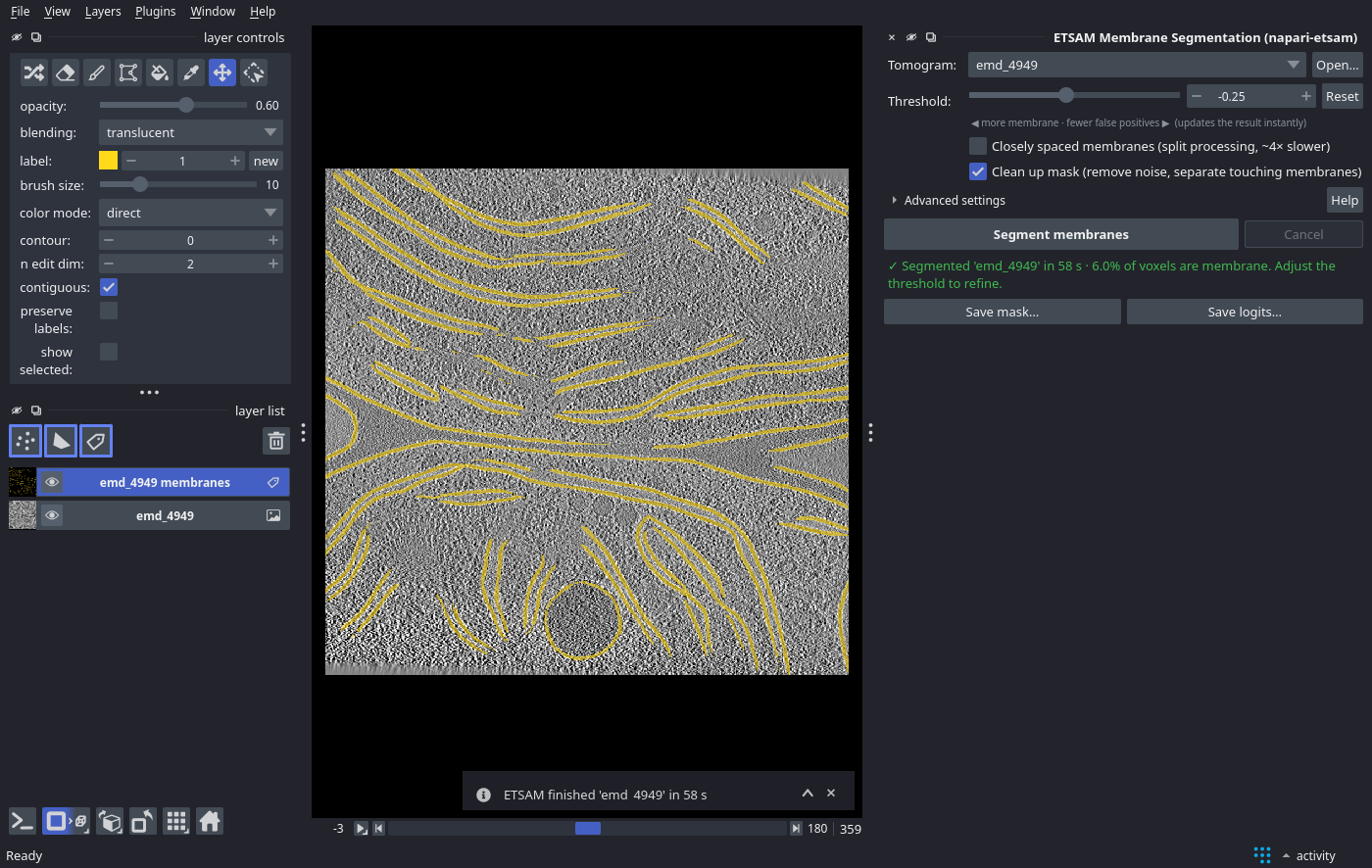
_src_path: gh:napari/napari-plugin-template
|
|
4
|
+
display_name: napari-etsam
|
|
5
|
+
email: jsbrq@missouri.edu
|
|
6
|
+
full_name: Joel Selvaraj
|
|
7
|
+
github_repository_url: provide later
|
|
8
|
+
github_username_or_organization: jianlin-cheng
|
|
9
|
+
include_reader_plugin: true
|
|
10
|
+
include_sample_data_plugin: false
|
|
11
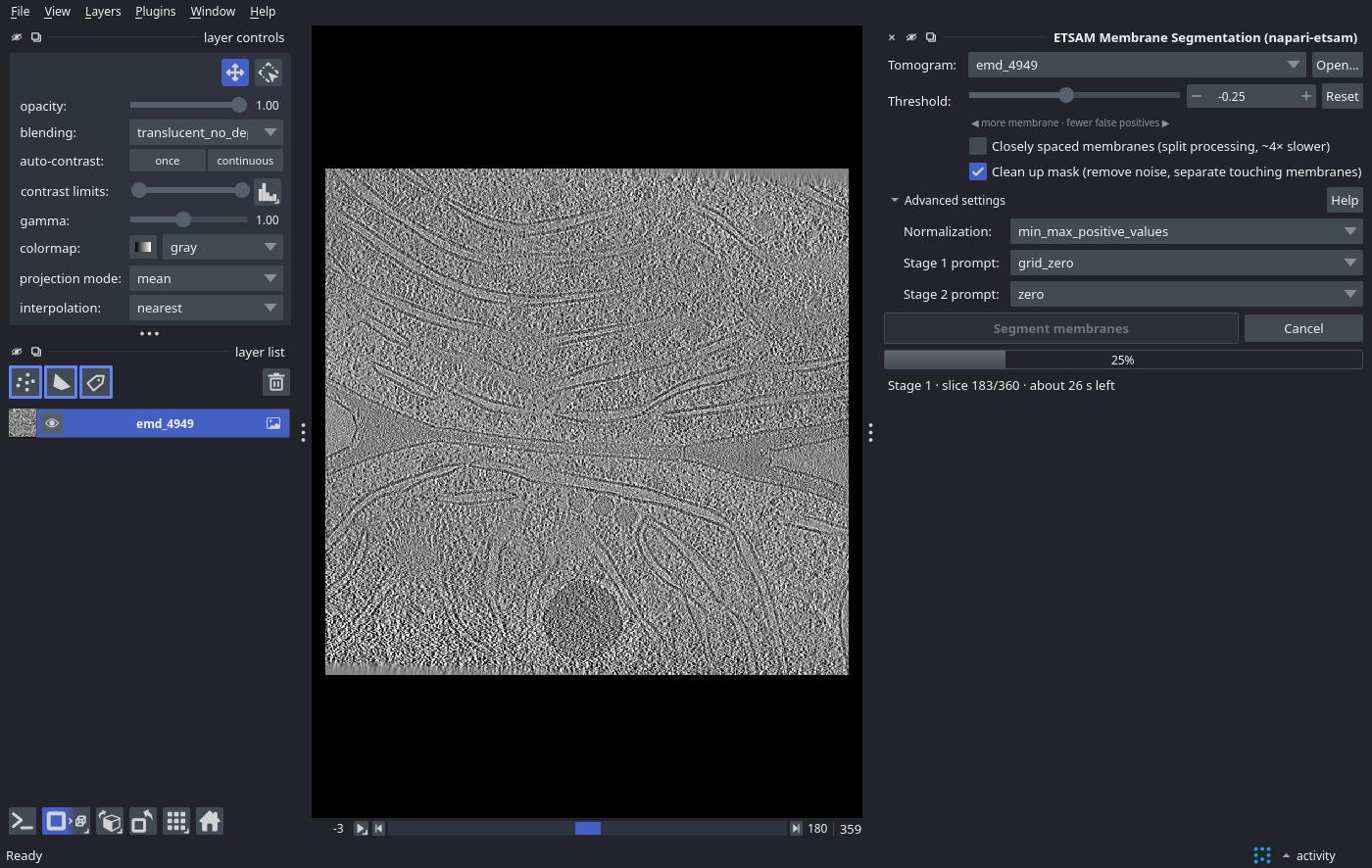
|
+
include_widget_plugin: true
|
|
12
|
+
include_writer_plugin: true
|
|
13
|
+
install_dependabot: false
|
|
14
|
+
install_precommit: false
|
|
15
|
+
license: MIT
|
|
16
|
+
module_name: napari_etsam
|
|
17
|
+
plugin_name: napari-etsam
|
|
18
|
+
short_description: Segment cell membranes in cryo-ET tomograms with ETSAM, inside
|
|
19
|
+
napari
|
|
@@ -0,0 +1,84 @@
|
|
|
1
|
+
# Byte-compiled / optimized / DLL files
|
|
2
|
+
__pycache__/
|
|
3
|
+
*.py[cod]
|
|
4
|
+
*$py.class
|
|
5
|
+
|
|
6
|
+
# C extensions
|
|
7
|
+
*.so
|
|
8
|
+
|
|
9
|
+
# Distribution / packaging
|
|
10
|
+
.Python
|
|
11
|
+
env/
|
|
12
|
+
build/
|
|
13
|
+
develop-eggs/
|
|
14
|
+
dist/
|
|
15
|
+
downloads/
|
|
16
|
+
eggs/
|
|
17
|
+
.eggs/
|
|
18
|
+
lib/
|
|
19
|
+
lib64/
|
|
20
|
+
parts/
|
|
21
|
+
sdist/
|
|
22
|
+
var/
|
|
23
|
+
*.egg-info/
|
|
24
|
+
.installed.cfg
|
|
25
|
+
*.egg
|
|
26
|
+
|
|
27
|
+
# PyInstaller
|
|
28
|
+
# Usually these files are written by a python script from a template
|
|
29
|
+
# before PyInstaller builds the exe, so as to inject date/other infos into it.
|
|
30
|
+
*.manifest
|
|
31
|
+
*.spec
|
|
32
|
+
|
|
33
|
+
# Installer logs
|
|
34
|
+
pip-log.txt
|
|
35
|
+
pip-delete-this-directory.txt
|
|
36
|
+
|
|
37
|
+
# Unit test / coverage reports
|
|
38
|
+
htmlcov/
|
|
39
|
+
.tox/
|
|
40
|
+
.coverage
|
|
41
|
+
.coverage.*
|
|
42
|
+
.cache
|
|
43
|
+
nosetests.xml
|
|
44
|
+
coverage.xml
|
|
45
|
+
*,cover
|
|
46
|
+
.hypothesis/
|
|
47
|
+
.napari_cache
|
|
48
|
+
|
|
49
|
+
# Translations
|
|
50
|
+
*.mo
|
|
51
|
+
*.pot
|
|
52
|
+
|
|
53
|
+
# Django stuff:
|
|
54
|
+
*.log
|
|
55
|
+
local_settings.py
|
|
56
|
+
|
|
57
|
+
# Flask instance folder
|
|
58
|
+
instance/
|
|
59
|
+
|
|
60
|
+
# Sphinx documentation
|
|
61
|
+
docs/_build/
|
|
62
|
+
|
|
63
|
+
# MkDocs documentation
|
|
64
|
+
/site/
|
|
65
|
+
|
|
66
|
+
# PyBuilder
|
|
67
|
+
target/
|
|
68
|
+
|
|
69
|
+
# Pycharm and VSCode
|
|
70
|
+
.idea/
|
|
71
|
+
venv/
|
|
72
|
+
.vscode/
|
|
73
|
+
|
|
74
|
+
# IPython Notebook
|
|
75
|
+
.ipynb_checkpoints
|
|
76
|
+
|
|
77
|
+
# pyenv
|
|
78
|
+
.python-version
|
|
79
|
+
|
|
80
|
+
# OS
|
|
81
|
+
.DS_Store
|
|
82
|
+
|
|
83
|
+
# written by setuptools_scm
|
|
84
|
+
**/_version.py
|
|
@@ -0,0 +1,21 @@
|
|
|
1
|
+
MIT License
|
|
2
|
+
|
|
3
|
+
Copyright (c) 2025 Jianlin Cheng
|
|
4
|
+
|
|
5
|
+
Permission is hereby granted, free of charge, to any person obtaining a copy
|
|
6
|
+
of this software and associated documentation files (the "Software"), to deal
|
|
7
|
+
in the Software without restriction, including without limitation the rights
|
|
8
|
+
to use, copy, modify, merge, publish, distribute, sublicense, and/or sell
|
|
9
|
+
copies of the Software, and to permit persons to whom the Software is
|
|
10
|
+
furnished to do so, subject to the following conditions:
|
|
11
|
+
|
|
12
|
+
The above copyright notice and this permission notice shall be included in all
|
|
13
|
+
copies or substantial portions of the Software.
|
|
14
|
+
|
|
15
|
+
THE SOFTWARE IS PROVIDED "AS IS", WITHOUT WARRANTY OF ANY KIND, EXPRESS OR
|
|
16
|
+
IMPLIED, INCLUDING BUT NOT LIMITED TO THE WARRANTIES OF MERCHANTABILITY,
|
|
17
|
+
FITNESS FOR A PARTICULAR PURPOSE AND NONINFRINGEMENT. IN NO EVENT SHALL THE
|
|
18
|
+
AUTHORS OR COPYRIGHT HOLDERS BE LIABLE FOR ANY CLAIM, DAMAGES OR OTHER
|
|
19
|
+
LIABILITY, WHETHER IN AN ACTION OF CONTRACT, TORT OR OTHERWISE, ARISING FROM,
|
|
20
|
+
OUT OF OR IN CONNECTION WITH THE SOFTWARE OR THE USE OR OTHER DEALINGS IN THE
|
|
21
|
+
SOFTWARE.
|
|
@@ -0,0 +1,137 @@
|
|
|
1
|
+
Metadata-Version: 2.4
|
|
2
|
+
Name: napari-etsam
|
|
3
|
+
Version: 1.1.0
|
|
4
|
+
Summary: Segment cell membranes in cryo-ET tomograms with ETSAM, inside napari
|
|
5
|
+
Author-email: Joel Selvaraj <jsbrq@missouri.edu>
|
|
6
|
+
License-Expression: MIT
|
|
7
|
+
Project-URL: Homepage, https://github.com/jianlin-cheng/ETSAM
|
|
8
|
+
Project-URL: Documentation, https://jianlin-cheng.github.io/ETSAM/napari/
|
|
9
|
+
Project-URL: Bug Tracker, https://github.com/jianlin-cheng/ETSAM/issues
|
|
10
|
+
Project-URL: Source Code, https://github.com/jianlin-cheng/ETSAM/tree/main/external_plugins/napari-etsam
|
|
11
|
+
Keywords: napari,cryo-ET,tomography,membrane segmentation,SAM2
|
|
12
|
+
Classifier: Development Status :: 4 - Beta
|
|
13
|
+
Classifier: Framework :: napari
|
|
14
|
+
Classifier: Intended Audience :: Science/Research
|
|
15
|
+
Classifier: Operating System :: POSIX :: Linux
|
|
16
|
+
Classifier: Operating System :: Microsoft :: Windows
|
|
17
|
+
Classifier: Programming Language :: Python
|
|
18
|
+
Classifier: Programming Language :: Python :: 3
|
|
19
|
+
Classifier: Programming Language :: Python :: 3 :: Only
|
|
20
|
+
Classifier: Programming Language :: Python :: 3.11
|
|
21
|
+
Classifier: Programming Language :: Python :: 3.12
|
|
22
|
+
Classifier: Programming Language :: Python :: 3.13
|
|
23
|
+
Classifier: Programming Language :: Python :: 3.14
|
|
24
|
+
Classifier: Topic :: Scientific/Engineering :: Bio-Informatics
|
|
25
|
+
Classifier: Topic :: Scientific/Engineering :: Image Processing
|
|
26
|
+
Requires-Python: >=3.11
|
|
27
|
+
Description-Content-Type: text/markdown
|
|
28
|
+
License-File: LICENSE
|
|
29
|
+
Requires-Dist: mrcfile>=1.5
|
|
30
|
+
Requires-Dist: numpy
|
|
31
|
+
Requires-Dist: qtpy
|
|
32
|
+
Requires-Dist: superqt>=0.6
|
|
33
|
+
Provides-Extra: all
|
|
34
|
+
Requires-Dist: napari[all]; extra == "all"
|
|
35
|
+
Dynamic: license-file
|
|
36
|
+
|
|
37
|
+
# ETSAM Plugin for napari
|
|
38
|
+
|
|
39
|
+
The **napari-etsam** plugin runs ETSAM inside [napari](https://napari.org), a free image viewer for multi-dimensional data. You open a tomogram, install and activate plugin, click **Segment membranes**. The membrane mask appears as an new label layer that you can refine, inspect and save.
|
|
40
|
+
|
|
41
|
+
> **Note**
|
|
42
|
+
> On first start, the plugin installs ETSAM in its own environment (if not already installed using the [ETSAM installer](https://jianlin-cheng.github.io/ETSAM/installation)).
|
|
43
|
+
|
|
44
|
+
|
|
45
|
+
|
|
46
|
+
*ETSAM membrane mask (yellow) on EMD-4949 in napari, with the ETSAM panel on the right.*
|
|
47
|
+
|
|
48
|
+
## Requirements
|
|
49
|
+
|
|
50
|
+
| | Minimum | Recommended |
|
|
51
|
+
| --- | --- | --- |
|
|
52
|
+
| GPU | NVIDIA GPU with 2 GB VRAM | NVIDIA GPU with 4 GB+ VRAM |
|
|
53
|
+
| RAM | 16 GB | 32 GB |
|
|
54
|
+
| Operating system | **Linux or Windows, with an NVIDIA GPU** | |
|
|
55
|
+
|
|
56
|
+
## Installation
|
|
57
|
+
|
|
58
|
+
### 1. Install the plugin
|
|
59
|
+
|
|
60
|
+
**From napari (recommended):**
|
|
61
|
+
|
|
62
|
+
1. Install napari if you don't have it yet. The [napari bundle](https://napari.org/stable/tutorials/fundamentals/installation_bundle_conda.html) is the easiest option.
|
|
63
|
+
2. In napari, open **Plugins ▸ Install/Uninstall Plugins…**.
|
|
64
|
+
3. Search for **ETSAM**, click **Install** next to *napari-etsam*, and restart napari.
|
|
65
|
+
|
|
66
|
+
**With pip**, in napari's Python environment:
|
|
67
|
+
|
|
68
|
+
```bash
|
|
69
|
+
pip install napari-etsam
|
|
70
|
+
```
|
|
71
|
+
|
|
72
|
+
> **Tip**
|
|
73
|
+
> To install the plugin from a checkout of the [ETSAM repository](https://github.com/jianlin-cheng/ETSAM) instead, use the Python of napari's environment:
|
|
74
|
+
>
|
|
75
|
+
> ```bash
|
|
76
|
+
> /path/to/napari/python -m pip install ./ETSAM/external_plugins/napari-etsam
|
|
77
|
+
> ```
|
|
78
|
+
|
|
79
|
+
### 2. First start: ETSAM is installed for you
|
|
80
|
+
|
|
81
|
+
ETSAM itself runs in its own environment, separate from napari. When you first open the ETSAM panel, the plugin looks for it and, if it is not installed yet, runs the [ETSAM installer](https://jianlin-cheng.github.io/ETSAM/installation/#method-1-etsam-installer-recommended) in the background. The installer puts ETSAM into `~/etsam_env` (on Windows, `%USERPROFILE%\etsam_env`) and sets up the conda environment and the model weights (about 5 GB in total), so this takes a few minutes; the panel shows its progress. Subsequent use starts are immediate.
|
|
82
|
+
|
|
83
|
+
## Segmenting a Tomogram
|
|
84
|
+
|
|
85
|
+
1. **Open the panel**: **Plugins ▸ ETSAM Membrane Segmentation (napari-etsam)**.
|
|
86
|
+
2. **Open a tomogram**: drag and drop an `.mrc` file onto napari, or click **Open…** in the panel. The new layer is selected as the *Tomogram* automatically.
|
|
87
|
+
3. Optionally, tick **Clean up mask** or **Closely spaced membranes** (see [Options](#options)).
|
|
88
|
+
4. Click **Segment membranes**. The progress bar follows ETSAM through Stage 1 and Stage 2 slice by slice, then through clean-up. Click **Cancel** to stop at any time.
|
|
89
|
+
|
|
90
|
+
|
|
91
|
+
|
|
92
|
+
*Progress is reported per slice for each stage, with an estimate of the time remaining.*
|
|
93
|
+
|
|
94
|
+
5. When finished, a **`<tomogram> membranes`** label layer is added on top of the tomogram, and the panel shows the run time and the fraction of voxels classified as membrane.
|
|
95
|
+
6. **Refine**: move the **Threshold** slider. The mask updates instantly, and clean-up is re-applied in the background if enabled. Lower values find more (and fainter) membrane; higher values give fewer false positives. **Reset** returns to the default `-0.25`. You can also correct the mask by hand with napari's label tools (paint, erase, fill).
|
|
96
|
+
7. **Save**: click **Save mask…** (the mask at the current threshold, including manual edits) or **Save logits…** (raw membrane scores). Files are written as `.mrc` with the tomogram's voxel size, so they overlay directly in ChimeraX, IMOD or other tools. *File ▸ Save Selected Layers…* with a `.mrc` file name works too.
|
|
97
|
+
|
|
98
|
+
## Options
|
|
99
|
+
|
|
100
|
+
The main options are in the panel. The rest are under **Advanced settings**.
|
|
101
|
+
|
|
102
|
+
<img src="https://raw.githubusercontent.com/jianlin-cheng/ETSAM/main/docs/public/napari/napari-advanced.png" alt="ETSAM advanced settings in napari" width="420">
|
|
103
|
+
|
|
104
|
+
| Option | Command-line equivalent | Description |
|
|
105
|
+
| --- | --- | --- |
|
|
106
|
+
| Threshold | `--logit-threshold` | Binarization threshold of the Stage 2 logits (default `-0.25`). Adjustable live after a run. |
|
|
107
|
+
| Closely spaced membranes | `--split-processing` | Segments the four Y/X quadrants separately with a denser prompt grid; separates closely apposed membranes. About 4× slower. |
|
|
108
|
+
| Clean up mask | `--post-process` | Removes thin noise blobs and cuts short bridges between parallel membranes, with the default [post-processing](https://jianlin-cheng.github.io/ETSAM/advanced/#post-processing-with-etsam-postprocess) settings. Compare with the raw result, because it can remove small real membranes. |
|
|
109
|
+
| Normalization | `--normalize-method` | Try *Softplus* if membranes are missed with the default. |
|
|
110
|
+
| Stage 1 / Stage 2 prompt | `--stage1-prompt`, `--stage2-prompt` | Prompting strategies; see [Advanced Usage](https://jianlin-cheng.github.io/ETSAM/advanced/#prompt-methods). |
|
|
111
|
+
|
|
112
|
+
The plugin and the `etsam` command produce the same results for the same settings.
|
|
113
|
+
|
|
114
|
+
## Troubleshooting
|
|
115
|
+
|
|
116
|
+
When something goes wrong, the panel shows a red box with the problem and a suggested fix. **Show details** displays the full error, and **Copy error report** copies it with your system information (versions, GPU) for a [GitHub issue](https://github.com/jianlin-cheng/ETSAM/issues).
|
|
117
|
+
|
|
118
|
+
<img src="https://raw.githubusercontent.com/jianlin-cheng/ETSAM/main/docs/public/napari/napari-error.png" alt="ETSAM error panel in napari" width="420">
|
|
119
|
+
|
|
120
|
+
| Message | What to do |
|
|
121
|
+
| --- | --- |
|
|
122
|
+
| *No tomogram selected* | Open an `.mrc` file first (drag and drop, *File ▸ Open* or **Open…**). |
|
|
123
|
+
| *This layer cannot be segmented* | ETSAM needs a single 3D grayscale volume (Z, Y, X). Select the tomogram layer rather than a 2D image, RGB image or a time series. |
|
|
124
|
+
| *Installing ETSAM failed: … requires an NVIDIA GPU* | The installer supports NVIDIA GPUs only. Install ETSAM yourself as described in [Installation](https://jianlin-cheng.github.io/ETSAM/installation/#method-2-conda-environment-from-source). |
|
|
125
|
+
| *Installing ETSAM failed: … the folder already exists* | An earlier installation was interrupted. Delete the `etsam` folder in your home folder and reopen the panel. |
|
|
126
|
+
| *ETSAM is not installed* | This computer is not supported by the installer. Install ETSAM yourself (see [Installation](#installation)), or set `ETSAM_PYTHON`. |
|
|
127
|
+
| *ETSAM is not installed in the environment …* | That environment lacks ETSAM. Run step 3 of the conda installation (`pip install --no-deps -e .` in the ETSAM folder). |
|
|
128
|
+
| *Running on CPU (no GPU: this will be slow)* although the computer has an NVIDIA GPU | Update the NVIDIA driver, and check that PyTorch in the `etsam` environment can use the GPU (see [Verify the Installation](https://jianlin-cheng.github.io/ETSAM/installation/#4-verify-the-installation)). |
|
|
129
|
+
| *The GPU is busy* | Another program keeps ETSAM from using the GPU. Close other programs that use the GPU, or restart napari. |
|
|
130
|
+
| *Out of memory* | Close other programs (especially ones using the GPU) and try again, or bin the tomogram (fewer slices need less RAM). |
|
|
131
|
+
| *Could not download the ETSAM model weights* | Check your internet connection or proxy and retry. Offline machines: copy `etsam_stage1_v1.pt` and `etsam_stage2_v1.pt` into the weights folder (see [Model Weights](https://jianlin-cheng.github.io/ETSAM/installation/)). |
|
|
132
|
+
| Empty or incomplete mask | Lower the threshold, try *Softplus* normalization, a `grid` Stage 1 prompt, or *Closely spaced membranes*. See [Troubleshooting](https://jianlin-cheng.github.io/ETSAM/troubleshooting/#empty-or-incomplete-membrane-predictions). |
|
|
133
|
+
| *ETSAM stopped unexpectedly* | Report it with **Copy error report**. |
|
|
134
|
+
|
|
135
|
+
## Uninstalling
|
|
136
|
+
|
|
137
|
+
Remove the plugin with **Plugins ▸ Install/Uninstall Plugins ▸ napari-etsam ▸ Uninstall**, or `pip uninstall napari-etsam`. To remove ETSAM completely, refer uninstall section in [Installation](https://jianlin-cheng.github.io/ETSAM/installation/#3-uninstall-etsam) guide.
|
|
@@ -0,0 +1,101 @@
|
|
|
1
|
+
# ETSAM Plugin for napari
|
|
2
|
+
|
|
3
|
+
The **napari-etsam** plugin runs ETSAM inside [napari](https://napari.org), a free image viewer for multi-dimensional data. You open a tomogram, install and activate plugin, click **Segment membranes**. The membrane mask appears as an new label layer that you can refine, inspect and save.
|
|
4
|
+
|
|
5
|
+
> **Note**
|
|
6
|
+
> On first start, the plugin installs ETSAM in its own environment (if not already installed using the [ETSAM installer](https://jianlin-cheng.github.io/ETSAM/installation)).
|
|
7
|
+
|
|
8
|
+

|
|
9
|
+
|
|
10
|
+
*ETSAM membrane mask (yellow) on EMD-4949 in napari, with the ETSAM panel on the right.*
|
|
11
|
+
|
|
12
|
+
## Requirements
|
|
13
|
+
|
|
14
|
+
| | Minimum | Recommended |
|
|
15
|
+
| --- | --- | --- |
|
|
16
|
+
| GPU | NVIDIA GPU with 2 GB VRAM | NVIDIA GPU with 4 GB+ VRAM |
|
|
17
|
+
| RAM | 16 GB | 32 GB |
|
|
18
|
+
| Operating system | **Linux or Windows, with an NVIDIA GPU** | |
|
|
19
|
+
|
|
20
|
+
## Installation
|
|
21
|
+
|
|
22
|
+
### 1. Install the plugin
|
|
23
|
+
|
|
24
|
+
**From napari (recommended):**
|
|
25
|
+
|
|
26
|
+
1. Install napari if you don't have it yet. The [napari bundle](https://napari.org/stable/tutorials/fundamentals/installation_bundle_conda.html) is the easiest option.
|
|
27
|
+
2. In napari, open **Plugins ▸ Install/Uninstall Plugins…**.
|
|
28
|
+
3. Search for **ETSAM**, click **Install** next to *napari-etsam*, and restart napari.
|
|
29
|
+
|
|
30
|
+
**With pip**, in napari's Python environment:
|
|
31
|
+
|
|
32
|
+
```bash
|
|
33
|
+
pip install napari-etsam
|
|
34
|
+
```
|
|
35
|
+
|
|
36
|
+
> **Tip**
|
|
37
|
+
> To install the plugin from a checkout of the [ETSAM repository](https://github.com/jianlin-cheng/ETSAM) instead, use the Python of napari's environment:
|
|
38
|
+
>
|
|
39
|
+
> ```bash
|
|
40
|
+
> /path/to/napari/python -m pip install ./ETSAM/external_plugins/napari-etsam
|
|
41
|
+
> ```
|
|
42
|
+
|
|
43
|
+
### 2. First start: ETSAM is installed for you
|
|
44
|
+
|
|
45
|
+
ETSAM itself runs in its own environment, separate from napari. When you first open the ETSAM panel, the plugin looks for it and, if it is not installed yet, runs the [ETSAM installer](https://jianlin-cheng.github.io/ETSAM/installation/#method-1-etsam-installer-recommended) in the background. The installer puts ETSAM into `~/etsam_env` (on Windows, `%USERPROFILE%\etsam_env`) and sets up the conda environment and the model weights (about 5 GB in total), so this takes a few minutes; the panel shows its progress. Subsequent use starts are immediate.
|
|
46
|
+
|
|
47
|
+
## Segmenting a Tomogram
|
|
48
|
+
|
|
49
|
+
1. **Open the panel**: **Plugins ▸ ETSAM Membrane Segmentation (napari-etsam)**.
|
|
50
|
+
2. **Open a tomogram**: drag and drop an `.mrc` file onto napari, or click **Open…** in the panel. The new layer is selected as the *Tomogram* automatically.
|
|
51
|
+
3. Optionally, tick **Clean up mask** or **Closely spaced membranes** (see [Options](#options)).
|
|
52
|
+
4. Click **Segment membranes**. The progress bar follows ETSAM through Stage 1 and Stage 2 slice by slice, then through clean-up. Click **Cancel** to stop at any time.
|
|
53
|
+
|
|
54
|
+

|
|
55
|
+
|
|
56
|
+
*Progress is reported per slice for each stage, with an estimate of the time remaining.*
|
|
57
|
+
|
|
58
|
+
5. When finished, a **`<tomogram> membranes`** label layer is added on top of the tomogram, and the panel shows the run time and the fraction of voxels classified as membrane.
|
|
59
|
+
6. **Refine**: move the **Threshold** slider. The mask updates instantly, and clean-up is re-applied in the background if enabled. Lower values find more (and fainter) membrane; higher values give fewer false positives. **Reset** returns to the default `-0.25`. You can also correct the mask by hand with napari's label tools (paint, erase, fill).
|
|
60
|
+
7. **Save**: click **Save mask…** (the mask at the current threshold, including manual edits) or **Save logits…** (raw membrane scores). Files are written as `.mrc` with the tomogram's voxel size, so they overlay directly in ChimeraX, IMOD or other tools. *File ▸ Save Selected Layers…* with a `.mrc` file name works too.
|
|
61
|
+
|
|
62
|
+
## Options
|
|
63
|
+
|
|
64
|
+
The main options are in the panel. The rest are under **Advanced settings**.
|
|
65
|
+
|
|
66
|
+
<img src="https://raw.githubusercontent.com/jianlin-cheng/ETSAM/main/docs/public/napari/napari-advanced.png" alt="ETSAM advanced settings in napari" width="420">
|
|
67
|
+
|
|
68
|
+
| Option | Command-line equivalent | Description |
|
|
69
|
+
| --- | --- | --- |
|
|
70
|
+
| Threshold | `--logit-threshold` | Binarization threshold of the Stage 2 logits (default `-0.25`). Adjustable live after a run. |
|
|
71
|
+
| Closely spaced membranes | `--split-processing` | Segments the four Y/X quadrants separately with a denser prompt grid; separates closely apposed membranes. About 4× slower. |
|
|
72
|
+
| Clean up mask | `--post-process` | Removes thin noise blobs and cuts short bridges between parallel membranes, with the default [post-processing](https://jianlin-cheng.github.io/ETSAM/advanced/#post-processing-with-etsam-postprocess) settings. Compare with the raw result, because it can remove small real membranes. |
|
|
73
|
+
| Normalization | `--normalize-method` | Try *Softplus* if membranes are missed with the default. |
|
|
74
|
+
| Stage 1 / Stage 2 prompt | `--stage1-prompt`, `--stage2-prompt` | Prompting strategies; see [Advanced Usage](https://jianlin-cheng.github.io/ETSAM/advanced/#prompt-methods). |
|
|
75
|
+
|
|
76
|
+
The plugin and the `etsam` command produce the same results for the same settings.
|
|
77
|
+
|
|
78
|
+
## Troubleshooting
|
|
79
|
+
|
|
80
|
+
When something goes wrong, the panel shows a red box with the problem and a suggested fix. **Show details** displays the full error, and **Copy error report** copies it with your system information (versions, GPU) for a [GitHub issue](https://github.com/jianlin-cheng/ETSAM/issues).
|
|
81
|
+
|
|
82
|
+
<img src="https://raw.githubusercontent.com/jianlin-cheng/ETSAM/main/docs/public/napari/napari-error.png" alt="ETSAM error panel in napari" width="420">
|
|
83
|
+
|
|
84
|
+
| Message | What to do |
|
|
85
|
+
| --- | --- |
|
|
86
|
+
| *No tomogram selected* | Open an `.mrc` file first (drag and drop, *File ▸ Open* or **Open…**). |
|
|
87
|
+
| *This layer cannot be segmented* | ETSAM needs a single 3D grayscale volume (Z, Y, X). Select the tomogram layer rather than a 2D image, RGB image or a time series. |
|
|
88
|
+
| *Installing ETSAM failed: … requires an NVIDIA GPU* | The installer supports NVIDIA GPUs only. Install ETSAM yourself as described in [Installation](https://jianlin-cheng.github.io/ETSAM/installation/#method-2-conda-environment-from-source). |
|
|
89
|
+
| *Installing ETSAM failed: … the folder already exists* | An earlier installation was interrupted. Delete the `etsam` folder in your home folder and reopen the panel. |
|
|
90
|
+
| *ETSAM is not installed* | This computer is not supported by the installer. Install ETSAM yourself (see [Installation](#installation)), or set `ETSAM_PYTHON`. |
|
|
91
|
+
| *ETSAM is not installed in the environment …* | That environment lacks ETSAM. Run step 3 of the conda installation (`pip install --no-deps -e .` in the ETSAM folder). |
|
|
92
|
+
| *Running on CPU (no GPU: this will be slow)* although the computer has an NVIDIA GPU | Update the NVIDIA driver, and check that PyTorch in the `etsam` environment can use the GPU (see [Verify the Installation](https://jianlin-cheng.github.io/ETSAM/installation/#4-verify-the-installation)). |
|
|
93
|
+
| *The GPU is busy* | Another program keeps ETSAM from using the GPU. Close other programs that use the GPU, or restart napari. |
|
|
94
|
+
| *Out of memory* | Close other programs (especially ones using the GPU) and try again, or bin the tomogram (fewer slices need less RAM). |
|
|
95
|
+
| *Could not download the ETSAM model weights* | Check your internet connection or proxy and retry. Offline machines: copy `etsam_stage1_v1.pt` and `etsam_stage2_v1.pt` into the weights folder (see [Model Weights](https://jianlin-cheng.github.io/ETSAM/installation/)). |
|
|
96
|
+
| Empty or incomplete mask | Lower the threshold, try *Softplus* normalization, a `grid` Stage 1 prompt, or *Closely spaced membranes*. See [Troubleshooting](https://jianlin-cheng.github.io/ETSAM/troubleshooting/#empty-or-incomplete-membrane-predictions). |
|
|
97
|
+
| *ETSAM stopped unexpectedly* | Report it with **Copy error report**. |
|
|
98
|
+
|
|
99
|
+
## Uninstalling
|
|
100
|
+
|
|
101
|
+
Remove the plugin with **Plugins ▸ Install/Uninstall Plugins ▸ napari-etsam ▸ Uninstall**, or `pip uninstall napari-etsam`. To remove ETSAM completely, refer uninstall section in [Installation](https://jianlin-cheng.github.io/ETSAM/installation/#3-uninstall-etsam) guide.
|
|
@@ -0,0 +1,104 @@
|
|
|
1
|
+
[project]
|
|
2
|
+
name = "napari-etsam"
|
|
3
|
+
dynamic = ["version"]
|
|
4
|
+
description = "Segment cell membranes in cryo-ET tomograms with ETSAM, inside napari"
|
|
5
|
+
readme = "README.md"
|
|
6
|
+
license = "MIT"
|
|
7
|
+
license-files = ["LICENSE"]
|
|
8
|
+
authors = [
|
|
9
|
+
{name = "Joel Selvaraj", email = "jsbrq@missouri.edu"},
|
|
10
|
+
]
|
|
11
|
+
keywords = ["napari", "cryo-ET", "tomography", "membrane segmentation", "SAM2"]
|
|
12
|
+
classifiers = [
|
|
13
|
+
"Development Status :: 4 - Beta",
|
|
14
|
+
"Framework :: napari",
|
|
15
|
+
"Intended Audience :: Science/Research",
|
|
16
|
+
"Operating System :: POSIX :: Linux",
|
|
17
|
+
"Operating System :: Microsoft :: Windows",
|
|
18
|
+
"Programming Language :: Python",
|
|
19
|
+
"Programming Language :: Python :: 3",
|
|
20
|
+
"Programming Language :: Python :: 3 :: Only",
|
|
21
|
+
"Programming Language :: Python :: 3.11",
|
|
22
|
+
"Programming Language :: Python :: 3.12",
|
|
23
|
+
"Programming Language :: Python :: 3.13",
|
|
24
|
+
"Programming Language :: Python :: 3.14",
|
|
25
|
+
"Topic :: Scientific/Engineering :: Bio-Informatics",
|
|
26
|
+
"Topic :: Scientific/Engineering :: Image Processing",
|
|
27
|
+
]
|
|
28
|
+
requires-python = ">=3.11"
|
|
29
|
+
# napari can be included in dependencies if napari imports are required.
|
|
30
|
+
# However, you should not include napari[all], napari[qt],
|
|
31
|
+
# or any other Qt bindings directly (e.g. PyQt5, PySide2).
|
|
32
|
+
# See best practices: https://napari.org/stable/plugins/building_a_plugin/best_practices.html
|
|
33
|
+
# ETSAM itself (PyTorch, SAM 2) is NOT a dependency of this package: it is installed
|
|
34
|
+
# in its own environment by the ETSAM installer (or as a conda environment), and the
|
|
35
|
+
# plugin runs it there, so it can never conflict with napari or other plugins
|
|
36
|
+
# (see src/napari_etsam/etsam_env.py).
|
|
37
|
+
dependencies = [
|
|
38
|
+
"mrcfile>=1.5",
|
|
39
|
+
"numpy",
|
|
40
|
+
"qtpy",
|
|
41
|
+
"superqt>=0.6",
|
|
42
|
+
]
|
|
43
|
+
|
|
44
|
+
[project.optional-dependencies]
|
|
45
|
+
# Allow easily installation with the full, default napari installation
|
|
46
|
+
# (including Qt backend) using napari-etsam[all].
|
|
47
|
+
all = ["napari[all]"]
|
|
48
|
+
|
|
49
|
+
[project.entry-points."napari.manifest"]
|
|
50
|
+
napari-etsam = "napari_etsam:napari.yaml"
|
|
51
|
+
|
|
52
|
+
[project.urls]
|
|
53
|
+
Homepage = "https://github.com/jianlin-cheng/ETSAM"
|
|
54
|
+
Documentation = "https://jianlin-cheng.github.io/ETSAM/napari/"
|
|
55
|
+
"Bug Tracker" = "https://github.com/jianlin-cheng/ETSAM/issues"
|
|
56
|
+
"Source Code" = "https://github.com/jianlin-cheng/ETSAM/tree/main/external_plugins/napari-etsam"
|
|
57
|
+
|
|
58
|
+
[build-system]
|
|
59
|
+
requires = ["setuptools>=77.0.3", "setuptools_scm"]
|
|
60
|
+
build-backend = "setuptools.build_meta"
|
|
61
|
+
|
|
62
|
+
[tool.setuptools]
|
|
63
|
+
include-package-data = true
|
|
64
|
+
|
|
65
|
+
[tool.setuptools.packages.find]
|
|
66
|
+
where = ["src"]
|
|
67
|
+
|
|
68
|
+
[tool.setuptools.package-data]
|
|
69
|
+
"*" = ["*.yaml"]
|
|
70
|
+
|
|
71
|
+
# The plugin lives in a subfolder of the ETSAM repository; its version comes from
|
|
72
|
+
# the repository's release tags (v1.2.3 -> 1.2.3).
|
|
73
|
+
[tool.setuptools_scm]
|
|
74
|
+
root = "../.."
|
|
75
|
+
version_file = "src/napari_etsam/_version.py"
|
|
76
|
+
fallback_version = "0.0.1+nogit"
|
|
77
|
+
|
|
78
|
+
# Line length and quotes match the rest of ETSAM and the ChimeraX plugin, which
|
|
79
|
+
# shares etsam_env.py, etsam_run.py and etsam_worker.py with this plugin.
|
|
80
|
+
[tool.ruff]
|
|
81
|
+
line-length = 100
|
|
82
|
+
fix = true
|
|
83
|
+
|
|
84
|
+
[tool.ruff.format]
|
|
85
|
+
quote-style = "double"
|
|
86
|
+
|
|
87
|
+
[tool.ruff.lint]
|
|
88
|
+
select = [
|
|
89
|
+
"E", "F", "W", #flake8
|
|
90
|
+
"UP", # pyupgrade
|
|
91
|
+
"I", # isort
|
|
92
|
+
"BLE", # flake8-blind-exception
|
|
93
|
+
"B", # flake8-bugbear
|
|
94
|
+
"A", # flake8-builtins
|
|
95
|
+
"C4", # flake8-comprehensions
|
|
96
|
+
"ISC", # flake8-implicit-str-concat
|
|
97
|
+
"G", # flake8-logging-format
|
|
98
|
+
"PIE", # flake8-pie
|
|
99
|
+
"SIM", # flake8-simplify
|
|
100
|
+
]
|
|
101
|
+
ignore = [
|
|
102
|
+
"E501", # line too long. handled by formatter
|
|
103
|
+
"UP006", "UP007", # type annotation. As using magicgui require runtime type annotation then we disable this.
|
|
104
|
+
]
|
|
@@ -0,0 +1,41 @@
|
|
|
1
|
+
"""Open MRC tomograms (and ETSAM masks) in napari."""
|
|
2
|
+
|
|
3
|
+
from pathlib import Path
|
|
4
|
+
|
|
5
|
+
import mrcfile
|
|
6
|
+
import numpy as np
|
|
7
|
+
|
|
8
|
+
MRC_SUFFIXES = (".mrc", ".rec", ".map", ".mrcs", ".st", ".ali")
|
|
9
|
+
|
|
10
|
+
|
|
11
|
+
def get_reader(path):
|
|
12
|
+
paths = path if isinstance(path, list) else [path]
|
|
13
|
+
if all(str(p).lower().endswith(MRC_SUFFIXES) for p in paths):
|
|
14
|
+
return read_mrc_files
|
|
15
|
+
return None
|
|
16
|
+
|
|
17
|
+
|
|
18
|
+
def read_mrc_files(path):
|
|
19
|
+
paths = path if isinstance(path, list) else [path]
|
|
20
|
+
layers = []
|
|
21
|
+
for p in paths:
|
|
22
|
+
with mrcfile.open(p, permissive=True) as mrc:
|
|
23
|
+
data = mrc.data.copy()
|
|
24
|
+
vs = mrc.voxel_size
|
|
25
|
+
voxel_size = tuple(float(v) if v > 0 else 1.0 for v in (vs.x, vs.y, vs.z))
|
|
26
|
+
name = Path(p).name
|
|
27
|
+
name = name[: name.rfind(".")]
|
|
28
|
+
kwargs = {
|
|
29
|
+
"name": name,
|
|
30
|
+
"scale": voxel_size[::-1], # (Z, Y, X)
|
|
31
|
+
"metadata": {"voxel_size": voxel_size, "source_path": str(Path(p).resolve())},
|
|
32
|
+
}
|
|
33
|
+
# A few small integer values: a saved mask, shown as labels.
|
|
34
|
+
sample = data[:: max(1, data.shape[0] // 16)]
|
|
35
|
+
if np.issubdtype(data.dtype, np.integer) and len(np.unique(sample)) <= 16:
|
|
36
|
+
layers.append((data.astype(np.uint8), kwargs, "labels"))
|
|
37
|
+
else:
|
|
38
|
+
# Robust contrast: cryo-ET tomograms have a few extreme voxels.
|
|
39
|
+
kwargs["contrast_limits"] = tuple(np.percentile(sample, (0.5, 99.5)).tolist())
|
|
40
|
+
layers.append((data, kwargs, "image"))
|
|
41
|
+
return layers
|
|
@@ -0,0 +1,24 @@
|
|
|
1
|
+
# file generated by vcs-versioning
|
|
2
|
+
# don't change, don't track in version control
|
|
3
|
+
from __future__ import annotations
|
|
4
|
+
|
|
5
|
+
__all__ = [
|
|
6
|
+
"__version__",
|
|
7
|
+
"__version_tuple__",
|
|
8
|
+
"version",
|
|
9
|
+
"version_tuple",
|
|
10
|
+
"__commit_id__",
|
|
11
|
+
"commit_id",
|
|
12
|
+
]
|
|
13
|
+
|
|
14
|
+
version: str
|
|
15
|
+
__version__: str
|
|
16
|
+
__version_tuple__: tuple[int | str, ...]
|
|
17
|
+
version_tuple: tuple[int | str, ...]
|
|
18
|
+
commit_id: str | None
|
|
19
|
+
__commit_id__: str | None
|
|
20
|
+
|
|
21
|
+
__version__ = version = '1.1.0'
|
|
22
|
+
__version_tuple__ = version_tuple = (1, 1, 0)
|
|
23
|
+
|
|
24
|
+
__commit_id__ = commit_id = 'g69f0aa6ce'
|