mytunes-pro 2.0.5__tar.gz → 2.0.6__tar.gz
This diff represents the content of publicly available package versions that have been released to one of the supported registries. The information contained in this diff is provided for informational purposes only and reflects changes between package versions as they appear in their respective public registries.
- {mytunes_pro-2.0.5/src/mytunes_pro.egg-info → mytunes_pro-2.0.6}/PKG-INFO +181 -30
- {mytunes_pro-2.0.5 → mytunes_pro-2.0.6}/README.md +180 -29
- {mytunes_pro-2.0.5 → mytunes_pro-2.0.6}/pyproject.toml +1 -1
- {mytunes_pro-2.0.5 → mytunes_pro-2.0.6}/src/mytunes/app.py +472 -106
- {mytunes_pro-2.0.5 → mytunes_pro-2.0.6/src/mytunes_pro.egg-info}/PKG-INFO +181 -30
- {mytunes_pro-2.0.5 → mytunes_pro-2.0.6}/LICENSE +0 -0
- {mytunes_pro-2.0.5 → mytunes_pro-2.0.6}/setup.cfg +0 -0
- {mytunes_pro-2.0.5 → mytunes_pro-2.0.6}/src/mytunes/__init__.py +0 -0
- {mytunes_pro-2.0.5 → mytunes_pro-2.0.6}/src/mytunes_pro.egg-info/SOURCES.txt +0 -0
- {mytunes_pro-2.0.5 → mytunes_pro-2.0.6}/src/mytunes_pro.egg-info/dependency_links.txt +0 -0
- {mytunes_pro-2.0.5 → mytunes_pro-2.0.6}/src/mytunes_pro.egg-info/entry_points.txt +0 -0
- {mytunes_pro-2.0.5 → mytunes_pro-2.0.6}/src/mytunes_pro.egg-info/requires.txt +0 -0
- {mytunes_pro-2.0.5 → mytunes_pro-2.0.6}/src/mytunes_pro.egg-info/top_level.txt +0 -0
|
@@ -1,6 +1,6 @@
|
|
|
1
1
|
Metadata-Version: 2.4
|
|
2
2
|
Name: mytunes-pro
|
|
3
|
-
Version: 2.0.
|
|
3
|
+
Version: 2.0.6
|
|
4
4
|
Summary: A lightweight, keyboard-centric terminal player for streaming YouTube music.
|
|
5
5
|
Author-email: loxo <loxo5432@gmail.com>
|
|
6
6
|
Project-URL: Homepage, https://github.com/postgresql-co-kr/mytunes
|
|
@@ -23,9 +23,9 @@ Dynamic: license-file
|
|
|
23
23
|
## 🚀 Terminal-based Media Workflow Experiment v2.0.5
|
|
24
24
|
|
|
25
25
|
> [!IMPORTANT]
|
|
26
|
-
> **Legal Disclaimer:** This project is a personal, non-commercial research experiment for developer education.
|
|
27
|
-
> It does not host, provide, or distribute any media content.
|
|
28
|
-
> All media sources are independently accessed and configured by the user.
|
|
26
|
+
> **Legal Disclaimer:** This project is a personal, non-commercial research experiment for developer education.
|
|
27
|
+
> It does not host, provide, or distribute any media content.
|
|
28
|
+
> All media sources are independently accessed and configured by the user.
|
|
29
29
|
> Users are solely responsible for ensuring that their usage complies with the terms of service of any third-party platforms accessed via this tool.
|
|
30
30
|
|
|
31
31
|
MyTunes Pro is a developer-focused **CLI Media Tool** for experimenting with terminal-based media workflows.
|
|
@@ -39,6 +39,8 @@ leveraging the `mpv` engine for local media processing and playback.
|
|
|
39
39
|

|
|
40
40
|

|
|
41
41
|
|
|
42
|
+
---
|
|
43
|
+
|
|
42
44
|
## 📸 Screenshots
|
|
43
45
|
| | |
|
|
44
46
|
| :---: | :---: |
|
|
@@ -68,6 +70,179 @@ leveraging the `mpv` engine for local media processing and playback.
|
|
|
68
70
|
|
|
69
71
|
---
|
|
70
72
|
|
|
73
|
+
## 🚀 Quick Install
|
|
74
|
+
|
|
75
|
+
We strongly recommend using **`pipx`** on modern macOS/Linux systems (PEP 668).
|
|
76
|
+
|
|
77
|
+
### 1. Recommended Method (pipx)
|
|
78
|
+
Automatically creates an isolated environment and registers the command.
|
|
79
|
+
|
|
80
|
+
```bash
|
|
81
|
+
# Ensure ensuredpath is run to register the command after pipx install!
|
|
82
|
+
pipx install mytunes-pro
|
|
83
|
+
pipx ensurepath
|
|
84
|
+
source ~/.zshrc # or source ~/.bashrc (apply immediately to current terminal)
|
|
85
|
+
```
|
|
86
|
+
|
|
87
|
+
### 2. Standard pip Method
|
|
88
|
+
If you encounter the `externally-managed-environment` error, add the following flag:
|
|
89
|
+
|
|
90
|
+
```bash
|
|
91
|
+
pip install mytunes-pro --break-system-packages
|
|
92
|
+
```
|
|
93
|
+
|
|
94
|
+
After installation, type **`mp`** anywhere in the terminal to run!
|
|
95
|
+
|
|
96
|
+
### 🔄 Update
|
|
97
|
+
If already installed, simply use the command below to update to the latest features:
|
|
98
|
+
|
|
99
|
+
```bash
|
|
100
|
+
pipx upgrade mytunes-pro
|
|
101
|
+
```
|
|
102
|
+
|
|
103
|
+
---
|
|
104
|
+
|
|
105
|
+
## 🛠 Prerequisites
|
|
106
|
+
|
|
107
|
+
Please install the necessary tools for your operating system before running.
|
|
108
|
+
|
|
109
|
+
### macOS (Using Homebrew)
|
|
110
|
+
```bash
|
|
111
|
+
brew install mpv python3 pipx
|
|
112
|
+
```
|
|
113
|
+
|
|
114
|
+
### Linux (Ubuntu/Debian)
|
|
115
|
+
```bash
|
|
116
|
+
sudo apt update
|
|
117
|
+
sudo apt install mpv python3 python3-pip pipx python3-venv -y
|
|
118
|
+
```
|
|
119
|
+
|
|
120
|
+
### Windows (WSL Guide)
|
|
121
|
+
|
|
122
|
+
Guide for Windows users where Korean search might not work or installation is difficult.
|
|
123
|
+
|
|
124
|
+
> **❓ What is WSL?**
|
|
125
|
+
> It allows you to run Linux environments directly on Windows. MyTunes works perfectly in this environment.
|
|
126
|
+
|
|
127
|
+
1. **Install WSL**:
|
|
128
|
+
- Right-click `Start` -> Run `Terminal (Admin)`.
|
|
129
|
+
- Enter the command below and **Reboot**:
|
|
130
|
+
```powershell
|
|
131
|
+
wsl --install -d Debian
|
|
132
|
+
```
|
|
133
|
+
|
|
134
|
+
2. **Install Essentials**:
|
|
135
|
+
```bash
|
|
136
|
+
sudo apt update && sudo apt install mpv python3-pip pipx -y
|
|
137
|
+
```
|
|
138
|
+
|
|
139
|
+
3. **Install MyTunes**:
|
|
140
|
+
```bash
|
|
141
|
+
pipx install mytunes-pro
|
|
142
|
+
pipx ensurepath
|
|
143
|
+
source ~/.bashrc # Apply settings immediately
|
|
144
|
+
```
|
|
145
|
+
|
|
146
|
+
---
|
|
147
|
+
|
|
148
|
+
## 🧑💻 Manual Installation (For Developers)
|
|
149
|
+
|
|
150
|
+
Follow these steps to modify source code or use the development version.
|
|
151
|
+
|
|
152
|
+
1. **Clone Repository**:
|
|
153
|
+
```bash
|
|
154
|
+
git clone https://github.com/postgresql-co-kr/mytunes.git
|
|
155
|
+
cd mytunes
|
|
156
|
+
```
|
|
157
|
+
|
|
158
|
+
2. **Setup Virtual Environment**:
|
|
159
|
+
```bash
|
|
160
|
+
python3 -m venv venv
|
|
161
|
+
source venv/bin/activate # macOS/Linux
|
|
162
|
+
pip install -r requirements.txt
|
|
163
|
+
```
|
|
164
|
+
|
|
165
|
+
3. **Run**:
|
|
166
|
+
```bash
|
|
167
|
+
python3 mytune.py
|
|
168
|
+
```
|
|
169
|
+
|
|
170
|
+
---
|
|
171
|
+
|
|
172
|
+
## ⌨️ Controls
|
|
173
|
+
|
|
174
|
+
**MyTunes Pro** is controlled entirely by keyboard.
|
|
175
|
+
We recommend using **Number Keys** for lag-free operation even in multi-language input modes.
|
|
176
|
+
|
|
177
|
+
### ⚡️ Instant Hotkeys (Number Keys)
|
|
178
|
+
Executes immediately without worrying about input language status.
|
|
179
|
+
|
|
180
|
+
| Key | Function | Description |
|
|
181
|
+
| :--- | :--- | :--- |
|
|
182
|
+
| **`1`** | **Search** | Open music search (Same as `S`) |
|
|
183
|
+
| **`2`** | **Favorites** | View favorites list (Same as `F`) |
|
|
184
|
+
| **`3`** | **History** | View recently played 100 tracks (Same as `R`) |
|
|
185
|
+
| **`4`** | **Main** | Return to main screen (Same as `M`) |
|
|
186
|
+
| **`5`** | **Add/Del** | Toggle favorite for selected track (Same as `A`) |
|
|
187
|
+
| **`+`** | **Vol UP** | Volume +5% (Same as `=`) |
|
|
188
|
+
| **`-`** | **Vol DOWN** | Volume -5% (Same as `_`) |
|
|
189
|
+
| **`F7`** | **Open YouTube** | View current track in browser |
|
|
190
|
+
| **`6`** | **Back** | Go to previous screen (Same as `Q`, `h`) |
|
|
191
|
+
| **`L`** | **Forward** | Go forward to previous screen (`Right Arrow`) |
|
|
192
|
+
| **`ESC`** | **Background** | **Exit without stopping music** (Background Play) |
|
|
193
|
+
|
|
194
|
+
### 🧭 Basic Navigation
|
|
195
|
+
| Key | Action |
|
|
196
|
+
| :--- | :--- |
|
|
197
|
+
| `↑` / `↓` / `k` / `j` | Move selection Up/Down (Vim keys supported) |
|
|
198
|
+
| `Enter` / `l` | **Select / Play** |
|
|
199
|
+
| `Space` | Play / Pause |
|
|
200
|
+
| `-` / `+` | **Volume Control** |
|
|
201
|
+
| `,` / `.` | Rewind / Forward 10s |
|
|
202
|
+
| `<` / `>` | Rewind / Forward 30s (Shift) |
|
|
203
|
+
| `Backspace` / `h` / `q` | Go Back / Clear Search |
|
|
204
|
+
| `L` | **Go Forward** |
|
|
205
|
+
| `/` | **Search** (Vim Style) |
|
|
206
|
+
|
|
207
|
+
---
|
|
208
|
+
|
|
209
|
+
## 📂 Data Storage
|
|
210
|
+
- Favorites and playback history are permanently saved in `~/.pymusic_data.json` in your home directory.
|
|
211
|
+
- Data is preserved even after restarting the program.
|
|
212
|
+
|
|
213
|
+
---
|
|
214
|
+
---
|
|
215
|
+
|
|
216
|
+
# 🎵 MyTunes Pro (Experimental Media Tool - KR)
|
|
217
|
+
|
|
218
|
+
## 🚀 터미널 기반 미디어 워크플로우 실험 v2.0.5
|
|
219
|
+
|
|
220
|
+
> [!IMPORTANT]
|
|
221
|
+
> **법적 면책 고지:** 본 프로젝트는 개발자 교육 및 연구를 목적으로 하는 개인적, 비상업적 실험입니다.
|
|
222
|
+
> 본 소프트웨어는 어떠한 미디어 콘텐츠도 직접 호스팅하거나 배포하지 않습니다.
|
|
223
|
+
> 모든 미디어 소스는 사용자의 로컬 환경에서 직접 구성되고 접근되며, 사용자는 외부 플랫폼의 이용 약관을 준수할 책임이 있습니다.
|
|
224
|
+
|
|
225
|
+
MyTunes Pro는 개발자를 위해 설계된 **CLI 미디어 실험 도구**입니다.
|
|
226
|
+
Python `curses` 라이브러리를 통해 터미널 환경에서 미디어 URL을 로드하고 관리하며,
|
|
227
|
+
사용자가 설치한 `mpv` 등의 외부 도구와 연동하여 미디어 워크플로우를 테스트할 수 있습니다.
|
|
228
|
+
|
|
229
|
+
## ✨ 주요 특징
|
|
230
|
+
|
|
231
|
+
- **미디어 핸들링**: 외부 추출 도구를 사용한 미디어 URL 로드 및 처리 지원.
|
|
232
|
+
- **TUI 워크플로우**: `curses` 라이브러리 기반의 효율적인 터미널 인터페이스.
|
|
233
|
+
- **작업 유지**: 순차적 미디어 로딩 및 마지막 작업 상태 복원 기능.
|
|
234
|
+
- **환경 연동**: 사용자에 의해 구성된 외부 미디어 도구와의 연동 지원. (본 소프트웨어는 외부 도구를 포함하여 배포하지 않습니다.)
|
|
235
|
+
|
|
236
|
+
---
|
|
237
|
+
|
|
238
|
+
## 📸 스크린샷 (Screenshots)
|
|
239
|
+
| | |
|
|
240
|
+
| :---: | :---: |
|
|
241
|
+
| 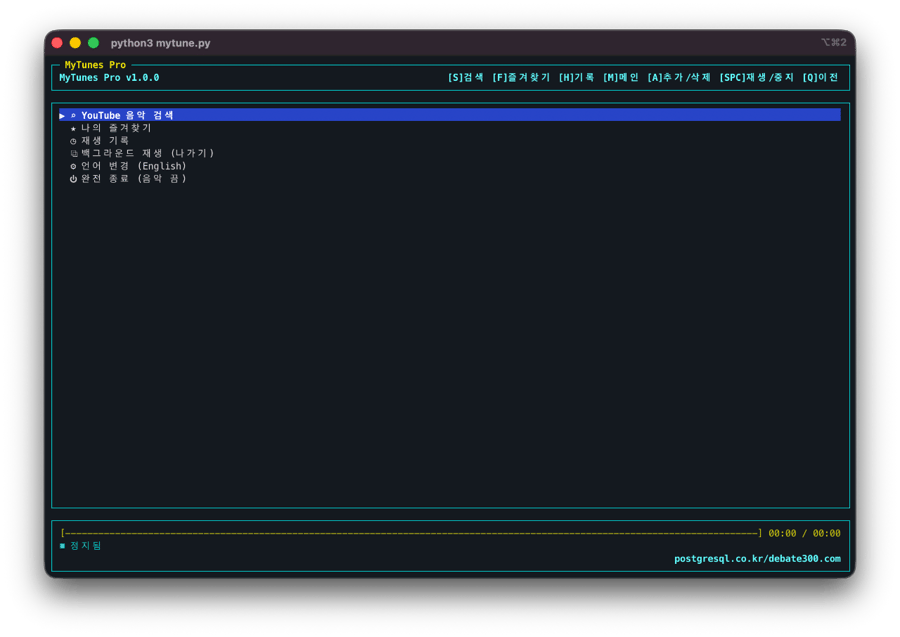 | 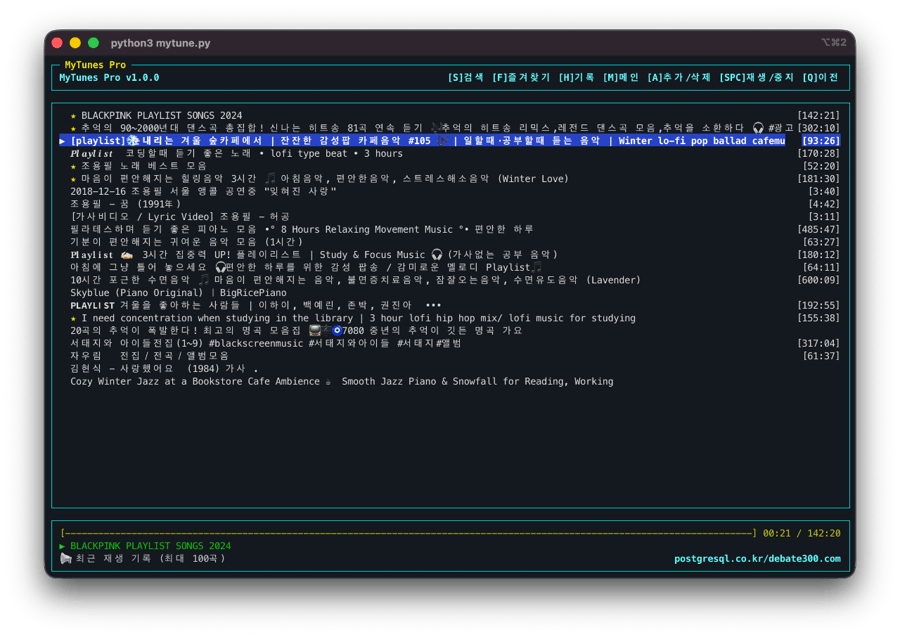 |
|
|
242
|
+
| 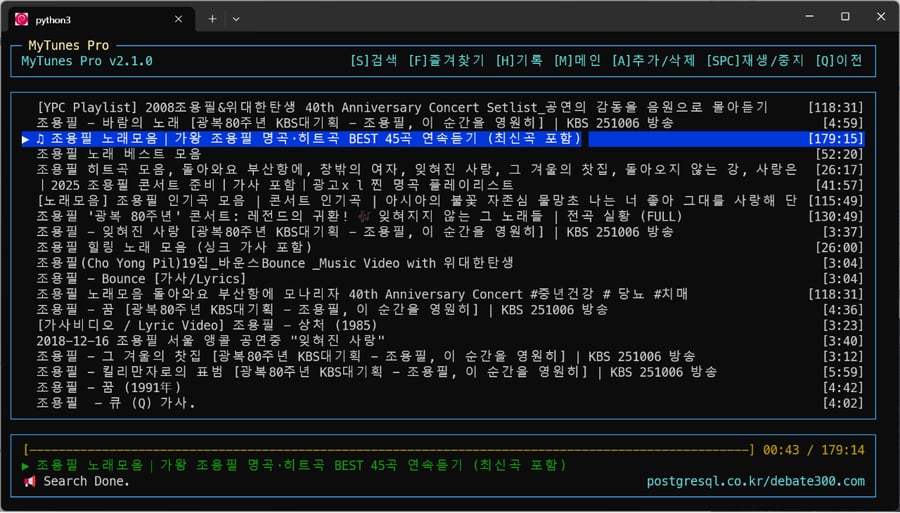 | 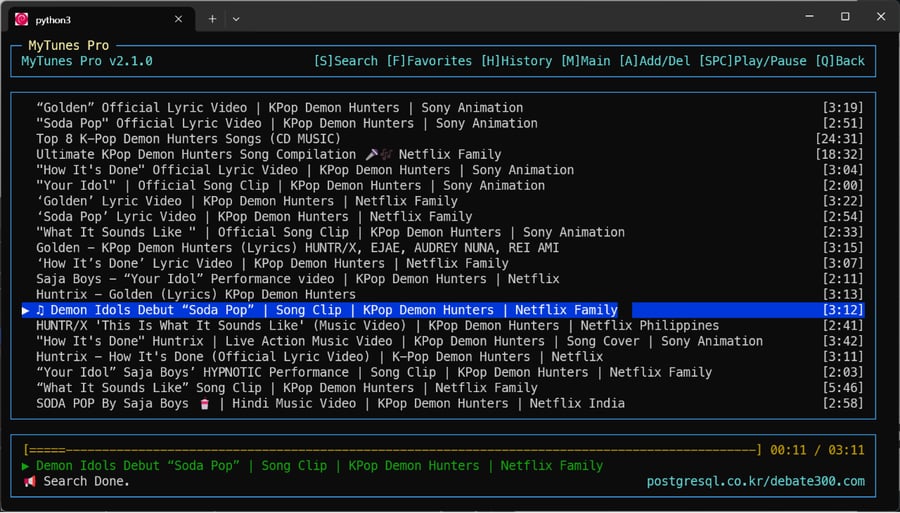 |
|
|
243
|
+
|
|
244
|
+
---
|
|
245
|
+
|
|
71
246
|
## 🚀 빠른 설치 (Quick Install)
|
|
72
247
|
|
|
73
248
|
최신 macOS/Linux 시스템(PEP 668)에서는 **`pipx`** 사용을 강력히 권장합니다.
|
|
@@ -129,12 +304,12 @@ Windows 환경에서 한글 검색이 안 되거나 설치가 어려운 분들
|
|
|
129
304
|
wsl --install -d Debian
|
|
130
305
|
```
|
|
131
306
|
|
|
132
|
-
|
|
307
|
+
2. **필수 도구 설치**:
|
|
133
308
|
```bash
|
|
134
309
|
sudo apt update && sudo apt install mpv python3-pip pipx -y
|
|
135
310
|
```
|
|
136
311
|
|
|
137
|
-
|
|
312
|
+
3. **MyTunes 설치**:
|
|
138
313
|
```bash
|
|
139
314
|
pipx install mytunes-pro
|
|
140
315
|
pipx ensurepath
|
|
@@ -211,30 +386,6 @@ Windows 환경에서 한글 검색이 안 되거나 설치가 어려운 분들
|
|
|
211
386
|
---
|
|
212
387
|
---
|
|
213
388
|
|
|
214
|
-
---
|
|
215
|
-
|
|
216
|
-
# 🎵 MyTunes Pro (Experimental Media Tool - KR)
|
|
217
|
-
|
|
218
|
-
## 🚀 터미널 기반 미디어 워크플로우 실험 v2.0.5
|
|
219
|
-
|
|
220
|
-
> [!IMPORTANT]
|
|
221
|
-
> **법적 면책 고지:** 본 프로젝트는 개발자 교육 및 연구를 목적으로 하는 개인적, 비상업적 실험입니다.
|
|
222
|
-
> 본 소프트웨어는 어떠한 미디어 콘텐츠도 직접 호스팅하거나 배포하지 않습니다.
|
|
223
|
-
> 모든 미디어 소스는 사용자의 로컬 환경에서 직접 구성되고 접근되며, 사용자는 외부 플랫폼의 이용 약관을 준수할 책임이 있습니다.
|
|
224
|
-
|
|
225
|
-
MyTunes Pro는 개발자를 위해 설계된 **CLI 미디어 실험 도구**입니다.
|
|
226
|
-
Python `curses` 라이브러리를 통해 터미널 환경에서 미디어 URL을 로드하고 관리하며,
|
|
227
|
-
사용자가 설치한 `mpv` 등의 외부 도구와 연동하여 미디어 워크플로우를 테스트할 수 있습니다.
|
|
228
|
-
|
|
229
|
-
## ✨ 주요 특징
|
|
230
|
-
|
|
231
|
-
- **미디어 핸들링**: 외부 추출 도구를 사용한 미디어 URL 로드 및 처리 지원.
|
|
232
|
-
- **TUI 워크플로우**: `curses` 라이브러리 기반의 효율적인 터미널 인터페이스.
|
|
233
|
-
- **작업 유지**: 순차적 미디어 로딩 및 마지막 작업 상태 복원 기능.
|
|
234
|
-
- **환경 연동**: 사용자에 의해 구성된 외부 미디어 도구와의 연동 지원. (본 소프트웨어는 외부 도구를 포함하여 배포하지 않습니다.)
|
|
235
|
-
|
|
236
|
-
---
|
|
237
|
-
|
|
238
389
|
## 🔄 Changelog
|
|
239
390
|
|
|
240
391
|
### v2.0.5 (2026-02-01)
|
|
@@ -3,9 +3,9 @@
|
|
|
3
3
|
## 🚀 Terminal-based Media Workflow Experiment v2.0.5
|
|
4
4
|
|
|
5
5
|
> [!IMPORTANT]
|
|
6
|
-
> **Legal Disclaimer:** This project is a personal, non-commercial research experiment for developer education.
|
|
7
|
-
> It does not host, provide, or distribute any media content.
|
|
8
|
-
> All media sources are independently accessed and configured by the user.
|
|
6
|
+
> **Legal Disclaimer:** This project is a personal, non-commercial research experiment for developer education.
|
|
7
|
+
> It does not host, provide, or distribute any media content.
|
|
8
|
+
> All media sources are independently accessed and configured by the user.
|
|
9
9
|
> Users are solely responsible for ensuring that their usage complies with the terms of service of any third-party platforms accessed via this tool.
|
|
10
10
|
|
|
11
11
|
MyTunes Pro is a developer-focused **CLI Media Tool** for experimenting with terminal-based media workflows.
|
|
@@ -19,6 +19,8 @@ leveraging the `mpv` engine for local media processing and playback.
|
|
|
19
19
|

|
|
20
20
|

|
|
21
21
|
|
|
22
|
+
---
|
|
23
|
+
|
|
22
24
|
## 📸 Screenshots
|
|
23
25
|
| | |
|
|
24
26
|
| :---: | :---: |
|
|
@@ -48,6 +50,179 @@ leveraging the `mpv` engine for local media processing and playback.
|
|
|
48
50
|
|
|
49
51
|
---
|
|
50
52
|
|
|
53
|
+
## 🚀 Quick Install
|
|
54
|
+
|
|
55
|
+
We strongly recommend using **`pipx`** on modern macOS/Linux systems (PEP 668).
|
|
56
|
+
|
|
57
|
+
### 1. Recommended Method (pipx)
|
|
58
|
+
Automatically creates an isolated environment and registers the command.
|
|
59
|
+
|
|
60
|
+
```bash
|
|
61
|
+
# Ensure ensuredpath is run to register the command after pipx install!
|
|
62
|
+
pipx install mytunes-pro
|
|
63
|
+
pipx ensurepath
|
|
64
|
+
source ~/.zshrc # or source ~/.bashrc (apply immediately to current terminal)
|
|
65
|
+
```
|
|
66
|
+
|
|
67
|
+
### 2. Standard pip Method
|
|
68
|
+
If you encounter the `externally-managed-environment` error, add the following flag:
|
|
69
|
+
|
|
70
|
+
```bash
|
|
71
|
+
pip install mytunes-pro --break-system-packages
|
|
72
|
+
```
|
|
73
|
+
|
|
74
|
+
After installation, type **`mp`** anywhere in the terminal to run!
|
|
75
|
+
|
|
76
|
+
### 🔄 Update
|
|
77
|
+
If already installed, simply use the command below to update to the latest features:
|
|
78
|
+
|
|
79
|
+
```bash
|
|
80
|
+
pipx upgrade mytunes-pro
|
|
81
|
+
```
|
|
82
|
+
|
|
83
|
+
---
|
|
84
|
+
|
|
85
|
+
## 🛠 Prerequisites
|
|
86
|
+
|
|
87
|
+
Please install the necessary tools for your operating system before running.
|
|
88
|
+
|
|
89
|
+
### macOS (Using Homebrew)
|
|
90
|
+
```bash
|
|
91
|
+
brew install mpv python3 pipx
|
|
92
|
+
```
|
|
93
|
+
|
|
94
|
+
### Linux (Ubuntu/Debian)
|
|
95
|
+
```bash
|
|
96
|
+
sudo apt update
|
|
97
|
+
sudo apt install mpv python3 python3-pip pipx python3-venv -y
|
|
98
|
+
```
|
|
99
|
+
|
|
100
|
+
### Windows (WSL Guide)
|
|
101
|
+
|
|
102
|
+
Guide for Windows users where Korean search might not work or installation is difficult.
|
|
103
|
+
|
|
104
|
+
> **❓ What is WSL?**
|
|
105
|
+
> It allows you to run Linux environments directly on Windows. MyTunes works perfectly in this environment.
|
|
106
|
+
|
|
107
|
+
1. **Install WSL**:
|
|
108
|
+
- Right-click `Start` -> Run `Terminal (Admin)`.
|
|
109
|
+
- Enter the command below and **Reboot**:
|
|
110
|
+
```powershell
|
|
111
|
+
wsl --install -d Debian
|
|
112
|
+
```
|
|
113
|
+
|
|
114
|
+
2. **Install Essentials**:
|
|
115
|
+
```bash
|
|
116
|
+
sudo apt update && sudo apt install mpv python3-pip pipx -y
|
|
117
|
+
```
|
|
118
|
+
|
|
119
|
+
3. **Install MyTunes**:
|
|
120
|
+
```bash
|
|
121
|
+
pipx install mytunes-pro
|
|
122
|
+
pipx ensurepath
|
|
123
|
+
source ~/.bashrc # Apply settings immediately
|
|
124
|
+
```
|
|
125
|
+
|
|
126
|
+
---
|
|
127
|
+
|
|
128
|
+
## 🧑💻 Manual Installation (For Developers)
|
|
129
|
+
|
|
130
|
+
Follow these steps to modify source code or use the development version.
|
|
131
|
+
|
|
132
|
+
1. **Clone Repository**:
|
|
133
|
+
```bash
|
|
134
|
+
git clone https://github.com/postgresql-co-kr/mytunes.git
|
|
135
|
+
cd mytunes
|
|
136
|
+
```
|
|
137
|
+
|
|
138
|
+
2. **Setup Virtual Environment**:
|
|
139
|
+
```bash
|
|
140
|
+
python3 -m venv venv
|
|
141
|
+
source venv/bin/activate # macOS/Linux
|
|
142
|
+
pip install -r requirements.txt
|
|
143
|
+
```
|
|
144
|
+
|
|
145
|
+
3. **Run**:
|
|
146
|
+
```bash
|
|
147
|
+
python3 mytune.py
|
|
148
|
+
```
|
|
149
|
+
|
|
150
|
+
---
|
|
151
|
+
|
|
152
|
+
## ⌨️ Controls
|
|
153
|
+
|
|
154
|
+
**MyTunes Pro** is controlled entirely by keyboard.
|
|
155
|
+
We recommend using **Number Keys** for lag-free operation even in multi-language input modes.
|
|
156
|
+
|
|
157
|
+
### ⚡️ Instant Hotkeys (Number Keys)
|
|
158
|
+
Executes immediately without worrying about input language status.
|
|
159
|
+
|
|
160
|
+
| Key | Function | Description |
|
|
161
|
+
| :--- | :--- | :--- |
|
|
162
|
+
| **`1`** | **Search** | Open music search (Same as `S`) |
|
|
163
|
+
| **`2`** | **Favorites** | View favorites list (Same as `F`) |
|
|
164
|
+
| **`3`** | **History** | View recently played 100 tracks (Same as `R`) |
|
|
165
|
+
| **`4`** | **Main** | Return to main screen (Same as `M`) |
|
|
166
|
+
| **`5`** | **Add/Del** | Toggle favorite for selected track (Same as `A`) |
|
|
167
|
+
| **`+`** | **Vol UP** | Volume +5% (Same as `=`) |
|
|
168
|
+
| **`-`** | **Vol DOWN** | Volume -5% (Same as `_`) |
|
|
169
|
+
| **`F7`** | **Open YouTube** | View current track in browser |
|
|
170
|
+
| **`6`** | **Back** | Go to previous screen (Same as `Q`, `h`) |
|
|
171
|
+
| **`L`** | **Forward** | Go forward to previous screen (`Right Arrow`) |
|
|
172
|
+
| **`ESC`** | **Background** | **Exit without stopping music** (Background Play) |
|
|
173
|
+
|
|
174
|
+
### 🧭 Basic Navigation
|
|
175
|
+
| Key | Action |
|
|
176
|
+
| :--- | :--- |
|
|
177
|
+
| `↑` / `↓` / `k` / `j` | Move selection Up/Down (Vim keys supported) |
|
|
178
|
+
| `Enter` / `l` | **Select / Play** |
|
|
179
|
+
| `Space` | Play / Pause |
|
|
180
|
+
| `-` / `+` | **Volume Control** |
|
|
181
|
+
| `,` / `.` | Rewind / Forward 10s |
|
|
182
|
+
| `<` / `>` | Rewind / Forward 30s (Shift) |
|
|
183
|
+
| `Backspace` / `h` / `q` | Go Back / Clear Search |
|
|
184
|
+
| `L` | **Go Forward** |
|
|
185
|
+
| `/` | **Search** (Vim Style) |
|
|
186
|
+
|
|
187
|
+
---
|
|
188
|
+
|
|
189
|
+
## 📂 Data Storage
|
|
190
|
+
- Favorites and playback history are permanently saved in `~/.pymusic_data.json` in your home directory.
|
|
191
|
+
- Data is preserved even after restarting the program.
|
|
192
|
+
|
|
193
|
+
---
|
|
194
|
+
---
|
|
195
|
+
|
|
196
|
+
# 🎵 MyTunes Pro (Experimental Media Tool - KR)
|
|
197
|
+
|
|
198
|
+
## 🚀 터미널 기반 미디어 워크플로우 실험 v2.0.5
|
|
199
|
+
|
|
200
|
+
> [!IMPORTANT]
|
|
201
|
+
> **법적 면책 고지:** 본 프로젝트는 개발자 교육 및 연구를 목적으로 하는 개인적, 비상업적 실험입니다.
|
|
202
|
+
> 본 소프트웨어는 어떠한 미디어 콘텐츠도 직접 호스팅하거나 배포하지 않습니다.
|
|
203
|
+
> 모든 미디어 소스는 사용자의 로컬 환경에서 직접 구성되고 접근되며, 사용자는 외부 플랫폼의 이용 약관을 준수할 책임이 있습니다.
|
|
204
|
+
|
|
205
|
+
MyTunes Pro는 개발자를 위해 설계된 **CLI 미디어 실험 도구**입니다.
|
|
206
|
+
Python `curses` 라이브러리를 통해 터미널 환경에서 미디어 URL을 로드하고 관리하며,
|
|
207
|
+
사용자가 설치한 `mpv` 등의 외부 도구와 연동하여 미디어 워크플로우를 테스트할 수 있습니다.
|
|
208
|
+
|
|
209
|
+
## ✨ 주요 특징
|
|
210
|
+
|
|
211
|
+
- **미디어 핸들링**: 외부 추출 도구를 사용한 미디어 URL 로드 및 처리 지원.
|
|
212
|
+
- **TUI 워크플로우**: `curses` 라이브러리 기반의 효율적인 터미널 인터페이스.
|
|
213
|
+
- **작업 유지**: 순차적 미디어 로딩 및 마지막 작업 상태 복원 기능.
|
|
214
|
+
- **환경 연동**: 사용자에 의해 구성된 외부 미디어 도구와의 연동 지원. (본 소프트웨어는 외부 도구를 포함하여 배포하지 않습니다.)
|
|
215
|
+
|
|
216
|
+
---
|
|
217
|
+
|
|
218
|
+
## 📸 스크린샷 (Screenshots)
|
|
219
|
+
| | |
|
|
220
|
+
| :---: | :---: |
|
|
221
|
+
|  |  |
|
|
222
|
+
|  |  |
|
|
223
|
+
|
|
224
|
+
---
|
|
225
|
+
|
|
51
226
|
## 🚀 빠른 설치 (Quick Install)
|
|
52
227
|
|
|
53
228
|
최신 macOS/Linux 시스템(PEP 668)에서는 **`pipx`** 사용을 강력히 권장합니다.
|
|
@@ -109,12 +284,12 @@ Windows 환경에서 한글 검색이 안 되거나 설치가 어려운 분들
|
|
|
109
284
|
wsl --install -d Debian
|
|
110
285
|
```
|
|
111
286
|
|
|
112
|
-
|
|
287
|
+
2. **필수 도구 설치**:
|
|
113
288
|
```bash
|
|
114
289
|
sudo apt update && sudo apt install mpv python3-pip pipx -y
|
|
115
290
|
```
|
|
116
291
|
|
|
117
|
-
|
|
292
|
+
3. **MyTunes 설치**:
|
|
118
293
|
```bash
|
|
119
294
|
pipx install mytunes-pro
|
|
120
295
|
pipx ensurepath
|
|
@@ -191,30 +366,6 @@ Windows 환경에서 한글 검색이 안 되거나 설치가 어려운 분들
|
|
|
191
366
|
---
|
|
192
367
|
---
|
|
193
368
|
|
|
194
|
-
---
|
|
195
|
-
|
|
196
|
-
# 🎵 MyTunes Pro (Experimental Media Tool - KR)
|
|
197
|
-
|
|
198
|
-
## 🚀 터미널 기반 미디어 워크플로우 실험 v2.0.5
|
|
199
|
-
|
|
200
|
-
> [!IMPORTANT]
|
|
201
|
-
> **법적 면책 고지:** 본 프로젝트는 개발자 교육 및 연구를 목적으로 하는 개인적, 비상업적 실험입니다.
|
|
202
|
-
> 본 소프트웨어는 어떠한 미디어 콘텐츠도 직접 호스팅하거나 배포하지 않습니다.
|
|
203
|
-
> 모든 미디어 소스는 사용자의 로컬 환경에서 직접 구성되고 접근되며, 사용자는 외부 플랫폼의 이용 약관을 준수할 책임이 있습니다.
|
|
204
|
-
|
|
205
|
-
MyTunes Pro는 개발자를 위해 설계된 **CLI 미디어 실험 도구**입니다.
|
|
206
|
-
Python `curses` 라이브러리를 통해 터미널 환경에서 미디어 URL을 로드하고 관리하며,
|
|
207
|
-
사용자가 설치한 `mpv` 등의 외부 도구와 연동하여 미디어 워크플로우를 테스트할 수 있습니다.
|
|
208
|
-
|
|
209
|
-
## ✨ 주요 특징
|
|
210
|
-
|
|
211
|
-
- **미디어 핸들링**: 외부 추출 도구를 사용한 미디어 URL 로드 및 처리 지원.
|
|
212
|
-
- **TUI 워크플로우**: `curses` 라이브러리 기반의 효율적인 터미널 인터페이스.
|
|
213
|
-
- **작업 유지**: 순차적 미디어 로딩 및 마지막 작업 상태 복원 기능.
|
|
214
|
-
- **환경 연동**: 사용자에 의해 구성된 외부 미디어 도구와의 연동 지원. (본 소프트웨어는 외부 도구를 포함하여 배포하지 않습니다.)
|
|
215
|
-
|
|
216
|
-
---
|
|
217
|
-
|
|
218
369
|
## 🔄 Changelog
|
|
219
370
|
|
|
220
371
|
### v2.0.5 (2026-02-01)
|