multimodars 0.2.1__tar.gz → 0.2.3__tar.gz
This diff represents the content of publicly available package versions that have been released to one of the supported registries. The information contained in this diff is provided for informational purposes only and reflects changes between package versions as they appear in their respective public registries.
- {multimodars-0.2.1 → multimodars-0.2.3}/.github/ISSUE_TEMPLATE/bug_report.md +8 -15
- {multimodars-0.2.1 → multimodars-0.2.3}/.github/PULL_REQUEST_TEMPLATE.md +1 -1
- {multimodars-0.2.1 → multimodars-0.2.3}/.github/workflows/CI.yml +21 -0
- {multimodars-0.2.1 → multimodars-0.2.3}/.gitignore +2 -1
- {multimodars-0.2.1 → multimodars-0.2.3}/CHANGELOG.md +26 -0
- multimodars-0.2.3/CONTRIBUTING.md +164 -0
- {multimodars-0.2.1 → multimodars-0.2.3}/Cargo.lock +1 -1
- {multimodars-0.2.1 → multimodars-0.2.3}/Cargo.toml +1 -1
- {multimodars-0.2.1 → multimodars-0.2.3}/PKG-INFO +65 -30
- {multimodars-0.2.1 → multimodars-0.2.3}/README.md +63 -28
- multimodars-0.2.3/docs/api/adjust_ccta.rst +9 -0
- {multimodars-0.2.1 → multimodars-0.2.3}/docs/api/centerline.rst +2 -1
- {multimodars-0.2.1 → multimodars-0.2.3}/docs/api/classes/PyContour.rst +1 -1
- {multimodars-0.2.1 → multimodars-0.2.3}/docs/api/classes/PyGeometryPair.rst +1 -1
- multimodars-0.2.3/docs/api/converters_and_wrappers.rst +9 -0
- {multimodars-0.2.1 → multimodars-0.2.3}/docs/api/index.rst +2 -1
- {multimodars-0.2.1 → multimodars-0.2.3}/docs/installation.rst +2 -2
- {multimodars-0.2.1 → multimodars-0.2.3}/docs/tutorial_ccta.rst +23 -12
- {multimodars-0.2.1 → multimodars-0.2.3}/docs/tutorial_intravascular.rst +111 -78
- {multimodars-0.2.1 → multimodars-0.2.3}/multimodars/__init__.py +30 -8
- {multimodars-0.2.1 → multimodars-0.2.3}/multimodars/_converters.py +144 -89
- {multimodars-0.2.1 → multimodars-0.2.3}/multimodars/ccta/adjust_ccta.py +383 -65
- {multimodars-0.2.1 → multimodars-0.2.3}/multimodars/io/write_geometries.py +3 -2
- multimodars-0.2.3/multimodars/multimodars.pyi +692 -0
- multimodars-0.2.3/multimodars/py.typed +0 -0
- multimodars-0.2.3/paper/REVIEWER1.md +140 -0
- {multimodars-0.2.1 → multimodars-0.2.3}/paper/bibliography.bib +31 -16
- multimodars-0.2.3/paper/figures/Figure2.jpg +0 -0
- multimodars-0.2.3/paper/figures/Figure3.png +0 -0
- multimodars-0.2.3/paper/paper.md +124 -0
- {multimodars-0.2.1 → multimodars-0.2.3}/pyproject.toml +1 -1
- {multimodars-0.2.1 → multimodars-0.2.3}/src/ccta/binding/ccta_py.rs +145 -80
- multimodars-0.2.3/src/intravascular/binding/align.rs +335 -0
- {multimodars-0.2.1 → multimodars-0.2.3}/src/intravascular/binding/classes.rs +521 -266
- {multimodars-0.2.1 → multimodars-0.2.3}/src/intravascular/binding/mod.rs +570 -269
- {multimodars-0.2.1 → multimodars-0.2.3}/tests/test_wrappers.py +3 -5
- multimodars-0.2.1/CONTRIBUTING.md +0 -61
- multimodars-0.2.1/docs/api/converters_and_wrappers.rst +0 -13
- multimodars-0.2.1/multimodars/_wrappers.py +0 -725
- multimodars-0.2.1/paper/figures/Figure2.jpg +0 -0
- multimodars-0.2.1/paper/paper.md +0 -80
- multimodars-0.2.1/src/intravascular/binding/align.rs +0 -267
- {multimodars-0.2.1 → multimodars-0.2.3}/.github/ISSUE_TEMPLATE/feature_request.md +0 -0
- {multimodars-0.2.1 → multimodars-0.2.3}/.github/workflows/draft-pdf.yml +0 -0
- {multimodars-0.2.1 → multimodars-0.2.3}/.pre-commit-config.yaml +0 -0
- {multimodars-0.2.1 → multimodars-0.2.3}/.readthedocs.yaml +0 -0
- {multimodars-0.2.1 → multimodars-0.2.3}/LICENSE +0 -0
- {multimodars-0.2.1 → multimodars-0.2.3}/ROADMAP.MD +0 -0
- {multimodars-0.2.1 → multimodars-0.2.3}/data/fixtures/idealized_geometry/branch_diastolic_contours.csv +0 -0
- {multimodars-0.2.1 → multimodars-0.2.3}/data/fixtures/idealized_geometry/branch_systolic_contours.csv +0 -0
- {multimodars-0.2.1 → multimodars-0.2.3}/data/fixtures/idealized_geometry/calcium_diastolic_contours.csv +0 -0
- {multimodars-0.2.1 → multimodars-0.2.3}/data/fixtures/idealized_geometry/calcium_systolic_contours.csv +0 -0
- {multimodars-0.2.1 → multimodars-0.2.3}/data/fixtures/idealized_geometry/diastolic_contours.csv +0 -0
- {multimodars-0.2.1 → multimodars-0.2.3}/data/fixtures/idealized_geometry/diastolic_reference_points.csv +0 -0
- {multimodars-0.2.1 → multimodars-0.2.3}/data/fixtures/idealized_geometry/eem_diastolic_contours.csv +0 -0
- {multimodars-0.2.1 → multimodars-0.2.3}/data/fixtures/idealized_geometry/eem_systolic_contours.csv +0 -0
- {multimodars-0.2.1 → multimodars-0.2.3}/data/fixtures/idealized_geometry/systolic_contours.csv +0 -0
- {multimodars-0.2.1 → multimodars-0.2.3}/data/fixtures/idealized_geometry/systolic_reference_points.csv +0 -0
- {multimodars-0.2.1 → multimodars-0.2.3}/data/fixtures/ivus_full/branch_diastolic_contours.csv +0 -0
- {multimodars-0.2.1 → multimodars-0.2.3}/data/fixtures/ivus_full/branch_systolic_contours.csv +0 -0
- {multimodars-0.2.1 → multimodars-0.2.3}/data/fixtures/ivus_full/calcium_diastolic_contours.csv +0 -0
- {multimodars-0.2.1 → multimodars-0.2.3}/data/fixtures/ivus_full/calcium_systolic_contours.csv +0 -0
- {multimodars-0.2.1 → multimodars-0.2.3}/data/fixtures/ivus_full/diastolic_contours.csv +0 -0
- {multimodars-0.2.1 → multimodars-0.2.3}/data/fixtures/ivus_full/diastolic_reference_points.csv +0 -0
- {multimodars-0.2.1 → multimodars-0.2.3}/data/fixtures/ivus_full/eem_diastolic_contours.csv +0 -0
- {multimodars-0.2.1 → multimodars-0.2.3}/data/fixtures/ivus_full/eem_systolic_contours.csv +0 -0
- {multimodars-0.2.1 → multimodars-0.2.3}/data/fixtures/ivus_full/systolic_contours.csv +0 -0
- {multimodars-0.2.1 → multimodars-0.2.3}/data/fixtures/ivus_full/systolic_reference_points.csv +0 -0
- {multimodars-0.2.1 → multimodars-0.2.3}/data/fixtures/ivus_rest/combined_sorted_manual.csv +0 -0
- {multimodars-0.2.1 → multimodars-0.2.3}/data/fixtures/ivus_rest/diastolic_contours.csv +0 -0
- {multimodars-0.2.1 → multimodars-0.2.3}/data/fixtures/ivus_rest/diastolic_reference_points.csv +0 -0
- {multimodars-0.2.1 → multimodars-0.2.3}/data/fixtures/ivus_rest/systolic_contours.csv +0 -0
- {multimodars-0.2.1 → multimodars-0.2.3}/data/fixtures/ivus_rest/systolic_reference_points.csv +0 -0
- {multimodars-0.2.1 → multimodars-0.2.3}/data/fixtures/ivus_stress/combined_sorted_manual.csv +0 -0
- {multimodars-0.2.1 → multimodars-0.2.3}/data/fixtures/ivus_stress/diastolic_contours.csv +0 -0
- {multimodars-0.2.1 → multimodars-0.2.3}/data/fixtures/ivus_stress/diastolic_reference_points.csv +0 -0
- {multimodars-0.2.1 → multimodars-0.2.3}/data/fixtures/ivus_stress/systolic_contours.csv +0 -0
- {multimodars-0.2.1 → multimodars-0.2.3}/data/fixtures/ivus_stress/systolic_reference_points.csv +0 -0
- {multimodars-0.2.1 → multimodars-0.2.3}/docs/Makefile +0 -0
- {multimodars-0.2.1 → multimodars-0.2.3}/docs/_static/.gitkeep +0 -0
- {multimodars-0.2.1 → multimodars-0.2.3}/docs/api/classes/PyCenterline.rst +0 -0
- {multimodars-0.2.1 → multimodars-0.2.3}/docs/api/classes/PyCenterlinePoint.rst +0 -0
- {multimodars-0.2.1 → multimodars-0.2.3}/docs/api/classes/PyContourPoint.rst +0 -0
- {multimodars-0.2.1 → multimodars-0.2.3}/docs/api/classes/PyFrame.rst +0 -0
- {multimodars-0.2.1 → multimodars-0.2.3}/docs/api/classes/PyGeometry.rst +0 -0
- {multimodars-0.2.1 → multimodars-0.2.3}/docs/api/classes/PyInputData.rst +0 -0
- {multimodars-0.2.1 → multimodars-0.2.3}/docs/api/classes/PyRecord.rst +0 -0
- {multimodars-0.2.1 → multimodars-0.2.3}/docs/api/classes/index.rst +0 -0
- {multimodars-0.2.1 → multimodars-0.2.3}/docs/api/core.rst +0 -0
- {multimodars-0.2.1 → multimodars-0.2.3}/docs/api/processing.rst +0 -0
- {multimodars-0.2.1 → multimodars-0.2.3}/docs/api/utilities.rst +0 -0
- {multimodars-0.2.1 → multimodars-0.2.3}/docs/build.sh +0 -0
- {multimodars-0.2.1 → multimodars-0.2.3}/docs/changelog.md +0 -0
- {multimodars-0.2.1 → multimodars-0.2.3}/docs/conf.py +0 -0
- {multimodars-0.2.1 → multimodars-0.2.3}/docs/figures/Alignment3p.png +0 -0
- {multimodars-0.2.1 → multimodars-0.2.3}/docs/figures/animation_stress_induced_systolic_deformation.gif +0 -0
- {multimodars-0.2.1 → multimodars-0.2.3}/docs/figures/anomalous_labeling.jpg +0 -0
- {multimodars-0.2.1 → multimodars-0.2.3}/docs/figures/initial_labeling.jpg +0 -0
- {multimodars-0.2.1 → multimodars-0.2.3}/docs/figures/scaling.jpg +0 -0
- {multimodars-0.2.1 → multimodars-0.2.3}/docs/index.rst +0 -0
- {multimodars-0.2.1 → multimodars-0.2.3}/docs/make.bat +0 -0
- {multimodars-0.2.1 → multimodars-0.2.3}/media/coronary_artery_disease.jpg +0 -0
- {multimodars-0.2.1 → multimodars-0.2.3}/media/dynamic_lumen_changes.png +0 -0
- {multimodars-0.2.1 → multimodars-0.2.3}/media/multimoda-rs.jpg +0 -0
- {multimodars-0.2.1 → multimodars-0.2.3}/multimodars/ccta/__init__.py +0 -0
- {multimodars-0.2.1 → multimodars-0.2.3}/multimodars/io/__init__.py +0 -0
- {multimodars-0.2.1 → multimodars-0.2.3}/multimodars/io/read_geometrical.py +0 -0
- {multimodars-0.2.1 → multimodars-0.2.3}/paper/figures/Figure1.jpg +0 -0
- /multimodars-0.2.1/paper/figures/Figure3.jpg → /multimodars-0.2.3/paper/figures/Figure4.jpg +0 -0
- {multimodars-0.2.1 → multimodars-0.2.3}/src/ccta/adjust_mesh/label_coronary.rs +0 -0
- {multimodars-0.2.1 → multimodars-0.2.3}/src/ccta/adjust_mesh/mod.rs +0 -0
- {multimodars-0.2.1 → multimodars-0.2.3}/src/ccta/adjust_mesh/scale_coronary.rs +0 -0
- {multimodars-0.2.1 → multimodars-0.2.3}/src/ccta/binding/mod.rs +0 -0
- {multimodars-0.2.1 → multimodars-0.2.3}/src/ccta/io/input.rs +0 -0
- {multimodars-0.2.1 → multimodars-0.2.3}/src/ccta/io/mod.rs +0 -0
- {multimodars-0.2.1 → multimodars-0.2.3}/src/ccta/mod.rs +0 -0
- {multimodars-0.2.1 → multimodars-0.2.3}/src/intravascular/binding/entry.rs +0 -0
- {multimodars-0.2.1 → multimodars-0.2.3}/src/intravascular/centerline_align/align_algorithms.rs +0 -0
- {multimodars-0.2.1 → multimodars-0.2.3}/src/intravascular/centerline_align/mod.rs +0 -0
- {multimodars-0.2.1 → multimodars-0.2.3}/src/intravascular/centerline_align/preprocessing.rs +0 -0
- {multimodars-0.2.1 → multimodars-0.2.3}/src/intravascular/io/geometry.rs +0 -0
- {multimodars-0.2.1 → multimodars-0.2.3}/src/intravascular/io/input.rs +0 -0
- {multimodars-0.2.1 → multimodars-0.2.3}/src/intravascular/io/integrity_check.rs +0 -0
- {multimodars-0.2.1 → multimodars-0.2.3}/src/intravascular/io/mod.rs +0 -0
- {multimodars-0.2.1 → multimodars-0.2.3}/src/intravascular/io/output.rs +0 -0
- {multimodars-0.2.1 → multimodars-0.2.3}/src/intravascular/mod.rs +0 -0
- {multimodars-0.2.1 → multimodars-0.2.3}/src/intravascular/processing/align_between.rs +0 -0
- {multimodars-0.2.1 → multimodars-0.2.3}/src/intravascular/processing/align_within.rs +0 -0
- {multimodars-0.2.1 → multimodars-0.2.3}/src/intravascular/processing/mod.rs +0 -0
- {multimodars-0.2.1 → multimodars-0.2.3}/src/intravascular/processing/postprocessing.rs +0 -0
- {multimodars-0.2.1 → multimodars-0.2.3}/src/intravascular/processing/preprocessing.rs +0 -0
- {multimodars-0.2.1 → multimodars-0.2.3}/src/intravascular/processing/process_utils.rs +0 -0
- {multimodars-0.2.1 → multimodars-0.2.3}/src/intravascular/processing/wall.rs +0 -0
- {multimodars-0.2.1 → multimodars-0.2.3}/src/intravascular/to_object/interpolation.rs +0 -0
- {multimodars-0.2.1 → multimodars-0.2.3}/src/intravascular/to_object/mod.rs +0 -0
- {multimodars-0.2.1 → multimodars-0.2.3}/src/intravascular/to_object/texture.rs +0 -0
- {multimodars-0.2.1 → multimodars-0.2.3}/src/intravascular/to_object/write_mtl.rs +0 -0
- {multimodars-0.2.1 → multimodars-0.2.3}/src/intravascular/utils/mod.rs +0 -0
- {multimodars-0.2.1 → multimodars-0.2.3}/src/intravascular/utils/test_utils.rs +0 -0
- {multimodars-0.2.1 → multimodars-0.2.3}/src/intravascular/utils/utils.rs +0 -0
- {multimodars-0.2.1 → multimodars-0.2.3}/src/lib.rs +0 -0
- {multimodars-0.2.1 → multimodars-0.2.3}/tests/conftest.py +0 -0
- {multimodars-0.2.1 → multimodars-0.2.3}/tests/test_converters.py +0 -0
- {multimodars-0.2.1 → multimodars-0.2.3}/tests/test_core.py +0 -0
- {multimodars-0.2.1 → multimodars-0.2.3}/tests/tests_todo.md +0 -0
|
@@ -12,27 +12,20 @@ A clear and concise description of what the bug is.
|
|
|
12
12
|
|
|
13
13
|
**To Reproduce**
|
|
14
14
|
Steps to reproduce the behavior:
|
|
15
|
-
1.
|
|
16
|
-
2.
|
|
17
|
-
3.
|
|
18
|
-
4. See error
|
|
15
|
+
1. Load data with '...'
|
|
16
|
+
2. Call function '...'
|
|
17
|
+
3. See error
|
|
19
18
|
|
|
20
19
|
**Expected behavior**
|
|
21
20
|
A clear and concise description of what you expected to happen.
|
|
22
21
|
|
|
22
|
+
**Environment (please complete the following information):**
|
|
23
|
+
- OS: [e.g. Windows, Linux, macOS]
|
|
24
|
+
- Python version: [e.g. 3.10]
|
|
25
|
+
- Package version: [e.g. 0.1.0]
|
|
26
|
+
|
|
23
27
|
**Screenshots**
|
|
24
28
|
If applicable, add screenshots to help explain your problem.
|
|
25
29
|
|
|
26
|
-
**Desktop (please complete the following information):**
|
|
27
|
-
- OS: [e.g. iOS]
|
|
28
|
-
- Browser [e.g. chrome, safari]
|
|
29
|
-
- Version [e.g. 22]
|
|
30
|
-
|
|
31
|
-
**Smartphone (please complete the following information):**
|
|
32
|
-
- Device: [e.g. iPhone6]
|
|
33
|
-
- OS: [e.g. iOS8.1]
|
|
34
|
-
- Browser [e.g. stock browser, safari]
|
|
35
|
-
- Version [e.g. 22]
|
|
36
|
-
|
|
37
30
|
**Additional context**
|
|
38
31
|
Add any other context about the problem here.
|
|
@@ -1,7 +1,7 @@
|
|
|
1
1
|
## Pull Request Checklist
|
|
2
2
|
|
|
3
3
|
- [ ] I have added tests that prove the fix is effective or that the feature works.
|
|
4
|
-
- [ ] I ran `pytest`
|
|
4
|
+
- [ ] I ran `pytest` locally and all tests pass.
|
|
5
5
|
- [ ] I updated `CHANGELOG.md` (or NEWS) and bumped the package version if applicable.
|
|
6
6
|
- [ ] I added/updated documentation (README, docstrings, or docs).
|
|
7
7
|
- [ ] This PR is linked to an issue: fixes #<issue-number> (if applicable).
|
|
@@ -19,6 +19,27 @@ permissions:
|
|
|
19
19
|
contents: read
|
|
20
20
|
|
|
21
21
|
jobs:
|
|
22
|
+
python-compat:
|
|
23
|
+
name: Python ${{ matrix.python-version }} compatibility
|
|
24
|
+
runs-on: ubuntu-latest
|
|
25
|
+
strategy:
|
|
26
|
+
fail-fast: false
|
|
27
|
+
matrix:
|
|
28
|
+
python-version: ['3.10', '3.11', '3.12', '3.13']
|
|
29
|
+
steps:
|
|
30
|
+
- uses: actions/checkout@v4
|
|
31
|
+
- uses: actions/setup-python@v5
|
|
32
|
+
with:
|
|
33
|
+
python-version: ${{ matrix.python-version }}
|
|
34
|
+
- name: Install Rust
|
|
35
|
+
uses: dtolnay/rust-toolchain@stable
|
|
36
|
+
- name: Install Python deps
|
|
37
|
+
run: |
|
|
38
|
+
python -m pip install --upgrade pip
|
|
39
|
+
pip install -e .[test]
|
|
40
|
+
- name: Run Python tests
|
|
41
|
+
run: pytest
|
|
42
|
+
|
|
22
43
|
linux:
|
|
23
44
|
runs-on: ${{ matrix.platform.runner }}
|
|
24
45
|
strategy:
|
|
@@ -3,6 +3,32 @@
|
|
|
3
3
|
All notable changes to this project will be documented in this file.
|
|
4
4
|
This project adheres to [Semantic Versioning](https://semver.org/).
|
|
5
5
|
|
|
6
|
+
## [0.2.3] - 2026-03-06
|
|
7
|
+
|
|
8
|
+
### Added
|
|
9
|
+
- Type stubs for the Rust-implemented interface (via maturin)
|
|
10
|
+
- `PyFrame.get_frame_at_z`: retrieve a frame by its z position
|
|
11
|
+
- `PyFrame.get_frame_at_index`: retrieve a frame by its index
|
|
12
|
+
- `PyFrame.replace_frame`: replace an existing frame with another
|
|
13
|
+
|
|
14
|
+
### Changed
|
|
15
|
+
- CI pipeline now tests against Python 3.10 through 3.13
|
|
16
|
+
- Updated documentation to reflect the current interface and Python version requirements
|
|
17
|
+
- Added direct download links to example data in the README and documentation
|
|
18
|
+
- Migrated to modern NumPy-style type annotations throughout the Python codebase
|
|
19
|
+
- All imports are now top-level across all Python modules
|
|
20
|
+
|
|
21
|
+
## [0.2.2] - 2026-03-03
|
|
22
|
+
|
|
23
|
+
### Changed
|
|
24
|
+
- Uploaded new example data
|
|
25
|
+
- Updated docs to match the new example data
|
|
26
|
+
|
|
27
|
+
## [0.2.1] - 2026-01-12
|
|
28
|
+
|
|
29
|
+
### Changed
|
|
30
|
+
- Automatic version update based on Cargo.toml
|
|
31
|
+
|
|
6
32
|
## [0.2.0] - 2026-01-11
|
|
7
33
|
|
|
8
34
|
### Added
|
|
@@ -0,0 +1,164 @@
|
|
|
1
|
+
# ✩°。⋆ Contributing to the project ⋆。°✩
|
|
2
|
+
|
|
3
|
+
First off, thank you for considering contributing! **ദ്ദി(˵ •̀ ᴗ - ˵ ) ✧**
|
|
4
|
+
Whether you’re filing a bug, proposing a new feature, improving documentation, or refactoring code, your help makes this project better for you and the whole community.
|
|
5
|
+
|
|
6
|
+
## Code of Conduct
|
|
7
|
+
This project adheres to the [Contributor Covenant v2.1](https://www.contributor-covenant.org/version/2/1/code_of_conduct/).
|
|
8
|
+
By participating, you agree to respect everyone in this community. **˗ˏˋ ♡ ˎˊ˗**
|
|
9
|
+
|
|
10
|
+
## Table of Contents
|
|
11
|
+
|
|
12
|
+
1. [Getting Started](#getting-started)
|
|
13
|
+
2. [I Have a Question](#i-have-a-question)
|
|
14
|
+
3. [Reporting Bugs](#reporting-bugs)
|
|
15
|
+
4. [Suggesting Enhancements](#suggesting-enhancements)
|
|
16
|
+
5. [Your First Code Contribution](#your-first-code-contribution)
|
|
17
|
+
6. [Pull Request Process](#pull-request-process)
|
|
18
|
+
7. [Coding Style & Tests](#coding-style--tests)
|
|
19
|
+
8. [Writing Documentation](#writing-documentation)
|
|
20
|
+
9. [Where to Get Help](#where-to-get-help)
|
|
21
|
+
|
|
22
|
+
## Getting started
|
|
23
|
+
1. Fork the repo and clone your fork
|
|
24
|
+
```bash
|
|
25
|
+
git clone https://github.com/yungselm/multimoda-rs.git
|
|
26
|
+
cd multimoda-rs
|
|
27
|
+
```
|
|
28
|
+
2. Create a new branch
|
|
29
|
+
```bash
|
|
30
|
+
git checkout -b feature/sick-feature
|
|
31
|
+
```
|
|
32
|
+
3. install dependencies and run tests
|
|
33
|
+
```bash
|
|
34
|
+
pip install -e
|
|
35
|
+
pytest
|
|
36
|
+
```
|
|
37
|
+
## I have a Question
|
|
38
|
+
Before opening an issue:
|
|
39
|
+
- Read the [Documentation](https://multimoda-rs.readthedocs.io/en/latest/index.html)
|
|
40
|
+
- Search existing [Issues](https://github.com/yungselm/multimoda-rs/issues?q=is%3Aissue)
|
|
41
|
+
|
|
42
|
+
If you still need help:
|
|
43
|
+
- Open a new issue: [Click here](https://github.com/yungselm/multimoda-rs/issues/new/choose)
|
|
44
|
+
- Provide:
|
|
45
|
+
- A clear, descriptive title
|
|
46
|
+
- Context: what you're trying to do, expected vs. actual behaviour
|
|
47
|
+
- Project verion, OS/platform, Python version, and any relevant logs
|
|
48
|
+
|
|
49
|
+
## Reporting Bugs
|
|
50
|
+
If you find a bug, please help us fix it by opening a [a new issue](https://github.com/yungselm/multimoda-rs/issues/new/choose) and providing:
|
|
51
|
+
- **Title**: A short descriptive title
|
|
52
|
+
- **Steps to reproduce**: Minimal code snippet or sequence to trigger the bug
|
|
53
|
+
- **Expected behaviour** vs **Actual behaviour**
|
|
54
|
+
- **Environment**:
|
|
55
|
+
- `multimoda-rs` version
|
|
56
|
+
- Python version
|
|
57
|
+
- OS and architecture
|
|
58
|
+
|
|
59
|
+
## Suggesting Enhancements
|
|
60
|
+
Have an idea for a new feature or an improvement to existing behaviour? Open a [feature request issue](https://github.com/yungselm/multimoda-rs/issues/new/choose) and include:
|
|
61
|
+
- **Summary**: A concise description of the enhancement
|
|
62
|
+
- **Motivation**: Why would this be useful? What problem does it solve?
|
|
63
|
+
- **Proposed solution**: How you envision it working (API sketch, example usage, etc.)
|
|
64
|
+
- **Alternatives considered**: Other approaches you've thought about
|
|
65
|
+
|
|
66
|
+
We appreciate well-scoped proposals with clear use cases.
|
|
67
|
+
|
|
68
|
+
## Your First Code Contribution
|
|
69
|
+
Not sure where to start? Look for issues labelled [`good first issue`](https://github.com/yungselm/multimoda-rs/issues?q=is%3Aissue+label%3A%22good+first+issue%22) or [`help wanted`](https://github.com/yungselm/multimoda-rs/issues?q=is%3Aissue+label%3A%22help+wanted%22).
|
|
70
|
+
|
|
71
|
+
**Setup** (Python + Rust hybrid via [maturin](https://github.com/PyO3/maturin)):
|
|
72
|
+
```bash
|
|
73
|
+
# 1. Fork the repo on GitHub, then clone your fork
|
|
74
|
+
git clone https://github.com/<your-username>/multimoda-rs.git
|
|
75
|
+
cd multimoda-rs
|
|
76
|
+
|
|
77
|
+
# 2. Create and activate a virtual environment
|
|
78
|
+
python -m venv .venv
|
|
79
|
+
source .venv/bin/activate # Windows: .venv\Scripts\activate
|
|
80
|
+
|
|
81
|
+
# 3. Install the package in development mode (compiles the Rust extension)
|
|
82
|
+
pip install -e ".[dev]"
|
|
83
|
+
|
|
84
|
+
# 4. Install pre-commit hooks
|
|
85
|
+
pre-commit install
|
|
86
|
+
|
|
87
|
+
# 5. Verify everything works
|
|
88
|
+
pytest
|
|
89
|
+
cargo test --lib
|
|
90
|
+
```
|
|
91
|
+
|
|
92
|
+
## Pull Request Process
|
|
93
|
+
1. **Branch** – create a descriptive branch (`feature/my-feature`, `fix/issue-123`).
|
|
94
|
+
2. **Commit** – write clear, atomic commit messages.
|
|
95
|
+
3. **Tests** – add or update tests to cover your changes; all existing tests must pass.
|
|
96
|
+
4. **Docs** – update docstrings and, if applicable, the RST docs under `docs/`.
|
|
97
|
+
5. **Open the PR** – target the `main` branch. Fill in the PR template with a summary, motivation, and testing notes.
|
|
98
|
+
6. **Review** – address reviewer comments; once approved and CI is green, a maintainer will merge.
|
|
99
|
+
|
|
100
|
+
PRs that break existing tests or skip the pre-commit hooks will not be merged.
|
|
101
|
+
|
|
102
|
+
## Coding Style & Tests
|
|
103
|
+
|
|
104
|
+
### Python
|
|
105
|
+
- **Formatter**: [Black](https://black.readthedocs.io/) (enforced automatically via pre-commit).
|
|
106
|
+
- **Linter**: [Ruff](https://docs.astral.sh/ruff/) with `--fix` (enforced automatically via pre-commit).
|
|
107
|
+
- **Docstrings**: [NumPy docstring style](https://numpydoc.readthedocs.io/en/latest/format.html).
|
|
108
|
+
Example:
|
|
109
|
+
```python
|
|
110
|
+
def my_function(x: float, y: float) -> float:
|
|
111
|
+
"""Short one-line summary.
|
|
112
|
+
|
|
113
|
+
Longer description if needed.
|
|
114
|
+
|
|
115
|
+
Parameters
|
|
116
|
+
----------
|
|
117
|
+
x : float
|
|
118
|
+
Description of x.
|
|
119
|
+
y : float
|
|
120
|
+
Description of y.
|
|
121
|
+
|
|
122
|
+
Returns
|
|
123
|
+
-------
|
|
124
|
+
float
|
|
125
|
+
Description of the return value.
|
|
126
|
+
"""
|
|
127
|
+
```
|
|
128
|
+
- **Type annotations**: use `from __future__ import annotations` at the top of every module and annotate all public functions and methods.
|
|
129
|
+
- **Tests**: place tests under `tests/` and use [pytest](https://docs.pytest.org/). Run with `pytest`.
|
|
130
|
+
|
|
131
|
+
### Rust
|
|
132
|
+
- **Formatter**: `cargo fmt --all` (enforced automatically via pre-commit).
|
|
133
|
+
- **Tests**: unit tests live alongside the source (`#[cfg(test)]` blocks). Run with `cargo test --lib`.
|
|
134
|
+
|
|
135
|
+
All checks are wired up via pre-commit and run automatically on every commit. You can also run them manually:
|
|
136
|
+
```bash
|
|
137
|
+
pre-commit run --all-files
|
|
138
|
+
```
|
|
139
|
+
|
|
140
|
+
## Writing Documentation
|
|
141
|
+
Documentation lives under `docs/` and is built with [Sphinx](https://www.sphinx-doc.org/).
|
|
142
|
+
|
|
143
|
+
- Public API is documented via **NumPy-style docstrings** (see above) — Sphinx picks these up automatically.
|
|
144
|
+
- Narrative docs (tutorials, how-tos) go in `.rst` files under `docs/`.
|
|
145
|
+
- Build locally with:
|
|
146
|
+
```bash
|
|
147
|
+
cd docs
|
|
148
|
+
make html
|
|
149
|
+
# open _build/html/index.html in your browser
|
|
150
|
+
```
|
|
151
|
+
- Keep prose clear and concise. Include runnable code examples where possible.
|
|
152
|
+
|
|
153
|
+
## Where to Get Help
|
|
154
|
+
| Channel | When to use |
|
|
155
|
+
|---------|-------------|
|
|
156
|
+
| [Documentation](https://multimoda-rs.readthedocs.io/en/latest/index.html) | First stop, API reference and tutorials |
|
|
157
|
+
| [GitHub Issues](https://github.com/yungselm/multimoda-rs/issues) | Bug reports and feature requests |
|
|
158
|
+
| [GitHub Discussions](https://github.com/yungselm/multimoda-rs/discussions) | Questions, ideas, and general discussion |
|
|
159
|
+
|
|
160
|
+
When asking for help, please include your `multimoda-rs` version, Python version, OS, and a minimal reproducible example.
|
|
161
|
+
|
|
162
|
+
|
|
163
|
+
**ฅ^>⩊<^ ฅ**
|
|
164
|
+
------------------------------------------------------------------------------------
|
|
@@ -1,6 +1,6 @@
|
|
|
1
1
|
Metadata-Version: 2.4
|
|
2
2
|
Name: multimodars
|
|
3
|
-
Version: 0.2.
|
|
3
|
+
Version: 0.2.3
|
|
4
4
|
Classifier: Programming Language :: Rust
|
|
5
5
|
Classifier: Programming Language :: Python :: Implementation :: CPython
|
|
6
6
|
Classifier: Programming Language :: Python :: Implementation :: PyPy
|
|
@@ -24,7 +24,7 @@ License-File: LICENSE
|
|
|
24
24
|
Summary: A Rust-powered cardiac multi-image modality fusion package
|
|
25
25
|
Author: Anselm W. Stark
|
|
26
26
|
License-Expression: MIT
|
|
27
|
-
Requires-Python: >=3.
|
|
27
|
+
Requires-Python: >=3.10
|
|
28
28
|
Description-Content-Type: text/markdown; charset=UTF-8; variant=GFM
|
|
29
29
|
Project-URL: Homepage, https://github.com/yungselm/multimoda-rs
|
|
30
30
|
Project-URL: Issues, https://github.com/yungselm/multimoda-rs/issues
|
|
@@ -47,9 +47,9 @@ Project-URL: Issues, https://github.com/yungselm/multimoda-rs/issues
|
|
|
47
47
|
|
|
48
48
|
<figure class="epigraph" style="text-align: center; font-style: italic;">
|
|
49
49
|
<blockquote>
|
|
50
|
-
|
|
50
|
+
"One package to fuse them all."
|
|
51
51
|
</blockquote>
|
|
52
|
-
<figcaption>—
|
|
52
|
+
<figcaption>— <cite>The Lord of the Rings (probably)</cite></figcaption>
|
|
53
53
|
</figure>
|
|
54
54
|
|
|
55
55
|
---
|
|
@@ -57,7 +57,7 @@ Project-URL: Issues, https://github.com/yungselm/multimoda-rs/issues
|
|
|
57
57
|
> A high‑performance, Rust‑accelerated toolkit for multi‑modality cardiac image fusion and registration ﮩ٨ـﮩﮩ٨ـ♡ﮩ٨ـﮩﮩ٨ـ.
|
|
58
58
|
|
|
59
59
|
---
|
|
60
|
-
# Overview
|
|
60
|
+
# Overview
|
|
61
61
|
`multimoda-rs` is a high-performance toolkit developed to enable the study of dynamic vessel deformation in coronary artery anomalies (CAAs), where quantifying lumen changes under stress and rest is critical. It addresses the general challenge of aligning and fusing diverse cardiac imaging modalities, such as CCTA, IVUS, OCT, and MRI—into a unified, high‑resolution 3D model. While CCTA provides comprehensive volumetric context, intravascular modalities (IVUS and OCT) offer sub‑millimeter resolution along the vessel lumen, and MRI (LGE) reveals tissue characteristics like scar and edema. This library leverages Rust for computationally intensive registration steps, delivering faster performance than pure Python implementations.
|
|
62
62
|
|
|
63
63
|
## Key Features
|
|
@@ -71,7 +71,7 @@ Project-URL: Issues, https://github.com/yungselm/multimoda-rs/issues
|
|
|
71
71
|
- Centerline Alignment
|
|
72
72
|
- Align registered geometries onto a vessel centerline using three‑point or manual rotation methods.
|
|
73
73
|
- Geometry Utilities
|
|
74
|
-
- Smooth contours,
|
|
74
|
+
- Smooth contours, compute areas and elliptic ratios, find farthest/closest point pairs, and more.
|
|
75
75
|
|
|
76
76
|
## Installation
|
|
77
77
|
|
|
@@ -106,39 +106,61 @@ maturin develop
|
|
|
106
106
|
|
|
107
107
|
|
|
108
108
|
## Quickstart Example
|
|
109
|
-
|
|
109
|
+
Download [examples.zip](https://github.com/yungselm/multimoda-rs/releases/latest/download/examples.zip) (SHA256: `d11ebc7607f43ab4571fb51c9ac9178caac57774cf5d97f4f068ace4eb070fee`) from the latest release and place it in your working directory. A Jupyter Notebook with step-by-step examples is available at `examples/ivus_to_centerline.ipynb`.
|
|
110
|
+
Provided you extraced examples to the project root you can just copy paste the below example to ensure proper setup:
|
|
111
|
+
|
|
110
112
|
```python
|
|
111
113
|
import multimodars as mm
|
|
112
114
|
import numpy as np
|
|
113
115
|
|
|
114
116
|
# IVUS pullbacks: full alignment of rest/stress & diastole/systole
|
|
115
|
-
rest, stress, dia, sys, _ = mm.
|
|
116
|
-
|
|
117
|
-
|
|
118
|
-
|
|
117
|
+
rest, stress, dia, sys, _ = mm.from_file_full(
|
|
118
|
+
input_path_a="examples/data/ivus_rest",
|
|
119
|
+
input_path_b="examples/data/ivus_stress",
|
|
120
|
+
label="full",
|
|
121
|
+
step_rotation_deg=0.1,
|
|
122
|
+
range_rotation_deg=90,
|
|
123
|
+
image_center=(4.5, 4.5),
|
|
124
|
+
radius=0.5,
|
|
125
|
+
n_points=20,
|
|
126
|
+
write_obj=True,
|
|
127
|
+
watertight=False,
|
|
128
|
+
output_path_a="output/rest",
|
|
129
|
+
output_path_b="output/stress",
|
|
130
|
+
output_path_c="output/diastole",
|
|
131
|
+
output_path_d="output/systole",
|
|
132
|
+
interpolation_steps=0,
|
|
133
|
+
contour_types=[mm.PyContourType.Lumen, mm.PyContourType.Catheter, mm.PyContourType.Wall]
|
|
119
134
|
)
|
|
120
135
|
|
|
121
|
-
# Load raw centerline
|
|
122
|
-
cl_raw = np.genfromtxt("data/centerline_raw.csv", delimiter=",")
|
|
136
|
+
# Load raw centerline and align geometry onto it
|
|
137
|
+
cl_raw = np.genfromtxt("examples/data/centerline_raw.csv", delimiter=",")
|
|
123
138
|
centerline = mm.numpy_to_centerline(cl_raw)
|
|
124
139
|
|
|
125
|
-
|
|
126
|
-
aligned_pair, cl_resampled = mm.to_centerline(
|
|
127
|
-
mode="three_pt",
|
|
140
|
+
aligned_pair, cl_resampled = mm.align_three_point(
|
|
128
141
|
centerline=centerline,
|
|
129
|
-
geometry_pair=rest,
|
|
130
|
-
aortic_ref_pt=(12.
|
|
131
|
-
upper_ref_pt=(11.
|
|
132
|
-
lower_ref_pt=(15.
|
|
142
|
+
geometry_pair=rest,
|
|
143
|
+
aortic_ref_pt=(12.2605, -201.3643, 1751.0554),
|
|
144
|
+
upper_ref_pt=(11.7567, -202.1920, 1754.7975),
|
|
145
|
+
lower_ref_pt=(15.6605, -202.1920, 1749.9655),
|
|
146
|
+
write=True,
|
|
147
|
+
watertight=False,
|
|
148
|
+
interpolation_steps=0,
|
|
133
149
|
)
|
|
134
150
|
|
|
135
|
-
# Optionally save
|
|
136
|
-
mm.to_obj(
|
|
137
|
-
|
|
151
|
+
# Optionally save any geometry directly as .obj
|
|
152
|
+
mm.to_obj(
|
|
153
|
+
aligned_pair.geom_a,
|
|
154
|
+
"output/aligned",
|
|
155
|
+
watertight=False,
|
|
156
|
+
contour_types=[mm.PyContourType.Lumen],
|
|
157
|
+
filename_prefix="aligned",
|
|
158
|
+
)
|
|
138
159
|
```
|
|
160
|
+
|
|
139
161
|
## API Reference
|
|
140
162
|
For detailed signatures and usage examples, see the [online documentation](https://multimoda-rs.readthedocs.io).
|
|
141
|
-
The intended usage of the package with examples for every case are provided under examples with Jupyter Notebooks to follow along.
|
|
163
|
+
The intended usage of the package with examples for every case are provided under `examples/` with Jupyter Notebooks to follow along.
|
|
142
164
|
|
|
143
165
|
## License
|
|
144
166
|
Distributed under the MIT License. See [LICENSE](LICENSE) for details.
|
|
@@ -152,7 +174,7 @@ This package was initially built to study anomalous aortic origin of a coronary
|
|
|
152
174
|
|
|
153
175
|
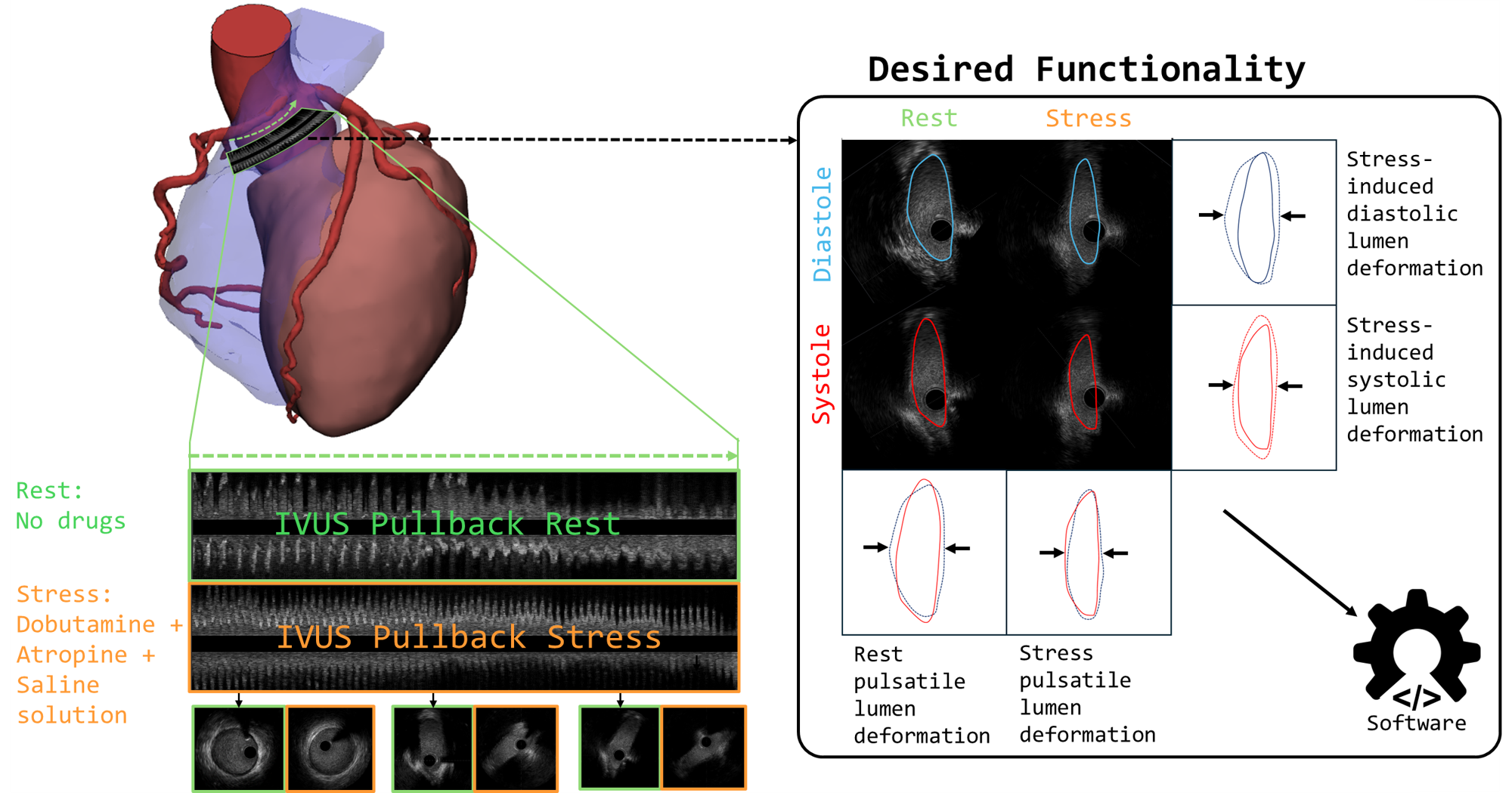
2. Stress-induced deformation from rest to stress for both diastole and systole.
|
|
154
176
|
|
|
155
|
-
The `
|
|
177
|
+
The `from_file_full`, `from_file_singlepair`, `from_array_singlepair`, and `from_array_single` functions were specifically designed to quantify these four distinct geometric states, which are crucial for diagnosis and treatment planning.
|
|
156
178
|
|
|
157
179
|
|
|
158
180
|
|
|
@@ -206,13 +228,29 @@ The expected input data for contours is the following for a csv file:
|
|
|
206
228
|
--------------------------------------------------------------------
|
|
207
229
|
| 185 | 5.32 | 2.37 | 0.0 |
|
|
208
230
|
| ... | ... | ... | ... |
|
|
209
|
-
No headers -> frame index, x-coord [mm], y-coord [mm], z-coord [mm]
|
|
231
|
+
No headers -> frame index, x-coord [mm], y-coord [mm], z-coord [mm]
|
|
210
232
|
```
|
|
211
233
|
The contours can also be in pixels, but results of the `.get_area()` function will be wrong.
|
|
212
234
|
|
|
213
235
|
The output allows for the creation of several interpolated meshes. These can then be used to render videos displaying the dynamics.
|
|
214
236
|
|
|
215
|
-

|
|
238
|
+
|
|
239
|
+
### Centerline Alignment
|
|
240
|
+
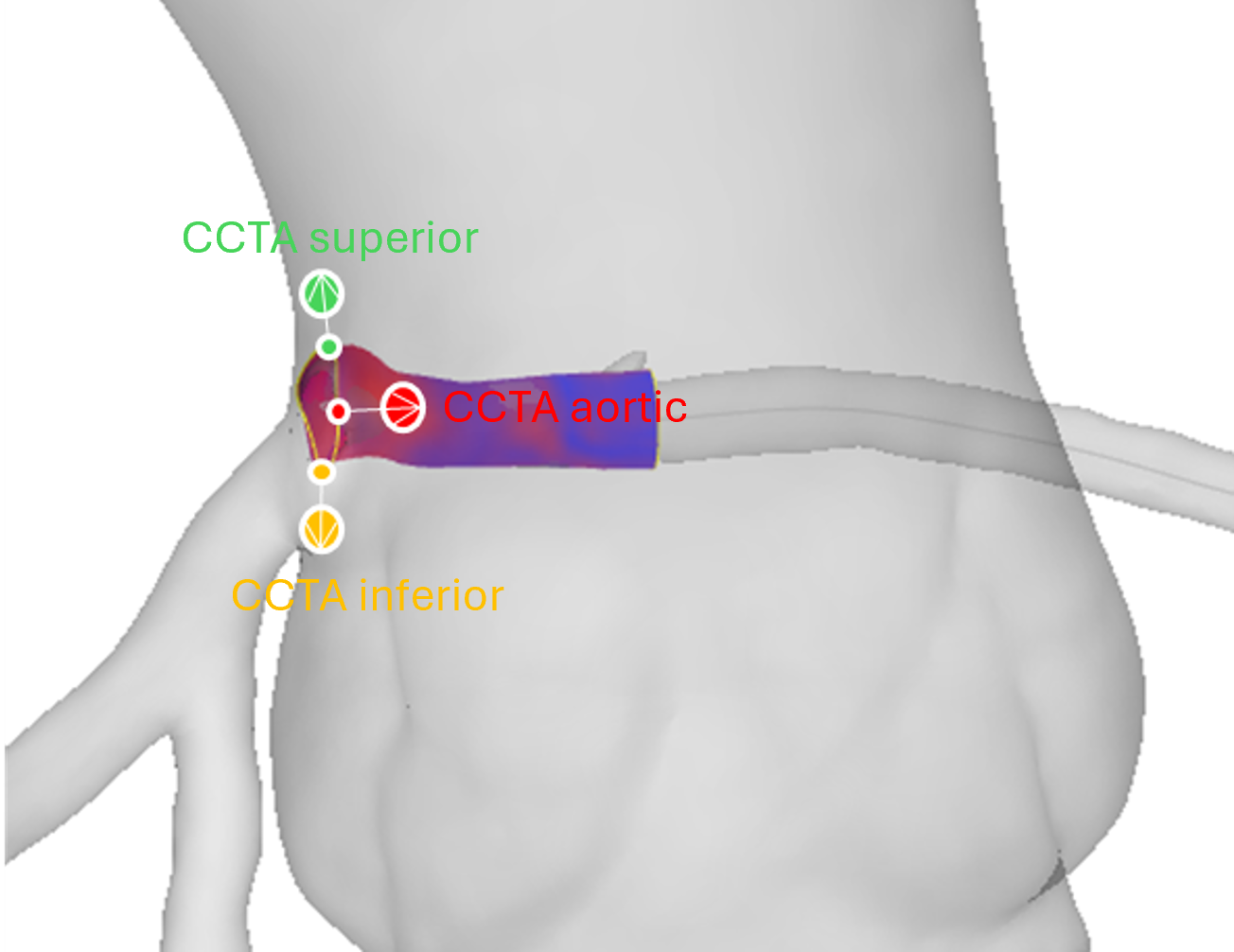
Reconstructed geometries can be aligned to a CCTA-derived centerline using three landmark points (aortic reference, proximal, and distal):
|
|
241
|
+
|
|
242
|
+
|
|
243
|
+
|
|
244
|
+
### CCTA Geometry Labeling
|
|
245
|
+
CCTA meshes can be automatically labeled by vessel region (aorta, RCA, LCA, intramural) for selective morphing and fusion:
|
|
246
|
+
|
|
247
|
+

|
|
248
|
+
|
|
249
|
+
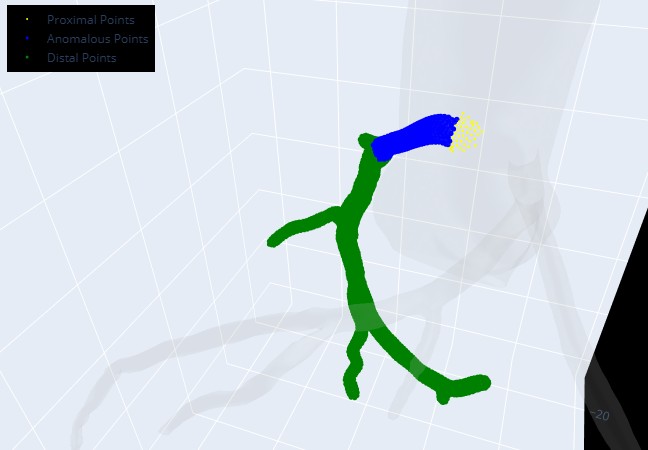
After alignment the anomalous region can be further subdivided into proximal, anomalous and distal parts and the CCTA can be morphed to better match the intravascular geometry:
|
|
250
|
+
|
|
251
|
+
|
|
252
|
+
|
|
253
|
+

|
|
216
254
|
|
|
217
255
|
### IVUS registration - pre- and post-stenting
|
|
218
256
|
The package works in the same way for other clinical applications such as pre- and post-stent alignment (An example is provided in `data/ivus_prestent` and `data/ivus_poststent`) or for coronary artery disease. Here it is also possible to read in contour information for e.g. lumen, external elastic membrane and create a coronary wall (See figure).
|
|
@@ -241,6 +279,3 @@ Please kindly cite the following paper if you use this repository.
|
|
|
241
279
|
|
|
242
280
|
Stark, Anselm W., Marc Ilic, Ali Mokhtari, Pooya Mohammadi Kazaj, Christoph Graeni, and Isaac Shiri. "multimodars: A Rust-powered toolkit for multi-modality cardiac image fusion and registration." arXiv preprint arXiv:2510.06241 (2025).
|
|
243
281
|
|
|
244
|
-
|
|
245
|
-
```
|
|
246
|
-
|
|
@@ -16,9 +16,9 @@
|
|
|
16
16
|
|
|
17
17
|
<figure class="epigraph" style="text-align: center; font-style: italic;">
|
|
18
18
|
<blockquote>
|
|
19
|
-
|
|
19
|
+
"One package to fuse them all."
|
|
20
20
|
</blockquote>
|
|
21
|
-
<figcaption>—
|
|
21
|
+
<figcaption>— <cite>The Lord of the Rings (probably)</cite></figcaption>
|
|
22
22
|
</figure>
|
|
23
23
|
|
|
24
24
|
---
|
|
@@ -26,7 +26,7 @@
|
|
|
26
26
|
> A high‑performance, Rust‑accelerated toolkit for multi‑modality cardiac image fusion and registration ﮩ٨ـﮩﮩ٨ـ♡ﮩ٨ـﮩﮩ٨ـ.
|
|
27
27
|
|
|
28
28
|
---
|
|
29
|
-
# Overview
|
|
29
|
+
# Overview
|
|
30
30
|
`multimoda-rs` is a high-performance toolkit developed to enable the study of dynamic vessel deformation in coronary artery anomalies (CAAs), where quantifying lumen changes under stress and rest is critical. It addresses the general challenge of aligning and fusing diverse cardiac imaging modalities, such as CCTA, IVUS, OCT, and MRI—into a unified, high‑resolution 3D model. While CCTA provides comprehensive volumetric context, intravascular modalities (IVUS and OCT) offer sub‑millimeter resolution along the vessel lumen, and MRI (LGE) reveals tissue characteristics like scar and edema. This library leverages Rust for computationally intensive registration steps, delivering faster performance than pure Python implementations.
|
|
31
31
|
|
|
32
32
|
## Key Features
|
|
@@ -40,7 +40,7 @@
|
|
|
40
40
|
- Centerline Alignment
|
|
41
41
|
- Align registered geometries onto a vessel centerline using three‑point or manual rotation methods.
|
|
42
42
|
- Geometry Utilities
|
|
43
|
-
- Smooth contours,
|
|
43
|
+
- Smooth contours, compute areas and elliptic ratios, find farthest/closest point pairs, and more.
|
|
44
44
|
|
|
45
45
|
## Installation
|
|
46
46
|
|
|
@@ -75,39 +75,61 @@ maturin develop
|
|
|
75
75
|
|
|
76
76
|
|
|
77
77
|
## Quickstart Example
|
|
78
|
-
|
|
78
|
+
Download [examples.zip](https://github.com/yungselm/multimoda-rs/releases/latest/download/examples.zip) (SHA256: `d11ebc7607f43ab4571fb51c9ac9178caac57774cf5d97f4f068ace4eb070fee`) from the latest release and place it in your working directory. A Jupyter Notebook with step-by-step examples is available at `examples/ivus_to_centerline.ipynb`.
|
|
79
|
+
Provided you extraced examples to the project root you can just copy paste the below example to ensure proper setup:
|
|
80
|
+
|
|
79
81
|
```python
|
|
80
82
|
import multimodars as mm
|
|
81
83
|
import numpy as np
|
|
82
84
|
|
|
83
85
|
# IVUS pullbacks: full alignment of rest/stress & diastole/systole
|
|
84
|
-
rest, stress, dia, sys, _ = mm.
|
|
85
|
-
|
|
86
|
-
|
|
87
|
-
|
|
86
|
+
rest, stress, dia, sys, _ = mm.from_file_full(
|
|
87
|
+
input_path_a="examples/data/ivus_rest",
|
|
88
|
+
input_path_b="examples/data/ivus_stress",
|
|
89
|
+
label="full",
|
|
90
|
+
step_rotation_deg=0.1,
|
|
91
|
+
range_rotation_deg=90,
|
|
92
|
+
image_center=(4.5, 4.5),
|
|
93
|
+
radius=0.5,
|
|
94
|
+
n_points=20,
|
|
95
|
+
write_obj=True,
|
|
96
|
+
watertight=False,
|
|
97
|
+
output_path_a="output/rest",
|
|
98
|
+
output_path_b="output/stress",
|
|
99
|
+
output_path_c="output/diastole",
|
|
100
|
+
output_path_d="output/systole",
|
|
101
|
+
interpolation_steps=0,
|
|
102
|
+
contour_types=[mm.PyContourType.Lumen, mm.PyContourType.Catheter, mm.PyContourType.Wall]
|
|
88
103
|
)
|
|
89
104
|
|
|
90
|
-
# Load raw centerline
|
|
91
|
-
cl_raw = np.genfromtxt("data/centerline_raw.csv", delimiter=",")
|
|
105
|
+
# Load raw centerline and align geometry onto it
|
|
106
|
+
cl_raw = np.genfromtxt("examples/data/centerline_raw.csv", delimiter=",")
|
|
92
107
|
centerline = mm.numpy_to_centerline(cl_raw)
|
|
93
108
|
|
|
94
|
-
|
|
95
|
-
aligned_pair, cl_resampled = mm.to_centerline(
|
|
96
|
-
mode="three_pt",
|
|
109
|
+
aligned_pair, cl_resampled = mm.align_three_point(
|
|
97
110
|
centerline=centerline,
|
|
98
|
-
geometry_pair=rest,
|
|
99
|
-
aortic_ref_pt=(12.
|
|
100
|
-
upper_ref_pt=(11.
|
|
101
|
-
lower_ref_pt=(15.
|
|
111
|
+
geometry_pair=rest,
|
|
112
|
+
aortic_ref_pt=(12.2605, -201.3643, 1751.0554),
|
|
113
|
+
upper_ref_pt=(11.7567, -202.1920, 1754.7975),
|
|
114
|
+
lower_ref_pt=(15.6605, -202.1920, 1749.9655),
|
|
115
|
+
write=True,
|
|
116
|
+
watertight=False,
|
|
117
|
+
interpolation_steps=0,
|
|
102
118
|
)
|
|
103
119
|
|
|
104
|
-
# Optionally save
|
|
105
|
-
mm.to_obj(
|
|
106
|
-
|
|
120
|
+
# Optionally save any geometry directly as .obj
|
|
121
|
+
mm.to_obj(
|
|
122
|
+
aligned_pair.geom_a,
|
|
123
|
+
"output/aligned",
|
|
124
|
+
watertight=False,
|
|
125
|
+
contour_types=[mm.PyContourType.Lumen],
|
|
126
|
+
filename_prefix="aligned",
|
|
127
|
+
)
|
|
107
128
|
```
|
|
129
|
+
|
|
108
130
|
## API Reference
|
|
109
131
|
For detailed signatures and usage examples, see the [online documentation](https://multimoda-rs.readthedocs.io).
|
|
110
|
-
The intended usage of the package with examples for every case are provided under examples with Jupyter Notebooks to follow along.
|
|
132
|
+
The intended usage of the package with examples for every case are provided under `examples/` with Jupyter Notebooks to follow along.
|
|
111
133
|
|
|
112
134
|
## License
|
|
113
135
|
Distributed under the MIT License. See [LICENSE](LICENSE) for details.
|
|
@@ -121,7 +143,7 @@ This package was initially built to study anomalous aortic origin of a coronary
|
|
|
121
143
|
|
|
122
144
|
2. Stress-induced deformation from rest to stress for both diastole and systole.
|
|
123
145
|
|
|
124
|
-
The `
|
|
146
|
+
The `from_file_full`, `from_file_singlepair`, `from_array_singlepair`, and `from_array_single` functions were specifically designed to quantify these four distinct geometric states, which are crucial for diagnosis and treatment planning.
|
|
125
147
|
|
|
126
148
|

|
|
127
149
|
|
|
@@ -175,13 +197,29 @@ The expected input data for contours is the following for a csv file:
|
|
|
175
197
|
--------------------------------------------------------------------
|
|
176
198
|
| 185 | 5.32 | 2.37 | 0.0 |
|
|
177
199
|
| ... | ... | ... | ... |
|
|
178
|
-
No headers -> frame index, x-coord [mm], y-coord [mm], z-coord [mm]
|
|
200
|
+
No headers -> frame index, x-coord [mm], y-coord [mm], z-coord [mm]
|
|
179
201
|
```
|
|
180
202
|
The contours can also be in pixels, but results of the `.get_area()` function will be wrong.
|
|
181
203
|
|
|
182
204
|
The output allows for the creation of several interpolated meshes. These can then be used to render videos displaying the dynamics.
|
|
183
205
|
|
|
184
|
-

|
|
207
|
+
|
|
208
|
+
### Centerline Alignment
|
|
209
|
+
Reconstructed geometries can be aligned to a CCTA-derived centerline using three landmark points (aortic reference, proximal, and distal):
|
|
210
|
+
|
|
211
|
+

|
|
212
|
+
|
|
213
|
+
### CCTA Geometry Labeling
|
|
214
|
+
CCTA meshes can be automatically labeled by vessel region (aorta, RCA, LCA, intramural) for selective morphing and fusion:
|
|
215
|
+
|
|
216
|
+

|
|
217
|
+
|
|
218
|
+
After alignment the anomalous region can be further subdivided into proximal, anomalous and distal parts and the CCTA can be morphed to better match the intravascular geometry:
|
|
219
|
+
|
|
220
|
+

|
|
221
|
+
|
|
222
|
+

|
|
185
223
|
|
|
186
224
|
### IVUS registration - pre- and post-stenting
|
|
187
225
|
The package works in the same way for other clinical applications such as pre- and post-stent alignment (An example is provided in `data/ivus_prestent` and `data/ivus_poststent`) or for coronary artery disease. Here it is also possible to read in contour information for e.g. lumen, external elastic membrane and create a coronary wall (See figure).
|
|
@@ -209,6 +247,3 @@ Please kindly cite the following paper if you use this repository.
|
|
|
209
247
|
```
|
|
210
248
|
|
|
211
249
|
Stark, Anselm W., Marc Ilic, Ali Mokhtari, Pooya Mohammadi Kazaj, Christoph Graeni, and Isaac Shiri. "multimodars: A Rust-powered toolkit for multi-modality cardiac image fusion and registration." arXiv preprint arXiv:2510.06241 (2025).
|
|
212
|
-
|
|
213
|
-
|
|
214
|
-
```
|
|
@@ -0,0 +1,9 @@
|
|
|
1
|
+
Adjust CCTA
|
|
2
|
+
===========
|
|
3
|
+
|
|
4
|
+
.. autofunction:: multimodars.ccta.adjust_ccta.label_geometry
|
|
5
|
+
.. autofunction:: multimodars.ccta.adjust_ccta.label_anomalous_region
|
|
6
|
+
.. autofunction:: multimodars.ccta.adjust_ccta.scale_region_centerline_morphing
|
|
7
|
+
.. autofunction:: multimodars.ccta.adjust_ccta.compare_centerline_scaling
|
|
8
|
+
.. autofunction:: multimodars.ccta.adjust_ccta.find_distal_and_proximal_scaling
|
|
9
|
+
.. autofunction:: multimodars.ccta.adjust_ccta.find_aorta_scaling
|