multimodars 0.2.1__tar.gz → 0.2.2__tar.gz
This diff represents the content of publicly available package versions that have been released to one of the supported registries. The information contained in this diff is provided for informational purposes only and reflects changes between package versions as they appear in their respective public registries.
- {multimodars-0.2.1 → multimodars-0.2.2}/.gitignore +2 -1
- {multimodars-0.2.1 → multimodars-0.2.2}/CHANGELOG.md +11 -0
- {multimodars-0.2.1 → multimodars-0.2.2}/Cargo.lock +1 -1
- {multimodars-0.2.1 → multimodars-0.2.2}/Cargo.toml +1 -1
- {multimodars-0.2.1 → multimodars-0.2.2}/PKG-INFO +62 -28
- {multimodars-0.2.1 → multimodars-0.2.2}/README.md +61 -27
- {multimodars-0.2.1 → multimodars-0.2.2}/docs/installation.rst +1 -1
- {multimodars-0.2.1 → multimodars-0.2.2}/docs/tutorial_ccta.rst +11 -5
- {multimodars-0.2.1 → multimodars-0.2.2}/docs/tutorial_intravascular.rst +129 -76
- {multimodars-0.2.1 → multimodars-0.2.2}/paper/bibliography.bib +27 -15
- multimodars-0.2.2/paper/figures/Figure3.png +0 -0
- multimodars-0.2.2/paper/paper.md +124 -0
- multimodars-0.2.1/paper/paper.md +0 -80
- {multimodars-0.2.1 → multimodars-0.2.2}/.github/ISSUE_TEMPLATE/bug_report.md +0 -0
- {multimodars-0.2.1 → multimodars-0.2.2}/.github/ISSUE_TEMPLATE/feature_request.md +0 -0
- {multimodars-0.2.1 → multimodars-0.2.2}/.github/PULL_REQUEST_TEMPLATE.md +0 -0
- {multimodars-0.2.1 → multimodars-0.2.2}/.github/workflows/CI.yml +0 -0
- {multimodars-0.2.1 → multimodars-0.2.2}/.github/workflows/draft-pdf.yml +0 -0
- {multimodars-0.2.1 → multimodars-0.2.2}/.pre-commit-config.yaml +0 -0
- {multimodars-0.2.1 → multimodars-0.2.2}/.readthedocs.yaml +0 -0
- {multimodars-0.2.1 → multimodars-0.2.2}/CONTRIBUTING.md +0 -0
- {multimodars-0.2.1 → multimodars-0.2.2}/LICENSE +0 -0
- {multimodars-0.2.1 → multimodars-0.2.2}/ROADMAP.MD +0 -0
- {multimodars-0.2.1 → multimodars-0.2.2}/data/fixtures/idealized_geometry/branch_diastolic_contours.csv +0 -0
- {multimodars-0.2.1 → multimodars-0.2.2}/data/fixtures/idealized_geometry/branch_systolic_contours.csv +0 -0
- {multimodars-0.2.1 → multimodars-0.2.2}/data/fixtures/idealized_geometry/calcium_diastolic_contours.csv +0 -0
- {multimodars-0.2.1 → multimodars-0.2.2}/data/fixtures/idealized_geometry/calcium_systolic_contours.csv +0 -0
- {multimodars-0.2.1 → multimodars-0.2.2}/data/fixtures/idealized_geometry/diastolic_contours.csv +0 -0
- {multimodars-0.2.1 → multimodars-0.2.2}/data/fixtures/idealized_geometry/diastolic_reference_points.csv +0 -0
- {multimodars-0.2.1 → multimodars-0.2.2}/data/fixtures/idealized_geometry/eem_diastolic_contours.csv +0 -0
- {multimodars-0.2.1 → multimodars-0.2.2}/data/fixtures/idealized_geometry/eem_systolic_contours.csv +0 -0
- {multimodars-0.2.1 → multimodars-0.2.2}/data/fixtures/idealized_geometry/systolic_contours.csv +0 -0
- {multimodars-0.2.1 → multimodars-0.2.2}/data/fixtures/idealized_geometry/systolic_reference_points.csv +0 -0
- {multimodars-0.2.1 → multimodars-0.2.2}/data/fixtures/ivus_full/branch_diastolic_contours.csv +0 -0
- {multimodars-0.2.1 → multimodars-0.2.2}/data/fixtures/ivus_full/branch_systolic_contours.csv +0 -0
- {multimodars-0.2.1 → multimodars-0.2.2}/data/fixtures/ivus_full/calcium_diastolic_contours.csv +0 -0
- {multimodars-0.2.1 → multimodars-0.2.2}/data/fixtures/ivus_full/calcium_systolic_contours.csv +0 -0
- {multimodars-0.2.1 → multimodars-0.2.2}/data/fixtures/ivus_full/diastolic_contours.csv +0 -0
- {multimodars-0.2.1 → multimodars-0.2.2}/data/fixtures/ivus_full/diastolic_reference_points.csv +0 -0
- {multimodars-0.2.1 → multimodars-0.2.2}/data/fixtures/ivus_full/eem_diastolic_contours.csv +0 -0
- {multimodars-0.2.1 → multimodars-0.2.2}/data/fixtures/ivus_full/eem_systolic_contours.csv +0 -0
- {multimodars-0.2.1 → multimodars-0.2.2}/data/fixtures/ivus_full/systolic_contours.csv +0 -0
- {multimodars-0.2.1 → multimodars-0.2.2}/data/fixtures/ivus_full/systolic_reference_points.csv +0 -0
- {multimodars-0.2.1 → multimodars-0.2.2}/data/fixtures/ivus_rest/combined_sorted_manual.csv +0 -0
- {multimodars-0.2.1 → multimodars-0.2.2}/data/fixtures/ivus_rest/diastolic_contours.csv +0 -0
- {multimodars-0.2.1 → multimodars-0.2.2}/data/fixtures/ivus_rest/diastolic_reference_points.csv +0 -0
- {multimodars-0.2.1 → multimodars-0.2.2}/data/fixtures/ivus_rest/systolic_contours.csv +0 -0
- {multimodars-0.2.1 → multimodars-0.2.2}/data/fixtures/ivus_rest/systolic_reference_points.csv +0 -0
- {multimodars-0.2.1 → multimodars-0.2.2}/data/fixtures/ivus_stress/combined_sorted_manual.csv +0 -0
- {multimodars-0.2.1 → multimodars-0.2.2}/data/fixtures/ivus_stress/diastolic_contours.csv +0 -0
- {multimodars-0.2.1 → multimodars-0.2.2}/data/fixtures/ivus_stress/diastolic_reference_points.csv +0 -0
- {multimodars-0.2.1 → multimodars-0.2.2}/data/fixtures/ivus_stress/systolic_contours.csv +0 -0
- {multimodars-0.2.1 → multimodars-0.2.2}/data/fixtures/ivus_stress/systolic_reference_points.csv +0 -0
- {multimodars-0.2.1 → multimodars-0.2.2}/docs/Makefile +0 -0
- {multimodars-0.2.1 → multimodars-0.2.2}/docs/_static/.gitkeep +0 -0
- {multimodars-0.2.1 → multimodars-0.2.2}/docs/api/centerline.rst +0 -0
- {multimodars-0.2.1 → multimodars-0.2.2}/docs/api/classes/PyCenterline.rst +0 -0
- {multimodars-0.2.1 → multimodars-0.2.2}/docs/api/classes/PyCenterlinePoint.rst +0 -0
- {multimodars-0.2.1 → multimodars-0.2.2}/docs/api/classes/PyContour.rst +0 -0
- {multimodars-0.2.1 → multimodars-0.2.2}/docs/api/classes/PyContourPoint.rst +0 -0
- {multimodars-0.2.1 → multimodars-0.2.2}/docs/api/classes/PyFrame.rst +0 -0
- {multimodars-0.2.1 → multimodars-0.2.2}/docs/api/classes/PyGeometry.rst +0 -0
- {multimodars-0.2.1 → multimodars-0.2.2}/docs/api/classes/PyGeometryPair.rst +0 -0
- {multimodars-0.2.1 → multimodars-0.2.2}/docs/api/classes/PyInputData.rst +0 -0
- {multimodars-0.2.1 → multimodars-0.2.2}/docs/api/classes/PyRecord.rst +0 -0
- {multimodars-0.2.1 → multimodars-0.2.2}/docs/api/classes/index.rst +0 -0
- {multimodars-0.2.1 → multimodars-0.2.2}/docs/api/converters_and_wrappers.rst +0 -0
- {multimodars-0.2.1 → multimodars-0.2.2}/docs/api/core.rst +0 -0
- {multimodars-0.2.1 → multimodars-0.2.2}/docs/api/index.rst +0 -0
- {multimodars-0.2.1 → multimodars-0.2.2}/docs/api/processing.rst +0 -0
- {multimodars-0.2.1 → multimodars-0.2.2}/docs/api/utilities.rst +0 -0
- {multimodars-0.2.1 → multimodars-0.2.2}/docs/build.sh +0 -0
- {multimodars-0.2.1 → multimodars-0.2.2}/docs/changelog.md +0 -0
- {multimodars-0.2.1 → multimodars-0.2.2}/docs/conf.py +0 -0
- {multimodars-0.2.1 → multimodars-0.2.2}/docs/figures/Alignment3p.png +0 -0
- {multimodars-0.2.1 → multimodars-0.2.2}/docs/figures/animation_stress_induced_systolic_deformation.gif +0 -0
- {multimodars-0.2.1 → multimodars-0.2.2}/docs/figures/anomalous_labeling.jpg +0 -0
- {multimodars-0.2.1 → multimodars-0.2.2}/docs/figures/initial_labeling.jpg +0 -0
- {multimodars-0.2.1 → multimodars-0.2.2}/docs/figures/scaling.jpg +0 -0
- {multimodars-0.2.1 → multimodars-0.2.2}/docs/index.rst +0 -0
- {multimodars-0.2.1 → multimodars-0.2.2}/docs/make.bat +0 -0
- {multimodars-0.2.1 → multimodars-0.2.2}/media/coronary_artery_disease.jpg +0 -0
- {multimodars-0.2.1 → multimodars-0.2.2}/media/dynamic_lumen_changes.png +0 -0
- {multimodars-0.2.1 → multimodars-0.2.2}/media/multimoda-rs.jpg +0 -0
- {multimodars-0.2.1 → multimodars-0.2.2}/multimodars/__init__.py +0 -0
- {multimodars-0.2.1 → multimodars-0.2.2}/multimodars/_converters.py +0 -0
- {multimodars-0.2.1 → multimodars-0.2.2}/multimodars/_wrappers.py +0 -0
- {multimodars-0.2.1 → multimodars-0.2.2}/multimodars/ccta/__init__.py +0 -0
- {multimodars-0.2.1 → multimodars-0.2.2}/multimodars/ccta/adjust_ccta.py +0 -0
- {multimodars-0.2.1 → multimodars-0.2.2}/multimodars/io/__init__.py +0 -0
- {multimodars-0.2.1 → multimodars-0.2.2}/multimodars/io/read_geometrical.py +0 -0
- {multimodars-0.2.1 → multimodars-0.2.2}/multimodars/io/write_geometries.py +0 -0
- {multimodars-0.2.1 → multimodars-0.2.2}/paper/figures/Figure1.jpg +0 -0
- {multimodars-0.2.1 → multimodars-0.2.2}/paper/figures/Figure2.jpg +0 -0
- /multimodars-0.2.1/paper/figures/Figure3.jpg → /multimodars-0.2.2/paper/figures/Figure4.jpg +0 -0
- {multimodars-0.2.1 → multimodars-0.2.2}/pyproject.toml +0 -0
- {multimodars-0.2.1 → multimodars-0.2.2}/src/ccta/adjust_mesh/label_coronary.rs +0 -0
- {multimodars-0.2.1 → multimodars-0.2.2}/src/ccta/adjust_mesh/mod.rs +0 -0
- {multimodars-0.2.1 → multimodars-0.2.2}/src/ccta/adjust_mesh/scale_coronary.rs +0 -0
- {multimodars-0.2.1 → multimodars-0.2.2}/src/ccta/binding/ccta_py.rs +0 -0
- {multimodars-0.2.1 → multimodars-0.2.2}/src/ccta/binding/mod.rs +0 -0
- {multimodars-0.2.1 → multimodars-0.2.2}/src/ccta/io/input.rs +0 -0
- {multimodars-0.2.1 → multimodars-0.2.2}/src/ccta/io/mod.rs +0 -0
- {multimodars-0.2.1 → multimodars-0.2.2}/src/ccta/mod.rs +0 -0
- {multimodars-0.2.1 → multimodars-0.2.2}/src/intravascular/binding/align.rs +0 -0
- {multimodars-0.2.1 → multimodars-0.2.2}/src/intravascular/binding/classes.rs +0 -0
- {multimodars-0.2.1 → multimodars-0.2.2}/src/intravascular/binding/entry.rs +0 -0
- {multimodars-0.2.1 → multimodars-0.2.2}/src/intravascular/binding/mod.rs +0 -0
- {multimodars-0.2.1 → multimodars-0.2.2}/src/intravascular/centerline_align/align_algorithms.rs +0 -0
- {multimodars-0.2.1 → multimodars-0.2.2}/src/intravascular/centerline_align/mod.rs +0 -0
- {multimodars-0.2.1 → multimodars-0.2.2}/src/intravascular/centerline_align/preprocessing.rs +0 -0
- {multimodars-0.2.1 → multimodars-0.2.2}/src/intravascular/io/geometry.rs +0 -0
- {multimodars-0.2.1 → multimodars-0.2.2}/src/intravascular/io/input.rs +0 -0
- {multimodars-0.2.1 → multimodars-0.2.2}/src/intravascular/io/integrity_check.rs +0 -0
- {multimodars-0.2.1 → multimodars-0.2.2}/src/intravascular/io/mod.rs +0 -0
- {multimodars-0.2.1 → multimodars-0.2.2}/src/intravascular/io/output.rs +0 -0
- {multimodars-0.2.1 → multimodars-0.2.2}/src/intravascular/mod.rs +0 -0
- {multimodars-0.2.1 → multimodars-0.2.2}/src/intravascular/processing/align_between.rs +0 -0
- {multimodars-0.2.1 → multimodars-0.2.2}/src/intravascular/processing/align_within.rs +0 -0
- {multimodars-0.2.1 → multimodars-0.2.2}/src/intravascular/processing/mod.rs +0 -0
- {multimodars-0.2.1 → multimodars-0.2.2}/src/intravascular/processing/postprocessing.rs +0 -0
- {multimodars-0.2.1 → multimodars-0.2.2}/src/intravascular/processing/preprocessing.rs +0 -0
- {multimodars-0.2.1 → multimodars-0.2.2}/src/intravascular/processing/process_utils.rs +0 -0
- {multimodars-0.2.1 → multimodars-0.2.2}/src/intravascular/processing/wall.rs +0 -0
- {multimodars-0.2.1 → multimodars-0.2.2}/src/intravascular/to_object/interpolation.rs +0 -0
- {multimodars-0.2.1 → multimodars-0.2.2}/src/intravascular/to_object/mod.rs +0 -0
- {multimodars-0.2.1 → multimodars-0.2.2}/src/intravascular/to_object/texture.rs +0 -0
- {multimodars-0.2.1 → multimodars-0.2.2}/src/intravascular/to_object/write_mtl.rs +0 -0
- {multimodars-0.2.1 → multimodars-0.2.2}/src/intravascular/utils/mod.rs +0 -0
- {multimodars-0.2.1 → multimodars-0.2.2}/src/intravascular/utils/test_utils.rs +0 -0
- {multimodars-0.2.1 → multimodars-0.2.2}/src/intravascular/utils/utils.rs +0 -0
- {multimodars-0.2.1 → multimodars-0.2.2}/src/lib.rs +0 -0
- {multimodars-0.2.1 → multimodars-0.2.2}/tests/conftest.py +0 -0
- {multimodars-0.2.1 → multimodars-0.2.2}/tests/test_converters.py +0 -0
- {multimodars-0.2.1 → multimodars-0.2.2}/tests/test_core.py +0 -0
- {multimodars-0.2.1 → multimodars-0.2.2}/tests/test_wrappers.py +0 -0
- {multimodars-0.2.1 → multimodars-0.2.2}/tests/tests_todo.md +0 -0
|
@@ -3,6 +3,17 @@
|
|
|
3
3
|
All notable changes to this project will be documented in this file.
|
|
4
4
|
This project adheres to [Semantic Versioning](https://semver.org/).
|
|
5
5
|
|
|
6
|
+
## [0.2.2] - 2026-03-03
|
|
7
|
+
|
|
8
|
+
### Changed
|
|
9
|
+
- Uploaded new example data
|
|
10
|
+
- Updated docs to match the new example data
|
|
11
|
+
|
|
12
|
+
## [0.2.1] - 2026-01-12
|
|
13
|
+
|
|
14
|
+
### Changed
|
|
15
|
+
- Automatic version update based on Cargo.toml
|
|
16
|
+
|
|
6
17
|
## [0.2.0] - 2026-01-11
|
|
7
18
|
|
|
8
19
|
### Added
|
|
@@ -1,6 +1,6 @@
|
|
|
1
1
|
Metadata-Version: 2.4
|
|
2
2
|
Name: multimodars
|
|
3
|
-
Version: 0.2.
|
|
3
|
+
Version: 0.2.2
|
|
4
4
|
Classifier: Programming Language :: Rust
|
|
5
5
|
Classifier: Programming Language :: Python :: Implementation :: CPython
|
|
6
6
|
Classifier: Programming Language :: Python :: Implementation :: PyPy
|
|
@@ -47,9 +47,9 @@ Project-URL: Issues, https://github.com/yungselm/multimoda-rs/issues
|
|
|
47
47
|
|
|
48
48
|
<figure class="epigraph" style="text-align: center; font-style: italic;">
|
|
49
49
|
<blockquote>
|
|
50
|
-
|
|
50
|
+
"One package to fuse them all."
|
|
51
51
|
</blockquote>
|
|
52
|
-
<figcaption>—
|
|
52
|
+
<figcaption>— <cite>The Lord of the Rings (probably)</cite></figcaption>
|
|
53
53
|
</figure>
|
|
54
54
|
|
|
55
55
|
---
|
|
@@ -57,7 +57,7 @@ Project-URL: Issues, https://github.com/yungselm/multimoda-rs/issues
|
|
|
57
57
|
> A high‑performance, Rust‑accelerated toolkit for multi‑modality cardiac image fusion and registration ﮩ٨ـﮩﮩ٨ـ♡ﮩ٨ـﮩﮩ٨ـ.
|
|
58
58
|
|
|
59
59
|
---
|
|
60
|
-
# Overview
|
|
60
|
+
# Overview
|
|
61
61
|
`multimoda-rs` is a high-performance toolkit developed to enable the study of dynamic vessel deformation in coronary artery anomalies (CAAs), where quantifying lumen changes under stress and rest is critical. It addresses the general challenge of aligning and fusing diverse cardiac imaging modalities, such as CCTA, IVUS, OCT, and MRI—into a unified, high‑resolution 3D model. While CCTA provides comprehensive volumetric context, intravascular modalities (IVUS and OCT) offer sub‑millimeter resolution along the vessel lumen, and MRI (LGE) reveals tissue characteristics like scar and edema. This library leverages Rust for computationally intensive registration steps, delivering faster performance than pure Python implementations.
|
|
62
62
|
|
|
63
63
|
## Key Features
|
|
@@ -106,39 +106,60 @@ maturin develop
|
|
|
106
106
|
|
|
107
107
|
|
|
108
108
|
## Quickstart Example
|
|
109
|
-
|
|
109
|
+
Download the example data from the latest release and place it in your working directory. A Jupyter Notebook with step-by-step examples is available at `examples/ivus_to_centerline.ipynb`.
|
|
110
|
+
|
|
110
111
|
```python
|
|
111
112
|
import multimodars as mm
|
|
112
113
|
import numpy as np
|
|
113
114
|
|
|
114
115
|
# IVUS pullbacks: full alignment of rest/stress & diastole/systole
|
|
115
|
-
rest, stress, dia, sys, _ = mm.
|
|
116
|
-
|
|
117
|
-
|
|
118
|
-
|
|
116
|
+
rest, stress, dia, sys, _ = mm.from_file_full(
|
|
117
|
+
input_path_a="ivus_rest",
|
|
118
|
+
input_path_b="ivus_stress",
|
|
119
|
+
label="full",
|
|
120
|
+
step_rotation_deg=0.1,
|
|
121
|
+
range_rotation_deg=90,
|
|
122
|
+
image_center=(4.5, 4.5),
|
|
123
|
+
radius=0.5,
|
|
124
|
+
n_points=20,
|
|
125
|
+
write_obj=True,
|
|
126
|
+
watertight=False,
|
|
127
|
+
output_path_a="output/rest",
|
|
128
|
+
output_path_b="output/stress",
|
|
129
|
+
output_path_c="output/diastole",
|
|
130
|
+
output_path_d="output/systole",
|
|
131
|
+
interpolation_steps=28,
|
|
132
|
+
contour_types=[mm.PyContourType.Lumen, mm.PyContourType.Catheter, mm.PyContourType.Wall]
|
|
119
133
|
)
|
|
120
134
|
|
|
121
|
-
# Load raw centerline
|
|
122
|
-
cl_raw = np.genfromtxt("
|
|
135
|
+
# Load raw centerline and align geometry onto it
|
|
136
|
+
cl_raw = np.genfromtxt("centerline_raw.csv", delimiter=",")
|
|
123
137
|
centerline = mm.numpy_to_centerline(cl_raw)
|
|
124
138
|
|
|
125
|
-
|
|
126
|
-
aligned_pair, cl_resampled = mm.to_centerline(
|
|
127
|
-
mode="three_pt",
|
|
139
|
+
aligned_pair, cl_resampled = mm.align_three_point(
|
|
128
140
|
centerline=centerline,
|
|
129
|
-
geometry_pair=rest,
|
|
130
|
-
aortic_ref_pt=(12.
|
|
131
|
-
upper_ref_pt=(11.
|
|
132
|
-
lower_ref_pt=(15.
|
|
141
|
+
geometry_pair=rest,
|
|
142
|
+
aortic_ref_pt=(12.2605, -201.3643, 1751.0554),
|
|
143
|
+
upper_ref_pt=(11.7567, -202.1920, 1754.7975),
|
|
144
|
+
lower_ref_pt=(15.6605, -202.1920, 1749.9655),
|
|
145
|
+
write=True,
|
|
146
|
+
watertight=False,
|
|
147
|
+
interpolation_steps=0,
|
|
133
148
|
)
|
|
134
149
|
|
|
135
|
-
# Optionally save
|
|
136
|
-
mm.to_obj(
|
|
137
|
-
|
|
150
|
+
# Optionally save any geometry directly as .obj
|
|
151
|
+
mm.to_obj(
|
|
152
|
+
aligned_pair.geom_a,
|
|
153
|
+
"output/aligned",
|
|
154
|
+
watertight=False,
|
|
155
|
+
contour_types=[mm.PyContourType.Lumen],
|
|
156
|
+
filename_prefix="aligned",
|
|
157
|
+
)
|
|
138
158
|
```
|
|
159
|
+
|
|
139
160
|
## API Reference
|
|
140
161
|
For detailed signatures and usage examples, see the [online documentation](https://multimoda-rs.readthedocs.io).
|
|
141
|
-
The intended usage of the package with examples for every case are provided under examples with Jupyter Notebooks to follow along.
|
|
162
|
+
The intended usage of the package with examples for every case are provided under `examples/` with Jupyter Notebooks to follow along.
|
|
142
163
|
|
|
143
164
|
## License
|
|
144
165
|
Distributed under the MIT License. See [LICENSE](LICENSE) for details.
|
|
@@ -152,7 +173,7 @@ This package was initially built to study anomalous aortic origin of a coronary
|
|
|
152
173
|
|
|
153
174
|
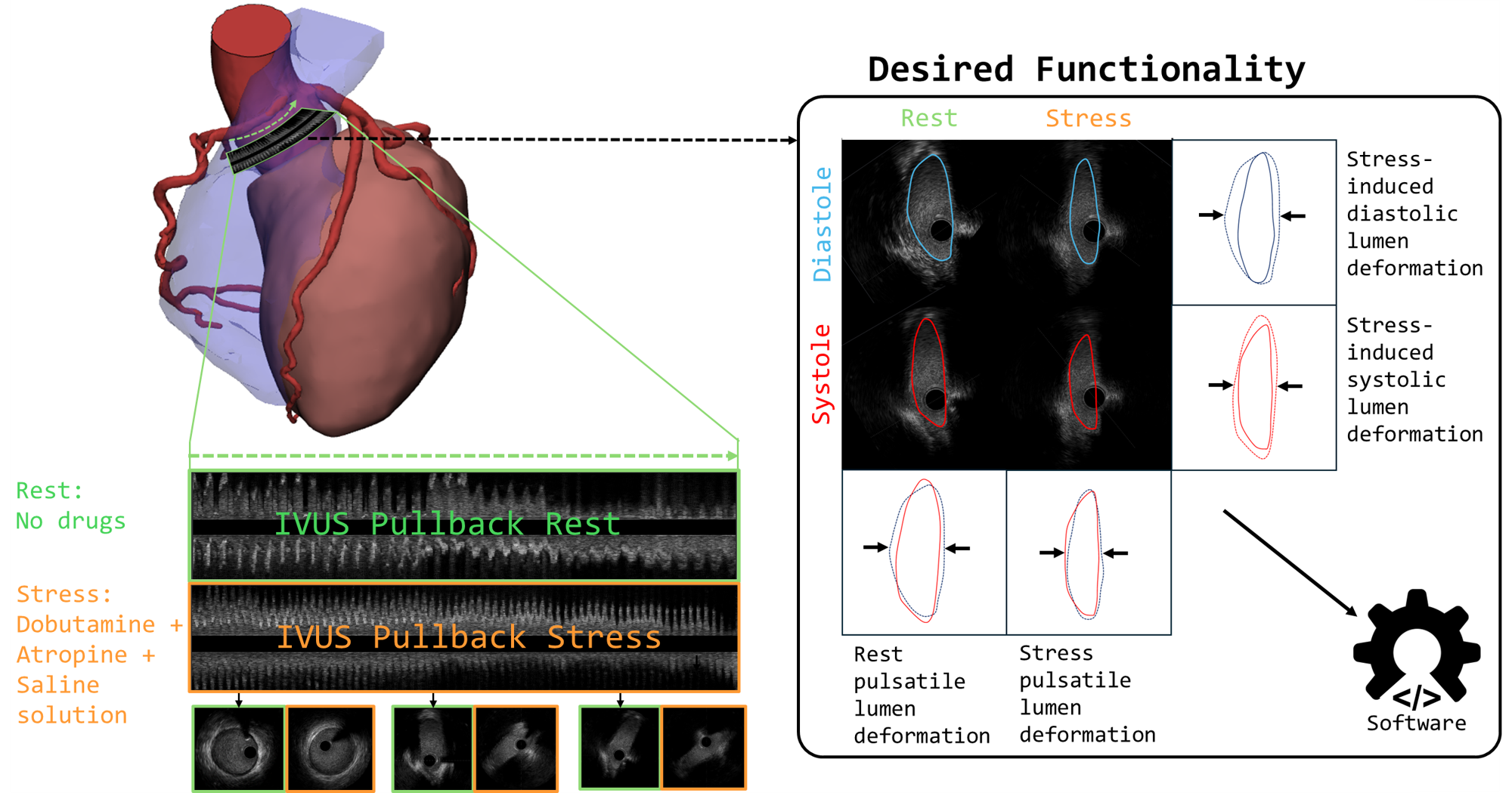
2. Stress-induced deformation from rest to stress for both diastole and systole.
|
|
154
175
|
|
|
155
|
-
The `
|
|
176
|
+
The `from_file_full`, `from_file_singlepair`, `from_array_singlepair`, and `from_array_single` functions were specifically designed to quantify these four distinct geometric states, which are crucial for diagnosis and treatment planning.
|
|
156
177
|
|
|
157
178
|
|
|
158
179
|
|
|
@@ -206,13 +227,29 @@ The expected input data for contours is the following for a csv file:
|
|
|
206
227
|
--------------------------------------------------------------------
|
|
207
228
|
| 185 | 5.32 | 2.37 | 0.0 |
|
|
208
229
|
| ... | ... | ... | ... |
|
|
209
|
-
No headers -> frame index, x-coord [mm], y-coord [mm], z-coord [mm]
|
|
230
|
+
No headers -> frame index, x-coord [mm], y-coord [mm], z-coord [mm]
|
|
210
231
|
```
|
|
211
232
|
The contours can also be in pixels, but results of the `.get_area()` function will be wrong.
|
|
212
233
|
|
|
213
234
|
The output allows for the creation of several interpolated meshes. These can then be used to render videos displaying the dynamics.
|
|
214
235
|
|
|
215
|
-

|
|
237
|
+
|
|
238
|
+
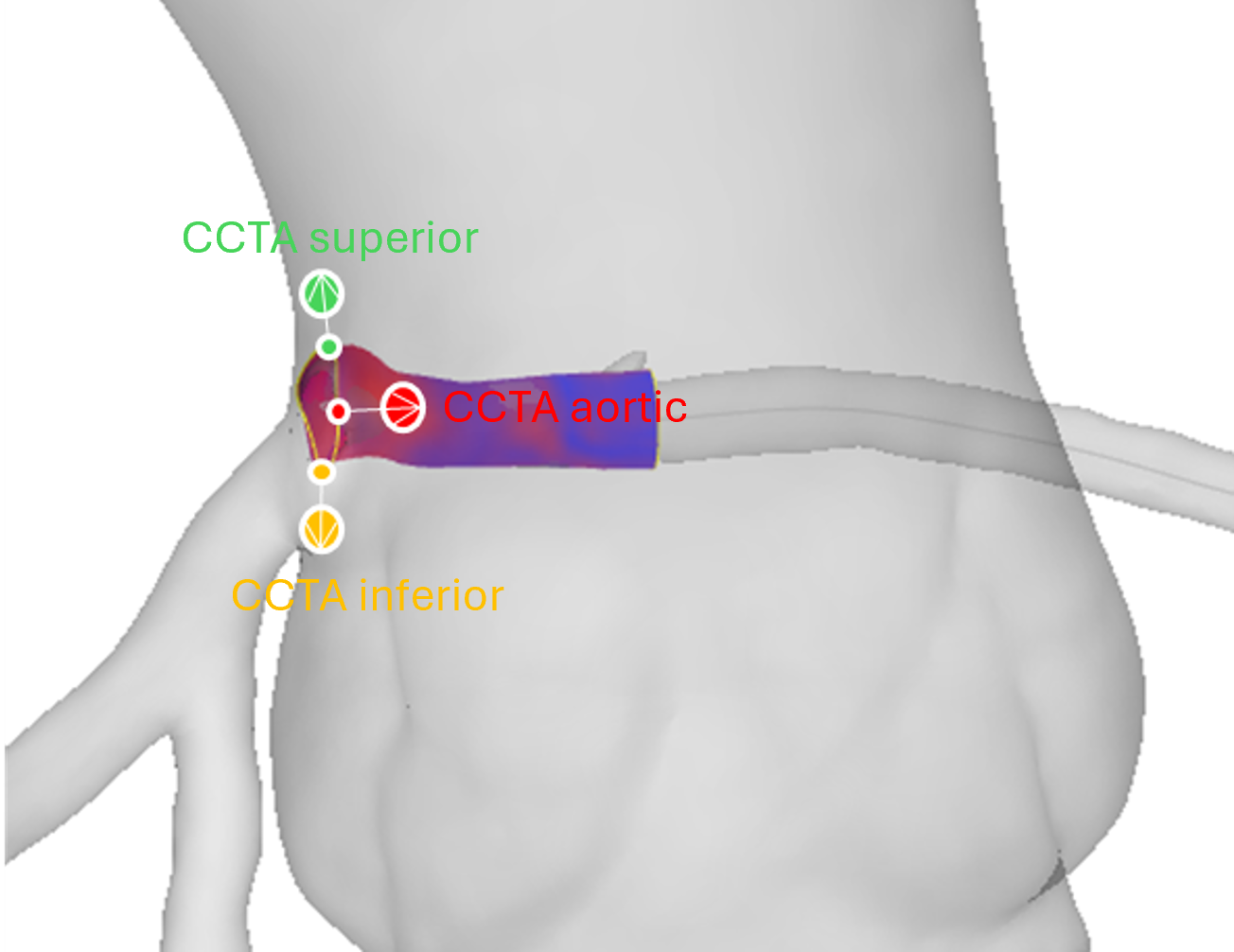
### Centerline Alignment
|
|
239
|
+
Reconstructed geometries can be aligned to a CCTA-derived centerline using three landmark points (aortic reference, proximal, and distal):
|
|
240
|
+
|
|
241
|
+
|
|
242
|
+
|
|
243
|
+
### CCTA Geometry Labeling
|
|
244
|
+
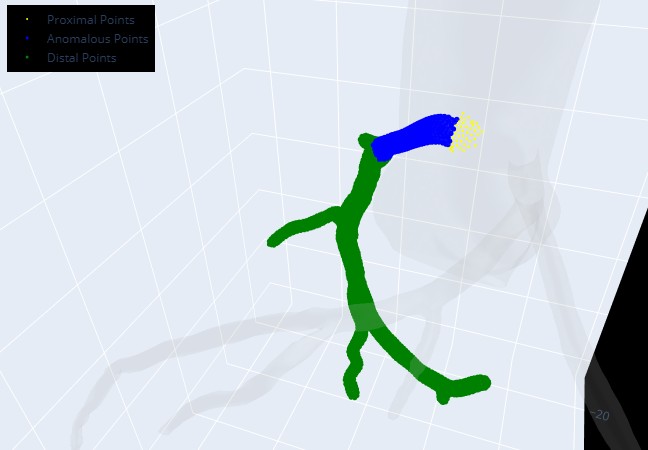
CCTA meshes can be automatically labeled by vessel region (aorta, RCA, LCA, intramural) for selective morphing and fusion:
|
|
245
|
+
|
|
246
|
+

|
|
247
|
+
|
|
248
|
+
After alignment the anomalous region can be further subdivided into proximal, anomalous and distal parts and the CCTA can be morphed to better match the intravascular geometry:
|
|
249
|
+
|
|
250
|
+
|
|
251
|
+
|
|
252
|
+

|
|
216
253
|
|
|
217
254
|
### IVUS registration - pre- and post-stenting
|
|
218
255
|
The package works in the same way for other clinical applications such as pre- and post-stent alignment (An example is provided in `data/ivus_prestent` and `data/ivus_poststent`) or for coronary artery disease. Here it is also possible to read in contour information for e.g. lumen, external elastic membrane and create a coronary wall (See figure).
|
|
@@ -241,6 +278,3 @@ Please kindly cite the following paper if you use this repository.
|
|
|
241
278
|
|
|
242
279
|
Stark, Anselm W., Marc Ilic, Ali Mokhtari, Pooya Mohammadi Kazaj, Christoph Graeni, and Isaac Shiri. "multimodars: A Rust-powered toolkit for multi-modality cardiac image fusion and registration." arXiv preprint arXiv:2510.06241 (2025).
|
|
243
280
|
|
|
244
|
-
|
|
245
|
-
```
|
|
246
|
-
|
|
@@ -16,9 +16,9 @@
|
|
|
16
16
|
|
|
17
17
|
<figure class="epigraph" style="text-align: center; font-style: italic;">
|
|
18
18
|
<blockquote>
|
|
19
|
-
|
|
19
|
+
"One package to fuse them all."
|
|
20
20
|
</blockquote>
|
|
21
|
-
<figcaption>—
|
|
21
|
+
<figcaption>— <cite>The Lord of the Rings (probably)</cite></figcaption>
|
|
22
22
|
</figure>
|
|
23
23
|
|
|
24
24
|
---
|
|
@@ -26,7 +26,7 @@
|
|
|
26
26
|
> A high‑performance, Rust‑accelerated toolkit for multi‑modality cardiac image fusion and registration ﮩ٨ـﮩﮩ٨ـ♡ﮩ٨ـﮩﮩ٨ـ.
|
|
27
27
|
|
|
28
28
|
---
|
|
29
|
-
# Overview
|
|
29
|
+
# Overview
|
|
30
30
|
`multimoda-rs` is a high-performance toolkit developed to enable the study of dynamic vessel deformation in coronary artery anomalies (CAAs), where quantifying lumen changes under stress and rest is critical. It addresses the general challenge of aligning and fusing diverse cardiac imaging modalities, such as CCTA, IVUS, OCT, and MRI—into a unified, high‑resolution 3D model. While CCTA provides comprehensive volumetric context, intravascular modalities (IVUS and OCT) offer sub‑millimeter resolution along the vessel lumen, and MRI (LGE) reveals tissue characteristics like scar and edema. This library leverages Rust for computationally intensive registration steps, delivering faster performance than pure Python implementations.
|
|
31
31
|
|
|
32
32
|
## Key Features
|
|
@@ -75,39 +75,60 @@ maturin develop
|
|
|
75
75
|
|
|
76
76
|
|
|
77
77
|
## Quickstart Example
|
|
78
|
-
|
|
78
|
+
Download the example data from the latest release and place it in your working directory. A Jupyter Notebook with step-by-step examples is available at `examples/ivus_to_centerline.ipynb`.
|
|
79
|
+
|
|
79
80
|
```python
|
|
80
81
|
import multimodars as mm
|
|
81
82
|
import numpy as np
|
|
82
83
|
|
|
83
84
|
# IVUS pullbacks: full alignment of rest/stress & diastole/systole
|
|
84
|
-
rest, stress, dia, sys, _ = mm.
|
|
85
|
-
|
|
86
|
-
|
|
87
|
-
|
|
85
|
+
rest, stress, dia, sys, _ = mm.from_file_full(
|
|
86
|
+
input_path_a="ivus_rest",
|
|
87
|
+
input_path_b="ivus_stress",
|
|
88
|
+
label="full",
|
|
89
|
+
step_rotation_deg=0.1,
|
|
90
|
+
range_rotation_deg=90,
|
|
91
|
+
image_center=(4.5, 4.5),
|
|
92
|
+
radius=0.5,
|
|
93
|
+
n_points=20,
|
|
94
|
+
write_obj=True,
|
|
95
|
+
watertight=False,
|
|
96
|
+
output_path_a="output/rest",
|
|
97
|
+
output_path_b="output/stress",
|
|
98
|
+
output_path_c="output/diastole",
|
|
99
|
+
output_path_d="output/systole",
|
|
100
|
+
interpolation_steps=28,
|
|
101
|
+
contour_types=[mm.PyContourType.Lumen, mm.PyContourType.Catheter, mm.PyContourType.Wall]
|
|
88
102
|
)
|
|
89
103
|
|
|
90
|
-
# Load raw centerline
|
|
91
|
-
cl_raw = np.genfromtxt("
|
|
104
|
+
# Load raw centerline and align geometry onto it
|
|
105
|
+
cl_raw = np.genfromtxt("centerline_raw.csv", delimiter=",")
|
|
92
106
|
centerline = mm.numpy_to_centerline(cl_raw)
|
|
93
107
|
|
|
94
|
-
|
|
95
|
-
aligned_pair, cl_resampled = mm.to_centerline(
|
|
96
|
-
mode="three_pt",
|
|
108
|
+
aligned_pair, cl_resampled = mm.align_three_point(
|
|
97
109
|
centerline=centerline,
|
|
98
|
-
geometry_pair=rest,
|
|
99
|
-
aortic_ref_pt=(12.
|
|
100
|
-
upper_ref_pt=(11.
|
|
101
|
-
lower_ref_pt=(15.
|
|
110
|
+
geometry_pair=rest,
|
|
111
|
+
aortic_ref_pt=(12.2605, -201.3643, 1751.0554),
|
|
112
|
+
upper_ref_pt=(11.7567, -202.1920, 1754.7975),
|
|
113
|
+
lower_ref_pt=(15.6605, -202.1920, 1749.9655),
|
|
114
|
+
write=True,
|
|
115
|
+
watertight=False,
|
|
116
|
+
interpolation_steps=0,
|
|
102
117
|
)
|
|
103
118
|
|
|
104
|
-
# Optionally save
|
|
105
|
-
mm.to_obj(
|
|
106
|
-
|
|
119
|
+
# Optionally save any geometry directly as .obj
|
|
120
|
+
mm.to_obj(
|
|
121
|
+
aligned_pair.geom_a,
|
|
122
|
+
"output/aligned",
|
|
123
|
+
watertight=False,
|
|
124
|
+
contour_types=[mm.PyContourType.Lumen],
|
|
125
|
+
filename_prefix="aligned",
|
|
126
|
+
)
|
|
107
127
|
```
|
|
128
|
+
|
|
108
129
|
## API Reference
|
|
109
130
|
For detailed signatures and usage examples, see the [online documentation](https://multimoda-rs.readthedocs.io).
|
|
110
|
-
The intended usage of the package with examples for every case are provided under examples with Jupyter Notebooks to follow along.
|
|
131
|
+
The intended usage of the package with examples for every case are provided under `examples/` with Jupyter Notebooks to follow along.
|
|
111
132
|
|
|
112
133
|
## License
|
|
113
134
|
Distributed under the MIT License. See [LICENSE](LICENSE) for details.
|
|
@@ -121,7 +142,7 @@ This package was initially built to study anomalous aortic origin of a coronary
|
|
|
121
142
|
|
|
122
143
|
2. Stress-induced deformation from rest to stress for both diastole and systole.
|
|
123
144
|
|
|
124
|
-
The `
|
|
145
|
+
The `from_file_full`, `from_file_singlepair`, `from_array_singlepair`, and `from_array_single` functions were specifically designed to quantify these four distinct geometric states, which are crucial for diagnosis and treatment planning.
|
|
125
146
|
|
|
126
147
|

|
|
127
148
|
|
|
@@ -175,13 +196,29 @@ The expected input data for contours is the following for a csv file:
|
|
|
175
196
|
--------------------------------------------------------------------
|
|
176
197
|
| 185 | 5.32 | 2.37 | 0.0 |
|
|
177
198
|
| ... | ... | ... | ... |
|
|
178
|
-
No headers -> frame index, x-coord [mm], y-coord [mm], z-coord [mm]
|
|
199
|
+
No headers -> frame index, x-coord [mm], y-coord [mm], z-coord [mm]
|
|
179
200
|
```
|
|
180
201
|
The contours can also be in pixels, but results of the `.get_area()` function will be wrong.
|
|
181
202
|
|
|
182
203
|
The output allows for the creation of several interpolated meshes. These can then be used to render videos displaying the dynamics.
|
|
183
204
|
|
|
184
|
-

|
|
206
|
+
|
|
207
|
+
### Centerline Alignment
|
|
208
|
+
Reconstructed geometries can be aligned to a CCTA-derived centerline using three landmark points (aortic reference, proximal, and distal):
|
|
209
|
+
|
|
210
|
+

|
|
211
|
+
|
|
212
|
+
### CCTA Geometry Labeling
|
|
213
|
+
CCTA meshes can be automatically labeled by vessel region (aorta, RCA, LCA, intramural) for selective morphing and fusion:
|
|
214
|
+
|
|
215
|
+

|
|
216
|
+
|
|
217
|
+
After alignment the anomalous region can be further subdivided into proximal, anomalous and distal parts and the CCTA can be morphed to better match the intravascular geometry:
|
|
218
|
+
|
|
219
|
+

|
|
220
|
+
|
|
221
|
+

|
|
185
222
|
|
|
186
223
|
### IVUS registration - pre- and post-stenting
|
|
187
224
|
The package works in the same way for other clinical applications such as pre- and post-stent alignment (An example is provided in `data/ivus_prestent` and `data/ivus_poststent`) or for coronary artery disease. Here it is also possible to read in contour information for e.g. lumen, external elastic membrane and create a coronary wall (See figure).
|
|
@@ -209,6 +246,3 @@ Please kindly cite the following paper if you use this repository.
|
|
|
209
246
|
```
|
|
210
247
|
|
|
211
248
|
Stark, Anselm W., Marc Ilic, Ali Mokhtari, Pooya Mohammadi Kazaj, Christoph Graeni, and Isaac Shiri. "multimodars: A Rust-powered toolkit for multi-modality cardiac image fusion and registration." arXiv preprint arXiv:2510.06241 (2025).
|
|
212
|
-
|
|
213
|
-
|
|
214
|
-
```
|
|
@@ -24,7 +24,7 @@ that combines both steps, and performs several checks. Additionally is the geome
|
|
|
24
24
|
|
|
25
25
|
import multimodars as mm
|
|
26
26
|
|
|
27
|
-
results, (rca_cl, lca_cl, ao_cl) = mm.
|
|
27
|
+
results, (rca_cl, lca_cl, ao_cl) = mm.label_geometry(
|
|
28
28
|
path_ccta_geometry="../data/NARCO_119.stl",
|
|
29
29
|
path_centerline_aorta="../data/centerline_aorta.csv",
|
|
30
30
|
path_centerline_rca="../data/centerline_rca.csv",
|
|
@@ -60,10 +60,15 @@ be performed.
|
|
|
60
60
|
|
|
61
61
|
.. code-block:: python
|
|
62
62
|
|
|
63
|
-
rest, _ = mm.from_file_singlepair(
|
|
63
|
+
rest, _ = mm.from_file_singlepair(
|
|
64
|
+
input_path="data/ivus_rest",
|
|
65
|
+
label="aligned",
|
|
66
|
+
output_path="output/rest",
|
|
67
|
+
write_obj=False,
|
|
68
|
+
)
|
|
64
69
|
|
|
65
70
|
aligned, resampled_cl = mm.align_combined(
|
|
66
|
-
|
|
71
|
+
rca_cl,
|
|
67
72
|
rest,
|
|
68
73
|
(12.2605, -201.3643, 1751.0554),
|
|
69
74
|
(11.7567, -202.1920, 1754.7975),
|
|
@@ -88,9 +93,10 @@ The labeling is straightforward:
|
|
|
88
93
|
.. code-block:: python
|
|
89
94
|
|
|
90
95
|
results = mm.label_anomalous_region(
|
|
91
|
-
centerline=
|
|
96
|
+
centerline=rca_cl,
|
|
92
97
|
frames=aligned.geom_a.frames,
|
|
93
|
-
|
|
98
|
+
results=results,
|
|
99
|
+
results_key='rca_points',
|
|
94
100
|
debug_plot=True,
|
|
95
101
|
)
|
|
96
102
|
|