moxdl 1.4__tar.gz
This diff represents the content of publicly available package versions that have been released to one of the supported registries. The information contained in this diff is provided for informational purposes only and reflects changes between package versions as they appear in their respective public registries.
- moxdl-1.4/LICENSE +21 -0
- moxdl-1.4/PKG-INFO +233 -0
- moxdl-1.4/README.md +216 -0
- moxdl-1.4/mox.py +1633 -0
- moxdl-1.4/moxdl.egg-info/PKG-INFO +233 -0
- moxdl-1.4/moxdl.egg-info/SOURCES.txt +10 -0
- moxdl-1.4/moxdl.egg-info/dependency_links.txt +1 -0
- moxdl-1.4/moxdl.egg-info/entry_points.txt +2 -0
- moxdl-1.4/moxdl.egg-info/top_level.txt +1 -0
- moxdl-1.4/pyproject.toml +30 -0
- moxdl-1.4/setup.cfg +4 -0
- moxdl-1.4/tests/test_mox.py +643 -0
moxdl-1.4/LICENSE
ADDED
|
@@ -0,0 +1,21 @@
|
|
|
1
|
+
MIT License
|
|
2
|
+
|
|
3
|
+
Copyright (c) 2026 Patrick Der Avakians
|
|
4
|
+
|
|
5
|
+
Permission is hereby granted, free of charge, to any person obtaining a copy
|
|
6
|
+
of this software and associated documentation files (the "Software"), to deal
|
|
7
|
+
in the Software without restriction, including without limitation the rights
|
|
8
|
+
to use, copy, modify, merge, publish, distribute, sublicense, and/or sell
|
|
9
|
+
copies of the Software, and to permit persons to whom the Software is
|
|
10
|
+
furnished to do so, subject to the following conditions:
|
|
11
|
+
|
|
12
|
+
The above copyright notice and this permission notice shall be included in all
|
|
13
|
+
copies or substantial portions of the Software.
|
|
14
|
+
|
|
15
|
+
THE SOFTWARE IS PROVIDED "AS IS", WITHOUT WARRANTY OF ANY KIND, EXPRESS OR
|
|
16
|
+
IMPLIED, INCLUDING BUT NOT LIMITED TO THE WARRANTIES OF MERCHANTABILITY,
|
|
17
|
+
FITNESS FOR A PARTICULAR PURPOSE AND NONINFRINGEMENT. IN NO EVENT SHALL THE
|
|
18
|
+
AUTHORS OR COPYRIGHT HOLDERS BE LIABLE FOR ANY CLAIM, DAMAGES OR OTHER
|
|
19
|
+
LIABILITY, WHETHER IN AN ACTION OF CONTRACT, TORT OR OTHERWISE, ARISING FROM,
|
|
20
|
+
OUT OF OR IN CONNECTION WITH THE SOFTWARE OR THE USE OR OTHER DEALINGS IN THE
|
|
21
|
+
SOFTWARE.
|
moxdl-1.4/PKG-INFO
ADDED
|
@@ -0,0 +1,233 @@
|
|
|
1
|
+
Metadata-Version: 2.4
|
|
2
|
+
Name: moxdl
|
|
3
|
+
Version: 1.4
|
|
4
|
+
Summary: Fast, resumable, multi-connection downloads in the terminal
|
|
5
|
+
Author: Patrick Der Avakians
|
|
6
|
+
License: MIT
|
|
7
|
+
Project-URL: Homepage, https://github.com/moxart/moxdl
|
|
8
|
+
Project-URL: Issues, https://github.com/moxart/moxdl/issues
|
|
9
|
+
Keywords: download,downloader,download-manager,cli,http
|
|
10
|
+
Classifier: Environment :: Console
|
|
11
|
+
Classifier: Programming Language :: Python :: 3
|
|
12
|
+
Classifier: Topic :: Internet :: WWW/HTTP
|
|
13
|
+
Requires-Python: >=3.8
|
|
14
|
+
Description-Content-Type: text/markdown
|
|
15
|
+
License-File: LICENSE
|
|
16
|
+
Dynamic: license-file
|
|
17
|
+
|
|
18
|
+
# mox
|
|
19
|
+
|
|
20
|
+
[](https://github.com/moxart/moxdl/actions/workflows/test.yml)
|
|
21
|
+

|
|
22
|
+

|
|
23
|
+
[](LICENSE)
|
|
24
|
+
|
|
25
|
+
[فارسی](README.fa.md)
|
|
26
|
+
|
|
27
|
+
A download manager for the terminal. It splits each file across many connections, resumes after you stop it, and survives flaky networks. It is one Python file and needs nothing outside the standard library.
|
|
28
|
+
|
|
29
|
+
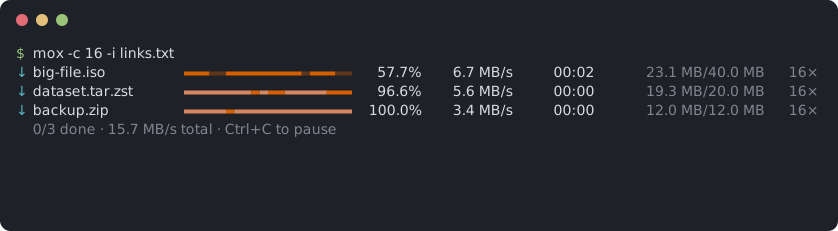
|
|
30
|
+
|
|
31
|
+
## Install
|
|
32
|
+
|
|
33
|
+
```bash
|
|
34
|
+
curl -fsSL https://raw.githubusercontent.com/moxart/moxdl/main/mox.py -o ~/.local/bin/mox && chmod +x ~/.local/bin/mox
|
|
35
|
+
```
|
|
36
|
+
|
|
37
|
+
It needs Python 3.8 or newer. Or install with [pipx](https://pipx.pypa.io):
|
|
38
|
+
|
|
39
|
+
```bash
|
|
40
|
+
pipx install git+https://github.com/moxart/moxdl.git
|
|
41
|
+
```
|
|
42
|
+
|
|
43
|
+
On Android, in [Termux](https://termux.dev): `pkg install python`, then the `curl` line above with `$PREFIX/bin/mox` in place of `~/.local/bin/mox`.
|
|
44
|
+
|
|
45
|
+
The package is called `moxdl`; the command is `mox`.
|
|
46
|
+
|
|
47
|
+
## Speed
|
|
48
|
+
|
|
49
|
+
Many servers cap the speed of each connection, so more connections means more speed. A 100 MB file from a local server that caps each connection at 4 MB/s:
|
|
50
|
+
|
|
51
|
+
| Command | Time | Speed |
|
|
52
|
+
| --- | ---: | ---: |
|
|
53
|
+
| `wget` | 24.5 s | 3.9 MB/s |
|
|
54
|
+
| `curl` | 24.4 s | 3.9 MB/s |
|
|
55
|
+
| `mox -c 4` | 6.3 s | 15.0 MB/s |
|
|
56
|
+
| `mox` (16 connections) | 1.8 s | 51.7 MB/s |
|
|
57
|
+
| `mox -c 32` | 1.1 s | 88.2 MB/s |
|
|
58
|
+
|
|
59
|
+
Some servers gain nothing or refuse extra connections. `mox bench URL` measures what a server allows and suggests a `-c` value. It downloads nothing to disk.
|
|
60
|
+
|
|
61
|
+
## Features
|
|
62
|
+
|
|
63
|
+
- Up to 64 connections per file, 16 by default.
|
|
64
|
+
- The progress bar shows which parts of each file are done.
|
|
65
|
+
- Fast connections take over work from slow ones.
|
|
66
|
+
- Very slow connections are reopened.
|
|
67
|
+
- Ctrl+C pauses. Run the same command again, or `mox resume`, to continue, even after a reboot.
|
|
68
|
+
- Retries dropped connections, and uses fewer connections when the server refuses more.
|
|
69
|
+
- `--watch` downloads every file link you copy.
|
|
70
|
+
- Scheduled downloads, such as 2:00 to 7:00 every night.
|
|
71
|
+
- A desktop notification, or a Telegram message, when the downloads are done.
|
|
72
|
+
- SOCKS5 and HTTP proxies, with user name and password.
|
|
73
|
+
- An expired link can be replaced with a fresh one without starting over.
|
|
74
|
+
- Starts over if the file on the server has changed.
|
|
75
|
+
- A total speed limit, SHA-256 verification, several files at once, URLs from a list file.
|
|
76
|
+
- Never overwrites an existing file: a second `file.zip` becomes `file (1).zip`.
|
|
77
|
+
- Works as a Python library: `mox.download(url)`.
|
|
78
|
+
|
|
79
|
+
## Usage
|
|
80
|
+
|
|
81
|
+
```bash
|
|
82
|
+
mox https://example.com/file.iso
|
|
83
|
+
```
|
|
84
|
+
|
|
85
|
+
Several files, saved to a folder, two at a time:
|
|
86
|
+
|
|
87
|
+
```bash
|
|
88
|
+
mox -d ~/Downloads -j 2 https://example.com/a.zip https://example.com/b.zip
|
|
89
|
+
```
|
|
90
|
+
|
|
91
|
+
A list of URLs, one per line. Blank lines and lines starting with `#` are skipped:
|
|
92
|
+
|
|
93
|
+
```bash
|
|
94
|
+
mox -i links.txt
|
|
95
|
+
```
|
|
96
|
+
|
|
97
|
+
Limit the total speed:
|
|
98
|
+
|
|
99
|
+
```bash
|
|
100
|
+
mox -l 2M https://example.com/big.mkv
|
|
101
|
+
```
|
|
102
|
+
|
|
103
|
+
A file behind a login, with a cookie from your browser:
|
|
104
|
+
|
|
105
|
+
```bash
|
|
106
|
+
mox -H "Cookie: session=abc123" -H "Referer: https://example.com/" https://example.com/private.zip
|
|
107
|
+
```
|
|
108
|
+
|
|
109
|
+
Check the file against a published checksum:
|
|
110
|
+
|
|
111
|
+
```bash
|
|
112
|
+
mox --sha256 9f86d081884c7d65... https://example.com/release.tar.gz
|
|
113
|
+
```
|
|
114
|
+
|
|
115
|
+
### Picking up where you left off
|
|
116
|
+
|
|
117
|
+
An unfinished download leaves `FILE.part` and `FILE.mox` behind. To continue everything unfinished in a folder:
|
|
118
|
+
|
|
119
|
+
```bash
|
|
120
|
+
mox resume ~/Downloads
|
|
121
|
+
```
|
|
122
|
+
|
|
123
|
+
It takes the same options as a normal download, such as `-c`, `-l` or `--until`.
|
|
124
|
+
|
|
125
|
+
### Copy a link, get the file
|
|
126
|
+
|
|
127
|
+
```bash
|
|
128
|
+
mox --watch -d ~/Downloads
|
|
129
|
+
```
|
|
130
|
+
|
|
131
|
+
mox downloads every file link you copy, and skips links to web pages. Ctrl+C stops it.
|
|
132
|
+
|
|
133
|
+
On Linux it needs `wl-paste`, `xclip` or `xsel`. If your clipboard tool isn't supported, set `MOX_CLIPBOARD_COMMAND` to a command that prints the clipboard.
|
|
134
|
+
|
|
135
|
+
### Night downloads
|
|
136
|
+
|
|
137
|
+
Download between 2:00 and 7:00 every night until everything is done:
|
|
138
|
+
|
|
139
|
+
```bash
|
|
140
|
+
mox --at 02:00 --until 07:00 -i links.txt
|
|
141
|
+
```
|
|
142
|
+
|
|
143
|
+
Leave the terminal open and the computer awake. With only `--until`, mox stops at that time; run the same command later to continue. With only `--at`, it waits and then runs to the end.
|
|
144
|
+
|
|
145
|
+
### Notifications
|
|
146
|
+
|
|
147
|
+
```bash
|
|
148
|
+
mox --notify --at 02:00 --until 07:00 -i links.txt
|
|
149
|
+
```
|
|
150
|
+
|
|
151
|
+
`--notify` sends a desktop notification when the downloads end. For a Telegram message too, make a bot with [@BotFather](https://t.me/BotFather), send it any message, and set:
|
|
152
|
+
|
|
153
|
+
```bash
|
|
154
|
+
export MOX_TELEGRAM_TOKEN=123456:ABC... # from BotFather
|
|
155
|
+
export MOX_TELEGRAM_CHAT=987654321 # your chat id, e.g. from @userinfobot
|
|
156
|
+
```
|
|
157
|
+
|
|
158
|
+
`MOX_TELEGRAM_API` sets a self-hosted Bot API server instead of `api.telegram.org`.
|
|
159
|
+
|
|
160
|
+
### Proxies
|
|
161
|
+
|
|
162
|
+
```bash
|
|
163
|
+
mox --proxy socks5://127.0.0.1:1080 https://example.com/file.iso
|
|
164
|
+
mox --proxy socks5h://user:pass@proxy.example:1080 https://example.com/file.iso
|
|
165
|
+
mox --proxy http://127.0.0.1:8080 https://example.com/file.iso
|
|
166
|
+
```
|
|
167
|
+
|
|
168
|
+
With SOCKS5, the proxy resolves host names. Without `--proxy`, the `http_proxy` and `https_proxy` environment variables apply.
|
|
169
|
+
|
|
170
|
+
### Expired links
|
|
171
|
+
|
|
172
|
+
If a link expires mid-download, mox prints the command to continue. Get a fresh link and pass the same file name:
|
|
173
|
+
|
|
174
|
+
```bash
|
|
175
|
+
mox -d ~/Downloads -o big-file.iso 'https://host.example/new-signed-link'
|
|
176
|
+
```
|
|
177
|
+
|
|
178
|
+
### From Python
|
|
179
|
+
|
|
180
|
+
`pip install moxdl`, or drop `mox.py` next to your script:
|
|
181
|
+
|
|
182
|
+
```python
|
|
183
|
+
import mox
|
|
184
|
+
|
|
185
|
+
path = mox.download("https://example.com/big.iso", "downloads",
|
|
186
|
+
progress=lambda done, total: print(f"{done}/{total}"))
|
|
187
|
+
```
|
|
188
|
+
|
|
189
|
+
Keyword arguments: `name`, `connections`, `limit` (bytes per second, or text such as `"2M"`), `retries`, `timeout`, `headers`, `sha256` and `proxy`. It returns the saved file's path and raises `mox.DownloadError` on failure.
|
|
190
|
+
|
|
191
|
+
### Options
|
|
192
|
+
|
|
193
|
+
| Option | Default | Meaning |
|
|
194
|
+
| --- | --- | --- |
|
|
195
|
+
| `-d, --dir DIR` | current directory | Where to save files |
|
|
196
|
+
| `-o, --output NAME` | from the server | File name, single URL only |
|
|
197
|
+
| `-i, --input FILE` | | Read URLs from a file, `-` for stdin |
|
|
198
|
+
| `-c, --connections N` | 16 | Connections per file, 1 to 64 |
|
|
199
|
+
| `-j, --jobs N` | 3 | Files downloaded at the same time |
|
|
200
|
+
| `-l, --limit RATE` | none | Total speed limit, such as `500K` or `2M` |
|
|
201
|
+
| `-r, --retries N` | 10 | Retries per connection before giving up |
|
|
202
|
+
| `-t, --timeout SEC` | 30 | Network timeout |
|
|
203
|
+
| `-H, --header 'K: V'` | | Extra request header, repeatable |
|
|
204
|
+
| `--sha256 HEX` | | Verify the finished file, single URL only |
|
|
205
|
+
| `-x, --proxy URL` | environment | `socks5://`, `socks5h://` or `http://` proxy |
|
|
206
|
+
| `--at HH:MM` | | Wait until this time of day before starting |
|
|
207
|
+
| `--until HH:MM` | | Pause at this time of day |
|
|
208
|
+
| `-w, --watch` | | Download every file link copied to the clipboard |
|
|
209
|
+
| `-n, --notify` | | Desktop or Telegram notification when done |
|
|
210
|
+
|
|
211
|
+
Other commands: `mox resume [DIR]` takes the download options above. `mox bench URL` takes `-s SECONDS` per round, `-c` for the most connections to try, and `-t`, `-H` and `-x`.
|
|
212
|
+
|
|
213
|
+
Exit codes are 0 when everything finished, 1 when any download failed, 2 for a usage error, 3 when `--until` stopped unfinished downloads, and 130 when you pressed Ctrl+C.
|
|
214
|
+
|
|
215
|
+
## Limitations
|
|
216
|
+
|
|
217
|
+
- HTTP and HTTPS only. No FTP, BitTorrent or Metalink.
|
|
218
|
+
- If a server does not support range requests, mox falls back to one connection, and an interrupted download starts over.
|
|
219
|
+
- Servers that allow only a few connections waste the first seconds on refusals. Use `mox bench` to find the right `-c`.
|
|
220
|
+
- HTTP proxies are slower than SOCKS5.
|
|
221
|
+
- The schedule only works while mox is running and the computer is awake.
|
|
222
|
+
- An existing file with the same name and size counts as already downloaded.
|
|
223
|
+
- Not yet tested in Termux or on Windows.
|
|
224
|
+
|
|
225
|
+
## Tests
|
|
226
|
+
|
|
227
|
+
```bash
|
|
228
|
+
python3 -m unittest discover -s tests -v
|
|
229
|
+
```
|
|
230
|
+
|
|
231
|
+
## License
|
|
232
|
+
|
|
233
|
+
MIT. See [LICENSE](LICENSE).
|
moxdl-1.4/README.md
ADDED
|
@@ -0,0 +1,216 @@
|
|
|
1
|
+
# mox
|
|
2
|
+
|
|
3
|
+
[](https://github.com/moxart/moxdl/actions/workflows/test.yml)
|
|
4
|
+

|
|
5
|
+

|
|
6
|
+
[](LICENSE)
|
|
7
|
+
|
|
8
|
+
[فارسی](README.fa.md)
|
|
9
|
+
|
|
10
|
+
A download manager for the terminal. It splits each file across many connections, resumes after you stop it, and survives flaky networks. It is one Python file and needs nothing outside the standard library.
|
|
11
|
+
|
|
12
|
+

|
|
13
|
+
|
|
14
|
+
## Install
|
|
15
|
+
|
|
16
|
+
```bash
|
|
17
|
+
curl -fsSL https://raw.githubusercontent.com/moxart/moxdl/main/mox.py -o ~/.local/bin/mox && chmod +x ~/.local/bin/mox
|
|
18
|
+
```
|
|
19
|
+
|
|
20
|
+
It needs Python 3.8 or newer. Or install with [pipx](https://pipx.pypa.io):
|
|
21
|
+
|
|
22
|
+
```bash
|
|
23
|
+
pipx install git+https://github.com/moxart/moxdl.git
|
|
24
|
+
```
|
|
25
|
+
|
|
26
|
+
On Android, in [Termux](https://termux.dev): `pkg install python`, then the `curl` line above with `$PREFIX/bin/mox` in place of `~/.local/bin/mox`.
|
|
27
|
+
|
|
28
|
+
The package is called `moxdl`; the command is `mox`.
|
|
29
|
+
|
|
30
|
+
## Speed
|
|
31
|
+
|
|
32
|
+
Many servers cap the speed of each connection, so more connections means more speed. A 100 MB file from a local server that caps each connection at 4 MB/s:
|
|
33
|
+
|
|
34
|
+
| Command | Time | Speed |
|
|
35
|
+
| --- | ---: | ---: |
|
|
36
|
+
| `wget` | 24.5 s | 3.9 MB/s |
|
|
37
|
+
| `curl` | 24.4 s | 3.9 MB/s |
|
|
38
|
+
| `mox -c 4` | 6.3 s | 15.0 MB/s |
|
|
39
|
+
| `mox` (16 connections) | 1.8 s | 51.7 MB/s |
|
|
40
|
+
| `mox -c 32` | 1.1 s | 88.2 MB/s |
|
|
41
|
+
|
|
42
|
+
Some servers gain nothing or refuse extra connections. `mox bench URL` measures what a server allows and suggests a `-c` value. It downloads nothing to disk.
|
|
43
|
+
|
|
44
|
+
## Features
|
|
45
|
+
|
|
46
|
+
- Up to 64 connections per file, 16 by default.
|
|
47
|
+
- The progress bar shows which parts of each file are done.
|
|
48
|
+
- Fast connections take over work from slow ones.
|
|
49
|
+
- Very slow connections are reopened.
|
|
50
|
+
- Ctrl+C pauses. Run the same command again, or `mox resume`, to continue, even after a reboot.
|
|
51
|
+
- Retries dropped connections, and uses fewer connections when the server refuses more.
|
|
52
|
+
- `--watch` downloads every file link you copy.
|
|
53
|
+
- Scheduled downloads, such as 2:00 to 7:00 every night.
|
|
54
|
+
- A desktop notification, or a Telegram message, when the downloads are done.
|
|
55
|
+
- SOCKS5 and HTTP proxies, with user name and password.
|
|
56
|
+
- An expired link can be replaced with a fresh one without starting over.
|
|
57
|
+
- Starts over if the file on the server has changed.
|
|
58
|
+
- A total speed limit, SHA-256 verification, several files at once, URLs from a list file.
|
|
59
|
+
- Never overwrites an existing file: a second `file.zip` becomes `file (1).zip`.
|
|
60
|
+
- Works as a Python library: `mox.download(url)`.
|
|
61
|
+
|
|
62
|
+
## Usage
|
|
63
|
+
|
|
64
|
+
```bash
|
|
65
|
+
mox https://example.com/file.iso
|
|
66
|
+
```
|
|
67
|
+
|
|
68
|
+
Several files, saved to a folder, two at a time:
|
|
69
|
+
|
|
70
|
+
```bash
|
|
71
|
+
mox -d ~/Downloads -j 2 https://example.com/a.zip https://example.com/b.zip
|
|
72
|
+
```
|
|
73
|
+
|
|
74
|
+
A list of URLs, one per line. Blank lines and lines starting with `#` are skipped:
|
|
75
|
+
|
|
76
|
+
```bash
|
|
77
|
+
mox -i links.txt
|
|
78
|
+
```
|
|
79
|
+
|
|
80
|
+
Limit the total speed:
|
|
81
|
+
|
|
82
|
+
```bash
|
|
83
|
+
mox -l 2M https://example.com/big.mkv
|
|
84
|
+
```
|
|
85
|
+
|
|
86
|
+
A file behind a login, with a cookie from your browser:
|
|
87
|
+
|
|
88
|
+
```bash
|
|
89
|
+
mox -H "Cookie: session=abc123" -H "Referer: https://example.com/" https://example.com/private.zip
|
|
90
|
+
```
|
|
91
|
+
|
|
92
|
+
Check the file against a published checksum:
|
|
93
|
+
|
|
94
|
+
```bash
|
|
95
|
+
mox --sha256 9f86d081884c7d65... https://example.com/release.tar.gz
|
|
96
|
+
```
|
|
97
|
+
|
|
98
|
+
### Picking up where you left off
|
|
99
|
+
|
|
100
|
+
An unfinished download leaves `FILE.part` and `FILE.mox` behind. To continue everything unfinished in a folder:
|
|
101
|
+
|
|
102
|
+
```bash
|
|
103
|
+
mox resume ~/Downloads
|
|
104
|
+
```
|
|
105
|
+
|
|
106
|
+
It takes the same options as a normal download, such as `-c`, `-l` or `--until`.
|
|
107
|
+
|
|
108
|
+
### Copy a link, get the file
|
|
109
|
+
|
|
110
|
+
```bash
|
|
111
|
+
mox --watch -d ~/Downloads
|
|
112
|
+
```
|
|
113
|
+
|
|
114
|
+
mox downloads every file link you copy, and skips links to web pages. Ctrl+C stops it.
|
|
115
|
+
|
|
116
|
+
On Linux it needs `wl-paste`, `xclip` or `xsel`. If your clipboard tool isn't supported, set `MOX_CLIPBOARD_COMMAND` to a command that prints the clipboard.
|
|
117
|
+
|
|
118
|
+
### Night downloads
|
|
119
|
+
|
|
120
|
+
Download between 2:00 and 7:00 every night until everything is done:
|
|
121
|
+
|
|
122
|
+
```bash
|
|
123
|
+
mox --at 02:00 --until 07:00 -i links.txt
|
|
124
|
+
```
|
|
125
|
+
|
|
126
|
+
Leave the terminal open and the computer awake. With only `--until`, mox stops at that time; run the same command later to continue. With only `--at`, it waits and then runs to the end.
|
|
127
|
+
|
|
128
|
+
### Notifications
|
|
129
|
+
|
|
130
|
+
```bash
|
|
131
|
+
mox --notify --at 02:00 --until 07:00 -i links.txt
|
|
132
|
+
```
|
|
133
|
+
|
|
134
|
+
`--notify` sends a desktop notification when the downloads end. For a Telegram message too, make a bot with [@BotFather](https://t.me/BotFather), send it any message, and set:
|
|
135
|
+
|
|
136
|
+
```bash
|
|
137
|
+
export MOX_TELEGRAM_TOKEN=123456:ABC... # from BotFather
|
|
138
|
+
export MOX_TELEGRAM_CHAT=987654321 # your chat id, e.g. from @userinfobot
|
|
139
|
+
```
|
|
140
|
+
|
|
141
|
+
`MOX_TELEGRAM_API` sets a self-hosted Bot API server instead of `api.telegram.org`.
|
|
142
|
+
|
|
143
|
+
### Proxies
|
|
144
|
+
|
|
145
|
+
```bash
|
|
146
|
+
mox --proxy socks5://127.0.0.1:1080 https://example.com/file.iso
|
|
147
|
+
mox --proxy socks5h://user:pass@proxy.example:1080 https://example.com/file.iso
|
|
148
|
+
mox --proxy http://127.0.0.1:8080 https://example.com/file.iso
|
|
149
|
+
```
|
|
150
|
+
|
|
151
|
+
With SOCKS5, the proxy resolves host names. Without `--proxy`, the `http_proxy` and `https_proxy` environment variables apply.
|
|
152
|
+
|
|
153
|
+
### Expired links
|
|
154
|
+
|
|
155
|
+
If a link expires mid-download, mox prints the command to continue. Get a fresh link and pass the same file name:
|
|
156
|
+
|
|
157
|
+
```bash
|
|
158
|
+
mox -d ~/Downloads -o big-file.iso 'https://host.example/new-signed-link'
|
|
159
|
+
```
|
|
160
|
+
|
|
161
|
+
### From Python
|
|
162
|
+
|
|
163
|
+
`pip install moxdl`, or drop `mox.py` next to your script:
|
|
164
|
+
|
|
165
|
+
```python
|
|
166
|
+
import mox
|
|
167
|
+
|
|
168
|
+
path = mox.download("https://example.com/big.iso", "downloads",
|
|
169
|
+
progress=lambda done, total: print(f"{done}/{total}"))
|
|
170
|
+
```
|
|
171
|
+
|
|
172
|
+
Keyword arguments: `name`, `connections`, `limit` (bytes per second, or text such as `"2M"`), `retries`, `timeout`, `headers`, `sha256` and `proxy`. It returns the saved file's path and raises `mox.DownloadError` on failure.
|
|
173
|
+
|
|
174
|
+
### Options
|
|
175
|
+
|
|
176
|
+
| Option | Default | Meaning |
|
|
177
|
+
| --- | --- | --- |
|
|
178
|
+
| `-d, --dir DIR` | current directory | Where to save files |
|
|
179
|
+
| `-o, --output NAME` | from the server | File name, single URL only |
|
|
180
|
+
| `-i, --input FILE` | | Read URLs from a file, `-` for stdin |
|
|
181
|
+
| `-c, --connections N` | 16 | Connections per file, 1 to 64 |
|
|
182
|
+
| `-j, --jobs N` | 3 | Files downloaded at the same time |
|
|
183
|
+
| `-l, --limit RATE` | none | Total speed limit, such as `500K` or `2M` |
|
|
184
|
+
| `-r, --retries N` | 10 | Retries per connection before giving up |
|
|
185
|
+
| `-t, --timeout SEC` | 30 | Network timeout |
|
|
186
|
+
| `-H, --header 'K: V'` | | Extra request header, repeatable |
|
|
187
|
+
| `--sha256 HEX` | | Verify the finished file, single URL only |
|
|
188
|
+
| `-x, --proxy URL` | environment | `socks5://`, `socks5h://` or `http://` proxy |
|
|
189
|
+
| `--at HH:MM` | | Wait until this time of day before starting |
|
|
190
|
+
| `--until HH:MM` | | Pause at this time of day |
|
|
191
|
+
| `-w, --watch` | | Download every file link copied to the clipboard |
|
|
192
|
+
| `-n, --notify` | | Desktop or Telegram notification when done |
|
|
193
|
+
|
|
194
|
+
Other commands: `mox resume [DIR]` takes the download options above. `mox bench URL` takes `-s SECONDS` per round, `-c` for the most connections to try, and `-t`, `-H` and `-x`.
|
|
195
|
+
|
|
196
|
+
Exit codes are 0 when everything finished, 1 when any download failed, 2 for a usage error, 3 when `--until` stopped unfinished downloads, and 130 when you pressed Ctrl+C.
|
|
197
|
+
|
|
198
|
+
## Limitations
|
|
199
|
+
|
|
200
|
+
- HTTP and HTTPS only. No FTP, BitTorrent or Metalink.
|
|
201
|
+
- If a server does not support range requests, mox falls back to one connection, and an interrupted download starts over.
|
|
202
|
+
- Servers that allow only a few connections waste the first seconds on refusals. Use `mox bench` to find the right `-c`.
|
|
203
|
+
- HTTP proxies are slower than SOCKS5.
|
|
204
|
+
- The schedule only works while mox is running and the computer is awake.
|
|
205
|
+
- An existing file with the same name and size counts as already downloaded.
|
|
206
|
+
- Not yet tested in Termux or on Windows.
|
|
207
|
+
|
|
208
|
+
## Tests
|
|
209
|
+
|
|
210
|
+
```bash
|
|
211
|
+
python3 -m unittest discover -s tests -v
|
|
212
|
+
```
|
|
213
|
+
|
|
214
|
+
## License
|
|
215
|
+
|
|
216
|
+
MIT. See [LICENSE](LICENSE).
|