mostlyai 4.5.1__tar.gz → 4.5.2__tar.gz
This diff represents the content of publicly available package versions that have been released to one of the supported registries. The information contained in this diff is provided for informational purposes only and reflects changes between package versions as they appear in their respective public registries.
- {mostlyai-4.5.1 → mostlyai-4.5.2}/PKG-INFO +57 -14
- {mostlyai-4.5.1 → mostlyai-4.5.2}/README.md +56 -13
- {mostlyai-4.5.1 → mostlyai-4.5.2}/mostlyai/sdk/__init__.py +1 -1
- {mostlyai-4.5.1 → mostlyai-4.5.2}/mostlyai/sdk/client/api.py +12 -1
- {mostlyai-4.5.1 → mostlyai-4.5.2}/mostlyai/sdk/client/base.py +3 -0
- {mostlyai-4.5.1 → mostlyai-4.5.2}/pyproject.toml +1 -1
- {mostlyai-4.5.1 → mostlyai-4.5.2}/.gitignore +0 -0
- {mostlyai-4.5.1 → mostlyai-4.5.2}/LICENSE +0 -0
- {mostlyai-4.5.1 → mostlyai-4.5.2}/mostlyai/sdk/_data/__init__.py +0 -0
- {mostlyai-4.5.1 → mostlyai-4.5.2}/mostlyai/sdk/_data/auto_detect.py +0 -0
- {mostlyai-4.5.1 → mostlyai-4.5.2}/mostlyai/sdk/_data/base.py +0 -0
- {mostlyai-4.5.1 → mostlyai-4.5.2}/mostlyai/sdk/_data/context.py +0 -0
- {mostlyai-4.5.1 → mostlyai-4.5.2}/mostlyai/sdk/_data/conversions.py +0 -0
- {mostlyai-4.5.1 → mostlyai-4.5.2}/mostlyai/sdk/_data/db/__init__.py +0 -0
- {mostlyai-4.5.1 → mostlyai-4.5.2}/mostlyai/sdk/_data/db/base.py +0 -0
- {mostlyai-4.5.1 → mostlyai-4.5.2}/mostlyai/sdk/_data/db/bigquery.py +0 -0
- {mostlyai-4.5.1 → mostlyai-4.5.2}/mostlyai/sdk/_data/db/databricks.py +0 -0
- {mostlyai-4.5.1 → mostlyai-4.5.2}/mostlyai/sdk/_data/db/hive.py +0 -0
- {mostlyai-4.5.1 → mostlyai-4.5.2}/mostlyai/sdk/_data/db/mssql.py +0 -0
- {mostlyai-4.5.1 → mostlyai-4.5.2}/mostlyai/sdk/_data/db/mysql.py +0 -0
- {mostlyai-4.5.1 → mostlyai-4.5.2}/mostlyai/sdk/_data/db/oracle.py +0 -0
- {mostlyai-4.5.1 → mostlyai-4.5.2}/mostlyai/sdk/_data/db/postgresql.py +0 -0
- {mostlyai-4.5.1 → mostlyai-4.5.2}/mostlyai/sdk/_data/db/snowflake.py +0 -0
- {mostlyai-4.5.1 → mostlyai-4.5.2}/mostlyai/sdk/_data/db/sqlite.py +0 -0
- {mostlyai-4.5.1 → mostlyai-4.5.2}/mostlyai/sdk/_data/db/types_coercion.py +0 -0
- {mostlyai-4.5.1 → mostlyai-4.5.2}/mostlyai/sdk/_data/dtype.py +0 -0
- {mostlyai-4.5.1 → mostlyai-4.5.2}/mostlyai/sdk/_data/exceptions.py +0 -0
- {mostlyai-4.5.1 → mostlyai-4.5.2}/mostlyai/sdk/_data/file/__init__.py +0 -0
- {mostlyai-4.5.1 → mostlyai-4.5.2}/mostlyai/sdk/_data/file/base.py +0 -0
- {mostlyai-4.5.1 → mostlyai-4.5.2}/mostlyai/sdk/_data/file/container/__init__.py +0 -0
- {mostlyai-4.5.1 → mostlyai-4.5.2}/mostlyai/sdk/_data/file/container/aws.py +0 -0
- {mostlyai-4.5.1 → mostlyai-4.5.2}/mostlyai/sdk/_data/file/container/azure.py +0 -0
- {mostlyai-4.5.1 → mostlyai-4.5.2}/mostlyai/sdk/_data/file/container/bucket_based.py +0 -0
- {mostlyai-4.5.1 → mostlyai-4.5.2}/mostlyai/sdk/_data/file/container/gcs.py +0 -0
- {mostlyai-4.5.1 → mostlyai-4.5.2}/mostlyai/sdk/_data/file/container/minio.py +0 -0
- {mostlyai-4.5.1 → mostlyai-4.5.2}/mostlyai/sdk/_data/file/table/__init__.py +0 -0
- {mostlyai-4.5.1 → mostlyai-4.5.2}/mostlyai/sdk/_data/file/table/csv.py +0 -0
- {mostlyai-4.5.1 → mostlyai-4.5.2}/mostlyai/sdk/_data/file/table/feather.py +0 -0
- {mostlyai-4.5.1 → mostlyai-4.5.2}/mostlyai/sdk/_data/file/table/json.py +0 -0
- {mostlyai-4.5.1 → mostlyai-4.5.2}/mostlyai/sdk/_data/file/table/parquet.py +0 -0
- {mostlyai-4.5.1 → mostlyai-4.5.2}/mostlyai/sdk/_data/file/utils.py +0 -0
- {mostlyai-4.5.1 → mostlyai-4.5.2}/mostlyai/sdk/_data/language_model.py +0 -0
- {mostlyai-4.5.1 → mostlyai-4.5.2}/mostlyai/sdk/_data/metadata_objects.py +0 -0
- {mostlyai-4.5.1 → mostlyai-4.5.2}/mostlyai/sdk/_data/non_context.py +0 -0
- {mostlyai-4.5.1 → mostlyai-4.5.2}/mostlyai/sdk/_data/progress_callback.py +0 -0
- {mostlyai-4.5.1 → mostlyai-4.5.2}/mostlyai/sdk/_data/pull.py +0 -0
- {mostlyai-4.5.1 → mostlyai-4.5.2}/mostlyai/sdk/_data/pull_context.py +0 -0
- {mostlyai-4.5.1 → mostlyai-4.5.2}/mostlyai/sdk/_data/pull_utils.py +0 -0
- {mostlyai-4.5.1 → mostlyai-4.5.2}/mostlyai/sdk/_data/push.py +0 -0
- {mostlyai-4.5.1 → mostlyai-4.5.2}/mostlyai/sdk/_data/util/__init__.py +0 -0
- {mostlyai-4.5.1 → mostlyai-4.5.2}/mostlyai/sdk/_data/util/common.py +0 -0
- {mostlyai-4.5.1 → mostlyai-4.5.2}/mostlyai/sdk/_data/util/kerberos.py +0 -0
- {mostlyai-4.5.1 → mostlyai-4.5.2}/mostlyai/sdk/_local/__init__.py +0 -0
- {mostlyai-4.5.1 → mostlyai-4.5.2}/mostlyai/sdk/_local/cli.py +0 -0
- {mostlyai-4.5.1 → mostlyai-4.5.2}/mostlyai/sdk/_local/connectors.py +0 -0
- {mostlyai-4.5.1 → mostlyai-4.5.2}/mostlyai/sdk/_local/execution/__init__.py +0 -0
- {mostlyai-4.5.1 → mostlyai-4.5.2}/mostlyai/sdk/_local/execution/jobs.py +0 -0
- {mostlyai-4.5.1 → mostlyai-4.5.2}/mostlyai/sdk/_local/execution/plan.py +0 -0
- {mostlyai-4.5.1 → mostlyai-4.5.2}/mostlyai/sdk/_local/execution/step_analyze_training_data.py +0 -0
- {mostlyai-4.5.1 → mostlyai-4.5.2}/mostlyai/sdk/_local/execution/step_create_data_report.py +0 -0
- {mostlyai-4.5.1 → mostlyai-4.5.2}/mostlyai/sdk/_local/execution/step_create_model_report.py +0 -0
- {mostlyai-4.5.1 → mostlyai-4.5.2}/mostlyai/sdk/_local/execution/step_deliver_data.py +0 -0
- {mostlyai-4.5.1 → mostlyai-4.5.2}/mostlyai/sdk/_local/execution/step_encode_training_data.py +0 -0
- {mostlyai-4.5.1 → mostlyai-4.5.2}/mostlyai/sdk/_local/execution/step_finalize_generation.py +0 -0
- {mostlyai-4.5.1 → mostlyai-4.5.2}/mostlyai/sdk/_local/execution/step_finalize_training.py +0 -0
- {mostlyai-4.5.1 → mostlyai-4.5.2}/mostlyai/sdk/_local/execution/step_generate_data.py +0 -0
- {mostlyai-4.5.1 → mostlyai-4.5.2}/mostlyai/sdk/_local/execution/step_generate_model_report_data.py +0 -0
- {mostlyai-4.5.1 → mostlyai-4.5.2}/mostlyai/sdk/_local/execution/step_pull_training_data.py +0 -0
- {mostlyai-4.5.1 → mostlyai-4.5.2}/mostlyai/sdk/_local/execution/step_train_model.py +0 -0
- {mostlyai-4.5.1 → mostlyai-4.5.2}/mostlyai/sdk/_local/generators.py +0 -0
- {mostlyai-4.5.1 → mostlyai-4.5.2}/mostlyai/sdk/_local/progress.py +0 -0
- {mostlyai-4.5.1 → mostlyai-4.5.2}/mostlyai/sdk/_local/routes.py +0 -0
- {mostlyai-4.5.1 → mostlyai-4.5.2}/mostlyai/sdk/_local/server.py +0 -0
- {mostlyai-4.5.1 → mostlyai-4.5.2}/mostlyai/sdk/_local/storage.py +0 -0
- {mostlyai-4.5.1 → mostlyai-4.5.2}/mostlyai/sdk/_local/synthetic_datasets.py +0 -0
- {mostlyai-4.5.1 → mostlyai-4.5.2}/mostlyai/sdk/client/__init__.py +0 -0
- {mostlyai-4.5.1 → mostlyai-4.5.2}/mostlyai/sdk/client/_base_utils.py +0 -0
- {mostlyai-4.5.1 → mostlyai-4.5.2}/mostlyai/sdk/client/_naming_conventions.py +0 -0
- {mostlyai-4.5.1 → mostlyai-4.5.2}/mostlyai/sdk/client/_utils.py +0 -0
- {mostlyai-4.5.1 → mostlyai-4.5.2}/mostlyai/sdk/client/connectors.py +0 -0
- {mostlyai-4.5.1 → mostlyai-4.5.2}/mostlyai/sdk/client/exceptions.py +0 -0
- {mostlyai-4.5.1 → mostlyai-4.5.2}/mostlyai/sdk/client/generators.py +0 -0
- {mostlyai-4.5.1 → mostlyai-4.5.2}/mostlyai/sdk/client/synthetic_datasets.py +0 -0
- {mostlyai-4.5.1 → mostlyai-4.5.2}/mostlyai/sdk/domain.py +0 -0
- {mostlyai-4.5.1 → mostlyai-4.5.2}/mostlyai/sdk/py.typed +0 -0
|
@@ -1,6 +1,6 @@
|
|
|
1
1
|
Metadata-Version: 2.4
|
|
2
2
|
Name: mostlyai
|
|
3
|
-
Version: 4.5.
|
|
3
|
+
Version: 4.5.2
|
|
4
4
|
Summary: Synthetic Data SDK
|
|
5
5
|
Project-URL: homepage, https://app.mostly.ai/
|
|
6
6
|
Project-URL: repository, https://github.com/mostly-ai/mostlyai
|
|
@@ -195,7 +195,7 @@ https://github.com/user-attachments/assets/9e233213-a259-455c-b8ed-d1f1548b492f
|
|
|
195
195
|
|
|
196
196
|
## Quick Start <a href="https://colab.research.google.com/github/mostly-ai/mostlyai/blob/main/docs/tutorials/getting-started/getting-started.ipynb" target="_blank"><img src="https://img.shields.io/badge/Open%20in-Colab-blue?logo=google-colab" alt="Run on Colab"></a>
|
|
197
197
|
|
|
198
|
-
Install the SDK via pip:
|
|
198
|
+
Install the SDK via `pip` (see [Installation](#installation) for further details):
|
|
199
199
|
|
|
200
200
|
```shell
|
|
201
201
|
pip install -U mostlyai # or 'mostlyai[local]' for LOCAL mode
|
|
@@ -258,7 +258,7 @@ The SDK is being developed with a focus on efficiency, accuracy, and flexibility
|
|
|
258
258
|
|
|
259
259
|
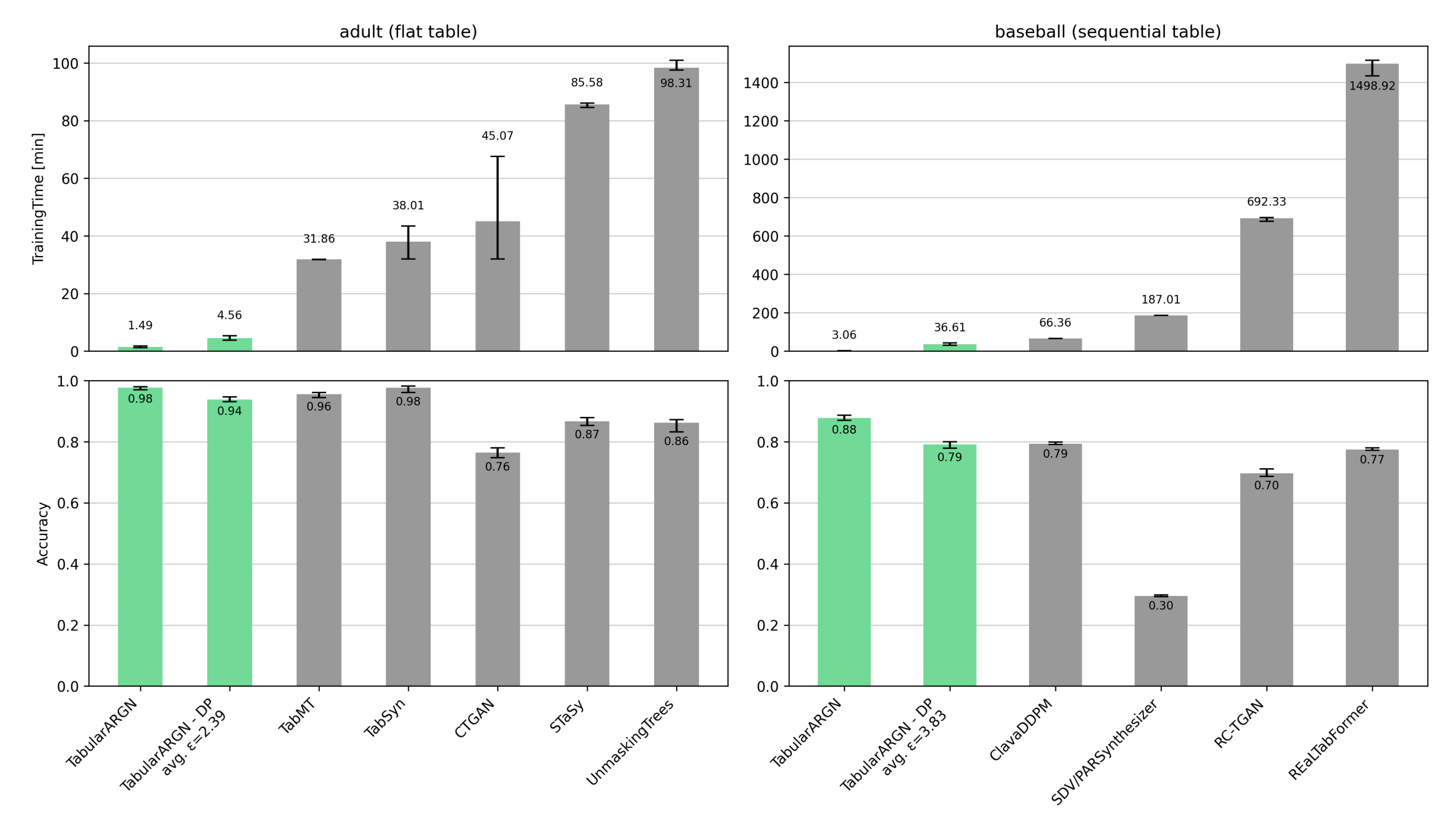
Tabular models within the SDK are built on TabularARGN ([arXiv:2501.12012](https://arxiv.org/abs/2501.12012)), which achieves best-in-class synthetic data quality while being 1–2 orders of magnitude more efficient than comparable models. This efficiency enables the training and generation of millions of synthetic records within minutes, even on CPU environments.
|
|
260
260
|
|
|
261
|
-

|
|
261
|
+
|
|
262
262
|
|
|
263
263
|
### Language Models
|
|
264
264
|
|
|
@@ -270,20 +270,63 @@ In either case, a modern GPU is highly recommended when working with language mo
|
|
|
270
270
|
|
|
271
271
|
## Installation
|
|
272
272
|
|
|
273
|
-
|
|
273
|
+
Use `pip` (or better `uv pip`) to install the official `mostlyai` package via PyPI. Python 3.10 or higher is required.
|
|
274
274
|
|
|
275
|
-
|
|
276
|
-
|
|
277
|
-
|
|
278
|
-
|
|
279
|
-
|
|
275
|
+
It is highly recommended to install the package within a dedicated virtual environment using `uv`.
|
|
276
|
+
|
|
277
|
+
<details>
|
|
278
|
+
|
|
279
|
+
<summary>Setup of <code>uv</code> on Unix / macOS</summary>
|
|
280
|
+
|
|
281
|
+
```shell
|
|
282
|
+
# Install uv if you don't have it yet
|
|
283
|
+
curl -Ls https://astral.sh/uv/install.sh | bash
|
|
284
|
+
|
|
285
|
+
# Create and activate a Python 3.12 environment with uv
|
|
286
|
+
mkdir ~/synthetic-data-sdk; cd ~/synthetic-data-sdk
|
|
287
|
+
uv venv -p 3.12
|
|
288
|
+
|
|
289
|
+
# Activate virtual environment
|
|
290
|
+
source .venv/bin/activate
|
|
291
|
+
```
|
|
292
|
+
|
|
293
|
+
</details>
|
|
294
|
+
|
|
295
|
+
<details>
|
|
296
|
+
|
|
297
|
+
<summary>Setup of <code>uv</code> on Windows</summary>
|
|
298
|
+
|
|
299
|
+
```shell
|
|
300
|
+
# Install uv if you don't have it yet
|
|
301
|
+
irm https://astral.sh/uv/install.ps1 | iex
|
|
302
|
+
|
|
303
|
+
# Create and activate a Python 3.12 environment with uv
|
|
304
|
+
mkdir ~/synthetic-data-sdk; cd ~/synthetic-data-sdk
|
|
305
|
+
uv venv -p 3.12
|
|
306
|
+
|
|
307
|
+
# Activate virtual environment
|
|
308
|
+
.venv\Scripts\activate
|
|
309
|
+
```
|
|
310
|
+
|
|
311
|
+
</details>
|
|
312
|
+
|
|
313
|
+
<details>
|
|
314
|
+
|
|
315
|
+
<summary>Run Jupyter Lab session via <code>uv</code></summary>
|
|
316
|
+
|
|
317
|
+
```shell
|
|
318
|
+
# Optionally launch jupyter session after SDK installation
|
|
319
|
+
uv run --with jupyter jupyter lab
|
|
320
|
+
```
|
|
321
|
+
|
|
322
|
+
</details>
|
|
280
323
|
|
|
281
324
|
### CLIENT mode
|
|
282
325
|
|
|
283
326
|
This is a light-weight installation for using the SDK in CLIENT mode only. It communicates to a MOSTLY AI platform to perform requested tasks. See e.g. [app.mostly.ai](https://app.mostly.ai/) for a free-to-use hosted version.
|
|
284
327
|
|
|
285
328
|
```shell
|
|
286
|
-
pip install -U mostlyai
|
|
329
|
+
uv pip install -U mostlyai
|
|
287
330
|
```
|
|
288
331
|
|
|
289
332
|
### CLIENT + LOCAL mode
|
|
@@ -292,11 +335,11 @@ This is a full installation for using the SDK in both CLIENT and LOCAL mode. It
|
|
|
292
335
|
|
|
293
336
|
```shell
|
|
294
337
|
# for CPU on macOS
|
|
295
|
-
pip install -U 'mostlyai[local]'
|
|
338
|
+
uv pip install -U 'mostlyai[local]'
|
|
296
339
|
# for CPU on Linux
|
|
297
|
-
pip install -U 'mostlyai[local-cpu]' --extra-index-url https://download.pytorch.org/whl/cpu
|
|
340
|
+
uv pip install -U 'mostlyai[local-cpu]' --extra-index-url https://download.pytorch.org/whl/cpu
|
|
298
341
|
# for GPU on Linux
|
|
299
|
-
pip install -U 'mostlyai[local-gpu]'
|
|
342
|
+
uv pip install -U 'mostlyai[local-gpu]'
|
|
300
343
|
```
|
|
301
344
|
|
|
302
345
|
> **Note for Google Colab users**: Installing any of the local extras (`mostlyai[local]`, `mostlyai[local-cpu]`, or `mostlyai[local-gpu]`) will downgrade Numpy from 2.0 to Numpy 1.26, due to Opacus dependency. You'll need to restart the runtime after installation for the changes to take effect.
|
|
@@ -304,7 +347,7 @@ pip install -U 'mostlyai[local-gpu]'
|
|
|
304
347
|
Add any of the following extras for further data connectors support in LOCAL mode: `databricks`, `googlebigquery`, `hive`, `mssql`, `mysql`, `oracle`, `postgres`, `snowflake`. E.g.
|
|
305
348
|
|
|
306
349
|
```shell
|
|
307
|
-
pip install -U 'mostlyai[local, databricks, snowflake]'
|
|
350
|
+
uv pip install -U 'mostlyai[local, databricks, snowflake]'
|
|
308
351
|
```
|
|
309
352
|
|
|
310
353
|
## Citation
|
|
@@ -61,7 +61,7 @@ https://github.com/user-attachments/assets/9e233213-a259-455c-b8ed-d1f1548b492f
|
|
|
61
61
|
|
|
62
62
|
## Quick Start <a href="https://colab.research.google.com/github/mostly-ai/mostlyai/blob/main/docs/tutorials/getting-started/getting-started.ipynb" target="_blank"><img src="https://img.shields.io/badge/Open%20in-Colab-blue?logo=google-colab" alt="Run on Colab"></a>
|
|
63
63
|
|
|
64
|
-
Install the SDK via pip:
|
|
64
|
+
Install the SDK via `pip` (see [Installation](#installation) for further details):
|
|
65
65
|
|
|
66
66
|
```shell
|
|
67
67
|
pip install -U mostlyai # or 'mostlyai[local]' for LOCAL mode
|
|
@@ -124,7 +124,7 @@ The SDK is being developed with a focus on efficiency, accuracy, and flexibility
|
|
|
124
124
|
|
|
125
125
|
Tabular models within the SDK are built on TabularARGN ([arXiv:2501.12012](https://arxiv.org/abs/2501.12012)), which achieves best-in-class synthetic data quality while being 1–2 orders of magnitude more efficient than comparable models. This efficiency enables the training and generation of millions of synthetic records within minutes, even on CPU environments.
|
|
126
126
|
|
|
127
|
-

|
|
127
|
+

|
|
128
128
|
|
|
129
129
|
### Language Models
|
|
130
130
|
|
|
@@ -136,20 +136,63 @@ In either case, a modern GPU is highly recommended when working with language mo
|
|
|
136
136
|
|
|
137
137
|
## Installation
|
|
138
138
|
|
|
139
|
-
|
|
139
|
+
Use `pip` (or better `uv pip`) to install the official `mostlyai` package via PyPI. Python 3.10 or higher is required.
|
|
140
140
|
|
|
141
|
-
|
|
142
|
-
|
|
143
|
-
|
|
144
|
-
|
|
145
|
-
|
|
141
|
+
It is highly recommended to install the package within a dedicated virtual environment using `uv`.
|
|
142
|
+
|
|
143
|
+
<details>
|
|
144
|
+
|
|
145
|
+
<summary>Setup of <code>uv</code> on Unix / macOS</summary>
|
|
146
|
+
|
|
147
|
+
```shell
|
|
148
|
+
# Install uv if you don't have it yet
|
|
149
|
+
curl -Ls https://astral.sh/uv/install.sh | bash
|
|
150
|
+
|
|
151
|
+
# Create and activate a Python 3.12 environment with uv
|
|
152
|
+
mkdir ~/synthetic-data-sdk; cd ~/synthetic-data-sdk
|
|
153
|
+
uv venv -p 3.12
|
|
154
|
+
|
|
155
|
+
# Activate virtual environment
|
|
156
|
+
source .venv/bin/activate
|
|
157
|
+
```
|
|
158
|
+
|
|
159
|
+
</details>
|
|
160
|
+
|
|
161
|
+
<details>
|
|
162
|
+
|
|
163
|
+
<summary>Setup of <code>uv</code> on Windows</summary>
|
|
164
|
+
|
|
165
|
+
```shell
|
|
166
|
+
# Install uv if you don't have it yet
|
|
167
|
+
irm https://astral.sh/uv/install.ps1 | iex
|
|
168
|
+
|
|
169
|
+
# Create and activate a Python 3.12 environment with uv
|
|
170
|
+
mkdir ~/synthetic-data-sdk; cd ~/synthetic-data-sdk
|
|
171
|
+
uv venv -p 3.12
|
|
172
|
+
|
|
173
|
+
# Activate virtual environment
|
|
174
|
+
.venv\Scripts\activate
|
|
175
|
+
```
|
|
176
|
+
|
|
177
|
+
</details>
|
|
178
|
+
|
|
179
|
+
<details>
|
|
180
|
+
|
|
181
|
+
<summary>Run Jupyter Lab session via <code>uv</code></summary>
|
|
182
|
+
|
|
183
|
+
```shell
|
|
184
|
+
# Optionally launch jupyter session after SDK installation
|
|
185
|
+
uv run --with jupyter jupyter lab
|
|
186
|
+
```
|
|
187
|
+
|
|
188
|
+
</details>
|
|
146
189
|
|
|
147
190
|
### CLIENT mode
|
|
148
191
|
|
|
149
192
|
This is a light-weight installation for using the SDK in CLIENT mode only. It communicates to a MOSTLY AI platform to perform requested tasks. See e.g. [app.mostly.ai](https://app.mostly.ai/) for a free-to-use hosted version.
|
|
150
193
|
|
|
151
194
|
```shell
|
|
152
|
-
pip install -U mostlyai
|
|
195
|
+
uv pip install -U mostlyai
|
|
153
196
|
```
|
|
154
197
|
|
|
155
198
|
### CLIENT + LOCAL mode
|
|
@@ -158,11 +201,11 @@ This is a full installation for using the SDK in both CLIENT and LOCAL mode. It
|
|
|
158
201
|
|
|
159
202
|
```shell
|
|
160
203
|
# for CPU on macOS
|
|
161
|
-
pip install -U 'mostlyai[local]'
|
|
204
|
+
uv pip install -U 'mostlyai[local]'
|
|
162
205
|
# for CPU on Linux
|
|
163
|
-
pip install -U 'mostlyai[local-cpu]' --extra-index-url https://download.pytorch.org/whl/cpu
|
|
206
|
+
uv pip install -U 'mostlyai[local-cpu]' --extra-index-url https://download.pytorch.org/whl/cpu
|
|
164
207
|
# for GPU on Linux
|
|
165
|
-
pip install -U 'mostlyai[local-gpu]'
|
|
208
|
+
uv pip install -U 'mostlyai[local-gpu]'
|
|
166
209
|
```
|
|
167
210
|
|
|
168
211
|
> **Note for Google Colab users**: Installing any of the local extras (`mostlyai[local]`, `mostlyai[local-cpu]`, or `mostlyai[local-gpu]`) will downgrade Numpy from 2.0 to Numpy 1.26, due to Opacus dependency. You'll need to restart the runtime after installation for the changes to take effect.
|
|
@@ -170,7 +213,7 @@ pip install -U 'mostlyai[local-gpu]'
|
|
|
170
213
|
Add any of the following extras for further data connectors support in LOCAL mode: `databricks`, `googlebigquery`, `hive`, `mssql`, `mysql`, `oracle`, `postgres`, `snowflake`. E.g.
|
|
171
214
|
|
|
172
215
|
```shell
|
|
173
|
-
pip install -U 'mostlyai[local, databricks, snowflake]'
|
|
216
|
+
uv pip install -U 'mostlyai[local, databricks, snowflake]'
|
|
174
217
|
```
|
|
175
218
|
|
|
176
219
|
## Citation
|
|
@@ -11,6 +11,7 @@
|
|
|
11
11
|
# WITHOUT WARRANTIES OR CONDITIONS OF ANY KIND, either express or implied.
|
|
12
12
|
# See the License for the specific language governing permissions and
|
|
13
13
|
# limitations under the License.
|
|
14
|
+
|
|
14
15
|
import os
|
|
15
16
|
from pathlib import Path
|
|
16
17
|
from typing import Any, Literal
|
|
@@ -21,6 +22,7 @@ from rich.prompt import Prompt
|
|
|
21
22
|
|
|
22
23
|
from mostlyai import sdk
|
|
23
24
|
from mostlyai.sdk.client.base import GET, _MostlyBaseClient, DEFAULT_BASE_URL
|
|
25
|
+
from mostlyai.sdk.client.exceptions import APIError
|
|
24
26
|
from mostlyai.sdk.client.connectors import _MostlyConnectorsClient
|
|
25
27
|
from mostlyai.sdk.client.generators import _MostlyGeneratorsClient
|
|
26
28
|
from mostlyai.sdk.domain import (
|
|
@@ -722,7 +724,16 @@ class MostlyAI(_MostlyBaseClient):
|
|
|
722
724
|
config=config,
|
|
723
725
|
config_type=SyntheticProbeConfig,
|
|
724
726
|
)
|
|
725
|
-
|
|
727
|
+
|
|
728
|
+
try:
|
|
729
|
+
dfs = self.synthetic_probes.create(config)
|
|
730
|
+
except APIError as e:
|
|
731
|
+
# translate timeout error into a more informative message for probe requests
|
|
732
|
+
if "timed out" in str(e).lower():
|
|
733
|
+
raise APIError("Probing timed out. Please try `generate()` instead.")
|
|
734
|
+
else:
|
|
735
|
+
raise e
|
|
736
|
+
|
|
726
737
|
if return_type == "auto" and len(dfs) == 1:
|
|
727
738
|
return list(dfs.values())[0]
|
|
728
739
|
else:
|
|
@@ -151,6 +151,9 @@ class _MostlyBaseClient:
|
|
|
151
151
|
error_msg = exc.response.content
|
|
152
152
|
# Handle HTTP errors (not in 2XX range)
|
|
153
153
|
raise APIStatusError(f"HTTP {exc.response.status_code}: {error_msg}") from None
|
|
154
|
+
except httpx.ReadTimeout as exc:
|
|
155
|
+
# Handle timeout errors
|
|
156
|
+
raise APIError(f"Timed out while requesting {exc.request.url!r}.") from None
|
|
154
157
|
except httpx.RequestError as exc:
|
|
155
158
|
# Handle request errors (e.g., network issues)
|
|
156
159
|
raise APIError(f"An error occurred while requesting {exc.request.url!r}.") from None
|
|
File without changes
|
|
File without changes
|
|
File without changes
|
|
File without changes
|
|
File without changes
|
|
File without changes
|
|
File without changes
|
|
File without changes
|
|
File without changes
|
|
File without changes
|
|
File without changes
|
|
File without changes
|
|
File without changes
|
|
File without changes
|
|
File without changes
|
|
File without changes
|
|
File without changes
|
|
File without changes
|
|
File without changes
|
|
File without changes
|
|
File without changes
|
|
File without changes
|
|
File without changes
|
|
File without changes
|
|
File without changes
|
|
File without changes
|
|
File without changes
|
|
File without changes
|
|
File without changes
|
|
File without changes
|
|
File without changes
|
|
File without changes
|
|
File without changes
|
|
File without changes
|
|
File without changes
|
|
File without changes
|
|
File without changes
|
|
File without changes
|
|
File without changes
|
|
File without changes
|
|
File without changes
|
|
File without changes
|
|
File without changes
|
|
File without changes
|
|
File without changes
|
|
File without changes
|
|
File without changes
|
|
File without changes
|
|
File without changes
|
|
File without changes
|
|
File without changes
|
|
File without changes
|
{mostlyai-4.5.1 → mostlyai-4.5.2}/mostlyai/sdk/_local/execution/step_analyze_training_data.py
RENAMED
|
File without changes
|
|
File without changes
|
|
File without changes
|
|
File without changes
|
{mostlyai-4.5.1 → mostlyai-4.5.2}/mostlyai/sdk/_local/execution/step_encode_training_data.py
RENAMED
|
File without changes
|
|
File without changes
|
|
File without changes
|
|
File without changes
|
{mostlyai-4.5.1 → mostlyai-4.5.2}/mostlyai/sdk/_local/execution/step_generate_model_report_data.py
RENAMED
|
File without changes
|
|
File without changes
|
|
File without changes
|
|
File without changes
|
|
File without changes
|
|
File without changes
|
|
File without changes
|
|
File without changes
|
|
File without changes
|
|
File without changes
|
|
File without changes
|
|
File without changes
|
|
File without changes
|
|
File without changes
|
|
File without changes
|
|
File without changes
|
|
File without changes
|
|
File without changes
|
|
File without changes
|