moleditpy-installer 3.1.2__tar.gz → 3.1.3__tar.gz
This diff represents the content of publicly available package versions that have been released to one of the supported registries. The information contained in this diff is provided for informational purposes only and reflects changes between package versions as they appear in their respective public registries.
- {moleditpy_installer-3.1.2 → moleditpy_installer-3.1.3}/PKG-INFO +43 -19
- {moleditpy_installer-3.1.2 → moleditpy_installer-3.1.3}/README.md +42 -18
- {moleditpy_installer-3.1.2 → moleditpy_installer-3.1.3}/moleditpy_installer/main.py +40 -14
- {moleditpy_installer-3.1.2 → moleditpy_installer-3.1.3}/moleditpy_installer/tui.py +13 -7
- {moleditpy_installer-3.1.2 → moleditpy_installer-3.1.3}/moleditpy_installer.egg-info/PKG-INFO +43 -19
- {moleditpy_installer-3.1.2 → moleditpy_installer-3.1.3}/pyproject.toml +1 -1
- {moleditpy_installer-3.1.2 → moleditpy_installer-3.1.3}/LICENSE +0 -0
- {moleditpy_installer-3.1.2 → moleditpy_installer-3.1.3}/moleditpy_installer/__init__.py +0 -0
- {moleditpy_installer-3.1.2 → moleditpy_installer-3.1.3}/moleditpy_installer/__main__.py +0 -0
- {moleditpy_installer-3.1.2 → moleditpy_installer-3.1.3}/moleditpy_installer/data/file_icon.icns +0 -0
- {moleditpy_installer-3.1.2 → moleditpy_installer-3.1.3}/moleditpy_installer/data/file_icon.ico +0 -0
- {moleditpy_installer-3.1.2 → moleditpy_installer-3.1.3}/moleditpy_installer/data/file_icon.png +0 -0
- {moleditpy_installer-3.1.2 → moleditpy_installer-3.1.3}/moleditpy_installer/data/file_icon_128.png +0 -0
- {moleditpy_installer-3.1.2 → moleditpy_installer-3.1.3}/moleditpy_installer/data/file_icon_16.png +0 -0
- {moleditpy_installer-3.1.2 → moleditpy_installer-3.1.3}/moleditpy_installer/data/file_icon_22.png +0 -0
- {moleditpy_installer-3.1.2 → moleditpy_installer-3.1.3}/moleditpy_installer/data/file_icon_24.png +0 -0
- {moleditpy_installer-3.1.2 → moleditpy_installer-3.1.3}/moleditpy_installer/data/file_icon_32.png +0 -0
- {moleditpy_installer-3.1.2 → moleditpy_installer-3.1.3}/moleditpy_installer/data/file_icon_48.png +0 -0
- {moleditpy_installer-3.1.2 → moleditpy_installer-3.1.3}/moleditpy_installer/data/file_icon_64.png +0 -0
- {moleditpy_installer-3.1.2 → moleditpy_installer-3.1.3}/moleditpy_installer/data/icon.icns +0 -0
- {moleditpy_installer-3.1.2 → moleditpy_installer-3.1.3}/moleditpy_installer/data/icon.ico +0 -0
- {moleditpy_installer-3.1.2 → moleditpy_installer-3.1.3}/moleditpy_installer/data/icon.png +0 -0
- {moleditpy_installer-3.1.2 → moleditpy_installer-3.1.3}/moleditpy_installer.egg-info/SOURCES.txt +0 -0
- {moleditpy_installer-3.1.2 → moleditpy_installer-3.1.3}/moleditpy_installer.egg-info/dependency_links.txt +0 -0
- {moleditpy_installer-3.1.2 → moleditpy_installer-3.1.3}/moleditpy_installer.egg-info/entry_points.txt +0 -0
- {moleditpy_installer-3.1.2 → moleditpy_installer-3.1.3}/moleditpy_installer.egg-info/requires.txt +0 -0
- {moleditpy_installer-3.1.2 → moleditpy_installer-3.1.3}/moleditpy_installer.egg-info/top_level.txt +0 -0
- {moleditpy_installer-3.1.2 → moleditpy_installer-3.1.3}/setup.cfg +0 -0
|
@@ -1,6 +1,6 @@
|
|
|
1
1
|
Metadata-Version: 2.4
|
|
2
2
|
Name: moleditpy-installer
|
|
3
|
-
Version: 3.1.
|
|
3
|
+
Version: 3.1.3
|
|
4
4
|
Summary: Installer and application bundler for MoleditPy
|
|
5
5
|
Author-email: HiroYokoyama <titech.yoko.hiro@gmail.com>
|
|
6
6
|
License: GNU GENERAL PUBLIC LICENSE
|
|
@@ -711,11 +711,24 @@ This package is a helper utility that automatically installs the correct version
|
|
|
711
711
|
|
|
712
712
|
|
|
713
713
|
|
|
714
|
+
## Quick start and command choice
|
|
715
|
+
|
|
716
|
+
Use a dedicated virtual environment, or activate the environment where MoleditPy should live. See the [Windows/macOS/Linux quick start](https://github.com/HiroYokoyama/python_molecular_editor/wiki/Quick-Start) for commands that use an explicit environment path.
|
|
717
|
+
|
|
718
|
+
```bash
|
|
719
|
+
python -m pip install moleditpy-installer
|
|
720
|
+
python -m moleditpy_installer
|
|
721
|
+
```
|
|
722
|
+
|
|
723
|
+
Both `python -m moleditpy_installer` and `moleditpy-installer` are supported. **Prefer the module form**: it runs under the Python you selected and avoids depending on the console script being on `PATH`. If `python` is not your environment's interpreter, substitute its full path (or `python3` on macOS/Linux outside an activated environment). Use that same interpreter for `-m pip`.
|
|
724
|
+
|
|
725
|
+
Installing the package installs the app dependency. Running the installer configures launchers and file associations. For a non-interactive setup use `python -m moleditpy_installer --no-tui`; to inspect discovery first use `python -m moleditpy_installer --check`. The standalone Windows/macOS download is a separate distribution with different plugin-dependency limitations.
|
|
726
|
+
|
|
714
727
|
## How to Use
|
|
715
728
|
|
|
716
729
|
1. **Install**
|
|
717
730
|
```bash
|
|
718
|
-
pip install moleditpy-installer
|
|
731
|
+
python -m pip install moleditpy-installer
|
|
719
732
|
```
|
|
720
733
|
This will automatically install the correct `moleditpy` package (for Windows/macOS) or `moleditpy-linux` (for Linux) as a dependency.
|
|
721
734
|
|
|
@@ -723,7 +736,7 @@ This package is a helper utility that automatically installs the correct version
|
|
|
723
736
|
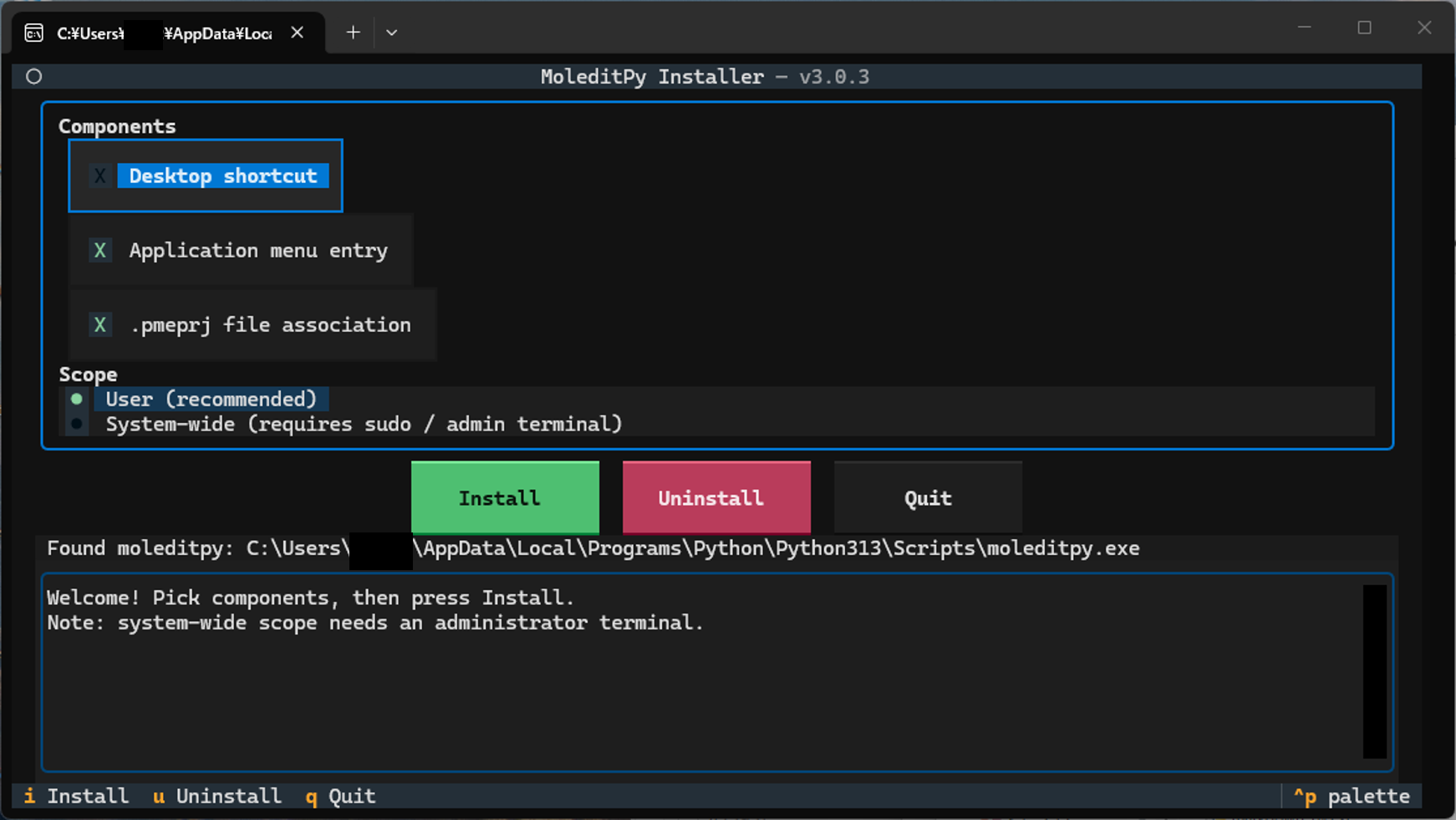
Run the following command in your terminal. In an interactive terminal this opens a TUI where you pick the components — Desktop shortcut, application-menu entry, `.pmeprj` file association — and the scope (per-user or system-wide), then press **Install**:
|
|
724
737
|
|
|
725
738
|
```bash
|
|
726
|
-
|
|
739
|
+
python -m moleditpy_installer
|
|
727
740
|
```
|
|
728
741
|
|
|
729
742
|
Defaults: Desktop shortcut **off**, application menu **on**, file association **on**, per-user scope, executable **auto-detected**. The **Executable path** field at the bottom of the panel is optional — leave it empty to auto-detect, or type the path to the `moleditpy` executable (or the `Scripts`/`bin` folder holding it) when your installation lives somewhere the search does not cover. The **Install** button is focused on start, so pressing **Enter** immediately installs with the defaults. Move between widgets with **Tab** / **Shift+Tab** (the arrow keys also switch between the Install / Uninstall / Quit buttons). After a successful install or uninstall the TUI stays open for two seconds, then exits and replays the full log in the terminal.
|
|
@@ -731,11 +744,11 @@ This package is a helper utility that automatically installs the correct version
|
|
|
731
744
|
**Non-interactive / scripted use** (also what runs automatically when there is no terminal):
|
|
732
745
|
|
|
733
746
|
```bash
|
|
734
|
-
|
|
735
|
-
|
|
736
|
-
|
|
737
|
-
sudo
|
|
738
|
-
|
|
747
|
+
python -m moleditpy_installer --no-tui # install with the defaults
|
|
748
|
+
python -m moleditpy_installer --desktop # also create a Desktop shortcut
|
|
749
|
+
python -m moleditpy_installer --no-file-assoc # skip the .pmeprj association
|
|
750
|
+
sudo /absolute/path/to/env/bin/python -m moleditpy_installer --system # system-wide (admin terminal on Windows)
|
|
751
|
+
python -m moleditpy_installer --exe-path /opt/env/bin/moleditpy # point at the executable yourself
|
|
739
752
|
```
|
|
740
753
|
|
|
741
754
|
Any explicit option skips the TUI.
|
|
@@ -743,21 +756,21 @@ This package is a helper utility that automatically installs the correct version
|
|
|
743
756
|
**Manual executable path.** If the automatic search cannot find your installation, pass `--exe-path` (or fill in the TUI field). It accepts the executable itself or the directory holding it, expands `~` and environment variables, and strips surrounding quotes:
|
|
744
757
|
|
|
745
758
|
```bash
|
|
746
|
-
|
|
747
|
-
|
|
759
|
+
python -m moleditpy_installer --exe-path "~/my envs/chem/bin" # a Scripts/bin directory
|
|
760
|
+
python -m moleditpy_installer --check --exe-path C:\envs\chem\Scripts\moleditpy.exe
|
|
748
761
|
```
|
|
749
762
|
|
|
750
763
|
A path given this way is never silently replaced by a search result: if it is wrong, the installer reports why and stops.
|
|
751
764
|
|
|
752
765
|
> **Security Note:** File associations for `.pmeraw` files have been intentionally removed. Opening `.pmeraw` files downloaded from the internet can be potentially unsecure, so they are no longer automatically associated with the application.
|
|
753
766
|
|
|
754
|
-
|
|
767
|
+
The console-script alternative is also supported when its Scripts/bin directory is on `PATH`:
|
|
755
768
|
|
|
756
769
|
```bash
|
|
757
|
-
|
|
770
|
+
moleditpy-installer
|
|
758
771
|
```
|
|
759
772
|
|
|
760
|
-
> **Note:** `python -m moleditpy-installer` (with a hyphen)
|
|
773
|
+
> **Note:** `python -m moleditpy-installer` (with a hyphen) does not name this package’s Python module and will not work. Always use the underscore form (`moleditpy_installer`) with `-m`.
|
|
761
774
|
|
|
762
775
|
> **Tip:** Run the installer from the Python environment where `moleditpy` is installed (e.g. after `conda activate <env>`). The installer verifies the launch command and warns you if the pairing cannot start MoleditPy.
|
|
763
776
|
|
|
@@ -765,18 +778,18 @@ This package is a helper utility that automatically installs the correct version
|
|
|
765
778
|
To remove the shortcuts, unregister file associations, and clean up extracted icon files, run (add `--system` for a system-wide install; `--remove` remains as a deprecated alias):
|
|
766
779
|
|
|
767
780
|
```bash
|
|
768
|
-
moleditpy-installer --uninstall
|
|
769
|
-
# or
|
|
770
781
|
python -m moleditpy_installer --uninstall
|
|
782
|
+
# or, if the console script is on PATH
|
|
783
|
+
moleditpy-installer --uninstall
|
|
771
784
|
```
|
|
772
785
|
|
|
773
|
-
> **Note:** this removes the shortcuts and file associations only. To fully remove MoleditPy itself, also run `pip uninstall moleditpy` (or `pip uninstall moleditpy-linux` on Linux).
|
|
786
|
+
> **Note:** this removes the shortcuts and file associations only. To fully remove MoleditPy itself, also run `python -m pip uninstall moleditpy` (or `python -m pip uninstall moleditpy-linux` on Linux).
|
|
774
787
|
|
|
775
788
|
4. **Check Executable Location**
|
|
776
789
|
To search for the `moleditpy` executable in the search paths and print the located path:
|
|
777
790
|
|
|
778
791
|
```bash
|
|
779
|
-
|
|
792
|
+
python -m moleditpy_installer --check
|
|
780
793
|
```
|
|
781
794
|
This command returns exit code `0` if the executable is found, and `1` otherwise. On macOS it additionally verifies that the launcher's interpreter/script pairing can actually start MoleditPy. Add `--exe-path <path>` to validate a specific location instead of searching.
|
|
782
795
|
|
|
@@ -786,14 +799,14 @@ This package is a helper utility that automatically installs the correct version
|
|
|
786
799
|
To show the version of the installer:
|
|
787
800
|
|
|
788
801
|
```bash
|
|
789
|
-
|
|
802
|
+
python -m moleditpy_installer --version
|
|
790
803
|
```
|
|
791
804
|
|
|
792
805
|
6. **Help**
|
|
793
806
|
To see all available options, run:
|
|
794
807
|
|
|
795
808
|
```bash
|
|
796
|
-
|
|
809
|
+
python -m moleditpy_installer --help
|
|
797
810
|
```
|
|
798
811
|
|
|
799
812
|
## What the installer sets up
|
|
@@ -817,6 +830,15 @@ This package is a helper utility that automatically installs the correct version
|
|
|
817
830
|
|
|
818
831
|
`moleditpy-installer --uninstall` undoes all of the above for the current user (add `--system` for system-wide installs).
|
|
819
832
|
|
|
833
|
+
## Version 3.1.3 fixes
|
|
834
|
+
|
|
835
|
+
- Report failed file-association and Linux system-launcher setup correctly.
|
|
836
|
+
- Serialize TUI actions and preserve logging while background discovery runs.
|
|
837
|
+
- Preserve other Linux MIME handlers during uninstall and prefer the active virtual environment during discovery.
|
|
838
|
+
- Quote macOS launcher paths safely and validate release tags against package metadata.
|
|
839
|
+
|
|
840
|
+
See [the changelog](https://github.com/HiroYokoyama/python_molecular_editor_installer/blob/main/CHANGELOG.md) for details.
|
|
841
|
+
|
|
820
842
|
## Version 3.1 highlights
|
|
821
843
|
|
|
822
844
|
- **New:** manual executable path — `--exe-path` on the command line and an **Executable path** field in the TUI, for installations the automatic search cannot find. Accepts the executable or the directory holding it; a wrong path is reported instead of being silently replaced by a search result.
|
|
@@ -842,3 +864,5 @@ This package is a helper utility that automatically installs the correct version
|
|
|
842
864
|
- **New:** `.pmeprj` double-click support and document icon on Linux (per-user MIME registration).
|
|
843
865
|
- **New:** `--check` verifies launchability on macOS; `--remove` also unregisters the bundle from Launch Services and removes extracted icons.
|
|
844
866
|
- Icons no longer live in the temp folder (Windows shortcut/registry icons no longer break after cleanup).
|
|
867
|
+
|
|
868
|
+
Replace `/absolute/path/to/env/bin/python` with the actual environment interpreter for a system-wide Unix install. On Windows, use the intended environment’s Python from an administrator terminal.
|
|
@@ -8,11 +8,24 @@ This package is a helper utility that automatically installs the correct version
|
|
|
8
8
|
|
|
9
9
|

|
|
10
10
|
|
|
11
|
+
## Quick start and command choice
|
|
12
|
+
|
|
13
|
+
Use a dedicated virtual environment, or activate the environment where MoleditPy should live. See the [Windows/macOS/Linux quick start](https://github.com/HiroYokoyama/python_molecular_editor/wiki/Quick-Start) for commands that use an explicit environment path.
|
|
14
|
+
|
|
15
|
+
```bash
|
|
16
|
+
python -m pip install moleditpy-installer
|
|
17
|
+
python -m moleditpy_installer
|
|
18
|
+
```
|
|
19
|
+
|
|
20
|
+
Both `python -m moleditpy_installer` and `moleditpy-installer` are supported. **Prefer the module form**: it runs under the Python you selected and avoids depending on the console script being on `PATH`. If `python` is not your environment's interpreter, substitute its full path (or `python3` on macOS/Linux outside an activated environment). Use that same interpreter for `-m pip`.
|
|
21
|
+
|
|
22
|
+
Installing the package installs the app dependency. Running the installer configures launchers and file associations. For a non-interactive setup use `python -m moleditpy_installer --no-tui`; to inspect discovery first use `python -m moleditpy_installer --check`. The standalone Windows/macOS download is a separate distribution with different plugin-dependency limitations.
|
|
23
|
+
|
|
11
24
|
## How to Use
|
|
12
25
|
|
|
13
26
|
1. **Install**
|
|
14
27
|
```bash
|
|
15
|
-
pip install moleditpy-installer
|
|
28
|
+
python -m pip install moleditpy-installer
|
|
16
29
|
```
|
|
17
30
|
This will automatically install the correct `moleditpy` package (for Windows/macOS) or `moleditpy-linux` (for Linux) as a dependency.
|
|
18
31
|
|
|
@@ -20,7 +33,7 @@ This package is a helper utility that automatically installs the correct version
|
|
|
20
33
|
Run the following command in your terminal. In an interactive terminal this opens a TUI where you pick the components — Desktop shortcut, application-menu entry, `.pmeprj` file association — and the scope (per-user or system-wide), then press **Install**:
|
|
21
34
|
|
|
22
35
|
```bash
|
|
23
|
-
|
|
36
|
+
python -m moleditpy_installer
|
|
24
37
|
```
|
|
25
38
|
|
|
26
39
|
Defaults: Desktop shortcut **off**, application menu **on**, file association **on**, per-user scope, executable **auto-detected**. The **Executable path** field at the bottom of the panel is optional — leave it empty to auto-detect, or type the path to the `moleditpy` executable (or the `Scripts`/`bin` folder holding it) when your installation lives somewhere the search does not cover. The **Install** button is focused on start, so pressing **Enter** immediately installs with the defaults. Move between widgets with **Tab** / **Shift+Tab** (the arrow keys also switch between the Install / Uninstall / Quit buttons). After a successful install or uninstall the TUI stays open for two seconds, then exits and replays the full log in the terminal.
|
|
@@ -28,11 +41,11 @@ This package is a helper utility that automatically installs the correct version
|
|
|
28
41
|
**Non-interactive / scripted use** (also what runs automatically when there is no terminal):
|
|
29
42
|
|
|
30
43
|
```bash
|
|
31
|
-
|
|
32
|
-
|
|
33
|
-
|
|
34
|
-
sudo
|
|
35
|
-
|
|
44
|
+
python -m moleditpy_installer --no-tui # install with the defaults
|
|
45
|
+
python -m moleditpy_installer --desktop # also create a Desktop shortcut
|
|
46
|
+
python -m moleditpy_installer --no-file-assoc # skip the .pmeprj association
|
|
47
|
+
sudo /absolute/path/to/env/bin/python -m moleditpy_installer --system # system-wide (admin terminal on Windows)
|
|
48
|
+
python -m moleditpy_installer --exe-path /opt/env/bin/moleditpy # point at the executable yourself
|
|
36
49
|
```
|
|
37
50
|
|
|
38
51
|
Any explicit option skips the TUI.
|
|
@@ -40,21 +53,21 @@ This package is a helper utility that automatically installs the correct version
|
|
|
40
53
|
**Manual executable path.** If the automatic search cannot find your installation, pass `--exe-path` (or fill in the TUI field). It accepts the executable itself or the directory holding it, expands `~` and environment variables, and strips surrounding quotes:
|
|
41
54
|
|
|
42
55
|
```bash
|
|
43
|
-
|
|
44
|
-
|
|
56
|
+
python -m moleditpy_installer --exe-path "~/my envs/chem/bin" # a Scripts/bin directory
|
|
57
|
+
python -m moleditpy_installer --check --exe-path C:\envs\chem\Scripts\moleditpy.exe
|
|
45
58
|
```
|
|
46
59
|
|
|
47
60
|
A path given this way is never silently replaced by a search result: if it is wrong, the installer reports why and stops.
|
|
48
61
|
|
|
49
62
|
> **Security Note:** File associations for `.pmeraw` files have been intentionally removed. Opening `.pmeraw` files downloaded from the internet can be potentially unsecure, so they are no longer automatically associated with the application.
|
|
50
63
|
|
|
51
|
-
|
|
64
|
+
The console-script alternative is also supported when its Scripts/bin directory is on `PATH`:
|
|
52
65
|
|
|
53
66
|
```bash
|
|
54
|
-
|
|
67
|
+
moleditpy-installer
|
|
55
68
|
```
|
|
56
69
|
|
|
57
|
-
> **Note:** `python -m moleditpy-installer` (with a hyphen)
|
|
70
|
+
> **Note:** `python -m moleditpy-installer` (with a hyphen) does not name this package’s Python module and will not work. Always use the underscore form (`moleditpy_installer`) with `-m`.
|
|
58
71
|
|
|
59
72
|
> **Tip:** Run the installer from the Python environment where `moleditpy` is installed (e.g. after `conda activate <env>`). The installer verifies the launch command and warns you if the pairing cannot start MoleditPy.
|
|
60
73
|
|
|
@@ -62,18 +75,18 @@ This package is a helper utility that automatically installs the correct version
|
|
|
62
75
|
To remove the shortcuts, unregister file associations, and clean up extracted icon files, run (add `--system` for a system-wide install; `--remove` remains as a deprecated alias):
|
|
63
76
|
|
|
64
77
|
```bash
|
|
65
|
-
moleditpy-installer --uninstall
|
|
66
|
-
# or
|
|
67
78
|
python -m moleditpy_installer --uninstall
|
|
79
|
+
# or, if the console script is on PATH
|
|
80
|
+
moleditpy-installer --uninstall
|
|
68
81
|
```
|
|
69
82
|
|
|
70
|
-
> **Note:** this removes the shortcuts and file associations only. To fully remove MoleditPy itself, also run `pip uninstall moleditpy` (or `pip uninstall moleditpy-linux` on Linux).
|
|
83
|
+
> **Note:** this removes the shortcuts and file associations only. To fully remove MoleditPy itself, also run `python -m pip uninstall moleditpy` (or `python -m pip uninstall moleditpy-linux` on Linux).
|
|
71
84
|
|
|
72
85
|
4. **Check Executable Location**
|
|
73
86
|
To search for the `moleditpy` executable in the search paths and print the located path:
|
|
74
87
|
|
|
75
88
|
```bash
|
|
76
|
-
|
|
89
|
+
python -m moleditpy_installer --check
|
|
77
90
|
```
|
|
78
91
|
This command returns exit code `0` if the executable is found, and `1` otherwise. On macOS it additionally verifies that the launcher's interpreter/script pairing can actually start MoleditPy. Add `--exe-path <path>` to validate a specific location instead of searching.
|
|
79
92
|
|
|
@@ -83,14 +96,14 @@ This package is a helper utility that automatically installs the correct version
|
|
|
83
96
|
To show the version of the installer:
|
|
84
97
|
|
|
85
98
|
```bash
|
|
86
|
-
|
|
99
|
+
python -m moleditpy_installer --version
|
|
87
100
|
```
|
|
88
101
|
|
|
89
102
|
6. **Help**
|
|
90
103
|
To see all available options, run:
|
|
91
104
|
|
|
92
105
|
```bash
|
|
93
|
-
|
|
106
|
+
python -m moleditpy_installer --help
|
|
94
107
|
```
|
|
95
108
|
|
|
96
109
|
## What the installer sets up
|
|
@@ -114,6 +127,15 @@ This package is a helper utility that automatically installs the correct version
|
|
|
114
127
|
|
|
115
128
|
`moleditpy-installer --uninstall` undoes all of the above for the current user (add `--system` for system-wide installs).
|
|
116
129
|
|
|
130
|
+
## Version 3.1.3 fixes
|
|
131
|
+
|
|
132
|
+
- Report failed file-association and Linux system-launcher setup correctly.
|
|
133
|
+
- Serialize TUI actions and preserve logging while background discovery runs.
|
|
134
|
+
- Preserve other Linux MIME handlers during uninstall and prefer the active virtual environment during discovery.
|
|
135
|
+
- Quote macOS launcher paths safely and validate release tags against package metadata.
|
|
136
|
+
|
|
137
|
+
See [the changelog](https://github.com/HiroYokoyama/python_molecular_editor_installer/blob/main/CHANGELOG.md) for details.
|
|
138
|
+
|
|
117
139
|
## Version 3.1 highlights
|
|
118
140
|
|
|
119
141
|
- **New:** manual executable path — `--exe-path` on the command line and an **Executable path** field in the TUI, for installations the automatic search cannot find. Accepts the executable or the directory holding it; a wrong path is reported instead of being silently replaced by a search result.
|
|
@@ -139,3 +161,5 @@ This package is a helper utility that automatically installs the correct version
|
|
|
139
161
|
- **New:** `.pmeprj` double-click support and document icon on Linux (per-user MIME registration).
|
|
140
162
|
- **New:** `--check` verifies launchability on macOS; `--remove` also unregisters the bundle from Launch Services and removes extracted icons.
|
|
141
163
|
- Icons no longer live in the temp folder (Windows shortcut/registry icons no longer break after cleanup).
|
|
164
|
+
|
|
165
|
+
Replace `/absolute/path/to/env/bin/python` with the actual environment interpreter for a system-wide Unix install. On Windows, use the intended environment’s Python from an administrator terminal.
|
|
@@ -189,7 +189,7 @@ def get_icon_path(system_scope: bool = False) -> Optional[str]:
|
|
|
189
189
|
return _extract_data_file(icon_name, system=system_scope)
|
|
190
190
|
|
|
191
191
|
|
|
192
|
-
def find_executable(name: str) -> Optional[str]:
|
|
192
|
+
def find_executable(name: str, *, quiet: bool = False) -> Optional[str]:
|
|
193
193
|
"""
|
|
194
194
|
Finds the path to the specified executable.
|
|
195
195
|
|
|
@@ -202,6 +202,7 @@ def find_executable(name: str) -> Optional[str]:
|
|
|
202
202
|
|
|
203
203
|
Args:
|
|
204
204
|
name (str): The name of the executable (e.g., 'moleditpy').
|
|
205
|
+
quiet (bool): Suppress discovery messages without redirecting stdout.
|
|
205
206
|
|
|
206
207
|
Returns:
|
|
207
208
|
Optional[str]: The absolute path to the executable, or None if not found.
|
|
@@ -214,12 +215,15 @@ def find_executable(name: str) -> Optional[str]:
|
|
|
214
215
|
candidate = candidate.with_suffix(".exe")
|
|
215
216
|
if candidate.is_file() and os.access(candidate, os.X_OK):
|
|
216
217
|
result = str(candidate)
|
|
217
|
-
|
|
218
|
+
if not quiet:
|
|
219
|
+
print(f"Found executable: {result}")
|
|
218
220
|
return result
|
|
219
221
|
return None
|
|
220
222
|
|
|
221
223
|
# 1 & 2. Dirs relative to the Python interpreter (reliable even under `python -m`)
|
|
222
|
-
|
|
224
|
+
# POSIX venv interpreters are commonly symlinks to the base Python.
|
|
225
|
+
# Resolving the link would search the base environment before the venv.
|
|
226
|
+
python_dir = Path(os.path.abspath(sys.executable)).parent
|
|
223
227
|
for scripts_dir in (
|
|
224
228
|
python_dir / "Scripts",
|
|
225
229
|
python_dir,
|
|
@@ -413,7 +417,8 @@ def find_executable(name: str) -> Optional[str]:
|
|
|
413
417
|
# 5. Fallback: system PATH
|
|
414
418
|
path_from_shutil = shutil.which(name)
|
|
415
419
|
if path_from_shutil:
|
|
416
|
-
|
|
420
|
+
if not quiet:
|
|
421
|
+
print(f"Found executable in system PATH: {path_from_shutil}")
|
|
417
422
|
return path_from_shutil
|
|
418
423
|
|
|
419
424
|
return None
|
|
@@ -818,8 +823,24 @@ def _clean_linux_mimeapps() -> None:
|
|
|
818
823
|
continue
|
|
819
824
|
try:
|
|
820
825
|
lines = path.read_text(encoding="utf-8").splitlines()
|
|
821
|
-
kept = [
|
|
822
|
-
|
|
826
|
+
kept = []
|
|
827
|
+
for line in lines:
|
|
828
|
+
key, separator, value = line.partition("=")
|
|
829
|
+
handlers = value.split(";")
|
|
830
|
+
if (
|
|
831
|
+
separator
|
|
832
|
+
and key.strip() == LINUX_MIME_TYPE
|
|
833
|
+
and "MoleditPy.desktop" in handlers
|
|
834
|
+
):
|
|
835
|
+
remaining = [
|
|
836
|
+
handler for handler in handlers
|
|
837
|
+
if handler and handler != "MoleditPy.desktop"
|
|
838
|
+
]
|
|
839
|
+
if remaining:
|
|
840
|
+
kept.append(f"{key}={';'.join(remaining)};")
|
|
841
|
+
else:
|
|
842
|
+
kept.append(line)
|
|
843
|
+
if kept != lines:
|
|
823
844
|
path.write_text("\n".join(kept) + "\n", encoding="utf-8")
|
|
824
845
|
print(f" Cleaned {path}")
|
|
825
846
|
except OSError as e:
|
|
@@ -1400,7 +1421,8 @@ def install(options: Optional[InstallOptions] = None) -> int:
|
|
|
1400
1421
|
if options.desktop or options.app_menu:
|
|
1401
1422
|
if system == "Linux" and options.system:
|
|
1402
1423
|
# pyshortcuts only writes per-user locations
|
|
1403
|
-
write_linux_system_desktop_entry(full_command, icon_path)
|
|
1424
|
+
if not write_linux_system_desktop_entry(full_command, icon_path):
|
|
1425
|
+
return 1
|
|
1404
1426
|
if options.desktop:
|
|
1405
1427
|
print(
|
|
1406
1428
|
"Note: Desktop shortcuts are per-user; "
|
|
@@ -1434,7 +1456,8 @@ def install(options: Optional[InstallOptions] = None) -> int:
|
|
|
1434
1456
|
)
|
|
1435
1457
|
|
|
1436
1458
|
if system == "Linux" and options.file_assoc:
|
|
1437
|
-
register_file_associations_linux(system=options.system)
|
|
1459
|
+
if not register_file_associations_linux(system=options.system):
|
|
1460
|
+
return 1
|
|
1438
1461
|
|
|
1439
1462
|
elif system == "Darwin":
|
|
1440
1463
|
if not (options.desktop or options.app_menu):
|
|
@@ -1478,8 +1501,8 @@ def install(options: Optional[InstallOptions] = None) -> int:
|
|
|
1478
1501
|
"moleditpy is installed (e.g. after 'conda activate <env>')."
|
|
1479
1502
|
)
|
|
1480
1503
|
|
|
1481
|
-
mac_escaped_script = mac_target_script.replace('"', '\\"')
|
|
1482
|
-
|
|
1504
|
+
mac_escaped_script = mac_target_script.replace("\\", "\\\\").replace('"', '\\"')
|
|
1505
|
+
mac_escaped_exe = original_exe_path.replace("\\", "\\\\").replace('"', '\\"')
|
|
1483
1506
|
|
|
1484
1507
|
# Run MoleditPy inside a Terminal window so Python output and
|
|
1485
1508
|
# errors are always visible to the user (a silent GUI launch
|
|
@@ -1488,7 +1511,7 @@ def install(options: Optional[InstallOptions] = None) -> int:
|
|
|
1488
1511
|
# away instead of staying "running" in the Dock.
|
|
1489
1512
|
applescript_code = f"""
|
|
1490
1513
|
on launch_moleditpy(extra_args)
|
|
1491
|
-
set base_cmd to quoted form of "{mac_escaped_script}" & " {
|
|
1514
|
+
set base_cmd to quoted form of "{mac_escaped_script}" & " " & quoted form of "{mac_escaped_exe}"
|
|
1492
1515
|
tell application "Terminal"
|
|
1493
1516
|
activate
|
|
1494
1517
|
do script base_cmd & extra_args
|
|
@@ -1566,7 +1589,9 @@ end open
|
|
|
1566
1589
|
shutil.copy2(icon_path, app_resources / "applet.icns")
|
|
1567
1590
|
|
|
1568
1591
|
if options.file_assoc:
|
|
1569
|
-
register_file_associations_darwin(target_app_path)
|
|
1592
|
+
if not register_file_associations_darwin(target_app_path):
|
|
1593
|
+
print("Failed to configure the app bundle's file association.")
|
|
1594
|
+
return 1
|
|
1570
1595
|
|
|
1571
1596
|
# Re-sign AFTER all bundle modifications, or Apple Silicon
|
|
1572
1597
|
# refuses to launch the app (silently from Finder).
|
|
@@ -1627,9 +1652,10 @@ end open
|
|
|
1627
1652
|
if not file_icon_path:
|
|
1628
1653
|
file_icon_path = icon_path
|
|
1629
1654
|
|
|
1630
|
-
register_file_associations_windows(
|
|
1655
|
+
if not register_file_associations_windows(
|
|
1631
1656
|
str(original_exe_path), file_icon_path, system=options.system
|
|
1632
|
-
)
|
|
1657
|
+
):
|
|
1658
|
+
return 1
|
|
1633
1659
|
|
|
1634
1660
|
print("\nYou can remove the shortcut and file associations by running:")
|
|
1635
1661
|
print(" moleditpy-installer --remove")
|
|
@@ -136,6 +136,7 @@ class InstallerApp(App):
|
|
|
136
136
|
self._show_uninstall_note = False
|
|
137
137
|
self._action_started = False
|
|
138
138
|
self._action_succeeded = False
|
|
139
|
+
self._busy = False
|
|
139
140
|
|
|
140
141
|
def compose(self) -> ComposeResult:
|
|
141
142
|
yield Header()
|
|
@@ -191,14 +192,14 @@ class InstallerApp(App):
|
|
|
191
192
|
)
|
|
192
193
|
|
|
193
194
|
def _set_busy(self, busy: bool) -> None:
|
|
194
|
-
|
|
195
|
+
self._busy = busy
|
|
196
|
+
for button_id in ("install", "remove", "quit"):
|
|
195
197
|
self.query_one(f"#{button_id}", Button).disabled = busy
|
|
196
198
|
|
|
197
199
|
def _detect_executable(self) -> None:
|
|
198
|
-
|
|
199
|
-
|
|
200
|
-
|
|
201
|
-
path = installer.find_executable("moleditpy-linux")
|
|
200
|
+
path = installer.find_executable("moleditpy", quiet=True)
|
|
201
|
+
if not path and platform.system() == "Linux":
|
|
202
|
+
path = installer.find_executable("moleditpy-linux", quiet=True)
|
|
202
203
|
if path:
|
|
203
204
|
self.call_from_thread(self._set_detect_status, f"Found moleditpy: {path}")
|
|
204
205
|
else:
|
|
@@ -247,6 +248,8 @@ class InstallerApp(App):
|
|
|
247
248
|
# ------------------------------------------------------------------ #
|
|
248
249
|
|
|
249
250
|
def action_install(self) -> None:
|
|
251
|
+
if self._busy:
|
|
252
|
+
return
|
|
250
253
|
options = self._selected_options()
|
|
251
254
|
self._action_started = True
|
|
252
255
|
self._set_busy(True)
|
|
@@ -268,6 +271,8 @@ class InstallerApp(App):
|
|
|
268
271
|
)
|
|
269
272
|
|
|
270
273
|
def action_remove(self) -> None:
|
|
274
|
+
if self._busy:
|
|
275
|
+
return
|
|
271
276
|
system_scope = self.query_one("#scope_system", RadioButton).value
|
|
272
277
|
self._action_started = True
|
|
273
278
|
self._set_busy(True)
|
|
@@ -307,11 +312,12 @@ class InstallerApp(App):
|
|
|
307
312
|
elif event.button.id == "remove":
|
|
308
313
|
self.action_remove()
|
|
309
314
|
elif event.button.id == "quit":
|
|
310
|
-
self.
|
|
315
|
+
self.action_quit()
|
|
311
316
|
|
|
312
317
|
def action_quit(self) -> None:
|
|
313
318
|
# Match the Quit button: keep the exit code of a failed action.
|
|
314
|
-
self.
|
|
319
|
+
if not self._busy:
|
|
320
|
+
self.exit(self.exit_code)
|
|
315
321
|
|
|
316
322
|
|
|
317
323
|
def run_tui() -> int:
|
{moleditpy_installer-3.1.2 → moleditpy_installer-3.1.3}/moleditpy_installer.egg-info/PKG-INFO
RENAMED
|
@@ -1,6 +1,6 @@
|
|
|
1
1
|
Metadata-Version: 2.4
|
|
2
2
|
Name: moleditpy-installer
|
|
3
|
-
Version: 3.1.
|
|
3
|
+
Version: 3.1.3
|
|
4
4
|
Summary: Installer and application bundler for MoleditPy
|
|
5
5
|
Author-email: HiroYokoyama <titech.yoko.hiro@gmail.com>
|
|
6
6
|
License: GNU GENERAL PUBLIC LICENSE
|
|
@@ -711,11 +711,24 @@ This package is a helper utility that automatically installs the correct version
|
|
|
711
711
|
|
|
712
712
|

|
|
713
713
|
|
|
714
|
+
## Quick start and command choice
|
|
715
|
+
|
|
716
|
+
Use a dedicated virtual environment, or activate the environment where MoleditPy should live. See the [Windows/macOS/Linux quick start](https://github.com/HiroYokoyama/python_molecular_editor/wiki/Quick-Start) for commands that use an explicit environment path.
|
|
717
|
+
|
|
718
|
+
```bash
|
|
719
|
+
python -m pip install moleditpy-installer
|
|
720
|
+
python -m moleditpy_installer
|
|
721
|
+
```
|
|
722
|
+
|
|
723
|
+
Both `python -m moleditpy_installer` and `moleditpy-installer` are supported. **Prefer the module form**: it runs under the Python you selected and avoids depending on the console script being on `PATH`. If `python` is not your environment's interpreter, substitute its full path (or `python3` on macOS/Linux outside an activated environment). Use that same interpreter for `-m pip`.
|
|
724
|
+
|
|
725
|
+
Installing the package installs the app dependency. Running the installer configures launchers and file associations. For a non-interactive setup use `python -m moleditpy_installer --no-tui`; to inspect discovery first use `python -m moleditpy_installer --check`. The standalone Windows/macOS download is a separate distribution with different plugin-dependency limitations.
|
|
726
|
+
|
|
714
727
|
## How to Use
|
|
715
728
|
|
|
716
729
|
1. **Install**
|
|
717
730
|
```bash
|
|
718
|
-
pip install moleditpy-installer
|
|
731
|
+
python -m pip install moleditpy-installer
|
|
719
732
|
```
|
|
720
733
|
This will automatically install the correct `moleditpy` package (for Windows/macOS) or `moleditpy-linux` (for Linux) as a dependency.
|
|
721
734
|
|
|
@@ -723,7 +736,7 @@ This package is a helper utility that automatically installs the correct version
|
|
|
723
736
|
Run the following command in your terminal. In an interactive terminal this opens a TUI where you pick the components — Desktop shortcut, application-menu entry, `.pmeprj` file association — and the scope (per-user or system-wide), then press **Install**:
|
|
724
737
|
|
|
725
738
|
```bash
|
|
726
|
-
|
|
739
|
+
python -m moleditpy_installer
|
|
727
740
|
```
|
|
728
741
|
|
|
729
742
|
Defaults: Desktop shortcut **off**, application menu **on**, file association **on**, per-user scope, executable **auto-detected**. The **Executable path** field at the bottom of the panel is optional — leave it empty to auto-detect, or type the path to the `moleditpy` executable (or the `Scripts`/`bin` folder holding it) when your installation lives somewhere the search does not cover. The **Install** button is focused on start, so pressing **Enter** immediately installs with the defaults. Move between widgets with **Tab** / **Shift+Tab** (the arrow keys also switch between the Install / Uninstall / Quit buttons). After a successful install or uninstall the TUI stays open for two seconds, then exits and replays the full log in the terminal.
|
|
@@ -731,11 +744,11 @@ This package is a helper utility that automatically installs the correct version
|
|
|
731
744
|
**Non-interactive / scripted use** (also what runs automatically when there is no terminal):
|
|
732
745
|
|
|
733
746
|
```bash
|
|
734
|
-
|
|
735
|
-
|
|
736
|
-
|
|
737
|
-
sudo
|
|
738
|
-
|
|
747
|
+
python -m moleditpy_installer --no-tui # install with the defaults
|
|
748
|
+
python -m moleditpy_installer --desktop # also create a Desktop shortcut
|
|
749
|
+
python -m moleditpy_installer --no-file-assoc # skip the .pmeprj association
|
|
750
|
+
sudo /absolute/path/to/env/bin/python -m moleditpy_installer --system # system-wide (admin terminal on Windows)
|
|
751
|
+
python -m moleditpy_installer --exe-path /opt/env/bin/moleditpy # point at the executable yourself
|
|
739
752
|
```
|
|
740
753
|
|
|
741
754
|
Any explicit option skips the TUI.
|
|
@@ -743,21 +756,21 @@ This package is a helper utility that automatically installs the correct version
|
|
|
743
756
|
**Manual executable path.** If the automatic search cannot find your installation, pass `--exe-path` (or fill in the TUI field). It accepts the executable itself or the directory holding it, expands `~` and environment variables, and strips surrounding quotes:
|
|
744
757
|
|
|
745
758
|
```bash
|
|
746
|
-
|
|
747
|
-
|
|
759
|
+
python -m moleditpy_installer --exe-path "~/my envs/chem/bin" # a Scripts/bin directory
|
|
760
|
+
python -m moleditpy_installer --check --exe-path C:\envs\chem\Scripts\moleditpy.exe
|
|
748
761
|
```
|
|
749
762
|
|
|
750
763
|
A path given this way is never silently replaced by a search result: if it is wrong, the installer reports why and stops.
|
|
751
764
|
|
|
752
765
|
> **Security Note:** File associations for `.pmeraw` files have been intentionally removed. Opening `.pmeraw` files downloaded from the internet can be potentially unsecure, so they are no longer automatically associated with the application.
|
|
753
766
|
|
|
754
|
-
|
|
767
|
+
The console-script alternative is also supported when its Scripts/bin directory is on `PATH`:
|
|
755
768
|
|
|
756
769
|
```bash
|
|
757
|
-
|
|
770
|
+
moleditpy-installer
|
|
758
771
|
```
|
|
759
772
|
|
|
760
|
-
> **Note:** `python -m moleditpy-installer` (with a hyphen)
|
|
773
|
+
> **Note:** `python -m moleditpy-installer` (with a hyphen) does not name this package’s Python module and will not work. Always use the underscore form (`moleditpy_installer`) with `-m`.
|
|
761
774
|
|
|
762
775
|
> **Tip:** Run the installer from the Python environment where `moleditpy` is installed (e.g. after `conda activate <env>`). The installer verifies the launch command and warns you if the pairing cannot start MoleditPy.
|
|
763
776
|
|
|
@@ -765,18 +778,18 @@ This package is a helper utility that automatically installs the correct version
|
|
|
765
778
|
To remove the shortcuts, unregister file associations, and clean up extracted icon files, run (add `--system` for a system-wide install; `--remove` remains as a deprecated alias):
|
|
766
779
|
|
|
767
780
|
```bash
|
|
768
|
-
moleditpy-installer --uninstall
|
|
769
|
-
# or
|
|
770
781
|
python -m moleditpy_installer --uninstall
|
|
782
|
+
# or, if the console script is on PATH
|
|
783
|
+
moleditpy-installer --uninstall
|
|
771
784
|
```
|
|
772
785
|
|
|
773
|
-
> **Note:** this removes the shortcuts and file associations only. To fully remove MoleditPy itself, also run `pip uninstall moleditpy` (or `pip uninstall moleditpy-linux` on Linux).
|
|
786
|
+
> **Note:** this removes the shortcuts and file associations only. To fully remove MoleditPy itself, also run `python -m pip uninstall moleditpy` (or `python -m pip uninstall moleditpy-linux` on Linux).
|
|
774
787
|
|
|
775
788
|
4. **Check Executable Location**
|
|
776
789
|
To search for the `moleditpy` executable in the search paths and print the located path:
|
|
777
790
|
|
|
778
791
|
```bash
|
|
779
|
-
|
|
792
|
+
python -m moleditpy_installer --check
|
|
780
793
|
```
|
|
781
794
|
This command returns exit code `0` if the executable is found, and `1` otherwise. On macOS it additionally verifies that the launcher's interpreter/script pairing can actually start MoleditPy. Add `--exe-path <path>` to validate a specific location instead of searching.
|
|
782
795
|
|
|
@@ -786,14 +799,14 @@ This package is a helper utility that automatically installs the correct version
|
|
|
786
799
|
To show the version of the installer:
|
|
787
800
|
|
|
788
801
|
```bash
|
|
789
|
-
|
|
802
|
+
python -m moleditpy_installer --version
|
|
790
803
|
```
|
|
791
804
|
|
|
792
805
|
6. **Help**
|
|
793
806
|
To see all available options, run:
|
|
794
807
|
|
|
795
808
|
```bash
|
|
796
|
-
|
|
809
|
+
python -m moleditpy_installer --help
|
|
797
810
|
```
|
|
798
811
|
|
|
799
812
|
## What the installer sets up
|
|
@@ -817,6 +830,15 @@ This package is a helper utility that automatically installs the correct version
|
|
|
817
830
|
|
|
818
831
|
`moleditpy-installer --uninstall` undoes all of the above for the current user (add `--system` for system-wide installs).
|
|
819
832
|
|
|
833
|
+
## Version 3.1.3 fixes
|
|
834
|
+
|
|
835
|
+
- Report failed file-association and Linux system-launcher setup correctly.
|
|
836
|
+
- Serialize TUI actions and preserve logging while background discovery runs.
|
|
837
|
+
- Preserve other Linux MIME handlers during uninstall and prefer the active virtual environment during discovery.
|
|
838
|
+
- Quote macOS launcher paths safely and validate release tags against package metadata.
|
|
839
|
+
|
|
840
|
+
See [the changelog](https://github.com/HiroYokoyama/python_molecular_editor_installer/blob/main/CHANGELOG.md) for details.
|
|
841
|
+
|
|
820
842
|
## Version 3.1 highlights
|
|
821
843
|
|
|
822
844
|
- **New:** manual executable path — `--exe-path` on the command line and an **Executable path** field in the TUI, for installations the automatic search cannot find. Accepts the executable or the directory holding it; a wrong path is reported instead of being silently replaced by a search result.
|
|
@@ -842,3 +864,5 @@ This package is a helper utility that automatically installs the correct version
|
|
|
842
864
|
- **New:** `.pmeprj` double-click support and document icon on Linux (per-user MIME registration).
|
|
843
865
|
- **New:** `--check` verifies launchability on macOS; `--remove` also unregisters the bundle from Launch Services and removes extracted icons.
|
|
844
866
|
- Icons no longer live in the temp folder (Windows shortcut/registry icons no longer break after cleanup).
|
|
867
|
+
|
|
868
|
+
Replace `/absolute/path/to/env/bin/python` with the actual environment interpreter for a system-wide Unix install. On Windows, use the intended environment’s Python from an administrator terminal.
|
|
File without changes
|
|
File without changes
|
|
File without changes
|
{moleditpy_installer-3.1.2 → moleditpy_installer-3.1.3}/moleditpy_installer/data/file_icon.icns
RENAMED
|
File without changes
|
{moleditpy_installer-3.1.2 → moleditpy_installer-3.1.3}/moleditpy_installer/data/file_icon.ico
RENAMED
|
File without changes
|
{moleditpy_installer-3.1.2 → moleditpy_installer-3.1.3}/moleditpy_installer/data/file_icon.png
RENAMED
|
File without changes
|
{moleditpy_installer-3.1.2 → moleditpy_installer-3.1.3}/moleditpy_installer/data/file_icon_128.png
RENAMED
|
File without changes
|
{moleditpy_installer-3.1.2 → moleditpy_installer-3.1.3}/moleditpy_installer/data/file_icon_16.png
RENAMED
|
File without changes
|
{moleditpy_installer-3.1.2 → moleditpy_installer-3.1.3}/moleditpy_installer/data/file_icon_22.png
RENAMED
|
File without changes
|
{moleditpy_installer-3.1.2 → moleditpy_installer-3.1.3}/moleditpy_installer/data/file_icon_24.png
RENAMED
|
File without changes
|
{moleditpy_installer-3.1.2 → moleditpy_installer-3.1.3}/moleditpy_installer/data/file_icon_32.png
RENAMED
|
File without changes
|
{moleditpy_installer-3.1.2 → moleditpy_installer-3.1.3}/moleditpy_installer/data/file_icon_48.png
RENAMED
|
File without changes
|
{moleditpy_installer-3.1.2 → moleditpy_installer-3.1.3}/moleditpy_installer/data/file_icon_64.png
RENAMED
|
File without changes
|
|
File without changes
|
|
File without changes
|
|
File without changes
|
{moleditpy_installer-3.1.2 → moleditpy_installer-3.1.3}/moleditpy_installer.egg-info/SOURCES.txt
RENAMED
|
File without changes
|
|
File without changes
|
|
File without changes
|
{moleditpy_installer-3.1.2 → moleditpy_installer-3.1.3}/moleditpy_installer.egg-info/requires.txt
RENAMED
|
File without changes
|
{moleditpy_installer-3.1.2 → moleditpy_installer-3.1.3}/moleditpy_installer.egg-info/top_level.txt
RENAMED
|
File without changes
|
|
File without changes
|