moleditpy-installer 3.0.2__tar.gz → 3.0.4__tar.gz
This diff represents the content of publicly available package versions that have been released to one of the supported registries. The information contained in this diff is provided for informational purposes only and reflects changes between package versions as they appear in their respective public registries.
- {moleditpy_installer-3.0.2 → moleditpy_installer-3.0.4}/PKG-INFO +19 -19
- {moleditpy_installer-3.0.2 → moleditpy_installer-3.0.4}/README.md +19 -19
- {moleditpy_installer-3.0.2 → moleditpy_installer-3.0.4}/moleditpy_installer/main.py +229 -45
- {moleditpy_installer-3.0.2 → moleditpy_installer-3.0.4}/moleditpy_installer/tui.py +53 -10
- {moleditpy_installer-3.0.2 → moleditpy_installer-3.0.4}/moleditpy_installer.egg-info/PKG-INFO +19 -19
- {moleditpy_installer-3.0.2 → moleditpy_installer-3.0.4}/pyproject.toml +1 -1
- {moleditpy_installer-3.0.2 → moleditpy_installer-3.0.4}/LICENSE +0 -0
- {moleditpy_installer-3.0.2 → moleditpy_installer-3.0.4}/moleditpy_installer/__init__.py +0 -0
- {moleditpy_installer-3.0.2 → moleditpy_installer-3.0.4}/moleditpy_installer/__main__.py +0 -0
- {moleditpy_installer-3.0.2 → moleditpy_installer-3.0.4}/moleditpy_installer/data/file_icon.icns +0 -0
- {moleditpy_installer-3.0.2 → moleditpy_installer-3.0.4}/moleditpy_installer/data/file_icon.ico +0 -0
- {moleditpy_installer-3.0.2 → moleditpy_installer-3.0.4}/moleditpy_installer/data/file_icon.png +0 -0
- {moleditpy_installer-3.0.2 → moleditpy_installer-3.0.4}/moleditpy_installer/data/icon.icns +0 -0
- {moleditpy_installer-3.0.2 → moleditpy_installer-3.0.4}/moleditpy_installer/data/icon.ico +0 -0
- {moleditpy_installer-3.0.2 → moleditpy_installer-3.0.4}/moleditpy_installer/data/icon.png +0 -0
- {moleditpy_installer-3.0.2 → moleditpy_installer-3.0.4}/moleditpy_installer.egg-info/SOURCES.txt +0 -0
- {moleditpy_installer-3.0.2 → moleditpy_installer-3.0.4}/moleditpy_installer.egg-info/dependency_links.txt +0 -0
- {moleditpy_installer-3.0.2 → moleditpy_installer-3.0.4}/moleditpy_installer.egg-info/entry_points.txt +0 -0
- {moleditpy_installer-3.0.2 → moleditpy_installer-3.0.4}/moleditpy_installer.egg-info/requires.txt +0 -0
- {moleditpy_installer-3.0.2 → moleditpy_installer-3.0.4}/moleditpy_installer.egg-info/top_level.txt +0 -0
- {moleditpy_installer-3.0.2 → moleditpy_installer-3.0.4}/setup.cfg +0 -0
|
@@ -1,6 +1,6 @@
|
|
|
1
1
|
Metadata-Version: 2.4
|
|
2
2
|
Name: moleditpy-installer
|
|
3
|
-
Version: 3.0.
|
|
3
|
+
Version: 3.0.4
|
|
4
4
|
Summary: Installer and application bundler for MoleditPy
|
|
5
5
|
Author-email: HiroYokoyama <titech.yoko.hiro@gmail.com>
|
|
6
6
|
License: GNU GENERAL PUBLIC LICENSE
|
|
@@ -707,7 +707,9 @@ Dynamic: license-file
|
|
|
707
707
|
[](https://pypi.org/project/moleditpy-installer/)
|
|
708
708
|
[](https://pypi.org/project/moleditpy-installer/)
|
|
709
709
|
|
|
710
|
-
This package is a helper utility that automatically installs the correct version of `moleditpy` or `moleditpy-linux` for your OS, creates an application menu shortcut, and registers file
|
|
710
|
+
This package is a helper utility that automatically installs the correct version of `moleditpy` or `moleditpy-linux` for your OS, creates an application menu shortcut, and registers the `.pmeprj` double-click file association on Windows, macOS, and Linux.
|
|
711
|
+
|
|
712
|
+
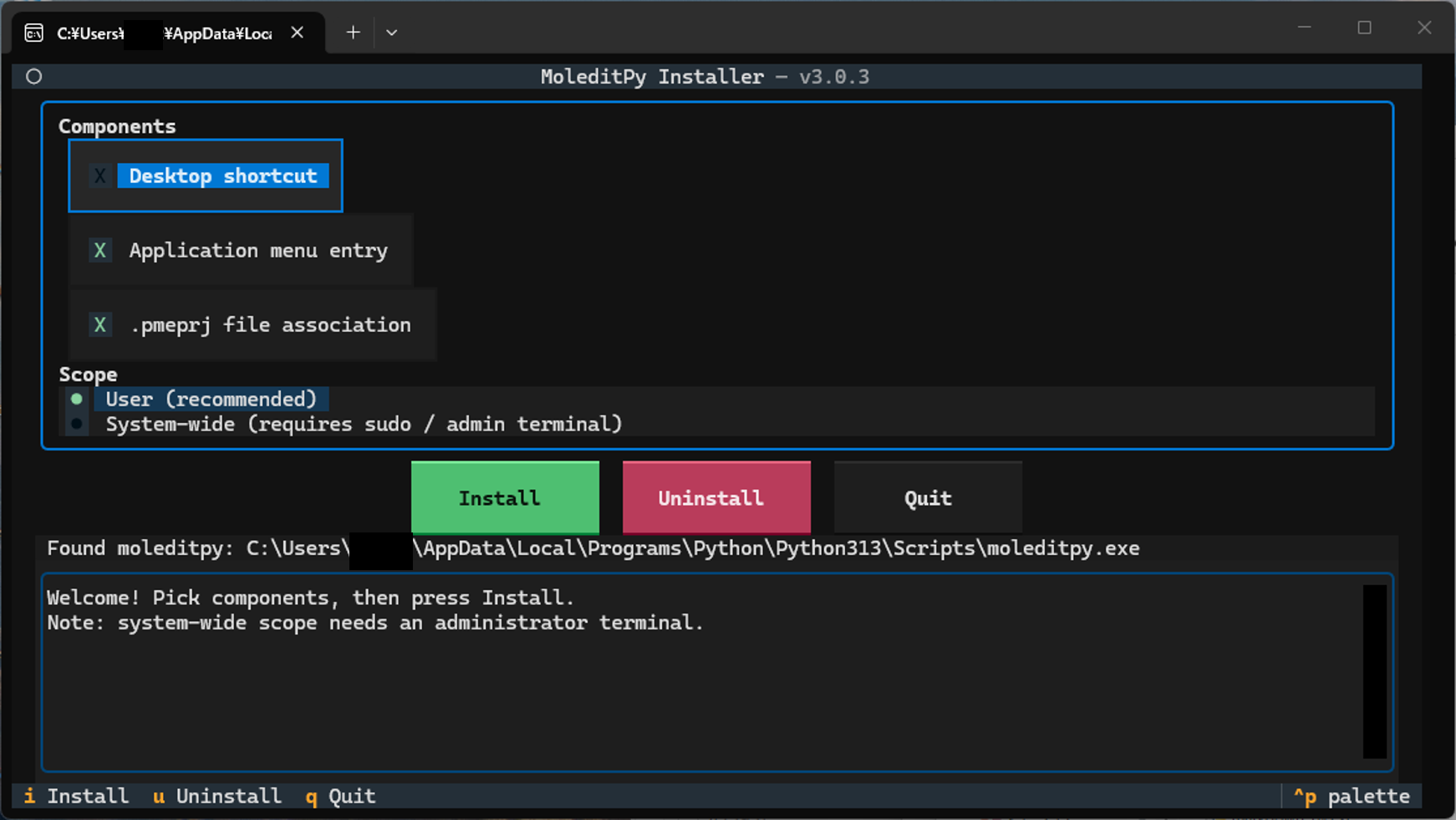
|
|
711
713
|
|
|
712
714
|
## How to Use
|
|
713
715
|
|
|
@@ -718,13 +720,13 @@ This package is a helper utility that automatically installs the correct version
|
|
|
718
720
|
This will automatically install the correct `moleditpy` package (for Windows/macOS) or `moleditpy-linux` (for Linux) as a dependency.
|
|
719
721
|
|
|
720
722
|
2. **Run the interactive installer (TUI)**
|
|
721
|
-
Run the following command in your terminal. In an interactive terminal this opens a TUI where you pick the components
|
|
723
|
+
Run the following command in your terminal. In an interactive terminal this opens a TUI where you pick the components 窶・Desktop shortcut, application-menu entry, `.pmeprj` file association 窶・and the scope (per-user or system-wide), then press **Install**:
|
|
722
724
|
|
|
723
725
|
```bash
|
|
724
726
|
moleditpy-installer
|
|
725
727
|
```
|
|
726
728
|
|
|
727
|
-
Defaults: Desktop shortcut **off**, application menu **on**, file association **on**, per-user scope.
|
|
729
|
+
Defaults: Desktop shortcut **off**, application menu **on**, file association **on**, per-user scope. The **Install** button is focused on start, so pressing **Enter** immediately installs with the defaults. Move between widgets with **Tab** / **Shift+Tab** (the arrow keys also switch between the Install / Uninstall / Quit buttons). After a successful install or uninstall the TUI stays open for two seconds, then exits and replays the full log in the terminal.
|
|
728
730
|
|
|
729
731
|
**Non-interactive / scripted use** (also what runs automatically when there is no terminal):
|
|
730
732
|
|
|
@@ -732,17 +734,13 @@ This package is a helper utility that automatically installs the correct version
|
|
|
732
734
|
moleditpy-installer --no-tui # install with the defaults
|
|
733
735
|
moleditpy-installer --desktop # also create a Desktop shortcut
|
|
734
736
|
moleditpy-installer --no-file-assoc # skip the .pmeprj association
|
|
735
|
-
sudo moleditpy-installer --system # system-wide (
|
|
737
|
+
sudo moleditpy-installer --system # system-wide (admin terminal on Windows)
|
|
736
738
|
```
|
|
737
739
|
|
|
738
740
|
Any explicit option skips the TUI.
|
|
739
741
|
|
|
740
742
|
> **Security Note:** File associations for `.pmeraw` files have been intentionally removed. Opening `.pmeraw` files downloaded from the internet can be potentially unsecure, so they are no longer automatically associated with the application.
|
|
741
743
|
|
|
742
|
-
```bash
|
|
743
|
-
moleditpy-installer
|
|
744
|
-
```
|
|
745
|
-
|
|
746
744
|
You can also invoke it as a Python module (use an **underscore**, not a hyphen):
|
|
747
745
|
|
|
748
746
|
```bash
|
|
@@ -753,15 +751,17 @@ This package is a helper utility that automatically installs the correct version
|
|
|
753
751
|
|
|
754
752
|
> **Tip:** Run the installer from the Python environment where `moleditpy` is installed (e.g. after `conda activate <env>`). The installer verifies the launch command and warns you if the pairing cannot start MoleditPy.
|
|
755
753
|
|
|
756
|
-
3. **
|
|
757
|
-
To remove the shortcuts, unregister file associations, and clean up extracted icon files, run (add `--system` for a system-wide install):
|
|
754
|
+
3. **Uninstall**
|
|
755
|
+
To remove the shortcuts, unregister file associations, and clean up extracted icon files, run (add `--system` for a system-wide install; `--remove` remains as a deprecated alias):
|
|
758
756
|
|
|
759
757
|
```bash
|
|
760
|
-
moleditpy-installer --
|
|
758
|
+
moleditpy-installer --uninstall
|
|
761
759
|
# or
|
|
762
|
-
python -m moleditpy_installer --
|
|
760
|
+
python -m moleditpy_installer --uninstall
|
|
763
761
|
```
|
|
764
762
|
|
|
763
|
+
> **Note:** this removes the shortcuts and file associations only. To fully remove MoleditPy itself, also run `pip uninstall moleditpy` (or `pip uninstall moleditpy-linux` on Linux).
|
|
764
|
+
|
|
765
765
|
4. **Check Executable Location**
|
|
766
766
|
To search for the `moleditpy` executable in the search paths and print the located path:
|
|
767
767
|
|
|
@@ -789,14 +789,14 @@ This package is a helper utility that automatically installs the correct version
|
|
|
789
789
|
## What the installer sets up
|
|
790
790
|
|
|
791
791
|
### Windows
|
|
792
|
-
- Start Menu shortcut (icon included); Desktop shortcut when enabled (`--desktop` or the TUI checkbox).
|
|
792
|
+
- Start Menu shortcut (icon included); Desktop shortcut when enabled (`--desktop` or the TUI checkbox). With `--system` (admin) the shortcuts go to the all-users locations and the association to HKLM.
|
|
793
793
|
- `.pmeprj` files open MoleditPy on double-click (per-user registry, no admin rights needed).
|
|
794
794
|
- Icons are stored under `%LOCALAPPDATA%\MoleditPy\installer` so they survive temp-folder cleanup.
|
|
795
795
|
|
|
796
796
|
### macOS
|
|
797
797
|
- A `MoleditPy.app` launcher in `~/Applications` (or `/Applications` with `--system`), plus a Desktop copy when enabled, with the MoleditPy icon.
|
|
798
798
|
- The launcher pairs the `moleditpy` script with the Python interpreter of **its own environment** (detected from the adjacent interpreter or the script's shebang), so it keeps working even when the installer runs from a different environment.
|
|
799
|
-
- MoleditPy always opens inside a **Terminal window**, so Python output and any errors stay visible. The first launch shows a one-time macOS consent prompt ("MoleditPy wants access to control Terminal")
|
|
799
|
+
- MoleditPy always opens inside a **Terminal window**, so Python output and any errors stay visible. The first launch shows a one-time macOS consent prompt ("MoleditPy wants access to control Terminal") 窶・click OK.
|
|
800
800
|
- Double-clicking `.pmeprj` files opens MoleditPy: the app bundle declares the `com.moleditpy.pmeprj` document type (exported UTI) and is registered with Launch Services. `.pmeprj` documents get their own file icon, matching the Windows behavior.
|
|
801
801
|
- The bundle is ad-hoc code-signed after configuration; required on Apple Silicon.
|
|
802
802
|
|
|
@@ -805,20 +805,20 @@ This package is a helper utility that automatically installs the correct version
|
|
|
805
805
|
- `.pmeprj` files open MoleditPy on double-click: a per-user `application/x-moleditpy-project` MIME type is registered (freedesktop shared-mime-info, no root needed) and set as the default handler.
|
|
806
806
|
- `.pmeprj` documents get their own file icon in file managers, matching Windows and macOS.
|
|
807
807
|
|
|
808
|
-
`moleditpy-installer --
|
|
808
|
+
`moleditpy-installer --uninstall` undoes all of the above for the current user (add `--system` for system-wide installs).
|
|
809
809
|
|
|
810
810
|
## Version 3.0 highlights
|
|
811
811
|
|
|
812
|
-
- **New:** interactive Textual TUI
|
|
812
|
+
- **New:** interactive Textual TUI 窶・pick components and scope, watch the log, press Install/Remove.
|
|
813
813
|
- **New:** component selection (`--desktop`, `--app-menu`, `--file-assoc`) with safer defaults (no Desktop shortcut unless requested).
|
|
814
|
-
- **New:** system-wide scope on Linux (`/usr/share
|
|
814
|
+
- **New:** system-wide scope on Linux (`/usr/share`), macOS (`/Applications`), and Windows (HKLM + all-users Start Menu; admin terminal) 窶・all requiring sudo/admin.
|
|
815
815
|
- Per-user Linux paths now honor `XDG_DATA_HOME`.
|
|
816
816
|
- End-to-end smoke tests on all three OSes in CI, including the sudo/system path.
|
|
817
817
|
|
|
818
818
|
## Version 2.0 highlights
|
|
819
819
|
|
|
820
820
|
- **Fixed:** silent launch failures on macOS caused by an invalidated app-bundle code signature (Apple Silicon refused to start the app and ignored its icon).
|
|
821
|
-
- **Fixed:** `ModuleNotFoundError: No module named 'moleditpy'` when the installer ran in a different Python environment than the one holding `moleditpy`
|
|
821
|
+
- **Fixed:** `ModuleNotFoundError: No module named 'moleditpy'` when the installer ran in a different Python environment than the one holding `moleditpy` 窶・the launcher now uses the script's own interpreter and the command is verified at install time.
|
|
822
822
|
- **New:** MoleditPy launches in a visible Terminal window on macOS.
|
|
823
823
|
- **New:** `.pmeprj` double-click support on macOS via a proper exported UTI + Launch Services registration.
|
|
824
824
|
- **New:** `.pmeprj` double-click support and document icon on Linux (per-user MIME registration).
|
|
@@ -4,7 +4,9 @@
|
|
|
4
4
|
[](https://pypi.org/project/moleditpy-installer/)
|
|
5
5
|
[](https://pypi.org/project/moleditpy-installer/)
|
|
6
6
|
|
|
7
|
-
This package is a helper utility that automatically installs the correct version of `moleditpy` or `moleditpy-linux` for your OS, creates an application menu shortcut, and registers file
|
|
7
|
+
This package is a helper utility that automatically installs the correct version of `moleditpy` or `moleditpy-linux` for your OS, creates an application menu shortcut, and registers the `.pmeprj` double-click file association on Windows, macOS, and Linux.
|
|
8
|
+
|
|
9
|
+

|
|
8
10
|
|
|
9
11
|
## How to Use
|
|
10
12
|
|
|
@@ -15,13 +17,13 @@ This package is a helper utility that automatically installs the correct version
|
|
|
15
17
|
This will automatically install the correct `moleditpy` package (for Windows/macOS) or `moleditpy-linux` (for Linux) as a dependency.
|
|
16
18
|
|
|
17
19
|
2. **Run the interactive installer (TUI)**
|
|
18
|
-
Run the following command in your terminal. In an interactive terminal this opens a TUI where you pick the components
|
|
20
|
+
Run the following command in your terminal. In an interactive terminal this opens a TUI where you pick the components 窶・Desktop shortcut, application-menu entry, `.pmeprj` file association 窶・and the scope (per-user or system-wide), then press **Install**:
|
|
19
21
|
|
|
20
22
|
```bash
|
|
21
23
|
moleditpy-installer
|
|
22
24
|
```
|
|
23
25
|
|
|
24
|
-
Defaults: Desktop shortcut **off**, application menu **on**, file association **on**, per-user scope.
|
|
26
|
+
Defaults: Desktop shortcut **off**, application menu **on**, file association **on**, per-user scope. The **Install** button is focused on start, so pressing **Enter** immediately installs with the defaults. Move between widgets with **Tab** / **Shift+Tab** (the arrow keys also switch between the Install / Uninstall / Quit buttons). After a successful install or uninstall the TUI stays open for two seconds, then exits and replays the full log in the terminal.
|
|
25
27
|
|
|
26
28
|
**Non-interactive / scripted use** (also what runs automatically when there is no terminal):
|
|
27
29
|
|
|
@@ -29,17 +31,13 @@ This package is a helper utility that automatically installs the correct version
|
|
|
29
31
|
moleditpy-installer --no-tui # install with the defaults
|
|
30
32
|
moleditpy-installer --desktop # also create a Desktop shortcut
|
|
31
33
|
moleditpy-installer --no-file-assoc # skip the .pmeprj association
|
|
32
|
-
sudo moleditpy-installer --system # system-wide (
|
|
34
|
+
sudo moleditpy-installer --system # system-wide (admin terminal on Windows)
|
|
33
35
|
```
|
|
34
36
|
|
|
35
37
|
Any explicit option skips the TUI.
|
|
36
38
|
|
|
37
39
|
> **Security Note:** File associations for `.pmeraw` files have been intentionally removed. Opening `.pmeraw` files downloaded from the internet can be potentially unsecure, so they are no longer automatically associated with the application.
|
|
38
40
|
|
|
39
|
-
```bash
|
|
40
|
-
moleditpy-installer
|
|
41
|
-
```
|
|
42
|
-
|
|
43
41
|
You can also invoke it as a Python module (use an **underscore**, not a hyphen):
|
|
44
42
|
|
|
45
43
|
```bash
|
|
@@ -50,15 +48,17 @@ This package is a helper utility that automatically installs the correct version
|
|
|
50
48
|
|
|
51
49
|
> **Tip:** Run the installer from the Python environment where `moleditpy` is installed (e.g. after `conda activate <env>`). The installer verifies the launch command and warns you if the pairing cannot start MoleditPy.
|
|
52
50
|
|
|
53
|
-
3. **
|
|
54
|
-
To remove the shortcuts, unregister file associations, and clean up extracted icon files, run (add `--system` for a system-wide install):
|
|
51
|
+
3. **Uninstall**
|
|
52
|
+
To remove the shortcuts, unregister file associations, and clean up extracted icon files, run (add `--system` for a system-wide install; `--remove` remains as a deprecated alias):
|
|
55
53
|
|
|
56
54
|
```bash
|
|
57
|
-
moleditpy-installer --
|
|
55
|
+
moleditpy-installer --uninstall
|
|
58
56
|
# or
|
|
59
|
-
python -m moleditpy_installer --
|
|
57
|
+
python -m moleditpy_installer --uninstall
|
|
60
58
|
```
|
|
61
59
|
|
|
60
|
+
> **Note:** this removes the shortcuts and file associations only. To fully remove MoleditPy itself, also run `pip uninstall moleditpy` (or `pip uninstall moleditpy-linux` on Linux).
|
|
61
|
+
|
|
62
62
|
4. **Check Executable Location**
|
|
63
63
|
To search for the `moleditpy` executable in the search paths and print the located path:
|
|
64
64
|
|
|
@@ -86,14 +86,14 @@ This package is a helper utility that automatically installs the correct version
|
|
|
86
86
|
## What the installer sets up
|
|
87
87
|
|
|
88
88
|
### Windows
|
|
89
|
-
- Start Menu shortcut (icon included); Desktop shortcut when enabled (`--desktop` or the TUI checkbox).
|
|
89
|
+
- Start Menu shortcut (icon included); Desktop shortcut when enabled (`--desktop` or the TUI checkbox). With `--system` (admin) the shortcuts go to the all-users locations and the association to HKLM.
|
|
90
90
|
- `.pmeprj` files open MoleditPy on double-click (per-user registry, no admin rights needed).
|
|
91
91
|
- Icons are stored under `%LOCALAPPDATA%\MoleditPy\installer` so they survive temp-folder cleanup.
|
|
92
92
|
|
|
93
93
|
### macOS
|
|
94
94
|
- A `MoleditPy.app` launcher in `~/Applications` (or `/Applications` with `--system`), plus a Desktop copy when enabled, with the MoleditPy icon.
|
|
95
95
|
- The launcher pairs the `moleditpy` script with the Python interpreter of **its own environment** (detected from the adjacent interpreter or the script's shebang), so it keeps working even when the installer runs from a different environment.
|
|
96
|
-
- MoleditPy always opens inside a **Terminal window**, so Python output and any errors stay visible. The first launch shows a one-time macOS consent prompt ("MoleditPy wants access to control Terminal")
|
|
96
|
+
- MoleditPy always opens inside a **Terminal window**, so Python output and any errors stay visible. The first launch shows a one-time macOS consent prompt ("MoleditPy wants access to control Terminal") 窶・click OK.
|
|
97
97
|
- Double-clicking `.pmeprj` files opens MoleditPy: the app bundle declares the `com.moleditpy.pmeprj` document type (exported UTI) and is registered with Launch Services. `.pmeprj` documents get their own file icon, matching the Windows behavior.
|
|
98
98
|
- The bundle is ad-hoc code-signed after configuration; required on Apple Silicon.
|
|
99
99
|
|
|
@@ -102,22 +102,22 @@ This package is a helper utility that automatically installs the correct version
|
|
|
102
102
|
- `.pmeprj` files open MoleditPy on double-click: a per-user `application/x-moleditpy-project` MIME type is registered (freedesktop shared-mime-info, no root needed) and set as the default handler.
|
|
103
103
|
- `.pmeprj` documents get their own file icon in file managers, matching Windows and macOS.
|
|
104
104
|
|
|
105
|
-
`moleditpy-installer --
|
|
105
|
+
`moleditpy-installer --uninstall` undoes all of the above for the current user (add `--system` for system-wide installs).
|
|
106
106
|
|
|
107
107
|
## Version 3.0 highlights
|
|
108
108
|
|
|
109
|
-
- **New:** interactive Textual TUI
|
|
109
|
+
- **New:** interactive Textual TUI 窶・pick components and scope, watch the log, press Install/Remove.
|
|
110
110
|
- **New:** component selection (`--desktop`, `--app-menu`, `--file-assoc`) with safer defaults (no Desktop shortcut unless requested).
|
|
111
|
-
- **New:** system-wide scope on Linux (`/usr/share
|
|
111
|
+
- **New:** system-wide scope on Linux (`/usr/share`), macOS (`/Applications`), and Windows (HKLM + all-users Start Menu; admin terminal) 窶・all requiring sudo/admin.
|
|
112
112
|
- Per-user Linux paths now honor `XDG_DATA_HOME`.
|
|
113
113
|
- End-to-end smoke tests on all three OSes in CI, including the sudo/system path.
|
|
114
114
|
|
|
115
115
|
## Version 2.0 highlights
|
|
116
116
|
|
|
117
117
|
- **Fixed:** silent launch failures on macOS caused by an invalidated app-bundle code signature (Apple Silicon refused to start the app and ignored its icon).
|
|
118
|
-
- **Fixed:** `ModuleNotFoundError: No module named 'moleditpy'` when the installer ran in a different Python environment than the one holding `moleditpy`
|
|
118
|
+
- **Fixed:** `ModuleNotFoundError: No module named 'moleditpy'` when the installer ran in a different Python environment than the one holding `moleditpy` 窶・the launcher now uses the script's own interpreter and the command is verified at install time.
|
|
119
119
|
- **New:** MoleditPy launches in a visible Terminal window on macOS.
|
|
120
120
|
- **New:** `.pmeprj` double-click support on macOS via a proper exported UTI + Launch Services registration.
|
|
121
121
|
- **New:** `.pmeprj` double-click support and document icon on Linux (per-user MIME registration).
|
|
122
122
|
- **New:** `--check` verifies launchability on macOS; `--remove` also unregisters the bundle from Launch Services and removes extracted icons.
|
|
123
|
-
- Icons no longer live in the temp folder (Windows shortcut/registry icons no longer break after cleanup).
|
|
123
|
+
- Icons no longer live in the temp folder (Windows shortcut/registry icons no longer break after cleanup).
|
|
@@ -66,8 +66,43 @@ class InstallOptions:
|
|
|
66
66
|
system: bool = False # system-wide (sudo/admin) instead of per-user
|
|
67
67
|
|
|
68
68
|
|
|
69
|
+
@contextlib.contextmanager
|
|
70
|
+
def _com_initialized():
|
|
71
|
+
"""
|
|
72
|
+
Initialize COM for the current thread on Windows.
|
|
73
|
+
|
|
74
|
+
pyshortcuts creates .lnk files through COM, which must be initialized
|
|
75
|
+
per-thread. The TUI runs install() in a worker thread, where shortcut
|
|
76
|
+
creation otherwise fails with CO_E_NOTINITIALIZED
|
|
77
|
+
("CoInitialize has not been called").
|
|
78
|
+
"""
|
|
79
|
+
initialized = False
|
|
80
|
+
if platform.system() == "Windows":
|
|
81
|
+
try:
|
|
82
|
+
import pythoncom
|
|
83
|
+
|
|
84
|
+
pythoncom.CoInitialize()
|
|
85
|
+
initialized = True
|
|
86
|
+
except ImportError:
|
|
87
|
+
pass
|
|
88
|
+
try:
|
|
89
|
+
yield
|
|
90
|
+
finally:
|
|
91
|
+
if initialized:
|
|
92
|
+
import pythoncom
|
|
93
|
+
|
|
94
|
+
pythoncom.CoUninitialize()
|
|
95
|
+
|
|
96
|
+
|
|
69
97
|
def is_root() -> bool:
|
|
70
|
-
"""True when running with root
|
|
98
|
+
"""True when running with root (POSIX) or admin (Windows) privileges."""
|
|
99
|
+
if platform.system() == "Windows":
|
|
100
|
+
try:
|
|
101
|
+
import ctypes
|
|
102
|
+
|
|
103
|
+
return bool(ctypes.windll.shell32.IsUserAnAdmin())
|
|
104
|
+
except (OSError, AttributeError):
|
|
105
|
+
return False
|
|
71
106
|
geteuid = getattr(os, "geteuid", None)
|
|
72
107
|
return geteuid is not None and geteuid() == 0
|
|
73
108
|
|
|
@@ -80,7 +115,7 @@ def linux_data_home(system: bool = False) -> Path:
|
|
|
80
115
|
return Path(xdg) if xdg else Path.home() / ".local" / "share"
|
|
81
116
|
|
|
82
117
|
|
|
83
|
-
def get_persistent_data_dir() -> Path:
|
|
118
|
+
def get_persistent_data_dir(system: bool = False) -> Path:
|
|
84
119
|
"""
|
|
85
120
|
Per-user directory for extracted installer assets (icons).
|
|
86
121
|
|
|
@@ -89,7 +124,13 @@ def get_persistent_data_dir() -> Path:
|
|
|
89
124
|
(which is periodically cleaned, silently breaking the icons).
|
|
90
125
|
"""
|
|
91
126
|
if platform.system() == "Windows":
|
|
92
|
-
|
|
127
|
+
if system:
|
|
128
|
+
# all users must be able to read icons referenced from HKLM
|
|
129
|
+
base = os.environ.get("PROGRAMDATA") or "C:/ProgramData"
|
|
130
|
+
else:
|
|
131
|
+
base = os.environ.get("LOCALAPPDATA") or str(
|
|
132
|
+
Path.home() / "AppData" / "Local"
|
|
133
|
+
)
|
|
93
134
|
data_dir = Path(base) / "MoleditPy" / "installer"
|
|
94
135
|
else:
|
|
95
136
|
data_dir = Path.home() / ".moleditpy" / "installer"
|
|
@@ -97,12 +138,12 @@ def get_persistent_data_dir() -> Path:
|
|
|
97
138
|
return data_dir
|
|
98
139
|
|
|
99
140
|
|
|
100
|
-
def _extract_data_file(file_name: str) -> Optional[str]:
|
|
141
|
+
def _extract_data_file(file_name: str, system: bool = False) -> Optional[str]:
|
|
101
142
|
"""Extract a packaged data file to the persistent data dir and return its path."""
|
|
102
143
|
try:
|
|
103
144
|
ref = importlib.resources.files("moleditpy_installer") / "data" / file_name
|
|
104
145
|
content = ref.read_bytes()
|
|
105
|
-
out_path = get_persistent_data_dir() / file_name
|
|
146
|
+
out_path = get_persistent_data_dir(system) / file_name
|
|
106
147
|
out_path.write_bytes(content)
|
|
107
148
|
return str(out_path)
|
|
108
149
|
except (OSError, ModuleNotFoundError, ValueError) as e:
|
|
@@ -362,13 +403,36 @@ def find_executable(name: str) -> Optional[str]:
|
|
|
362
403
|
return None
|
|
363
404
|
|
|
364
405
|
|
|
365
|
-
def
|
|
406
|
+
def _notify_windows_assoc_changed() -> None:
|
|
407
|
+
"""
|
|
408
|
+
Tell Explorer the file associations changed.
|
|
409
|
+
|
|
410
|
+
Without SHChangeNotify(SHCNE_ASSOCCHANGED) Explorer keeps showing the
|
|
411
|
+
old association/icon from its cache until the next logon.
|
|
412
|
+
"""
|
|
413
|
+
try:
|
|
414
|
+
import ctypes
|
|
415
|
+
|
|
416
|
+
SHCNE_ASSOCCHANGED = 0x08000000
|
|
417
|
+
SHCNF_IDLIST = 0x0
|
|
418
|
+
ctypes.windll.shell32.SHChangeNotify(
|
|
419
|
+
SHCNE_ASSOCCHANGED, SHCNF_IDLIST, None, None
|
|
420
|
+
)
|
|
421
|
+
except (OSError, AttributeError):
|
|
422
|
+
pass # not on Windows / shell32 unavailable
|
|
423
|
+
|
|
424
|
+
|
|
425
|
+
def register_file_associations_windows(
|
|
426
|
+
exe_path: str, icon_path: Optional[str], system: bool = False
|
|
427
|
+
) -> bool:
|
|
366
428
|
"""
|
|
367
429
|
Register file associations for .pmeprj files on Windows.
|
|
368
430
|
|
|
369
431
|
Args:
|
|
370
432
|
exe_path (str): Path to the executable to associate.
|
|
371
433
|
icon_path (Optional[str]): Path to the icon file for the association.
|
|
434
|
+
system (bool): Register machine-wide under HKLM (requires admin)
|
|
435
|
+
instead of per-user under HKCU.
|
|
372
436
|
|
|
373
437
|
Returns:
|
|
374
438
|
bool: True if successful, False otherwise.
|
|
@@ -376,6 +440,8 @@ def register_file_associations_windows(exe_path: str, icon_path: Optional[str])
|
|
|
376
440
|
if platform.system() != "Windows":
|
|
377
441
|
return False
|
|
378
442
|
|
|
443
|
+
root = winreg.HKEY_LOCAL_MACHINE if system else winreg.HKEY_CURRENT_USER
|
|
444
|
+
|
|
379
445
|
try:
|
|
380
446
|
extensions = [".pmeprj"]
|
|
381
447
|
prog_id = "MoleditPy.File"
|
|
@@ -384,21 +450,19 @@ def register_file_associations_windows(exe_path: str, icon_path: Optional[str])
|
|
|
384
450
|
print("Registering file associations...")
|
|
385
451
|
|
|
386
452
|
# Create ProgID
|
|
387
|
-
with winreg.CreateKey(
|
|
388
|
-
winreg.HKEY_CURRENT_USER, f"Software\\Classes\\{prog_id}"
|
|
389
|
-
) as key:
|
|
453
|
+
with winreg.CreateKey(root, f"Software\\Classes\\{prog_id}") as key:
|
|
390
454
|
winreg.SetValue(key, "", winreg.REG_SZ, f"{app_name} File")
|
|
391
455
|
|
|
392
456
|
# Set default icon
|
|
393
457
|
if icon_path and os.path.exists(icon_path):
|
|
394
458
|
with winreg.CreateKey(
|
|
395
|
-
|
|
459
|
+
root, f"Software\\Classes\\{prog_id}\\DefaultIcon"
|
|
396
460
|
) as key:
|
|
397
461
|
winreg.SetValue(key, "", winreg.REG_SZ, icon_path)
|
|
398
462
|
|
|
399
463
|
# Friendly context-menu label for the open verb
|
|
400
464
|
with winreg.CreateKey(
|
|
401
|
-
|
|
465
|
+
root, f"Software\\Classes\\{prog_id}\\shell\\open"
|
|
402
466
|
) as key:
|
|
403
467
|
winreg.SetValue(key, "", winreg.REG_SZ, f"Open with {app_name}")
|
|
404
468
|
|
|
@@ -406,19 +470,18 @@ def register_file_associations_windows(exe_path: str, icon_path: Optional[str])
|
|
|
406
470
|
# Quote paths to handle spaces
|
|
407
471
|
command = f'"{exe_path}" "%1"'
|
|
408
472
|
with winreg.CreateKey(
|
|
409
|
-
|
|
473
|
+
root,
|
|
410
474
|
f"Software\\Classes\\{prog_id}\\shell\\open\\command",
|
|
411
475
|
) as key:
|
|
412
476
|
winreg.SetValue(key, "", winreg.REG_SZ, command)
|
|
413
477
|
|
|
414
478
|
# Associate extensions
|
|
415
479
|
for ext in extensions:
|
|
416
|
-
with winreg.CreateKey(
|
|
417
|
-
winreg.HKEY_CURRENT_USER, f"Software\\Classes\\{ext}"
|
|
418
|
-
) as key:
|
|
480
|
+
with winreg.CreateKey(root, f"Software\\Classes\\{ext}") as key:
|
|
419
481
|
winreg.SetValue(key, "", winreg.REG_SZ, prog_id)
|
|
420
482
|
print(f" Associated {ext} with {app_name}")
|
|
421
483
|
|
|
484
|
+
_notify_windows_assoc_changed()
|
|
422
485
|
print("File associations registered successfully.")
|
|
423
486
|
return True
|
|
424
487
|
|
|
@@ -623,6 +686,27 @@ def register_file_associations_linux(system: bool = False) -> bool:
|
|
|
623
686
|
return False
|
|
624
687
|
|
|
625
688
|
|
|
689
|
+
def _clean_linux_mimeapps() -> None:
|
|
690
|
+
"""Drop MoleditPy's MIME entries from the per-user mimeapps.list files
|
|
691
|
+
(xdg-mime has no 'unset'; a dangling default otherwise remains)."""
|
|
692
|
+
config_home = Path(os.environ.get("XDG_CONFIG_HOME") or Path.home() / ".config")
|
|
693
|
+
candidates = [
|
|
694
|
+
config_home / "mimeapps.list",
|
|
695
|
+
linux_data_home() / "applications" / "mimeapps.list", # legacy location
|
|
696
|
+
]
|
|
697
|
+
for path in candidates:
|
|
698
|
+
if not path.is_file():
|
|
699
|
+
continue
|
|
700
|
+
try:
|
|
701
|
+
lines = path.read_text(encoding="utf-8").splitlines()
|
|
702
|
+
kept = [line for line in lines if LINUX_MIME_TYPE not in line]
|
|
703
|
+
if len(kept) != len(lines):
|
|
704
|
+
path.write_text("\n".join(kept) + "\n", encoding="utf-8")
|
|
705
|
+
print(f" Cleaned {path}")
|
|
706
|
+
except OSError as e:
|
|
707
|
+
print(f" Failed to clean {path}: {e}")
|
|
708
|
+
|
|
709
|
+
|
|
626
710
|
def unregister_file_associations_linux(system: bool = False) -> None:
|
|
627
711
|
"""Remove the .pmeprj MIME type, its icon, and refresh the databases."""
|
|
628
712
|
if platform.system() != "Linux":
|
|
@@ -647,6 +731,9 @@ def unregister_file_associations_linux(system: bool = False) -> None:
|
|
|
647
731
|
except OSError as e:
|
|
648
732
|
print(f" Failed to remove {path}: {e}")
|
|
649
733
|
|
|
734
|
+
if not system:
|
|
735
|
+
_clean_linux_mimeapps()
|
|
736
|
+
|
|
650
737
|
_run_quiet(["update-mime-database", str(mime_dir)])
|
|
651
738
|
_run_quiet(["update-desktop-database", str(data_home / "applications")])
|
|
652
739
|
_run_quiet(["gtk-update-icon-cache", str(data_home / "icons" / "hicolor")])
|
|
@@ -710,17 +797,20 @@ def delete_registry_tree(key, sub_key):
|
|
|
710
797
|
return False
|
|
711
798
|
|
|
712
799
|
|
|
713
|
-
def unregister_file_associations_windows() -> None:
|
|
800
|
+
def unregister_file_associations_windows(system: bool = False) -> None:
|
|
714
801
|
"""
|
|
715
802
|
Unregister file associations for .pmeprj and .pmeraw files on Windows.
|
|
803
|
+
With ``system=True`` removes the machine-wide (HKLM) registration.
|
|
716
804
|
"""
|
|
717
805
|
if platform.system() != "Windows":
|
|
718
806
|
return
|
|
719
807
|
|
|
808
|
+
root = winreg.HKEY_LOCAL_MACHINE if system else winreg.HKEY_CURRENT_USER
|
|
809
|
+
|
|
720
810
|
print("Unregistering file associations...")
|
|
721
811
|
keys_to_remove = [
|
|
722
|
-
(
|
|
723
|
-
(
|
|
812
|
+
(root, "Software\\Classes\\.pmeprj"),
|
|
813
|
+
(root, "Software\\Classes\\.pmeraw"),
|
|
724
814
|
]
|
|
725
815
|
|
|
726
816
|
# ProgID might have subkeys (shell, DefaultIcon), so we need recursive delete
|
|
@@ -738,9 +828,20 @@ def unregister_file_associations_windows() -> None:
|
|
|
738
828
|
print(f" Failed to remove {key_path}: {e}")
|
|
739
829
|
|
|
740
830
|
# Remove ProgID recursively
|
|
741
|
-
if delete_registry_tree(
|
|
831
|
+
if delete_registry_tree(root, prog_id_key):
|
|
742
832
|
print(f" Removed registry tree: {prog_id_key}")
|
|
743
833
|
|
|
834
|
+
# Explorer pins its own per-user choice under FileExts; without
|
|
835
|
+
# removing it (and notifying), the association looks still present.
|
|
836
|
+
for ext in (".pmeprj",):
|
|
837
|
+
file_exts_key = (
|
|
838
|
+
"Software\\Microsoft\\Windows\\CurrentVersion\\"
|
|
839
|
+
f"Explorer\\FileExts\\{ext}"
|
|
840
|
+
)
|
|
841
|
+
if delete_registry_tree(winreg.HKEY_CURRENT_USER, file_exts_key):
|
|
842
|
+
print(f" Removed Explorer cache: {file_exts_key}")
|
|
843
|
+
|
|
844
|
+
_notify_windows_assoc_changed()
|
|
744
845
|
print("File associations unregistered.")
|
|
745
846
|
except OSError as e:
|
|
746
847
|
print(f"Error during file association removal: {e}")
|
|
@@ -757,11 +858,17 @@ def remove_shortcut(system_scope: bool = False) -> None:
|
|
|
757
858
|
shortcut_paths = []
|
|
758
859
|
shortcut_name = "MoleditPy"
|
|
759
860
|
|
|
760
|
-
if system_scope and
|
|
761
|
-
|
|
762
|
-
|
|
763
|
-
|
|
764
|
-
|
|
861
|
+
if system_scope and not is_root():
|
|
862
|
+
if system == "Windows":
|
|
863
|
+
print(
|
|
864
|
+
"Warning: removing a system-wide install requires an "
|
|
865
|
+
"administrator terminal; system entries will likely remain."
|
|
866
|
+
)
|
|
867
|
+
else:
|
|
868
|
+
print(
|
|
869
|
+
"Warning: removing a system-wide install requires root; "
|
|
870
|
+
"system files will likely remain. Re-run with sudo."
|
|
871
|
+
)
|
|
765
872
|
|
|
766
873
|
if system == "Windows":
|
|
767
874
|
# Usually in APPDATA/Microsoft/Windows/Start Menu/Programs
|
|
@@ -780,6 +887,20 @@ def remove_shortcut(system_scope: bool = False) -> None:
|
|
|
780
887
|
|
|
781
888
|
unregister_file_associations_windows()
|
|
782
889
|
|
|
890
|
+
if system_scope:
|
|
891
|
+
program_data = os.environ.get("PROGRAMDATA") or "C:/ProgramData"
|
|
892
|
+
public = os.environ.get("PUBLIC") or "C:/Users/Public"
|
|
893
|
+
shortcut_paths.append(
|
|
894
|
+
Path(program_data)
|
|
895
|
+
/ "Microsoft"
|
|
896
|
+
/ "Windows"
|
|
897
|
+
/ "Start Menu"
|
|
898
|
+
/ "Programs"
|
|
899
|
+
/ f"{shortcut_name}.lnk"
|
|
900
|
+
)
|
|
901
|
+
shortcut_paths.append(Path(public) / "Desktop" / f"{shortcut_name}.lnk")
|
|
902
|
+
unregister_file_associations_windows(system=True)
|
|
903
|
+
|
|
783
904
|
elif system == "Linux":
|
|
784
905
|
# Usually in ~/.local/share/applications/ plus a Desktop copy
|
|
785
906
|
home = Path.home()
|
|
@@ -832,11 +953,13 @@ def remove_shortcut(system_scope: bool = False) -> None:
|
|
|
832
953
|
# Clean up the icons extracted at install time
|
|
833
954
|
try:
|
|
834
955
|
shutil.rmtree(get_persistent_data_dir(), ignore_errors=True)
|
|
956
|
+
if system_scope:
|
|
957
|
+
shutil.rmtree(get_persistent_data_dir(system=True), ignore_errors=True)
|
|
835
958
|
except OSError:
|
|
836
959
|
pass
|
|
837
960
|
|
|
838
961
|
|
|
839
|
-
def get_file_icon_path() -> Optional[str]:
|
|
962
|
+
def get_file_icon_path(system: bool = False) -> Optional[str]:
|
|
840
963
|
"""
|
|
841
964
|
Gets the absolute path to the file icon (file_icon.ico) for Windows associations.
|
|
842
965
|
"""
|
|
@@ -845,7 +968,7 @@ def get_file_icon_path() -> Optional[str]:
|
|
|
845
968
|
|
|
846
969
|
# Extract to a persistent location: as_file() paths may be temporary
|
|
847
970
|
# (zip installs) and would be dead by the time the registry reads them.
|
|
848
|
-
return _extract_data_file("file_icon.ico")
|
|
971
|
+
return _extract_data_file("file_icon.ico", system=system)
|
|
849
972
|
|
|
850
973
|
|
|
851
974
|
def python_for_executable(exe_path: str) -> str:
|
|
@@ -969,6 +1092,56 @@ def refresh_launch_services(app_path: Path, unregister: bool = False) -> None:
|
|
|
969
1092
|
return
|
|
970
1093
|
|
|
971
1094
|
|
|
1095
|
+
def _move_windows_shortcuts_to_all_users(desktop: bool, app_menu: bool) -> None:
|
|
1096
|
+
"""
|
|
1097
|
+
Relocate freshly created per-user shortcuts to the all-users locations
|
|
1098
|
+
(ProgramData Start Menu / Public Desktop). pyshortcuts only writes
|
|
1099
|
+
per-user paths, so a system-wide install moves them afterwards.
|
|
1100
|
+
"""
|
|
1101
|
+
name = "MoleditPy"
|
|
1102
|
+
moves = []
|
|
1103
|
+
appdata = os.environ.get("APPDATA")
|
|
1104
|
+
program_data = os.environ.get("PROGRAMDATA") or "C:/ProgramData"
|
|
1105
|
+
public = os.environ.get("PUBLIC") or "C:/Users/Public"
|
|
1106
|
+
|
|
1107
|
+
if app_menu and appdata:
|
|
1108
|
+
moves.append(
|
|
1109
|
+
(
|
|
1110
|
+
Path(appdata)
|
|
1111
|
+
/ "Microsoft"
|
|
1112
|
+
/ "Windows"
|
|
1113
|
+
/ "Start Menu"
|
|
1114
|
+
/ "Programs"
|
|
1115
|
+
/ f"{name}.lnk",
|
|
1116
|
+
Path(program_data)
|
|
1117
|
+
/ "Microsoft"
|
|
1118
|
+
/ "Windows"
|
|
1119
|
+
/ "Start Menu"
|
|
1120
|
+
/ "Programs"
|
|
1121
|
+
/ f"{name}.lnk",
|
|
1122
|
+
)
|
|
1123
|
+
)
|
|
1124
|
+
if desktop:
|
|
1125
|
+
moves.append(
|
|
1126
|
+
(
|
|
1127
|
+
Path.home() / "Desktop" / f"{name}.lnk",
|
|
1128
|
+
Path(public) / "Desktop" / f"{name}.lnk",
|
|
1129
|
+
)
|
|
1130
|
+
)
|
|
1131
|
+
|
|
1132
|
+
for src, dest in moves:
|
|
1133
|
+
if not src.is_file():
|
|
1134
|
+
continue
|
|
1135
|
+
try:
|
|
1136
|
+
dest.parent.mkdir(parents=True, exist_ok=True)
|
|
1137
|
+
if dest.exists():
|
|
1138
|
+
dest.unlink()
|
|
1139
|
+
shutil.move(str(src), str(dest))
|
|
1140
|
+
print(f"Moved shortcut to all-users location: {dest}")
|
|
1141
|
+
except OSError as e:
|
|
1142
|
+
print(f"Warning: could not move {src} to {dest}: {e}")
|
|
1143
|
+
|
|
1144
|
+
|
|
972
1145
|
def install(options: Optional[InstallOptions] = None) -> int:
|
|
973
1146
|
"""
|
|
974
1147
|
Creates shortcuts and file associations for the installed moleditpy
|
|
@@ -990,15 +1163,14 @@ def install(options: Optional[InstallOptions] = None) -> int:
|
|
|
990
1163
|
print("Nothing to install: all components are disabled.")
|
|
991
1164
|
return 1
|
|
992
1165
|
|
|
993
|
-
if options.system:
|
|
1166
|
+
if options.system and not is_root():
|
|
994
1167
|
if system == "Windows":
|
|
995
|
-
print("Error: system-wide installation
|
|
996
|
-
print("
|
|
997
|
-
|
|
998
|
-
if not is_root():
|
|
1168
|
+
print("Error: system-wide installation requires an elevated terminal.")
|
|
1169
|
+
print("Re-run from an administrator terminal, or drop --system.")
|
|
1170
|
+
else:
|
|
999
1171
|
print("Error: system-wide installation requires root privileges.")
|
|
1000
1172
|
print("Re-run with sudo, or drop --system for a per-user install.")
|
|
1001
|
-
|
|
1173
|
+
return 1
|
|
1002
1174
|
|
|
1003
1175
|
command_name = "moleditpy"
|
|
1004
1176
|
|
|
@@ -1081,14 +1253,19 @@ def install(options: Optional[InstallOptions] = None) -> int:
|
|
|
1081
1253
|
"skipped for a system-wide install."
|
|
1082
1254
|
)
|
|
1083
1255
|
else:
|
|
1084
|
-
|
|
1085
|
-
|
|
1086
|
-
|
|
1087
|
-
|
|
1088
|
-
|
|
1089
|
-
|
|
1090
|
-
|
|
1091
|
-
|
|
1256
|
+
with _com_initialized():
|
|
1257
|
+
make_shortcut(
|
|
1258
|
+
script=full_command,
|
|
1259
|
+
name=shortcut_name,
|
|
1260
|
+
icon=icon_path,
|
|
1261
|
+
desktop=options.desktop,
|
|
1262
|
+
startmenu=options.app_menu,
|
|
1263
|
+
noexe=True,
|
|
1264
|
+
)
|
|
1265
|
+
if system == "Windows" and options.system:
|
|
1266
|
+
_move_windows_shortcuts_to_all_users(
|
|
1267
|
+
options.desktop, options.app_menu
|
|
1268
|
+
)
|
|
1092
1269
|
created_in = [
|
|
1093
1270
|
loc
|
|
1094
1271
|
for enabled, loc in (
|
|
@@ -1283,11 +1460,13 @@ end open
|
|
|
1283
1460
|
# pickle-based format and is intentionally NOT associated with
|
|
1284
1461
|
# double-click for safety).
|
|
1285
1462
|
if system == "Windows" and original_exe_path and options.file_assoc:
|
|
1286
|
-
file_icon_path = get_file_icon_path()
|
|
1463
|
+
file_icon_path = get_file_icon_path(system=options.system)
|
|
1287
1464
|
if not file_icon_path:
|
|
1288
1465
|
file_icon_path = icon_path
|
|
1289
1466
|
|
|
1290
|
-
register_file_associations_windows(
|
|
1467
|
+
register_file_associations_windows(
|
|
1468
|
+
str(original_exe_path), file_icon_path, system=options.system
|
|
1469
|
+
)
|
|
1291
1470
|
|
|
1292
1471
|
print("\nYou can remove the shortcut and file associations by running:")
|
|
1293
1472
|
print(" moleditpy-installer --remove")
|
|
@@ -1343,9 +1522,14 @@ def main() -> int:
|
|
|
1343
1522
|
),
|
|
1344
1523
|
)
|
|
1345
1524
|
parser.add_argument(
|
|
1525
|
+
"--uninstall",
|
|
1346
1526
|
"--remove",
|
|
1527
|
+
dest="uninstall",
|
|
1347
1528
|
action="store_true",
|
|
1348
|
-
help=
|
|
1529
|
+
help=(
|
|
1530
|
+
"Uninstall: remove the shortcuts and unregister file "
|
|
1531
|
+
"associations (--remove is a deprecated alias)."
|
|
1532
|
+
),
|
|
1349
1533
|
)
|
|
1350
1534
|
parser.add_argument(
|
|
1351
1535
|
"--check",
|
|
@@ -1373,7 +1557,7 @@ def main() -> int:
|
|
|
1373
1557
|
parser.add_argument(
|
|
1374
1558
|
"--system",
|
|
1375
1559
|
action="store_true",
|
|
1376
|
-
help="Install system-wide instead of per-user (
|
|
1560
|
+
help="Install system-wide instead of per-user (requires sudo/admin).",
|
|
1377
1561
|
)
|
|
1378
1562
|
parser.add_argument(
|
|
1379
1563
|
"--no-tui",
|
|
@@ -1389,7 +1573,7 @@ def main() -> int:
|
|
|
1389
1573
|
|
|
1390
1574
|
args = parser.parse_args()
|
|
1391
1575
|
|
|
1392
|
-
if args.
|
|
1576
|
+
if args.uninstall:
|
|
1393
1577
|
remove_shortcut(system_scope=args.system)
|
|
1394
1578
|
return 0
|
|
1395
1579
|
|
|
@@ -52,6 +52,15 @@ class InstallerApp(App):
|
|
|
52
52
|
TITLE = "MoleditPy Installer"
|
|
53
53
|
SUB_TITLE = f"v{installer.get_installer_version()}"
|
|
54
54
|
|
|
55
|
+
# Focus Install on start so a bare Enter runs the default install.
|
|
56
|
+
# (A plain .focus() in on_mount is overridden by the screen's
|
|
57
|
+
# auto-focus once it becomes active.)
|
|
58
|
+
AUTO_FOCUS = "#install"
|
|
59
|
+
|
|
60
|
+
# Pause before auto-exit on success so the final log lines stay
|
|
61
|
+
# readable in the TUI (tests shrink this to keep the suite fast).
|
|
62
|
+
EXIT_DELAY_SECONDS = 2.0
|
|
63
|
+
|
|
55
64
|
# Compact layout: everything (including the buttons) must fit in a
|
|
56
65
|
# standard 80x24 terminal — on smaller screens the buttons were pushed
|
|
57
66
|
# below the fold and mouse clicks could not reach them. overflow-y
|
|
@@ -101,7 +110,7 @@ class InstallerApp(App):
|
|
|
101
110
|
|
|
102
111
|
BINDINGS = [
|
|
103
112
|
("i", "install", "Install"),
|
|
104
|
-
("
|
|
113
|
+
("u", "remove", "Uninstall"),
|
|
105
114
|
("q", "quit", "Quit"),
|
|
106
115
|
]
|
|
107
116
|
|
|
@@ -109,6 +118,8 @@ class InstallerApp(App):
|
|
|
109
118
|
super().__init__()
|
|
110
119
|
self.exit_code = 0
|
|
111
120
|
self._history = []
|
|
121
|
+
self._show_uninstall_note = False
|
|
122
|
+
self._action_started = False
|
|
112
123
|
|
|
113
124
|
def compose(self) -> ComposeResult:
|
|
114
125
|
yield Header()
|
|
@@ -121,13 +132,12 @@ class InstallerApp(App):
|
|
|
121
132
|
with RadioSet(id="scope"):
|
|
122
133
|
yield RadioButton("User (recommended)", value=True, id="scope_user")
|
|
123
134
|
yield RadioButton(
|
|
124
|
-
"System-wide (requires sudo/
|
|
135
|
+
"System-wide (requires sudo / admin terminal)",
|
|
125
136
|
id="scope_system",
|
|
126
|
-
disabled=platform.system() == "Windows",
|
|
127
137
|
)
|
|
128
138
|
with Horizontal(id="buttons"):
|
|
129
139
|
yield Button("Install", variant="success", id="install")
|
|
130
|
-
yield Button("
|
|
140
|
+
yield Button("Uninstall", variant="error", id="remove")
|
|
131
141
|
yield Button("Quit", variant="default", id="quit")
|
|
132
142
|
yield Static("Status: detecting moleditpy executable…", id="status")
|
|
133
143
|
yield RichLog(id="log", wrap=True, markup=False)
|
|
@@ -136,7 +146,7 @@ class InstallerApp(App):
|
|
|
136
146
|
def on_mount(self) -> None:
|
|
137
147
|
self.log_line("Welcome! Pick components, then press Install.")
|
|
138
148
|
if platform.system() == "Windows":
|
|
139
|
-
self.log_line("Note: system-wide scope
|
|
149
|
+
self.log_line("Note: system-wide scope needs an administrator terminal.")
|
|
140
150
|
self.run_worker(self._detect_executable, thread=True)
|
|
141
151
|
|
|
142
152
|
# ------------------------------------------------------------------ #
|
|
@@ -168,13 +178,19 @@ class InstallerApp(App):
|
|
|
168
178
|
if not path and platform.system() == "Linux":
|
|
169
179
|
path = installer.find_executable("moleditpy-linux")
|
|
170
180
|
if path:
|
|
171
|
-
self.call_from_thread(self.
|
|
181
|
+
self.call_from_thread(self._set_detect_status, f"Found moleditpy: {path}")
|
|
172
182
|
else:
|
|
173
183
|
self.call_from_thread(
|
|
174
|
-
self.
|
|
184
|
+
self._set_detect_status,
|
|
175
185
|
"moleditpy executable not found — install it first (pip install moleditpy)",
|
|
176
186
|
)
|
|
177
187
|
|
|
188
|
+
def _set_detect_status(self, text: str) -> None:
|
|
189
|
+
# A slow detection must not overwrite the status of an install or
|
|
190
|
+
# uninstall the user has already started.
|
|
191
|
+
if not self._action_started:
|
|
192
|
+
self._set_status(text)
|
|
193
|
+
|
|
178
194
|
def _run_installer_action(self, action, description: str) -> None:
|
|
179
195
|
writer = _LogWriter(self)
|
|
180
196
|
try:
|
|
@@ -191,9 +207,12 @@ class InstallerApp(App):
|
|
|
191
207
|
self.log_line(f"--- {description} {'finished' if ok else 'FAILED'} ---")
|
|
192
208
|
self.exit_code = 0 if ok else 1
|
|
193
209
|
if ok:
|
|
194
|
-
|
|
210
|
+
if description == "Uninstall":
|
|
211
|
+
self._show_uninstall_note = True
|
|
212
|
+
# Linger briefly so the result is readable, then exit;
|
|
213
|
+
# run_tui() replays the log in the terminal afterwards.
|
|
195
214
|
self._set_status(f"{description} finished — exiting…")
|
|
196
|
-
self.exit(self.exit_code)
|
|
215
|
+
self.set_timer(self.EXIT_DELAY_SECONDS, lambda: self.exit(self.exit_code))
|
|
197
216
|
else:
|
|
198
217
|
# Stay open so the options can be adjusted and retried.
|
|
199
218
|
self._set_status(f"{description} FAILED — see the log, adjust and retry.")
|
|
@@ -205,6 +224,7 @@ class InstallerApp(App):
|
|
|
205
224
|
|
|
206
225
|
def action_install(self) -> None:
|
|
207
226
|
options = self._selected_options()
|
|
227
|
+
self._action_started = True
|
|
208
228
|
self._set_busy(True)
|
|
209
229
|
self.log_line("")
|
|
210
230
|
self.log_line(
|
|
@@ -224,6 +244,7 @@ class InstallerApp(App):
|
|
|
224
244
|
|
|
225
245
|
def action_remove(self) -> None:
|
|
226
246
|
system_scope = self.query_one("#scope_system", RadioButton).value
|
|
247
|
+
self._action_started = True
|
|
227
248
|
self._set_busy(True)
|
|
228
249
|
self.log_line("")
|
|
229
250
|
self.log_line(
|
|
@@ -233,11 +254,28 @@ class InstallerApp(App):
|
|
|
233
254
|
self._set_status("Removing…")
|
|
234
255
|
self.run_worker(
|
|
235
256
|
lambda: self._run_installer_action(
|
|
236
|
-
lambda: installer.remove_shortcut(system_scope=system_scope),
|
|
257
|
+
lambda: installer.remove_shortcut(system_scope=system_scope),
|
|
258
|
+
"Uninstall",
|
|
237
259
|
),
|
|
238
260
|
thread=True,
|
|
239
261
|
)
|
|
240
262
|
|
|
263
|
+
def on_key(self, event) -> None:
|
|
264
|
+
"""Move between the action buttons with the left/right arrow keys
|
|
265
|
+
(tab / shift+tab always work as well)."""
|
|
266
|
+
focused = self.focused
|
|
267
|
+
button_ids = ("install", "remove", "quit")
|
|
268
|
+
if (
|
|
269
|
+
event.key in ("left", "right")
|
|
270
|
+
and focused is not None
|
|
271
|
+
and focused.id in button_ids
|
|
272
|
+
):
|
|
273
|
+
index = button_ids.index(focused.id)
|
|
274
|
+
step = 1 if event.key == "right" else -1
|
|
275
|
+
target = button_ids[(index + step) % len(button_ids)]
|
|
276
|
+
self.query_one(f"#{target}", Button).focus()
|
|
277
|
+
event.stop()
|
|
278
|
+
|
|
241
279
|
def on_button_pressed(self, event: Button.Pressed) -> None:
|
|
242
280
|
if event.button.id == "install":
|
|
243
281
|
self.action_install()
|
|
@@ -263,4 +301,9 @@ def run_tui() -> int:
|
|
|
263
301
|
for line in history:
|
|
264
302
|
print(f" {line}")
|
|
265
303
|
print(f"Result: {'success' if code == 0 else f'FAILED (exit code {code})'}")
|
|
304
|
+
if getattr(app, "_show_uninstall_note", False):
|
|
305
|
+
print(
|
|
306
|
+
"Note: shortcuts and file associations were removed. "
|
|
307
|
+
"To fully remove MoleditPy itself, run: pip uninstall moleditpy"
|
|
308
|
+
)
|
|
266
309
|
return code
|
{moleditpy_installer-3.0.2 → moleditpy_installer-3.0.4}/moleditpy_installer.egg-info/PKG-INFO
RENAMED
|
@@ -1,6 +1,6 @@
|
|
|
1
1
|
Metadata-Version: 2.4
|
|
2
2
|
Name: moleditpy-installer
|
|
3
|
-
Version: 3.0.
|
|
3
|
+
Version: 3.0.4
|
|
4
4
|
Summary: Installer and application bundler for MoleditPy
|
|
5
5
|
Author-email: HiroYokoyama <titech.yoko.hiro@gmail.com>
|
|
6
6
|
License: GNU GENERAL PUBLIC LICENSE
|
|
@@ -707,7 +707,9 @@ Dynamic: license-file
|
|
|
707
707
|
[](https://pypi.org/project/moleditpy-installer/)
|
|
708
708
|
[](https://pypi.org/project/moleditpy-installer/)
|
|
709
709
|
|
|
710
|
-
This package is a helper utility that automatically installs the correct version of `moleditpy` or `moleditpy-linux` for your OS, creates an application menu shortcut, and registers file
|
|
710
|
+
This package is a helper utility that automatically installs the correct version of `moleditpy` or `moleditpy-linux` for your OS, creates an application menu shortcut, and registers the `.pmeprj` double-click file association on Windows, macOS, and Linux.
|
|
711
|
+
|
|
712
|
+

|
|
711
713
|
|
|
712
714
|
## How to Use
|
|
713
715
|
|
|
@@ -718,13 +720,13 @@ This package is a helper utility that automatically installs the correct version
|
|
|
718
720
|
This will automatically install the correct `moleditpy` package (for Windows/macOS) or `moleditpy-linux` (for Linux) as a dependency.
|
|
719
721
|
|
|
720
722
|
2. **Run the interactive installer (TUI)**
|
|
721
|
-
Run the following command in your terminal. In an interactive terminal this opens a TUI where you pick the components
|
|
723
|
+
Run the following command in your terminal. In an interactive terminal this opens a TUI where you pick the components 窶・Desktop shortcut, application-menu entry, `.pmeprj` file association 窶・and the scope (per-user or system-wide), then press **Install**:
|
|
722
724
|
|
|
723
725
|
```bash
|
|
724
726
|
moleditpy-installer
|
|
725
727
|
```
|
|
726
728
|
|
|
727
|
-
Defaults: Desktop shortcut **off**, application menu **on**, file association **on**, per-user scope.
|
|
729
|
+
Defaults: Desktop shortcut **off**, application menu **on**, file association **on**, per-user scope. The **Install** button is focused on start, so pressing **Enter** immediately installs with the defaults. Move between widgets with **Tab** / **Shift+Tab** (the arrow keys also switch between the Install / Uninstall / Quit buttons). After a successful install or uninstall the TUI stays open for two seconds, then exits and replays the full log in the terminal.
|
|
728
730
|
|
|
729
731
|
**Non-interactive / scripted use** (also what runs automatically when there is no terminal):
|
|
730
732
|
|
|
@@ -732,17 +734,13 @@ This package is a helper utility that automatically installs the correct version
|
|
|
732
734
|
moleditpy-installer --no-tui # install with the defaults
|
|
733
735
|
moleditpy-installer --desktop # also create a Desktop shortcut
|
|
734
736
|
moleditpy-installer --no-file-assoc # skip the .pmeprj association
|
|
735
|
-
sudo moleditpy-installer --system # system-wide (
|
|
737
|
+
sudo moleditpy-installer --system # system-wide (admin terminal on Windows)
|
|
736
738
|
```
|
|
737
739
|
|
|
738
740
|
Any explicit option skips the TUI.
|
|
739
741
|
|
|
740
742
|
> **Security Note:** File associations for `.pmeraw` files have been intentionally removed. Opening `.pmeraw` files downloaded from the internet can be potentially unsecure, so they are no longer automatically associated with the application.
|
|
741
743
|
|
|
742
|
-
```bash
|
|
743
|
-
moleditpy-installer
|
|
744
|
-
```
|
|
745
|
-
|
|
746
744
|
You can also invoke it as a Python module (use an **underscore**, not a hyphen):
|
|
747
745
|
|
|
748
746
|
```bash
|
|
@@ -753,15 +751,17 @@ This package is a helper utility that automatically installs the correct version
|
|
|
753
751
|
|
|
754
752
|
> **Tip:** Run the installer from the Python environment where `moleditpy` is installed (e.g. after `conda activate <env>`). The installer verifies the launch command and warns you if the pairing cannot start MoleditPy.
|
|
755
753
|
|
|
756
|
-
3. **
|
|
757
|
-
To remove the shortcuts, unregister file associations, and clean up extracted icon files, run (add `--system` for a system-wide install):
|
|
754
|
+
3. **Uninstall**
|
|
755
|
+
To remove the shortcuts, unregister file associations, and clean up extracted icon files, run (add `--system` for a system-wide install; `--remove` remains as a deprecated alias):
|
|
758
756
|
|
|
759
757
|
```bash
|
|
760
|
-
moleditpy-installer --
|
|
758
|
+
moleditpy-installer --uninstall
|
|
761
759
|
# or
|
|
762
|
-
python -m moleditpy_installer --
|
|
760
|
+
python -m moleditpy_installer --uninstall
|
|
763
761
|
```
|
|
764
762
|
|
|
763
|
+
> **Note:** this removes the shortcuts and file associations only. To fully remove MoleditPy itself, also run `pip uninstall moleditpy` (or `pip uninstall moleditpy-linux` on Linux).
|
|
764
|
+
|
|
765
765
|
4. **Check Executable Location**
|
|
766
766
|
To search for the `moleditpy` executable in the search paths and print the located path:
|
|
767
767
|
|
|
@@ -789,14 +789,14 @@ This package is a helper utility that automatically installs the correct version
|
|
|
789
789
|
## What the installer sets up
|
|
790
790
|
|
|
791
791
|
### Windows
|
|
792
|
-
- Start Menu shortcut (icon included); Desktop shortcut when enabled (`--desktop` or the TUI checkbox).
|
|
792
|
+
- Start Menu shortcut (icon included); Desktop shortcut when enabled (`--desktop` or the TUI checkbox). With `--system` (admin) the shortcuts go to the all-users locations and the association to HKLM.
|
|
793
793
|
- `.pmeprj` files open MoleditPy on double-click (per-user registry, no admin rights needed).
|
|
794
794
|
- Icons are stored under `%LOCALAPPDATA%\MoleditPy\installer` so they survive temp-folder cleanup.
|
|
795
795
|
|
|
796
796
|
### macOS
|
|
797
797
|
- A `MoleditPy.app` launcher in `~/Applications` (or `/Applications` with `--system`), plus a Desktop copy when enabled, with the MoleditPy icon.
|
|
798
798
|
- The launcher pairs the `moleditpy` script with the Python interpreter of **its own environment** (detected from the adjacent interpreter or the script's shebang), so it keeps working even when the installer runs from a different environment.
|
|
799
|
-
- MoleditPy always opens inside a **Terminal window**, so Python output and any errors stay visible. The first launch shows a one-time macOS consent prompt ("MoleditPy wants access to control Terminal")
|
|
799
|
+
- MoleditPy always opens inside a **Terminal window**, so Python output and any errors stay visible. The first launch shows a one-time macOS consent prompt ("MoleditPy wants access to control Terminal") 窶・click OK.
|
|
800
800
|
- Double-clicking `.pmeprj` files opens MoleditPy: the app bundle declares the `com.moleditpy.pmeprj` document type (exported UTI) and is registered with Launch Services. `.pmeprj` documents get their own file icon, matching the Windows behavior.
|
|
801
801
|
- The bundle is ad-hoc code-signed after configuration; required on Apple Silicon.
|
|
802
802
|
|
|
@@ -805,20 +805,20 @@ This package is a helper utility that automatically installs the correct version
|
|
|
805
805
|
- `.pmeprj` files open MoleditPy on double-click: a per-user `application/x-moleditpy-project` MIME type is registered (freedesktop shared-mime-info, no root needed) and set as the default handler.
|
|
806
806
|
- `.pmeprj` documents get their own file icon in file managers, matching Windows and macOS.
|
|
807
807
|
|
|
808
|
-
`moleditpy-installer --
|
|
808
|
+
`moleditpy-installer --uninstall` undoes all of the above for the current user (add `--system` for system-wide installs).
|
|
809
809
|
|
|
810
810
|
## Version 3.0 highlights
|
|
811
811
|
|
|
812
|
-
- **New:** interactive Textual TUI
|
|
812
|
+
- **New:** interactive Textual TUI 窶・pick components and scope, watch the log, press Install/Remove.
|
|
813
813
|
- **New:** component selection (`--desktop`, `--app-menu`, `--file-assoc`) with safer defaults (no Desktop shortcut unless requested).
|
|
814
|
-
- **New:** system-wide scope on Linux (`/usr/share
|
|
814
|
+
- **New:** system-wide scope on Linux (`/usr/share`), macOS (`/Applications`), and Windows (HKLM + all-users Start Menu; admin terminal) 窶・all requiring sudo/admin.
|
|
815
815
|
- Per-user Linux paths now honor `XDG_DATA_HOME`.
|
|
816
816
|
- End-to-end smoke tests on all three OSes in CI, including the sudo/system path.
|
|
817
817
|
|
|
818
818
|
## Version 2.0 highlights
|
|
819
819
|
|
|
820
820
|
- **Fixed:** silent launch failures on macOS caused by an invalidated app-bundle code signature (Apple Silicon refused to start the app and ignored its icon).
|
|
821
|
-
- **Fixed:** `ModuleNotFoundError: No module named 'moleditpy'` when the installer ran in a different Python environment than the one holding `moleditpy`
|
|
821
|
+
- **Fixed:** `ModuleNotFoundError: No module named 'moleditpy'` when the installer ran in a different Python environment than the one holding `moleditpy` 窶・the launcher now uses the script's own interpreter and the command is verified at install time.
|
|
822
822
|
- **New:** MoleditPy launches in a visible Terminal window on macOS.
|
|
823
823
|
- **New:** `.pmeprj` double-click support on macOS via a proper exported UTI + Launch Services registration.
|
|
824
824
|
- **New:** `.pmeprj` double-click support and document icon on Linux (per-user MIME registration).
|
|
File without changes
|
|
File without changes
|
|
File without changes
|
{moleditpy_installer-3.0.2 → moleditpy_installer-3.0.4}/moleditpy_installer/data/file_icon.icns
RENAMED
|
File without changes
|
{moleditpy_installer-3.0.2 → moleditpy_installer-3.0.4}/moleditpy_installer/data/file_icon.ico
RENAMED
|
File without changes
|
{moleditpy_installer-3.0.2 → moleditpy_installer-3.0.4}/moleditpy_installer/data/file_icon.png
RENAMED
|
File without changes
|
|
File without changes
|
|
File without changes
|
|
File without changes
|
{moleditpy_installer-3.0.2 → moleditpy_installer-3.0.4}/moleditpy_installer.egg-info/SOURCES.txt
RENAMED
|
File without changes
|
|
File without changes
|
|
File without changes
|
{moleditpy_installer-3.0.2 → moleditpy_installer-3.0.4}/moleditpy_installer.egg-info/requires.txt
RENAMED
|
File without changes
|
{moleditpy_installer-3.0.2 → moleditpy_installer-3.0.4}/moleditpy_installer.egg-info/top_level.txt
RENAMED
|
File without changes
|
|
File without changes
|