mlia-model-explorer 0.1.1__tar.gz
This diff represents the content of publicly available package versions that have been released to one of the supported registries. The information contained in this diff is provided for informational purposes only and reflects changes between package versions as they appear in their respective public registries.
- mlia_model_explorer-0.1.1/.ci/model-explorer-public/README.md +59 -0
- mlia_model_explorer-0.1.1/.ci/model-explorer-public/src/builtin-adapter/README.md +55 -0
- mlia_model_explorer-0.1.1/.ci/model-explorer-public/src/custom_element_demos/README.md +27 -0
- mlia_model_explorer-0.1.1/.ci/model-explorer-public/src/custom_element_demos/angular/README.md +19 -0
- mlia_model_explorer-0.1.1/.ci/model-explorer-public/src/custom_element_demos/nextjs/README.md +21 -0
- mlia_model_explorer-0.1.1/.ci/model-explorer-public/src/custom_element_demos/vanilla_js/README.md +25 -0
- mlia_model_explorer-0.1.1/.ci/model-explorer-public/src/custom_element_demos/vanilla_ts/README.md +22 -0
- mlia_model_explorer-0.1.1/.ci/model-explorer-public/src/example_adapters/graphviz_dot_adapter/README.md +30 -0
- mlia_model_explorer-0.1.1/.ci/model-explorer-public/src/example_adapters/graphviz_dot_adapter/pyproject.toml +8 -0
- mlia_model_explorer-0.1.1/.ci/model-explorer-public/src/example_adapters/my_adapter/README.md +26 -0
- mlia_model_explorer-0.1.1/.ci/model-explorer-public/src/example_adapters/my_adapter/pyproject.toml +7 -0
- mlia_model_explorer-0.1.1/.ci/model-explorer-public/src/example_node_data_providers/my_ndp/README.md +24 -0
- mlia_model_explorer-0.1.1/.ci/model-explorer-public/src/example_node_data_providers/my_ndp/pyproject.toml +7 -0
- mlia_model_explorer-0.1.1/.ci/model-explorer-public/src/server/README.md +9 -0
- mlia_model_explorer-0.1.1/.ci/model-explorer-public/src/server/package/README.md +26 -0
- mlia_model_explorer-0.1.1/.ci/model-explorer-public/src/server/package/pyproject.toml +42 -0
- mlia_model_explorer-0.1.1/.ci/model-explorer-public/src/ui/README.md +87 -0
- mlia_model_explorer-0.1.1/.ci/model-explorer-public/src/ui/custom_element_npm/README.md +177 -0
- mlia_model_explorer-0.1.1/.gitignore +22 -0
- mlia_model_explorer-0.1.1/LICENSES/Apache-2.0.txt +177 -0
- mlia_model_explorer-0.1.1/PKG-INFO +84 -0
- mlia_model_explorer-0.1.1/README.md +52 -0
- mlia_model_explorer-0.1.1/docs/Makefile +20 -0
- mlia_model_explorer-0.1.1/docs/README.md +47 -0
- mlia_model_explorer-0.1.1/docs/source/adapters.md +58 -0
- mlia_model_explorer-0.1.1/docs/source/api.md +48 -0
- mlia_model_explorer-0.1.1/docs/source/artifacts.md +74 -0
- mlia_model_explorer-0.1.1/docs/source/development.md +89 -0
- mlia_model_explorer-0.1.1/docs/source/execution_flow.md +63 -0
- mlia_model_explorer-0.1.1/docs/source/high_level_architecture.md +52 -0
- mlia_model_explorer-0.1.1/docs/source/index.md +26 -0
- mlia_model_explorer-0.1.1/docs/source/overview.md +38 -0
- mlia_model_explorer-0.1.1/docs/source/plugin_integration.md +52 -0
- mlia_model_explorer-0.1.1/docs/source/usage.md +97 -0
- mlia_model_explorer-0.1.1/mkdocs.yml +48 -0
- mlia_model_explorer-0.1.1/pyproject.toml +120 -0
- mlia_model_explorer-0.1.1/src/mlia/model_explorer/__init__.py +3 -0
- mlia_model_explorer-0.1.1/src/mlia/model_explorer/_artifacts/__init__.py +3 -0
- mlia_model_explorer-0.1.1/src/mlia/model_explorer/_artifacts/graphs.py +1335 -0
- mlia_model_explorer-0.1.1/src/mlia/model_explorer/_artifacts/models.py +227 -0
- mlia_model_explorer-0.1.1/src/mlia/model_explorer/_artifacts/navigation.py +397 -0
- mlia_model_explorer-0.1.1/src/mlia/model_explorer/_artifacts/node_data.py +1088 -0
- mlia_model_explorer-0.1.1/src/mlia/model_explorer/_artifacts/serialization.py +212 -0
- mlia_model_explorer-0.1.1/src/mlia/model_explorer/_artifacts/source_mapping.py +476 -0
- mlia_model_explorer-0.1.1/src/mlia/model_explorer/_artifacts/source_model.py +295 -0
- mlia_model_explorer-0.1.1/src/mlia/model_explorer/artifacts.py +117 -0
- mlia_model_explorer-0.1.1/src/mlia/model_explorer/bundler.py +727 -0
- mlia_model_explorer-0.1.1/src/mlia/model_explorer/graph_data.py +57 -0
- mlia_model_explorer-0.1.1/src/mlia/model_explorer/model-explorer-visualizer/README.md +33 -0
- mlia_model_explorer-0.1.1/src/mlia/model_explorer/model-explorer-visualizer/main_embedded.js +55375 -0
- mlia_model_explorer-0.1.1/src/mlia/model_explorer/model-explorer-visualizer/main_embedded.js.license +1846 -0
- mlia_model_explorer-0.1.1/src/mlia/model_explorer/model-explorer-visualizer/update.py +86 -0
- mlia_model_explorer-0.1.1/src/mlia/model_explorer/plugin.py +77 -0
- mlia_model_explorer-0.1.1/src/mlia/model_explorer/typescript/source_mapping.ts +58 -0
|
@@ -0,0 +1,59 @@
|
|
|
1
|
+
# Model Explorer [](https://badge.fury.io/py/ai-edge-model-explorer) [](https://badge.fury.io/js/ai-edge-model-explorer-visualizer)
|
|
2
|
+
|
|
3
|
+
Model Explorer offers an intuitive and hierarchical visualization of model
|
|
4
|
+
graphs. It organizes model operations into nested layers, enabling users to
|
|
5
|
+
dynamically expand or collapse these layers. It also provides a range of
|
|
6
|
+
features to facilitate model exploration and debugging, including the ability to
|
|
7
|
+
highlight input and output operations, overlay metadata on nodes, display layers
|
|
8
|
+
in interactive pop-ups, perform searches, show identical layers, GPU-accelerated
|
|
9
|
+
graph rendering, among others. It currently supports TFLite, TF, TFJS, MLIR, and
|
|
10
|
+
PyTorch (Exported Program) model format, and provides an extension framework for
|
|
11
|
+
developers to easily add support for additional formats.
|
|
12
|
+
|
|
13
|
+
<img width="890" alt="Home page screenshot" src="screenshots/main_ui.png">
|
|
14
|
+
|
|
15
|
+
<br>
|
|
16
|
+
|
|
17
|
+
To start using Model Explorer, run:
|
|
18
|
+
|
|
19
|
+
```shell
|
|
20
|
+
$ pip install ai-edge-model-explorer
|
|
21
|
+
$ model-explorer
|
|
22
|
+
```
|
|
23
|
+
|
|
24
|
+
Or give it a try on [Hugging Face](https://huggingface.co/spaces/google/model-explorer) (only support visualizing uploaded models)
|
|
25
|
+
|
|
26
|
+
Please check out our [Wiki](https://github.com/google-ai-edge/model-explorer/wiki) for
|
|
27
|
+
more details:
|
|
28
|
+
|
|
29
|
+
- [Installation](https://github.com/google-ai-edge/model-explorer/wiki/1.-Installation)
|
|
30
|
+
- [User Guide](https://github.com/google-ai-edge/model-explorer/wiki/2.-User-Guide)
|
|
31
|
+
- [Command Line Guide](https://github.com/google-ai-edge/model-explorer/wiki/3.-Command-Line-Guide)
|
|
32
|
+
- [API Guide](https://github.com/google-ai-edge/model-explorer/wiki/4.-API-Guide)
|
|
33
|
+
- [Run in Colab Notebook](https://github.com/google-ai-edge/model-explorer/wiki/5.-Run-in-Colab-Notebook)
|
|
34
|
+
- [Develop Adapter Extension](https://github.com/google-ai-edge/model-explorer/wiki/6.-Develop-Adapter-Extension)
|
|
35
|
+
- [Limitations and Known Issues](https://github.com/google-ai-edge/model-explorer/wiki/7.-Limitations-and-Known-Issues)
|
|
36
|
+
|
|
37
|
+
We invite you to participate in research studies on Model Explorer. Sign up [here](https://docs.google.com/forms/d/e/1FAIpQLScGOkQOIKmIzkt3P0ywhSfwbl-TRb2epEV5J8NTXEesZqc3vw/viewform).
|
|
38
|
+
|
|
39
|
+
## NPM package
|
|
40
|
+
|
|
41
|
+
The core visualizer component is available in the
|
|
42
|
+
[ai-edge-model-explorer-visualizer](https://www.npmjs.com/package/ai-edge-model-explorer-visualizer)
|
|
43
|
+
npm pacakge. See the [README.md](src/ui/custom_element_npm/README.md) for
|
|
44
|
+
instructions and check out its [demos](src/custom_element_demos/).
|
|
45
|
+
|
|
46
|
+
## Community-contributed adapters
|
|
47
|
+
|
|
48
|
+
- ONNX Adapter: https://github.com/justinchuby/model-explorer-onnx
|
|
49
|
+
- VGF Adapter: https://github.com/arm/vgf-adapter-model-explorer
|
|
50
|
+
- TOSA Adapter: https://github.com/arm/tosa-adapter-model-explorer
|
|
51
|
+
|
|
52
|
+
## Contributions
|
|
53
|
+
|
|
54
|
+
You are invited to create custom adapters to add support for additional model formats. Please refer to our [Develop Adapter Extension](https://github.com/google-ai-edge/model-explorer/wiki/6.-Develop-Adapter-Extension) guide. We will gladly consider pull requests to add links to your adapter's GitHub repository and PyPI package to this README.
|
|
55
|
+
|
|
56
|
+
## Resources
|
|
57
|
+
|
|
58
|
+
- [Introduction video](https://youtu.be/DgkLKybBVcs?si=eLmNTE66RlKkLQcT) on YouTube
|
|
59
|
+
- [Blog post](https://research.google/blog/model-explorer/) on Google Research Blog
|
|
@@ -0,0 +1,55 @@
|
|
|
1
|
+
# Model Explorer Adapter
|
|
2
|
+
|
|
3
|
+
The Model Explorer Adapter provides graph extraction and visualization
|
|
4
|
+
conversion for ML models (TensorFlow SavedModel, GraphDef, FlatBuffer/TFLite,
|
|
5
|
+
StableHLO/MLIR) to Model Explorer's visualization JSON format.
|
|
6
|
+
|
|
7
|
+
It is implemented as a stable C-ABI library
|
|
8
|
+
(`libai_edge_model_explorer_adapter.so` / `.dylib`) with a pure Python `ctypes`
|
|
9
|
+
FFI wrapper for universal ABI stability across Python versions without pybind11
|
|
10
|
+
compile-time matrix bloat.
|
|
11
|
+
|
|
12
|
+
## Install from PyPI
|
|
13
|
+
|
|
14
|
+
Install `ai-edge-model-explorer-adapter` via pip from PyPI. For example, in a
|
|
15
|
+
Python virtual environment:
|
|
16
|
+
|
|
17
|
+
```bash
|
|
18
|
+
% python3 -m venv ~/tmp/venv
|
|
19
|
+
% source ~/tmp/venv/bin/activate
|
|
20
|
+
(venv) $ pip install ai-edge-model-explorer-adapter
|
|
21
|
+
```
|
|
22
|
+
|
|
23
|
+
## Use the Package
|
|
24
|
+
|
|
25
|
+
After installation, the package can be imported directly:
|
|
26
|
+
|
|
27
|
+
```python
|
|
28
|
+
import ai_edge_model_explorer_adapter as adapter
|
|
29
|
+
|
|
30
|
+
config = adapter.VisualizeConfig()
|
|
31
|
+
json_str = adapter.ConvertFlatbufferDirectlyToJson(config, "model.tflite")
|
|
32
|
+
print(json_str)
|
|
33
|
+
```
|
|
34
|
+
|
|
35
|
+
## Build and Install Locally
|
|
36
|
+
|
|
37
|
+
### Declarative Bazel Build
|
|
38
|
+
|
|
39
|
+
Build the Python wheel directly using Bazel:
|
|
40
|
+
|
|
41
|
+
```bash
|
|
42
|
+
bazel build -c opt //python/ai_edge_model_explorer_adapter:wheel
|
|
43
|
+
```
|
|
44
|
+
|
|
45
|
+
The resulting wheel is located under `bazel-bin/`:
|
|
46
|
+
`bazel-bin/python/ai_edge_model_explorer_adapter/`
|
|
47
|
+
|
|
48
|
+
### Install
|
|
49
|
+
|
|
50
|
+
Install the resulting wheel via pip:
|
|
51
|
+
|
|
52
|
+
```bash
|
|
53
|
+
(venv) $ pip install \
|
|
54
|
+
bazel-bin/python/ai_edge_model_explorer_adapter/*.whl
|
|
55
|
+
```
|
|
@@ -0,0 +1,27 @@
|
|
|
1
|
+
# Demos for Model Explorer Visualizer NPM package
|
|
2
|
+
|
|
3
|
+
This directory contains four demos showcasing the usage of the
|
|
4
|
+
`<model-explorer-visualizer>` custom element from the
|
|
5
|
+
[ai-edge-model-explorer-visualizer](https://www.npmjs.com/package/ai-edge-model-explorer-visualizer)
|
|
6
|
+
npm package in different JavaScript frameworks and environments.
|
|
7
|
+
See their respective README.md files for more details. Here is a summary:
|
|
8
|
+
|
|
9
|
+
**Vanilla JS**:
|
|
10
|
+
|
|
11
|
+
* Use `<model-explorer-visualizer>` in plain JavaScript.
|
|
12
|
+
* How to set custom location for static files needed by the visualizer.
|
|
13
|
+
|
|
14
|
+
**Vanilla TS**:
|
|
15
|
+
|
|
16
|
+
* Use `<model-explorer-visualizer>` in plain TypeScript.
|
|
17
|
+
* How to set custom location for the worker script needed by the visualizer.
|
|
18
|
+
|
|
19
|
+
**Next.js**:
|
|
20
|
+
|
|
21
|
+
* Use `<model-explorer-visualizer>` in a Next.js application.
|
|
22
|
+
* Imports the visualizer module within a `useEffect` hook.
|
|
23
|
+
|
|
24
|
+
**Angular**:
|
|
25
|
+
|
|
26
|
+
* Use `<model-explorer-visualizer>` in an Angular application.
|
|
27
|
+
* Includes a left-side panel showcasing various visualizer APIs.
|
mlia_model_explorer-0.1.1/.ci/model-explorer-public/src/custom_element_demos/angular/README.md
ADDED
|
@@ -0,0 +1,19 @@
|
|
|
1
|
+
# Demo
|
|
2
|
+
|
|
3
|
+
This demo uses the `<model-explorer-visualizer>` custom element in an Angular
|
|
4
|
+
application. Run the commands below to build the app and start a local dev
|
|
5
|
+
server.
|
|
6
|
+
|
|
7
|
+
```
|
|
8
|
+
$ npm install
|
|
9
|
+
$ npm run start
|
|
10
|
+
```
|
|
11
|
+
|
|
12
|
+
It should open the page `http://localhost:4200` automatically in browser.
|
|
13
|
+
|
|
14
|
+
# Notes
|
|
15
|
+
|
|
16
|
+
- This demo has a left-side panel to showcase how various visualizer APIs work.
|
|
17
|
+
See comments in `src/app/app.component.ts` for more details.
|
|
18
|
+
- This demo uses symlinks to make the `worker.js` file and `static_files`
|
|
19
|
+
directory from `node_modules` available under the `public` directory.
|
|
@@ -0,0 +1,21 @@
|
|
|
1
|
+
# Demo
|
|
2
|
+
|
|
3
|
+
This demo uses the `<model-explorer-visualizer>` custom element in a Next.js
|
|
4
|
+
application. Run the commands below to build the app and start a local dev
|
|
5
|
+
server.
|
|
6
|
+
|
|
7
|
+
```
|
|
8
|
+
$ npm install
|
|
9
|
+
$ npm run dev
|
|
10
|
+
```
|
|
11
|
+
|
|
12
|
+
Visit `http://localhost:3000`
|
|
13
|
+
|
|
14
|
+
# Notes
|
|
15
|
+
|
|
16
|
+
- The custom element works in the client-side script.
|
|
17
|
+
- Import the visualizer package in `useEffect` instead of importing it at top
|
|
18
|
+
level.
|
|
19
|
+
- This demo uses symlinks to make the `worker.js` file and `static_files`
|
|
20
|
+
directory from `node_modules` available under the `public` directory.
|
|
21
|
+
|
mlia_model_explorer-0.1.1/.ci/model-explorer-public/src/custom_element_demos/vanilla_js/README.md
ADDED
|
@@ -0,0 +1,25 @@
|
|
|
1
|
+
# Demo
|
|
2
|
+
|
|
3
|
+
This demo uses the `<model-explorer-visualizer>` custom element in vanilla JS.
|
|
4
|
+
Run the command below to prepare and launch the demo in a browser tab.
|
|
5
|
+
|
|
6
|
+
```
|
|
7
|
+
$ ./build_and_deploy.sh
|
|
8
|
+
```
|
|
9
|
+
|
|
10
|
+
It should open the page `http://localhost:8080/dist` automatically in browser.
|
|
11
|
+
|
|
12
|
+
# Notes
|
|
13
|
+
|
|
14
|
+
- Load `https://unpkg.com/ai-edge-model-explorer-visualizer@latest` in a script tag in `index.html`.
|
|
15
|
+
- Download `https://unpkg.com/ai-edge-model-explorer-visualizer@latest/dist/worker.js` and place it in the
|
|
16
|
+
same directory as index.html.
|
|
17
|
+
- To enable the visualizer to load static files from `unpkg`, set
|
|
18
|
+
`modelExplorer.assetFilesBaseUrl` to `https://unpkg.com/ai-edge-model-explorer-visualizer@latest/dist/static_files`.
|
|
19
|
+
Alternatively, you can download the `static_files` directory and place it in
|
|
20
|
+
the same directory as `index.html` for local serving.
|
|
21
|
+
|
|
22
|
+
Check out file comments in `src/` for more details.
|
|
23
|
+
|
|
24
|
+
|
|
25
|
+
|
mlia_model_explorer-0.1.1/.ci/model-explorer-public/src/custom_element_demos/vanilla_ts/README.md
ADDED
|
@@ -0,0 +1,22 @@
|
|
|
1
|
+
# Demo
|
|
2
|
+
|
|
3
|
+
This demo uses the `<model-explorer-visualizer>` custom element in vanilla TS.
|
|
4
|
+
Run the command below to build and launch the demo in a browser tab.
|
|
5
|
+
|
|
6
|
+
```
|
|
7
|
+
$ npm run build_and_deploy
|
|
8
|
+
```
|
|
9
|
+
|
|
10
|
+
It should open the page `http://localhost:8080/dist` automatically in browser.
|
|
11
|
+
|
|
12
|
+
# Notes
|
|
13
|
+
|
|
14
|
+
- Import `ai-edge-model-explorer-visualizer` in the main typescript file.
|
|
15
|
+
- This demo uses symlinks to make the `worker.js` file and `static_files`
|
|
16
|
+
directory from `node_modules` available in the same directory as `index.html`.
|
|
17
|
+
- The `worker.js` file is linked to `dist/my_worker_path/worker.js` instead of
|
|
18
|
+
the default location (`dist/worker.js`). To ensure the custom element can
|
|
19
|
+
load it successfully, the main script must set
|
|
20
|
+
`modelExplorer.workerScriptPath` to this path.
|
|
21
|
+
|
|
22
|
+
Check out file comments in `src/` for more details.
|
|
@@ -0,0 +1,30 @@
|
|
|
1
|
+
This is an example adapter extension that adds basic support for
|
|
2
|
+
[GraphViz DOT](https://graphviz.org/pdf/dotguide.pdf) format to Model Explorer.
|
|
3
|
+
It uses [pydot](https://pypi.org/project/pydot/) to parse the input `.dot` file
|
|
4
|
+
and converts it into Model Explorer graphs. It only supports a subset of
|
|
5
|
+
features in DOT, including node labels, edge connections, and
|
|
6
|
+
subgraphs/clusters.
|
|
7
|
+
|
|
8
|
+
Check out the
|
|
9
|
+
[Develop Adapter Extension](https://github.com/google-ai-edge/model-explorer/wiki/6.-Develop-Adapter-Extension)
|
|
10
|
+
wiki to learn more.
|
|
11
|
+
|
|
12
|
+
<img src="screenshots/graphviz_dot_adapter.png" width="890">
|
|
13
|
+
|
|
14
|
+
<br>
|
|
15
|
+
|
|
16
|
+
# Run it locally
|
|
17
|
+
|
|
18
|
+
Run the following commands under the top `graphviz_dot_adapter` directory:
|
|
19
|
+
|
|
20
|
+
```shell
|
|
21
|
+
# Setup python venv.
|
|
22
|
+
$ python3 -m venv venv
|
|
23
|
+
$ source venv/bin/activate
|
|
24
|
+
|
|
25
|
+
# Run Model Explorer with the "graphviz_dot_adapter" extension.
|
|
26
|
+
#
|
|
27
|
+
# Note the "." at the end.
|
|
28
|
+
$ pip install -e .
|
|
29
|
+
$ model-explorer example.dot --extension=graphviz_dot_adapter
|
|
30
|
+
```
|
|
@@ -0,0 +1,26 @@
|
|
|
1
|
+
This is an example adapter extension used in the
|
|
2
|
+
[Develop Adapter Extension](https://github.com/google-ai-edge/model-explorer/wiki/6.-Develop-Adapter-Extension)
|
|
3
|
+
wiki.
|
|
4
|
+
|
|
5
|
+
This adapter adds support for a imaginary `.test` model format and always
|
|
6
|
+
returns the same graph:
|
|
7
|
+
|
|
8
|
+
<img src="screenshots/my_adapter_graph.png" width="562">
|
|
9
|
+
|
|
10
|
+
<br>
|
|
11
|
+
|
|
12
|
+
# Run it locally
|
|
13
|
+
|
|
14
|
+
Run the following commands under the top `my_adapter` directory:
|
|
15
|
+
|
|
16
|
+
```shell
|
|
17
|
+
# Setup python venv.
|
|
18
|
+
$ python3 -m venv venv
|
|
19
|
+
$ source venv/bin/activate
|
|
20
|
+
|
|
21
|
+
# Run Model Explorer with the "my_adapter" extension.
|
|
22
|
+
#
|
|
23
|
+
# Note the "." at the end.
|
|
24
|
+
$ pip install -e .
|
|
25
|
+
$ model-explorer model.test --extension=my_adapter
|
|
26
|
+
```
|
mlia_model_explorer-0.1.1/.ci/model-explorer-public/src/example_node_data_providers/my_ndp/README.md
ADDED
|
@@ -0,0 +1,24 @@
|
|
|
1
|
+
# Run it locally
|
|
2
|
+
|
|
3
|
+
Run the following commands under the top `my_ndp` directory:
|
|
4
|
+
|
|
5
|
+
```shell
|
|
6
|
+
# At <repo_root>/src/example_node_data_providers/my_ndp:
|
|
7
|
+
#
|
|
8
|
+
# Setup python venv.
|
|
9
|
+
$ python3 -m venv venv
|
|
10
|
+
$ source venv/bin/activate
|
|
11
|
+
|
|
12
|
+
# Run Model Explorer with the "my_ndp" extension.
|
|
13
|
+
#
|
|
14
|
+
# Note the "." at the end. This will also install ai-edge-model-explorer.
|
|
15
|
+
$ pip install -e .
|
|
16
|
+
$ model-explorer coco-ssd.json --extension=my_ndp
|
|
17
|
+
```
|
|
18
|
+
|
|
19
|
+
In the Model Explorer UI, click the "+ Add per-node data" button in the toolbar.
|
|
20
|
+
This will open a menu where you should select "My test node data provider" to
|
|
21
|
+
launch the configuration dialog. The dialog allows you to try out different
|
|
22
|
+
config editors; however, for this extension, only the "Start color" and
|
|
23
|
+
"End color" fields will be used to specify the node data's gradient colors.
|
|
24
|
+
Set these two colors to distinct values, and then click Run to view the results.
|
|
@@ -0,0 +1,26 @@
|
|
|
1
|
+
# Model Explorer
|
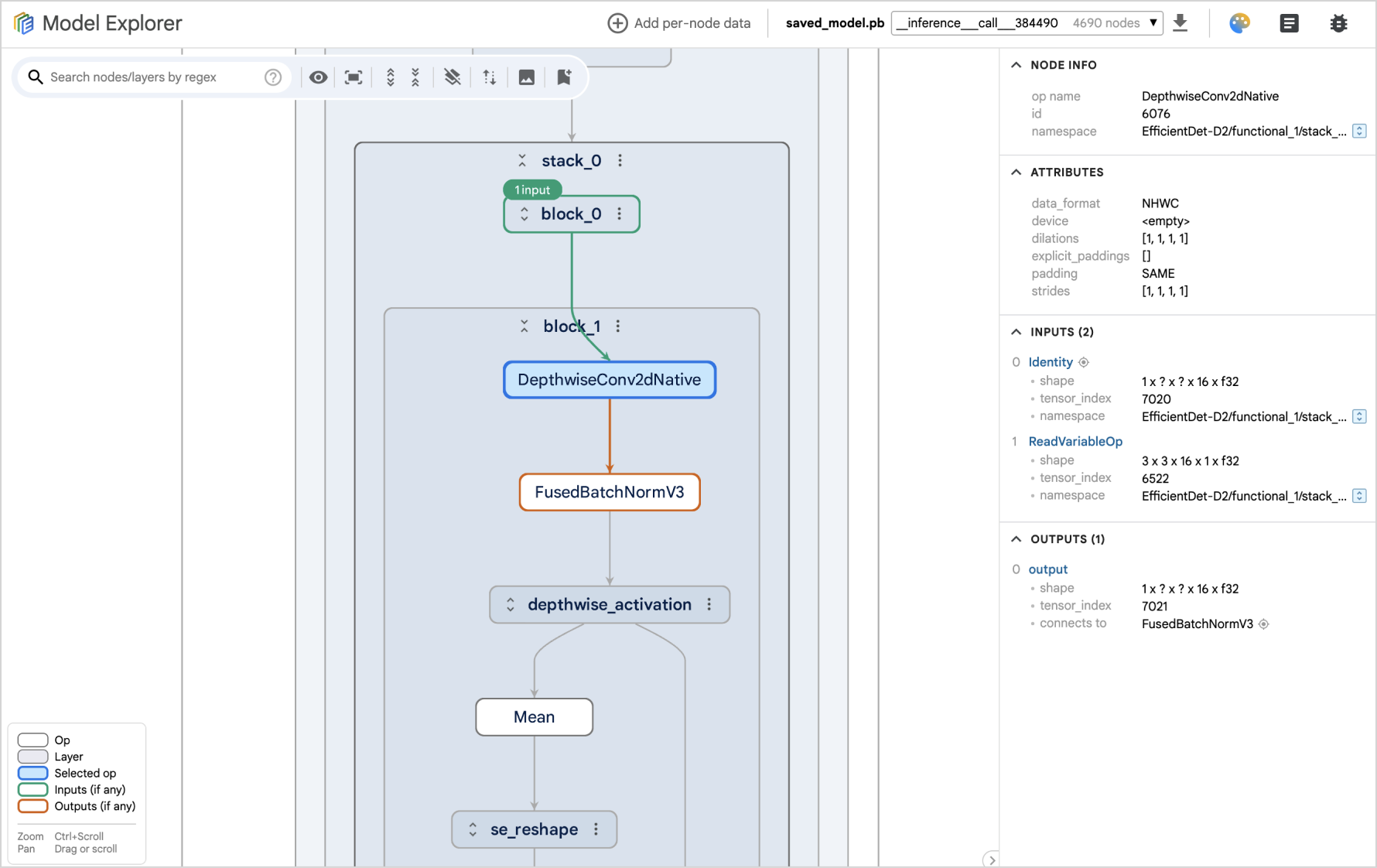
|
2
|
+
|
|
3
|
+
Model Explorer offers an intuitive and hierarchical visualization of model
|
|
4
|
+
graphs. It organizes model operations into nested layers, enabling users to
|
|
5
|
+
dynamically expand or collapse these layers. It also provides a range of
|
|
6
|
+
features to facilitate model exploration and debugging, including the ability to
|
|
7
|
+
highlight input and output operations, overlay metadata on nodes, display layers
|
|
8
|
+
in interactive pop-ups, perform searches, show identical layers, GPU-accelerated
|
|
9
|
+
graph rendering, among others. It currently supports TFLite, TF, TFJS, MLIR, and
|
|
10
|
+
PyTorch (Exported Program) model format, and provides an extension framework for
|
|
11
|
+
developers to easily add support for additional formats.
|
|
12
|
+
|
|
13
|
+
|
|
14
|
+
|
|
15
|
+
<br>
|
|
16
|
+
<br>
|
|
17
|
+
|
|
18
|
+
Please check out our [Wiki](https://github.com/google-ai-edge/model-explorer/wiki) for
|
|
19
|
+
more details:
|
|
20
|
+
|
|
21
|
+
- [Installation](https://github.com/google-ai-edge/model-explorer/wiki/1.-Installation)
|
|
22
|
+
- [User Guide](https://github.com/google-ai-edge/model-explorer/wiki/2.-User-Guide)
|
|
23
|
+
- [Command Line Guide](https://github.com/google-ai-edge/model-explorer/wiki/3.-Command-Line-Guide)
|
|
24
|
+
- [API Guide](https://github.com/google-ai-edge/model-explorer/wiki/4.-API-Guide)
|
|
25
|
+
- [Run in Colab Notebook](https://github.com/google-ai-edge/model-explorer/wiki/5.-Run-in-Colab-Notebook)
|
|
26
|
+
- [Develop Adapter Extension](https://github.com/google-ai-edge/model-explorer/wiki/6.-Develop-Adapter-Extension)
|
|
@@ -0,0 +1,42 @@
|
|
|
1
|
+
[project]
|
|
2
|
+
name = "ai-edge-model-explorer"
|
|
3
|
+
version = "0.1.32"
|
|
4
|
+
authors = [
|
|
5
|
+
{ name="Google LLC", email="opensource@google.com" },
|
|
6
|
+
]
|
|
7
|
+
description = "A modern model graph visualizer and debugger"
|
|
8
|
+
readme = "README.md"
|
|
9
|
+
requires-python = ">=3.9"
|
|
10
|
+
classifiers = [
|
|
11
|
+
"Programming Language :: Python :: 3.9",
|
|
12
|
+
"Programming Language :: Python :: 3.10",
|
|
13
|
+
"Programming Language :: Python :: 3.11",
|
|
14
|
+
"Programming Language :: Python :: 3.12",
|
|
15
|
+
"Programming Language :: Python :: 3.13",
|
|
16
|
+
"License :: OSI Approved :: Apache Software License",
|
|
17
|
+
]
|
|
18
|
+
dependencies = [
|
|
19
|
+
"flask",
|
|
20
|
+
"ipython",
|
|
21
|
+
# Skip on windows.
|
|
22
|
+
"ai-edge-model-explorer-adapter ~= 0.1.14; sys_platform != 'win32'",
|
|
23
|
+
"dacite",
|
|
24
|
+
"packaging",
|
|
25
|
+
"portpicker",
|
|
26
|
+
"requests",
|
|
27
|
+
"termcolor",
|
|
28
|
+
"typing-extensions",
|
|
29
|
+
"numpy",
|
|
30
|
+
"watchdog",
|
|
31
|
+
]
|
|
32
|
+
|
|
33
|
+
[project.scripts]
|
|
34
|
+
model-explorer = "model_explorer.cmdline:main"
|
|
35
|
+
|
|
36
|
+
[build-system]
|
|
37
|
+
requires = ["setuptools>=61.0"]
|
|
38
|
+
build-backend = "setuptools.build_meta"
|
|
39
|
+
|
|
40
|
+
# Include all files in "web_app" dir.
|
|
41
|
+
[tool.setuptools.package-data]
|
|
42
|
+
"model_explorer.web_app" = ["**/*"]
|
|
@@ -0,0 +1,87 @@
|
|
|
1
|
+
An Angular project for Model Explorer UI.
|
|
2
|
+
|
|
3
|
+
# Local development
|
|
4
|
+
|
|
5
|
+
## One-time setup
|
|
6
|
+
|
|
7
|
+
Install Angular CLI and packages:
|
|
8
|
+
|
|
9
|
+
```
|
|
10
|
+
$ npm install -g @angular/cli
|
|
11
|
+
$ npm install
|
|
12
|
+
```
|
|
13
|
+
|
|
14
|
+
## Run dev server
|
|
15
|
+
|
|
16
|
+
First, start the Model Explorer python server locally for handling API requests.
|
|
17
|
+
Check out the [Installation Guide](https://github.com/google-ai-edge/model-explorer/wiki/1.-Installation)
|
|
18
|
+
if needed.
|
|
19
|
+
|
|
20
|
+
```
|
|
21
|
+
$ model-explorer --no_open_in_browser
|
|
22
|
+
```
|
|
23
|
+
|
|
24
|
+
Then, start the Angular dev server:
|
|
25
|
+
|
|
26
|
+
```
|
|
27
|
+
$ ng serve
|
|
28
|
+
```
|
|
29
|
+
|
|
30
|
+
Access the app at http://localhost:4200 after the Angular dev server starts.
|
|
31
|
+
|
|
32
|
+
<br>
|
|
33
|
+
|
|
34
|
+
> [!IMPORTANT]
|
|
35
|
+
> The python server starts at port 8080 by default, which is also the default
|
|
36
|
+
> port the Angular dev server sends API requests to. See below if you want to
|
|
37
|
+
> use a different port.
|
|
38
|
+
|
|
39
|
+
To use a different port:
|
|
40
|
+
|
|
41
|
+
Start the python server at the port:
|
|
42
|
+
|
|
43
|
+
```
|
|
44
|
+
$ model-explorer --port=<port_number> --no_open_in_browser
|
|
45
|
+
```
|
|
46
|
+
|
|
47
|
+
Update the port number in [`src/proxy.conf.json`](https://github.com/google-ai-edge/model-explorer/blob/main/src/ui/src/proxy.conf.json),
|
|
48
|
+
then start the Angular dev server.
|
|
49
|
+
|
|
50
|
+
## Run demo app without python server
|
|
51
|
+
|
|
52
|
+
This Angular project also has a demo page showing the main
|
|
53
|
+
[visualizer component](https://github.com/google-ai-edge/model-explorer/tree/main/src/ui/src/components/visualizer) directly. It renders the pre-converted model graph JSON files from
|
|
54
|
+
a TFLite model and a TF model. This allows you to experiment with the visualizer
|
|
55
|
+
code without going through the model conversion process.
|
|
56
|
+
|
|
57
|
+
You only need to run the Angular dev server to see the demo page.
|
|
58
|
+
|
|
59
|
+
|
|
60
|
+
```
|
|
61
|
+
$ ng serve
|
|
62
|
+
```
|
|
63
|
+
|
|
64
|
+
Then visit the demo page at http://localhost:4200/demo
|
|
65
|
+
|
|
66
|
+
# Deployment
|
|
67
|
+
|
|
68
|
+
Run the following command to build the Angular app and update the corresponding
|
|
69
|
+
files in the python package (`src/server/package/src/model_explorer/web_app`).
|
|
70
|
+
|
|
71
|
+
```
|
|
72
|
+
$ npm run deploy
|
|
73
|
+
```
|
|
74
|
+
|
|
75
|
+
<br>
|
|
76
|
+
|
|
77
|
+
> [!NOTE]
|
|
78
|
+
> On Linux host, install `rollup` manually if you see the
|
|
79
|
+
> `Cannot find module @rollup/rollup-linux-x64-gnu` error.
|
|
80
|
+
>
|
|
81
|
+
> `$ npm install @rollup/rollup-linux-x64-gnu`
|
|
82
|
+
|
|
83
|
+
# Contributions
|
|
84
|
+
|
|
85
|
+
We are not currently accepting community contributions to Model Explorer UI
|
|
86
|
+
(except for links to community-built adapters). Please submit feature requests
|
|
87
|
+
or proposals to collaborate via the Issue Tracker.
|