midiscripter 0.2__tar.gz → 0.4__tar.gz
This diff represents the content of publicly available package versions that have been released to one of the supported registries. The information contained in this diff is provided for informational purposes only and reflects changes between package versions as they appear in their respective public registries.
- {midiscripter-0.2 → midiscripter-0.4}/PKG-INFO +79 -38
- midiscripter-0.4/README.md +105 -0
- {midiscripter-0.2 → midiscripter-0.4}/midiscripter/__init__.py +3 -1
- midiscripter-0.4/midiscripter/base/__init__.py +1 -0
- midiscripter-0.4/midiscripter/base/msg_base.py +114 -0
- midiscripter-0.4/midiscripter/base/port_base.py +309 -0
- {midiscripter-0.2 → midiscripter-0.4}/midiscripter/cli/starters.py +5 -2
- {midiscripter-0.2 → midiscripter-0.4}/midiscripter/file_event/__init__.py +1 -1
- {midiscripter-0.2 → midiscripter-0.4}/midiscripter/file_event/file_event_msg.py +16 -8
- {midiscripter-0.2 → midiscripter-0.4}/midiscripter/file_event/file_event_port.py +22 -1
- {midiscripter-0.2 → midiscripter-0.4}/midiscripter/gui/__init__.py +1 -1
- {midiscripter-0.2 → midiscripter-0.4}/midiscripter/gui/app.py +22 -15
- {midiscripter-0.2 → midiscripter-0.4}/midiscripter/gui/gui_widgets/button.py +135 -22
- {midiscripter-0.2 → midiscripter-0.4}/midiscripter/gui/gui_widgets/gui_msg.py +16 -11
- {midiscripter-0.2 → midiscripter-0.4}/midiscripter/gui/gui_widgets/gui_widget_base.py +48 -27
- midiscripter-0.4/midiscripter/gui/gui_widgets/layout.py +80 -0
- midiscripter-0.4/midiscripter/gui/gui_widgets/list.py +104 -0
- {midiscripter-0.2 → midiscripter-0.4}/midiscripter/gui/gui_widgets/mixins.py +7 -8
- {midiscripter-0.2 → midiscripter-0.4}/midiscripter/gui/gui_widgets/text.py +44 -6
- {midiscripter-0.2 → midiscripter-0.4}/midiscripter/gui/log_widget.py +60 -32
- {midiscripter-0.2 → midiscripter-0.4}/midiscripter/gui/main_window.py +14 -14
- {midiscripter-0.2 → midiscripter-0.4}/midiscripter/gui/menu_bar.py +43 -59
- midiscripter-0.4/midiscripter/gui/ports_widget.py +350 -0
- {midiscripter-0.2 → midiscripter-0.4}/midiscripter/keyboard/__init__.py +1 -1
- {midiscripter-0.2 → midiscripter-0.4}/midiscripter/keyboard/keyboard_msg.py +23 -15
- {midiscripter-0.2 → midiscripter-0.4}/midiscripter/keyboard/keyboard_port.py +61 -21
- {midiscripter-0.2 → midiscripter-0.4}/midiscripter/logger/html_sink.py +0 -1
- {midiscripter-0.2 → midiscripter-0.4}/midiscripter/logger/log.py +32 -24
- midiscripter-0.4/midiscripter/metronome/metronome_port.py +84 -0
- {midiscripter-0.2 → midiscripter-0.4}/midiscripter/midi/midi_msg.py +86 -37
- {midiscripter-0.2 → midiscripter-0.4}/midiscripter/midi/midi_note_data.py +3 -4
- {midiscripter-0.2 → midiscripter-0.4}/midiscripter/midi/midi_port.py +99 -44
- {midiscripter-0.2 → midiscripter-0.4}/midiscripter/midi/midi_ports_update.py +14 -15
- midiscripter-0.4/midiscripter/mouse/__init__.py +2 -0
- midiscripter-0.4/midiscripter/mouse/mouse_msg.py +84 -0
- midiscripter-0.4/midiscripter/mouse/mouse_port.py +164 -0
- {midiscripter-0.2 → midiscripter-0.4}/midiscripter/osc/osc_msg.py +10 -6
- {midiscripter-0.2 → midiscripter-0.4}/midiscripter/osc/osc_port.py +35 -10
- {midiscripter-0.2 → midiscripter-0.4}/midiscripter/osc/osc_query_maker.py +0 -1
- midiscripter-0.2/midiscripter/base/shared.py → midiscripter-0.4/midiscripter/shared/__init__.py +6 -4
- midiscripter-0.4/midiscripter/shared/autostart.py +84 -0
- {midiscripter-0.2 → midiscripter-0.4}/pyproject.toml +4 -5
- midiscripter-0.2/README.md +0 -63
- midiscripter-0.2/midiscripter/base/msg_base.py +0 -95
- midiscripter-0.2/midiscripter/base/port_base.py +0 -251
- midiscripter-0.2/midiscripter/gui/gui_widgets/__init__.py +0 -0
- midiscripter-0.2/midiscripter/gui/gui_widgets/layout.py +0 -63
- midiscripter-0.2/midiscripter/gui/gui_widgets/list.py +0 -67
- midiscripter-0.2/midiscripter/gui/ports_widget.py +0 -309
- midiscripter-0.2/midiscripter/metronome/metronome_port.py +0 -72
- {midiscripter-0.2 → midiscripter-0.4}/LICENSE +0 -0
- {midiscripter-0.2 → midiscripter-0.4}/midiscripter/cli/__init__.py +0 -0
- {midiscripter-0.2/midiscripter/base → midiscripter-0.4/midiscripter/gui/gui_widgets}/__init__.py +0 -0
- {midiscripter-0.2 → midiscripter-0.4}/midiscripter/logger/__init__.py +0 -0
- {midiscripter-0.2 → midiscripter-0.4}/midiscripter/logger/console_sink.py +0 -0
- {midiscripter-0.2 → midiscripter-0.4}/midiscripter/metronome/__init__.py +0 -0
- {midiscripter-0.2 → midiscripter-0.4}/midiscripter/midi/__init__.py +0 -0
- {midiscripter-0.2 → midiscripter-0.4}/midiscripter/osc/__init__.py +0 -0
- {midiscripter-0.2 → midiscripter-0.4}/midiscripter/resources/icon.ico +0 -0
- {midiscripter-0.2 → midiscripter-0.4}/midiscripter/resources/icon.svg +0 -0
|
@@ -1,6 +1,6 @@
|
|
|
1
1
|
Metadata-Version: 2.3
|
|
2
2
|
Name: midiscripter
|
|
3
|
-
Version: 0.
|
|
3
|
+
Version: 0.4
|
|
4
4
|
Summary: Framework for scripting MIDI, keyboard and Open Sound Control input and output
|
|
5
5
|
Project-URL: Documentation, https://maboroshy.github.io/midi-scripter
|
|
6
6
|
Project-URL: Issues, https://github.com/Maboroshy/midi-scripter/issues
|
|
@@ -175,11 +175,8 @@ License-File: LICENSE
|
|
|
175
175
|
Keywords: MIDI,OSC,automation,input,script
|
|
176
176
|
Classifier: Development Status :: 4 - Beta
|
|
177
177
|
Classifier: License :: OSI Approved :: GNU Lesser General Public License v3 (LGPLv3)
|
|
178
|
-
Classifier: Operating System :: Microsoft :: Windows
|
|
179
|
-
Classifier: Programming Language :: Python
|
|
180
178
|
Classifier: Programming Language :: Python :: 3.11
|
|
181
179
|
Classifier: Programming Language :: Python :: 3.12
|
|
182
|
-
Classifier: Programming Language :: Python :: Implementation :: CPython
|
|
183
180
|
Classifier: Topic :: Multimedia :: Sound/Audio
|
|
184
181
|
Classifier: Topic :: Multimedia :: Sound/Audio :: MIDI
|
|
185
182
|
Classifier: Topic :: Software Development :: Libraries :: Python Modules
|
|
@@ -191,72 +188,116 @@ Requires-Dist: python-osc~=1.7
|
|
|
191
188
|
Requires-Dist: python-rtmidi~=1.5
|
|
192
189
|
Requires-Dist: pywin32; platform_system == 'Windows'
|
|
193
190
|
Requires-Dist: watchdog~=4.0
|
|
191
|
+
Provides-Extra: dev
|
|
192
|
+
Requires-Dist: ruff; extra == 'dev'
|
|
194
193
|
Provides-Extra: doc
|
|
195
194
|
Requires-Dist: griffe-inherited-docstrings; extra == 'doc'
|
|
196
195
|
Requires-Dist: mkdocs-material; extra == 'doc'
|
|
197
196
|
Requires-Dist: mkdocstrings; extra == 'doc'
|
|
198
197
|
Description-Content-Type: text/markdown
|
|
199
198
|
|
|
200
|
-
# MIDI Scripter
|
|
199
|
+
# <img src="docs/icon.svg" width="24"/> MIDI Scripter
|
|
201
200
|
|
|
202
|
-
MIDI Scripter is a framework
|
|
201
|
+
MIDI Scripter is a framework filtering, modifying, routing and any other
|
|
202
|
+
scripting for MIDI, Open Sound Control (OSC), keyboard and mouse input and
|
|
203
|
+
output with Python.
|
|
203
204
|
|
|
204
|
-
MIDI Scripter
|
|
205
|
+
MIDI Scripter listens to the input ports and feeds incoming messages to
|
|
206
|
+
subscribed callables (functions, methods, etc.). These callables or any
|
|
207
|
+
other Python code can send modified or created messages with output ports.
|
|
208
|
+
MIDI Scripter can act as a proxy to filter, transform and convert the input.
|
|
209
|
+
|
|
210
|
+
MIDI Scripter includes customizable GUI for message logging, coding
|
|
211
|
+
assistance and GUI controls and indicators to use in scripts.
|
|
205
212
|
|
|
206
213
|
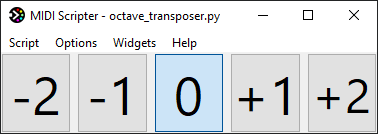
An octave transposer with GUI controls in 10 lines of code:
|
|
207
214
|
|
|
208
215
|
``` python
|
|
209
|
-
from midiscripter import *
|
|
216
|
+
from midiscripter import *
|
|
210
217
|
|
|
211
|
-
midi_keyboard = MidiIn('
|
|
212
|
-
proxy_output = MidiOut('
|
|
218
|
+
midi_keyboard = MidiIn('MIDI Keyboard') # GUI will provide you with port names
|
|
219
|
+
proxy_output = MidiOut('To DAW') # using virtual proxy port for output
|
|
213
220
|
|
|
214
|
-
# GUI control in a single line
|
|
221
|
+
# GUI control in a single line
|
|
215
222
|
octave_selector = GuiButtonSelectorH(('-2', '-1', '0', '+1', '+2'), select='0')
|
|
216
223
|
|
|
217
224
|
@midi_keyboard.subscribe # decorated function will receive port's messages
|
|
218
225
|
def transpose(msg: MidiMsg) -> None:
|
|
219
226
|
if msg.type == MidiType.NOTE_ON or msg.type == MidiType.NOTE_OFF: # filter
|
|
220
227
|
msg.data1 += 12 * int(octave_selector.selected_item_text) # modify
|
|
221
|
-
|
|
228
|
+
proxy_output.send(msg) # route
|
|
222
229
|
|
|
223
230
|
if __name__ == '__main__': # combine multiple scripts by importing them
|
|
224
231
|
start_gui() # opens helpful customizable GUI
|
|
225
232
|
```
|
|
226
233
|
|
|
227
|
-
|
|
234
|
+

|
|
235
|
+
|
|
236
|
+
[You can find more examples here.](https://github.com/Maboroshy/midi-scripter/tree/master/examples)
|
|
237
|
+
|
|
238
|
+
[Overview and API documentation available.](https://maboroshy.github.io/midi-scripter)
|
|
239
|
+
|
|
240
|
+
The average measured roundtrip latency for the script above is less than 0.25
|
|
241
|
+
milliseconds.
|
|
242
|
+
|
|
243
|
+
Currently MIDI Scripter is at "beta" development stage. It's fully
|
|
244
|
+
functional but needs more user feedback. It works on Windows and Linux and
|
|
245
|
+
should work on macOS.
|
|
246
|
+
|
|
247
|
+
## What it can do
|
|
228
248
|
|
|
229
|
-
|
|
249
|
+
The basics:
|
|
230
250
|
|
|
231
|
-
|
|
232
|
-
|
|
233
|
-
|
|
234
|
-
3. Map any Python code to input message.
|
|
235
|
-
4. Make extra "shift" keys to multiply MIDI controls.
|
|
236
|
-
5. Organize mappings into sets / scenes with GUI controls.
|
|
237
|
-
6. Make an extra overlay mappings on top of MIDI controller's default DAW integration by using proxy.
|
|
251
|
+
- Receive MIDI, OSC, keyboard and mouse input messages.
|
|
252
|
+
- Filter, modify and do anything Python can with the messages.
|
|
253
|
+
- Send out modified or generated MIDI, OSC, keyboard and mouse messages.
|
|
238
254
|
|
|
239
|
-
|
|
240
|
-
1. Create and map complex macros involving multiple hardware or virtual MIDI controllers.
|
|
241
|
-
2. Make custom sequencer or MIDI input generator.
|
|
242
|
-
3. Make music education ot trainer GUI application based on MIDI input.
|
|
255
|
+
For performance MIDI setups:
|
|
243
256
|
|
|
244
|
-
|
|
257
|
+
- Make extra banks and layers to multiply MIDI controls.
|
|
258
|
+
- Organize mappings into sets / scenes with GUI dashboard.
|
|
259
|
+
- Make an extra overlay mappings on top of MIDI controller's DAW integration by
|
|
260
|
+
using proxies.
|
|
261
|
+
|
|
262
|
+
For software control and automation:
|
|
263
|
+
|
|
264
|
+
- Map or convert the messages to each other with any conditions and logic.
|
|
265
|
+
- Use MIDI controllers or keyboard shortcuts to run any Python code.
|
|
266
|
+
- Use keyboard and mouse macros.
|
|
267
|
+
|
|
268
|
+
For writing MIDI related Python code:
|
|
269
|
+
|
|
270
|
+
- Prepare MIDI, OSC keyboard and mouse inputs and outputs with a single line,
|
|
271
|
+
without boilerplate code.
|
|
272
|
+
- Feed input messages to functions or any callables by decorators.
|
|
273
|
+
- Work with message objects instead of raw data different for each input type.
|
|
274
|
+
- Create GUI widgets with a single line and arrange them with mouse.
|
|
275
|
+
- Write basic MIDI related GUI applications with very little Python code.
|
|
245
276
|
|
|
246
277
|
## Installation
|
|
247
|
-
1. [Python 3.11+](https://www.python.org/downloads/) with "Add python.exe to PATH" option.
|
|
248
|
-
2. [loopMIDI](https://www.tobias-erichsen.de/software/loopmidi.html) for virtual MIDI output ports on Windows.
|
|
249
|
-
3. `pip install midiscripter` in console.
|
|
250
278
|
|
|
251
|
-
|
|
252
|
-
|
|
279
|
+
1. Install [Python 3.11+](https://www.python.org/downloads/) including pip.
|
|
280
|
+
2. Run `pip install midiscripter`.
|
|
281
|
+
|
|
282
|
+
Extra steps for Windows:
|
|
253
283
|
|
|
254
|
-
Enable
|
|
284
|
+
1. Enable `Add python .exe to PATH` option in Python installer.
|
|
285
|
+
2. Install [loopMIDI](https://www.tobias-erichsen.de/software/loopmidi.html)
|
|
286
|
+
and set required virtual MIDI ports inside it.
|
|
255
287
|
|
|
256
288
|
## Quick Start
|
|
257
|
-
|
|
258
|
-
|
|
259
|
-
|
|
260
|
-
|
|
261
|
-
|
|
262
|
-
|
|
289
|
+
|
|
290
|
+
1. Paste [script template](examples/script_template.py) to Python IDE or plain
|
|
291
|
+
text editor. IDE is recommended.
|
|
292
|
+
2. Run template script as-is from IDE or by `python your_script.py` command to
|
|
293
|
+
open GUI for more info on available ports and incoming input.
|
|
294
|
+
3. Turn on available ports' checkboxes to enable them, watch the log for
|
|
295
|
+
input messages.
|
|
296
|
+
4. Click on port names and messages in log to copy their declarations to the
|
|
297
|
+
clipboard. Paste the declarations to your script.
|
|
298
|
+
5. Modify the template function to make it do what you want.
|
|
299
|
+
Use `log('messages')` for debugging.
|
|
300
|
+
6. Restart the script from GUI to check how in works.
|
|
301
|
+
7. Write more complex scripts. Use more inputs, outputs and functions
|
|
302
|
+
(callables). Subscribe callables to input messages with
|
|
303
|
+
`@input_port.subscribe` decorator.
|
|
@@ -0,0 +1,105 @@
|
|
|
1
|
+
# <img src="docs/icon.svg" width="24"/> MIDI Scripter
|
|
2
|
+
|
|
3
|
+
MIDI Scripter is a framework filtering, modifying, routing and any other
|
|
4
|
+
scripting for MIDI, Open Sound Control (OSC), keyboard and mouse input and
|
|
5
|
+
output with Python.
|
|
6
|
+
|
|
7
|
+
MIDI Scripter listens to the input ports and feeds incoming messages to
|
|
8
|
+
subscribed callables (functions, methods, etc.). These callables or any
|
|
9
|
+
other Python code can send modified or created messages with output ports.
|
|
10
|
+
MIDI Scripter can act as a proxy to filter, transform and convert the input.
|
|
11
|
+
|
|
12
|
+
MIDI Scripter includes customizable GUI for message logging, coding
|
|
13
|
+
assistance and GUI controls and indicators to use in scripts.
|
|
14
|
+
|
|
15
|
+
An octave transposer with GUI controls in 10 lines of code:
|
|
16
|
+
|
|
17
|
+
``` python
|
|
18
|
+
from midiscripter import *
|
|
19
|
+
|
|
20
|
+
midi_keyboard = MidiIn('MIDI Keyboard') # GUI will provide you with port names
|
|
21
|
+
proxy_output = MidiOut('To DAW') # using virtual proxy port for output
|
|
22
|
+
|
|
23
|
+
# GUI control in a single line
|
|
24
|
+
octave_selector = GuiButtonSelectorH(('-2', '-1', '0', '+1', '+2'), select='0')
|
|
25
|
+
|
|
26
|
+
@midi_keyboard.subscribe # decorated function will receive port's messages
|
|
27
|
+
def transpose(msg: MidiMsg) -> None:
|
|
28
|
+
if msg.type == MidiType.NOTE_ON or msg.type == MidiType.NOTE_OFF: # filter
|
|
29
|
+
msg.data1 += 12 * int(octave_selector.selected_item_text) # modify
|
|
30
|
+
proxy_output.send(msg) # route
|
|
31
|
+
|
|
32
|
+
if __name__ == '__main__': # combine multiple scripts by importing them
|
|
33
|
+
start_gui() # opens helpful customizable GUI
|
|
34
|
+
```
|
|
35
|
+
|
|
36
|
+

|
|
37
|
+
|
|
38
|
+
[You can find more examples here.](https://github.com/Maboroshy/midi-scripter/tree/master/examples)
|
|
39
|
+
|
|
40
|
+
[Overview and API documentation available.](https://maboroshy.github.io/midi-scripter)
|
|
41
|
+
|
|
42
|
+
The average measured roundtrip latency for the script above is less than 0.25
|
|
43
|
+
milliseconds.
|
|
44
|
+
|
|
45
|
+
Currently MIDI Scripter is at "beta" development stage. It's fully
|
|
46
|
+
functional but needs more user feedback. It works on Windows and Linux and
|
|
47
|
+
should work on macOS.
|
|
48
|
+
|
|
49
|
+
## What it can do
|
|
50
|
+
|
|
51
|
+
The basics:
|
|
52
|
+
|
|
53
|
+
- Receive MIDI, OSC, keyboard and mouse input messages.
|
|
54
|
+
- Filter, modify and do anything Python can with the messages.
|
|
55
|
+
- Send out modified or generated MIDI, OSC, keyboard and mouse messages.
|
|
56
|
+
|
|
57
|
+
For performance MIDI setups:
|
|
58
|
+
|
|
59
|
+
- Make extra banks and layers to multiply MIDI controls.
|
|
60
|
+
- Organize mappings into sets / scenes with GUI dashboard.
|
|
61
|
+
- Make an extra overlay mappings on top of MIDI controller's DAW integration by
|
|
62
|
+
using proxies.
|
|
63
|
+
|
|
64
|
+
For software control and automation:
|
|
65
|
+
|
|
66
|
+
- Map or convert the messages to each other with any conditions and logic.
|
|
67
|
+
- Use MIDI controllers or keyboard shortcuts to run any Python code.
|
|
68
|
+
- Use keyboard and mouse macros.
|
|
69
|
+
|
|
70
|
+
For writing MIDI related Python code:
|
|
71
|
+
|
|
72
|
+
- Prepare MIDI, OSC keyboard and mouse inputs and outputs with a single line,
|
|
73
|
+
without boilerplate code.
|
|
74
|
+
- Feed input messages to functions or any callables by decorators.
|
|
75
|
+
- Work with message objects instead of raw data different for each input type.
|
|
76
|
+
- Create GUI widgets with a single line and arrange them with mouse.
|
|
77
|
+
- Write basic MIDI related GUI applications with very little Python code.
|
|
78
|
+
|
|
79
|
+
## Installation
|
|
80
|
+
|
|
81
|
+
1. Install [Python 3.11+](https://www.python.org/downloads/) including pip.
|
|
82
|
+
2. Run `pip install midiscripter`.
|
|
83
|
+
|
|
84
|
+
Extra steps for Windows:
|
|
85
|
+
|
|
86
|
+
1. Enable `Add python .exe to PATH` option in Python installer.
|
|
87
|
+
2. Install [loopMIDI](https://www.tobias-erichsen.de/software/loopmidi.html)
|
|
88
|
+
and set required virtual MIDI ports inside it.
|
|
89
|
+
|
|
90
|
+
## Quick Start
|
|
91
|
+
|
|
92
|
+
1. Paste [script template](examples/script_template.py) to Python IDE or plain
|
|
93
|
+
text editor. IDE is recommended.
|
|
94
|
+
2. Run template script as-is from IDE or by `python your_script.py` command to
|
|
95
|
+
open GUI for more info on available ports and incoming input.
|
|
96
|
+
3. Turn on available ports' checkboxes to enable them, watch the log for
|
|
97
|
+
input messages.
|
|
98
|
+
4. Click on port names and messages in log to copy their declarations to the
|
|
99
|
+
clipboard. Paste the declarations to your script.
|
|
100
|
+
5. Modify the template function to make it do what you want.
|
|
101
|
+
Use `log('messages')` for debugging.
|
|
102
|
+
6. Restart the script from GUI to check how in works.
|
|
103
|
+
7. Write more complex scripts. Use more inputs, outputs and functions
|
|
104
|
+
(callables). Subscribe callables to input messages with
|
|
105
|
+
`@input_port.subscribe` decorator.
|
|
@@ -1,8 +1,10 @@
|
|
|
1
|
-
from .
|
|
1
|
+
from .shared import restart_script, run_after_ports_opened
|
|
2
|
+
from .base import *
|
|
2
3
|
from .cli import *
|
|
3
4
|
from .file_event import *
|
|
4
5
|
from .gui import *
|
|
5
6
|
from .keyboard import *
|
|
7
|
+
from .mouse import *
|
|
6
8
|
from .logger import *
|
|
7
9
|
from .metronome import *
|
|
8
10
|
from .midi import *
|
|
@@ -0,0 +1 @@
|
|
|
1
|
+
from .msg_base import Msg, Not
|
|
@@ -0,0 +1,114 @@
|
|
|
1
|
+
import enum
|
|
2
|
+
from typing import Any
|
|
3
|
+
from collections.abc import Container
|
|
4
|
+
|
|
5
|
+
import midiscripter.shared
|
|
6
|
+
from midiscripter.base.port_base import Input
|
|
7
|
+
|
|
8
|
+
|
|
9
|
+
class Not:
|
|
10
|
+
def __init__(self, value: Container | Any):
|
|
11
|
+
self.value = value
|
|
12
|
+
|
|
13
|
+
|
|
14
|
+
class AttrEnum(enum.StrEnum):
|
|
15
|
+
def __repr__(self):
|
|
16
|
+
return f'{self.__class__.__name__}({self.value.__repr__()})'
|
|
17
|
+
|
|
18
|
+
|
|
19
|
+
class Msg:
|
|
20
|
+
"""The data object generated by input port that is sent as an argument to its subscribed calls
|
|
21
|
+
and can be sent with an output port"""
|
|
22
|
+
|
|
23
|
+
type: str
|
|
24
|
+
"""Message type description for filtering and representation"""
|
|
25
|
+
|
|
26
|
+
ctime: float
|
|
27
|
+
"""Message creation time in ["Unix time"](https://wikipedia.org/wiki/Unix_time) format"""
|
|
28
|
+
|
|
29
|
+
source: Input
|
|
30
|
+
"""Input port instance that generated the message"""
|
|
31
|
+
|
|
32
|
+
__match_args__: tuple[str] = ('type',)
|
|
33
|
+
|
|
34
|
+
def __init__(self, type: str, source: Input | None = None):
|
|
35
|
+
"""
|
|
36
|
+
Args:
|
|
37
|
+
source: Input port instance that generated the message
|
|
38
|
+
"""
|
|
39
|
+
self.type = type
|
|
40
|
+
self.source = source
|
|
41
|
+
self.ctime = midiscripter.shared.precise_epoch_time()
|
|
42
|
+
|
|
43
|
+
self.ctime: float # workaround for mkdocstrings issue #607
|
|
44
|
+
"""Message creation time in ["Unix time"](https://wikipedia.org/wiki/Unix_time) format"""
|
|
45
|
+
|
|
46
|
+
def __repr__(self):
|
|
47
|
+
return f'{self.__class__.__name__}({", ".join(repr(value) for value in self.__as_tuple())})'
|
|
48
|
+
|
|
49
|
+
def __str__(self):
|
|
50
|
+
return ' | '.join(str(value) for value in self.__as_tuple() if value is not None)
|
|
51
|
+
|
|
52
|
+
def __eq__(self, other_msg: 'Msg'):
|
|
53
|
+
return type(self) is type(other_msg) and self.__as_tuple() == other_msg.__as_tuple()
|
|
54
|
+
|
|
55
|
+
def matches(self, *conditions_args, **conditions_kwargs) -> bool:
|
|
56
|
+
"""Checks if message's attributes match all provided attribute conditions:
|
|
57
|
+
|
|
58
|
+
1. If condition is `None` or omitted, it matches anything.
|
|
59
|
+
|
|
60
|
+
2. If condition equals attribute, it matches the attribute.
|
|
61
|
+
|
|
62
|
+
3. If condition is a container and contains the attribute, it matches the attribute.
|
|
63
|
+
|
|
64
|
+
Use `Not(condition)` to invert condition matching.
|
|
65
|
+
|
|
66
|
+
Returns:
|
|
67
|
+
`True` if all attributes match, `False` if any does not match
|
|
68
|
+
"""
|
|
69
|
+
attr_conditions = dict(zip(self.__match_args__, conditions_args, strict=False))
|
|
70
|
+
attr_conditions.update(conditions_kwargs)
|
|
71
|
+
|
|
72
|
+
for parameter_name, condition in attr_conditions.items():
|
|
73
|
+
if condition is None:
|
|
74
|
+
continue
|
|
75
|
+
|
|
76
|
+
try:
|
|
77
|
+
attr = getattr(self, parameter_name)
|
|
78
|
+
except AttributeError:
|
|
79
|
+
if isinstance(condition, Not):
|
|
80
|
+
continue
|
|
81
|
+
else:
|
|
82
|
+
return False
|
|
83
|
+
|
|
84
|
+
if attr == condition:
|
|
85
|
+
if isinstance(condition, Not):
|
|
86
|
+
return False
|
|
87
|
+
else:
|
|
88
|
+
continue
|
|
89
|
+
|
|
90
|
+
try:
|
|
91
|
+
if attr in condition and not isinstance(condition, str):
|
|
92
|
+
if isinstance(condition, Not):
|
|
93
|
+
return False
|
|
94
|
+
else:
|
|
95
|
+
continue
|
|
96
|
+
except TypeError: # condition is not a container
|
|
97
|
+
pass
|
|
98
|
+
|
|
99
|
+
return False
|
|
100
|
+
return True
|
|
101
|
+
|
|
102
|
+
@property
|
|
103
|
+
def _age_ms(self) -> float:
|
|
104
|
+
"""Time passed since message creation in milliseconds"""
|
|
105
|
+
# Using faster rounding
|
|
106
|
+
return int((midiscripter.shared.precise_epoch_time() - self.ctime) * 1000000) / 1000
|
|
107
|
+
|
|
108
|
+
def __as_tuple(self) -> tuple:
|
|
109
|
+
"""Converts message to a tuple based on message's __match_args__ class attribute
|
|
110
|
+
|
|
111
|
+
Returns:
|
|
112
|
+
Tuple with values of attributes specified in __match_args__ class attribute
|
|
113
|
+
"""
|
|
114
|
+
return tuple(getattr(self, attr_name) for attr_name in self.__match_args__)
|