memory-graph 0.3.9__tar.gz → 0.3.11__tar.gz
This diff represents the content of publicly available package versions that have been released to one of the supported registries. The information contained in this diff is provided for informational purposes only and reflects changes between package versions as they appear in their respective public registries.
- {memory_graph-0.3.9/memory_graph.egg-info → memory_graph-0.3.11}/PKG-INFO +41 -16
- {memory_graph-0.3.9 → memory_graph-0.3.11}/README.md +40 -15
- {memory_graph-0.3.9 → memory_graph-0.3.11}/memory_graph/__init__.py +70 -44
- {memory_graph-0.3.9 → memory_graph-0.3.11}/memory_graph/config.py +3 -1
- {memory_graph-0.3.9 → memory_graph-0.3.11}/memory_graph/config_default.py +6 -3
- {memory_graph-0.3.9 → memory_graph-0.3.11}/memory_graph/html_table.py +1 -1
- {memory_graph-0.3.9 → memory_graph-0.3.11}/memory_graph/memory_to_nodes.py +8 -9
- {memory_graph-0.3.9 → memory_graph-0.3.11}/memory_graph/test.py +1 -1
- memory_graph-0.3.11/memory_graph/test_max_graph_depth.py +27 -0
- {memory_graph-0.3.9 → memory_graph-0.3.11/memory_graph.egg-info}/PKG-INFO +41 -16
- memory_graph-0.3.11/memory_graph.egg-info/SOURCES.txt +36 -0
- {memory_graph-0.3.9 → memory_graph-0.3.11}/setup.py +1 -1
- memory_graph-0.3.9/TODO.txt +0 -9
- memory_graph-0.3.9/images/add_one.png +0 -0
- memory_graph-0.3.9/images/add_one.py +0 -18
- memory_graph-0.3.9/images/avltree.py +0 -43
- memory_graph-0.3.9/images/avltree_base.png +0 -0
- memory_graph-0.3.9/images/avltree_dir.png +0 -0
- memory_graph-0.3.9/images/avltree_fail.png +0 -0
- memory_graph-0.3.9/images/avltree_key_value.png +0 -0
- memory_graph-0.3.9/images/avltree_linear.png +0 -0
- memory_graph-0.3.9/images/avltree_table.png +0 -0
- memory_graph-0.3.9/images/bin_tree.png +0 -0
- memory_graph-0.3.9/images/bin_tree.py +0 -47
- memory_graph-0.3.9/images/copies.png +0 -0
- memory_graph-0.3.9/images/copies.py +0 -15
- memory_graph-0.3.9/images/copy_method.png +0 -0
- memory_graph-0.3.9/images/copy_method.py +0 -22
- memory_graph-0.3.9/images/create_gif.sh +0 -19
- memory_graph-0.3.9/images/create_images.sh +0 -34
- memory_graph-0.3.9/images/debugging.gif +0 -0
- memory_graph-0.3.9/images/debugging.py +0 -19
- memory_graph-0.3.9/images/extension_numpy.png +0 -0
- memory_graph-0.3.9/images/extension_numpy.py +0 -14
- memory_graph-0.3.9/images/extension_pandas.png +0 -0
- memory_graph-0.3.9/images/extension_pandas.py +0 -17
- memory_graph-0.3.9/images/factorial.gif +0 -0
- memory_graph-0.3.9/images/factorial.py +0 -24
- memory_graph-0.3.9/images/hash_set.png +0 -0
- memory_graph-0.3.9/images/hash_set.py +0 -39
- memory_graph-0.3.9/images/highlight.png +0 -0
- memory_graph-0.3.9/images/highlight.py +0 -15
- memory_graph-0.3.9/images/immutable.py +0 -11
- memory_graph-0.3.9/images/immutable1.png +0 -0
- memory_graph-0.3.9/images/immutable2.png +0 -0
- memory_graph-0.3.9/images/jupyter_example.ipynb +0 -85
- memory_graph-0.3.9/images/jupyter_example.png +0 -0
- memory_graph-0.3.9/images/linked_list.png +0 -0
- memory_graph-0.3.9/images/linked_list.py +0 -39
- memory_graph-0.3.9/images/many_types.png +0 -0
- memory_graph-0.3.9/images/many_types.py +0 -13
- memory_graph-0.3.9/images/mutable.py +0 -11
- memory_graph-0.3.9/images/mutable1.png +0 -0
- memory_graph-0.3.9/images/mutable2.png +0 -0
- memory_graph-0.3.9/images/power_set.gif +0 -0
- memory_graph-0.3.9/images/power_set.py +0 -28
- memory_graph-0.3.9/images/uva.png +0 -0
- memory_graph-0.3.9/install.txt +0 -31
- memory_graph-0.3.9/memory_graph.egg-info/SOURCES.txt +0 -82
- memory_graph-0.3.9/uml/memory_graph.uxf +0 -322
- {memory_graph-0.3.9 → memory_graph-0.3.11}/LICENSE.txt +0 -0
- {memory_graph-0.3.9 → memory_graph-0.3.11}/MANIFEST.in +0 -0
- {memory_graph-0.3.9 → memory_graph-0.3.11}/memory_graph/config_helpers.py +0 -0
- {memory_graph-0.3.9 → memory_graph-0.3.11}/memory_graph/extension_numpy.py +0 -0
- {memory_graph-0.3.9 → memory_graph-0.3.11}/memory_graph/extension_pandas.py +0 -0
- {memory_graph-0.3.9 → memory_graph-0.3.11}/memory_graph/list_view.py +0 -0
- {memory_graph-0.3.9 → memory_graph-0.3.11}/memory_graph/node_base.py +0 -0
- {memory_graph-0.3.9 → memory_graph-0.3.11}/memory_graph/node_key_value.py +0 -0
- {memory_graph-0.3.9 → memory_graph-0.3.11}/memory_graph/node_linear.py +0 -0
- {memory_graph-0.3.9 → memory_graph-0.3.11}/memory_graph/node_table.py +0 -0
- {memory_graph-0.3.9 → memory_graph-0.3.11}/memory_graph/sequence.py +0 -0
- {memory_graph-0.3.9 → memory_graph-0.3.11}/memory_graph/slicer.py +0 -0
- {memory_graph-0.3.9 → memory_graph-0.3.11}/memory_graph/slices.py +0 -0
- {memory_graph-0.3.9 → memory_graph-0.3.11}/memory_graph/slices_iterator.py +0 -0
- {memory_graph-0.3.9 → memory_graph-0.3.11}/memory_graph/slices_table_iterator.py +0 -0
- {memory_graph-0.3.9 → memory_graph-0.3.11}/memory_graph/test_memory_graph.py +0 -0
- {memory_graph-0.3.9 → memory_graph-0.3.11}/memory_graph/test_memory_to_nodes.py +0 -0
- {memory_graph-0.3.9 → memory_graph-0.3.11}/memory_graph/test_sequence.py +0 -0
- {memory_graph-0.3.9 → memory_graph-0.3.11}/memory_graph/test_slicer.py +0 -0
- {memory_graph-0.3.9 → memory_graph-0.3.11}/memory_graph/test_slices.py +0 -0
- {memory_graph-0.3.9 → memory_graph-0.3.11}/memory_graph/test_slices_iterator.py +0 -0
- {memory_graph-0.3.9 → memory_graph-0.3.11}/memory_graph/utils.py +0 -0
- {memory_graph-0.3.9 → memory_graph-0.3.11}/memory_graph.egg-info/dependency_links.txt +0 -0
- {memory_graph-0.3.9 → memory_graph-0.3.11}/memory_graph.egg-info/requires.txt +0 -0
- {memory_graph-0.3.9 → memory_graph-0.3.11}/memory_graph.egg-info/top_level.txt +0 -0
- {memory_graph-0.3.9 → memory_graph-0.3.11}/setup.cfg +0 -0
|
@@ -1,6 +1,6 @@
|
|
|
1
1
|
Metadata-Version: 2.1
|
|
2
2
|
Name: memory_graph
|
|
3
|
-
Version: 0.3.
|
|
3
|
+
Version: 0.3.11
|
|
4
4
|
Summary: Draws a graph of your data to analyze its structure.
|
|
5
5
|
Home-page: https://github.com/bterwijn/memory_graph
|
|
6
6
|
Author: Bas Terwijn
|
|
@@ -91,7 +91,7 @@ mg.render(data, "my_graph.pdf")
|
|
|
91
91
|
mg.render(data, "my_graph.svg")
|
|
92
92
|
mg.render(data, "my_graph.png")
|
|
93
93
|
mg.render(data, "my_graph.gv") # Graphviz DOT file
|
|
94
|
-
mg.render(data) # renders to 'mg.render_filename'
|
|
94
|
+
mg.render(data) # renders to 'mg.render_filename' with default value: 'memory_graph.pdf'
|
|
95
95
|
```
|
|
96
96
|
|
|
97
97
|
# Chapters #
|
|
@@ -112,6 +112,10 @@ mg.render(data) # renders to 'mg.render_filename' (default value: 'memory_graph.
|
|
|
112
112
|
|
|
113
113
|
[Jupyter Notebook](#jupyter-notebook)
|
|
114
114
|
|
|
115
|
+
[ipython](#ipython)
|
|
116
|
+
|
|
117
|
+
[In the Browser](#in-the-browser)
|
|
118
|
+
|
|
115
119
|
[Troubleshooting](#troubleshooting)
|
|
116
120
|
|
|
117
121
|
|
|
@@ -152,7 +156,7 @@ mg.render(locals(), 'immutable2.png')
|
|
|
152
156
|
|
|
153
157
|
|
|
154
158
|
### Mutable Type ###
|
|
155
|
-
With mutable types the result is different. In the code below variable `a` and `b` both reference the same `list` value [4, 3, 2]. A `list` is a mutable type and therefore when we change variable `a` its value **can** be mutated in place and thus `a` and `b` both reference the same new value afterwards. Thus changing `a` also changes `b` and vice versa. Sometimes we want this but other times we don't and then we will have to make a copy so that `b`
|
|
159
|
+
With mutable types the result is different. In the code below variable `a` and `b` both reference the same `list` value [4, 3, 2]. A `list` is a mutable type and therefore when we change variable `a` its value **can** be mutated in place and thus `a` and `b` both reference the same new value afterwards. Thus changing `a` also changes `b` and vice versa. Sometimes we want this but other times we don't and then we will have to make a copy so that `a` and `b` are independent.
|
|
156
160
|
|
|
157
161
|
```python
|
|
158
162
|
import memory_graph as mg
|
|
@@ -167,7 +171,7 @@ mg.render(locals(), 'mutable2.png')
|
|
|
167
171
|
|:-----------------------------------------------------------:|:-------------------------------------------------------------:|
|
|
168
172
|
| mutable1.png | mutable2.png |
|
|
169
173
|
|
|
170
|
-
One practical reason why Python makes the distinction between mutable and immutable types is that a value of a mutable type
|
|
174
|
+
One practical reason why Python makes the distinction between mutable and immutable types is that a value of a mutable type can be large, making it inefficient to copy each time we change it. Immutable values generally don't need to change as much, or are small making copying less of a concern.
|
|
171
175
|
|
|
172
176
|
### Copying ###
|
|
173
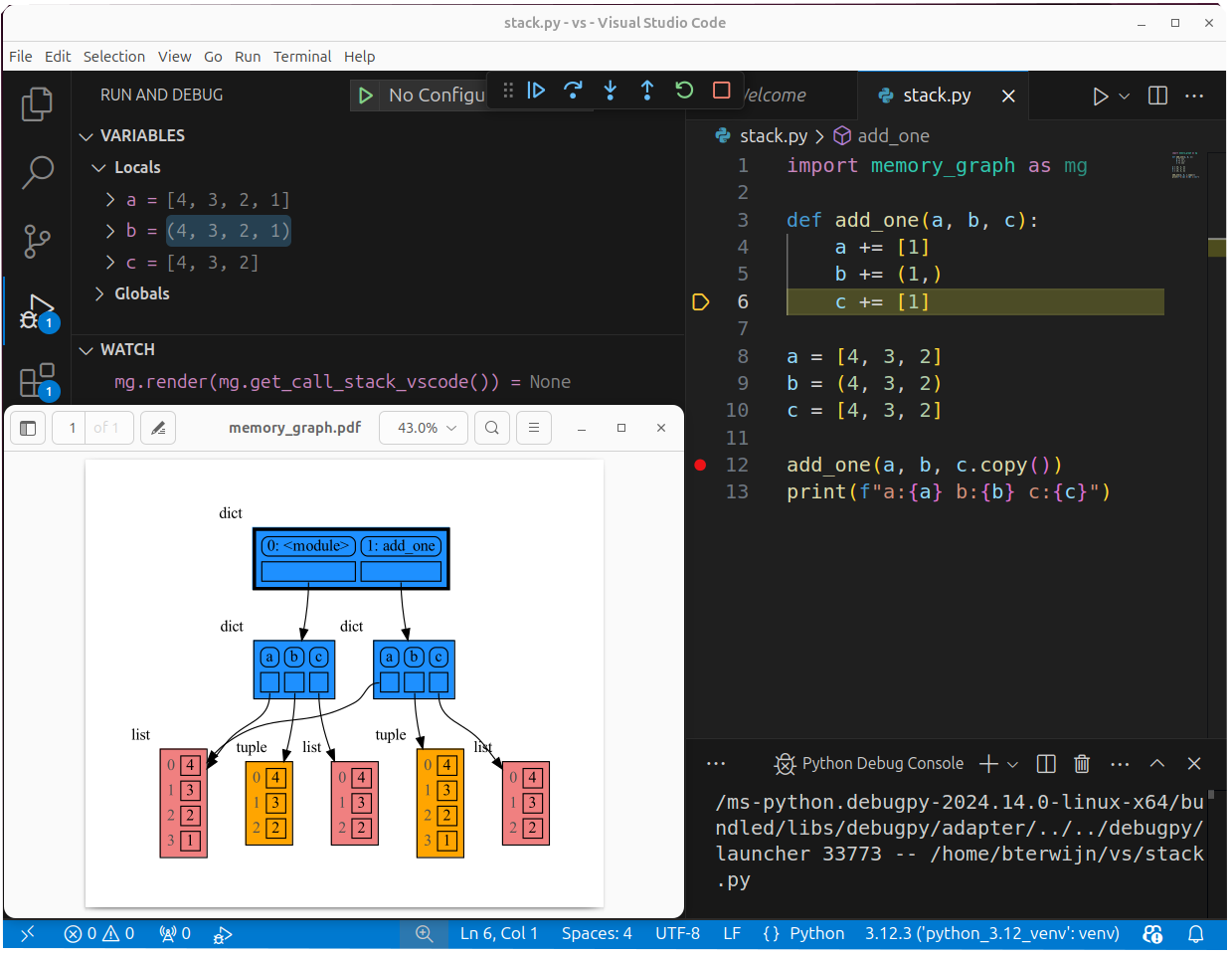
177
|
Python offers three different "copy" options that we will demonstrate using a nested list:
|
|
@@ -220,7 +224,7 @@ mg.show(locals())
|
|
|
220
224
|
|
|
221
225
|
|
|
222
226
|
## Call Stack ##
|
|
223
|
-
The `mg.get_call_stack()` function retrieves the entire call stack, including the local variables for each function on the stack. This enables us to visualize the local variables across all active functions simultaneously. Then by examining the graph, we can determine whether any local variables from different functions on the call stack share data. For instance, consider the function `add_one()` which adds the value `1` to each of its parameters
|
|
227
|
+
The `mg.get_call_stack()` function retrieves the entire call stack, including the local variables for each function on the stack. This enables us to visualize the local variables across all active functions simultaneously. Then by examining the graph, we can determine whether any local variables from different functions on the call stack share data. For instance, consider the function `add_one()` which adds the value `1` to each of its parameters `a`, `b`, and `c`.
|
|
224
228
|
|
|
225
229
|
```python
|
|
226
230
|
import memory_graph as mg
|
|
@@ -254,9 +258,15 @@ It is often helpful to temporarily block program execution to inspect the graph.
|
|
|
254
258
|
mg.block(fun, arg1, arg2, ...)
|
|
255
259
|
```
|
|
256
260
|
|
|
257
|
-
This function
|
|
258
|
-
|
|
259
|
-
|
|
261
|
+
This function:
|
|
262
|
+
* first executes `fun(arg1, arg2, ...)`
|
|
263
|
+
* then prints the current source location in the program
|
|
264
|
+
* then blocks execution until the <Enter> key is pressed
|
|
265
|
+
* finally returns the value of the `fun()` call
|
|
266
|
+
|
|
267
|
+
to change it's behavior:
|
|
268
|
+
* Set `mg.block_prints_location = False` to skip printing the source location.
|
|
269
|
+
* Set `mg.press_enter_message = None` to skip printing "Press <Enter> to continue...".
|
|
260
270
|
|
|
261
271
|
### Recursion ###
|
|
262
272
|
The call stack is also helpful to visualize how recursion works. Here we use `mg.block()` to show each step of how recursively ```factorial(3)``` is computed:
|
|
@@ -327,6 +337,8 @@ The ```mg.get_call_stack()``` doesn't work well in *watch* context in most debug
|
|
|
327
337
|
| **Visual Studio Code** | `mg.get_call_stack_vscode()` |
|
|
328
338
|
| **Pycharm** | `mg.get_call_stack_pycharm()` |
|
|
329
339
|
|
|
340
|
+
|
|
341
|
+
|
|
330
342
|
#### Other Debuggers ####
|
|
331
343
|
For other debuggers, invoke this function within the *watch* context. Then, in the "call_stack.txt" file, identify the slice of functions you wish to include in the call stack.
|
|
332
344
|
```
|
|
@@ -498,8 +510,8 @@ for i in range(n):
|
|
|
498
510
|
## Configuration ##
|
|
499
511
|
Different aspects of memory_graph can be configured. The default configuration is reset by importing 'memory_graph.config_default'.
|
|
500
512
|
|
|
501
|
-
- ***mg.config.
|
|
502
|
-
- The maxium depth of the graph. A
|
|
513
|
+
- ***mg.config.max_graph_depth*** : int
|
|
514
|
+
- The maxium depth of the graph with default value 12. A `✂` (scissor) symbol indicates where the graph is cut short.
|
|
503
515
|
|
|
504
516
|
- ***mg.config.max_string_length*** : int
|
|
505
517
|
- The maximum length of strings shown in the graph. Longer strings will be truncated.
|
|
@@ -544,7 +556,7 @@ mg.show( locals(),
|
|
|
544
556
|
Different extensions are available for types from other Python packages.
|
|
545
557
|
|
|
546
558
|
### Numpy ###
|
|
547
|
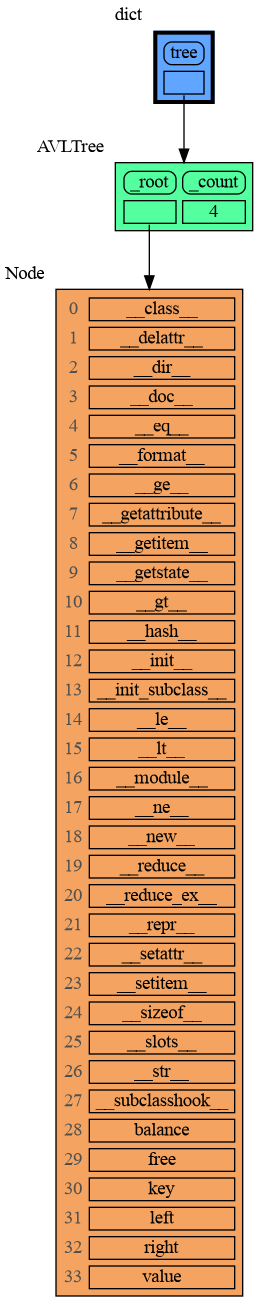
-
Numpy types `
|
|
559
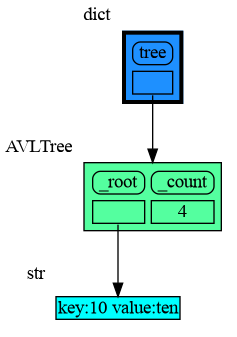
|
+
Numpy types `array` and `matrix` and `ndarray` can be graphed with "memory_graph.extension_numpy":
|
|
548
560
|
|
|
549
561
|
```python
|
|
550
562
|
import memory_graph as mg
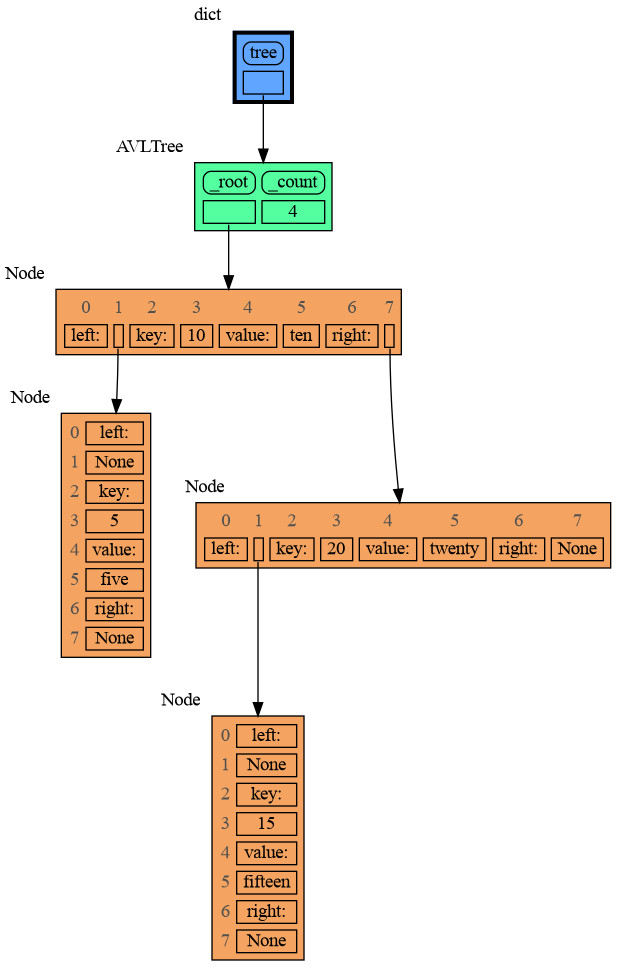
|
|
@@ -620,9 +632,9 @@ mg.show(locals())
|
|
|
620
632
|
```
|
|
621
633
|
|
|
622
634
|
|
|
623
|
-
Next figure out what are the attributes you want to graph and choose a Node type, there are four options
|
|
635
|
+
Next figure out what are the attributes you want to graph and choose a Node type, there are four options:
|
|
624
636
|
|
|
625
|
-
### 1 Node_Base ###
|
|
637
|
+
### 1) Node_Base ###
|
|
626
638
|
Node_base is a leaf node (with no children) and shows just a single value.
|
|
627
639
|
```python
|
|
628
640
|
import memory_graph as mg
|
|
@@ -642,7 +654,7 @@ mg.show(locals())
|
|
|
642
654
|
```
|
|
643
655
|
|
|
644
656
|
|
|
645
|
-
### 2 Node_Linear ###
|
|
657
|
+
### 2) Node_Linear ###
|
|
646
658
|
Node_Linear shows all the values in a line like a list.
|
|
647
659
|
```python
|
|
648
660
|
import memory_graph as mg
|
|
@@ -666,7 +678,7 @@ mg.show(locals())
|
|
|
666
678
|
```
|
|
667
679
|
|
|
668
680
|
|
|
669
|
-
### 3 Node_Key_Value ###
|
|
681
|
+
### 3) Node_Key_Value ###
|
|
670
682
|
Node_Key_Value shows key-value pairs like a dictionary. Note the required `items()` call at the end.
|
|
671
683
|
```python
|
|
672
684
|
import memory_graph as mg
|
|
@@ -690,7 +702,7 @@ mg.show(locals())
|
|
|
690
702
|
```
|
|
691
703
|
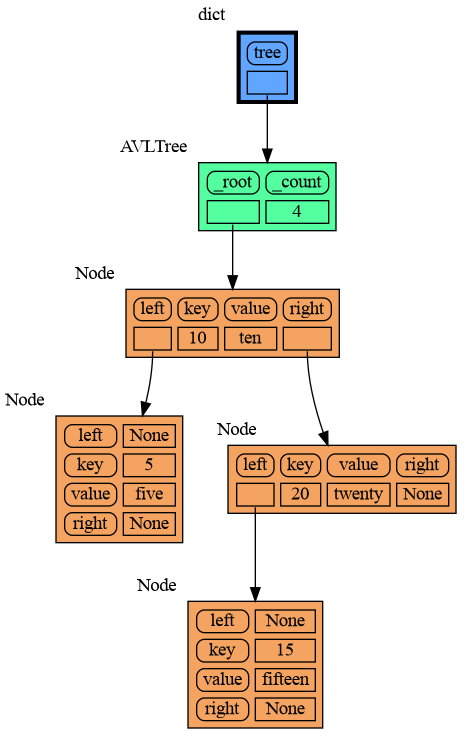
|
|
692
704
|
|
|
693
|
-
### 4 Node_Table ###
|
|
705
|
+
### 4) Node_Table ###
|
|
694
706
|
Node_Table shows all the values as a table.
|
|
695
707
|
```python
|
|
696
708
|
import memory_graph as mg
|
|
@@ -727,6 +739,19 @@ mg.block(display, mg.create_graph(mg.locals_jupyter()) ) # the same but blocked
|
|
|
727
739
|
See for example [jupyter_example.ipynb](https://raw.githubusercontent.com/bterwijn/memory_graph/main/images/jupyter_example.ipynb).
|
|
728
740
|
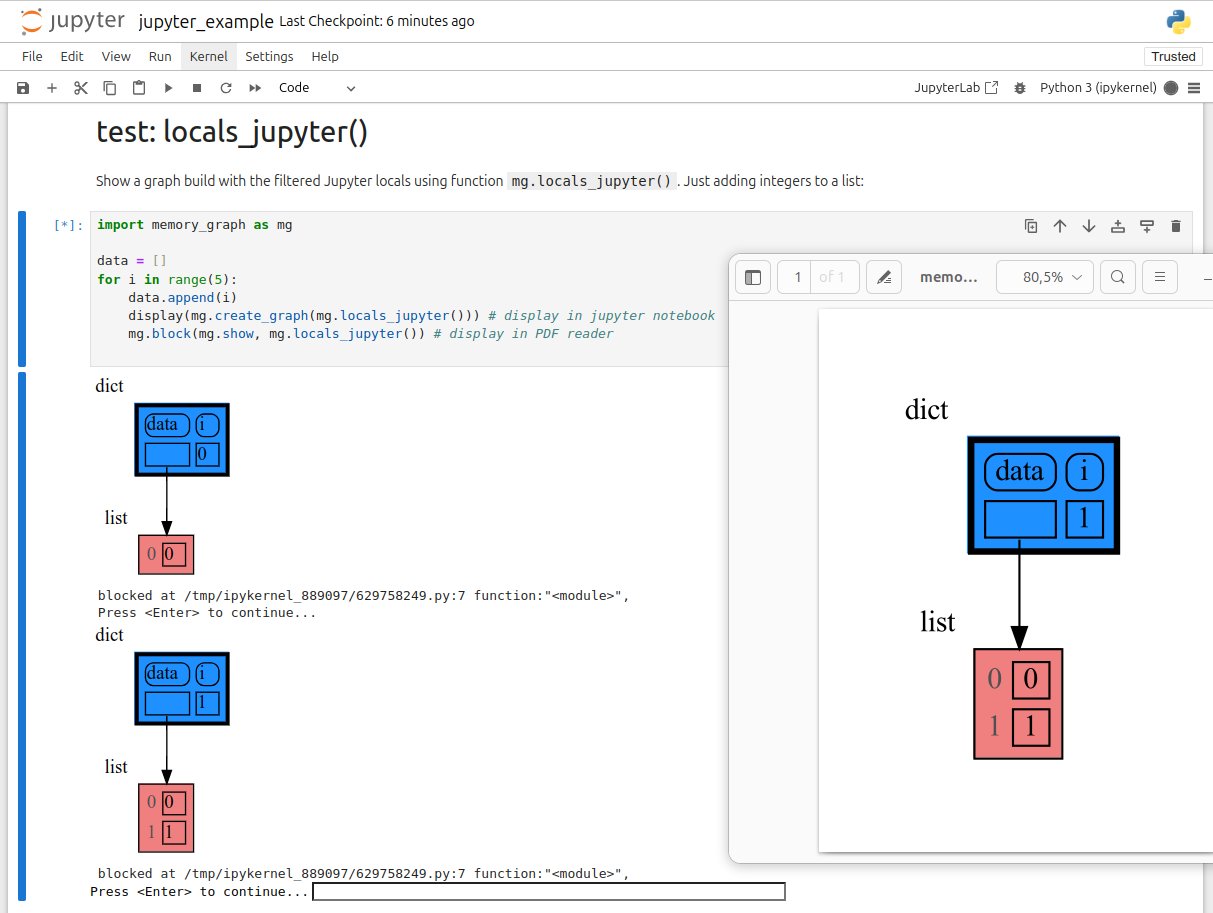
|
|
729
741
|
|
|
742
|
+
## ipython ##
|
|
743
|
+
In ipython `locals()` has additional variables that cause problems in the graph, use `mg.locals_ipython()` to get the local variables with these problematic variables filtered out. Use `mg.get_call_stack_ipython()` to get the whole call stack with these variables filtered out.
|
|
744
|
+
|
|
745
|
+
Additionally install file [auto_memory_graph.py](https://raw.githubusercontent.com/bterwijn/memory_graph/main/src/auto_memory_graph.py) in the ipython startup directory:
|
|
746
|
+
* Linux/Mac: ~/.ipython/profile_default/startup/
|
|
747
|
+
* Windows: %USERPROFILE%\.ipython\profile_default\startup\
|
|
748
|
+
|
|
749
|
+
Then after starting 'ipython' call function `mg_switch()` to turn on/off the automatic visualization of local variables after each command.
|
|
750
|
+
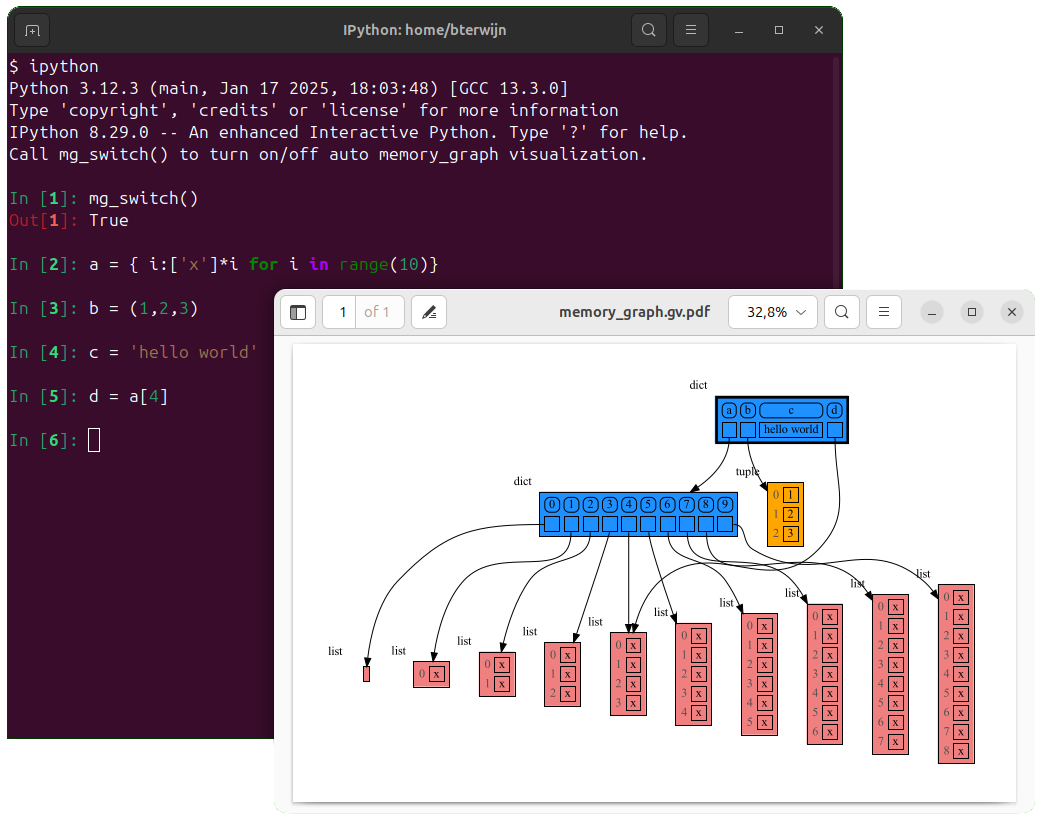
|
|
751
|
+
|
|
752
|
+
## In the Browser ##
|
|
753
|
+
We can run memory_graph in the browser: <a href="https://bterwijn.github.io/memory_graph/src/pyodide.html" target="_blank">Pyodide Example</a>
|
|
754
|
+
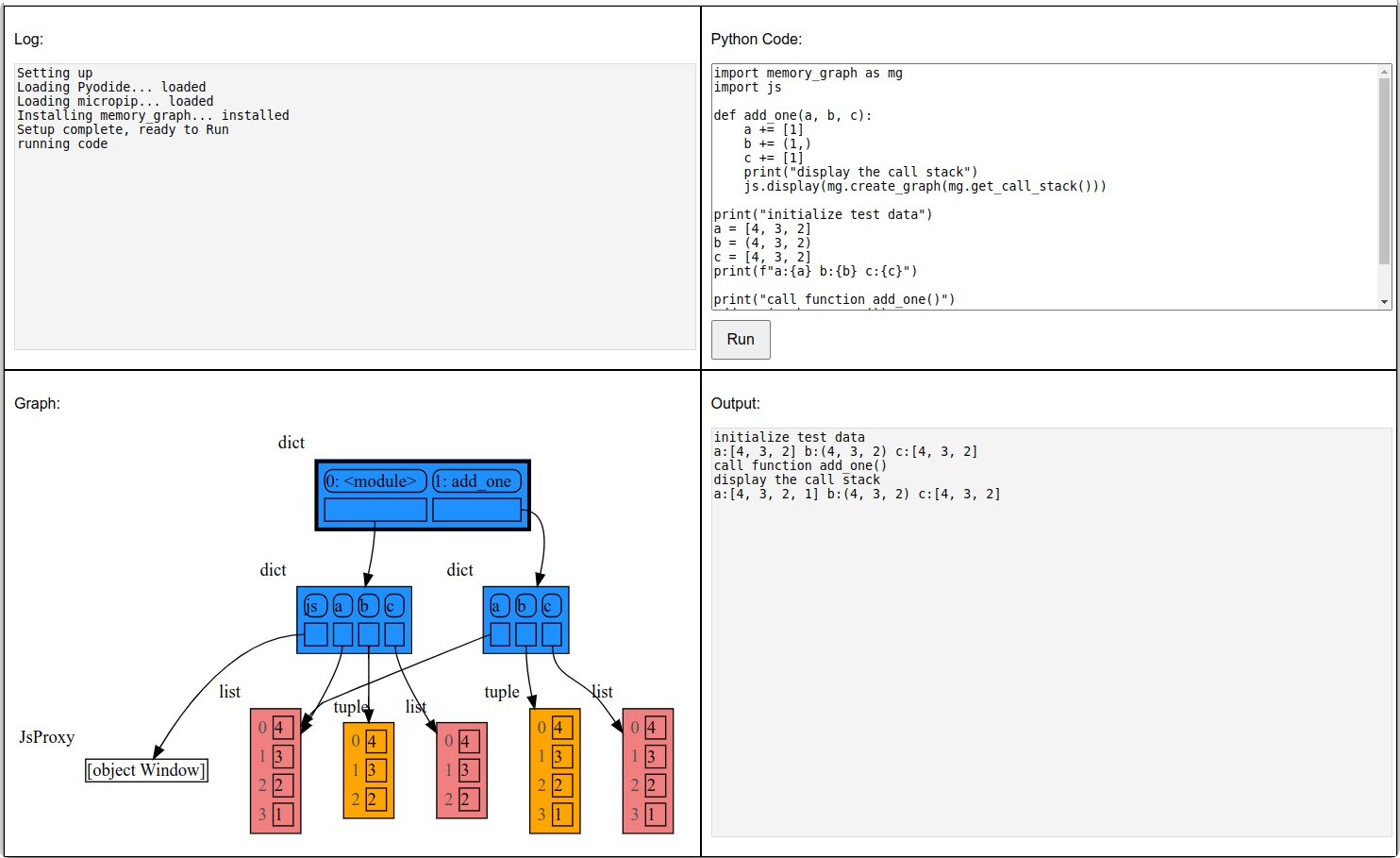
|
|
730
755
|
|
|
731
756
|
## Troubleshooting ##
|
|
732
757
|
|
|
@@ -72,7 +72,7 @@ mg.render(data, "my_graph.pdf")
|
|
|
72
72
|
mg.render(data, "my_graph.svg")
|
|
73
73
|
mg.render(data, "my_graph.png")
|
|
74
74
|
mg.render(data, "my_graph.gv") # Graphviz DOT file
|
|
75
|
-
mg.render(data) # renders to 'mg.render_filename'
|
|
75
|
+
mg.render(data) # renders to 'mg.render_filename' with default value: 'memory_graph.pdf'
|
|
76
76
|
```
|
|
77
77
|
|
|
78
78
|
# Chapters #
|
|
@@ -93,6 +93,10 @@ mg.render(data) # renders to 'mg.render_filename' (default value: 'memory_graph.
|
|
|
93
93
|
|
|
94
94
|
[Jupyter Notebook](#jupyter-notebook)
|
|
95
95
|
|
|
96
|
+
[ipython](#ipython)
|
|
97
|
+
|
|
98
|
+
[In the Browser](#in-the-browser)
|
|
99
|
+
|
|
96
100
|
[Troubleshooting](#troubleshooting)
|
|
97
101
|
|
|
98
102
|
|
|
@@ -133,7 +137,7 @@ mg.render(locals(), 'immutable2.png')
|
|
|
133
137
|
|
|
134
138
|
|
|
135
139
|
### Mutable Type ###
|
|
136
|
-
With mutable types the result is different. In the code below variable `a` and `b` both reference the same `list` value [4, 3, 2]. A `list` is a mutable type and therefore when we change variable `a` its value **can** be mutated in place and thus `a` and `b` both reference the same new value afterwards. Thus changing `a` also changes `b` and vice versa. Sometimes we want this but other times we don't and then we will have to make a copy so that `b`
|
|
140
|
+
With mutable types the result is different. In the code below variable `a` and `b` both reference the same `list` value [4, 3, 2]. A `list` is a mutable type and therefore when we change variable `a` its value **can** be mutated in place and thus `a` and `b` both reference the same new value afterwards. Thus changing `a` also changes `b` and vice versa. Sometimes we want this but other times we don't and then we will have to make a copy so that `a` and `b` are independent.
|
|
137
141
|
|
|
138
142
|
```python
|
|
139
143
|
import memory_graph as mg
|
|
@@ -148,7 +152,7 @@ mg.render(locals(), 'mutable2.png')
|
|
|
148
152
|
|:-----------------------------------------------------------:|:-------------------------------------------------------------:|
|
|
149
153
|
| mutable1.png | mutable2.png |
|
|
150
154
|
|
|
151
|
-
One practical reason why Python makes the distinction between mutable and immutable types is that a value of a mutable type
|
|
155
|
+
One practical reason why Python makes the distinction between mutable and immutable types is that a value of a mutable type can be large, making it inefficient to copy each time we change it. Immutable values generally don't need to change as much, or are small making copying less of a concern.
|
|
152
156
|
|
|
153
157
|
### Copying ###
|
|
154
158
|
Python offers three different "copy" options that we will demonstrate using a nested list:
|
|
@@ -201,7 +205,7 @@ mg.show(locals())
|
|
|
201
205
|
|
|
202
206
|
|
|
203
207
|
## Call Stack ##
|
|
204
|
-
The `mg.get_call_stack()` function retrieves the entire call stack, including the local variables for each function on the stack. This enables us to visualize the local variables across all active functions simultaneously. Then by examining the graph, we can determine whether any local variables from different functions on the call stack share data. For instance, consider the function `add_one()` which adds the value `1` to each of its parameters
|
|
208
|
+
The `mg.get_call_stack()` function retrieves the entire call stack, including the local variables for each function on the stack. This enables us to visualize the local variables across all active functions simultaneously. Then by examining the graph, we can determine whether any local variables from different functions on the call stack share data. For instance, consider the function `add_one()` which adds the value `1` to each of its parameters `a`, `b`, and `c`.
|
|
205
209
|
|
|
206
210
|
```python
|
|
207
211
|
import memory_graph as mg
|
|
@@ -235,9 +239,15 @@ It is often helpful to temporarily block program execution to inspect the graph.
|
|
|
235
239
|
mg.block(fun, arg1, arg2, ...)
|
|
236
240
|
```
|
|
237
241
|
|
|
238
|
-
This function
|
|
239
|
-
|
|
240
|
-
|
|
242
|
+
This function:
|
|
243
|
+
* first executes `fun(arg1, arg2, ...)`
|
|
244
|
+
* then prints the current source location in the program
|
|
245
|
+
* then blocks execution until the <Enter> key is pressed
|
|
246
|
+
* finally returns the value of the `fun()` call
|
|
247
|
+
|
|
248
|
+
to change it's behavior:
|
|
249
|
+
* Set `mg.block_prints_location = False` to skip printing the source location.
|
|
250
|
+
* Set `mg.press_enter_message = None` to skip printing "Press <Enter> to continue...".
|
|
241
251
|
|
|
242
252
|
### Recursion ###
|
|
243
253
|
The call stack is also helpful to visualize how recursion works. Here we use `mg.block()` to show each step of how recursively ```factorial(3)``` is computed:
|
|
@@ -308,6 +318,8 @@ The ```mg.get_call_stack()``` doesn't work well in *watch* context in most debug
|
|
|
308
318
|
| **Visual Studio Code** | `mg.get_call_stack_vscode()` |
|
|
309
319
|
| **Pycharm** | `mg.get_call_stack_pycharm()` |
|
|
310
320
|
|
|
321
|
+

|
|
322
|
+
|
|
311
323
|
#### Other Debuggers ####
|
|
312
324
|
For other debuggers, invoke this function within the *watch* context. Then, in the "call_stack.txt" file, identify the slice of functions you wish to include in the call stack.
|
|
313
325
|
```
|
|
@@ -479,8 +491,8 @@ for i in range(n):
|
|
|
479
491
|
## Configuration ##
|
|
480
492
|
Different aspects of memory_graph can be configured. The default configuration is reset by importing 'memory_graph.config_default'.
|
|
481
493
|
|
|
482
|
-
- ***mg.config.
|
|
483
|
-
- The maxium depth of the graph. A
|
|
494
|
+
- ***mg.config.max_graph_depth*** : int
|
|
495
|
+
- The maxium depth of the graph with default value 12. A `✂` (scissor) symbol indicates where the graph is cut short.
|
|
484
496
|
|
|
485
497
|
- ***mg.config.max_string_length*** : int
|
|
486
498
|
- The maximum length of strings shown in the graph. Longer strings will be truncated.
|
|
@@ -525,7 +537,7 @@ mg.show( locals(),
|
|
|
525
537
|
Different extensions are available for types from other Python packages.
|
|
526
538
|
|
|
527
539
|
### Numpy ###
|
|
528
|
-
Numpy types `
|
|
540
|
+
Numpy types `array` and `matrix` and `ndarray` can be graphed with "memory_graph.extension_numpy":
|
|
529
541
|
|
|
530
542
|
```python
|
|
531
543
|
import memory_graph as mg
|
|
@@ -601,9 +613,9 @@ mg.show(locals())
|
|
|
601
613
|
```
|
|
602
614
|

|
|
603
615
|
|
|
604
|
-
Next figure out what are the attributes you want to graph and choose a Node type, there are four options
|
|
616
|
+
Next figure out what are the attributes you want to graph and choose a Node type, there are four options:
|
|
605
617
|
|
|
606
|
-
### 1 Node_Base ###
|
|
618
|
+
### 1) Node_Base ###
|
|
607
619
|
Node_base is a leaf node (with no children) and shows just a single value.
|
|
608
620
|
```python
|
|
609
621
|
import memory_graph as mg
|
|
@@ -623,7 +635,7 @@ mg.show(locals())
|
|
|
623
635
|
```
|
|
624
636
|

|
|
625
637
|
|
|
626
|
-
### 2 Node_Linear ###
|
|
638
|
+
### 2) Node_Linear ###
|
|
627
639
|
Node_Linear shows all the values in a line like a list.
|
|
628
640
|
```python
|
|
629
641
|
import memory_graph as mg
|
|
@@ -647,7 +659,7 @@ mg.show(locals())
|
|
|
647
659
|
```
|
|
648
660
|

|
|
649
661
|
|
|
650
|
-
### 3 Node_Key_Value ###
|
|
662
|
+
### 3) Node_Key_Value ###
|
|
651
663
|
Node_Key_Value shows key-value pairs like a dictionary. Note the required `items()` call at the end.
|
|
652
664
|
```python
|
|
653
665
|
import memory_graph as mg
|
|
@@ -671,7 +683,7 @@ mg.show(locals())
|
|
|
671
683
|
```
|
|
672
684
|

|
|
673
685
|
|
|
674
|
-
### 4 Node_Table ###
|
|
686
|
+
### 4) Node_Table ###
|
|
675
687
|
Node_Table shows all the values as a table.
|
|
676
688
|
```python
|
|
677
689
|
import memory_graph as mg
|
|
@@ -708,6 +720,19 @@ mg.block(display, mg.create_graph(mg.locals_jupyter()) ) # the same but blocked
|
|
|
708
720
|
See for example [jupyter_example.ipynb](https://raw.githubusercontent.com/bterwijn/memory_graph/main/images/jupyter_example.ipynb).
|
|
709
721
|

|
|
710
722
|
|
|
723
|
+
## ipython ##
|
|
724
|
+
In ipython `locals()` has additional variables that cause problems in the graph, use `mg.locals_ipython()` to get the local variables with these problematic variables filtered out. Use `mg.get_call_stack_ipython()` to get the whole call stack with these variables filtered out.
|
|
725
|
+
|
|
726
|
+
Additionally install file [auto_memory_graph.py](https://raw.githubusercontent.com/bterwijn/memory_graph/main/src/auto_memory_graph.py) in the ipython startup directory:
|
|
727
|
+
* Linux/Mac: ~/.ipython/profile_default/startup/
|
|
728
|
+
* Windows: %USERPROFILE%\.ipython\profile_default\startup\
|
|
729
|
+
|
|
730
|
+
Then after starting 'ipython' call function `mg_switch()` to turn on/off the automatic visualization of local variables after each command.
|
|
731
|
+

|
|
732
|
+
|
|
733
|
+
## In the Browser ##
|
|
734
|
+
We can run memory_graph in the browser: <a href="https://bterwijn.github.io/memory_graph/src/pyodide.html" target="_blank">Pyodide Example</a>
|
|
735
|
+

|
|
711
736
|
|
|
712
737
|
## Troubleshooting ##
|
|
713
738
|
|
|
@@ -13,15 +13,15 @@ import sys
|
|
|
13
13
|
|
|
14
14
|
import graphviz
|
|
15
15
|
|
|
16
|
-
__version__ = "0.3.
|
|
16
|
+
__version__ = "0.3.11"
|
|
17
17
|
__author__ = 'Bas Terwijn'
|
|
18
18
|
render_filename = 'memory_graph.pdf'
|
|
19
|
-
|
|
19
|
+
block_prints_location = True
|
|
20
20
|
press_enter_message = "Press <Enter> to continue..."
|
|
21
21
|
|
|
22
|
-
def get_source_location(stack_index):
|
|
22
|
+
def get_source_location(stack_index=0):
|
|
23
23
|
""" Helper function to get the source location of the stack with 'stack_index' of the call stack. """
|
|
24
|
-
frameInfo = inspect.stack()[stack_index] # get frameInfo of calling frame
|
|
24
|
+
frameInfo = inspect.stack()[1+stack_index] # get frameInfo of calling frame
|
|
25
25
|
filename= frameInfo.filename
|
|
26
26
|
line_nr= frameInfo.lineno
|
|
27
27
|
function = frameInfo.function
|
|
@@ -32,14 +32,15 @@ def block(fun=None, *args, **kwargs):
|
|
|
32
32
|
Calls the given function `fun` with specified arguments and keyword arguments,
|
|
33
33
|
waits for the user to press Enter, and returns the result of `fun`.
|
|
34
34
|
"""
|
|
35
|
+
stack_index = 0
|
|
35
36
|
if 'stack_index' in kwargs:
|
|
36
37
|
stack_index = kwargs['stack_index']
|
|
37
38
|
del kwargs['stack_index']
|
|
38
39
|
result = None
|
|
39
40
|
if callable(fun):
|
|
40
41
|
result = fun(*args, **kwargs)
|
|
41
|
-
if memory_graph.
|
|
42
|
-
print('blocked at ' + get_source_location(stack_index), end=', ')
|
|
42
|
+
if memory_graph.block_prints_location:
|
|
43
|
+
print('blocked at ' + get_source_location(1+stack_index), end=', ')
|
|
43
44
|
if memory_graph.press_enter_message:
|
|
44
45
|
print(memory_graph.press_enter_message)
|
|
45
46
|
input()
|
|
@@ -58,7 +59,7 @@ def create_graph(data,
|
|
|
58
59
|
graphviz_graph = memory_to_nodes.memory_to_nodes(data)
|
|
59
60
|
return graphviz_graph
|
|
60
61
|
|
|
61
|
-
def show(data
|
|
62
|
+
def show(data, block=False,
|
|
62
63
|
colors = None,
|
|
63
64
|
vertical_orientations = None,
|
|
64
65
|
slicers = None):
|
|
@@ -82,84 +83,84 @@ def render(data, outfile=None, block=False,
|
|
|
82
83
|
|
|
83
84
|
# ------------ aliases
|
|
84
85
|
|
|
85
|
-
def sl(stack_index=
|
|
86
|
+
def sl(stack_index=0, colors = None, vertical_orientations = None, slicers = None):
|
|
86
87
|
"""
|
|
87
88
|
Shows the graph of locals() and blocks.
|
|
88
89
|
"""
|
|
89
|
-
data =
|
|
90
|
+
data = get_locals_from_call_stack(stack_index=1+stack_index)
|
|
90
91
|
memory_graph.show(data, colors=colors, vertical_orientations=vertical_orientations, slicers=slicers)
|
|
91
92
|
|
|
92
|
-
def ss(stack_index=
|
|
93
|
+
def ss(stack_index=0, colors = None, vertical_orientations = None, slicers = None):
|
|
93
94
|
"""
|
|
94
95
|
Shows the graph of mg.get_call_stack() and blocks.
|
|
95
96
|
"""
|
|
96
|
-
data = get_call_stack(stack_index=stack_index)
|
|
97
|
+
data = get_call_stack(stack_index=1+stack_index)
|
|
97
98
|
memory_graph.show(data, colors=colors, vertical_orientations=vertical_orientations, slicers=slicers)
|
|
98
99
|
|
|
99
|
-
def bsl(stack_index=
|
|
100
|
+
def bsl(stack_index=0, colors = None, vertical_orientations = None, slicers = None):
|
|
100
101
|
"""
|
|
101
102
|
Shows the graph of locals() and blocks.
|
|
102
103
|
"""
|
|
103
|
-
data =
|
|
104
|
-
memory_graph.block(memory_graph.show, data, stack_index=stack_index
|
|
104
|
+
data = get_locals_from_call_stack(stack_index=1+stack_index)
|
|
105
|
+
memory_graph.block(memory_graph.show, data, stack_index=1+stack_index, block=False,
|
|
105
106
|
colors=colors, vertical_orientations=vertical_orientations, slicers=slicers)
|
|
106
107
|
|
|
107
|
-
def bss(stack_index=
|
|
108
|
+
def bss(stack_index=0, colors = None, vertical_orientations = None, slicers = None):
|
|
108
109
|
"""
|
|
109
110
|
Shows the graph of mg.get_call_stack() and blocks.
|
|
110
111
|
"""
|
|
111
|
-
data = get_call_stack(stack_index=stack_index)
|
|
112
|
-
memory_graph.block(memory_graph.show, data, stack_index=stack_index
|
|
112
|
+
data = get_call_stack(stack_index=1+stack_index)
|
|
113
|
+
memory_graph.block(memory_graph.show, data, stack_index=1+stack_index, block=False,
|
|
113
114
|
colors=colors, vertical_orientations=vertical_orientations, slicers=slicers)
|
|
114
115
|
|
|
115
|
-
def rl(stack_index=
|
|
116
|
+
def rl(stack_index=0, colors = None, vertical_orientations = None, slicers = None):
|
|
116
117
|
"""
|
|
117
118
|
Shows the graph of locals() and blocks.
|
|
118
119
|
"""
|
|
119
|
-
data =
|
|
120
|
+
data = get_locals_from_call_stack(stack_index=1+stack_index)
|
|
120
121
|
memory_graph.render(data, block=False, colors=colors, vertical_orientations=vertical_orientations, slicers=slicers)
|
|
121
122
|
|
|
122
|
-
def rs(stack_index=
|
|
123
|
+
def rs(stack_index=0, colors = None, vertical_orientations = None, slicers = None):
|
|
123
124
|
"""
|
|
124
125
|
Shows the graph of mg.get_call_stack() and blocks.
|
|
125
126
|
"""
|
|
126
|
-
data = get_call_stack(stack_index=stack_index)
|
|
127
|
+
data = get_call_stack(stack_index=1+stack_index)
|
|
127
128
|
memory_graph.render(data, block=False, colors=colors, vertical_orientations=vertical_orientations, slicers=slicers)
|
|
128
129
|
|
|
129
|
-
def brl(stack_index=
|
|
130
|
+
def brl(stack_index=0, colors = None, vertical_orientations = None, slicers = None):
|
|
130
131
|
"""
|
|
131
132
|
Shows the graph of locals() and blocks.
|
|
132
133
|
"""
|
|
133
|
-
data =
|
|
134
|
-
memory_graph.block(memory_graph.render, data, stack_index=stack_index
|
|
134
|
+
data = get_locals_from_call_stack(stack_index=1+stack_index)
|
|
135
|
+
memory_graph.block(memory_graph.render, data, stack_index=1+stack_index, block=False,
|
|
135
136
|
colors=colors, vertical_orientations=vertical_orientations, slicers=slicers)
|
|
136
137
|
|
|
137
|
-
def brs(stack_index=
|
|
138
|
+
def brs(stack_index=0, colors = None, vertical_orientations = None, slicers = None):
|
|
138
139
|
"""
|
|
139
140
|
Shows the graph of mg.get_call_stack() and blocks.
|
|
140
141
|
"""
|
|
141
|
-
data = get_call_stack(stack_index=stack_index)
|
|
142
|
-
memory_graph.block(memory_graph.render, data, stack_index=stack_index
|
|
142
|
+
data = get_call_stack(stack_index=1+stack_index)
|
|
143
|
+
memory_graph.block(memory_graph.render, data, stack_index=1+stack_index, block=False,
|
|
143
144
|
colors=colors, vertical_orientations=vertical_orientations, slicers=slicers)
|
|
144
145
|
|
|
145
|
-
def l(stack_index=
|
|
146
|
+
def l(stack_index=0, colors = None, vertical_orientations = None, slicers = None):
|
|
146
147
|
"""
|
|
147
148
|
Shows the graph of locals() and blocks.
|
|
148
149
|
"""
|
|
149
|
-
bsl(stack_index=stack_index
|
|
150
|
+
bsl(stack_index=1+stack_index, colors=colors, vertical_orientations=vertical_orientations, slicers=slicers)
|
|
150
151
|
|
|
151
|
-
def s(stack_index=
|
|
152
|
+
def s(stack_index=0, colors = None, vertical_orientations = None, slicers = None):
|
|
152
153
|
"""
|
|
153
154
|
Shows the graph of mg.get_call_stack() and blocks.
|
|
154
155
|
"""
|
|
155
|
-
bss(stack_index=stack_index
|
|
156
|
+
bss(stack_index=1+stack_index, colors=colors, vertical_orientations=vertical_orientations, slicers=slicers)
|
|
156
157
|
|
|
157
158
|
|
|
158
159
|
# ------------ call stack
|
|
159
160
|
|
|
160
|
-
def
|
|
161
|
+
def get_locals_from_call_stack(stack_index=0):
|
|
161
162
|
""" Helper function to get locals of the stack with 'stack_inex' of the call stack. """
|
|
162
|
-
frameInfo = inspect.stack()[stack_index] # get frameInfo of calling frame
|
|
163
|
+
frameInfo = inspect.stack()[1+stack_index] # get frameInfo of calling frame
|
|
163
164
|
return frameInfo.frame.f_locals
|
|
164
165
|
|
|
165
166
|
def stack_frames_to_dict(frames):
|
|
@@ -169,10 +170,10 @@ def stack_frames_to_dict(frames):
|
|
|
169
170
|
return {f"{level}: {frameInfo.function}" : frameInfo.frame.f_locals
|
|
170
171
|
for level, frameInfo in enumerate(frames)}
|
|
171
172
|
|
|
172
|
-
def get_call_stack(up_to_function="<module>",stack_index=
|
|
173
|
+
def get_call_stack(up_to_function="<module>",stack_index=0):
|
|
173
174
|
""" Gets the call stack up to the function 'up_to_function'. """
|
|
174
175
|
frames = reversed(list(
|
|
175
|
-
utils.take_up_to(lambda i: i.function==up_to_function, inspect.stack()[stack_index:])
|
|
176
|
+
utils.take_up_to(lambda i: i.function==up_to_function, inspect.stack()[1+stack_index:])
|
|
176
177
|
))
|
|
177
178
|
return stack_frames_to_dict(frames)
|
|
178
179
|
|
|
@@ -197,27 +198,52 @@ def get_call_stack_pycharm(after_function="trace_dispatch",up_to_function="<modu
|
|
|
197
198
|
return get_call_stack_after_up_to(after_function,up_to_function)
|
|
198
199
|
|
|
199
200
|
def save_call_stack(filename):
|
|
200
|
-
"""
|
|
201
|
+
""" Saves the call stack to 'filename' for inspection to see what functions need to be
|
|
201
202
|
filtered out to create the desired graph. """
|
|
202
203
|
with open(filename,'w') as file:
|
|
203
|
-
for
|
|
204
|
-
file.write(f"function:{
|
|
205
|
-
|
|
204
|
+
for frame in inspect.stack():
|
|
205
|
+
file.write(f"function:{frame.function} filename:{frame.filename}\n")
|
|
206
|
+
|
|
207
|
+
def print_call_stack_vars(stack_index=0):
|
|
208
|
+
""" Prints all variables on the call stack. """
|
|
209
|
+
for level, frameInfo in enumerate(reversed(inspect.stack())):
|
|
210
|
+
print('=====',level,frameInfo.function)
|
|
211
|
+
print(tuple(frameInfo.frame.f_locals.keys()))
|
|
212
|
+
|
|
206
213
|
# ------------ jupyter filtering
|
|
207
|
-
|
|
214
|
+
|
|
208
215
|
jupyter_filter_keys = {'exit','quit','v','In','Out','jupyter_filter_keys'}
|
|
209
216
|
def jupyter_locals_filter(jupyter_locals):
|
|
210
217
|
""" Filter out the jupyter specific keys that polute the graph. """
|
|
211
218
|
return {k:v for k,v in jupyter_locals.items()
|
|
212
219
|
if k not in jupyter_filter_keys and k[0] != '_'}
|
|
213
220
|
|
|
214
|
-
def locals_jupyter(stack_index=
|
|
221
|
+
def locals_jupyter(stack_index=0):
|
|
215
222
|
""" Get the locals of the calling frame in a jupyter notebook, filtering out the jupyter specific keys. """
|
|
216
|
-
return jupyter_locals_filter(
|
|
223
|
+
return jupyter_locals_filter(get_locals_from_call_stack(1+stack_index))
|
|
217
224
|
|
|
218
|
-
def get_call_stack_jupyter(up_to_function="<module>",stack_index=
|
|
225
|
+
def get_call_stack_jupyter(up_to_function="<module>",stack_index=0):
|
|
219
226
|
""" Get the call stack in a jupyter notebook, filtering out the jupyter specific keys. """
|
|
220
|
-
call_stack = get_call_stack(up_to_function,stack_index)
|
|
227
|
+
call_stack = get_call_stack(up_to_function,1+stack_index)
|
|
221
228
|
globals_frame = next(iter(call_stack))
|
|
222
229
|
call_stack[globals_frame] = jupyter_locals_filter(call_stack[globals_frame])
|
|
223
230
|
return call_stack
|
|
231
|
+
|
|
232
|
+
# ------------ ipython filtering
|
|
233
|
+
|
|
234
|
+
ipython_filter_keys = {'mg_visualization_status', 'sys', 'ipython', 'In', 'Out', 'get_ipython', 'exit', 'quit', 'open'}
|
|
235
|
+
def ipython_locals_filter(ipython_locals):
|
|
236
|
+
""" Filter out the ipython specific keys that polute the graph. """
|
|
237
|
+
return {k:v for k,v in ipython_locals.items()
|
|
238
|
+
if k not in ipython_filter_keys and k[0] != '_'}
|
|
239
|
+
|
|
240
|
+
def locals_ipython(stack_index=0):
|
|
241
|
+
""" Get the locals of the calling frame in a ipython, filtering out the ipython specific keys. """
|
|
242
|
+
return ipython_locals_filter(get_locals_from_call_stack(1+stack_index))
|
|
243
|
+
|
|
244
|
+
def get_call_stack_ipython(up_to_function="<module>",stack_index=0):
|
|
245
|
+
""" Get the call stack in a ipython, filtering out the ipython specific keys. """
|
|
246
|
+
call_stack = get_call_stack(up_to_function,1+stack_index)
|
|
247
|
+
globals_frame = next(iter(call_stack))
|
|
248
|
+
call_stack[globals_frame] = ipython_locals_filter(call_stack[globals_frame])
|
|
249
|
+
return call_stack
|
|
@@ -4,9 +4,11 @@
|
|
|
4
4
|
|
|
5
5
|
""" Configuration file for the graph visualizer. The configuration values are set later by the 'config_default.py' file. """
|
|
6
6
|
|
|
7
|
-
|
|
7
|
+
max_graph_depth = None
|
|
8
|
+
graph_cut_symbol = None
|
|
8
9
|
max_missing_edges = None
|
|
9
10
|
max_string_length = None
|
|
11
|
+
graph_stability = None
|
|
10
12
|
|
|
11
13
|
not_node_types = {}
|
|
12
14
|
no_child_references_types = set()
|
|
@@ -15,14 +15,17 @@ import memory_graph.utils as utils
|
|
|
15
15
|
|
|
16
16
|
import types
|
|
17
17
|
|
|
18
|
-
""" The maximum depth of nodes in the graph. When the graph gets too big set this to a small positive number. A
|
|
19
|
-
config.
|
|
20
|
-
|
|
18
|
+
""" The maximum depth of nodes in the graph. When the graph gets too big set this to a small positive number. A `✂` symbol indictes where the graph is cut short. """
|
|
19
|
+
config.max_graph_depth = 12
|
|
20
|
+
config.graph_cut_symbol = '✂'
|
|
21
21
|
config.max_missing_edges = 3
|
|
22
22
|
|
|
23
23
|
""" The maximum length of strings shown in the graph. Longer strings will be truncated. """
|
|
24
24
|
config.max_string_length = 42
|
|
25
25
|
|
|
26
|
+
""" The number of references keeping child nodes in order versus other references pullen them out. """
|
|
27
|
+
config.graph_stability = 10
|
|
28
|
+
|
|
26
29
|
""" Types that by default will not have references pointing to them in the graph but instead will be visualized in the node of their parent. """
|
|
27
30
|
config.not_node_types = {
|
|
28
31
|
type(None), bool, int, float, complex, str,
|
|
@@ -80,7 +80,7 @@ class HTML_Table:
|
|
|
80
80
|
if child_id in id_to_slices:
|
|
81
81
|
self.add_reference(node, child, rounded, border, dashed)
|
|
82
82
|
else:
|
|
83
|
-
self.add_value(
|
|
83
|
+
self.add_value(config.graph_cut_symbol, rounded, border)
|
|
84
84
|
else:
|
|
85
85
|
self.add_value(child, rounded, border)
|
|
86
86
|
|
|
@@ -45,10 +45,10 @@ def read_nodes(data):
|
|
|
45
45
|
|
|
46
46
|
# --------------------------------------------------------------------------------------------
|
|
47
47
|
|
|
48
|
-
def slice_nodes(nodes, root_id,
|
|
48
|
+
def slice_nodes(nodes, root_id, max_graph_depth):
|
|
49
49
|
|
|
50
|
-
def slice_nodes_recursive(nodes, node_id, id_to_slices,
|
|
51
|
-
if
|
|
50
|
+
def slice_nodes_recursive(nodes, node_id, id_to_slices, max_graph_depth):
|
|
51
|
+
if max_graph_depth == 0 or node_id in id_to_slices:
|
|
52
52
|
return
|
|
53
53
|
if node_id in nodes:
|
|
54
54
|
node = nodes[node_id]
|
|
@@ -60,11 +60,11 @@ def slice_nodes(nodes, root_id, max_tree_depth):
|
|
|
60
60
|
slices = children.slice(slicer)
|
|
61
61
|
id_to_slices[node_id] = slices
|
|
62
62
|
if not node.is_hidden_node():
|
|
63
|
-
|
|
63
|
+
max_graph_depth -= 1
|
|
64
64
|
for index in slices:
|
|
65
|
-
slice_nodes_recursive(nodes, id(children[index]), id_to_slices,
|
|
65
|
+
slice_nodes_recursive(nodes, id(children[index]), id_to_slices, max_graph_depth)
|
|
66
66
|
id_to_slices = {}
|
|
67
|
-
slice_nodes_recursive(nodes, root_id, id_to_slices,
|
|
67
|
+
slice_nodes_recursive(nodes, root_id, id_to_slices, max_graph_depth)
|
|
68
68
|
return id_to_slices
|
|
69
69
|
|
|
70
70
|
# --------------------------------------------------------------------------------------------
|
|
@@ -133,8 +133,7 @@ def create_depth_of_nodes(nodes, nodes_at_depth):
|
|
|
133
133
|
def add_subgraph(graphviz_graph, nodes_to_subgraph):
|
|
134
134
|
new_node_names = [node.get_name() for node in nodes_to_subgraph]
|
|
135
135
|
if len(new_node_names) > 1:
|
|
136
|
-
|
|
137
|
-
graphviz_graph.body.append('{ rank="same" '+('; '.join(new_node_names))+'; }\n')
|
|
136
|
+
graphviz_graph.body.append('subgraph { rank=same; '+ ' -> '.join(new_node_names) + '[weight='+str(config.graph_stability)+', style=invis]; }\n')
|
|
138
137
|
|
|
139
138
|
def add_to_graphviz_graph(graphviz_graph, nodes, node, slices, id_to_slices, subgraphed_nodes, depth):
|
|
140
139
|
html_table = node.get_html_table(nodes, slices, id_to_slices)
|
|
@@ -176,7 +175,7 @@ def build_graph(graphviz_graph, nodes, root_id, id_to_slices):
|
|
|
176
175
|
def memory_to_nodes(data):
|
|
177
176
|
nodes, root_id = read_nodes(data)
|
|
178
177
|
#print('nodes:',nodes,'root_id:',root_id)
|
|
179
|
-
id_to_slices = slice_nodes(nodes, root_id, config.
|
|
178
|
+
id_to_slices = slice_nodes(nodes, root_id, config.max_graph_depth)
|
|
180
179
|
#print('id_to_slices:',id_to_slices)
|
|
181
180
|
id_to_slices = add_missing_edges(nodes, id_to_slices, config.max_missing_edges)
|
|
182
181
|
#print('id_to_slices:',id_to_slices)
|