memory-graph 0.3.8__tar.gz → 0.3.10__tar.gz
This diff represents the content of publicly available package versions that have been released to one of the supported registries. The information contained in this diff is provided for informational purposes only and reflects changes between package versions as they appear in their respective public registries.
- {memory_graph-0.3.8/memory_graph.egg-info → memory_graph-0.3.10}/PKG-INFO +51 -17
- {memory_graph-0.3.8 → memory_graph-0.3.10}/README.md +50 -16
- memory_graph-0.3.10/images/add_one.png +0 -0
- {memory_graph-0.3.8 → memory_graph-0.3.10}/images/add_one.py +4 -0
- {memory_graph-0.3.8 → memory_graph-0.3.10}/images/avltree.py +4 -0
- memory_graph-0.3.10/images/bin_tree.png +0 -0
- {memory_graph-0.3.8 → memory_graph-0.3.10}/images/bin_tree.py +4 -0
- memory_graph-0.3.10/images/copies.png +0 -0
- {memory_graph-0.3.8 → memory_graph-0.3.10}/images/copies.py +4 -0
- {memory_graph-0.3.8 → memory_graph-0.3.10}/images/copy_method.py +4 -0
- memory_graph-0.3.10/images/debugging.gif +0 -0
- {memory_graph-0.3.8 → memory_graph-0.3.10}/images/debugging.py +4 -0
- {memory_graph-0.3.8 → memory_graph-0.3.10}/images/extension_numpy.py +4 -0
- {memory_graph-0.3.8 → memory_graph-0.3.10}/images/extension_pandas.py +4 -0
- {memory_graph-0.3.8 → memory_graph-0.3.10}/images/factorial.py +4 -0
- {memory_graph-0.3.8 → memory_graph-0.3.10}/images/hash_set.py +4 -0
- memory_graph-0.3.10/images/highlight.png +0 -0
- {memory_graph-0.3.8 → memory_graph-0.3.10}/images/highlight.py +4 -0
- {memory_graph-0.3.8 → memory_graph-0.3.10}/images/immutable.py +4 -0
- memory_graph-0.3.10/images/ipython.png +0 -0
- {memory_graph-0.3.8 → memory_graph-0.3.10}/images/linked_list.py +4 -0
- {memory_graph-0.3.8 → memory_graph-0.3.10}/images/many_types.py +4 -0
- {memory_graph-0.3.8 → memory_graph-0.3.10}/images/mutable.py +4 -0
- memory_graph-0.3.10/images/power_set.gif +0 -0
- {memory_graph-0.3.8 → memory_graph-0.3.10}/images/power_set.py +4 -0
- memory_graph-0.3.10/images/pyodide.png +0 -0
- {memory_graph-0.3.8 → memory_graph-0.3.10}/install.txt +2 -2
- memory_graph-0.3.10/memory_graph/__init__.py +249 -0
- {memory_graph-0.3.8 → memory_graph-0.3.10}/memory_graph/config.py +5 -0
- {memory_graph-0.3.8 → memory_graph-0.3.10}/memory_graph/config_default.py +8 -1
- {memory_graph-0.3.8 → memory_graph-0.3.10}/memory_graph/config_helpers.py +4 -0
- {memory_graph-0.3.8 → memory_graph-0.3.10}/memory_graph/extension_numpy.py +4 -0
- {memory_graph-0.3.8 → memory_graph-0.3.10}/memory_graph/extension_pandas.py +4 -0
- {memory_graph-0.3.8 → memory_graph-0.3.10}/memory_graph/html_table.py +4 -0
- {memory_graph-0.3.8 → memory_graph-0.3.10}/memory_graph/list_view.py +4 -0
- {memory_graph-0.3.8 → memory_graph-0.3.10}/memory_graph/memory_to_nodes.py +5 -2
- {memory_graph-0.3.8 → memory_graph-0.3.10}/memory_graph/node_base.py +4 -0
- {memory_graph-0.3.8 → memory_graph-0.3.10}/memory_graph/node_key_value.py +4 -0
- {memory_graph-0.3.8 → memory_graph-0.3.10}/memory_graph/node_linear.py +4 -0
- {memory_graph-0.3.8 → memory_graph-0.3.10}/memory_graph/node_table.py +4 -0
- {memory_graph-0.3.8 → memory_graph-0.3.10}/memory_graph/sequence.py +4 -0
- {memory_graph-0.3.8 → memory_graph-0.3.10}/memory_graph/slicer.py +4 -0
- {memory_graph-0.3.8 → memory_graph-0.3.10}/memory_graph/slices.py +4 -0
- {memory_graph-0.3.8 → memory_graph-0.3.10}/memory_graph/slices_iterator.py +4 -0
- {memory_graph-0.3.8 → memory_graph-0.3.10}/memory_graph/slices_table_iterator.py +4 -0
- {memory_graph-0.3.8 → memory_graph-0.3.10}/memory_graph/test.py +4 -0
- {memory_graph-0.3.8 → memory_graph-0.3.10}/memory_graph/test_memory_graph.py +4 -0
- {memory_graph-0.3.8 → memory_graph-0.3.10}/memory_graph/test_memory_to_nodes.py +4 -0
- {memory_graph-0.3.8 → memory_graph-0.3.10}/memory_graph/test_sequence.py +4 -0
- {memory_graph-0.3.8 → memory_graph-0.3.10}/memory_graph/test_slicer.py +4 -0
- {memory_graph-0.3.8 → memory_graph-0.3.10}/memory_graph/test_slices.py +4 -0
- {memory_graph-0.3.8 → memory_graph-0.3.10}/memory_graph/test_slices_iterator.py +4 -0
- {memory_graph-0.3.8 → memory_graph-0.3.10}/memory_graph/utils.py +4 -0
- {memory_graph-0.3.8 → memory_graph-0.3.10/memory_graph.egg-info}/PKG-INFO +51 -17
- {memory_graph-0.3.8 → memory_graph-0.3.10}/memory_graph.egg-info/SOURCES.txt +4 -2
- {memory_graph-0.3.8 → memory_graph-0.3.10}/setup.py +5 -1
- memory_graph-0.3.10/src/auto_memory_graph.py +18 -0
- memory_graph-0.3.10/src/pyodide.html +179 -0
- memory_graph-0.3.8/child_to_parent/main.py +0 -334
- memory_graph-0.3.8/images/add_one.png +0 -0
- memory_graph-0.3.8/images/bin_tree.png +0 -0
- memory_graph-0.3.8/images/copies.png +0 -0
- memory_graph-0.3.8/images/debugging.gif +0 -0
- memory_graph-0.3.8/images/highlight.png +0 -0
- memory_graph-0.3.8/images/power_set.gif +0 -0
- memory_graph-0.3.8/memory_graph/__init__.py +0 -161
- memory_graph-0.3.8/memory_graph/t.py +0 -15
- {memory_graph-0.3.8 → memory_graph-0.3.10}/LICENSE.txt +0 -0
- {memory_graph-0.3.8 → memory_graph-0.3.10}/MANIFEST.in +0 -0
- {memory_graph-0.3.8 → memory_graph-0.3.10}/TODO.txt +0 -0
- {memory_graph-0.3.8 → memory_graph-0.3.10}/images/avltree_base.png +0 -0
- {memory_graph-0.3.8 → memory_graph-0.3.10}/images/avltree_dir.png +0 -0
- {memory_graph-0.3.8 → memory_graph-0.3.10}/images/avltree_fail.png +0 -0
- {memory_graph-0.3.8 → memory_graph-0.3.10}/images/avltree_key_value.png +0 -0
- {memory_graph-0.3.8 → memory_graph-0.3.10}/images/avltree_linear.png +0 -0
- {memory_graph-0.3.8 → memory_graph-0.3.10}/images/avltree_table.png +0 -0
- {memory_graph-0.3.8 → memory_graph-0.3.10}/images/copy_method.png +0 -0
- {memory_graph-0.3.8 → memory_graph-0.3.10}/images/create_gif.sh +0 -0
- {memory_graph-0.3.8 → memory_graph-0.3.10}/images/create_images.sh +0 -0
- {memory_graph-0.3.8 → memory_graph-0.3.10}/images/extension_numpy.png +0 -0
- {memory_graph-0.3.8 → memory_graph-0.3.10}/images/extension_pandas.png +0 -0
- {memory_graph-0.3.8 → memory_graph-0.3.10}/images/factorial.gif +0 -0
- {memory_graph-0.3.8 → memory_graph-0.3.10}/images/hash_set.png +0 -0
- {memory_graph-0.3.8 → memory_graph-0.3.10}/images/immutable1.png +0 -0
- {memory_graph-0.3.8 → memory_graph-0.3.10}/images/immutable2.png +0 -0
- {memory_graph-0.3.8 → memory_graph-0.3.10}/images/jupyter_example.ipynb +0 -0
- {memory_graph-0.3.8 → memory_graph-0.3.10}/images/jupyter_example.png +0 -0
- {memory_graph-0.3.8 → memory_graph-0.3.10}/images/linked_list.png +0 -0
- {memory_graph-0.3.8 → memory_graph-0.3.10}/images/many_types.png +0 -0
- {memory_graph-0.3.8 → memory_graph-0.3.10}/images/mutable1.png +0 -0
- {memory_graph-0.3.8 → memory_graph-0.3.10}/images/mutable2.png +0 -0
- {memory_graph-0.3.8 → memory_graph-0.3.10}/images/uva.png +0 -0
- {memory_graph-0.3.8 → memory_graph-0.3.10}/memory_graph.egg-info/dependency_links.txt +0 -0
- {memory_graph-0.3.8 → memory_graph-0.3.10}/memory_graph.egg-info/requires.txt +0 -0
- {memory_graph-0.3.8 → memory_graph-0.3.10}/memory_graph.egg-info/top_level.txt +0 -0
- {memory_graph-0.3.8 → memory_graph-0.3.10}/setup.cfg +0 -0
- {memory_graph-0.3.8 → memory_graph-0.3.10}/uml/memory_graph.uxf +0 -0
|
@@ -1,6 +1,6 @@
|
|
|
1
1
|
Metadata-Version: 2.1
|
|
2
2
|
Name: memory_graph
|
|
3
|
-
Version: 0.3.
|
|
3
|
+
Version: 0.3.10
|
|
4
4
|
Summary: Draws a graph of your data to analyze its structure.
|
|
5
5
|
Home-page: https://github.com/bterwijn/memory_graph
|
|
6
6
|
Author: Bas Terwijn
|
|
@@ -91,6 +91,7 @@ mg.render(data, "my_graph.pdf")
|
|
|
91
91
|
mg.render(data, "my_graph.svg")
|
|
92
92
|
mg.render(data, "my_graph.png")
|
|
93
93
|
mg.render(data, "my_graph.gv") # Graphviz DOT file
|
|
94
|
+
mg.render(data) # renders to 'mg.render_filename' with default value: 'memory_graph.pdf'
|
|
94
95
|
```
|
|
95
96
|
|
|
96
97
|
# Chapters #
|
|
@@ -111,6 +112,10 @@ mg.render(data, "my_graph.gv") # Graphviz DOT file
|
|
|
111
112
|
|
|
112
113
|
[Jupyter Notebook](#jupyter-notebook)
|
|
113
114
|
|
|
115
|
+
[ipython](#ipython)
|
|
116
|
+
|
|
117
|
+
[In the Browser](#in-the-browser)
|
|
118
|
+
|
|
114
119
|
[Troubleshooting](#troubleshooting)
|
|
115
120
|
|
|
116
121
|
|
|
@@ -151,7 +156,7 @@ mg.render(locals(), 'immutable2.png')
|
|
|
151
156
|
|
|
152
157
|
|
|
153
158
|
### Mutable Type ###
|
|
154
|
-
With mutable types the result is different. In the code below variable `a` and `b` both reference the same `list` value [4, 3, 2]. A `list` is a mutable type and therefore when we change variable `a` its value **can** be mutated in place and thus `a` and `b` both reference the same new value afterwards. Thus changing `a` also changes `b` and vice versa. Sometimes we want this but other times we don't and then we will have to make a copy so that `b`
|
|
159
|
+
With mutable types the result is different. In the code below variable `a` and `b` both reference the same `list` value [4, 3, 2]. A `list` is a mutable type and therefore when we change variable `a` its value **can** be mutated in place and thus `a` and `b` both reference the same new value afterwards. Thus changing `a` also changes `b` and vice versa. Sometimes we want this but other times we don't and then we will have to make a copy so that `a` and `b` are independent.
|
|
155
160
|
|
|
156
161
|
```python
|
|
157
162
|
import memory_graph as mg
|
|
@@ -166,7 +171,7 @@ mg.render(locals(), 'mutable2.png')
|
|
|
166
171
|
|:-----------------------------------------------------------:|:-------------------------------------------------------------:|
|
|
167
172
|
| mutable1.png | mutable2.png |
|
|
168
173
|
|
|
169
|
-
One practical reason why Python makes the distinction between mutable and immutable types is that a value of a mutable type
|
|
174
|
+
One practical reason why Python makes the distinction between mutable and immutable types is that a value of a mutable type can be large, making it inefficient to copy each time we change it. Immutable values generally don't need to change as much, or are small which makes copying less of a concern.
|
|
170
175
|
|
|
171
176
|
### Copying ###
|
|
172
177
|
Python offers three different "copy" options that we will demonstrate using a nested list:
|
|
@@ -219,7 +224,7 @@ mg.show(locals())
|
|
|
219
224
|
|
|
220
225
|
|
|
221
226
|
## Call Stack ##
|
|
222
|
-
The `mg.get_call_stack()` function retrieves the entire call stack, including the local variables for each function on the stack. This enables us to visualize the local variables across all active functions simultaneously. Then by examining the graph, we can determine whether any local variables from different functions on the call stack share data. For instance, consider the function `add_one()` which adds the value `1` to each of its parameters
|
|
227
|
+
The `mg.get_call_stack()` function retrieves the entire call stack, including the local variables for each function on the stack. This enables us to visualize the local variables across all active functions simultaneously. Then by examining the graph, we can determine whether any local variables from different functions on the call stack share data. For instance, consider the function `add_one()` which adds the value `1` to each of its parameters `a`, `b`, and `c`.
|
|
223
228
|
|
|
224
229
|
```python
|
|
225
230
|
import memory_graph as mg
|
|
@@ -250,10 +255,18 @@ This is because `b` is of immutable type 'tuple' so its value gets copied automa
|
|
|
250
255
|
It is often helpful to temporarily block program execution to inspect the graph. For this, you can use the `mg.block()` function:
|
|
251
256
|
|
|
252
257
|
```python
|
|
253
|
-
mg.block(fun, arg1, arg2,
|
|
258
|
+
mg.block(fun, arg1, arg2, ...)
|
|
254
259
|
```
|
|
255
260
|
|
|
256
|
-
This function
|
|
261
|
+
This function:
|
|
262
|
+
* first executes `fun(arg1, arg2, ...)`
|
|
263
|
+
* then prints the current source location in the program
|
|
264
|
+
* then blocks execution until the <Enter> key is pressed
|
|
265
|
+
* finally returns the value of the `fun()` call
|
|
266
|
+
|
|
267
|
+
to change it's behavior:
|
|
268
|
+
* Set `mg.block_prints_location = False` to skip printing the source location.
|
|
269
|
+
* Set `mg.press_enter_message = None` to skip printing "Press <Enter> to continue...".
|
|
257
270
|
|
|
258
271
|
### Recursion ###
|
|
259
272
|
The call stack is also helpful to visualize how recursion works. Here we use `mg.block()` to show each step of how recursively ```factorial(3)``` is computed:
|
|
@@ -336,12 +349,20 @@ mg.get_call_stack_after_up_to(after_function, up_to_function="<module>")
|
|
|
336
349
|
|
|
337
350
|
### Debugging without Debugger Tool ###
|
|
338
351
|
|
|
339
|
-
To simplify debugging without a debugger tool, we offer these
|
|
352
|
+
To simplify debugging without a debugger tool, we offer these alias functions that you can insert into your code at the point where you want to visualize a graph:
|
|
340
353
|
|
|
341
354
|
| alias | purpose | function call |
|
|
342
355
|
|:---|:---|:---|
|
|
343
|
-
| `mg.
|
|
344
|
-
| `mg.
|
|
356
|
+
| `mg.sl()` | **s**how **l**ocal variables | `mg.show(locals())` |
|
|
357
|
+
| `mg.ss()` | **s**how the call **s**tack | `mg.show(mg.get_call_stack())` |
|
|
358
|
+
| `mg.bsl()` | **b**lock after **s**howing **l**ocal variables | `mg.block(mg.show, locals())` |
|
|
359
|
+
| `mg.bss()` | **b**lock after **s**howing the call **s**tack | `mg.block(mg.show, mg.get_call_stack())` |
|
|
360
|
+
| `mg.rl()` | **r**ender **l**ocal variables | `mg.render(locals())` |
|
|
361
|
+
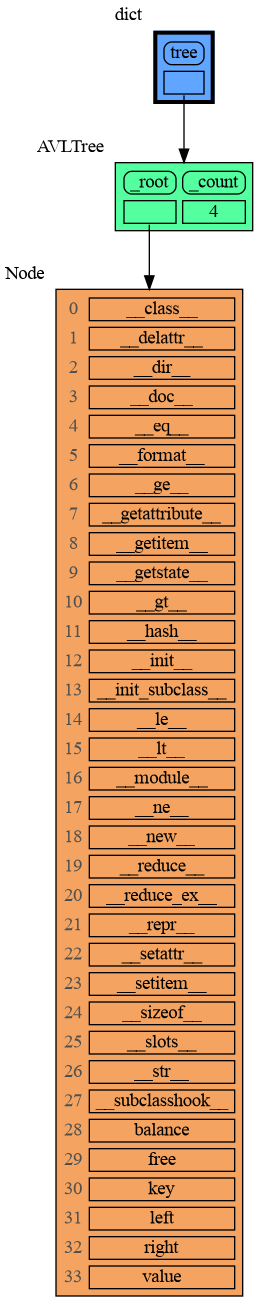
| `mg.rs()` | **r**ender the call **s**tack | `mg.render(mg.get_call_stack())` |
|
|
362
|
+
| `mg.brl()` | **b**lock after **r**endering **l**ocal variables | `mg.block(mg.render, locals())` |
|
|
363
|
+
| `mg.brs()` | **b**lock after **r**endering the call **s**tack | `mg.block(mg.render, mg.get_call_stack())` |
|
|
364
|
+
| `mg.l()` | same as `mg.bsl()` | |
|
|
365
|
+
| `mg.s()` | same as `mg.bss()` | |
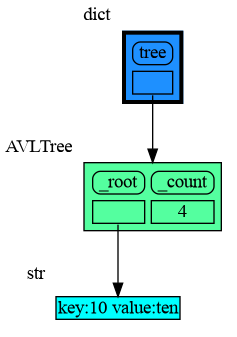
|
|
345
366
|
|
|
346
367
|
For example, executing this program:
|
|
347
368
|
|
|
@@ -353,7 +374,7 @@ squares_collector = []
|
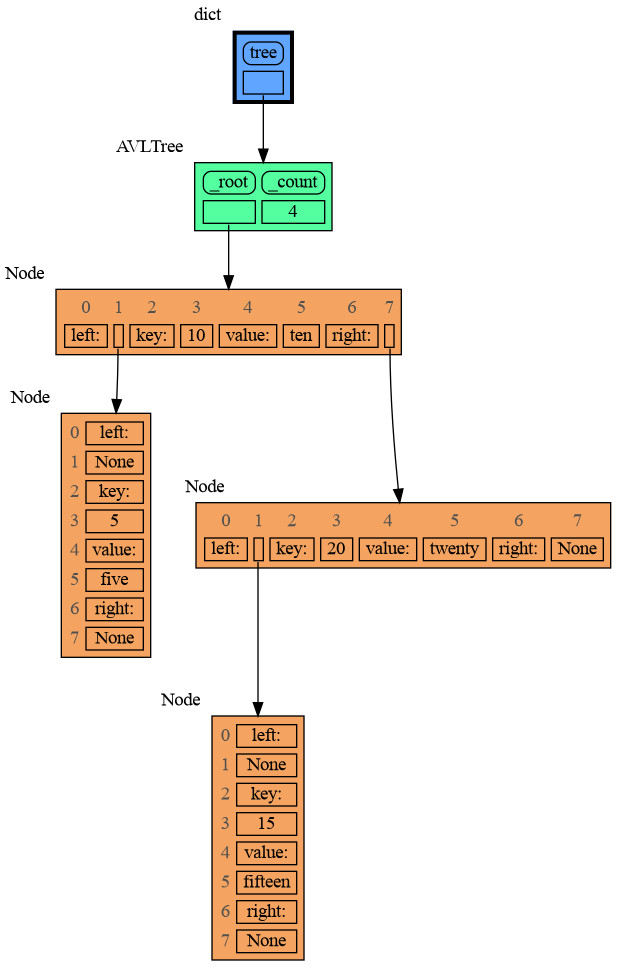
|
|
353
374
|
for i in range(1, 6):
|
|
354
375
|
squares.append(i**2)
|
|
355
376
|
squares_collector.append(squares.copy())
|
|
356
|
-
mg.l() #
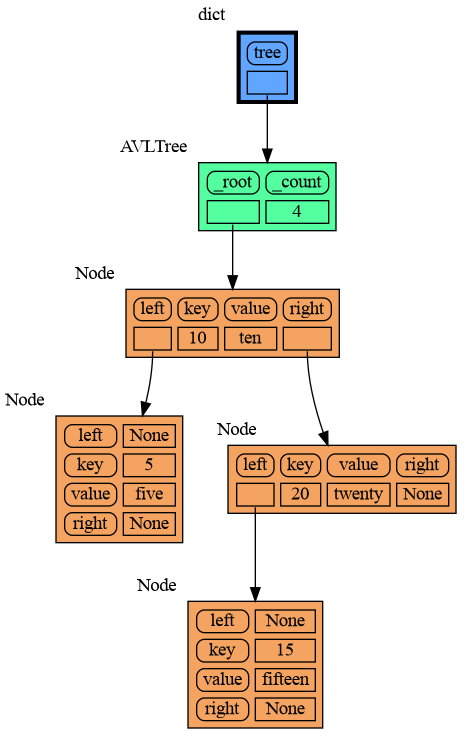
|
|
377
|
+
mg.l() # block after showing local variables
|
|
357
378
|
```
|
|
358
379
|
and pressing <Enter> a number of times, results in:
|
|
359
380
|
|
|
@@ -568,7 +589,7 @@ mg.show(locals())
|
|
|
568
589
|

|
|
569
590
|
|
|
570
591
|
## Introspection ##
|
|
571
|
-
This section is likely to change. Sometimes the introspection fails or is not as desired. For example the `bintrees.avltree.Node` object doesn't show any attributes in the graph below
|
|
592
|
+
This section is likely to change. Sometimes the introspection fails or is not as desired. For example the `bintrees.avltree.Node` object doesn't show any attributes in the graph below.
|
|
572
593
|
|
|
573
594
|
```python
|
|
574
595
|
import memory_graph as mg
|
|
@@ -587,7 +608,7 @@ mg.show(locals())
|
|
|
587
608
|
|
|
588
609
|
|
|
589
610
|
### dir() ###
|
|
590
|
-
A
|
|
611
|
+
A useful start is to give it some color, show the list of all its attributes using `dir()`, and setting an empty Slicer to see the attribute list in full.
|
|
591
612
|
|
|
592
613
|
```python
|
|
593
614
|
import memory_graph as mg
|
|
@@ -609,9 +630,9 @@ mg.show(locals())
|
|
|
609
630
|
```
|
|
610
631
|
|
|
611
632
|
|
|
612
|
-
Next figure out what are the attributes you want to graph and choose a Node type, there are four options
|
|
633
|
+
Next figure out what are the attributes you want to graph and choose a Node type, there are four options:
|
|
613
634
|
|
|
614
|
-
### 1 Node_Base ###
|
|
635
|
+
### 1) Node_Base ###
|
|
615
636
|
Node_base is a leaf node (with no children) and shows just a single value.
|
|
616
637
|
```python
|
|
617
638
|
import memory_graph as mg
|
|
@@ -631,7 +652,7 @@ mg.show(locals())
|
|
|
631
652
|
```
|
|
632
653
|
|
|
633
654
|
|
|
634
|
-
### 2 Node_Linear ###
|
|
655
|
+
### 2) Node_Linear ###
|
|
635
656
|
Node_Linear shows all the values in a line like a list.
|
|
636
657
|
```python
|
|
637
658
|
import memory_graph as mg
|
|
@@ -655,7 +676,7 @@ mg.show(locals())
|
|
|
655
676
|
```
|
|
656
677
|
|
|
657
678
|
|
|
658
|
-
### 3 Node_Key_Value ###
|
|
679
|
+
### 3) Node_Key_Value ###
|
|
659
680
|
Node_Key_Value shows key-value pairs like a dictionary. Note the required `items()` call at the end.
|
|
660
681
|
```python
|
|
661
682
|
import memory_graph as mg
|
|
@@ -679,7 +700,7 @@ mg.show(locals())
|
|
|
679
700
|
```
|
|
680
701
|
|
|
681
702
|
|
|
682
|
-
### 4 Node_Table ###
|
|
703
|
+
### 4) Node_Table ###
|
|
683
704
|
Node_Table shows all the values as a table.
|
|
684
705
|
```python
|
|
685
706
|
import memory_graph as mg
|
|
@@ -716,6 +737,19 @@ mg.block(display, mg.create_graph(mg.locals_jupyter()) ) # the same but blocked
|
|
|
716
737
|
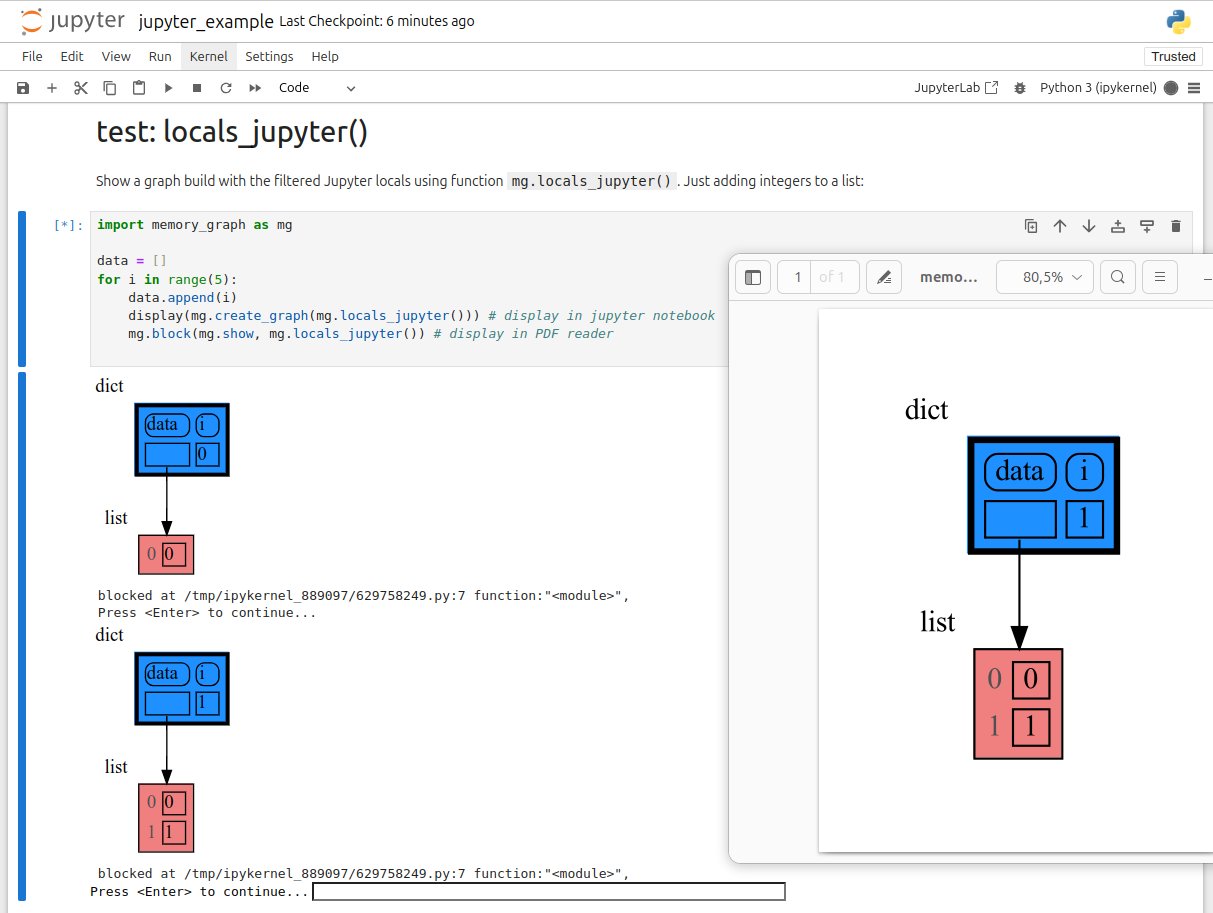
See for example [jupyter_example.ipynb](https://raw.githubusercontent.com/bterwijn/memory_graph/main/images/jupyter_example.ipynb).
|
|
717
738
|
|
|
718
739
|
|
|
740
|
+
## ipython ##
|
|
741
|
+
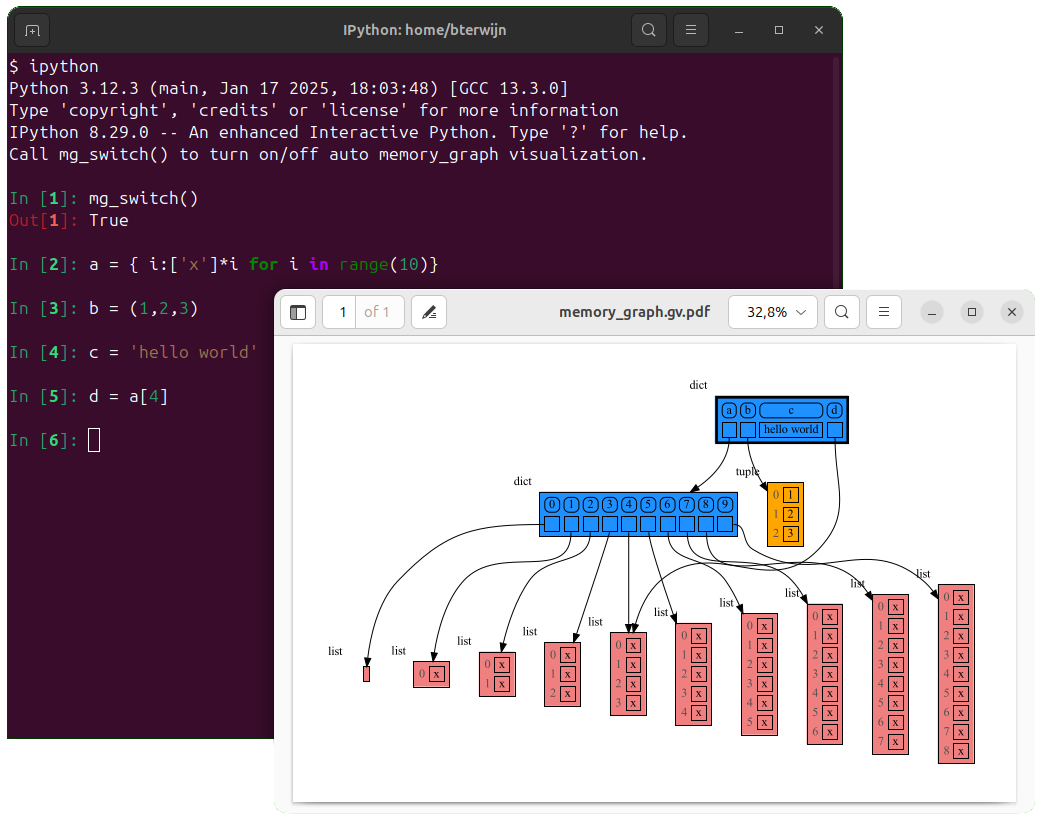
In ipython `locals()` has additional variables that cause problems in the graph, use `mg.locals_ipython()` to get the local variables with these problematic variables filtered out. Use `mg.get_call_stack_ipython()` to get the whole call stack with these variables filtered out.
|
|
742
|
+
|
|
743
|
+
Additionally install file [auto_memory_graph.py](https://raw.githubusercontent.com/bterwijn/memory_graph/main/sc/auto_memory_graph.py) in the ipython startup directory:
|
|
744
|
+
* Linux/Mac: ~/.ipython/profile_default/startup/
|
|
745
|
+
* Windows: %USERPROFILE%\.ipython\profile_default\startup\
|
|
746
|
+
|
|
747
|
+
Then after starting 'ipython' call function `mg_switch()` to turn on/off the automatic visualization of local variables after each command.
|
|
748
|
+
|
|
749
|
+
|
|
750
|
+
## In the Browser ##
|
|
751
|
+
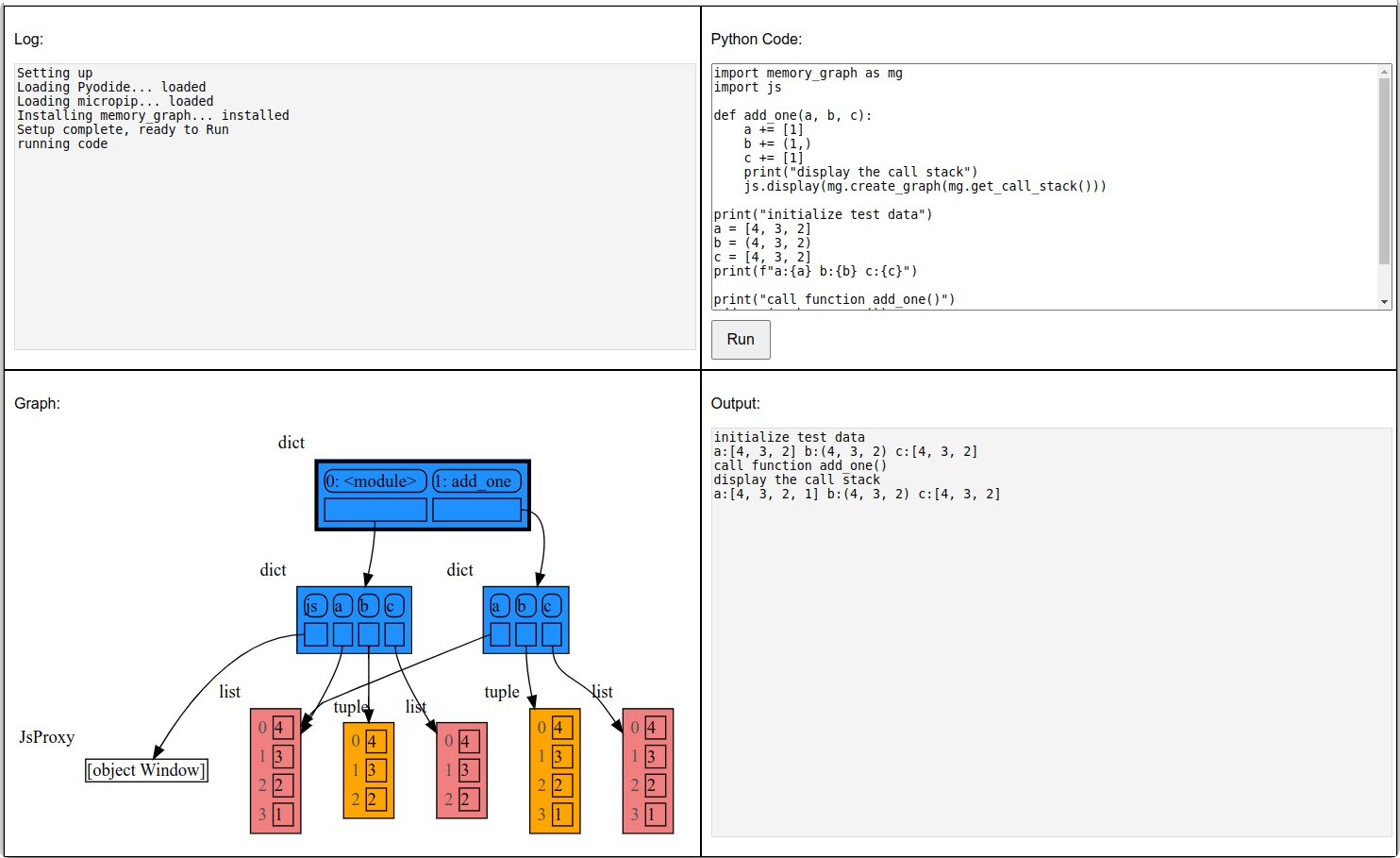
We can run memory_graph in the browser: <a href="https://bterwijn.github.io/memory_graph/src/pyodide.html" target="_blank">Pyodide Example</a>
|
|
752
|
+
|
|
719
753
|
|
|
720
754
|
## Troubleshooting ##
|
|
721
755
|
|
|
@@ -72,6 +72,7 @@ mg.render(data, "my_graph.pdf")
|
|
|
72
72
|
mg.render(data, "my_graph.svg")
|
|
73
73
|
mg.render(data, "my_graph.png")
|
|
74
74
|
mg.render(data, "my_graph.gv") # Graphviz DOT file
|
|
75
|
+
mg.render(data) # renders to 'mg.render_filename' with default value: 'memory_graph.pdf'
|
|
75
76
|
```
|
|
76
77
|
|
|
77
78
|
# Chapters #
|
|
@@ -92,6 +93,10 @@ mg.render(data, "my_graph.gv") # Graphviz DOT file
|
|
|
92
93
|
|
|
93
94
|
[Jupyter Notebook](#jupyter-notebook)
|
|
94
95
|
|
|
96
|
+
[ipython](#ipython)
|
|
97
|
+
|
|
98
|
+
[In the Browser](#in-the-browser)
|
|
99
|
+
|
|
95
100
|
[Troubleshooting](#troubleshooting)
|
|
96
101
|
|
|
97
102
|
|
|
@@ -132,7 +137,7 @@ mg.render(locals(), 'immutable2.png')
|
|
|
132
137
|
|
|
133
138
|
|
|
134
139
|
### Mutable Type ###
|
|
135
|
-
With mutable types the result is different. In the code below variable `a` and `b` both reference the same `list` value [4, 3, 2]. A `list` is a mutable type and therefore when we change variable `a` its value **can** be mutated in place and thus `a` and `b` both reference the same new value afterwards. Thus changing `a` also changes `b` and vice versa. Sometimes we want this but other times we don't and then we will have to make a copy so that `b`
|
|
140
|
+
With mutable types the result is different. In the code below variable `a` and `b` both reference the same `list` value [4, 3, 2]. A `list` is a mutable type and therefore when we change variable `a` its value **can** be mutated in place and thus `a` and `b` both reference the same new value afterwards. Thus changing `a` also changes `b` and vice versa. Sometimes we want this but other times we don't and then we will have to make a copy so that `a` and `b` are independent.
|
|
136
141
|
|
|
137
142
|
```python
|
|
138
143
|
import memory_graph as mg
|
|
@@ -147,7 +152,7 @@ mg.render(locals(), 'mutable2.png')
|
|
|
147
152
|
|:-----------------------------------------------------------:|:-------------------------------------------------------------:|
|
|
148
153
|
| mutable1.png | mutable2.png |
|
|
149
154
|
|
|
150
|
-
One practical reason why Python makes the distinction between mutable and immutable types is that a value of a mutable type
|
|
155
|
+
One practical reason why Python makes the distinction between mutable and immutable types is that a value of a mutable type can be large, making it inefficient to copy each time we change it. Immutable values generally don't need to change as much, or are small which makes copying less of a concern.
|
|
151
156
|
|
|
152
157
|
### Copying ###
|
|
153
158
|
Python offers three different "copy" options that we will demonstrate using a nested list:
|
|
@@ -200,7 +205,7 @@ mg.show(locals())
|
|
|
200
205
|
|
|
201
206
|
|
|
202
207
|
## Call Stack ##
|
|
203
|
-
The `mg.get_call_stack()` function retrieves the entire call stack, including the local variables for each function on the stack. This enables us to visualize the local variables across all active functions simultaneously. Then by examining the graph, we can determine whether any local variables from different functions on the call stack share data. For instance, consider the function `add_one()` which adds the value `1` to each of its parameters
|
|
208
|
+
The `mg.get_call_stack()` function retrieves the entire call stack, including the local variables for each function on the stack. This enables us to visualize the local variables across all active functions simultaneously. Then by examining the graph, we can determine whether any local variables from different functions on the call stack share data. For instance, consider the function `add_one()` which adds the value `1` to each of its parameters `a`, `b`, and `c`.
|
|
204
209
|
|
|
205
210
|
```python
|
|
206
211
|
import memory_graph as mg
|
|
@@ -231,10 +236,18 @@ This is because `b` is of immutable type 'tuple' so its value gets copied automa
|
|
|
231
236
|
It is often helpful to temporarily block program execution to inspect the graph. For this, you can use the `mg.block()` function:
|
|
232
237
|
|
|
233
238
|
```python
|
|
234
|
-
mg.block(fun, arg1, arg2,
|
|
239
|
+
mg.block(fun, arg1, arg2, ...)
|
|
235
240
|
```
|
|
236
241
|
|
|
237
|
-
This function
|
|
242
|
+
This function:
|
|
243
|
+
* first executes `fun(arg1, arg2, ...)`
|
|
244
|
+
* then prints the current source location in the program
|
|
245
|
+
* then blocks execution until the <Enter> key is pressed
|
|
246
|
+
* finally returns the value of the `fun()` call
|
|
247
|
+
|
|
248
|
+
to change it's behavior:
|
|
249
|
+
* Set `mg.block_prints_location = False` to skip printing the source location.
|
|
250
|
+
* Set `mg.press_enter_message = None` to skip printing "Press <Enter> to continue...".
|
|
238
251
|
|
|
239
252
|
### Recursion ###
|
|
240
253
|
The call stack is also helpful to visualize how recursion works. Here we use `mg.block()` to show each step of how recursively ```factorial(3)``` is computed:
|
|
@@ -317,12 +330,20 @@ mg.get_call_stack_after_up_to(after_function, up_to_function="<module>")
|
|
|
317
330
|
|
|
318
331
|
### Debugging without Debugger Tool ###
|
|
319
332
|
|
|
320
|
-
To simplify debugging without a debugger tool, we offer these
|
|
333
|
+
To simplify debugging without a debugger tool, we offer these alias functions that you can insert into your code at the point where you want to visualize a graph:
|
|
321
334
|
|
|
322
335
|
| alias | purpose | function call |
|
|
323
336
|
|:---|:---|:---|
|
|
324
|
-
| `mg.
|
|
325
|
-
| `mg.
|
|
337
|
+
| `mg.sl()` | **s**how **l**ocal variables | `mg.show(locals())` |
|
|
338
|
+
| `mg.ss()` | **s**how the call **s**tack | `mg.show(mg.get_call_stack())` |
|
|
339
|
+
| `mg.bsl()` | **b**lock after **s**howing **l**ocal variables | `mg.block(mg.show, locals())` |
|
|
340
|
+
| `mg.bss()` | **b**lock after **s**howing the call **s**tack | `mg.block(mg.show, mg.get_call_stack())` |
|
|
341
|
+
| `mg.rl()` | **r**ender **l**ocal variables | `mg.render(locals())` |
|
|
342
|
+
| `mg.rs()` | **r**ender the call **s**tack | `mg.render(mg.get_call_stack())` |
|
|
343
|
+
| `mg.brl()` | **b**lock after **r**endering **l**ocal variables | `mg.block(mg.render, locals())` |
|
|
344
|
+
| `mg.brs()` | **b**lock after **r**endering the call **s**tack | `mg.block(mg.render, mg.get_call_stack())` |
|
|
345
|
+
| `mg.l()` | same as `mg.bsl()` | |
|
|
346
|
+
| `mg.s()` | same as `mg.bss()` | |
|
|
326
347
|
|
|
327
348
|
For example, executing this program:
|
|
328
349
|
|
|
@@ -334,7 +355,7 @@ squares_collector = []
|
|
|
334
355
|
for i in range(1, 6):
|
|
335
356
|
squares.append(i**2)
|
|
336
357
|
squares_collector.append(squares.copy())
|
|
337
|
-
mg.l() #
|
|
358
|
+
mg.l() # block after showing local variables
|
|
338
359
|
```
|
|
339
360
|
and pressing <Enter> a number of times, results in:
|
|
340
361
|
|
|
@@ -549,7 +570,7 @@ mg.show(locals())
|
|
|
549
570
|

|
|
550
571
|
|
|
551
572
|
## Introspection ##
|
|
552
|
-
This section is likely to change. Sometimes the introspection fails or is not as desired. For example the `bintrees.avltree.Node` object doesn't show any attributes in the graph below
|
|
573
|
+
This section is likely to change. Sometimes the introspection fails or is not as desired. For example the `bintrees.avltree.Node` object doesn't show any attributes in the graph below.
|
|
553
574
|
|
|
554
575
|
```python
|
|
555
576
|
import memory_graph as mg
|
|
@@ -568,7 +589,7 @@ mg.show(locals())
|
|
|
568
589
|
|
|
569
590
|
|
|
570
591
|
### dir() ###
|
|
571
|
-
A
|
|
592
|
+
A useful start is to give it some color, show the list of all its attributes using `dir()`, and setting an empty Slicer to see the attribute list in full.
|
|
572
593
|
|
|
573
594
|
```python
|
|
574
595
|
import memory_graph as mg
|
|
@@ -590,9 +611,9 @@ mg.show(locals())
|
|
|
590
611
|
```
|
|
591
612
|

|
|
592
613
|
|
|
593
|
-
Next figure out what are the attributes you want to graph and choose a Node type, there are four options
|
|
614
|
+
Next figure out what are the attributes you want to graph and choose a Node type, there are four options:
|
|
594
615
|
|
|
595
|
-
### 1 Node_Base ###
|
|
616
|
+
### 1) Node_Base ###
|
|
596
617
|
Node_base is a leaf node (with no children) and shows just a single value.
|
|
597
618
|
```python
|
|
598
619
|
import memory_graph as mg
|
|
@@ -612,7 +633,7 @@ mg.show(locals())
|
|
|
612
633
|
```
|
|
613
634
|

|
|
614
635
|
|
|
615
|
-
### 2 Node_Linear ###
|
|
636
|
+
### 2) Node_Linear ###
|
|
616
637
|
Node_Linear shows all the values in a line like a list.
|
|
617
638
|
```python
|
|
618
639
|
import memory_graph as mg
|
|
@@ -636,7 +657,7 @@ mg.show(locals())
|
|
|
636
657
|
```
|
|
637
658
|

|
|
638
659
|
|
|
639
|
-
### 3 Node_Key_Value ###
|
|
660
|
+
### 3) Node_Key_Value ###
|
|
640
661
|
Node_Key_Value shows key-value pairs like a dictionary. Note the required `items()` call at the end.
|
|
641
662
|
```python
|
|
642
663
|
import memory_graph as mg
|
|
@@ -660,7 +681,7 @@ mg.show(locals())
|
|
|
660
681
|
```
|
|
661
682
|

|
|
662
683
|
|
|
663
|
-
### 4 Node_Table ###
|
|
684
|
+
### 4) Node_Table ###
|
|
664
685
|
Node_Table shows all the values as a table.
|
|
665
686
|
```python
|
|
666
687
|
import memory_graph as mg
|
|
@@ -697,6 +718,19 @@ mg.block(display, mg.create_graph(mg.locals_jupyter()) ) # the same but blocked
|
|
|
697
718
|
See for example [jupyter_example.ipynb](https://raw.githubusercontent.com/bterwijn/memory_graph/main/images/jupyter_example.ipynb).
|
|
698
719
|

|
|
699
720
|
|
|
721
|
+
## ipython ##
|
|
722
|
+
In ipython `locals()` has additional variables that cause problems in the graph, use `mg.locals_ipython()` to get the local variables with these problematic variables filtered out. Use `mg.get_call_stack_ipython()` to get the whole call stack with these variables filtered out.
|
|
723
|
+
|
|
724
|
+
Additionally install file [auto_memory_graph.py](https://raw.githubusercontent.com/bterwijn/memory_graph/main/sc/auto_memory_graph.py) in the ipython startup directory:
|
|
725
|
+
* Linux/Mac: ~/.ipython/profile_default/startup/
|
|
726
|
+
* Windows: %USERPROFILE%\.ipython\profile_default\startup\
|
|
727
|
+
|
|
728
|
+
Then after starting 'ipython' call function `mg_switch()` to turn on/off the automatic visualization of local variables after each command.
|
|
729
|
+

|
|
730
|
+
|
|
731
|
+
## In the Browser ##
|
|
732
|
+
We can run memory_graph in the browser: <a href="https://bterwijn.github.io/memory_graph/src/pyodide.html" target="_blank">Pyodide Example</a>
|
|
733
|
+

|
|
700
734
|
|
|
701
735
|
## Troubleshooting ##
|
|
702
736
|
|
|
Binary file
|
|
Binary file
|
|
Binary file
|
|
Binary file
|
|
Binary file
|
|
Binary file
|
|
Binary file
|
|
Binary file
|
|
@@ -14,10 +14,10 @@ pip install --upgrade .
|
|
|
14
14
|
|
|
15
15
|
|
|
16
16
|
# ===== prepare packages for upload
|
|
17
|
-
# - increase version number in setup.py
|
|
17
|
+
# - increase version number in: setup.py memory_graph/__init__.py
|
|
18
18
|
# - update images:
|
|
19
19
|
cd images; bash create_images.sh; cd ..
|
|
20
|
-
# - git commit -am "version X.X.X"
|
|
20
|
+
# - git commit -am "version X.X.X" && git push
|
|
21
21
|
rm -f ./dist/*
|
|
22
22
|
python setup.py check
|
|
23
23
|
python setup.py sdist
|