memory-graph 0.3.87__tar.gz → 0.3.89__tar.gz
This diff represents the content of publicly available package versions that have been released to one of the supported registries. The information contained in this diff is provided for informational purposes only and reflects changes between package versions as they appear in their respective public registries.
- {memory_graph-0.3.87 → memory_graph-0.3.89}/PKG-INFO +23 -14
- {memory_graph-0.3.87 → memory_graph-0.3.89}/README.md +22 -13
- {memory_graph-0.3.87 → memory_graph-0.3.89}/memory_graph/__init__.py +13 -1
- {memory_graph-0.3.87 → memory_graph-0.3.89}/memory_graph/config_default.py +5 -0
- memory_graph-0.3.89/memory_graph/extension_pandas.py +142 -0
- {memory_graph-0.3.87 → memory_graph-0.3.89}/memory_graph/utils.py +4 -0
- {memory_graph-0.3.87 → memory_graph-0.3.89}/memory_graph.egg-info/PKG-INFO +23 -14
- {memory_graph-0.3.87 → memory_graph-0.3.89}/pyproject.toml +1 -1
- memory_graph-0.3.87/memory_graph/extension_pandas.py +0 -48
- {memory_graph-0.3.87 → memory_graph-0.3.89}/LICENSE.txt +0 -0
- {memory_graph-0.3.87 → memory_graph-0.3.89}/memory_graph/call_stack.py +0 -0
- {memory_graph-0.3.87 → memory_graph-0.3.89}/memory_graph/config.py +0 -0
- {memory_graph-0.3.87 → memory_graph-0.3.89}/memory_graph/config_helpers.py +0 -0
- {memory_graph-0.3.87 → memory_graph-0.3.89}/memory_graph/extension_numpy.py +0 -0
- {memory_graph-0.3.87 → memory_graph-0.3.89}/memory_graph/extension_torch.py +0 -0
- {memory_graph-0.3.87 → memory_graph-0.3.89}/memory_graph/html_table.py +0 -0
- {memory_graph-0.3.87 → memory_graph-0.3.89}/memory_graph/list_view.py +0 -0
- {memory_graph-0.3.87 → memory_graph-0.3.89}/memory_graph/memory_to_nodes.py +0 -0
- {memory_graph-0.3.87 → memory_graph-0.3.89}/memory_graph/node_base.py +0 -0
- {memory_graph-0.3.87 → memory_graph-0.3.89}/memory_graph/node_key_value.py +0 -0
- {memory_graph-0.3.87 → memory_graph-0.3.89}/memory_graph/node_leaf.py +0 -0
- {memory_graph-0.3.87 → memory_graph-0.3.89}/memory_graph/node_linear.py +0 -0
- {memory_graph-0.3.87 → memory_graph-0.3.89}/memory_graph/node_table.py +0 -0
- {memory_graph-0.3.87 → memory_graph-0.3.89}/memory_graph/sequence.py +0 -0
- {memory_graph-0.3.87 → memory_graph-0.3.89}/memory_graph/slicer.py +0 -0
- {memory_graph-0.3.87 → memory_graph-0.3.89}/memory_graph/slices.py +0 -0
- {memory_graph-0.3.87 → memory_graph-0.3.89}/memory_graph/slices_iterator.py +0 -0
- {memory_graph-0.3.87 → memory_graph-0.3.89}/memory_graph/slices_table_iterator.py +0 -0
- {memory_graph-0.3.87 → memory_graph-0.3.89}/memory_graph/test.py +0 -0
- {memory_graph-0.3.87 → memory_graph-0.3.89}/memory_graph/test_max_graph_depth.py +0 -0
- {memory_graph-0.3.87 → memory_graph-0.3.89}/memory_graph/test_memory_graph.py +0 -0
- {memory_graph-0.3.87 → memory_graph-0.3.89}/memory_graph/test_memory_to_nodes.py +0 -0
- {memory_graph-0.3.87 → memory_graph-0.3.89}/memory_graph/test_sequence.py +0 -0
- {memory_graph-0.3.87 → memory_graph-0.3.89}/memory_graph/test_slicer.py +0 -0
- {memory_graph-0.3.87 → memory_graph-0.3.89}/memory_graph/test_slices.py +0 -0
- {memory_graph-0.3.87 → memory_graph-0.3.89}/memory_graph/test_slices_iterator.py +0 -0
- {memory_graph-0.3.87 → memory_graph-0.3.89}/memory_graph.egg-info/SOURCES.txt +0 -0
- {memory_graph-0.3.87 → memory_graph-0.3.89}/memory_graph.egg-info/dependency_links.txt +0 -0
- {memory_graph-0.3.87 → memory_graph-0.3.89}/memory_graph.egg-info/requires.txt +0 -0
- {memory_graph-0.3.87 → memory_graph-0.3.89}/memory_graph.egg-info/top_level.txt +0 -0
- {memory_graph-0.3.87 → memory_graph-0.3.89}/setup.cfg +0 -0
- {memory_graph-0.3.87 → memory_graph-0.3.89}/setup.py +0 -0
|
@@ -1,6 +1,6 @@
|
|
|
1
1
|
Metadata-Version: 2.4
|
|
2
2
|
Name: memory_graph
|
|
3
|
-
Version: 0.3.
|
|
3
|
+
Version: 0.3.89
|
|
4
4
|
Summary: Teaching tool and debugging aid in context of references, mutable data types, and shallow and deep copy.
|
|
5
5
|
Author-email: Bas Terwijn <bterwijn@gmail.com>
|
|
6
6
|
License-Expression: BSD-2-Clause
|
|
@@ -753,7 +753,7 @@ Visualization of different sorting algorithms in Memory Graph Web Debugger.
|
|
|
753
753
|
# Bitwise Operators #
|
|
754
754
|
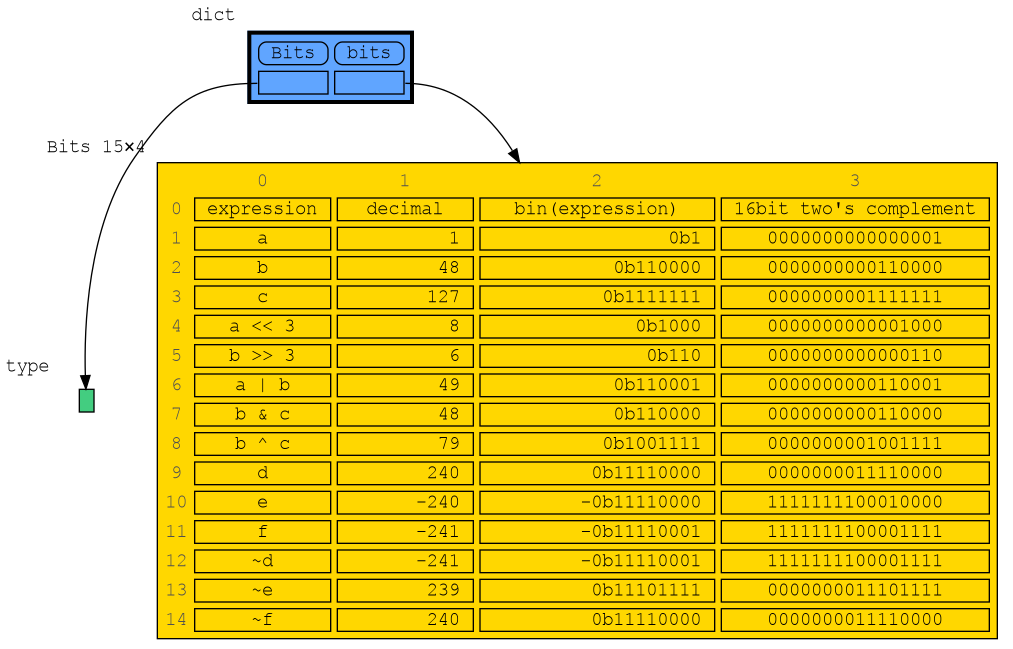
In this configuration example we show the decimal, binary and [two's complement representation](https://www.cs.cornell.edu/~tomf/notes/cps104/twoscomp.html) representation of `int` values of dictionary subclass `Bits` to show the result of [bitwise operators](https://docs.python.org/3/library/stdtypes.html?utm_source=chatgpt.com#bitwise-operations-on-integer-types). The `~` (inverse) operator can be a bit confusing if not shown with two's complement representation.
|
|
755
755
|
|
|
756
|
-
- [bitwise operators](https://memory-graph.com/#codeurl=https://raw.githubusercontent.com/bterwijn/memory_graph/refs/heads/main/src/bitwise_operators.py&breakpoints=
|
|
756
|
+
- [bitwise operators](https://memory-graph.com/#codeurl=https://raw.githubusercontent.com/bterwijn/memory_graph/refs/heads/main/src/bitwise_operators.py&breakpoints=22&continues=1&play)
|
|
757
757
|
|
|
758
758
|
|
|
759
759
|
|
|
@@ -915,12 +915,12 @@ Run a Linked_List iterator example in the [Memory Graph Web Debugger](https://me
|
|
|
915
915
|
This example shows the flow of control when using a decorator. A decorator wraps a function and is active before and after the function is called.
|
|
916
916
|
|
|
917
917
|
```python
|
|
918
|
-
def log_call(function):
|
|
918
|
+
def log_call(function): # decorator example
|
|
919
919
|
def wrapper(*args, **kwargs):
|
|
920
|
-
print(f"
|
|
921
|
-
|
|
922
|
-
print(f"
|
|
923
|
-
return
|
|
920
|
+
print(f"log: '{function.__name__}' called with: {args}, {kwargs}")
|
|
921
|
+
return_value = function(*args, **kwargs)
|
|
922
|
+
print(f"log: '{function.__name__}' returned with: {return_value}")
|
|
923
|
+
return return_value
|
|
924
924
|
return wrapper
|
|
925
925
|
|
|
926
926
|
@log_call
|
|
@@ -932,11 +932,11 @@ def calculate_total(price, quantity, rounding=False):
|
|
|
932
932
|
def send_email(receiver, message, sender="support@company.com"):
|
|
933
933
|
print(f"Sending email to:{receiver} from:{sender}, {message}")
|
|
934
934
|
|
|
935
|
-
total = calculate_total(
|
|
935
|
+
total = calculate_total(2.4, 3, rounding=True)
|
|
936
936
|
print(total)
|
|
937
937
|
send_email("alice@example.com", "Your order is ready")
|
|
938
938
|
```
|
|
939
|
-
Run it in the [Memory Graph Web Debugger](https://memory-graph.com/#codeurl=https://raw.githubusercontent.com/bterwijn/memory_graph/refs/heads/main/src/decorator.py&breakpoints=
|
|
939
|
+
Run it in the [Memory Graph Web Debugger](https://memory-graph.com/#codeurl=https://raw.githubusercontent.com/bterwijn/memory_graph/refs/heads/main/src/decorator.py&breakpoints=19&continues=1&play).
|
|
940
940
|
|
|
941
941
|
## Exception Handling ##
|
|
942
942
|
|
|
@@ -1191,7 +1191,13 @@ mg.show(locals())
|
|
|
1191
1191
|
|
|
1192
1192
|
|
|
1193
1193
|
## All attributes using dir() ##
|
|
1194
|
-
|
|
1194
|
+
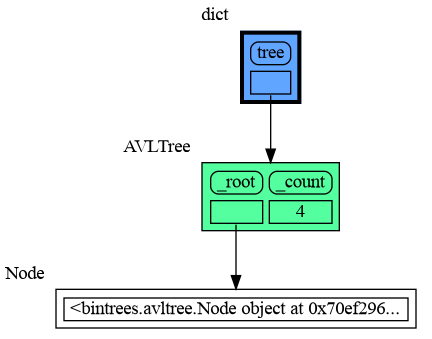
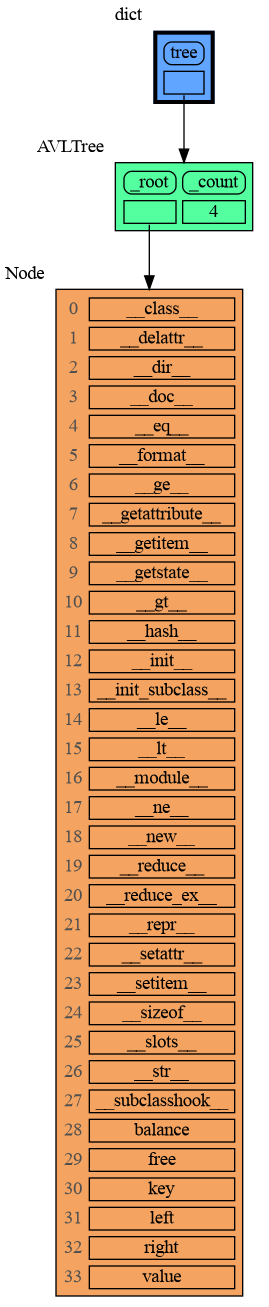
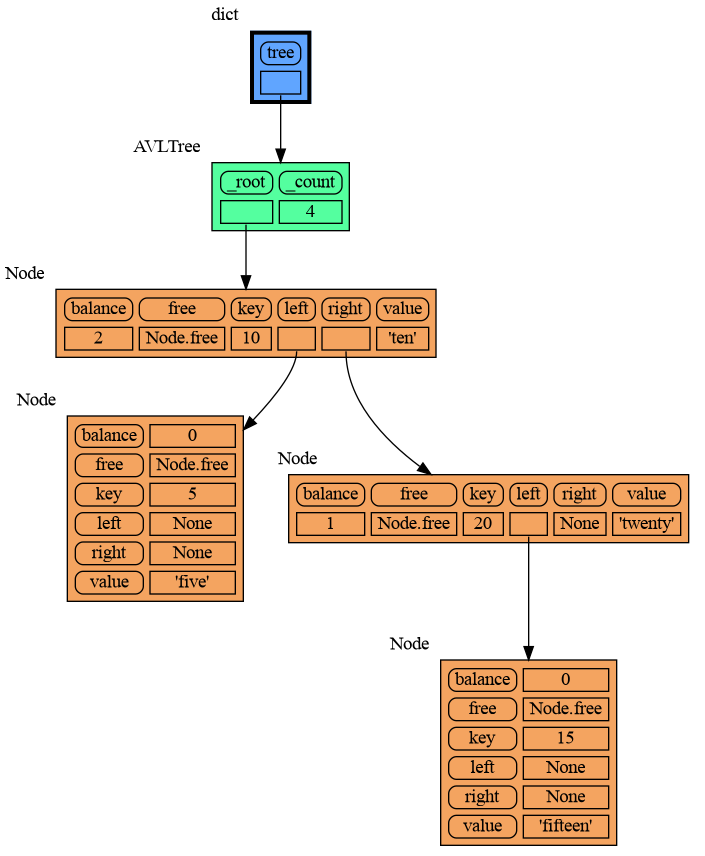
Then first give it some color, show the its attributes using either of:
|
|
1195
|
+
|
|
1196
|
+
- mg.node_all_attributes(data)
|
|
1197
|
+
- mg.node_non_callable_attributes(data)
|
|
1198
|
+
- mg.node_non_dunder_attributes(data)
|
|
1199
|
+
|
|
1200
|
+
and set an empty Slicer to see all attributes.
|
|
1195
1201
|
|
|
1196
1202
|
```python
|
|
1197
1203
|
import memory_graph as mg
|
|
@@ -1205,15 +1211,16 @@ tree.insert(20, "twenty")
|
|
|
1205
1211
|
tree.insert(15, "fifteen")
|
|
1206
1212
|
|
|
1207
1213
|
mg.config.type_to_color[bintrees.avltree.Node] = "sandybrown"
|
|
1208
|
-
mg.config.type_to_node[bintrees.avltree.Node] = lambda data:
|
|
1209
|
-
|
|
1214
|
+
mg.config.type_to_node[bintrees.avltree.Node] = lambda data:
|
|
1215
|
+
mg.node_non_dunder_attributes(data)
|
|
1210
1216
|
mg.config.type_to_slicer[bintrees.avltree.Node] = mg.Slicer()
|
|
1211
1217
|
|
|
1212
1218
|
mg.show(locals())
|
|
1213
1219
|
```
|
|
1214
|
-
|
|
1215
1220
|
|
|
1216
|
-
|
|
1221
|
+
|
|
1222
|
+
|
|
1223
|
+
Next figure out what the attributes are you actually want to graph and choose a Node type, there are four options:
|
|
1217
1224
|
|
|
1218
1225
|
## 1) Node_Leaf ##
|
|
1219
1226
|
Node_Leaf is a node with no children and shows just a single value.
|
|
@@ -1555,6 +1562,8 @@ mg.show(locals())
|
|
|
1555
1562
|
|
|
1556
1563
|
Or see it in the [Memory Graph Web Debugger](https://memory-graph.com/#micropip=numpy&codeurl=https://raw.githubusercontent.com/bterwijn/memory_graph/refs/heads/main/src/mg_numpy.py&play).
|
|
1557
1564
|
|
|
1565
|
+
See this [introduction to numpy operations](https://memory-graph.com/#micropip=numpy&codeurl=https://raw.githubusercontent.com/bterwijn/memory_graph/refs/heads/main/src/numpy_operations.py×tep=0.5&play).
|
|
1566
|
+
|
|
1558
1567
|
## Pandas ##
|
|
1559
1568
|
For pandas types `Series` and `DataFrame`, use `mg.extend_pandas()`:
|
|
1560
1569
|
|
|
@@ -733,7 +733,7 @@ Visualization of different sorting algorithms in Memory Graph Web Debugger.
|
|
|
733
733
|
# Bitwise Operators #
|
|
734
734
|
In this configuration example we show the decimal, binary and [two's complement representation](https://www.cs.cornell.edu/~tomf/notes/cps104/twoscomp.html) representation of `int` values of dictionary subclass `Bits` to show the result of [bitwise operators](https://docs.python.org/3/library/stdtypes.html?utm_source=chatgpt.com#bitwise-operations-on-integer-types). The `~` (inverse) operator can be a bit confusing if not shown with two's complement representation.
|
|
735
735
|
|
|
736
|
-
- [bitwise operators](https://memory-graph.com/#codeurl=https://raw.githubusercontent.com/bterwijn/memory_graph/refs/heads/main/src/bitwise_operators.py&breakpoints=
|
|
736
|
+
- [bitwise operators](https://memory-graph.com/#codeurl=https://raw.githubusercontent.com/bterwijn/memory_graph/refs/heads/main/src/bitwise_operators.py&breakpoints=22&continues=1&play)
|
|
737
737
|
|
|
738
738
|

|
|
739
739
|
|
|
@@ -895,12 +895,12 @@ Run a Linked_List iterator example in the [Memory Graph Web Debugger](https://me
|
|
|
895
895
|
This example shows the flow of control when using a decorator. A decorator wraps a function and is active before and after the function is called.
|
|
896
896
|
|
|
897
897
|
```python
|
|
898
|
-
def log_call(function):
|
|
898
|
+
def log_call(function): # decorator example
|
|
899
899
|
def wrapper(*args, **kwargs):
|
|
900
|
-
print(f"
|
|
901
|
-
|
|
902
|
-
print(f"
|
|
903
|
-
return
|
|
900
|
+
print(f"log: '{function.__name__}' called with: {args}, {kwargs}")
|
|
901
|
+
return_value = function(*args, **kwargs)
|
|
902
|
+
print(f"log: '{function.__name__}' returned with: {return_value}")
|
|
903
|
+
return return_value
|
|
904
904
|
return wrapper
|
|
905
905
|
|
|
906
906
|
@log_call
|
|
@@ -912,11 +912,11 @@ def calculate_total(price, quantity, rounding=False):
|
|
|
912
912
|
def send_email(receiver, message, sender="support@company.com"):
|
|
913
913
|
print(f"Sending email to:{receiver} from:{sender}, {message}")
|
|
914
914
|
|
|
915
|
-
total = calculate_total(
|
|
915
|
+
total = calculate_total(2.4, 3, rounding=True)
|
|
916
916
|
print(total)
|
|
917
917
|
send_email("alice@example.com", "Your order is ready")
|
|
918
918
|
```
|
|
919
|
-
Run it in the [Memory Graph Web Debugger](https://memory-graph.com/#codeurl=https://raw.githubusercontent.com/bterwijn/memory_graph/refs/heads/main/src/decorator.py&breakpoints=
|
|
919
|
+
Run it in the [Memory Graph Web Debugger](https://memory-graph.com/#codeurl=https://raw.githubusercontent.com/bterwijn/memory_graph/refs/heads/main/src/decorator.py&breakpoints=19&continues=1&play).
|
|
920
920
|
|
|
921
921
|
## Exception Handling ##
|
|
922
922
|
|
|
@@ -1171,7 +1171,13 @@ mg.show(locals())
|
|
|
1171
1171
|

|
|
1172
1172
|
|
|
1173
1173
|
## All attributes using dir() ##
|
|
1174
|
-
|
|
1174
|
+
Then first give it some color, show the its attributes using either of:
|
|
1175
|
+
|
|
1176
|
+
- mg.node_all_attributes(data)
|
|
1177
|
+
- mg.node_non_callable_attributes(data)
|
|
1178
|
+
- mg.node_non_dunder_attributes(data)
|
|
1179
|
+
|
|
1180
|
+
and set an empty Slicer to see all attributes.
|
|
1175
1181
|
|
|
1176
1182
|
```python
|
|
1177
1183
|
import memory_graph as mg
|
|
@@ -1185,15 +1191,16 @@ tree.insert(20, "twenty")
|
|
|
1185
1191
|
tree.insert(15, "fifteen")
|
|
1186
1192
|
|
|
1187
1193
|
mg.config.type_to_color[bintrees.avltree.Node] = "sandybrown"
|
|
1188
|
-
mg.config.type_to_node[bintrees.avltree.Node] = lambda data:
|
|
1189
|
-
|
|
1194
|
+
mg.config.type_to_node[bintrees.avltree.Node] = lambda data:
|
|
1195
|
+
mg.node_non_dunder_attributes(data)
|
|
1190
1196
|
mg.config.type_to_slicer[bintrees.avltree.Node] = mg.Slicer()
|
|
1191
1197
|
|
|
1192
1198
|
mg.show(locals())
|
|
1193
1199
|
```
|
|
1194
|
-

|
|
1195
1200
|
|
|
1196
|
-
|
|
1201
|
+

|
|
1202
|
+
|
|
1203
|
+
Next figure out what the attributes are you actually want to graph and choose a Node type, there are four options:
|
|
1197
1204
|
|
|
1198
1205
|
## 1) Node_Leaf ##
|
|
1199
1206
|
Node_Leaf is a node with no children and shows just a single value.
|
|
@@ -1535,6 +1542,8 @@ mg.show(locals())
|
|
|
1535
1542
|
|
|
1536
1543
|
Or see it in the [Memory Graph Web Debugger](https://memory-graph.com/#micropip=numpy&codeurl=https://raw.githubusercontent.com/bterwijn/memory_graph/refs/heads/main/src/mg_numpy.py&play).
|
|
1537
1544
|
|
|
1545
|
+
See this [introduction to numpy operations](https://memory-graph.com/#micropip=numpy&codeurl=https://raw.githubusercontent.com/bterwijn/memory_graph/refs/heads/main/src/numpy_operations.py×tep=0.5&play).
|
|
1546
|
+
|
|
1538
1547
|
## Pandas ##
|
|
1539
1548
|
For pandas types `Series` and `DataFrame`, use `mg.extend_pandas()`:
|
|
1540
1549
|
|
|
@@ -2,7 +2,7 @@
|
|
|
2
2
|
# Copyright (c) 2023, Bas Terwijn.
|
|
3
3
|
# SPDX-License-Identifier: BSD-2-Clause
|
|
4
4
|
|
|
5
|
-
__version__ = "0.3.
|
|
5
|
+
__version__ = "0.3.89"
|
|
6
6
|
__author__ = 'Bas Terwijn'
|
|
7
7
|
|
|
8
8
|
import memory_graph.memory_to_nodes as memory_to_nodes
|
|
@@ -537,3 +537,15 @@ def collapse_type(type_name):
|
|
|
537
537
|
def reset_type(type_name):
|
|
538
538
|
del mg.config.type_to_node[type_name]
|
|
539
539
|
del mg.config.type_to_color[type_name]
|
|
540
|
+
|
|
541
|
+
# ------------ atributes to Node_Key_Value
|
|
542
|
+
|
|
543
|
+
def node_all_attributes(data):
|
|
544
|
+
return Node_Key_Value(data, [(attr, getattr(data, attr)) for attr in dir(data)])
|
|
545
|
+
|
|
546
|
+
def node_non_callable_attributes(data):
|
|
547
|
+
attr_values = [(attr, getattr(data, attr)) for attr in dir(data)]
|
|
548
|
+
return Node_Key_Value(data, [(attr, value) for attr, value in attr_values if not callable(value)])
|
|
549
|
+
|
|
550
|
+
def node_non_dunder_attributes(data):
|
|
551
|
+
return Node_Key_Value(data, [(attr, getattr(data, attr)) for attr in dir(data) if not attr.startswith('__')])
|
|
@@ -179,6 +179,11 @@ def reset():
|
|
|
179
179
|
call_stack: lambda data: Node_Key_Value(data, data.items()),
|
|
180
180
|
type: lambda data: Node_Key_Value(data, utils.filter_type_attributes(vars(data).items())),
|
|
181
181
|
range: lambda data: Node_Key_Value(data, {'start':data.start, 'stop':data.stop, 'step':data.step}.items()),
|
|
182
|
+
tuple: lambda data: (
|
|
183
|
+
Node_Key_Value(data, zip(data._fields, iter(data)))
|
|
184
|
+
if utils.is_namedtuple(data) else
|
|
185
|
+
Node_Linear(data, iter(data))
|
|
186
|
+
),
|
|
182
187
|
dict: lambda data: (
|
|
183
188
|
Node_Key_Value(data, utils.filter_dict(data) )
|
|
184
189
|
if dict in config.embedding_types else
|
|
@@ -0,0 +1,142 @@
|
|
|
1
|
+
# This file is part of memory_graph.
|
|
2
|
+
# Copyright (c) 2023, Bas Terwijn.
|
|
3
|
+
# SPDX-License-Identifier: BSD-2-Clause
|
|
4
|
+
|
|
5
|
+
"""Extension to add memory graph configuration for public Pandas values."""
|
|
6
|
+
import reprlib
|
|
7
|
+
|
|
8
|
+
from memory_graph.node_leaf import Node_Leaf
|
|
9
|
+
from memory_graph.node_table import Node_Table
|
|
10
|
+
|
|
11
|
+
import memory_graph.config as config
|
|
12
|
+
import memory_graph.config_default as config_default
|
|
13
|
+
|
|
14
|
+
|
|
15
|
+
def _display_value(value):
|
|
16
|
+
"""Keep object references, but display Pandas scalar values without internals."""
|
|
17
|
+
import pandas as pd
|
|
18
|
+
|
|
19
|
+
if value is pd.NA or value is pd.NaT:
|
|
20
|
+
return str(value)
|
|
21
|
+
if isinstance(value, (pd.Timestamp, pd.Timedelta, pd.Period, pd.Interval)):
|
|
22
|
+
return str(value)
|
|
23
|
+
return value
|
|
24
|
+
|
|
25
|
+
|
|
26
|
+
def _column_name(name, default="value"):
|
|
27
|
+
return default if name is None else str(name)
|
|
28
|
+
|
|
29
|
+
|
|
30
|
+
def _dataframe_to_node(data):
|
|
31
|
+
# Unlike .values, itertuples does not coerce all numeric columns to one dtype.
|
|
32
|
+
return Node_Table(
|
|
33
|
+
data,
|
|
34
|
+
[[_display_value(value) for value in row]
|
|
35
|
+
for row in data.itertuples(index=False, name=None)],
|
|
36
|
+
col_names=[str(name) for name in data.columns],
|
|
37
|
+
row_names=[str(name) for name in data.index],
|
|
38
|
+
)
|
|
39
|
+
|
|
40
|
+
|
|
41
|
+
def _series_to_node(data):
|
|
42
|
+
return Node_Table(
|
|
43
|
+
data,
|
|
44
|
+
[[_display_value(value)] for value in data.tolist()],
|
|
45
|
+
col_names=[_column_name(data.name)],
|
|
46
|
+
row_names=[str(name) for name in data.index],
|
|
47
|
+
)
|
|
48
|
+
|
|
49
|
+
|
|
50
|
+
def _index_to_node(data):
|
|
51
|
+
# Also handles RangeIndex, DatetimeIndex, TimedeltaIndex and PeriodIndex
|
|
52
|
+
# through config's base-class lookup.
|
|
53
|
+
return Node_Table(
|
|
54
|
+
data,
|
|
55
|
+
[[_display_value(value)] for value in data.tolist()],
|
|
56
|
+
col_names=[_column_name(data.name)],
|
|
57
|
+
)
|
|
58
|
+
|
|
59
|
+
|
|
60
|
+
def _multiindex_to_node(data):
|
|
61
|
+
# Use the actual row labels, not .levels (which includes unused labels).
|
|
62
|
+
return Node_Table(
|
|
63
|
+
data,
|
|
64
|
+
[[_display_value(value) for value in row] for row in data.tolist()],
|
|
65
|
+
col_names=[_column_name(name, f"level_{i}")
|
|
66
|
+
for i, name in enumerate(data.names)],
|
|
67
|
+
)
|
|
68
|
+
|
|
69
|
+
|
|
70
|
+
class _Categorical_Table(Node_Table):
|
|
71
|
+
"""Show values as a table, with category order as compact metadata."""
|
|
72
|
+
|
|
73
|
+
def get_label(self, slices):
|
|
74
|
+
data = self.get_data()
|
|
75
|
+
return (super().get_label(slices)
|
|
76
|
+
+ f"\ncategories={reprlib.repr(data.categories.tolist())}"
|
|
77
|
+
+ f"\nordered={data.ordered}")
|
|
78
|
+
|
|
79
|
+
|
|
80
|
+
def _categorical_to_node(data):
|
|
81
|
+
return _Categorical_Table(
|
|
82
|
+
data,
|
|
83
|
+
[[_display_value(value)] for value in data.tolist()],
|
|
84
|
+
col_names=[_column_name(getattr(data, "name", None))],
|
|
85
|
+
)
|
|
86
|
+
|
|
87
|
+
|
|
88
|
+
def _intervalindex_to_node(data):
|
|
89
|
+
return Node_Table(
|
|
90
|
+
data,
|
|
91
|
+
[[_display_value(left), _display_value(right), data.closed]
|
|
92
|
+
for left, right in zip(data.left.tolist(), data.right.tolist())],
|
|
93
|
+
col_names=["left", "right", "closed"],
|
|
94
|
+
)
|
|
95
|
+
|
|
96
|
+
|
|
97
|
+
def _scalar_to_node(data):
|
|
98
|
+
return Node_Leaf(data, str(data))
|
|
99
|
+
|
|
100
|
+
|
|
101
|
+
def _pandas_types():
|
|
102
|
+
"""Keep optional Pandas imports inside the extension, as before."""
|
|
103
|
+
import pandas as pd
|
|
104
|
+
|
|
105
|
+
return {
|
|
106
|
+
pd.DataFrame: (_dataframe_to_node, "olivedrab1", "#3a4d13"),
|
|
107
|
+
pd.Series: (_series_to_node, "olivedrab2", "#3a4d13"),
|
|
108
|
+
pd.Index: (_index_to_node, "olivedrab3", "#384d24"),
|
|
109
|
+
pd.MultiIndex: (_multiindex_to_node, "palegreen2", "#244d32"),
|
|
110
|
+
pd.CategoricalIndex: (_categorical_to_node, "darkseagreen2", "#324d39"),
|
|
111
|
+
pd.Categorical: (_categorical_to_node, "darkseagreen2", "#324d39"),
|
|
112
|
+
pd.IntervalIndex: (_intervalindex_to_node, "lightgoldenrod1", "#5c5125"),
|
|
113
|
+
# IndexSlice is an instance, not a public class or a table. Obtain its
|
|
114
|
+
# type from the public singleton instead of importing a private type.
|
|
115
|
+
type(pd.IndexSlice): (
|
|
116
|
+
lambda data: Node_Leaf(data, "pd.IndexSlice (slice helper)"),
|
|
117
|
+
"lightsteelblue1", "#30465c",
|
|
118
|
+
),
|
|
119
|
+
pd.Timestamp: (_scalar_to_node, "olivedrab2", "#3a4d13"),
|
|
120
|
+
pd.Timedelta: (_scalar_to_node, "olivedrab2", "#3a4d13"),
|
|
121
|
+
pd.Period: (_scalar_to_node, "olivedrab2", "#3a4d13"),
|
|
122
|
+
pd.Interval: (_scalar_to_node, "lightgoldenrod1", "#5c5125"),
|
|
123
|
+
type(pd.NA): (_scalar_to_node, "gray85", "#454545"),
|
|
124
|
+
type(pd.NaT): (_scalar_to_node, "gray85", "#454545"),
|
|
125
|
+
}
|
|
126
|
+
|
|
127
|
+
|
|
128
|
+
def extend_pandas():
|
|
129
|
+
for data_type, (to_node, light, dark) in _pandas_types().items():
|
|
130
|
+
config.type_to_node[data_type] = to_node
|
|
131
|
+
config_default.type_to_color_light[data_type] = light
|
|
132
|
+
config_default.type_to_color_dark[data_type] = dark
|
|
133
|
+
config.type_to_color[data_type] = dark if config.color_mode_dark else light
|
|
134
|
+
|
|
135
|
+
|
|
136
|
+
def unextend_pandas():
|
|
137
|
+
for data_type in _pandas_types():
|
|
138
|
+
config.type_to_node.pop(data_type, None)
|
|
139
|
+
config.type_to_color.pop(data_type, None)
|
|
140
|
+
# Remove theme defaults too, so changing theme cannot re-enable colors.
|
|
141
|
+
config_default.type_to_color_light.pop(data_type, None)
|
|
142
|
+
config_default.type_to_color_dark.pop(data_type, None)
|
|
@@ -165,6 +165,10 @@ def is_finite_iterable(data):
|
|
|
165
165
|
return True
|
|
166
166
|
except TypeError:
|
|
167
167
|
return False
|
|
168
|
+
|
|
169
|
+
def is_namedtuple(data):
|
|
170
|
+
""" Returns 'True' if 'data' is a namedtuple. """
|
|
171
|
+
return isinstance(data, tuple) and hasattr(data, '_fields')
|
|
168
172
|
|
|
169
173
|
def get_type_name(data):
|
|
170
174
|
""" Returns the name of the type of 'data'. """
|
|
@@ -1,6 +1,6 @@
|
|
|
1
1
|
Metadata-Version: 2.4
|
|
2
2
|
Name: memory_graph
|
|
3
|
-
Version: 0.3.
|
|
3
|
+
Version: 0.3.89
|
|
4
4
|
Summary: Teaching tool and debugging aid in context of references, mutable data types, and shallow and deep copy.
|
|
5
5
|
Author-email: Bas Terwijn <bterwijn@gmail.com>
|
|
6
6
|
License-Expression: BSD-2-Clause
|
|
@@ -753,7 +753,7 @@ Visualization of different sorting algorithms in Memory Graph Web Debugger.
|
|
|
753
753
|
# Bitwise Operators #
|
|
754
754
|
In this configuration example we show the decimal, binary and [two's complement representation](https://www.cs.cornell.edu/~tomf/notes/cps104/twoscomp.html) representation of `int` values of dictionary subclass `Bits` to show the result of [bitwise operators](https://docs.python.org/3/library/stdtypes.html?utm_source=chatgpt.com#bitwise-operations-on-integer-types). The `~` (inverse) operator can be a bit confusing if not shown with two's complement representation.
|
|
755
755
|
|
|
756
|
-
- [bitwise operators](https://memory-graph.com/#codeurl=https://raw.githubusercontent.com/bterwijn/memory_graph/refs/heads/main/src/bitwise_operators.py&breakpoints=
|
|
756
|
+
- [bitwise operators](https://memory-graph.com/#codeurl=https://raw.githubusercontent.com/bterwijn/memory_graph/refs/heads/main/src/bitwise_operators.py&breakpoints=22&continues=1&play)
|
|
757
757
|
|
|
758
758
|

|
|
759
759
|
|
|
@@ -915,12 +915,12 @@ Run a Linked_List iterator example in the [Memory Graph Web Debugger](https://me
|
|
|
915
915
|
This example shows the flow of control when using a decorator. A decorator wraps a function and is active before and after the function is called.
|
|
916
916
|
|
|
917
917
|
```python
|
|
918
|
-
def log_call(function):
|
|
918
|
+
def log_call(function): # decorator example
|
|
919
919
|
def wrapper(*args, **kwargs):
|
|
920
|
-
print(f"
|
|
921
|
-
|
|
922
|
-
print(f"
|
|
923
|
-
return
|
|
920
|
+
print(f"log: '{function.__name__}' called with: {args}, {kwargs}")
|
|
921
|
+
return_value = function(*args, **kwargs)
|
|
922
|
+
print(f"log: '{function.__name__}' returned with: {return_value}")
|
|
923
|
+
return return_value
|
|
924
924
|
return wrapper
|
|
925
925
|
|
|
926
926
|
@log_call
|
|
@@ -932,11 +932,11 @@ def calculate_total(price, quantity, rounding=False):
|
|
|
932
932
|
def send_email(receiver, message, sender="support@company.com"):
|
|
933
933
|
print(f"Sending email to:{receiver} from:{sender}, {message}")
|
|
934
934
|
|
|
935
|
-
total = calculate_total(
|
|
935
|
+
total = calculate_total(2.4, 3, rounding=True)
|
|
936
936
|
print(total)
|
|
937
937
|
send_email("alice@example.com", "Your order is ready")
|
|
938
938
|
```
|
|
939
|
-
Run it in the [Memory Graph Web Debugger](https://memory-graph.com/#codeurl=https://raw.githubusercontent.com/bterwijn/memory_graph/refs/heads/main/src/decorator.py&breakpoints=
|
|
939
|
+
Run it in the [Memory Graph Web Debugger](https://memory-graph.com/#codeurl=https://raw.githubusercontent.com/bterwijn/memory_graph/refs/heads/main/src/decorator.py&breakpoints=19&continues=1&play).
|
|
940
940
|
|
|
941
941
|
## Exception Handling ##
|
|
942
942
|
|
|
@@ -1191,7 +1191,13 @@ mg.show(locals())
|
|
|
1191
1191
|

|
|
1192
1192
|
|
|
1193
1193
|
## All attributes using dir() ##
|
|
1194
|
-
|
|
1194
|
+
Then first give it some color, show the its attributes using either of:
|
|
1195
|
+
|
|
1196
|
+
- mg.node_all_attributes(data)
|
|
1197
|
+
- mg.node_non_callable_attributes(data)
|
|
1198
|
+
- mg.node_non_dunder_attributes(data)
|
|
1199
|
+
|
|
1200
|
+
and set an empty Slicer to see all attributes.
|
|
1195
1201
|
|
|
1196
1202
|
```python
|
|
1197
1203
|
import memory_graph as mg
|
|
@@ -1205,15 +1211,16 @@ tree.insert(20, "twenty")
|
|
|
1205
1211
|
tree.insert(15, "fifteen")
|
|
1206
1212
|
|
|
1207
1213
|
mg.config.type_to_color[bintrees.avltree.Node] = "sandybrown"
|
|
1208
|
-
mg.config.type_to_node[bintrees.avltree.Node] = lambda data:
|
|
1209
|
-
|
|
1214
|
+
mg.config.type_to_node[bintrees.avltree.Node] = lambda data:
|
|
1215
|
+
mg.node_non_dunder_attributes(data)
|
|
1210
1216
|
mg.config.type_to_slicer[bintrees.avltree.Node] = mg.Slicer()
|
|
1211
1217
|
|
|
1212
1218
|
mg.show(locals())
|
|
1213
1219
|
```
|
|
1214
|
-

|
|
1215
1220
|
|
|
1216
|
-
|
|
1221
|
+

|
|
1222
|
+
|
|
1223
|
+
Next figure out what the attributes are you actually want to graph and choose a Node type, there are four options:
|
|
1217
1224
|
|
|
1218
1225
|
## 1) Node_Leaf ##
|
|
1219
1226
|
Node_Leaf is a node with no children and shows just a single value.
|
|
@@ -1555,6 +1562,8 @@ mg.show(locals())
|
|
|
1555
1562
|
|
|
1556
1563
|
Or see it in the [Memory Graph Web Debugger](https://memory-graph.com/#micropip=numpy&codeurl=https://raw.githubusercontent.com/bterwijn/memory_graph/refs/heads/main/src/mg_numpy.py&play).
|
|
1557
1564
|
|
|
1565
|
+
See this [introduction to numpy operations](https://memory-graph.com/#micropip=numpy&codeurl=https://raw.githubusercontent.com/bterwijn/memory_graph/refs/heads/main/src/numpy_operations.py×tep=0.5&play).
|
|
1566
|
+
|
|
1558
1567
|
## Pandas ##
|
|
1559
1568
|
For pandas types `Series` and `DataFrame`, use `mg.extend_pandas()`:
|
|
1560
1569
|
|
|
@@ -4,7 +4,7 @@ build-backend = "setuptools.build_meta"
|
|
|
4
4
|
|
|
5
5
|
[project]
|
|
6
6
|
name = "memory_graph"
|
|
7
|
-
version = "0.3.
|
|
7
|
+
version = "0.3.89"
|
|
8
8
|
description = "Teaching tool and debugging aid in context of references, mutable data types, and shallow and deep copy."
|
|
9
9
|
authors = [
|
|
10
10
|
{name = "Bas Terwijn", email = "bterwijn@gmail.com"}
|
|
@@ -1,48 +0,0 @@
|
|
|
1
|
-
# This file is part of memory_graph.
|
|
2
|
-
# Copyright (c) 2023, Bas Terwijn.
|
|
3
|
-
# SPDX-License-Identifier: BSD-2-Clause
|
|
4
|
-
|
|
5
|
-
""" Extension to add the memory graph configuration for Pandas types. """
|
|
6
|
-
from memory_graph.node_linear import Node_Linear
|
|
7
|
-
from memory_graph.node_table import Node_Table
|
|
8
|
-
|
|
9
|
-
import memory_graph.config as config
|
|
10
|
-
import memory_graph.config_default as config_default
|
|
11
|
-
|
|
12
|
-
def extend_pandas():
|
|
13
|
-
import pandas as pd
|
|
14
|
-
|
|
15
|
-
config.type_to_node[pd.DataFrame] = lambda data : (
|
|
16
|
-
Node_Table(data,
|
|
17
|
-
data.values.tolist(),
|
|
18
|
-
col_names = data.columns.tolist(),
|
|
19
|
-
row_names = [ str(i) for i in data.index.tolist()]
|
|
20
|
-
)
|
|
21
|
-
)
|
|
22
|
-
|
|
23
|
-
config.type_to_node[pd.Series] = lambda data : (
|
|
24
|
-
Node_Linear(data, data.tolist())
|
|
25
|
-
)
|
|
26
|
-
|
|
27
|
-
config_default.type_to_color_light[pd.DataFrame] = "olivedrab1"
|
|
28
|
-
config_default.type_to_color_light[pd.Series] = "olivedrab2"
|
|
29
|
-
|
|
30
|
-
config_default.type_to_color_dark[pd.DataFrame] = "#3a4d13"
|
|
31
|
-
config_default.type_to_color_dark[pd.Series] = "#3a4d13"
|
|
32
|
-
|
|
33
|
-
if not config.color_mode_dark:
|
|
34
|
-
config.type_to_color[pd.DataFrame] = config_default.type_to_color_light[pd.DataFrame]
|
|
35
|
-
config.type_to_color[pd.Series] = config_default.type_to_color_light[pd.Series]
|
|
36
|
-
else:
|
|
37
|
-
config.type_to_color[pd.DataFrame] = config_default.type_to_color_dark[pd.DataFrame]
|
|
38
|
-
config.type_to_color[pd.Series] = config_default.type_to_color_dark[pd.Series]
|
|
39
|
-
|
|
40
|
-
|
|
41
|
-
def unextend_pandas():
|
|
42
|
-
import pandas as pd
|
|
43
|
-
|
|
44
|
-
del config.type_to_node[pd.DataFrame]
|
|
45
|
-
del config.type_to_node[pd.Series]
|
|
46
|
-
|
|
47
|
-
del config.type_to_color[pd.DataFrame]
|
|
48
|
-
del config.type_to_color[pd.Series]
|
|
File without changes
|
|
File without changes
|
|
File without changes
|
|
File without changes
|
|
File without changes
|
|
File without changes
|
|
File without changes
|
|
File without changes
|
|
File without changes
|
|
File without changes
|
|
File without changes
|
|
File without changes
|
|
File without changes
|
|
File without changes
|
|
File without changes
|
|
File without changes
|
|
File without changes
|
|
File without changes
|
|
File without changes
|
|
File without changes
|
|
File without changes
|
|
File without changes
|
|
File without changes
|
|
File without changes
|
|
File without changes
|
|
File without changes
|
|
File without changes
|
|
File without changes
|
|
File without changes
|
|
File without changes
|
|
File without changes
|
|
File without changes
|
|
File without changes
|