memory-graph 0.3.85__tar.gz → 0.3.87__tar.gz
This diff represents the content of publicly available package versions that have been released to one of the supported registries. The information contained in this diff is provided for informational purposes only and reflects changes between package versions as they appear in their respective public registries.
- {memory_graph-0.3.85 → memory_graph-0.3.87}/PKG-INFO +53 -10
- {memory_graph-0.3.85 → memory_graph-0.3.87}/README.md +52 -9
- {memory_graph-0.3.85 → memory_graph-0.3.87}/memory_graph/__init__.py +1 -1
- {memory_graph-0.3.85 → memory_graph-0.3.87}/memory_graph/extension_numpy.py +13 -2
- {memory_graph-0.3.85 → memory_graph-0.3.87}/memory_graph/extension_pandas.py +14 -2
- {memory_graph-0.3.85 → memory_graph-0.3.87}/memory_graph/extension_torch.py +10 -1
- {memory_graph-0.3.85 → memory_graph-0.3.87}/memory_graph/memory_to_nodes.py +3 -3
- {memory_graph-0.3.85 → memory_graph-0.3.87}/memory_graph/slices_iterator.py +0 -15
- {memory_graph-0.3.85 → memory_graph-0.3.87}/memory_graph.egg-info/PKG-INFO +53 -10
- {memory_graph-0.3.85 → memory_graph-0.3.87}/pyproject.toml +1 -1
- {memory_graph-0.3.85 → memory_graph-0.3.87}/LICENSE.txt +0 -0
- {memory_graph-0.3.85 → memory_graph-0.3.87}/memory_graph/call_stack.py +0 -0
- {memory_graph-0.3.85 → memory_graph-0.3.87}/memory_graph/config.py +0 -0
- {memory_graph-0.3.85 → memory_graph-0.3.87}/memory_graph/config_default.py +0 -0
- {memory_graph-0.3.85 → memory_graph-0.3.87}/memory_graph/config_helpers.py +0 -0
- {memory_graph-0.3.85 → memory_graph-0.3.87}/memory_graph/html_table.py +0 -0
- {memory_graph-0.3.85 → memory_graph-0.3.87}/memory_graph/list_view.py +0 -0
- {memory_graph-0.3.85 → memory_graph-0.3.87}/memory_graph/node_base.py +0 -0
- {memory_graph-0.3.85 → memory_graph-0.3.87}/memory_graph/node_key_value.py +0 -0
- {memory_graph-0.3.85 → memory_graph-0.3.87}/memory_graph/node_leaf.py +0 -0
- {memory_graph-0.3.85 → memory_graph-0.3.87}/memory_graph/node_linear.py +0 -0
- {memory_graph-0.3.85 → memory_graph-0.3.87}/memory_graph/node_table.py +0 -0
- {memory_graph-0.3.85 → memory_graph-0.3.87}/memory_graph/sequence.py +0 -0
- {memory_graph-0.3.85 → memory_graph-0.3.87}/memory_graph/slicer.py +0 -0
- {memory_graph-0.3.85 → memory_graph-0.3.87}/memory_graph/slices.py +0 -0
- {memory_graph-0.3.85 → memory_graph-0.3.87}/memory_graph/slices_table_iterator.py +0 -0
- {memory_graph-0.3.85 → memory_graph-0.3.87}/memory_graph/test.py +0 -0
- {memory_graph-0.3.85 → memory_graph-0.3.87}/memory_graph/test_max_graph_depth.py +0 -0
- {memory_graph-0.3.85 → memory_graph-0.3.87}/memory_graph/test_memory_graph.py +0 -0
- {memory_graph-0.3.85 → memory_graph-0.3.87}/memory_graph/test_memory_to_nodes.py +0 -0
- {memory_graph-0.3.85 → memory_graph-0.3.87}/memory_graph/test_sequence.py +0 -0
- {memory_graph-0.3.85 → memory_graph-0.3.87}/memory_graph/test_slicer.py +0 -0
- {memory_graph-0.3.85 → memory_graph-0.3.87}/memory_graph/test_slices.py +0 -0
- {memory_graph-0.3.85 → memory_graph-0.3.87}/memory_graph/test_slices_iterator.py +0 -0
- {memory_graph-0.3.85 → memory_graph-0.3.87}/memory_graph/utils.py +0 -0
- {memory_graph-0.3.85 → memory_graph-0.3.87}/memory_graph.egg-info/SOURCES.txt +0 -0
- {memory_graph-0.3.85 → memory_graph-0.3.87}/memory_graph.egg-info/dependency_links.txt +0 -0
- {memory_graph-0.3.85 → memory_graph-0.3.87}/memory_graph.egg-info/requires.txt +0 -0
- {memory_graph-0.3.85 → memory_graph-0.3.87}/memory_graph.egg-info/top_level.txt +0 -0
- {memory_graph-0.3.85 → memory_graph-0.3.87}/setup.cfg +0 -0
- {memory_graph-0.3.85 → memory_graph-0.3.87}/setup.py +0 -0
|
@@ -1,6 +1,6 @@
|
|
|
1
1
|
Metadata-Version: 2.4
|
|
2
2
|
Name: memory_graph
|
|
3
|
-
Version: 0.3.
|
|
3
|
+
Version: 0.3.87
|
|
4
4
|
Summary: Teaching tool and debugging aid in context of references, mutable data types, and shallow and deep copy.
|
|
5
5
|
Author-email: Bas Terwijn <bterwijn@gmail.com>
|
|
6
6
|
License-Expression: BSD-2-Clause
|
|
@@ -37,10 +37,10 @@ An example Binary Tree data structure:
|
|
|
37
37
|
|
|
38
38
|
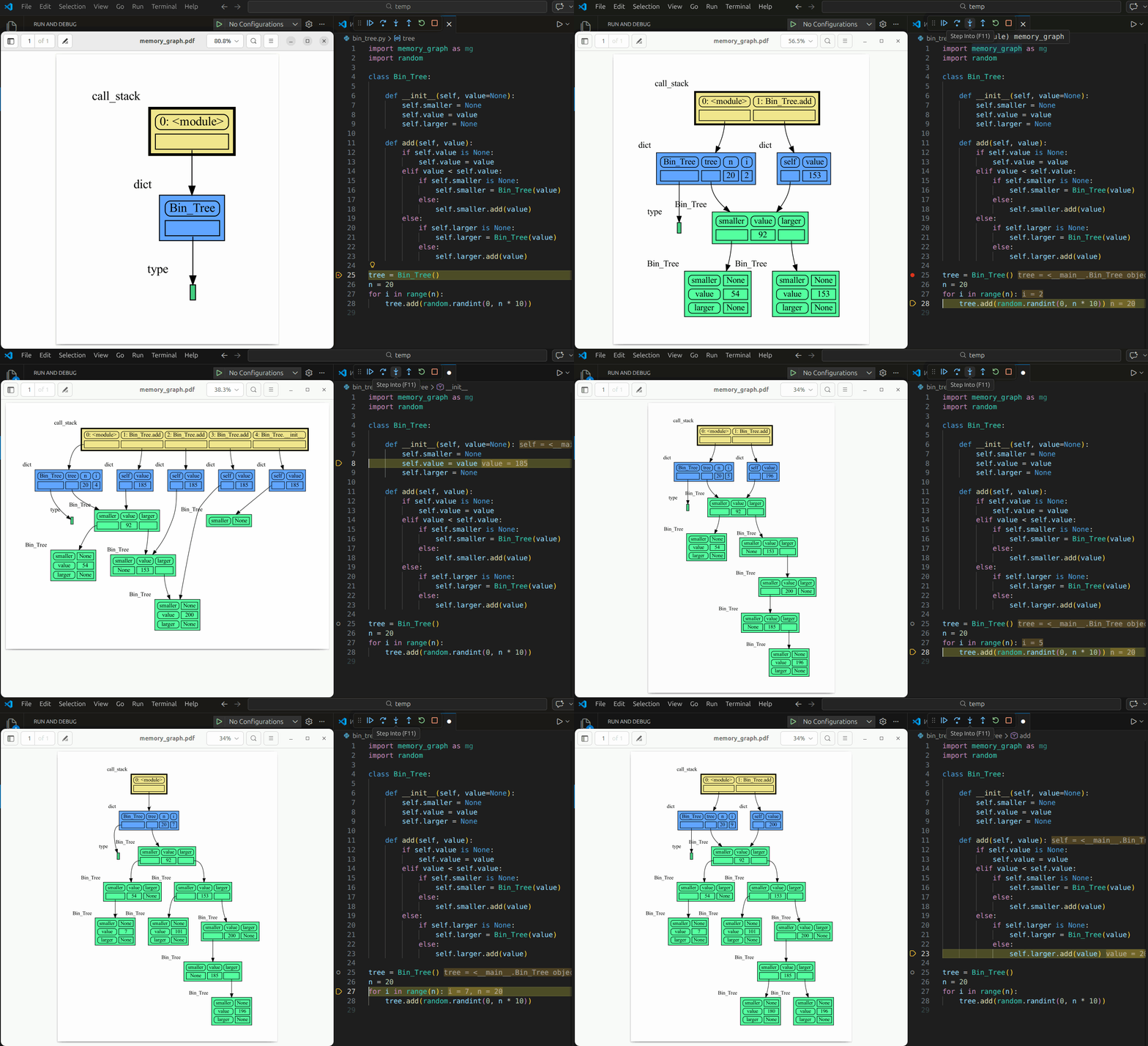
Or see it in the [Memory Graph Web Debugger](https://memory-graph.com/#codeurl=https://raw.githubusercontent.com/bterwijn/memory_graph/refs/heads/main/src/bin_tree.py×tep=0.2&play).
|
|
39
39
|
|
|
40
|
-
# Videos
|
|
41
|
-
| [](https://dai.ly/xb2u52e) | [](https://dai.ly/xb2u4eq) |
|
|
42
42
|
|:--:|:--:|
|
|
43
|
-
| [Quick Intro (3:49)](https://
|
|
43
|
+
| [Quick Intro (3:49)](https://dai.ly/xb2u52e) | [Mutability (17:29)](https://dai.ly/xb2u4eq) |
|
|
44
44
|
|
|
45
45
|
# Memory Graph #
|
|
46
46
|
For program understanding and debugging, the [memory_graph](https://github.com/bterwijn/memory_graph) package can visualize your data, supporting many different data types, including but not limited to:
|
|
@@ -131,7 +131,7 @@ A better way to understand what values are shared is to draw a graph using [memo
|
|
|
131
131
|
|
|
132
132
|
[Sliding Puzzle Solver](#sliding-puzzle-solver)
|
|
133
133
|
|
|
134
|
-
[Control
|
|
134
|
+
[Flow Control](#flow-control)
|
|
135
135
|
|
|
136
136
|
[Configuration](#configuration)
|
|
137
137
|
|
|
@@ -393,7 +393,7 @@ The effect of calling `add_one()` is that `b[0]` increases by 1, while `a` is un
|
|
|
393
393
|
|
|
394
394
|
# Data Model Exercises #
|
|
395
395
|
|
|
396
|
-
Now is a good time to practice with these Python Data Model concepts. Here are [some exercises](https://github.com/bterwijn/memory_graph_videos/blob/main/exercises/exercises.md) on references, mutability, copies, and function calls. Also see the programming exercises at [the end of the Mutability video](https://
|
|
396
|
+
Now is a good time to practice with these Python Data Model concepts. Here are [some exercises](https://github.com/bterwijn/memory_graph_videos/blob/main/exercises/exercises.md) on references, mutability, copies, and function calls. Also see the programming exercises at [the end of the Mutability video](https://dai.ly/xb2u4eq?start=891).
|
|
397
397
|
|
|
398
398
|
# Block #
|
|
399
399
|
It is often helpful to temporarily block program execution to inspect the graph. For this we can use the `mg.block()` function:
|
|
@@ -512,7 +512,7 @@ The ```mg.stack()``` doesn't work well in **watch** context in most debuggers be
|
|
|
512
512
|
| [Wing](https://wingware.com/) | `mg.stack_wing()` |
|
|
513
513
|
|
|
514
514
|
|
|
515
|
-
See the [Quick Intro (3:49)](https://
|
|
515
|
+
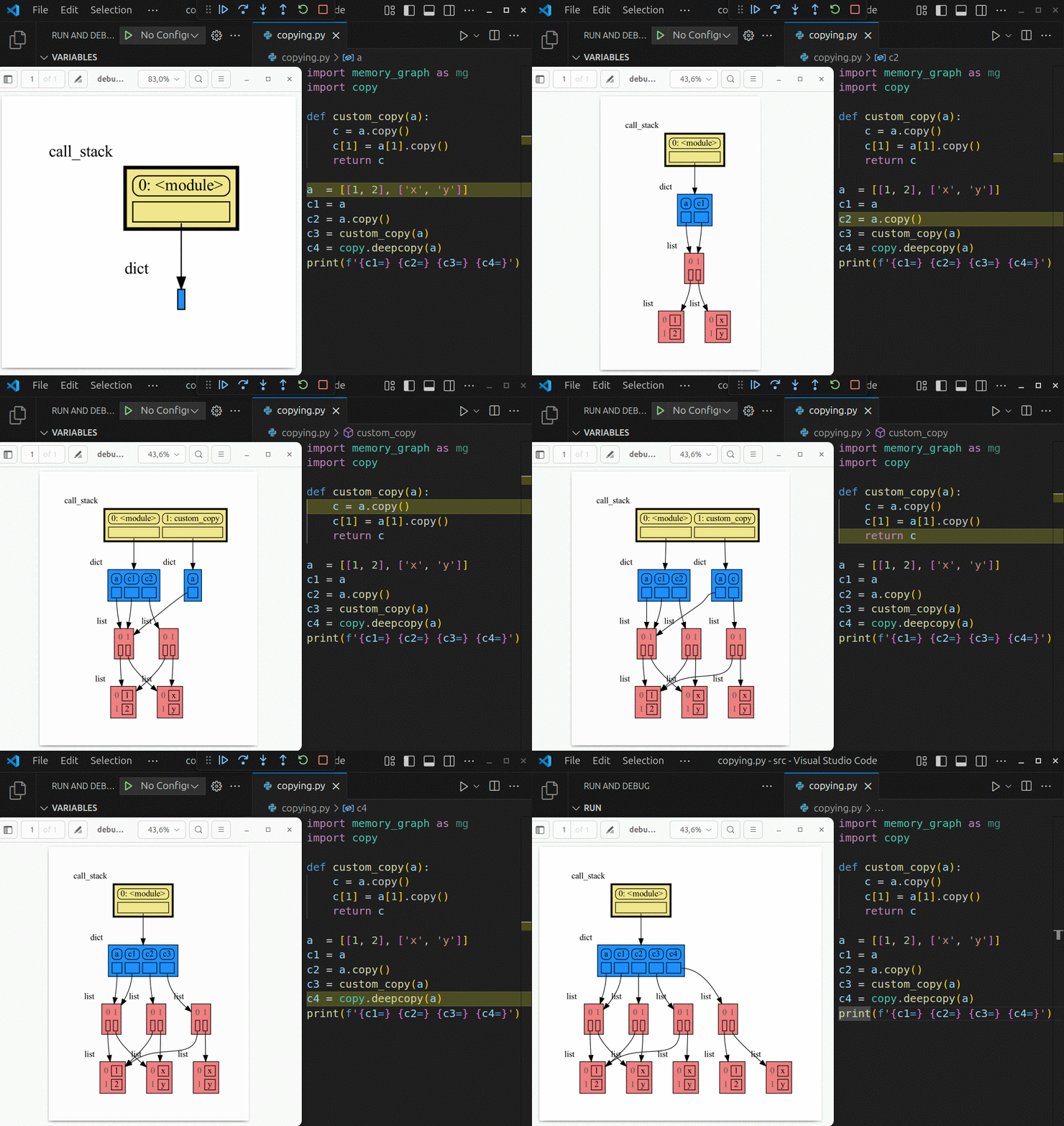
See the [Quick Intro (3:49)](https://dai.ly/xb2u52e?start=124) video for the setup.
|
|
516
516
|
|
|
517
517
|
## Other Debuggers ##
|
|
518
518
|
For other debuggers, invoke this function within the **watch** context. Then, in the "call_stack.txt" file, identify the slice of functions you wish to include as stack frames in the call stack.
|
|
@@ -753,7 +753,7 @@ Visualization of different sorting algorithms in Memory Graph Web Debugger.
|
|
|
753
753
|
# Bitwise Operators #
|
|
754
754
|
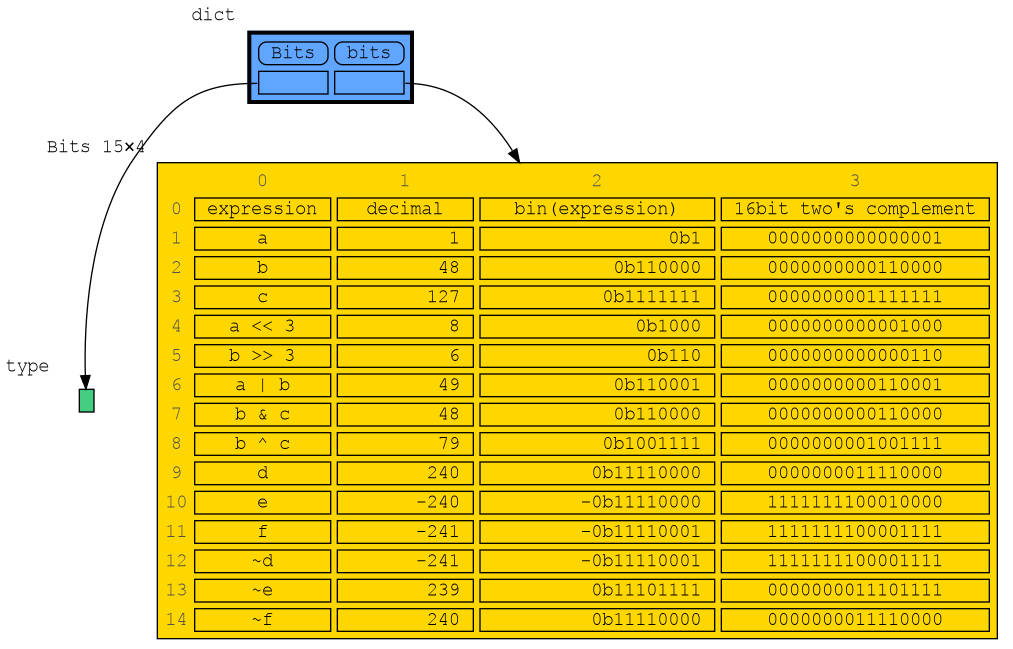
In this configuration example we show the decimal, binary and [two's complement representation](https://www.cs.cornell.edu/~tomf/notes/cps104/twoscomp.html) representation of `int` values of dictionary subclass `Bits` to show the result of [bitwise operators](https://docs.python.org/3/library/stdtypes.html?utm_source=chatgpt.com#bitwise-operations-on-integer-types). The `~` (inverse) operator can be a bit confusing if not shown with two's complement representation.
|
|
755
755
|
|
|
756
|
-
- [bitwise operators](https://memory-graph.com/#codeurl=https://raw.githubusercontent.com/bterwijn/memory_graph/refs/heads/main/src/bitwise_operators.py&breakpoints=
|
|
756
|
+
- [bitwise operators](https://memory-graph.com/#codeurl=https://raw.githubusercontent.com/bterwijn/memory_graph/refs/heads/main/src/bitwise_operators.py&breakpoints=23&continues=1&play)
|
|
757
757
|
|
|
758
758
|
|
|
759
759
|
|
|
@@ -765,9 +765,9 @@ A sliding puzzle solver as a challenging example showing how memory_graph deals
|
|
|
765
765
|
|
|
766
766
|
|
|
767
767
|
|
|
768
|
-
# Control
|
|
768
|
+
# Flow Control #
|
|
769
769
|
|
|
770
|
-
Some examples where we focus on the flow of
|
|
770
|
+
Some examples where we focus more on the flow of execution in Python code.
|
|
771
771
|
|
|
772
772
|
## Different Methods ##
|
|
773
773
|
|
|
@@ -869,6 +869,47 @@ sms.send('001122334455', 'Update to Privacy Policy')
|
|
|
869
869
|
```
|
|
870
870
|
Run it in the [Memory Graph Web Debugger](https://memory-graph.com/#codeurl=https://raw.githubusercontent.com/bterwijn/memory_graph/refs/heads/main/src/inheritance.py&breakpoints=35&continues=1&play).
|
|
871
871
|
|
|
872
|
+
## Iterators ##
|
|
873
|
+
|
|
874
|
+
What actually happens when Python executes a for-loop?
|
|
875
|
+
|
|
876
|
+
```python
|
|
877
|
+
for value in container:
|
|
878
|
+
print(value)
|
|
879
|
+
```
|
|
880
|
+
|
|
881
|
+
Behind the scenes, Python uses the [iterator protocol](https://docs.python.org/3/glossary.html#term-iterator):
|
|
882
|
+
|
|
883
|
+
```python
|
|
884
|
+
iterator = iter(container)
|
|
885
|
+
while True:
|
|
886
|
+
try:
|
|
887
|
+
value = next(iterator)
|
|
888
|
+
print(value)
|
|
889
|
+
except StopIteration:
|
|
890
|
+
break
|
|
891
|
+
```
|
|
892
|
+
|
|
893
|
+
- `iter(container)`: creates an iterator.
|
|
894
|
+
- `next(iterator)`: retrieves one value at a time.
|
|
895
|
+
|
|
896
|
+
When there are no more values, the iterator raises StopIteration. The for-loop catches this exception automatically and ends the loop. For containers that support backward iteration, Python also provides:
|
|
897
|
+
|
|
898
|
+
- `reversed(container)`: creates a backward iterator.
|
|
899
|
+
|
|
900
|
+
We can support these operations in our own classes by implementing:
|
|
901
|
+
|
|
902
|
+
```python
|
|
903
|
+
def __iter__(self):
|
|
904
|
+
def __next__(self):
|
|
905
|
+
def __reversed__(self):
|
|
906
|
+
```
|
|
907
|
+
|
|
908
|
+
This provides a powerful abstraction: an algorithm can process values without needing to know how a container stores them internally. The same algorithm can therefore work with lists, sets, dictionaries, linked lists, trees, and many other containers.
|
|
909
|
+
|
|
910
|
+
Run a Linked_List iterator example in the [Memory Graph Web Debugger](https://memory-graph.com/#codeurl=https://raw.githubusercontent.com/bterwijn/memory_graph/refs/heads/main/src/list_iter.py×tep=0.2&play).
|
|
911
|
+
|
|
912
|
+
|
|
872
913
|
## Decorator ##
|
|
873
914
|
|
|
874
915
|
This example shows the flow of control when using a decorator. A decorator wraps a function and is active before and after the function is called.
|
|
@@ -1030,6 +1071,8 @@ create: 2
|
|
|
1030
1071
|
use: 2
|
|
1031
1072
|
```
|
|
1032
1073
|
|
|
1074
|
+
Lazy evaluation is critical when you want to quickly start to process the first elements of a large stream of data, that may not even fit in your RAM entirely, or process just a section of an infite stream.
|
|
1075
|
+
|
|
1033
1076
|
</td></tr>
|
|
1034
1077
|
</table>
|
|
1035
1078
|
|
|
@@ -17,10 +17,10 @@ An example Binary Tree data structure:
|
|
|
17
17
|

|
|
18
18
|
Or see it in the [Memory Graph Web Debugger](https://memory-graph.com/#codeurl=https://raw.githubusercontent.com/bterwijn/memory_graph/refs/heads/main/src/bin_tree.py×tep=0.2&play).
|
|
19
19
|
|
|
20
|
-
# Videos
|
|
21
|
-
| [](https://dai.ly/xb2u52e) | [](https://dai.ly/xb2u4eq) |
|
|
22
22
|
|:--:|:--:|
|
|
23
|
-
| [Quick Intro (3:49)](https://
|
|
23
|
+
| [Quick Intro (3:49)](https://dai.ly/xb2u52e) | [Mutability (17:29)](https://dai.ly/xb2u4eq) |
|
|
24
24
|
|
|
25
25
|
# Memory Graph #
|
|
26
26
|
For program understanding and debugging, the [memory_graph](https://github.com/bterwijn/memory_graph) package can visualize your data, supporting many different data types, including but not limited to:
|
|
@@ -111,7 +111,7 @@ A better way to understand what values are shared is to draw a graph using [memo
|
|
|
111
111
|
|
|
112
112
|
[Sliding Puzzle Solver](#sliding-puzzle-solver)
|
|
113
113
|
|
|
114
|
-
[Control
|
|
114
|
+
[Flow Control](#flow-control)
|
|
115
115
|
|
|
116
116
|
[Configuration](#configuration)
|
|
117
117
|
|
|
@@ -373,7 +373,7 @@ The effect of calling `add_one()` is that `b[0]` increases by 1, while `a` is un
|
|
|
373
373
|
|
|
374
374
|
# Data Model Exercises #
|
|
375
375
|
|
|
376
|
-
Now is a good time to practice with these Python Data Model concepts. Here are [some exercises](https://github.com/bterwijn/memory_graph_videos/blob/main/exercises/exercises.md) on references, mutability, copies, and function calls. Also see the programming exercises at [the end of the Mutability video](https://
|
|
376
|
+
Now is a good time to practice with these Python Data Model concepts. Here are [some exercises](https://github.com/bterwijn/memory_graph_videos/blob/main/exercises/exercises.md) on references, mutability, copies, and function calls. Also see the programming exercises at [the end of the Mutability video](https://dai.ly/xb2u4eq?start=891).
|
|
377
377
|
|
|
378
378
|
# Block #
|
|
379
379
|
It is often helpful to temporarily block program execution to inspect the graph. For this we can use the `mg.block()` function:
|
|
@@ -492,7 +492,7 @@ The ```mg.stack()``` doesn't work well in **watch** context in most debuggers be
|
|
|
492
492
|
| [Wing](https://wingware.com/) | `mg.stack_wing()` |
|
|
493
493
|
|
|
494
494
|

|
|
495
|
-
See the [Quick Intro (3:49)](https://
|
|
495
|
+
See the [Quick Intro (3:49)](https://dai.ly/xb2u52e?start=124) video for the setup.
|
|
496
496
|
|
|
497
497
|
## Other Debuggers ##
|
|
498
498
|
For other debuggers, invoke this function within the **watch** context. Then, in the "call_stack.txt" file, identify the slice of functions you wish to include as stack frames in the call stack.
|
|
@@ -733,7 +733,7 @@ Visualization of different sorting algorithms in Memory Graph Web Debugger.
|
|
|
733
733
|
# Bitwise Operators #
|
|
734
734
|
In this configuration example we show the decimal, binary and [two's complement representation](https://www.cs.cornell.edu/~tomf/notes/cps104/twoscomp.html) representation of `int` values of dictionary subclass `Bits` to show the result of [bitwise operators](https://docs.python.org/3/library/stdtypes.html?utm_source=chatgpt.com#bitwise-operations-on-integer-types). The `~` (inverse) operator can be a bit confusing if not shown with two's complement representation.
|
|
735
735
|
|
|
736
|
-
- [bitwise operators](https://memory-graph.com/#codeurl=https://raw.githubusercontent.com/bterwijn/memory_graph/refs/heads/main/src/bitwise_operators.py&breakpoints=
|
|
736
|
+
- [bitwise operators](https://memory-graph.com/#codeurl=https://raw.githubusercontent.com/bterwijn/memory_graph/refs/heads/main/src/bitwise_operators.py&breakpoints=23&continues=1&play)
|
|
737
737
|
|
|
738
738
|

|
|
739
739
|
|
|
@@ -745,9 +745,9 @@ A sliding puzzle solver as a challenging example showing how memory_graph deals
|
|
|
745
745
|
|
|
746
746
|

|
|
747
747
|
|
|
748
|
-
# Control
|
|
748
|
+
# Flow Control #
|
|
749
749
|
|
|
750
|
-
Some examples where we focus on the flow of
|
|
750
|
+
Some examples where we focus more on the flow of execution in Python code.
|
|
751
751
|
|
|
752
752
|
## Different Methods ##
|
|
753
753
|
|
|
@@ -849,6 +849,47 @@ sms.send('001122334455', 'Update to Privacy Policy')
|
|
|
849
849
|
```
|
|
850
850
|
Run it in the [Memory Graph Web Debugger](https://memory-graph.com/#codeurl=https://raw.githubusercontent.com/bterwijn/memory_graph/refs/heads/main/src/inheritance.py&breakpoints=35&continues=1&play).
|
|
851
851
|
|
|
852
|
+
## Iterators ##
|
|
853
|
+
|
|
854
|
+
What actually happens when Python executes a for-loop?
|
|
855
|
+
|
|
856
|
+
```python
|
|
857
|
+
for value in container:
|
|
858
|
+
print(value)
|
|
859
|
+
```
|
|
860
|
+
|
|
861
|
+
Behind the scenes, Python uses the [iterator protocol](https://docs.python.org/3/glossary.html#term-iterator):
|
|
862
|
+
|
|
863
|
+
```python
|
|
864
|
+
iterator = iter(container)
|
|
865
|
+
while True:
|
|
866
|
+
try:
|
|
867
|
+
value = next(iterator)
|
|
868
|
+
print(value)
|
|
869
|
+
except StopIteration:
|
|
870
|
+
break
|
|
871
|
+
```
|
|
872
|
+
|
|
873
|
+
- `iter(container)`: creates an iterator.
|
|
874
|
+
- `next(iterator)`: retrieves one value at a time.
|
|
875
|
+
|
|
876
|
+
When there are no more values, the iterator raises StopIteration. The for-loop catches this exception automatically and ends the loop. For containers that support backward iteration, Python also provides:
|
|
877
|
+
|
|
878
|
+
- `reversed(container)`: creates a backward iterator.
|
|
879
|
+
|
|
880
|
+
We can support these operations in our own classes by implementing:
|
|
881
|
+
|
|
882
|
+
```python
|
|
883
|
+
def __iter__(self):
|
|
884
|
+
def __next__(self):
|
|
885
|
+
def __reversed__(self):
|
|
886
|
+
```
|
|
887
|
+
|
|
888
|
+
This provides a powerful abstraction: an algorithm can process values without needing to know how a container stores them internally. The same algorithm can therefore work with lists, sets, dictionaries, linked lists, trees, and many other containers.
|
|
889
|
+
|
|
890
|
+
Run a Linked_List iterator example in the [Memory Graph Web Debugger](https://memory-graph.com/#codeurl=https://raw.githubusercontent.com/bterwijn/memory_graph/refs/heads/main/src/list_iter.py×tep=0.2&play).
|
|
891
|
+
|
|
892
|
+
|
|
852
893
|
## Decorator ##
|
|
853
894
|
|
|
854
895
|
This example shows the flow of control when using a decorator. A decorator wraps a function and is active before and after the function is called.
|
|
@@ -1010,6 +1051,8 @@ create: 2
|
|
|
1010
1051
|
use: 2
|
|
1011
1052
|
```
|
|
1012
1053
|
|
|
1054
|
+
Lazy evaluation is critical when you want to quickly start to process the first elements of a large stream of data, that may not even fit in your RAM entirely, or process just a section of an infite stream.
|
|
1055
|
+
|
|
1013
1056
|
</td></tr>
|
|
1014
1057
|
</table>
|
|
1015
1058
|
|
|
@@ -7,6 +7,7 @@ from memory_graph.node_linear import Node_Linear
|
|
|
7
7
|
from memory_graph.node_table import Node_Table
|
|
8
8
|
|
|
9
9
|
import memory_graph.config as config
|
|
10
|
+
import memory_graph.config_default as config_default
|
|
10
11
|
|
|
11
12
|
def ndarray_to_node(data, ndarray_data):
|
|
12
13
|
dim = len(ndarray_data.shape)
|
|
@@ -34,8 +35,18 @@ def extend_numpy():
|
|
|
34
35
|
config.type_to_node[np.matrix] = lambda data : Node_Table(data, np.asarray(data)) # convert to ndarray to avoid infinite recursion due to index issue
|
|
35
36
|
config.type_to_node[np.ndarray] = lambda data : ndarray_to_node(data, data)
|
|
36
37
|
|
|
37
|
-
|
|
38
|
-
|
|
38
|
+
config_default.type_to_color_light[np.ndarray] = "hotpink1"
|
|
39
|
+
config_default.type_to_color_light[np.matrix] = "hotpink2"
|
|
40
|
+
|
|
41
|
+
config_default.type_to_color_dark[np.ndarray] = "#652c47"
|
|
42
|
+
config_default.type_to_color_dark[np.matrix] = "#652c47"
|
|
43
|
+
|
|
44
|
+
if not config.color_mode_dark:
|
|
45
|
+
config.type_to_color[np.ndarray] = config_default.type_to_color_light[np.ndarray]
|
|
46
|
+
config.type_to_color[np.matrix] = config_default.type_to_color_light[np.matrix]
|
|
47
|
+
else:
|
|
48
|
+
config.type_to_color[np.ndarray] = config_default.type_to_color_dark[np.ndarray]
|
|
49
|
+
config.type_to_color[np.matrix] = config_default.type_to_color_dark[np.matrix]
|
|
39
50
|
|
|
40
51
|
def unextend_numpy():
|
|
41
52
|
import numpy as np
|
|
@@ -7,6 +7,7 @@ from memory_graph.node_linear import Node_Linear
|
|
|
7
7
|
from memory_graph.node_table import Node_Table
|
|
8
8
|
|
|
9
9
|
import memory_graph.config as config
|
|
10
|
+
import memory_graph.config_default as config_default
|
|
10
11
|
|
|
11
12
|
def extend_pandas():
|
|
12
13
|
import pandas as pd
|
|
@@ -23,8 +24,19 @@ def extend_pandas():
|
|
|
23
24
|
Node_Linear(data, data.tolist())
|
|
24
25
|
)
|
|
25
26
|
|
|
26
|
-
|
|
27
|
-
|
|
27
|
+
config_default.type_to_color_light[pd.DataFrame] = "olivedrab1"
|
|
28
|
+
config_default.type_to_color_light[pd.Series] = "olivedrab2"
|
|
29
|
+
|
|
30
|
+
config_default.type_to_color_dark[pd.DataFrame] = "#3a4d13"
|
|
31
|
+
config_default.type_to_color_dark[pd.Series] = "#3a4d13"
|
|
32
|
+
|
|
33
|
+
if not config.color_mode_dark:
|
|
34
|
+
config.type_to_color[pd.DataFrame] = config_default.type_to_color_light[pd.DataFrame]
|
|
35
|
+
config.type_to_color[pd.Series] = config_default.type_to_color_light[pd.Series]
|
|
36
|
+
else:
|
|
37
|
+
config.type_to_color[pd.DataFrame] = config_default.type_to_color_dark[pd.DataFrame]
|
|
38
|
+
config.type_to_color[pd.Series] = config_default.type_to_color_dark[pd.Series]
|
|
39
|
+
|
|
28
40
|
|
|
29
41
|
def unextend_pandas():
|
|
30
42
|
import pandas as pd
|
|
@@ -5,12 +5,21 @@
|
|
|
5
5
|
""" Extension to add the memory graph configuration for Pandas types. """
|
|
6
6
|
import memory_graph.extension_numpy as ext_np
|
|
7
7
|
import memory_graph.config as config
|
|
8
|
+
import memory_graph.config_default as config_default
|
|
8
9
|
|
|
9
10
|
def extend_torch():
|
|
10
11
|
import torch
|
|
11
12
|
|
|
12
13
|
config.type_to_node[torch.Tensor] = lambda data : ext_np.ndarray_to_node(data, data.numpy())
|
|
13
|
-
|
|
14
|
+
|
|
15
|
+
config_default.type_to_color_light[torch.Tensor] = "darkolivegreen1"
|
|
16
|
+
|
|
17
|
+
config_default.type_to_color_dark[torch.Tensor] = "darkolivegreen"
|
|
18
|
+
|
|
19
|
+
if not config.color_mode_dark:
|
|
20
|
+
config.type_to_color[torch.Tensor] = config_default.type_to_color_light[torch.Tensor]
|
|
21
|
+
else:
|
|
22
|
+
config.type_to_color[torch.Tensor] = config_default.type_to_color_dark[torch.Tensor]
|
|
14
23
|
|
|
15
24
|
def unextend_torch():
|
|
16
25
|
import torch
|
|
@@ -208,6 +208,8 @@ def build_graph(graphviz_graph, nodes, root_id, id_to_slices):
|
|
|
208
208
|
""" Adds a subgraph to 'graphviz_graph' for 'nodes_to_subgraph'. """
|
|
209
209
|
new_node_names = [node.get_name() for node in nodes_to_subgraph]
|
|
210
210
|
if len(new_node_names) > 1:
|
|
211
|
+
if config.horizontal:
|
|
212
|
+
new_node_names.reverse() # reverse order for horizontal layout
|
|
211
213
|
graphviz_graph.body.append('subgraph { rank=same; '+ ' -> '.join(new_node_names) + '[weight='+str(config.graph_stability)+', style=invis]; }\n')
|
|
212
214
|
|
|
213
215
|
def add_to_graphviz_graph(graphviz_graph, nodes, node, slices, id_to_slices):
|
|
@@ -223,7 +225,6 @@ def build_graph(graphviz_graph, nodes, root_id, id_to_slices):
|
|
|
223
225
|
else:
|
|
224
226
|
graphviz_graph.node(node.get_name(),
|
|
225
227
|
html_table.to_string(border, color, config.foreground_color))
|
|
226
|
-
# ------------ edges
|
|
227
228
|
for parent,child,dashed in edges:
|
|
228
229
|
graphviz_graph.edge(parent, child+':table', style='dashed' if dashed else 'solid')
|
|
229
230
|
|
|
@@ -239,8 +240,7 @@ def build_graph(graphviz_graph, nodes, root_id, id_to_slices):
|
|
|
239
240
|
if node_id in id_to_slices:
|
|
240
241
|
slices = id_to_slices[node_id]
|
|
241
242
|
if not slices is None:
|
|
242
|
-
|
|
243
|
-
for index in slices_iter:
|
|
243
|
+
for index in slices:
|
|
244
244
|
child_id = id(children[index])
|
|
245
245
|
build_graph_depth_first(graphviz_graph, nodes, child_id, id_to_slices, nodes_at_depth, subgraphed_nodes, depth+1)
|
|
246
246
|
if not node.is_hidden_node():
|
|
@@ -30,12 +30,6 @@ class Slices_Iterator1D(Slices_Iterator):
|
|
|
30
30
|
for i in range(slices[si][0], slices[si][1]):
|
|
31
31
|
yield i
|
|
32
32
|
|
|
33
|
-
def reverse_generate(self):
|
|
34
|
-
slices = self.slices.get_slices()
|
|
35
|
-
for si in range(len(slices)-1, -1, -1):
|
|
36
|
-
for i in range(slices[si][1]-1, slices[si][0]-1, -1):
|
|
37
|
-
yield i
|
|
38
|
-
|
|
39
33
|
def __next__(self):
|
|
40
34
|
return next(self.gen)
|
|
41
35
|
|
|
@@ -57,14 +51,5 @@ class Slices_Iterator2D(Slices_Iterator):
|
|
|
57
51
|
for col_i in range(col_slice[0], col_slice[1]):
|
|
58
52
|
yield (row_i, col_i)
|
|
59
53
|
|
|
60
|
-
def reverse_generate(self):
|
|
61
|
-
row_slices = self.slices.get_row_slices().get_slices()
|
|
62
|
-
col_slices = self.slices.get_col_slices().get_slices()
|
|
63
|
-
for row_slice in reversed(row_slices):
|
|
64
|
-
for row_i in range(row_slice[1]-1, row_slice[0]-1, -1):
|
|
65
|
-
for col_slice in reversed(col_slices):
|
|
66
|
-
for col_i in range(col_slice[1]-1, col_slice[0]-1, -1):
|
|
67
|
-
yield (row_i, col_i)
|
|
68
|
-
|
|
69
54
|
def __next__(self):
|
|
70
55
|
return next(self.gen)
|
|
@@ -1,6 +1,6 @@
|
|
|
1
1
|
Metadata-Version: 2.4
|
|
2
2
|
Name: memory_graph
|
|
3
|
-
Version: 0.3.
|
|
3
|
+
Version: 0.3.87
|
|
4
4
|
Summary: Teaching tool and debugging aid in context of references, mutable data types, and shallow and deep copy.
|
|
5
5
|
Author-email: Bas Terwijn <bterwijn@gmail.com>
|
|
6
6
|
License-Expression: BSD-2-Clause
|
|
@@ -37,10 +37,10 @@ An example Binary Tree data structure:
|
|
|
37
37
|

|
|
38
38
|
Or see it in the [Memory Graph Web Debugger](https://memory-graph.com/#codeurl=https://raw.githubusercontent.com/bterwijn/memory_graph/refs/heads/main/src/bin_tree.py×tep=0.2&play).
|
|
39
39
|
|
|
40
|
-
# Videos
|
|
41
|
-
| [](https://dai.ly/xb2u52e) | [](https://dai.ly/xb2u4eq) |
|
|
42
42
|
|:--:|:--:|
|
|
43
|
-
| [Quick Intro (3:49)](https://
|
|
43
|
+
| [Quick Intro (3:49)](https://dai.ly/xb2u52e) | [Mutability (17:29)](https://dai.ly/xb2u4eq) |
|
|
44
44
|
|
|
45
45
|
# Memory Graph #
|
|
46
46
|
For program understanding and debugging, the [memory_graph](https://github.com/bterwijn/memory_graph) package can visualize your data, supporting many different data types, including but not limited to:
|
|
@@ -131,7 +131,7 @@ A better way to understand what values are shared is to draw a graph using [memo
|
|
|
131
131
|
|
|
132
132
|
[Sliding Puzzle Solver](#sliding-puzzle-solver)
|
|
133
133
|
|
|
134
|
-
[Control
|
|
134
|
+
[Flow Control](#flow-control)
|
|
135
135
|
|
|
136
136
|
[Configuration](#configuration)
|
|
137
137
|
|
|
@@ -393,7 +393,7 @@ The effect of calling `add_one()` is that `b[0]` increases by 1, while `a` is un
|
|
|
393
393
|
|
|
394
394
|
# Data Model Exercises #
|
|
395
395
|
|
|
396
|
-
Now is a good time to practice with these Python Data Model concepts. Here are [some exercises](https://github.com/bterwijn/memory_graph_videos/blob/main/exercises/exercises.md) on references, mutability, copies, and function calls. Also see the programming exercises at [the end of the Mutability video](https://
|
|
396
|
+
Now is a good time to practice with these Python Data Model concepts. Here are [some exercises](https://github.com/bterwijn/memory_graph_videos/blob/main/exercises/exercises.md) on references, mutability, copies, and function calls. Also see the programming exercises at [the end of the Mutability video](https://dai.ly/xb2u4eq?start=891).
|
|
397
397
|
|
|
398
398
|
# Block #
|
|
399
399
|
It is often helpful to temporarily block program execution to inspect the graph. For this we can use the `mg.block()` function:
|
|
@@ -512,7 +512,7 @@ The ```mg.stack()``` doesn't work well in **watch** context in most debuggers be
|
|
|
512
512
|
| [Wing](https://wingware.com/) | `mg.stack_wing()` |
|
|
513
513
|
|
|
514
514
|

|
|
515
|
-
See the [Quick Intro (3:49)](https://
|
|
515
|
+
See the [Quick Intro (3:49)](https://dai.ly/xb2u52e?start=124) video for the setup.
|
|
516
516
|
|
|
517
517
|
## Other Debuggers ##
|
|
518
518
|
For other debuggers, invoke this function within the **watch** context. Then, in the "call_stack.txt" file, identify the slice of functions you wish to include as stack frames in the call stack.
|
|
@@ -753,7 +753,7 @@ Visualization of different sorting algorithms in Memory Graph Web Debugger.
|
|
|
753
753
|
# Bitwise Operators #
|
|
754
754
|
In this configuration example we show the decimal, binary and [two's complement representation](https://www.cs.cornell.edu/~tomf/notes/cps104/twoscomp.html) representation of `int` values of dictionary subclass `Bits` to show the result of [bitwise operators](https://docs.python.org/3/library/stdtypes.html?utm_source=chatgpt.com#bitwise-operations-on-integer-types). The `~` (inverse) operator can be a bit confusing if not shown with two's complement representation.
|
|
755
755
|
|
|
756
|
-
- [bitwise operators](https://memory-graph.com/#codeurl=https://raw.githubusercontent.com/bterwijn/memory_graph/refs/heads/main/src/bitwise_operators.py&breakpoints=
|
|
756
|
+
- [bitwise operators](https://memory-graph.com/#codeurl=https://raw.githubusercontent.com/bterwijn/memory_graph/refs/heads/main/src/bitwise_operators.py&breakpoints=23&continues=1&play)
|
|
757
757
|
|
|
758
758
|

|
|
759
759
|
|
|
@@ -765,9 +765,9 @@ A sliding puzzle solver as a challenging example showing how memory_graph deals
|
|
|
765
765
|
|
|
766
766
|

|
|
767
767
|
|
|
768
|
-
# Control
|
|
768
|
+
# Flow Control #
|
|
769
769
|
|
|
770
|
-
Some examples where we focus on the flow of
|
|
770
|
+
Some examples where we focus more on the flow of execution in Python code.
|
|
771
771
|
|
|
772
772
|
## Different Methods ##
|
|
773
773
|
|
|
@@ -869,6 +869,47 @@ sms.send('001122334455', 'Update to Privacy Policy')
|
|
|
869
869
|
```
|
|
870
870
|
Run it in the [Memory Graph Web Debugger](https://memory-graph.com/#codeurl=https://raw.githubusercontent.com/bterwijn/memory_graph/refs/heads/main/src/inheritance.py&breakpoints=35&continues=1&play).
|
|
871
871
|
|
|
872
|
+
## Iterators ##
|
|
873
|
+
|
|
874
|
+
What actually happens when Python executes a for-loop?
|
|
875
|
+
|
|
876
|
+
```python
|
|
877
|
+
for value in container:
|
|
878
|
+
print(value)
|
|
879
|
+
```
|
|
880
|
+
|
|
881
|
+
Behind the scenes, Python uses the [iterator protocol](https://docs.python.org/3/glossary.html#term-iterator):
|
|
882
|
+
|
|
883
|
+
```python
|
|
884
|
+
iterator = iter(container)
|
|
885
|
+
while True:
|
|
886
|
+
try:
|
|
887
|
+
value = next(iterator)
|
|
888
|
+
print(value)
|
|
889
|
+
except StopIteration:
|
|
890
|
+
break
|
|
891
|
+
```
|
|
892
|
+
|
|
893
|
+
- `iter(container)`: creates an iterator.
|
|
894
|
+
- `next(iterator)`: retrieves one value at a time.
|
|
895
|
+
|
|
896
|
+
When there are no more values, the iterator raises StopIteration. The for-loop catches this exception automatically and ends the loop. For containers that support backward iteration, Python also provides:
|
|
897
|
+
|
|
898
|
+
- `reversed(container)`: creates a backward iterator.
|
|
899
|
+
|
|
900
|
+
We can support these operations in our own classes by implementing:
|
|
901
|
+
|
|
902
|
+
```python
|
|
903
|
+
def __iter__(self):
|
|
904
|
+
def __next__(self):
|
|
905
|
+
def __reversed__(self):
|
|
906
|
+
```
|
|
907
|
+
|
|
908
|
+
This provides a powerful abstraction: an algorithm can process values without needing to know how a container stores them internally. The same algorithm can therefore work with lists, sets, dictionaries, linked lists, trees, and many other containers.
|
|
909
|
+
|
|
910
|
+
Run a Linked_List iterator example in the [Memory Graph Web Debugger](https://memory-graph.com/#codeurl=https://raw.githubusercontent.com/bterwijn/memory_graph/refs/heads/main/src/list_iter.py×tep=0.2&play).
|
|
911
|
+
|
|
912
|
+
|
|
872
913
|
## Decorator ##
|
|
873
914
|
|
|
874
915
|
This example shows the flow of control when using a decorator. A decorator wraps a function and is active before and after the function is called.
|
|
@@ -1030,6 +1071,8 @@ create: 2
|
|
|
1030
1071
|
use: 2
|
|
1031
1072
|
```
|
|
1032
1073
|
|
|
1074
|
+
Lazy evaluation is critical when you want to quickly start to process the first elements of a large stream of data, that may not even fit in your RAM entirely, or process just a section of an infite stream.
|
|
1075
|
+
|
|
1033
1076
|
</td></tr>
|
|
1034
1077
|
</table>
|
|
1035
1078
|
|
|
@@ -4,7 +4,7 @@ build-backend = "setuptools.build_meta"
|
|
|
4
4
|
|
|
5
5
|
[project]
|
|
6
6
|
name = "memory_graph"
|
|
7
|
-
version = "0.3.
|
|
7
|
+
version = "0.3.87"
|
|
8
8
|
description = "Teaching tool and debugging aid in context of references, mutable data types, and shallow and deep copy."
|
|
9
9
|
authors = [
|
|
10
10
|
{name = "Bas Terwijn", email = "bterwijn@gmail.com"}
|
|
File without changes
|
|
File without changes
|
|
File without changes
|
|
File without changes
|
|
File without changes
|
|
File without changes
|
|
File without changes
|
|
File without changes
|
|
File without changes
|
|
File without changes
|
|
File without changes
|
|
File without changes
|
|
File without changes
|
|
File without changes
|
|
File without changes
|
|
File without changes
|
|
File without changes
|
|
File without changes
|
|
File without changes
|
|
File without changes
|
|
File without changes
|
|
File without changes
|
|
File without changes
|
|
File without changes
|
|
File without changes
|
|
File without changes
|
|
File without changes
|
|
File without changes
|
|
File without changes
|
|
File without changes
|
|
File without changes
|