memory-graph 0.3.82__tar.gz → 0.3.83__tar.gz
This diff represents the content of publicly available package versions that have been released to one of the supported registries. The information contained in this diff is provided for informational purposes only and reflects changes between package versions as they appear in their respective public registries.
- {memory_graph-0.3.82 → memory_graph-0.3.83}/PKG-INFO +59 -3
- {memory_graph-0.3.82 → memory_graph-0.3.83}/README.md +58 -2
- {memory_graph-0.3.82 → memory_graph-0.3.83}/memory_graph/__init__.py +2 -2
- {memory_graph-0.3.82 → memory_graph-0.3.83}/memory_graph/config.py +1 -0
- {memory_graph-0.3.82 → memory_graph-0.3.83}/memory_graph/config_default.py +6 -0
- {memory_graph-0.3.82 → memory_graph-0.3.83}/memory_graph/memory_to_nodes.py +1 -0
- {memory_graph-0.3.82 → memory_graph-0.3.83}/memory_graph/node_key_value.py +2 -0
- {memory_graph-0.3.82 → memory_graph-0.3.83}/memory_graph/node_linear.py +4 -1
- {memory_graph-0.3.82 → memory_graph-0.3.83}/memory_graph.egg-info/PKG-INFO +59 -3
- {memory_graph-0.3.82 → memory_graph-0.3.83}/pyproject.toml +1 -1
- {memory_graph-0.3.82 → memory_graph-0.3.83}/LICENSE.txt +0 -0
- {memory_graph-0.3.82 → memory_graph-0.3.83}/memory_graph/call_stack.py +0 -0
- {memory_graph-0.3.82 → memory_graph-0.3.83}/memory_graph/config_helpers.py +0 -0
- {memory_graph-0.3.82 → memory_graph-0.3.83}/memory_graph/extension_numpy.py +0 -0
- {memory_graph-0.3.82 → memory_graph-0.3.83}/memory_graph/extension_pandas.py +0 -0
- {memory_graph-0.3.82 → memory_graph-0.3.83}/memory_graph/extension_torch.py +0 -0
- {memory_graph-0.3.82 → memory_graph-0.3.83}/memory_graph/html_table.py +0 -0
- {memory_graph-0.3.82 → memory_graph-0.3.83}/memory_graph/list_view.py +0 -0
- {memory_graph-0.3.82 → memory_graph-0.3.83}/memory_graph/node_base.py +0 -0
- {memory_graph-0.3.82 → memory_graph-0.3.83}/memory_graph/node_leaf.py +0 -0
- {memory_graph-0.3.82 → memory_graph-0.3.83}/memory_graph/node_table.py +0 -0
- {memory_graph-0.3.82 → memory_graph-0.3.83}/memory_graph/sequence.py +0 -0
- {memory_graph-0.3.82 → memory_graph-0.3.83}/memory_graph/slicer.py +0 -0
- {memory_graph-0.3.82 → memory_graph-0.3.83}/memory_graph/slices.py +0 -0
- {memory_graph-0.3.82 → memory_graph-0.3.83}/memory_graph/slices_iterator.py +0 -0
- {memory_graph-0.3.82 → memory_graph-0.3.83}/memory_graph/slices_table_iterator.py +0 -0
- {memory_graph-0.3.82 → memory_graph-0.3.83}/memory_graph/test.py +0 -0
- {memory_graph-0.3.82 → memory_graph-0.3.83}/memory_graph/test_max_graph_depth.py +0 -0
- {memory_graph-0.3.82 → memory_graph-0.3.83}/memory_graph/test_memory_graph.py +0 -0
- {memory_graph-0.3.82 → memory_graph-0.3.83}/memory_graph/test_memory_to_nodes.py +0 -0
- {memory_graph-0.3.82 → memory_graph-0.3.83}/memory_graph/test_sequence.py +0 -0
- {memory_graph-0.3.82 → memory_graph-0.3.83}/memory_graph/test_slicer.py +0 -0
- {memory_graph-0.3.82 → memory_graph-0.3.83}/memory_graph/test_slices.py +0 -0
- {memory_graph-0.3.82 → memory_graph-0.3.83}/memory_graph/test_slices_iterator.py +0 -0
- {memory_graph-0.3.82 → memory_graph-0.3.83}/memory_graph/utils.py +0 -0
- {memory_graph-0.3.82 → memory_graph-0.3.83}/memory_graph.egg-info/SOURCES.txt +0 -0
- {memory_graph-0.3.82 → memory_graph-0.3.83}/memory_graph.egg-info/dependency_links.txt +0 -0
- {memory_graph-0.3.82 → memory_graph-0.3.83}/memory_graph.egg-info/requires.txt +0 -0
- {memory_graph-0.3.82 → memory_graph-0.3.83}/memory_graph.egg-info/top_level.txt +0 -0
- {memory_graph-0.3.82 → memory_graph-0.3.83}/setup.cfg +0 -0
- {memory_graph-0.3.82 → memory_graph-0.3.83}/setup.py +0 -0
|
@@ -1,6 +1,6 @@
|
|
|
1
1
|
Metadata-Version: 2.4
|
|
2
2
|
Name: memory_graph
|
|
3
|
-
Version: 0.3.
|
|
3
|
+
Version: 0.3.83
|
|
4
4
|
Summary: Teaching tool and debugging aid in context of references, mutable data types, and shallow and deep copy.
|
|
5
5
|
Author-email: Bas Terwijn <bterwijn@gmail.com>
|
|
6
6
|
License-Expression: BSD-2-Clause
|
|
@@ -366,7 +366,7 @@ a:[4, 3, 2, 1] b:(4, 3, 2) c:[4, 3, 2]
|
|
|
366
366
|
```
|
|
367
367
|
This is because `b` is of immutable type 'tuple' so its value gets copied automatically when it is changed. And because the function is called with a copy of `c`, its original value is not changed by the function. The value of variable `a` is the only value of mutable type that is shared between the root stack frame **'0: \<module>'** and the **'1: add_one'** stack frame of the function call so only that variable is affected as a result of calling the function. The other changes remain confined to the local variables of the ```add_one()``` function.
|
|
368
368
|
|
|
369
|
-
## Function Call
|
|
369
|
+
## Function Call Changes 'int' Value ##
|
|
370
370
|
Even though `int` is an immutable type, so an `int` value can not be changed by directly passing it to a function, we can still change it by wrapping it in a mutable container.
|
|
371
371
|
|
|
372
372
|
```python
|
|
@@ -767,7 +767,58 @@ A sliding puzzle solver as a challenging example showing how memory_graph deals
|
|
|
767
767
|
|
|
768
768
|
# Control Flow #
|
|
769
769
|
|
|
770
|
-
Some examples where we focus on the flow of control
|
|
770
|
+
Some examples where we focus on the flow of control and access to state in Python code.
|
|
771
|
+
|
|
772
|
+
## Different Methods ##
|
|
773
|
+
|
|
774
|
+
This example shows the difference between 'instance', 'class' and 'static' methods:
|
|
775
|
+
|
|
776
|
+
```python
|
|
777
|
+
class My_Class:
|
|
778
|
+
|
|
779
|
+
# class variables:
|
|
780
|
+
count = 0
|
|
781
|
+
unique_value = 0
|
|
782
|
+
|
|
783
|
+
def __init__(self):
|
|
784
|
+
print("__init__ called, initialize instance variables of object")
|
|
785
|
+
self.my_instance_variable = [] # create instance variable
|
|
786
|
+
My_Class.count += 1 # also change class variable
|
|
787
|
+
|
|
788
|
+
def my_instance_method(self):
|
|
789
|
+
print("my_instance_method called, access to instance variables via 'self'")
|
|
790
|
+
self.my_instance_variable.append(My_Class.unique_value)
|
|
791
|
+
My_Class.unique_value += 1 # also change class variable
|
|
792
|
+
|
|
793
|
+
@classmethod
|
|
794
|
+
def my_class_method(cls):
|
|
795
|
+
print("my_class_method called, access to class variables via 'cls', no instance variables")
|
|
796
|
+
print(f"{cls.count=}")
|
|
797
|
+
|
|
798
|
+
@staticmethod
|
|
799
|
+
def my_static_method():
|
|
800
|
+
print("my_static_method called, no 'self' or 'cls'")
|
|
801
|
+
print(f"{My_Class.count=}") # but still access to class variables
|
|
802
|
+
|
|
803
|
+
obj1 = My_Class()
|
|
804
|
+
obj2 = My_Class()
|
|
805
|
+
|
|
806
|
+
obj1.my_instance_method()
|
|
807
|
+
obj1.my_class_method()
|
|
808
|
+
obj1.my_static_method()
|
|
809
|
+
|
|
810
|
+
for _ in range(2):
|
|
811
|
+
obj1.my_instance_method()
|
|
812
|
+
obj2.my_instance_method()
|
|
813
|
+
|
|
814
|
+
print(f"{obj1.count=}") # reading class variable if no instance variable found
|
|
815
|
+
obj1.count = 100 # creating instance variable
|
|
816
|
+
print(f"{obj1.count=}") # now finding and reading instance variable
|
|
817
|
+
print(f"{My_Class.count}") # class variable still available via class name
|
|
818
|
+
print(f"{obj2.count=}") # obj2 still reads the class variable
|
|
819
|
+
```
|
|
820
|
+
|
|
821
|
+
Run it in the [Memory Graph Web Debugger](https://memory-graph.com/#codeurl=https://raw.githubusercontent.com/bterwijn/memory_graph/refs/heads/main/src/different_methods.py&play).
|
|
771
822
|
|
|
772
823
|
## Inheritance ##
|
|
773
824
|
|
|
@@ -1048,6 +1099,9 @@ Different aspects of memory_graph can be configured. The default configuration c
|
|
|
1048
1099
|
|
|
1049
1100
|
## Functions ##
|
|
1050
1101
|
|
|
1102
|
+
- **mg.layout(horizontal: bool = None)**
|
|
1103
|
+
- Set graph layout to 'True' for horizontal, 'False' for vertical, or 'None' to toggle.
|
|
1104
|
+
|
|
1051
1105
|
- **mg.dark_mode(b: bool = None)**
|
|
1052
1106
|
- Set dark mode to 'True' or 'False', or 'None' to toggle.
|
|
1053
1107
|
|
|
@@ -1301,6 +1355,8 @@ mg.show(locals())
|
|
|
1301
1355
|
```
|
|
1302
1356
|
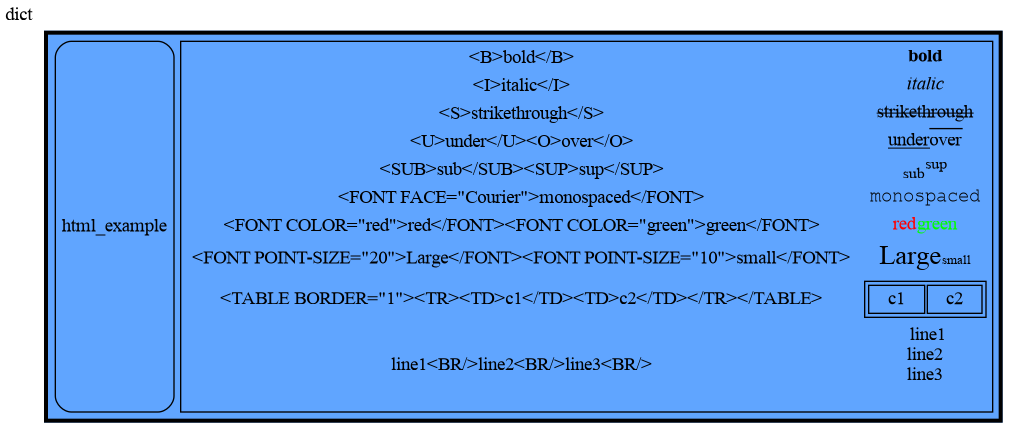
|
|
1303
1357
|
|
|
1358
|
+
### Images
|
|
1359
|
+
|
|
1304
1360
|
Including the `<IMG>` tag that allows for showing local image files only, but that currently doesn't work in the Memory Graph Web Debugger, that uses 'Viz.js' for graph rendering, unfortunately.
|
|
1305
1361
|
|
|
1306
1362
|
```python
|
|
@@ -346,7 +346,7 @@ a:[4, 3, 2, 1] b:(4, 3, 2) c:[4, 3, 2]
|
|
|
346
346
|
```
|
|
347
347
|
This is because `b` is of immutable type 'tuple' so its value gets copied automatically when it is changed. And because the function is called with a copy of `c`, its original value is not changed by the function. The value of variable `a` is the only value of mutable type that is shared between the root stack frame **'0: \<module>'** and the **'1: add_one'** stack frame of the function call so only that variable is affected as a result of calling the function. The other changes remain confined to the local variables of the ```add_one()``` function.
|
|
348
348
|
|
|
349
|
-
## Function Call
|
|
349
|
+
## Function Call Changes 'int' Value ##
|
|
350
350
|
Even though `int` is an immutable type, so an `int` value can not be changed by directly passing it to a function, we can still change it by wrapping it in a mutable container.
|
|
351
351
|
|
|
352
352
|
```python
|
|
@@ -747,7 +747,58 @@ A sliding puzzle solver as a challenging example showing how memory_graph deals
|
|
|
747
747
|
|
|
748
748
|
# Control Flow #
|
|
749
749
|
|
|
750
|
-
Some examples where we focus on the flow of control
|
|
750
|
+
Some examples where we focus on the flow of control and access to state in Python code.
|
|
751
|
+
|
|
752
|
+
## Different Methods ##
|
|
753
|
+
|
|
754
|
+
This example shows the difference between 'instance', 'class' and 'static' methods:
|
|
755
|
+
|
|
756
|
+
```python
|
|
757
|
+
class My_Class:
|
|
758
|
+
|
|
759
|
+
# class variables:
|
|
760
|
+
count = 0
|
|
761
|
+
unique_value = 0
|
|
762
|
+
|
|
763
|
+
def __init__(self):
|
|
764
|
+
print("__init__ called, initialize instance variables of object")
|
|
765
|
+
self.my_instance_variable = [] # create instance variable
|
|
766
|
+
My_Class.count += 1 # also change class variable
|
|
767
|
+
|
|
768
|
+
def my_instance_method(self):
|
|
769
|
+
print("my_instance_method called, access to instance variables via 'self'")
|
|
770
|
+
self.my_instance_variable.append(My_Class.unique_value)
|
|
771
|
+
My_Class.unique_value += 1 # also change class variable
|
|
772
|
+
|
|
773
|
+
@classmethod
|
|
774
|
+
def my_class_method(cls):
|
|
775
|
+
print("my_class_method called, access to class variables via 'cls', no instance variables")
|
|
776
|
+
print(f"{cls.count=}")
|
|
777
|
+
|
|
778
|
+
@staticmethod
|
|
779
|
+
def my_static_method():
|
|
780
|
+
print("my_static_method called, no 'self' or 'cls'")
|
|
781
|
+
print(f"{My_Class.count=}") # but still access to class variables
|
|
782
|
+
|
|
783
|
+
obj1 = My_Class()
|
|
784
|
+
obj2 = My_Class()
|
|
785
|
+
|
|
786
|
+
obj1.my_instance_method()
|
|
787
|
+
obj1.my_class_method()
|
|
788
|
+
obj1.my_static_method()
|
|
789
|
+
|
|
790
|
+
for _ in range(2):
|
|
791
|
+
obj1.my_instance_method()
|
|
792
|
+
obj2.my_instance_method()
|
|
793
|
+
|
|
794
|
+
print(f"{obj1.count=}") # reading class variable if no instance variable found
|
|
795
|
+
obj1.count = 100 # creating instance variable
|
|
796
|
+
print(f"{obj1.count=}") # now finding and reading instance variable
|
|
797
|
+
print(f"{My_Class.count}") # class variable still available via class name
|
|
798
|
+
print(f"{obj2.count=}") # obj2 still reads the class variable
|
|
799
|
+
```
|
|
800
|
+
|
|
801
|
+
Run it in the [Memory Graph Web Debugger](https://memory-graph.com/#codeurl=https://raw.githubusercontent.com/bterwijn/memory_graph/refs/heads/main/src/different_methods.py&play).
|
|
751
802
|
|
|
752
803
|
## Inheritance ##
|
|
753
804
|
|
|
@@ -1028,6 +1079,9 @@ Different aspects of memory_graph can be configured. The default configuration c
|
|
|
1028
1079
|
|
|
1029
1080
|
## Functions ##
|
|
1030
1081
|
|
|
1082
|
+
- **mg.layout(horizontal: bool = None)**
|
|
1083
|
+
- Set graph layout to 'True' for horizontal, 'False' for vertical, or 'None' to toggle.
|
|
1084
|
+
|
|
1031
1085
|
- **mg.dark_mode(b: bool = None)**
|
|
1032
1086
|
- Set dark mode to 'True' or 'False', or 'None' to toggle.
|
|
1033
1087
|
|
|
@@ -1281,6 +1335,8 @@ mg.show(locals())
|
|
|
1281
1335
|
```
|
|
1282
1336
|

|
|
1283
1337
|
|
|
1338
|
+
### Images
|
|
1339
|
+
|
|
1284
1340
|
Including the `<IMG>` tag that allows for showing local image files only, but that currently doesn't work in the Memory Graph Web Debugger, that uses 'Viz.js' for graph rendering, unfortunately.
|
|
1285
1341
|
|
|
1286
1342
|
```python
|
|
@@ -2,7 +2,7 @@
|
|
|
2
2
|
# Copyright (c) 2023, Bas Terwijn.
|
|
3
3
|
# SPDX-License-Identifier: BSD-2-Clause
|
|
4
4
|
|
|
5
|
-
__version__ = "0.3.
|
|
5
|
+
__version__ = "0.3.83"
|
|
6
6
|
__author__ = 'Bas Terwijn'
|
|
7
7
|
|
|
8
8
|
import memory_graph.memory_to_nodes as memory_to_nodes
|
|
@@ -26,7 +26,7 @@ if not hasattr(builtins, "mg"):
|
|
|
26
26
|
builtins.mg = mg
|
|
27
27
|
|
|
28
28
|
# re-exports for shorter names
|
|
29
|
-
from .config_default import dark_mode, transparent_background, set_colors
|
|
29
|
+
from .config_default import layout, dark_mode, transparent_background, set_colors
|
|
30
30
|
from .slicer import Slicer
|
|
31
31
|
from .node_leaf import Node_Leaf
|
|
32
32
|
from .node_linear import Node_Linear
|
|
@@ -109,6 +109,12 @@ def dark_mode(dark = None):
|
|
|
109
109
|
config.color_mode_dark = dark
|
|
110
110
|
set_colors(config.color_mode_dark, config.transparent_background)
|
|
111
111
|
|
|
112
|
+
def layout(horizontal = None):
|
|
113
|
+
if horizontal is None:
|
|
114
|
+
config.horizontal = not config.horizontal
|
|
115
|
+
else:
|
|
116
|
+
config.horizontal = horizontal
|
|
117
|
+
|
|
112
118
|
def reset():
|
|
113
119
|
|
|
114
120
|
set_colors(config.color_mode_dark, config.transparent_background)
|
|
@@ -268,5 +268,6 @@ def memory_to_nodes(data):
|
|
|
268
268
|
graph_attr=graphviz_graph_attr,
|
|
269
269
|
node_attr=graphviz_node_attr,
|
|
270
270
|
edge_attr=graphviz_edge_attr)
|
|
271
|
+
graphviz_graph.attr(rankdir= "LR" if config.horizontal else "TB")
|
|
271
272
|
build_graph(graphviz_graph, nodes, root_id, id_to_slices)
|
|
272
273
|
return graphviz_graph
|
|
@@ -58,6 +58,8 @@ class Node_Key_Value(Node_Base):
|
|
|
58
58
|
if slices is None:
|
|
59
59
|
return
|
|
60
60
|
vertical = self.is_vertical(nodes, slices, id_to_slices)
|
|
61
|
+
if config.horizontal:
|
|
62
|
+
vertical = not vertical
|
|
61
63
|
if vertical:
|
|
62
64
|
self.fill_html_table_vertical(html_table, nodes, slices, id_to_slices)
|
|
63
65
|
else:
|
|
@@ -49,7 +49,10 @@ class Node_Linear(Node_Base):
|
|
|
49
49
|
"""
|
|
50
50
|
if slices is None:
|
|
51
51
|
return
|
|
52
|
-
|
|
52
|
+
vertical = self.is_vertical(nodes, slices, id_to_slices)
|
|
53
|
+
if config.horizontal:
|
|
54
|
+
vertical = not vertical # flip orientation if horizontal layout is set
|
|
55
|
+
if vertical:
|
|
53
56
|
self.fill_html_table_vertical(html_table, nodes, slices, id_to_slices)
|
|
54
57
|
else:
|
|
55
58
|
self.fill_html_table_horizontal(html_table, nodes, slices, id_to_slices)
|
|
@@ -1,6 +1,6 @@
|
|
|
1
1
|
Metadata-Version: 2.4
|
|
2
2
|
Name: memory_graph
|
|
3
|
-
Version: 0.3.
|
|
3
|
+
Version: 0.3.83
|
|
4
4
|
Summary: Teaching tool and debugging aid in context of references, mutable data types, and shallow and deep copy.
|
|
5
5
|
Author-email: Bas Terwijn <bterwijn@gmail.com>
|
|
6
6
|
License-Expression: BSD-2-Clause
|
|
@@ -366,7 +366,7 @@ a:[4, 3, 2, 1] b:(4, 3, 2) c:[4, 3, 2]
|
|
|
366
366
|
```
|
|
367
367
|
This is because `b` is of immutable type 'tuple' so its value gets copied automatically when it is changed. And because the function is called with a copy of `c`, its original value is not changed by the function. The value of variable `a` is the only value of mutable type that is shared between the root stack frame **'0: \<module>'** and the **'1: add_one'** stack frame of the function call so only that variable is affected as a result of calling the function. The other changes remain confined to the local variables of the ```add_one()``` function.
|
|
368
368
|
|
|
369
|
-
## Function Call
|
|
369
|
+
## Function Call Changes 'int' Value ##
|
|
370
370
|
Even though `int` is an immutable type, so an `int` value can not be changed by directly passing it to a function, we can still change it by wrapping it in a mutable container.
|
|
371
371
|
|
|
372
372
|
```python
|
|
@@ -767,7 +767,58 @@ A sliding puzzle solver as a challenging example showing how memory_graph deals
|
|
|
767
767
|
|
|
768
768
|
# Control Flow #
|
|
769
769
|
|
|
770
|
-
Some examples where we focus on the flow of control
|
|
770
|
+
Some examples where we focus on the flow of control and access to state in Python code.
|
|
771
|
+
|
|
772
|
+
## Different Methods ##
|
|
773
|
+
|
|
774
|
+
This example shows the difference between 'instance', 'class' and 'static' methods:
|
|
775
|
+
|
|
776
|
+
```python
|
|
777
|
+
class My_Class:
|
|
778
|
+
|
|
779
|
+
# class variables:
|
|
780
|
+
count = 0
|
|
781
|
+
unique_value = 0
|
|
782
|
+
|
|
783
|
+
def __init__(self):
|
|
784
|
+
print("__init__ called, initialize instance variables of object")
|
|
785
|
+
self.my_instance_variable = [] # create instance variable
|
|
786
|
+
My_Class.count += 1 # also change class variable
|
|
787
|
+
|
|
788
|
+
def my_instance_method(self):
|
|
789
|
+
print("my_instance_method called, access to instance variables via 'self'")
|
|
790
|
+
self.my_instance_variable.append(My_Class.unique_value)
|
|
791
|
+
My_Class.unique_value += 1 # also change class variable
|
|
792
|
+
|
|
793
|
+
@classmethod
|
|
794
|
+
def my_class_method(cls):
|
|
795
|
+
print("my_class_method called, access to class variables via 'cls', no instance variables")
|
|
796
|
+
print(f"{cls.count=}")
|
|
797
|
+
|
|
798
|
+
@staticmethod
|
|
799
|
+
def my_static_method():
|
|
800
|
+
print("my_static_method called, no 'self' or 'cls'")
|
|
801
|
+
print(f"{My_Class.count=}") # but still access to class variables
|
|
802
|
+
|
|
803
|
+
obj1 = My_Class()
|
|
804
|
+
obj2 = My_Class()
|
|
805
|
+
|
|
806
|
+
obj1.my_instance_method()
|
|
807
|
+
obj1.my_class_method()
|
|
808
|
+
obj1.my_static_method()
|
|
809
|
+
|
|
810
|
+
for _ in range(2):
|
|
811
|
+
obj1.my_instance_method()
|
|
812
|
+
obj2.my_instance_method()
|
|
813
|
+
|
|
814
|
+
print(f"{obj1.count=}") # reading class variable if no instance variable found
|
|
815
|
+
obj1.count = 100 # creating instance variable
|
|
816
|
+
print(f"{obj1.count=}") # now finding and reading instance variable
|
|
817
|
+
print(f"{My_Class.count}") # class variable still available via class name
|
|
818
|
+
print(f"{obj2.count=}") # obj2 still reads the class variable
|
|
819
|
+
```
|
|
820
|
+
|
|
821
|
+
Run it in the [Memory Graph Web Debugger](https://memory-graph.com/#codeurl=https://raw.githubusercontent.com/bterwijn/memory_graph/refs/heads/main/src/different_methods.py&play).
|
|
771
822
|
|
|
772
823
|
## Inheritance ##
|
|
773
824
|
|
|
@@ -1048,6 +1099,9 @@ Different aspects of memory_graph can be configured. The default configuration c
|
|
|
1048
1099
|
|
|
1049
1100
|
## Functions ##
|
|
1050
1101
|
|
|
1102
|
+
- **mg.layout(horizontal: bool = None)**
|
|
1103
|
+
- Set graph layout to 'True' for horizontal, 'False' for vertical, or 'None' to toggle.
|
|
1104
|
+
|
|
1051
1105
|
- **mg.dark_mode(b: bool = None)**
|
|
1052
1106
|
- Set dark mode to 'True' or 'False', or 'None' to toggle.
|
|
1053
1107
|
|
|
@@ -1301,6 +1355,8 @@ mg.show(locals())
|
|
|
1301
1355
|
```
|
|
1302
1356
|

|
|
1303
1357
|
|
|
1358
|
+
### Images
|
|
1359
|
+
|
|
1304
1360
|
Including the `<IMG>` tag that allows for showing local image files only, but that currently doesn't work in the Memory Graph Web Debugger, that uses 'Viz.js' for graph rendering, unfortunately.
|
|
1305
1361
|
|
|
1306
1362
|
```python
|
|
@@ -4,7 +4,7 @@ build-backend = "setuptools.build_meta"
|
|
|
4
4
|
|
|
5
5
|
[project]
|
|
6
6
|
name = "memory_graph"
|
|
7
|
-
version = "0.3.
|
|
7
|
+
version = "0.3.83"
|
|
8
8
|
description = "Teaching tool and debugging aid in context of references, mutable data types, and shallow and deep copy."
|
|
9
9
|
authors = [
|
|
10
10
|
{name = "Bas Terwijn", email = "bterwijn@gmail.com"}
|
|
File without changes
|
|
File without changes
|
|
File without changes
|
|
File without changes
|
|
File without changes
|
|
File without changes
|
|
File without changes
|
|
File without changes
|
|
File without changes
|
|
File without changes
|
|
File without changes
|
|
File without changes
|
|
File without changes
|
|
File without changes
|
|
File without changes
|
|
File without changes
|
|
File without changes
|
|
File without changes
|
|
File without changes
|
|
File without changes
|
|
File without changes
|
|
File without changes
|
|
File without changes
|
|
File without changes
|
|
File without changes
|
|
File without changes
|
|
File without changes
|
|
File without changes
|
|
File without changes
|
|
File without changes
|
|
File without changes
|