memory-graph 0.3.7__tar.gz → 0.3.9__tar.gz
This diff represents the content of publicly available package versions that have been released to one of the supported registries. The information contained in this diff is provided for informational purposes only and reflects changes between package versions as they appear in their respective public registries.
- {memory_graph-0.3.7/memory_graph.egg-info → memory_graph-0.3.9}/PKG-INFO +165 -9
- {memory_graph-0.3.7 → memory_graph-0.3.9}/README.md +164 -8
- memory_graph-0.3.9/TODO.txt +9 -0
- memory_graph-0.3.9/images/add_one.png +0 -0
- memory_graph-0.3.9/images/add_one.py +18 -0
- memory_graph-0.3.9/images/avltree.py +43 -0
- memory_graph-0.3.9/images/avltree_base.png +0 -0
- memory_graph-0.3.9/images/avltree_dir.png +0 -0
- memory_graph-0.3.9/images/avltree_fail.png +0 -0
- memory_graph-0.3.9/images/avltree_key_value.png +0 -0
- memory_graph-0.3.9/images/avltree_linear.png +0 -0
- memory_graph-0.3.9/images/avltree_table.png +0 -0
- memory_graph-0.3.9/images/bin_tree.png +0 -0
- memory_graph-0.3.9/images/bin_tree.py +47 -0
- memory_graph-0.3.9/images/copies.png +0 -0
- memory_graph-0.3.9/images/copies.py +15 -0
- memory_graph-0.3.9/images/copy_method.png +0 -0
- memory_graph-0.3.9/images/copy_method.py +22 -0
- memory_graph-0.3.9/images/create_gif.sh +19 -0
- memory_graph-0.3.9/images/create_images.sh +34 -0
- memory_graph-0.3.9/images/debugging.gif +0 -0
- memory_graph-0.3.9/images/debugging.py +19 -0
- memory_graph-0.3.9/images/extension_numpy.png +0 -0
- memory_graph-0.3.9/images/extension_numpy.py +14 -0
- memory_graph-0.3.9/images/extension_pandas.png +0 -0
- memory_graph-0.3.9/images/extension_pandas.py +17 -0
- memory_graph-0.3.9/images/factorial.gif +0 -0
- memory_graph-0.3.9/images/factorial.py +24 -0
- memory_graph-0.3.9/images/hash_set.png +0 -0
- memory_graph-0.3.9/images/hash_set.py +39 -0
- memory_graph-0.3.9/images/highlight.png +0 -0
- memory_graph-0.3.9/images/highlight.py +15 -0
- memory_graph-0.3.9/images/immutable.py +11 -0
- memory_graph-0.3.9/images/immutable1.png +0 -0
- memory_graph-0.3.9/images/immutable2.png +0 -0
- memory_graph-0.3.9/images/jupyter_example.ipynb +85 -0
- memory_graph-0.3.9/images/jupyter_example.png +0 -0
- memory_graph-0.3.9/images/linked_list.png +0 -0
- memory_graph-0.3.9/images/linked_list.py +39 -0
- memory_graph-0.3.9/images/many_types.png +0 -0
- memory_graph-0.3.9/images/many_types.py +13 -0
- memory_graph-0.3.9/images/mutable.py +11 -0
- memory_graph-0.3.9/images/mutable1.png +0 -0
- memory_graph-0.3.9/images/mutable2.png +0 -0
- memory_graph-0.3.9/images/power_set.gif +0 -0
- memory_graph-0.3.9/images/power_set.py +28 -0
- memory_graph-0.3.9/images/uva.png +0 -0
- memory_graph-0.3.9/install.txt +31 -0
- {memory_graph-0.3.7 → memory_graph-0.3.9}/memory_graph/__init__.py +84 -22
- {memory_graph-0.3.7 → memory_graph-0.3.9}/memory_graph/config.py +4 -0
- {memory_graph-0.3.7 → memory_graph-0.3.9}/memory_graph/config_default.py +4 -0
- {memory_graph-0.3.7 → memory_graph-0.3.9}/memory_graph/config_helpers.py +4 -0
- {memory_graph-0.3.7 → memory_graph-0.3.9}/memory_graph/extension_numpy.py +4 -0
- {memory_graph-0.3.7 → memory_graph-0.3.9}/memory_graph/extension_pandas.py +4 -0
- {memory_graph-0.3.7 → memory_graph-0.3.9}/memory_graph/html_table.py +4 -0
- {memory_graph-0.3.7 → memory_graph-0.3.9}/memory_graph/list_view.py +4 -0
- {memory_graph-0.3.7 → memory_graph-0.3.9}/memory_graph/memory_to_nodes.py +5 -1
- {memory_graph-0.3.7 → memory_graph-0.3.9}/memory_graph/node_base.py +4 -0
- {memory_graph-0.3.7 → memory_graph-0.3.9}/memory_graph/node_key_value.py +4 -0
- {memory_graph-0.3.7 → memory_graph-0.3.9}/memory_graph/node_linear.py +4 -0
- {memory_graph-0.3.7 → memory_graph-0.3.9}/memory_graph/node_table.py +4 -0
- {memory_graph-0.3.7 → memory_graph-0.3.9}/memory_graph/sequence.py +5 -1
- {memory_graph-0.3.7 → memory_graph-0.3.9}/memory_graph/slicer.py +4 -0
- {memory_graph-0.3.7 → memory_graph-0.3.9}/memory_graph/slices.py +4 -0
- {memory_graph-0.3.7 → memory_graph-0.3.9}/memory_graph/slices_iterator.py +4 -0
- {memory_graph-0.3.7 → memory_graph-0.3.9}/memory_graph/slices_table_iterator.py +4 -0
- {memory_graph-0.3.7 → memory_graph-0.3.9}/memory_graph/test.py +4 -0
- {memory_graph-0.3.7 → memory_graph-0.3.9}/memory_graph/test_memory_graph.py +4 -0
- {memory_graph-0.3.7 → memory_graph-0.3.9}/memory_graph/test_memory_to_nodes.py +4 -0
- {memory_graph-0.3.7 → memory_graph-0.3.9}/memory_graph/test_sequence.py +4 -0
- {memory_graph-0.3.7 → memory_graph-0.3.9}/memory_graph/test_slicer.py +4 -0
- {memory_graph-0.3.7 → memory_graph-0.3.9}/memory_graph/test_slices.py +4 -0
- {memory_graph-0.3.7 → memory_graph-0.3.9}/memory_graph/test_slices_iterator.py +4 -0
- {memory_graph-0.3.7 → memory_graph-0.3.9}/memory_graph/utils.py +9 -3
- {memory_graph-0.3.7 → memory_graph-0.3.9/memory_graph.egg-info}/PKG-INFO +165 -9
- memory_graph-0.3.9/memory_graph.egg-info/SOURCES.txt +82 -0
- {memory_graph-0.3.7 → memory_graph-0.3.9}/setup.py +5 -1
- memory_graph-0.3.9/uml/memory_graph.uxf +322 -0
- memory_graph-0.3.7/memory_graph/t.py +0 -15
- memory_graph-0.3.7/memory_graph.egg-info/SOURCES.txt +0 -36
- {memory_graph-0.3.7 → memory_graph-0.3.9}/LICENSE.txt +0 -0
- {memory_graph-0.3.7 → memory_graph-0.3.9}/MANIFEST.in +0 -0
- {memory_graph-0.3.7 → memory_graph-0.3.9}/memory_graph.egg-info/dependency_links.txt +0 -0
- {memory_graph-0.3.7 → memory_graph-0.3.9}/memory_graph.egg-info/requires.txt +0 -0
- {memory_graph-0.3.7 → memory_graph-0.3.9}/memory_graph.egg-info/top_level.txt +0 -0
- {memory_graph-0.3.7 → memory_graph-0.3.9}/setup.cfg +0 -0
|
@@ -1,6 +1,6 @@
|
|
|
1
1
|
Metadata-Version: 2.1
|
|
2
2
|
Name: memory_graph
|
|
3
|
-
Version: 0.3.
|
|
3
|
+
Version: 0.3.9
|
|
4
4
|
Summary: Draws a graph of your data to analyze its structure.
|
|
5
5
|
Home-page: https://github.com/bterwijn/memory_graph
|
|
6
6
|
Author: Bas Terwijn
|
|
@@ -68,7 +68,7 @@ identical?: True
|
|
|
68
68
|
A better way to understand what data is shared is to draw a graph of the data using the [memory_graph](https://pypi.org/project/memory-graph/) package.
|
|
69
69
|
|
|
70
70
|
# Memory Graph #
|
|
71
|
-
The [memory_graph](https://pypi.org/project/memory-graph/) package can graph many different data types
|
|
71
|
+
The [memory_graph](https://pypi.org/project/memory-graph/) package can graph many different data types, not limited to:
|
|
72
72
|
|
|
73
73
|
```python
|
|
74
74
|
import memory_graph as mg
|
|
@@ -88,8 +88,10 @@ Instead of showing the graph you can also render it to an output file of your ch
|
|
|
88
88
|
|
|
89
89
|
```python
|
|
90
90
|
mg.render(data, "my_graph.pdf")
|
|
91
|
+
mg.render(data, "my_graph.svg")
|
|
91
92
|
mg.render(data, "my_graph.png")
|
|
92
93
|
mg.render(data, "my_graph.gv") # Graphviz DOT file
|
|
94
|
+
mg.render(data) # renders to 'mg.render_filename' (default value: 'memory_graph.pdf')
|
|
93
95
|
```
|
|
94
96
|
|
|
95
97
|
# Chapters #
|
|
@@ -106,6 +108,8 @@ mg.render(data, "my_graph.gv") # Graphviz DOT file
|
|
|
106
108
|
|
|
107
109
|
[Extensions](#extensions)
|
|
108
110
|
|
|
111
|
+
[Introspection](#introspection)
|
|
112
|
+
|
|
109
113
|
[Jupyter Notebook](#jupyter-notebook)
|
|
110
114
|
|
|
111
115
|
[Troubleshooting](#troubleshooting)
|
|
@@ -247,10 +251,12 @@ This is because `b` is of immutable type 'tuple' so its value gets copied automa
|
|
|
247
251
|
It is often helpful to temporarily block program execution to inspect the graph. For this, you can use the `mg.block()` function:
|
|
248
252
|
|
|
249
253
|
```python
|
|
250
|
-
mg.block(fun, arg1, arg2,
|
|
254
|
+
mg.block(fun, arg1, arg2, ...)
|
|
251
255
|
```
|
|
252
256
|
|
|
253
|
-
This function first executes `fun(arg1, arg2, ...)`, then prints the current source location in the program, and blocks execution until the <Enter> key is pressed.
|
|
257
|
+
This function first executes `fun(arg1, arg2, ...)`, then prints the current source location in the program, and blocks execution until the <Enter> key is pressed.
|
|
258
|
+
Set `mg.block_shows_location = False` to skip printing the source location.
|
|
259
|
+
Set `mg.press_enter_message = None` to skip printing "Press <Enter> to continue...".
|
|
254
260
|
|
|
255
261
|
### Recursion ###
|
|
256
262
|
The call stack is also helpful to visualize how recursion works. Here we use `mg.block()` to show each step of how recursively ```factorial(3)``` is computed:
|
|
@@ -333,12 +339,20 @@ mg.get_call_stack_after_up_to(after_function, up_to_function="<module>")
|
|
|
333
339
|
|
|
334
340
|
### Debugging without Debugger Tool ###
|
|
335
341
|
|
|
336
|
-
To simplify debugging without a debugger tool, we offer these
|
|
342
|
+
To simplify debugging without a debugger tool, we offer these alias functions that you can insert into your code at the point where you want to visualize a graph:
|
|
337
343
|
|
|
338
344
|
| alias | purpose | function call |
|
|
339
345
|
|:---|:---|:---|
|
|
340
|
-
| `mg.
|
|
341
|
-
| `mg.
|
|
346
|
+
| `mg.sl()` | **s**how **l**ocal variables | `mg.show(locals())` |
|
|
347
|
+
| `mg.ss()` | **s**how the call **s**tack | `mg.show(mg.get_call_stack())` |
|
|
348
|
+
| `mg.bsl()` | **b**lock after **s**howing **l**ocal variables | `mg.block(mg.show, locals())` |
|
|
349
|
+
| `mg.bss()` | **b**lock after **s**howing the call **s**tack | `mg.block(mg.show, mg.get_call_stack())` |
|
|
350
|
+
| `mg.rl()` | **r**ender **l**ocal variables | `mg.render(locals())` |
|
|
351
|
+
| `mg.rs()` | **r**ender the call **s**tack | `mg.render(mg.get_call_stack())` |
|
|
352
|
+
| `mg.brl()` | **b**lock after **r**endering **l**ocal variables | `mg.block(mg.render, locals())` |
|
|
353
|
+
| `mg.brs()` | **b**lock after **r**endering the call **s**tack | `mg.block(mg.render, mg.get_call_stack())` |
|
|
354
|
+
| `mg.l()` | same as `mg.bsl()` | |
|
|
355
|
+
| `mg.s()` | same as `mg.bss()` | |
|
|
342
356
|
|
|
343
357
|
For example, executing this program:
|
|
344
358
|
|
|
@@ -350,7 +364,7 @@ squares_collector = []
|
|
|
350
364
|
for i in range(1, 6):
|
|
351
365
|
squares.append(i**2)
|
|
352
366
|
squares_collector.append(squares.copy())
|
|
353
|
-
mg.l() #
|
|
367
|
+
mg.l() # block after showing local variables
|
|
354
368
|
```
|
|
355
369
|
and pressing <Enter> a number of times, results in:
|
|
356
370
|
|
|
@@ -564,9 +578,151 @@ mg.show(locals())
|
|
|
564
578
|
```
|
|
565
579
|

|
|
566
580
|
|
|
581
|
+
## Introspection ##
|
|
582
|
+
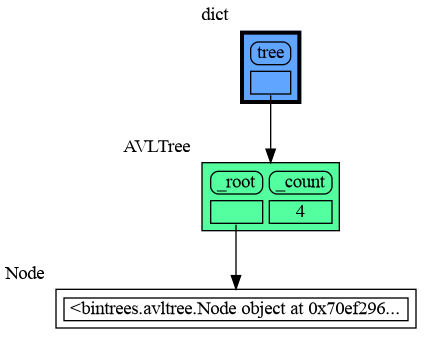
This section is likely to change. Sometimes the introspection fails or is not as desired. For example the `bintrees.avltree.Node` object doesn't show any attributes in the graph below.
|
|
583
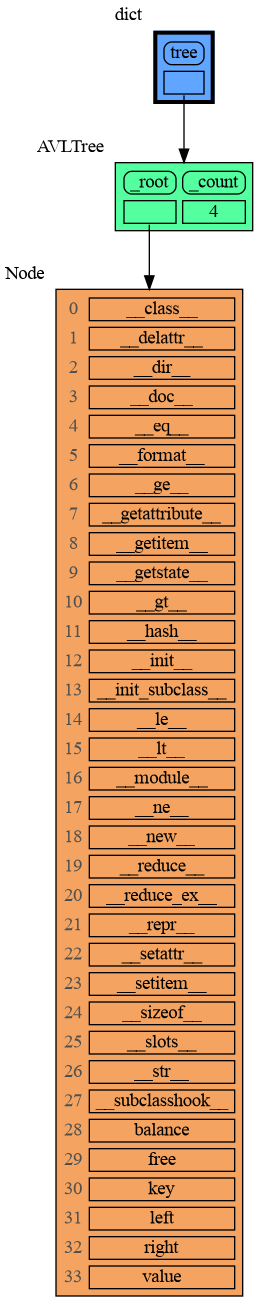
|
+
|
|
584
|
+
```python
|
|
585
|
+
import memory_graph as mg
|
|
586
|
+
import bintrees
|
|
587
|
+
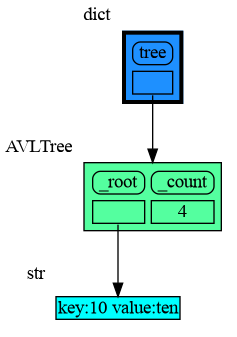
|
|
588
|
+
# Create an AVL tree
|
|
589
|
+
tree = bintrees.AVLTree()
|
|
590
|
+
tree.insert(10, "ten")
|
|
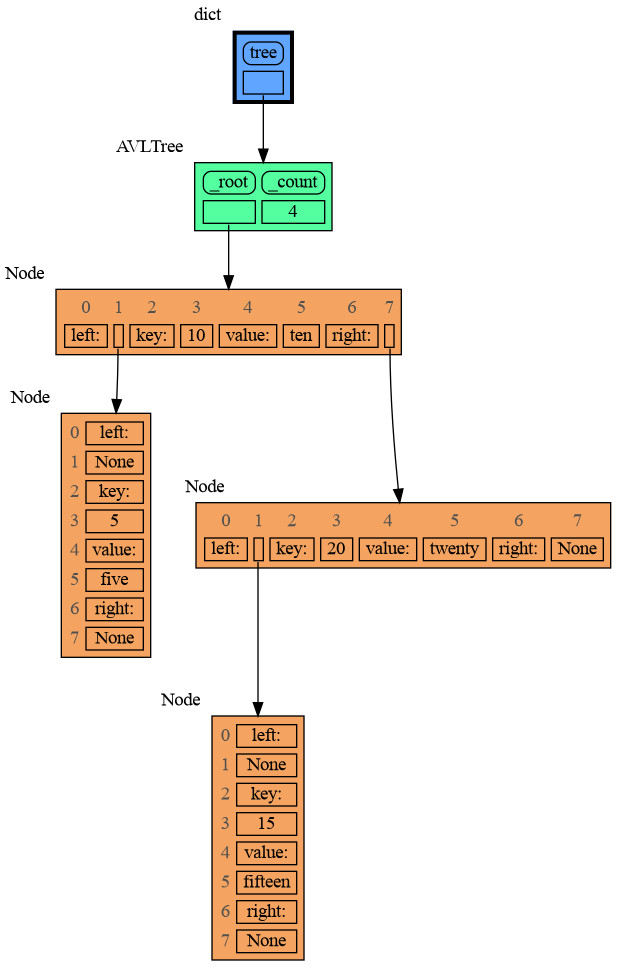
591
|
+
tree.insert(5, "five")
|
|
592
|
+
tree.insert(20, "twenty")
|
|
593
|
+
tree.insert(15, "fifteen")
|
|
594
|
+
|
|
595
|
+
mg.show(locals())
|
|
596
|
+
```
|
|
597
|
+
|
|
598
|
+
|
|
599
|
+
|
|
600
|
+
### dir() ###
|
|
601
|
+
A useful start is to give it some color, show the list of all its attributes using `dir()`, and setting an empty Slicer to see the attribute list in full.
|
|
602
|
+
|
|
603
|
+
```python
|
|
604
|
+
import memory_graph as mg
|
|
605
|
+
import bintrees
|
|
606
|
+
|
|
607
|
+
# Create an AVL tree
|
|
608
|
+
tree = bintrees.AVLTree()
|
|
609
|
+
tree.insert(10, "ten")
|
|
610
|
+
tree.insert(5, "five")
|
|
611
|
+
tree.insert(20, "twenty")
|
|
612
|
+
tree.insert(15, "fifteen")
|
|
613
|
+
|
|
614
|
+
mg.config.type_to_color[bintrees.avltree.Node] = "sandybrown"
|
|
615
|
+
mg.config.type_to_node[bintrees.avltree.Node] = lambda data: mg.node_linear.Node_Linear(data,
|
|
616
|
+
dir(data))
|
|
617
|
+
mg.config.type_to_slicer[bintrees.avltree.Node] = mg.slicer.Slicer()
|
|
618
|
+
|
|
619
|
+
mg.show(locals())
|
|
620
|
+
```
|
|
621
|
+
|
|
622
|
+
|
|
623
|
+
Next figure out what are the attributes you want to graph and choose a Node type, there are four options.
|
|
624
|
+
|
|
625
|
+
### 1 Node_Base ###
|
|
626
|
+
Node_base is a leaf node (with no children) and shows just a single value.
|
|
627
|
+
```python
|
|
628
|
+
import memory_graph as mg
|
|
629
|
+
import bintrees
|
|
630
|
+
|
|
631
|
+
# Create an AVL tree
|
|
632
|
+
tree = bintrees.AVLTree()
|
|
633
|
+
tree.insert(10, "ten")
|
|
634
|
+
tree.insert(5, "five")
|
|
635
|
+
tree.insert(20, "twenty")
|
|
636
|
+
tree.insert(15, "fifteen")
|
|
637
|
+
|
|
638
|
+
mg.config.type_to_color[bintrees.avltree.Node] = "sandybrown"
|
|
639
|
+
mg.config.type_to_node[bintrees.avltree.Node] = lambda data: mg.node_base.Node_Base(f"key:{data.key} value:{data.value}")
|
|
640
|
+
|
|
641
|
+
mg.show(locals())
|
|
642
|
+
```
|
|
643
|
+
|
|
644
|
+
|
|
645
|
+
### 2 Node_Linear ###
|
|
646
|
+
Node_Linear shows all the values in a line like a list.
|
|
647
|
+
```python
|
|
648
|
+
import memory_graph as mg
|
|
649
|
+
import bintrees
|
|
650
|
+
|
|
651
|
+
# Create an AVL tree
|
|
652
|
+
tree = bintrees.AVLTree()
|
|
653
|
+
tree.insert(10, "ten")
|
|
654
|
+
tree.insert(5, "five")
|
|
655
|
+
tree.insert(20, "twenty")
|
|
656
|
+
tree.insert(15, "fifteen")
|
|
657
|
+
|
|
658
|
+
mg.config.type_to_color[bintrees.avltree.Node] = "sandybrown"
|
|
659
|
+
mg.config.type_to_node[bintrees.avltree.Node] = lambda data: mg.node_linear.Node_Linear(data,
|
|
660
|
+
['left:', data.left,
|
|
661
|
+
'key:', data.key,
|
|
662
|
+
'value:', data.value,
|
|
663
|
+
'right:', data.right] )
|
|
664
|
+
|
|
665
|
+
mg.show(locals())
|
|
666
|
+
```
|
|
667
|
+
|
|
668
|
+
|
|
669
|
+
### 3 Node_Key_Value ###
|
|
670
|
+
Node_Key_Value shows key-value pairs like a dictionary. Note the required `items()` call at the end.
|
|
671
|
+
```python
|
|
672
|
+
import memory_graph as mg
|
|
673
|
+
import bintrees
|
|
674
|
+
|
|
675
|
+
# Create an AVL tree
|
|
676
|
+
tree = bintrees.AVLTree()
|
|
677
|
+
tree.insert(10, "ten")
|
|
678
|
+
tree.insert(5, "five")
|
|
679
|
+
tree.insert(20, "twenty")
|
|
680
|
+
tree.insert(15, "fifteen")
|
|
681
|
+
|
|
682
|
+
mg.config.type_to_color[bintrees.avltree.Node] = "sandybrown"
|
|
683
|
+
mg.config.type_to_node[bintrees.avltree.Node] = lambda data: mg.node_key_value.Node_Key_Value(data,
|
|
684
|
+
{'left': data.left,
|
|
685
|
+
'key': data.key,
|
|
686
|
+
'value': data.value,
|
|
687
|
+
'right': data.right}.items() )
|
|
688
|
+
|
|
689
|
+
mg.show(locals())
|
|
690
|
+
```
|
|
691
|
+
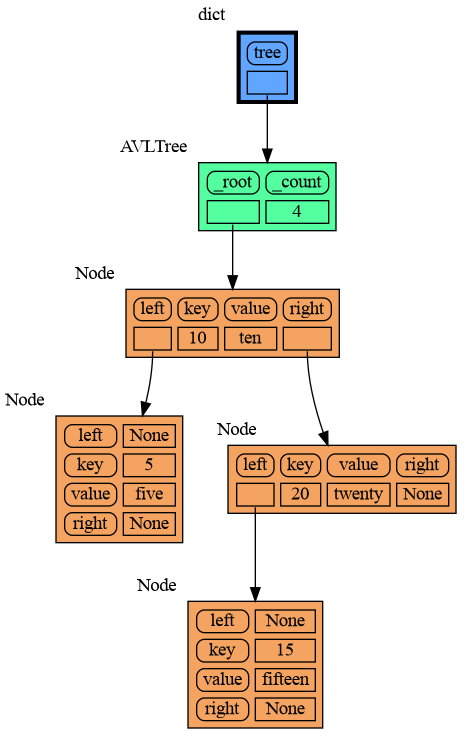
|
|
692
|
+
|
|
693
|
+
### 4 Node_Table ###
|
|
694
|
+
Node_Table shows all the values as a table.
|
|
695
|
+
```python
|
|
696
|
+
import memory_graph as mg
|
|
697
|
+
import bintrees
|
|
698
|
+
|
|
699
|
+
# Create an AVL tree
|
|
700
|
+
tree = bintrees.AVLTree()
|
|
701
|
+
tree.insert(10, "ten")
|
|
702
|
+
tree.insert(5, "five")
|
|
703
|
+
tree.insert(20, "twenty")
|
|
704
|
+
tree.insert(15, "fifteen")
|
|
705
|
+
|
|
706
|
+
mg.config.type_to_color[bintrees.avltree.Node] = "sandybrown"
|
|
707
|
+
mg.config.type_to_node[bintrees.avltree.Node] = lambda data: mg.node_table.Node_Table(data,
|
|
708
|
+
[[data.key, data.value],
|
|
709
|
+
[data.left, data.right]] )
|
|
710
|
+
|
|
711
|
+
|
|
712
|
+
mg.show(locals())
|
|
713
|
+
```
|
|
714
|
+
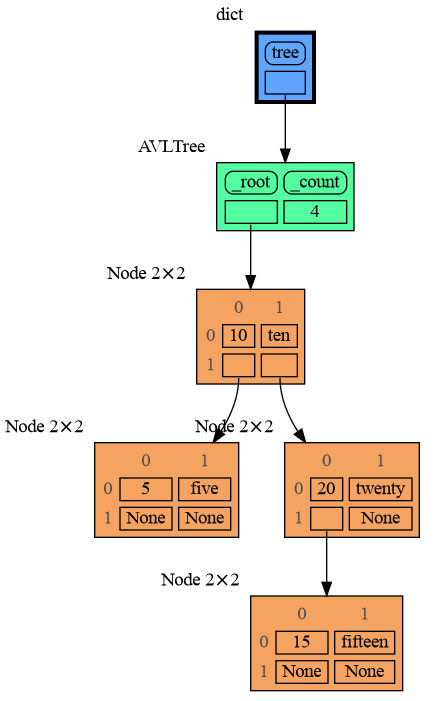
|
|
715
|
+
|
|
716
|
+
|
|
567
717
|
## Jupyter Notebook ##
|
|
718
|
+
In Jupyter Notebook `locals()` has additional variables that cause problems in the graph, use `mg.locals_jupyter()` to get the local variables with these problematic variables filtered out. Use `mg.get_call_stack_jupyter()` to get the whole call stack with these variables filtered out.
|
|
568
719
|
|
|
569
|
-
|
|
720
|
+
We can use `mg.show()` and `mg.render()` in a Jupyter Notebook, but alternatively we can also use `mg.create_graph()` to create a graph and the `display()` function to render it inline with for example:
|
|
721
|
+
|
|
722
|
+
```python
|
|
723
|
+
display( mg.create_graph(mg.locals_jupyter()) ) # display the local variables inline
|
|
724
|
+
mg.block(display, mg.create_graph(mg.locals_jupyter()) ) # the same but blocked
|
|
725
|
+
```
|
|
570
726
|
|
|
571
727
|
See for example [jupyter_example.ipynb](https://raw.githubusercontent.com/bterwijn/memory_graph/main/images/jupyter_example.ipynb).
|
|
572
728
|
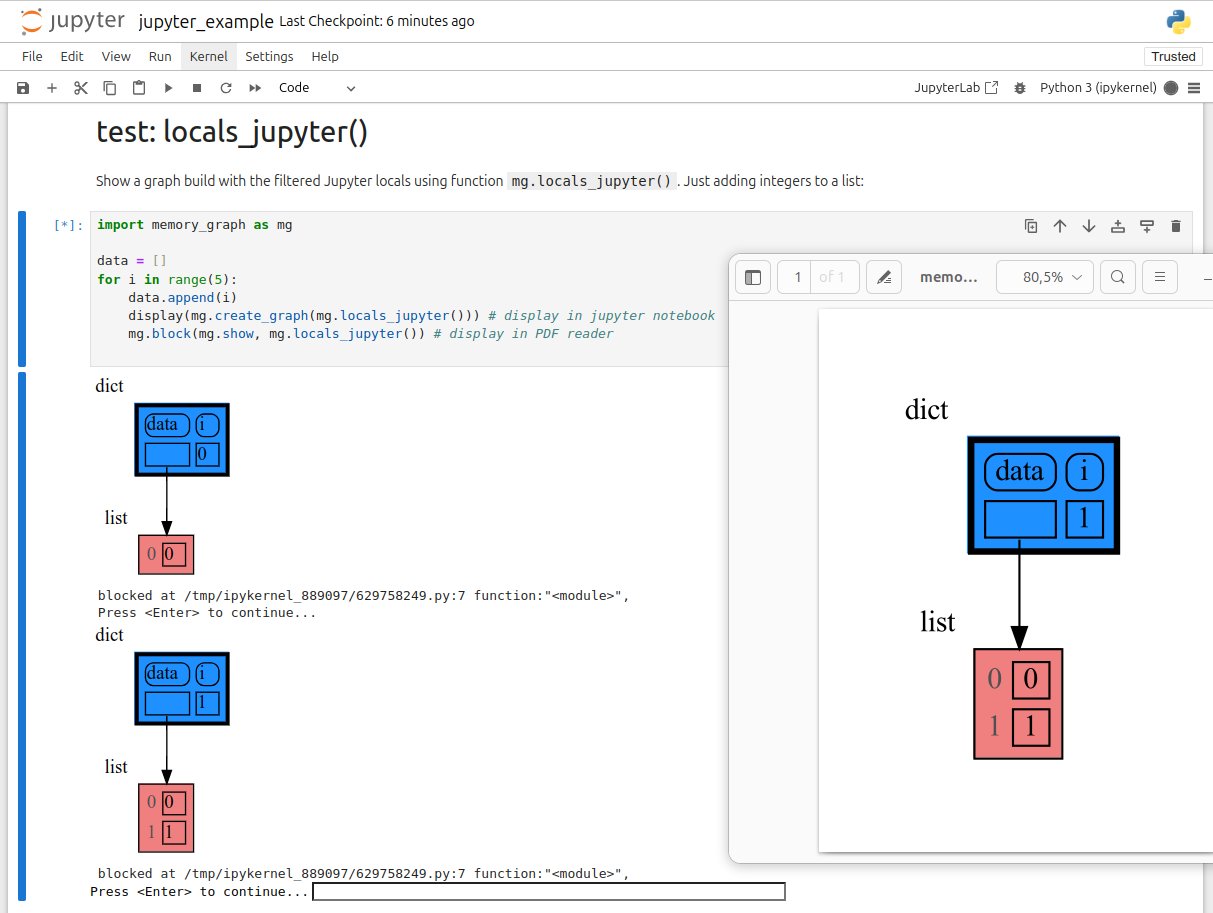
|
|
@@ -49,7 +49,7 @@ identical?: True
|
|
|
49
49
|
A better way to understand what data is shared is to draw a graph of the data using the [memory_graph](https://pypi.org/project/memory-graph/) package.
|
|
50
50
|
|
|
51
51
|
# Memory Graph #
|
|
52
|
-
The [memory_graph](https://pypi.org/project/memory-graph/) package can graph many different data types
|
|
52
|
+
The [memory_graph](https://pypi.org/project/memory-graph/) package can graph many different data types, not limited to:
|
|
53
53
|
|
|
54
54
|
```python
|
|
55
55
|
import memory_graph as mg
|
|
@@ -69,8 +69,10 @@ Instead of showing the graph you can also render it to an output file of your ch
|
|
|
69
69
|
|
|
70
70
|
```python
|
|
71
71
|
mg.render(data, "my_graph.pdf")
|
|
72
|
+
mg.render(data, "my_graph.svg")
|
|
72
73
|
mg.render(data, "my_graph.png")
|
|
73
74
|
mg.render(data, "my_graph.gv") # Graphviz DOT file
|
|
75
|
+
mg.render(data) # renders to 'mg.render_filename' (default value: 'memory_graph.pdf')
|
|
74
76
|
```
|
|
75
77
|
|
|
76
78
|
# Chapters #
|
|
@@ -87,6 +89,8 @@ mg.render(data, "my_graph.gv") # Graphviz DOT file
|
|
|
87
89
|
|
|
88
90
|
[Extensions](#extensions)
|
|
89
91
|
|
|
92
|
+
[Introspection](#introspection)
|
|
93
|
+
|
|
90
94
|
[Jupyter Notebook](#jupyter-notebook)
|
|
91
95
|
|
|
92
96
|
[Troubleshooting](#troubleshooting)
|
|
@@ -228,10 +232,12 @@ This is because `b` is of immutable type 'tuple' so its value gets copied automa
|
|
|
228
232
|
It is often helpful to temporarily block program execution to inspect the graph. For this, you can use the `mg.block()` function:
|
|
229
233
|
|
|
230
234
|
```python
|
|
231
|
-
mg.block(fun, arg1, arg2,
|
|
235
|
+
mg.block(fun, arg1, arg2, ...)
|
|
232
236
|
```
|
|
233
237
|
|
|
234
|
-
This function first executes `fun(arg1, arg2, ...)`, then prints the current source location in the program, and blocks execution until the <Enter> key is pressed.
|
|
238
|
+
This function first executes `fun(arg1, arg2, ...)`, then prints the current source location in the program, and blocks execution until the <Enter> key is pressed.
|
|
239
|
+
Set `mg.block_shows_location = False` to skip printing the source location.
|
|
240
|
+
Set `mg.press_enter_message = None` to skip printing "Press <Enter> to continue...".
|
|
235
241
|
|
|
236
242
|
### Recursion ###
|
|
237
243
|
The call stack is also helpful to visualize how recursion works. Here we use `mg.block()` to show each step of how recursively ```factorial(3)``` is computed:
|
|
@@ -314,12 +320,20 @@ mg.get_call_stack_after_up_to(after_function, up_to_function="<module>")
|
|
|
314
320
|
|
|
315
321
|
### Debugging without Debugger Tool ###
|
|
316
322
|
|
|
317
|
-
To simplify debugging without a debugger tool, we offer these
|
|
323
|
+
To simplify debugging without a debugger tool, we offer these alias functions that you can insert into your code at the point where you want to visualize a graph:
|
|
318
324
|
|
|
319
325
|
| alias | purpose | function call |
|
|
320
326
|
|:---|:---|:---|
|
|
321
|
-
| `mg.
|
|
322
|
-
| `mg.
|
|
327
|
+
| `mg.sl()` | **s**how **l**ocal variables | `mg.show(locals())` |
|
|
328
|
+
| `mg.ss()` | **s**how the call **s**tack | `mg.show(mg.get_call_stack())` |
|
|
329
|
+
| `mg.bsl()` | **b**lock after **s**howing **l**ocal variables | `mg.block(mg.show, locals())` |
|
|
330
|
+
| `mg.bss()` | **b**lock after **s**howing the call **s**tack | `mg.block(mg.show, mg.get_call_stack())` |
|
|
331
|
+
| `mg.rl()` | **r**ender **l**ocal variables | `mg.render(locals())` |
|
|
332
|
+
| `mg.rs()` | **r**ender the call **s**tack | `mg.render(mg.get_call_stack())` |
|
|
333
|
+
| `mg.brl()` | **b**lock after **r**endering **l**ocal variables | `mg.block(mg.render, locals())` |
|
|
334
|
+
| `mg.brs()` | **b**lock after **r**endering the call **s**tack | `mg.block(mg.render, mg.get_call_stack())` |
|
|
335
|
+
| `mg.l()` | same as `mg.bsl()` | |
|
|
336
|
+
| `mg.s()` | same as `mg.bss()` | |
|
|
323
337
|
|
|
324
338
|
For example, executing this program:
|
|
325
339
|
|
|
@@ -331,7 +345,7 @@ squares_collector = []
|
|
|
331
345
|
for i in range(1, 6):
|
|
332
346
|
squares.append(i**2)
|
|
333
347
|
squares_collector.append(squares.copy())
|
|
334
|
-
mg.l() #
|
|
348
|
+
mg.l() # block after showing local variables
|
|
335
349
|
```
|
|
336
350
|
and pressing <Enter> a number of times, results in:
|
|
337
351
|
|
|
@@ -545,9 +559,151 @@ mg.show(locals())
|
|
|
545
559
|
```
|
|
546
560
|

|
|
547
561
|
|
|
562
|
+
## Introspection ##
|
|
563
|
+
This section is likely to change. Sometimes the introspection fails or is not as desired. For example the `bintrees.avltree.Node` object doesn't show any attributes in the graph below.
|
|
564
|
+
|
|
565
|
+
```python
|
|
566
|
+
import memory_graph as mg
|
|
567
|
+
import bintrees
|
|
568
|
+
|
|
569
|
+
# Create an AVL tree
|
|
570
|
+
tree = bintrees.AVLTree()
|
|
571
|
+
tree.insert(10, "ten")
|
|
572
|
+
tree.insert(5, "five")
|
|
573
|
+
tree.insert(20, "twenty")
|
|
574
|
+
tree.insert(15, "fifteen")
|
|
575
|
+
|
|
576
|
+
mg.show(locals())
|
|
577
|
+
```
|
|
578
|
+

|
|
579
|
+
|
|
580
|
+
|
|
581
|
+
### dir() ###
|
|
582
|
+
A useful start is to give it some color, show the list of all its attributes using `dir()`, and setting an empty Slicer to see the attribute list in full.
|
|
583
|
+
|
|
584
|
+
```python
|
|
585
|
+
import memory_graph as mg
|
|
586
|
+
import bintrees
|
|
587
|
+
|
|
588
|
+
# Create an AVL tree
|
|
589
|
+
tree = bintrees.AVLTree()
|
|
590
|
+
tree.insert(10, "ten")
|
|
591
|
+
tree.insert(5, "five")
|
|
592
|
+
tree.insert(20, "twenty")
|
|
593
|
+
tree.insert(15, "fifteen")
|
|
594
|
+
|
|
595
|
+
mg.config.type_to_color[bintrees.avltree.Node] = "sandybrown"
|
|
596
|
+
mg.config.type_to_node[bintrees.avltree.Node] = lambda data: mg.node_linear.Node_Linear(data,
|
|
597
|
+
dir(data))
|
|
598
|
+
mg.config.type_to_slicer[bintrees.avltree.Node] = mg.slicer.Slicer()
|
|
599
|
+
|
|
600
|
+
mg.show(locals())
|
|
601
|
+
```
|
|
602
|
+

|
|
603
|
+
|
|
604
|
+
Next figure out what are the attributes you want to graph and choose a Node type, there are four options.
|
|
605
|
+
|
|
606
|
+
### 1 Node_Base ###
|
|
607
|
+
Node_base is a leaf node (with no children) and shows just a single value.
|
|
608
|
+
```python
|
|
609
|
+
import memory_graph as mg
|
|
610
|
+
import bintrees
|
|
611
|
+
|
|
612
|
+
# Create an AVL tree
|
|
613
|
+
tree = bintrees.AVLTree()
|
|
614
|
+
tree.insert(10, "ten")
|
|
615
|
+
tree.insert(5, "five")
|
|
616
|
+
tree.insert(20, "twenty")
|
|
617
|
+
tree.insert(15, "fifteen")
|
|
618
|
+
|
|
619
|
+
mg.config.type_to_color[bintrees.avltree.Node] = "sandybrown"
|
|
620
|
+
mg.config.type_to_node[bintrees.avltree.Node] = lambda data: mg.node_base.Node_Base(f"key:{data.key} value:{data.value}")
|
|
621
|
+
|
|
622
|
+
mg.show(locals())
|
|
623
|
+
```
|
|
624
|
+

|
|
625
|
+
|
|
626
|
+
### 2 Node_Linear ###
|
|
627
|
+
Node_Linear shows all the values in a line like a list.
|
|
628
|
+
```python
|
|
629
|
+
import memory_graph as mg
|
|
630
|
+
import bintrees
|
|
631
|
+
|
|
632
|
+
# Create an AVL tree
|
|
633
|
+
tree = bintrees.AVLTree()
|
|
634
|
+
tree.insert(10, "ten")
|
|
635
|
+
tree.insert(5, "five")
|
|
636
|
+
tree.insert(20, "twenty")
|
|
637
|
+
tree.insert(15, "fifteen")
|
|
638
|
+
|
|
639
|
+
mg.config.type_to_color[bintrees.avltree.Node] = "sandybrown"
|
|
640
|
+
mg.config.type_to_node[bintrees.avltree.Node] = lambda data: mg.node_linear.Node_Linear(data,
|
|
641
|
+
['left:', data.left,
|
|
642
|
+
'key:', data.key,
|
|
643
|
+
'value:', data.value,
|
|
644
|
+
'right:', data.right] )
|
|
645
|
+
|
|
646
|
+
mg.show(locals())
|
|
647
|
+
```
|
|
648
|
+

|
|
649
|
+
|
|
650
|
+
### 3 Node_Key_Value ###
|
|
651
|
+
Node_Key_Value shows key-value pairs like a dictionary. Note the required `items()` call at the end.
|
|
652
|
+
```python
|
|
653
|
+
import memory_graph as mg
|
|
654
|
+
import bintrees
|
|
655
|
+
|
|
656
|
+
# Create an AVL tree
|
|
657
|
+
tree = bintrees.AVLTree()
|
|
658
|
+
tree.insert(10, "ten")
|
|
659
|
+
tree.insert(5, "five")
|
|
660
|
+
tree.insert(20, "twenty")
|
|
661
|
+
tree.insert(15, "fifteen")
|
|
662
|
+
|
|
663
|
+
mg.config.type_to_color[bintrees.avltree.Node] = "sandybrown"
|
|
664
|
+
mg.config.type_to_node[bintrees.avltree.Node] = lambda data: mg.node_key_value.Node_Key_Value(data,
|
|
665
|
+
{'left': data.left,
|
|
666
|
+
'key': data.key,
|
|
667
|
+
'value': data.value,
|
|
668
|
+
'right': data.right}.items() )
|
|
669
|
+
|
|
670
|
+
mg.show(locals())
|
|
671
|
+
```
|
|
672
|
+

|
|
673
|
+
|
|
674
|
+
### 4 Node_Table ###
|
|
675
|
+
Node_Table shows all the values as a table.
|
|
676
|
+
```python
|
|
677
|
+
import memory_graph as mg
|
|
678
|
+
import bintrees
|
|
679
|
+
|
|
680
|
+
# Create an AVL tree
|
|
681
|
+
tree = bintrees.AVLTree()
|
|
682
|
+
tree.insert(10, "ten")
|
|
683
|
+
tree.insert(5, "five")
|
|
684
|
+
tree.insert(20, "twenty")
|
|
685
|
+
tree.insert(15, "fifteen")
|
|
686
|
+
|
|
687
|
+
mg.config.type_to_color[bintrees.avltree.Node] = "sandybrown"
|
|
688
|
+
mg.config.type_to_node[bintrees.avltree.Node] = lambda data: mg.node_table.Node_Table(data,
|
|
689
|
+
[[data.key, data.value],
|
|
690
|
+
[data.left, data.right]] )
|
|
691
|
+
|
|
692
|
+
|
|
693
|
+
mg.show(locals())
|
|
694
|
+
```
|
|
695
|
+

|
|
696
|
+
|
|
697
|
+
|
|
548
698
|
## Jupyter Notebook ##
|
|
699
|
+
In Jupyter Notebook `locals()` has additional variables that cause problems in the graph, use `mg.locals_jupyter()` to get the local variables with these problematic variables filtered out. Use `mg.get_call_stack_jupyter()` to get the whole call stack with these variables filtered out.
|
|
549
700
|
|
|
550
|
-
|
|
701
|
+
We can use `mg.show()` and `mg.render()` in a Jupyter Notebook, but alternatively we can also use `mg.create_graph()` to create a graph and the `display()` function to render it inline with for example:
|
|
702
|
+
|
|
703
|
+
```python
|
|
704
|
+
display( mg.create_graph(mg.locals_jupyter()) ) # display the local variables inline
|
|
705
|
+
mg.block(display, mg.create_graph(mg.locals_jupyter()) ) # the same but blocked
|
|
706
|
+
```
|
|
551
707
|
|
|
552
708
|
See for example [jupyter_example.ipynb](https://raw.githubusercontent.com/bterwijn/memory_graph/main/images/jupyter_example.ipynb).
|
|
553
709
|

|
|
@@ -0,0 +1,9 @@
|
|
|
1
|
+
|
|
2
|
+
mg.block(fun, print_loc=True), update docs, stack-overflow posts
|
|
3
|
+
|
|
4
|
+
Jupyter Notebook inline render using display()
|
|
5
|
+
|
|
6
|
+
webassembly inline render
|
|
7
|
+
|
|
8
|
+
optional max introspect depth for each type/id
|
|
9
|
+
https://discuss.python.org/t/request-for-feedback-memory-graph-a-python-visualization-tool-for-education/78347
|
|
Binary file
|
|
@@ -0,0 +1,18 @@
|
|
|
1
|
+
# This file is part of memory_graph.
|
|
2
|
+
# Copyright (c) 2023, Bas Terwijn.
|
|
3
|
+
# SPDX-License-Identifier: BSD-2-Clause
|
|
4
|
+
|
|
5
|
+
import memory_graph as mg
|
|
6
|
+
|
|
7
|
+
def add_one(a, b, c):
|
|
8
|
+
a += [1]
|
|
9
|
+
b += (1,)
|
|
10
|
+
c += [1]
|
|
11
|
+
mg.render( mg.get_call_stack(), "add_one.png")
|
|
12
|
+
|
|
13
|
+
a = [4, 3, 2]
|
|
14
|
+
b = (4, 3, 2)
|
|
15
|
+
c = [4, 3, 2]
|
|
16
|
+
|
|
17
|
+
add_one(a, b, c.copy())
|
|
18
|
+
print(f"a:{a} b:{b} c:{c}")
|
|
@@ -0,0 +1,43 @@
|
|
|
1
|
+
# This file is part of memory_graph.
|
|
2
|
+
# Copyright (c) 2023, Bas Terwijn.
|
|
3
|
+
# SPDX-License-Identifier: BSD-2-Clause
|
|
4
|
+
|
|
5
|
+
import memory_graph as mg
|
|
6
|
+
import bintrees
|
|
7
|
+
|
|
8
|
+
# Create an AVL tree
|
|
9
|
+
tree = bintrees.AVLTree()
|
|
10
|
+
tree.insert(10, "ten")
|
|
11
|
+
tree.insert(5, "five")
|
|
12
|
+
tree.insert(20, "twenty")
|
|
13
|
+
tree.insert(15, "fifteen")
|
|
14
|
+
|
|
15
|
+
# mg.render(locals(), 'avltree_fail.png') # id keeps changing
|
|
16
|
+
|
|
17
|
+
mg.config.type_to_color[bintrees.avltree.Node] = "sandybrown"
|
|
18
|
+
mg.config.type_to_node[bintrees.avltree.Node] = lambda data: mg.node_linear.Node_Linear(data, dir(data))
|
|
19
|
+
mg.config.type_to_slicer[bintrees.avltree.Node] = mg.slicer.Slicer()
|
|
20
|
+
mg.render(locals(), 'avltree_dir.png')
|
|
21
|
+
|
|
22
|
+
mg.config.type_to_node[bintrees.avltree.Node] = lambda data: mg.node_base.Node_Base(f"key:{data.key} value:{data.value}")
|
|
23
|
+
mg.render(locals(), 'avltree_base.png')
|
|
24
|
+
|
|
25
|
+
mg.config.type_to_node[bintrees.avltree.Node] = lambda data: mg.node_linear.Node_Linear(data,
|
|
26
|
+
['left:', data.left,
|
|
27
|
+
'key:', data.key,
|
|
28
|
+
'value:', data.value,
|
|
29
|
+
'right:', data.right])
|
|
30
|
+
mg.render(locals(), 'avltree_linear.png')
|
|
31
|
+
|
|
32
|
+
mg.config.type_to_node[bintrees.avltree.Node] = lambda data: mg.node_key_value.Node_Key_Value(data,
|
|
33
|
+
{'left': data.left,
|
|
34
|
+
'key': data.key,
|
|
35
|
+
'value': data.value,
|
|
36
|
+
'right': data.right}.items())
|
|
37
|
+
mg.render(locals(), 'avltree_key_value.png')
|
|
38
|
+
|
|
39
|
+
mg.config.type_to_node[bintrees.avltree.Node] = lambda data: mg.node_table.Node_Table(data,
|
|
40
|
+
[[data.key, data.value],
|
|
41
|
+
[data.left, data.right]]
|
|
42
|
+
)
|
|
43
|
+
mg.render(locals(), 'avltree_table.png')
|
|
Binary file
|
|
Binary file
|
|
Binary file
|
|
Binary file
|
|
Binary file
|
|
Binary file
|
|
Binary file
|
|
@@ -0,0 +1,47 @@
|
|
|
1
|
+
# This file is part of memory_graph.
|
|
2
|
+
# Copyright (c) 2023, Bas Terwijn.
|
|
3
|
+
# SPDX-License-Identifier: BSD-2-Clause
|
|
4
|
+
|
|
5
|
+
import memory_graph as mg
|
|
6
|
+
import random
|
|
7
|
+
random.seed(0) # use same random numbers each run
|
|
8
|
+
|
|
9
|
+
class Node:
|
|
10
|
+
|
|
11
|
+
def __init__(self, value):
|
|
12
|
+
self.smaller = None
|
|
13
|
+
self.value = value
|
|
14
|
+
self.larger = None
|
|
15
|
+
|
|
16
|
+
class BinTree:
|
|
17
|
+
|
|
18
|
+
def __init__(self):
|
|
19
|
+
self.root = None
|
|
20
|
+
|
|
21
|
+
def add_recursive(self, new_value, node):
|
|
22
|
+
if new_value < node.value:
|
|
23
|
+
if node.smaller is None:
|
|
24
|
+
node.smaller = Node(new_value)
|
|
25
|
+
else:
|
|
26
|
+
self.add_recursive(new_value, node.smaller)
|
|
27
|
+
else:
|
|
28
|
+
if node.larger is None:
|
|
29
|
+
node.larger = Node(new_value)
|
|
30
|
+
else:
|
|
31
|
+
self.add_recursive(new_value, node.larger)
|
|
32
|
+
if new_value == 51:
|
|
33
|
+
mg.render(locals(), f"bin_tree.png")
|
|
34
|
+
exit(0)
|
|
35
|
+
|
|
36
|
+
def add(self, value):
|
|
37
|
+
if self.root is None:
|
|
38
|
+
self.root = Node(value)
|
|
39
|
+
else:
|
|
40
|
+
self.add_recursive(value, self.root)
|
|
41
|
+
|
|
42
|
+
tree = BinTree()
|
|
43
|
+
n = 100
|
|
44
|
+
for i in range(n):
|
|
45
|
+
new_value = random.randrange(n)
|
|
46
|
+
tree.add(new_value)
|
|
47
|
+
|
|
Binary file
|
|
@@ -0,0 +1,15 @@
|
|
|
1
|
+
# This file is part of memory_graph.
|
|
2
|
+
# Copyright (c) 2023, Bas Terwijn.
|
|
3
|
+
# SPDX-License-Identifier: BSD-2-Clause
|
|
4
|
+
|
|
5
|
+
import memory_graph as mg
|
|
6
|
+
import copy
|
|
7
|
+
|
|
8
|
+
a = [ [1, 2], ['x', 'y'] ] # a nested list (a list containing lists)
|
|
9
|
+
|
|
10
|
+
# three different ways to make a "copy" of 'a':
|
|
11
|
+
c1 = a
|
|
12
|
+
c2 = copy.copy(a) # equivalent to: a.copy() a[:] list(a)
|
|
13
|
+
c3 = copy.deepcopy(a)
|
|
14
|
+
|
|
15
|
+
mg.render(locals(), 'copies.png')
|
|
Binary file
|
|
@@ -0,0 +1,22 @@
|
|
|
1
|
+
# This file is part of memory_graph.
|
|
2
|
+
# Copyright (c) 2023, Bas Terwijn.
|
|
3
|
+
# SPDX-License-Identifier: BSD-2-Clause
|
|
4
|
+
|
|
5
|
+
import memory_graph as mg
|
|
6
|
+
import copy
|
|
7
|
+
|
|
8
|
+
class My_Class:
|
|
9
|
+
|
|
10
|
+
def __init__(self):
|
|
11
|
+
self.digits = [1, 2]
|
|
12
|
+
self.letters = ['x', 'y']
|
|
13
|
+
|
|
14
|
+
def copy(self): # custom copy method copies the digits but shares the letters
|
|
15
|
+
c = copy.copy(self)
|
|
16
|
+
c.digits = copy.copy(self.digits)
|
|
17
|
+
return c
|
|
18
|
+
|
|
19
|
+
a = My_Class()
|
|
20
|
+
b = a.copy()
|
|
21
|
+
|
|
22
|
+
mg.render(locals(), 'copy_method.png')
|
|
@@ -0,0 +1,19 @@
|
|
|
1
|
+
#!/bin/bash
|
|
2
|
+
#
|
|
3
|
+
# install:
|
|
4
|
+
#
|
|
5
|
+
# sudo apt install imagemagick
|
|
6
|
+
|
|
7
|
+
name="$1"
|
|
8
|
+
files=$(ls -v $name*.png)
|
|
9
|
+
echo "creating gif with:"
|
|
10
|
+
echo "$files"
|
|
11
|
+
|
|
12
|
+
largest_size=$(identify -format "%Wx%H %f\n" $name*.png | sort -nr | head -n1)
|
|
13
|
+
echo "largest_size: $largest_size"
|
|
14
|
+
|
|
15
|
+
echo "resizing images"
|
|
16
|
+
mogrify -resize $largest_size -background white -gravity center -extent $largest_size $files
|
|
17
|
+
echo "creating file: $name.gif"
|
|
18
|
+
convert -delay 150 -loop 0 $files $name.gif
|
|
19
|
+
echo "done"
|