memory-graph 0.3.69__tar.gz → 0.3.71__tar.gz
This diff represents the content of publicly available package versions that have been released to one of the supported registries. The information contained in this diff is provided for informational purposes only and reflects changes between package versions as they appear in their respective public registries.
- {memory_graph-0.3.69 → memory_graph-0.3.71}/PKG-INFO +54 -10
- {memory_graph-0.3.69 → memory_graph-0.3.71}/README.md +53 -9
- {memory_graph-0.3.69 → memory_graph-0.3.71}/memory_graph/__init__.py +12 -1
- {memory_graph-0.3.69 → memory_graph-0.3.71}/memory_graph/memory_to_nodes.py +6 -4
- {memory_graph-0.3.69 → memory_graph-0.3.71}/memory_graph.egg-info/PKG-INFO +54 -10
- {memory_graph-0.3.69 → memory_graph-0.3.71}/pyproject.toml +1 -1
- {memory_graph-0.3.69 → memory_graph-0.3.71}/LICENSE.txt +0 -0
- {memory_graph-0.3.69 → memory_graph-0.3.71}/memory_graph/call_stack.py +0 -0
- {memory_graph-0.3.69 → memory_graph-0.3.71}/memory_graph/config.py +0 -0
- {memory_graph-0.3.69 → memory_graph-0.3.71}/memory_graph/config_default.py +0 -0
- {memory_graph-0.3.69 → memory_graph-0.3.71}/memory_graph/config_helpers.py +0 -0
- {memory_graph-0.3.69 → memory_graph-0.3.71}/memory_graph/extension_numpy.py +0 -0
- {memory_graph-0.3.69 → memory_graph-0.3.71}/memory_graph/extension_pandas.py +0 -0
- {memory_graph-0.3.69 → memory_graph-0.3.71}/memory_graph/extension_torch.py +0 -0
- {memory_graph-0.3.69 → memory_graph-0.3.71}/memory_graph/html_table.py +0 -0
- {memory_graph-0.3.69 → memory_graph-0.3.71}/memory_graph/list_view.py +0 -0
- {memory_graph-0.3.69 → memory_graph-0.3.71}/memory_graph/node_base.py +0 -0
- {memory_graph-0.3.69 → memory_graph-0.3.71}/memory_graph/node_key_value.py +0 -0
- {memory_graph-0.3.69 → memory_graph-0.3.71}/memory_graph/node_leaf.py +0 -0
- {memory_graph-0.3.69 → memory_graph-0.3.71}/memory_graph/node_linear.py +0 -0
- {memory_graph-0.3.69 → memory_graph-0.3.71}/memory_graph/node_table.py +0 -0
- {memory_graph-0.3.69 → memory_graph-0.3.71}/memory_graph/sequence.py +0 -0
- {memory_graph-0.3.69 → memory_graph-0.3.71}/memory_graph/slicer.py +0 -0
- {memory_graph-0.3.69 → memory_graph-0.3.71}/memory_graph/slices.py +0 -0
- {memory_graph-0.3.69 → memory_graph-0.3.71}/memory_graph/slices_iterator.py +0 -0
- {memory_graph-0.3.69 → memory_graph-0.3.71}/memory_graph/slices_table_iterator.py +0 -0
- {memory_graph-0.3.69 → memory_graph-0.3.71}/memory_graph/test.py +0 -0
- {memory_graph-0.3.69 → memory_graph-0.3.71}/memory_graph/test_max_graph_depth.py +0 -0
- {memory_graph-0.3.69 → memory_graph-0.3.71}/memory_graph/test_memory_graph.py +0 -0
- {memory_graph-0.3.69 → memory_graph-0.3.71}/memory_graph/test_memory_to_nodes.py +0 -0
- {memory_graph-0.3.69 → memory_graph-0.3.71}/memory_graph/test_sequence.py +0 -0
- {memory_graph-0.3.69 → memory_graph-0.3.71}/memory_graph/test_slicer.py +0 -0
- {memory_graph-0.3.69 → memory_graph-0.3.71}/memory_graph/test_slices.py +0 -0
- {memory_graph-0.3.69 → memory_graph-0.3.71}/memory_graph/test_slices_iterator.py +0 -0
- {memory_graph-0.3.69 → memory_graph-0.3.71}/memory_graph/utils.py +0 -0
- {memory_graph-0.3.69 → memory_graph-0.3.71}/memory_graph.egg-info/SOURCES.txt +0 -0
- {memory_graph-0.3.69 → memory_graph-0.3.71}/memory_graph.egg-info/dependency_links.txt +0 -0
- {memory_graph-0.3.69 → memory_graph-0.3.71}/memory_graph.egg-info/requires.txt +0 -0
- {memory_graph-0.3.69 → memory_graph-0.3.71}/memory_graph.egg-info/top_level.txt +0 -0
- {memory_graph-0.3.69 → memory_graph-0.3.71}/setup.cfg +0 -0
- {memory_graph-0.3.69 → memory_graph-0.3.71}/setup.py +0 -0
|
@@ -1,6 +1,6 @@
|
|
|
1
1
|
Metadata-Version: 2.4
|
|
2
2
|
Name: memory_graph
|
|
3
|
-
Version: 0.3.
|
|
3
|
+
Version: 0.3.71
|
|
4
4
|
Summary: Teaching tool and debugging aid in context of references, mutable data types, and shallow and deep copy.
|
|
5
5
|
Author-email: Bas Terwijn <bterwijn@gmail.com>
|
|
6
6
|
License-Expression: BSD-2-Clause
|
|
@@ -559,16 +559,15 @@ and pressing <Enter> a number of times, results in:
|
|
|
559
559
|
|
|
560
560
|
## Debugging using Exceptions ##
|
|
561
561
|
|
|
562
|
-
To get the call stack at the point where exception `e` was
|
|
562
|
+
To get the call stack at the point where exception `e` was raised use `mg.stack_exception(e)`. This allows you to graph the trace back for easier debugging, for example:
|
|
563
563
|
|
|
564
564
|
``` python
|
|
565
565
|
import memory_graph as mg
|
|
566
|
-
import traceback;
|
|
567
566
|
|
|
568
567
|
def fun3():
|
|
569
568
|
d = [0] * 3
|
|
570
569
|
for i in range(4):
|
|
571
|
-
d[i] = i #
|
|
570
|
+
d[i] = i # raises IndexError when i = 3
|
|
572
571
|
|
|
573
572
|
def fun2():
|
|
574
573
|
fun3()
|
|
@@ -579,19 +578,22 @@ def fun1():
|
|
|
579
578
|
try:
|
|
580
579
|
fun1()
|
|
581
580
|
except Exception as e:
|
|
582
|
-
|
|
583
|
-
|
|
581
|
+
mg.show(mg.stack_exception(e)) # graph traceback
|
|
582
|
+
raise e # reraise to print traceback
|
|
584
583
|
```
|
|
585
584
|
```
|
|
586
585
|
$ python exception_example.py
|
|
587
586
|
Traceback (most recent call last):
|
|
588
|
-
File "
|
|
587
|
+
File "/home/bterwijn/temp/e.py", line 18, in <module>
|
|
588
|
+
raise e # raise to print traceback
|
|
589
|
+
^^^^^^^
|
|
590
|
+
File "/home/bterwijn/temp/e.py", line 15, in <module>
|
|
589
591
|
fun1()
|
|
590
|
-
File "
|
|
592
|
+
File "/home/bterwijn/temp/e.py", line 12, in fun1
|
|
591
593
|
fun2()
|
|
592
|
-
File "
|
|
594
|
+
File "/home/bterwijn/temp/e.py", line 9, in fun2
|
|
593
595
|
fun3()
|
|
594
|
-
File "
|
|
596
|
+
File "/home/bterwijn/temp/e.py", line 6, in fun3
|
|
595
597
|
d[i] = i # throws IndexError when i = 3
|
|
596
598
|
~^^^
|
|
597
599
|
IndexError: list assignment index out of range
|
|
@@ -1033,6 +1035,48 @@ mg.config.type_to_node[List_View] = (lambda l: mg.Node_Linear(l,
|
|
|
1033
1035
|
|
|
1034
1036
|
Or see it in the [Memory Grah Web Debugger](https://memory-graph.com/#codeurl=https://raw.githubusercontent.com/bterwijn/memory_graph/refs/heads/main/src/bin_search.py&breakpoints=32&continues=1×tep=0.5&play)
|
|
1035
1037
|
|
|
1038
|
+
## Collapse Type ##
|
|
1039
|
+
|
|
1040
|
+
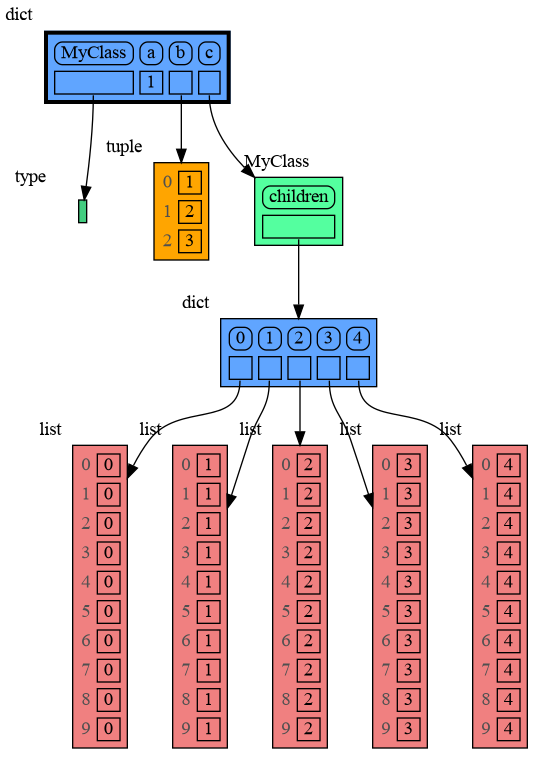
Sometimes a type has too many attributes or too many child nodes in the graph for it to stay readable. We use type 'MyClass' as an example here:
|
|
1041
|
+
|
|
1042
|
+
```python
|
|
1043
|
+
import memory_graph as mg
|
|
1044
|
+
|
|
1045
|
+
class MyClass:
|
|
1046
|
+
def __init__(self):
|
|
1047
|
+
self.children = {i: [i]*10 for i in range(5)}
|
|
1048
|
+
a = 1
|
|
1049
|
+
b = (1, 2, 3)
|
|
1050
|
+
c = MyClass()
|
|
1051
|
+
d = (4, 5, 6, 7)
|
|
1052
|
+
|
|
1053
|
+
mg.l()
|
|
1054
|
+
```
|
|
1055
|
+
|
|
1056
|
+
|
|
1057
|
+
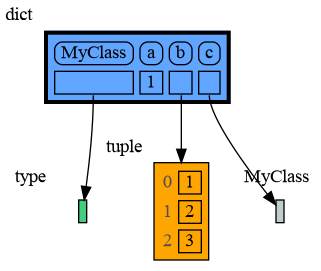
Then we can collapse this type with `mg.collapse_type(<type-name>)`. This simply sets `mg.config.type_to_node[<type-name>]` to an empty `Node_Linear` and `mg.config.type_to_color[<type-name>]` to a gray color, so that we don't introspect it's attributes which will also increase graph making performance:
|
|
1058
|
+
|
|
1059
|
+
```python
|
|
1060
|
+
import memory_graph as mg
|
|
1061
|
+
|
|
1062
|
+
class MyClass:
|
|
1063
|
+
def __init__(self):
|
|
1064
|
+
self.children = {i: [i]*10 for i in range(5)}
|
|
1065
|
+
|
|
1066
|
+
a = 1
|
|
1067
|
+
b = (1, 2, 3)
|
|
1068
|
+
c = MyClass()
|
|
1069
|
+
d = (4, 5, 6, 7)
|
|
1070
|
+
|
|
1071
|
+
# for better graph readability in large graphs:
|
|
1072
|
+
mg.collapse_type(type(c)) # collapse type(c)
|
|
1073
|
+
mg.collapse_type(id(d)) # collapse id(d)
|
|
1074
|
+
mg.l()
|
|
1075
|
+
```
|
|
1076
|
+
|
|
1077
|
+
|
|
1078
|
+
Use `mg.reset_type(<type_name>)` to remove the `type_to_node` and `type_to_color` configuration for a type and restore it's default introspection.
|
|
1079
|
+
|
|
1036
1080
|
# Graph Depth #
|
|
1037
1081
|
To limit the size of the graph the maximum depth of the graph is set by `mg.config.max_graph_depth`. Additionally for each type a depth can be set to further limit the graph, as is done for type `B` in the example below. Scissors indicate where the graph is cut short. Alternatively the `id()` of a data elements can be used to limit the graph for that specific element, as is done for the value referenced by variable `c`.
|
|
1038
1082
|
|
|
@@ -539,16 +539,15 @@ and pressing <Enter> a number of times, results in:
|
|
|
539
539
|
|
|
540
540
|
## Debugging using Exceptions ##
|
|
541
541
|
|
|
542
|
-
To get the call stack at the point where exception `e` was
|
|
542
|
+
To get the call stack at the point where exception `e` was raised use `mg.stack_exception(e)`. This allows you to graph the trace back for easier debugging, for example:
|
|
543
543
|
|
|
544
544
|
``` python
|
|
545
545
|
import memory_graph as mg
|
|
546
|
-
import traceback;
|
|
547
546
|
|
|
548
547
|
def fun3():
|
|
549
548
|
d = [0] * 3
|
|
550
549
|
for i in range(4):
|
|
551
|
-
d[i] = i #
|
|
550
|
+
d[i] = i # raises IndexError when i = 3
|
|
552
551
|
|
|
553
552
|
def fun2():
|
|
554
553
|
fun3()
|
|
@@ -559,19 +558,22 @@ def fun1():
|
|
|
559
558
|
try:
|
|
560
559
|
fun1()
|
|
561
560
|
except Exception as e:
|
|
562
|
-
|
|
563
|
-
|
|
561
|
+
mg.show(mg.stack_exception(e)) # graph traceback
|
|
562
|
+
raise e # reraise to print traceback
|
|
564
563
|
```
|
|
565
564
|
```
|
|
566
565
|
$ python exception_example.py
|
|
567
566
|
Traceback (most recent call last):
|
|
568
|
-
File "
|
|
567
|
+
File "/home/bterwijn/temp/e.py", line 18, in <module>
|
|
568
|
+
raise e # raise to print traceback
|
|
569
|
+
^^^^^^^
|
|
570
|
+
File "/home/bterwijn/temp/e.py", line 15, in <module>
|
|
569
571
|
fun1()
|
|
570
|
-
File "
|
|
572
|
+
File "/home/bterwijn/temp/e.py", line 12, in fun1
|
|
571
573
|
fun2()
|
|
572
|
-
File "
|
|
574
|
+
File "/home/bterwijn/temp/e.py", line 9, in fun2
|
|
573
575
|
fun3()
|
|
574
|
-
File "
|
|
576
|
+
File "/home/bterwijn/temp/e.py", line 6, in fun3
|
|
575
577
|
d[i] = i # throws IndexError when i = 3
|
|
576
578
|
~^^^
|
|
577
579
|
IndexError: list assignment index out of range
|
|
@@ -1013,6 +1015,48 @@ mg.config.type_to_node[List_View] = (lambda l: mg.Node_Linear(l,
|
|
|
1013
1015
|
|
|
1014
1016
|
Or see it in the [Memory Grah Web Debugger](https://memory-graph.com/#codeurl=https://raw.githubusercontent.com/bterwijn/memory_graph/refs/heads/main/src/bin_search.py&breakpoints=32&continues=1×tep=0.5&play)
|
|
1015
1017
|
|
|
1018
|
+
## Collapse Type ##
|
|
1019
|
+
|
|
1020
|
+
Sometimes a type has too many attributes or too many child nodes in the graph for it to stay readable. We use type 'MyClass' as an example here:
|
|
1021
|
+
|
|
1022
|
+
```python
|
|
1023
|
+
import memory_graph as mg
|
|
1024
|
+
|
|
1025
|
+
class MyClass:
|
|
1026
|
+
def __init__(self):
|
|
1027
|
+
self.children = {i: [i]*10 for i in range(5)}
|
|
1028
|
+
a = 1
|
|
1029
|
+
b = (1, 2, 3)
|
|
1030
|
+
c = MyClass()
|
|
1031
|
+
d = (4, 5, 6, 7)
|
|
1032
|
+
|
|
1033
|
+
mg.l()
|
|
1034
|
+
```
|
|
1035
|
+

|
|
1036
|
+
|
|
1037
|
+
Then we can collapse this type with `mg.collapse_type(<type-name>)`. This simply sets `mg.config.type_to_node[<type-name>]` to an empty `Node_Linear` and `mg.config.type_to_color[<type-name>]` to a gray color, so that we don't introspect it's attributes which will also increase graph making performance:
|
|
1038
|
+
|
|
1039
|
+
```python
|
|
1040
|
+
import memory_graph as mg
|
|
1041
|
+
|
|
1042
|
+
class MyClass:
|
|
1043
|
+
def __init__(self):
|
|
1044
|
+
self.children = {i: [i]*10 for i in range(5)}
|
|
1045
|
+
|
|
1046
|
+
a = 1
|
|
1047
|
+
b = (1, 2, 3)
|
|
1048
|
+
c = MyClass()
|
|
1049
|
+
d = (4, 5, 6, 7)
|
|
1050
|
+
|
|
1051
|
+
# for better graph readability in large graphs:
|
|
1052
|
+
mg.collapse_type(type(c)) # collapse type(c)
|
|
1053
|
+
mg.collapse_type(id(d)) # collapse id(d)
|
|
1054
|
+
mg.l()
|
|
1055
|
+
```
|
|
1056
|
+

|
|
1057
|
+
|
|
1058
|
+
Use `mg.reset_type(<type_name>)` to remove the `type_to_node` and `type_to_color` configuration for a type and restore it's default introspection.
|
|
1059
|
+
|
|
1016
1060
|
# Graph Depth #
|
|
1017
1061
|
To limit the size of the graph the maximum depth of the graph is set by `mg.config.max_graph_depth`. Additionally for each type a depth can be set to further limit the graph, as is done for type `B` in the example below. Scissors indicate where the graph is cut short. Alternatively the `id()` of a data elements can be used to limit the graph for that specific element, as is done for the value referenced by variable `c`.
|
|
1018
1062
|
|
|
@@ -2,7 +2,7 @@
|
|
|
2
2
|
# Copyright (c) 2023, Bas Terwijn.
|
|
3
3
|
# SPDX-License-Identifier: BSD-2-Clause
|
|
4
4
|
|
|
5
|
-
__version__ = "0.3.
|
|
5
|
+
__version__ = "0.3.71"
|
|
6
6
|
__author__ = 'Bas Terwijn'
|
|
7
7
|
|
|
8
8
|
import memory_graph.memory_to_nodes as memory_to_nodes
|
|
@@ -525,3 +525,14 @@ def extend_torch(on=True):
|
|
|
525
525
|
ext_torch.extend_torch()
|
|
526
526
|
else:
|
|
527
527
|
ext_torch.unextend_torch()
|
|
528
|
+
|
|
529
|
+
|
|
530
|
+
# ------------ collapse type
|
|
531
|
+
|
|
532
|
+
def collapse_type(type_name):
|
|
533
|
+
mg.config.type_to_node[type_name] = lambda data: mg.Node_Linear(data, [])
|
|
534
|
+
mg.config.type_to_color[type_name] = "azure3"
|
|
535
|
+
|
|
536
|
+
def reset_type(type_name):
|
|
537
|
+
del mg.config.type_to_node[type_name]
|
|
538
|
+
del mg.config.type_to_color[type_name]
|
|
@@ -20,9 +20,11 @@ def read_nodes(data):
|
|
|
20
20
|
- the id of 'data' as root node.
|
|
21
21
|
"""
|
|
22
22
|
|
|
23
|
-
def data_to_node(data_type, data):
|
|
24
|
-
""" Returns the Node for 'data' based on it's type. """
|
|
25
|
-
if
|
|
23
|
+
def data_to_node(data_id, data_type, data):
|
|
24
|
+
""" Returns the Node for 'data' based on it's id or type. """
|
|
25
|
+
if data_id in config.type_to_node: # for ids
|
|
26
|
+
return config.type_to_node[data_id](data)
|
|
27
|
+
elif data_type in config.type_to_node: # for predefined types
|
|
26
28
|
return config.type_to_node[data_type](data)
|
|
27
29
|
elif utils.has_dict_attributes(data): # for user defined classes
|
|
28
30
|
return Node_Key_Value(data, utils.filter_dict(utils.get_dict_attributes(data)) )
|
|
@@ -41,7 +43,7 @@ def read_nodes(data):
|
|
|
41
43
|
if data_id in nodes:
|
|
42
44
|
node = nodes[data_id]
|
|
43
45
|
else:
|
|
44
|
-
node = data_to_node(data_type, data)
|
|
46
|
+
node = data_to_node(data_id, data_type, data)
|
|
45
47
|
if isinstance(node, Node_Key_Value):
|
|
46
48
|
nodes_key_value.append(data_id)
|
|
47
49
|
nodes[data_id] = node
|
|
@@ -1,6 +1,6 @@
|
|
|
1
1
|
Metadata-Version: 2.4
|
|
2
2
|
Name: memory_graph
|
|
3
|
-
Version: 0.3.
|
|
3
|
+
Version: 0.3.71
|
|
4
4
|
Summary: Teaching tool and debugging aid in context of references, mutable data types, and shallow and deep copy.
|
|
5
5
|
Author-email: Bas Terwijn <bterwijn@gmail.com>
|
|
6
6
|
License-Expression: BSD-2-Clause
|
|
@@ -559,16 +559,15 @@ and pressing <Enter> a number of times, results in:
|
|
|
559
559
|
|
|
560
560
|
## Debugging using Exceptions ##
|
|
561
561
|
|
|
562
|
-
To get the call stack at the point where exception `e` was
|
|
562
|
+
To get the call stack at the point where exception `e` was raised use `mg.stack_exception(e)`. This allows you to graph the trace back for easier debugging, for example:
|
|
563
563
|
|
|
564
564
|
``` python
|
|
565
565
|
import memory_graph as mg
|
|
566
|
-
import traceback;
|
|
567
566
|
|
|
568
567
|
def fun3():
|
|
569
568
|
d = [0] * 3
|
|
570
569
|
for i in range(4):
|
|
571
|
-
d[i] = i #
|
|
570
|
+
d[i] = i # raises IndexError when i = 3
|
|
572
571
|
|
|
573
572
|
def fun2():
|
|
574
573
|
fun3()
|
|
@@ -579,19 +578,22 @@ def fun1():
|
|
|
579
578
|
try:
|
|
580
579
|
fun1()
|
|
581
580
|
except Exception as e:
|
|
582
|
-
|
|
583
|
-
|
|
581
|
+
mg.show(mg.stack_exception(e)) # graph traceback
|
|
582
|
+
raise e # reraise to print traceback
|
|
584
583
|
```
|
|
585
584
|
```
|
|
586
585
|
$ python exception_example.py
|
|
587
586
|
Traceback (most recent call last):
|
|
588
|
-
File "
|
|
587
|
+
File "/home/bterwijn/temp/e.py", line 18, in <module>
|
|
588
|
+
raise e # raise to print traceback
|
|
589
|
+
^^^^^^^
|
|
590
|
+
File "/home/bterwijn/temp/e.py", line 15, in <module>
|
|
589
591
|
fun1()
|
|
590
|
-
File "
|
|
592
|
+
File "/home/bterwijn/temp/e.py", line 12, in fun1
|
|
591
593
|
fun2()
|
|
592
|
-
File "
|
|
594
|
+
File "/home/bterwijn/temp/e.py", line 9, in fun2
|
|
593
595
|
fun3()
|
|
594
|
-
File "
|
|
596
|
+
File "/home/bterwijn/temp/e.py", line 6, in fun3
|
|
595
597
|
d[i] = i # throws IndexError when i = 3
|
|
596
598
|
~^^^
|
|
597
599
|
IndexError: list assignment index out of range
|
|
@@ -1033,6 +1035,48 @@ mg.config.type_to_node[List_View] = (lambda l: mg.Node_Linear(l,
|
|
|
1033
1035
|
|
|
1034
1036
|
Or see it in the [Memory Grah Web Debugger](https://memory-graph.com/#codeurl=https://raw.githubusercontent.com/bterwijn/memory_graph/refs/heads/main/src/bin_search.py&breakpoints=32&continues=1×tep=0.5&play)
|
|
1035
1037
|
|
|
1038
|
+
## Collapse Type ##
|
|
1039
|
+
|
|
1040
|
+
Sometimes a type has too many attributes or too many child nodes in the graph for it to stay readable. We use type 'MyClass' as an example here:
|
|
1041
|
+
|
|
1042
|
+
```python
|
|
1043
|
+
import memory_graph as mg
|
|
1044
|
+
|
|
1045
|
+
class MyClass:
|
|
1046
|
+
def __init__(self):
|
|
1047
|
+
self.children = {i: [i]*10 for i in range(5)}
|
|
1048
|
+
a = 1
|
|
1049
|
+
b = (1, 2, 3)
|
|
1050
|
+
c = MyClass()
|
|
1051
|
+
d = (4, 5, 6, 7)
|
|
1052
|
+
|
|
1053
|
+
mg.l()
|
|
1054
|
+
```
|
|
1055
|
+

|
|
1056
|
+
|
|
1057
|
+
Then we can collapse this type with `mg.collapse_type(<type-name>)`. This simply sets `mg.config.type_to_node[<type-name>]` to an empty `Node_Linear` and `mg.config.type_to_color[<type-name>]` to a gray color, so that we don't introspect it's attributes which will also increase graph making performance:
|
|
1058
|
+
|
|
1059
|
+
```python
|
|
1060
|
+
import memory_graph as mg
|
|
1061
|
+
|
|
1062
|
+
class MyClass:
|
|
1063
|
+
def __init__(self):
|
|
1064
|
+
self.children = {i: [i]*10 for i in range(5)}
|
|
1065
|
+
|
|
1066
|
+
a = 1
|
|
1067
|
+
b = (1, 2, 3)
|
|
1068
|
+
c = MyClass()
|
|
1069
|
+
d = (4, 5, 6, 7)
|
|
1070
|
+
|
|
1071
|
+
# for better graph readability in large graphs:
|
|
1072
|
+
mg.collapse_type(type(c)) # collapse type(c)
|
|
1073
|
+
mg.collapse_type(id(d)) # collapse id(d)
|
|
1074
|
+
mg.l()
|
|
1075
|
+
```
|
|
1076
|
+

|
|
1077
|
+
|
|
1078
|
+
Use `mg.reset_type(<type_name>)` to remove the `type_to_node` and `type_to_color` configuration for a type and restore it's default introspection.
|
|
1079
|
+
|
|
1036
1080
|
# Graph Depth #
|
|
1037
1081
|
To limit the size of the graph the maximum depth of the graph is set by `mg.config.max_graph_depth`. Additionally for each type a depth can be set to further limit the graph, as is done for type `B` in the example below. Scissors indicate where the graph is cut short. Alternatively the `id()` of a data elements can be used to limit the graph for that specific element, as is done for the value referenced by variable `c`.
|
|
1038
1082
|
|
|
@@ -4,7 +4,7 @@ build-backend = "setuptools.build_meta"
|
|
|
4
4
|
|
|
5
5
|
[project]
|
|
6
6
|
name = "memory_graph"
|
|
7
|
-
version = "0.3.
|
|
7
|
+
version = "0.3.71"
|
|
8
8
|
description = "Teaching tool and debugging aid in context of references, mutable data types, and shallow and deep copy."
|
|
9
9
|
authors = [
|
|
10
10
|
{name = "Bas Terwijn", email = "bterwijn@gmail.com"}
|
|
File without changes
|
|
File without changes
|
|
File without changes
|
|
File without changes
|
|
File without changes
|
|
File without changes
|
|
File without changes
|
|
File without changes
|
|
File without changes
|
|
File without changes
|
|
File without changes
|
|
File without changes
|
|
File without changes
|
|
File without changes
|
|
File without changes
|
|
File without changes
|
|
File without changes
|
|
File without changes
|
|
File without changes
|
|
File without changes
|
|
File without changes
|
|
File without changes
|
|
File without changes
|
|
File without changes
|
|
File without changes
|
|
File without changes
|
|
File without changes
|
|
File without changes
|
|
File without changes
|
|
File without changes
|
|
File without changes
|
|
File without changes
|
|
File without changes
|
|
File without changes
|
|
File without changes
|