memory-graph 0.3.63__tar.gz → 0.3.64__tar.gz
This diff represents the content of publicly available package versions that have been released to one of the supported registries. The information contained in this diff is provided for informational purposes only and reflects changes between package versions as they appear in their respective public registries.
- {memory_graph-0.3.63 → memory_graph-0.3.64}/PKG-INFO +49 -49
- {memory_graph-0.3.63 → memory_graph-0.3.64}/README.md +48 -48
- {memory_graph-0.3.63 → memory_graph-0.3.64}/memory_graph/__init__.py +1 -1
- {memory_graph-0.3.63 → memory_graph-0.3.64}/memory_graph.egg-info/PKG-INFO +49 -49
- {memory_graph-0.3.63 → memory_graph-0.3.64}/pyproject.toml +1 -1
- {memory_graph-0.3.63 → memory_graph-0.3.64}/LICENSE.txt +0 -0
- {memory_graph-0.3.63 → memory_graph-0.3.64}/memory_graph/call_stack.py +0 -0
- {memory_graph-0.3.63 → memory_graph-0.3.64}/memory_graph/config.py +0 -0
- {memory_graph-0.3.63 → memory_graph-0.3.64}/memory_graph/config_default.py +0 -0
- {memory_graph-0.3.63 → memory_graph-0.3.64}/memory_graph/config_helpers.py +0 -0
- {memory_graph-0.3.63 → memory_graph-0.3.64}/memory_graph/extension_numpy.py +0 -0
- {memory_graph-0.3.63 → memory_graph-0.3.64}/memory_graph/extension_pandas.py +0 -0
- {memory_graph-0.3.63 → memory_graph-0.3.64}/memory_graph/extension_torch.py +0 -0
- {memory_graph-0.3.63 → memory_graph-0.3.64}/memory_graph/html_table.py +0 -0
- {memory_graph-0.3.63 → memory_graph-0.3.64}/memory_graph/list_view.py +0 -0
- {memory_graph-0.3.63 → memory_graph-0.3.64}/memory_graph/memory_to_nodes.py +0 -0
- {memory_graph-0.3.63 → memory_graph-0.3.64}/memory_graph/node_base.py +0 -0
- {memory_graph-0.3.63 → memory_graph-0.3.64}/memory_graph/node_key_value.py +0 -0
- {memory_graph-0.3.63 → memory_graph-0.3.64}/memory_graph/node_leaf.py +0 -0
- {memory_graph-0.3.63 → memory_graph-0.3.64}/memory_graph/node_linear.py +0 -0
- {memory_graph-0.3.63 → memory_graph-0.3.64}/memory_graph/node_table.py +0 -0
- {memory_graph-0.3.63 → memory_graph-0.3.64}/memory_graph/sequence.py +0 -0
- {memory_graph-0.3.63 → memory_graph-0.3.64}/memory_graph/slicer.py +0 -0
- {memory_graph-0.3.63 → memory_graph-0.3.64}/memory_graph/slices.py +0 -0
- {memory_graph-0.3.63 → memory_graph-0.3.64}/memory_graph/slices_iterator.py +0 -0
- {memory_graph-0.3.63 → memory_graph-0.3.64}/memory_graph/slices_table_iterator.py +0 -0
- {memory_graph-0.3.63 → memory_graph-0.3.64}/memory_graph/test.py +0 -0
- {memory_graph-0.3.63 → memory_graph-0.3.64}/memory_graph/test_max_graph_depth.py +0 -0
- {memory_graph-0.3.63 → memory_graph-0.3.64}/memory_graph/test_memory_graph.py +0 -0
- {memory_graph-0.3.63 → memory_graph-0.3.64}/memory_graph/test_memory_to_nodes.py +0 -0
- {memory_graph-0.3.63 → memory_graph-0.3.64}/memory_graph/test_sequence.py +0 -0
- {memory_graph-0.3.63 → memory_graph-0.3.64}/memory_graph/test_slicer.py +0 -0
- {memory_graph-0.3.63 → memory_graph-0.3.64}/memory_graph/test_slices.py +0 -0
- {memory_graph-0.3.63 → memory_graph-0.3.64}/memory_graph/test_slices_iterator.py +0 -0
- {memory_graph-0.3.63 → memory_graph-0.3.64}/memory_graph/utils.py +0 -0
- {memory_graph-0.3.63 → memory_graph-0.3.64}/memory_graph.egg-info/SOURCES.txt +0 -0
- {memory_graph-0.3.63 → memory_graph-0.3.64}/memory_graph.egg-info/dependency_links.txt +0 -0
- {memory_graph-0.3.63 → memory_graph-0.3.64}/memory_graph.egg-info/requires.txt +0 -0
- {memory_graph-0.3.63 → memory_graph-0.3.64}/memory_graph.egg-info/top_level.txt +0 -0
- {memory_graph-0.3.63 → memory_graph-0.3.64}/setup.cfg +0 -0
- {memory_graph-0.3.63 → memory_graph-0.3.64}/setup.py +0 -0
|
@@ -1,6 +1,6 @@
|
|
|
1
1
|
Metadata-Version: 2.4
|
|
2
2
|
Name: memory_graph
|
|
3
|
-
Version: 0.3.
|
|
3
|
+
Version: 0.3.64
|
|
4
4
|
Summary: Teaching tool and debugging aid in context of references, mutable data types, and shallow and deep copy.
|
|
5
5
|
Author-email: Bas Terwijn <bterwijn@gmail.com>
|
|
6
6
|
License-Expression: BSD-2-Clause
|
|
@@ -26,7 +26,7 @@ pip install --upgrade memory_graph
|
|
|
26
26
|
Additionally [Graphviz](https://graphviz.org/download/) needs to be installed.
|
|
27
27
|
|
|
28
28
|
# Highlights #
|
|
29
|
-

|
|
30
30
|
Run a live demo in the 👉 [**Memory Graph Web Debugger**](https://memory-graph.com/#breakpoints=8&continues=1×tep=1.0&play) 👈 now, no installation required!
|
|
31
31
|
|
|
32
32
|
- learn the right **mental model** to think about Python data (references, mutability, shallow vs deep copy)
|
|
@@ -34,7 +34,7 @@ Run a live demo in the 👉 [**Memory Graph Web Debugger**](https://memory-graph
|
|
|
34
34
|
- understand function calls, variable scope, and the **complete program state** through call stack visualization
|
|
35
35
|
|
|
36
36
|
An example Binary Tree data structure:
|
|
37
|
-

|
|
38
38
|
Or see it in the [Memory Grah Web Debugger](https://memory-graph.com/#codeurl=https://raw.githubusercontent.com/bterwijn/memory_graph/refs/heads/main/src/bin_tree.py×tep=0.2&play).
|
|
39
39
|
|
|
40
40
|
# Videos #
|
|
@@ -57,7 +57,7 @@ class My_Class:
|
|
|
57
57
|
data = [ range(1, 2), (3, 4), {5, 6}, {7:'seven', 8:'eight'}, My_Class(9, 10) ]
|
|
58
58
|
mg.show(data)
|
|
59
59
|
```
|
|
60
|
-

|
|
61
61
|
|
|
62
62
|
Instead of showing the graph on screen you can also render it to an output file (see [Graphviz Output Formats](https://graphviz.org/docs/outputs/)) using for example:
|
|
63
63
|
|
|
@@ -96,7 +96,7 @@ mg.show( locals() )
|
|
|
96
96
|
|
|
97
97
|
</td><td>
|
|
98
98
|
|
|
99
|
-

|
|
100
100
|
|
|
101
101
|
a graph showing `a` and `b` share values
|
|
102
102
|
|
|
@@ -168,7 +168,7 @@ The main difference are that running memory_graph locally is a key design choice
|
|
|
168
168
|
* [Reddit](https://www.reddit.com/r/Python_memory_graph/)
|
|
169
169
|
|
|
170
170
|
## Supported by ##
|
|
171
|
-
<img src="https://raw.githubusercontent.com/bterwijn/
|
|
171
|
+
<img src="https://raw.githubusercontent.com/bterwijn/memory_graph/main/images/uva.png" alt="University of Amsterdam" width="600">
|
|
172
172
|
|
|
173
173
|
___
|
|
174
174
|
___
|
|
@@ -193,7 +193,7 @@ mg.render(locals(), 'immutable1.png')
|
|
|
193
193
|
b += (1,)
|
|
194
194
|
mg.render(locals(), 'immutable2.png')
|
|
195
195
|
```
|
|
196
|
-
|  | 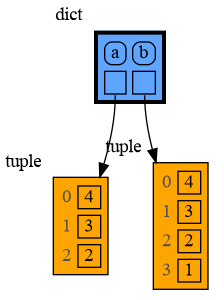 |
|
|
197
197
|
|:-----------------------------------------------------------:|:-------------------------------------------------------------:|
|
|
198
198
|
| immutable1.png | immutable2.png |
|
|
199
199
|
|
|
@@ -211,7 +211,7 @@ mg.render(locals(), 'mutable1.png')
|
|
|
211
211
|
b += [1] # equivalent to: b.append(1)
|
|
212
212
|
mg.render(locals(), 'mutable2.png')
|
|
213
213
|
```
|
|
214
|
-
|  | 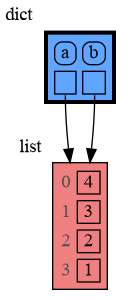 |
|
|
215
215
|
|:-----------------------------------------------------------:|:-------------------------------------------------------------:|
|
|
216
216
|
| mutable1.png | mutable2.png |
|
|
217
217
|
|
|
@@ -238,7 +238,7 @@ mg.show(locals())
|
|
|
238
238
|
* `c2` is a **shallow copy**, only the first value is copied, all the underlying values are shared
|
|
239
239
|
* `c3` is a **deep copy**, all the values are copied, nothing is shared
|
|
240
240
|
|
|
241
|
-

|
|
242
242
|
|
|
243
243
|
Or see it in the [Memory Grah Web Debugger](https://memory-graph.com/#codeurl=https://raw.githubusercontent.com/bterwijn/memory_graph/refs/heads/main/src/copies.py&play).
|
|
244
244
|
|
|
@@ -266,7 +266,7 @@ b = a.custom_copy()
|
|
|
266
266
|
|
|
267
267
|
mg.show(locals())
|
|
268
268
|
```
|
|
269
|
-

|
|
270
270
|
|
|
271
271
|
Or see it in the [Memory Grah Web Debugger](https://memory-graph.com/#codeurl=https://raw.githubusercontent.com/bterwijn/memory_graph/refs/heads/main/src/custom_copy.py&breakpoints=15&continues=1&play).
|
|
272
272
|
|
|
@@ -284,7 +284,7 @@ b += [1] # changes the value of 'b' and 'a'
|
|
|
284
284
|
b = [100, 200] # rebinds 'b' to another value, 'a' is unaffected
|
|
285
285
|
mg.render(locals(), 'rebinding2.png')
|
|
286
286
|
```
|
|
287
|
-
|  | 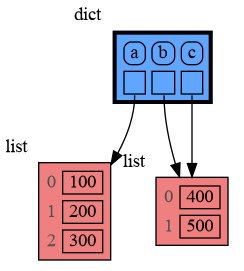 |
|
|
288
288
|
|:-----------------------------------------------------------:|:-------------------------------------------------------------:|
|
|
289
289
|
| rebinding1.png | rebinding2.png |
|
|
290
290
|
|
|
@@ -306,7 +306,7 @@ c3 = copy.deepcopy(a)
|
|
|
306
306
|
|
|
307
307
|
mg.show(locals())
|
|
308
308
|
```
|
|
309
|
-

|
|
310
310
|
|
|
311
311
|
## Copying a Mix of Mutable and Immutable Values ##
|
|
312
312
|
When copying a mix of values of mutable and immutable type, to save on time and space, a deep copy will try to copy as few values of immutable type as possible in order to copy each value of mutable type.
|
|
@@ -323,7 +323,7 @@ c3 = copy.deepcopy(a)
|
|
|
323
323
|
|
|
324
324
|
mg.show(locals())
|
|
325
325
|
```
|
|
326
|
-

|
|
327
327
|
|
|
328
328
|
# Call Stack #
|
|
329
329
|
The `mg.stack()` function retrieves the entire call stack, including the local variables for each function on the stack. This enables us to understand function calls, variable scope, and the **complete program state** through call stack visualization. By examining the graph, we can see whether local variables from different function calls share data. For instance, consider the function `add_one()` which adds the value `1` to each of its parameters `a`, `b`, and `c`.
|
|
@@ -344,7 +344,7 @@ add_one(a, b, c.copy())
|
|
|
344
344
|
|
|
345
345
|
print(f"a:{a} b:{b} c:{c}")
|
|
346
346
|
```
|
|
347
|
-

|
|
348
348
|
|
|
349
349
|
Or see it in the [Memory Grah Web Debugger](https://memory-graph.com/#codeurl=https://raw.githubusercontent.com/bterwijn/memory_graph/refs/heads/main/src/function_call.py&play).
|
|
350
350
|
|
|
@@ -371,7 +371,7 @@ add_one(a, b)
|
|
|
371
371
|
|
|
372
372
|
print(f"a:{a} b:{b[0]}")
|
|
373
373
|
```
|
|
374
|
-

|
|
375
375
|
```
|
|
376
376
|
a:10 b:11
|
|
377
377
|
```
|
|
@@ -412,7 +412,7 @@ def factorial(n):
|
|
|
412
412
|
|
|
413
413
|
print( factorial(4) )
|
|
414
414
|
```
|
|
415
|
-

|
|
416
416
|
|
|
417
417
|
and the result is: 1 x 2 x 3 x 4 = 24
|
|
418
418
|
|
|
@@ -435,7 +435,7 @@ def binary(value: int) -> list[int]:
|
|
|
435
435
|
|
|
436
436
|
print( binary(100) )
|
|
437
437
|
```
|
|
438
|
-

|
|
439
439
|
```
|
|
440
440
|
[1, 1, 0, 0, 1, 0, 0]
|
|
441
441
|
```
|
|
@@ -467,7 +467,7 @@ def power_set(data):
|
|
|
467
467
|
print( power_set(['a', 'b', 'c']) )
|
|
468
468
|
```
|
|
469
469
|
|
|
470
|
-

|
|
471
471
|
```
|
|
472
472
|
[['a', 'b', 'c'], ['a', 'b'], ['a', 'c'], ['a'], ['b', 'c'], ['b'], ['c'], []]
|
|
473
473
|
```
|
|
@@ -498,7 +498,7 @@ The ```mg.stack()``` doesn't work well in **watch** context in most debuggers be
|
|
|
498
498
|
| [PyCharm](https://www.jetbrains.com/pycharm/) | `mg.stack_pycharm()` |
|
|
499
499
|
| [Wing](https://wingware.com/) | `mg.stack_wing()` |
|
|
500
500
|
|
|
501
|
-

|
|
502
502
|
See the [Quick Intro (3:49)](https://www.youtube.com/watch?v=23_bHcr7hqo) video for the setup.
|
|
503
503
|
|
|
504
504
|
## Other Debuggers ##
|
|
@@ -548,7 +548,7 @@ for i in range(1, 6):
|
|
|
548
548
|
```
|
|
549
549
|
and pressing <Enter> a number of times, results in:
|
|
550
550
|
|
|
551
|
-

|
|
552
552
|
|
|
553
553
|
# Data Structure Examples #
|
|
554
554
|
Package memory_graph can **visualize the structure of your data** to easily understand and debug data structures, some examples:
|
|
@@ -585,11 +585,11 @@ for i in range(n):
|
|
|
585
585
|
linked_list.add_back(value)
|
|
586
586
|
mg.block(mg.show, locals()) # <--- draw locals
|
|
587
587
|
```
|
|
588
|
-

|
|
589
589
|
|
|
590
590
|
### Linked List in Cursor AI ###
|
|
591
591
|
Here we show values being added to a Linked List in Cursor AI. When adding the last value '5' we "Step Into" the code to show more of the details.
|
|
592
|
-

|
|
593
593
|
|
|
594
594
|
Or see it in the [Memory Grah Web Debugger](https://memory-graph.com/#codeurl=https://raw.githubusercontent.com/bterwijn/memory_graph/refs/heads/main/src/linked_list.py×tep=0.2&play).
|
|
595
595
|
|
|
@@ -627,11 +627,11 @@ for i in range(n):
|
|
|
627
627
|
value = random.randrange(n)
|
|
628
628
|
tree.add(value)
|
|
629
629
|
```
|
|
630
|
-

|
|
631
631
|
|
|
632
632
|
### Binary Tree in Visual Studio Code ###
|
|
633
633
|
Here we show values being inserted in a Binary Tree in Visual Studio Code. When inserting the last value '29' we "Step Into" the code to show the recursive implementation.
|
|
634
|
-

|
|
635
635
|
|
|
636
636
|
See it in the [Memory Grah Web Debugger](https://memory-graph.com/#codeurl=https://raw.githubusercontent.com/bterwijn/memory_graph/refs/heads/main/src/bin_tree.py×tep=0.2&play) or see the more advanced [Multiway Tree](https://memory-graph.com/#codeurl=https://raw.githubusercontent.com/bterwijn/memory_graph/refs/heads/main/src/multiway_tree.py&breakpoints=19,33&continues=1×tep=0.2&play) with more than two children per node, making the tree less deep and more efficient.
|
|
637
637
|
|
|
@@ -671,11 +671,11 @@ for i in range(n):
|
|
|
671
671
|
new_value = random.randrange(n)
|
|
672
672
|
hash_set.add(new_value)
|
|
673
673
|
```
|
|
674
|
-

|
|
675
675
|
|
|
676
676
|
### Hash Set in PyCharm ###
|
|
677
677
|
Here we show values being inserted in a HashSet in PyCharm. When inserting the last value '44' we "Step Into" the code to show more of the details.
|
|
678
|
-

|
|
679
679
|
|
|
680
680
|
Or see it in the [Memory Grah Web Debugger](https://memory-graph.com/#codeurl=https://raw.githubusercontent.com/bterwijn/memory_graph/refs/heads/main/src/hash_set.py&breakpoints=32&continues=1×tep=0.5&play).
|
|
681
681
|
|
|
@@ -683,7 +683,7 @@ Or see it in the [Memory Grah Web Debugger](https://memory-graph.com/#codeurl=ht
|
|
|
683
683
|
# Sorting Algorithms #
|
|
684
684
|
|
|
685
685
|
Visualization of different sorting algorithms in Memory Graph Web Debugger.
|
|
686
|
-

|
|
687
687
|
|
|
688
688
|
- [selection sort](https://memory-graph.com/#codeurl=https://raw.githubusercontent.com/bterwijn/memory_graph/refs/heads/main/src/selection_sort.py&breakpoints=13,27&continues=1×tep=0.2&play)
|
|
689
689
|
- [insertion sort](https://memory-graph.com/#codeurl=https://raw.githubusercontent.com/bterwijn/memory_graph/refs/heads/main/src/insertion_sort.py&breakpoints=13,29&continues=1×tep=0.2&play)
|
|
@@ -696,7 +696,7 @@ In this configuration example we show the decimal, binary and [two's complement
|
|
|
696
696
|
|
|
697
697
|
- [bitwise operators](https://memory-graph.com/#codeurl=https://raw.githubusercontent.com/bterwijn/memory_graph/refs/heads/main/src/bitwise_operators.py&breakpoints=22&continues=1&play)
|
|
698
698
|
|
|
699
|
-

|
|
700
700
|
|
|
701
701
|
|
|
702
702
|
# Sliding Puzzle Solver #
|
|
@@ -705,7 +705,7 @@ A sliding puzzle solver as a challenging example showing how memory_graph deals
|
|
|
705
705
|
|
|
706
706
|
- [sliding puzzle solver](https://memory-graph.com/#codeurl=https://raw.githubusercontent.com/bterwijn/memory_graph/refs/heads/main/src/sliding_puzzle.py&breakpoints=17,27,29,40&continues=1)
|
|
707
707
|
|
|
708
|
-

|
|
709
709
|
|
|
710
710
|
|
|
711
711
|
# Configuration #
|
|
@@ -787,7 +787,7 @@ mg.config.embedded_types.remove(int) # now show separate nodes for int values
|
|
|
787
787
|
|
|
788
788
|
mg.render(locals(), 'embedded2.png')
|
|
789
789
|
```
|
|
790
|
-
|  | 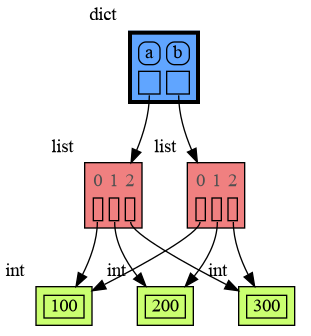 |
|
|
791
791
|
|:-----------------------------------------------------------:|:-------------------------------------------------------------:|
|
|
792
792
|
| embedded1.png — simplified | embedded2.png — technically correct |
|
|
793
793
|
|
|
@@ -809,7 +809,7 @@ tree.insert(15, "fifteen")
|
|
|
809
809
|
|
|
810
810
|
mg.show(locals())
|
|
811
811
|
```
|
|
812
|
-

|
|
813
813
|
|
|
814
814
|
## All attributes using dir() ##
|
|
815
815
|
A useful start is to give it some color, show the list of all its attributes using `dir()`, and setting an empty Slicer to see the attribute list in full.
|
|
@@ -832,7 +832,7 @@ mg.config.type_to_slicer[bintrees.avltree.Node] = mg.Slicer()
|
|
|
832
832
|
|
|
833
833
|
mg.show(locals())
|
|
834
834
|
```
|
|
835
|
-

|
|
836
836
|
|
|
837
837
|
Next figure out what the attributes are you want to graph and choose a Node type, there are four options:
|
|
838
838
|
|
|
@@ -855,7 +855,7 @@ mg.config.type_to_node[bintrees.avltree.Node] = lambda data: mg.Node_Leaf(data,
|
|
|
855
855
|
|
|
856
856
|
mg.show(locals())
|
|
857
857
|
```
|
|
858
|
-

|
|
859
859
|
|
|
860
860
|
## 2) Node_Linear ##
|
|
861
861
|
Node_Linear shows multiple values in a line like a list.
|
|
@@ -879,7 +879,7 @@ mg.config.type_to_node[bintrees.avltree.Node] = lambda data: mg.Node_Linear(data
|
|
|
879
879
|
|
|
880
880
|
mg.show(locals())
|
|
881
881
|
```
|
|
882
|
-

|
|
883
883
|
|
|
884
884
|
## 3) Node_Key_Value ##
|
|
885
885
|
Node_Key_Value shows key-value pairs like a dictionary. Note the required `items()` call at the end.
|
|
@@ -903,7 +903,7 @@ mg.config.type_to_node[bintrees.avltree.Node] = lambda data: mg.Node_Key_Value(d
|
|
|
903
903
|
|
|
904
904
|
mg.show(locals())
|
|
905
905
|
```
|
|
906
|
-

|
|
907
907
|
|
|
908
908
|
## 4) Node_Table ##
|
|
909
909
|
Node_Table shows all the values as a table.
|
|
@@ -925,7 +925,7 @@ mg.config.type_to_node[bintrees.avltree.Node] = lambda data: mg.Node_Table(data,
|
|
|
925
925
|
|
|
926
926
|
mg.show(locals())
|
|
927
927
|
```
|
|
928
|
-

|
|
929
929
|
|
|
930
930
|
## Binary Search ##
|
|
931
931
|
For binary search we can use a List_View class to represent a particular sublist without making a list copy.
|
|
@@ -968,7 +968,7 @@ value = data[random.randrange(n)]
|
|
|
968
968
|
index = bin_search(List_View(data, 0, len(data)), value)
|
|
969
969
|
print('index:', index, 'data[index]:', data[index])
|
|
970
970
|
```
|
|
971
|
-

|
|
972
972
|
|
|
973
973
|
Arguably the visualization is then more clear when we show a List_View object as an actual sublist using a Node_linear node:
|
|
974
974
|
|
|
@@ -978,7 +978,7 @@ mg.config.type_to_node[List_View] = (lambda l: mg.Node_Linear(l,
|
|
|
978
978
|
if hasattr(l, 'end') else [])
|
|
979
979
|
)
|
|
980
980
|
```
|
|
981
|
-

|
|
982
982
|
|
|
983
983
|
# Graph Depth #
|
|
984
984
|
To limit the size of the graph the maximum depth of the graph is set by `mg.config.max_graph_depth`. Additionally for each type a depth can be set to further limit the graph, as is done for type `B` in the example below. Scissors indicate where the graph is cut short. Alternatively the `id()` of a data elements can be used to limit the graph for that specific element, as is done for the value referenced by variable `c`.
|
|
@@ -1030,7 +1030,7 @@ mg.config.type_to_depth[B] = 3
|
|
|
1030
1030
|
mg.config.type_to_depth[id(c)] = 2
|
|
1031
1031
|
mg.show(locals())
|
|
1032
1032
|
```
|
|
1033
|
-

|
|
1034
1034
|
|
|
1035
1035
|
## Hidden Edges ##
|
|
1036
1036
|
|
|
@@ -1046,7 +1046,7 @@ for i in range(20):
|
|
|
1046
1046
|
|
|
1047
1047
|
mg.show(locals())
|
|
1048
1048
|
```
|
|
1049
|
-

|
|
1050
1050
|
|
|
1051
1051
|
# Extensions #
|
|
1052
1052
|
Different extensions are available for types from other Python packages.
|
|
@@ -1067,7 +1067,7 @@ ndarray_3d = np.random.rand(2,2,2)
|
|
|
1067
1067
|
|
|
1068
1068
|
mg.show(locals())
|
|
1069
1069
|
```
|
|
1070
|
-

|
|
1071
1071
|
|
|
1072
1072
|
Or see it in the [Memory Grah Web Debugger](https://memory-graph.com/#micropip=numpy&codeurl=https://raw.githubusercontent.com/bterwijn/memory_graph/refs/heads/main/src/mg_numpy.py&continues=1).
|
|
1073
1073
|
|
|
@@ -1088,7 +1088,7 @@ dataframe2 = pd.DataFrame({ 'Name' : [ 'Tom', 'Anna', 'Steve', 'Lisa'],
|
|
|
1088
1088
|
index=['one', 'two', 'three', 'four']) # with row names
|
|
1089
1089
|
mg.show(locals())
|
|
1090
1090
|
```
|
|
1091
|
-

|
|
1092
1092
|
|
|
1093
1093
|
Or see it in the [Memory Grah Web Debugger](https://memory-graph.com/#micropip=pandas&codeurl=https://raw.githubusercontent.com/bterwijn/memory_graph/refs/heads/main/src/mg_pandas.py&continues=1).
|
|
1094
1094
|
|
|
@@ -1107,11 +1107,11 @@ tensor_3d = torch.rand(2, 2, 2)
|
|
|
1107
1107
|
|
|
1108
1108
|
mg.show(locals())
|
|
1109
1109
|
```
|
|
1110
|
-

|
|
1111
1111
|
|
|
1112
1112
|
# Memory Graph Web Debugger #
|
|
1113
1113
|
The <a href="https://memory-graph.com/#play" target="_blank">Memory Graph Web Debugger</a> lets us use memory_graph without any installation.
|
|
1114
|
-

|
|
1115
1115
|
|
|
1116
1116
|
# Jupyter Notebook #
|
|
1117
1117
|
In Jupyter Notebook `locals()` has additional variables that cause problems in the graph, use `mg.locals_jupyter()` to get the local variables with these problematic variables filtered out. Use `mg.stack_jupyter()` to get the whole call stack with these variables filtered out.
|
|
@@ -1124,7 +1124,7 @@ mg.block(display, mg.create_graph(mg.locals_jupyter()) ) # the same but blocked
|
|
|
1124
1124
|
```
|
|
1125
1125
|
|
|
1126
1126
|
See for example [jupyter_example.ipynb](https://raw.githubusercontent.com/bterwijn/memory_graph/main/src/jupyter_example.ipynb).
|
|
1127
|
-

|
|
1128
1128
|
|
|
1129
1129
|
# ipython #
|
|
1130
1130
|
In ipython `locals()` has additional variables that cause problems in the graph, use `mg.locals_ipython()` to get the local variables with these problematic variables filtered out. Use `mg.stack_ipython()` to get the whole call stack with these variables filtered out.
|
|
@@ -1134,19 +1134,19 @@ Additionally install file [auto_memory_graph.py](https://raw.githubusercontent.c
|
|
|
1134
1134
|
* Windows: `%USERPROFILE%\.ipython\profile_default\startup\`
|
|
1135
1135
|
|
|
1136
1136
|
Then after starting 'ipython' call function `mg_switch()` to turn on/off the automatic visualization of local variables after each command.
|
|
1137
|
-

|
|
1138
1138
|
|
|
1139
1139
|
# Google Colab #
|
|
1140
1140
|
In Google Colab `locals()` has additional variables that cause problems in the graph, use `mg.locals_colab()` to get the local variables with these problematic variables filtered out. Use `mg.stack_colab()` to get the whole call stack with these variables filtered out.
|
|
1141
1141
|
|
|
1142
1142
|
See for example [colab_example.ipynb](https://raw.githubusercontent.com/bterwijn/memory_graph/main/src/colab_example.ipynb).
|
|
1143
|
-

|
|
1144
1144
|
|
|
1145
1145
|
# Marimo #
|
|
1146
1146
|
In Marimo `locals()` has additional variables that cause problems in the graph, use `mg.locals_marimo()` to get the local variables with these problematic variables filtered out. Use `mg.stack_marimo()` to get the whole call stack with these variables filtered out. Memory_graph only works when running Marimo locally, not in the playground.
|
|
1147
1147
|
|
|
1148
1148
|
See for example [marimo_example.py](https://raw.githubusercontent.com/bterwijn/memory_graph/main/src/marimo_example.py).
|
|
1149
|
-

|
|
1150
1150
|
|
|
1151
1151
|
|
|
1152
1152
|
# Animated GIF #
|
|
@@ -1159,7 +1159,7 @@ in your source or better as a *watch* in a debugger so that stepping through the
|
|
|
1159
1159
|
|
|
1160
1160
|
animated0.png, animated1.png, animated2.png, ...
|
|
1161
1161
|
|
|
1162
|
-
Then use these images to make an animated GIF, for example using this Bash script [create_gif.sh](https://raw.githubusercontent.com/bterwijn/
|
|
1162
|
+
Then use these images to make an animated GIF, for example using this Bash script [create_gif.sh](https://raw.githubusercontent.com/bterwijn/memory_graph/main/images/create_gif.sh):
|
|
1163
1163
|
|
|
1164
1164
|
```bash
|
|
1165
1165
|
$ bash create_gif.sh animated
|